Understanding Video Containers: MP4, AVI, MKV, and More


Free Download Mp4Gain
picture

Understanding Video Containers: MP4, AVI, MKV, and More
Video Containers
Video Containers

Introduction to Video Containers

Video Containers
Video Containers

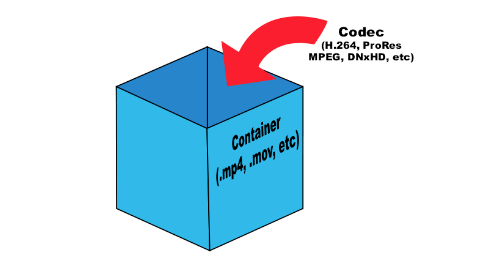
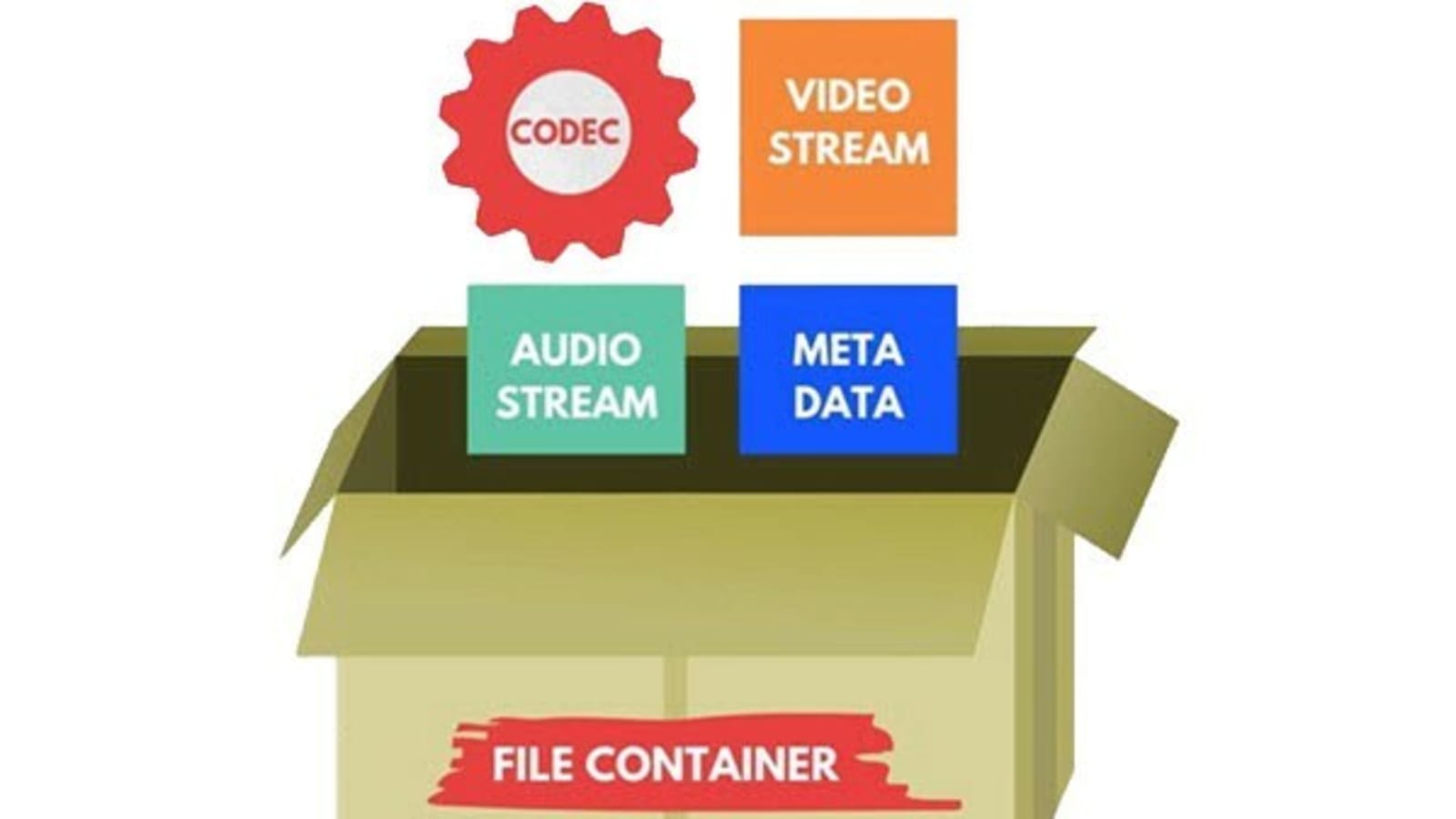
Video containers are an integral part of digital video technology, and they play a crucial role in delivering video content to users. A video container is essentially a file format that combines different types of data, including video, audio, and subtitles, into a single file. Video containers enable users to store and play back video files, and they support a wide range of codecs and other video-related technologies.

In this article, we will explore some of the most popular video containers in use today, including MP4, AVI, and MKV. We will provide an in-depth technical analysis of each container, including their history, features, benefits, and common codecs. We will also cover the purpose and definition of video containers, as well as the importance of choosing the right container for your needs.

The Purpose of Video Containers

The primary purpose of a video container is to store and organize video and audio content in a single file. Video containers are designed to accommodate multiple video and audio codecs, which are used to compress the video and audio data in the file. The container format also includes information about the video and audio streams, such as the frame rate, resolution, and bit rate.

The video container provides a common structure for storing video and audio data, and it enables users to easily share and distribute video files. Video containers are also used to deliver video content over the internet, as they support streaming technologies that enable users to watch video content without having to download the entire file.

History of Video Containers

The history of video containers dates back to the early days of digital video technology, when various video formats were being developed to store and play back digital video content. One of the earliest video container formats was AVI (Audio Video Interleave), which was introduced by Microsoft in 1992. AVI was designed to support multiple video and audio codecs, and it quickly became a popular format for storing and playing back video content.

In the years that followed, a number of other video container formats were developed, each with its own unique features and benefits. One of the most popular video container formats today is MP4 (MPEG-4 Part 14), which was introduced in 2001 as a successor to the older MPEG-2 video format. MP4 is designed to be a highly versatile and efficient container format that can support a wide range of video and audio codecs.

Another popular video container format is MKV (Matroska Video), which was introduced in 2002 as an open-source alternative to other container formats. MKV is designed to support a wide range of video and audio codecs, and it also includes support for advanced features such as subtitles and multiple audio tracks.

Features and Benefits of Video Containers

One of the key features of video containers is their support for multiple video and audio codecs. Video codecs are used to compress video data in order to reduce file size and improve playback performance. Audio codecs are used to compress audio data in a similar manner.

Video containers also include information about the video and audio streams in the file, such as the frame rate, resolution, and bit rate. This information is used by media players to correctly play back the video and audio content, and it ensures that the video is displayed at the correct size and aspect ratio.

Another important feature of video containers is their support for streaming technologies, which enable users to watch video content without having to download the entire file. Streaming technologies work by delivering the video content in small chunks, which are downloaded and played back in real-time.

Common Codecs Used in Video Containers

One of the most important components of video containers is the codec used to compress and decompress the video data. Codecs are responsible for reducing the file size of the video while maintaining its quality. There are many different codecs available, each with its own strengths and weaknesses.

H.264/AVC

H.264/AVC is a widely used codec that provides a high compression ratio with good video quality. It is supported by most modern devices and is often used for streaming video online. However, it can be computationally intensive, requiring a powerful processor to decode.

HEVC/H.265

HEVC/H.265 is a newer codec that provides even better compression than H.264/AVC, resulting in smaller file sizes with higher quality video. It is also more efficient than H.264/AVC, meaning it requires less bandwidth to stream. However, it is not yet widely supported by devices and software, and it can be more computationally intensive to decode than H.264/AVC.

VP9

VP9 is a codec developed by Google that provides high-quality video at lower bitrates. It is commonly used for streaming video on YouTube and other Google services. However, it is not as widely supported as H.264/AVC or HEVC/H.265, and it can be more computationally intensive to decode.

AV1

AV1 is a relatively new codec that provides high-quality video at even lower bitrates than VP9. It is an open-source codec developed by the Alliance for Open Media, which includes major tech companies such as Google, Microsoft, and Amazon. However, it is not yet widely supported by devices and software, and it can be computationally intensive to decode.

Choosing the Right Video Container

When it comes to choosing the right video container, there are several factors to consider, including compatibility with devices and software, quality and file size considerations, and future-proofing.

Compatibility

The first factor to consider is compatibility. Different devices and software support different video containers and codecs, so it is important to choose a container and codec that is widely supported. MP4 is a good choice for maximum compatibility, as it is supported by most devices and software.

Quality and File Size

Another factor to consider is the quality and file size of the video. Different containers and codecs can result in different levels of quality and file size. Generally, newer codecs like HEVC/H.265 and AV1 provide higher quality video at lower file sizes, but they may not be supported by all devices and software.

Future-Proofing

Finally, it is important to consider future-proofing when choosing a video container. Video technology is constantly evolving, so it is important to choose a container and codec that will be supported in the future. MP4 is a good choice for future-proofing, as it is widely supported and likely to remain so in the future.

Conclusion

Video containers play a crucial role in the storage and playback of video content. Understanding the differences between video containers like MP4, AVI, and MKV, as well as the codecs used to compress and decompress the video data, is essential for choosing the right container for your needs. By considering factors like compatibility, quality and file size, and future-proofing, you can ensure that your video content is stored and played back seamlessly on a wide range of devices and software.



Free Download Mp4Gain
picture


Mp4Gain Main Window
picture


Mp4Gain Features
picture


Free Download Mp4Gain
picture

The Importance of Codecs in Video Compression

The Importance of Codecs in Video Compression

Video Codec
Video Codec

Introduction

Video Codec
Video Codec

Video codecs play a vital role in video compression. The quality and size of video files depend largely on the type of codec used to compress them. In this article, we will explore the significance of video codecs in video compression and the technical aspects that determine the quality and efficiency of video files.

History of Video Codecs

The first video codec was developed in the 1970s, called H.120. This codec allowed for the transmission of video over ISDN telephone lines. Since then, video codecs have evolved significantly, and we now have a wide range of codecs available that offer different levels of compression and quality.

Understanding Video Quality

Video quality can be defined as the degree of excellence that a video possesses. This quality is determined by various factors, including the resolution, bit rate, frame rate, and compression method used.

Resolution

The resolution of a video is the number of pixels that make up the image. Higher resolution videos have more pixels, which means they are sharper and more detailed. The most common resolutions are 720p, 1080p, and 4K.

Bit Rate

The bit rate is the amount of data that is processed per second. A higher bit rate means more data is processed, resulting in a higher-quality video. However, higher bit rates also mean larger file sizes, which can be challenging for storage and transmission.

Frame Rate

The frame rate is the number of frames that are displayed per second. A higher frame rate results in a smoother video, but it also requires more data to be processed, resulting in larger file sizes.

Compression Method

Compression methods are used to reduce the size of video files without compromising on quality. Lossless compression methods preserve the original quality of the video, while lossy compression methods sacrifice some quality to achieve smaller file sizes.

Video Codecs and Formats

Video codecs can be classified into two categories: proprietary codecs and open-source codecs. Proprietary codecs are developed by companies and are generally licensed for use. Open-source codecs, on the other hand, are developed by communities and are free to use.

Proprietary Codecs

Proprietary codecs are developed by companies such as Apple, Microsoft, and Google. They are often used in popular video formats such as MP4, AVI, and MOV. These codecs are optimized for specific devices and software, resulting in high-quality videos that are compatible with a wide range of devices.

Open-Source Codecs

Open-source codecs are developed by communities and are free to use. The most popular open-source codec is the VP9 codec developed by Google. It is used in the WebM format and offers a high level of compression with minimal loss of quality.

Choosing the Right Codec

When choosing a codec, it is important to consider the factors that affect video quality, such as resolution, bit rate, frame rate, and compression method. Proprietary codecs are often optimized for specific devices and software, while open-source codecs offer more flexibility and are free to use.

Format

The format of a video file also plays a significant role in determining the quality and efficiency of the file. Popular video formats include MP4, AVI, MOV, and WebM. Each format has its own set of advantages and disadvantages, and it is important to choose the right format based on your needs.

Conclusion

Video codecs are an essential part of video compression, and they play a significant role in determining the quality and size of video files. By understanding the technical aspects of video quality and the different types of codecs and formats available, you can make informed decisions when choosing

The Ultimate Guide to High-Quality Audio and Video

The Ultimate Guide to High-Quality Audio and Video: Benefits and Technical Insights

High-Quality Audio and Video

Introduction

High-Quality Audio and Video

High-quality audio and video are becoming increasingly important in today’s world, especially for professionals and geeks who appreciate a premium experience. In this guide, we will explore the benefits of high-quality audio and video and delve into the technical aspects that make it possible. From bitrate and samplerate to resolution and codecs, we’ll cover everything you need to know to get the most out of your audio and video content.

Audio Quality

Definition of Audio Quality

Audio quality refers to the fidelity of sound reproduction. It is affected by various factors, such as the bitrate, samplerate, and audio format. Higher-quality audio has a higher bitrate, which means more data is transmitted per second. A higher samplerate means that more samples of the audio signal are captured per second, resulting in a more accurate representation of the original sound.

Lossy vs. Lossless Audio Formats

Lossy audio formats, such as MP3, compress the audio signal to reduce file size. This compression results in some loss of audio quality. Lossless audio formats, such as FLAC, retain all the original audio data, resulting in better sound quality. However, lossless audio files are larger in size than lossy files.

Optimizing Audio Quality

Optimizing audio quality depends on the purpose of the content. For music production, a higher-quality audio format is recommended, such as WAV or AIFF. For video production, a high-quality compressed audio format, such as AAC, is suitable. Streaming services usually use lossy audio formats, such as MP3 or AAC, to reduce bandwidth usage. However, lossless formats are recommended for critical listening applications, such as audiophile music playback.

Examples of High-Quality Audio and Their Benefits

Some examples of high-quality audio include studio master recordings, high-resolution audio files, and audiophile-grade equipment. High-quality audio provides better sound clarity, dynamics, and realism, resulting in a more immersive listening experience.

Video Quality

Definition of Video Quality

Video quality refers to the resolution, framerate, codec, and other technical factors that affect the visual fidelity of a video. Higher-quality video has a higher resolution, which means more pixels are displayed on the screen. A higher framerate means that more frames are displayed per second, resulting in smoother motion. A better codec means that the video signal is compressed more efficiently, resulting in a smaller file size without loss of quality.

Compressed vs. Uncompressed Video Formats

Compressed video formats, such as H.264 or HEVC, use a codec to reduce the size of the video file. Uncompressed video formats, such as RAW, retain all the original video data, resulting in better visual quality. However, uncompressed video files are larger in size than compressed files.

Optimizing Video Quality

Optimizing video quality depends on the intended use of the content. For streaming services, a compressed video format, such as H.264 or VP9, is recommended to reduce bandwidth usage. For video editing and post-production, an uncompressed or lightly compressed format, such as ProRes or DNxHR, is suitable. High-resolution video is recommended for critical viewing applications, such as film production or gaming.

Examples of High-Quality Video and Their Benefits

Some examples of high-quality video include 4K Ultra HD, HDR (High Dynamic Range), and high frame rate (HFR) video. High-quality video provides better visual clarity, color accuracy, and motion detail, resulting in a more immersive viewing experience.

Benefits of High-Quality Audio and Video

Improved User Experience

High-quality audio and video provide a more immersive and engaging experience for the user. The higher fidelity and realism result in a more enjoyable and satisfying experience.

Increased Brand Value

High-quality audio and video can increase the perceived value of a brand. Companies that prioritize high-quality content demonstrate a commitment to excellence and attention to detail, which can enhance their reputation and brand loyalty.

Better Communication

Clear and high-quality audio and video are essential for effective communication. High-quality video conferencing, for example, can improve the productivity and effectiveness of remote meetings, allowing participants to communicate more clearly and efficiently.

Technical Insights

Understanding the technical aspects of high-quality audio and video can help professionals and enthusiasts optimize their content and equipment. Knowing the optimal bitrate, samplerate, resolution, and codec for different applications can result in better quality and efficiency.

Conclusion

High-quality audio and video are essential components of modern content creation and consumption. Understanding the technical aspects of audio and video quality can help professionals and enthusiasts optimize their content and equipment, resulting in better quality and efficiency. Whether for music production, video editing, or critical listening and viewing, high-quality audio and video provide numerous benefits and enhance the user experience.

What Is Audio Sampling Rate: A Comprehensive Explanation

What Is Audio Sampling Rate: A Comprehensive Explanation

Sample Rate
Sample Rate

Introduction

Sample Rate
Sample Rate

Audio sampling rate is a fundamental concept in digital audio that refers to the number of samples per second used to represent an analog audio signal in digital form. In this article, we’ll explore the technical details of audio sampling rate, its importance in digital audio, and its impact on audio quality and file size.

Sampling Rate Fundamentals

The concept of audio sampling rate is based on the Nyquist-Shannon sampling theorem, which states that in order to accurately represent an analog signal in digital form, the sampling rate must be at least twice the highest frequency present in the signal. This means that a signal with a highest frequency of 20kHz (the upper limit of human hearing) must be sampled at a rate of at least 40kHz in order to be accurately represented.

Sampling rate is measured in Hertz (Hz), which refers to the number of samples per second. Common sampling rates in digital audio range from 44.1kHz (used in CDs) to 192kHz (used in some high-resolution audio formats).

Sample Rate Conversion

In some cases, it may be necessary to convert audio from one sampling rate to another. Sample rate conversion involves resampling the audio data to a different rate, which can be done using digital signal processing techniques. However, sample rate conversion can introduce artifacts and reduce audio quality, especially when downsampling from a higher rate to a lower rate.

There are various reasons why sample rate conversion may be necessary, such as when mixing audio tracks with different sampling rates, or when preparing audio for distribution on different platforms with varying requirements.

Audio Quality and Sampling Rate

The sampling rate has a significant impact on audio quality, with higher sampling rates generally resulting in better fidelity and more accurate representation of the original signal. However, the benefits of higher sampling rates are limited by the limitations of human hearing and the practical limitations of digital audio technology.

While there is debate about the benefits of “high-resolution audio” formats with sampling rates above 44.1kHz, it is generally accepted that sampling rates above 96kHz provide little additional benefit in terms of audio quality.

Bit Depth and Sampling Rate

The bit depth of an audio sample refers to the number of bits used to represent the amplitude of the signal at each sample point. Higher bit depths allow for more precise representation of the signal, but also result in larger file sizes. The bit depth and sampling rate are related, as increasing the bit depth requires more data to be stored for each sample.

There is a trade-off between sampling rate and bit depth, as higher sampling rates require more data to be stored per second, which can limit the maximum bit depth that can be used without exceeding practical file size limits. However, this trade-off can be mitigated by using efficient audio compression techniques.

Sample Rate in Practice

Common sampling rates in digital audio include 44.1kHz (used in CDs), 48kHz (used in digital video), 88.2kHz, 96kHz, 176.4kHz, and 192kHz. Streaming services such as Spotify and Apple Music typically use lower sampling rates for their audio streams, with 44.1kHz being a common choice.

The Nyquist Theorem, named after the Swedish-American physicist Harry Nyquist, states that the sampling rate should be at least twice the highest frequency component in the signal being sampled. This is why the standard CD quality sampling rate is 44.1 kHz, which is just above the upper limit of human hearing.

However, it is important to note that there are higher sampling rates available, such as 48 kHz, 96 kHz, and even 192 kHz. These higher sampling rates can provide more detail and accuracy in the digital representation of the analog signal. However, they also require more storage space and processing power.

Another important factor to consider is the bit depth, which is the number of bits used to represent each sample. The more bits used, the more accurate and detailed the representation of the analog signal. CD quality uses a bit depth of 16 bits, but higher bit depths such as 24 bits are also available.

It is worth noting that some argue that higher sampling rates and bit depths may not necessarily result in audible improvements in sound quality, especially when considering the limitations of human hearing. Additionally, some argue that the increased storage and processing requirements may not be worth the potential improvements.

In conclusion, the sampling rate is a crucial component in the digital representation of analog audio signals. A higher sampling rate can provide more detail and accuracy in the digital representation, but also requires more storage and processing power. The Nyquist Theorem provides a guideline for choosing the appropriate sampling rate based on the highest frequency component in the signal. Additionally, the bit depth is another factor to consider in the accuracy and detail of the digital representation. While higher sampling rates and bit depths are available, the potential improvements in sound quality must be balanced against the increased storage and processing requirements.

Understanding Audio Bit Depth: 8-bit vs. 16-bit vs. 24-bit

Understanding Audio Bit Depth: 8-bit vs. 16-bit vs. 24-bit

Bit Depth
Bit Depth

When it comes to digital audio, one of the most critical factors in determining the quality of a recording is the audio bit depth. In this article, we’ll delve into the technical details of audio bit depth and explore the differences between 8-bit, 16-bit, and 24-bit audio recordings.

Bit Depth
Bit Depth

What is Audio Bit Depth?

In digital audio, sound waves are converted into a series of numerical values that can be stored and manipulated by computers. Audio bit depth refers to the number of bits of information used to represent each sample in a digital audio recording. Each sample represents the amplitude of the sound wave at a specific point in time.

The bit depth determines the range of possible values for each sample. For example, an 8-bit audio recording has 256 possible values, while a 16-bit recording has 65,536 possible values, and a 24-bit recording has over 16 million possible values. This increase in possible values provides greater resolution and accuracy, resulting in improved sound quality.

Dynamic Range

Another critical aspect of audio bit depth is dynamic range, which refers to the difference between the quietest and loudest sounds that can be recorded. With an increase in bit depth, the dynamic range of a recording also increases. For example, a 16-bit audio recording has a dynamic range of 96 dB, whereas a 24-bit recording has a dynamic range of 144 dB. This difference in dynamic range is quite significant and is one of the reasons why 24-bit audio is preferred for professional applications.

Quantization Noise

Quantization noise is an inherent part of digital audio and is introduced during the process of converting an analog audio signal to a digital representation. Quantization noise is essentially the difference between the actual analog signal and the closest quantized digital value. The more bits used for quantization, the lower the level of quantization noise.

However, as the bit depth increases, the noise introduced becomes less of an issue. At 16 bits, quantization noise is typically not audible, but it can become noticeable when processing audio. At 24 bits, quantization noise is virtually non-existent, even when processing audio.

Conclusion

In conclusion, audio bit depth plays a crucial role in the quality of digital audio recordings. Increasing the bit depth of an audio recording provides greater resolution and accuracy, resulting in improved sound quality. Professionals in the music industry typically prefer 24-bit audio due to its higher dynamic range and lower quantization noise. However, for most consumer applications, 16-bit audio is perfectly adequate and results in high-quality sound.

It is also important to note that bit depth is just one aspect of digital audio quality. Other factors such as sample rate and compression algorithms also play a significant role in determining the overall quality of a digital audio recording. Nonetheless, understanding audio bit depth is a crucial step in the journey to becoming a proficient audio engineer or producer.

Digital Audio Converter

Digital Audio Converter

Digital Audio Converter

Digital audio converters are essential tools for anyone who wants to work with audio files in different formats. With the plethora of audio formats available today, it can be confusing to understand the differences between each one and the best way to convert them. This article will explain the most popular audio formats and their conversions.

Digital Audio Converter

Audio Formats: A Brief Overview

Before we dive into the different audio formats and their conversions, let’s take a quick look at what audio formats actually are. In simple terms, an audio format is a way of storing audio data in a file. It’s like a container that holds audio data, just as a cup holds liquid. Different audio formats have different features, such as compression, quality, and file size.

There are many different audio formats available, but we’ll focus on the most popular ones:

MP3

MP3 is one of the most popular and widely used audio formats today. It’s a compressed format that reduces the size of audio files by removing some of the data that is not perceived by the human ear. This compression allows for smaller file sizes, which makes it easier to store and share audio files. MP3 is compatible with most devices and media players, which is why it’s so popular.

OGG

OGG is a free, open-source audio format that is designed to provide high-quality audio at a lower bit rate than other formats. It’s a compressed format, but it uses a different compression algorithm than MP3, which allows for better audio quality at a lower file size. OGG is also capable of storing metadata, such as artist and album information, which makes it a great format for music files.

FLAC

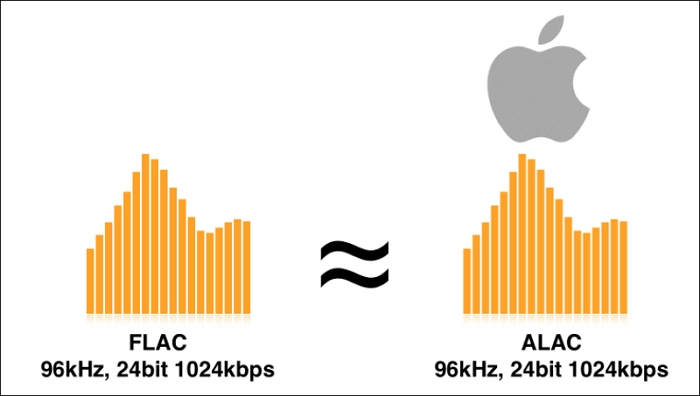
FLAC is a lossless audio format that provides high-quality audio without any loss of data. It’s a compressed format, but it doesn’t remove any of the audio data like MP3 or OGG. This means that FLAC files are larger than MP3 or OGG files, but they provide better audio quality. FLAC is a great choice for audiophiles and music producers who want to ensure the highest quality audio.

AAC

AAC is a compressed audio format that is designed to provide high-quality audio at a lower bit rate than MP3. It’s the default audio format for Apple devices and is supported by most media players. AAC provides better audio quality than MP3 at the same bit rate, which makes it a great choice for music streaming services.

Conversions: From One Format to Another

Now that we have an understanding of the different audio formats, let’s take a look at how we can convert them from one format to another. There are many software tools and online services that can perform audio conversions, but we’ll focus on one of the most popular options: MP4Gain.

MP4Gain

MP4Gain is a software tool that can convert audio files from one format to another, as well as adjust their volume levels. It supports all of the audio formats we’ve discussed so far, including MP3, OGG, FLAC, and AAC. To convert an audio file with MP4Gain, simply select the input and output formats, adjust the volume levels if necessary, and click the convert button.

Conclusion

In conclusion, digital audio converters are essential tools for anyone who wants to work with audio files in different formats. Understanding the different audio formats and their conversions is important for ensuring the highest quality audio and compatibility with different devices and media players. MP4Gain is a great software tool for performing audio conversions and adjusting volume levels, and it supports all of the popular audio formats.

What Are the Key Differences Between MP3 and OGG Audio Formats?

What Are the Key Differences Between MP3 and OGG Audio Formats?

MP3 vs Ogg
MP3 vs Ogg

Introduction

Ogg vs MP3
Ogg vs MP3

Digital audio formats play a vital role in the storage and transmission of audio files. They determine the quality, file size, and compatibility of audio files with different devices and software. In this article, we will explore the technical specifications, advantages, and disadvantages of two popular audio formats: MP3 and OGG. We will also compare and contrast the features of these formats to help you choose the best one for your needs.

Technical Specifications of MP3

MP3 is a widely used audio format that utilizes a lossy compression algorithm to reduce the file size without significantly affecting the quality of audio output. The compression algorithm removes some of the audio data that is less perceptible to the human ear, resulting in a smaller file size. The bit rate of an MP3 file typically ranges from 32 to 320 kbps, while the sampling rate ranges from 8 to 48 kHz.

MP3 uses a psychoacoustic model that takes advantage of the human ear’s limitations to mask certain sounds that are less perceptible to the human ear. The model discards or reduces the bits in the audio that are masked, resulting in a smaller file size without compromising the overall quality. However, the compression algorithm used in MP3 can result in a loss of audio quality, especially at lower bit rates.

The main advantage of MP3 is its widespread compatibility with different devices and software. It is supported by most media players, mobile devices, and operating systems. However, the file size of MP3 files can also be relatively large compared to other audio formats.

Technical Specifications of OGG

OGG is a free, open-source audio format that uses a lossy compression algorithm similar to that used in MP3. However, the compression algorithm used in OGG is generally considered to be more efficient than that used in MP3. OGG files can have a variable bit rate that ranges from 16 to 500 kbps, while the sampling rate can range from 8 to 48 kHz.

OGG uses a Vorbis psychoacoustic model that takes advantage of the human ear’s limitations to remove the bits that are less audible. The model analyzes the audio signal and selects the bits to be discarded based on the masking properties of the audio. This results in a higher compression ratio without compromising the audio quality. OGG is particularly good at compressing audio that has complex and variable structures, such as classical music and speech.

One of the main advantages of OGG is its higher audio quality at lower bit rates compared to MP3. OGG files also have a smaller file size compared to MP3 files, making them more suitable for streaming and online distribution. However, OGG is not as widely supported as MP3 and may not be compatible with some devices and software.

Comparison of MP3 and OGG

The main difference between MP3 and OGG is the compression algorithm used. MP3 uses a simpler compression algorithm that can result in a loss of audio quality, especially at lower bit rates. OGG uses a more efficient compression algorithm that can achieve higher audio quality at lower bit rates. As a result, OGG files are generally smaller in size than MP3 files of similar audio quality.

In terms of compatibility, MP3 is more widely supported by different devices and software. It is the standard format for most digital audio players and online music stores. OGG, on the other hand, may not be supported by some devices and software.

In terms of file size, OGG files are generally smaller than MP3 files. This makes them more suitable for streaming and online distribution, as they take up less bandwidth and storage space. However, the smaller file size of OGG files can also result in a lower overall audio quality compared to MP3 files of the same bit rate. Additionally, the smaller market share of OGG may make it harder to find audio content in this format.

One advantage of OGG over MP3 is its support for advanced audio features, such as multi-channel audio and variable bit rates. OGG can also support metadata tags, which allow you to add information such as album, artist, and track title to your audio files.

Conclusion

In conclusion, both MP3 and OGG have their own strengths and weaknesses when it comes to audio quality, file size, and compatibility. MP3 is a widely supported audio format that is compatible with most devices and software. However, its compression algorithm can result in a loss of audio quality, especially at lower bit rates. OGG, on the other hand, uses a more efficient compression algorithm that can achieve higher audio quality at lower bit rates. It is suitable for streaming and online distribution, but may not be compatible with some devices and software.

Ultimately, the choice between MP3 and OGG depends on your specific needs and preferences. If you prioritize compatibility and widespread support, MP3 may be the better choice. However, if you value audio quality and smaller file sizes, OGG may be the way to go. Whatever format you choose, make sure to use high-quality encoding software to ensure the best possible audio output.