Digital Audio Converter


Free Download Mp4Gain
picture

Digital Audio Converter

Digital Audio Converter

Digital audio converters are essential tools for anyone who wants to work with audio files in different formats. With the plethora of audio formats available today, it can be confusing to understand the differences between each one and the best way to convert them. This article will explain the most popular audio formats and their conversions.

Digital Audio Converter

Audio Formats: A Brief Overview

Before we dive into the different audio formats and their conversions, let’s take a quick look at what audio formats actually are. In simple terms, an audio format is a way of storing audio data in a file. It’s like a container that holds audio data, just as a cup holds liquid. Different audio formats have different features, such as compression, quality, and file size.

There are many different audio formats available, but we’ll focus on the most popular ones:

MP3

MP3 is one of the most popular and widely used audio formats today. It’s a compressed format that reduces the size of audio files by removing some of the data that is not perceived by the human ear. This compression allows for smaller file sizes, which makes it easier to store and share audio files. MP3 is compatible with most devices and media players, which is why it’s so popular.

OGG

OGG is a free, open-source audio format that is designed to provide high-quality audio at a lower bit rate than other formats. It’s a compressed format, but it uses a different compression algorithm than MP3, which allows for better audio quality at a lower file size. OGG is also capable of storing metadata, such as artist and album information, which makes it a great format for music files.

FLAC

FLAC is a lossless audio format that provides high-quality audio without any loss of data. It’s a compressed format, but it doesn’t remove any of the audio data like MP3 or OGG. This means that FLAC files are larger than MP3 or OGG files, but they provide better audio quality. FLAC is a great choice for audiophiles and music producers who want to ensure the highest quality audio.

AAC

AAC is a compressed audio format that is designed to provide high-quality audio at a lower bit rate than MP3. It’s the default audio format for Apple devices and is supported by most media players. AAC provides better audio quality than MP3 at the same bit rate, which makes it a great choice for music streaming services.

Conversions: From One Format to Another

Now that we have an understanding of the different audio formats, let’s take a look at how we can convert them from one format to another. There are many software tools and online services that can perform audio conversions, but we’ll focus on one of the most popular options: MP4Gain.

MP4Gain

MP4Gain is a software tool that can convert audio files from one format to another, as well as adjust their volume levels. It supports all of the audio formats we’ve discussed so far, including MP3, OGG, FLAC, and AAC. To convert an audio file with MP4Gain, simply select the input and output formats, adjust the volume levels if necessary, and click the convert button.

Conclusion

In conclusion, digital audio converters are essential tools for anyone who wants to work with audio files in different formats. Understanding the different audio formats and their conversions is important for ensuring the highest quality audio and compatibility with different devices and media players. MP4Gain is a great software tool for performing audio conversions and adjusting volume levels, and it supports all of the popular audio formats.


Free Download Mp4Gain
picture


Mp4Gain Main Window
picture


Mp4Gain Features
picture


Free Download Mp4Gain
picture

Analog to Digital

Analog to digital

Analog to digital

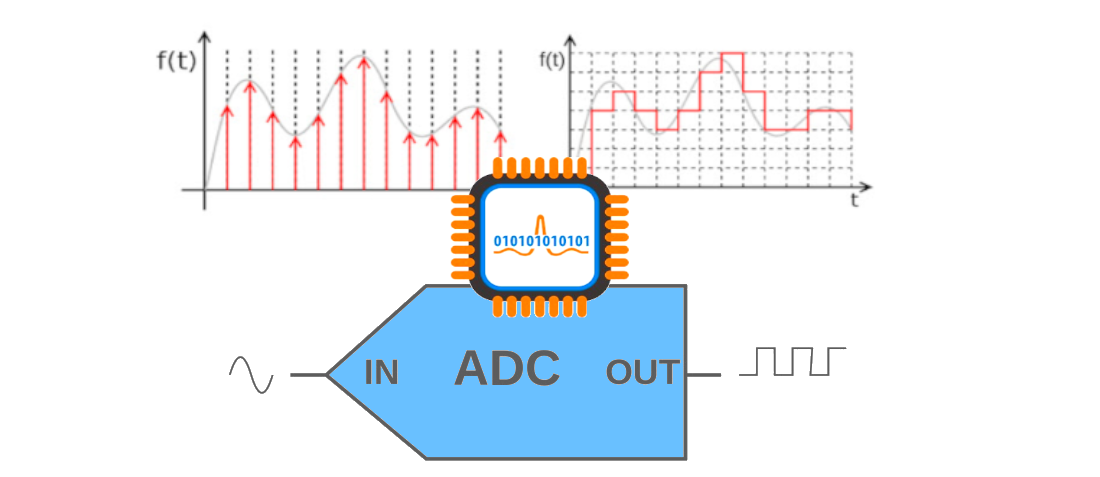
To convert any analog signal (sound, image) into digital format, three basic operations must be performed: sampling, quantization and encoding. Sampling – presentation of a continuous analog signal by means of a sequence of its values ​​(samples).

Analog to digital


These samples are taken at times separated from each other by an interval called the sampling interval. The reciprocal of the interval between samples is called the sample rate. In Fig. 1 shows the original analog signal and its sampled version. The images that appear below the time diagrams have been obtained assuming that the signals are one-line television video signals, the same for the entire television frame. Analog to digital conversion.

Sampling It is clear that the smaller the sampling interval and consequently the higher the sampling frequency, the smaller the difference between the original signal and its sampled copy. The stepped structure of the sampled signal can be smoothed with a low-pass filter. This is how the analog signal is restored from the sampled one.

But the reconstruction will be accurate only if the sampling frequency is at least 2 times the bandwidth of the original analog signal (this condition is determined by the well-known Kotelnikov theorem). If this condition is not met, the sampling is accompanied by irreversible distortions. The fact is that, as a result of sampling, additional components appear in the frequency spectrum of the signal, which lie around the harmonics of the sampling frequency in the range, equal to twice the bandwidth of the original analog signal. . If the maximum frequency in the frequency spectrum of the analog signal exceeds half the sampling frequency, the additional components enter the frequency band of the original analog signal. In this case, it is no longer possible to restore the original signal without distortion.

The theory of sampling is covered in many books. Analog to digital conversion. Distortion sampling An example of sampling distortions is shown in Fig. 2. An analog signal (again, suppose it is a TV line video signal) contains a wave, the frequency of which first increases from 0.5 MHz to 2.5 MHz and then decreases to 0.5 MHz. This signal is sampled at 3 MHz. In Fig. 2 the images are shown sequentially: the original analog signal, the sampled signal, the restored analog signal after sampling. The low-pass reconstruction filter has a 1.2 MHz bandwidth. As you can see, the low-frequency components (less than 1 MHz) are restored without distortion. The 1.5 MHz wave disappears and becomes a relatively flat field. The 2.5 MHz wave after recovery became a 0.5 MHz wave (this is the difference between the 3 MHz sampling frequency and the original 2.5 MHz frequency). These image diagrams illustrate the distortion associated with an insufficiently high spatial sample rate of the image. If the subject of the television recording is an object that is moving very fast or, for example, a rotating object, then sampling distortions in the time domain may occur. An example of distortion associated with insufficiently high sample rate (and this is the frame rate of television decay) is an image of a fast moving car with stationary wheels or, for example, slowly turning in one direction u another, the spokes of the wheel (stroboscopic effect). there is no sampling distortion when the bandwidth of the original signal is limited from above and does not exceed half the sampling frequency. associated with insufficiently high spatial sampling rate of the image. If the subject of the television recording is an object that is moving very fast or, for example, a rotating object, then sampling distortions in the time domain may occur.

An example of distortion associated with insufficiently high sample rate (and this is the frame rate of television decay) is an image of a fast moving car with stationary wheels or, for example, slowly turning in one direction u another, the spokes of the wheel (stroboscopic effect). there is no sampling distortion when the bandwidth of the original signal is limited from above and does not exceed half the sampling frequency. associated with insufficiently high spatial sampling rate of the image. If the subject of the television recording is an object that is moving very fast or, for example, a rotating object, then sampling distortions in the time domain may occur.