Digital Audio Converter


Free Download Mp4Gain
picture

Digital Audio Converter

Digital Audio Converter

Digital audio converters are essential tools for anyone who wants to work with audio files in different formats. With the plethora of audio formats available today, it can be confusing to understand the differences between each one and the best way to convert them. This article will explain the most popular audio formats and their conversions.

Digital Audio Converter

Audio Formats: A Brief Overview

Before we dive into the different audio formats and their conversions, let’s take a quick look at what audio formats actually are. In simple terms, an audio format is a way of storing audio data in a file. It’s like a container that holds audio data, just as a cup holds liquid. Different audio formats have different features, such as compression, quality, and file size.

There are many different audio formats available, but we’ll focus on the most popular ones:

MP3

MP3 is one of the most popular and widely used audio formats today. It’s a compressed format that reduces the size of audio files by removing some of the data that is not perceived by the human ear. This compression allows for smaller file sizes, which makes it easier to store and share audio files. MP3 is compatible with most devices and media players, which is why it’s so popular.

OGG

OGG is a free, open-source audio format that is designed to provide high-quality audio at a lower bit rate than other formats. It’s a compressed format, but it uses a different compression algorithm than MP3, which allows for better audio quality at a lower file size. OGG is also capable of storing metadata, such as artist and album information, which makes it a great format for music files.

FLAC

FLAC is a lossless audio format that provides high-quality audio without any loss of data. It’s a compressed format, but it doesn’t remove any of the audio data like MP3 or OGG. This means that FLAC files are larger than MP3 or OGG files, but they provide better audio quality. FLAC is a great choice for audiophiles and music producers who want to ensure the highest quality audio.

AAC

AAC is a compressed audio format that is designed to provide high-quality audio at a lower bit rate than MP3. It’s the default audio format for Apple devices and is supported by most media players. AAC provides better audio quality than MP3 at the same bit rate, which makes it a great choice for music streaming services.

Conversions: From One Format to Another

Now that we have an understanding of the different audio formats, let’s take a look at how we can convert them from one format to another. There are many software tools and online services that can perform audio conversions, but we’ll focus on one of the most popular options: MP4Gain.

MP4Gain

MP4Gain is a software tool that can convert audio files from one format to another, as well as adjust their volume levels. It supports all of the audio formats we’ve discussed so far, including MP3, OGG, FLAC, and AAC. To convert an audio file with MP4Gain, simply select the input and output formats, adjust the volume levels if necessary, and click the convert button.

Conclusion

In conclusion, digital audio converters are essential tools for anyone who wants to work with audio files in different formats. Understanding the different audio formats and their conversions is important for ensuring the highest quality audio and compatibility with different devices and media players. MP4Gain is a great software tool for performing audio conversions and adjusting volume levels, and it supports all of the popular audio formats.


Free Download Mp4Gain
picture


Mp4Gain Main Window
picture


Mp4Gain Features
picture


Free Download Mp4Gain
picture

Digital sound quality

Digital sound quality.

Sound quality

Sound information. Sound is a wave that travels through air, water, or other medium with a continuously varying intensity and frequency.

Digital Sound Quality

A person receives sound waves (air vibrations) supported by hearing in the form of sound of varying volume and pitch. The greater the intensity of the sound wave, the louder the sound, the higher the frequency of the wave, the higher the pitch of the sound

Dependence of the volume and pitch of sound on the intensity and frequency of a sound wave

The human ear receives sound with a frequency of 20 vibrations per second (small sound) to 20,000 vibrations per second (loud sound).

A person can receive sound in a wide spectrum of intensities, in which the highest intensity is 1014 times greater than the lowest (100 thousand billion times). To measure the volume of sound, a special unit “decibel” (dbl) is used (Table 5.1). Decreasing or increasing the sound volume by 10 dB is suitable for decreasing or increasing the sound intensity by 10 times.

The sound volume
sound in decibels
lower limit of human ear sensitivity 0
leaf whisper 10
Conversation 60
Gudok Vehicle 90
Jet engine 120
Pain threshold 140
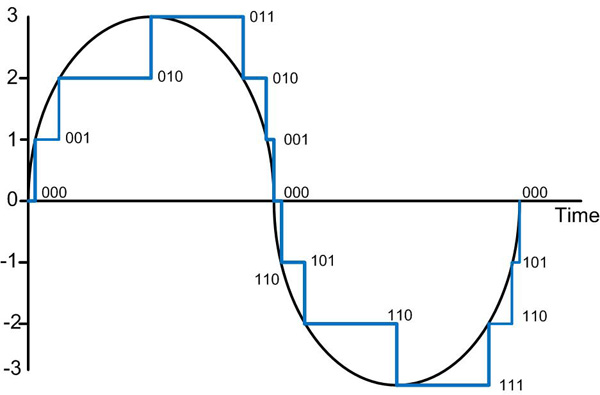
Sound time sampling. In order for a computer to process sound, a continuous audio signal must be converted to a discrete digital form with support for time sampling. A constant sound wave is divided into small separate time sections, for each section a certain value of sound intensity is set.

Therefore, the constant dependence of the loudness of the sound on time A (t) is replaced by a discrete sequence of loudness levels. On the graph, this appears to replace a smooth curve with a sequence of “steps”

Sampling frequency. To record analog sound and transform it into digital format, a microphone is used, connected to the sound card. The quality of the digital sound obtained depends on the number of measurements of the sound volume level per unit of time, that is, the sampling frequency. The more measurements that are made in 1 second (the higher the sampling frequency), the more accurately the “ladder” of the digital audio signal repeats the curve of the dialogue signal.

Audio sample rate is the number of audio volume measurements in one second.

The audio sample rate can range from 8000 to 48000 sound volume measurements per second.

Audio encoding depth. Each “step” is assigned a specific value for the sound volume level. Loudness levels of sound can be viewed as a set of probable states N, for which encoding a certain amount of information I is required, which is magnified by the encoding depth of the sound.

Audio encoding depth is the amount of information required to encode the discrete volume levels of digital audio.

If the encoding depth is known, then the number of digital sound volume levels can be calculated using the formula N = 2I. Let the sound encoding depth be 16 bit, then the number of sound volume levels is the same:

N = 2I = 216 = 65536.

During the encoding process, each sound volume level is assigned its own 16-bit binary code, the lowest sound level will correspond to the code 0000000000000000, and the highest – 1111111111111111.

The quality of digitized sound. The higher the sound sampling frequency and depth, the higher the quality of the digitized sound. The lowest quality of digitized sound, suitable for the quality of a telephone connection, is obtained at a sample rate of 8000 times per second, an 8-bit sample rate, and by recording an audio track (“mono” mode). The highest quality digitized sound, suitable for audio CD quality, is achieved at a sampling rate of 48,000 times per second, a 16-bit sampling rate, and by recording 2 audio tracks (“stereo” mode ).

It should be remembered that the higher the quality of the digital sound, the greater the volume of information in the audio file. You can estimate the volume of information in a digital stereo sound file with a duration of 1 second with an average sound quality (16 bits, 24,000 measurements per second). To do this, the encoding depth must be multiplied by the number of measurements in 1 second and multiplied by 2 (stereo sound):

16 bits 24,000 2 = 768,000 bits = 96,000 b = 93.75 KB.