As music lovers, we all crave that feeling of being completely absorbed in the sound of our favorite tracks. We want to feel the beat in our bones, to be transported to another world through the power of music. One of the most effective ways to enhance this experience is by using an MP3 bass boost. In this article, we’ll take an in-depth look at what bass boost is, how it works, and the benefits it can provide.
Bass Boost
What is MP3 Bass Boost?
Simply put, an MP3 bass boost is a software feature that increases the low-frequency bass response of an audio track. This results in a more pronounced and powerful bass sound that can be felt as well as heard. Bass boost is often used in music production to enhance the impact of the low-end frequencies, but it can also be used in playback to create a more immersive listening experience.
How Does MP3 Bass Boost Work?
MP3 bass boost works by selectively boosting the frequencies within the bass range of an audio track. This can be achieved through various methods, such as equalization or dynamic range compression. The exact process will depend on the software or device being used, but the end result is a more pronounced and powerful bass sound.
The Benefits of MP3 Bass Boost
Enhanced Listening Experience: MP3 bass boost can create a more immersive and engaging listening experience by adding depth and dimension to the low-frequency bass response.
Better Clarity: By selectively boosting certain frequencies, MP3 bass boost can also improve the clarity and definition of the bass sound, making it easier to distinguish from other elements in the mix.
Customization: MP3 bass boost can be customized to suit individual preferences and listening environments. This means you can tailor the bass response to your own tastes and the acoustics of your listening space.
Using MP3 Bass Boost with Mp4Gain
While there are various software and hardware options for achieving MP3 bass boost, one popular option is Mp4Gain. This software allows you to not only increase the bass response of your MP3 files, but also adjust the volume, pitch, and other elements of the sound. By using Mp4Gain’s bass boost feature, you can achieve a more powerful and immersive listening experience without sacrificing clarity or quality.
Overall, MP3 bass boost is a powerful tool for enhancing the listening experience of your favorite tracks. Whether you’re a music producer looking to add impact to your mixes or a casual listener looking for a more immersive experience, bass boost can help you feel the music in your bones.
Digital video has become an essential part of our daily lives, from entertainment to communication, education to advertising. One of the key factors that determine the quality of digital video is the frame rate. The frame rate refers to the number of individual frames or images displayed per second, and it plays a critical role in defining the video’s smoothness, clarity, and overall visual appeal.
Video Frame Rate
In this article, we’ll explore the impact of frame rate on digital video quality, discussing the technical aspects, and providing examples and studies that demonstrate the importance of selecting the right frame rate for your digital video.
The Technical Aspects of Frame Rate
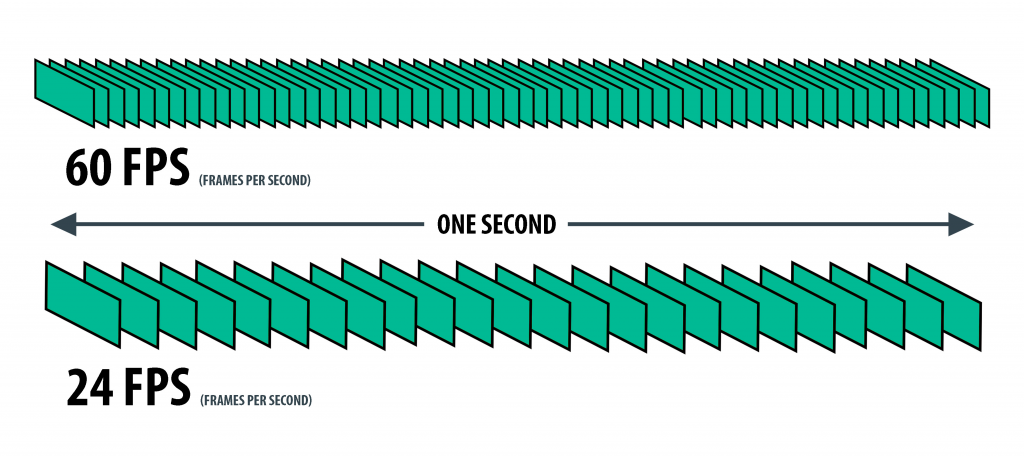
To understand the impact of frame rate on digital video quality, it’s essential to know the technical aspects behind it. The frame rate is measured in frames per second (FPS), and it represents the number of individual frames or images displayed on the screen within one second. The higher the frame rate, the smoother the video appears, while a lower frame rate can make the video seem choppy and jerky.
In digital video, the most common frame rates are 24 FPS, 25 FPS, 30 FPS, 50 FPS, and 60 FPS. The choice of frame rate depends on the type of video being produced, the platform it will be displayed on, and the desired visual effect.
For example, movies are typically shot at 24 FPS, which creates a cinematic effect with a slight blurring of motion, while television programs are usually shot at 30 FPS, providing a more realistic look. However, higher frame rates, such as 50 FPS and 60 FPS, are becoming more common due to the increased use of high-speed cameras and the availability of faster internet speeds.
The Impact of Frame Rate on Digital Video Quality
The frame rate has a significant impact on digital video quality, affecting the overall visual appeal, smoothness, and clarity. The following are the main ways in which frame rate affects digital video quality:
Smoothness
A higher frame rate results in a smoother video, as the additional frames help to create the illusion of motion. For example, a video with a frame rate of 60 FPS will appear smoother than the same video with a frame rate of 30 FPS. This is particularly noticeable in fast-paced action scenes or when panning across a landscape. A higher frame rate helps to reduce motion blur, making the video appear more realistic and sharper.
Clarity
A higher frame rate also improves the clarity of digital video by reducing image tearing and stuttering. Image tearing occurs when the video’s horizontal lines are misaligned, resulting in a visible seam between two parts of the image. Stuttering, on the other hand, occurs when the video’s motion appears jerky or irregular. A higher frame rate helps to reduce both of these issues, resulting in a clearer, more consistent video.
Visual Appeal
Finally, the frame rate can also impact the overall visual appeal of digital video. A higher frame rate provides a more immersive and realistic experience, while a lower frame rate can create a more stylized or artistic effect. For example, a video shot at 24 FPS may have a more cinematic feel, while a video shot at 60 FPS may appear more like real-life footage.
Choosing the Right Frame Rate
Choosing the right frame rate depends on several factors, including the type of video being produced, the platform it will be displayed on, and the desired visual effect. For example, a video intended for television broadcast will typically use a frame rate of 30 FPS, while a video intended for social media or online
How to Calculate Audio Bitrate: A Comprehensive Guide
Audio Bitrate
Calculating audio bitrate is an essential skill for anyone working with digital audio files. Bitrate is the amount of data used to encode one second of audio, and it plays a significant role in the quality of audio files. In this comprehensive guide, we will discuss everything you need to know about audio bitrate and how to calculate it.
Audio Bitrate
What is Audio Bitrate?
Bitrate is the number of bits used to encode one second of audio. It is typically measured in kilobits per second (kbps) and determines the audio file’s size and quality. The higher the bitrate, the larger the audio file’s size and the better the audio quality.
Audio bitrate is determined by several factors, including:
The audio format
The audio codec
The audio signal characteristics
Audio Format and Codec
The audio format and codec are two critical factors that determine audio bitrate. Audio format refers to the type of audio file, such as MP3, WAV, or FLAC. Each audio format has its own advantages and disadvantages, including file size, compatibility, and audio quality.
The audio codec, on the other hand, is the software used to compress and decompress audio data. Codecs determine how efficiently audio data is compressed and how much data is used to encode one second of audio.
It is essential to choose the right audio format and codec for your needs, as they can significantly impact the audio bitrate and quality. For example, MP3 files are smaller in size but lower in quality than WAV or FLAC files.
Audio Signal Characteristics
The characteristics of the audio signal, such as its frequency range and amplitude, can also affect the effectiveness of audio compression and the resulting audio bitrate. Higher frequencies and amplitudes require more data to encode accurately, resulting in a higher bitrate.
Other factors that can affect audio bitrate include the number of audio channels and the audio’s dynamic range. Stereo audio files require more data than mono audio files, while audio files with a wide dynamic range require more data than those with a narrow dynamic range.
Calculating Audio Bitrate
Calculating audio bitrate requires you to know the audio file’s duration, size, and format. Once you have this information, you can use the following formula to calculate audio bitrate:
Bitrate = (File size in bits / Duration in seconds) / 1000
For example, if you have a 3-minute MP3 audio file with a size of 4,320,000 bytes:
Convert the file size to bits: 4,320,000 x 8 = 34,560,000 bits
Convert the duration to seconds: 3 x 60 = 180 seconds
In this example, the audio file has a bitrate of 192 kbps.
Conclusion
Calculating audio bitrate is an essential skill for anyone working with digital audio files. Understanding audio format, codec, and signal characteristics can help you choose the right audio settings for your needs and ensure the best audio quality possible. By following the formula above, you can easily calculate the required bitrate for your audio files and adjust the settings accordingly. Keep in mind that bitrate is not the only factor that affects audio quality, so be sure to consider other factors such as the audio format, codec, and signal characteristics when selecting your settings.
When working with audio, it’s important to strike a balance between file size and audio quality. Higher bitrates generally result in better audio quality, but also larger file sizes. It’s up to you to determine the optimal balance for your specific needs and use case.
Final Thoughts
Calculating audio bitrate may seem like a daunting task, but with the right tools and knowledge, it can be a straightforward process. By understanding the different factors that affect audio quality and file size, you can make informed decisions when selecting your audio settings.
Remember, bitrate is just one of many factors that affect audio quality. Other factors, such as the audio format and codec, can also have a significant impact. By taking these factors into consideration and making informed decisions, you can achieve the best possible audio quality for your needs.
Whether you’re an audio professional or simply someone who enjoys working with digital audio files, understanding how to calculate audio bitrate is an important skill to have. By following the guidelines outlined in this article, you can ensure that your audio files are optimized for the best possible quality and file size.
Note: The information provided in this article is for educational purposes only and should not be construed as professional advice. Always consult a professional audio engineer or other qualified expert for advice on specific audio projects or issues.
Audio Noise Reduction Algorithms: Understanding the Science Behind Clear Sound
Audio Noise Reduction
Audio noise is a common issue that plagues most audio recordings. Noise refers to any unwanted sound that is picked up during recording, such as hissing, humming, or static. This unwanted sound can be distracting and reduce the quality of the audio. Fortunately, audio noise reduction algorithms can help eliminate these noises, resulting in clear and high-quality audio recordings.
Audio Noise Reduction
The Basics of Audio Noise Reduction Algorithms
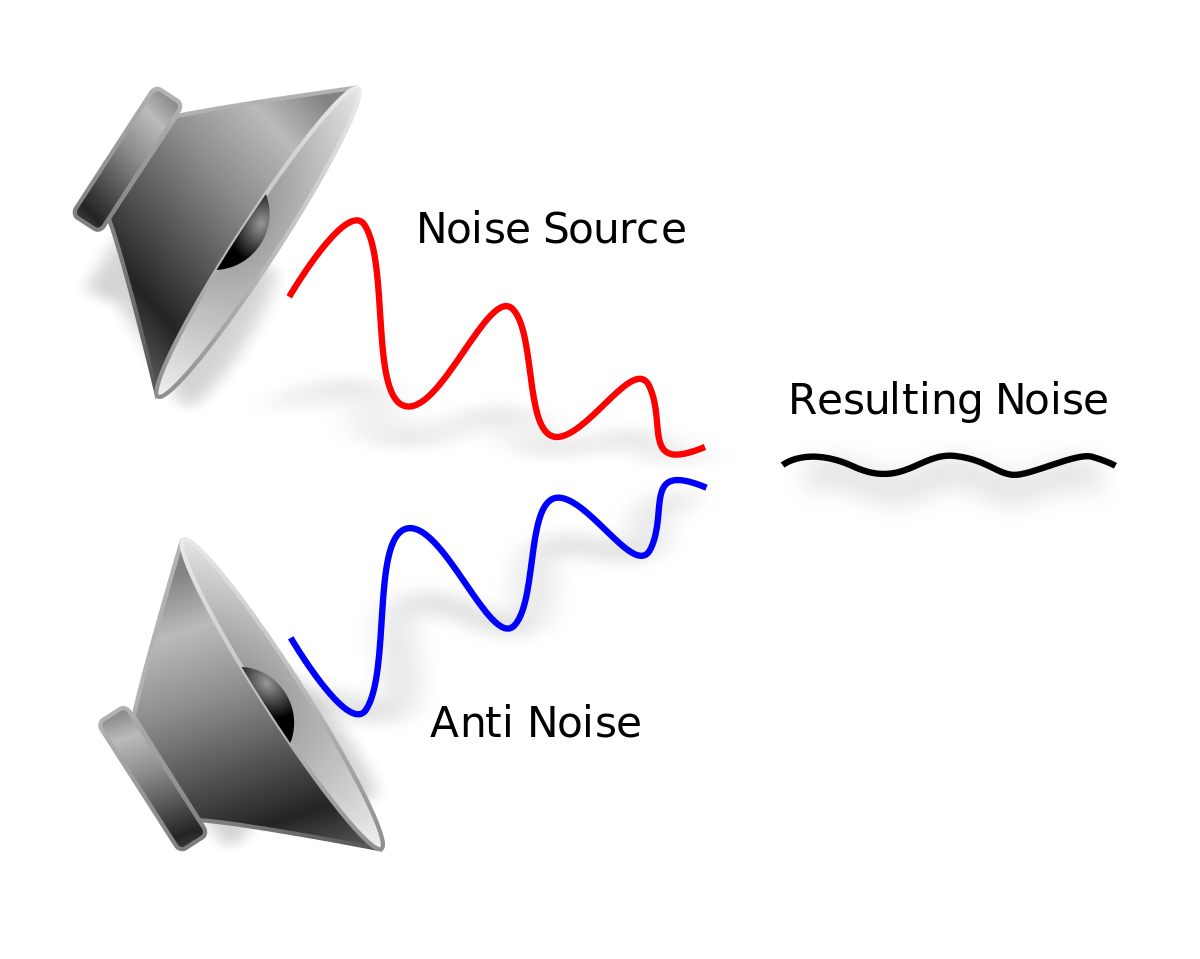
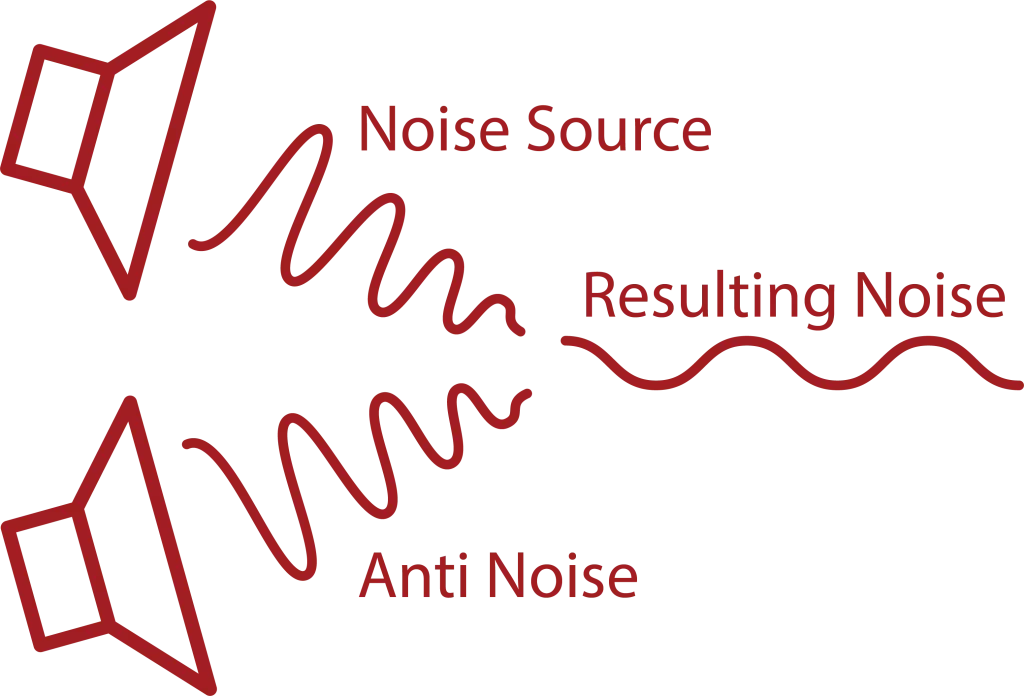
Audio noise reduction algorithms are used to filter out noise from audio recordings. These algorithms analyze the audio signal and separate the noise from the desired audio. Once the noise is separated, the algorithm can reduce or eliminate it from the recording. There are two main types of audio noise reduction algorithms:
Spectral Subtraction: This algorithm works by analyzing the frequency spectrum of the audio signal. It then estimates the noise spectrum and subtracts it from the audio signal, resulting in a cleaner sound.
Adaptive Filtering: This algorithm works by modeling the noise signal and filtering it out of the audio signal.
Both of these algorithms can be effective in reducing noise from audio recordings, but each has its strengths and weaknesses depending on the type of noise present and the characteristics of the audio signal.
How Audio Noise Reduction Algorithms Work
Audio noise reduction algorithms work by analyzing the audio signal and separating the noise from the desired audio. This process involves several steps:
Step 1: Noise Estimation
The first step in the audio noise reduction process is to estimate the noise. This is done by analyzing a portion of the audio signal that is known to be noise-only. This can be a portion of the audio that was recorded with no desired audio present or a silent section of the audio. Once the noise is estimated, the algorithm can use this information to separate the noise from the desired audio.
Step 2: Filtering
Once the noise has been estimated, the algorithm can begin to filter it out of the audio signal. This is done by applying a filter to the audio signal that will reduce or eliminate the noise. The type of filter used will depend on the algorithm being used and the characteristics of the audio signal.
Step 3: Signal Reconstruction
After the noise has been filtered out of the audio signal, the algorithm will reconstruct the audio signal to ensure that it is of high quality and free of artifacts. This is done by applying a process called signal reconstruction, which involves smoothing out any irregularities in the audio signal and ensuring that the signal is continuous.
Factors That Affect Audio Noise Reduction
There are several factors that can affect the effectiveness of audio noise reduction algorithms:
Noise Type: The type of noise present in the audio signal can affect the effectiveness of the algorithm. Some types of noise are easier to filter out than others.
Signal-to-Noise Ratio: The signal-to-noise ratio (SNR) is the ratio of the desired audio to the noise in the audio signal. A low SNR can make it more difficult for the algorithm to separate the noise from the desired audio.
Audio Signal Characteristics: The characteristics of the audio signal, such as its frequency range and amplitude, can also affect the effectiveness of noise reduction algorithms.
Types of Noise Reduction Algorithms
There are several types of noise reduction algorithms available, each with its own strengths and weaknesses. Some of the most commonly used algorithms include:
Single-Channel Noise Reduction: This type of algorithm is designed to reduce noise in a single audio channel, such as a single microphone recording. It can be effective in reducing constant background noise but may not be as effective in reducing more complex noise patterns.
Multi-Channel Noise Reduction: Multi-channel noise reduction algorithms can be used to reduce noise in multiple audio channels, such as in a stereo recording. These algorithms can be more effective than single-channel algorithms in reducing complex noise patterns.
Adaptive Filter: Adaptive filter algorithms can be effective in reducing noise that is relatively consistent over time, such as electrical hum. These algorithms analyze the audio signal and create a filter that is customized to reduce the specific noise pattern.
Spectral Subtraction: Spectral subtraction algorithms work by analyzing the frequency spectrum of the audio signal and subtracting the noise frequency components. This algorithm can be effective in reducing steady-state noise but may introduce artifacts in the audio signal.
Wiener Filter: The Wiener filter is a statistical algorithm that can be used to reduce noise in audio signals. This algorithm analyzes the statistical properties of the audio signal and the noise and creates a filter that can effectively reduce the noise.
Challenges in Noise Reduction
While noise reduction algorithms can be effective in reducing unwanted noise in audio signals, there are several challenges that must be considered:
Noise Types: Different types of noise require different noise reduction algorithms. For example, reducing background hiss requires a different algorithm than reducing electrical hum.
Signal-to-Noise Ratio: The signal-to-noise ratio (SNR) is the ratio of the desired audio signal to the unwanted noise. A low SNR can make it difficult for noise reduction algorithms to effectively reduce the noise without affecting the desired audio signal.
Artifacts: Noise reduction algorithms can introduce artifacts into the audio signal, such as distortion or a “muffling” effect. These artifacts can negatively affect the quality of the audio signal.
Computational Complexity: Some noise reduction algorithms require significant computational resources, which can make real-time noise reduction difficult.
Conclusion
Audio noise reduction algorithms are an essential tool for improving the quality of audio recordings. By analyzing the characteristics of the audio signal and the noise, these algorithms can effectively reduce unwanted noise and improve the clarity of the desired audio signal. However, the effectiveness of these algorithms depends on several factors, including the type of noise, the signal-to-noise ratio, and the computational complexity of the algorithm. By understanding the strengths and limitations of different noise reduction algorithms, audio professionals can select the most appropriate algorithm for their specific needs and achieve the best possible results.
Digital audio compression is a complex topic that is often misunderstood. It is a process that reduces the size of digital audio files without affecting the overall quality of the sound. The goal of this article is to provide a comprehensive overview of the science behind digital audio compression, including its history, the different types of compression, and how it affects the quality of the sound.
Digital Audio Compression
The History of Digital Audio Compression
The history of digital audio compression can be traced back to the early 1990s when the first MP3 encoder was developed. MP3 stands for MPEG-1 Audio Layer 3 and is a method of compressing digital audio files. This compression method quickly gained popularity due to its ability to reduce file size without compromising the quality of the sound.
Since then, many different types of digital audio compression have been developed, each with its own set of advantages and disadvantages. However, they all work on the same principle of reducing the amount of data in the audio file while maintaining the overall quality of the sound.
The Different Types of Digital Audio Compression
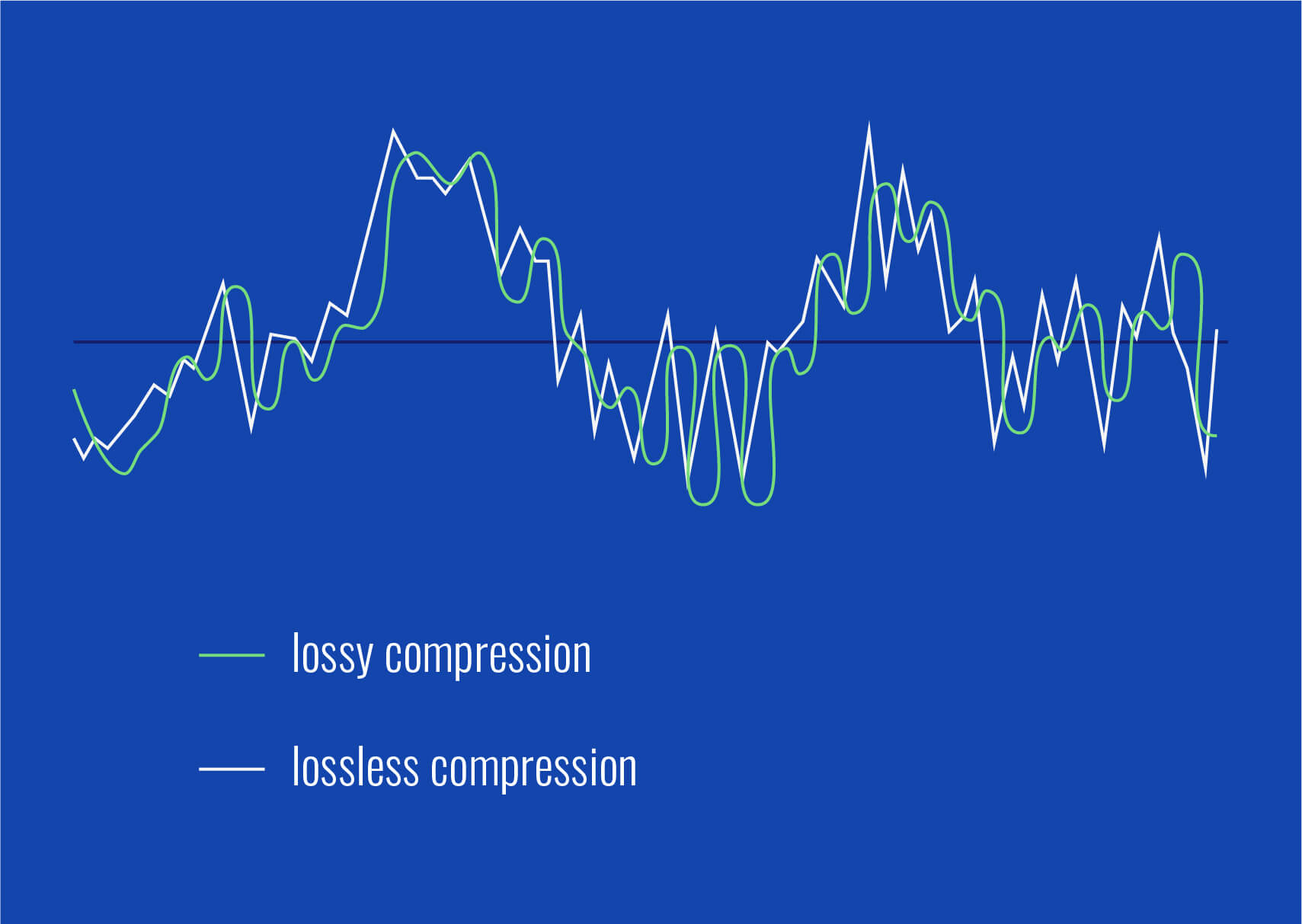
There are two main types of digital audio compression: lossy and lossless. Lossy compression is the most common type of compression and is used in formats like MP3, AAC, and WMA. It works by removing parts of the audio file that are deemed less important to the overall quality of the sound.
Lossless compression, on the other hand, is used in formats like FLAC and ALAC. This method of compression works by compressing the file in a way that allows it to be decompressed back to its original form without losing any of the data. This means that the sound quality is preserved, but the file size is still reduced.
The Science Behind Digital Audio Compression
Digital audio compression works by reducing the amount of data in an audio file. The amount of data in an audio file is measured in bits per second (bps) or kilobits per second (kbps). The higher the bitrate, the better the quality of the sound. However, higher bitrates also mean larger file sizes.
Compression algorithms work by analyzing the audio data and removing parts that are not critical to the overall sound quality. These parts can include frequencies that are outside the range of human hearing or parts that are masked by other sounds in the file.
Once the compression algorithm has identified the parts of the file that can be removed, it uses a mathematical formula to compress the remaining data. This formula is designed to reduce the size of the file without affecting the overall quality of the sound.
The Effects of Compression on Sound Quality
The goal of digital audio compression is to reduce the size of the file without affecting the overall quality of the sound. However, compression can have some effects on sound quality, depending on the type of compression used and the bitrate of the original file.
Lossy compression, for example, can result in a loss of high-frequency information and dynamic range. This can lead to a loss of detail in the sound and a less natural-sounding reproduction of the original recording.
Lossless compression, on the other hand, preserves the original sound quality of the recording, but the resulting file sizes can still be quite large. This makes it less practical for use in situations where file size is a concern.
The Future of Digital Audio Compression
The future of digital audio compression is closely tied to the ongoing development of digital audio technology. As technology continues to improve, the potential for more efficient compression algorithms and higher quality sound reproduction is becoming a reality.
One of the most exciting developments in digital audio compression is the emergence of artificial intelligence (AI) and machine learning. These technologies have the potential to create compression
The Role of AI in Music Production: Revolutionizing the Music Industry
AI Music
The Impact of Artificial Intelligence on Music Creation and Production
AI Music
The Evolution of Music Production with Digital Technology
The music industry has undergone a major transformation over the past decade, with the advent of digital technology. This technology has enabled musicians to create, distribute, and consume music in ways that were once impossible. However, the emergence of artificial intelligence (AI) is taking this transformation to a whole new level.
The Impact of Digital Technology on Music Production
For over a decade, music has been created on computers using sampling, quantization, and other digital techniques to enhance sound quality. Programs have also been developed to modify pitch and tone, allowing virtually anyone to sound in tune. This has impacted the music industry significantly, as many musicians and vocalists who lack the ability to perform live have still been able to produce high-quality recordings.
The Role of AI in Music Creation and Production
However, the use of AI takes this concept much further. With the development of AI in music production, we now have the ability to create music using prompts – pre-determined orders that tell the computer how to create music. Engineers who specialize in creating these prompts have emerged, similar to those who work in the field of AI image production. These prompts allow for the creation of high-quality music that was previously impossible without significant musical expertise.
The Importance of Producers in AI-Driven Music Production
This shift in technology has resulted in a significant change in the music industry. The role of the producer, who creates and oversees the final product, has become even more important than the role of the artist. While the artist’s creative input is still valuable, the producer’s knowledge and ability to work with AI technology is now essential to the success of the final product.
The Potential Benefits and Risks of AI in Music Production
The potential benefits of AI in music production are significant. AI can help to streamline the production process, reduce costs, and improve the quality of the final product. However, there are also risks to consider. One concern is the potential loss of jobs in the music industry as AI technology becomes more prevalent. Another concern is the potential for AI-generated music to lack the emotional depth and authenticity of music created by human musicians.
The Future of AI in Music Production
Despite these risks, the future of AI in music production looks promising. As AI technology continues to evolve, we can expect to see even more sophisticated prompts and tools for music creation. This will allow producers to create music that is even more complex and nuanced than what is currently possible. The use of AI in music production is still in its early stages, but it is clear that this technology has the potential to revolutionize the music industry in ways that were once unimaginable.
The digital representation of audio is based on a series of binary digits (bits) that capture the amplitude of the sound wave at regular intervals. These bits are usually stored in a file format such as WAV, AIFF or FLAC. Despite being represented as a series of zeros and ones, digital audio has revolutionized the music industry and changed the way we consume and produce music.
Digital Audio Compression
One of the most significant advantages of digital audio is the ability to compress audio files without compromising quality. Compression reduces the amount of data required to represent an audio file by discarding some of the redundant or less important information. There are two types of audio compression: lossless and lossy.
Lossless Audio Compression
Lossless compression algorithms reduce the size of an audio file without losing any of the original data. These algorithms work by identifying and eliminating redundant information while preserving the remaining data. The most common lossless audio compression formats are FLAC, ALAC, and WAVPACK. These formats are preferred by audiophiles and music professionals because they offer the same audio quality as the original uncompressed file.
Lossy Audio Compression
Lossy compression algorithms, on the other hand, permanently discard some of the data in the original audio file to achieve a smaller file size. The most popular lossy audio formats are MP3, AAC, and OGG. Although lossy formats achieve significantly smaller file sizes than lossless formats, they sacrifice some of the audio quality. The extent of the audio quality loss depends on the compression settings and the original file’s quality.
The Impact of Compression on Audio Quality
The impact of compression on audio quality depends on the compression algorithm and the original audio file’s quality. Lossless compression algorithms have no impact on audio quality because they preserve all the original data. Lossy compression algorithms, on the other hand, can significantly affect audio quality, particularly at low bitrates or with complex audio signals.
In general, higher bitrates and less aggressive compression settings result in better audio quality, while lower bitrates and aggressive compression settings result in lower quality audio.
The Evolution of Digital Audio Technology
The quality of digital audio has improved significantly over the past few decades due to advancements in technology. In the early 1990s, computers had limited processing power, and audio quality was limited by the hardware’s capabilities. Today, modern devices such as laptops, tablets, and smartphones are capable of playing high-quality audio files with ease.
Streaming services such as Spotify and Apple Music have also contributed to the evolution of digital audio technology. These services use lossy compression algorithms such as OGG to optimize the transmission of audio files over the internet while minimizing data usage. Despite the compression, the audio quality is still high enough to satisfy most listeners.
Conclusion
Digital audio compression has revolutionized the music industry by enabling the storage and transmission of high-quality audio files while minimizing file sizes. Lossless compression algorithms such as FLAC and ALAC offer the same audio quality as the original uncompressed file, while lossy algorithms such as MP3 and AAC achieve significantly smaller file sizes but sacrifice some audio quality. The evolution of digital audio technology has improved audio quality and made it possible to enjoy high-quality audio on a wide range of devices.
Video content has become increasingly important in today’s digital age, with the demand for high-quality, easily accessible video content only growing. This has led to the development of various video formats that are designed to offer different benefits and features.
The AVI Format
One of the more established video formats is the Audio Video Interleave (AVI) format. Developed by Microsoft in the early 1990s, AVI has been a popular format for many years, particularly in the Windows environment. It’s a versatile format that supports multiple codecs and can handle a wide range of resolutions and frame rates.
History of AVI
AVI was introduced in November 1992 as part of the Video for Windows technology. It was designed as a container format that could hold both audio and video data in a single file. The format gained popularity quickly due to its ability to be played on a wide range of devices and software.
How AVI Works
AVI files are based on the Resource Interchange File Format (RIFF) and consist of two parts: the header and the data. The header contains information about the video and audio codecs used, as well as the resolution, frame rate, and other technical details. The data section contains the actual audio and video data.
The WebP Format
In contrast, WebP is a relatively new image and video format that was developed by Google in 2010. The format was designed to offer a more efficient compression algorithm than existing formats, with the goal of reducing file sizes and improving page load times.
History of WebP
Google introduced WebP in 2010 as an alternative to the JPEG and PNG image formats. In 2013, WebP support was added to the Google Chrome browser, and in 2018, support was added to the Firefox and Edge browsers.
How WebP Works
WebP uses a lossy compression algorithm that reduces the file size of images and videos without compromising too much on quality. The format achieves this by using advanced compression techniques such as predictive coding, where each pixel is predicted based on surrounding pixels, and entropy encoding, which compresses the data based on the frequency of occurrence of specific patterns.
Comparing AVI and WebP
Both AVI and WebP have their own strengths and weaknesses. AVI is a more established format with broad compatibility, while WebP is a newer format with more efficient compression.
One significant difference between the two formats is their compression algorithms. AVI uses a variety of codecs that may offer different levels of compression, while WebP uses a single, highly efficient compression algorithm. This means that WebP files can be significantly smaller than AVI files, which can be beneficial for web content and other applications where file size is a concern.
Another significant difference is their compatibility. AVI is a widely supported format that can be played on most devices and software, while WebP is still gaining popularity and may not be supported on all devices and software.
Conclusion
In summary, both AVI and WebP are useful video formats that offer different benefits and features. The choice between the two depends on the specific requirements of the application, such as compatibility, file size, and compression efficiency.
Final thoughts
To sum up, AVI and WebP are two different video formats that have their own strengths and weaknesses. While AVI has been around for a long time and is widely supported, it has limitations in terms of file size and compression efficiency. On the other hand, WebP is a relatively new format that offers superior compression, smaller file sizes, and better quality for animated content. However, its support is not as widespread as AVI, and it may not be the best option for compatibility with older browsers and devices.
Ultimately, the choice between AVI and WebP comes down to the specific needs of the project or application. It is important to consider factors such as compatibility, file size, compression efficiency, and quality when choosing a video format. With the right format and settings, video content can be optimized for both quality and performance, resulting in an engaging and immersive viewing experience for users.
MP4 vs. DivX: Which Video Format is More Efficient?
MP4 vs. DivX
MP4 vs. DivX Introduction
MP4 vs. DivX
Video content is everywhere in our lives today, from streaming platforms like Netflix and YouTube to social media and personal video collections. With so much video content out there, it’s important to have an efficient and high-quality video format to ensure a seamless viewing experience.
Two popular video formats that have been around for some time are MP4 and DivX. Both formats have their pros and cons, and it’s important to understand the differences between them to choose the right format for your needs.
In this article, we’ll explore the differences between MP4 and DivX, their strengths and weaknesses, and which format is more efficient.
MP4
MP4 is a digital multimedia container format that’s widely used for storing and playing video and audio files. It was developed by the Moving Picture Experts Group (MPEG) and is part of the MPEG-4 standard.
One of the main advantages of MP4 is its compatibility with a wide range of devices, including smartphones, tablets, computers, and gaming consoles. MP4 files can be played on almost any device and operating system, making it a versatile format for storing and sharing video content.
Another advantage of MP4 is its high compression rate, which allows for smaller file sizes without sacrificing quality. This makes it an efficient format for streaming video content over the internet, as it reduces the amount of data needed for a smooth playback experience.
MP4 also supports advanced features like subtitles, closed captions, and multiple audio tracks, making it a popular choice for movies and TV shows.
DivX
DivX is a video compression technology that was developed by DivX, Inc. It’s based on the MPEG-4 standard and is designed to provide high-quality video compression with smaller file sizes.
One of the main advantages of DivX is its high compression rate, which allows for smaller file sizes without sacrificing video quality. This makes it an efficient format for storing and sharing video content, especially over the internet.
DivX also supports advanced features like subtitles, multiple audio tracks, and chapter points, making it a popular choice for movies and TV shows.
However, one downside of DivX is its limited compatibility with devices and operating systems. Unlike MP4, which is supported by almost any device and platform, DivX requires a special player or codec to play on some devices.
MP4 vs. DivX: Which is More Efficient?
When it comes to efficiency, both MP4 and DivX have their strengths and weaknesses.
In terms of compression rate, both formats are efficient and can produce smaller file sizes without sacrificing quality. However, DivX has a slight edge over MP4 in terms of compression efficiency, making it a better choice for storing and sharing video content over the internet.
On the other hand, MP4 has the advantage of compatibility. It’s supported by almost any device and operating system, which makes it a versatile format for storing and sharing video content.
When it comes to advanced features, both formats support subtitles, multiple audio tracks, and chapter points. However, MP4 has an advantage in terms of support for closed captions, which is an important accessibility feature for people with hearing impairments.
Conclusion
Both MP4 and DivX are popular video formats that have their strengths and weaknesses. When it comes to efficiency, both formats are capable of producing high-quality video with smaller file sizes, making them efficient choices for storing and sharing video content.
However, if compatibility is a top priority, MP4 is the better choice as it’s supported by almost any device and operating system. On the other hand, if compression efficiency is your primary concern, DivX might be the better option.
In terms of quality, both MP4 and DivX offer high-quality video playback, but DivX has the edge when it comes to compression efficiency. This means that DivX files are generally smaller in size than MP4 files of the same length and resolution. This makes them ideal for situations where file size is a concern, such as when streaming video over a slow internet connection or when storage space is limited.
Another advantage of DivX is its support for advanced features such as subtitles and multiple audio tracks. This is particularly useful for movie and TV show enthusiasts who prefer to watch content in their native language or with subtitles. DivX also supports chapters and menus, which allows for easy navigation through longer videos.
On the other hand, MP4 has the advantage of wider compatibility with a broader range of devices and operating systems. It’s supported by virtually every device, including smartphones, tablets, game consoles, and smart TVs. MP4 is also compatible with all major operating systems, including Windows, Mac, and Linux, making it a versatile and accessible format for video playback.
Another advantage of MP4 is its support for a broader range of codecs. This means that you can encode your video in a variety of codecs, including H.264, H.265, and MPEG-4, among others. This gives you more control over the size and quality of your video file, making MP4 a more flexible format in terms of customization options.
In terms of compatibility, MP4 is the clear winner, but if compression efficiency and advanced features are a priority, DivX is a great choice. Ultimately, the best format for your needs will depend on your specific requirements, such as file size, compatibility, and advanced features.
Conclusion
When it comes to video formats, MP4 and DivX are two of the most popular options available today. While both formats offer high-quality video playback, they differ in terms of compression efficiency, compatibility, and advanced features.
If you’re looking for a format that’s compatible with virtually every device and operating system, MP4 is the way to go. It’s a versatile and accessible format that’s widely supported and offers a broad range of customization options.
On the other hand, if compression efficiency and advanced features are a priority, DivX is an excellent choice. Its smaller file sizes and support for advanced features like subtitles and multiple audio tracks make it ideal for streaming video over a slow internet connection or when storage space is limited.
Ultimately, the choice between MP4 and DivX will depend on your specific requirements. Consider factors like file size, compatibility, and advanced features when choosing between the two formats.
If you’re an audiophile, you may already be familiar with popular audio file formats like MP3 and WAV. However, there’s another format that’s worth considering: M4A. In this article, we’ll explore the benefits of M4A and why it’s a format you should consider using for your audio files.
What is M4A?
M4A is a file format that’s commonly used for storing audio files on computers and mobile devices. It’s similar to the popular MP3 format, but it has a few advantages over MP3. M4A files are typically smaller than MP3 files, which means they take up less storage space on your device. They also offer better sound quality than MP3 files, making them a great choice for audiophiles who want to ensure the highest possible sound quality.
The Advantages of M4A
There are several advantages to using M4A over other audio file formats. Here are some of the most important:
1. Smaller file sizes
M4A files are typically smaller than MP3 files, which means they take up less storage space on your device. This is especially important if you have limited storage space on your device, or if you want to store a large number of audio files on your device.
2. Better sound quality
M4A files offer better sound quality than MP3 files. This is because M4A uses a higher bit rate than MP3, which means it can capture more detail in the audio. If you’re an audiophile, you’ll appreciate the higher quality sound that M4A provides.
3. Support for advanced audio features
M4A files support advanced audio features like metadata, which allows you to add information about the audio file, such as the artist, album, and track name. M4A files also support cover art, which means you can add an image to your audio file that will display when the file is played.
How to Use M4A
If you’re interested in using M4A for your audio files, there are several ways to do so. You can convert your existing audio files to M4A using a conversion tool, or you can download audio files in the M4A format from online music stores. M4A files can be played on a variety of devices, including computers, smartphones, and tablets.
Converting Audio Files to M4A
To convert your existing audio files to M4A, you’ll need a conversion tool. There are several conversion tools available online, many of which are free. Simply download the tool, select the audio file you want to convert, and choose the M4A format. The conversion process will take a few minutes, depending on the size of the file.
Downloading M4A Files
If you don’t want to convert your existing audio files to M4A, you can download M4A files from online music stores. Many music stores, including iTunes, offer audio files in the M4A format. Simply search for the song or album you want to download, and choose the M4A format when prompted.
Conclusion
If you’re looking for a high-quality audio file format that offers great sound quality and advanced features, M4A is a great choice. With smaller file sizes and support for advanced audio features, M4A is a format that’s worth considering for your audio files. Whether you’re a music enthusiast, a professional musician, or just someone who values high-quality audio, M4A can provide you with the level of audio quality you need.
In conclusion, M4A is an excellent audio format that offers great sound quality, advanced features, and smaller file sizes compared to other popular audio formats like MP3. While it may not be as widely used as MP3, M4A is gaining popularity and support from a variety of devices and platforms.
Overall, M4A is a versatile and high-quality audio format that’s definitely worth considering for your audio needs. With its smaller file sizes, advanced features, and great sound quality, M4A is quickly becoming a popular choice among music enthusiasts and professionals alike.