As the world becomes increasingly digitized, the importance of video codecs in our lives cannot be overstated. Video codecs are essential in video compression, encoding, streaming, and playback. Choosing the right codec can make the difference between smooth playback and frustrating buffering, between crisp and clear images and pixelated messes. In this article, we will explore the differences between three of the most popular video codecs in use today: H.264, H.265, and VP9.
H.264 vs H.265: What’s the Difference?
H.264, also known as AVC (Advanced Video Coding), has been the dominant codec in use for the past decade. It is widely supported by devices and software and offers good compression while maintaining high video quality. However, H.265 (HEVC) is slowly taking over. It is a newer and more advanced codec that offers better compression ratios, which means smaller file sizes with the same quality as H.264. H.265 is also better at handling high-resolution videos, making it a good choice for 4K and 8K videos. However, it requires more processing power to decode, which may be an issue on older devices.
Personally, I have found that H.265 delivers noticeably better quality than H.264 for the same file size. It is especially noticeable in high-motion scenes like action movies or sports. However, it does require more processing power, so make sure your device can handle it before choosing it as your preferred codec.
VP9: The New Kid on the Block
VP9 is a newer codec developed by Google and is designed to be a royalty-free alternative to H.265. It offers better compression than H.264 while maintaining the same video quality. It is also highly efficient at handling high-resolution videos, making it a good choice for 4K and 8K videos. However, its adoption has been slow due to its lack of support in many devices and software. It also requires more processing power to decode than H.264.
One of my personal experiences with VP9 was when I was trying to stream a 4K video on my laptop. I noticed that the video was buffering a lot and the quality was not as good as I expected. After some research, I found out that the video was encoded with VP9, which my laptop did not support. I had to switch to H.264 to get smooth playback.
Conclusion: Choosing the Right Video Codec
Choosing the right video codec is crucial for ensuring smooth video playback and high video quality. H.264 is still a solid choice for most situations, but H.265 and VP9 offer better compression and handling of high-resolution videos. However, they require more processing power and may not be supported by all devices and software. Make sure to choose the codec that best suits your needs and device capabilities.
In conclusion, video codecs are an essential part of our digital lives, and choosing the right one can make all the difference in our video-watching experience. Always keep in mind the pros and cons of each codec and make an informed decision based on your needs.
What is the difference between bit depth and bitrate?
Bit DepthBit Depth
Understanding Bit Depth and Bitrate
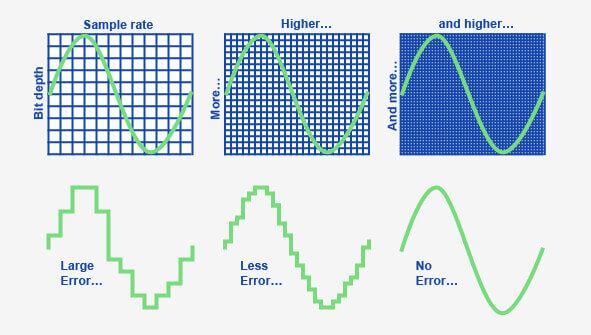
When it comes to audio and video files, there are two terms that are often used interchangeably: bit depth and bitrate. However, they are not the same thing. Bit depth refers to the number of bits used to represent each sample in an audio or video file, while bitrate refers to the amount of data transmitted per second.
Bit depth determines the number of possible values for each sample in a digital audio or video file. For example, an 8-bit audio file can have 256 possible values per sample, while a 16-bit file can have 65,536. The higher the bit depth, the more accurate the representation of the original sound or image.
On the other hand, bitrate refers to the amount of data transmitted per second in a digital file. In other words, it’s the rate at which data is encoded in a file. Higher bitrates typically mean higher quality files with more information, but also larger file sizes.
Audio Bit Depth vs Bitrate
When it comes to audio files, the bit depth and bitrate are both important factors in determining the quality of the sound. A higher bit depth means a more accurate representation of the original sound, while a higher bitrate means more data is transmitted per second, resulting in a higher quality sound.
However, it’s important to note that a higher bitrate does not necessarily mean a higher quality sound. If the original recording is of poor quality, increasing the bitrate will not improve the sound. In fact, it can actually result in larger file sizes with no improvement in sound quality.
Video Bit Depth vs Bitrate
Video files also have bit depth and bitrate, but they work slightly differently than in audio files. Bit depth determines the number of colors that can be represented in a video file, while bitrate determines the amount of data transmitted per second.
A higher bit depth means a wider range of colors can be represented in the video, resulting in a more accurate and vibrant image. However, a higher bitrate is also important for video files, as it determines the amount of detail that can be captured in each frame.
It’s important to find the right balance between bit depth and bitrate for video files, as increasing one can have a negative impact on the other. For example, a high bit depth with a low bitrate can result in a choppy or pixelated image, while a low bit depth with a high bitrate can result in a washed-out or blurry image.
Final Words
In conclusion, bit depth and bitrate are both important factors to consider when working with audio and video files. While they may seem similar, they serve different purposes and have different effects on the quality of the final product. It’s important to find the right balance between the two to ensure the best possible sound or image quality.
Keywords: audio bit depth, video bit depth, bit depth vs bitrate, bitrate definition, bitrate vs quality, audio quality, video quality, digital audio, digital video, file size, data transmission, accuracy, color representation, image quality, sound quality, audio recording, video recording, data encoding, pixelation, file format, media production, sound engineering, video editing, multimedia, digital media, technology, mp4gain, audio normalization, audio conversion, equalizer, windows, digital signal processing, dynamic
MPEG decoding is the process of converting compressed digital video data into a viewable format. This process is necessary because most digital videos are compressed to save space and reduce bandwidth requirements. Decoding MPEG involves using a special algorithm to decompress the data and extract the video and audio streams. Once the video and audio streams are separated, they can be played back on a computer or other device.
According to the book “Video Demystified” by Keith Jack, “Decoding MPEG requires a powerful processor and specialized hardware.” This is because the process is computationally intensive and requires a lot of processing power to be done in real-time. Many modern computers and mobile devices are capable of decoding MPEG on their own, but some may require specialized software or hardware to do so.
MPEG Decoder
An MPEG decoder is a piece of software or hardware that is designed to decode MPEG-encoded video files. Decoders come in many different forms, from standalone devices to software that can be installed on a computer. Most modern media players, such as VLC, have built-in MPEG decoders that can play back MPEG-encoded video files without the need for additional software.
As noted by the book “Digital Video Processing” by A. Murat Tekalp, “The quality of an MPEG decoder determines the quality of the video output.” This is because the decoding process can introduce artifacts and other issues that can degrade the quality of the video. It is important to use a high-quality decoder to ensure that the video is decoded correctly and looks its best.
Decoding Video Files
Decoding video files is an essential part of playing back digital video content. Many different video codecs are used to compress video data, and each requires a specific decoder to play back the content. MPEG is just one of many video codecs that are commonly used. Other popular codecs include H.264, HEVC, and AV1.
As stated by the movie “The Matrix”, “Unfortunately, no one can be told what decoding video files is. You have to see it for yourself.” While decoding video files may seem complicated, modern media players and other software have made the process much easier. With the right software and hardware, anyone can decode and play back digital video content with ease.
Final Words:
In conclusion, MPEG decoding is an essential process for playing back digital video content. Whether you are using a standalone device or a computer with specialized software, understanding how MPEG decoding works is important for getting the best possible video playback experience. If you’re looking for a high-quality MPEG decoder, consider using mp4gain to ensure that your video files are decoded correctly and look their best.
Video compression is the process of reducing the size of a digital video file without compromising its quality. MPEG (Moving Picture Experts Group) codec is one of the most widely used video compression techniques in the world. It is known for its ability to compress videos without significantly reducing their quality. As a result, MPEG codec is used in various multimedia applications, including DVDs, digital television, and streaming video platforms.
According to renowned filmmaker Martin Scorsese, “Compression is interesting because you can actually get more information on a disc if you compress it than if you don’t. You’re just using the data more efficiently.” MPEG codec helps achieve this efficiency, making it a popular choice among content creators.
Digital Video Format
MPEG codec is also popular because it supports multiple digital video formats, including MPEG-1, MPEG-2, MPEG-4, and MPEG-7. Each of these formats is optimized for different types of content and applications. For example, MPEG-1 is ideal for low-resolution video and audio playback, while MPEG-4 is ideal for streaming high-quality videos over the internet.
MPEG-2, on the other hand, is widely used in digital television broadcasting, while MPEG-7 is used for multimedia content management. Overall, MPEG codec has revolutionized the way we consume and distribute digital video content.
Video Encoding
Video encoding is the process of converting a raw video file into a compressed digital format. MPEG codec is one of the most efficient and reliable video encoding techniques available. It uses complex algorithms to analyze the video content and compress it while maintaining its quality.
As noted by filmmaker George Lucas, “The whole industry is based on technology. It’s not based on storytelling. If the technology is great, everybody in the world can do it.” MPEG codec’s ability to compress videos while maintaining their quality has made it an essential component of the video production process.
In conclusion, MPEG codec is a crucial video compression technique that has transformed the way we consume and distribute digital video content. Its ability to compress videos without significantly reducing their quality has made it a popular choice among content creators and consumers alike. If you’re looking for a reliable video compression solution, MPEG codec is definitely worth considering.
Final Words:
Whether you’re a content creator or a consumer, MPEG codec is an essential component of the digital video ecosystem. Its ability to compress videos while maintaining their quality has made it an industry standard. If you’re looking for a reliable video compression solution, consider using MPEG codec to optimize your digital video content.
Video Quality: Understanding the Factors that Determine it
Video QualityVideo Quality
Video quality is the most crucial aspect of any video, whether it’s a movie, TV show, or a YouTube clip. In today’s world, where video streaming is the norm, video quality is even more critical. However, not everyone understands the factors that determine video quality and how to optimize it.
What is Video Quality?
Video quality refers to the level of visual and audio fidelity of a video. A high-quality video has a clear, sharp picture, vibrant colors, and excellent audio quality. On the other hand, a low-quality video may have pixelated images, distorted colors, and muffled audio.
Video quality is determined by several factors, including resolution, bitrate, codec, and frame rate. Understanding these factors is crucial to optimizing video quality.
Resolution
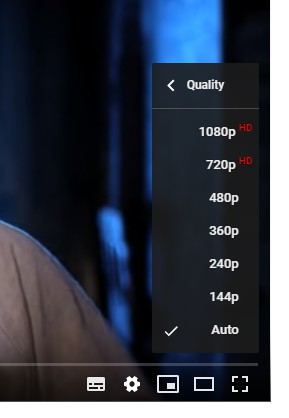
Resolution refers to the number of pixels that make up a video image. The higher the resolution, the more pixels, and the sharper the image. The most common video resolutions are 720p, 1080p, and 4K.
When choosing a resolution, it’s important to consider the display device’s capabilities. For example, if you’re watching a video on a smartphone screen, a 720p resolution is sufficient. However, if you’re watching the same video on a large TV screen, a 4K resolution would provide a better viewing experience.
Bitrate
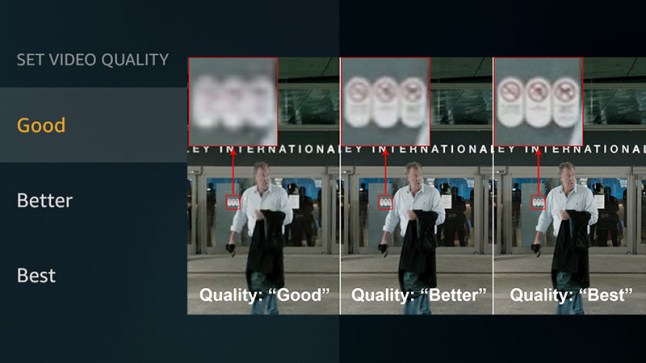
Bitrate refers to the amount of data that is used to encode a video. It affects both the video’s quality and file size. A higher bitrate results in a higher-quality video but also a larger file size.
When choosing a bitrate, it’s important to consider the available bandwidth. A higher bitrate requires more bandwidth, which may result in buffering or slow streaming. Therefore, it’s important to balance quality and file size with available bandwidth.
Codec
A codec is a software that compresses and decompresses video data. It affects the video’s quality, file size, and compatibility with different devices and players. The most common codecs are H.264 and H.265.
When choosing a codec, it’s important to consider compatibility with the playback device and the available processing power. For example, H.265 provides better compression than H.264, resulting in smaller file sizes, but requires more processing power to decode.
Frame Rate
Frame rate refers to the number of frames per second (fps) in a video. A higher frame rate results in smoother and more fluid motion. The standard frame rate for video is 24 fps, but higher frame rates, such as 60 fps, are becoming more common.
When choosing a frame rate, it’s important to consider the content and the intended viewing experience. For example, a higher frame rate is more suitable for action scenes, while a lower frame rate may be sufficient for a dialogue-driven drama.
Conclusion
Optimizing video quality requires a balance of resolution, bitrate, codec, and frame rate. Understanding these factors and choosing the right combination can result in high-quality videos that provide a better viewing experience. One tool that can help optimize video quality is MP4Gain, which can normalize the audio volume of a video and improve overall quality.
FAQ
What is the best video resolution?
The best video resolution depends on the purpose of the video and the device on which it will be played. For example, a video intended for social media or online streaming may have a lower resolution than a video intended for a cinema screen or high-end TV. However, there are some video resolutions that are widely considered to be the best for certain purposes.
1080p (Full HD)
1080p (1920 x 1080 pixels) is a video resolution commonly used for Blu-ray discs, HDTV broadcasts, and online streaming platforms such as YouTube and Netflix. This resolution provides a clear and detailed image that is suitable for most purposes, including watching movies, playing games, and general computer use. However, it may not be sufficient for larger screens or high-end devices that require higher resolutions.
4K Ultra HD
4K Ultra HD (3840 x 2160 pixels) is a video resolution that provides four times the number of pixels as 1080p. This resolution is becoming increasingly popular for high-end devices, such as gaming consoles, high-end TVs, and high-end smartphones. It provides a significantly more detailed and immersive image, particularly on larger screens or when viewed up close. However, it requires a powerful device and may not be necessary for all purposes.
8K Ultra HD
8K Ultra HD (7680 x 4320 pixels) is the highest video resolution currently available. It provides sixteen times the number of pixels as 1080p and is primarily used for professional applications, such as video production and digital signage. It requires a very powerful device and is not necessary for most consumer purposes.
Factors that affect video quality
Video quality is affected by a variety of factors, including resolution, frame rate, bitrate, and codecs. Understanding these factors can help you choose the right settings for your video and ensure the best possible quality.
Resolution
As discussed above, resolution refers to the number of pixels in a video image. Higher resolutions generally result in better image quality, but also require more storage space and processing power. However, the benefits of higher resolutions may not be noticeable on smaller screens or at normal viewing distances.
Frame rate
Frame rate refers to the number of individual frames that make up a video per second. The most common frame rates are 24, 25, and 30 frames per second (fps). Higher frame rates can result in smoother motion and reduce motion blur, but also require more storage space and processing power. However, higher frame rates may not be noticeable for certain types of video, such as still images or talking heads.
Bitrate
Bitrate refers to the amount of data used to represent a video image per second. Higher bitrates generally result in better image quality, but also require more storage space and may cause playback issues on slower devices or internet connections. However, lower bitrates may result in compression artifacts or pixelation.
Codecs
Codecs are software programs that compress and decompress video data for playback. Different codecs use different algorithms to compress video data, resulting in different levels of compression and image quality. Some codecs are better suited for certain types of video or devices, while others may be more versatile but less efficient.
Conclusion
Video quality is a complex and multifaceted topic that is influenced by a variety of factors. Choosing the right video resolution, frame rate, bitrate, and codec can help you achieve the best possible results for your specific needs. However, it is important to keep in mind that there is no one-size-fits-all solution, and the best settings will vary depending on the intended use of the video.
How can I improve video quality?
There are several ways to improve video quality, depending on the specific issue you are facing. Here are some tips:
Use a higher video resolution and bitrate.
Ensure proper lighting and exposure when shooting the video.
Stabilize the camera to avoid shaky footage.
Use a high-quality codec for encoding the video.
Reduce noise and grain in post-processing.
Use color correction to enhance the colors and contrast.
Use a high-quality audio recording device and ensure proper sound levels.
Conclusion
Video quality is an important aspect of video production that can greatly impact the viewer’s experience. By understanding the key factors that influence video quality and choosing the appropriate settings for your specific needs, you can achieve the best possible results. Remember to consider the intended use of the video, as well as the device and platform on which it will be viewed, when selecting video settings. With the right tools and techniques, you can create high-quality videos that will captivate and engage your audience.
FAQ
What is video resolution?
Video resolution refers to the number of pixels that make up a video image. A higher resolution means a larger number of pixels, resulting in a clearer and more detailed image.
What is video bitrate?
Video bitrate refers to the amount of data used to encode a video stream. A higher bitrate means more data is used, resulting in a higher-quality video with fewer compression artifacts.
What is a video codec?
A video codec is a software algorithm used to compress and decompress video data. Different codecs offer varying levels of compression and quality, and the choice of codec will depend on the specific needs and requirements of the video project.
Digital audio and video are types of data that we can store on a computer or other electronic device. They are made up of a series of numbers that represent the sound or image we want to save. This means that instead of using physical materials like film or tape to record sound or video, we can use a computer to store and manipulate digital versions of that data.
Digital Audio and Video
How is sound digitized?
Sound is a type of wave that travels through the air. When we want to digitize sound, we need to find a way to measure that wave and turn it into a series of numbers. We do this by using a device called a microphone, which converts sound waves into electrical signals that can be processed by a computer.
Here’s an example: imagine you’re at a concert and you want to record a song using your phone. You turn on the voice memo app and hold your phone up to the speakers. The microphone in your phone converts the sound waves from the speakers into electrical signals that are then turned into a digital audio file that you can listen to later.
How are multiple sounds combined into a single file?
When we record sound using a microphone, we’re not just capturing one sound at a time. We’re also picking up any other sounds that might be happening in the background, like people talking or the sound of a car driving by. So how do we store all of these different sounds in a single file?
The answer is that each sound is given its own “channel” in the digital audio file. Imagine that you have a stereo system with two speakers – one on the left and one on the right. When you record a song using your phone, the sound that’s coming out of the left speaker is saved in one channel of the audio file, while the sound that’s coming out of the right speaker is saved in another channel.
How are different instruments and voices saved in a single channel?
So now we know how to store multiple sounds in a digital audio file using different channels. But what if we want to save a song that has lots of different instruments and voices playing at the same time? How can we separate out all of those different sounds and make sure they’re saved correctly in the file?
The answer is that each sound is given its own “frequency” in the digital audio file. Think of it like a rainbow: just like how a rainbow has lots of different colors, sound has lots of different frequencies. When we record a song, we’re capturing all of those different frequencies at the same time.
So let’s say we’re recording a song that has a guitar, a bass, a drum set, and a singer. Each of those instruments and the singer’s voice has a different set of frequencies that make up its sound. The guitar might have a lot of high frequencies, while the bass might have a lot of low frequencies. When we record the song, we capture all of those frequencies at the same time and save them in the digital audio file.
How are timbres saved in a digital audio file?
The “timbre” of a sound refers to its unique quality or tone. For example, if you hear a trumpet and a violin playing the same note, you can still tell the difference between the two because they have different timbres. So how do we save the timbre of each instrument or voice in a digital audio file?
To save the timbre of each sound, we use a process called “sampling”. Sampling involves taking tiny snapshots of the sound wave at regular intervals and saving those snapshots as numbers in the digital audio file. The more snapshots we take, the more accurately we can capture the unique timbre of each sound.
Here’s an example: let’s say we’re recording a piano playing a single note. We take 44,100 snapshots of the sound wave per second and save each snapshot as a number in the digital audio file. When we play back the file, the computer reads those numbers and uses them to recreate the sound of the piano note. Because we took so many snapshots per second, we’re able to capture all of the nuances of the piano’s timbre and make it sound like a real piano.
How are noises and other sounds saved in a digital audio file?
When we record sound using a microphone, we’re not just capturing the sounds we want to hear – we’re also capturing any background noise that might be happening. This can include things like people talking, cars driving by, or birds chirping. So how do we deal with all of that extra noise when we save the sound as a digital file?
One way to deal with background noise is to use a process called “noise reduction”. This involves analyzing the digital audio file and looking for parts of the sound that are consistent over time – like the sound of a fan running or the hum of a fluorescent light. The computer can then remove those consistent sounds from the file, leaving behind just the sounds we want to hear.
Another way to deal with background noise is to use a process called “EQ” (short for “equalization”). EQ allows us to boost or cut certain frequencies in the sound to make it sound better. For example, if there’s a lot of low-frequency rumble in a recording, we can use EQ to cut out some of those frequencies and make the sound clearer.
What is digital video?
Digital video is similar to digital audio, but instead of capturing sound waves, we’re capturing images. When we record a video, we’re capturing a series of still images (or frames) at regular intervals and saving them as a digital file.
How are videos saved in digital format?
To save a video in digital format, we need to capture a series of still images (or frames) and save them as a digital file. We do this using a device called a camera, which captures light from the scene we’re filming and turns it into an electrical signal that can be processed by a computer.
Here’s an example: imagine you’re filming a video of your dog playing in the park. You hold up your phone and hit the record button. The camera in your phone captures a series of still images (or frames) of your dog playing and saves them as a digital video file that you can watch later.
How are multiple images combined into a single video file?
When we capture a video, we’re capturing a series of still images (or frames) at regular intervals. To create a smooth video, we need to combine all of those frames into a single file. This is done using a process called “video compression”.
Video compression works by looking for parts of the image that are similar from frame to frame and only saving the parts that are different. For example, if you’re filming a video of a person sitting in a chair, the background behind them might not change much from frame to frame, so the computer can save that part of the image just once and only save the parts that are changing (like the person’s movements).
By only saving the parts of the image that are changing, we’re able to save space and create smaller video files that are easier to store and share. However, too much compression can make the video look blurry or pixelated. So, it’s important to find a balance between file size and video quality when compressing videos.
How do we add sound to a digital video file?
To add sound to a digital video file, we use a process called “audio syncing”. Audio syncing involves combining the digital audio file (which we learned about earlier) with the digital video file so that the sound matches up with the images.
Here’s an example: let’s say you’re filming a concert and you want to create a video of one of the songs. You record the video using your camera and the audio using a separate recording device. When you go to edit the video, you import both the digital audio file and the digital video file into your editing software. Then, you use audio syncing to line up the audio with the video so that the sound matches up with the images.
Conclusion
In conclusion, digital audio and video are complex subjects, but they can be explained in a way that a 6-year-old can understand. Digital audio involves converting sound waves into numbers that can be saved in a digital file. We use sampling to capture the unique timbre of each sound, and we use noise reduction and EQ to deal with background noise. Digital video involves capturing a series of still images (or frames) and saving them as a digital file. We use video compression to combine those frames into a single file and audio syncing to add sound to the video. By understanding these concepts, we can appreciate the technology behind the digital media that we enjoy every day.
What are the factors that affect video quality? Part 2
video quality
The “image quality” of a video is actually a very complicated topic.
video quality
The last and most problematic is the video format.
There are endless video formats, and we are also dazzled in the process of practical application. LOL
Which AVI WMV MKV MXF MOV M4V MP4 RMVB MPG FLV
It’s really stunning, isn’t it?
Next, let’s talk about ranking. AVI is similar to WAV in audio files. It has the most volume, but is usually the original material. The biggest advantage of AVI is that it can be streamed. Basically you can use NLE to edit in all office conditions Minus it is very inconvenient to wear
WMV is the Windows Media Video compression specification. MOV are the two QuickTime formats. These two formats are the most widely used HD encoding formats under current technical conditions.
MP4 is mpeg4 . We should all be very familiar with mpeg2 . Supported by excellent encoders, MP4 is also a format that can be frequently used in high-definition environments. Don’t underestimate mp4 because of the inherent concept. The uses of mp4 are many, very wide and very convenient. m4v is an mp4 file in some specific encoder environments, and m2v corresponds to mpeg2
MXF MKV is the package format. To put it bluntly, it’s the box brand. The decoders used in the box can be various and support a wide range of use and high efficiency. In general, finished products that do not require reprocessing can choose these two formats. Basically, this format is selected. It is equivalent to “packaged, ready to receive”. The degree of freedom is very large, and the encoder can be the common DivX, XviD, 3IVX, or even Real, Quicktime, WMV, etc.
RMVB, as the name suggests, the RealVideo format has a high compression rate and the video quality is poor. It is generally used for what you know. Now it is rarely used.
The “image quality” of a video is actually a very complicated topic.
video quality
Whether it is the fluidity of the image, the size of the image or the clarity of the image, it can be counted in the criteria of “image quality”.
Here we must first clarify some more important parameters
1. Bitrate
The bitrate affects the volume of the video, which is proportional to the final size of the video file. That is, the higher the bitrate, the larger the video file size. The lower the bitrate, the smaller the video file size. What role does the code rate play? In simple terms, bitrate size is the amount of data contained in one second of video. That is the sample rate. In this way, the higher the bitrate, the richer the content of the video file, the richer the image details, and the closer the overall image quality to the original material.
2. Frame rate
The frame rate affects the smoothness of the image. Under normal circumstances, if the video exceeds 24 frames per second, the human eye may assume that it is smooth by default. In most cases, the frame rate does not affect “image quality”, because the frame rate standards that can be selected are “scientific” and “effective”. Whether it is film (23.976), PAL (25), or NTSC (29.97), in these common formats, the frame rates shown in parentheses are the frame rates that can give people a good viewing experience. .
3. Resolution
The definition of resolution should be very familiar to everyone. N*M resolution essentially refers to the number of pixels. The resolution determines how fine the video is. If the original material can be guaranteed. The higher the resolution, the better the video content.
With that said, we can start to infer the image and video quality factors.
first priority
quality of original materials
The quality of good footage trumps everything, and the quality of footage can be hidden. That is, I have a 1920 x 1280 video in hand and downscale it to a 1280 x 720 video. If other parameters are reasonable, the image quality of this video can be guaranteed. For example, I only have a PAL material (720*576), I want to convert it to a 1920*1080 video, if the resolution of this material in this new video exceeds 720*576 (i.e. its original resolution), the quality of the video starts to drop off sharply and there is no way to compensate for this process.
Second, the code rate should be selected within a reasonable range. Under normal circumstances, the original 25M/s video material can still be viewed if it is compressed to 8M/s, but only if your display device is a common home device or general projector. Specific discussions are also required in the high definition environment.
The last and most problematic is the video format.
What are the factors that affect video quality? Part 2
Video Quality
Which AVI WMV MKV MXF MOV M4V MP4 RMVB MPG FLV
It’s really stunning, isn’t it?
Next, let’s talk about ranking. AVI is similar to WAV in audio files. It has the most volume, but is usually the original material. The biggest advantage of AVI is that it can be streamed. Basically you can use NLE to edit in all office conditions Minus it is very inconvenient to wear
WMV is the Windows Media Video compression specification. MOV are the two QuickTime formats. These two formats are the most widely used HD encoding formats under current technical conditions.
MP4 is mpeg4 . We should all be very familiar with mpeg2 . Supported by excellent encoders, MP4 is also a format that can be frequently used in high-definition environments. Don’t underestimate mp4 because of the inherent concept. The uses of mp4 are many, very wide and very convenient. m4v is an mp4 file in some specific encoder environments, and m2v corresponds to mpeg2
MXF MKV is the package format. To put it bluntly, it’s the box brand. The decoders used in the box can be various and support a wide range of use and high efficiency. In general, finished products that do not require reprocessing can choose these two formats. Basically, this format is selected. It is equivalent to “packaged, ready to receive”. The degree of freedom is very large, and the encoder can be the common DivX, XviD, 3IVX, or even Real, Quicktime, WMV, etc.
RMVB, as the name suggests, is the RealVideo format, with a high compression rate and poor video quality.
The “image quality” of a video is actually a very complicated topic. Whether it is the fluidity of the image, the size of the image or the clarity of the image, it can be counted in the criteria of “image quality”.
Here we must first clarify some more important parameters
1. Bit rate (also called bitrate)
The bitrate affects the volume of the video, which is proportional to the final size of the video file. That is, the higher the bitrate, the larger the video file size. The lower the bitrate, the smaller the video file size. What role does the code rate play? In simple terms, bitrate size is the amount of data contained in one second of video. That is the sample rate. In this way, the higher the bitrate, the richer the content of the video file, the richer the image details, and the closer the overall image quality to the original material.
2. Frame rate
The frame rate affects the smoothness of the image. Under normal circumstances, if the video exceeds 24 frames per second, the human eye may assume that it is smooth by default. In most cases, the frame rate does not affect “image quality”, because the frame rate standards that can be selected are “scientific” and “effective”. Whether it is film (23.976), PAL (25), or NTSC (29.97), in these common formats, the frame rates shown in parentheses are the frame rates that can give people a good viewing experience. .
3. Resolution
The definition of resolution should be very familiar to everyone. N*M resolution essentially refers to the number of pixels. The resolution determines how fine the video is. If the original material can be guaranteed. The higher the resolution, the better the video content.
With that said, we can start to infer the image and video quality factors.
first priority
quality of original materials
The quality of good footage trumps everything, and the quality of footage can be hidden. That is, I have a 1920 x 1280 video in hand and downscale it to a 1280 x 720 video. If other parameters are reasonable, the image quality of this video can be guaranteed. For example, I only have a PAL material (720*576), I want to convert it to a 1920*1080 video, if the resolution of this material in this new video exceeds 720*576 (i.e. its original resolution), the quality of the video starts to drop off sharply and there is no way to compensate for this process.
Second, the code rate should be selected within a reasonable range. Under normal circumstances, the original 25M/s video material can still be viewed if it is compressed to 8M/s, but only if your display device is a common home device or general projector. Specific discussions are also required in the high definition environment.
The last and most problematic is the video format.
There are endless video formats, and we are also dazzled in the process of practical application.