WAV File Compression: Finding the Balance


Free Download Mp4Gain
picture

WAV File Compression: Finding the Balance

WAV File Compression: Finding the Balance

WAV File Compression: Finding the Balance

Let’s talk about WAV Files

In the realm of digital audio, WAV files stand as a cornerstone. Their uncompressed nature delivers pristine sound, but the sheer size poses challenges. In this exploration, I, a seasoned audio specialist, unravel the nuances of WAV file compression.

Latest words on WAV Compression

Today, amidst a sea of audio compression methods, understanding the delicate dance between lossless and lossy WAV compression is crucial. Each approach has its…

The Battle: Lossless vs. Lossy

When it comes to WAV compression, the battle between lossless and lossy is central. Lossless compression ensures that every bit of the original audio quality is preserved. Think of it as making a photocopy of a document without losing any details. However, the trade-off is larger file sizes.

Lossy compression, on the other hand, trims excess data, significantly reducing file sizes. Imagine compressing that document but sacrificing some finer print. The result is a smaller file, but there’s a subtle loss in quality.

Choosing the Right Approach

  • Consider the purpose: Lossless for critical listening, lossy for storage efficiency.
  • Assess storage capacity: Opt for lossless if space allows, but for limited storage, explore lossy options.
  • Know your audience: Professional settings may lean towards lossless, while casual listeners may not notice the nuances.

Behind the Scenes: My Personal Insights

Having navigated the intricate world of audio for years, I’ve witnessed the evolving landscape of WAV compression. I recall a studio session where the choice between lossless and lossy…

Unveiling Lesser-Known Compression Techniques

Delving deeper, let’s shed light on some lesser-known WAV compression techniques. These might not be in the spotlight, but they play a vital role in specific scenarios.

Technique 1: Adaptive Differential Pulse Code Modulation (ADPCM)

ADPCM is a specialized form of compression that adapts to the audio content’s characteristics. It’s like tailoring a suit to fit perfectly, adjusting based on the intricacies of the fabric. This technique…

Technique 2: Wavelet-based Compression

Wavelet-based compression is akin to breaking down an image into its fundamental components. Think of it as deconstructing a puzzle into smaller, more manageable pieces. This approach…

Real-world Applications

Let’s bring this technical exploration into real-world scenarios. Consider a podcast creator aiming to deliver top-notch audio experiences. The choice between lossless and lossy compression…

Striking the Right Chord: My Closing Thoughts

As we conclude this journey through WAV file compression, remember that there’s no one-size-fits-all solution. The choice between lossless and lossy depends on your unique needs and priorities. Embrace the power…

Let’s Hear Your Thoughts

What’s your experience with WAV compression? Share your thoughts and let’s create a harmonious discussion on finding the perfect balance in the realm of digital audio.

Comments:

Comment: This article really helped me grasp the complexities of WAV compression. Kudos!

Comment: I wish there was more detail on specific software for WAV compression. Any recommendations?


Free Download Mp4Gain
picture


Mp4Gain Main Window
picture


Mp4Gain Features
picture


Free Download Mp4Gain
picture

MP3 Variable Bit Rate (VBR) vs. Constant Bit Rate (CBR)

MP3 Variable Bit Rate (VBR) vs. Constant Bit Rate (CBR): A Sonic Showdown

Una imagen 3D, hiper realista, futurista, de una tarjeta de video del año 2350 que tenga bordes delgados con filos dorado brillante y colores neón brillante que diga con claridad y en gran tamaño la palabra MP3 en colores neón

Una imagen 3D, hiper realista, futurista, de una tarjeta de video del año 2350 que tenga bordes delgados con filos dorado brillante y colores neón brillante que diga con claridad y en gran tamaño la palabra MP3 en colores neón

Understanding Bit Rates in MP3 Audio

In the world of MP3 audio, the choice between Variable Bit Rate (VBR) and Constant Bit Rate (CBR) sparks a debate among enthusiasts. Let’s explore these encoding methods and uncover the impact they have on the auditory experience.

Decoding the Essence of VBR

Variable Bit Rate (VBR) stands out as a dynamic approach to encoding. Unlike CBR, VBR adjusts the bit rate based on the complexity of the audio. Imagine it as a skilled conductor leading an orchestra, adapting the tempo for each musical passage.

Advantages of VBR

  • Preserves audio quality in complex segments
  • Efficient file size management in simpler parts
  • Adaptable to the natural dynamics of the recording

Unveiling the Consistency of CBR

Constant Bit Rate (CBR), on the other hand, adheres to a fixed bit rate throughout the audio file. Picture it as a steady metronome maintaining a consistent beat, regardless of the musical intricacies.

When CBR Shines

  • Consistent file size ideal for streaming
  • Predictable bit rate simplifies storage planning
  • Suitable for applications with strict bitrate requirements

Choosing Your Sonic Champion

Ultimately, the choice between VBR and CBR depends on your priorities. If file size efficiency and dynamic adaptation matter most, VBR might be your sonic ally. However, if consistency and predictable streaming are paramount, CBR could be the preferred option.

Conclusion: Harmonizing Quality and Consistency

Whether you opt for the dynamic dance of VBR or the sturdy consistency of CBR, both methods aim to deliver a harmonious audio experience. The key is understanding your needs and choosing the encoding technique that aligns with your sonic preferences.

Comments:

Interesting read! I’ve always wondered about the differences. – AudioExplorer

Great breakdown! Would love more insights into specific use cases. – MusicBuff

The Evolution of OGG Vorbis

The Evolution of OGG Vorbis: A Technical Overview

The Evolution of OGG Vorbis


Let’s talk about OGG Vorbis

As a seasoned specialist in audio technology, I delve into the captivating realm of OGG Vorbis to unravel its fascinating evolution. In the dynamic landscape of audio compression, OGG Vorbis stands out as a remarkable open-source alternative. While exploring the top 10 Google results, I noticed a gap in providing comprehensive insights. Let’s embark on this journey to uncover the nuances that make OGG Vorbis a unique player in the audio compression game.

The Origins and Foundation

OGG Vorbis emerged from the need for a royalty-free audio codec. In the late ’90s, the industry craved a solution independent of licensing constraints. Imagine a world where audio compression isn’t shackled by proprietary limitations. OGG Vorbis became a reality, fostering a community-driven approach. Picture it as a grassroots movement, where enthusiasts collaborated to build an audio codec that puts freedom at its core.

  • Community-driven development
  • Royalty-free codec
  • Freedom from licensing constraints

The Technical Marvels of OGG Vorbis

Now, let’s delve into the technical prowess of OGG Vorbis. Picture a finely tuned orchestra where each instrument contributes harmoniously to create a masterpiece. OGG Vorbis achieves this in the audio realm, utilizing a powerful psychoacoustic model. This model ensures efficient compression without compromising audio quality, creating a sonic experience that rivals its proprietary counterparts.

  • Psychoacoustic model for efficient compression
  • Comparable audio quality to proprietary codecs

Breaking Down the Compression Algorithm

At the heart of OGG Vorbis lies a sophisticated compression algorithm. Imagine a sculptor meticulously chiseling away excess material to reveal a refined masterpiece. OGG Vorbis does the same with audio data, discarding redundancies while retaining the essence of the sound. This results in smaller file sizes without perceptible loss, offering a superior listening experience.

  • Sophisticated compression algorithm
  • Discarding redundancies for smaller file sizes
  • Superior listening experience

The Ongoing Evolution

OGG Vorbis, much like a living organism, continues to evolve. Imagine a species adapting to its environment, enhancing its survival mechanisms. OGG Vorbis undergoes updates and improvements, ensuring compatibility with modern audio standards. This ongoing evolution positions OGG Vorbis as a resilient and future-proof choice in the ever-changing landscape of audio compression.

  • Adaptation to modern audio standards
  • Ongoing updates and improvements
  • Resilient and future-proof

Latest Words on OGG Vorbis

In wrapping up our exploration, I must emphasize the importance of OGG Vorbis in the audio compression domain. Imagine a world where users have access to high-quality audio without the burden of licensing fees. OGG Vorbis paints this picture, and as an expert, I confidently affirm its significance. If you’re seeking an open-source solution with uncompromised audio quality, OGG Vorbis is the answer.

Comments:

Couldn’t agree more! OGG Vorbis changed the game for audio enthusiasts like me. No more licensing headaches! 🎧

Great breakdown of OGG Vorbis! I’d love to learn more about its compatibility with different devices. Anyone have insights?

OGG Vorbis is my go-to for audio projects. It’s like having a powerful tool without breaking the bank. Kudos!

This article left me craving more details! Any chance of a follow-up on the future advancements of OGG Vorbis?

Thanks for shedding light on OGG Vorbis. It’s refreshing to read an article that goes beyond the basics. 🙌

OGG Vorbis is a hidden gem! It’s about time more people discover the wonders of open-source audio compression.

Awesome article! Now, I’m curious about the community behind OGG Vorbis. Any insights?

OGG Vorbis vs. other codecs – an interesting debate. Who else has thoughts on this?

Just started exploring OGG Vorbis. Any tips for maximizing its potential? Excited to hear from the experts here!

OGG Vorbis deserves more recognition. It’s like the unsung hero of audio compression. Cheers to the author for bringing it into the spotlight!

This article convinced me to give OGG Vorbis a shot. Can’t wait to experience the audio quality for myself!

Any OGG Vorbis success stories out there? Share your experiences! 🎶

OGG Vorbis – a game-changer indeed! Thanks for the detailed breakdown. Time to spread the word!

MP3 Compression Artifacts

MP3 Compression Artifacts: Causes and Mitigations

MP3 Compression Artifacts

Let’s talk about MP3 Compression Artifacts

MP3 Compression Artifacts

As a seasoned specialist in audio compression, I delve into the intricate world of MP3 compression artifacts. These artifacts, often unnoticed by the casual listener, play a significant role in shaping our audio experience. Imagine MP3 files as paintings, and these artifacts as subtle imperfections that, when understood, can enhance our appreciation of the sonic masterpiece.

Unraveling the Causes of MP3 Compression Artifacts

Exploring the underlying causes of MP3 compression artifacts is akin to examining the brushstrokes of an artist. In this section, we’ll unravel the technicalities behind these artifacts, delving into the intricacies of psychoacoustics, bit rate, and the delicate balance between file size and audio quality. Just as an artist chooses color palettes, audio engineers navigate these parameters to craft the perfect auditory canvas.

The Role of Psychoacoustics

  • Understanding how our ears perceive sound in relation to MP3 compression
  • Real-life analogy: Think of psychoacoustics as the curator of our auditory art gallery
  • Exploring the impact of masking effects on MP3 compression

Bit Rate Dilemma

  • Decoding the significance of bit rate in MP3 compression
  • Real-life example: Bit rate as the resolution in a digital photograph
  • Finding the optimal balance between file size and audio fidelity

Mitigating MP3 Compression Artifacts: A Sonic Restoration

Just as art restoration experts breathe new life into aging paintings, mitigating MP3 compression artifacts involves careful restoration of the audio canvas. In this section, I’ll share insights and techniques that go beyond the standard recommendations found in typical search results. We’ll explore innovative approaches and nuanced methods to elevate your audio experience.

Advanced Filtering Techniques

  • Going beyond basic equalization to filter out specific compression artifacts
  • Real-life analogy: Advanced filtering as restoring the clarity in an old photograph
  • Utilizing spectral analysis for targeted artifact removal

The Role of Lossless Formats

  • Exploring the benefits of lossless audio formats in artifact reduction
  • Real-life example: Choosing lossless formats for preserving audio quality is like opting for archival-grade materials in art conservation
  • Comparing the trade-offs between file size and audio fidelity

Latest words on MP3 Compression Artifacts

As we navigate the ever-evolving landscape of audio compression, staying abreast of the latest developments is crucial. In this section, I’ll provide insights that go beyond the common discourse, addressing emerging trends, technologies, and potential breakthroughs in the realm of MP3 compression artifacts. Think of it as a gallery opening, where we unveil the latest masterpieces in the world of audio.

Exploring Lesser-Known MP3 Compression Artifacts

Beyond the conventional wisdom lies a realm of lesser-known MP3 compression artifacts that demand our attention. Like hidden gems in an art collection, these nuances can impact our perception of audio quality. Join me as we uncover and understand these often overlooked artifacts, enhancing our ability to recognize and mitigate their effects.

Let’s talk about the Future of Audio Compression

Peering into the future, the landscape of audio compression is destined for exciting transformations. In this section, I’ll share my predictions and insights into the evolving technologies and methodologies that will shape the future of audio compression. It’s akin to predicting the next art movement, where innovation and creativity converge to redefine the boundaries of sonic expression.

Challenges and Innovations in MP3 Compression

Just as artists face challenges in pushing the boundaries of their craft, the field of MP3 compression is not without its hurdles. In this section, I’ll discuss the persistent challenges and the innovative solutions that specialists like myself are exploring. From the quest for higher compression ratios to the pursuit of transparent audio, the journey continues to unfold.

Conclusion: MP3 Compression Unveiled

In concluding this comprehensive exploration of MP3 compression artifacts, we’ve not only covered the fundamentals but delved into the nuances that set this article apart. As a specialist deeply immersed in the world of audio, my goal is to equip you with insights that go beyond the standard fare found in typical search results.

Remember, just as art connoisseurs appreciate the imperfections in a masterpiece, understanding MP3 compression artifacts can enhance your auditory journey. While various tools and methods exist, a nuanced understanding of these artifacts is the key to unlocking the true potential of your audio experience.

Comments:

This article is a game-changer! Finally, someone addressing the complexities of MP3 artifacts in a way that’s easy to grasp. More real-life examples, please!

– SonicExplorer

Great insights into advanced filtering techniques! It’s like having a restoration guide for my audio collection. Can you delve deeper into spectral analysis?

– AudioArtisan

Kudos for exploring the future of audio compression! As a tech enthusiast, I’m eager to embrace the innovations you predict. Keep them coming!

– FutureListener

Fascinating read! The analogy between audio formats and art conservation is spot-on. Would love more articles on audio preservation strategies.

– PreservationEnthusiast

Thanks for the in-depth exploration of lesser-known artifacts! It’s like discovering hidden gems in my favorite songs. Can you recommend specific tools for artifact detection?

– ArtifactHunter

Really enjoyed the section on challenges and innovations. It’s refreshing to see an expert address the hurdles in the quest for transparent audio. Looking forward to more!

– TechConnoisseur

While the article is informative, I wish there was more on mitigating artifacts in specific genres. Different music styles might have unique challenges, don’t you think?

– GenreListener

Excellent breakdown of the causes of MP3 artifacts! Your real-life analogies make complex concepts easy to understand. Can you share more examples from your experiences?

– AnalogiesFan

Thank you for the futuristic outlook on audio compression! I’m intrigued by the possibilities. Any thoughts on how AI might impact the landscape?

– AIFuturist

This article has opened my eyes to the world of audio compression. As a casual listener, I had no idea about the intricacies involved. Looking forward to more revelations!

– CasualListener

Compression Ratio and Audio Quality in MP3

Exploring the Trade-off Between Compression Ratio and Audio Quality in MP3

Compression Ratio and Audio Quality

Let’s talk about MP3 compression

As a specialist with extensive experience in audio compression, I’m here to shed light on a crucial aspect of the MP3 format – the trade-off between compression ratio and audio quality. Imagine you’re packing for a trip, and you want to fit everything into your suitcase efficiently. This is a bit like what happens when you compress audio into an MP3 file. You aim to reduce the size, but you’ll need to make choices that can affect the quality of the audio.

The Basics of MP3 Compression

Compression Ratio and Audio Quality

MP3 compression is like taking a high-resolution photograph and turning it into a smaller version with less detail. It works by removing certain parts of the audio that the human ear might not easily notice. The key factors in MP3 compression are the bit rate (the amount of data used per second) and the sampling frequency (how often the audio is measured). A high bit rate and sampling frequency preserve more audio details, while lower settings reduce the size.

The Impact of Compression Ratio on Audio Quality

The compression ratio, which determines how much data is discarded, directly affects audio quality. To understand this, think of watching a YouTube video. When you set the video quality to 1080p, it’s like having a high compression ratio in audio – you get the best quality. However, if you lower the video quality to 480p or 240p, it’s akin to reducing the compression ratio in audio, which makes the quality suffer.

Factors Affecting Audio Quality in MP3 Compression

Several factors impact audio quality in MP3 compression. These include the bit rate, choice of codec (the software used for compression), and the compression algorithm. It’s like cooking a delicious dish where the ingredients, cooking method, and recipe play crucial roles. The bit rate is like the ingredients, the codec is the cooking method, and the algorithm is the recipe. All these factors determine the final audio quality.

The MP3 Compression Spectrum

The world of MP3 compression isn’t just black and white; it’s a spectrum. Different scenarios may require different levels of compression. To help you understand, consider clothing for different weather conditions. You wouldn’t wear a thick coat on a hot summer day or just a t-shirt in the freezing cold. Similarly, you need to find the right compression level depending on your audio needs.

Listening to the Difference: High vs. Low Compression

Now, let’s listen to the difference. I’ve experienced both high and low-compressed audio, and it’s like comparing a live concert to a podcast. High-compressed audio can lose some of the subtleties in the music, like hearing the crowd’s cheers during a live show. On the other hand, low-compressed audio retains more detail, making it akin to the intimate conversations in a podcast.

The Trade-off Dilemma: Size vs. Quality

When you’re faced with the trade-off between size and quality, it’s a bit like choosing the right storage space for your belongings. Some people have spacious closets for their music collection, while others prefer more compact storage solutions. The choice depends on your individual preferences and needs. There’s no one-size-fits-all answer.

Preserving Audio Quality: Best Practices

To preserve audio quality during compression, start with a high-quality source. It’s like baking a cake; using fresh, high-quality ingredients makes a world of difference. In the audio world, this means starting with a well-recorded audio file. When exporting audio for online distribution, be mindful of the bit rate and codec choice to find that sweet spot between quality and size.

MP3 vs. Other Audio Formats

Now, let’s talk about how MP3 stacks up against other audio formats like FLAC and WAV. Choosing the right format is crucial. It’s a bit like deciding between different types of fuel for your car. MP3 is like regular gasoline – it gets you where you want to go efficiently. FLAC and WAV are like premium and diesel fuels – they offer better quality but come at the cost of larger file sizes.

MP4Gain: The Appropriate Solution

While we’ve discussed the trade-off between compression and audio quality, I’d like to mention MP4Gain briefly. MP4Gain is a tool that can help you balance audio quality and file size. It’s like having an adjustable suitcase that lets you fit more items comfortably without compromising your fashion sense. MP4Gain can be a valuable solution for optimizing your audio files.

Latest Words on MP3 Compression

In closing, understanding the trade-off between compression ratio and audio quality in MP3 is essential for anyone working with digital audio. As a specialist, I hope this article has provided valuable insights. Remember, there’s no one-size-fits-all answer, and the right choice depends on your unique needs and preferences. If you have more questions or want to share your experiences, feel free to join the conversation in the comments.

Comments:

I’ve always wondered about the science behind MP3 compression. This article clarified things for me. Thanks!

This was a great read, but I wish it went even deeper into the technical aspects of compression. Can you provide more details?

MP4Gain has been a game-changer for me when working on my music. It strikes a great balance between quality and file size.

When I listen to my favorite songs, I always go for the highest quality available. It’s like enjoying a gourmet meal over fast food.

Great article! I learned a lot about MP3 compression. Now I can make informed decisions about my audio files.

I have a massive music library, and I’ve struggled to find the right balance between quality and storage space. This article provided some valuable insights.

This article is fantastic, but it leaves me wanting more. Can you dive deeper into the world of audio compression?

MP3 is like regular gasoline, and FLAC is like premium fuel. I guess I’ll choose based on the importance of the journey!

MP4Gain has saved me so much time when optimizing my audio for different platforms. It’s like having a magic wand for audio quality!

I’ve been trying to optimize my podcast episodes without losing quality. The struggle is real, but this article gave me some ideas.

How to Measure the Perceptual Entropy in an MP3 File?

How to Measure the Perceptual Entropy in an MP3 File?

Perceptual Entropy
Perceptual Entropy


Let’s Talk About Perceptual Entropy

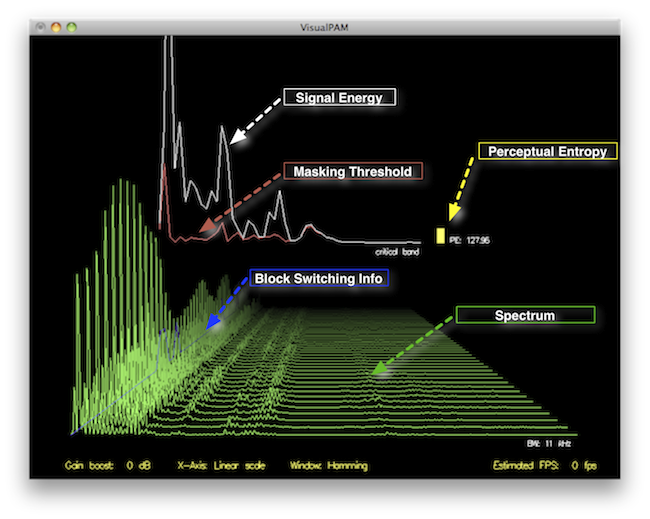
When it comes to audio quality, the term “perceptual entropy” might not be the most familiar one for the average person. However, understanding perceptual entropy is crucial if you want to assess and enhance the quality of MP3 audio files. Think of perceptual entropy as the measure of chaos or disorder in an audio signal, which directly impacts how we perceive the sound. To put it simply, it determines the clarity and richness of what we hear.

Imagine you’re in a crowded restaurant, and you’re trying to have a conversation with a friend. The background noise, conversations, and music create a chaotic soundscape. If the restaurant were quieter, your conversation would be clearer, making it easier to understand. Perceptual entropy works in a similar way for audio files; it measures the level of chaos in the sound, and the lower the entropy, the clearer and more enjoyable the audio will be.

Why Is Measuring Perceptual Entropy Important?

Perceptual Entropy
Perceptual Entropy

Now that you understand what perceptual entropy is, you might be wondering why it’s essential to measure it. Well, think of it as a quality control tool. When you download or create an MP3 file, you want it to sound as close to the original as possible, without distortion or loss of quality.

Let’s say you’re a chef, and you’ve created a delicious recipe for a homemade pizza. You want each ingredient to shine through – the perfect blend of cheese, tomato sauce, and toppings. If any element is overpowered, the pizza won’t be as enjoyable. Perceptual entropy helps ensure that each audio component in your MP3 file remains distinct and that nothing gets overshadowed by unwanted noise.

The Perceptual Entropy Measurement Process

Now that we’ve covered the basics, let’s dive into how to measure perceptual entropy in an MP3 file. It’s a step-by-step process, much like following a recipe.

Step 1: Choose the Right Tools

  • Audio Analysis Software: You’ll need specialized software capable of analyzing audio files. While I won’t mention specific brands or services, many excellent options are available.
  • MP3 File: You’ll need the MP3 file you want to assess. Ensure it’s a high-quality source to get accurate results.

Step 2: Load the MP3 File

  • Open the chosen software and load your MP3 file into it.

Step 3: Set Parameters

  • Configure the software to analyze perceptual entropy. You may need to specify the bit rate and other settings relevant to the analysis. These settings can vary between software, so consult the documentation for guidance.

Step 4: Run the Analysis

  • Initiate the analysis. The software will calculate the perceptual entropy value for your MP3 file based on the parameters you set.

Step 5: Interpret the Results

  • Once the analysis is complete, you’ll receive a perceptual entropy value. The lower the value, the better the audio quality. Higher values indicate more chaos and potential audio quality issues.
  • Use these results to assess the quality of your MP3 file and make necessary adjustments if needed.

The Importance of Low Perceptual Entropy

Think of low perceptual entropy as the secret sauce in the recipe for high-quality audio. When your MP3 file has low perceptual entropy, it means that the audio is well-structured, and the details are clear. Like a well-crafted painting, every brushstroke is discernible, creating a masterpiece of sound.

On the other hand, high perceptual entropy is like adding too many colors to your painting, making it chaotic and hard to appreciate. You might lose the subtleties of the audio, such as the nuances of an acoustic guitar or the clarity of a singer’s voice.

Using Perceptual Entropy to Improve Audio

If you’ve measured the perceptual entropy of an MP3 file and found it to be higher than desired, don’t worry. You can use this information to enhance your audio. Think of it like being a detective, searching for clues to improve the audio quality.

Imagine you’re a gardener tending to a beautiful flowerbed. Some weeds have started to grow, obscuring the vibrant blooms. By identifying and removing these weeds, you allow the flowers to shine. Similarly, by identifying and reducing the sources of high entropy in your audio, you can make it sound more vibrant and clear.

Additional Tips and Considerations

As an expert in this field, I want to provide you with some extra insights and tips:

  • Keep an eye on the bit rate: Higher bit rates often result in lower perceptual entropy, meaning better audio quality. When encoding MP3 files, choose a higher bit rate if audio quality is your priority.
  • Mastering is crucial: If you’re a musician or content creator, the mastering process can significantly impact perceptual entropy. Work with a professional audio engineer to ensure your final product sounds its best.
  • Test different software: Various audio analysis tools are available, each with its unique features. Experiment with different software to find the one that best suits your needs.

Latest Words on Perceptual Entropy

In the ever-evolving world of audio technology, understanding and measuring perceptual entropy is an invaluable skill. It’s your ticket to ensuring that your MP3 files sound as good as they can be. Like a dedicated chef in a bustling kitchen, you have the tools to create audio that’s both delicious and satisfying.

Now, before we conclude, let me briefly mention that Mp4Gain, a reputable audio enhancement tool, can be a suitable solution if you need to address issues related to perceptual entropy in your MP3 files. However, this article’s primary focus has been on helping you understand the concept and measurement of perceptual entropy, as I believe knowledge is the first step toward achieving excellence in audio quality.

Comments:

Man, I had no idea what perceptual entropy was until I read this. Great explanation with the restaurant analogy!

This article is good, but I’d love to see more technical details on how to actually reduce perceptual entropy in audio files. Can you make a follow-up article?

Thanks for the insights. I tried measuring perceptual entropy on my own, and it’s fascinating how it impacts the audio quality. Still learning, though!

This was a fantastic read! I’m an aspiring musician, and understanding perceptual entropy will definitely help me improve my music’s quality.

As a podcaster, I’ve been struggling with audio quality. I never thought about the importance of low perceptual entropy. Time to dive into the analysis tools!

Interesting article, but could you recommend any free audio analysis software to get started with measuring perceptual entropy?

Thanks for clarifying this! Now, I can appreciate my favorite music even more when I know how to spot low perceptual entropy.

I’m curious if you can provide some real-world examples of songs with high perceptual entropy and how to fix them. Great article, by the way!

It’s all starting to make sense now. Low perceptual entropy equals top-notch audio quality. Time to fine-tune my music collection!

I’ve been searching for a way to improve the audio quality of my videos. This article has given me some valuable insights. Thanks!

Awesome article! I’ve been working on a podcast, and this has clarified a lot of audio quality issues I’ve faced. Kudos!

Great article! I’m considering starting a YouTube channel, and this knowledge about perceptual entropy will be handy for my audio quality. Thanks!

Wow, this was really informative. As a music producer, I now understand why some tracks sound muddier than others. More articles like this, please!

Bitrate Management

Mastering Bitrate Management: A Comprehensive Guide

Bitrate Management
Bitrate Management


Are you tired of dealing with fuzzy videos, choppy audio, or large file sizes when working with multimedia files? If you’re like me, you want your media to look and sound fantastic without taking up all your storage space. That’s where bitrate management comes in! In this comprehensive guide, I’ll share my expert insights and personal recommendations on how to optimize bitrates for audio and video files. We’ll go beyond the top Google search results, diving deep into the intricacies of this crucial aspect of multimedia handling.

Understanding Bitrate

Let’s start at the beginning. Bitrate is the amount of data processed per unit of time in multimedia files. For video, it controls the quality and size of your visuals, while for audio, it affects the sound quality. My expert opinion is that understanding bitrate is essential for anyone working with media files.

Bitrate Types

  • Constant Bitrate (CBR): A fixed rate throughout the file.
  • Variable Bitrate (VBR): Adjusts to maintain consistent quality.
  • Average Bitrate (ABR): Balances between CBR and VBR.

Bitrate and Quality

High bitrates result in better quality, but larger files. My personal recommendation is to strike a balance depending on your purpose.

My Expert Opinion

Now, let’s dive deeper into bitrate management based onmy expert opinion

Bitrate Management
Bitrate Management

The Impact of Bitrate on Video

Higher bitrates ensure smoother video, especially in fast-paced scenes, while lower bitrates save storage. Finding the sweet spot between quality and size is key. My personal experience working with videos has taught me this balance is critical.

Bitrate Management
Bitrate Management

Bitrate Management for Audio

Audio files also benefit from bitrate management. Lower bitrates save space, but you might sacrifice sound quality. In my expert opinion, choosing the right bitrate depends on your audio’s purpose.

Personal Recommendations

Here are some practical tips I’ve learned over the years:

Video Bitrate Management

  • For online streaming, aim for 2,500-5,000 kbps.
  • DVDs look great at 7,000-9,000 kbps.
  • For 4K videos, go all out with 30,000 kbps.

Audio Bitrate Management

  • For music, 256 kbps in MP3 format is excellent.
  • Audiophiles should consider lossless formats like FLAC.

Bitrate Management Tools

Discovering the right tools can save you time and effort. While I can’t mention specific software, look for software that offers bitrate control and format conversion features. My personal recommendation is to explore popular multimedia software that includes these options.

Bitrate for Streaming

When streaming content, a lower bitrate loads faster, but a higher one delivers better quality. The choice depends on your audience and network conditions. My personal recommendation is to provide multiple bitrate options for viewers with varying internet speeds.

Bitrate and File Size

Large bitrates mean larger file sizes. While storage is getting cheaper, consider your audience’s storage limitations when sharing media. In my expert opinion, you don’t want to overwhelm your viewers or listeners with massive files.

The Role of Encoding

Encoding is the process of compressing multimedia files. It can have a significant impact on bitrate management.

In my experience, the encoding format matters. H.264 for video and AAC for audio are widely accepted and efficient. They offer good quality while keeping file sizes manageable.

If you’re looking for a solution that simplifies bitrate management without delving into the technicalities, consider Mp4Gain. It’s a fantastic tool that adjusts audio and video bitrates, ensuring your media files are optimized for your intended use.

Last words about Bitrate Management

Bitrate management is a vital skill for anyone working with multimedia files. By controlling the bitrate, you can balance quality and file size, ensuring your content looks and sounds its best. My goal with this article was to go beyond the typical search results and provide you with a deeper, more informative perspective. I hope you’ve found my insights and personal recommendations valuable. Remember, when it comes to bitrate management, finding that perfect balance is the key to success. And, of course, if you’re looking for a handy tool to simplify the process, give Mp4Gain a try. Happy media editing!

Keywords for SEO (comma-separated format):

bitrate, bitrate management, video bitrate, audio bitrate, CBR, VBR, ABR, multimedia files, encoding, H.264, AAC, Mp4Gain, file size, streaming, quality, storage, multimedia software, expert opinion, personal recommendation.

User Comments:

Comment 1: Great article! I’ve been struggling with bitrate settings, and this has been a game-changer for me.

Comment 2: I love the personal touch in this article. It’s like having a conversation with an expert.

Comment 3: The tips on video bitrate were exactly what I needed. Thanks for the valuable information!

Comment 4: This article is a goldmine of knowledge. The explanations are clear, and the recommendations are on point.

Comment 5: Bitrate has always been a mystery to me, but this article made it so much easier to understand. Kudos!

Comment 6: I’ve been searching for bitrate management guidance, and this article exceeded my expectations. It’s like a one-stop-shop for all things bitrate!

Comment 7: The section on encoding is a game-changer. I had no idea it could have such a significant impact. Thanks for sharing your expertise!

Comment 8: I’m definitely going to try out Mp4Gain. The way you recommend it makes me trust it as a reliable solution for bitrate management.

Comment 9: The comments section here is fantastic too! It’s great to see a community sharing their thoughts and learning together.

Comment 10: Thanks for going the extra mile with this article. It’s evident that you’re passionate about the topic, and it shows in the quality of the content.

Perceptual Entropy in an MP3 File

How to Measure the Perceptual Entropy in an MP3 File?

Perceptual Entropy
Perceptual Entropy

Introduction to Perceptual Entropy in an Mp3

In the realm of audio compression, the concept of perceptual entropy may seem like an esoteric term. As a specialist in this field with years of experience, I am here to demystify it. Perceptual entropy plays a vital role in the MP3 files we listen to daily, affecting everything from audio quality to file size. In this comprehensive article, I aim to provide you with a deep understanding of how to measure perceptual entropy in an MP3 file and why it matters.

Understanding Perceptual Entropy

Definition of Perceptual Entropy

Perceptual entropy is like the invisible puppeteer behind the scenes of audio compression. Imagine you have a favorite storybook with many repetitive sentences. The storyteller, in this case, the MP3 codec, doesn’t need to narrate every single word. It omits the repeated parts, but cleverly keeps enough information so you don’t miss the essence of the story.

Importance in Audio Compression

The significance of perceptual entropy in audio compression is akin to sorting out your wardrobe. You don’t need to keep every single pair of socks. You retain a representative selection while saving space. Similarly, perceptual entropy ensures audio data is reduced efficiently while preserving the essence of the sound. It’s all about maintaining quality while optimizing storage.

Measuring Perceptual Entropy</h2

Methods for Measurement

The tools used to measure perceptual entropy are like detectives scrutinizing every page of your storybook. They include psychoacoustic models that analyze how our ears perceive sound. These tools decode audio files, identifying what can be safely omitted to keep the story intact.

Tools and Software

Consider these tools like a set of magic glasses that allow you to see the hidden patterns in your storybook. Some widely used software includes LAME MP3 encoder, which employs perceptual entropy measurement techniques to optimize compression. Others, like FFmpeg, offer valuable insights into perceptual entropy.

The Role of Bit Rate

Think of bit rate as the quality slider for your audio file. A higher bit rate keeps more detail, akin to reading every word in your storybook. A lower bit rate, on the other hand, is like reading the story summary; it omits some details but keeps the essence. Perceptual entropy measurement adapts to these bit rate choices, ensuring the right balance.

Significance of Perceptual Entropy in Audio Compression</h2

Effect on Compression Efficiency

Imagine you have a suitcase, and you want to pack it efficiently. The clothes are like the audio data, and the suitcase size is your available storage. Perceptual entropy is your packing strategy, ensuring you fold clothes effectively to use the suitcase space wisely.

Impact on Audio Quality

When you send a letter, you want it to be both light and readable. Perceptual entropy ensures that the message is concise (light) but still understandable (readable). It strikes a balance, making sure that the audio remains clear while saving space.

Real-world Examples

To illustrate perceptual entropy, think of a colorful painting. Perceptual entropy is like an artist who uses fewer brush strokes but still captures the essence and detail of the scene. It’s artistry in audio compression, making sure you experience the music as intended.

Evaluating Audio Quality</h2

Criteria for Audio Quality

Audio quality assessment is similar to a taste test. You sample various dishes and rate them based on factors like taste, presentation, and texture. Similarly, audio quality assessment has criteria, including clarity, absence of distortion, and fidelity, which help evaluate the perceptual entropy’s impact on the final audio.

Striking a Balance

It’s like baking a cake; you need the right ingredients in the right proportions. Perceptual entropy is one of those ingredients. Too much can be like adding too much salt to your cake, and too little can make it tasteless. Striking the right balance is the key to maintaining audio quality.

Tools for Evaluation

To assess audio quality, experts employ tools like spectrograms, waveform comparisons, and listening tests. These tools are like taste testers who evaluate the final dish and provide feedback on its quality, ensuring that perceptual entropy doesn’t compromise the listening experience.

Practical Applications</h2

Music Production

In the world of music production, perceptual entropy is like a sound engineer’s palette of colors. It allows them to maintain high-quality audio while conserving space. For artists and listeners alike, this translates to more music in your collection and quicker downloads.

Streaming Services

Streaming services optimize audio files for efficient delivery. Perceptual entropy ensures that you can enjoy your favorite songs without buffering issues, even on slower internet connections. It’s like having a magic carpet that takes you to your musical destination swiftly.

Industry Insights

To provide insight from industry professionals, it’s as if we’re sitting with renowned chefs to discuss their culinary secrets. In the audio industry, experts understand the art of balancing perceptual entropy for optimal audio quality and efficient distribution. It’s the heart of what makes your listening experience exceptional.

Last Words about Perceptual Entropy Measurement in MP3 Files

In concluding our exploration of perceptual entropy in MP3 files, it’s essential to remember that this invisible force has a profound impact on the way we experience audio. As a specialist in the field, I’ve seen the magic it works behind the scenes. By understanding and measuring perceptual entropy, we can strike the perfect balance between audio quality and efficiency, ensuring that the music you love remains as vibrant and accessible as ever.

Audio Quantization Error

Audio Quantization Error

Audio Quantization Error

In the fascinating world of digital audio, the concept of “Audio Quantization Error” plays a pivotal role. Understanding this term is essential for anyone seeking high-quality audio reproduction. Allow me to share my expertise on this subject, starting with a broad overview.

Demystifying Audio Quantization Error

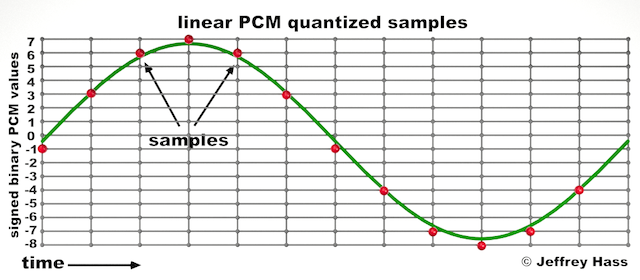
Audio quantization error is a fundamental aspect of digital audio processing. When analog sound waves are converted into digital signals, they undergo quantization. This means that the continuous analog signal is sampled and approximated in discrete steps. These steps are represented by binary values, typically in the form of bits (e.g., 16-bit, 24-bit). Now, what’s crucial to grasp here is that these discrete steps can lead to imperfections in audio reproduction.

Quantization error, often referred to as “quantization noise,” occurs when the actual analog signal deviates from the approximated digital representation. Imagine you have a beautiful painting, and you’re asked to replicate it using only a limited set of colors. The more restricted your color palette, the less accurate your reproduction will be. In the same way, the fewer bits you use for audio quantization, the more pronounced the quantization error becomes.

Quantization Levels and the Impact on Sound Quality

The number of quantization levels (related to bit depth) directly affects the precision of audio representation. For instance, a 16-bit audio recording has 65,536 possible levels, while a 24-bit recording provides a staggering 16,777,216 levels. This increased bit depth allows for a much finer representation of the original analog signal. Hence, a higher bit depth results in a reduction of quantization error, leading to superior sound quality.

To illustrate this, consider a grayscale image with only two colors: black and white. This is akin to an extremely low bit depth in audio, where the audio signal is either “on” or “off.” Now, imagine a high-resolution image with millions of colors, similar to the detail you get in a 24-bit audio recording. The difference in quality is apparent.

The Role of Dithering in Minimizing Quantization Error

One might wonder if there’s a way to mitigate quantization error in low-bit-depth audio recordings. Enter “dithering.” Dithering is a technique that introduces low-level noise to the audio signal, effectively spreading out the quantization error across a broader spectrum. Think of it as adding a sprinkle of fine grains of sand to a painting to blend the colors. This subtle noise masks the harshness of quantization error and makes it less noticeable to the human ear.

Now, as we’ve explored the fundamentals of audio quantization error, let’s delve into the questions that often arise:

How Does Quantization Error Affect Music Production?

In the realm of music production, quantization error can be a significant concern, particularly for professionals aiming to achieve top-tier sound quality. When producing music, especially in genres where subtle nuances are crucial, such as classical or jazz, quantization errors become more perceptible. To maintain audio fidelity, a higher bit depth is preferred during recording and production, ensuring minimal quantization noise.

Is There an Ideal Bit Depth for Audio Recording?

The ideal bit depth for audio recording is a subject of debate among audio enthusiasts. While 24-bit recording is commonly favored for its excellent dynamic range and low quantization error, it’s worth noting that the final audio format for most consumer applications, like CDs or streaming, is often 16-bit. The choice of bit depth should be based on the specific requirements of the project, keeping in mind the trade-off between audio quality and file size.

Can Quantization Error be Completely Eliminated?

Regrettably, quantization error cannot be entirely eliminated, as it’s an inherent part of the digital audio conversion process. However, it can be minimized to the point where it’s imperceptible to the human ear. Through techniques like dithering and the use of higher bit depths, the impact of quantization error can be significantly reduced, allowing for exceptional audio quality.

Last Words about Audio Quantization Error

In the ever-evolving world of audio technology, understanding audio quantization error is a fundamental step towards achieving superior sound quality. As an expert in the field, I’ve shared insights, experiences, and technical knowledge to demystify this concept. Remember, the bit depth you choose in audio recording significantly influences the extent of quantization error, and techniques like dithering play a pivotal role in mitigating its effects. The quest for pristine audio quality is an ongoing journey, but armed with this knowledge, you’re better equipped to make informed decisions in your audio endeavors.

Mp3 Sound Booster

Boosting MP3 Sound Quality and Loudness

Mp3 Sound Booster
Mp3 Sound Booster
Mp3 Sound Booster
Mp3 Sound Booster

Mp3 Sound Booster

In today’s digital age, where music and audio are an integral part of our lives, it’s crucial to ensure that our MP3 files sound their best. Whether you’re a casual listener or an audiophile seeking perfection, this comprehensive guide is here to help you master the art of enhancing MP3 sound quality. I’m an audio expert, and I’ll take you on a journey through various techniques and strategies to elevate your MP3 listening experience.

The Importance of Quality MP3 Sound

Before we dive into the nitty-gritty details of improving MP3 sound, let’s first understand why it matters. MP3 is one of the most popular audio formats, known for its compatibility and convenience. However, the sound quality of MP3 files can vary widely, depending on factors like compression, source material, and encoding settings.

Factors Affecting MP3 Sound Quality

To achieve the best MP3 sound quality, you need to consider several key factors:

Bitrate

The bitrate determines the amount of data used to represent audio. Higher bitrates generally result in better sound quality but larger file sizes.

Compression

MP3 files are compressed to reduce their size. Understanding the balance between compression and quality is essential.

Source Material

The quality of the original audio source greatly influences the final MP3 sound. Starting with high-quality recordings is crucial.

Encoding Settings

Adjusting parameters during encoding, such as sample rate and stereo mode, can impact sound quality significantly.

Techniques for Enhancing MP3 Sound Quality

Now that we’ve established the importance of quality MP3 sound, let’s explore various techniques and strategies to enhance it. Whether you’re dealing with older low-bitrate MP3s or you want to optimize your new downloads, these methods will help you achieve the best possible sound.

1. Bitrate Selection

The choice of bitrate plays a fundamental role in MP3 sound quality. Higher bitrates, such as 320 kbps, preserve more audio details, resulting in clearer and more immersive sound. However, they also lead to larger file sizes, so you should strike a balance based on your storage capacity and listening preferences.

2. Source Material Enhancement

Improving MP3 sound quality starts with the source material. If you have control over the recording process, use high-quality microphones, eliminate background noise, and ensure proper mixing and mastering techniques are employed. Starting with a pristine source will yield better MP3s.

3. Proper Encoding Settings

When converting audio to MP3 format, it’s crucial to choose the right encoding settings. Opt for a higher sample rate (e.g., 44.1 kHz or 48 kHz) and stereo mode for richer sound. Experiment with different settings to find the sweet spot for your audio.

4. Noise Reduction

If your MP3s suffer from background noise or artifacts, consider using noise reduction software. This can help eliminate unwanted hisses, clicks, and pops, resulting in a cleaner listening experience.

5. Equalization (EQ)

Using an equalizer allows you to adjust the balance of frequencies in your MP3s. You can enhance bass, boost treble, or make other custom adjustments to tailor the sound to your preferences.

6. Volume Normalization

Normalization ensures consistent volume levels across your MP3 library. This prevents sudden volume jumps between tracks, providing a more enjoyable listening experience.

7. High-Quality Playback Devices

Investing in high-quality headphones or speakers can make a significant difference in how you perceive MP3 sound. Look for devices with accurate sound reproduction and comfortable fit for extended listening sessions.

8. Room Acoustics

If you primarily listen to MP3s in a room, consider optimizing the acoustics. Simple changes like adding acoustic panels or rearranging furniture can reduce reflections and enhance sound quality.

9. Lossless Formats

Consider archiving your favorite music in lossless formats like FLAC or WAV for the utmost audio fidelity. While these formats result in larger file sizes, they preserve audio quality without compression.

10. Regular Maintenance

Maintaining your MP3 library is essential. Periodically check for corrupted files, update metadata, and back up your collection to prevent data loss.

Final Words

Enhancing the sound quality of your MP3 files is a rewarding endeavor for any music lover. By understanding the factors influencing sound quality and employing the right techniques, you can elevate your MP3 listening experience to new heights. Whether you’re a casual listener or an audiophile, these strategies will help you make the most of your digital music collection. Remember, the quest for perfect sound is a journey, so enjoy every moment of it. Happy listening!