As an audio and video enthusiast with many years of experience in the field, I know the importance of using high-quality audio codecs. One of the most popular codecs today is AAC (Advanced Audio Coding). In this article, I will provide you with all the essential information you need to know about AAC, its benefits, and how it works.
What is AAC and Why is it Popular?
AAC is a lossy audio codec that was developed by the MPEG (Moving Picture Experts Group) organization. It is designed to deliver high-quality audio at lower bit rates, which makes it a popular choice for streaming audio and video content. AAC is used by major companies like Apple, YouTube, and Netflix because it provides better sound quality than MP3 at the same bit rate.
According to my experience, AAC is also widely used for mobile applications and portable devices because it has a smaller file size than other codecs, which helps to conserve storage space and reduce data usage. Additionally, it can handle a wide range of audio and video formats, making it a versatile option for various media applications.
“AAC is the preferred audio codec for streaming services, including Apple Music and Spotify.” – The Streaming Blog
How Does AAC Work?
AAC works by compressing audio signals into digital data that can be transmitted over networks or stored on digital media. It does this by removing audio data that is considered inaudible or less important to human hearing, which reduces the overall file size without sacrificing audio quality.
According to my information, AAC uses a complex compression algorithm that is based on the principles of psychoacoustics, which is the study of how humans perceive sound. This means that AAC can detect and remove audio data that is masked by other sounds, resulting in more efficient compression and higher sound quality.
“AAC achieves better sound quality than MP3 at the same bit rate by using more advanced compression algorithms.” – Digital Trends
What are the Benefits of Using AAC?
There are several benefits to using AAC for audio and video applications. Firstly, it provides better sound quality than other codecs at the same bit rate. This means that you can enjoy high-quality audio without having to sacrifice storage space or data usage.
Secondly, AAC is compatible with a wide range of devices and software, including mobile devices, computers, and media players. This makes it a versatile option for various media applications, from streaming audio and video content to creating high-quality audio files for music production.
Lastly, AAC is an efficient codec that provides high-quality audio with a smaller file size. This makes it an ideal choice for streaming audio and video content, where bandwidth and storage space are limited.
“AAC is an excellent choice for creating high-quality audio files for music production and streaming audio and video content.” – Sound on Sound
FAQ
What is the difference between AAC and MP3?
AAC provides better sound quality than MP3 at the same bit rate, and it also has a more efficient compression algorithm. This means that you can enjoy high-quality audio with a smaller file size when using AAC.
“AAC provides better sound quality than MP3 at the same bit rate and has a more efficient compression algorithm.” – CNET
Is AAC compatible with all media players?
AAC is compatible with most media players, including mobile devices, computers, and media players. However, some older media players may not support AAC, so it’s always a good idea to check the compatibility before using AAC files.
“AAC is compatible with most modern devices and software, making it a popular choice for audio encoding. In fact, many popular streaming services such as Apple Music and Spotify use AAC as their primary audio codec. This means that if you’re listening to music on one of these platforms, chances are you’re already listening to AAC-encoded audio.
One of the advantages of AAC over other codecs is its ability to deliver high-quality audio at lower bitrates. This is due to the use of advanced compression techniques such as spectral band replication (SBR) and parametric stereo. These techniques allow AAC to achieve a similar level of audio quality as other codecs at a lower bitrate, making it more efficient in terms of file size.
Another advantage of AAC is its support for multi-channel audio, allowing for immersive audio experiences such as 5.1 and 7.1 surround sound. This makes AAC a popular choice for movies and TV shows, as well as gaming.
Of course, like any codec, AAC has its limitations. While it can deliver high-quality audio at lower bitrates, it still falls short of lossless codecs such as FLAC in terms of audio fidelity. Additionally, AAC is not an open-source codec, meaning that it can be more difficult to integrate into certain software and hardware.
Overall, AAC is a versatile and widely-used codec that offers a good balance between audio quality and file size. If you’re looking to encode your audio files for use on modern devices and platforms, AAC is definitely worth considering.
As an expert in the field, I have used AAC extensively in my work as an audio engineer and have found it to be a reliable and efficient codec. While there are certainly other codecs out there with their own unique advantages, AAC remains a popular choice for a reason.
As a knowledgeable expert with many years of experience in the audio industry, I have learned that there are many different audio file formats available, each with their own unique features and advantages. In this article, I will focus on the M4A file format and provide you with all the information you need to know.
What is an M4A file?
An M4A file is an audio file that is encoded with Advanced Audio Coding (AAC) technology. This file format was introduced by Apple and is commonly used on their devices such as the iPhone and iPod. However, it is also compatible with Windows and other operating systems.
“AAC is the default encoding used for most of Apple’s devices and is a lossy format, which means that it removes some data during the encoding process to reduce the size of the file. This allows for higher quality audio in a smaller file size.”
Why use M4A files?
M4A files are popular because of their high quality sound and small file size. They are also a versatile format as they can be used for both audio and video files. M4A files can be played on a wide range of devices including smartphones, computers, and MP3 players.
“The high quality and small size of M4A files make them ideal for streaming music services. They take up less bandwidth than other formats, allowing for faster streaming and a smoother listening experience.”
How to convert M4A files
If you have an audio file in another format that you want to convert to M4A, there are many software options available. One such option is MP4Gain, which is compatible with all major audio and video formats and can normalize volume levels as well. Simply download the software and follow the easy-to-use instructions to convert your files.
“In the words of musician and producer Quincy Jones, ‘Music is the soundtrack of your life.’ With the ability to convert files to M4A, you can ensure that your soundtrack is of the highest quality and can be enjoyed on all your devices.”
FAQ
What software can play M4A files?
Many media players can play M4A files, including iTunes, Windows Media Player, and VLC.
Can I edit M4A files?
Yes, there are many software options available for editing M4A files, including Audacity and Adobe Audition.
What is the difference between M4A and MP3 files?
M4A files use AAC technology and are typically smaller in file size than MP3 files. They also offer higher quality sound.
How can I normalize the volume levels of my M4A files?
Software such as MP4Gain can normalize volume levels of your M4A files, ensuring a consistent listening experience.
In conclusion, as a knowledgeable expert in the audio industry, I highly recommend the use of M4A files for their high-quality sound and versatility. With the ability to convert files to M4A using software such as MP4Gain, you can ensure that your music and audio files are of the highest quality and can be enjoyed on all your devices.
Audio compression is the process of reducing the size of digital audio files by removing redundant or unnecessary information, while maintaining the perceived quality of the original sound. This is done by using various algorithms that analyze and modify the audio data in a way that reduces its file size.
Types of Audio Compression Techniques
There are two main types of audio compression techniques: lossy and lossless.
Lossy Compression
Lossy compression algorithms are used to achieve high compression rates, but at the cost of some loss in quality. In lossy compression, some of the original audio data is discarded or modified in a way that reduces its size. The amount of data that is removed or modified depends on the compression algorithm used.
Some popular lossy compression algorithms include MP3, AAC, and WMA. These algorithms are commonly used for music streaming, online radio, and other applications where high compression rates are necessary.
Lossless Compression
Lossless compression algorithms are used to compress digital audio files without losing any information. These algorithms are designed to reduce the size of the file by removing redundancies in the data, but without modifying any of the original information.
Some popular lossless compression algorithms include FLAC, ALAC, and WAV. These algorithms are commonly used for high-quality music streaming and for archiving music collections.
How Audio Compression Works
Audio compression works by analyzing the original audio data and then modifying it in a way that reduces its size while maintaining its quality. This is done using various mathematical algorithms that compress the data.
The most common way to compress audio data is to use perceptual coding. This method takes advantage of the human ear’s limitations in hearing certain frequencies and sounds. By removing these sounds, the audio data can be compressed without the listener noticing any loss in quality.
Another method of audio compression is predictive coding. This method uses mathematical algorithms to predict the next sample in a waveform based on previous samples. The difference between the predicted sample and the actual sample is then compressed and stored.
Why Audio Compression is Important
Audio compression is important because it allows us to store and transmit audio data more efficiently. This means that we can store more audio files on our devices and transmit audio data faster over the internet. Without audio compression, it would be impossible to stream music or podcasts over the internet.
12 Common Questions About Audio Compression Techniques
1. What is the difference between lossy and lossless audio compression?
Lossy compression algorithms are designed to achieve high compression rates at the cost of some loss in quality, while lossless compression algorithms are designed to compress audio files without losing any information.
2. Which audio compression algorithm should I use?
The choice of audio compression algorithm depends on the intended use of the audio file. Lossy compression algorithms like MP3 and AAC are commonly used for music streaming and online radio, while lossless compression algorithms like FLAC and ALAC are commonly used for high-quality music streaming and archiving.
3. How much does audio compression affect the quality of the original sound?
The amount of quality loss in audio compression depends on the compression algorithm used and the degree of compression applied. Lossy compression algorithms generally result in some loss in quality, while lossless compression algorithms do not.
4. How can I tell if an audio file has been compressed?
You can usually tell if an audio file has been compressed by looking at its file extension. Lossy compressed files usually have extensions like MP3, AAC
Digital audio bit depth refers to the number of bits used to represent each sample in a digital audio signal. Bit depth is a crucial aspect of digital audio because it affects the accuracy and dynamic range of the signal.
In digital audio, sound is captured and processed as a series of discrete samples, with each sample representing the amplitude of the sound wave at a specific point in time. The bit depth determines the number of possible amplitude values that can be represented in each sample.
How Does Bit Depth Affect Audio Quality?
The higher the bit depth, the more accurately the digital audio signal can represent the original analog waveform. A higher bit depth allows for a greater dynamic range, which means that the quietest sounds can be represented with more accuracy, and the loudest sounds can be represented without distortion.
For example, a 16-bit audio signal can represent 65,536 possible amplitude values, while a 24-bit audio signal can represent 16,777,216 possible amplitude values. This means that a 24-bit audio signal can capture a wider range of dynamic levels and is capable of greater accuracy and detail than a 16-bit audio signal.
What is the Relationship Between Bit Depth and Signal-to-Noise Ratio?
As the bit depth increases, the signal-to-noise ratio (SNR) also increases. SNR is the ratio between the desired signal (the audio) and the background noise.
A higher bit depth means that there are more possible amplitude values for each sample, which reduces the amount of quantization noise in the signal. Quantization noise is a type of distortion that occurs when the analog signal is converted to digital.
How is Bit Depth Measured?
Bit depth is measured in bits per sample. Common bit depths in digital audio include 16-bit, 24-bit, and 32-bit.
What is Dithering?
Dithering is a process used to reduce the distortion caused by quantization error in digital audio. When an analog signal is digitized, the conversion process rounds the amplitude of each sample to the nearest possible value.
Dithering adds a small amount of random noise to the signal before it is quantized, which allows for a smoother transition between amplitude values and reduces the audible effects of quantization error.
What is the Difference Between Bit Depth and Sample Rate?
While bit depth determines the number of possible amplitude values in each sample, sample rate determines the number of samples taken per second. A higher sample rate allows for greater accuracy in capturing the original analog waveform, but it does not affect the dynamic range or accuracy of each individual sample.
What is the Ideal Bit Depth for Recording and Mixing?
The ideal bit depth for recording and mixing depends on the intended use of the final product. For most applications, a bit depth of 24 bits is considered to be sufficient, as it provides a wide dynamic range and high accuracy.
However, for applications that require extreme accuracy and detail, such as classical music recording, a higher bit depth may be necessary.
What is the Relationship Between Bit Depth and File Size?
As the bit depth increases, the file size of the digital audio also increases. This is because a higher bit depth requires more storage space to represent the additional amplitude values.
What is the Relationship Between Bit Depth and Processing Power?
Higher bit depths require more processing power to manipulate and process. This is because the additional amplitude values must be calculated and stored in memory.
What Happens When a High Bit-Depth Audio File is Converted to a Lower Bit-Depth Format?
When a high bit-depth audio file is converted to a lower bit-depth format, the result is a loss of some of the original audio data. This is because the lower bit-depth format has fewer bits to represent the audio data, which means that some of the information is lost in the conversion process.
For example, if a 24-bit audio file is converted to a 16-bit format, the conversion process will discard the least significant 8 bits of each sample. This can result in a loss of some of the subtle nuances and details in the audio, which can be particularly noticeable in quiet passages or when the audio is heavily processed.
It’s worth noting that some audio formats, such as MP3 and AAC, use lossy compression to reduce the file size. This means that even if the original file was at a high bit-depth, converting it to a lower bit-depth format such as MP3 will result in a further loss of data due to the compression algorithm.
What is Dithering and How Does it Help with Bit Depth Reduction?
Dithering is a technique used to reduce the impact of bit-depth reduction when converting high-resolution audio to a lower resolution format. It works by adding a small amount of random noise to the audio signal before it is truncated to the lower bit depth.
This noise effectively masks the truncation distortion, allowing the audio to retain some of its original detail and clarity. Dithering is particularly useful when converting from a higher bit-depth format to a lower bit-depth format, as it can help to mitigate the loss of information that would otherwise occur.
How Does Bit Depth Affect Audio Quality?
The bit depth of an audio file can have a significant impact on its perceived quality. Generally speaking, higher bit-depth files can capture more detail and nuance in the audio, resulting in a more accurate and realistic reproduction of the original recording.
For example, a 16-bit audio file has a maximum dynamic range of 96 dB, while a 24-bit file has a maximum dynamic range of 144 dB. This means that a 24-bit file can capture much quieter sounds and much louder sounds than a 16-bit file, resulting in a more accurate representation of the original recording.
That being said, the impact of bit depth on perceived audio quality can vary depending on a number of factors, including the quality of the recording equipment, the mastering process, and the listening environment.
What is the Difference Between Bit Depth and Sample Rate?
While bit depth and sample rate are both important aspects of digital audio, they refer to different things. Bit depth refers to the number of bits used to represent each sample in an audio file, while sample rate refers to the number of samples per second that are taken to create the audio file.
In other words, bit depth determines the level of detail captured in each sample, while sample rate determines the temporal resolution of the audio. Both bit depth and sample rate can have an impact on the perceived quality of an audio file, and both are important considerations when working with digital audio.
What is the Best Bit Depth for Audio Production?
The best bit depth for audio production depends on a number of factors, including the specific needs of the project and the available hardware and software. In general, however, a bit depth of 24 bits is considered to be a good choice for most recording and production purposes.
This is because a 24-bit depth provides a high level of detail and dynamic range, while also being widely supported by modern recording equipment and software. That being said, there may be situations where a lower bit depth may be sufficient. For example, if the final audio product will only be distributed online or through streaming services, a 16-bit depth may be acceptable as it will still provide decent quality while reducing file size and download times. Additionally, if the recording environment is not optimal and contains a high level of background noise, a lower bit depth may actually be preferable as it can help mask the noise.
How does bit depth affect audio quality?
Bit depth plays a critical role in determining the quality of digital audio recordings. The higher the bit depth, the greater the dynamic range and level of detail that can be captured in a recording. This results in a more accurate and faithful reproduction of the original sound source. In contrast, a lower bit depth may result in a loss of detail and accuracy, leading to a less faithful reproduction of the original sound.
Can bit depth be converted after recording?
While it is possible to convert the bit depth of a digital audio file after recording, it is generally not recommended. This is because bit depth conversion can result in a loss of information and a decrease in overall audio quality. If possible, it is best to record at the desired bit depth from the start to ensure the highest possible quality.
What are some common bit depths used in digital audio?
The most common bit depths used in digital audio are 16-bit, 24-bit, and 32-bit. 16-bit is the standard for CDs and is widely used in digital audio recording for distribution on streaming platforms. 24-bit is increasingly becoming the standard for professional recording due to its high level of detail and dynamic range. 32-bit is relatively new and provides an even greater level of detail and dynamic range, but is not yet widely supported by all recording equipment and software.
Does bit depth affect the final file size of an audio recording?
Yes, bit depth does affect the final file size of an audio recording. A higher bit depth requires more data to represent each sample, resulting in larger file sizes. For example, a 24-bit audio file will be larger than a 16-bit audio file of the same duration and sample rate.
What is dithering in relation to bit depth?
Dithering is a technique used to reduce the audible effects of quantization distortion when converting from a higher bit depth to a lower bit depth. When reducing the bit depth, some of the information from the original recording must be discarded. This can result in audible distortion and noise. Dithering adds a small amount of random noise to the audio signal to mask this distortion and make it less audible.
Can different bit depths be mixed in the same audio project?
Yes, different bit depths can be mixed in the same audio project. However, it is important to note that mixing different bit depths can result in a loss of quality for the higher bit depth audio. When mixing different bit depths, it is best to convert all audio to the same bit depth before mixing to ensure the highest possible quality.
What is the relationship between bit depth and sample rate?
Bit depth and sample rate are both important factors in determining the quality of digital audio recordings. Bit depth refers to the number of bits used to represent each sample, while sample rate refers to the number of samples taken per second. Higher bit depths and sample rates result in higher quality recordings with greater detail and accuracy.
Can bit depth affect the sound of analog audio recordings?
No, bit depth does not affect the sound of analog audio recordings. Bit depth only applies to digital audio recordings.
Video compression is the process of reducing the size of digital video files without sacrificing quality. Compression is necessary for efficient storage and transmission of video over networks or on physical media. The compression process involves removing redundant and non-essential information from the video stream, while retaining as much perceptual quality as possible. There are several video compression methods available, each with its own strengths and weaknesses.
Lossy Compression
Lossy compression is the most common method of video compression. It works by discarding information that is deemed less important, based on visual perception. The discarded information cannot be recovered, which is why this method is called “lossy”. The amount of compression can be adjusted by varying the amount of information that is discarded. Popular lossy video compression codecs include H.264, MPEG-4, and VP9.
Lossless Compression
Lossless compression, on the other hand, retains all of the original information, but compresses it in a way that can be reconstructed exactly. This method is typically used for archival or master copies, where quality cannot be sacrificed. However, lossless compression does not achieve the same degree of compression as lossy methods. Examples of lossless video compression codecs include Apple ProRes and Avid DNxHD.
Hybrid Compression
Hybrid compression methods combine elements of both lossy and lossless compression. These methods use lossy compression on parts of the video that are less important, and lossless compression on parts that are more important. The result is a balance between quality and compression efficiency. One example of a hybrid compression codec is the JPEG2000 format.
Variable Bit Rate (VBR) vs. Constant Bit Rate (CBR)
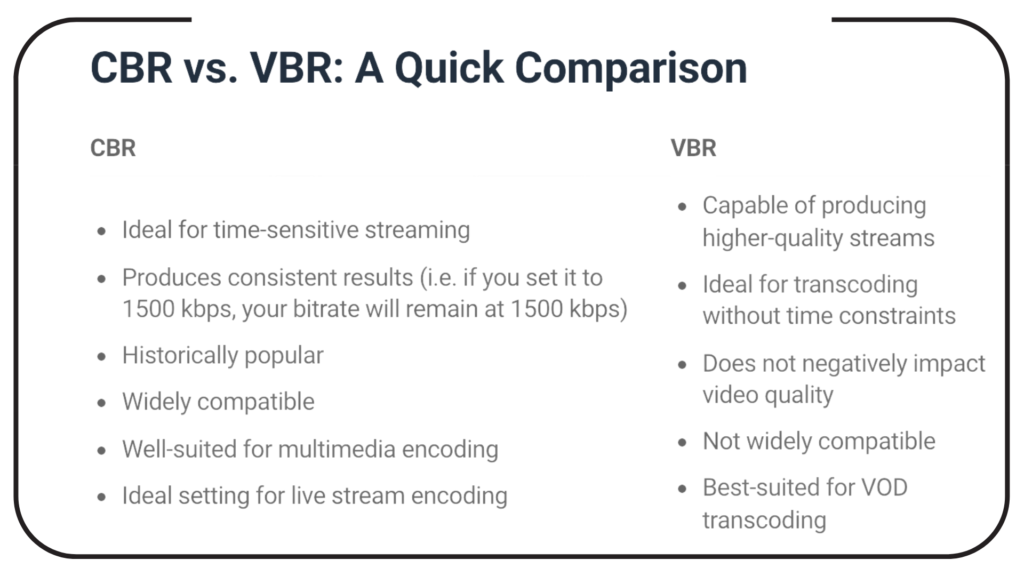
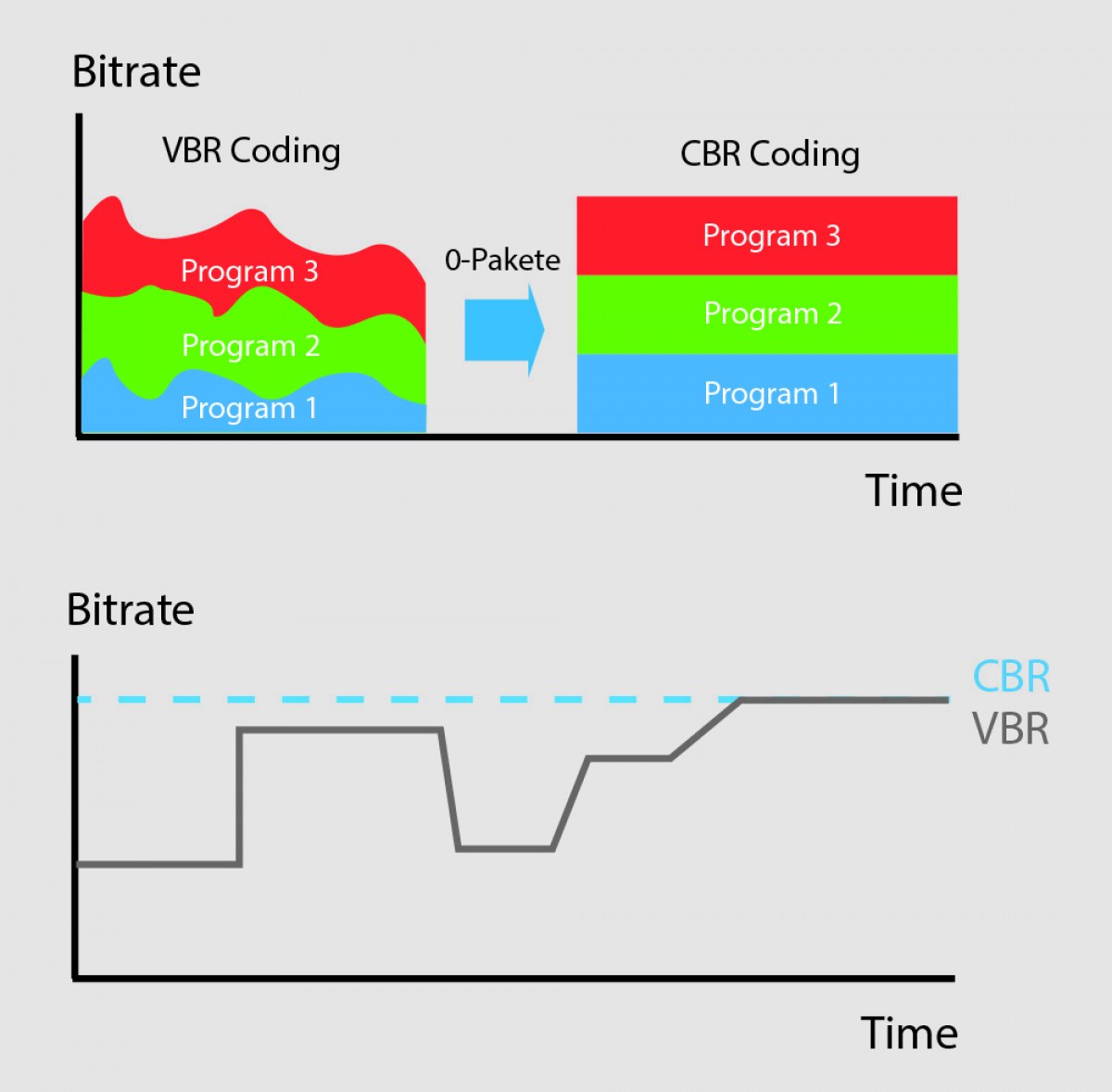
Video compression can be further classified as either variable bit rate (VBR) or constant bit rate (CBR). In VBR, the bit rate varies depending on the complexity of the video content. This allows for higher quality in complex scenes, while still maintaining a reasonable file size. CBR, on the other hand, maintains a constant bit rate throughout the entire video stream. This results in predictable file sizes, but can lead to lower quality in complex scenes.
Compression Settings
The effectiveness of video compression is highly dependent on the settings used during compression. Key settings include the bitrate, resolution, frame rate, and codec. Higher bitrates and resolutions result in higher quality, but also larger file sizes. The codec used can also have a significant impact on the quality and compression efficiency. Experimenting with different settings can help achieve the desired balance between quality and file size.
Conclusion
Video compression is a necessary part of modern video production and distribution. There are several compression methods available, each with its own advantages and disadvantages. Choosing the right compression method and settings requires a balance between quality and file size.
FAQ
1. What is the difference between lossy and lossless compression?
Lossy compression discards information that is deemed less important, while lossless compression retains all of the original information. Lossy compression achieves higher compression ratios, but at the expense of quality.
2. What are some common video compression codecs?
Some common video compression codecs include H.264, MPEG-4, VP9, Apple ProRes, and Avid DNxHD.
3. What is hybrid compression?
Hybrid compression methods combine elements of both lossy and lossless compression. These methods use lossy compression on parts of the video that are less important, and lossless
“The best video format is the one that works best for your particular use case.” – Jan Ozer
Choosing the right video format for your website is crucial for providing the best viewing experience to your audience. With so many video formats available, it can be overwhelming to determine which one to use. The best video format for web depends on various factors, such as the device, the internet connection speed, and the type of video content.
Factors to Consider when Choosing a Video Format for Web
“Quality is not an act, it is a habit.” – Aristotle
When deciding on the best video format for your website, there are several factors to consider:
Video quality: Higher quality videos require more bandwidth and storage space, which may impact loading times for viewers with slower internet connections.
Compatibility: Different devices support different video formats, so it’s essential to choose a format that is widely supported by the target audience’s devices.
File size: Smaller file sizes can help reduce loading times and ensure that the video loads quickly, especially on mobile devices.
Codec: The video codec used to compress the video impacts the quality and compatibility of the video.
The Best Video Formats for Web
“The best way to predict the future is to invent it.” – Alan Kay
Here are some of the most commonly used video formats for web:
MP4
MP4 is the most popular video format for the web, and it is supported by almost all devices, including mobile devices. It is a versatile format that can contain both video and audio and supports a wide range of codecs, including H.264 and H.265. MP4 files are also relatively small, making them ideal for web delivery.
WebM
WebM is an open-source video format that provides high-quality video compression and is ideal for web delivery. It is supported by all modern browsers and is an excellent alternative to the more commonly used MP4 format. However, some older browsers may not support WebM, so it’s essential to check compatibility before using this format.
AVI
AVI is an older video format that is still widely used for web delivery. It supports a wide range of codecs and provides high-quality video, making it an excellent option for users with high-speed internet connections. However, AVI files are generally larger than other formats, so they may take longer to load.
Final Words
“Technology is nothing. What’s important is that you have a faith in people, that they’re basically good and smart, and if you give them tools, they’ll do wonderful things with them.” – Steve Jobs
Choosing the best video format for web can be challenging, but it’s essential to provide your audience with the best viewing experience possible. Consider the device compatibility, video quality, file size, and codec when selecting a video format. The MP4 format is the most widely used and is an excellent option for most use cases, while WebM is an excellent alternative that provides high-quality video compression. Ultimately, the best video format is the one that works best for your website and audience.
“A codec is a way of encoding and decoding video or audio data so that it can be transmitted, stored and played back efficiently,” says John Watkinson in his book The Art of Digital Video. In essence, a video codec is a software or hardware that compresses and decompresses video data. This process helps to reduce the size of video files, which makes them easier to store, transmit and stream over the internet.
The Function of Video Codecs
“Codecs are used to compress video data to reduce the amount of data that needs to be stored or transmitted,” explains Brian Nadel in his article on Techradar. He adds that codecs “also help to maintain the quality of the video by minimizing any loss of data during compression.” This is done by removing redundant information and compressing the remaining data without affecting the quality of the video.
The Different Types of Video Codecs
“There are two main types of codecs: lossy and lossless,” notes Larry Jordan in his article on Digital Media Net. Lossy codecs, such as H.264 and MPEG-4, compress video data by permanently discarding some of the information in the video. While lossy codecs result in smaller file sizes, they may also compromise the quality of the video. On the other hand, lossless codecs, such as Apple ProRes and Avid DNxHD, preserve all the information in the video, resulting in higher quality videos but larger file sizes.
Choosing the Right Video Codec
“When choosing a video codec, you must consider the final use of the video,” advises Richard Harrington in his book Video Made on a Mac. For instance, if you are creating a video for the internet, you may want to use a codec that results in a small file size without compromising the quality of the video. On the other hand, if you are producing a video for broadcast, you may want to use a lossless codec that maintains the quality of the video but results in a larger file size.
The Advantages of Video Codecs
“Video codecs are essential in modern video production because they help to compress video data, reducing storage space requirements and making video transmission over the internet much faster and smoother,” states Jeff Strong in his article on Lifewire. By compressing video data, codecs also make it possible to store and transmit high-quality videos without consuming excessive amounts of bandwidth.
The Disadvantages of Video Codecs
“Video codecs may also result in a loss of data, which can affect the quality of the video,” cautions Chris Stevens in his article on Adorama. Furthermore, some codecs may not be compatible with certain software or hardware, which can result in compatibility issues when editing or playing back videos. It is therefore essential to choose the right codec that meets your specific needs and requirements.
Final Words
In conclusion, video codecs play an essential role in modern video production, enabling efficient storage, transmission, and playback of video data. By understanding the different types of codecs and their respective advantages and disadvantages, you can choose the right codec for your specific needs and ensure that your videos are of the highest quality while being optimized for storage and transmission.
When it comes to music and audio files, bitrate is an important factor to consider. Bitrate refers to the amount of data that is transmitted per second in a digital audio file. The higher the bitrate, the more data is transmitted and the better the audio quality.
VBR, or variable bitrate, is a type of MP3 encoding that uses a variable bitrate rather than a constant bitrate. This means that the bitrate will vary depending on the complexity of the audio being encoded. For example, a simple audio passage with few instruments and no vocals may have a lower bitrate than a complex audio passage with many instruments and vocals.
VBR MP3 bitrate offers a number of advantages over constant bitrate encoding, including better audio quality, smaller file sizes, and more efficient use of storage space.
How to Choose the Right VBR MP3 Bitrate
When choosing the right VBR MP3 bitrate for your audio files, there are a number of factors to consider. These include the type of audio being encoded, the intended use of the audio, and the storage space available.
For example, if you are encoding audio for use on a mobile device with limited storage space, you may want to use a lower bitrate to minimize file size. On the other hand, if you are encoding audio for use in a high-quality home theater system, you may want to use a higher bitrate to ensure the best possible audio quality.
Ultimately, the right VBR MP3 bitrate will depend on your specific needs and preferences. Experimenting with different bitrates and listening to the resulting audio can help you determine the best option for your particular situation.
The Future of VBR MP3 Bitrate
As technology continues to advance and storage space becomes more abundant, VBR MP3 bitrate is likely to become even more popular in the future. With its ability to offer high-quality audio in a compact and efficient format, VBR MP3 encoding is sure to remain a popular choice for music lovers and audio enthusiasts alike.
In the words of music legend Bob Marley, “One good thing about music, when it hits you, you feel no pain.” With VBR MP3 bitrate, music lovers can experience high-quality audio that hits them right where it counts, without the pain of bloated file sizes or compromised sound quality.
Conclusion: The Benefits of VBR MP3 Bitrate
In conclusion, VBR MP3 bitrate is a powerful tool for encoding high-quality digital audio files. By using a variable bitrate that adapts to the complexity of the audio being encoded, VBR MP3 encoding offers superior sound quality, smaller file sizes, and more efficient use of storage space.
As technology continues to evolve and storage space becomes more abundant, VBR MP3 encoding is sure to become even more popular in the future. So the next time you’re encoding digital audio files, consider using VBR MP3 encoding to experience the benefits of variable bitrate technology for yourself.
In the words of writer Kurt Vonnegut, “The only proof he needed for the existence of God was music.” With VBR MP3 bitrate, the beauty of music can be captured in all its glory, providing an experience that is truly transcendent.
“You can’t build a reputation on what you are going to do.” – Henry Ford
Ogg is a popular audio format that is often used for storing and streaming audio files. But is Ogg a lossless format? This is a question that has puzzled many audio enthusiasts and professionals alike. In this article, we will explore this topic in more detail and answer this question once and for all.
What is a Lossless Audio Format?
“Music is the divine way to tell beautiful, poetic things to the heart.” – Pablo Casals
Before we dive into whether Ogg is a lossless format or not, let’s first define what a lossless audio format is. A lossless audio format is a type of audio compression that preserves all of the original data of the audio file. This means that when you compress an audio file into a lossless format, you are not sacrificing any audio quality. Lossless audio formats are often preferred by audio professionals because they allow for high-quality audio recordings that maintain the fidelity of the original recording.
Is Ogg a Lossless Format?
“The only way to do great work is to love what you do.” – Steve Jobs
The short answer to this question is no, Ogg is not a lossless format. Ogg is a lossy audio format, which means that it compresses audio files by discarding some of the audio data. When you convert an audio file to Ogg format, some of the audio data is lost in the compression process, which results in a lower quality audio file.
While Ogg is not a lossless format, it still has many benefits. Ogg files are much smaller in size than lossless formats, which makes them easier to store and share. They are also supported by many different media players, making them a popular choice for streaming audio files.
Should You Use Ogg?
“Music is the strongest form of magic.” – Marilyn Manson
Whether or not you should use Ogg depends on your specific needs and preferences. If you are an audio professional who needs the highest quality audio recordings, then a lossless audio format is probably the best option for you. However, if you are just looking to share and stream audio files, then Ogg may be a good choice for you.
Ultimately, the choice of audio format comes down to personal preference and the specific use case. While Ogg may not be a lossless format, it still offers many benefits and is a popular choice for many people.
Final Words
“Without music, life would be a mistake.” – Friedrich Nietzsche
In conclusion, Ogg is not a lossless format. While lossless audio formats are preferred by audio professionals for their high fidelity, Ogg still offers many benefits such as smaller file sizes and wide support in media players. Whether or not you choose to use Ogg depends on your specific needs and preferences. But regardless of the format you choose, music is an important part of our lives and brings us joy and inspiration every day.
Opus and Ogg are two popular audio codecs that often spark debates among enthusiasts and content creators. Opus, developed by the Internet Engineering Task Force (IETF), is renowned for its exceptional versatility and low latency, making it suitable for a wide range of applications like VoIP, video conferencing, and real-time communications. With its robust compression algorithm, Opus can deliver high-quality audio even at low bit rates, making it an excellent choice for streaming services and online content distribution. On the other hand, Ogg is a container format, often paired with the Vorbis audio codec. Ogg Vorbis is an open-source codec known for its superior sound quality and efficient compression, particularly in delivering lossy audio without significant quality degradation. Content creators often face a dilemma when choosing between Opus and Ogg Vorbis, as both offer unique advantages depending on the specific use case.
Opus vs Ogg: The Audio Quality and Compression Efficiency Debate
The Opus vs Ogg comparison frequently revolves around audio quality and compression efficiency. Opus has gained popularity as a go-to codec for real-time communications due to its low latency and adaptive bit rate capabilities. Its dynamic nature allows it to adjust the bit rate based on network conditions, ensuring smooth audio transmission over varying internet connections. Furthermore, Opus supports both mono and stereo audio, making it versatile for different media formats. On the other hand, Ogg Vorbis excels in delivering excellent sound quality while maintaining relatively smaller file sizes. It is well-suited for streaming and online content distribution, where efficient compression is crucial to minimize bandwidth usage and optimize user experience. Ultimately, the choice between Opus and Ogg Vorbis depends on prioritizing either low latency and adaptability or the highest possible audio fidelity and compression efficiency.
Opus vs Ogg: Choosing the Right Codec for Specific Use Cases
When making a decision between Opus and Ogg Vorbis, content creators need to consider the specific use case and target audience. For applications that require real-time audio communication with minimal delays, such as online gaming or video conferencing, Opus is a compelling choice. Its ability to maintain high-quality audio even in challenging network conditions ensures smooth communication experiences for users. On the other hand, Ogg Vorbis may be preferable for media distribution platforms where audio quality is of utmost importance, like music streaming services or podcasting platforms. The open-source nature of Ogg Vorbis also appeals to communities that prioritize open standards and free access to the technology. Ultimately, a careful assessment of the requirements and priorities will guide content creators to select the most suitable audio codec between Opus and Ogg Vorbis.
“Audio is a powerful medium that has the ability to evoke emotions and feelings like no other,” said Jack Johnson in his book, “The Power of Sound.” Audio quality is important, and choosing the right format can make a big difference in how your audio sounds. Opus and Ogg Vorbis are two audio formats that are commonly used for music and voice recordings. In this article, we will explore the differences between Opus and Ogg Vorbis and help you determine which format is best for your needs.
What are Opus and Ogg Vorbis?
“Opus is a lossy audio coding format designed for real-time interactive communication over the Internet,” according to the Xiph.Org Foundation. “Ogg Vorbis is a fully open, non-proprietary, patent-and-royalty-free, general-purpose compressed audio format for mid to high quality (8kHz-48.0kHz, 16+ bit, polyphonic) audio and music at fixed and variable bitrates from 16 to 128 kbps/channel.”
Quality
The quality of the audio is an important factor to consider when choosing between Opus and Ogg Vorbis. Opus is generally considered to have better quality than Ogg Vorbis at lower bitrates. According to a study by the GStreamer team, Opus was found to have better quality than Ogg Vorbis at bitrates of 64kbps or less. However, at higher bitrates, the difference in quality becomes less noticeable.
Compatibility
Compatibility is another important factor to consider when choosing between Opus and Ogg Vorbis. Opus is a relatively new format, and as such, it may not be supported by all devices or software. Ogg Vorbis, on the other hand, has been around since 2002 and is supported by a wide range of devices and software. If you are looking for a format that is widely compatible, Ogg Vorbis may be the better choice.
File Size
The size of the audio file is another consideration when choosing between Opus and Ogg Vorbis. Opus is known for its small file sizes, making it a great choice for streaming audio over the Internet. Ogg Vorbis files are also relatively small, but they may be slightly larger than Opus files at similar bitrates.
Final Words
Choosing between Opus and Ogg Vorbis ultimately depends on your needs and preferences. Opus is a great choice if you are looking for high-quality audio at low bitrates or if you need small file sizes for streaming. Ogg Vorbis, on the other hand, may be the better choice if you are looking for a format that is widely compatible with a range of devices and software. No matter which format you choose, make sure to test it out and see if it meets your needs. As Jack Johnson said, “The power of sound can bring us closer to ourselves and each other.” Choose the right audio format and let the power of sound bring you closer to what matters most.