As a music lover, it’s frustrating when your favorite MP3 files are too quiet. You want to listen to them loudly without damaging your ears, but how can you make MP3 louder? The answer is MP4Gain. This Windows-based software can normalize and amplify the volume of your MP3 files without any loss in quality. With just a few clicks, you can increase the volume of your MP3s and enjoy them at the perfect volume.
Amplify MP3 Sound with Simple Steps
You don’t need to be an audio expert to make your MP3 files louder. With MP4Gain, it’s a simple process that anyone can do. After installing the software, just drag and drop your MP3 files into the program. MP4Gain will analyze and normalize the volume of each file, so they all sound at the same level. Then, you can amplify the volume to your desired level, and save the files. It’s that easy!
Make MP3 Louder Online with These Tips
If you don’t want to install software on your computer, you can make your MP3 files louder online. There are many websites that offer this service, but be careful as some of them can reduce the quality of your audio. Look for a reliable and trustworthy website that can amplify the volume without any loss in quality. Also, keep in mind that online tools may have limitations, and the results may not be as good as with dedicated software like MP4Gain.
How to Make MP3 Louder: Tips and Tricks
Aside from using software or online tools, there are some tips and tricks that you can use to make your MP3 files louder. For example, you can use an equalizer to boost the volume of certain frequencies. You can also try compressing the file, which can make the quieter parts louder while keeping the louder parts unchanged. However, keep in mind that these techniques may not work for all MP3 files, and you may still need to use dedicated software like MP4Gain to achieve the desired results.
Boost MP3 Volume: Conclusion
In conclusion, if you’re looking to make your MP3 files louder, MP4Gain is the ultimate solution. It’s easy to use, affordable, and can provide great results. Whether you’re a music lover, a podcaster, or a video creator, having your MP3 files at the perfect volume is essential. Don’t settle for quiet MP3s anymore, boost their volume with MP4Gain!
If you are looking for a way to play high-quality videos on your computer, you might have heard of Xvid video codec. Xvid is a free and open-source video codec that is known for its ability to compress video files while maintaining high quality. To get started with Xvid, you can download the codec from a trusted website and install it on your computer. Once you have installed the codec, you can start playing videos encoded with Xvid.
Xvid Video Codec Windows 10
If you are using Windows 10, you might be wondering if Xvid is compatible with the operating system. The good news is that Xvid is compatible with Windows 10, and you can download and install the codec on your computer without any issues. Once you have installed Xvid on your Windows 10 computer, you can start playing videos that are encoded with the codec.
Xvid Codec for VLC
VLC is a popular media player that can play almost any video format. If you want to play videos encoded with Xvid on VLC, you need to have the Xvid codec installed on your computer. Fortunately, VLC supports Xvid, and you can play Xvid-encoded videos on VLC without any issues.
Xvid Codec for Mac
Mac users might be wondering if Xvid is compatible with their operating system. The bad news is that Xvid is not natively supported on Mac, which means you need to download and install a third-party codec to play Xvid-encoded videos on your Mac. There are several Xvid codecs available for Mac, and you can choose one that suits your needs.
Xvid Codec Player
If you want to play Xvid-encoded videos on your computer, you need a media player that supports the codec. Fortunately, there are many media players that support Xvid, including VLC, Windows Media Player, and QuickTime. You can also download a dedicated Xvid codec player that is designed to play Xvid-encoded videos.
Final Words:
Xvid video codec is a powerful and efficient way to compress video files while maintaining high quality. Whether you are a Windows or Mac user, you can download and install Xvid on your computer and start playing videos that are encoded with the codec. If you are looking for a reliable and versatile media player that supports Xvid, VLC is a great choice.
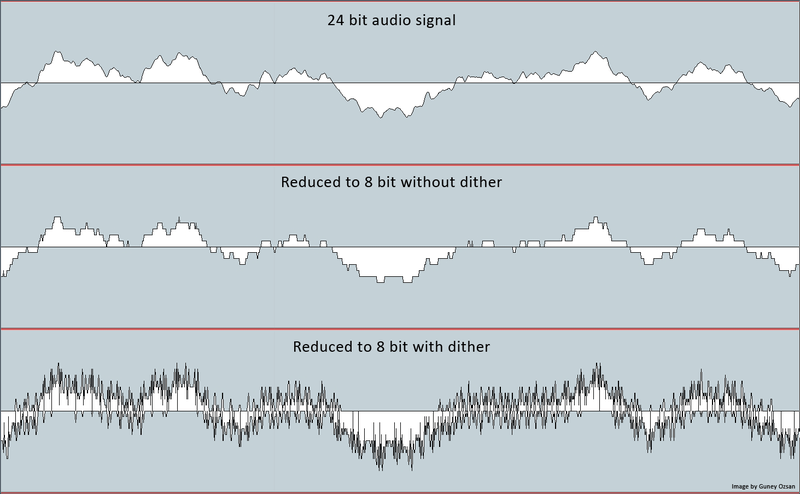
Dithering is a technique used to reduce banding and other artifacts in digital images and audio. It works by adding a small amount of noise to the signal, which can mask the unwanted artifacts and create a more natural, organic look or sound.
What is Dithering?
Dithering is the process of adding random noise to a signal in order to improve its quality. This can be used to reduce quantization error in digital audio, or to create a more natural-looking gradient in digital images.
Dithering Algorithm
There are many different algorithms used for dithering, each with their own strengths and weaknesses. Some of the most popular include ordered dithering, error diffusion dithering, and random noise dithering.
Dithering Images
In digital imaging, dithering can be used to reduce banding and other artifacts that can occur when the number of available colors is limited. By adding noise to the image, dithering can create the illusion of more colors and a smoother gradient.
Dithering Audio
In digital audio, dithering can be used to reduce quantization error and improve the overall sound quality. By adding a small amount of noise to the signal, dithering can create a more natural, analog sound that is easier on the ears.
At MP4Gain.com, we understand the importance of high-quality audio and video. That’s why we offer a range of powerful tools, including our flagship product, MP4Gain. With MP4Gain, you can easily normalize and convert your audio and video files to a wide range of formats, all with the click of a button.
Whether you’re a professional audio engineer or just looking to improve the quality of your home recordings, MP4Gain is the solution you’ve been looking for. So why wait? Try MP4Gain today and experience the power of dithering for yourself.
When it comes to video file formats, one of the most popular choices for Windows users is WMV. But what exactly is the WMV codec? In short, WMV stands for Windows Media Video, which is a video codec developed by Microsoft. It was first introduced in 1999 as part of the Windows Media framework and has since become a widely used format for streaming and storing video content.
What is a Codec?
Before diving into the specifics of the WMV codec, it’s important to understand what a codec is. A codec is a piece of software that is used to compress and decompress digital media files. The purpose of a codec is to reduce the size of the file, making it easier to store and transmit, while still maintaining as much quality as possible.
What are the Advantages of the WMV Codec?
One of the main advantages of the WMV codec is its high level of compression. This means that WMV files are typically smaller in size than other video formats, making them easier to store and transmit. Additionally, WMV files can be played back on a wide range of devices, including Windows computers, Xbox consoles, and even some DVD players.
Another advantage of the WMV codec is its ability to maintain high-quality video at relatively low bitrates. This is achieved through the use of advanced compression algorithms that are specifically designed for streaming video content over the internet.
What are the Disadvantages of the WMV Codec?
While the WMV codec does have many advantages, there are also some drawbacks to consider. One of the main disadvantages of the WMV codec is its lack of compatibility with non-Windows devices. This can make it difficult to share WMV files with friends and colleagues who use Mac or Linux computers.
Another potential issue with the WMV codec is its dependence on the Windows Media Player software. While this software is included with most versions of Windows, it may not always be installed or up-to-date on every computer. This can make it difficult to play WMV files on older computers or on systems that do not have the Windows Media Player software installed.
People Also Ask
What is the difference between WMV and MP4?
WMV and MP4 are both popular video file formats, but they have some key differences. One of the main differences is the level of compression used. WMV files are typically smaller in size than MP4 files, but they may not maintain the same level of quality. Additionally, MP4 files are generally more compatible with a wider range of devices and operating systems.
How do I convert WMV to another format?
To convert a WMV file to another format, use Mp4Gain, the best converter and normalizer.
Is the WMV codec free?
The WMV codec is included with most versions of the Windows operating system, so it is technically free to use. However, some third-party software applications may require a license or subscription in order to use the WMV codec for video encoding and decoding.
Conclusion
In conclusion, the WMV codec is a widely used video format that offers many advantages, such as high levels of compression and compatibility with Windows devices. However, it also has some limitations, such as its lack of compatibility with non-Windows devices and dependence on the Windows Media Player software. Overall, the WMV codec is a good choice for Windows users who prioritize smaller file sizes and high-quality video.
When it comes to video file formats, there are many options available. Two popular formats are WMV and MP4. In this article, we’ll explore the differences between these two formats and help you decide which one is right for your needs.
WMV Format
WMV stands for Windows Media Video, and it was developed by Microsoft. It’s a popular format for Windows users, as it’s natively supported by the Windows operating system and Windows Media Player. WMV files typically have the extension .wmv.
One of the advantages of WMV is its high compression rate, which allows for smaller file sizes without sacrificing quality. This makes it a good option for streaming videos on the internet or for storing large video collections on your computer. However, the downside is that WMV is not as widely supported as other formats, which can cause compatibility issues when playing back videos on non-Windows devices or software.
MP4 Format
MP4 stands for MPEG-4 Part 14, and it’s a standard developed by the International Organization for Standardization (ISO). It’s a popular format for both Windows and Mac users, as it’s widely supported by both operating systems and media players. MP4 files typically have the extension .mp4.
One of the advantages of MP4 is its versatility, as it can support a wide range of video and audio codecs. This makes it a good option for both streaming and storing videos, as it can maintain high quality even with smaller file sizes. Additionally, MP4 is supported by a wide range of devices and software, making it easy to share and play back videos across different platforms.
Differences between WMV and MP4
The main differences between WMV and MP4 are their compression rates and compatibility. As mentioned, WMV has a higher compression rate, which allows for smaller file sizes, but it’s not as widely supported as MP4. MP4, on the other hand, is more versatile and compatible, but its compression rate may not be as high as WMV.
Another difference is the software needed to create and edit videos in each format. WMV is typically associated with Windows Movie Maker, while MP4 is more commonly used with Apple’s iMovie. However, both formats can be edited with a wide range of video editing software.
People also ask
1. Which format has better quality, WMV or MP4?
Both formats can maintain high quality, but it ultimately depends on the specific video and its compression settings. Generally, MP4 is considered to have better quality at lower bitrates, while WMV may perform better at higher bitrates.
2. Can I convert a WMV file to MP4?
Yes, there are many software programs and online converters available to convert WMV files to MP4 or vice versa. However, keep in mind that the quality may be affected during the conversion process.
3. Which format is better for streaming videos?
Both formats can work well for streaming videos, but WMV may be better for slower internet connections due to its high compression rate. MP4 may be a better option for faster internet connections and higher quality videos.
Conclusion
In summary, both WMV and MP4 are popular video file formats with their own advantages and disadvantages. If you’re a Windows user and prioritize smaller file sizes, WMV may be the better choice for you. However, if you want a more versatile and compatible format that can maintain high quality, MP4 may be the way to go.
People Also Ask
1. Is MP4 better than WMV?
Both MP4 and WMV have their own advantages and disadvantages, and which one is better depends on your specific needs. MP4 is generally considered to be more versatile and compatible, while WMV is often preferred for its smaller file sizes.
2. Can Windows Media Player play MP4 files?
Yes, Windows Media Player can play MP4 files with the proper codecs installed. However, some older versions of Windows Media Player may not support certain MP4 files.
If you’re someone who works with video files, you’ve likely come across the WMV file format. But what is WMV, and why is it important? In this article, we’ll answer those questions and more.
What is WMV?
WMV stands for Windows Media Video, a video file format developed by Microsoft. It was first released in 1999 as a competitor to other popular video file formats like MPEG-4 and QuickTime. WMV files are similar to other compressed video file formats, and they use a codec to compress the video data.
What are the advantages of WMV?
One of the primary advantages of WMV is its compatibility with Windows-based systems. Since it was developed by Microsoft, it’s optimized for use on Windows computers and is compatible with a wide range of Windows software applications. WMV files are also known for their high quality and small file size, making them ideal for streaming and sharing over the internet.
What are the disadvantages of WMV?
One of the main disadvantages of WMV is its lack of compatibility with non-Windows systems. This can make it difficult to play WMV files on devices like Macs or mobile phones. Additionally, some users have reported issues with compatibility between different versions of Windows Media Player, which can cause problems when trying to play back WMV files.
How can I convert WMV files?
If you need to convert a WMV file to a different file format, there are several options available. One of the most popular is to use an online file converter, which can convert your WMV file to a variety of different formats. Alternatively, you can use a desktop software program to convert your WMV file. Just make sure to choose a reputable program that’s compatible with your computer system.
Can I improve the quality of my WMV files?
Yes, you can! If you’re looking to improve the quality of your WMV files, consider using a video conversion tool like MP4Gain. These tools allow you to adjust the video bitrate and other settings to optimize the quality of your WMV files. Just make sure to use a reputable tool and to save a backup of your original file before making any changes.
Conclusion
WMV is a popular video file format developed by Microsoft. It offers high-quality video and small file sizes, making it ideal for streaming and sharing over the internet. However, it can be difficult to play WMV files on non-Windows devices, and compatibility issues can arise when using different versions of Windows Media Player. If you need to convert a WMV file, there are several options available, including online file converters and desktop software programs. And if you’re looking to improve the quality of your WMV files, consider using a video conversion tool like MP4Gain.
People also ask
How do I play WMV files on a Mac?
Is WMV better than MP4?
How do I open a WMV file on Windows?
If you’re looking for the best video format for high quality, it’s important to understand the different formats available and their strengths and weaknesses. The best video format will depend on your intended use, whether it’s for streaming, editing, or playback on a specific device.
Best Video Formats for Streaming
Streaming video has become increasingly popular in recent years, with platforms like Netflix and YouTube dominating the market. To ensure the best quality streaming experience, the best video format is one that is optimized for streaming.
The most popular streaming video format is H.264, which is widely supported by most devices and platforms. It offers high-quality video compression with a relatively small file size, making it ideal for streaming. Another popular streaming format is VP9, which is used by YouTube and offers higher quality video at lower bitrates.
Best Video Formats for Editing
If you’re planning to edit your videos, it’s important to choose a format that will retain the highest quality of your footage. The best video formats for editing are those that support high bitrates and high color depths.
One of the most popular formats for editing is ProRes, which is a proprietary format developed by Apple. It offers high-quality compression and is widely supported by most editing software. Another popular format is DNxHD, which is supported by Avid editing software and offers high-quality compression for editing.
Best Video Formats for Playback on Specific Devices
If you’re planning to playback your videos on a specific device, it’s important to choose a format that is compatible with that device. Different devices support different video formats, so it’s important to do your research to ensure compatibility.
For example, if you’re planning to playback your videos on an iPhone or iPad, the best format is H.264, which is supported by Apple devices. If you’re planning to playback your videos on a Samsung device, the best format is MP4, which is widely supported by Android devices.
What about 4K and HDR?
If you’re looking to create or playback 4K or HDR videos, it’s important to choose a format that supports these features. The most popular format for 4K video is HEVC/H.265, which offers high-quality compression with a smaller file size compared to other formats.
For HDR video, the most popular formats are HDR10 and Dolby Vision, which offer improved color depth and contrast compared to standard video formats.
What is the Future of Video Formats?
As technology continues to advance, video formats are also evolving. One of the newest formats is AV1, which is developed by the Alliance for Open Media and offers high-quality compression with a smaller file size compared to other formats.
Another format on the horizon is MPEG-5 Part 1 (EVC), which offers improved compression for HDR video and is expected to become the standard for video compression in the future.
People Also Ask
What is the difference between a container and a codec?
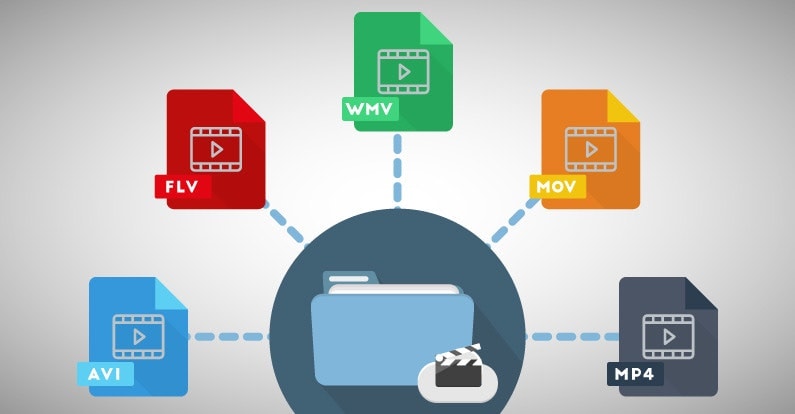
A container is a file format that holds audio, video, and other data together in a single file. A codec is a software that compresses or decompresses audio or video data. The container format and the codec used can affect the quality and compatibility of your videos.
What is the difference between lossy and lossless compression?
Lossy compression is a method of compressing video or audio data by removing some of the data to reduce file size. Lossless compression, on the other hand, compresses the data without losing any information. Lossless compression is preferred for editing
If you have ever used a video camera, watched a movie or streamed a video online, you may have come across the term “video resolution.” In simple terms, video resolution refers to the number of pixels in a video image. It determines the clarity, sharpness, and overall quality of the video. In this article, we will explore video resolution in detail and answer the most common questions about it.
What is Video Resolution?
Video resolution refers to the number of pixels that make up an image in a video. Pixels are tiny dots that make up an image on a screen. The more pixels an image has, the sharper and clearer it appears. Video resolution is usually measured in width and height, and the total number of pixels is calculated by multiplying the two dimensions.
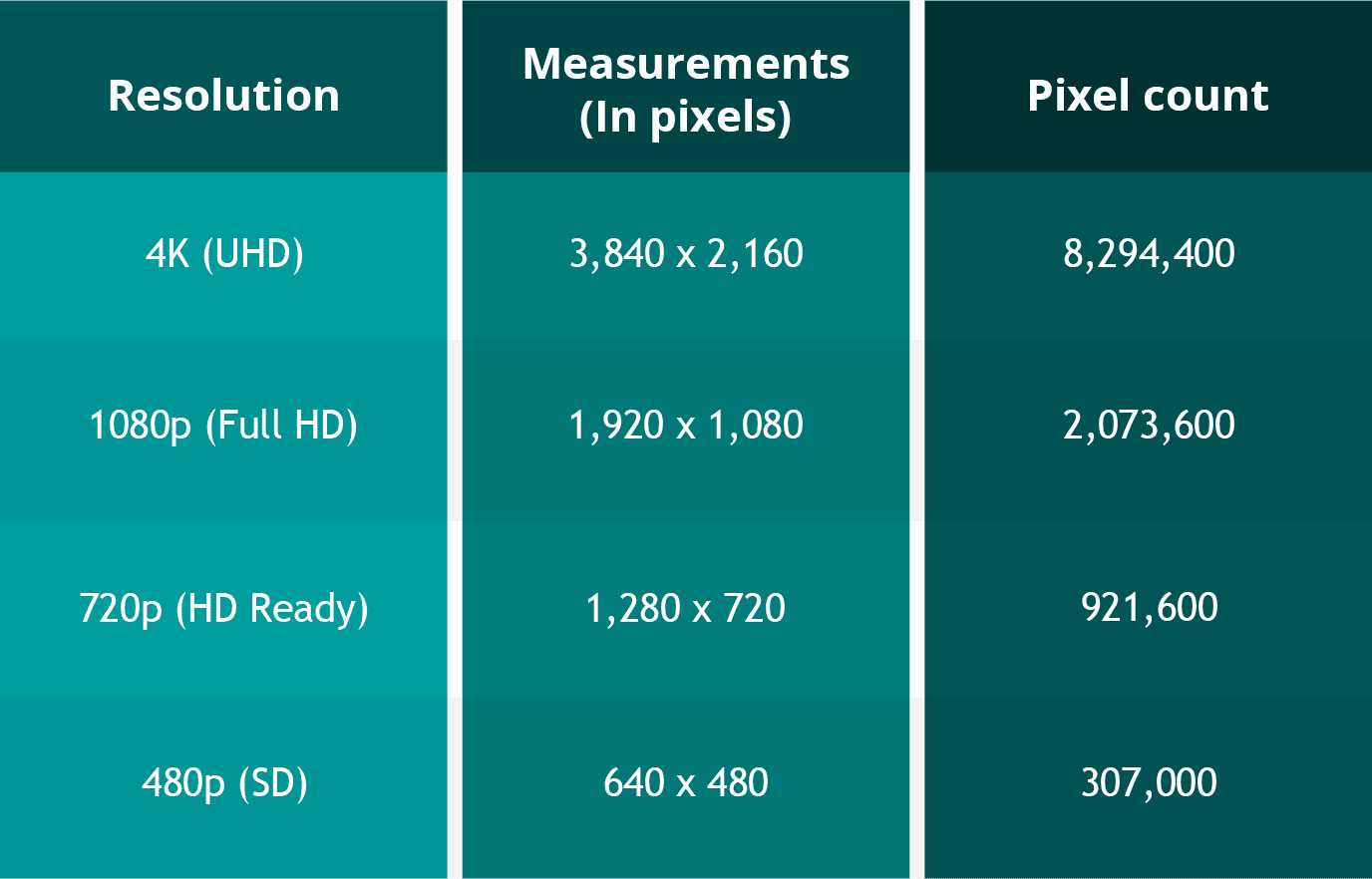
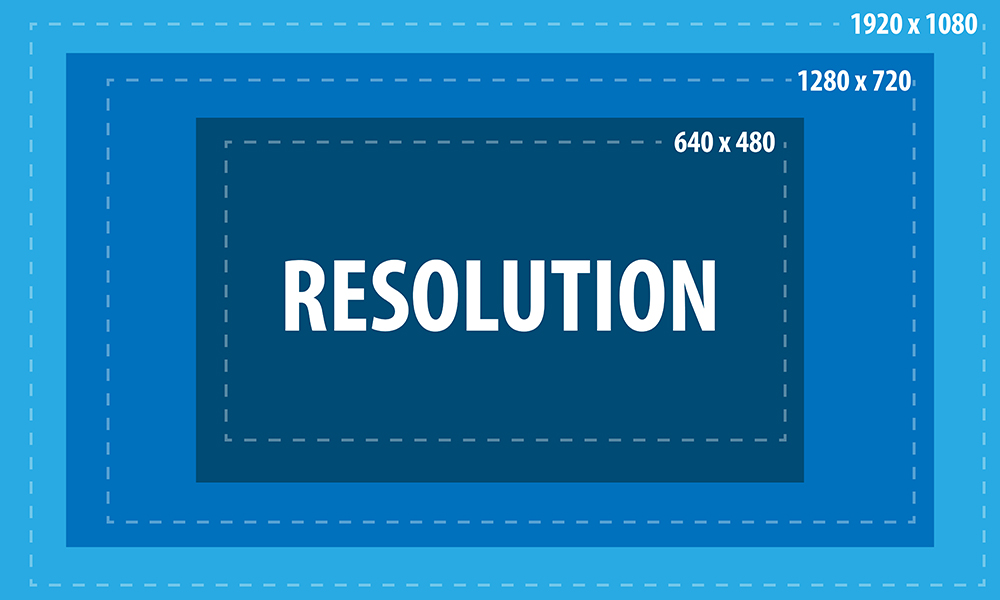
For example, a video with a resolution of 1920 x 1080 has 1920 pixels in width and 1080 pixels in height. The total number of pixels in this video is 2,073,600 (1920 x 1080 = 2,073,600). This is also referred to as 1080p or Full HD resolution.
What are the different types of Video Resolutions?
There are several different types of video resolutions available today. Here are some of the most common video resolutions:
480p – This is standard definition (SD) video and has a resolution of 640 x 480 pixels. It is commonly used for older TV shows and movies.
720p – This is high definition (HD) video and has a resolution of 1280 x 720 pixels. It is commonly used for streaming videos online and for newer TV shows and movies.
1080p – This is Full HD video and has a resolution of 1920 x 1080 pixels. It is commonly used for Blu-ray discs, streaming videos, and newer TV shows and movies.
4K – This is Ultra HD (UHD) video and has a resolution of 3840 x 2160 pixels. It is commonly used for high-end TVs and streaming videos.
8K – This is the latest and highest resolution available for video and has a resolution of 7680 x 4320 pixels. It is used for high-end TVs and is not yet commonly available for streaming or other video content.
What factors affect Video Resolution?
Several factors can affect video resolution, including the quality of the camera or device used to capture the video, the lighting conditions, and the amount of compression used to store or transmit the video. Higher-quality cameras and devices can capture more pixels and produce sharper and clearer images. Good lighting conditions can also help produce better quality videos, while poor lighting can result in grainy or blurry images. Additionally, compression can reduce the file size of a video but can also reduce the quality of the video.
People Also Ask
What is aspect ratio in video resolution?
Aspect ratio refers to the ratio of the width of a video image to its height. It determines the shape of the video image and is usually expressed as a ratio of the width to the height. The most common aspect ratios for video are 4:3, which is standard definition, and 16:9, which is high definition.
What is the difference between 1080p and 4K resolution?
The difference between 1080p and 4K resolution lies in the number of pixels. 1080p has a resolution of 1920 x 1080 pixels, while 4K has a resolution of 3840 x 2160 pixels, which is four times the number of pixels as 1080p. This means that 4K displays have a much higher pixel density, resulting in sharper, more detailed images.
Another difference between the two is that 4K content requires more bandwidth and storage space than 1080p content. This is because 4K files are much larger, due to the increased number of pixels. Therefore, streaming 4K content or storing it on a device requires a faster internet connection and more storage space.
It’s worth noting that the human eye can only perceive so much detail, and the benefits of 4K resolution are most noticeable on larger screens or when sitting closer to the display. On smaller screens or at typical viewing distances, the difference between 1080p and 4K may not be as noticeable.
What is HDR?
HDR stands for High Dynamic Range, and it is a technology that expands the range of colors and brightness levels that can be displayed on a screen. HDR content is encoded with information about the brightness and color of each pixel, allowing displays that support HDR to reproduce a wider range of colors and brightness levels, resulting in more vibrant and lifelike images.
HDR content is available in a variety of formats, including HDR10, Dolby Vision, and HLG (Hybrid Log-Gamma). HDR10 is an open standard that is widely used, while Dolby Vision is a proprietary format developed by Dolby Laboratories that offers additional features, such as dynamic metadata that adjusts the brightness and color levels of each scene. HLG is a format designed for broadcasting and is compatible with both standard dynamic range and high dynamic range displays.
What is the difference between refresh rate and frame rate?
Refresh rate and frame rate are two different measurements that are often confused. Refresh rate refers to how many times per second a display updates the image on the screen, while frame rate refers to how many still images or frames are displayed per second in a video.
Refresh rate is measured in Hertz (Hz), with common refresh rates being 60Hz, 120Hz, or 144Hz. A higher refresh rate can reduce motion blur and make fast-paced action in video games or sports appear smoother.
Frame rate, on the other hand, is typically 24, 30, or 60 frames per second (fps) in video content. A higher frame rate can result in smoother motion and less stuttering, especially in fast-paced or action-packed scenes.
It’s important to note that a higher refresh rate does not necessarily mean a higher frame rate, as the two are independent of each other. A display can have a high refresh rate but still display content at a lower frame rate, resulting in a less smooth image. Conversely, a display with a low refresh rate can display high frame rate content, but the image may appear choppy due to motion blur.
Conclusion
Video resolution is an important aspect of the viewing experience, as it determines the level of detail and clarity of the image. Higher resolutions, such as 4K, can provide more detailed images with greater clarity, but they also require more bandwidth and storage space. HDR is a technology that expands the range of colors and brightness levels that can be displayed on a screen, resulting in more vibrant and lifelike images. Refresh rate refers to the number of times per second that an image is redrawn on the screen. It is measured in Hertz (Hz), with common refresh rates being 60Hz, 120Hz, and 144Hz. A higher refresh rate can result in a smoother image, especially during fast-paced action scenes or sports events. However, not all content can take advantage of a high refresh rate, so it may not be necessary for all users.
Frame rate, on the other hand, refers to the number of individual frames that make up one second of video. It is typically measured in frames per second (fps), with common frame rates being 24fps, 30fps, and 60fps. A higher frame rate can result in a smoother video, especially for fast-moving content, but it can also require more processing power and storage space.
What is aspect ratio?
Aspect ratio is another important measurement to consider when it comes to video resolution. It refers to the proportional relationship between the width and height of a video image. Common aspect ratios include 16:9 (widescreen), 4:3 (standard), and 21:9 (ultra-wide).
The aspect ratio can affect how the video is displayed on the screen, as well as the overall viewing experience. For example, a wider aspect ratio can be better for watching movies, while a narrower aspect ratio may be more suitable for certain types of content, such as computer applications or documents.
Conclusion
Video resolution is a key factor in determining the quality and clarity of video content. Understanding the different measurements and terms used to describe resolution can help you make informed decisions when purchasing a new TV or monitor, or when creating and sharing your own video content.
Remember to consider factors such as aspect ratio, refresh rate, and frame rate, as well as the resolution itself, when evaluating the quality of video content. With a better understanding of these concepts, you can enjoy your favorite movies, TV shows, and other video content in the best possible quality.
People also ask
What is the difference between resolution and pixel density?
Resolution refers to the number of pixels in an image, while pixel density refers to the concentration of those pixels within a given area. A higher pixel density can result in a sharper, more detailed image, even at lower resolutions.
What is 8K resolution?
8K resolution, also known as 7680 x 4320 or 4320p, is the highest resolution currently available for consumer video content. It offers four times the resolution of 4K and sixteen times the resolution of 1080p.
Can I upscale lower-resolution content to a higher resolution?
While it is possible to upscale lower-resolution content to a higher resolution, the quality of the resulting image may not be as good as native high-resolution content. Upscaling can also result in issues such as artifacts, blurriness, and distortion. It is generally recommended to view content at its native resolution whenever possible.
Digital video has revolutionized the way we capture, store, and share videos. With the rise of digital cameras, smartphones, and other video recording devices, digital video has become more accessible and popular than ever before. In this article, we will discuss the advantages of digital video and why it has become the preferred format for video production and consumption.
Higher Quality
One of the biggest advantages of digital video is the higher quality that it provides compared to analog video. Digital video has a higher resolution, which means that it can capture more detail and produce sharper images. It also has a wider color gamut, which means that it can display more colors and shades than analog video.
Greater Flexibility
Digital video also provides greater flexibility in terms of editing and distribution. With digital video, you can easily edit, crop, and manipulate footage using software, which is much easier than doing so with analog footage. You can also distribute digital video through a variety of channels, including social media, streaming platforms, and websites, which makes it more accessible to a wider audience.
Cost-Effective
Digital video is also more cost-effective than analog video. With digital video, you don’t need to purchase and develop film, which can be expensive. You can also store digital video on hard drives or cloud storage, which is much more affordable than storing physical media.
People Also Ask
What are the disadvantages of digital video?
While digital video has many advantages, it also has some disadvantages. One of the biggest disadvantages is that digital video can be prone to compression artifacts, which can reduce the quality of the video. Digital video also requires more storage space than analog video, which can be an issue if you have limited storage capacity.
What are the different types of digital video?
There are several different types of digital video, including MPEG, AVI, WMV, and MOV. Each type of digital video has its own strengths and weaknesses, and the best format to use will depend on your specific needs and preferences.
How has digital video changed the film industry?
Digital video has had a significant impact on the film industry. It has made it easier and more affordable for independent filmmakers to create high-quality films, and it has also allowed for more experimentation and creativity in terms of film production. Digital video has also made it easier for films to be distributed and marketed globally, which has opened up new opportunities for filmmakers and audiences alike.
“Windows Media Audio (WMA) is an audio data compression technology developed by Microsoft.”
How does WMA work?
“WMA uses a perceptual audio coding technique to compress audio data while minimizing perceptible loss of audio quality.”
What are the benefits of using WMA?
“Some of the benefits of using WMA include smaller file size, higher sound quality, and compatibility with a wide range of devices.”
What are the disadvantages of using WMA?
“One of the main disadvantages of using WMA is its limited compatibility with non-Microsoft devices.”
How can you convert WMA files?
“You can convert WMA files to other formats using various software tools such as MP4Gain, which can also normalize audio levels and convert other major audio and video formats.”
Final Words
“As a long-time expert in audio technology, I highly recommend using WMA for its superior sound quality and smaller file size. However, keep in mind its limitations when it comes to compatibility with non-Microsoft devices. And if you need to convert WMA files, consider using a reliable tool like MP4Gain.”





:strip_icc()/i.s3.glbimg.com/v1/AUTH_08fbf48bc0524877943fe86e43087e7a/internal_photos/bs/2021/t/K/q4ahizQxqbedZPLU1QRA/2015-03-23-xvid-logo.jpg)