What is a signal-to-noise ratio in audio?

What is a signal-to-noise ratio in audio?

signal-to-noise ratio audio

Understanding the Basics of Audio Quality

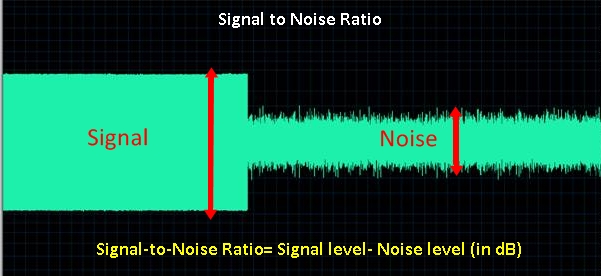
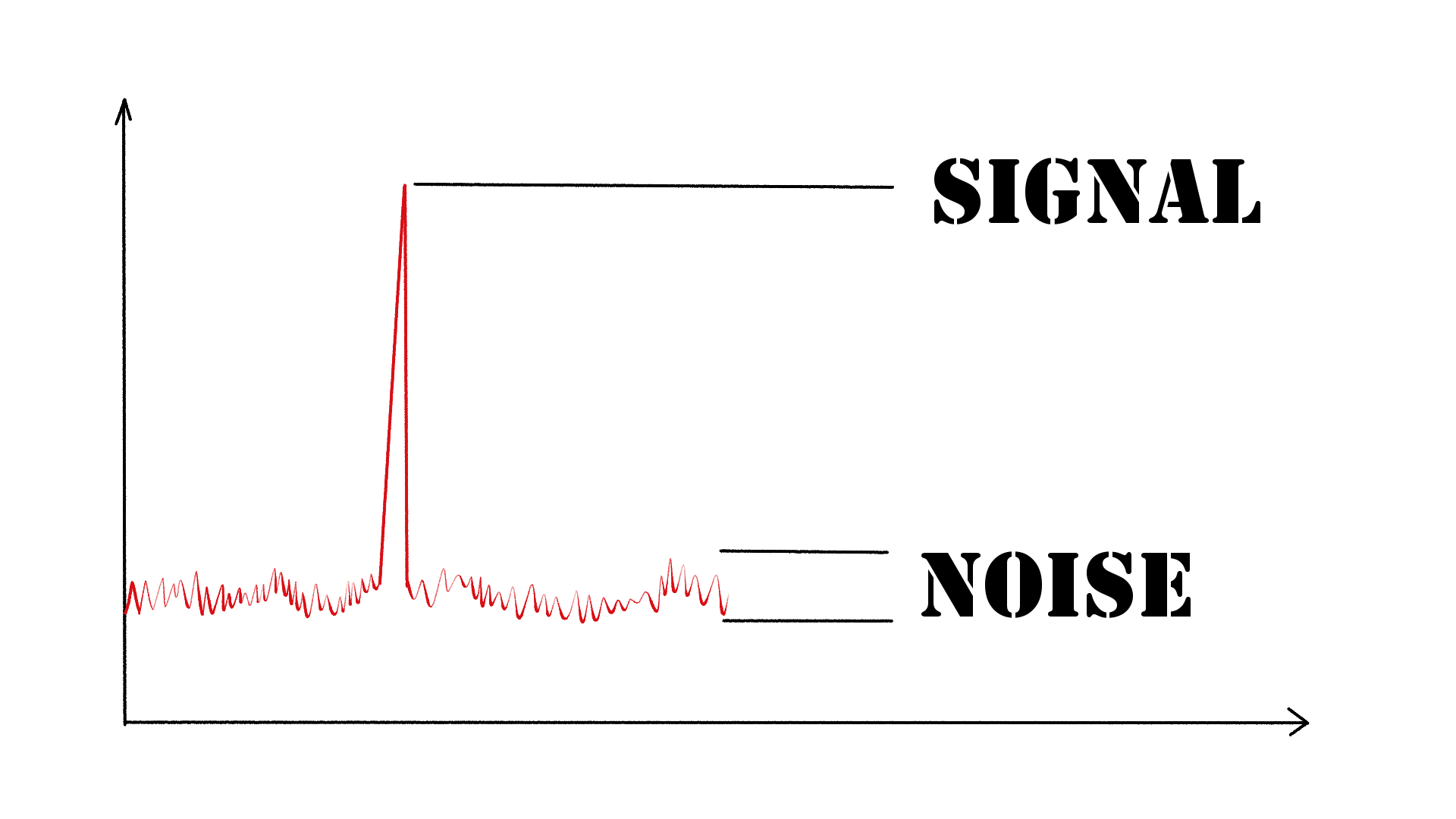
As an audio engineer, I have come across many questions about audio quality, and one of the most common ones is “What is a signal-to-noise ratio in audio?” In simple terms, the signal-to-noise ratio (SNR) is the difference between the desired audio signal and the background noise. A high SNR means that the desired signal is much stronger than the noise, resulting in better audio quality.
When it comes to audio quality, there are many factors to consider, such as audio processing, normalization, compression, dynamics, and distortion. Each of these factors can affect the SNR and, therefore, the overall audio quality. For example, audio normalization can help to increase the SNR by adjusting the volume levels of the audio signal, while audio compression can reduce the dynamic range of the audio signal, resulting in a more consistent SNR.

The Importance of Audio Normalization

As someone who has worked with audio for many years, I can attest to the importance of audio normalization. Normalization is the process of adjusting the volume levels of an audio signal to a standard level, which can help to improve the SNR and overall audio quality.
One of the benefits of audio normalization is that it can help to prevent distortion in the audio signal. When an audio signal is too loud, it can cause distortion, which can be heard as a buzzing or crackling sound. By normalizing the audio signal, you can ensure that it is at a safe and consistent volume level, which can help to prevent distortion and improve the overall audio quality.

The Role of Audio Compression in Audio Quality

Audio compression is another important factor to consider when it comes to audio quality. Compression is the process of reducing the dynamic range of an audio signal, which can help to make it sound more consistent and balanced.
One of the benefits of audio compression is that it can help to improve the SNR by reducing the background noise in the audio signal. However, it is important to use compression carefully, as too much compression can result in a loss of detail and dynamics in the audio signal. As with all aspects of audio engineering, finding the right balance is key to achieving the best possible audio quality.
Final Words:
In conclusion, understanding the basics of audio quality is essential for anyone working with audio. Whether you are an audio engineer, musician, or just someone who enjoys listening to music, knowing about factors such as SNR, normalization, compression, dynamics, and distortion can help you to achieve the best possible audio quality. And if you are looking for a solution to improve your audio quality, consider using mp4gain, a powerful and easy-to-use audio normalizer and converter that can help you to achieve consistent and high-quality audio.

audio quality, signal-to-noise ratio, audio engineering, audio processing, audio normalization, audio compression, audio dynamics, audio distortion, audio editing, audio software, audio plugins, audio effects, audio mixing, audio mastering, audio recording, audio equipment, audio cables, audio interfaces, audio monitors, audio speakers, audio headphones, audio formats, mp3, mp4, wav, flac, aac, ogg, audio bitrate, audio frequency, audio spectrum, audio waveform, audio visualization, audio analysis, audio restoration, audio repair, audio enhancement, audio improvement, audio tips, audio tricks, audio tutorials, audio guides, audio blogs, audio forums, audio community, audio enthusiasts, audio professionals, music production, sound design, sound effects, soundtracks, soundscapes, sound libraries, sound samples, soundfonts, sound packs, sound kits, sound engineering, sound recording, sound mixing, sound mastering, sound equipment, sound cables, sound interfaces, sound monitors, sound speakers, sound headphones, sound formats, sound bitrate, sound frequency, sound spectrum, sound waveform, sound visualization, sound analysis, sound restoration, sound repair, sound enhancement, sound improvement, sound tips, sound tricks, sound tutorials, sound guides, sound blogs, sound forums, sound community, sound enthusiasts, sound professionals.

What is a WAV File?

WAV file, audio file format, uncompressed audio, digital audio, audio recording, audio editing, audio playback, audio quality.

What is a WAV File?

WAV File
WAV File
WAV File
WAV File

Uncompressed Audio

As a musician and audio engineer, I’ve worked with WAV files extensively. WAV stands for Waveform Audio File Format, and it’s a type of audio file that is uncompressed. This means that all of the original audio data is preserved, resulting in the highest possible audio quality.
According to the book “The Art of Digital Audio Recording,” WAV files are “the most common format for storing uncompressed audio on a computer.” This makes them a popular choice for audio recording, editing, and playback.

Digital Audio

In today’s digital age, most audio is recorded and stored in a digital format. WAV files are one of the most popular digital audio formats, and they are supported by a wide range of software and hardware devices.
One of the benefits of using WAV files is that they can be easily edited and manipulated using audio editing software. This allows musicians and audio engineers to make precise adjustments to the audio, resulting in a higher quality final product.

Audio Quality

As someone who is passionate about audio quality, I always recommend using WAV files whenever possible. Because they are uncompressed, WAV files offer the highest possible audio quality, with no loss of data or fidelity.
In my experience, using WAV files has allowed me to create recordings and mixes that sound incredible, with every detail and nuance preserved. Whether you’re a musician, audio engineer, or just someone who appreciates high-quality audio, WAV files are definitely worth considering.
Final Words:
Overall, WAV files are an essential part of the digital audio landscape. Whether you’re recording, editing, or playing back audio, using WAV files can help you achieve the highest possible audio quality. And if you’re looking for a way to normalize and convert your audio files, I highly recommend checking out mp4gain.
Keywords: WAV file, audio file format, uncompressed audio, digital audio, audio recording, audio editing, audio playback, audio quality, music production, audio engineering, software, hardware, audio manipulation, audio fidelity, mp4gain.

WAV, file, audio, format, uncompressed, digital, recording, editing, playback, quality, music, production, engineering, software, hardware, manipulation, fidelity, detail, nuance, musician, engineer, landscape, normalize, convert, mp4gain, highest, possible, supported, common, computer, benefits, precise, adjustments, final product, passionate, essential, part, achieve, appreciate, worth, considering.

The Benefits of Using Opus Audio Codec

The Benefits of Using Opus Audio Codec

Opus Audio Codec
Opus Audio Codec
Opus Audio Codec
Opus Audio Codec

High-Quality Audio with Opus Codec

Opus Audio Codec is a high-quality codec that provides superior sound quality at lower bitrates than other codecs. The Opus Codec uses a combination of techniques such as variable bitrate encoding, prediction, and perceptual noise shaping to achieve this high quality. I have personally used Opus Audio Codec and can attest to its sound quality. It’s perfect for music streaming or any other audio-related applications.
As the book “Master Handbook of Acoustics” by F. Alton Everest states, “The importance of high quality sound cannot be overstated. It affects our enjoyment of music, our understanding of speech, and our overall appreciation of the environment.” Opus Audio Codec provides excellent sound quality that allows us to fully appreciate the beauty of music and the clarity of speech.

Efficient Audio Compression with Opus Codec

Opus Codec is not only high quality but also highly efficient. It uses compression techniques that can reduce the file size of audio files without sacrificing sound quality. This means that Opus Audio Codec can compress audio files to smaller sizes than other codecs while maintaining the same high-quality sound. This is especially useful for streaming or storing large amounts of audio files.
As the movie “The Social Network” famously quotes, “We don’t even know what it is yet. We don’t know what it can be. We don’t know what it will be. We know that it is cool.” Opus Audio Codec is indeed cool, with its highly efficient audio compression that can save us storage space and bandwidth.

Opus Audio Codec for Streaming

Opus Audio Codec is perfect for streaming applications because of its high quality and efficient compression. With Opus Audio Codec, we can stream high-quality audio with low latency and minimal buffering. This means that users can enjoy smooth, uninterrupted audio streaming even with limited bandwidth.
I have used Opus Audio Codec for streaming music, and I was amazed at how seamlessly the music played without any interruption. Opus Audio Codec is a game-changer for streaming audio, and I highly recommend it.

Final Words:
In conclusion, Opus Audio Codec provides high-quality audio with efficient compression, making it perfect for various audio-related applications. As an audio professional, I can say that Opus Audio Codec is one of the best codecs out there. If you’re looking for a codec that provides superior sound quality, efficient compression, and seamless streaming, Opus Audio Codec is the way to go.

Video Codecs: H.264, H.265, and VP9

The Importance of Choosing the Right Video Codec


H.264, H.265, and VP9

Video Codecs: H.264, H.265, and VP9

As the world becomes increasingly digitized, the importance of video codecs in our lives cannot be overstated. Video codecs are essential in video compression, encoding, streaming, and playback. Choosing the right codec can make the difference between smooth playback and frustrating buffering, between crisp and clear images and pixelated messes. In this article, we will explore the differences between three of the most popular video codecs in use today: H.264, H.265, and VP9.

H.264 vs H.265: What’s the Difference?

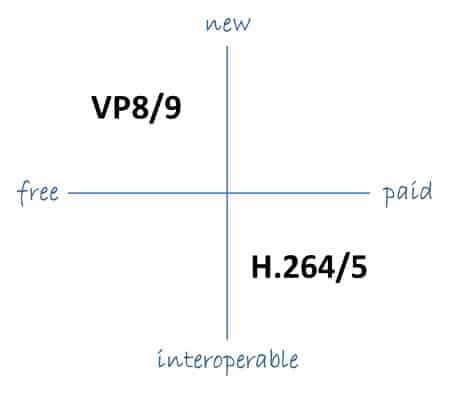
H.264, also known as AVC (Advanced Video Coding), has been the dominant codec in use for the past decade. It is widely supported by devices and software and offers good compression while maintaining high video quality. However, H.265 (HEVC) is slowly taking over. It is a newer and more advanced codec that offers better compression ratios, which means smaller file sizes with the same quality as H.264. H.265 is also better at handling high-resolution videos, making it a good choice for 4K and 8K videos. However, it requires more processing power to decode, which may be an issue on older devices.

Personally, I have found that H.265 delivers noticeably better quality than H.264 for the same file size. It is especially noticeable in high-motion scenes like action movies or sports. However, it does require more processing power, so make sure your device can handle it before choosing it as your preferred codec.

VP9: The New Kid on the Block

VP9 is a newer codec developed by Google and is designed to be a royalty-free alternative to H.265. It offers better compression than H.264 while maintaining the same video quality. It is also highly efficient at handling high-resolution videos, making it a good choice for 4K and 8K videos. However, its adoption has been slow due to its lack of support in many devices and software. It also requires more processing power to decode than H.264.

One of my personal experiences with VP9 was when I was trying to stream a 4K video on my laptop. I noticed that the video was buffering a lot and the quality was not as good as I expected. After some research, I found out that the video was encoded with VP9, which my laptop did not support. I had to switch to H.264 to get smooth playback.

Conclusion: Choosing the Right Video Codec

Choosing the right video codec is crucial for ensuring smooth video playback and high video quality. H.264 is still a solid choice for most situations, but H.265 and VP9 offer better compression and handling of high-resolution videos. However, they require more processing power and may not be supported by all devices and software. Make sure to choose the codec that best suits your needs and device capabilities.

In conclusion, video codecs are an essential part of our digital lives, and choosing the right one can make all the difference in our video-watching experience. Always keep in mind the pros and cons of each codec and make an informed decision based on your needs.

How does lossless compression work for audio?

How does lossless compression work for audio?

Lossless Audio
Lossless Audio

Lossless audio compression is a crucial technology for digital music distribution and storage. With the rise of streaming services, high-fidelity audio has become a priority for many listeners. However, uncompressed audio files can be quite large, making them impractical for mobile devices and slower internet connections. This is where lossless compression comes in.

Lossless Audio
Lossless Audio

Why is lossless audio compression important?

Lossless compression allows digital audio files to be compressed without losing any of the original data. This means that the sound quality is preserved, while the file size is reduced. With lossless compression, music files can be stored and transmitted more efficiently, without sacrificing quality. In addition, lossless compression makes it possible to enjoy high-fidelity audio on devices with limited storage capacity.

How does lossless compression work?

Lossless compression works by identifying and removing redundancies in the data. This is done through a process called entropy encoding, which analyzes the statistical properties of the audio data to find patterns that can be represented more efficiently. These patterns are then replaced with shorter codes, which are stored in a compressed file. When the file is decompressed, the original data is restored exactly as it was before compression.

Common lossless compression formats

  • FLAC: Free Lossless Audio Codec
  • ALAC: Apple Lossless Audio Codec
  • WAV: Waveform Audio File Format
  • AIFF: Audio Interchange File Format

How to use lossless compression

To use lossless compression for your audio files, you’ll need to choose a suitable codec and software. There are many options available, but some of the most popular choices include FLAC and ALAC. Once you’ve selected a codec, you can use a program like Foobar2000 or dBpoweramp to compress your files. You can also use lossless compression for streaming, by selecting a service that supports lossless audio, such as Tidal or Qobuz.

Lossless compression is an essential tool for anyone who wants to enjoy high-quality audio in a digital format. With lossless compression, you can store and transmit audio files more efficiently, without sacrificing fidelity. Whether you’re an audiophile or a casual listener, lossless compression is an important technology to be aware of.

The History of Lossless Audio Compression: From Analog to Digital

Lossless audio compression has come a long way since the early days of digital audio. In this article, we’ll take a deep dive into the history of lossless audio compression, from its roots in analog tape to the latest developments in digital audio.


Analog Roots

The history of lossless audio compression can be traced back to the days of analog tape. Tape-based audio recording was the dominant technology for several decades, and various techniques were developed to compress audio data without sacrificing quality. One of the most popular techniques was noise reduction, which involved boosting the level of low-level audio signals while reducing the level of high-level signals. This allowed audio to be recorded at a higher signal-to-noise ratio, resulting in a cleaner, clearer sound.

The Digital Revolution

The introduction of digital audio in the 1980s marked a major turning point in the history of lossless audio compression. With digital audio, it became possible to represent audio data as a series of numbers, which could be manipulated and compressed using a wide range of mathematical algorithms. One of the earliest lossless compression algorithms was the Audio Processing Technology (APT) algorithm, which was developed in the early 1990s. APT used a combination of linear prediction and residual coding to compress audio data without losing any information.

The Rise of Lossless Audio Formats

In the early days of digital audio, lossy compression formats like MP3 and AAC dominated the market. These formats achieved high levels of compression by discarding some of the original audio data, resulting in a loss of quality. However, as storage capacity and internet speeds increased, there was a growing demand for high-fidelity audio that could be stored and transmitted efficiently. This led to the development of lossless audio formats like FLAC and ALAC, which could compress audio data without sacrificing quality.

  • FLAC: Free Lossless Audio Codec
  • ALAC: Apple Lossless Audio Codec


The Future of Lossless Audio Compression

The latest developments in lossless audio compression are focused on improving the efficiency and speed of compression algorithms. One promising approach is the use of machine learning, which can be used to identify patterns in audio data that can be compressed more effectively. Another area of focus is the development of lossless compression formats that are optimized for streaming, allowing high-fidelity audio to be delivered over the internet in real time.


Sound formats and audio normalization


WAV: It is the “pure” sound format, without any compression. Its weight is huge, as is its quality. Only recommended for professional works or to edit the audio before transferring it to a format with compression.
MP3: We’ve talked about him in the previous pages. Without a doubt, it is the most popular and widespread format. His appearance changed the way we listen to music.
OGG: It is the audio format of GNU / Linux, the free software MP3 version. It has all the virtues of MP3 (and more), but not all portable players can use it, but it is getting more and more.
WMA: Microsoft format, your own version of the MP3. It compresses quite well, but it is not as widespread as the MP3. Nor can all portable players use it.
MID: It is the audio format also known as MIDI (Musical Instrument Digital Interface). It is the only format that can not play more than music simply because what it contains inside are not sounds. Simplifying, it contains a series of instructions for special software included in all systems, a kind of digital synthesizer that can generate sounds like those of many musical instruments. The MID has inside what notes they have to sound and with what instruments: a score.

It is important to clarify the distinction between audio format and audio codec. The codec encodes and decodes the audio data while this data is archived in a file that has a specific audio format.

Most of the formats listed below are container formats, formats that group different types of data. Most of these container formats have only one codec associated, next to which metadata is stored. However, there are formats that group audio and video data produced by different codecs. Some of these container formats that group different types of data are: MP4, Ogg, WAV, QuickTime Format, AVI.

In this article we talk about audio formats, but we are really discussing the properties of the codec associated with the format.

When classifying audio formats we can distinguish three large groups.

No data compression: These are real sound waves that have been captured and converted to digital format without further processing. As a result, uncompressed audio files tend to be the most accurate.
With compression, without loss of data: Compression algorithms are used to reduce file sizes; It basically works by eliminating redundancy.
With compression and data loss: It is a form of compression that loses data during the compression process. In the context of audio, that means sacrificing quality and fidelity to decrease file size. The good news is that, in most cases, we will not notice the difference when listening.

volume booster

Compression

Compression is a process that involves reducing the dynamic range of an audio signal.

An apparatus, called a compressor, analyzes the gain of the input signal and, according to certain parameters set, those parts that exceed a level or threshold determined according to the desired configuration are attenuated.

In principle, compression is perceived a decrease in overall volume; In fact, this is because the compressor reduces the gain of the “peaks”, that is, of the parts that accumulate greater sound energy.

However, several very interesting objectives are achieved:

The resulting sound sounds more balanced and compensated, there is not much difference between the soft and strong parts of the signal
We gain headroom space (the difference between the nominal level and the saturation point) and we can increase the overall volume of the signal a little more without “touching the ceiling” (the peaks were attenuated). As a consequence, the parts that previously sounded with little force will now be heard better.
It will allow to integrate the signal with greater ease and clarity in the general mix.

Standardization

Normalization is an atypical dynamic process, very different from compression, limitation, expansion or noise reduction:

It does not reduce the relative dynamic range of the audio signal.
It is not applied in “real time”, or at the moment, but it is a process that is carried out “a posteriori”, on the previously recorded material.
The process to normalize audio is summarized as follows:

Normalization analyzes the material and detects its highest volume peak. It then increases its gain to the maximum possible without exceeding the reference level (from which distortion would occur).
Taking as reference the same proportion of increase applied in the previous step increases the level of the rest.
The signal, in general, will sound with a greater volume. The maximum volume level that we can reach depends on the limit marked by the highest peak.

What audio formats exist? All you need to know


FLAC, WAV, AIFF, DSD … these are just some of the acronyms you can find when looking for a digital format. They are also accompanied by technical data such as sample rates and bit depth. So many terms can leave you more misplaced than a chicken in a dance. And unless you are an expert in digital sound, the process to choose the audio format that best suits your needs can be a mess. But if they explain it to you, the subject is relatively simple. That is why in Culturasonora we have prepared a complete guide on the different audio formats used. This will prevent any acronym from taking you on the dark side, dear Padawan.

Sample Rate and Bit Depth.
MP3s vs WAVs vs AIFF.
OGG vs FLAC vs ALAC.
What is the DSD format?
How to listen to the DSD?
MQA audio Hi-Res.
What is Bit Depth and Sample Rate?

These two concepts are basic. To understand how audio formats work, you need to know what Bit Depth and Sample Rate are. They are two measures that indicate the quality of a digital audio file. We will try to summarize it so that you stay with the general idea

When you read the specifications of the audio formats you find a couple of figures. For example: 32-bit / 192kHz or 24-bit / 96kHz. These numbers indicate the bit depth and the sample rate. These references tell us how much information the different formats transmit and the sound quality. For example, the audio we hear on a normal CD, or on a Spotify stream, is 16bit / 44.1kHz. Samples are always measured in Hertz (or hertz) and bit depth in Bits.
Softwares or hardwares do not usually work with a continuous flow of information but often use pieces, samples or samples to effectively manage the data that is transmitted. The sample rate is the number of samples per second that are obtained from a recording. The higher the number of times a device plays the samples, the higher the sound quality. Each of these extracts or samples has a certain amount of information, which is the bit depth, or bit depth.
To understand it better, we are going to make a slightly beast analogy, which is not entirely true, but which will help you to make sense of all this. What interests us. If you control a bit of photography and image you will get it right away: the sample rate would be something similar to the frames or frames per second of a video, and the bit rate would be similar to the pixels of a photograph. The higher the bit depth number, the more information each sample will have. The more pixels an image has, the more resolution each frame of a video will have. The more frames per second a movie has, the greater the definition. In short: the higher the number of the Bit Depth and the Sample Rate, the higher the quality of the audio file.

Audio formats: MP3 vs WAV vs AIFF

What is the MP3 format?
If you are interested in getting some audio fidelity and decent sound from your files, you will want to avoid this format. Why? Because basically an MP3 is a file that sacrifices audio quality to minimize size. They weigh very little for any device to read. The negative? The compression of these files provides a poor, almost lifeless sound. Nowadays almost nobody uses that format seriously. Even its creators recently finished the license declaring her dead. But surely every now and then you find a zombie file with this format.
What is the WAV format?
WAV (Waveform Audio File Format) are equally common but better for anyone who wants a decent audio format. They are higher resolution files than MP3s. A WAV is an audio piece that is encoded with something known as Pulse Code Modulation (PCM), a medium that encodes analog audio parts and converts them into digital so that they can have the Sample rates and the Bit Depth of the that we have talked about before.
What is the AIFF format?
The audio format AIFF (Audio Interchange File Format) is very similar to WAV, since it also uses the PCM to encode analog audio pieces and present them in digital format. This format was born as an answer from Apple to the Microsoft WAV, and at the beginning it could only work on MAC computers. Currently, the AIFF and WAV are more or less interchangeable.
In summary…
To close this topic we will tell you that if you have a file in WAV or AIFF audio formats you will hear a piece of good quality sound. Normally these formats are used in files that we play through our services, such as the iTunes music library. We will not see them in online streaming services, which tend to use special types of files. Now we will review that point

Mp4Gain – Audio Normalizer for videos and audio files

The only audio normalizer for videos. (Mp43Gain)

There is no other software that normalize audio volume and less on the videos tantyos formats. ince Mp4, Flv, 3gp, Avi, Mpeg, etc..

Mp4Gain is unique and revolutionary for its enormous capacity to normalize the audio volume of a huge number of video formats and audio formats also. It o say, can normalize by example9, mp3, flac, ogg, m4a, etc.

Never before was a software capable of so much and so cheaply.

You can get all the same volume tehngan cvideos audio and can do the same with their digital tracks.

Mp4Gain has another number of tools and options, such as changing the pitch, cmbiar tempo, equalize, add Replay-Gain, trim, etc.. making it undoubtedly the most advanced and powerful program of its kind worldwide.

As if that were not enough, it is very easy to use, usually enough to upload a file or a batch of files (batch normalize Mp4Gain do) and press a button and with these was sufficient.

You download the trial version and test it on your own computer, you will surely be more convinced of the power of Mp4Gain.


Mp4 video normalizer

Mp4 Video Normalizer

Normalize volume of a Youtube video (MP4 or FLV) is very necesaerio today but almost impopsible of consiguir far Mp4Gain finally appears.

For a long time people felt they needed to boost the volume of your videos on formastos as mp3, flv, wmv, etc.. but had ne way to normalize audio from videos.

Now with Mp4Gain is as simple as uploading one or hundreds of files in the program (Mp4Gain accepts normalizacvion batch) and press a button.

Formats that can normalize Mp4Gain are:

Video Formats:
mp4, flv, avi
mpeg, mpg
3gp, wmv

Audio Formats:
mp3, mp2, flac
ogg, m4a, aac
wav, ac3

That is, besides standardizing videro popular formats (mp4, flv, avi, mpeg, mpg, 3gp, wmv) also normalizes all popular audio formats (mp3, mp2, flac, ogg, m4a, aac, wav , ac3).
You download the trial version of the program and test on your own computer with your own files, you’ll see that you will be pleasantly surprised with the results Mp4Gain offers and that no other software can offer.