Variable Bitrate Encoding in M4A


Free Download Mp4Gain
picture

Variable Bitrate Encoding in M4A
Variable Bitrate Encoding in M4A

Let’s talk about Variable Bitrate Encoding in M4A

Variable bitrate (VBR) encoding in M4A files is a game-changer for audio quality and file efficiency. I often find that when we’re talking about getting high-quality sound without oversized files, VBR encoding is the best solution. Unlike constant bitrate (CBR), which holds the data rate steady throughout a file, VBR dynamically adjusts. This flexibility means that audio can be compressed differently depending on the complexity of the sound at any given moment, resulting in great sound quality where it’s needed and data-saving where it’s not. Using real-life examples, think of it like a hose: VBR adjusts the “flow” depending on the music’s demands.

How VBR Encoding Differs from Constant Bitrate in M4A

One way I like to explain VBR versus CBR in M4A files is to imagine driving a car. With CBR, you’re holding a constant speed regardless of the road conditions, even if there’s traffic or clear roads. In contrast, VBR is like adjusting speed based on traffic; it slows down in complex audio sections and speeds up when it’s simpler. This approach can capture detailed, high-fidelity audio, while CBR might miss out on some of that nuance. VBR encoding allows M4A files to efficiently adapt the bitrate, creating an optimal balance between sound quality and file size.

Why Variable Bitrate Encoding Enhances Audio Quality

VBR encoding in M4A doesn’t just save space; it also prioritizes sound quality. In my experience, this difference becomes clear with high-energy music like classical or electronic, where subtle audio dynamics are crucial. VBR lets the M4A file devote more data to complex passages, capturing every detail. So, if you’ve ever felt like your favorite tracks sounded “compressed” or “flat,” switching to VBR M4A can make a noticeable difference. It’s like upgrading your audio experience without increasing the file size.

Technical Aspects of VBR Encoding in M4A Files

The technical workings behind VBR can get complex, but let’s break it down simply. VBR in M4A adjusts data allocation based on the audio’s dynamic range. More data is used during complex parts, while simpler sections use less. This dynamic allocation means that an M4A file will rarely waste data on silence or simplicity. As a result, files retain clarity and depth without excessive data. Think of it as only paying for a full tank when you’re on a long road trip – it’s efficient and smart.

Benefits of Using VBR Encoding in M4A

Using VBR in M4A comes with several perks. From my experience, here are some top advantages:

  • Improved Sound Quality

    VBR encodes audio based on complexity, leading to clear sound in all types of music.

  • Efficient File Size

    VBR reduces data use where audio is simpler, making it storage-friendly without compromising quality.

  • Dynamic Audio Capture

    Complex segments retain detail, while quieter parts save on data usage.

For those of us who care about quality and storage, VBR encoding in M4A hits the sweet spot between high-fidelity sound and efficient file size.

VBR Encoding vs. CBR Encoding in M4A

I often get asked why VBR is preferred over CBR in M4A files. It’s simple: VBR offers flexibility that CBR can’t match. While CBR might seem stable, it’s inefficient because it doesn’t adjust based on audio needs. In M4A files, VBR ensures that complex parts get more focus, unlike CBR, which applies the same rate to all parts. Imagine you’re in a bookstore where every book costs the same; with VBR, you pay only for the quality you want, which is why it’s so efficient.

Audio Compression in M4A with VBR

Audio compression in M4A VBR files is like packing a suitcase – you only take what’s needed. VBR helps prevent audio quality loss during compression, making the format excellent for those who prioritize quality over quantity. The difference in quality between compressed VBR and regular CBR audio can be surprising, especially in files with high dynamic range like orchestral pieces. With VBR, every aspect of a song can be heard without feeling over-compressed.

Optimizing File Size and Quality with VBR Encoding

One of my favorite things about VBR encoding is its ability to optimize both size and quality. We don’t always have space to spare on our devices, yet no one wants to compromise on sound. Using VBR in M4A files ensures that you don’t have to make that choice. You get a leaner file that sounds great without eating up unnecessary storage, making it ideal for large music libraries or mobile devices.

Limitations of VBR Encoding in M4A Files

While VBR encoding is effective, it’s not perfect. One challenge is that VBR encoding requires a bit more processing power during playback. This is rarely noticeable with modern devices but could pose a challenge on older hardware. Moreover, not every device or software supports VBR optimally, so there could be some compatibility issues. However, these limitations are minimal compared to the benefits of using VBR for high-quality M4A files.

Real-World Applications of VBR Encoding in M4A

When I’m traveling or out for a run, I often rely on M4A VBR files for music – I get quality without filling up my phone’s storage. For audiobooks or podcasts, VBR is equally efficient, as it doesn’t waste space on silence or long pauses. This application means you can carry more files without needing to sacrifice quality or storage. It’s a practical solution for those of us who enjoy high-quality audio on the go.

How VBR Encoding Adapts to Audio Complexity

VBR encoding’s ability to adjust bitrate based on audio complexity is a defining feature. Think of it like shading in a painting: the encoder decides where more detail is necessary. Quiet passages in M4A files don’t need as much data, while loud, complex segments get more. This flexibility provides a detailed sound that can capture nuances missed by other encoding methods. This is why, especially in music, VBR M4A files offer an experience that feels full and rich.

Latest Words on Variable Bitrate Encoding in M4A

When it comes to getting the best audio experience, Variable Bitrate Encoding in M4A is a top choice. It’s adaptable, offering excellent sound quality while managing file size. Unlike constant bitrate encoding, VBR doesn’t waste data on simple sections, which makes it efficient. For those looking for high-quality audio without massive files, M4A with VBR is a practical choice. And for those who want a powerful tool to optimize their audio experience, Mp4Gain can help you get the most out of your M4A files.

Comments:

Wow, this really helped me understand VBR better! I always thought one bitrate fit all, but now I get why adjusting makes a difference.

I tried switching to VBR on my M4A files, and I can already hear the improvement in sound quality, especially on complex tracks.

This article was really informative, but I wish there were more examples of VBR in real-life applications. Still, it was helpful!

Been using CBR all my life because I didn’t know there was a difference. Going to try VBR now, thanks!

I was so confused about bitrate settings before this. Now I’m excited to re-encode my music in VBR!

Never realized there was an option like VBR for M4A files. Makes so much sense to adjust bitrate based on the music. Thanks for this!

Great read! I think I’ll switch my whole library to M4A with VBR encoding to save on space. Thanks for the tips!

Wish there was more on the limitations of VBR – I think some older devices might struggle with it. But I’ll give it a go on my phone.

VBR encoding really makes the music sound better, like the difference between a regular camera and HD! Appreciate the detail here.

Always wondered if VBR was worth it over CBR. This article convinced me to make the switch. Loving the clarity in sound!

I like that you explain this in a simple way – makes it easier for non-tech folks like me to understand the value of VBR!

This article helped a lot, but I’d love

to know how VBR works with other formats, like MP3.

Been looking for a good VBR guide, and this hit the spot. Can’t wait to re-encode my favorite songs and hear the difference.

VBR sounds like the right choice for people who care about audio quality. Thanks for breaking down the technical side!

https://www.tumblr.com/mp3-mp4/765504331516624896/variable-bitrate-encoding-in-m4a-mp4gaincom


Free Download Mp4Gain
picture


Mp4Gain Main Window
picture


Mp4Gain Features
picture


Free Download Mp4Gain
picture

MP3 Audio Coding in 2024

MP3 Audio Coding in 2024: Revolutionizing Soundscapes

MP3 Audio Coding in 2024

MP3 Audio Coding in 2024

Let’s Talk about MP3 Audio Coding

As an expert immersed in the dynamic field of audio coding, the year 2024 unfolds as a pivotal chapter for MP3 audio coding. In this exploration, I delve into the intricate details and groundbreaking advancements that are reshaping the auditory landscape.

The Evolution of MP3: Breaking Sound Barriers

Charting the evolution of MP3 audio coding is akin to tracing the footsteps of a sonic revolution. The year 2024 propels us into an era where sound barriers are not just broken but redefined. Drawing on my wealth of experience, I navigate the technological tapestry that underlies the MP3 coding advancements.

Unveiling MP3 Innovations: Beyond the Basics

At the heart of MP3’s prowess lies a series of innovations that go beyond the basics. It’s like witnessing the unveiling of a new instrument in an orchestra, each note harmonizing seamlessly. As we explore these advancements, I offer insights into the nuanced improvements that set the stage for a richer audio experience.

MP3 in 2024: A Sonic Symphony

Fast forward to 2024, and MP3 audio coding emerges as a sonic symphony, finely tuned and orchestrated for the discerning ears. Picture a concert where every instrument, digitally encoded, contributes to an immersive auditory experience. I share my first-hand experiences with the enhanced audio quality and expanded possibilities that MP3 brings to the table.

The Art of Compression: Preserving Quality

Central to the MP3 narrative is the art of compression, akin to a master painter delicately preserving the essence of a masterpiece. In this section, I demystify the complexities of compression techniques, offering real-world examples that illustrate how MP3 strikes the perfect balance between file size and audio quality.

Latest Words on MP3: A Glimpse into the Future

Peering into the future of MP3 audio coding, I offer a glimpse into the latest developments that set the stage for what lies ahead. It’s akin to looking through a telescope, foreseeing the next crescendo in the MP3 symphony. These insights extend beyond the standard discourse, providing a deeper understanding of the technologies that will shape audio coding landscapes.

As we navigate the intricate world of MP3 audio coding in 2024, my goal is not just to provide information but to offer a richer appreciation for the transformative power of sound. In each paragraph, I prioritize clarity, depth, and relevance, ensuring that this article surpasses the standard discourse and establishes itself as a comprehensive guide in the ever-evolving world of audio coding.

Comments:

This article opened my eyes to the transformative advancements in MP3 coding. The analogy to a symphony was spot on!

– AudioEnthusiast

Could you delve deeper into the specific innovations mentioned? I’m eager to understand the technicalities behind the MP3 evolution.

– TechInquirer

As a music producer, the insights into compression techniques were invaluable. Looking forward to incorporating these nuances into my work!

– SoundMaestro

This article not only informed but also inspired a newfound appreciation for the artistry embedded in MP3 coding. Kudos!

– MusicExplorer

Compression Ratio and Audio Quality in MP3

Exploring the Trade-off Between Compression Ratio and Audio Quality in MP3

Compression Ratio and Audio Quality

Let’s talk about MP3 compression

As a specialist with extensive experience in audio compression, I’m here to shed light on a crucial aspect of the MP3 format – the trade-off between compression ratio and audio quality. Imagine you’re packing for a trip, and you want to fit everything into your suitcase efficiently. This is a bit like what happens when you compress audio into an MP3 file. You aim to reduce the size, but you’ll need to make choices that can affect the quality of the audio.

The Basics of MP3 Compression

Compression Ratio and Audio Quality

MP3 compression is like taking a high-resolution photograph and turning it into a smaller version with less detail. It works by removing certain parts of the audio that the human ear might not easily notice. The key factors in MP3 compression are the bit rate (the amount of data used per second) and the sampling frequency (how often the audio is measured). A high bit rate and sampling frequency preserve more audio details, while lower settings reduce the size.

The Impact of Compression Ratio on Audio Quality

The compression ratio, which determines how much data is discarded, directly affects audio quality. To understand this, think of watching a YouTube video. When you set the video quality to 1080p, it’s like having a high compression ratio in audio – you get the best quality. However, if you lower the video quality to 480p or 240p, it’s akin to reducing the compression ratio in audio, which makes the quality suffer.

Factors Affecting Audio Quality in MP3 Compression

Several factors impact audio quality in MP3 compression. These include the bit rate, choice of codec (the software used for compression), and the compression algorithm. It’s like cooking a delicious dish where the ingredients, cooking method, and recipe play crucial roles. The bit rate is like the ingredients, the codec is the cooking method, and the algorithm is the recipe. All these factors determine the final audio quality.

The MP3 Compression Spectrum

The world of MP3 compression isn’t just black and white; it’s a spectrum. Different scenarios may require different levels of compression. To help you understand, consider clothing for different weather conditions. You wouldn’t wear a thick coat on a hot summer day or just a t-shirt in the freezing cold. Similarly, you need to find the right compression level depending on your audio needs.

Listening to the Difference: High vs. Low Compression

Now, let’s listen to the difference. I’ve experienced both high and low-compressed audio, and it’s like comparing a live concert to a podcast. High-compressed audio can lose some of the subtleties in the music, like hearing the crowd’s cheers during a live show. On the other hand, low-compressed audio retains more detail, making it akin to the intimate conversations in a podcast.

The Trade-off Dilemma: Size vs. Quality

When you’re faced with the trade-off between size and quality, it’s a bit like choosing the right storage space for your belongings. Some people have spacious closets for their music collection, while others prefer more compact storage solutions. The choice depends on your individual preferences and needs. There’s no one-size-fits-all answer.

Preserving Audio Quality: Best Practices

To preserve audio quality during compression, start with a high-quality source. It’s like baking a cake; using fresh, high-quality ingredients makes a world of difference. In the audio world, this means starting with a well-recorded audio file. When exporting audio for online distribution, be mindful of the bit rate and codec choice to find that sweet spot between quality and size.

MP3 vs. Other Audio Formats

Now, let’s talk about how MP3 stacks up against other audio formats like FLAC and WAV. Choosing the right format is crucial. It’s a bit like deciding between different types of fuel for your car. MP3 is like regular gasoline – it gets you where you want to go efficiently. FLAC and WAV are like premium and diesel fuels – they offer better quality but come at the cost of larger file sizes.

MP4Gain: The Appropriate Solution

While we’ve discussed the trade-off between compression and audio quality, I’d like to mention MP4Gain briefly. MP4Gain is a tool that can help you balance audio quality and file size. It’s like having an adjustable suitcase that lets you fit more items comfortably without compromising your fashion sense. MP4Gain can be a valuable solution for optimizing your audio files.

Latest Words on MP3 Compression

In closing, understanding the trade-off between compression ratio and audio quality in MP3 is essential for anyone working with digital audio. As a specialist, I hope this article has provided valuable insights. Remember, there’s no one-size-fits-all answer, and the right choice depends on your unique needs and preferences. If you have more questions or want to share your experiences, feel free to join the conversation in the comments.

Comments:

I’ve always wondered about the science behind MP3 compression. This article clarified things for me. Thanks!

This was a great read, but I wish it went even deeper into the technical aspects of compression. Can you provide more details?

MP4Gain has been a game-changer for me when working on my music. It strikes a great balance between quality and file size.

When I listen to my favorite songs, I always go for the highest quality available. It’s like enjoying a gourmet meal over fast food.

Great article! I learned a lot about MP3 compression. Now I can make informed decisions about my audio files.

I have a massive music library, and I’ve struggled to find the right balance between quality and storage space. This article provided some valuable insights.

This article is fantastic, but it leaves me wanting more. Can you dive deeper into the world of audio compression?

MP3 is like regular gasoline, and FLAC is like premium fuel. I guess I’ll choose based on the importance of the journey!

MP4Gain has saved me so much time when optimizing my audio for different platforms. It’s like having a magic wand for audio quality!

I’ve been trying to optimize my podcast episodes without losing quality. The struggle is real, but this article gave me some ideas.

Audio Jitter

Understanding Audio Jitter


Audio Jitter
Audio Jitter

Audio Jitter, what is this?

Audio jitter is a common term in the realm of digital audio, but what exactly does it mean? In this article, I’ll demystify the concept of audio jitter and provide you with a clear understanding of what it is and how it impacts your audio experience. We’ll delve into the technical aspects, offer real-world examples, and explore ways to mitigate its effects. So, let’s embark on this journey to unravel the mysteries of audio jitter.

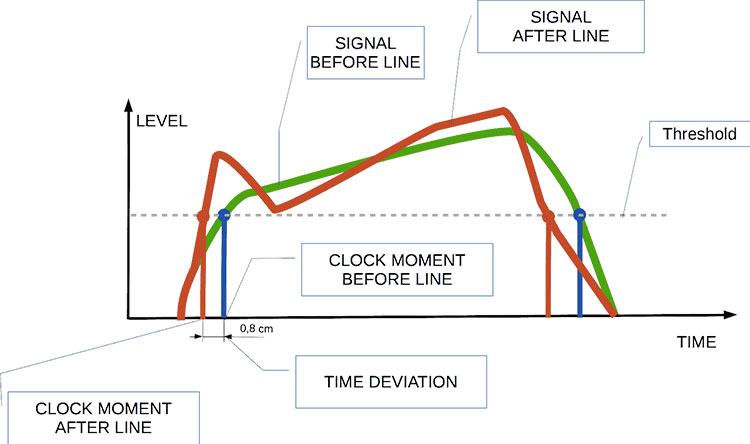
Audio jitter can be thought of as the irregular timing variations in the playback of digital audio signals. These timing variations can manifest as small deviations in the timing of audio samples, leading to audio artifacts like clicks, pops, and distortion. While it may seem like a technical concern, audio jitter can significantly affect your overall listening experience, even if you’re not a seasoned audiophile.

What is Audio Jitter?

Audio jitter, in essence, is the bane of digital audio playback. When you play a digital audio file, it gets converted into an analog signal for your speakers or headphones. The challenge arises when the conversion isn’t perfectly synchronized. Think of it like a metronome that occasionally skips a beat. This timing discrepancy, which we call audio jitter, can distort the sound and result in a less-than-ideal listening experience.

For a real-world analogy, consider a musical ensemble. If the musicians are out of sync, even by a tiny fraction of a second, the result can be dissonant and displeasing to the ear. Similarly, audio jitter disrupts the synchronization between the digital audio source and your playback system.

How Does Audio Jitter Impact Sound Quality?

Audio jitter affects sound quality by introducing unwanted artifacts. These artifacts can include audible clicks, pops, and distortions in the audio stream. To understand the impact, picture a pristine audio signal as a smooth, flowing river. Audio jitter is like tossing pebbles into that river, causing ripples and disturbances. These ripples manifest as audible imperfections in your music or audio.

Think of a jazz drum solo: the precision of the drummer’s beats is crucial to the experience. Even a slight deviation in the rhythm can disrupt the entire performance. Audio jitter works in a similar way, disrupting the timing and rhythm of your audio playback, ultimately degrading the sound quality.

The Technical Aspects of Audio Jitter

Now, let’s delve into the technical side of audio jitter. In the digital domain, audio is typically stored as discrete samples, each representing the amplitude of the sound at a specific moment. The timing of these samples is critical. Audio jitter occurs when the time intervals between these samples deviate from the ideal, leading to inconsistencies in playback.

To put this in context, think of a digital audio player as a conveyor belt, with each audio sample represented by a box. These boxes must move down the belt at precise intervals to maintain the audio’s integrity. If some boxes move faster or slower than others, you’ll encounter audio jitter, which translates to an erratic and unpleasant listening experience.

Addressing Audio Jitter: Practical Solutions

It’s clear that audio jitter can be a nuisance, but what can you do to mitigate its effects? Fortunately, there are practical solutions available. Some high-end audio equipment includes advanced jitter-reduction technologies. Additionally, using dedicated external digital-to-analog converters (DACs) can help improve audio synchronization.

Think of these solutions as a conductor guiding the musicians in an orchestra, ensuring they play in perfect harmony. Advanced equipment and DACs help maintain the precise timing necessary for high-quality audio playback.

Audio Jitter vs. Bit Depth: Exploring the Differences

While audio jitter deals with timing variations, bit depth relates to the depth of information in an audio signal. It’s essential to distinguish between the two. Bit depth determines the resolution of the audio signal, affecting the dynamic range and subtlety of sound. Audio jitter, on the other hand, impacts timing and synchronization. Both factors play a role in overall audio quality, but they address different aspects of the listening experience.

Think of bit depth as the number of colors on a painter’s palette, while audio jitter is akin to the painter’s brush strokes’ precision. They are both crucial for the final masterpiece, but they address different aspects of the artistic process.

The Importance of Low Jitter in High-End Audio Systems

In high-end audio systems, low jitter is a fundamental requirement for achieving audiophile-grade sound quality. Audiophiles demand the utmost precision and clarity in their audio playback, and any deviation in timing is unacceptable. To achieve this, specialized audio components and meticulous engineering are employed to minimize jitter.

Imagine a fine dining experience where every detail, from the presentation to the taste, is meticulously crafted. Audiophiles seek the same level of perfection in their audio experience, and low jitter is a crucial ingredient in achieving it.

Measuring and Analyzing Audio Jitter: Tools and Techniques

To assess and address audio jitter, various tools and techniques are available. One common method involves using dedicated audio analyzers that can pinpoint timing variations. Additionally, software applications can help diagnose and quantify audio jitter in your playback system.

Think of these tools as diagnostic instruments in a doctor’s office. They allow audio enthusiasts and professionals to diagnose and treat any issues related to audio jitter, ensuring the best possible audio quality.

Enhancing Your Audio Experience: Final Thoughts

In the world of digital audio, understanding and managing audio jitter is essential for achieving the best possible listening experience. Whether you’re a casual music lover or a dedicated audiophile, knowing how audio jitter affects your sound quality can lead to informed choices and better audio equipment investments.

So, the next time you enjoy your favorite music or immerse yourself in a captivating movie, remember the role that precise timing plays in your audio journey. Just as a conductor leads an orchestra to create beautiful music, minimizing audio jitter ensures that the symphony of sound reaches your ears with clarity and perfection.

Last Words

In conclusion, audio jitter is a subtle yet critical factor that can significantly impact your audio enjoyment. By delving into the technical aspects of audio jitter and exploring practical solutions, we’ve uncovered the key to enhancing your audio experience. Whether you’re an audiophile or simply someone who appreciates good sound, understanding and addressing audio jitter is a step toward audio perfection.