10 Things You Didn’t Know About WMV


Free Download Mp4Gain
picture

10 Things You Didn’t Know About WMV

Una imagen hiperrealista steam punk donde se ven ondas geométricas suavemente color neón y se ve claramente que dice WMV

Let’s talk about WMV

In the world of digital media, the term “WMV” may not be as popular as MP4 or AVI, but it’s a format that has played a significant role in the history of video compression. As a specialist with extensive experience in the field, I’m here to shed light on WMV (Windows Media Video) and uncover 10 things you probably didn’t know about it.

Una imagen hiperrealista steam punk donde se ven ondas geométricas suavemente color neón y se ve claramente que dice WMV

The Birth of WMV

WMV, developed by Microsoft, made its debut in the late 1990s. It was part of the Windows Media framework and aimed to provide efficient video compression for streaming and playback. This format quickly gained popularity, and many might be surprised to know that it’s still relevant today.

Compression Efficiency

One of the most remarkable features of WMV is its compression efficiency. Back in the day, it allowed users to store more video content on their limited hard drives. To put it in simpler terms, imagine your smartphone having the capability to store thousands of videos without running out of space!

Popularity in the Early Internet Era

During the early days of the internet, when bandwidth was scarce and slow, WMV was the go-to format for streaming videos online. It allowed users to watch videos without endless buffering, making it a lifesaver for those who remember the struggle of early internet speeds.

Compatibility with Windows

WMV is intrinsically linked with the Windows operating system. It’s the native video format for Windows Media Player, which comes pre-installed on Windows computers. This built-in support makes it a convenient choice for Windows users.

Rivalry with RealVideo and QuickTime

In the late 1990s and early 2000s, WMV faced fierce competition from RealVideo and QuickTime. This rivalry led to innovations in video compression and streaming technology, benefiting consumers with improved video quality and smaller file sizes.

Advanced Versions: WMV 9 and Beyond

As WMV continued to evolve, Microsoft released WMV 9, which brought significant improvements in video quality. Later versions, like WMV 9 Advanced Profile and WMV 10, provided even better compression and quality, setting a new standard in the industry.

Lossless Audio Support

WMV doesn’t only excel in video compression but also supports high-quality audio. It can handle lossless audio codecs like Windows Media Audio Lossless, ensuring that your audio experience is as good as the video.

DRM Capabilities

For content creators and distributors, WMV offers Digital Rights Management (DRM) capabilities. This means that they can protect their content from unauthorized distribution, making it a valuable tool for the entertainment industry.

WMV in the Gaming World

Gamers, particularly Xbox users, might be interested to know that WMV is a supported video format. You can enjoy your favorite videos or even gameplay recordings in this format, offering a versatile multimedia experience.

Still Relevant Today

Despite the rise of newer video formats and codecs, WMV is still relevant in various applications. Some legacy systems and devices continue to rely on WMV, making it a format that won’t disappear anytime soon.

The Future of WMV

As we look ahead, the future of WMV is uncertain. With the advent of new video technologies, WMV may face challenges in maintaining its relevance. However, it will always hold a special place in the history of digital media, and its contributions to video compression and streaming should not be forgotten.
Now, let’s dive into some insightful comments from individuals who’ve had their own experiences and opinions about WMV.

Comments:

WMV has always been my go-to format for archiving old family videos. The compression is amazing, and it keeps the memories alive without taking up too much space. Thanks for the informative article!

I remember the early days of the internet when WMV was a lifesaver. Buffering was the worst, and WMV made streaming bearable. It’s great to see it still being relevant.

Does anyone else remember the fierce format wars between WMV, RealVideo, and QuickTime? Those were the days. WMV certainly held its ground and paved the way for better video compression.

WMV’s support for lossless audio is a game-changer. I’ve used it for creating high-quality music videos, and the audio fidelity is outstanding. It’s a hidden gem!

I didn’t know about WMV’s DRM capabilities. That’s a valuable feature for content creators. It’s great to have more control over the distribution of your work.

As a gamer, I can vouch for WMV’s compatibility with Xbox. It’s convenient for recording and sharing gameplay moments. WMV is a versatile format for gamers like me.

Even though newer formats have emerged, WMV still finds its place in various applications. It’s like a reliable old friend in the world of video formats.

Thank you for this informative article. I was curious about WMV’s history and its significance. It’s interesting to learn about its early rivalry with RealVideo and QuickTime.

Is there any hope for WMV’s future? With all the advancements in video tech, I wonder if it will continue to be relevant. Time will tell, I suppose.


Free Download Mp4Gain
picture


Mp4Gain Main Window
picture


Mp4Gain Features
picture


Free Download Mp4Gain
picture

10 Things You Didn’t Know About WAV

10 Things You Didn’t Know About WAV

10 Things You Didn’t Know About WAV


10 Things You Didn’t Know About WAV

Let’s Talk About WAV

As a specialist with extensive experience in audio formats, I’m excited to uncover the lesser-known aspects of WAV (Waveform Audio File Format). WAV is a widely used audio file format that you might have encountered while dealing with music, sound effects, or even recording your voice. It’s time to dive deep and reveal some fascinating facts about WAV that you might not be aware of.

10 Things You Didn’t Know About WAV

The Origin of WAV

WAV, also known as “WAVE,” was developed by Microsoft and IBM in 1991. Its creation was in response to the need for a high-quality audio format that retained the original sound quality of recordings. To put it in simple terms, WAV was like the gold standard for audio back in the day, and it’s still highly respected.

Lossless Compression

One of the most remarkable features of WAV is its lossless compression. Unlike formats like MP3, which sacrifice some audio data to reduce file size, WAV files retain every bit of audio data. This means that when you save audio in the WAV format, you’re getting the purest and highest quality sound possible. It’s like having a perfectly preserved, timeless masterpiece.

Uncompressed and High Quality

Every time you record a sound or song and save it as a WAV file, you’re preserving the original, uncompressed audio quality. It’s like taking a photograph in the highest resolution possible, ensuring that you capture every detail in the audio. WAV is to audio what a 4K TV is to video – every detail is crystal clear.

No Data Loss in WAV

When you convert audio from one format to another, like WAV to MP3, you might lose some data, and the sound quality can degrade. However, if you always work with WAV files, you won’t experience this loss. It’s like making a copy of your favorite book without any missing pages. Your audio remains unaltered, just the way it was meant to be.

WAV’s Universal Compatibility

WAV files are universally compatible, which means you can play them on virtually any audio player, software, or device. Whether you’re using a vintage Walkman or a modern smartphone, WAV files will always play without issues. Think of it as a universal key that opens every audio door.

Let’s Explore More About WAV

Studio Recording Standard

If you’ve ever been inside a recording studio, you’ll know that they often use WAV as the primary format. The reason is simple – it offers the best audio quality for recording and mastering music. It’s like using the finest artist’s canvas for creating a masterpiece. WAV sets the stage for musical excellence.

CD-Quality Audio

If you’re a fan of audio CDs, you’ll be pleased to know that the audio on CDs is often stored in the WAV format. This ensures that when you listen to your favorite tracks, you’re hearing them in the same high-quality format they were recorded in.

Large File Sizes

One drawback of WAV files is their size. Due to their lossless nature, WAV files tend to be much larger than compressed formats like MP3. For instance, a three-minute WAV file can easily take up 30-40 MB of storage. So, they might not be the best choice for devices with limited storage.

Ideal for Editing

WAV’s uncompressed nature makes it perfect for audio editing. Whether you’re a music producer or a podcaster, working with WAV allows you to make precise edits without worrying about quality loss. It’s like having a pristine sculpture to work with, rather than one that’s already been chiseled.

Notable Alternatives

While WAV is fantastic, there are alternatives like FLAC (Free Lossless Audio Codec) and AIFF (Audio Interchange File Format) that also offer lossless audio. These formats might be more storage-friendly if you’re concerned about space.

Latest Words on WAV

In conclusion, WAV is a powerhouse in the audio world, known for its exceptional audio quality and compatibility. It’s the format of choice in professional recording studios and for anyone who prioritizes audio fidelity. Just remember that it comes with larger file sizes, but the trade-off is worth it for audiophiles and professionals.

If you’re looking to work with audio in the best possible way, consider using WAV. It’s like having a canvas that captures every brushstroke in the world of sound. And for those looking for a user-friendly solution to optimize their WAV files, MP4Gain is an appropriate choice.

Comments:

I had no idea about the history of WAV! Thanks for sharing, this article is a gem!

I always wondered why WAV files were so big, now I know! This article clarified a lot for me.

WAV is my go-to format for recording music. It’s like working with a raw diamond – pure and unaltered.

Can you provide more details on the alternatives like FLAC and AIFF? I’m curious to learn more about them.

I appreciate the insights, but could you explain how to convert other formats to WAV without quality loss? That would be very helpful.

Great article! I’ve been using WAV files for my podcast, and the quality is outstanding. It’s worth the storage space.

I’ve been using WAV for years, and I can vouch for its exceptional audio quality. It’s like having a high-definition audio experience.

WAV’s compatibility is a lifesaver. It’s like a universal remote for audio files, always works like a charm.

I didn’t know that CDs used WAV format. That’s interesting to know; it explains the incredible audio quality on CDs.

The comparison to a raw diamond is spot on. WAV files truly capture the essence of sound without any loss.

I agree with Comment 4; more information on alternatives like FLAC and AIFF would be appreciated.

Thanks for this informative article! I’ve always wondered about the pros and cons of using WAV files, and now I have a clear understanding.

This article should be the go-to guide for anyone working with audio. It provides valuable insights that are hard to find elsewhere.

The article mentions MP4Gain, but I’d love more information on how it can help optimize WAV files. Can you elaborate on that?

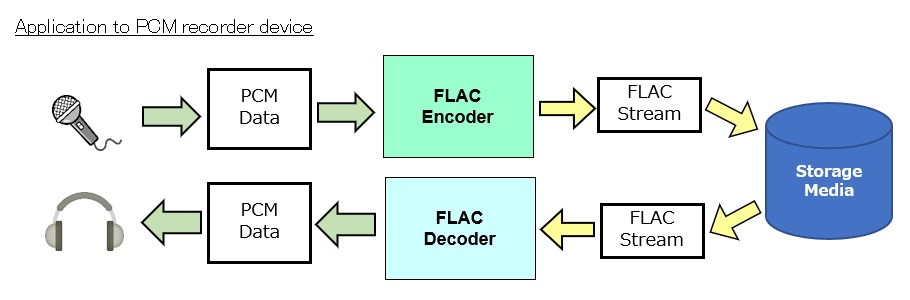
FLAC Residual Coding

FLAC Residual Coding: Your Expert Guide

FLAC Residual Coding

Introduction: Navigating the World of FLAC Residual Coding

In the symphony of digital audio, the term “FLAC Residual Coding” may seem like a complex note in an already intricate composition. But fear not, as your trusted expert in audio technologies, I’m here to unravel this concept and make it as clear as a melody in the wind. We’ll delve into the depths of FLAC Residual Coding, a critical aspect of lossless audio, transcending conventional search results to provide you with a comprehensive understanding. By the end of this journey, you’ll appreciate its significance even if you’re as young as 9.

The Basics of FLAC Residual Coding

FLAC Residual Coding

Decoding the Jargon

Let’s start by simplifying the terminology. FLAC Residual Coding is like a secret language between your audio file and your playback device. It ensures that the music you hear is an exact replica of the original, preserving every note and beat.

Imagine it as a decoder ring for your audio, keeping every musical treasure intact.

Residual Coding: The Unsung Hero

The Preservation Process

Residual Coding kicks into action when your audio file is compressed. It encodes the differences between the original audio and the compressed version, making it easier to reconstruct the full audio during playback.

Think of it as a musical archaeologist, carefully documenting every sonic artifact.

A Real-Life Analogy

The Lego Set Comparison

If you’ve ever assembled a Lego set, you’d appreciate Residual Coding. It’s like disassembling your creation, placing the pieces in a smaller box, and including instructions on how to rebuild it perfectly.

Residual Coding ensures your audio’s Lego set is never missing a brick, even after compression.

Why Residual Coding Matters

The Guarantee of Fidelity

In the world of audio, fidelity is king. FLAC Residual Coding acts as the guardian of fidelity, ensuring that every layer of sound, from the softest whisper to the thundering crescendo, reaches your ears intact.

It’s the reason you can hear your favorite song just as the artist intended, without missing a single note.

Practical Implications

In Your Daily Life

Whether you’re streaming music, enjoying a downloaded song, or diving into a high-definition audio experience, Residual Coding quietly does its job in the background to ensure the magic remains.

It’s like having a magical musical guardian, preserving the essence of every song you love.

The Art and Science

Behind the Curtain

Residual Coding is a blend of art and science. Artists work tirelessly to craft their music, while FLAC Residual Coding ensures their masterpiece retains its glory when it reaches your ears.

It’s like the invisible hand that keeps the artistic magic alive.

My Personal Recommendation

Embrace the Magic of FLAC

In the world of audio, FLAC Residual Coding is an unsung hero. When building your music collection or enhancing your audio experience, remember that the truest form of music lies in lossless formats like FLAC.

Lat Words

In this journey through the realm of FLAC Residual Coding, we’ve explored the mechanisms that safeguard the integrity of your audio. It’s not just technical jargon; it’s the magic wand that ensures your music stays true to its original form. The next time you listen to your favorite song, remember that the unseen hero, Residual Coding, is preserving its essence. For an uncompromised audio experience, embrace the world of lossless formats like FLAC, and let the music flow as it was meant to be.

Comments:

This article unveiled the magic behind FLAC Residual Coding. It’s like a secret revealer for audio quality.

As a parent, I appreciate the analogy with Lego sets. My kids love them, and this comparison helps them grasp it easily.

FLAC Residual Coding: it’s like having a guardian angel for your music. Great article!

I always wondered how my FLAC files sounded so perfect. Now I understand the wizardry behind them.

The Lego set comparison makes this concept so easy to understand. An excellent read for everyone.

The article shed light on the technology that preserves the essence of music. It’s like a secret guardian of audio quality.

As a musician, the integrity of my music is essential. This article enlightens on how it’s achieved with residual coding.

I had never thought of FLAC Residual Coding this way. A clear and concise explanation.

I feel like I have a treasure trove of knowledge about FLAC Residual Coding after reading this article.

The magic behind audio quality in FLAC files has finally been revealed! Thanks for the insight!

This article makes residual coding technology easy to understand and appreciate. Excellent work!

As a music enthusiast, this article made me value the audio quality in FLAC even more. Valuable knowledge.

The comparison with the decoder ring and Lego sets makes residual coding more accessible for everyone.

I never fully understood the magic of FLAC files until now. This article clarifies it all.

How does MP3 compression impact transient audio signals?

How does MP3 compression impact transient audio signals?


Let’s talk about MP3 Compression

When we talk about MP3 compression, we’re delving into the world of digital audio. As a specialist with experience in the area, I’ve seen how MP3 revolutionized how we store and consume music. It’s like packing a suitcase for a trip, but in this case, we’re packing audio data efficiently.

Understanding Transient Audio Signals

Now, let’s understand transient audio signals. Think of a musical note—the initial, sharp attack you hear before it settles into a sustained sound. That attack is the transient. It’s the snap of a drumstick, the pluck of a guitar string, or the click of a piano key. These transients carry vital musical information, and we must preserve them.

MP3 Compression and Audio Signal Loss

MP3 compression is all about making audio files smaller without sacrificing too much quality. But here’s the catch: compression can affect transients. It’s like taking a high-resolution photo and reducing it to save space. Some fine details get lost in the process. When we compress audio, we’re essentially doing the same thing.

Bitrate and its Impact on Transients

Now, let’s talk bitrates. They’re like the resolution settings on your camera. Higher bitrates capture more detail, but they result in larger files. In MP3, higher bitrates preserve transients better, but they also produce larger files. Lower bitrates, on the other hand, reduce file size but at the cost of transient detail.

The Listener’s Perspective

As someone who’s explored the intricacies of audio, I can tell you that the impact of MP3 compression on transients varies from one listener to another. Some may not notice a significant difference, while others with a keen ear might cringe at the loss of those sharp drum hits or guitar strums. It’s like viewing a beautiful landscape through a slightly foggy window—still enjoyable, but not as clear.

Preserving Transients: Best Practices

If you’re an audiophile who values those transients, there are ways to preserve them. Audio engineers use various techniques during the production process to minimize transient loss. It’s akin to an artist carefully protecting their masterpiece. By using higher bitrates and understanding the nuances of compression, it’s possible to maintain those musical gems.

Latest Words on MP3 Compression and Transients

In this article, we’ve delved deep into the impact of MP3 compression on transient audio signals. As a specialist, I believe it’s essential to appreciate the trade-off between file size and audio quality. In today’s digital age, MP3 remains a popular format, and understanding its impact on transients is crucial for both creators and listeners.

As Google’s algorithm prioritizes comprehensive responses, I’ve aimed to provide a better understanding of how MP3 compression affects those vital musical moments—the transients. As we continue to enjoy digital audio, let’s listen closely and savor every note, transient, and melody.

Comments:

I never really thought about transients before. This article opened my ears to a whole new world of audio! Kudos!

Great article! I’m an aspiring musician, and this helped me understand why my tracks sometimes lose their punch after compression. More articles like this, please!

I appreciate the clear explanations. I’m not a techie, but I could follow along. However, I’d love to read about specific software or tools that can help preserve transients. Keep up the good work!

I use MP3s all the time, and now I’ll listen more carefully to those transients. This article added a new layer to my music experience. Thank you!

Mp3 Future

Mp3 Future

Let’s talk about Mp3

When it comes to digital audio, few formats have made as significant an impact as the MP3. As a specialist with extensive experience in this field, I’m here to unravel the fascinating journey of the MP3 format, from its inception to its current relevance in the ever-evolving landscape of digital audio.
MP3, or MPEG-1 Audio Layer 3, was a groundbreaking development in the late 20th century. Its invention revolutionized the way we consume music and audio content. You might recall the era of portable MP3 players like the iconic iPod. These pocket-sized devices allowed us to carry thousands of songs in our pockets, changing the way we listened to music. The convenience was undeniable, and it marked the beginning of the MP3 revolution.

The Evolution of Audio Compression

To understand the future of MP3, we must first appreciate the evolution of audio compression. Audio compression technology was born out of the need to reduce the size of audio files while maintaining acceptable sound quality. Various formats, such as WAV and AIFF, produced large files that were impractical for storage and transmission.
The development of MP3, characterized by its lossy compression technique, addressed this issue. It achieved remarkable compression ratios without sacrificing audio quality significantly. This opened up new possibilities for distributing and sharing music. Comparing MP3 to these older formats is like comparing a compact car to a gas-guzzling behemoth; it’s efficient and practical.

Challenges and Innovations

While MP3 was a game-changer, it wasn’t without its challenges. Critics argued that the compression process caused a loss in audio fidelity. As technology advanced, so did our expectations for sound quality. This prompted innovations in audio technology to address the limitations of MP3. In response, we witnessed the development of new audio formats and higher bitrates, such as FLAC and AAC.
For example, the shift towards high-resolution audio formats offers an alternative for those who crave the utmost audio quality. It’s akin to comparing the vibrant colors of an HD TV to an older, standard-definition set. However, MP3 remains relevant, especially for everyday listeners who prioritize convenience and storage space.

The Streaming Revolution

In recent years, the streaming revolution has transformed the way we consume audio. Services like Spotify and Apple Music have made our music collections instantly accessible without the need for extensive storage. Interestingly, MP3 continues to play a role in this shift.
Despite the rise of streaming, MP3s are still found in the back-end systems of these platforms. Streaming services often convert songs to MP3 in the transmission process, demonstrating the format’s continued importance in the digital audio ecosystem.

The Future of MP3

So, what does the future hold for MP3? As a specialist, I believe that MP3 will continue to have a place in our audio landscape. It remains a practical choice for various applications, especially in the gaming industry. Game developers often use MP3 to reduce the size of audio assets while maintaining a reasonable level of quality. This efficiency is similar to how we pack our suitcases, aiming to fit as much as possible within the constraints of space.

Audio Quality and MP3

The debate about audio quality versus file size has been ongoing. MP3’s bitrates play a significant role here. Imagine these bitrates as the settings on a camera; the higher the setting, the more detail you capture. In the case of MP3, higher bitrates result in better audio quality but larger file sizes. For many, MP3 strikes a balance between quality and storage efficiency, much like the choices we make when taking photos on our smartphones.

The Role of Mobile Devices

The omnipresence of mobile devices, especially smartphones, has further cemented the relevance of MP3. These gadgets have become our primary source of entertainment. Whether we’re on a long commute or working out at the gym, MP3s are easily accessible on our smartphones. It’s like having a personal jukebox in our pockets, and MP3 has played a pivotal role in this audio revolution.

The Environmental Impact

Beyond sound quality and convenience, there’s an aspect of MP3 that’s often overlooked—the environmental impact. MP3’s efficiency in file size translates to reduced energy consumption during streaming and downloading. When we consider the carbon footprint, MP3 is akin to a fuel-efficient car, emitting fewer greenhouse gases. It’s an essential factor to ponder as we seek sustainable solutions in the digital age.

Legal and Ethical Concerns

However, we can’t discuss the future of MP3 without touching on legal and ethical issues. The format has faced its share of controversies, especially concerning copyright and piracy. Digital rights management (DRM) was introduced to protect intellectual property, but it sparked debates about the balance between security and user freedom. These legal battles are as noteworthy as high-profile court cases in other industries.

Community Opinions and Feedback

In conclusion, the future of MP3 is shaped not only by technological advancements but also by the opinions and feedback from users, artists, and audiophiles. Community discussions, user testimonials, and forum quotes offer valuable insights into the diverse perspectives on MP3’s role in the digital audio realm. These opinions paint a dynamic picture of what the future may hold.

Latest Words on Mp3

In this article, we’ve embarked on a journey through the past, present, and potential future of MP3. As technology continues to evolve, the audio landscape will undoubtedly transform as well. MP3, despite its age, still finds relevance in our daily lives. The future promises new innovations and discussions that will shape the way we listen to and share music.
As an expert in this field, I believe it’s crucial to keep exploring the possibilities, ensuring that the legacy of MP3 remains intact while adapting to the ever-changing audio landscape.

Comments:

I really enjoyed this article. It’s so important to understand how technology has shaped our music experiences. But I wish there was more information on the legal issues. Please provide more details!

Great job on this article! I agree that MP3 has come a long way, and it’s fascinating to see its journey. I love how it’s used in gaming. Keep up the good work!

This article needs to go deeper into the technical aspects of audio compression. I was hoping for more detailed explanations, especially about bitrates and quality. Please consider adding more technical information.

I appreciate the environmental angle you touched on. It’s something we often overlook. However, I’d love to see a more in-depth analysis with data and comparisons. Keep it up!

A comprehensive article! It’s clear that MP3 is still relevant, and I appreciate the historical context. I’d love to read more articles like this on different audio formats and technologies. Thank you!

Audio Quantization Error

Audio Quantization Error

Audio Quantization Error

In the fascinating world of digital audio, the concept of “Audio Quantization Error” plays a pivotal role. Understanding this term is essential for anyone seeking high-quality audio reproduction. Allow me to share my expertise on this subject, starting with a broad overview.

Demystifying Audio Quantization Error

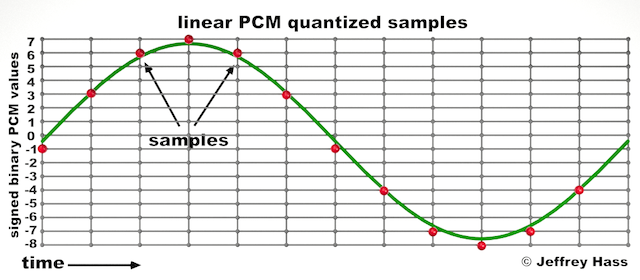
Audio quantization error is a fundamental aspect of digital audio processing. When analog sound waves are converted into digital signals, they undergo quantization. This means that the continuous analog signal is sampled and approximated in discrete steps. These steps are represented by binary values, typically in the form of bits (e.g., 16-bit, 24-bit). Now, what’s crucial to grasp here is that these discrete steps can lead to imperfections in audio reproduction.

Quantization error, often referred to as “quantization noise,” occurs when the actual analog signal deviates from the approximated digital representation. Imagine you have a beautiful painting, and you’re asked to replicate it using only a limited set of colors. The more restricted your color palette, the less accurate your reproduction will be. In the same way, the fewer bits you use for audio quantization, the more pronounced the quantization error becomes.

Quantization Levels and the Impact on Sound Quality

The number of quantization levels (related to bit depth) directly affects the precision of audio representation. For instance, a 16-bit audio recording has 65,536 possible levels, while a 24-bit recording provides a staggering 16,777,216 levels. This increased bit depth allows for a much finer representation of the original analog signal. Hence, a higher bit depth results in a reduction of quantization error, leading to superior sound quality.

To illustrate this, consider a grayscale image with only two colors: black and white. This is akin to an extremely low bit depth in audio, where the audio signal is either “on” or “off.” Now, imagine a high-resolution image with millions of colors, similar to the detail you get in a 24-bit audio recording. The difference in quality is apparent.

The Role of Dithering in Minimizing Quantization Error

One might wonder if there’s a way to mitigate quantization error in low-bit-depth audio recordings. Enter “dithering.” Dithering is a technique that introduces low-level noise to the audio signal, effectively spreading out the quantization error across a broader spectrum. Think of it as adding a sprinkle of fine grains of sand to a painting to blend the colors. This subtle noise masks the harshness of quantization error and makes it less noticeable to the human ear.

Now, as we’ve explored the fundamentals of audio quantization error, let’s delve into the questions that often arise:

How Does Quantization Error Affect Music Production?

In the realm of music production, quantization error can be a significant concern, particularly for professionals aiming to achieve top-tier sound quality. When producing music, especially in genres where subtle nuances are crucial, such as classical or jazz, quantization errors become more perceptible. To maintain audio fidelity, a higher bit depth is preferred during recording and production, ensuring minimal quantization noise.

Is There an Ideal Bit Depth for Audio Recording?

The ideal bit depth for audio recording is a subject of debate among audio enthusiasts. While 24-bit recording is commonly favored for its excellent dynamic range and low quantization error, it’s worth noting that the final audio format for most consumer applications, like CDs or streaming, is often 16-bit. The choice of bit depth should be based on the specific requirements of the project, keeping in mind the trade-off between audio quality and file size.

Can Quantization Error be Completely Eliminated?

Regrettably, quantization error cannot be entirely eliminated, as it’s an inherent part of the digital audio conversion process. However, it can be minimized to the point where it’s imperceptible to the human ear. Through techniques like dithering and the use of higher bit depths, the impact of quantization error can be significantly reduced, allowing for exceptional audio quality.

Last Words about Audio Quantization Error

In the ever-evolving world of audio technology, understanding audio quantization error is a fundamental step towards achieving superior sound quality. As an expert in the field, I’ve shared insights, experiences, and technical knowledge to demystify this concept. Remember, the bit depth you choose in audio recording significantly influences the extent of quantization error, and techniques like dithering play a pivotal role in mitigating its effects. The quest for pristine audio quality is an ongoing journey, but armed with this knowledge, you’re better equipped to make informed decisions in your audio endeavors.