Perceptual Entropy in an MP3 File


Free Download Mp4Gain
picture

How to Measure the Perceptual Entropy in an MP3 File?
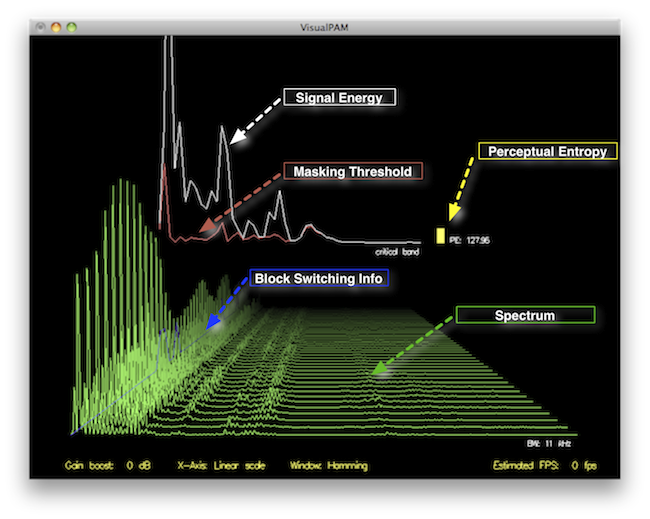
Perceptual Entropy
Perceptual Entropy

Introduction to Perceptual Entropy in an Mp3

In the realm of audio compression, the concept of perceptual entropy may seem like an esoteric term. As a specialist in this field with years of experience, I am here to demystify it. Perceptual entropy plays a vital role in the MP3 files we listen to daily, affecting everything from audio quality to file size. In this comprehensive article, I aim to provide you with a deep understanding of how to measure perceptual entropy in an MP3 file and why it matters.

Understanding Perceptual Entropy

Definition of Perceptual Entropy

Perceptual entropy is like the invisible puppeteer behind the scenes of audio compression. Imagine you have a favorite storybook with many repetitive sentences. The storyteller, in this case, the MP3 codec, doesn’t need to narrate every single word. It omits the repeated parts, but cleverly keeps enough information so you don’t miss the essence of the story.

Importance in Audio Compression

The significance of perceptual entropy in audio compression is akin to sorting out your wardrobe. You don’t need to keep every single pair of socks. You retain a representative selection while saving space. Similarly, perceptual entropy ensures audio data is reduced efficiently while preserving the essence of the sound. It’s all about maintaining quality while optimizing storage.

Measuring Perceptual Entropy</h2

Methods for Measurement

The tools used to measure perceptual entropy are like detectives scrutinizing every page of your storybook. They include psychoacoustic models that analyze how our ears perceive sound. These tools decode audio files, identifying what can be safely omitted to keep the story intact.

Tools and Software

Consider these tools like a set of magic glasses that allow you to see the hidden patterns in your storybook. Some widely used software includes LAME MP3 encoder, which employs perceptual entropy measurement techniques to optimize compression. Others, like FFmpeg, offer valuable insights into perceptual entropy.

The Role of Bit Rate

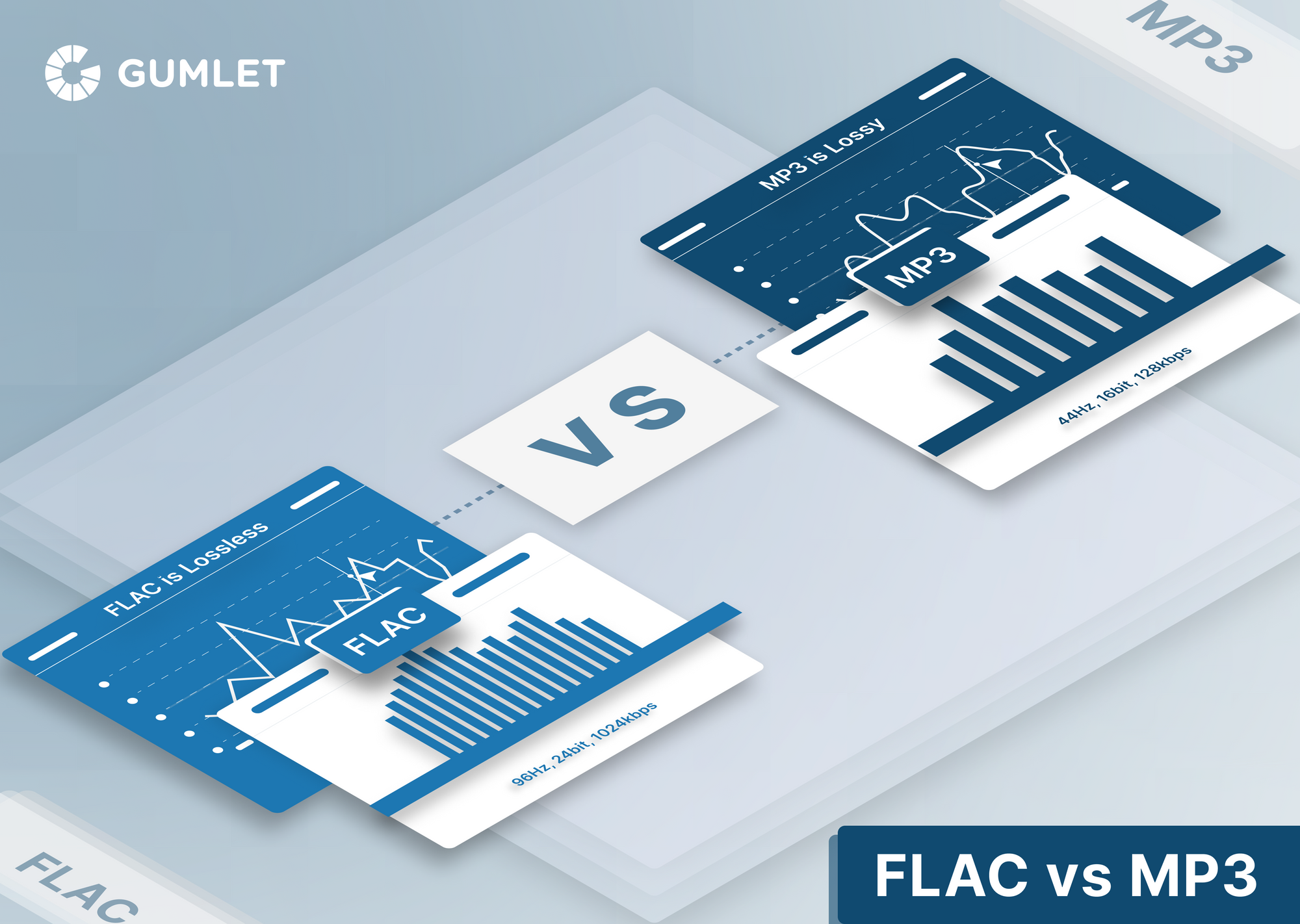
Think of bit rate as the quality slider for your audio file. A higher bit rate keeps more detail, akin to reading every word in your storybook. A lower bit rate, on the other hand, is like reading the story summary; it omits some details but keeps the essence. Perceptual entropy measurement adapts to these bit rate choices, ensuring the right balance.

Significance of Perceptual Entropy in Audio Compression</h2

Effect on Compression Efficiency

Imagine you have a suitcase, and you want to pack it efficiently. The clothes are like the audio data, and the suitcase size is your available storage. Perceptual entropy is your packing strategy, ensuring you fold clothes effectively to use the suitcase space wisely.

Impact on Audio Quality

When you send a letter, you want it to be both light and readable. Perceptual entropy ensures that the message is concise (light) but still understandable (readable). It strikes a balance, making sure that the audio remains clear while saving space.

Real-world Examples

To illustrate perceptual entropy, think of a colorful painting. Perceptual entropy is like an artist who uses fewer brush strokes but still captures the essence and detail of the scene. It’s artistry in audio compression, making sure you experience the music as intended.

Evaluating Audio Quality</h2

Criteria for Audio Quality

Audio quality assessment is similar to a taste test. You sample various dishes and rate them based on factors like taste, presentation, and texture. Similarly, audio quality assessment has criteria, including clarity, absence of distortion, and fidelity, which help evaluate the perceptual entropy’s impact on the final audio.

Striking a Balance

It’s like baking a cake; you need the right ingredients in the right proportions. Perceptual entropy is one of those ingredients. Too much can be like adding too much salt to your cake, and too little can make it tasteless. Striking the right balance is the key to maintaining audio quality.

Tools for Evaluation

To assess audio quality, experts employ tools like spectrograms, waveform comparisons, and listening tests. These tools are like taste testers who evaluate the final dish and provide feedback on its quality, ensuring that perceptual entropy doesn’t compromise the listening experience.

Practical Applications</h2

Music Production

In the world of music production, perceptual entropy is like a sound engineer’s palette of colors. It allows them to maintain high-quality audio while conserving space. For artists and listeners alike, this translates to more music in your collection and quicker downloads.

Streaming Services

Streaming services optimize audio files for efficient delivery. Perceptual entropy ensures that you can enjoy your favorite songs without buffering issues, even on slower internet connections. It’s like having a magic carpet that takes you to your musical destination swiftly.

Industry Insights

To provide insight from industry professionals, it’s as if we’re sitting with renowned chefs to discuss their culinary secrets. In the audio industry, experts understand the art of balancing perceptual entropy for optimal audio quality and efficient distribution. It’s the heart of what makes your listening experience exceptional.

Last Words about Perceptual Entropy Measurement in MP3 Files

In concluding our exploration of perceptual entropy in MP3 files, it’s essential to remember that this invisible force has a profound impact on the way we experience audio. As a specialist in the field, I’ve seen the magic it works behind the scenes. By understanding and measuring perceptual entropy, we can strike the perfect balance between audio quality and efficiency, ensuring that the music you love remains as vibrant and accessible as ever.


Free Download Mp4Gain
picture


Mp4Gain Main Window
picture


Mp4Gain Features
picture


Free Download Mp4Gain
picture

Critical Bandwidths in MP3

Calculating Critical Bandwidths in MP3 Compression

Critical Bandwidths in MP3

As an expert in the realm of MP3 compression and audio technology, I’m here to unravel the intricate world of critical bandwidths in MP3 compression. Understanding this concept is pivotal in achieving optimal audio quality while minimizing file size. Let’s dive into the details and explore this fascinating topic.

What Are Critical Bandwidths in MP3 Compression?

Critical bandwidths, often referred to as critical bands, are a fundamental concept in the field of psychoacoustics. They relate to the way our ears perceive different frequencies and play a vital role in audio compression, particularly in the MP3 format. To put it simply, critical bandwidths represent the range of frequencies that our ears can distinguish and process.

Real-Life Example: Think of critical bandwidths as a set of buckets, each representing a range of frequencies. Our ears can only fill a limited number of buckets at once, and these buckets are wider for low frequencies and narrower for high frequencies.

MP3 compression exploits the knowledge of critical bandwidths to remove audio information that falls outside the range of human hearing. This selective approach allows for significant data reduction while retaining audio quality. It’s akin to trimming the fat while preserving the meat, resulting in a leaner audio file.

How Are Critical Bandwidths Determined?

Critical bandwidths are not fixed; they vary depending on the specific frequency and the environment in which the sound is heard. Psychoacoustic studies have led to the development of critical bandwidth curves, which provide a graphical representation of how our ears perceive different frequencies.

Real-Life Example: Imagine you’re in a noisy café, trying to listen to a conversation. Your ears focus on the frequency range of the voices while ignoring the surrounding noise. This selective attention is similar to how critical bandwidths work in audio compression.

In the context of MP3 compression, these critical bandwidth curves are used to determine which parts of the audio spectrum can be discarded without a noticeable impact on the listening experience. This fine-tuned approach ensures that the compression process is both efficient and transparent to our ears.

Balancing Compression and Quality

The art of MP3 compression lies in finding the delicate balance between reducing file size and maintaining audio quality. Critical bandwidths are a crucial tool in achieving this equilibrium. By identifying and preserving the most relevant audio information while discarding what falls outside the critical bandwidths, MP3 compression delivers impressive results.

Real-Life Example: Consider the act of watching a high-definition movie on your smartphone while saving data. The device adjusts the video quality based on the screen size and your internet speed, providing a smooth viewing experience without unnecessary data consumption. MP3 compression operates in a similar fashion, optimizing audio for digital consumption.

In essence, critical bandwidths in MP3 compression serve as a guide to ensure that the compression process is as imperceptible as possible to the human ear. By focusing on the audio information that matters most, we can enjoy high-quality audio experiences with smaller file sizes.

Last Words about Critical Bandwidths in MP3 Compression

In my journey through the realm of audio compression, I’ve come to appreciate the profound impact of critical bandwidths. These frequency ranges shape the way we perceive sound and play a pivotal role in the world of MP3 compression. By understanding this concept, we can navigate the intricacies of audio technology, striking a harmonious balance between quality and efficiency.

Error Resilience in MP3 Audio Streaming

Error Resilience in MP3 Audio Streaming

Error Resilience in MP3 Audio Streaming

As an expert in the field of audio streaming and error resilience, I’m here to provide you with valuable insights and information on the implications of error resilience in MP3 audio streaming. MP3 audio streaming has become an integral part of our digital world, and understanding the challenges and solutions related to error resilience is essential for a seamless listening experience.

The Importance of Error Resilience

Error resilience in MP3 audio streaming is a critical aspect of ensuring uninterrupted and high-quality playback. MP3 files are susceptible to various types of errors, such as packet loss during transmission or data corruption, which can lead to audio artifacts and interruptions in the streaming process. To address these challenges, error resilience mechanisms have been developed.

Real-Life Example: Imagine streaming your favorite song, and suddenly, the audio quality degrades due to a poor network connection. Error resilience mechanisms kick in, helping to maintain a smooth listening experience by minimizing the impact of errors.

These mechanisms include techniques like Forward Error Correction (FEC) and interleaving, which help recover lost or corrupted data during transmission. In essence, error resilience ensures that even in less-than-ideal network conditions, you can still enjoy your audio content without noticeable disruptions.

How Error Resilience Works

Error resilience strategies in MP3 audio streaming are designed to detect and correct errors as they occur, thus preventing them from affecting your listening experience. FEC, for example, involves adding redundant data to the audio stream, allowing the receiver to reconstruct missing or damaged parts of the file.

Real-Life Example: Think of FEC as a safety net for your audio data. It's like having extra puzzle pieces that can be used to complete the picture, even if some pieces are missing or damaged.

Interleaving, on the other hand, rearranges the data in a way that minimizes the impact of consecutive errors. This ensures that even if a burst of errors occurs, your audio stream remains relatively intact.

Overcoming Network Challenges

In a world where we stream audio content from various devices and locations, network challenges are inevitable. Error resilience mechanisms in MP3 audio streaming are the unsung heroes that keep our music flowing smoothly.

Real-Life Example: Picture yourself streaming a podcast during your daily commute. Your signal may drop momentarily in a tunnel, but thanks to error resilience, you hardly notice it, as the system seamlessly adjusts to the momentary disruption.

These mechanisms don’t just correct errors; they also adapt to changing network conditions, ensuring a consistent audio quality even when you’re on the move.

Optimizing Your Streaming Experience

To optimize your MP3 audio streaming experience, it’s crucial to choose platforms and devices that implement robust error resilience mechanisms. These systems not only provide you with high-quality sound but also enhance your listening experience, no matter where you are.

Real-Life Example: When you select a streaming service or device that prioritizes error resilience, you're choosing a smoother audio journey. You'll enjoy your music, podcasts, or audiobooks without constant interruptions, even when you encounter minor network hiccups.

In conclusion, error resilience in MP3 audio streaming is a complex but essential aspect of our digital world. It’s the technology that quietly works in the background, ensuring that your audio content reaches your ears in a pristine state, even when the digital pathways it travels are far from perfect.

Last Words about Error Resilience in MP3 Audio Streaming

In my journey through the world of audio streaming, I’ve witnessed the evolution of error resilience mechanisms that have made our listening experiences more robust and enjoyable. Remember, when you encounter a flawless stream of your favorite music or podcast, there’s a team of engineers and systems working tirelessly to make it happen. Error resilience in MP3 audio streaming is not just a concept; it’s the unsung hero that ensures you hear the music, not the errors.

x264 Encoder in Mp4 Creation

Role of the x264 Encoder in MP4 Creation

x264
x264

As an expert in video encoding, I’ll delve into the significant role played by the x264 open-source encoder in the creation of MP4 files. This versatile tool has a profound impact on the quality, settings, and optimization of your MP4 videos. In this article, I’ll share insights and experiences to answer your search intention and help you understand the x264 encoder’s key role.

How Does x264 Affect Video Quality in MP4 Files?

The x264 encoder is renowned for its ability to enhance video quality in MP4 files. It achieves this by efficiently compressing video data while preserving visual fidelity. One of its notable features is its constant rate factor (CRF) mode, which allows you to balance file size and video quality. By adjusting the CRF value, you can control the compression level, ensuring that your MP4 videos maintain excellent quality. This balance is crucial, especially when dealing with high-definition content, as it ensures a visually pleasing viewing experience without excessive file sizes.

Key Settings for x264 in MP4 Encoding

To make the most of the x264 encoder in MP4 creation, it’s essential to understand key settings. The x264 encoder provides options for controlling parameters such as bitrate, preset, and profile. For instance, choosing the “slow” preset improves video quality but results in longer encoding times. On the other hand, the “fast” preset sacrifices some quality for faster encoding. These settings are valuable tools for customizing your MP4 files to meet your specific needs.

Benefits of Using the x264 Encoder in MP4 Creation

The x264 encoder offers several advantages when it comes to MP4 video creation. Firstly, it’s an open-source tool, which means it’s free and accessible for anyone. This allows for widespread adoption and community support. Additionally, it’s known for its high compression efficiency, resulting in smaller file sizes without compromising video quality. The x264 encoder’s flexibility and adaptability make it an ideal choice for various applications, from video streaming to archiving.

Optimizing x264 for MP4 Videos

Optimizing x264 for your MP4 videos involves fine-tuning the settings to suit your specific goals. You can experiment with different presets, CRF values, and profiles to find the right balance between quality and file size. It’s essential to consider the content you’re encoding and the target audience. For example, if you’re creating content for online streaming, you may prioritize faster encoding times. On the other hand, if quality is paramount, you can opt for slower presets and higher CRF values.

Last Words about the Role of the x264 Open-Source Encoder in MP4 Creation

In conclusion, the x264 open-source encoder plays a crucial role in MP4 video creation. It empowers users to achieve excellent video quality while providing flexibility and accessibility. By understanding its impact on video quality, key settings, benefits, and optimization techniques, you can harness the full potential of the x264 encoder for your MP4 files. Whether you’re a content creator or a video enthusiast, this tool is a valuable asset in the world of video encoding.

MP4 Encoding for High Frame Rate

How to Optimize MP4 Encoding for High Frame Rate

High Frame Rate MP4 Encoding

When it comes to video encoding, achieving a high frame rate in your MP4 files can greatly enhance the viewing experience. In this article, I will share my expertise and insights on optimizing MP4 encoding for high frame rates, ensuring you have a deep understanding of the process. Let’s dive in!

Key Parameters for High Frame Rate Video Encoding

To optimize MP4 encoding for high frame rates, it’s crucial to understand key parameters. The frame rate, bitrate, and codec are the primary factors to consider. A higher frame rate, such as 60 or 120 frames per second, ensures smooth video playback, but it also requires a higher bitrate to maintain quality. H.265 is an efficient codec choice for high frame rates, offering smaller file sizes without compromising quality. Experiment with these parameters to find the perfect balance for your specific needs.

How High Frame Rate Affects Video Quality

High frame rates, like 60fps or 120fps, deliver exceptional video quality by capturing more frames per second. This creates smoother motion and reduces motion blur, making it ideal for action-packed content like gaming or sports videos. However, it’s worth noting that not all displays can take full advantage of high frame rates. To appreciate the difference, you need a monitor or TV with a high refresh rate, typically 120Hz or above. For an immersive experience, combining high frame rates with compatible hardware is key.

Ideal Frame Rate for Smooth Video Playback

The ideal frame rate for smooth video playback depends on the content and the audience’s preferences. While 30fps is considered standard for most videos, high frame rates like 60fps or 120fps are perfect for fast-paced content. Gamers and sports enthusiasts often prefer 120fps for the unparalleled smoothness it provides. However, it’s essential to ensure your audience’s devices can handle the chosen frame rate to avoid playback issues.

Last Words about How to Optimize MP4 Encoding for High Frame Rate

In conclusion, optimizing MP4 encoding for high frame rates is a powerful way to enhance video quality and viewer experience. By selecting the right software, adjusting key parameters, and understanding the impact of high frame rates on video quality, you can create outstanding content. Remember to consider your audience’s preferences and device capabilities when choosing the ideal frame rate. With the knowledge shared in this article, you’ll be well on your way to producing top-notch high frame rate MP4 videos.

Adaptive Audio Streaming

Adaptive Audio Streaming

Adaptive Audio Streaming

Adaptive audio streaming, a critical aspect of modern digital media delivery, has revolutionized how we experience audio content. In this comprehensive guide, I will delve into the intricacies of adaptive audio streaming and its significance in providing top-notch streaming audio quality.

Understanding Adaptive Audio Streaming

Adaptive audio streaming is a dynamic approach that optimizes audio quality based on the viewer’s network conditions. It ensures a seamless audio experience by adjusting the audio codec’s parameters and the bitrate of the audio stream in real-time. This adaptation is vital to prevent audio interruptions, buffering, and loss of quality, especially in the ever-changing world of online content delivery.

Imagine a journey on a highway where the traffic flow constantly changes. Adaptive streaming is like having a smart vehicle that adjusts its speed to maintain a smooth ride. Similarly, when your internet connection fluctuates, adaptive audio streaming adapts the audio quality to ensure you experience a continuous, high-quality audio stream.

The Science Behind Streaming Audio Quality

To grasp the science behind adaptive audio streaming, let’s explore some of the key technical aspects. Adaptive streaming relies on efficient audio codecs that compress and decompress audio data. These codecs use various algorithms to reduce the size of audio files while preserving audio quality. The choice of codec and its efficiency play a significant role in determining the quality of the audio stream.

In a real-world analogy, think of audio codecs as skilled chefs preparing a sumptuous dish. A masterful chef knows how to retain the flavors while reducing the dish’s size, making it easier to serve. Likewise, efficient audio codecs preserve the audio’s fidelity while making it compatible with varying network conditions.

The Impact of Latency in Audio Streaming

Latency, the delay between audio production and playback, is a crucial factor in adaptive audio streaming. While some latency is inevitable due to data transmission and codec processing, excessive latency can disrupt the streaming experience. Adaptive streaming technologies aim to strike a balance between audio quality and latency.

Think of latency as the time it takes for a letter to reach its destination through traditional mail compared to email. Adaptive audio streaming ensures the audio reaches your ears with minimal delay, akin to the swift delivery of an email. This balance is essential for real-time applications like online gaming or live broadcasts, where low latency is a top priority.

Now, let’s address the questions that often arise regarding adaptive audio streaming:

How Does Adaptive Bitrate Streaming Work?

Adaptive bitrate streaming, a close sibling to adaptive audio streaming, involves adjusting not only the audio quality but also the video quality based on network conditions. It works by dividing the audio and video content into small chunks of data and delivering them in varying quality levels. Players then choose the best quality for a seamless viewing experience.

What Technologies Drive Adaptive Audio Streaming?

Adaptive audio streaming leverages several technologies, including HTTP Live Streaming (HLS), Dynamic Adaptive Streaming over HTTP (DASH), and Real-Time Messaging Protocol (RTMP). These technologies enable adaptive streaming by optimizing content delivery over the internet, ensuring that audio quality remains consistent across different devices and network conditions.

Why Is Mobile Audio Streaming Challenging?

Mobile audio streaming presents unique challenges due to the variability of cellular networks and the limited processing power of mobile devices. Adaptive audio streaming is particularly crucial in this context, as it ensures a smooth listening experience, even when on the move. It’s like having an audio companion that adjusts to your surroundings, providing uninterrupted music or podcasts as you travel.

Last Words about Adaptive Audio Streaming

In the era of digital media, adaptive audio streaming is the unsung hero that ensures you enjoy a high-quality audio experience regardless of your network conditions. I’ve shared my knowledge and expertise on this topic, revealing the science behind streaming audio quality and the role of efficient codecs. Understanding the impact of latency and the technologies driving adaptive streaming is key to appreciating its significance. As an expert in the field, I encourage you to embrace the world of adaptive audio streaming, where your audio content is tailored to your network conditions, just like a perfectly orchestrated symphony.

Audio Quantization Error

Audio Quantization Error

Audio Quantization Error

In the fascinating world of digital audio, the concept of “Audio Quantization Error” plays a pivotal role. Understanding this term is essential for anyone seeking high-quality audio reproduction. Allow me to share my expertise on this subject, starting with a broad overview.

Demystifying Audio Quantization Error

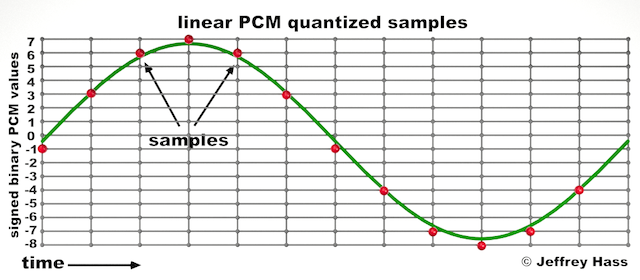
Audio quantization error is a fundamental aspect of digital audio processing. When analog sound waves are converted into digital signals, they undergo quantization. This means that the continuous analog signal is sampled and approximated in discrete steps. These steps are represented by binary values, typically in the form of bits (e.g., 16-bit, 24-bit). Now, what’s crucial to grasp here is that these discrete steps can lead to imperfections in audio reproduction.

Quantization error, often referred to as “quantization noise,” occurs when the actual analog signal deviates from the approximated digital representation. Imagine you have a beautiful painting, and you’re asked to replicate it using only a limited set of colors. The more restricted your color palette, the less accurate your reproduction will be. In the same way, the fewer bits you use for audio quantization, the more pronounced the quantization error becomes.

Quantization Levels and the Impact on Sound Quality

The number of quantization levels (related to bit depth) directly affects the precision of audio representation. For instance, a 16-bit audio recording has 65,536 possible levels, while a 24-bit recording provides a staggering 16,777,216 levels. This increased bit depth allows for a much finer representation of the original analog signal. Hence, a higher bit depth results in a reduction of quantization error, leading to superior sound quality.

To illustrate this, consider a grayscale image with only two colors: black and white. This is akin to an extremely low bit depth in audio, where the audio signal is either “on” or “off.” Now, imagine a high-resolution image with millions of colors, similar to the detail you get in a 24-bit audio recording. The difference in quality is apparent.

The Role of Dithering in Minimizing Quantization Error

One might wonder if there’s a way to mitigate quantization error in low-bit-depth audio recordings. Enter “dithering.” Dithering is a technique that introduces low-level noise to the audio signal, effectively spreading out the quantization error across a broader spectrum. Think of it as adding a sprinkle of fine grains of sand to a painting to blend the colors. This subtle noise masks the harshness of quantization error and makes it less noticeable to the human ear.

Now, as we’ve explored the fundamentals of audio quantization error, let’s delve into the questions that often arise:

How Does Quantization Error Affect Music Production?

In the realm of music production, quantization error can be a significant concern, particularly for professionals aiming to achieve top-tier sound quality. When producing music, especially in genres where subtle nuances are crucial, such as classical or jazz, quantization errors become more perceptible. To maintain audio fidelity, a higher bit depth is preferred during recording and production, ensuring minimal quantization noise.

Is There an Ideal Bit Depth for Audio Recording?

The ideal bit depth for audio recording is a subject of debate among audio enthusiasts. While 24-bit recording is commonly favored for its excellent dynamic range and low quantization error, it’s worth noting that the final audio format for most consumer applications, like CDs or streaming, is often 16-bit. The choice of bit depth should be based on the specific requirements of the project, keeping in mind the trade-off between audio quality and file size.

Can Quantization Error be Completely Eliminated?

Regrettably, quantization error cannot be entirely eliminated, as it’s an inherent part of the digital audio conversion process. However, it can be minimized to the point where it’s imperceptible to the human ear. Through techniques like dithering and the use of higher bit depths, the impact of quantization error can be significantly reduced, allowing for exceptional audio quality.

Last Words about Audio Quantization Error

In the ever-evolving world of audio technology, understanding audio quantization error is a fundamental step towards achieving superior sound quality. As an expert in the field, I’ve shared insights, experiences, and technical knowledge to demystify this concept. Remember, the bit depth you choose in audio recording significantly influences the extent of quantization error, and techniques like dithering play a pivotal role in mitigating its effects. The quest for pristine audio quality is an ongoing journey, but armed with this knowledge, you’re better equipped to make informed decisions in your audio endeavors.

Audio Quality Assessment

Audio Quality Assessment

Audio Quality Assessment

When it comes to audio quality assessment, it’s all about ensuring that the sound you hear is as clear and crisp as possible. As someone deeply involved in the world of audio, I can’t emphasize enough how crucial this aspect is. From evaluating audio equipment to optimizing sound for various applications, audio quality assessment plays a pivotal role in the audio industry. In this article, I’ll provide you with insights, expertise, and answers to common questions surrounding this essential subject.

Understanding Audio Quality Assessment

Audio quality assessment, in a nutshell, is the process of evaluating and quantifying the fidelity and clarity of audio signals. It’s like having a magnifying glass for your ears. The aim is to identify imperfections, distortions, or issues that might affect the overall listening experience. Think about it as your audio system’s annual check-up, where you assess its health and determine if any improvements or repairs are needed.

Imagine listening to your favorite song. You want to hear each instrument and vocal with utmost clarity, without any unwanted noise or distortion. Audio quality assessment ensures that this happens consistently. It involves using various techniques and measurements to evaluate sound quality objectively, rather than relying solely on personal preferences.

Measuring Sound Quality

A common question that arises is, “How do you measure sound quality?” Well, this process is multi-faceted. To start, sound quality assessment involves the analysis of various factors, including frequency response, distortion, dynamic range, signal-to-noise ratio, and more. These metrics help us gauge the performance of audio equipment like speakers, headphones, or amplifiers.

For example, a speaker’s frequency response measurement shows how accurately it reproduces different frequencies. If a speaker is meant for home theater, it should have a broad and flat frequency response to deliver a balanced sound across low, mid, and high frequencies. Evaluating these parameters is like examining an athlete’s performance statistics to determine their strengths and weaknesses.

Factors Affecting Audio Fidelity

As an audio expert, I often encounter the question, “What factors affect audio fidelity?” Audio fidelity, or how accurately sound is reproduced, can be influenced by a variety of elements. These include the quality of the source material, the capabilities of playback equipment, the acoustics of the listening environment, and even the quality of the cables used in your setup.

Consider the analogy of a chef preparing a gourmet meal. The quality of the ingredients, the kitchen equipment, and the cooking environment all play a role in the final dish’s taste. Similarly, when assessing audio fidelity, we need to take into account the entire audio chain, from the source to the listener’s ears, to pinpoint potential areas of improvement.

Importance of Audio Performance Evaluation

Lastly, let’s address the significance of audio performance evaluation. Why is it important? Well, imagine you’re watching a blockbuster movie or listening to a podcast, and the audio quality is subpar. It can greatly detract from the overall experience. In the professional audio world, ensuring high-quality audio is paramount for content creators, musicians, and sound engineers.

Picture yourself at a live concert where the sound quality is impeccable. It enhances your emotional connection to the music and elevates the entire experience. This is why evaluating audio performance is essential, whether it’s for personal enjoyment or professional use. By understanding and optimizing audio quality, you can immerse yourself in the richness of sound and appreciate it to the fullest.

Last Words about Audio Quality Assessment

In conclusion, audio quality assessment is the compass that guides us toward exceptional sound experiences. It enables us to objectively evaluate and enhance audio quality, ensuring that every note, every word, and every sound is delivered with clarity and precision. As an audio enthusiast and expert, I encourage you to explore the world of audio quality assessment, as it can truly transform the way you listen and appreciate the beauty of sound.

Audio Channel Remapping

Audio Channel Remapping


Audio Channel Remapping

Audio channel remapping is a powerful technique that allows you to reconfigure how audio signals are distributed across different speakers or channels in a sound system. This process is essential in the world of audio engineering, as it can significantly impact the quality of sound output in various applications. In this article, I will delve into the intricacies of audio channel remapping, providing you with a comprehensive understanding of the subject and addressing related questions that you might have.

The Basics of Audio Channel Remapping

To start, audio channel remapping involves the alteration of audio signals to achieve specific spatial audio effects or to adapt to various playback configurations. It’s commonly used in home theaters, surround sound setups, and even in professional audio production. Imagine you have a 5.1 surround sound system, and you want to enjoy a movie that’s mixed in 7.1 surround. Audio channel remapping can help redistribute the audio elements to your available channels, delivering an immersive experience.

Consider this scenario: You’re watching a high-octane action scene in a movie, and the sound of a car approaching from behind should be heard from the rear speakers. With audio channel remapping, the sound can be dynamically redirected to the appropriate speakers, creating a more realistic and engaging audio experience.

Remapping Audio Channels in Software

One of the most common questions related to audio channel remapping is, “How do I remap audio channels in software?” This is a crucial aspect, as software solutions offer a flexible way to adjust audio channel assignments. Various audio editing and playback software tools, such as Adobe Audition or VLC Media Player, allow you to remap channels to your liking.

For instance, you can change the default audio channel mapping for a video in VLC. By going to Tools > Preferences > Audio, you can set your preferred audio output configuration, effectively remapping the channels based on your sound system’s setup. This level of customization empowers you to optimize your audio experience for any media.

Enhancing Surround Sound with Audio Channel Remapping

Now, let’s address the question of whether audio channel remapping can improve surround sound. The answer is a resounding yes. By reallocating audio channels effectively, you can enhance the immersion of your surround sound setup. Let’s return to the example of a 5.1 system playing 7.1 content. Audio channel remapping allows you to adapt the audio so that you don’t miss out on any details. You can make sure that the dialogue remains clear from the center speaker, while ambient sounds and effects are distributed to the appropriate channels, delivering a more enveloping experience.

The Benefits of Audio Channel Remapping

Finally, let’s explore the benefits of audio channel remapping. This technique not only caters to home theater enthusiasts but also holds significance in the realm of professional audio production. It enables sound engineers to optimize audio for various playback scenarios, ensuring that the intended impact is achieved. In summary, audio channel remapping offers the following advantages:

Customization: You can adapt audio to your specific speaker configuration.
Enhanced Immersion: It improves surround sound experiences.
Compatibility: Allows you to enjoy diverse audio content on your system.
Last Words about Audio Channel Remapping

In conclusion, audio channel remapping is a valuable tool for audio enthusiasts and professionals alike. With the ability to customize audio distribution, enhance surround sound, and achieve compatibility with various audio formats, it plays a vital role in delivering an exceptional auditory experience. I hope this article has provided you with valuable insights into the world of audio channel remapping and its applications.

Bitrate and the 4K Video Experience

Bitrate and the 4K Video Experience

4K Video
4K Video

Understanding 4K Video Bitrate

4K video, with its stunning resolution, has become a favorite for those seeking the ultimate visual experience. But what about the less-talked-about factor: bitrate? 4K video bitrate is a crucial element that influences the quality of your 4K content. In this article, I’ll explain what 4K video bitrate is, how it affects the 4K video experience, and why optimizing it is vital.

4K video bitrate is essentially the amount of data processed per second to create that beautiful, high-resolution image. It determines the level of detail and clarity you see on your screen. Think of it as the paint a talented artist uses to create a masterpiece—bitrate is the quality of that paint, and it directly affects the visual quality of your 4K video.

How Bitrate Impacts 4K Video Quality

The relationship between bitrate and 4K video quality is straightforward: the higher the bitrate, the better the quality. Higher bitrate means more data is allocated to each frame, resulting in a richer, more detailed image. If the bitrate is too low, you may notice compression artifacts, pixelation, and a loss of detail, which can be jarring in the context of 4K.

Imagine you have a high-definition painting of a scenic landscape. If you view it up close, every brushstroke and detail is clear and vivid—this is akin to high bitrate. On the other hand, if you were to stretch the same painting to cover an entire wall, you might notice pixelation and loss of detail, much like what happens with low bitrate 4K video.

Optimizing Bitrate for a Seamless 4K Experience

To enjoy a seamless 4K video experience, optimizing bitrate is key. Streaming services and platforms aim to find the right balance between image quality and efficient data transmission. As a viewer, you can help by ensuring a stable and high-speed internet connection. Additionally, when creating or encoding 4K content, it’s essential to select an appropriate bitrate setting that aligns with your content’s intended quality.

Think of bitrate optimization as finding the right balance in a recipe. Too much spice can overwhelm the dish, while too little can make it bland. In the world of 4K video, the right bitrate ensures a visually pleasing experience without unnecessary data bloat or loss of quality.

Enhancing the 4K Video Experience

In conclusion, bitrate plays a pivotal role in your 4K video experience. Understanding its importance and finding that sweet spot between quality and efficiency is the key to unlocking the full potential of 4K content. So, whether you’re a content creator or a 4K enthusiast, keep in mind that bitrate is the paintbrush that adds the final strokes to your visual masterpiece.

Last Words

Bitrate and 4K video quality go hand in hand, and with the right knowledge and adjustments, you can enjoy a truly immersive 4K experience.