Audio Jitter


Free Download Mp4Gain
picture

Understanding Audio Jitter

Audio Jitter
Audio Jitter

Audio Jitter, what is this?

Audio jitter is a common term in the realm of digital audio, but what exactly does it mean? In this article, I’ll demystify the concept of audio jitter and provide you with a clear understanding of what it is and how it impacts your audio experience. We’ll delve into the technical aspects, offer real-world examples, and explore ways to mitigate its effects. So, let’s embark on this journey to unravel the mysteries of audio jitter.

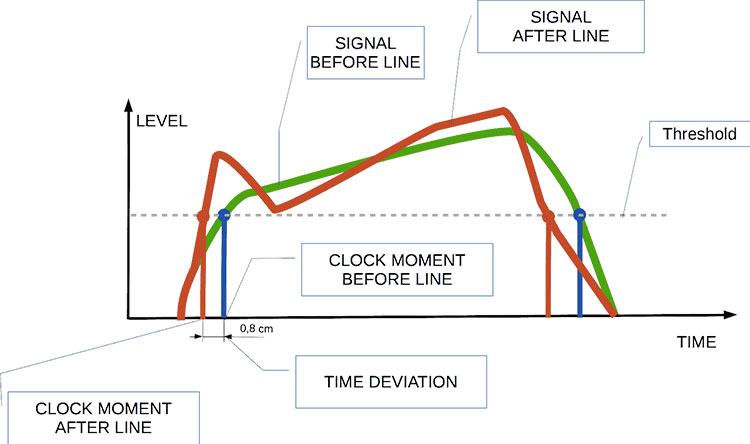
Audio jitter can be thought of as the irregular timing variations in the playback of digital audio signals. These timing variations can manifest as small deviations in the timing of audio samples, leading to audio artifacts like clicks, pops, and distortion. While it may seem like a technical concern, audio jitter can significantly affect your overall listening experience, even if you’re not a seasoned audiophile.

What is Audio Jitter?

Audio jitter, in essence, is the bane of digital audio playback. When you play a digital audio file, it gets converted into an analog signal for your speakers or headphones. The challenge arises when the conversion isn’t perfectly synchronized. Think of it like a metronome that occasionally skips a beat. This timing discrepancy, which we call audio jitter, can distort the sound and result in a less-than-ideal listening experience.

For a real-world analogy, consider a musical ensemble. If the musicians are out of sync, even by a tiny fraction of a second, the result can be dissonant and displeasing to the ear. Similarly, audio jitter disrupts the synchronization between the digital audio source and your playback system.

How Does Audio Jitter Impact Sound Quality?

Audio jitter affects sound quality by introducing unwanted artifacts. These artifacts can include audible clicks, pops, and distortions in the audio stream. To understand the impact, picture a pristine audio signal as a smooth, flowing river. Audio jitter is like tossing pebbles into that river, causing ripples and disturbances. These ripples manifest as audible imperfections in your music or audio.

Think of a jazz drum solo: the precision of the drummer’s beats is crucial to the experience. Even a slight deviation in the rhythm can disrupt the entire performance. Audio jitter works in a similar way, disrupting the timing and rhythm of your audio playback, ultimately degrading the sound quality.

The Technical Aspects of Audio Jitter

Now, let’s delve into the technical side of audio jitter. In the digital domain, audio is typically stored as discrete samples, each representing the amplitude of the sound at a specific moment. The timing of these samples is critical. Audio jitter occurs when the time intervals between these samples deviate from the ideal, leading to inconsistencies in playback.

To put this in context, think of a digital audio player as a conveyor belt, with each audio sample represented by a box. These boxes must move down the belt at precise intervals to maintain the audio’s integrity. If some boxes move faster or slower than others, you’ll encounter audio jitter, which translates to an erratic and unpleasant listening experience.

Addressing Audio Jitter: Practical Solutions

It’s clear that audio jitter can be a nuisance, but what can you do to mitigate its effects? Fortunately, there are practical solutions available. Some high-end audio equipment includes advanced jitter-reduction technologies. Additionally, using dedicated external digital-to-analog converters (DACs) can help improve audio synchronization.

Think of these solutions as a conductor guiding the musicians in an orchestra, ensuring they play in perfect harmony. Advanced equipment and DACs help maintain the precise timing necessary for high-quality audio playback.

Audio Jitter vs. Bit Depth: Exploring the Differences

While audio jitter deals with timing variations, bit depth relates to the depth of information in an audio signal. It’s essential to distinguish between the two. Bit depth determines the resolution of the audio signal, affecting the dynamic range and subtlety of sound. Audio jitter, on the other hand, impacts timing and synchronization. Both factors play a role in overall audio quality, but they address different aspects of the listening experience.

Think of bit depth as the number of colors on a painter’s palette, while audio jitter is akin to the painter’s brush strokes’ precision. They are both crucial for the final masterpiece, but they address different aspects of the artistic process.

The Importance of Low Jitter in High-End Audio Systems

In high-end audio systems, low jitter is a fundamental requirement for achieving audiophile-grade sound quality. Audiophiles demand the utmost precision and clarity in their audio playback, and any deviation in timing is unacceptable. To achieve this, specialized audio components and meticulous engineering are employed to minimize jitter.

Imagine a fine dining experience where every detail, from the presentation to the taste, is meticulously crafted. Audiophiles seek the same level of perfection in their audio experience, and low jitter is a crucial ingredient in achieving it.

Measuring and Analyzing Audio Jitter: Tools and Techniques

To assess and address audio jitter, various tools and techniques are available. One common method involves using dedicated audio analyzers that can pinpoint timing variations. Additionally, software applications can help diagnose and quantify audio jitter in your playback system.

Think of these tools as diagnostic instruments in a doctor’s office. They allow audio enthusiasts and professionals to diagnose and treat any issues related to audio jitter, ensuring the best possible audio quality.

Enhancing Your Audio Experience: Final Thoughts

In the world of digital audio, understanding and managing audio jitter is essential for achieving the best possible listening experience. Whether you’re a casual music lover or a dedicated audiophile, knowing how audio jitter affects your sound quality can lead to informed choices and better audio equipment investments.

So, the next time you enjoy your favorite music or immerse yourself in a captivating movie, remember the role that precise timing plays in your audio journey. Just as a conductor leads an orchestra to create beautiful music, minimizing audio jitter ensures that the symphony of sound reaches your ears with clarity and perfection.

Last Words

In conclusion, audio jitter is a subtle yet critical factor that can significantly impact your audio enjoyment. By delving into the technical aspects of audio jitter and exploring practical solutions, we’ve uncovered the key to enhancing your audio experience. Whether you’re an audiophile or simply someone who appreciates good sound, understanding and addressing audio jitter is a step toward audio perfection.


Free Download Mp4Gain
picture


Mp4Gain Main Window
picture


Mp4Gain Features
picture


Free Download Mp4Gain
picture

Bitstream Synchronization

Bitstream Synchronization

Bitstream Synchronization

Understanding Bitstream Synchronization: A Comprehensive Guide

Bitstream Synchronization is a crucial concept in the realm of digital technology and communication. In this article, I will provide you with a comprehensive overview of Bitstream Synchronization, explaining its importance, how it works, and its real-world applications.

Bitstream Synchronization ensures that data is transmitted accurately from sender to receiver, and it plays a pivotal role in various technologies, including telecommunications, data storage, and more. Let’s dive into this fascinating subject.

What Is Bitstream Synchronization?

Bitstream Synchronization is the process of aligning the incoming data stream with the receiver’s clock to ensure proper data extraction. In simpler terms, it’s like syncing two watches to show the same time. In digital communication, data is transmitted in the form of bits (0s and 1s), and precise timing is crucial for error-free reception.

Imagine you’re receiving a stream of water from a hose. To collect the water effectively, you’d need to synchronize your bucket’s position with the water’s flow. Similarly, in digital communication, Bitstream Synchronization ensures that the data is captured accurately by aligning the receiver’s timing with the incoming bits.

How Does Bitstream Synchronization Work?

Bitstream Synchronization involves multiple steps:

Clock Recovery: The receiver extracts the clock signal from the incoming data. This clock signal helps determine the timing of each bit.

Bit Detection: The receiver uses the recovered clock to sample and interpret the incoming bits. It identifies the transitions between 0s and 1s based on the clock’s timing.

Synchronization Adjustment: If there’s a slight timing mismatch between the sender and receiver, synchronization circuits make fine adjustments to ensure the bits are captured accurately.

Think of Bitstream Synchronization as a skilled juggler who adjusts their hand movements to catch balls thrown at varying speeds. It ensures that even if the sender and receiver have slightly different clocks, the data is received correctly.

Real-World Applications

Bitstream Synchronization is essential in various technological applications:

Wireless Communication: In mobile phones and Wi-Fi networks, Bitstream Synchronization helps maintain a stable connection by aligning the receiver’s clock with the transmitter’s clock.

Data Storage: In hard drives and solid-state drives (SSDs), Bitstream Synchronization ensures data is read and written accurately, preventing data corruption.

Digital Broadcasting: Television and radio signals use Bitstream Synchronization to ensure a clear and uninterrupted viewing experience.

Now that we’ve covered the basics of Bitstream Synchronization, let’s delve into the questions you might have about this topic.

Why is Bitstream Synchronization Important?

Bitstream Synchronization is crucial because it ensures the accurate transmission and reception of digital data. Without it, errors can occur, leading to data corruption and communication breakdowns. Imagine sending a text message, and the recipient receives garbled characters instead. Bitstream Synchronization prevents such mishaps.

Can You Explain the Role of Timing in Bitstream Synchronization?

Timing is everything in Bitstream Synchronization. It’s like playing a musical instrument in perfect harmony. The receiver needs to know when to expect each bit, and the sender must transmit them precisely. Any deviation can result in misinterpretation, much like playing a musical note out of tune can disrupt a melody.

What Happens if Bitstream Synchronization Fails?

When Bitstream Synchronization fails, data errors can occur. In practical terms, this could manifest as a dropped call in a phone conversation, distorted video in streaming services, or corrupted files on a computer.

Bitstream Synchronization: Beyond the Basics

Now that we’ve covered the fundamentals, let’s explore some related aspects of Bitstream Synchronization. Understanding these nuances will provide you with a more comprehensive view of this vital concept.

Bitstream Synchronization and Error Correction

Bitstream Synchronization often works in tandem with error correction techniques. It not only aligns the data stream but also helps identify and correct errors that may occur during transmission. Think of it as spell-check for digital data.

The Evolution of Bitstream Synchronization

As technology advances, so does Bitstream Synchronization. Modern systems employ advanced algorithms and hardware to achieve even more precise synchronization, allowing for faster and more reliable data transmission.

Future Applications of Bitstream Synchronization

The importance of Bitstream Synchronization will continue to grow as our reliance on digital communication and data storage increases. Emerging technologies, such as 5G networks and quantum computing, will rely on Bitstream Synchronization for their success.

Last Words

In conclusion, Bitstream Synchronization is the unsung hero of digital communication and data storage. Its role in ensuring the accuracy of data transmission cannot be overstated. Whether you’re making a phone call, streaming a video, or storing files on your computer, Bitstream Synchronization quietly works in the background to make it all possible. As technology continues to evolve, Bitstream Synchronization will remain a critical component of our digital world.

So, the next time you send a message, make a call, or access your data, remember the vital role of Bitstream Synchronization in making it all happen seamlessly.

Bitstream Compression

Understanding Bitstream Compression: Enhancing Data Efficiency

Bitstream Compression


In today’s data-driven world, efficiency is paramount. Whether you’re a tech enthusiast, a professional in the field, or simply curious about data compression, the term “Bitstream Compression” might have piqued your interest. In this article, I’ll delve into the intricacies of Bitstream Compression, providing insights, examples, and technical knowledge to help you grasp its significance and applications.

Bitstream Compression: Unraveling the Concept

Bitstream Compression: A Closer Look

Bitstream Compression is a data compression technique designed to reduce the size of digital data streams. To put it simply, it’s like packing a suitcase efficiently to maximize space. This technology finds applications in various domains, from multimedia transmission to storage devices. Imagine you’re sending a high-definition video over the internet. Bitstream Compression optimizes the data, allowing for smoother transmission without compromising quality.

The Mechanics of Bitstream Compression

How Bitstream Compression Works

Let’s take a closer look at how Bitstream Compression works. Imagine you have a long string of binary data, consisting of 0s and 1s. Think of it as a sequence of beads on a string. Bitstream Compression identifies patterns within this sequence and replaces them with shorter codes, just like using symbols to represent words. This compression process reduces the overall size of the data while retaining essential information. As a result, you save bandwidth and storage space. This technique is analogous to shorthand writing, where complex sentences are expressed with fewer strokes.

Applications of Bitstream Compression

Bitstream Compression in the Real World

Bitstream Compression plays a pivotal role in modern technology. It’s the reason you can stream high-quality videos on your mobile device without constant buffering. Moreover, it’s widely employed in audio codecs like MP3, making it possible to carry your entire music library in your pocket. Beyond entertainment, it’s essential in sectors like medical imaging, where high-resolution images are compressed for efficient storage and transmission.

Optimizing Bitstream Compression

Now, let’s address some common questions that arise regarding Bitstream Compression:

1. How does Bitstream Compression affect data quality?

The Trade-Off Between Compression and Quality

Bitstream Compression aims to reduce data size, but what about quality? Find out how this technique strikes a balance between efficient storage and maintaining data integrity.

2. Where else is Bitstream Compression used besides multimedia?

Bitstream Compression Beyond Entertainment

Explore the diverse applications of Bitstream Compression, from medical imaging to data transmission, and discover how it impacts various industries.

3. Are there different methods of Bitstream Compression?

Exploring Bitstream Compression Techniques

Delve into the world of Bitstream Compression techniques and learn about the various methods used to optimize data streams for different purposes.

4. How can I implement Bitstream Compression in my projects?

Implementing Bitstream Compression: Practical Tips

If you’re considering incorporating Bitstream Compression into your projects, this section provides valuable insights and guidance on getting started.

Last Words

In conclusion, Bitstream Compression is a powerful tool in the digital age, enabling efficient data storage and transmission across a wide range of applications. Understanding its mechanics and applications can empower you to make informed decisions in your tech endeavors. Whether you’re a developer, a content creator, or simply someone curious about the digital world, Bitstream Compression is a concept worth exploring.

Audio Phase

Audio Phase: Unraveling the Mysteries of Sound

Audio Phase
Audio Phase

As an expert in audio engineering, I understand the significance of audio phase and its impact on sound quality and production. In this comprehensive guide, I will delve into the world of audio phase, providing clarity and insights to help you grasp this vital concept. Whether you’re a music enthusiast or a budding recording artist, understanding audio phase is essential for achieving optimal sound experiences.

Demystifying Audio Phase

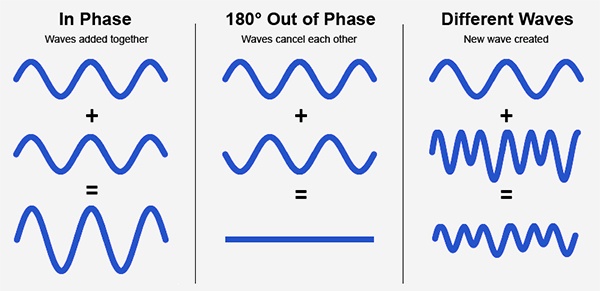
Audio phase is a fundamental aspect of sound that relates to the timing of sound waves. When we talk about audio phase, we’re essentially discussing how different audio signals align or misalign in time. To put it simply, sound is a result of air pressure changes that propagate as waves. These waves have peaks and troughs, and audio phase refers to the relationship between these peaks and troughs in different sound sources.

Think of audio phase as a group of musicians playing in perfect harmony. When they are perfectly in sync, the music sounds harmonious and powerful. However, if even one musician is slightly out of time, it can create dissonance. Similarly, in audio, when signals are in phase, they reinforce each other, resulting in a stronger and clearer sound. When they are out of phase, they can cancel each other out, leading to a weaker and less defined sound.

Audio Phase in Music Production

Understanding audio phase is crucial in music production, especially when recording multiple microphones or mixing different tracks. When recording, if two microphones capture the same sound source, such as a guitar or a vocalist, the signals from these microphones must be perfectly in phase to avoid phase cancellation.

Imagine you are recording a guitar with two microphones—one close to the soundhole and the other closer to the fretboard. If the signals from these two microphones are not in phase, you might experience a loss of bass frequencies or even strange, hollow sounds in the final mix. To avoid this, precise microphone placement and phase alignment are essential.

Correcting Audio Phase Issues

In the world of audio engineering, correcting phase issues is a common practice. Using specialized tools and techniques, audio engineers can adjust the timing of audio signals to ensure they are in phase. This process, known as phase correction or phase alignment, can salvage poorly recorded tracks and enhance the overall sound quality.

Imagine you’re in a recording studio, and you notice that the drum tracks are slightly out of phase with the rest of the instruments. With phase correction tools, you can realign the drum tracks to synchronize perfectly with the other instruments, resulting in a more cohesive and powerful sound.

Audio Phase and Sound Quality: Key Considerations

Now, let’s address some common questions related to audio phase:

How Does Audio Phase Affect Sound Quality?

Audio phase has a direct impact on sound quality. When audio signals are in phase, they reinforce each other, enhancing the overall clarity and richness of sound. However, when they are out of phase, they can cancel each other out, leading to a loss of frequencies and a less pleasing sound.

What Are the Common Phase Issues in Music Production?

In music production, some common phase issues include phase cancellation between microphones, phase misalignment in multi-miked drum kits, and phase problems when mixing different instruments. Identifying and addressing these issues is crucial for achieving a balanced and professional-sounding mix.

How Can I Prevent Phase Issues When Recording?

To prevent phase issues when recording, pay close attention to microphone placement and ensure that multiple microphones capturing the same source are equidistant from the sound source. Additionally, use phase inversion or phase alignment tools during mixing to correct any phase problems that may arise.

Audio Phase: A Symphony of Sound Precision

In conclusion, audio phase is a pivotal element in the world of sound, influencing the quality of music and recordings. Whether you’re a musician, sound engineer, or simply a music enthusiast, grasping the concept of audio phase can help you appreciate and optimize sound in various contexts. Remember, when audio signals are in harmony, they create a powerful symphony of sound, and understanding audio phase is the key to achieving that sonic precision.

Last Words

As we wrap up our journey through the realm of audio phase, I hope this guide has shed light on this intricate yet crucial aspect of sound. Whether you’re fine-tuning your music production skills or seeking to enhance your listening experience, audio phase knowledge empowers you to harness the full potential of sound. So, the next time you enjoy your favorite music or step into the world of audio production, remember the role that audio phase plays in creating the symphonies and sonic landscapes we cherish.

Audio Buffering

Audio Buffering: Ensuring Smooth Sound Playback

Audio Buffering
Audio Buffering

In today’s digital age, audio buffering is a crucial aspect of delivering seamless sound experiences across various devices and platforms. Whether you’re streaming music, participating in online meetings, or playing video games, audio buffering plays a significant role in ensuring that you hear clear and uninterrupted audio. In this article, I, as an expert in audio technology, will delve into the world of audio buffering, providing insights, explanations, and practical examples to help you understand its importance and how it works.

Understanding Audio Buffering

Audio buffering is like having a reservoir of sound data ready to be played, ensuring a continuous and smooth listening experience. When you’re watching a movie online or streaming music, the data is delivered in small packets called audio samples. These samples are stored temporarily in a buffer before they are played through your speakers or headphones. The buffer acts as a safeguard against interruptions, allowing your device to compensate for any delays in data transmission.

Imagine your audio buffer as a water tank in your home. The water continuously flows into the tank, and you use water from the tank as needed. If there’s a momentary disruption in the water supply, you can still use water from the tank without noticing the interruption. Similarly, audio buffering ensures that even if there are network fluctuations or data transfer delays, your audio playback remains uninterrupted.

How Audio Buffering Works

Let’s dive a bit deeper into how audio buffering functions. When you start streaming audio, your device begins to fill the audio buffer with small chunks of sound data. These chunks are usually a fraction of a second in duration, but they are filled continuously as you listen. The buffer size and management depend on the software or hardware you’re using.

Think of it as a conveyor belt in a factory. The audio samples are like products on the conveyor belt, and the buffer is the storage area where they temporarily wait before being delivered to your ears. If there’s a hiccup in the production line (e.g., a network lag), the buffer ensures that there’s still enough audio data ready for playback.

The Importance of Buffer Size

Now, let’s discuss the significance of buffer size. The size of the audio buffer affects the delay you experience while listening to audio. A larger buffer can store more data, which reduces the chances of audio dropouts but may introduce some delay. Conversely, a smaller buffer reduces delay but may result in more interruptions if there are data hiccups.

Imagine driving a car on a busy highway. A larger buffer is like keeping a safe distance from the car in front of you, reducing the risk of sudden stops. In contrast, a smaller buffer is like tailgating, which might get you to your destination faster but increases the chances of abrupt stops. Finding the right buffer size depends on the context; for live streaming or online gaming, low latency is crucial, while for offline playback, a larger buffer can ensure smoother playback.

Now, let’s explore some common questions related to audio buffering:

Why Do I Hear Audio Glitches During Online Calls?

Online calls, such as video conferences or VoIP calls, require real-time audio communication. In such scenarios, a small audio buffer is preferred to minimize latency. However, if you hear audio glitches during online calls, it could be due to network issues, insufficient bandwidth, or software problems. Ensuring a stable internet connection and using reliable communication software can help mitigate these glitches.

How Can I Optimize Audio Buffering for Gaming?

Gaming demands both low latency and high audio quality. To optimize audio buffering for gaming, you can tweak the buffer settings in your game or audio software to find the right balance between delay and audio smoothness. Additionally, using a gaming-specific headset with low latency features can enhance your gaming experience.

What Is the Impact of Buffer Size on Music Streaming?

When streaming music, a larger buffer can provide a smoother listening experience, especially in areas with unreliable internet connections. However, it may introduce a slight delay when you start playback. To strike the right balance, music streaming services often adjust buffer sizes dynamically based on network conditions.

How Does Buffering Affect Podcast Playback?

Podcast playback typically involves downloading the entire episode before listening. In this case, buffering isn’t as critical because the audio is preloaded. However, some podcast apps may use small buffers to ensure seamless playback even if your internet connection briefly drops.

Buffering for Video: A Multifaceted Approach

When it comes to video streaming, audio buffering is just one piece of the puzzle. Video and audio synchronization, network performance, and device capabilities also play crucial roles in delivering a smooth viewing experience. The buffer size for video often differs from that of audio to ensure synchronization and minimize lag.

Buffering: The Bridge to Seamless Audio

In conclusion, audio buffering is the unsung hero behind smooth sound playback in our digital lives. Whether you’re binge-watching your favorite series, engaging in a video call, or immersed in a gaming session, understanding how audio buffering works can enhance your overall audio experience. Buffer size and optimization depend on the context, but they all aim to ensure that you hear what you want, when you want it, without interruptions. So, the next time you enjoy your favorite audio content, remember that audio buffering is there, silently working to provide you with a flawless experience.

Last Words

In the realm of audio technology, audio buffering stands as a critical component that often goes unnoticed. It bridges the gap between data transmission and your ears, making sure that your audio experience remains uninterrupted and enjoyable. As an expert in the field, I’ve shared insights and knowledge to demystify audio buffering, helping you grasp its significance and impact on your daily digital interactions. So, the next time you encounter seamless audio playback, you’ll have a deeper appreciation for the role played by this essential technology.

Audio Clipping

Audio Clipping: Understanding, Causes, and Solutions

Audio Clipping
Audio Clipping

Introduction to Audio Clipping

Audio clipping is a common issue that can significantly impact the quality of your sound recordings. As an audio expert, I’ll provide you with insights, explanations, and practical solutions to help you understand and tackle this problem. Whether you’re a podcaster, musician, or simply someone who wants to improve their audio quality, this article will guide you through the nuances of audio clipping.

Audio clipping occurs when the amplitude of an audio signal exceeds the maximum level that can be accurately represented. When this happens, the signal is cut off or “clipped,” resulting in distorted and unpleasant sound. It’s essential to address this issue because clipped audio can be distracting and diminish the overall quality of your recordings.

What Causes Audio Clipping?

Audio clipping can be caused by various factors, but the most common ones include:

Overloading Input Levels: One of the primary reasons for audio clipping is setting input levels too high. When your microphone or audio input device records sound that is too loud, it can exceed the equipment’s capacity, leading to clipping. To avoid this, ensure your input levels are appropriately adjusted to prevent distortion.

Digital Clipping: In the digital realm, audio clipping occurs when the audio signal exceeds the maximum value that can be represented in the digital format. This can happen during recording, mixing, or mastering stages. It’s crucial to maintain headroom in your digital audio workflow to prevent digital clipping.

Amplification in Post-Processing: Amplifying an already clipped audio signal during post-processing can worsen the problem. It’s essential to identify and rectify clipped audio before applying any amplification or effects to your recordings.

How to Prevent and Fix Audio Clipping

Preventing and fixing audio clipping requires a combination of techniques and equipment adjustments. Here are some practical tips:

Proper Gain Staging: Maintain proper gain staging by setting input levels so that your audio signal is strong enough to capture the desired sound without overloading the equipment. This involves adjusting the gain on your microphone or audio interface.

Use a Pop Filter: A pop filter can help reduce sudden bursts of loud sound, such as plosives in vocal recordings. This can go a long way in preventing clipping at the source.

Monitor Levels: Continuously monitor your audio levels while recording to ensure they stay within the acceptable range. Use headphones or audio meters to keep an eye on the levels in real-time.

Why Is Audio Clipping Detrimental?

Audio clipping is detrimental because it compromises the quality and intelligibility of your recordings. When your audience hears distorted audio, it can be distracting and make it challenging to understand the content. In professional settings like music production, audio clipping can ruin an otherwise excellent recording.

Furthermore, addressing audio clipping is not just about improving sound quality; it’s also about preserving your equipment. Consistent clipping can damage microphones, speakers, and other audio gear over time, resulting in costly repairs or replacements.

Identical Search Intent Keywords

Now, let’s explore identical search intent keywords related to audio clipping:

Audio Clipping Prevention Techniques: Discover effective techniques to prevent audio clipping and maintain high-quality sound recordings.

Digital Audio Clipping Solutions: Learn how to deal with digital audio clipping issues and safeguard your recordings from distortion.

Microphone Gain Adjustment Tips: Gain insights into adjusting microphone gain levels to avoid audio clipping and capture pristine sound.

Real-Life Audio Clipping Examples: Explore real-life scenarios where audio clipping can occur, from live music performances to podcast recording sessions.

Last Words

In conclusion, understanding and addressing audio clipping is crucial for anyone working with audio recordings. By implementing proper gain staging, monitoring levels, and using tools like pop filters, you can significantly improve the quality of your audio. Remember that audio clipping not only affects the sound but also the longevity of your equipment. So, take the necessary steps to prevent and fix it, ensuring your audience enjoys distortion-free audio experiences.

As an audio expert with years of experience in the field, I’m confident that the information provided in this article will help you overcome audio clipping challenges and elevate the quality of your audio projects.

Audio Oscillators

Exploring the World of Audio Oscillators

Audio Oscillators
Audio Oscillators

When it comes to understanding the fascinating realm of audio electronics, audio oscillators play a pivotal role. These devices generate precise audio signals of varying frequencies, making them indispensable tools for testing, calibration, and sound production. In this article, I will delve into the world of audio oscillators, providing insights, examples, and expertise to help you grasp their significance and functionality.

Audio oscillators, at their core, are electronic instruments designed to produce audio waveforms with specific frequencies. These waveforms can vary from simple sine waves to more complex ones, like square or sawtooth waves. One common application of audio oscillators is in audio testing and measurement. For instance, when you need to check the frequency response of a speaker, you can use an audio oscillator to generate different frequencies and assess how the speaker responds. This is crucial for ensuring that audio equipment performs as expected.

Furthermore, audio oscillators are indispensable tools in music and sound production. Musicians and sound engineers use them to create specific tones and effects. For example, synthesizers often employ oscillators to produce the various sounds you hear in electronic music. These oscillators allow artists to manipulate waveforms to achieve the desired sonic textures. Now, let’s explore some of the questions you might have about audio oscillators.

How Do Audio Oscillators Work?

Audio oscillators function based on the principle of feedback loops. They contain components like amplifiers, capacitors, and resistors, all carefully configured to maintain a stable oscillation. At their core, oscillators generate a continuous output signal by feeding a portion of the signal back into the input, resulting in a continuous cycle of waveforms. The frequency of the output signal depends on the values of the components and can be adjusted using control knobs or digital settings.

Imagine a swing: when you give it a small push and keep pushing it at the right intervals, it swings back and forth steadily. Similarly, an audio oscillator maintains its output by continuously feeding back a portion of its signal, ensuring a consistent and predictable audio frequency.

Types of Audio Oscillators

Audio oscillators come in various types, each suited for specific applications. Here are a few common ones:

Analog Oscillators: These are traditional oscillators that use analog components like resistors, capacitors, and operational amplifiers. They are known for their warm and organic sound and are often favored in music production.

Digital Oscillators: These oscillators use digital signal processing to generate audio waveforms. They offer precise control and flexibility, making them ideal for synthesizers and digital audio workstations.

Function Generators: While not exclusively audio oscillators, function generators can produce a wide range of waveforms, including audio frequencies. They are versatile tools used in both audio testing and music production.

Low-Frequency Oscillators (LFOs): LFOs produce very low-frequency signals, typically below the audible range. They are crucial for modulating parameters in synthesis and creating dynamic audio effects.

Applications of Audio Oscillators

Audio oscillators find applications in various fields:

Audio Testing: Engineers use audio oscillators to measure the performance of audio equipment, ensuring accurate sound reproduction.

Music Production: Musicians and producers use oscillators to create unique sounds, from simple tones to complex textures.

Frequency Calibration: Oscillators are employed in scientific and industrial settings to calibrate equipment and maintain precise frequencies.

Waveform Analysis: Researchers and scientists use audio oscillators for waveform analysis and experimentation.

Last Words

In conclusion, audio oscillators are fascinating devices with a broad range of applications in audio engineering, music production, and scientific research. Whether you’re a musician looking to craft unique sounds or an engineer ensuring the quality of audio equipment, understanding the principles and types of audio oscillators is essential. I hope this article has provided valuable insights into this intriguing world of audio electronics.

Audio Convolution

Exploring Audio Convolution: Unraveling the Sound Transformation

Audio Convolution
Audio Convolution

Audio convolution is a fascinating concept that lies at the heart of many audio processing techniques and technologies. In this article, I will provide a comprehensive overview of audio convolution, its applications, and its role in shaping the world of sound.

Understanding Audio Convolution

Audio convolution is a mathematical operation that combines two audio signals to produce a third, resulting in a unique and transformative effect on sound. It operates by taking each sample of one audio signal and “mixing” it with corresponding samples of another, resulting in a new audio signal that carries the characteristics of both. This process is fundamental in various audio applications, ranging from music production to acoustic modeling and sound synthesis.

Applications of Audio Convolution

Audio convolution finds its use in a plethora of applications, each harnessing its power in distinct ways:

Reverberation: Convolution reverb is a widely used technique to recreate the natural acoustics of different spaces. By convolving an impulse response (representing a specific space’s acoustic characteristics) with an audio signal, you can make it sound as if it was recorded in that space.

Sound Design: Audio engineers use convolution to apply complex and unique effects to audio. This includes simulating vintage hardware, creating immersive audio environments for video games, or adding character to music tracks.

Room Acoustics Analysis: In architectural acoustics, convolution helps simulate how sound behaves in various spaces. This is crucial for designing concert halls, theaters, and recording studios to achieve desired acoustic properties.

FAQ Audio Convolution

What is Impulse Response in Audio Convolution?

Impulse response is a key element in audio convolution. It represents the way a system responds to an idealized impulse signal, which is a brief and infinitely loud sound. In audio convolution, an impulse response characterizes the unique acoustic properties of a space or the effect you want to apply. By convolving this impulse response with audio, you can emulate the sound of that space or effect.

How Does Audio Convolution Enhance Sound Quality?

Audio convolution enhances sound quality by allowing you to apply realistic acoustic properties, effects, and spatial characteristics to audio signals. This means you can make recorded music sound like it’s played in a concert hall or add rich textures to audio recordings. By accurately capturing and reproducing these aspects, convolution contributes to more immersive and high-fidelity sound experiences.

What Tools Are Used for Audio Convolution?

Several software tools and plugins are available for audio convolution. Digital audio workstations (DAWs) often include convolution reverb plugins, which make it easy to apply convolution to audio tracks. Additionally, standalone convolution processors and libraries offer flexibility in creating custom convolution effects and simulations

Sound Transformation with Audio Convolution

Audio convolution serves as a powerful tool for sound transformation. By convolving audio signals with various impulse responses and effects, you can shape and mold sound in countless creative ways. Whether you’re a music producer looking to craft unique textures or a sound designer pushing the boundaries of audio creativity, audio convolution opens up a world of sonic possibilities.

Real-Time Audio Convolution Processing

Real-time audio convolution processing has become increasingly accessible, thanks to advancements in computing power and software development. Musicians and live sound engineers can now apply convolution effects in real time, enhancing the quality and depth of live performances. This technology has revolutionized the way we experience sound in concerts and events.

Audio Convolution vs. Traditional Sound Processing

Audio convolution stands apart from traditional sound processing methods. While traditional techniques like equalization and compression modify audio in predefined ways, convolution offers a more flexible and adaptive approach. It allows you to replicate real-world sonic environments or create entirely novel soundscapes, making it a valuable addition to the audio engineer’s toolbox.

Last Words

In the ever-evolving realm of audio, the concept of audio convolution remains a potent force for creativity and realism. Whether you’re seeking to recreate the grandeur of a concert hall, craft cinematic soundscapes, or explore new sonic frontiers, audio convolution empowers you to transform sound in ways limited only by your imagination.

Audio Delay Compensation

Understanding Audio Delay Compensation: A Comprehensive Guide

Audio Delay Compensation

In the world of audio production and playback, timing is everything. Ensuring that sound reaches your ears in perfect sync can be a challenging task, and that’s where audio delay compensation comes into play. In this article, we will delve into the intricacies of audio delay compensation, addressing common questions and shedding light on its importance.

The Basics of Audio Delay Compensation

Audio delay compensation, also known as latency correction or audio synchronization, is a crucial aspect of audio technology. It refers to the process of aligning audio signals so that they reach the listener’s ears without any noticeable delay or misalignment. This synchronization is essential in various applications, from live performances to video editing and gaming.

Why is Audio Delay Compensation Necessary?

Imagine watching a movie where the dialogue doesn’t match the actors’ lip movements, or playing a video game where the sound effects lag behind the action on the screen. Such experiences can be frustrating and immersion-breaking. Audio delay compensation ensures that sound and visuals remain perfectly synchronized, creating a seamless and enjoyable audiovisual experience.

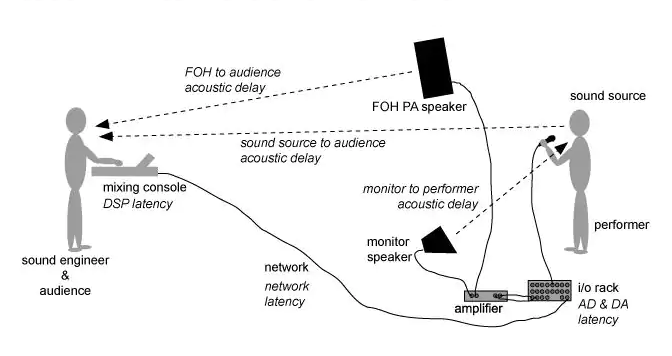
To achieve this synchronization, audio delay compensation systems measure the delay introduced by various components in the audio chain, such as microphones, audio interfaces, and speakers. These delays can vary depending on the equipment used and the processing involved. By carefully adjusting the timing of audio signals, delay compensation systems eliminate discrepancies and deliver a harmonious audio experience.

Real-Life Examples of Audio Delay Compensation

Let’s consider a practical example: a live concert. In such a setting, sound travels at a finite speed, and the distance between the stage and the audience can result in a noticeable delay between what the audience sees and hears. To address this, audio engineers use delay compensation to ensure that the sound from the speakers aligns perfectly with the visual performance on stage.

Similarly, in the realm of online communication, think about video conferencing. Without audio delay compensation, conversations would be riddled with awkward pauses, making it difficult for participants to engage naturally. Thanks to this technology, the voices of speakers are synchronized, facilitating smooth and natural interactions.

FAQ Audio Delay Compensation

How Does Audio Delay Compensation Work in Music Production?

In music production, audio delay compensation plays a critical role in achieving a polished final mix. When multiple tracks are recorded and processed, each may introduce its own delay. Audio delay compensation software analyzes these delays and automatically adjusts the timing of each track so that they align perfectly. This ensures that instruments and vocals harmonize as intended, creating a cohesive and professional sound.

What Are the Different Types of Audio Delays?

Audio delays can occur for various reasons, including signal processing, digital-to-analog conversion, and transmission. Some common types of audio delays include:

Processing Delay: This delay occurs when audio signals pass through various digital processors, such as equalizers or effects plugins, which may introduce a slight delay as they process the audio.

Conversion Delay: Analog audio signals must be converted to digital format for processing, and vice versa. This conversion process can introduce a delay, which must be compensated for to maintain synchronization.

Transmission Delay: When audio is transmitted over long distances, such as in live broadcasting or online streaming, there can be a delay in signal transmission. Audio delay compensation helps mitigate these delays to ensure real-time audio.

Is Audio Delay Compensation Important for Gamers?

Absolutely! Gamers rely on split-second reactions and immersive experiences. In online multiplayer games, audio cues are often crucial for situational awareness and gameplay. Without audio delay compensation, players might experience disorienting delays between in-game actions and corresponding sound effects. This technology ensures that audio feedback is instantaneous, enhancing the gaming experience.

Identical Search Intent Keywords

Audio Latency Reduction Techniques

Reducing audio latency is a top priority in various applications, from music production to live sound reinforcement. To achieve this, techniques such as buffer size optimization, low-latency audio interfaces, and real-time monitoring are employed. These methods minimize the time it takes for audio signals to traverse the entire chain, resulting in near-instantaneous playback.

Zero-Latency Monitoring in Audio Recording

Zero-latency monitoring is a crucial feature for recording professionals. It allows musicians to hear their performances in real-time while recording, eliminating distracting delays that can affect their timing and creativity. This is achieved by routing the audio input directly to the output, bypassing any processing that could introduce latency.

Audio Delay Compensation in Home Theater Systems

Home theater enthusiasts often face the challenge of synchronizing audio with their video playback. Audio delay compensation systems in modern home theater equipment, such as AV receivers, ensure that sound aligns perfectly with on-screen action. This enhances the cinematic experience in the comfort of one’s own home.

Last Words

In the world of audio, timing is paramount. Whether you’re a musician striving for that perfect mix, a gamer seeking an immersive experience, or a home theater enthusiast enjoying a movie night, audio delay compensation is the unsung hero that ensures synchronization. By understanding its significance and the techniques involved, you can elevate your audio experiences to a whole new level.

Audio Impulse Response

Audio Impulse Response

Understanding Audio Impulse Response: Exploring the World of Sound

Audio Impulse Response

Audio Impulse Response, often referred to as IR, is a critical concept in the world of audio engineering and sound reproduction. It plays a fundamental role in shaping the sound quality of various audio systems, from your home theater setup to professional recording studios. In this article, we will delve into the fascinating realm of Audio Impulse Response, exploring its significance, applications, and the technical intricacies that make it an indispensable tool for audio enthusiasts and professionals alike.

What Is Audio Impulse Response?

Audio Impulse Response, in its simplest form, is a mathematical description of how a system or device responds to an impulse or a short burst of sound. Think of it as the fingerprint of an audio system or space; it characterizes how that system interacts with sound. When you clap your hands in a room, the way the sound reverberates, bounces off walls, and eventually fades away is precisely what Audio Impulse Response quantifies.

Applications in Real-Life Scenarios

To illustrate its importance in real-life scenarios, consider a concert hall. Audio engineers use Impulse Response to understand how the hall reflects and diffuses sound. By analyzing the hall’s impulse response, they can optimize the placement of microphones and speakers, ensuring that the audience experiences the best possible sound quality.

Similarly, in the realm of home audio, IR plays a pivotal role. When you set up a home theater system, the IR of your room and equipment helps determine the ideal speaker placement and configuration for immersive surround sound.

The Technical Aspects

Now, let’s delve into the technical aspects. Audio Impulse Response is typically represented as a graph, where the x-axis represents time, and the y-axis represents amplitude. This graph shows how a system responds to an impulse over a certain period.

Understanding this graph allows audio engineers to manipulate and optimize audio systems effectively. For example, they can use IR data to simulate different acoustic environments. If you want your living room to sound like a concert hall, you can apply an IR profile that mimics the hall’s characteristics.

Exploring Further: Common Questions

How is Audio Impulse Response Measured?

Measuring Audio Impulse Response involves sending a precisely calibrated audio signal into a system and recording how the system responds. This is typically done using specialized equipment such as a sweep generator and a microphone. The recorded data is then processed to generate the IR graph, which reveals the system’s behavior.

Can Audio Impulse Response Be Altered?

Yes, Audio Impulse Response can be altered to achieve specific audio effects. Digital signal processing techniques allow audio engineers to modify the IR of a system. For example, you can apply reverb to make a recording sound like it was made in a cathedral or add echo for a spacious effect.

What’s the Connection Between IR and Speaker Design?

Speaker design relies heavily on understanding IR. Speaker manufacturers use IR data to design speakers that produce the desired sound characteristics. By fine-tuning the shape of the speaker cone and other components based on IR analysis, they can create speakers with optimal sound quality.

Keywords with Identical Search Intent

1. Acoustic Response Analysis

Acoustic Response Analysis is a related concept to Audio Impulse Response, focusing on the analysis of sound behavior in acoustic spaces. It is essential for designing concert halls, recording studios, and even home theaters.

2. Sound System Optimization

Sound System Optimization involves using Audio Impulse Response to fine-tune audio systems for the best possible sound quality. This applies to both professional setups and home audio systems.

3. Room Acoustics Enhancement

Improving Room Acoustics is a common goal in audio engineering. Understanding the IR of a room helps in enhancing acoustics through sound-absorbing materials, diffusers, and speaker placement.

4. Virtual Acoustic Modeling

Virtual Acoustic Modeling utilizes Audio Impulse Response data to simulate different acoustic environments in virtual or augmented reality applications. This is valuable for architectural acoustics and immersive audio experiences.

Last Words

In conclusion, Audio Impulse Response is a multifaceted concept that underpins much of the audio engineering world. From concert halls to your home audio setup, it influences how we experience sound in various environments. By grasping its technical intricacies and applications, you can gain a deeper appreciation for the magic that happens behind the scenes, making our audio experiences truly exceptional. So, the next time you enjoy a movie, concert, or even a phone call, remember that Audio Impulse Response is playing a crucial role in delivering that pristine sound to your ears.