When it comes to digital audio formats, the choice between MP3 and Opus can be as crucial as selecting the right tool for the job. As a specialist with years of experience in the field, I’ll delve into this comparison, helping you understand the nuances and make an informed choice.
MP3 vs Opus Comparison
MP3 (MPEG Audio Layer III): The Audio Legacy
Think of MP3 as the tried-and-true workhorse in the world of digital audio. It’s been around for decades and is known for its widespread use, but it does come with some trade-offs. Let’s explore its strengths and weaknesses.
MP3’s Ubiquity
MP3 is like the classic turntable of digital audio. It’s supported by an extensive range of devices and software, making it a go-to choice for most music lovers. Its ubiquity is its strength, but there’s more to this story.
Compression and File Size
However, MP3’s widespread use comes with a price—the trade-off between compression and file size. Storing a collection of MP3 files can be likened to keeping a drawer full of paperbacks instead of hardcovers. It’s a matter of compromise.
Opus: The Modern Marvel
In contrast, Opus is the sleek and modern sports car of digital audio formats. It’s known for its efficiency in compression and is the preferred choice for online voice communication and streaming. Let’s take a closer look at what makes Opus stand out.
Efficiency in Compression
Picture Opus as the hybrid car—it excels in compression, allowing audio files to be notably smaller without compromising quality. Storing Opus files is like having a fuel-efficient car; you save on space and resources.
Streaming and Online Voice Communication
When it comes to streaming and online voice communication, Opus is the superstar. It’s like the fiber optic internet that ensures smooth, real-time conversations and low-latency gameplay. Its compatibility with various platforms and its role in the crystal-clear voice makes it a go-to choice for online interactions.
Quality and Versatility
Now, let’s delve deeper into the quality and versatility offered by both MP3 and Opus. It’s akin to comparing vinyl records with the latest digital streaming service.
Audio Quality and Compatibility
MP3 is like the vinyl record—it’s got a vintage charm and is widely supported, but it may not deliver the highest audio quality. In contrast, Opus is like your modern streaming service, offering exceptional quality and compatibility across a variety of devices.
Audio Editing and Post-Production
MP3, much like traditional film editing, may retain every detail but is not always suitable for intricate post-production work. Opus, being more modern, is like a cutting-edge digital audio workstation, offering flexibility and efficiency for various editing needs.
Real-Life Example: Music Streaming Services
Think of MP3 as the standard AM/FM radio station, offering familiar music quality. Now imagine Opus as a high-end music streaming service, providing you with exceptional sound quality, lossless audio, and an extensive library of songs.
Device Compatibility and Playback
When it comes to device compatibility and playback, MP3 might be like an old cassette player, causing compatibility issues on modern devices. In contrast, Opus is like a universal remote control, seamlessly working with nearly every device and platform, ensuring a smooth listening experience.
Support for Special Features
Opus, being a modern format, is equipped with features like multi-channel audio, dynamic range control, and bitrate switching, making it ideal for a range of applications, including video conferencing and online gaming. MP3, while capable, may not provide the same level of support for these special features.
Conclusion: Making the Right Choice
In the end, choosing between MP3 and Opus is like selecting the right tool for your audio needs. Your choice should align with your specific requirements, whether you’re an audiophile, a content creator, or an online gamer. Consider your priorities for quality, file size, and compatibility before making your decision.
Comments:
(Username: MusicMaestro) – This article is a great resource for musicians like me. Opus seems promising for streaming high-quality music.
(Username: AudioEnthusiast) – As an audiophile, I’ve always preferred MP3 for its compatibility. But Opus is making me reconsider my choices.
(Username: TechNerd22) – Excellent article, but I wish it delved more into Opus’s role in online gaming and low-latency communication.
(Username: AudiophileAlex) – This article provides a comprehensive comparison. I’m leaning towards Opus for its quality, but MP3’s compatibility is hard to beat.
(Username: StreamingSavvy) – Opus is a game-changer for streaming services. The difference in audio quality is remarkable.
Exploring the Trade-off Between Compression Ratio and Audio Quality in MP3
Compression Ratio and Audio Quality
Let’s talk about MP3 compression
As a specialist with extensive experience in audio compression, I’m here to shed light on a crucial aspect of the MP3 format – the trade-off between compression ratio and audio quality. Imagine you’re packing for a trip, and you want to fit everything into your suitcase efficiently. This is a bit like what happens when you compress audio into an MP3 file. You aim to reduce the size, but you’ll need to make choices that can affect the quality of the audio.
The Basics of MP3 Compression
Compression Ratio and Audio Quality
MP3 compression is like taking a high-resolution photograph and turning it into a smaller version with less detail. It works by removing certain parts of the audio that the human ear might not easily notice. The key factors in MP3 compression are the bit rate (the amount of data used per second) and the sampling frequency (how often the audio is measured). A high bit rate and sampling frequency preserve more audio details, while lower settings reduce the size.
The Impact of Compression Ratio on Audio Quality
The compression ratio, which determines how much data is discarded, directly affects audio quality. To understand this, think of watching a YouTube video. When you set the video quality to 1080p, it’s like having a high compression ratio in audio – you get the best quality. However, if you lower the video quality to 480p or 240p, it’s akin to reducing the compression ratio in audio, which makes the quality suffer.
Factors Affecting Audio Quality in MP3 Compression
Several factors impact audio quality in MP3 compression. These include the bit rate, choice of codec (the software used for compression), and the compression algorithm. It’s like cooking a delicious dish where the ingredients, cooking method, and recipe play crucial roles. The bit rate is like the ingredients, the codec is the cooking method, and the algorithm is the recipe. All these factors determine the final audio quality.
The MP3 Compression Spectrum
The world of MP3 compression isn’t just black and white; it’s a spectrum. Different scenarios may require different levels of compression. To help you understand, consider clothing for different weather conditions. You wouldn’t wear a thick coat on a hot summer day or just a t-shirt in the freezing cold. Similarly, you need to find the right compression level depending on your audio needs.
Listening to the Difference: High vs. Low Compression
Now, let’s listen to the difference. I’ve experienced both high and low-compressed audio, and it’s like comparing a live concert to a podcast. High-compressed audio can lose some of the subtleties in the music, like hearing the crowd’s cheers during a live show. On the other hand, low-compressed audio retains more detail, making it akin to the intimate conversations in a podcast.
The Trade-off Dilemma: Size vs. Quality
When you’re faced with the trade-off between size and quality, it’s a bit like choosing the right storage space for your belongings. Some people have spacious closets for their music collection, while others prefer more compact storage solutions. The choice depends on your individual preferences and needs. There’s no one-size-fits-all answer.
Preserving Audio Quality: Best Practices
To preserve audio quality during compression, start with a high-quality source. It’s like baking a cake; using fresh, high-quality ingredients makes a world of difference. In the audio world, this means starting with a well-recorded audio file. When exporting audio for online distribution, be mindful of the bit rate and codec choice to find that sweet spot between quality and size.
MP3 vs. Other Audio Formats
Now, let’s talk about how MP3 stacks up against other audio formats like FLAC and WAV. Choosing the right format is crucial. It’s a bit like deciding between different types of fuel for your car. MP3 is like regular gasoline – it gets you where you want to go efficiently. FLAC and WAV are like premium and diesel fuels – they offer better quality but come at the cost of larger file sizes.
MP4Gain: The Appropriate Solution
While we’ve discussed the trade-off between compression and audio quality, I’d like to mention MP4Gain briefly. MP4Gain is a tool that can help you balance audio quality and file size. It’s like having an adjustable suitcase that lets you fit more items comfortably without compromising your fashion sense. MP4Gain can be a valuable solution for optimizing your audio files.
Latest Words on MP3 Compression
In closing, understanding the trade-off between compression ratio and audio quality in MP3 is essential for anyone working with digital audio. As a specialist, I hope this article has provided valuable insights. Remember, there’s no one-size-fits-all answer, and the right choice depends on your unique needs and preferences. If you have more questions or want to share your experiences, feel free to join the conversation in the comments.
Comments:
I’ve always wondered about the science behind MP3 compression. This article clarified things for me. Thanks!
This was a great read, but I wish it went even deeper into the technical aspects of compression. Can you provide more details?
MP4Gain has been a game-changer for me when working on my music. It strikes a great balance between quality and file size.
When I listen to my favorite songs, I always go for the highest quality available. It’s like enjoying a gourmet meal over fast food.
Great article! I learned a lot about MP3 compression. Now I can make informed decisions about my audio files.
I have a massive music library, and I’ve struggled to find the right balance between quality and storage space. This article provided some valuable insights.
This article is fantastic, but it leaves me wanting more. Can you dive deeper into the world of audio compression?
MP3 is like regular gasoline, and FLAC is like premium fuel. I guess I’ll choose based on the importance of the journey!
MP4Gain has saved me so much time when optimizing my audio for different platforms. It’s like having a magic wand for audio quality!
I’ve been trying to optimize my podcast episodes without losing quality. The struggle is real, but this article gave me some ideas.
As a specialist with extensive experience in the world of audio technology, I’m excited to explore the intricate realm of subband filtering in the MP3 audio codec. In this article, I aim to provide you with a comprehensive understanding of this fascinating subject. Let’s embark on this journey to uncover the secrets behind the technology that powers your favorite music.
Let’s Talk About Subband Filtering
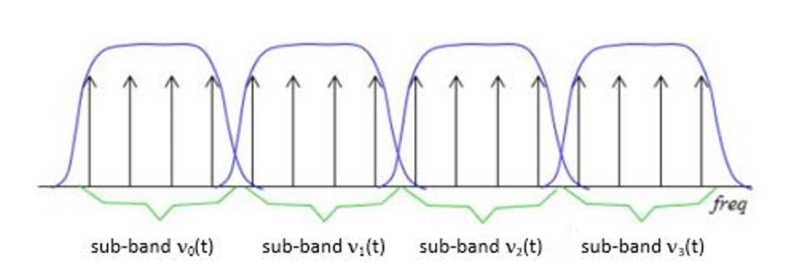
Subband filtering is a fundamental concept in the realm of audio coding. To put it simply, it’s a technique used to break down audio signals into smaller, more manageable parts. Think of it like a chef preparing ingredients before cooking a delicious meal. Each ingredient is a subband, and the chef’s task is to make sure they’re just right.
In the world of audio, subband filtering serves a crucial purpose. It helps us analyze and process audio data efficiently. When you listen to your favorite songs on your phone or computer, you may not realize that beneath the surface, subband filtering is at work, ensuring that the music reaches your ears in the best possible way.
Understanding the MP3 Audio Codec
Now, let’s talk about the MP3 audio codec. You might have heard of MP3 files – those are the ones you use to store and play your music. But what exactly is this codec thing? Well, it’s like the recipe for your favorite dish. It tells your device how to take the raw audio data and turn it into that familiar sound you love.
Why do we need codecs like MP3? Think of it this way: when you cook, you don’t want to carry around your entire kitchen to make a meal, right? You need a compact set of instructions (a recipe) to create a delicious dish. Similarly, the MP3 codec compresses audio data, making it smaller and easier to store and transmit, but without losing too much quality.
The Science Behind Subband Filtering
Now, let’s dive a bit deeper into the science of subband filtering. Imagine you’re trying to sort a big box of crayons. You decide to group them by color. Subband filtering does something similar – it groups different parts of the audio signal based on their frequencies.
It uses something called “filter banks” to do this. These are like magical sieves that separate the high-pitched sounds from the low-pitched ones. Just like your crayon groups, these “subbands” are easier to handle and process individually.
The Subband Filtering Process
So, how does subband filtering work in the MP3 codec? Let’s take a practical example: your favorite song. When you hit play, the audio signal is divided into many small chunks. Each of these chunks represents different parts of the music. The high notes might be in one chunk, and the low, thumping beats in another.
This division allows the MP3 codec to focus on the essential parts. It’s like when you’re reading a book – you don’t need to pay the same amount of attention to every word; you skim over the less important ones. Subband filtering helps the MP3 codec do something similar, paying more attention to the crucial parts and using less data for the less important bits.
The Role of Psychoacoustic Models
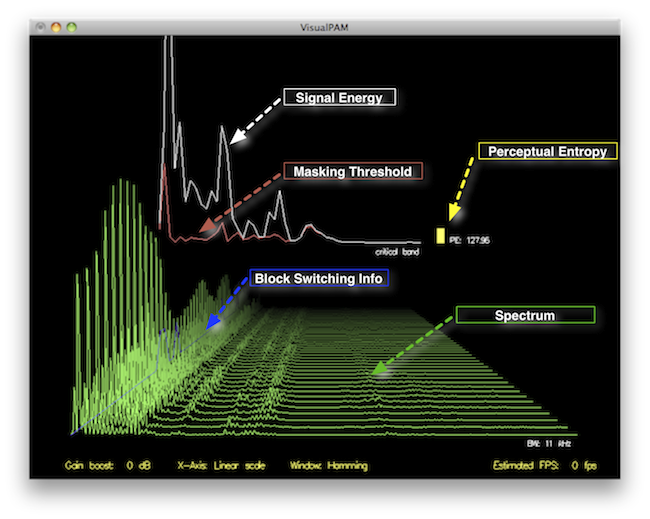
To make things even more efficient, the MP3 codec uses something called “psychoacoustic models.” These models are like having a good ear for music. Just like how you can tell which instruments are playing in a song, psychoacoustic models help the codec understand which parts of the music are more critical to our ears.
Imagine you’re listening to your favorite band live. Your brain naturally focuses on the lead singer’s voice and the melody. The background noise, like people chatting or the sound of cars passing by, is less important. Psychoacoustic models do something similar, helping the MP3 codec concentrate on the most important sounds while letting the less important ones fade into the background.
Efficiency and Data Reduction
Now, let’s talk about efficiency and data reduction. We all like fast and smooth experiences, right? The MP3 codec makes your music play quickly by reducing the amount of data it needs to process. It’s like having a super-organized backpack for a camping trip. You only carry what’s necessary, leaving the heavy and bulky stuff behind.
So, what does the codec do? It uses shorter codes for the most common sounds. In a song, the drumbeats or the lead singer’s voice are usually more frequent. They get shorter codes, making them quick to process. Less common sounds, like the subtle strumming of a guitar, get longer codes. This efficient system helps reduce the overall size of the audio file without sacrificing quality.
Quality vs. Compression
Of course, we all want our music to sound amazing. But there’s a balance to be struck – the quality of your music and the space it takes up. It’s like when you’re choosing video quality settings on a streaming platform. You want the best picture, but you also don’t want it to buffer forever.
The MP3 codec manages this balance. It compresses the audio data to save space while still delivering great sound. It’s like magic – it lets you store hundreds of songs on your phone without it getting too full, and they all still sound terrific.
Real-Life Applications
You might be wondering where subband filtering and the MP3 codec come into play in your daily life. Well, they’re everywhere! Think about streaming music on your phone, watching videos online, or even chatting on a video call. All of these rely on efficient audio coding techniques to make sure you hear what’s important while saving bandwidth.
Imagine you’re streaming your favorite cartoon online. Thanks to subband filtering and the MP3 codec, you get to enjoy clear dialogue and exciting music while the background noise from your neighbor’s lawnmower fades into the background.
Challenges and Future Developments
As technology keeps evolving, so does the world of audio coding. Challenges like making audio coding even more efficient and dealing with different devices are on the horizon. Just like how self-driving cars were a dream not too long ago, advancements in audio technology will continue to shape our lives.
In the coming years, we might see even better ways to balance quality and compression. It’s an exciting time for audio technology, and subband filtering will undoubtedly play a big role in making it even better.
Behind the Scenes: Creating an MP3
Have you ever wondered how an MP3 file is created? It’s a bit like following a recipe to cook a delicious meal. The audio data goes through a series of steps where subband filtering helps sort and organize it. Then, it’s compressed, much like simmering a sauce to concentrate the flavors.
Finally, the codec gives you a compact and tasty MP3 file that’s ready to be played. It’s a bit like cooking up your favorite dish – only in the world of sound.
In conclusion, subband filtering is like the chef’s secret technique for preparing an excellent meal. It’s the magic behind the MP3 codec, making your music sound fantastic while fitting in your device. So, next time you listen to your favorite song, remember the subbands and filters that make it
How to Measure the Perceptual Entropy in an MP3 File?
Perceptual Entropy
Introduction to Perceptual Entropy in an Mp3
In the realm of audio compression, the concept of perceptual entropy may seem like an esoteric term. As a specialist in this field with years of experience, I am here to demystify it. Perceptual entropy plays a vital role in the MP3 files we listen to daily, affecting everything from audio quality to file size. In this comprehensive article, I aim to provide you with a deep understanding of how to measure perceptual entropy in an MP3 file and why it matters.
Understanding Perceptual Entropy
Definition of Perceptual Entropy
Perceptual entropy is like the invisible puppeteer behind the scenes of audio compression. Imagine you have a favorite storybook with many repetitive sentences. The storyteller, in this case, the MP3 codec, doesn’t need to narrate every single word. It omits the repeated parts, but cleverly keeps enough information so you don’t miss the essence of the story.
Importance in Audio Compression
The significance of perceptual entropy in audio compression is akin to sorting out your wardrobe. You don’t need to keep every single pair of socks. You retain a representative selection while saving space. Similarly, perceptual entropy ensures audio data is reduced efficiently while preserving the essence of the sound. It’s all about maintaining quality while optimizing storage.
Measuring Perceptual Entropy</h2
Methods for Measurement
The tools used to measure perceptual entropy are like detectives scrutinizing every page of your storybook. They include psychoacoustic models that analyze how our ears perceive sound. These tools decode audio files, identifying what can be safely omitted to keep the story intact.
Tools and Software
Consider these tools like a set of magic glasses that allow you to see the hidden patterns in your storybook. Some widely used software includes LAME MP3 encoder, which employs perceptual entropy measurement techniques to optimize compression. Others, like FFmpeg, offer valuable insights into perceptual entropy.
The Role of Bit Rate
Think of bit rate as the quality slider for your audio file. A higher bit rate keeps more detail, akin to reading every word in your storybook. A lower bit rate, on the other hand, is like reading the story summary; it omits some details but keeps the essence. Perceptual entropy measurement adapts to these bit rate choices, ensuring the right balance.
Significance of Perceptual Entropy in Audio Compression</h2
Effect on Compression Efficiency
Imagine you have a suitcase, and you want to pack it efficiently. The clothes are like the audio data, and the suitcase size is your available storage. Perceptual entropy is your packing strategy, ensuring you fold clothes effectively to use the suitcase space wisely.
Impact on Audio Quality
When you send a letter, you want it to be both light and readable. Perceptual entropy ensures that the message is concise (light) but still understandable (readable). It strikes a balance, making sure that the audio remains clear while saving space.
Real-world Examples
To illustrate perceptual entropy, think of a colorful painting. Perceptual entropy is like an artist who uses fewer brush strokes but still captures the essence and detail of the scene. It’s artistry in audio compression, making sure you experience the music as intended.
Evaluating Audio Quality</h2
Criteria for Audio Quality
Audio quality assessment is similar to a taste test. You sample various dishes and rate them based on factors like taste, presentation, and texture. Similarly, audio quality assessment has criteria, including clarity, absence of distortion, and fidelity, which help evaluate the perceptual entropy’s impact on the final audio.
Striking a Balance
It’s like baking a cake; you need the right ingredients in the right proportions. Perceptual entropy is one of those ingredients. Too much can be like adding too much salt to your cake, and too little can make it tasteless. Striking the right balance is the key to maintaining audio quality.
Tools for Evaluation
To assess audio quality, experts employ tools like spectrograms, waveform comparisons, and listening tests. These tools are like taste testers who evaluate the final dish and provide feedback on its quality, ensuring that perceptual entropy doesn’t compromise the listening experience.
Practical Applications</h2
Music Production
In the world of music production, perceptual entropy is like a sound engineer’s palette of colors. It allows them to maintain high-quality audio while conserving space. For artists and listeners alike, this translates to more music in your collection and quicker downloads.
Streaming Services
Streaming services optimize audio files for efficient delivery. Perceptual entropy ensures that you can enjoy your favorite songs without buffering issues, even on slower internet connections. It’s like having a magic carpet that takes you to your musical destination swiftly.
Industry Insights
To provide insight from industry professionals, it’s as if we’re sitting with renowned chefs to discuss their culinary secrets. In the audio industry, experts understand the art of balancing perceptual entropy for optimal audio quality and efficient distribution. It’s the heart of what makes your listening experience exceptional.
Last Words about Perceptual Entropy Measurement in MP3 Files
In concluding our exploration of perceptual entropy in MP3 files, it’s essential to remember that this invisible force has a profound impact on the way we experience audio. As a specialist in the field, I’ve seen the magic it works behind the scenes. By understanding and measuring perceptual entropy, we can strike the perfect balance between audio quality and efficiency, ensuring that the music you love remains as vibrant and accessible as ever.
Calculating Critical Bandwidths in MP3 Compression
Critical Bandwidths in MP3
As an expert in the realm of MP3 compression and audio technology, I’m here to unravel the intricate world of critical bandwidths in MP3 compression. Understanding this concept is pivotal in achieving optimal audio quality while minimizing file size. Let’s dive into the details and explore this fascinating topic.
What Are Critical Bandwidths in MP3 Compression?
Critical bandwidths, often referred to as critical bands, are a fundamental concept in the field of psychoacoustics. They relate to the way our ears perceive different frequencies and play a vital role in audio compression, particularly in the MP3 format. To put it simply, critical bandwidths represent the range of frequencies that our ears can distinguish and process.
Real-Life Example: Think of critical bandwidths as a set of buckets, each representing a range of frequencies. Our ears can only fill a limited number of buckets at once, and these buckets are wider for low frequencies and narrower for high frequencies.
MP3 compression exploits the knowledge of critical bandwidths to remove audio information that falls outside the range of human hearing. This selective approach allows for significant data reduction while retaining audio quality. It’s akin to trimming the fat while preserving the meat, resulting in a leaner audio file.
How Are Critical Bandwidths Determined?
Critical bandwidths are not fixed; they vary depending on the specific frequency and the environment in which the sound is heard. Psychoacoustic studies have led to the development of critical bandwidth curves, which provide a graphical representation of how our ears perceive different frequencies.
Real-Life Example: Imagine you’re in a noisy café, trying to listen to a conversation. Your ears focus on the frequency range of the voices while ignoring the surrounding noise. This selective attention is similar to how critical bandwidths work in audio compression.
In the context of MP3 compression, these critical bandwidth curves are used to determine which parts of the audio spectrum can be discarded without a noticeable impact on the listening experience. This fine-tuned approach ensures that the compression process is both efficient and transparent to our ears.
Balancing Compression and Quality
The art of MP3 compression lies in finding the delicate balance between reducing file size and maintaining audio quality. Critical bandwidths are a crucial tool in achieving this equilibrium. By identifying and preserving the most relevant audio information while discarding what falls outside the critical bandwidths, MP3 compression delivers impressive results.
Real-Life Example: Consider the act of watching a high-definition movie on your smartphone while saving data. The device adjusts the video quality based on the screen size and your internet speed, providing a smooth viewing experience without unnecessary data consumption. MP3 compression operates in a similar fashion, optimizing audio for digital consumption.
In essence, critical bandwidths in MP3 compression serve as a guide to ensure that the compression process is as imperceptible as possible to the human ear. By focusing on the audio information that matters most, we can enjoy high-quality audio experiences with smaller file sizes.
Last Words about Critical Bandwidths in MP3 Compression
In my journey through the realm of audio compression, I’ve come to appreciate the profound impact of critical bandwidths. These frequency ranges shape the way we perceive sound and play a pivotal role in the world of MP3 compression. By understanding this concept, we can navigate the intricacies of audio technology, striking a harmonious balance between quality and efficiency.
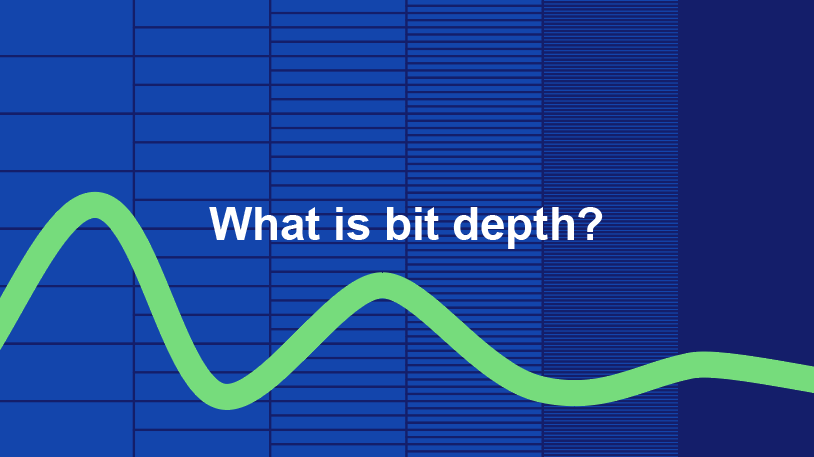
Audio bit depth refers to the number of bits used to represent the amplitude of an audio signal at each sample point. In simpler terms, it determines the dynamic range of digital audio. A higher bit depth allows for a more detailed representation of sound, capturing subtle nuances and minimizing quantization noise.
Imagine bit depth as a measurement of how finely audio is divided into individual steps. For instance, a 16-bit audio recording has 65,536 possible amplitude levels, while a 24-bit recording offers a staggering 16,777,216 levels. This increased granularity results in smoother, more accurate sound reproduction.
Understanding Bit Depth in Audio
To grasp the significance of bit depth, consider it as the shades of color in a painting. A higher bit depth provides a broader palette of colors, allowing for a more accurate depiction of the original image. Similarly, in audio, a greater bit depth captures a wider range of volume levels, preserving the subtleties of a musical performance or the nuances of a voice.
In practical terms, when you listen to music or a podcast, a higher bit depth ensures that you can hear the softest whispers and the loudest drum hits without distortion or loss of detail. It’s like having a more precise lens to view the sonic landscape.
Audio Resolution and Bit Depth
Bit depth and audio resolution are closely linked. Audio resolution refers to the level of detail and accuracy in an audio recording. Bit depth plays a pivotal role in determining this resolution. Think of it as the difference between watching a video in standard definition versus high definition. A higher bit depth offers a more lifelike and faithful representation of sound.
When recording or listening to music, you’ll often encounter terms like “16-bit” or “24-bit.” These numbers indicate the bit depth of the audio, with 24-bit audio being the gold standard for high-quality recordings. It’s akin to having a sharper, more detailed image in photography.
Now, let’s explore more facets of bit depth in audio.
Importance of Bit Depth in Sound
Bit depth is paramount in the world of sound because it directly impacts audio fidelity and the ability to reproduce music or voice accurately. It ensures that every subtle nuance, from the softest piano notes to the powerful guitar riffs, is faithfully captured and played back with precision.
Consider this: when recording a classical piano performance, the pianist’s delicate touch on the keys is as vital as the thunderous crescendos. A higher bit depth preserves the intricate dynamics, making you feel as if you are sitting in the concert hall, immersed in the music.
Bit depth is the foundation of audio quality, and understanding its role can help you appreciate the importance of using higher bit depths in audio production and playback.
How Bit Depth Affects Audio Quality
The impact of bit depth on audio quality is akin to the role of paint quality in a masterpiece. Just as a skilled artist requires high-quality pigments for a vivid painting, audio engineers rely on a greater bit depth for lifelike and rich audio recordings.
A lower bit depth might result in noticeable “stepping” or quantization noise, especially in quiet passages of a recording. This noise can be distracting and diminish the overall listening experience. On the other hand, a higher bit depth provides a smooth, natural curve to the audio waveform, minimizing these artifacts and delivering pristine sound.
Consider your favorite music track—the artist’s emotions, the resonance of instruments, and the atmosphere of the recording venue. All these subtleties are better preserved and conveyed through higher bit depth, elevating your listening experience to a new level.
Bit Depth in Digital Audio
In the digital realm, bit depth plays a pivotal role in the accuracy of audio representation. Think of it as pixels in a high-resolution photograph; more pixels mean finer details. Similarly, a higher bit depth translates to a more accurate depiction of sound.
In applications like digital audio workstations (DAWs) and music players, you often have the option to choose between different bit depths for your audio projects. Opting for a higher bit depth can lead to more professional-sounding results, particularly in the realms of music production, film scoring, and sound design.
Bit Depth vs. Sample Rate
While bit depth and sample rate are both critical aspects of digital audio, they serve different purposes. Bit depth determines the accuracy of amplitude representation, while sample rate governs how often the audio waveform is sampled per second.
Picture bit depth as the color depth in a photograph and sample rate as the frames per second in a video. A higher bit depth allows for greater tonal accuracy, while a higher sample rate captures more audio snapshots per second, preserving high-frequency content.
In many scenarios, a balanced approach between bit depth and sample rate is essential to achieve optimal audio quality. The synergy between these two factors ensures that audio recordings faithfully capture the richness and subtleties of the original source.
Bit Depth in Music Production
For music producers, bit depth is a critical consideration when working on audio projects. It influences the quality of sound recordings and the ability to manipulate audio during the production process.
When mixing and mastering music, a higher bit depth provides ample headroom for processing audio without introducing artifacts or degrading quality. This allows producers to apply effects, equalization, and compression with greater precision.
Additionally, when releasing music, opting for a higher bit depth ensures that your audience experiences the full depth and nuance of your compositions, whether they’re listening through high-end headphones or a powerful sound system.
16-Bit vs. 24-Bit Audio
The choice between 16-bit and 24-bit audio often arises when considering audio quality and storage requirements. A 16-bit audio file occupies less space compared to a 24-bit file, but it also has limitations in capturing subtle audio details.
16-bit audio is akin to a compact camera with limited resolution, suitable for casual snapshots. In contrast, 24-bit audio offers the quality of a professional DSLR camera, capturing a broader dynamic range and preserving the finer nuances of sound.
When deciding between the two, it’s essential to consider the specific use case. For audiophiles, professional audio production, and high-end sound systems, 24-bit audio is the preferred choice for its ability to deliver an immersive and faithful listening experience.
Bit Depth for Audio Recording
In the realm of audio recording, selecting the appropriate bit depth is a pivotal decision. It directly affects the quality and flexibility of the recorded material, whether you’re tracking vocals, instruments, or ambient sounds.
Recording at a higher bit depth, such as 24-bit, provides audio engineers with a safety net during the recording process. It allows them to capture a wide dynamic range without the risk of clipping or distortion. This is particularly valuable when dealing with unpredictable elements in live recordings or capturing the subtleties of acoustic instruments.
In essence, bit depth choice during audio recording is like choosing the canvas size for a painting. A larger canvas provides more room for creativity and detail, and a higher bit depth offers greater sonic canvas for audio professionals.
Final Words
In the realm of audio, bit depth serves as the bedrock of quality and fidelity. It determines how faithfully sound is captured, preserved, and reproduced. Understanding the importance of bit depth allows you to appreciate the nuances in your favorite music, the clarity in podcasts, and the immersive soundscapes in movies.
Whether you’re an aspiring musician, an audio engineer, or simply a passionate listener, recognizing the role of bit depth in audio enriches your experience. It’s the difference between seeing the world in black and white and experiencing it in full color.
So, the next time you enjoy your favorite song or immerse yourself in a cinematic adventure, remember that bit depth is the silent hero behind the scenes, ensuring that every sonic detail reaches your ears with precision and clarity.
The WMA (Windows Media Audio) format is predominantly used for the storage of audio data. Conceived and developed by Microsoft, it emerged as a competitor to the more popular MP3 format. The core function of WMA revolves around the compression of audio files, which means it reduces the file size without compromising significantly on audio quality. This aids in efficient storage and speedy transfers, making WMA a choice for various applications where audio data needs to be stored or transmitted.
Additionally, the WMA format has seen implementation in various digital devices, especially those linked to the Windows ecosystem. It’s suitable for both streaming audio content and local playback. Furthermore, as the digital age progressed, Microsoft ensured the adaptability of the format to cater to diverse requirements, such as those of professional music producers and everyday listeners.
“Sound is the vocabulary of nature.” – Pierre Schaeffer
How does WMA differ from MP3?
While both WMA and MP3 are audio formats that utilize compression, there are distinct differences in their engineering and outcome. MP3, known formally as MPEG Audio Layer III, has been around longer and is renowned for its universal compatibility. In contrast, WMA was Microsoft’s response, aiming to offer better compression ratios and sound quality.
Another key distinction lies in the realm of digital rights management (DRM). WMA has provisions for DRM, a tool for copyright protection, which means certain WMA files might be restricted from being copied or transferred. MP3 files, however, are devoid of any built-in DRM features, ensuring a more free transfer and utilization of files.
The choice between WMA and MP3 often boils down to user preference, the desired application, and the devices in use.
“Music is the universal language of mankind.” – Henry Wadsworth Longfellow
What are the benefits of WMA files?
There are multiple benefits of using WMA files. Firstly, they offer a good balance between file size and sound quality. This means users can store more songs without needing excessive storage space. Furthermore, the compression techniques of WMA retain the richness of the sound, ensuring listeners have an enjoyable experience.
WMA also offers versatility. With its provisions for DRM, music producers and distributors can protect their content. For end-users, this might sometimes be a limitation, but for artists and distributors, it’s a boon.
Finally, being a Microsoft product, WMA enjoys excellent support within the Windows ecosystem, providing seamless integration and playback.
“Without music, life would be a mistake.” – Friedrich Nietzsche
Is WMA better than MP3 for audio quality?
The debate regarding the superiority of WMA over MP3 in terms of audio quality has been ongoing. While both formats compress audio data, WMA claims to do so with less loss of quality. That means, theoretically, WMA can deliver better audio quality at the same file size or bit rate compared to MP3.
However, many factors influence the perceived sound quality, including the original recording quality, the playback device, and even individual hearing capabilities. Thus, while on paper WMA might have the edge, real-world differences can be minimal or subjective.
“Music can change the world because it can change people.” – Bono
How does WMA compression work?
WMA employs a method of lossy compression. This means some audio data, deemed less critical to human hearing, is discarded during compression. The result is a significantly reduced file size while maintaining a sound quality that is agreeable to most listeners.
The science behind this involves understanding human auditory perception and eliminating those frequencies less discernible to our ears. Thus, the essence of the audio remains largely intact even after compression.
“The music is not in the notes, but in the silence between.” – Wolfgang Amadeus Mozart
Can WMA files be played on all devices?
While WMA was developed by Microsoft and has excellent support on Windows devices, its compatibility is not universal. Many modern devices and platforms do support WMA playback. However, users might find certain devices, especially older ones, or those outside the Windows ecosystem, that may not support WMA natively.
Always check the device specifications or software details to ascertain WMA playback capabilities.
“Music touches us emotionally, where words alone can’t.” – Johnny Depp
Are there different versions of WMA format?
Yes, over the years, Microsoft introduced various versions of WMA. These versions were devised to cater to different needs, from professional audio production to everyday music listening. Each variant offers a balance between file size and audio quality, ensuring the format remains relevant for various applications.
“Music expresses that which cannot be put into words and that which cannot remain silent.” – Victor Hugo
How does WMA handle digital rights management?
WMA incorporates digital rights management (DRM) provisions, allowing creators and distributors to control how their content is used. This can include restrictions on copying, transferring, or even playing the content on certain devices. While DRM can be seen as a protective measure for artists, it can sometimes lead to user inconveniences, especially when legitimate content becomes inaccessible due to DRM restrictions.
“Music is the shorthand of emotion.” – Leo Tolstoy
What is the history behind WMA?
Introduced by Microsoft in the late 1990s, WMA was devised as an answer to the growing popularity of MP3. Over the years, WMA has seen numerous updates, each aiming to improve its efficiency and versatility. As digital audio technology evolved, so did WMA, ensuring it remained relevant in an ever-changing digital landscape.
“Music is the wine that fills the cup of silence.” – Robert Fripp
How can I convert a file to WMA?
Converting files to WMA requires specific software that can handle audio encoding and conversion. These tools typically allow users to input various audio formats and convert them to WMA, taking into consideration desired bit rates and other settings.
“Music brings a warm glow to my vision, thawing mind and muscle from their endless wintering.” – Haruki Murakami
Final Words
The WMA format, with its roots in Microsoft’s vision for digital audio, has indeed carved a niche for itself in the world of audio formats. Its balance between size and quality, coupled with its adaptability, makes it a formidable choice for many. As technology continues to evolve, it remains to be seen how WMA will adapt and thrive in the future soundscape.
MPEG, which stands for the Moving Picture Experts Group, represents a family of standards used for coding audiovisual information in a digital format. Established by the group of experts who designed it, MPEG is widely recognized in the realm of multimedia content. Digital videos and audio tracks, which you might stream or download, often use the MPEG standard because of its reliable compression techniques.
Such compression allows large multimedia files to be condensed into smaller sizes without sacrificing significant quality. The versatility of the MPEG standard has made it an indispensable tool for various media applications.
“The digital revolution is far more significant than the invention of writing or even of printing.” – Douglas Engelbart
History of the MPEG format.
The MPEG format, as we know it today, was initiated in 1988. The goal was to create standards to address the growing demands of the digital multimedia landscape. Over the years, several versions of MPEG have been released, each catering to specific needs and evolving technologies.
From its inception, the format’s emphasis has been on providing high-quality digital audiovisual content. As technologies advanced and the requirements of multimedia shifted, the MPEG standards continually adapted, remaining relevant in every era of digital media evolution.
“Innovation is the calling card of the future.” – Anna Eshoo
How does MPEG compression work?
MPEG compression is a marvel of digital engineering. It uses a combination of temporal and spatial compression techniques. Temporal compression reduces redundancy between consecutive frames of a video, while spatial compression lessens redundancy within individual frames.
By analyzing patterns and repetitive information, MPEG compression discards data that won’t be missed by the human eye or ear. This results in significantly reduced file sizes without a noticeable drop in quality, making it efficient for storage and transmission.
“Simplicity is the ultimate sophistication.” – Leonardo da Vinci
Differences between MPEG versions.
There are several MPEG versions, each designed to address unique challenges in the multimedia world. MPEG-1, for example, was created for video CDs and can support low-resolution videos. MPEG-2, on the other hand, was designed for DVDs and broadcast television.
Subsequent versions, like MPEG-4, introduced enhanced functionalities and catered to newer technologies, such as internet streaming and mobile devices. Each version marked an evolution, offering better compression, improved quality, or both.
“Progress is impossible without change.” – George Bernard Shaw
MPEG format’s impact on multimedia.
The MPEG format revolutionized the multimedia industry. Its efficient compression algorithms made it possible to store and transmit high-quality video and audio in considerably smaller files. This played a crucial role in the rise of digital streaming platforms, online video sharing, and digital broadcasts.
Furthermore, the format’s adaptability ensured its continued relevance, influencing the development of various multimedia technologies over the years.
“Without change, there is no innovation.” – C. Frank Wang
Understanding MPEG’s video and audio components.
MPEG encompasses both video and audio components. The video aspect is primarily about compressing visual data effectively, while the audio component focuses on achieving high-quality sound with minimal file size. Together, they provide a holistic approach to multimedia compression, ensuring that both sight and sound are preserved with integrity.
“Sound and vision become poetry when woven together.” – Anonymous
Evolution and significance of MPEG.
Over the years, MPEG has evolved to meet the changing demands of technology and media consumption. Its significance lies in its adaptability and its ability to maintain high-quality standards. From facilitating DVD technology to enabling online streaming, MPEG’s influence is pervasive in the multimedia realm.
“Adaptability is the simple secret of survival.” – Jessica Hagedorn
Advantages of using MPEG.
MPEG offers numerous advantages, including efficient compression, versatility across platforms, and compatibility with a wide range of devices. Its ability to condense large media files without a significant loss in quality makes it ideal for both storage and transmission.
“In every challenge lies an opportunity for growth.” – Unknown
Limitations of the MPEG format.
While MPEG is highly efficient, it’s not without limitations. Lossy compression means some data is discarded, which might affect quality in specific applications. Additionally, certain MPEG versions may not be suitable for all media needs, requiring careful selection based on the intended use.
“Every limitation is an opportunity in disguise.” – Anonymous
Real-world applications of MPEG.
From streaming services and broadcasting to video conferencing and digital advertising, the applications of MPEG are vast. Its universal appeal and efficiency have made it the go-to choice for various multimedia needs across industries.
“The real world is where the monsters are.” – Rick Riordan
Final Words
MPEG’s indelible mark on the multimedia landscape underscores its importance. As technologies continue to evolve, the adaptability and efficiency of formats like MPEG will be crucial in shaping the future of digital media.
The M4A file format is predominantly used for storing audio data, particularly music tracks and podcasts. A successor to the well-known MP3 format, M4A offers users the chance to store their music in a format that often provides better sound quality and smaller file sizes. This format benefits both creators and consumers of audio content by ensuring that quality is maintained without consuming excess storage space.
While M4A might sound like a technical acronym to some, its significance in the digital music industry cannot be understated. By moving away from older, more limited formats, the music world has been able to embrace the digital age with more flexibility.
“Music gives a soul to the universe, wings to the mind, flight to the imagination and life to everything.” – Plato
How does M4A compare to MP3?
M4A and MP3 are both digital audio formats, but there are key differences between the two. The main distinction lies in the codec used to encode the audio. MP3 uses a codec that has been around since the 90s, while M4A makes use of the newer Advanced Audio Codec (AAC).
This updated codec provides M4A files with an edge when it comes to audio quality at similar file sizes. So, if you were to compare an M4A file and an MP3 file of the same size, it’s likely that the M4A file would have superior audio quality. Moreover, M4A files are often smaller than their MP3 counterparts, making them more storage-friendly.
“The music is not in the notes, but in the silence in between.” – Wolfgang Amadeus Mozart
Are M4A files of better quality than MP3?
As touched upon earlier, M4A files often have an advantage over MP3 files in terms of quality. The AAC codec’s efficiency ensures that M4A files retain more of the original audio’s detail. This results in clearer highs and lows, making the overall listening experience richer.
However, the difference in quality might not always be discernible to the average listener using standard headphones or speakers. For audiophiles or those using high-end audio equipment, the distinction between the two formats becomes clearer.
“In music, in the sea, in a flower, in a leaf, in an act of kindness… I see what people call God in all these things.” – Pablo Casals
Can M4A files be played on all devices?
M4A files, while versatile, are not universally compatible with all devices. Earlier devices or those not updated might face issues playing back M4A files. However, with the increasing acceptance and popularity of the format, most modern devices, including smartphones, tablets, and computers, support M4A playback natively.
For those few devices that don’t, converting the M4A files to another compatible format is a viable option. This ensures that users can enjoy their favorite tunes regardless of their device’s initial compatibility.
“Where words fail, music speaks.” – Hans Christian Andersen
What are the advantages of the M4A format?
M4A boasts a plethora of benefits over older formats. Firstly, it offers improved audio quality, making it ideal for those who prioritize sound clarity. The efficient compression ensures smaller file sizes without compromising the audio’s integrity.
Another advantage of the M4A format is its ability to store metadata like track names, artist details, and album art, enriching the user experience.
“Without music, life would be a mistake.” – Friedrich Nietzsche
Are M4A files lossless or lossy?
M4A files can be both lossless and lossy. The standard M4A file with AAC encoding is lossy, which means some original audio information is lost during compression. However, Apple also introduced a lossless version known as Apple Lossless Audio Codec (ALAC) stored in an M4A container, retaining all the audio’s original details.
“Music touches us emotionally, where words alone can’t.” – Johnny Depp
Why was the M4A format introduced?
The M4A format was introduced as a part of Apple’s move to provide better audio quality for its iTunes store downloads. Recognizing the need for a more efficient codec than MP3, Apple championed the AAC codec, storing it within the M4A container. The intention was clear: offer consumers a higher quality audio experience without taking up excessive storage space.
“Music can change the world because it can change people.” – Bono
Can you convert M4A to other formats?
Yes, M4A files can be converted into various other formats. While the specifics won’t be delved into here, numerous tools and applications can facilitate such conversions, ensuring that users can access their audio content across a multitude of platforms and devices.
“Music was my refuge. I could crawl into the space between the notes and curl my back to loneliness.” – Maya Angelou
Is M4A suitable for professional audio?
M4A, especially in its lossless ALAC variant, can indeed be suitable for professional audio. Many sound engineers and artists have started using M4A for its balance of size and quality. It’s especially useful for distributing high-quality demos or for sharing tracks in environments where space is at a premium.
“To stop the flow of music would be like the stopping of time itself, incredible and inconceivable.” – Aaron Copland
What’s the future of the M4A format?
While predicting the future is always a challenge, the M4A format appears to have a secure place in the audio industry for the foreseeable future. Its efficient encoding, versatility, and increasing device compatibility make it an ideal choice for both consumers and professionals.
“After silence, that which comes nearest to expressing the inexpressible is music.” – Aldous Huxley
Final Words
Understanding the M4A format’s nuances aids users in making informed choices about their audio storage and playback needs. As the digital world evolves, so too will the formats we use, but for now, M4A stands as a testament to the marriage of quality and efficiency.
M4A and FLAC are both audio file formats, but they are quite distinct in their characteristics. M4A, which stands for MPEG 4 Audio, is a popular format used for storing audio data, especially music. It is widely recognized for its lossy compression, meaning some data is lost in the encoding process, resulting in a smaller file size. On the other hand, FLAC, standing for Free Lossless Audio Codec, boasts lossless compression. No data is discarded, maintaining the original audio quality.
“Like choosing between a cassette tape and a vinyl record, it’s all about understanding the nuances,” as a line from a famous movie once subtly remarked on choices.
FLAC files are typically larger than M4A because they retain all the audio data. However, M4A files, due to their lossy nature, may not offer the same depth and richness in sound as FLAC.
Which is better: M4A or FLAC?
Defining which format is “better” depends largely on the user’s needs. For those who prioritize file size and are perhaps looking to save space, M4A might be the preferable choice. Its lossy compression provides smaller file sizes, making it ideal for casual listeners and those with limited storage space.
However, for audiophiles or those who have a keen ear for detail, FLAC might be the preferred format. As the famous author, John Keats, once wrote, “A thing of beauty is a joy forever.” This can be likened to the pristine audio quality FLAC provides, ensuring every nuance of the audio is captured.
Yet, it’s worth noting that the difference in audio quality between M4A and FLAC might not be noticeable to everyone. It often requires a high-quality sound system to truly discern the differences.
What are the advantages of M4A over FLAC?
M4A does come with certain advantages. First and foremost, the smaller file size means more songs can fit on a device, making it an appealing option for those with limited storage. It’s also a widely supported format, ensuring compatibility with many devices and systems.
“Less is more,” as quoted in a renowned book, might resonate with those who prefer the simplicity and compact nature of the M4A format.
Additionally, M4A files tend to process faster due to their size. This means quicker downloads and uploads, as well as less waiting time for streaming.
How does FLAC’s quality compare to M4A?
FLAC’s quality is, objectively speaking, superior to M4A. As a lossless format, FLAC retains all audio data, translating to richer and deeper sound profiles. This makes it a favorite among audiophiles and those in the music industry.
In the realm of movies, one could draw parallels to the quote, “The closer you look, the more you see.” With FLAC, the closer you listen, the more you hear.
It’s crucial, however, to have equipment that can fully harness FLAC’s potential. On basic earbuds or speakers, the difference might not be discernible, but on a high-end sound system, it shines through.
Final Words
The battle between M4A and FLAC is akin to comparing two distinct art forms. Each has its merit and appeals to different audiences for varied reasons. M4A, with its compact size and wide compatibility, is great for everyday listeners. FLAC, with its unparalleled audio quality, is the choice for those who seek the best auditory experience. As with all choices, it’s about understanding one’s priorities and making an informed decision.












Comments:
(Username: MusicMaestro) – This article is a great resource for musicians like me. Opus seems promising for streaming high-quality music.
(Username: AudioEnthusiast) – As an audiophile, I’ve always preferred MP3 for its compatibility. But Opus is making me reconsider my choices.
(Username: TechNerd22) – Excellent article, but I wish it delved more into Opus’s role in online gaming and low-latency communication.
(Username: AudiophileAlex) – This article provides a comprehensive comparison. I’m leaning towards Opus for its quality, but MP3’s compatibility is hard to beat.
(Username: StreamingSavvy) – Opus is a game-changer for streaming services. The difference in audio quality is remarkable.