When it comes to video quality, there are two main factors that you need to consider: bitrate and codec.
Bitrate
Bitrate is the amount of data that is used to encode a video file. A higher bitrate will result in a higher quality video, but it will also result in a larger file size.
The ideal bitrate for a video will depend on a number of factors, including the resolution of the video, the frame rate, and the type of content. For example, a high-resolution video with a high frame rate will require a higher bitrate than a low-resolution video with a low frame rate.
If you are concerned about file size, you can try reducing the bitrate of your video. However, keep in mind that this will also reduce the quality of the video.
Codec
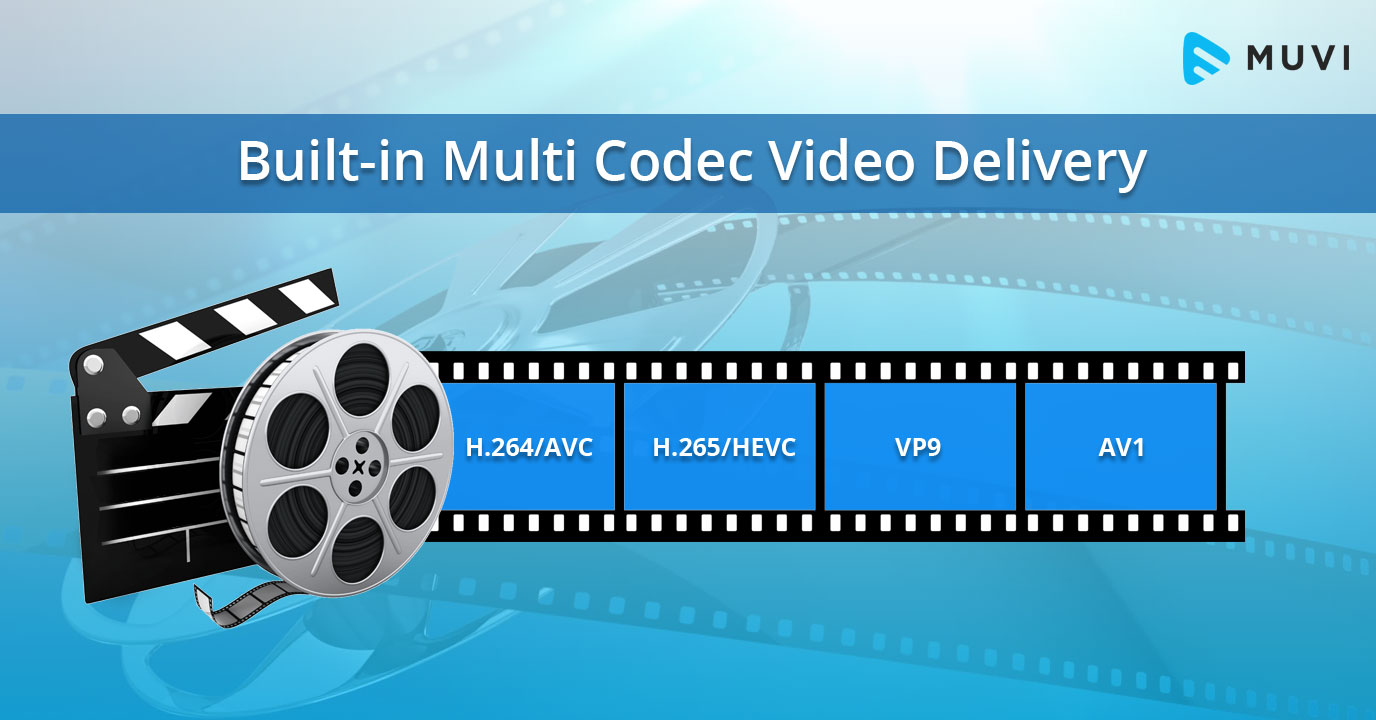
A codec is a type of software that is used to encode and decode video files. There are many different codecs available, and each one has its own strengths and weaknesses.
Some of the most popular codecs include:
H.264: This is a widely used codec that offers good quality and compatibility.
MPEG-4: This is another popular codec that is known for its good quality.
VP9: This is a newer codec that offers better quality than H.264 and MPEG-4, but it is not as widely supported.
When choosing a codec, you need to consider the following factors:
The quality of the video that you want to create
The compatibility of the codec with your devices and software
The file size of the video that you want to create
Conclusion
Bitrate and codec are two important factors that you need to consider when enhancing video quality. By understanding these factors, you can create high-quality videos that are also small in file size.
Here are some additional tips for enhancing video quality:
Use a high-quality camera
Shoot in good lighting conditions
Edit your videos carefully
Optimize your videos for the web
By following these tips, you can create videos that are both high-quality and visually appealing.
Audio signal processing is the process of manipulating digital audio signals. This can be done for a variety of purposes, such as noise reduction, equalization, and compression.
Here are some of the most common digital audio signal processing techniques:
Noise reduction: This technique is used to remove unwanted noise from an audio signal. This can be done using a variety of methods, such as averaging, filtering, and time-domain adaptive filtering.
Equalization: This technique is used to adjust the frequency response of an audio signal. This can be done to improve the sound quality of an audio signal, or to match the frequency response of a speaker system.
Compression: This technique is used to reduce the dynamic range of an audio signal. This can be done to make an audio signal louder, or to save space when storing an audio file.
Digital audio signal processing is a complex and ever-evolving field. However, the basic principles are relatively simple to understand.
Here are some of the most important concepts in digital audio signal processing:
Sampling: This is the process of converting an analog audio signal into a digital signal. This is done by taking a series of measurements of the analog signal at regular intervals.
Quantization: This is the process of rounding the digital values to a finite number of bits. This is done to reduce the amount of data that needs to be stored or transmitted.
Filtering: This is the process of removing unwanted components from an audio signal. This can be done using a variety of methods, such as FIR filters, IIR filters, and wavelet transforms.
Enhancement: This is the process of improving the quality of an audio signal. This can be done using a variety of methods, such as noise reduction, equalization, and compression.
Digital audio signal processing is a powerful tool that can be used to improve the sound quality of audio recordings. It can also be used to create new and exciting sounds.
If you are interested in learning more about digital audio signal processing, there are many resources available online and in libraries.
Frequently Asked Questions
Here are some of the most frequently asked questions about digital audio signal processing:
What is the difference between analog and digital audio?
Analog audio is a continuous signal, while digital audio is a discrete signal. This means that analog audio values can take on any value within a given range, while digital audio values can only take on a finite number of values.
Why is digital audio better than analog audio?
Digital audio is not necessarily better than analog audio. However, digital audio has some advantages over analog audio, such as:
It is less susceptible to noise.
It can be easily stored and transmitted.
It can be easily manipulated using digital audio signal processing techniques.
What are the different types of digital audio formats?
There are many different types of digital audio formats. Some of the most common formats include:
WAV: This is a lossless format that is commonly used for storing uncompressed audio.
MP3: This is a lossy format that is commonly used for storing compressed audio.
AAC: This is another lossy format that is commonly used for storing compressed audio.
FLAC: This is a lossless format that is commonly used for storing high-quality audio.
What are the different types of digital audio signal processing techniques?
There are many different types of digital audio signal processing techniques. Some of the most common techniques include:
Noise reduction: This technique is used to remove unwanted noise from an audio signal.
Equalization: This technique is used to adjust the frequency response of an audio signal.
Compression: This technique is used to reduce the dynamic range of an audio signal.
Enhancement: This is the process of improving the quality of an audio signal.
Conclusion
Digital audio signal processing is a powerful tool that can be used to improve the sound quality of audio recordings. It can also be used to create new and exciting sounds.
If you are interested in learning more about digital audio signal processing, there are many resources available online and in libraries.
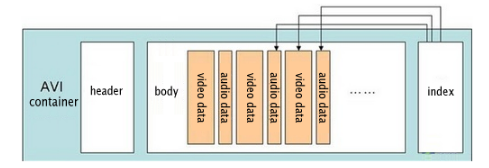
An AVI chunk is a data structure used to store information in an AVI file. AVI files are a popular format for storing video and audio data. They are commonly used for storing movies, TV shows, and home videos.
What is the Structure of an AVI Chunk?
An AVI chunk consists of a header and a data section. The header contains information about the chunk, such as its type, size, and position in the file. The data section contains the actual data for the chunk.
What are the Different Types of AVI Chunks?
There are many different types of AVI chunks. Some of the most common types include:
Main header: This chunk contains the main information about the AVI file, such as its size, duration, and number of streams.
Stream header: This chunk contains information about a specific stream in the AVI file, such as its type, codec, and bit rate.
Data chunk: This chunk contains the actual data for a stream in the AVI file.
How to Analyze an AVI Chunk Structure
To analyze an AVI chunk structure, you can use a variety of tools. One popular tool is the AVIInfo tool. This tool can be used to display information about an AVI file, including its chunk structure.
Conclusion
AVI chunk structure is an important concept for understanding how AVI files work. By understanding the different types of AVI chunks and how they are structured, you can better understand how to work with AVI files.
Here are some additional details about the different types of AVI chunks:
Main header: The main header is the first chunk in an AVI file. It contains the following information:
File size
Creation date
Number of streams
Video stream information
Audio stream information
Stream header: A stream header contains information about a specific stream in an AVI file. It contains the following information:
Stream type
Codec
Bit rate
Data format
Data chunk: A data chunk contains the actual data for a stream in an AVI file. It is usually compressed using a lossy compression algorithm, such as MPEG-4 or DivX.
By understanding the different types of AVI chunks and how they are structured, you can better understand how to work with AVI files. For example, if you want to convert an AVI file to a different format, you will need to know the type of each stream in the AVI file. You will also need to know the bit rate of each stream.
MP3 bitrate is the amount of data that is used to encode an MP3 audio file. The higher the bitrate, the higher the quality of the audio file. However, higher bitrates also result in larger file sizes.
How is MP3 Bitrate Calculated?
MP3 bitrate is calculated using a variety of factors, including the complexity of the audio signal, the desired quality of the audio file, and the target file size.
What are the Different Types of MP3 Bitrate Calculation Methods?
There are two main types of MP3 bitrate calculation methods:
Constant bitrate (CBR): This method uses a constant bitrate for the entire audio file. This results in a consistent audio quality throughout the file, but it can also result in larger file sizes for complex audio signals.
Variable bitrate (VBR): This method uses a variable bitrate, which means that the bitrate changes depending on the complexity of the audio signal. This results in smaller file sizes for complex audio signals, but it can also result in a slight variation in audio quality.
Which MP3 Bitrate Calculation Method is Best?
The best MP3 bitrate calculation method depends on your needs. If you need a consistent audio quality throughout the file, then CBR is the best option. If you are more concerned about file size, then VBR is the best option.
How to Choose the Right MP3 Bitrate for Your Needs
When choosing the right MP3 bitrate for your needs, you should consider the following factors:
The type of audio signal: Complex audio signals, such as those that contain a lot of high-frequency content, require a higher bitrate than simple audio signals.
The desired quality of the audio file: If you want the highest possible quality, then you should use a higher bitrate. If you are more concerned about file size, then you can use a lower bitrate.
The target file size: If you have a specific file size in mind, then you can use a bitrate calculator to determine the bitrate that you need.
Conclusion
MP3 bitrate is an important factor to consider when encoding audio files. By understanding the different types of MP3 bitrate calculation methods and how to choose the right bitrate for your needs, you can ensure that your audio files sound great and have a reasonable file size.
Here are some additional details about the different types of MP3 bitrate calculation methods:
Constant bitrate (CBR): This method is the simplest to understand and implement. It is also the most reliable, as it ensures that the audio quality is consistent throughout the file. However, it can result in larger file sizes for complex audio signals.
Variable bitrate (VBR): This method is more complex than CBR, but it can result in smaller file sizes for complex audio signals. This is because VBR allows the encoder to use a lower bitrate for less complex parts of the audio signal, and a higher bitrate for more complex parts of the audio signal. However, VBR can result in a slight variation in audio quality, depending on the complexity of the audio signal.
Ultimately, the best MP3 bitrate calculation method for you depends on your specific needs. If you need a consistent audio quality throughout the file, then CBR is the best option. If you are more concerned about file size, then VBR is the best option.
Demystifying the OGG Audio FormatDemystifying the OGG Audio Format
OGG is a free, open-source audio format that was created by the Xiph.Org Foundation. It is a popular choice for streaming and downloading music because it offers good audio quality and smaller file sizes than other formats, such as MP3.
Here are some of the key features of OGG:
Open-source: OGG is an open-source format, which means that it is free to use and distribute. This makes it a popular choice for developers who want to create their own music players or other software that can play OGG files.
Small file sizes: OGG files are typically smaller than MP3 files of the same quality. This makes them a good choice for streaming or downloading music over the internet, or for storing music on devices with limited storage space.
Good audio quality: OGG files offer good audio quality, comparable to MP3 files. This is because OGG uses a lossy compression algorithm that is designed to remove data from the audio file without significantly affecting the quality.
Here are some of the most common questions that people ask about OGG:
1. What is the difference between OGG and MP3?
OGG and MP3 are both lossy audio formats, which means that they use compression to reduce the size of the audio file. However, OGG uses a different compression algorithm than MP3. This means that OGG files are typically smaller than MP3 files of the same quality.
2. What software can I use to play OGG files?
There are many different software programs that can play OGG files. Some popular options include VLC Media Player, Winamp, and Audacity.
3. Where can I find OGG files?
There are many different websites where you can find OGG files. Some popular options include Jamendo, Free Music Archive, and Magnatune.
4. Is OGG a good choice for music streaming?
Yes, OGG is a good choice for music streaming. It offers good audio quality and smaller file sizes than other formats, such as MP3. This makes it a good choice for listening to music online or on mobile devices.
5. Is OGG a good choice for music downloads?
Yes, OGG is a good choice for music downloads. It offers good audio quality and smaller file sizes than other formats, such as MP3. This makes it a good choice for storing music on devices with limited storage space.
Overall, OGG is a good choice for anyone who wants to listen to music with good audio quality and smaller file sizes. It is an open-source format that is free to use and distribute, and it is supported by a wide range of software.
OGG and MP4 are two popular multimedia file formats. They are both used to store audio and video files, but they have some key differences.
OGG is an open-source format that is free to use and distribute. It is supported by a wide range of software, including players, encoders, and decoders. OGG files are typically smaller than MP4 files, which makes them a good choice for streaming or downloading music and videos.
MP4 is a proprietary format that is owned by the MPEG Group. It is supported by a wider range of devices than OGG, including smartphones, tablets, and gaming consoles. MP4 files are typically larger than OGG files, but they offer better quality audio and video.
Here is a table that summarizes the key differences between OGG and MP4:
Feature
OGG
MP4
File format
Open-source
Proprietary
Licensing
Free to use and distribute
Requires a license
Supported software
Wide range of players, encoders, and decoders
Limited range of devices
File size
Typically smaller
Typically larger
Audio and video quality
Good
Excellent
Here are some additional questions that people often ask about OGG and MP4:
1. Which format is better for streaming music?
OGG is a good choice for streaming music because it offers good audio quality and smaller file sizes. This makes it ideal for listening to music online or on mobile devices.
2. Which format is better for downloading movies and TV shows?
MP4 is a good choice for downloading movies and TV shows because it offers excellent audio and video quality. This makes it ideal for watching movies and TV shows on high-definition TVs or home theater systems.
3. Which format is better for recording audio?
Both OGG and MP4 are good choices for recording audio. However, OGG may be a better choice if you are looking for smaller file sizes.
4. Which format is better for creating video files?
MP4 is a better choice for creating video files because it offers better quality video. This is important if you are creating videos that will be watched on high-definition TVs or home theater systems.
Ultimately, the best format for you will depend on your needs and preferences. If you are looking for a format that offers good audio and video quality and is supported by a wide range of devices, then MP4 is a good choice. If you are looking for a format that offers good audio quality and smaller file sizes, then OGG is a good choice.
MP3 is a popular digital audio format that uses a lossy compression algorithm to reduce the size of audio files. One of the factors that can affect the quality of an MP3 file is its frequency response.
Frequency response is a measure of how well a system reproduces different frequencies of sound. A flat frequency response means that all frequencies are reproduced equally well. However, MP3 compression can introduce distortions that can affect the frequency response of an audio file.
There are a number of factors that can affect the frequency response of an MP3 file, including:
The bitrate of the MP3 file. The bitrate is a measure of the amount of data that is used to represent the audio file. Higher bitrates result in better quality audio files, but they also result in larger file sizes.
The encoder used to create the MP3 file. Different encoders use different compression algorithms, and these algorithms can have different effects on the frequency response of an audio file.
The playback device. The playback device can also affect the frequency response of an MP3 file. Some playback devices, such as headphones, have a limited frequency response. This can result in loss of detail in the audio signal.
If you are concerned about the frequency response of your MP3 files, there are a few things you can do to improve the quality of the audio.
Use a higher bitrate. This will result in better quality audio files, but it will also result in larger file sizes.
Use a different encoder. Some encoders, such as the Fraunhofer mp3 encoder, are known for their good frequency response.
Use a high-quality playback device. This will help to ensure that the full range of frequencies in the audio signal are reproduced.
By following these tips, you can improve the frequency response of your MP3 files and enjoy better quality audio.
Here are some additional questions that people often ask about MP3 frequency response:
1. What is a good frequency response for an MP3 file?
A good frequency response for an MP3 file will vary depending on the type of music that you are listening to. However, a general rule of thumb is that the frequency response should be flat within the range of human hearing, which is typically between 20 Hz and 20 kHz.
2. How does the bitrate of an MP3 file affect its frequency response?
The bitrate of an MP3 file is a measure of the amount of data that is used to represent the audio file. Higher bitrates result in better quality audio files, but they also result in larger file sizes. In general, a higher bitrate will result in a flatter frequency response.
3. What are some of the best encoders for MP3 files?
Some of the best encoders for MP3 files include the Fraunhofer mp3 encoder, the Xiph.org LAME encoder, and the Monkey’s Audio encoder. These encoders are known for their good quality and their ability to produce flat frequency responses.
4. What are some of the best playback devices for MP3 files?
Some of the best playback devices for MP3 files include high-quality headphones, home stereo systems, and car stereos. These devices are capable of reproducing the full range of frequencies in an audio signal, which can help to improve the quality of the audio.
Audio codecs are a type of data compression algorithm that is used to reduce the size of digital audio files. This makes it possible to store and transfer audio files more efficiently, and to play them back on devices with limited storage space.
There are two main types of audio codecs: lossy and lossless. Lossy codecs reduce the size of audio files by removing some of the data from the original audio signal. This can result in a loss of quality, but it can also result in a significant reduction in file size. Lossless codecs, on the other hand, do not remove any data from the original audio signal. This means that the quality of the audio is preserved, but the file size is not reduced as much.
In this article, we will compare two of the most popular audio codecs: AAC and MP3. We will discuss the advantages and disadvantages of each codec, and we will help you decide which codec is right for you.
AAC
AAC stands for Advanced Audio Coding. It is a lossy audio codec that was developed by the Moving Picture Experts Group (MPEG). AAC is designed to provide better sound quality than MP3 at the same file size. AAC is also more efficient than MP3, which means that it can achieve even better sound quality at lower file sizes.
AAC is supported by a wide range of devices, including smartphones, tablets, computers, and home audio systems. It is also the default audio format for many streaming services, such as Spotify and Apple Music.
MP3
MP3 stands for MPEG-1 Audio Layer 3. It is a lossy audio codec that was developed by the Moving Picture Experts Group (MPEG). MP3 is the most popular audio codec in the world. It is supported by a wide range of devices, and it is the default audio format for many music file sharing services.
MP3 is not as efficient as AAC, which means that it cannot achieve the same sound quality at lower file sizes. However, MP3 is still a good choice for most people. It is a reliable and widely supported codec that offers good sound quality at a reasonable file size.
Which Audio Codec is Right for You?
The best audio codec for you depends on your needs. If you want the best possible sound quality, then AAC is the better choice. However, if you are looking for a codec that is widely supported and that offers good sound quality at a reasonable file size, then MP3 is a good option.
Conclusion
AAC and MP3 are two of the most popular audio codecs in the world. Both codecs offer good sound quality, but AAC is generally considered to be the better choice for people who want the best possible sound quality. MP3 is a good option for people who are looking for a codec that is widely supported and that offers good sound quality at a reasonable file size.
Have you ever wondered how digital audio works? How can a computer store and play back sound, which is a continuous wave? The answer lies in digital audio, which is a way of representing sound as data.
In digital audio, sound is sampled at regular intervals. This means that the computer takes a snapshot of the sound wave at a certain point in time, and then stores that snapshot as data. The more frequently the sound is sampled, the more accurate the digital representation of the sound will be.
Once the sound has been sampled, it can be stored on a computer or other digital device. When the sound is played back, the computer reads the data and uses it to recreate the original sound wave.
Digital audio has many advantages over analog audio, which is the traditional way of storing and playing back sound. Digital audio is more accurate, it can be stored in smaller files, and it is less susceptible to noise and distortion.
Digital audio is also more versatile than analog audio. It can be easily edited, mixed, and mastered. It can also be stored and played back on a variety of devices, including computers, smartphones, and MP3 players.
How Digital Audio Works
Here is a more detailed explanation of how digital audio works:
The sound wave is first converted into an electrical signal. This is done by a microphone.
The electrical signal is then sampled at regular intervals. This is done by an analog-to-digital converter (ADC).
The samples are then stored as data. This can be done on a computer, a hard drive, or a CD.
When the sound is played back, the data is read from the storage device and converted back into an electrical signal. This is done by a digital-to-analog converter (DAC).
The electrical signal is then amplified and sent to a speaker.
The speaker converts the electrical signal back into sound waves, which are then audible to the listener.
The Benefits of Digital Audio
There are many benefits to using digital audio. Some of the most important benefits include:
Accuracy: Digital audio is more accurate than analog audio. This is because the sound is sampled at regular intervals, which ensures that the data is a true representation of the original sound wave.
Size: Digital audio files are much smaller than analog audio files. This is because the data is stored in a compressed format.
Versatility: Digital audio is more versatile than analog audio. It can be easily edited, mixed, and mastered. It can also be stored and played back on a variety of devices.
The Future of Digital Audio
Digital audio is the future of sound recording and playback. It is more accurate, smaller, and more versatile than analog audio. As technology continues to evolve, digital audio will become even more popular.
Conclusion
Digital audio is a powerful technology that has revolutionized the way we listen to music. It is more accurate, smaller, and more versatile than analog audio. As technology continues to evolve, digital audio will become even more popular.
Digital Rights anagement (DRM) is a technology used to control access to digital content. DRM can be used to protect copyrighted material, such as music, movies, and software, from unauthorized copying or distribution. DRM can also be used to restrict how users can use digital content, such as by limiting the number of devices on which it can be played or the number of times it can be copied.
There are a number of different DRM technologies in use today. Some of the most common DRM technologies include:
Encryption: This involves encrypting digital content so that it can only be accessed with a special key.
Digital signatures: This involves adding a digital signature to digital content to verify its authenticity and ownership.
Watermarking: This involves embedding invisible data into digital content to identify its source and prevent unauthorized copying.
DRM can be a valuable tool for copyright holders and content creators. However, DRM can also be a source of frustration for users. Some users complain that DRM makes it difficult to use digital content, and that it can sometimes prevent them from using the content in the way they want to.
Benefits of DRM
There are a number of benefits to using DRM. DRM can help to protect copyrighted material from unauthorized copying and distribution. This can help to protect the rights of copyright holders and content creators, and it can also help to prevent piracy. DRM can also help to prevent unauthorized access to digital content. This can help to protect users from malware and other security threats.
Drawbacks of DRM
There are also a number of drawbacks to using DRM. DRM can make it difficult to use digital content. For example, DRM can prevent users from copying digital content to multiple devices, or from playing digital content on unauthorized devices. DRM can also make it difficult to transfer digital content between different DRM systems. Additionally, DRM can sometimes be used to track user behavior, which some users find to be a privacy concern.
The Future of DRM
The future of DRM is uncertain. Some experts believe that DRM will continue to evolve and become more sophisticated. Others believe that DRM will eventually be replaced by other technologies, such as blockchain. Only time will tell how the future of DRM will unfold.
Conclusion
DRM is a complex and controversial topic. There are both benefits and drawbacks to using DRM. Ultimately, the decision of whether or not to use DRM is a personal one.







:max_bytes(150000):strip_icc()/AAC-vs-MP3-861dbce7e28045dda598a9c5cd2a6b65.jpg)