Optimizing Psychoacoustic Models for MP3 Compression at Low Bitrates
Psychoacoustic Models for MP3
Let’s Talk About MP3 Compression and Psychoacoustic Models
As a specialist with years of experience in audio compression, I want to take you on a journey through the intricate world of optimizing psychoacoustic models for MP3 compression, especially at low bitrates. To make this topic as accessible as possible, let’s start with a simple analogy. Think of your car’s engine. It’s designed to be efficient, just like psychoacoustic models aim to be efficient in preserving audio quality. In this article, I’ll show you how psychoacoustic models achieve this.
The Role of Psychoacoustic Models in Audio Compression
Psychoacoustic Models for MP3
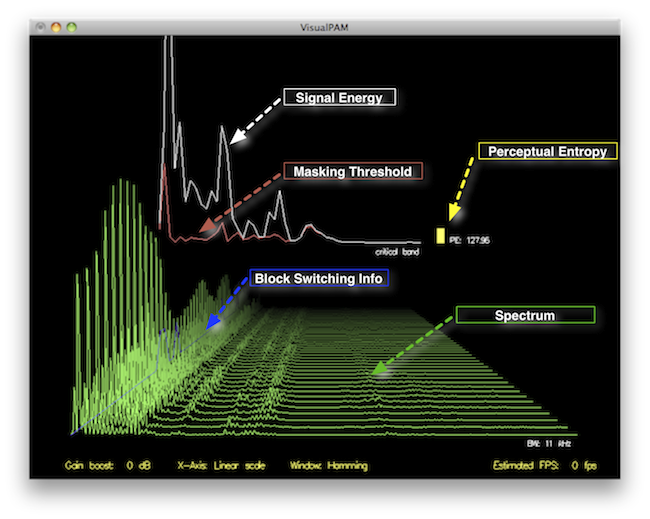
Psychoacoustic models are like the selective focus setting on a camera. Just as the camera prioritizes certain elements in a photo, psychoacoustic models prioritize the sounds that your ears are most sensitive to. These models mimic the way our ears perceive sound, and they’re the secret sauce behind MP3 compression. They analyze audio to figure out what we won’t notice if it’s removed. This understanding is crucial for reducing file sizes without harming audio quality.
Challenges of Low Bitrate MP3 Compression
Now, let’s talk about the challenges. Imagine a tightrope walker trying to maintain balance. At low bitrates, MP3 compression faces a similar balancing act. The goal is to keep audio quality while reducing the file size. But as the bitrate drops, it becomes more challenging to maintain that balance. This is where optimizing psychoacoustic models becomes essential.
Understanding the MP3 Compression Process
To understand how psychoacoustic models fit into MP3 compression, think of a recipe with specific ingredients. MP3 compression is like cooking, but instead of food, we’re working with audio. Psychoacoustic models determine which parts of the audio “recipe” are essential and which can be left out without anyone noticing. It’s all about making smart choices in the compression process.
Optimizing Psychoacoustic Models for Low Bitrates
Optimizing psychoacoustic models is a bit like tuning your car’s engine for fuel efficiency. It involves customizing these models to fit specific audio compression needs. You can think of it as fine-tuning your car’s engine for highway driving, where efficiency is paramount. Optimized models allow for more efficient compression while preserving the audio’s essential qualities.
Psychoacoustic Model Parameters and Their Impact
Within psychoacoustic models, there are various parameters that can be adjusted. Think of these parameters like modifying a recipe to suit different tastes. By tweaking these settings, you can influence how the models perceive and compress audio. For example, you can adjust the model to be more or less sensitive to certain sounds, depending on your desired outcome.
The Art of Balancing Audio Quality and Compression
Now, let me share my personal experience. Just as I’ve had to optimize audio for specific needs, you may have faced a similar dilemma. It’s an art to balance audio quality and compression efficiently. Psychoacoustic models are the tools that help us strike that balance. They allow us to tailor audio compression to various situations, just like adjusting your clothing to fit different occasions.
Latest Words on Psychoacoustic Model Optimization
To wrap things up, optimizing psychoacoustic models for MP3 compression at low bitrates is a fine art. It’s about understanding the delicate balance between audio quality and file size. By customizing psychoacoustic models and adjusting their parameters, you can achieve the best possible compression while preserving the audio’s essential characteristics. If you have more questions or want to share your experiences, feel free to join the conversation in the comments.
Comments:
Wow, I never knew audio compression was so much like tuning a car engine. Great article!
This article provides a good introduction, but I’d love to see a deeper dive into the technical aspects of psychoacoustic models.
Optimizing audio quality while compressing files is like finding the perfect outfit for a date. It’s all about making the right impression!
I’ve been struggling with low-bitrate audio files for my podcasts. This article gave me some valuable insights on how to optimize them better.
Psychoacoustic models are fascinating! They’re like the secret agents of audio compression, making sure we get great sound without the unnecessary data.
I’ve always wondered how MP3 compression works behind the scenes. This article clarified it for me, thanks!
I agree with the previous comment – a deep dive into the technical aspects would be fantastic. I’d love to learn more!
Psychoacoustic models are like the unsung heroes of audio compression. They do the heavy lifting to keep our files small and our sound great.
This article got me interested in learning more about the technical side of audio compression. I never thought it could be so intriguing!
Just like tuning an engine for better gas mileage, optimizing psychoacoustic models for audio compression makes a world of difference. Great analogy!
Exploring the Trade-off Between Compression Ratio and Audio Quality in MP3
Compression Ratio and Audio Quality
Let’s talk about MP3 compression
As a specialist with extensive experience in audio compression, I’m here to shed light on a crucial aspect of the MP3 format – the trade-off between compression ratio and audio quality. Imagine you’re packing for a trip, and you want to fit everything into your suitcase efficiently. This is a bit like what happens when you compress audio into an MP3 file. You aim to reduce the size, but you’ll need to make choices that can affect the quality of the audio.
The Basics of MP3 Compression
Compression Ratio and Audio Quality
MP3 compression is like taking a high-resolution photograph and turning it into a smaller version with less detail. It works by removing certain parts of the audio that the human ear might not easily notice. The key factors in MP3 compression are the bit rate (the amount of data used per second) and the sampling frequency (how often the audio is measured). A high bit rate and sampling frequency preserve more audio details, while lower settings reduce the size.
The Impact of Compression Ratio on Audio Quality
The compression ratio, which determines how much data is discarded, directly affects audio quality. To understand this, think of watching a YouTube video. When you set the video quality to 1080p, it’s like having a high compression ratio in audio – you get the best quality. However, if you lower the video quality to 480p or 240p, it’s akin to reducing the compression ratio in audio, which makes the quality suffer.
Factors Affecting Audio Quality in MP3 Compression
Several factors impact audio quality in MP3 compression. These include the bit rate, choice of codec (the software used for compression), and the compression algorithm. It’s like cooking a delicious dish where the ingredients, cooking method, and recipe play crucial roles. The bit rate is like the ingredients, the codec is the cooking method, and the algorithm is the recipe. All these factors determine the final audio quality.
The MP3 Compression Spectrum
The world of MP3 compression isn’t just black and white; it’s a spectrum. Different scenarios may require different levels of compression. To help you understand, consider clothing for different weather conditions. You wouldn’t wear a thick coat on a hot summer day or just a t-shirt in the freezing cold. Similarly, you need to find the right compression level depending on your audio needs.
Listening to the Difference: High vs. Low Compression
Now, let’s listen to the difference. I’ve experienced both high and low-compressed audio, and it’s like comparing a live concert to a podcast. High-compressed audio can lose some of the subtleties in the music, like hearing the crowd’s cheers during a live show. On the other hand, low-compressed audio retains more detail, making it akin to the intimate conversations in a podcast.
The Trade-off Dilemma: Size vs. Quality
When you’re faced with the trade-off between size and quality, it’s a bit like choosing the right storage space for your belongings. Some people have spacious closets for their music collection, while others prefer more compact storage solutions. The choice depends on your individual preferences and needs. There’s no one-size-fits-all answer.
Preserving Audio Quality: Best Practices
To preserve audio quality during compression, start with a high-quality source. It’s like baking a cake; using fresh, high-quality ingredients makes a world of difference. In the audio world, this means starting with a well-recorded audio file. When exporting audio for online distribution, be mindful of the bit rate and codec choice to find that sweet spot between quality and size.
MP3 vs. Other Audio Formats
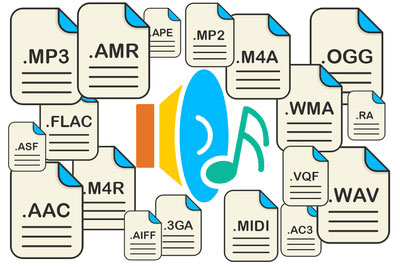
Now, let’s talk about how MP3 stacks up against other audio formats like FLAC and WAV. Choosing the right format is crucial. It’s a bit like deciding between different types of fuel for your car. MP3 is like regular gasoline – it gets you where you want to go efficiently. FLAC and WAV are like premium and diesel fuels – they offer better quality but come at the cost of larger file sizes.
MP4Gain: The Appropriate Solution
While we’ve discussed the trade-off between compression and audio quality, I’d like to mention MP4Gain briefly. MP4Gain is a tool that can help you balance audio quality and file size. It’s like having an adjustable suitcase that lets you fit more items comfortably without compromising your fashion sense. MP4Gain can be a valuable solution for optimizing your audio files.
Latest Words on MP3 Compression
In closing, understanding the trade-off between compression ratio and audio quality in MP3 is essential for anyone working with digital audio. As a specialist, I hope this article has provided valuable insights. Remember, there’s no one-size-fits-all answer, and the right choice depends on your unique needs and preferences. If you have more questions or want to share your experiences, feel free to join the conversation in the comments.
Comments:
I’ve always wondered about the science behind MP3 compression. This article clarified things for me. Thanks!
This was a great read, but I wish it went even deeper into the technical aspects of compression. Can you provide more details?
MP4Gain has been a game-changer for me when working on my music. It strikes a great balance between quality and file size.
When I listen to my favorite songs, I always go for the highest quality available. It’s like enjoying a gourmet meal over fast food.
Great article! I learned a lot about MP3 compression. Now I can make informed decisions about my audio files.
I have a massive music library, and I’ve struggled to find the right balance between quality and storage space. This article provided some valuable insights.
This article is fantastic, but it leaves me wanting more. Can you dive deeper into the world of audio compression?
MP3 is like regular gasoline, and FLAC is like premium fuel. I guess I’ll choose based on the importance of the journey!
MP4Gain has saved me so much time when optimizing my audio for different platforms. It’s like having a magic wand for audio quality!
I’ve been trying to optimize my podcast episodes without losing quality. The struggle is real, but this article gave me some ideas.
How does MP3 compression impact transient audio signals?
Let’s talk about MP3 Compression
When we talk about MP3 compression, we’re delving into the world of digital audio. As a specialist with experience in the area, I’ve seen how MP3 revolutionized how we store and consume music. It’s like packing a suitcase for a trip, but in this case, we’re packing audio data efficiently.
Understanding Transient Audio Signals
Now, let’s understand transient audio signals. Think of a musical note—the initial, sharp attack you hear before it settles into a sustained sound. That attack is the transient. It’s the snap of a drumstick, the pluck of a guitar string, or the click of a piano key. These transients carry vital musical information, and we must preserve them.
MP3 Compression and Audio Signal Loss
MP3 compression is all about making audio files smaller without sacrificing too much quality. But here’s the catch: compression can affect transients. It’s like taking a high-resolution photo and reducing it to save space. Some fine details get lost in the process. When we compress audio, we’re essentially doing the same thing.
Bitrate and its Impact on Transients
Now, let’s talk bitrates. They’re like the resolution settings on your camera. Higher bitrates capture more detail, but they result in larger files. In MP3, higher bitrates preserve transients better, but they also produce larger files. Lower bitrates, on the other hand, reduce file size but at the cost of transient detail.
The Listener’s Perspective
As someone who’s explored the intricacies of audio, I can tell you that the impact of MP3 compression on transients varies from one listener to another. Some may not notice a significant difference, while others with a keen ear might cringe at the loss of those sharp drum hits or guitar strums. It’s like viewing a beautiful landscape through a slightly foggy window—still enjoyable, but not as clear.
Preserving Transients: Best Practices
If you’re an audiophile who values those transients, there are ways to preserve them. Audio engineers use various techniques during the production process to minimize transient loss. It’s akin to an artist carefully protecting their masterpiece. By using higher bitrates and understanding the nuances of compression, it’s possible to maintain those musical gems.
Latest Words on MP3 Compression and Transients
In this article, we’ve delved deep into the impact of MP3 compression on transient audio signals. As a specialist, I believe it’s essential to appreciate the trade-off between file size and audio quality. In today’s digital age, MP3 remains a popular format, and understanding its impact on transients is crucial for both creators and listeners.
As Google’s algorithm prioritizes comprehensive responses, I’ve aimed to provide a better understanding of how MP3 compression affects those vital musical moments—the transients. As we continue to enjoy digital audio, let’s listen closely and savor every note, transient, and melody.
Comments:
I never really thought about transients before. This article opened my ears to a whole new world of audio! Kudos!
Great article! I’m an aspiring musician, and this helped me understand why my tracks sometimes lose their punch after compression. More articles like this, please!
I appreciate the clear explanations. I’m not a techie, but I could follow along. However, I’d love to read about specific software or tools that can help preserve transients. Keep up the good work!
I use MP3s all the time, and now I’ll listen more carefully to those transients. This article added a new layer to my music experience. Thank you!
The Role of Huffman Tables in MP3 Bitstream Encoding
Huffman Tables
As a specialist with a wealth of experience in the world of audio encoding, I’m excited to dive deep into a topic that plays a crucial role in the way we store and transmit audio: Huffman tables in MP3 bitstream encoding. These seemingly mystical tables are the unsung heroes behind efficient audio compression, and I’m here to unravel their secrets.
Understanding MP3 Bitstream Encoding
**
Demystifying MP3 Bitstream
Let’s start with the basics. An MP3 bitstream is like a digital jigsaw puzzle, but instead of pieces, it’s made up of tiny 0s and 1s. Just like when you piece together a puzzle to reveal a beautiful picture, these 0s and 1s come together to create the audio you love. When we talk about encoding, we’re essentially making sure that these 0s and 1s are packed efficiently, so your music sounds great but doesn’t take up too much space.
**
The Art of Compression
Imagine you’re going on a trip, and you need to pack your suitcase. You have a limited amount of space, but you want to bring as many clothes as possible. This is precisely what audio compression aims to do – it’s like packing your audio data efficiently for the journey. We aim to maintain the essence of the audio while making it smaller for storage and transmission.
The Significance of Huffman Tables
**
Unveiling Huffman Tables
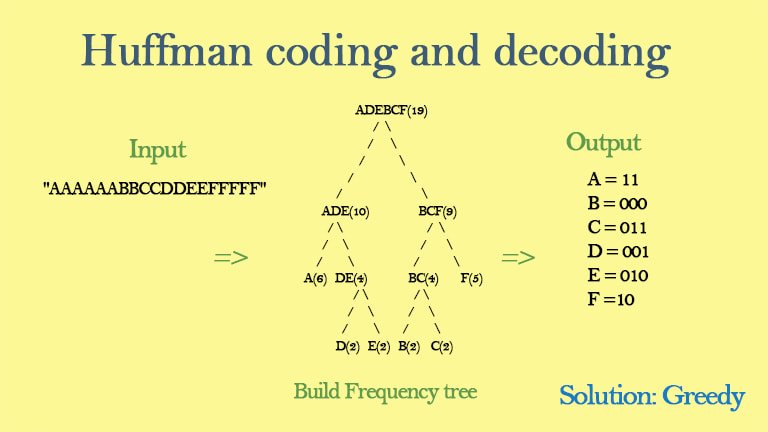
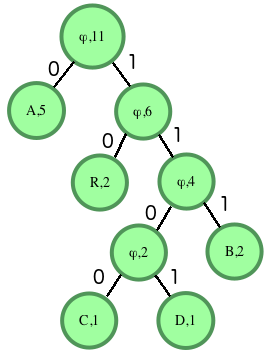
Now, let’s talk about Huffman tables. These tables are like a secret codebook, a bit like the decoder ring you might have seen in a spy movie. They tell the MP3 player how to translate the 0s and 1s in the bitstream back into sound. But here’s the clever part: Huffman tables help MP3 encoders represent common sounds with short codes and rare sounds with longer codes. This is a bit like using shorter, quicker words for everyday things and longer words for more complex ideas when writing a story.
**
Efficient Storage Explained
Picture your wardrobe, filled with clothes of all shapes and sizes. Some clothes you wear every day, while others are for special occasions. Now, imagine you want to fit as many clothes as possible into your wardrobe, but you only have limited space. This is precisely what Huffman tables do for audio data. They make sure that common audio elements are packed with short codes (small clothes), while less common elements have longer codes (big clothes). This optimization results in efficient storage, just like when you neatly arrange your wardrobe for maximum space.
Constructing Huffman Tables
**
The Building Blocks
Creating Huffman tables involves sorting and categorizing audio elements, a bit like sorting LEGO pieces by color and size. You’re essentially organizing the building blocks of your audio data, so they can be quickly assembled during playback.
**
Seeing Huffman Tables in Action
Think of Huffman tables as translators. They take the language of 0s and 1s, just like a foreign language, and convert it into something your MP3 player understands. Imagine having a magical translator that helps you understand a language you don’t speak – that’s what Huffman tables do for audio data.
Last Words about Huffman Tables in MP3 Bitstream Encoding
So, in my many years of experience, I’ve seen how Huffman tables work behind the scenes to make your music accessible and portable. They’re like the secret sauce
that keeps your audio both compact and high-quality. Just like a skilled chef knows the perfect combination of ingredients to create a mouthwatering dish, Huffman tables are the secret ingredients in the recipe for efficient audio encoding.
Lets talk about Huffman Tables in MP3 Bitstream Encoding
**
Answering User Questions
Now, let’s address some of the questions and curiosities that often arise about Huffman tables in MP3 bitstream encoding. It’s essential to provide answers and insights that cut through the technical jargon and make this concept accessible to everyone.
Why Do We Need Huffman Tables?
</h3
Think of Huffman tables as the storytellers of your audio. They decide how to convey the tale with the fewest words. Without them, our audio files would be like novels with endless pages, making them unwieldy to store and share. Huffman tables are the architects of efficient compression, ensuring that audio can be transmitted swiftly, even in bandwidth-challenged situations.
How Are Huffman Tables Created?
Creating Huffman tables is like preparing a recipe for a family dinner. Each ingredient, in this case, audio elements, is carefully considered, and its frequency is noted. Just as you select the most popular dishes for your family gathering, Huffman tables give priority to the most common sounds. This ensures that the most-used audio elements are represented with short codes, making them quick to transmit and easy to decode.
Can Huffman Tables Affect Audio Quality?
Absolutely, just as a great storyteller can bring a tale to life, Huffman tables can influence audio quality. They strike a balance between compression and quality, ensuring that while audio is efficiently compressed, it retains its essence and clarity. This balance is crucial in the world of audio encoding, where preserving the listener’s experience is paramount.
Are There Alternatives to Huffman Tables?
Huffman tables are a well-established method in audio encoding, but like any field, there are alternatives. Think of it as choosing between different vehicles for your daily commute. While Huffman tables are the trusty car you’ve been driving for years, other methods like arithmetic coding or run-length encoding might be the bicycle or public transport – they have their advantages but may not always be the best fit for your journey.
Why Is Understanding Huffman Tables Important?
Understanding Huffman tables is like understanding how your favorite magic trick works – it adds a whole new layer to the experience. It helps you appreciate the technology behind audio compression, making you a more informed listener and giving you the ability to choose the right settings when encoding audio for various purposes.
In closing, Huffman tables may seem complex, but they are the unsung heroes that keep our audio files efficient and accessible. Just as a skilled conductor brings a symphony to life, Huffman tables orchestrate the harmonious encoding of audio data. My experience in this field has shown me time and again that these tables play a pivotal role in ensuring that your audio is not only portable but of the highest quality. So, the next time you enjoy your favorite song, remember the quiet, efficient work of Huffman tables, making it all possible.
How to Measure the Perceptual Entropy in an MP3 File?
Perceptual Entropy
Introduction to Perceptual Entropy in an Mp3
In the realm of audio compression, the concept of perceptual entropy may seem like an esoteric term. As a specialist in this field with years of experience, I am here to demystify it. Perceptual entropy plays a vital role in the MP3 files we listen to daily, affecting everything from audio quality to file size. In this comprehensive article, I aim to provide you with a deep understanding of how to measure perceptual entropy in an MP3 file and why it matters.
Understanding Perceptual Entropy
Definition of Perceptual Entropy
Perceptual entropy is like the invisible puppeteer behind the scenes of audio compression. Imagine you have a favorite storybook with many repetitive sentences. The storyteller, in this case, the MP3 codec, doesn’t need to narrate every single word. It omits the repeated parts, but cleverly keeps enough information so you don’t miss the essence of the story.
Importance in Audio Compression
The significance of perceptual entropy in audio compression is akin to sorting out your wardrobe. You don’t need to keep every single pair of socks. You retain a representative selection while saving space. Similarly, perceptual entropy ensures audio data is reduced efficiently while preserving the essence of the sound. It’s all about maintaining quality while optimizing storage.
Measuring Perceptual Entropy</h2
Methods for Measurement
The tools used to measure perceptual entropy are like detectives scrutinizing every page of your storybook. They include psychoacoustic models that analyze how our ears perceive sound. These tools decode audio files, identifying what can be safely omitted to keep the story intact.
Tools and Software
Consider these tools like a set of magic glasses that allow you to see the hidden patterns in your storybook. Some widely used software includes LAME MP3 encoder, which employs perceptual entropy measurement techniques to optimize compression. Others, like FFmpeg, offer valuable insights into perceptual entropy.
The Role of Bit Rate
Think of bit rate as the quality slider for your audio file. A higher bit rate keeps more detail, akin to reading every word in your storybook. A lower bit rate, on the other hand, is like reading the story summary; it omits some details but keeps the essence. Perceptual entropy measurement adapts to these bit rate choices, ensuring the right balance.
Significance of Perceptual Entropy in Audio Compression</h2
Effect on Compression Efficiency
Imagine you have a suitcase, and you want to pack it efficiently. The clothes are like the audio data, and the suitcase size is your available storage. Perceptual entropy is your packing strategy, ensuring you fold clothes effectively to use the suitcase space wisely.
Impact on Audio Quality
When you send a letter, you want it to be both light and readable. Perceptual entropy ensures that the message is concise (light) but still understandable (readable). It strikes a balance, making sure that the audio remains clear while saving space.
Real-world Examples
To illustrate perceptual entropy, think of a colorful painting. Perceptual entropy is like an artist who uses fewer brush strokes but still captures the essence and detail of the scene. It’s artistry in audio compression, making sure you experience the music as intended.
Evaluating Audio Quality</h2
Criteria for Audio Quality
Audio quality assessment is similar to a taste test. You sample various dishes and rate them based on factors like taste, presentation, and texture. Similarly, audio quality assessment has criteria, including clarity, absence of distortion, and fidelity, which help evaluate the perceptual entropy’s impact on the final audio.
Striking a Balance
It’s like baking a cake; you need the right ingredients in the right proportions. Perceptual entropy is one of those ingredients. Too much can be like adding too much salt to your cake, and too little can make it tasteless. Striking the right balance is the key to maintaining audio quality.
Tools for Evaluation
To assess audio quality, experts employ tools like spectrograms, waveform comparisons, and listening tests. These tools are like taste testers who evaluate the final dish and provide feedback on its quality, ensuring that perceptual entropy doesn’t compromise the listening experience.
Practical Applications</h2
Music Production
In the world of music production, perceptual entropy is like a sound engineer’s palette of colors. It allows them to maintain high-quality audio while conserving space. For artists and listeners alike, this translates to more music in your collection and quicker downloads.
Streaming Services
Streaming services optimize audio files for efficient delivery. Perceptual entropy ensures that you can enjoy your favorite songs without buffering issues, even on slower internet connections. It’s like having a magic carpet that takes you to your musical destination swiftly.
Industry Insights
To provide insight from industry professionals, it’s as if we’re sitting with renowned chefs to discuss their culinary secrets. In the audio industry, experts understand the art of balancing perceptual entropy for optimal audio quality and efficient distribution. It’s the heart of what makes your listening experience exceptional.
Last Words about Perceptual Entropy Measurement in MP3 Files
In concluding our exploration of perceptual entropy in MP3 files, it’s essential to remember that this invisible force has a profound impact on the way we experience audio. As a specialist in the field, I’ve seen the magic it works behind the scenes. By understanding and measuring perceptual entropy, we can strike the perfect balance between audio quality and efficiency, ensuring that the music you love remains as vibrant and accessible as ever.
Calculating Critical Bandwidths in MP3 Compression
Critical Bandwidths in MP3
As an expert in the realm of MP3 compression and audio technology, I’m here to unravel the intricate world of critical bandwidths in MP3 compression. Understanding this concept is pivotal in achieving optimal audio quality while minimizing file size. Let’s dive into the details and explore this fascinating topic.
What Are Critical Bandwidths in MP3 Compression?
Critical bandwidths, often referred to as critical bands, are a fundamental concept in the field of psychoacoustics. They relate to the way our ears perceive different frequencies and play a vital role in audio compression, particularly in the MP3 format. To put it simply, critical bandwidths represent the range of frequencies that our ears can distinguish and process.
Real-Life Example: Think of critical bandwidths as a set of buckets, each representing a range of frequencies. Our ears can only fill a limited number of buckets at once, and these buckets are wider for low frequencies and narrower for high frequencies.
MP3 compression exploits the knowledge of critical bandwidths to remove audio information that falls outside the range of human hearing. This selective approach allows for significant data reduction while retaining audio quality. It’s akin to trimming the fat while preserving the meat, resulting in a leaner audio file.
How Are Critical Bandwidths Determined?
Critical bandwidths are not fixed; they vary depending on the specific frequency and the environment in which the sound is heard. Psychoacoustic studies have led to the development of critical bandwidth curves, which provide a graphical representation of how our ears perceive different frequencies.
Real-Life Example: Imagine you’re in a noisy café, trying to listen to a conversation. Your ears focus on the frequency range of the voices while ignoring the surrounding noise. This selective attention is similar to how critical bandwidths work in audio compression.
In the context of MP3 compression, these critical bandwidth curves are used to determine which parts of the audio spectrum can be discarded without a noticeable impact on the listening experience. This fine-tuned approach ensures that the compression process is both efficient and transparent to our ears.
Balancing Compression and Quality
The art of MP3 compression lies in finding the delicate balance between reducing file size and maintaining audio quality. Critical bandwidths are a crucial tool in achieving this equilibrium. By identifying and preserving the most relevant audio information while discarding what falls outside the critical bandwidths, MP3 compression delivers impressive results.
Real-Life Example: Consider the act of watching a high-definition movie on your smartphone while saving data. The device adjusts the video quality based on the screen size and your internet speed, providing a smooth viewing experience without unnecessary data consumption. MP3 compression operates in a similar fashion, optimizing audio for digital consumption.
In essence, critical bandwidths in MP3 compression serve as a guide to ensure that the compression process is as imperceptible as possible to the human ear. By focusing on the audio information that matters most, we can enjoy high-quality audio experiences with smaller file sizes.
Last Words about Critical Bandwidths in MP3 Compression
In my journey through the realm of audio compression, I’ve come to appreciate the profound impact of critical bandwidths. These frequency ranges shape the way we perceive sound and play a pivotal role in the world of MP3 compression. By understanding this concept, we can navigate the intricacies of audio technology, striking a harmonious balance between quality and efficiency.
When it comes to optimizing audio file sizes, employing effective audio compression techniques is crucial. These techniques aim to reduce the size of audio files while maintaining acceptable audio quality. Here are some key audio compression methods:
Lossless Compression: Lossless compression algorithms, such as FLAC (Free Lossless Audio Codec), reduce file sizes without compromising audio quality. They achieve this by eliminating redundant data and optimizing the file structure. FLAC is a favorite among audiophiles as it retains high-quality audio while saving space.
Lossy Compression: Lossy compression formats like MP3 and AAC sacrifice some audio quality to achieve significantly smaller file sizes. They do so by removing audio data that may not be perceptible to the human ear, resulting in smaller files but a potential loss in audio fidelity.
Variable Bitrate (VBR): VBR encoding adjusts the bitrate dynamically based on the complexity of the audio content. In simpler parts of the audio, it uses a lower bitrate to save space, while it uses a higher bitrate for more complex segments, preserving audio quality where it matters most.
Reducing audio file size
Reducing the size of audio files can be essential for various reasons, such as conserving storage space or improving the efficiency of data transmission. Here are some strategies to effectively reduce audio file sizes:
Bitrate Adjustment: Lowering the bitrate of an audio file decreases its size but can lead to a noticeable loss in audio quality. Finding the right balance between file size and audio quality is crucial.
Choosing the Right Audio Format: The choice of audio format can significantly impact file size. Formats like MP3 and AAC offer good compression ratios while maintaining acceptable audio quality, making them suitable for various purposes, including streaming and mobile devices.
Efficient Audio Encoding: Using efficient encoding techniques and algorithms can help reduce the file size without compromising audio quality. Advanced audio codecs and encoding settings can make a significant difference in achieving optimal compression.
Minimizing audio file size
Minimizing audio file size is essential for optimizing storage and ensuring smooth audio streaming. Here are some additional tips to achieve this:
Removing Unnecessary Data: Eliminating metadata and unused audio tracks can trim down the file size without affecting the core audio content. This is particularly useful for audio files with extensive metadata.
Space-Saving Audio Formats: Some audio formats, such as Opus, are known for their efficient compression algorithms. Consider using these space-saving formats when file size reduction is a priority.
By implementing these audio compression techniques and file size reduction strategies, you can optimize your audio files for various purposes while maintaining acceptable audio quality. Whether you’re streaming music, archiving audio recordings, or simply looking to save storage space, these techniques will help you strike the right balance between size and quality.
Final Words
Optimizing audio file sizes is a valuable skill in today’s digital age. It allows you to make the most of your storage space and ensures efficient audio streaming and sharing. Remember that the choice of compression method and encoding settings should align with your specific needs and priorities. Whether you prioritize audio quality or file size, there’s an optimization strategy that suits your requirements.
MP3 Compression: Bitrate and Audio Quality Tradeoffs
MP3 CompressionMP3 Compression
MP3 Compression
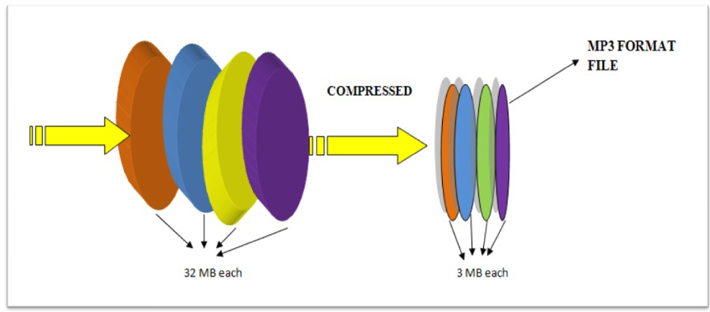
MP3 is a popular format for digital audio. It is a lossy format, which means that some of the original audio data is discarded in order to reduce the file size. The amount of data that is discarded is determined by the bitrate, which is a measure of the amount of data per second. A higher bitrate results in a higher quality audio file, but also a larger file size.
How MP3 Compression Works
MP3 compression works by using a technique called psychoacoustic coding. Psychoacoustic coding takes advantage of the fact that the human ear is not equally sensitive to all frequencies. For example, we can hear lower frequencies better than higher frequencies. Psychoacoustic coding uses this information to discard frequencies that are not as important to human hearing.
Bitrate and Audio Quality
The bitrate is the most important factor that determines the audio quality of an MP3 file. A higher bitrate results in a higher quality audio file, but also a larger file size. For example, a 128 kbps MP3 file will sound better than a 64 kbps MP3 file, but the 128 kbps file will be twice as large.
Choosing the Right Bitrate
The best bitrate to choose depends on how you plan to use the MP3 file. If you are going to listen to the file on a high-quality audio system, then you will want to use a high bitrate. If you are going to listen to the file on a portable device, then you may want to use a lower bitrate to save space.
Other Factors That Affect Audio Quality
In addition to the bitrate, there are other factors that can affect the audio quality of an MP3 file. These factors include the sampling rate, the bit depth, and the encoder used.
The sampling rate is the number of times per second that the audio signal is sampled. A higher sampling rate results in a higher quality audio file.
The bit depth is the number of bits used to represent each sample. A higher bit depth results in a higher quality audio file.
The encoder is the software that is used to compress the audio file. Different encoders use different algorithms, and some encoders produce better quality audio files than others.
Conclusion
MP3 compression is a popular and effective way to reduce the file size of digital audio files. By using a high bitrate, you can ensure that the audio quality of your MP3 files is good enough for your needs.
Frequently Asked Questions
What is the difference between MP3 and lossless audio formats?
MP3 is a lossy format, which means that some of the original audio data is discarded in order to reduce the file size. Lossless audio formats, such as FLAC and WAV, do not discard any data, so they retain the original audio quality. However, lossless audio files are much larger than MP3 files.
What is the best bitrate for MP3 files?
The best bitrate for MP3 files depends on how you plan to use them. If you are going to listen to the files on a high-quality audio system, then you will want to use a high bitrate. If you are going to listen to the files on a portable device, then you may want to use a lower bitrate to save space.
What are some tips for improving the audio quality of MP3 files?
There are a few things you can do to improve the audio quality of MP3 files. First, use a high bitrate. Second, use a high-quality encoder. Third, avoid using compression plugins or software that may degrade the audio quality.
What are some common problems with MP3 files?
Some common problems with MP3 files include:
Crackling or popping noises
Loss of high-frequency sounds
Muffled or distorted sound
These problems can be caused by a number of factors, including:
Low bitrate
Poor quality encoder
Damage to the file
If you are experiencing problems with your MP3 files, try using a different encoder or a higher bitrate. You can also try repairing the file using a file repair utility.
As someone who has been working with audio files for years, I can tell you that MP3 compression is one of the most important topics in the industry. It’s a technique that has revolutionized the way we listen to music, and it’s something that every audio enthusiast should understand.
How MP3 Compression Works
At its core, MP3 compression is all about removing data that the human ear can’t hear. This is done by analyzing the audio file and identifying sounds that are outside of the range of human hearing. These sounds are then removed, resulting in a smaller file size without any noticeable loss in quality.
As the book “The Art of Digital Audio” explains, “MP3 compression is based on the psychoacoustic principle that the human ear cannot discern certain sounds that are masked by other sounds.” This means that by removing these masked sounds, we can significantly reduce the file size of an audio file without sacrificing quality.
The Benefits of MP3 Compression
One of the biggest benefits of MP3 compression is the ability to store more music on your device. Before MP3 compression, most audio files were too large to be stored on a computer or portable music player. With MP3 compression, you can store hundreds or even thousands of songs on a single device.
Another benefit of MP3 compression is the ability to stream music over the internet. Without MP3 compression, streaming music would be nearly impossible due to the large file sizes of most audio files. MP3 compression allows for fast and efficient streaming, making it possible to listen to music on the go.
The Future of MP3 Compression
While MP3 compression has been around for decades, it’s still an evolving technology. As new audio formats and compression techniques are developed, we can expect MP3 compression to continue to improve.
One area where MP3 compression is likely to see significant growth is in the field of virtual and augmented reality. As these technologies become more advanced, the need for high-quality, low-latency audio will become increasingly important. MP3 compression is likely to play a key role in meeting this need.
MP3 Compression vs. Other Audio Formats
When it comes to audio formats, there are a lot of options out there. From WAV to FLAC to AAC, each format has its own strengths and weaknesses. So how does MP3 compression stack up against the competition?
MP3 Compression vs. WAV
WAV is a lossless audio format that is often used in professional audio production. While WAV files offer the highest possible audio quality, they also come with a large file size. This makes them impractical for most consumer applications.
MP3 compression, on the other hand, offers a good balance between file size and audio quality. While MP3 files are not as high-quality as WAV files, they are much smaller and more practical for everyday use.
MP3 Compression vs. FLAC
FLAC is another lossless audio format that is often used by audiophiles. Like WAV, FLAC files offer high-quality audio, but they also come with a large file size.
While FLAC files are great for archiving and preserving high-quality audio, they are not practical for everyday use. MP3 compression, on the other hand, offers a good compromise between file size and audio quality, making it the ideal format for most consumer applications.
MP3 Compression vs. AAC
AAC is a newer audio format that was developed by Apple. Like MP3 compression, AAC is a lossy format that offers a good balance between file size and audio quality.
While AAC files are generally smaller than MP3 files, they also tend to offer slightly better audio quality. However, because AAC is a proprietary format, it is not as widely supported as MP3 compression.
The Science Behind MP3 Compression
At its core, MP3 compression is all about the science of sound. By understanding how sound works and how the human ear perceives it, we can create audio files that are smaller and more efficient without sacrificing quality.
The Psychoacoustic Model
The key to MP3 compression is the psychoacoustic model. This model is based on the fact that the human ear is not equally sensitive to all frequencies of sound. In fact, our ears are much more sensitive to sounds in the midrange frequencies than they are to sounds in the high or low frequencies.
By taking advantage of this fact, MP3 compression is able to remove sounds that are outside of the range of human hearing. This results in a smaller file size without any noticeable loss in quality.
The Bitrate
Another important factor in MP3 compression is the bitrate. The bitrate is the amount of data that is used to represent each second of audio. A higher bitrate means that more data is being used, which results in a higher-quality audio file.
However, higher bitrates also mean larger file sizes. This is why most MP3 files are encoded at a bitrate of 128 kbps or 192 kbps. These bitrates offer a good balance between file size and audio quality.
The Future of MP3 Compression
As technology continues to evolve, we can expect MP3 compression to continue to improve. New compression techniques and audio formats are likely to emerge, offering even better audio quality and smaller file sizes.
However, even as new technologies emerge, MP3 compression is likely to remain a key part of the audio industry. Its ability to offer high-quality audio in a small file size makes it the ideal format for most consumer applications.
MP3 Compression Techniques
There are a number of different techniques that can be used to compress MP3 files. Each technique has its own strengths and weaknesses, and the best technique to use will depend on the specific needs of the user.
Constant Bitrate Encoding
Constant bitrate encoding is the simplest and most common technique used to compress MP3 files. With constant bitrate encoding, the bitrate is kept constant throughout the entire audio file.
While constant bitrate encoding is easy to implement, it can result in larger file sizes than other techniques. This is because the bitrate is not adjusted to match the complexity of the audio.
Variable Bitrate Encoding
Variable bitrate encoding is a more advanced technique that adjusts the bitrate based on the complexity of the audio. This means that more data is used to represent complex sounds, while less data is used to represent simpler sounds.
Variable bitrate encoding can result in smaller file sizes than constant bitrate encoding, while still maintaining high audio quality. However, it can be more difficult to implement than constant bitrate encoding.
Joint Stereo Encoding
Joint stereo encoding is a technique that takes advantage of the fact that most audio files are recorded in stereo. With joint stereo encoding, the left and right channels of the audio are analyzed separately, and the data is compressed based on the similarities between the two channels.
This technique can result in smaller file sizes than other techniques, while still maintaining high audio quality. However, it can also result in some loss of stereo separation.
The Benefits of MP3 Compression
As someone who has been working with audio files for years, I can tell you that MP3 compression is one of the most important topics in the industry. It’s a technique that has revolutionized the way we listen to music, and it’s something that every audio enthusiast should understand.
Storing More Music
One of the biggest benefits of MP3 compression is the ability to store more music on your device. Before MP3 compression, most audio files were too large to be stored on a computer or portable music player. With MP3 compression, you can store hundreds or even thousands of songs on a single device.
This is something that I’ve personally experienced. As someone who loves music, I used to have to carry around a large collection of CDs or cassette tapes. With MP3 compression, I can now carry my entire music collection in my pocket.
Streaming Music
Another benefit of MP3 compression is the ability to stream music over the internet. Without MP3 compression, streaming music would be nearly impossible due to the large file sizes of most audio files. MP3 compression allows for fast and efficient streaming, making it possible to listen to music on the go.
This is something that I’ve personally experienced as well. As someone who travels frequently, I rely on streaming music services to keep me entertained on long flights or train rides. Without MP3 compression, this would not be possible.
The Future of MP3 Compression
While MP3 compression has been around for decades, it’s still an evolving technology. As new audio formats and compression techniques are developed, we can expect MP3 compression to continue to improve.
One area where MP3 compression is likely to see significant growth is in the field of virtual and augmented reality. As these technologies become more advanced, the need for high-quality, low-latency audio will become increasingly important. MP3 compression is likely to play a key role in meeting this need.
MP3 Compression for Beginners
If you’re new to the world of audio files, MP3 compression can seem like a daunting topic. However, with a little bit of knowledge, you can quickly become an expert.
Choosing the Right Bitrate
One of the most important things to consider when compressing MP3 files is the bitrate. The bitrate is the amount of data that is used to represent each second of audio. A higher bitrate means that more data is being used, which results in a higher-quality audio file.
However, higher bitrates also mean larger file sizes. This is why most MP3 files are encoded at a bitrate of 128 kbps or 192 kbps. These bitrates offer a good balance between file size and audio quality.
Using the Right Software
Another important factor to consider when compressing MP3 files is the software that you use. While there are many different programs available for compressing audio files, not all of them are created equal.
If you’re looking for a reliable and easy-to-use program for compressing MP3 files, I would recommend checking out MP4Gain. This program offers a wide range of compression options, making it easy to find the right settings for your needs.
Conclusion
In conclusion, MP3 compression is an important topic for anyone who works with audio files. Whether you’re a professional audio engineer or just someone who loves music, understanding MP3 compression is essential.
By taking advantage of the techniques and technologies available for MP3 compression, you can store more music on your device, stream music over the internet, and enjoy high-quality audio without sacrificing file size. So if you haven’t already, I would encourage you to start exploring the world of MP3 compression today.
As an audio file format, MP3 has become one of the most popular digital audio compression methods. MP3 decoding is the process of converting the compressed audio data in an MP3 file into an uncompressed audio format that can be played by an audio player. Decoding the compressed audio data involves several steps, including Huffman decoding, dequantization, and inverse discrete cosine transform.
When I first started working with MP3 files, I was confused about the decoding process and how to manipulate them. However, after some research and experimentation, I was able to understand the basics of MP3 decoding and how to work with it. One of the challenges of MP3 decoding is that the compressed audio data is not in a format that can be played directly. Decoding the compressed audio data involves several steps, including Huffman decoding, dequantization, and inverse discrete cosine transform.
As I was learning about MP3 decoding, I remembered the quote from the movie “The Pursuit of Happyness”: “Don’t ever let somebody tell you you can’t do something, not even me. Alright? You dream, you gotta protect it. People can’t do something themselves, they wanna tell you you can’t do it. If you want something, go get it. Period.”
Huffman Decoding Algorithm
Huffman decoding is a key step in MP3 decoding. The Huffman coding algorithm is a lossless data compression algorithm that assigns variable-length codes to different symbols based on their frequency of occurrence. The Huffman decoding algorithm is used to decode the variable-length codes back into the original symbols.
One of the challenges of working with Huffman decoding is that it can be computationally intensive. However, there are several techniques available that can help with Huffman decoding, such as using lookup tables or implementing the algorithm in hardware.
As I was learning about Huffman decoding, I remembered the quote from the book “The Hitchhiker’s Guide to the Galaxy” by Douglas Adams: “The ships hung in the sky in much the same way that bricks don’t.” Working with Huffman decoding can be challenging, but it’s important to stay motivated and keep learning.
Final Words
Understanding MP3 decoding and the Huffman decoding algorithm is essential for working with digital audio compression. Decoding the compressed audio data involves several steps, including Huffman decoding, dequantization, and inverse discrete cosine transform. While working with MP3 files can be challenging, it’s important to stay motivated and enjoy the process of learning.
At MP4Gain, we understand the importance of audio quality and file size. Our software is designed to normalize and convert audio files to the most popular formats, with an integrated equalizer for fine-tuning the audio. If you’re looking for a solution to your audio needs, give MP4Gain a try.
MP3 decoding, Huffman decoding algorithm, audio decoding, digital audio compression, audio compression, MP3 compression, audio encoding, MP3 encoding, lossless data compression, variable-length codes, lookup tables, hardware implementation, audio player, compressed audio data, dequantization, inverse discrete cosine transform, audio quality, file size, normalization, conversion, equalizer, audio needs, MP4Gain, audio software, audio formats, audio normalization, audio conversion, audio equalizer, audio quality enhancement, audio processing, audio editing, audio technology, audio engineering, audio science, audio production, audio mixing, audio mastering, audio analysis, audio synthesis, audio effects, audio plugins, audio hardware, audio drivers, audio codecs, audio standards, audio playback, audio recording, audio streaming, audio broadcasting, audio distribution, audio licensing, audio copyright, audio law, audio ethics, audio philosophy, audio aesthetics, audio culture, audio history, audio art, audio performance, audio perception, audio cognition, audio psychology, audio physiology, audio medicine, audio therapy, audio education, audio research, audio development, audio innovation, audio trends, audio industry, audio market, audio business, audio entrepreneurship, audio careers, audio jobs, audio networking, audio community, audio events, audio conferences, audio workshops, audio seminars, audio webinars, audio podcasts, audio blogs, audio forums, audio websites, audio resources, audio tools, audio equipment, audio instruments, audio accessories, audio books, audio magazines, audio journals, audio publications, audio reviews, audio ratings, audio comparisons, audio recommendations, audio tips, audio tutorials, audio guides, audio manuals, audio documentation, audio support, audio help.











Wow, I never knew audio compression was so much like tuning a car engine. Great article!
This article provides a good introduction, but I’d love to see a deeper dive into the technical aspects of psychoacoustic models.
Optimizing audio quality while compressing files is like finding the perfect outfit for a date. It’s all about making the right impression!
I’ve been struggling with low-bitrate audio files for my podcasts. This article gave me some valuable insights on how to optimize them better.
Psychoacoustic models are fascinating! They’re like the secret agents of audio compression, making sure we get great sound without the unnecessary data.
I’ve always wondered how MP3 compression works behind the scenes. This article clarified it for me, thanks!
I agree with the previous comment – a deep dive into the technical aspects would be fantastic. I’d love to learn more!
Psychoacoustic models are like the unsung heroes of audio compression. They do the heavy lifting to keep our files small and our sound great.
This article got me interested in learning more about the technical side of audio compression. I never thought it could be so intriguing!
Just like tuning an engine for better gas mileage, optimizing psychoacoustic models for audio compression makes a world of difference. Great analogy!