DIGITAL AUDIO explained


Free Download Mp4Gain
picture

Audio is the electronic information that represents sound, or rather, having sound of a temporary nature is the flow of information that represents it.

Sound is made up of pressure waves traveling in space, therefore it is represented by a sinusoidal.

Digital Audio

The characteristics of a sound are:

Amplitude: Measured in Hertz (Hz) and determined by the frequency of a sound, the higher the frequency, the louder the sound, the lower it is, the lower the sound.

Intensity: it is measured in decibels (db) and is determined by the power of a sound, the more intense a sound is, the greater its volume.

Duration: It is measured in seconds (s) and dermal how long a sound lasts over time.

Timbre: It is not directly measurable, but it is that sound parameter that allows us to distinguish a trumpet from a drum. It constitutes the trace of a sound and is characterized by harmonics.

digital audio

ANALOGUE AND DIGITAL

There are two different ways of representing sound as electronic, analog and digital information.

Analog audio was the first, in chronological order, to be developed.

The information varies similarly to the information it represents and can (in theory) assume any value.

If we greatly expand the sine wave that describes an analog sound, we would see that it is a continuous line without interruptions.

Instead, digital audio is encoded with a number system, which allows discretization (transition from analog to digital), during this step information is lost, but once the sound is written as a series of numbers (digital information) it is possible to reproduce it. , transmit and modify it without losing anything in terms of quality, which is impossible with analog information.

If we greatly expand the sine wave that represents a digital sound, we would realize that it is not a continuous line as in the previous case, but a series of points very close to each other.

The amount of these points in one second of information will define the “sampling frequency”.

The amount of information that each point can contain is called “bit depth”.

THE CHARACTERISTICS OF DIGITAL SOUND

Sampling rate

Determine the number of samples contained in one second of information.

It is expressed in hertz (Hz) and generally assumes the following values ​​in the musical field: 22050Hz, 44100Hz, 96000Hz.

According to Nyquist’s theorem, each sampling frequency can record and reproduce sounds that have a maximum frequency equal to half of the chosen sampling frequency, this means that a piece sampled at 44Mhz can assume values ​​of up to 22Mhz only

Bit depth

Determine the amount of information contained in each sample.

It is expressed in Bit (bit) and generally assumes the following values ​​in the musical field 8Bit, 16Bit and 24Bit.

Above all, this is the parameter that depends on the quality of a sound.

Transmission rate (bit rate)

It is a characteristic of codecs, that is, of the “machine language” used to describe a sound.

Sets the total amount of information needed to play a second of a sound.

It is expressed in Bit / s.

AUDIO PROCESSING

Whether you’re talking about studio recording or live performances, the audio signal is never sent directly from the microphone to the speakers / recording medium, but is always processed first, through tools that allow you to perform different interventions. in the sound

These instruments can be analog, therefore they have the instrument physically in the studio (which is usually inserted inside a shelf), which must be connected between the microphone and the mixer or between the mixer and the speakers / recording medium.

Or you can simulate them through some plugins for your computer.

It is necessary to have a Daw (Digital Audio Workstation), which is the workspace in which all editing operations are performed. (Ableton, Cubase, Fruitloops, Logic, Reaper).

Within this software it is possible to install smaller ones, called VST (Virtual Studio Technology) that simulate the circuits of the studio equipment, emulating the effect.

(There are also other proprietary plugins with extensions other than the classic VST like .component or .au).

Some tools are essential and are used in all audio recordings, others are used only in particular situations or to obtain / avoid certain effects.

The main ones are:

Equalizer, is used to emphasize or attenuate some frequencies, this way you get a cleaner sound and a less “mixed” mix where all the instruments occupy only the correct frequencies, without overlapping.

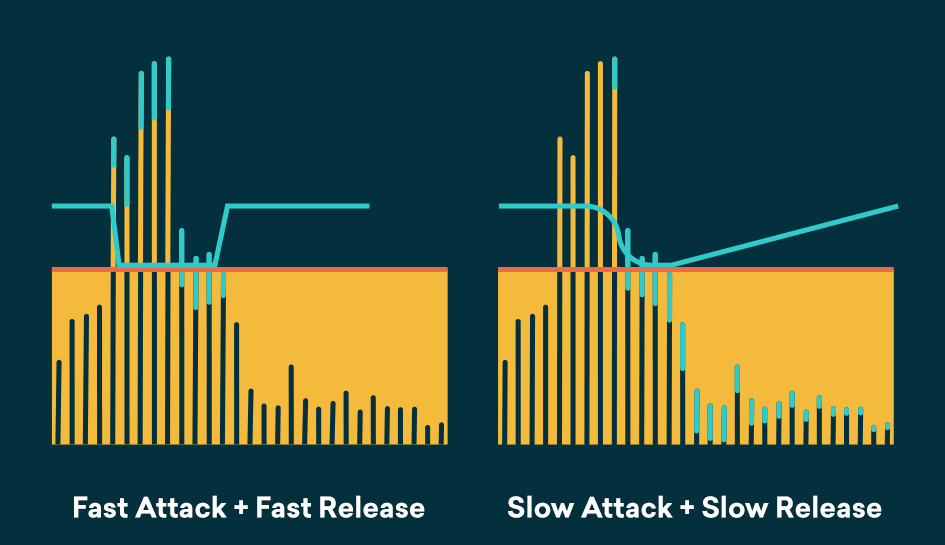
The compressor, as the name suggests, serves to compress the dynamic range, so that the sound is more consistent and less dispersive.

Amp, wavering of different kinds, is used to increase the intensity of a sound.

Limiter works in a similar way to the compressor, but instead of compressing all frequencies, it attenuates those that exceed a predetermined threshold (threshold), avoids entering faults.

Reverb adds a slight reverb that makes a sound recorded in a soundproof studio much more natural than it would be too “dry”.

Filters (high / low cut) allow you to cut some useless and sumptuous frequencies too low or too high. (They are just 1 band parametric equalizers).


Free Download Mp4Gain
picture


Mp4Gain Main Window
picture


Mp4Gain Features
picture


Free Download Mp4Gain
picture

Mp3, the winner

In the era of broadband connections, fiber optics and HD videos on YouTube, MP3 remains the reference format for audio files. We are now so used to listening to music in compressed formats, and often through poor quality playback systems, that it is difficult for us to remember what listening to music really means. The recent evolution from download to hit-and-run streaming has only made the situation worse by further devaluing the value of music. When was the last time you listened to a record from start to finish without interruption, spending those 30-40 minutes on “simple” listening activity?

Audio formats

Premise: This post is not a crusade against Spotify because I use it myself for new releases or to have some background music at work, it is not even an analog vs. digital (or vinyl vs. CD vs. MP3) post because on this topic en Much has already been said. My goal is to make you understand what you are missing, in qualitative terms, if you listen to music in compressed formats.

Audio formats

Sampling and theoretical aspects.

Audio recording on a computer or digital medium assumes that the signal passes through an analog> digital (AD) converter, so that the continuous electrical signal generated by microphones or musical instruments is transformed into a digital signal (series of 0 and 1) This process is called sampling. The final quality of the recording depends on several factors: converter quality, sample rate, and bit depth.

To make an easily understandable comparison: When shooting a movie, the “analog” reality perceived by our eye is stored in a movie that takes 24 frames per second. If we consider the standard of the audio CD (44.1 kHz, 16 bits), for every second of music 44100 pictures are taken from the computer to the continuous electrical signal. If with the sampling frequency we have simply established how many times in a second the waveform will be analyzed, with the bit depth we assign to each sample a numerical value: 2 ^ 16 = 65,536 possible values.

If you wonder how it got to 44,100, I refer you to the Nyquist-Shannon sampling theorem.

When we press the record button on our computer, through the PCM (pulse code modulation) sampling process described above, the files are saved in uncompressed WAV or AIFF format.

Lossless files and lossy files

PCM files take up a lot of space on our hard drives because, as we have seen, there is the data necessary to describe the analog waveform in as much detail as possible. Indicatively, a WAV or AIFF file as audio CD will occupy 10 MB for every minute of music.

To overcome this problem, remember that in the early 2000s storage space cost around $ 10 / GB, while today the price is around $ 0.03 / GB (source): Audio formats have been introduced that , through an algorithm encodes and decodes information, reduces the size of the file. These codecs fall into two categories: formats with lossless compression and formats with lossy compression.

As the name implies, lossless compression indicates a reduction in file weight (usually around 50%) without loss of information. Leaving the world of audio aside for a second, ZIP and RAR files are clear examples of this type of compression: at any time we can “unzip” such a file and have access to the original information again without this no way has changed.

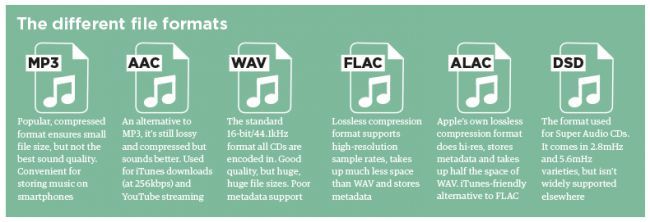
The most common file formats are: FLAC (Free Lossless Audio Codec) and ALAC (Apple Lossless Audio Codec).

Lossy compression, on the other hand, implies that some of the original audio information is somehow removed to obtain a file that weighs even 90% less than the PCM.

By what criteria is information removed without “compromising” the original audio too much? Since our hearing is an imperfect instrument, codecs exploit two principles of psychoacoustics: the minimum threshold of audibility (the human ear does not perceive all frequencies in the range between 20Hz and 20kHZ equally) and masking (a weaker sound). is masked, making it inaudible, by a louder sound.)

Compression algorithms, however advanced, introduce a number of artifacts into audio files that, if played back in discrete quality audio systems, can be easily recognized or at least noticed even by an inexperienced ear. Several studies have shown that an untrained ear does not distinguish the difference between an uncompressed file and an MP3 with a bit rate equal to 256kb / s or more.

The most common lossy formats are: MP3, OGG Vorbis, AAC.

The victory of MP3

Since its introduction in the mid-1990s, MP3 has established itself as the industry-standard consumer format fueled by file-sharing through peer-to-peer channels, where, with slow connections, the heaviest file was the one it was downloaded, the longer it took to obtain it, and since the market introduction of MP3 players in which we tried to store as much music as possible and, therefore, we resorted to very compressed files.

In the transition from the era of downloading to that of small transmission files, they ensure smoother and smoother data transmission.

Despite, therefore, the evolution that has taken place in recent years in the speed of Internet connections and the reduction in the price of storage systems, only in recent years have services been created to buy files from High-quality online audio (HD tracks) or HD streaming services (Tidal).

Examples and audio files.

The main services we use to buy or listen to music use these compression levels (all information is taken from the official websites of each service at the time this publication was written).

Spotify: OGG Vorbis files at 96 kb / s (normal mobile quality), 160 kb / s (normal desktop and web player quality, high mobile quality), 320 kb / s (premium users: high desktop quality, very high quality mobile).
iTunes: By default, CDs are imported into 128 kb / s AAC files. Files in the iTunes Store are of this quality, except for “iTunes Plus” songs converted to AAC at 256 kb / s.
Pandora: 64kb / s AAC (free users), 192kb / s AAC (premium users).
YouTube: HD videos (720 or 1080p) have an audio quality equal to 384kb / s, SD videos (360, 480p) have an audio quality equal to 128kb / s.

Multimedia formats: Digital audio


Sound is a continuous signal. To be stored with computer systems
it must be sampled, thus obtaining a digital signal.
The parameters that characterize the sampling are basically three:

 The sample rate
 Bit depth
 The number of channels
these parameters influence both the space occupied and the quality of the audio file
digital obtained.

Digital Audio

Sampling rate

The sampling frequency is the measurement expressed in Hertz (Hz) of the number
of times per second in which an analog signal is measured and stored
in digital form.

Sampling rate
The higher the sampling rate, the more the sequence of the samples
digital will be close to that of the original analog waveform.
Low sampling rates limit the frequency range that is
can record, which in turn can generate a recording that
poorly reproduces the original sound.
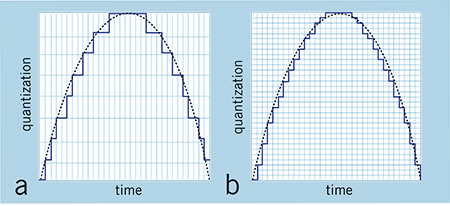
Two sampling frequencies:
A. Low sampling rate,
which distorts the wave of the original sound
B. High sampling rate,
which perfectly reproduces the wave of
original sound
To reproduce a certain frequency, the sampling frequency
it must be at least double it (Nyquist theorem).
For example, audio CDs have a sampling rate of 44.100 Hz,
so they can reproduce frequencies up to 22.050 Hz, which are hardly found
beyond the limit of human perception of 20,000 Hz.
The following table shows the most common sampling rates for
digital audio.

Bit depth

The bit depth represents the number of bits used to store a
single digital sample.
When a sound wave is sampled, each sample is assigned
the amplitude value closest to the original wave amplitude. A depth
in high bits it provides as many amplitude values ​​as possible, which results in a
greater dynamic range (the difference in decibels between the maximum volume that the component can sustain without
distort the waves and the background noise it produces), lower and higher background noise
fidelity.
For example if you use 8 bits you have 256 possible values ​​(28
) that, being
relatively few, offer less sound quality than a
tape; if instead 16 bits per sample are used, 65536 values ​​are obtained
possible (216).
The most common examples are the audio CD, recorded in 16 bit, and the DVD, which
supports up to 24 bit depth.

Compression formats

Hand in hand with the advent of digitalization, multimedia applications have
they are increasingly widespread until they become commonplace. One of
multimedia features is certainly the use of digital audio
vowel and sound. The biggest obstacle associated with digitizing audio is
the large size of the files that are produced, which puts them at
sector operators (especially those linked to the internet) the problem of
reduce the space occupied by the data to obtain the double advantage of:
 save in terms of memory occupation;
 save in terms of transfer time on the network.

For this reason, speaking of digitizing the audio, it is necessary to speak
also of data compression techniques. The compression techniques of the
data, of whatever nature they are, are divided into:
 lossless: compress data through a lossless process
of information that takes advantage of redundancies in data encoding
 lossy: compress data through a lossy process
of information that takes advantage of redundancies in the use of data.

Lossless formats

Lossless compression formats are more suitable for archiving rather than
to reproduction, since most of them require complete
decompression before they can be played.
One of the most common lossless compression formats is FLAC (Free Lossless Audio Codec).

Lossy formats

Lossy compression formats use compression algorithms capable of
drastically reduce the amount of data required to store a sound,
guaranteeing however an acceptable and faithful reproduction of the original file uncompressed.

What is a constant bit rate? CBR

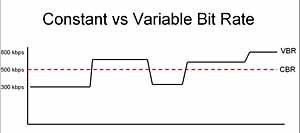
Constant bit rate is a tool used in digital telecommunication signals, for example, when transferring audio files from the Internet. A constant bit rate file is encoded to produce a file that plays at exactly the same bit rate throughout its duration. The biggest advantage of a constant file bit rate type is that it allows for constant playback of the media stream, as the bit rate will never fluctuate, reducing any delay and jitter from the end of the server stream. Although this file type is ideal in such circumstances, it is disadvantageous for storing more complex file types, as the constant bit rate can be overloaded or underused depending on file variations.

Constant bit rate (CBR)

A constant bit rate file is like a trickle of sand through an hourglass – it will always go exactly the same speed. Counter this with an opposite file type, the variable bit rate file. In a variable bit rate file, the “sand” is uncomfortable, resulting in sometimes small information flows and sometimes larger, more complex blocks.

CBR and VBR

As mentioned, one of the best uses for a constant bit rate stream is when playing a media file. Compressing the entire content of the video or audio file into a single playback ensures consistency across the file, forcing images and tones to become substantially similar to each other. In a multimedia file encoded in a variable bit rate format, the quality of the file can change dramatically from one moment to the next as the bit rate peaks and slows like a roller coaster. Although a file using a constant bit rate does not always have the optimal image quality, as some images may have to be reduced in appearance to “adapt” the selected bit rate, at least the entire presentation will be smooth and fluid for the user.

It may seem that a file with a constant bit rate is always preferable, but this is not always the case. Some circumstances tend to favor the ability to model the bit rate within a specific range of values. Consider archiving a multimedia repository of popular paintings. While some paintings in the collection are hopelessly complex, requiring a high bitrate to capture their true essence, others are much simpler, requiring a much lower bitrate to keep the overall file size low. In cases like this, files that use a bit rate that remains constant would normally provide too much or too little storage space for each virtual drawing image.

Although a solution could be to increase the bit rate “ceiling”, allowing even the most complex paintings to be preserved with impunity, but this is not optimal from a programming point of view. Files with a higher bitrate require more storage space on the hard drive, as each item in the file has more room to “breathe” with the higher bitrate. The greater the space wasted by files whose complexity is not justified by the chosen high bit rate, the more inefficient the solution becomes.

What is a video bit rate? What is mp3

The bit rate is of two types:

internal: the number of bits transmitted per second;

external: data rate and its value for real-time transmission (to watch a movie or listen to music).

Bitrate

Let me remind you that high bitrate usually means better quality, however this may depend on the source file.

How to find out the bit rate of a specific file?

It can usually be found right inside

And what is the difference, let’s see?

There is said to be little difference. 🙂 In my opinion)) (hearing), it is necessary to listen to music not through the speakers for 100 rubles, and certainly not through a portable speaker. C and everything fits immediately: it does not sound, but cacophony, if the bit rate is less than 120 kbps.

Bitrate

Different bit rates for people who work with sound. Well, to listen at home, any bitrate, even the lowest bitrate, will. Here it is, as the saying goes, an amateur.

Incidentally, one of the “representatives” of music with a high bit rate is the .flac format. . , the bit rate weighs less than 800-1000 kbps, however it takes up more space, such a song can weigh 30mb, and the album less than 400.

I hope this explanation of “What is the bit rate in music” has helped me a little? Please leave the comments below so I can reply to you.
Don’t be afraid of me and add

With the concept of “bit rate” we are faced with the mention of files in audio and video format. To understand the essence of this term, you must master file compression and encoding. German scientists have established the general principle of compressing files with minimal loss. Using the MP3 encoding example, the source audio file is cut into chunks lasting 50 milliseconds, each of which is analyzed separately. In the analysis, the fragment is broken down into harmonics according to the Fourier method, of which, according to the theory of sound perception, the harmonics that the person perceives worse than the rest are expelled from the human ear. These are quieter harmonics in the context of the stronger ones. As a result, sounds masked by hearing inertia are ejected (for example, if a very short beep sounds at once, with a delay of a fraction of a second, some other short-term signal is heard, then it will not be heard. ) The remaining harmonic information after filtering is recorded in an MP3 file, which results in a much smaller size than the original WAV. The WAV file stores complete information about the original sound, digitized and quantized at a frequency of 44 kHz. This information is stored on normal audio CDs. During playback, a reverse transformation is performed, in which the remaining harmonics are converted back into a sound wave. Some information about the original signal has disappeared, therefore the sound is not the same as the original. But insignificant sounds have been thrown, so the human ear cannot distinguish the signal from the original, which it was before packaging in MP3.

Bit rate is the amount of information per unit of time. Its essence: how much information about each second of the registry can we spend. Of course, the smaller it is, the smaller the files are with the same duration over time, so they have to throw more “extra” harmonics. Bit rates have units of measure: kilobits per second (Kbps) and megabits per second (Mbps). The MP3 audio compression algorithm is often used with 128 kbps compression. They are of two types: fixed and variable. So with video compression, if a constant bit rate is applied, a fixed amount of data is used to encode a second of a movie. In the case of variable bitrate, the codec sets its own bitrate value based on the scene in the movie. For example, when encoding in MPEG, in practice, the compression gain is obtained by saving only the difference between adjacent frames. With a slow scene change, the difference between the frames is small, and therefore it is possible to reduce the bit rate required to reproduce these scenes.

How does music compress the mp3 format?

Many people do not have a clear idea that in general most audio formats compress music.

In fact, thanks to that compression, the mp3 became so popular. It is not because it sounded better, as an uncle of mine creates … but because it allows you to store much more music on a USB stick, on a CD, etc. even when it sacrifices a bit of quality.

mp3 compression

That is to say, technically the mp3 sounds worse than the original raw format like a wav.

But handling wavs is usually unmanageable, unless you are an audio professional.

But, going back to talk about my uncle, who wants to listen to Frank Sinatra in his car, using the mp3 is much more friendly. Even because it has a metadata (artist name, track, lyrics, etc.) and also, if a good bitrate is used (160 m or more) it is almost imperceptible to most of the people the difference between an mp3 and a wav .

mp3 compression

Experiments have been carried out in famous universities that managed to show that not even the people who claimed to have an auditory training (for being musicians, djs, etc.) managed to distinguish in most cases a 192-bit mp3 from the original wav.

This explains why mp3 is still king, even before the appearance of FLAC for example, that it is free (without patents) and that it has a much better quality.

But, again to mention my uncle, he believes that FLAC is a colorful cereal … and he still says that he really likes that cereal for breakfast !!

Compression

But then, the fame of the mp3 is due exclusively to its ability to save space?

Yes.

And how does the music compress the mp3?

Follow several methods. Here I will tell you superficially and only by way of introduction how it manages to save space.

The first tactic is almost logical. As the human ear only listens to a part of the sound spectrum, the mp3 erases everything that is outside that spectrum, thus saving a lot of space.

Then it uses another well-known mechanism of the human ear (if you look at the mp3 it is based on the ability to perceive the human ear … THAT’S why people DO NOT manage to perceive a good mp3 from the original wav !!).

That mechanism is called masking, and it’s about the following. If there are two or more sounds at nearby frequencies and one of them suddenly sounds loud enough, the ear will NOT hear the other sounds that are lower in volume at nearby frequencies. So the mp3 uses that acoustic principle of the human ear and gets rid of those other sounds with which it again removes information.

And removing information means SAVING SPACE.

And if you finally use some mechanism to compress (type .zip or type .rar), a great saving of space is achieved.

For example, let’s imagine (it is a false example, but it illustrates what I mean), if we had this string in the audio “xxxxxxxxxxxxxxxxxxxx”, one way to compress it would be to say that there are 20 x, instead of writing 10 x, note :

xxxxxxxxxxxxxxxxxxxx
20x

Which takes up more space and which takes less?

Both strings of signs or characters say the same thing, there are 20 x, but it is shorter to write it as 20x, than to write “xxxxxxxxxxxxxxxxxxxx”

Onbiamente in all loss of information, there is a loss of quality. But the same thing happens with colors.

They say there are computers capable of handling not how many millions of different colors … it would be smart to ask how many different colors the human eye can perceive.

So, there will always be a purist who says that the mp3 loses quality … but it would be good to see if her ear can distinguish it. Music is made to be heard by human ears, with its limitations.

Well, in short, this is how you make an mp3 to save space. I will send a copy of this article to my uncle.

Video formats and compression codecs for video editing

To understand the basics of video editing, one must consider display frame theory. For this reason, we will often use a fitting comparison in the guide: that of motion pictures and the frames that make up the film.

Video Editing

What is a video format?

We all know that you need a screen, a projector, and a movie to get a movie projection. A sequence of images is printed on the film, translucent as the negatives of the photographs, which in the projection modify the light beam of the projector, allowing only certain parts to pass through, which will generate an image on the screen. Film flows, projected images change rapidly, and a motion effect is obtained.

Let’s go back to digital video.

Let’s say we have a series of images that reproduce a movement (we will see later how the capture phase, or video capture, allows this). These images alone are not enough to show a movie on our PC. In fact, we should be able to tell the machine where these images are, what type they are, how fast they should be viewed, and in what order. For this reason, the format of a clip is defined, that is, a kind of “container”, recognizable by the PC, in which the previous information is attached, in addition to the images.
To recognize a video file format of a clip, you can access the file properties panel or observe the file extension itself (for example, AVI, MPG, QTM, etc … all video extensions).

Digital video
Each editor chooses the best video format they consider appropriate, depending on how they work, the technology they have available and the end result they want to achieve.

In fact, try to think how much a color image of about 800×600 pixels takes up. So much … too much to see 25 per second (as the theory of optics says) and save them to our HD.

What is a video codec?

This is where the codec (COmpressor DECompressor or better DECoder CODER) comes in, or the software that contains the mathematical procedure through which the images are compressed (often with loss or loss of information) to allow agile management and reproduction correct clip.
In practice, compressed video formats are obtained.

The codec is used both to capture and compress the video from an external source, and to play and process the video once it is stored on the hard drive. It could be compared to a kind of very fast Winzip that, if necessary, compresses and decompresses the images of a film.

It is useless to dwell on how a codec manages to make a noticeable decrease in the space occupied by images, reducing the loss of quality to a minimum (sometimes surprisingly!) What little indication to say which is the best video codec or the best compression Of video . The answer is always the same: it depends on what you want to achieve (and, similarly, what is the best video format is a question that has multiple answers).
The important thing is that these codecs are available to us, there are many of them and each one has peculiar characteristics that suggest its working environment.

We suggest downloading the K-Lite Codeck Pack (often also abbreviated as Klite) which contains an important collection of useful and cross-cutting codecs, tools, formats and filters.

Structure of a video format

Hardware codec and analog capture

Until recently, analog capture cards (especially M-Jpeg) were almost all equipped with a proprietary chip that allowed smooth, lossless capture as it took the computer’s processor out of compression work (it’s this chip that kept the price of the cards high).
The hardware codec is still software, but it interacts with this chip by letting the system know that it exists and that it can do the job instead of the CPU.
Without the codec installed, the card chip is useless, whereas if only the software codec is installed, the PC processor may be able to do the compression job, but this in particular cases.

Entry-level PCs are still powerful, and often analog acquisition cards only have one analog-to-digital conversion chip, while the processor does the conversion. In some cases, it is even possible to capture with very complex and elaborate software codecs like DivX or Xvid.
It is clear that choosing the hardware codec is always recommended, as in the case of the MPEG2 capture which requires a lot of resources.

Are you sure you listen to music well?

It is frequent to listen to low quality music without realizing it. But how can you tell if an audio file is of good quality? Do you know what you hear

How can you tell if an audio file is of good quality?

Today we listen to music from different devices and continuously. It often happens unintentionally – in stores, banks, supermarkets, advertisements, and many other situations, even without being brought to our iPod (if still in use). But when we decide to listen to music voluntarily, are we sure we listen to it well?

Audio quality

Be careful, reading this article can make sound fetishists so hostile to your company of friends. If you continue reading, you deserve this anecdote.

I was in the car with friends, when suddenly I heard one of my favorite songs come out of the speakers. Although I turned the volume knob on the ball, the sound was still very muffled. Blame the speakers? Maybe, but not in that case. To my quick question (demanding that you heard the “noise of the Titanic”), I received a very simple answer: “I downloaded it from a YouTube video.”

Best Audio Quality

Now, I am absolutely not here to moralize anyone, because for better or for worse we have downloaded all the songs from YouTube, however there is one important factor to consider: how can you understand if an audio file is of good quality?

Let’s start with this assumption: Buying the records and / or buying the songs in the digital stores will surely feel great if played on certain systems. That said, the two macrocategories for listening to music are:

The type of the audio file.

The type of sound emitting system / device
Lossless discs and files are the best to listen to. By avoiding delving into complex technicalities by converting files to .mp3 there is compression that reduces digital size at the expense of quality. The unit of measure for quality is kbps (kilo bits per second) and the best value of all is 320 kbps (we tend to scale 256, 192, 128, 96, and 64 kbps). Pseudo-decent performance occurs (but with high data loss) at 128 kbps. It is better to always be on top.

While this doesn’t make sense to nerds, many people ignore these factors because they don’t know they are listening to songs about which 30% of the instruments may not fully perceive. Please note that Spotify allows you to choose the type of audio quality only in the Premium version and the lowest or “Normal” function is at 96 kbps. Also, if you ever download songs illegally from YouTube, many unofficial videos already have poor startup audio, let alone convert them to low-quality .mp3.

Now let’s say we have a song with the best possible quality on our mobile. The problem is to listen to it from a medium that has decent characteristics. To assess this, you must rely on the frequency response or how closely the audible frequencies are reproduced to the human ear by the speakers / headphones or the vehicle in question. We hear from 20 Hertz to 20,000 Hertz (also called 20kHz), this range varies with age and trauma (eg disk). It is correct to possibly check the frequency response of your vehicle: if you buy 5 euros headphones in a store, it will not have a great result, no matter how much the brain comes to us trying to hypothetically recreate incomplete or missing frequencies. It should be remembered that there are other, much more complex factors for optimal hearing, which can be easily explored on the web or in sound theory books.

Going back to the initial anecdote, we were in a Panda ten years ago, with the original Fiat speakers and we listened to a low-quality song downloaded from an unofficial YouTube video. Worse than that, one could not ask, therefore, on second thought, could not have said anything, while that opaque discontent would have been covered by my discontents and for those there are no remedies.

HIGH RESOLUTION AUDIO: HOW TO LISTEN TO MUSIC WITH THE HIGHEST QUALITY

Many of our clients, simple music fans or professionals in the sector, constantly seek perfection. Some are willing to spend even thousands of euros to assemble a high-quality hi-fi system. Many come to us for advice, and we are happy to accommodate them. First, however, it is good to gain some (really few) insights into the world of music and the media through which we generally hear it.

Sony High-Resolution Audio

We will start from the beginning.

Digital music is distributed in many formats. Some are compressed, others are not compressed. However, all files are nothing more than a sequence of bits whose value can be 1 or 0. These bits are grouped into bytes, that is, words of 8 bits each. A series of bytes forms a file or an audio track that we can listen to.

High resolution audio: recording and playback

Once recorded, to be played by us, this digital music file is sent to an analog-to-digital converter (DAC), converted to an analog signal, and finally sent to an output circuit, either a preamplifier or analog output

The quality of the file to be reproduced is given by two factors: resolution and sampling frequency.
Resolution is expressed in bits, while the sampling value is expressed in kilohertz (kHz).

Word length (bit)
= resolution Dynamic range Reproducible tones
12 bit 72 dB 4,096
16 bit (CD) 96 dB 65,536
24-bit (DVD) 144 dB 16,777,216
32 bit 192 dB 4,294,967,296

In simple terms, all this means that the denser the digital information, the closer the “digital” version of the signal gets closer to the original analog signal.

“The highest possible quality is the closest to the original as it was produced.”

For example, if you have digital music on CD in 16 bit / 44.1 kHz, this corresponds to a dynamic range of 96 dB with 65,536 gradations. However, music is rarely written to CD under these conditions, because the recording was originally made in only 16 bits (other recording defects may further reduce the signal).

Today, however, recordings are made at 24-bit / 192 kHz (in part also at 32-bit / 384 kHz), which means that the length of the information is significantly longer (and therefore has a greater dynamic range) and a higher sampling rate thus increasing the bandwidth.

The higher the resolution of the audio file, the higher the sample rate and the better the final audio signal.

Please note that the increase in “information content” resulting from higher resolution / sampling is exponential: consequently, the qualitative difference between a 16-bit audio file and 24-bit recordings could be so subtle that only be perceived by a trained ear and obviously well equipped.

HIGH DEFINITION: COMPRESSED AUDIO FORMATS AND UNCOMPRESSED AUDIO FORMATS

Audio files can be compressed (with or without loss of quality) and uncompressed (without loss of quality).

Some examples:

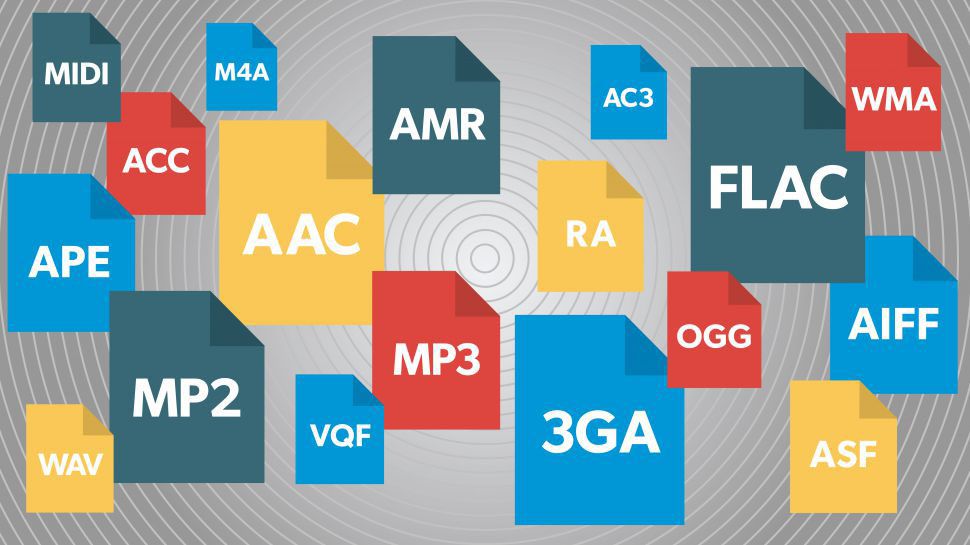
Uncompressed audio formats

WAV – Waveform Audio File Format (.wav)
AIFF – Audio Interchange File Form (.aiff, .aif or .aifc)

Compressed audio formats (no quality loss)

ALAC: Apple Lossless Audio Codec (.mp4 or .m4a)
FLAC: Lossless Audio Codec (.flac)

Compressed audio formats (with loss of quality)

MP3: MPEG-1 or MPEG-2 Audio Layer III (.mp3)
AAC: Advanced Audio Coding (.aac, .mp4, or .m4a)

To make a “visual” example and clarify the concept, let’s take a photograph: on the left, the original version, in good resolution; On the right, the same photo, saved in compressed format, which reduces its quality:

high rsolution audio

music in high definition, example of maximum quality

In summary: CDs (compact discs) offered good quality (not maximum) and a certain “portability”, but their capacity was limited.
Mp3 files certainly helped share music over the network, at the price of a substantial loss in terms of playback quality.

HIGH DEFINITION SOUND: A SMALL GLOSSARY TO BETTER UNDERSTAND

Bit rate

The bit rate is the amount of data per second required for a transfer from A to B. The bit rate is always expressed in kilobits (Kbps) or megabits (Mbps) per second. For example, an mp3 plays an audio track from 96 to 320 kbps; a FLAC file can exceed 5000 kbps.

Bit depth (resolution)

This value describes the number of bits recorded in a single audio sample. Therefore, it is equivalent to termination. An example: the quality of a CD (compact disc) supports up to 16 bits; An audio DVD supports up to 24 bits.

Liquid Hi-Fi Music Short Guide

LIQUID MUSIC

“Liquid music” means playing music from digital formats such as tablets:

– MP3 (lossy, that is, with a more or less noticeable quality loss depending on the bit rate)

– FLAC (without loss, that is, without loss of quality)

The uncompressed format (eg WAV) is almost never used as it is too expensive in terms of space (for storage) and network bandwidth (for playback). In fact, liquid music is usually stored on the hard drives of regular PCs (or other digital players) and is often played on home Wi-Fi networks (as well as on the Internet).

Liquid Music

As for the MP3 format, almost everyone agrees that the 128 kbps (CBR, constant bit rate) standard, extended until a few years ago, does not offer enough high-fidelity quality (may be good for portable players if you don’t have too many claims) Conversely, formats from 192kbps to 320kbps (top) can provide excellent audio quality, albeit more costly in terms of space and bandwidth. A good compromise is often the 256 kbps VBR (Variable Bit Rate).

The FLAC format is exactly the same as the digital original, in terms of quality. For example, 44-kHz and 16-bit files can be reproduced with the same quality as CDs, with the advantage of not degrading over time, since they are not subject to wear on optical media and consequent read errors (in addition from the obvious risk of permanent damage due to repeated use). But there is more. Without the limitations of CD support, which has meant that a full series of more or less general evolutions (SACD, DVD-Audio, Blu Ray, etc.) have been introduced, sample rates and number of bits can also be used . high, up to 192khz 24bit (historically used only in professional recording studios and now available to all fans).

In general, the long-time passionate audiophile is quite skeptical about the use of new technologies and, in particular, of liquid music. Neglecting “tactile” and “psychoacoustic” factors, this skepticism stems essentially from two factors:

1) The potential loss of quality compared to physical media

2) The complexity of management (installation, configuration, use)

Regarding point (1), as already mentioned, there are no intrinsic limitations in the formats, but clearly in the final quality other factors come into play such as the devices used for the reproduction (in particular the DACs and the analog output stages. related).

Regarding point (2), the problem exists and is not a trivial matter. It is also true that, once properly configured, a liquid music playback system can provide great satisfaction and be extremely more practical and flexible in use than a traditional hi-fi system.

Basically, there are 3 aspects to manage to enter the world of “high-end liquid music”:

a) How to get music files and / or convert your own discs

b) Where to store the files and, therefore, where to reproduce them

c) How to play music files

Point (a) is perhaps the most complicated, since it requires a minimum of familiarity with the PC. In general, in fact, music files need to be purchased online from online stores (just think of Amazon, iTunes, etc.) in good quality MP3 format (generally at least 192 kbps). But to avoid the burden of buying back what you already have, especially if it is in CD format, it is more convenient to convert (or “extract”) your CD case using special PC software, which runs from the classic Windows Media Player (available on all Windows PCs) to free and widespread Exact Audio Copy, excellent for lossless FLAC format. It is also possible to buy music directly in high definition (for example, from the HD Tracks site) and, for those who have the time and the desire, digitize their vinyl in HD format using acquisition cards with high-quality analog-digital converters .

Item (b) is still quite cumbersome, as few audiophiles will be willing to connect their “regular” PC to the hi-fi system, for various reasons: limited storage space (especially on laptops), mediocre level DACs, absence of RCA outputs, slow power, background noise, absence of remote control, non-immediate playback start, etc. Therefore, they will most likely choose to store their music library at:

b1) a large external USB hard drive of at least 1TB (I suggest this WD My Passport) to connect it to a hi-fi component that allows liquid music playback.