There are several types such as WAV, MP3 and FLAC, but what is the difference? Part 4


Free Download Mp4Gain
picture

There are several types such as WAV, MP3 and FLAC, but what is the difference? Part 4

ANALOG vs. DIGITAL AUDIO

There are several types such as WAV, MP3 and FLAC, but what is the difference? Comprehensive research on music file formats

analog audio disc

Data and music
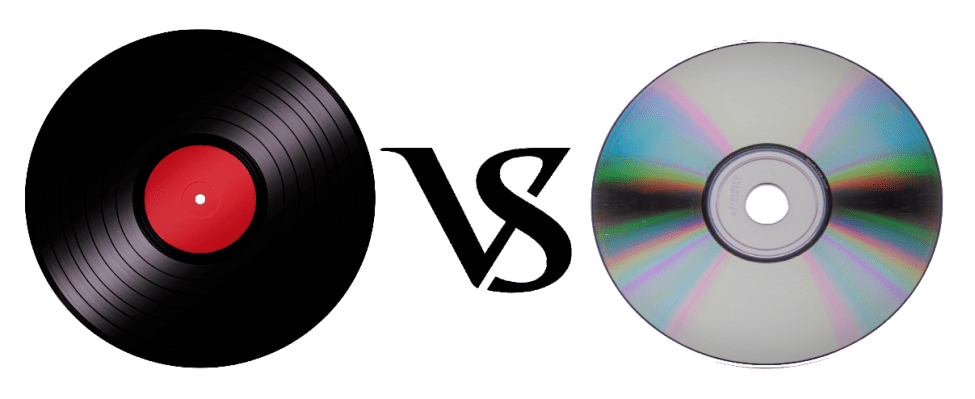
Does the boom from the analog discs come back?

In recent years, the world boom of analog discs has arrived. According to the Association of the Recording Industry of the Public Corporation in General of Japan, the national disk market is the production number of 2017 1063000 sheets. In terms of Amount, it was 1,916 million yen, the highest of the last 10 years.

You may have heard that sound quality is generally better than that of a CD, but what really differs is the recorded frequency band.

It is said that the frequency band that can be stored on a CD is up to about 22,000 Hz, while the analog record contains information of up to about 100,000 Hz. However, it is said that the audible human range is approximately 20Hz to 20,000Hz, so it does not make sense unless you notice the difference in sound. It seems that the parties other than the audible human range, the vibration of the air due to the sound and the force caused by it, are transmitted by other routes other than sound.

This is a great merit that can only be experienced with analog discs, and it can be said that it is the true emotion of the discs.

However, the care of the equipment, the deterioration of the plate, the difficulty of handling and the size can be disadvantages compared to the CDs and the data. (In the youngest generation of these days, this effort is quite new and many people enjoy it).

abstract

There are several formats for musical data files and each one has its own personality. Which of the music services and distribution sites that I have used casually so far?

It can also be good to listen and compare the differences with data such as CD and analog discs.

I want to take me well with musical data wisely according to my style!


Free Download Mp4Gain
picture


Mp4Gain Main Window
picture


Mp4Gain Features
picture


Free Download Mp4Gain
picture

There are several types such as WAV, MP3 and FLAC, but what is the difference? Part 3

There are several types such as WAV, MP3 and FLAC, but what is the difference? Part 3

Audio Formats

Relationship between the depth of bits, the sampling frequency and the frequency of bits

Audio File Formats

The musical data has numbers such as the depth of bits and the sampling frequency indicating the amount of musical data per second.

And the product of the two is the “bit rate”.

· Sampling rate
Also known as sampling frequency. It shows how many tens of thousands of sounds are collected per second.

The higher the value, the greater the number of divisions, which translates into a softer sound and an improved sound quality.

By the way, the CD is 44100Hz.

· Bit depth
Also known as quantification bits, bid reduction, sample bits count.

This shows how much capacity is given to divided data.

The greater the sound, the better the sound will be and the quality of the sound will be improved.

The CD is 16 bits.

· Bit rate
It is shown as BPS and shows the amount of data per second.

It is the product of the “sampling frequency” and the “bits depth” mentioned above.

In the case of a stereo file, there are two sounds, so if you formulate it …

Sampling rate (Hz) x Bit depth (bits) x 2 = Bit rate (BPS)
A large “bit rate” means a “sampling rate” and a large large bits depth, which means that sound quality is good.

By the way, in the case of CD,

44100 (Hz) x 16 (bits) x 2 = 1411200 (BPS)
This means that.

In this article, I specifically compared the difference in the file size.

cheep
Marker
Share
Pocket
Update: 2020.07.15 Published: 2018.08.14
Technology | Included in the Hall of Fame

There are several types such as WAV, MP3 and FLAC, but what is the difference? Comprehensive research on music file formats
keyword
Data and music
INDEX

I compared file sizes
So, what is the call frequency?
Is “dead mp3”?
Why are there so many formats in the first place?
I compared file sizes
Then, I compared what kind of difference is made from the point of view of the file size and if there is a difference in Hz that sounds depending on each file format. In comparison, Tucson Repertory Orchestra and Sierra Vista Symphony Orchestra were listening to the opinion of Japanese Director Toru Tagawa, who serves as musical director and director of the (Sierra Vista Symphony Orchestra), is the ninth of Beethoven is good advised me to play The Berlin Philharmonic directed by Karajan, one of the most famous recordings.

I compared file sizes

So, what is the call frequency?
Is “dead mp3”?
Why are there so many formats in the first place?
I compared file sizes
Then, I compared what kind of difference is made from the point of view of the file size and if there is a difference in Hz that sounds depending on each file format. In comparison, Tucson Repertory Orchestra and Sierra Vista Symphony Orchestra were listening to the opinion of Japanese Director Toru Tagawa, who serves as musical director and director of the (Sierra Vista Symphony Orchestra), is the ninth of Beethoven is good advised me to play The Berlin Philharmonic directed by Karajan, one of the most famous recordings.

Then, here is the CD used for this comparison.

Symphony n. ° 9 by Beethoven (choir) from director Herbert von Karajan released by Universal Music. In fact, it is said that the Ninth of Beethoven was the origin of the unit of a CD. (There are several theories about this).

When I really verified it, there was still a remarkable difference in the size of the file.

OLA 701.5 MB.
ALAC 308.6 MB.
MP3.
160 kbps 79.4 MB
256 Kbps 127 MB
320 kbps 158.8 MB
CAA.
160 kbps 80.2 MB
256 Kbps 127.8 MB
320 kbps 159.5 MB
However, for “MP3” and “AAC”, none of the bit rates appeared around 1 MB.

So, what is the call frequency?

With respect to the frequency, I tried to verify showing the waveform. The image above is in WAV format.

Compared to “WAV”, there were almost no changes in the frequency of acute and only a slight change in the bass was observed.

Comparing “MP3” and “AAC”, which have almost the same file size, you can see that “AAC” has a lower tone. In terms of frequency, “AAC” seems to have a better sound quality. In other words, the result of the verification shows that AAC, which is a more recent compression technology, is higher.

There are several types such as WAV, MP3 and FLAC, but what is the difference?

There are several types such as WAV, MP3 and FLAC, but what is the difference?

Music File Formats

Comprehensive research on file formats
Do they like music to all?

audio file formats

I think many people enjoy music by downloading or playing streaming instead of CD these days, but what kind of format music is stored as data?

I researched the differences, advantages and disadvantages of each format.

Types of audio compression

There are three types of music file formats: “Not compressed”, “compressed with loss” and “compressed without loss”.

File-based compression can reduce the size of the file and reduce the download time and storage capacity.

“Uncompressed format”
As its name indicates it, it is an uncompressed file. The point are the original data.

The advantage is the accuracy of the data. However, it also has the disadvantage of a large file, which uses about 10 MB for a 1-minute audio file.

The most used are “WAV” and “AIFF”. It is common to use “WAV” for Windows and “AIFF” for Macintosh.

“Compression format with loss”
This compression format is probably the one that most uses.

Although there are individual differences, it is said that the human audible range is 20 Hz to 20000 Hz. This file format has the advantage that the file size can be deleted while maintaining a certain level of sound quality when it is removed and compressed Other parts difficult to identify.

Even so, the disadvantage is that the sound quality is lower than the original data. It is not exaggerated to say that “MP3” is the best-known file format. As successors, “AAC” is often used, which was created to achieve higher sound quality. In addition, “WMA”, “Vorbis”, etc. They are also in this format.

“Format of compression without loss”
This format compresses the original data while preserves them.

During playback, you can decompress and return to the original uncompressed format, so the sound quality is the same as that of the original data. Although the file size can be reduced compared to the uncompressed format, it is still about half, so the size of the file is greater than that of the compressed format with loss and takes more time coding and decoding.

In addition, it is currently not handled by the main music distribution sites, and the number of devices that can be reproduced is less than that of uncompressed formats. The most common of these formats is “FLAC”, and Apple uses a single format called “ALAC”.

What is the difference between MP3 and AAC? Part 3

What is the difference between MP3 and AAC? Part 3

aac vs mp3

Finally, let’s review the important MP3 and AAC compatible devices.


MP3 o AAC

MP3s are compatible with almost all music-playing devices, such as personal computers, smartphones, and audio devices. Therefore, it is generally better to save the file in MP3 format.

As for AAC, it is a recommended storage format for iPad / iPhone users and those who use iTunes, Apple’s official music player, because it is compatible with Apple devices. Even if you import the sound source from a CD with iTunes or purchase paid music content from iTunes, it will be saved in AAC format.

Which is better, MP3 or AAC?

Unsplash logo Photo by marksolarski
In this article, I explained about MP3 and AAC music file storage formats. Finally, if you do not know what is the storage format that I should use, to leave and save the music files in MP3 format, it can be said that it is the best. MP3s have many playable devices and the sound quality is not that different from AAC.

Also, files saved in MP3 format can be easily converted to AAC files using iTunesw. When saving as MP3, it can also support post file conversion, so if you have problems with the save format, it is better to select the MP3 format. Also, if you’re targeting Apple devices, try saving music by choosing an AAC format that doesn’t need to be converted.

What is the difference between MP3 and AAC? Part 2

What is the difference between MP3 and AAC? Part 2

AAC Vs. MP3

The disadvantage of the “lossy compression format” used by MP3 / AAC is that the compressed data file cannot be restored to its original size (the original sound quality of music content).

aac vs mp3

There is a music content compression format called “lossless compression format”, which has a relatively large data size and can restore the original sound quality when playing music files.

There is not much difference between the two compression formats, but if you want better sound quality, you should use the “lossless compression format”. In the next chapter, we will further compare the differences between MP3 and AAC formats.

Comparison of MP3 and AAC

Unsplash Logo Photo by duck58cth
We will compare MP3 and AAC in terms of sound quality and compression rate (bit rate).

Sound quality

As mentioned above, MP3 and AAC are compression methods that use the “lossy compression format”, so there is not a big difference in sound quality between the two formats. The sound quality of MP3 and AAC differs depending on the compression rate (bit rate) of the music content file. So what exactly is the compression rate (bitrate)? The next section describes (compression bit rate).

Compression rate (bit rate)

format Compression rate (bit rate)
64kbbp 96kbbp 128 kbbp 160 kbp 192 kbbp 256 kbbp 320kbbp

MP3 Upper Limit Frequency 8.3 kHz 11.7 kHz 15.2 kHz 18.6 kHz 21.3 kHz 22.0 kHz 22.0 kHz

MP3 size 123kB 184kB 245kB 308kB 372kB 494kB 616kB

AAC upper limit frequency 13.5 kHz 15.2 kHz 18.7 kHz 19.1 kHz 19.6 kHz 20.0 kHz 20.0 kHz

AAC size 127kB 188kB 249 KB 310kB 368kB 490kB 613kB

The comparison table above shows the compression rate (bit rate) of MP3 and AAC, and the upper limit of frequency and data size (capacity). The higher the value of the compression rate (bit rate), the higher the upper limit for frequency and data size (capacity), and the better the sound quality.

Although the compression rate (bit rate) of MP3 and AAC is the same, the data size (capacity) and the upper limit frequency are different, so please compare the sound quality using the table above as a guide.

Proper use of MP3 and AAC

In this chapter at the end of this article, we will introduce how to use MP3 and AAC correctly. Even if you read the comparative explanation of MP3 and AAC presented so far, many people may not get it right. How to use MP3 and AAC correctly should be judged by the compression rate (bit rate).

Bit rate

As discussed in the previous chapter, the higher the value expressed in “kbbs” called the compression rate (bit rate), the better the sound quality. However, MP3 and AAC have the same compression rate (bit rate) but different upper limit frequencies.

128 kbps to 160 kbps is adopted for general MP3 / AAC music files. This is because you can watch various music genres like J-POP and Jazz with high sound quality. You can fully enjoy music with your PC speakers and audio equipment.

Then I will explain the characteristics of the compression rate (bit rate) of 128 kbps or less and the compression rate (bit rate) of 160 kbps or more, and which file format should be used, MP3 or AAC.

Less than 128 kbps

A compression rate (bit rate) of less than 128 kbps does not improve the sound quality of music, etc., and is not suitable for the music content storage file format. Suitable as a conversation-focused radio sound source. Also, if it is less than 128 kbps, the AAC format has a higher frequency upper limit, so the sound quality is said to be better than MP3.

192 kbps or higher

The compression rate (bit rate) of 192 kbps or higher reproduces even delicate sounds like classical music. If you have a good ear, you can clearly tell the difference in sound quality.

When the compression rate (bit rate) is 192 kbps or higher, the MP3 format has a higher upper limit frequency and is said to have a higher sound quality. The data size (capacity) is almost the same as that of AAC, so it is recommended to save it in MP3 format.

MP3: the digital audio revolution

Perhaps not many people know that in 1992 a silent and unstoppable revolution of digital audio began for mass, until then essentially represented by CD-Audio. This was, in fact, the year that the algorithm underlying the MP3 format was born by the Fraunhofer-Institut für Integrierte Schaltungen (IIS).

Mp3

Part of a European research project called EUREKA, which started in 1987 and ended in 1994, the then-MPEG 1 Layer 3 was one of the most important and mature fruits in the field of psychoacoustic compression algorithms. This family of compression algorithms, whose first studies date back to 1979 by Manfred R. Schroeder, German physicist at AT & T-Bell Labsc, aims to reduce the amount of information capable of describing an audio sequence, from the assumption that the human ear, fortunately for us, is not perfect. The basic idea is to exploit the inability of the man’s auditory system to recognize certain sounds and frequencies, when they are masked by others.

MP3

Audio masking is detected at two levels: frequency and temporal masking. To explain the principle quickly, let’s take an example: in the presence of two tones, depending on their frequency and intensity, our ears will be able to recognize both or only one.

In the latter case, we have a frequency masking, and therefore information related to the least audible tone can be discarded. What happens, however, if the most intense tone is lost? It will happen that the tone that was not noticed before, will now return to the foreground. However, for the hearing system to notice, time will inevitably pass, because the membrane needs to stop vibrating and readjust.

We speak, of course, of times in the order of milliseconds, which are however precious, because the sound that falls within this time will be cut by the compression algorithm and, consequently, will help to reduce the amount of information necessary to describe what is audible.

The first MP3 encoder, called l3enc, was released by the Fraunhofer Society on July 7, 1994, while the MP3 extension was officially born on July 15 of the following year.

Those who lived through this time know that we are talking about years in which ADSL did not exist, hard drives were a few hundred MB in size, and in general, both from the point of view of communications and data storage, the figures they were far from being as generous as they are today. With these limitations in mind, I want to remind you that an uncompressed audio file in PCM WAV format, with a resolution of 44 kHz and 16 bits, stereo, as required by the CD-Audio standard, has a bit rate equal to 1411.2 kbit / s. This means that if you want to rip a song from an audio CD on your hard drive, the occupied space in uncompressed WAV format is approximately 10MB per minute. Today perhaps it would not be a problem to have this space, but in the mid-nineties it was a notable limitation.

The compactness of the MP3 format combined with the more than acceptable quality (a very optimistic estimate is a bit rate of 128 kbit / s to obtain a quality comparable to CD-Audio), made it in a few years the vehicle of transmission par excellence for music. The milestones that contributed to this unstoppable technological success were the launch of the Winamp player software by Nullsoft in 1997, and the arrival on the market just one year after the first portable media players: the MPMan F10 from Eiger Labs and the Rio PMP300 from Diamond. Multimedia.

Finally, it is impossible not to mention the birth of peer-to-peer networks aimed at exchanging MP3 files with Napster, one of the most famous applications in history, both for the innovative service that was made accessible and for the inevitable judicial events that followed and which decreed its closure in 2001.

In the same year, another symbol of the multimedia revolution, the result of the same technological horizon drawn by the MP3 format, appeared on the market: the Apple iPod.
Continuing until today we find, in parallel with the birth of new and more efficient compression formats, increasingly evident examples of the revolution, also social and commercial, that led to the arrival of the MP3 format.

There was a time when playlists were decided exclusively by record companies that were mixed into albums with mediocre songs, greatest hits; Today you can create your favorite playlist, selecting the songs and the order of play without any difficulty.

DIGITAL AUDIO explained

Audio is the electronic information that represents sound, or rather, having sound of a temporary nature is the flow of information that represents it.

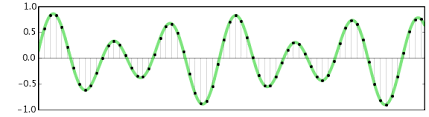
Sound is made up of pressure waves traveling in space, therefore it is represented by a sinusoidal.
Digital Audio

The characteristics of a sound are:

Amplitude: Measured in Hertz (Hz) and determined by the frequency of a sound, the higher the frequency, the louder the sound, the lower it is, the lower the sound.

Intensity: it is measured in decibels (db) and is determined by the power of a sound, the more intense a sound is, the greater its volume.

Duration: It is measured in seconds (s) and dermal how long a sound lasts over time.

Timbre: It is not directly measurable, but it is that sound parameter that allows us to distinguish a trumpet from a drum. It constitutes the trace of a sound and is characterized by harmonics.

digital audio

ANALOGUE AND DIGITAL

There are two different ways of representing sound as electronic, analog and digital information.

Analog audio was the first, in chronological order, to be developed.

The information varies similarly to the information it represents and can (in theory) assume any value.

If we greatly expand the sine wave that describes an analog sound, we would see that it is a continuous line without interruptions.

Instead, digital audio is encoded with a number system, which allows discretization (transition from analog to digital), during this step information is lost, but once the sound is written as a series of numbers (digital information) it is possible to reproduce it. , transmit and modify it without losing anything in terms of quality, which is impossible with analog information.

If we greatly expand the sine wave that represents a digital sound, we would realize that it is not a continuous line as in the previous case, but a series of points very close to each other.

The amount of these points in one second of information will define the “sampling frequency”.

The amount of information that each point can contain is called “bit depth”.

THE CHARACTERISTICS OF DIGITAL SOUND

Sampling rate

Determine the number of samples contained in one second of information.

It is expressed in hertz (Hz) and generally assumes the following values ​​in the musical field: 22050Hz, 44100Hz, 96000Hz.

According to Nyquist’s theorem, each sampling frequency can record and reproduce sounds that have a maximum frequency equal to half of the chosen sampling frequency, this means that a piece sampled at 44Mhz can assume values ​​of up to 22Mhz only

Bit depth

Determine the amount of information contained in each sample.

It is expressed in Bit (bit) and generally assumes the following values ​​in the musical field 8Bit, 16Bit and 24Bit.

Above all, this is the parameter that depends on the quality of a sound.

Transmission rate (bit rate)

It is a characteristic of codecs, that is, of the “machine language” used to describe a sound.

Sets the total amount of information needed to play a second of a sound.

It is expressed in Bit / s.

AUDIO PROCESSING

Whether you’re talking about studio recording or live performances, the audio signal is never sent directly from the microphone to the speakers / recording medium, but is always processed first, through tools that allow you to perform different interventions. in the sound

These instruments can be analog, therefore they have the instrument physically in the studio (which is usually inserted inside a shelf), which must be connected between the microphone and the mixer or between the mixer and the speakers / recording medium.

Or you can simulate them through some plugins for your computer.

It is necessary to have a Daw (Digital Audio Workstation), which is the workspace in which all editing operations are performed. (Ableton, Cubase, Fruitloops, Logic, Reaper).

Within this software it is possible to install smaller ones, called VST (Virtual Studio Technology) that simulate the circuits of the studio equipment, emulating the effect.

(There are also other proprietary plugins with extensions other than the classic VST like .component or .au).

Some tools are essential and are used in all audio recordings, others are used only in particular situations or to obtain / avoid certain effects.

The main ones are:

Equalizer, is used to emphasize or attenuate some frequencies, this way you get a cleaner sound and a less “mixed” mix where all the instruments occupy only the correct frequencies, without overlapping.

The compressor, as the name suggests, serves to compress the dynamic range, so that the sound is more consistent and less dispersive.

Amp, wavering of different kinds, is used to increase the intensity of a sound.

Limiter works in a similar way to the compressor, but instead of compressing all frequencies, it attenuates those that exceed a predetermined threshold (threshold), avoids entering faults.

Reverb adds a slight reverb that makes a sound recorded in a soundproof studio much more natural than it would be too “dry”.

Filters (high / low cut) allow you to cut some useless and sumptuous frequencies too low or too high. (They are just 1 band parametric equalizers).

Digital audio formats on the network

Digital audio formats on the network:

WAV: Waveform files (or simply wave) are the most common sound formats on Windows platforms. WAV files can also be played on Mac and other systems with player software.

MPEG (MP3): The Motion Pictures Experts Group (MPEG) format is a standard format with significant compression capability. MPEG level 3 or MP3 files are frequently used for web music distribution. However, due to their size, MPEG files must be downloaded completely before playing them.

RealAudio (.rm): Real Audio is the technology that currently predominates on the Web. You need a proprietary player, but the basic versions of the player are available for free.
MIDI: The Musical Instrument Digital Interface format is not a digital audio format. It represents notes and other information so that music can be synthesized. MIDI has good support and its files are very small, but it is only useful for certain applications because of the quality of its sound when played on PC hardware.

AU: The u-law format is one of the oldest sound formats on the Internet. Players are available for almost all platforms.

RMF: The Rich Music Format supported by Beatnik (www.beatnik.com) is a high quality audio format, primarily for “download-and-play”, which is becoming increasingly popular.

AIFF: The Audio Interchange File Format is very common on Macs. It is widely used in multimedia applications, but it is not very common on the Web.

Flac: Free Lossless Audio Codec (FLAC) (Lossless audio compression codec) Ogg project format without loss. The initial file can be completely recomposed with the disadvantage that the file occupies much more space than would be obtained when applying lossy compression or Lossy.

Digital audio on the network:

The digital sound is measured by the sampling frequency, or how many times the sound is digitized over a certain period of time. The sampling frequencies are indicated in kilohertz (kHz), which indicate the number of times the sound is sampled per second. The CD sound quality is obtained with 44.1 kHz, or 44,100 samples per second. For stereo sound, two channels are required, each 8 bits; At 16 bits per sample, this results in 705,600 bits of data on a CD, producing high quality sound, at the request of the end user. In reality, the transmission of this amount of data would occupy almost half the bandwidth of the T1 network. As the average user of the Web does not have this bandwidth, another solution is necessary. One possible solution is to decrease the sampling rate when digital sound is created for sending through the Web. A sampling frequency of 8 kHz, in mono, would produce acceptable results for simple applications, such as language, especially if we consider that the playback hardware generally consists of a combination of a simple sound card and a small speaker. Low quality audio does not require more than 64,000 bits of data per second, but the end user still has to wait to download the sound. Modern users need several seconds to receive, even in the best conditions, a single second of low quality sound, making continuous sound impossible.