H.264 All about H.264


Free Download Mp4Gain
picture

What is the H.264 video encoding format and why is it becoming the industry standard for video compression?

H.264.

The H.264 video compression standard, also known as MPEG-4 Part 10, Advanced Video Coding, MPEG-4 AVC, or AVC video, is a standard for video compression currently among the most widely used formats.

H.264 affects all aspects of our digital life and its popularity continues to grow. For example, we find this codec on HD DVD, HDTV, pay TV or YouTube video. However, H.264 is not only limited to consumer electronics, but has also spread to business.

By 2025, more conventional video distribution solutions using HDBaseT or other proprietary streaming methods are forecast to be replaced by more flexible IP-based systems, given the continued growth in popularity of H.264.
H.264

What is H.264?

H.264 or MPEG-4 AVC (Advanced Video Coding) is a video encoding format that allows you to record and distribute Full HD video and audio. It was developed and maintained by the ITU-T Video Coding Expert Group (VCEG) with the ISO / IEC JTC1 (MPEG) Moving Image Expert Group.

Commonly used for recording, compression and distribution of video content, the H.264 format is a video transmission method that provides high-quality images without taking up bandwidth.

H.264 encoding and decoding

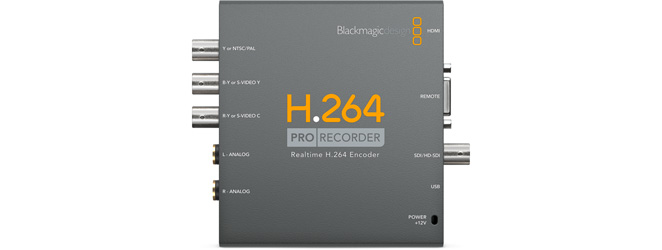
The H.264 works by encoding (converting) HDMI (HD) video and audio signals into an IP transmission that can be transmitted over an IP network. On the other hand, a decoder converts the signals into an uncompressed HDMI format. What makes H.264 so versatile is that it allows you to stream video from one encoder to multiple decoders simultaneously. For example, it is possible to transmit a set of video signals to a screen, a video wall, and a digital signage system at the same time.

H.264 applications: when and where to use?

The H.264 video compression format is perfect for AV distribution to one or more video sources (multicast broadcasts for many displays). Its use may be particularly suitable for long distance signal transmission using existing cables and infrastructure.

The H.264 video compression format is perfect for AV distribution to one or more video sources (multicast broadcasts for many displays). Its use may be particularly suitable for long distance signal transmission using existing cables and infrastructure. For example, these are fast becoming the standard video compression format for the world of video surveillance. Applications can range from external transmissions (OB vans), energy sector, education, recording, transport drones for environmental monitoring, as well as Video Wall processing, digital signage solutions and video conferencing.


Comparison between H.265 and H.264

H.265, the younger brother of H.264, is a format also known as High Efficiency Video Coding (HEVC) and MPEG-H Part 2. Compared to H.264, H.265 offers duplicate data compression for the same video quality. It was designed to support future resolutions up to 8K UHD (8192×4320) compared to 4K (4092×2160) supporting H.264. Some new devices, such as televisions, are starting to provide a set-top box with built-in hardware to play H.265 content, though the superior quality and reduced bandwidth certainly come at a cost. H.265 encoding and decoding require significantly more processing power than H.264, therefore the cost of H.265 solutions remains decidedly higher.

Comparison between H.264 and MPEG-2

Compared to MPEG-2, H.264 has:

Better remote viewing quality with the same compression bit rate as MPEG-2
30-50% lower bit rate
Use up to 50 percent less bandwidth
H.264 is best suited for transmission oriented technologies
Advantages derived from the use of H.264 encoders and decoders
Higher resolution monitoring and low bandwidth usage.
H.264 was created to provide high-quality full-motion video streaming with lower bandwidth requirements and traditional video standards with less latency, such as MPEG-2. H.264 uses a highly efficient codec that provides high-quality images and uses a minimal amount of bandwidth.
H.264 bit rate is lower than other formats
H.264 has an 80% lower bit rate than JPEG Motion videos. It can be estimated that speed savings


Free Download Mp4Gain
picture


Mp4Gain Main Window
picture


Mp4Gain Features
picture


Free Download Mp4Gain
picture

Mp4gain is an audio converter and video converter at the same time.

Mp4gain is an audio converter and video converter at the same time.

You can even convert video files as audio files. In other words, extract the audio from a video and only deliver the audio in the format of our choice.

audio converter

How to convert the mp4gain It is really very advanced Because at the same time that it can convert all the popular video audio formats together, it can normalize the volume and the loudness of the audio and it can do some other things like allowing us to equalize or modify the Pitch without affecting the speed or vice versa.

picture

Indeed, Norma Life’s function of audio volume affecting the loudness of the audio, which has mp4gain, is the most advanced normalization and that offers better results among all existing normalizers.

Its function is very similar to that of a compressor if one wishes it.
Well you can perfectly mark a peak of volume of which we do not want the music to exceed the Tropic of minimum volume of which we do not want the music to sound below that level.

In this way we will get audio files that, even when they keep the dynamics, will never be excessively loud or excessively silent and the loudness will be very similar in all of them.

There is no other audio converter or video converter that offers such a variety of advanced options and can convert so easily and with such a professional result.

That is why mp4gain is used both in universities and in recording studios or at the users’ homes.

What happens is that it perfectly covers what an audio professional needs and also what a music listener needs. Just be an amateur.

Obviously you can download videos from YouTube or anywhere else and convert them to another format or convert them from YouTube to an mp3.

Because many people think that the Mp4Gain is just a normalizer, forgetting that it is the most powerful audio converter and video converter that exists.

Obviously you can choose the bitrate and samplerate you want and at the same time you can normalize the loudness of a music file and equalize it, for example, all at once.

What does it mean to normalize audio?

We often hear someone normalize an mp3 file or a flac, ogg, aac, etc.
Even with the Mp4Gain we talk about normalizing the audio of video files such as Mp4, AVI, mpeg, etc.

What does normalizes mean?

We could say that it refers to something similar to standardize, in the sense that it maintains a volume standard, that it does not lower the loudness up or down, that it stays within a standard, within given limits.

Music Loudness War

Audio compression

When the music began to digitize, going from analog to digital, it became absolutely necessary to use compressors, which will work as a limiter, to stop the peaks and as an expander or compressor to enhance the valleys of lower loudness.

At the same time, a principle that has to do with the human ear was detected: at higher volume the ear believes that the music is “better heard” and that is where the so-called volume war began.

Audio Loudness and Normalizer

Each time the audio productions registered an increase in loudness.

All of the above caused anyone who listened to various music files, in an order, to notice differences in the sound of these, which was unpleasant and uncomfortable.

And there arises the need to normalize the volume, to obtain a similar loudness without variations in loudness.

Then we will see that a normalizer is a software or hardware that is responsible for maintaining the loudness of all the audio, because it is not only about music, but we also talk about videos, movies, etc. It maintains that constant sound, without fluctuations.

Even modern normalizers, at least the Mp4Gain, do this by separating the audio by bands, thus achieving an enhancement that the audio had lost when being compressed excessively.

Audio compressors are necessary, but their abuse in the last decades, have managed to reduce the quality of the audio and also that the loudness is not the same between one file and another.

The normalizer has become one of the most important accessories in the audio chain, at least at the user level.

People search everywhere how to equalize volume levels, how to improve volume levels, how to match the volume of their audio files … until they finally find a good normalizer that comes to solve the problem, greatly improving the audio quality and ending the problem of uneven loudness.

The best format for YouTube videos

The best format for YouTube videos is Codec. The codec is the part of the software that deals with the encoding and decoding of the information that constitutes the transmission of audio or video. The newer codecs also deal with compression and decompression, and therefore when encoding and decoding signals, they use mathematical algorithms that allow you to save storage space at the expense of quality.

YOUTUBE VIDEO FORMAT

Compression

In video file playback, compression is performed using mathematical functions that reduce the number of frames per second or decrease the resolution of the pixels that make up the image. In audio files, compression is performed by removing the frequencies that are not fully perceptible to the human ear and the number of bits that make up the sound information.

youtube video formats

Container

The best option for the extension is mp4. The frame rate should be the same as that recorded and edited. The most common container formats are MKV or AVI.

Video formats

Youtube uses the HD 1080p streaming format and the MPEG-2 steam supports the DVD format and is saved with a .MPG extension. If you can’t send the video in MPEG-2 format, choose the MPEG-4 format.

MPEG-2
Audio codec: MPEG Layer II and Dolby AC-3
Audio Bit Rate: 128Kbps or higher
MPEG-4
Video codec: H.264
Audio codec: AAC
Audio Bit Rate: 128Kbps or higher
Minimum audiovisual duration
The minimum duration is 33 seconds, excluding black and static images on the video channel, as well as silence and background noise on the audio channel.

Frame rates

Videos must be at the native frame rate without resampling. As for film originals, a 24fps or 25fps progressive master produces the best results. Frame rates are typically set to 24, 25, or 30 frames per second.

It is not advisable to use resampling techniques as they allow the images to vibrate and often result in poor video quality. Examples: upsampling and transfer like “telecine pulldown”.

Dimensions

Videos must use native aspect ratios, and uploaded videos should never include the black bands of “letterbox” and “pillarbox”. The Youtube player uses frames that allow you to watch videos correctly, without cropped or stretched images.

Video resolution

YouTube would like high definition videos.

For videos intended for sale and rental, you must provide a minimum resolution of 1920 x 1080 with an aspect ratio of 16: 9.
For free or advertising content, YouTube does not require a minimum resolution, but recommends a resolution of at least 1280 x 720 for videos with an aspect ratio of 16: 9 and a resolution of at least 640 x 480 for videos with an aspect ratio. 4: 3.
If the videos are of lower quality, they are not visible to the public on YouTube and are used as a reference for Content ID. These videos generally have a “quarter” resolution, which is 320 x 240. However, the videos must have more than 200 lines to produce effective references.

Bitrate

Bit rates depend on the codec. It is the number of bits per unit of time (attention! We are talking about bits and not bytes), generally measured in KiloBits per second. For the same format, the more information per second, the higher the quality or resolution of the film or audio. Videos should be optimized based on frame rate, aspect ratio, and resolution rather than bitrate.

MP3: the digital audio revolution

Perhaps not many people know that in 1992 a silent and unstoppable revolution of digital audio began for mass, until then essentially represented by CD-Audio. This was, in fact, the year that the algorithm underlying the MP3 format was born by the Fraunhofer-Institut für Integrierte Schaltungen (IIS).

Mp3

Part of a European research project called EUREKA, which started in 1987 and ended in 1994, the then-MPEG 1 Layer 3 was one of the most important and mature fruits in the field of psychoacoustic compression algorithms. This family of compression algorithms, whose first studies date back to 1979 by Manfred R. Schroeder, German physicist at AT & T-Bell Labsc, aims to reduce the amount of information capable of describing an audio sequence, from the assumption that the human ear, fortunately for us, is not perfect. The basic idea is to exploit the inability of the man’s auditory system to recognize certain sounds and frequencies, when they are masked by others.

MP3

Audio masking is detected at two levels: frequency and temporal masking. To explain the principle quickly, let’s take an example: in the presence of two tones, depending on their frequency and intensity, our ears will be able to recognize both or only one.

In the latter case, we have a frequency masking, and therefore information related to the least audible tone can be discarded. What happens, however, if the most intense tone is lost? It will happen that the tone that was not noticed before, will now return to the foreground. However, for the hearing system to notice, time will inevitably pass, because the membrane needs to stop vibrating and readjust.

We speak, of course, of times in the order of milliseconds, which are however precious, because the sound that falls within this time will be cut by the compression algorithm and, consequently, will help to reduce the amount of information necessary to describe what is audible.

The first MP3 encoder, called l3enc, was released by the Fraunhofer Society on July 7, 1994, while the MP3 extension was officially born on July 15 of the following year.

Those who lived through this time know that we are talking about years in which ADSL did not exist, hard drives were a few hundred MB in size, and in general, both from the point of view of communications and data storage, the figures they were far from being as generous as they are today. With these limitations in mind, I want to remind you that an uncompressed audio file in PCM WAV format, with a resolution of 44 kHz and 16 bits, stereo, as required by the CD-Audio standard, has a bit rate equal to 1411.2 kbit / s. This means that if you want to rip a song from an audio CD on your hard drive, the occupied space in uncompressed WAV format is approximately 10MB per minute. Today perhaps it would not be a problem to have this space, but in the mid-nineties it was a notable limitation.

The compactness of the MP3 format combined with the more than acceptable quality (a very optimistic estimate is a bit rate of 128 kbit / s to obtain a quality comparable to CD-Audio), made it in a few years the vehicle of transmission par excellence for music. The milestones that contributed to this unstoppable technological success were the launch of the Winamp player software by Nullsoft in 1997, and the arrival on the market just one year after the first portable media players: the MPMan F10 from Eiger Labs and the Rio PMP300 from Diamond. Multimedia.

Finally, it is impossible not to mention the birth of peer-to-peer networks aimed at exchanging MP3 files with Napster, one of the most famous applications in history, both for the innovative service that was made accessible and for the inevitable judicial events that followed and which decreed its closure in 2001.

In the same year, another symbol of the multimedia revolution, the result of the same technological horizon drawn by the MP3 format, appeared on the market: the Apple iPod.
Continuing until today we find, in parallel with the birth of new and more efficient compression formats, increasingly evident examples of the revolution, also social and commercial, that led to the arrival of the MP3 format.

There was a time when playlists were decided exclusively by record companies that were mixed into albums with mediocre songs, greatest hits; Today you can create your favorite playlist, selecting the songs and the order of play without any difficulty.

How to choose the perfect compressor configuration

Compressors and how to use them, explained.

Compression is one of your most powerful mixing tools. It is the essential element behind any good mix.

But for your compressors to work, you must first understand what compression is.

It can seem intimidating to start learning such a broad subject, especially when the controls and how they affect the signal are difficult to understand in relation to the sound.

This article will help you understand what compression does, how to choose the perfect compressor setting, and some common mistakes to avoid.

But before…

What is compression in music?

Compression in music is the process of reducing the dynamic range of a signal. Dynamic range is the difference between the loudest and quietest parts of an audio signal.

audio compression

You must reduce the dynamic range of most audio signals to sound natural to a recording.

For example: imagine a whisper and a scream on the same audio track. If they had the same volume difference as they do in real life, it would be very annoying!

Compressors fix all of this by attenuating the loudest parts of the signal and boosting what is output so that the quieter parts are more noticeable.

Imagine a whisper and a scream on the same audio track. If they had the same volume difference as they do in real life, it would be very annoying!
Using compression
Experienced engineers often talk about how one compressor is more “musical” than another.

It is an important concept. Its dynamics is one of the fundamental aspects for its sound to be unique.

When you use a compressor to change the dynamics, the sound engineer becomes part of the musical performance.

If your compressors work properly, they will positively contribute to performance and improve recordings.

Transients: understanding high energy moments.

To understand compression, you need to know what transients are.

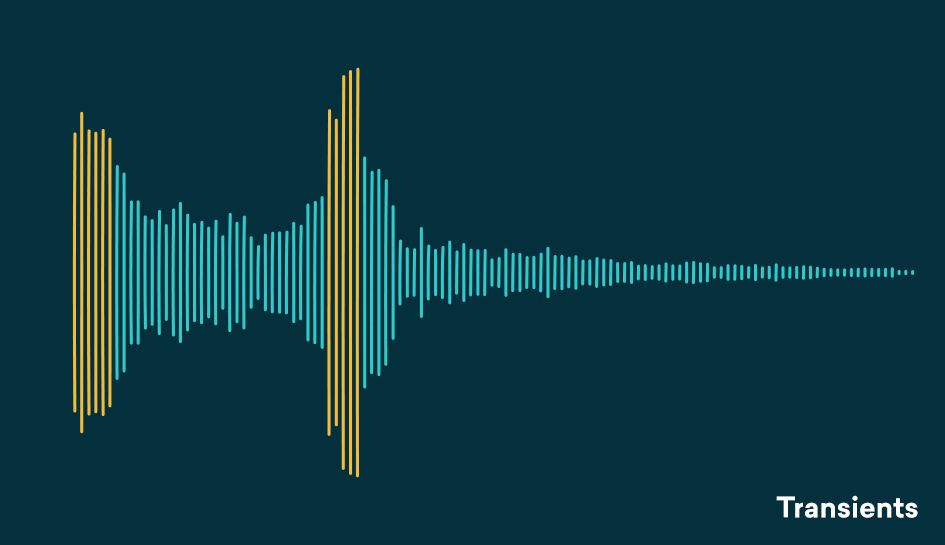
Transients are the first high-energy moments of a certain sound in its waveform. These explosions give our brain a lot of information about the quality of a sound.

Since transients are usually louder than the rest of the waveform, they are greatly influenced by compressors.

For example: think of a nice roaring trap. As soon as the trap enters, there is an initial peak in the waveform that narrows slowly. That initial energy spike is your transient.

transient compresor

Compression helps you find the perfect balance for a track that has good dynamic range with a beautiful, full body.
A waveform with good dynamics will have a lot of transients when some sounds hit and then decay in the composition. Transients and their final decay are what make a waveform similar to a fish bone.

There is even an overly dynamic trail. If your song is transient without a body, its sound will not be of interest to your ear.

The reverse is also true, no dynamics can lead to lifeless, exhausting sound for the human ear and a waveform that looks like a big brick.

Compression helps you find the perfect balance for a track that has good dynamic range with a beautiful, full body.

Limiter

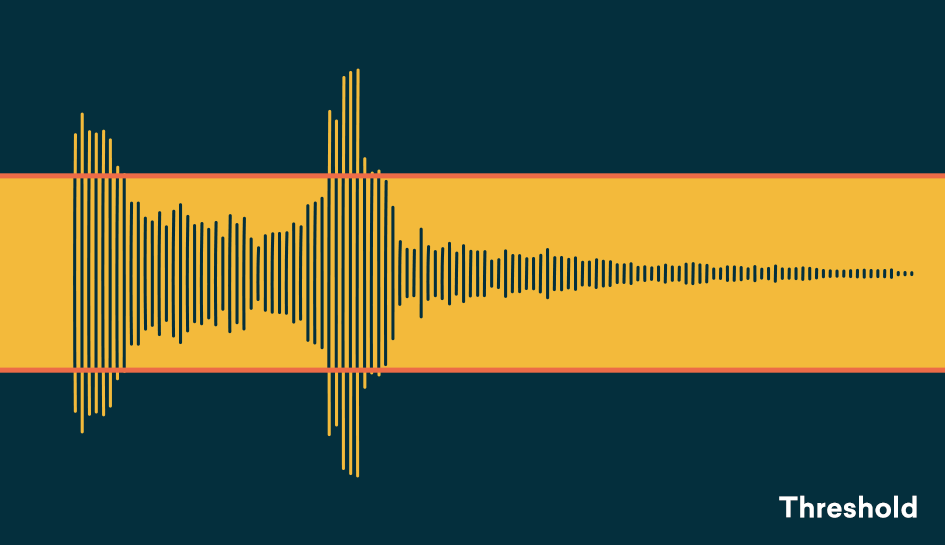
The threshold determines the signal level at which the compressor will start operating. The threshold is measured in dB, therefore any signal above the set threshold will be compressed.

When setting the threshold, decide what part of the signal you want to reduce.
With the threshold low, the compressor gain reduction is applied to a larger portion of the signal. Setting it higher affects only the most aggressive peaks and leaves the rest intact.

To determine what the perfect threshold is, think about what you’re trying to accomplish by compressing the audio and which parts of the signal are the most troublesome.

Are strong signal transients distracting you from the rest of your mix? Or maybe your final decadence is imperceptible in the mix?

A good rule of thumb for compression is “do no harm.”
Set the threshold to hear compressor operation on the part of the signal that needs to be addressed and not lowered.

Setting the perfect threshold will depend on your needs. Play the track and tweak it on the go to find the perfect amount.

Relationship

The ratio determines the amount of gain reduction applied by the compressor when the signal exceeds the threshold. It is called a relationship because it is expressed in comparison with the unaffected signal.

The higher the first number in the report, the greater the gain reduction factor.

For example, we can say that an uncompressed signal would have a 1: 1 ratio

Differences between lossy and lossless compression: advantages and disadvantages

Audio compression reduces the size of an audio file.

Difference Between Lossy Compression and Lossless Compression ...

The physical structure of a CD and data storage are described in the Red Book, written by Sony and Philips in 1980, the year the CD sales began.
The standard capacity for an audio CD is 747 MB, however, the tracks stored on the CD are in .CDA format (they weigh a few bytes because they do not actually contain the track itself, but only references on the duration of the actual audio track containing encoding digital audio file).
A codec is a program that digitally encodes and decodes a signal (usually audio or video) so that it can be stored on a storage medium or retrieved for reading.

Lossless Compression
Codecs also perform compression (and decompression on reading) of the data related to them, in order to reduce the storage space occupied for the benefit of audio / video usability.
To achieve compression, the reduction of the frequencies to be reproduced (in some audio codecs, the frequencies that are not audible to the human ear) or the elimination of redundancies is used.

Firstly, compression, in addition to reducing space for file storage, also obviously increases transfer speed.
The shortcomings of systems of this type are a greater difficulty in reading / writing files and, in general, a decrease in the quality of the audio.

BITRATES

With respect to audio formats, each second is associated with a certain content of information and, therefore, with a certain subsequence of binary digits.
The number of binary digits that make up these subsequences is called the bit rate (binary digits used to store one second of information).
This can be constant throughout the life of the file or vary within it.
The bit rate is expressed in kilobits per second (kbps) and varies from 32 kbps (the minimum) to 320 kbps (the maximum).
Compression, by decreasing the total length of the file, will consequently decrease the average length of the subsequences, that is, it will decrease the average bit rate.
Therefore, the average bit rate in these cases becomes the index of the compression extent.
For example, if the source file had a 256Kbps bitrate and the compressed file had an average 128Kbps bitrate, then we would have reduced it by a factor of 2.
CBR (constant bit rate) The bit rate remains constant in each frame and this means that the encoder will always use the same number of bits to encode each musical passage.

In practice, the more complex passages will have a lower quality than the simple ones, since they will be encoded with an always equal number of bits, while more would be needed for complex passages and less for simple passages.
ABR (Average Bit Rate) is a mode that has a higher throughput than CBR and consists of a kind of “variable” bit rate.
The encoder will encode the regions that need it with more bits and the simplest ones with less, trying to keep the average bit rate set throughout the file.
Finally, VBR (Variable BitRate) is a mode where there is a truly variable bit rate.
By setting a quality index and a maximum and minimum bit rate, the encoder will encode each frame using the most appropriate bit rate (the bit rate increases / decreases according to the “complexity” of the music).

COMPRESSION TYPES

There are basically two types of compression: lossless and lossy algorithms.
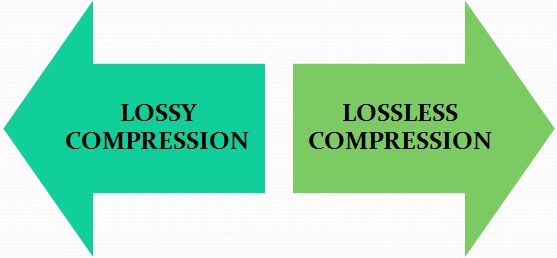
As the name implies, lossless compression retains the original data so you can get an exact copy of it, while lossy compression causes some changes to the original data.
Lossy compression compromises the loss of information and the size of the final file, while a lossless compression must balance the size of the final file with the execution times of the algorithm.

LOSSLESS COMPRESSION

Lossless compression indicates an algorithm that completely preserves, through the various stages of compression / decompression, all the original information in the source file.
The most famous algorithms that use “lossless” techniques are the Huffman encoding and the LZW (Lempel-Ziv-Welch) algorithm used in the compression of GIF files.
The efficiency of these algorithms generally ranges around the compression ratios of the order of 70% maximum, that is, the compressed data will occupy 30% of the original length.

In conclusion, we can say that lossless compression is commonly used for data compression, such as executable applications, text or databases, which must be restored to their original state.

Mp3 Compression, step by step

The MP3 Encoder is that program that analyzes the uncompressed digital file (for example, a Wav file) and transforms it into an MP3 file.

The audio signal is filtered and divided into 576 areas (called subbands) through a process that uses DCT (Discrete Cosine Transformation) and manages to eliminate all unnecessary frequencies. The human ear, as already stated, perceives sounds only beyond a certain threshold so that all the audio below is not encoded.

Auditory Perception

At this point, the resulting signal passes through the psychoacoustic model in which the masking thresholds of which we have spoken previously are identified. This is done using the discrete Fourier transform (DFT, Discrete Fourier Transform).

During the masking of the 576 subbands, the frequencies to be masked are determined and therefore can be removed.

Auditory perception

After masking, the defined Stereo Ensemble process is applied. Below a certain frequency, the ear cannot perceive the spatial position of sounds, so they can be recorded on a single channel (therefore in mono format) with significant space savings.

Once the file is ready, the data is further analyzed and compressed using Hufmann encoding which allows for a data reduction (without loss of information) of approximately 20%.

At this point, after all the data has been collected, the encoder proceeds to create the bit stream that will form the final MP3 file.

Compression criteria

To perform such compression, the MP3 format is based on a simple concept: filter a digital musical piece and eliminate all unnecessary information, thus reducing space.

The human ear is an almost perfect instrument but it also has its limits. The human ear pass band extends from 20 Hz to 20,000 Hz, but is much more sensitive to those in the mid-range, 700 to 6,000 Hz, where most of the information is concentrated.
The study of auditory perception is a matter of psychoacoustics that mainly analyzes 2 factors that are later used in MP3 encoding:

Auditory perception

In the area of ​​sounds, only a few can be heard by the human ear. The following figure shows these areas that represent the different sound frequencies. Only those in the white area are audible from our ear.

Masking

Masking is nothing more than the superposition of weak sounds with loud sounds. It almost always happens that the sounds of different instruments overlap each other. In cases where the loudest sound completely covers the lowest, there is a so-called masking. In MP3 files, masking allows you to remove the information from the weakest sounds, which, however, because they are not perceived by the ear, are virtually irrelevant.