What is the future of the video compression standard? Differences between H.264 and H.265


Free Download Mp4Gain
picture

Recordings available on the Internet and real-time broadcasts have become two of the main sources of communication today. H.264 is one of the video compression formats that enables this visual and digital revolution. Just analyze the amount of time you spend in front of broadcast channels or portals. In 2017, the average number of hours observed daily worldwide is one billion. In 2016, 500 million hours were counted. In just one year, the results doubled.
H.265 vs H.264

If the H.264 video compression format is capable of supporting and offering quality to so many people every day of the year, the same is true for surveillance and monitoring technologies. Video compression is as important for YouTube as it is for an IP CCTV system. Basically, video compression is done using technologies that allow captured data to be intelligently transmitted. To do this, they reduce the amount of information that is similar and that would be just an additional burden on the files.

H265 vs H264

The Importance of Standards in Video Compression

Video compression uses techniques that will make files less burdensome, without interfering with the quality and, above all, the accuracy of the information. Precisely because it prioritizes the maintenance of visual characteristics, it is so essential to know what technologies are used. Choosing one format or another can directly affect the sharpness and loading of images. Since you don’t need to keep all the data, the suggestion is to use an industry standard. Until then, H.264, also called advanced video encoding (AVC), is the predominant one.

H.264 is considered one of the most adaptable and high-level formats. However, there is already what would be its evolution, H.265 or High Efficiency Video Coding (HEVC). Both are standardized and approved by the responsible institutions. That is, they are two official standards. Before talking about the benefits that H.265 adds to video compression, it’s important to note that both are standards that will make partners and vendors maintain identical prerequisites. What guarantees compatibility and more options for the clients.

H.264: what are the advantages of video compression?

Video compression is based on a technology that analyzes images captured within frames. It is like looking at a photo and identifying what data is relevant and what is not. For example, if there are an equal number of frames that are not noticeable, they are discarded. For that to happen, there is a forecast that uses a “comparison basis”. The deleted image is opposed to what serves as a parameter and, with that, one perceives what is altered. Only changes in relation to the base frame remain. Those with the same values ​​are not considered in the encoding, which reduces the size and number of pixels.

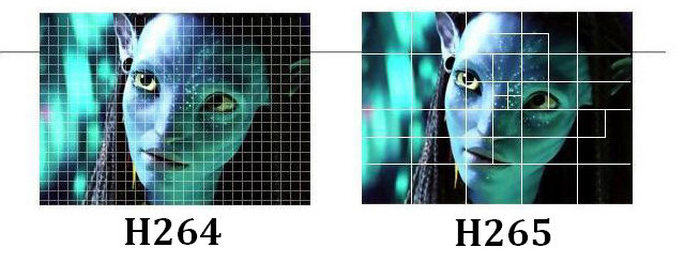
When using macroblock comparison, where each frame is decomposed and compared until it finds compatibility or modifications. Therefore, the similar ones are eliminated, or rather, the frame of reference is maintained. In H.264, macroblocks are used, with the division of images and, consequently, their segmentation into more blocks. Replays are considered redundancies and pixels do not count within video compression. What has changed with H.265?

H.265: what is the main change?

H.265 has a potential for video compression that significantly outperforms H.264, using less bandwidth and maintaining quality delivery. For this reason, you can stream higher-level content with the same amount of bandwidth that the other uses to do the same with more compact data.

There has been an evolution in compression, streaming and support capabilities, although H.265 uses the same video compression technique explained above. Macroblocks that make comparisons between divided frames of the same frame with a standard reference. So why is such a relevant technological advance?

The key issue for H.265 is the strategic use of macroblocks. There is also compatibility between similar pixels between frames, but with greater flexibility. There is no fixed area, it all depends on the type of image and your need. Greater attention to detail is paid only when necessary, making video compression even higher and more effective by reducing pixels and bytes.

In H.264, macroblocks do not exceed a 16-pixel standard, which are not best suited for certain situations and images. In H.265, there is an increase in the size of the blocks up to 64 pixels.


Free Download Mp4Gain
picture


Mp4Gain Main Window
picture


Mp4Gain Features
picture


Free Download Mp4Gain
picture

What are the differences between AVI, RMVB, MKV and MP4?

Unlike what happens with audio files, the extension of video files says little about the encodings used. Each of them, from RMVB for extremely small files to MKV for extreme quality, has different types of encoding for audio, video and all the other necessary components of movies, so they are known as containers.

MP4

Container? Isn’t that a video codec? To understand them, the best example is that of a backpack. To attend a class, we have to bring a notebook, a case, books and other essentials for good use. Within a container we have a similar situation, with video encoding, audio encoding, subtitles and additional information on frame rate, audio channels, etc.

MKV

In our example, if we have the best notebook in the world with a bad pencil and a poorly written book, our experience will be drastically reduced, just like video containers. AVI, RMVB, MKV, each of them has different “levels” of quality depending on the coding of each of the components. Below is the list of currently used video encodings:

RMVB (Real Media Variable Bitrate, extension. Rmvb): Developed by Real Networks for RealPlayer, it has a variable bit rate. Although it is capable of generating a smaller file than the original RealMedia, the quality is the same, but it is far from good. Recommended for users who have a low-speed Internet connection or a data franchise.
RMVB

AVI (Audio Video Interleave, extension. Avi): container developed by Microsoft and currently supported by a variety of devices, from DVD players to smartphones. It uses DivX or XviD (High Loss Compression) encoding for video and generally MP3 for audio, which provides a reasonable video experience, but does not have native subtitle support.
Avi

MP4 (MPEG-4 part 14, extension. Mp4): In many ways, very similar to AVI, MP4 has the advantage of having native subtitle support (i.e. no subtitles in separate files), Xvid, DivX and powerful H. 264 for videos and ACC for audio (learn more about ACC). Users who want a balance between quality and compression generally prefer MP4, but it’s still not popular near AVI.
MP4

MKV(. Matroska Video, MKV Extension. MKV., Mks): Relatively new open source format preferred by users who want their movies to be of the highest quality possible regardless of download size. It is possible to encode all the elements in almost any format, from the frame rate per second and the quality of each image to the use of different encoders for video (DivX, XviD, H.264) and audio (ACC, DTS, Dolby Digital ), where Full HD (1080p) movies are rarely less than 10GB and reach up to almost 70GB in Remux quality.

These are not all video formats. MOV (Apple), WMV (Windows) and VOB (used on DVD) were not mentioned as they did not bring significant differences. The performance of each of them depends more on the compression rate itself than on the format itself, and machines that have hardware decoding can handle any format without major problems.

What is the bit rate and how does it influence the quality of the videos?

Amid the pandemic we are facing and authorities increasingly asking people to stay home, the use of the Internet, especially broadcast services, is skyrocketing. Amazon Prime Video, Netflix, YouTube, Twitch and others have already announced measures to try to ensure everyone accesses their videos without gagging, but there are differences between the measures on some platforms.

bitrate

YouTube reduces standard video quality to SD worldwide

Netflix, for example, opted for a reduction in the data rate or bit rate without lowering the resolution of the video itself. YouTube is already one of the platforms that now forces you to load at a lower resolution while maintaining the data rate, that is, the final quality, and allows you to increase the image size manually by the user.

bitrate

Oops wait! So does reducing resolution not reduce the quality and quantity of data to transfer? Not quite. Resolution is not the only thing that defines the quality of a video image, or even a JPG image, audio and the like, there are a number of factors. Among them, in addition to the image size, the bit rate that will be transferred from a server to a device, for example.

Data rate versus bandwidth

Reducing the amount of data sent to each user can help guarantee the service for everyone (Photo: Pixabay)
To understand metering on Netflix, you first need to understand the difference between the data rate of a media file and the bandwidth of the connection. Both can be called bitrate and throughput, and whether those terms are correct or not matters little. What matters is that it confuses, so it is necessary to clarify it.

The data rate of a media file refers to the maximum size of a second of the video. A video, as you may already know, is divided into frames, the most common speed is 30 fps (30 frames per second). Each table has its own set of information, and the total of 30 (or 24, 60, 120, and the like) forms the bitrate.

The bandwidth of the connection is the speed of your internet. Brazilian 4G, for example, has an average of 20 Mbps. Some fixed broadband operators offer packages of 100 Mbps, 200 Mbps or even more. This rate is the maximum amount of data that your Internet can receive from a central server.

Data volume

YouTube chose to lower the standard resolution without decreasing the volume of data (Photo: Pixabay)
The bit rate of a media file, therefore, is the amount of data it has each second. Netflix reduced this rate to decrease the amount of information that its servers need to send to each user connected to the platform. This reduces the quality of the image because it is less data, which can slightly reduce sharpness and cause noise, which some call “pixelization”, especially in very dark areas of the frame.

The resolution is not the lowest: it is that this image has less information. When loaded onto a large screen such as a TV, details are missing to display. On smaller screens, you will hardly notice the difference.

Facebook and Instagram will reduce the quality of video in Brazil
Globoplay will reduce video quality to meet demand
In short, Netflix’s decision ensures resolution, keeping sharpness a little closer than the user is used to, but reducing the amount of data transferred, resulting in images with a lower level of detail and sometimes , even more noise, even.

By sending less information to each user, Netflix, as well as Facebook, Globoplay and other services with similar measures, the platform avoids what we call server bottlenecks. This could cause suffocation and connection failures. YouTube’s measure also alleviates traffic because not everyone will manually increase the resolution, which in itself already reduces the amount of information to be transferred.

The 7 most common video file formats explained

To better understand its video file formats, let’s take a look at some of the most popular types on the market and their specific features.

video formats


1. AVI or WMV (Microsoft)

AVI video file formats are used to completely dominate the video market. However, the popularity of the format has declined recently, AVI videos are still common on the Internet. Microsoft replaced AVI with the WMV video file format in the mid-2000s.

Video Formats

The original WMV was designed exclusively for streaming applications. However, alternative WMV formats, reminiscent of WMV Screen and WMV Image, have been released for use with specialized video content.

Both AVI and WMV produce less compression than other competing formats, which means they provide better video quality. In contrast, they are large files.

Other benefits of AVI and WMV include its wide compatibility with PC and Mac operating systems. Among the disadvantages we can mention the impossibility of manually selecting the proportions of the rates, which can be quite bad for some users.

2. MOV and QT (Quicktime formats)

Like Microsoft’s AVI and WMV formats, Apple’s MOV and QT formats are compatible with both Apple and Microsoft platforms. The MOV has been specifically designed for feature films. Both MOV and QT are famous for supporting a wide variety of video content. These two video extensions are usually kept together.

Both formats use a multimedia container file, which is separated into a range of tracks. Users can dedicate all tracks to storing specific information (video, audio, effects and / or text). Another important advantage is that MOV and QT formats are also compatible with a large selection of codecs.

3. MKV

Derived from the Russian word matroska (doll), MKV is an extremely popular video file format for many reasons. First, it is open source. Second, it offers a multitude of additional features. And last but not least, it is compatible with almost all codecs.

The main disadvantage of the MKV format is that it is not compatible with certain programs and devices. But, if you are watching or distributing your video files in VLC, XBMC, PotPlayer or other MKV compatible video player, the high quality and versatility of this format make it an ideal choice.

4. MP4

Popularized by Apple on the iTunes Store, the MP4 is probably the closest to a universal standard. It not only stores video and audio files, but also text and still images. With a small file size and good quality, this format allows you to add interactive video and multimedia components.

Although this format offers less definition and fewer options than the MKV format, it is widely compatible with a range of the most prominent digital devices on the market.

5. AVCHD (advanced high definition video encoding)

The result of a collaboration between Panasonic and Sony, this video file format was expressly designed for digital video cameras. AVCHD takes advantage of H.264 / MPEG-4 video compression technology, which can compress video information into extraordinarily small sizes.

Perfect for people who record using their own video equipment, this format allows you to store hours of recording, using very little space, without sacrificing quality considerably. AVCHD is a standard definition and high definition variations. The latest edition of this format (AVCHD 2.0) supports 3D video.

6. FLV and SWF (Flash formats)

Flash Video has been around for a long time and is divided into two different formats. The first format (FLV) is very popular for streaming video on sites like YouTube and Google Video. FLV files are generally small and can be downloaded quickly.

SWF is the second dominant Flash format for displaying animated vector graphics online (an acronym for Shockwave Flash). It can be viewed as a Flash animation file.

Although Flash formats are famous for involving streaming video on the web, they are not compatible with iOS devices such as iPhones and iPads, which can cause major problems for Apple users.

7. RealVideo

Developed specifically for the Internet, this video format was developed by RealNetworks. The most striking feature of this format is that it works perfectly on low-bandwidth transmissions, but the video quality is compromised.

To view files in this format, you will need to install additional software. Therefore, when you decide to save and share your videos in a specific file format, choose the formats that can be played on multiple platforms.

Placebo effect? Can you distinguish an mp3 320 kbs vs a FLAC?

Studies have shown that most people can NOT distinguish an mp3 at 323 kbs (That is, with the best quality) from a FLAC file.

MP3 vs FLAC

We all know that in theory an mp3 is a format that discards information to achieve a small size; or, indeed, due to this ability to take up little space on the disk, but sounding very similar to the original wav was what propelled fame to mp3.

The Mp3 is dead.

Dozens of times it has been written about the undeniable advantages of the formats that do not lose information (looseless), it could be thought that people would turn their backs on the mp3.

MP3 vs FLAC

Some have warned that it is not so likely that this will happen, since most of the audio players (for example, those that come from the factory with the cars) play mp3s but not Flac.

Placebo effect?

But others have pointed out that untrained human hatred CANNOT distinguish an mp3 recorded at its highest quality from the FLAC.
For which to show yourself as a lover of FLAC and a fanatic defender of that format, it is more a snobbery full of blah, blah blah and technicalities that ignore that the human ear is not a robot and that in reality most people they cannot distinguish between one and the other.

And we combine the convenience of using mp3s because the devices are designed for mp3 and not for FLAC, together with the fact that in reality most people cannot distinguish one from the other … this should explain that that the mp3 is dead, is more a product of fanaticism than realism.

Also, they forget another problem.

When digital music is recorded it requires using a compressor … which did not happen with music recorded on tape, that is, vinyl.

That is why there is another faction that does not proclaim and sing songs in favor of FLAC but rather the return to vinyl (forgetting all the advantages and comforts of digitization).

In other words, all these discussions seem more like a mixture of snobbery and puritanism than something realistic.

What studies have shown

What we cannot ignore is that undoubtedly 99% of people (including many experts, musicians, etc. who talk hours about bitdepth, bitrate, etc.) can NOT distinguish a WAV, from a FLAC, from an mp3 recorded at qualities superior to 160 kbs.

Personally, we celebrate that all these formats exist and that we are coming to the time where every person can use and love the format of their choice and even defenestrate and even hate other formats and discuss long hours about their technical knowledge.

But yes, it seems that it is basically a placebo effect.

What is the audio bit depth?

Understand what bit depth is, how it works, and how this feature will affect the quality of music during auditions;

Currently, many of those who are looking for quality audio or quality music keep mentioning “Hi-Res”, FLAC 24-bit, and MQA (Master Quality Audio) files. This is a growing trend in high-end smartphones that are trying to offer higher audio quality both in their DAC and in support of advanced Bluetooth audio codecs like LDAC, developed by Sony. Additionally, there are music streaming services that promise lossless audio quality, like Tidal.

BitDepth

The promise made by audio equipment manufacturers, developers of audio streaming and music streaming formats, is simple: superior audio quality due to the increased amount of data, also known as bit depth or English bit depth . There are 24 bits of 1 and 0 versus 16 bits on the CD. Of course, these high-resolution files are more expensive due to their quality, but the more bits, the better the result will be when listening to music, right?

Bitdepth

Low resolution audio is usually displayed using a jagged wave graph (with ladders). Source: soundguys
Well, the answer to the previous question is: not necessarily. The argument for a value in increasing bit depth is not based on something scientific, but on the distortion of what is actually happening and the exploitation of consumer ignorance about the media they are consuming. That is, it is a fact that stores selling 24-bit tracks reap far more benefits than a real improvement in promised sound quality.

Bit depth and sound quality.

The greatest example of companies selling 24-bit audio is the demonstration of a jagged sine wave, like stairs. When we look at a file that has a resolution of 16 bits, we see an irregular line, but when we look at the same song in 24 bits, it seems to be a practically smooth line, with better definition. It is a basic visual illustration, but depending on the person’s knowledge of the subject, he can be easily fooled.

Why use 24-bit or more audio files?

The utility of using a high-level bit depth applies to studios, because with each filter and conversion that is applied, the background noise increases. This increase in noise occurs due to the insertion of a new wave, as explained above. In other words, when using a higher bit depth level, the sound engineer prevents the original audio from generating noise by manipulating it for mixing and mastering.

However, remember that this will be more useful for audio production and not for the listener, as explained above.

conclusion
What will make the difference will be the balance between the sounds made in the mastering and not the bit depth itself, since the 16 bits of the CD are already more than enough for music listeners.

Audio quality

MP3 generation: today they are young. The most famous digital music format of all time is in people’s mouths and ears, targeted by piracy, and on portable players around the world.

Bitrate

Meanwhile, vinyls have become relics in used bookstores and K7 tapes are left behind in the closet. In fact, it’s not surprising that many of today’s youngsters have never had the pleasure of listening to a good vinyl record on an old record player.

Digital music formats are everywhere and make the soundtrack of every user’s life. But then, do you know how to take advantage of available audio technologies or any MP3 file, regardless of quality, is a good size for your ear?

Bitrate

No matter your musical style, the audio quality in digital music is of great importance. Each format, each size, each file has a different quality and this directly influences how a song is heard.

Find any music CD in your drawer and put it to play on your radio. Now choose an MP3 and listen to it on your computer speakers. Did you notice the difference in noise and compression?

Quality, format and compression.

To transfer songs from an audio CD to your computer, there may be no loss of quality to your music? Quality if you use the WAV (Windows standard) or AIFF (Mac standard) format. The quality is perfect, but the size can give you a big headache: for every minute of music in WAV format, an average of 10 MB is taken up on the hard drive.

So to take up less space, use an audio file compressor like Free MP3 Converter and end up with a low quality, compressed size audio file. How does MP3 get so much smaller? The format basically removes all audio tracks that, in theory, are not perceived by the human ear, compressing instruments and layers of music.

It is as if a steamroller passes over an orchestra: the music sounds like a block of noise, which can cause hearing fatigue. The big problem is that people are so used to this mass of instruments and voice that music is at serious risk of degradation.

Bit rate (bit rate)

An encoded or decoded file is never exactly the same as the original file, as much of the information deemed superfluous is removed. In general, the lower the compression ratio, the better the quality of the file.

The term used to speak of compression is Bitrate, it consists of the average number of bits that in one second of the data will be compressed. The unit used is KBPS or 1000 BITS per second. Check the audio quality below based on the bit rate used.

Vinyl, CD or files: Who wins this historic clash?

We analyzed the difference and the peculiarities of both CDs and vinyl, reaching a controversial conclusion: vinyl is great, but it is not better than CD.

vinyl vs digital

The return of vinyl has been celebrated around the world, it is a large format, nostalgic, but when it comes to sound quality, there are many steps behind the CD. There is no way to compare something analog with something digital. What can be discussed is the quality of the artists of today, in relation to the artists of the past.

If Led Zeppelin recorded his self-titled album today, digitally, it would be even better when it comes to sound quality. Just as if Justin Bieber recorded “Believe” in the past, similarly, it would be even worse.

In addition to vinyl and CDs, other music distribution formats are also in vogue, such as MP3.

Advantages and disadvantages of vinyl:

vinyl

On vinyl, sound waves are analog, as is vinyl recording. This means that there is not much loss between recording and playback. Many claim that vinyl sound has more body and shows more detail. Since it is an analog process, the EQ naturally has more bass, making it more noticeable.

However, this does not mean that the sound is of higher quality. If the CD has a sample rate of 44 KHz at 16 bits, the vinyl would have 16 KHz at 8 bits.

Vinyl is physically limited in some way. First, in terms of “dynamic range”, which in the case of vinyl is extremely limited.

(Note: Dynamic Range is the difference between the highest note and the softest note.)

And secondly, in terms of “frequency”, because the quality of vinyl’s frequency is not universal, it is variable.

The sound of vinyl sounds better on songs with lower notes, because if the notes of the songs are too high, the needle has difficulty following / playing, which contributes to significant distortions in the sound of the songs. For example, try listening to the letters, whose consonants (s, z, etc.) are sung sharply, the distortion will be clear.

Because they have more groove and clearer, cleaner bass, the vinyl is a favorite for music djs.

Advantages and disadvantages of the CD:

CDs depend on sampling an analog signal, as well as having some limitations regarding the “frequency” element. While on vinyl, encoding is done in an audio waveform, on CD, this audio sampling encoding must be captured in different ways and points, unlike vinyl, which captures it through a single point, for what cd will never be able to present the rhythm that vinyl presents, and this is one of the few advantages of analog over digital.

On the other hand, the CD has a sufficient sampling volume to sound clearer and more defined to the human ear.

The sampling rate of CDs is 44.1, which means that CD recordings can be captured up to 44,100 times per second and can capture frequencies of 20KHZ.

And this frequency is the maximum that the human ear can hear, the human ear is clear, because in the case of dogs, for example, it is still a low frequency, because they have a hearing 4 times higher than ours, and probably even listen to our breathing clearly.
.

Recordings above 21 kHz, only for dogs. This does not mean that the 20 Khz reached by the cd is worthy of an outstanding frequency, no, it is not that the frequency of the cd is clearer and clearer to the human ear.

Also, in the recording studio there is no microphone to capture more than 20 Khz.

MP3:

digital audio

It all depends on your compaction rate. MP3, like CDs and DVDs, captures sound waves and converts them to files. It turns out that in digital recording it is not possible to follow the “curves” of sound waves, so they are recorded with a certain interval, defined by compression. The higher the compression, the greater the range and the less nuances the recording captures.

See the figure above. The black line is the original analog sound. The blue line represents a recording with high compression, the red line with a smaller one. Note that blue does not follow sound curves as much as red.

Compaction eliminates dynamic bands that, in theory, the human ear does not hear, so the tips flatten out. In other words, an uncompressed digital file, such as WAV, will show all these curves, that is, the same quality as the CD. Today there are formats like FLAC, which have compression, but little. They are still bigger than an MP3, but much smaller than a WAV.

Therefore, it can be concluded that, in terms of sound quality, CD is really better than vinyl and MP3.

But what do people prefer?

If we consider the growth in sales of digital copies, as well as the practicality that this brings, people tend to prefer digital copies, be it MP3 or WAV.

But this is an unfair comparison, since you can’t put a CD or vinyl on the iPod and listen in the middle of the street. Today’s people are more dynamic, they live in a world where haste and practicality go together, and in this world, for them, it is important to have music available in their pocket.

It’s not for nothing that people listen to music, just listen. And the difference between listening and listening is clear. Listening is when you listen to music doing other things in parallel, and listening is paying attention only to the album you are listening to.

The music is trivialized, people listen to a song by a certain artist, and if they don’t like it, they are already making a negative judgment about the artist, without even listening to his work, all due to the rush and practicality of being able to hear everything he wants. . at any time through the internet.

And that is exactly why vinyl and CDs cannot compete with digital copying, in terms of the particular taste of most people.

Sound engineers Geringer and Dunnigan presented recordings made in analog (vinyl) and digitally designed (cd) recordings to a group of record label producers, without telling them which recordings were digital and which were analog.

The result was a massacre, since the vast majority of producers preferred digital recording, without knowing if they were voting for digital or analog recordings. Upon listening to the recordings, the producers reported that the digital recordings were of an incomparable quality infinitely superior to the quality of the analog recordings they had previously listened to.

According to them, digital recording sounded better in all aspects: treble, bass, sound quality, frequency, etc.

If the quality of the CD is higher and the MP3 allows more practicality, why do people still listen to vinyl?

Because vinyl, in addition to providing a retro, nostalgic air, is the only device that people, when they stop to listen, really listen carefully. In addition, the vinyl preserves the original recording, that is, if someone coughed or sneezed in the middle of a recording, they will continue in the recording, giving the format a visceral air and better recording than the artist can do, without resources. computerized.

When you listen to an analog recording, you hear it as it was recorded, and this is the charm of vinyl. On the contrary, in the CD, in very rare cases, the final versions are not affected by the sound editing programs.

There are countless artists today who only achieve fame and success because they record digitally. Many of today’s artists would not be able to record analogue as they do not have enough talent to record on tape without changing the recording later.

Digital recording is more accurate, but this is not the only point to consider.

To conclude, it is important to note that each format has its charms. MP3 offers greater practicality, CD has higher sound quality, while vinyl has a better rhythm.

But none of this works if your speaker or headphones aren’t good enough to play any of the 3 formats.

MP3 history

It all starts in the 70s, in Germany, when a German teacher and his students think of a way to encode music. Dieter Seitzer’s team at the University of Nuremberg manages to develop the first processor capable of compressing audio.

mp3

In the 1980s, an agreement was signed between the German university and the Fraunhofer Institute. With more people, the group begins to try to improve the audio encoding algorithms. At the end of the decade, the student Karlheinz Brandenburg presented the OCF algorithm (“Optimal coding in the frequency domain”) in his doctoral thesis.

In 1991, the OCF algorithm was refined and adopted by the MPEG group. MP3 was born, but still without the name we know today.

mp3 quality

Only in 1995 was the name MP3 suggested, voted and unanimously approved. Files encoded in MPEG-1 Layer 3 must have the extension “.mp3”. Until now, the codec was only handled by its developers.

At the time, no one knew how successful the format would be, as everyone was excited about the LP, K7, and CD compilation.

But MP3 began to spread like a tsunami through MP3 players, sharing recordable CDs with Internet users and later with recordable DVDs, flash drives, smartphones, and external hard drives.

With the increase in Internet speed and the size of the storage capacity of devices, millions of people can download complete albums in seconds and save them in different places.

Advantages and disadvantages of MP3

ADVANTAGES :

The listener can equalize, increase / decrease the volume, pause / stop and fast forward / rewind the MP3 as if they were listening to a CD.
It requires little RAM to function.
Due to its small size, it can be transported, shared, stored and run in different ways and on different devices.
You can download thousands of songs on the Internet, both free and paid.
It has superior quality to an old radio or K7 transmission.
On the Internet, obtaining it is immediate, unlike physical means, which can wait days to arrive.
It is possible to make a playlist with hundreds of songs and play them without having to change the media / media.
Harms less the environment.
Improvements are possible through audio editing software.
It has metadata with information about artist, album, genre, etc.

DISADVANTAGES:

Conversion may result in low quality, depending on the quality chosen.
An MP3 downloaded from the Internet may have some effects, voices and other changes made to the original audio.
Facilitates piracy, both virtual and physical, damaging copyright.
It has a loss of quality, although minimal, in relation to the CD.
It is intangible, it cannot be touched or smelled.
There is no sense of nostalgia.
Some MP3s have incorrect or missing metadata about the song.

WHAT IS THE NORMAL BITS SPEED ON AN MP3?

BIT RATE

The bit rate of an MP3 indicates the density of the audio information contained in the file. Therefore, every second on a 192 kbps MP3 contains 192 kilobits (24 bytes) of data. The higher the bit rate, the more information the MP3 contains; The more information it contains, the quality will be closer to the original audio recording. The bit rate also determines the size of the MP3 file: a four-minute song encoded at 128 kbps takes up just over 3.5 MB, while the same song encoded at 320 kbps requires more than 9 MB of space.

Bitrate

CHOOSE A BIT RATE

When converting an audio file or ripping the CD collection to MP3, you must specify the bit rate you want the encoder to use. Choose a bit rate based on the type of audio you are encoding and the desired purpose. If you are converting a conference or other piece of vocal audio, a 128 kbps bit rate is more than enough. If you encode MP3 files for use with a portable media player, a 192 kbp bitrate generally provides a good balance between audio quality and file size. If you are converting your CD collection to MP3 for archiving, encode your files with 320kbps bit rate.

Mp3 Bitrate

VARIABLE BIT SPEED

Encoding with a variable bit rate changes the MP3 bit rate based on the type of data present at a certain point in the audio. For example, a variable bit rate encoder can encode dense information from an MP3 at 320 kbps; however, when the audio contains a mute section, the encoder reduces the bit rate to 32 kbps. If the bit rate of an MP3 has an unusual number (for example 204 kbps), this indicates that the MP3 creator has encoded it with a variable bit rate.

BITS SPEED CONVERSION

Although most MP3 encoding and conversion programs can modify an MP3 with a different bit rate, this is not a good idea in general. Converting an MP3 to a higher bit rate does not add audio information to the file, so the sound quality does not increase. Converting an MP3 to a lower bit rate reduces the file size, but it could also have audio defects as the encoder is compressing an already compressed file. If you need an MP3 file to have a different bit rate, re-encode an MP3 from the original audio CD or WAV file.