Why isn’t “high resolution audio” worth promising higher quality than CD?


Free Download Mp4Gain
picture

In recent years, Neil Young has been the most outspoken advocate of “high resolution audio” or HRA. These are huge audio files that in theory sound much better than any other digital file. To put this sound in everyone’s hands and ears, he created the PonoPlayer, a portable device that promises the highest fidelity.

He is not alone. Last week at CES, Sony announced a series of new products with high-resolution audio. The main one: an absurdly expensive $ 1,200 Walkman, with hardware that supposedly optimizes the playback of songs recorded on it.

PonoPlayer

At the most basic level, the desire for high-resolution audio is based on reality. We sacrifice audio quality for convenience by adopting digital formats like MP3 and lossy encoding from streaming services like Spotify. A music lover should be concerned with improving audio quality using better files.

This is fair! But from there, the arguments for high-resolution audio crumble.

There are no scientific bases

Although the term “high-resolution audio” is freely used, it generally refers to music that has been digitally encoded at a high sampling rate and bit depth. Specifically, we are talking about higher rates than the CD-quality digital standard, adopted for decades.

Below is a Pono chart that describes various levels of audio quality. At the bottom, we have lower quality files for streaming; in between, we have the CD-quality 44.1 kHz / 16-bit standard; And on top, we have absurdly high resolution files that are 192 kHz / 24 bit encoded.


High Resolution Audio

The logic behind HRA is that by maximizing the sample rate and bit depth, you also maximize the sound detail and dynamic range of the music you are listening to. This sounds great in theory, but in practice it is an absolute fantasy.

The CD quality standard, which is insufficient for the Young and HRA defenders, has not been adopted at random. It is not a number taken from the air. It is based on sampling theory and the real limits of human hearing. For the human ear, audio above 44.1 kHz / 16 bit does not show an audible difference.

Still, this does not prevent people from claiming that they can hear the difference in the highest quality audio. The “proof” that PonoPlayer is superior begins with a testimonial video, posted on Pono’s Kickstarter page. Young used his connections to the music industry to fill the PonoPlayer with high definition audio tracks and bring it to famous musicians. They, of course, say they got goosebumps and say that Pono is the best they have ever heard.

This proves nothing. I am not calling Norah Jones and Dave Grohl liars, but I am saying that they are succumbing to confirmation bias, that natural urge to see what you want to see, or hear what you want to hear. If Neil Young pushes a device into his hands and says, “Listen to this, man, you won’t believe it,” you will probably hear exactly what Neil Young wants you to hear.

There is a scientific way to overcome confirmation bias, called a double-blind test, in which two alternatives are presented at random, so you have no idea which is which. There are some issues with the double-blind test, but it’s generally accepted as a good practice, especially when it comes to evaluating something as elusive as the audio quality.

Young and Pono do not cite studies of this type on the benefits of high audio rates or their music player. But there were those who investigated this problem: in a study published in 2007 in the Journal of the Audio Engineering Society, Brad Meyer and David Moran did a double-blind test with a large sample of “serious” listeners. In it, the 44.1 kHz audio was compared to “the best high-resolution discs we could find.” The goal was not to show which one was better, but to find out if you could tell the difference.

“None of these variables showed a correlation with the results, and there was no difference between the responses and the results of tossing a coin,” they write in the conclusion. I mean, people couldn’t figure out what the high-resolution audio was and what the CD-quality audio was.

In general, expensive hardware is unnecessary for music to sound good, especially if it promises a quality that human ears cannot perceive.

Neil Young even upholds a commendable principle: We should be listening to higher quality music, but high-resolution audio promises more than it has to offer.


Free Download Mp4Gain
picture


Mp4Gain Main Window
picture


Mp4Gain Features
picture


Free Download Mp4Gain
picture

Volume level software

People often ask themselves how to find a volume level software.
Either to normalize the loudness of the audio or video files.

volume level software

This occurs much more frequently since the music was not recorded in analog form, to become digital music and digital video.

One of the reasons is because digital audio and video files can take up a lot of space if they have not been compressed.

Obviously when digital audio was used, the space it occupied did not matter much.
No one bought a music LP thinking about how much space it takes up.

mp3 audio masking

But when that long play was digitized and saved on the computer’s hard drive, the amount of space it would take up was important and relevant.

That is why the need arose to create audio and video formats that had a quality very similar to the uncompressed Originals but that did offer good compression.

But of course it happens that to be able to compress a file you have to discard a lot of information.
You even have to rely on many strategies where volume is one of the main variables used to discard information.

One of several mechanisms that are used to compress in the case of MP3, for example, is what we call masking.

And this masking is based on a behavior of the human ear.

This behavior of the ear produces that if two sounds with similar frequencies occur more or less at the same time but one of them has a greater volume than the other, the human ear will not perceive the one that has a lower volume.

So it can be discarded and with it you have less information and therefore it takes up less space on the hard disk … but this mechanism, like others, uses the volume as one of the criteria with which it seeks to save space by compressing and the criterion for compressing is volume.

Another criterion for compressing is kilobytes per second and this directly affects the dynamics of the music which obviously has an effect on loudness.

That is, when we found the need to compress the audio, there was a side effect that generated a disparity in the volume and loudness levels, with all the problems that this implies.

And then people feel the need to find some software that can normalize the volume and loudness levels of audio or video files.

Mp4gain is the only software that can successfully normalize audio and video files of the main formats. You can even convert audio or video files, between different formats or even extract the audio from a video and generate an audio file, of the audio format we choose.

For this reason, mp4gain has practically become the norm for normalizing the level and loudness of audio in video and audio files.

History of the mp3 well explained.

In the late 1980s, MPEG (“Moving Image Expert Group”) joined the “International Organization for Standardization” (ISO), or “International Organization for Standardization”. Its function is to develop compression standards for audio and video. In the last year of the decade, Karlheinz Brandenburg presented the OCF algorithm (“Optimal coding in the frequency domain”) in his doctoral thesis. OCF already has several features of what would become MP3.

MPEG Layer 3

1990s: The key year of that decade is 1991, as this is the date the OCF algorithm is perfected, resulting in an extremely powerful codec, called ASPEC (“A Dptive Spectral Perceptual Entropy Coding”), with contributions from the University of Hannover, AT&T and Thomson, who had already proposed in 1989 that ASPEG be adopted by MPEG as the coding standard.

MPEG Layer 3

Understand the algorithm as a script capable of performing a certain task or, to put it simply, how it would explain to a tourist how to get to the nearest shopping center.
After receiving numerous different proposals, including the one from ASPEC, and another one called MUSICAM, MPEG performs several format tests and suggests the creation of a family of coding schemes, which we could define as “the three layers”, based on codecs ASPEC and MUSICAM. They are: Layer 1, which is a variation of MUSICAM, but of low complexity; Layer 2, which is an improved version of MUSICAM; and Layer 3, completely based on ASPEC.

Because Layer 2 has low complexity, DAB (“Digital Audio Broadcasting” or “Digital Audio Broadcasting”) chooses it as the standard for streaming digital music. Layer 3, on the other hand, due to its great complexity and, therefore, greater efficiency in encoding and compression, is the format of choice for audio transmission over ISDN (“Digital Service Network”) lines. Integrated “or” Integrated Services Digital Network “).

Keep in mind that at this point no one has dreamed of using Layer 3 to distribute digital music to end users. In fact, end users were happy and content, very busy filling the shelf (and emptying their pockets) with the super-revolutionary newcomer CDs.
After some tweaking and adding improvements to the ASPEC codec, the new format was almost ready to be officially standardized. In December 1991, the technical development of the MPEG-1 standard was completed, and Layer 3 enables music encoding with a quality almost identical to that of CD. MP3 was born, but still without the name we know today.

The pioneers had no idea that in 2009 it would be possible for end users to standardize songs to their liking.

In 1992, MPEG completed the first compression standard, MPEG-1, with the three-tier family. As layer 3 is the most efficient. Subsequently, the music in the format would begin to populate the very limited hard drives of the time, transferring over the Internet through the miraculous 28.8 kbps modems. The format explosion had begun, and its creators had no idea of ​​the repercussions the technology would have.

Still, in 1995 alone, the name MP3 was unanimously suggested, voted, and approved. Files encoded in MPEG-1 Layer 3 must have the extension “.mp3”. Until now, the codec was only managed by its developers, but in 1995, it was released for the PC platform and distributed as shareware.

In the late 1990s, MP3 would hit the home user’s home, like a tsunami of compressed music. Hundreds of people now had their eyes sparkling as they could listen to their favorite songs without having to change CDs multiple times. The Internet kept pace with the growth and further facilitated the dissemination of MP3 information.

In 1998 Diamond Multimedia surprises the world with the launch of the Rio 100 in the United States (remember?). Being able to upload your music downloaded from the Internet or ripped from CD was not yet cheap, but it was becoming part of the wish lists of music lovers around the world. The hunting season was opened by the MP3 player. Everyone wanted to have one. Everyone wanted to be able to download songs and take them with them, listen to them in the car, on the bus, in short, anywhere.

Audio formats

Before you know the audio formats, know that they are divided into two main groups: the compressed and the uncompressed.

audio formats

Uncompressed formats are those in which the audio quality is assessed and without loss of information, which guarantees that the audios are practically identical to the real ones. Tablets reduce the original file size, taking up less space on your computer or cell phone memory. However, the quality and information may be compromised.

audio format

It is worth mentioning that it is not just a good format that guarantees that the end result will be of excellent sound quality. You need to do your part, too, using good audio software to make the necessary changes and “cleanup,” as well as using quality equipment to record your voice.

1. Advanced Audio Coding (AAC)

It is considered the main competitor to the most famous format on the Internet, MP3, and is commonly used on Apple devices, based on the MPEG-4 standard.

Compared to MP3, AAC has more flexibility, which means you will experience less data loss and quality when compressed. Also, it has a better level at lower bit rates, such as 128 kbps.

2. OGG Vorbis

This is a non-proprietary format, that is, they have no restrictions for audio players to play it. Also, it has a better compression rate than MP3, however it is not as well known or advertised.

It is widely used in game audio, because among other qualities, it brings open source, which provides greater customization, but is difficult to standardize. Its audio quality is quite satisfactory.

3. MP3

Considered the most popular audio format in the world, MP3 offers high compatibility, allowing music and audio to be played in virtually any program or media player.

It was created in Germany and uses the so-called perceptual encoding, which encodes only the sounds that humans can hear. Of all, it manages to be the most balanced in terms of quality versus size.

It may get to lower bit rates, but there may be a final quality loss.

4. WMA

This is Microsoft’s standard format and also quite popular. Unlike MP3, WMA allows the creation of content-protected copies, thus preventing your music or other audio productions from being pirated.

Microsoft’s proposal is that the format achieve a sound property equivalent to that of MP3, but in a much smaller size. In practice, this does not happen, but at low bit rates the result is very similar.

It offers four codecs:

Standard WMA: acts as an MP3 repeater;
WMA Pro: guarantees higher definition audio;
WMA Lossless: allows file compression without loss of quality;
WMA Voice – Aimed at low bit rate voice recordings.

5. MP2

Although it already has a successor, MP2 is still widely used, being the standard format for transmitting radio and television audio. It is a file extension for MPEG -1 layer II playback (MP3 plays in MPEG -1/2 layer III).

One of the attributes of the MP2 is that it still has great compatibility, as well as fewer errors than its successor. In addition to having better performance in audios with higher bit rates.

6. Real Audio

RealNetworks proprietary format. They have multiple audio codecs and great performance for those with low bit rates. It was constantly used in dial-up modems, hi-fi formats for music and streaming, as is the case with web radio.

RealNetworks is an internet provider that works with streaming services. It was founded by a former Microsoft executive and also offers entertainment services through subscriptions.

7. Audio Coding 3 (AC3)

Created in 1983 by Dolby Laboratories, AC3 is primarily used in DVDs, Blu-ray players, home theaters, and HDTV playback. It can reproduce frequencies between 20 and 20,000 Hz, which is equivalent to the human audible sound.

Therefore, the AC3 can reproduce unique and detailed sounds, with very good quality. Its bit rate goes up to 640kpbs and its display speed goes up to 48kHz.

8. WAV

One of the best characteristics of this format is that it has a high sound fidelity rate, that is, it faithfully reproduces what was recorded without compression or loss of data.

It is widely used by those who work with audio editing, since it will be able to manipulate the real sound and without any interference. It is also considered for those who need more definition and sound fidelity as possible for their productions.

What is the best MP3 quality? 128, 192 or 320 kbps?

What is the best MP3 quality? 128, 192 or 320 kbps?

The quality of the MP3, 128, 192 and 320 kbps, there are some differences, if you listen to a more powerful sound or if you record on an audio CD, you may feel some difference between the qualities of the MP3 itself.

What is the best MP3 quality?

What is the best MP3 quality?

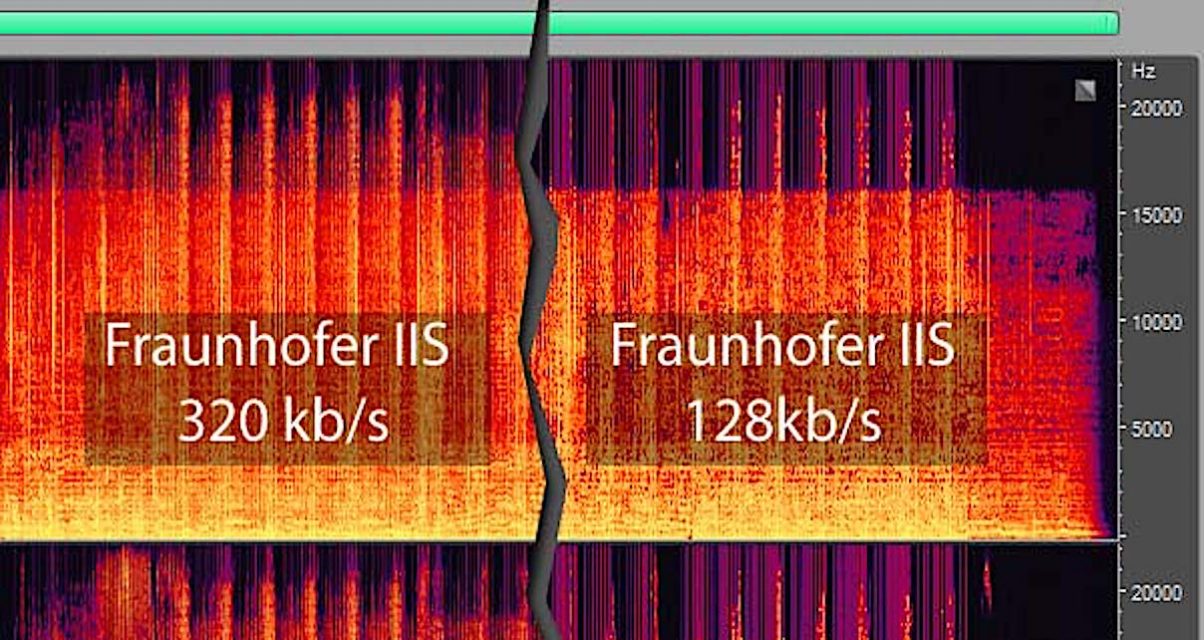
Its compression rate is measured in Kbps, 128kbps being the standard quality, in which the reduction of the file size is approximately 90%, that is, a ratio of 10: 1. The quality can reach up to 320 kbps, the quality Maximum, where the reduction in file size is approximately 25%, that is, a 4: 1 ratio. There are also other intermediate quality levels, such as 192 kbps, 256 kbps, the choice of which depends on the cost ratio. -wanted benefit, where the file size can be reduced at the expense of sound fidelity.

What is the best MP3 quality?

Kbps is a measure of data volume, just like gigabit and megabit. A 320 kbps song takes up more memory space on a PC or memory card than a 128 kbps file, probably because the 320 kbps song is larger, but sometimes it may not be. It not only depends on the size, it also depends on the sound quality, if the music is very hectic and has many instruments.

The higher the speed, the higher the file and the higher the quality. However, you will hardly feel any difference in the quality of the two.

The lossy compression method used in MP3 compression is to remove from the audio everything that the human ear would normally not be able to perceive, due to sound masking phenomena and limitations of human hearing (although people with absolute hearing can perceive such losses)

A good usage rate is 192 kbps, since the sound is clean and does not take up much memory space. See below the classification of the three main compression rates:

MP3 quality
Below 128 kbps Bad or fair
128 kbps Good
192 kbps Very good (recommended)
320 kbps Excellent

Mp4Gain – Best Mp3 Quality tool

Without a doubt, the best tool to obtain an mp3 with the best quality is using Mp4Gain.

Professional studies have shown that an mp3 file with a suitable volume (like the one achieved with Mp4Gain) sounds better to the human ear. Just improving the loudness of an mp3 makes it sound better.

This was initially discovered in the 1970s. There it was not mp3 but vinyl, but the result was the same: it sounded with better volume quality if the volume was optimal.

In fact, that started what is known as the volume war, where each time the volume of the audio was increased a little to make it sound better according to the human ear. The productions were gradually increasing in volume so that the human ear would perceive them as sounding with better quality.

Best mp3 quality with Mp4Gain

Making a summary of how to obtain mp3 of the best quality, we can summarize that if we manage to have:

1.- A Bit Rate of more than 256 or up to 320 kbps
2.- A sample rate of 44,100 or up to 48000
3.- Get the volume to be optimized-normalized. Since it has been discovered that a louder volume, without saturating, makes the ear perceive that it sounds better.
4.- The possibility of equalizing the mp3

We will get an mp3 with a best mp3 quality

Batch normalization of videos

Since the ability to digitize audio was born, as you can use many different codecs, different containers, different sample trates, different bitrates, etc. it can be verified that this has produced that the level of sound of different videos is not the same.

Single or batch normalization of videos

Then the need has arisen to normalize the loudness of videos of very diverse formats.
Mp4Gain comes to be the solution to be able to normalize in batch mode or in sigle mode the lodness of the videos.

video loudness normalization

Increase the loudness of a video in any format

With Mp4Gain you can normalize the volume level of any audio or video file in the most popular formats.

It really has been a breakthrough to be able to boost the volume of a video file or a group of video files with just one click.

In fact, apart from normalizing the volume, mp4gain is also capable of Modifying the PC without modifying the speed and vice versa, or of equalizing the sound to improve it and some other very useful functions.

Of course it is capable of converting most of the audio and video formats to each other.

With which you can convert a video format into any other video format, an audio format into any other audio format, but you can also convert a video format into any other audio format, that is, extract the audio from any video and get a mp3 in flac or any other popular audio format of your choice.

Sound compression. MP3 audio compression

Audio compression (audio compression) is the type of data compression, encoding used to reduce the volume of audio files or to reduce bandwidth for audio transmission. Sound file compression algorithms are implemented in computer programs called audio codecs. The invention of special compression algorithms for audio data is motivated by the fact that general compression algorithms are inefficient for working with sound and make it impossible to work in real time.

Audio compression

As in the general case, lossless sound compression is differentiated, making it possible to restore the original data without distortion and lossy compression, where such recovery is impossible. Lossy compression algorithms provide a high degree of compression, for example, an audio CD cannot contain more than one hour of “uncompressed” music, with lossless compression, the CD can store almost 2 hours of music and with compression with an average bit rate of 7 to 10 hours.

Audio compression

Lossless compression

The complexity of lossless compression is that recordings are extremely complex in structure. One of the compression methods is to search for samples and their repeats, but this method is not effective for more chaotic data, such as digitized sound or photographs. Interestingly, if computer generated graphics are much easier to compress without loss, synthesized sound will have no advantage in this regard. This is because even computer generated sound generally has a very complex shape, which is a difficult task to invent an algorithm.

Another complication is that the sound generally changes very quickly and this is also the reason why ordered byte sequences appear very rarely.

The most common lossless compression formats are:
Lossless Audio Codec (FLAC), Apple Lossless, MPEG-4 ALS, Monkey’s Audio and TTA.

Lossy compression

Lossy compression is extremely widespread. In addition to computer programs, lossy compression is used in the transmission of audio to DVD, television and digital radio and in the transmission of media on the Internet.

An innovation in this compression method was the use of psychoacoustics to detect sound components that are not perceived by the human ear. An example is the high frequencies, which are perceived only when the energy is sufficient, or the silent sounds that occur simultaneously or immediately after the loud sounds and, therefore, are masked by them; these sound components can be transmitted with less precision, or not at all.

For masking, the time sequence signal of the amplitude samples is converted into a sound spectrum sequence in which each component of the spectrum is encoded separately. To implement this conversion, fast Fourier transformation methods, MDCT, quadrature mirror filters or others are used. The total amount of information during this recoding remains unchanged. Compression in a given frequency domain may consist of the fact that masked or zero components are not stored or encoded at a lower resolution. For example, components with frequencies up to 200 Hz and over 14 kHz can be encoded with 4-bit resolution, while components in the mid-range can be encoded with 16 bits. The result of this operation will be encoded with an average bit depth of 8 bits, but the result will be much better than when the entire frequency range is encoded with an 8 bit depth. However, it is obvious that the low resolution transcoded fragments of the spectrum can no longer be restored exactly and are therefore lost forever.
The main parameter of lossy compression is the bit rate, which determines the degree of compression of the file and, consequently, the quality. Distinguish compression with a constant bit rate (Eng. Constant Bit Rate – CBR), Variable Bit Rate (Eng. Variable Bit Rate – VBR) and Average Bit Rate (Esp. Average Bit Rate – ABR).

The most common lossy compression formats are: AAC, ADPCM, ATRAC, Dolby AC-3, MP2, MP3, Musepack Ogg Vorbis, WMA and others.

Mp3, how it compresses the sound and why it needs to be normalized

The mp3 bases its effectiveness on that it is based on human hearing. That is, from knowing the limitations and behaviors of the human ear, it is that they have managed to eliminate information without this fact affecting the quality, if other values, such as bitrate and sample rate, are kept at adequate levels.

Sound perception
Characteristics of human hearing

Human hearing is not perfect. In addition to the physical limitations of the ear, sound has to travel through the nerves to the auditory cortex of the brain, where it is transformed into different perceptions of which we are aware.

sound perception mp3
Volume:

Two sounds with the same amplitude can be perceived with different intensity depending on the frequencies they have. The perception of the intensity of a sound is not constant with frequency. The human ear has a greater sensitivity to sound between 1000 and 5000 Hz. All the points of the curve are perceived with the same volume (volume), but the necessary sound pressure is not the same.


Frequency range

Human beings can perceive sounds in the frequency range of 20 Hz to 20 kHz due to the physical limitations of the ear. The frequency range changes with age, we lose the ability to hear the higher frequencies as we age.


Dynamic range

The smallest variation in air pressure that a human can detect (20 micropascals) measured at the frequencies where we are most sensitive, is used as a reference (0 dB) to measure the intensity of other sounds.

Power in dB (decibels) =, where P is the power considered and is the power corresponding to 20 micropascals.

A normal conversation is between 50-60 dB and the sound of car traffic is approximately 80 dB. The maximum sound that the ear can tolerate is 130 dB, which provides a dynamic range of 0 to 130 dB.


Auditory masking

Hearing masking is defined as the “decreased audibility of one sound due to the presence of another.” Auditory masking consists of frequency masking and temporal masking:


Frequency masking:

Also called simultaneous masking, it is best explained with an example. If you have a loud sound with a frequency of 1000 Hz, and also a sound at the 1100 Hz frequency that is 18 dB below the above, the 1100 Hz sound cannot be heard because it is being masked by the louder sound of 1000 Hz. This is because the 1000 Hz sound is louder and has a close frequency. The closer they are in frequency, the louder the sounds that can be masked by the louder sound. (Figure 2)

Temporary masking: occurs before and after a loud sound. If a sound is masked after a louder sound, it is called post-masking, and if it is masked in advance it is called pre-masking. Previous masking only exists for a brief moment (20 ms). Subsequent masking takes effect up to 200 ms. (Figure 3).

By exploring both masks (in frequency and time) it is possible to substantially reduce the audio information, without an audible change.

That is, there are at least four facts that allow the information to be reduced without the ear detecting it.

1.- The human ear does not detect the stereo in the low frequencies.

2.- If two or more sounds occur at nearby frequencies, the human ear will only listen to the loudest sound.

3.- The sounds before and especially after a loud sound are also masked or “covered” by the loudest sound.

4.- The ear does not receive the same volume at all frequencies.

All this allows the mp3 to discard information, a lot of information, that the human ear will not detect, if a suitable bitrate and samplerate are used.

Waveform and perceptual encoders

There are two types of audio encoders. First we have the waveform encoders, which try to reconstruct the signal as exactly as possible after encoding and decoding.

Perceptual encoders do not attempt to keep the signal exactly as it was before the encoding and decoding step. They seek to ensure that the human ear perceives the output as the original. Taking advantage of knowledge about the properties of hearing and the limitations of human hearing, the perceptual encoder removes part of the signal that we cannot perceive.

Almost all perceptual encoders transform the sound from the time domain to the frequency domain, and they soon separated the different frequencies into subbands. Then he uses his knowledge of how the ear works to remove unnecessary information. The chewing effect is the most commonly explored hearing phenomenon.

Digital sound vs. analog sound: what’s the difference?

It is very common to hear about digital sound. This wave of digital sound comes from the late 1970s, when digital media began to appear on the market, further solidifying with the arrival of CD in 1983. Leading brands would begin to announce digital sound as the great revolution in Sound. Recently, however, many have decided to go back to vinyl or even analog cassette tapes and claim that the sound of analog media is superior to that of digital media. But who is right?

Digital and Analog Audio

First, let’s establish that, when we talk about digital sound versus analog sound, we are mainly talking about the media where that sound is stored and the encoding used in those media. With that, we can start by classifying them by saying the following:

Analog sound is all that sound placed in uninterrupted media, creating a change in the media that is analogous to the phenomenon of sound. In the case of vinyl, a groove similar to the electrical signal generated in the microphone is created. In the case of magnetic tape, there is a change in the magnetic field analogous to the electrical signal generated at the microphone.

Analog and Digital audio

Digital sound is all that sound placed on media encoded in binary code. This encoding transforms the microphone signal into a digital code that follows various parameters, such as the Nyquist theorem, sample rate, bit depth, bit rate, interpolation, etc. In future publications, we will study each of these characteristics. Examples of digital media are: CD, SD memory cards, SSD, HDD, DAT … In short, everything that can store a digital code.

Some authors argue that all sound is analog. However, according to the previous definition we will establish that the sound, in itself, is natural. Each natural sound that reaches the microphone becomes analog by generating an electrical signal. And each microphone will start as analog. There are some digital microphones, but these are nothing more than microphones that have an analog / digital converter in their structure, making the sound emitted digital. In addition, all speakers also output analog sound only, since even if the source is digital, it will be necessary to perform a digital / analog conversion in any situation.

That is, the sound has to be analog at any given moment in the capture / playback chain, but it doesn’t necessarily have to be digital. That’s why many argue that analog sound is “pure” and, according to some people, “better”. However, there are several advantages to digital media. For example, digital media is more accurate, has a better differentiation between channels, is more compact and cheaper.

In productive terms, digital media outperforms analog media in several ways. Therefore, it is quite rare today to find analog sound in film and music. The logistical approach between analog and digital is different and many artists maintain that the use of analog media directly influences creation, since many feel that in analog there is a greater intimacy between the artist and the physical phenomenon. But in general, we can associate this intimacy only with the subjective factor. Analog is more expensive and offers a result that can be copied to digital.

On the other hand, there is a good advantage for analog media: durability. In general, vinyl and tape, if well maintained, have greater durability than CDs, DVDs, or HDDs. Until now, we still do not have a digital medium that has proven to be resistant to time (with the exception, perhaps, of DAT). Also, the way the viewer relates to the media is very important. In this case, the imperfections of analog media can make it more intimate and the precision of digital media can make it cold and impersonal. It goes for each one.

The most important topic of discussion on this topic in the world of audiophilia is related to CDs vs. Vinyls, a point that we will address in greater depth in some future publications. But for now, this is what we have about digital sound versus analog sound.

What is audio and video compression?

Do you know what audio and video compression is? It is the technology that allows you to play and store multimedia files on PCs, mobile phones and tablets.

Audio & Video Compression

Internet users are consuming more and more multimedia content. The audiovisual format is estimated to represent 80% of online content by 2020.

However, files are often heavy and may not run easily on all computers, so understanding what audio and video compression is is essential.

Audio and video compression

To work with audiovisuals, the professional needs to understand how compression of multimedia files works. In this post, you will know what audio and video compression is and why it is so important to do so.

After all, what is audio and video compression?
It is reducing a large volume of data in a file so that it takes up less space in the memory of a device or requires less transmission bandwidth. It can happen with or without loss, although most eliminate some almost imperceptible details.

However, the higher the audio and video compression, the lower the quality.

This is how each type of compression works:

Audio compression

By compressing sound files, the software reduces or simplifies the repetition of bits and eliminates the data considered imperceptible to the human ear.

To play an audio format on a certain device, you must select a codec, a program that encodes and decodes the media file.

In short, it compresses the file into a smaller format and unzips it, converting it back to sound when the user wants to listen to it. However, the same codec will not be used for all types of compressions and decodes.

The standard computer audio storage (WAV) file is too heavy to hold from essential data to unnecessary data to maintain its quality. This is because it transforms information into sounds that are not perceived by our ears. Codecs remove this less important data and offer a quality format, playable by the vast majority of gamers.

Modern techniques explore the perception of the human ear and provide compression that has apparently not suffered any loss. The most popular are:

FLAC (Free Lossless Audio Codec; Lossless Compression) – Unlike most, it doesn’t remove any information from the sound file, but it can shrink by up to 50%. Despite the decrease, it can be up to ten times heavier than MP3 format;
ALAC (Apple Lossless): compression of audio data produced by Apple;
MP3 (MPEG-1/2 Audio Layer 3; lossy) – The most popular audio compression format greatly reduced file size and still maintained its quality. It was officially discontinued in 2017, but is still very popular;
Ogg Vorbis (lossy) – Audio format that offers a lower bit rate and more quality than MP3. It is divided into two parts, Ogg, responsible for the file’s metadata, and Vorbis, an encoder that compresses the songs;
AAC (lossy) – Designed to be the successor to MP3, AAC is the standard format for playing audio on computers like iPhone, iPad, and PlayStation 3.
Video compression
Like audio, video compression involves reducing the file size, but in this case, removing the parts that have already been designed.

When not lost, no part of the data is discarded from the image.

In lossy compression, bits are selectively discarded. One way to do this is to reduce the number of frames, which is generally the same as on television (30 per second).

Once compressed, each type of video uses a specific set of codecs. Some of the most popular compression formats are:

MKV (Matroska Video): Widely used for high resolution videos, MKV offers effective compression and maintains quality. To make this happen, the codec encapsulates the audio, video, and subtitle tracks in a single container;
MPEG (Moving Picture Experts Group): defined by ISO as the standard video compression format, it can vary between MPEG-1 (for VCD), MPEG-2 (DVD) and MPEG-4;
AVI (Audio Video Interleave): Like MKV, AVI encapsulates audio and video in the same container. With this, both play synchronously. As it was produced by Microsoft, the format runs easily on Windows and is recognized by DVD and Blu-Ray players that are compatible with the DivX codec.
Why is audio and video compression technology important?
In addition to taking up less space, downloading and uploading a compressed file takes much less time. This makes it much easier when you want to post a video file on social media.