Technical factors in video formats


Free Download Mp4Gain
picture

In each video file format, each factor performs a function: each video has a frame rate and a color depth, a format, and a soundtrack. Depending on these four factors, the video takes on a certain aspect and size. For example, the higher the resolution of the film format and the higher the frame rate, the more information should be included. Therefore, such a file will also take up more space on your hard drive. By compressing the file, its size can be reduced, but this generally comes at the expense of quality.

Video formats

advice

Different video formats not only determine the quality and size of the file, but also determine which devices can play it. That is why video formats are generally chosen based on the media that will be used to play the video file.

Video Formats

Common video formats on different platforms

The most widely used video platform on the net is obviously YouTube. However, the social network Facebook also has wide coverage. On both websites you can upload multiple videos and share them with a large audience. Therefore, common video formats must be actively supported on both platforms. The same is true if you want to upload the different video formats to the platforms. Among other things, both providers accept the following video formats:

  • MOV
  • MP4
  • AVI
  • WMF
  • FLV
  • WebM

However, the time it takes for the platform to make the video and convert it depends on both the file size and the chosen video format, so you should choose the appropriate video format. This also applies to embedding video formats on your website.

The different video formats: advantages and disadvantages
Basically, we need to distinguish containers (container formats) from codecs. When we talk about video formats, we generally mean the container format, which contains video, audio, and metadata. The container ensures that all the information within a file can be retrieved. Instead, the so-called codec is used to encode the video, which mainly refers to the type and strength of compression. The most popular codecs are H.264, H.265, VP8 and VP9. To encode a video, you need a video editing program.

The MP4 file format

The MP4 file format has long been one of the most popular video formats on the web. Thanks to good compression coupled with good video file quality, excellent compromises can be achieved. The codecs used for MP4 are mainly H.264 or H.265.

Advantage

The format offers a good compromise between image quality and compression and is particularly compelling due to the simple ability to bundle multiple audio tracks and additional elements into a single format.

Disadvantages

MP4 files are often heavily compressed using standard codecs, making processing and creation difficult.

The AVI file format

The abbreviation AVI stands for Audio Video Interleave and means that in this format the video and audio tracks are directly linked to each other. The format is widespread, but technically obsolete.

Advantage

This format is mainly characterized by a very high level of acceptance. There is hardly any player and hardly any browser that does not support AVI files.

Disadvantages

The technical limitations of the file format and, above all, the lack of ability to use multiple audio tracks mean that fewer and fewer users are using the AVI file format.

The MKV file format

The MKV format is currently one of the most popular video formats on the net. It is a powerful container format that can integrate not only video files but also audio tracks, menus, and many other functions.

Advantage

The MKV format is particularly compelling due to the high quality of video files and the wide range of functions in which the format can be used. The format can only be used with the appropriate codec, but it is freely available on the net.

Disadvantages

The disadvantages of the format are mainly the low compression properties, so it is not possible to create very compact files.

The MOV file format

This video format was developed by Apple and is designed primarily for use with Quicktime. However, the format is no longer up to date and is therefore rarely used for network applications.

Advantage

The advantages of the format are mainly the ease of use in the Apple environment and the very high compression, which allows to obtain small files.

Disadvantages

Due to the very high compression of video files, a consequent loss of images and information occurs.


Free Download Mp4Gain
picture


Mp4Gain Main Window
picture


Mp4Gain Features
picture


Free Download Mp4Gain
picture

Mp3 format

MP3 (in full version Moving Picture Expert Group-1/2 Audio Layer 3) is a lossy audio compression algorithm, developed by the MPEG group, capable of drastically reducing the amount of data needed to store a sound, while still be a reproduction. acceptably faithful to the original uncompressed file.

Mp3 Format

Data compression is carried out by eliminating all those sounds that are not perceived by the human auditory system. In fact, recordings in wav format contain much more information than our ear is capable of distinguishing: by removing too much information, it is possible to obtain size reductions of more than 10 times (compared to uncompressed wav format).

Descargar MP3 Video Converter Pro 3.0f + Key Apk para Android 2020 3.0f  para Android

In practice, the mp3 format exploits the limits of our auditory system, limits that depend so much on the structure of our ear (not capable of perceiving frequencies above 20 kHz, but particularly sensitive to the intermediate range that goes from 700 Hz to around 6000 Hz) and the ways our brain perceives and interprets sounds. These perceptual limits are studied by psychoacoustics, a sector of psychology that deals with the perception of sounds.

A particularly important and exploited effect in mp3 compression is masking (masking), in which the perception (or less) of a sound is influenced by the presence of another sound. For example, conversation at a bus stop can become completely impossible if a noisy bus approaches: a weaker sound is “masked”, that is, made inaudible by the presence of a louder sound. Masking is all the more effective the closer the two sounds are to frequencies, since our auditory system is unable to discriminate sounds with very close frequencies.

As we have mentioned, mp3 compression is lossy type, that is, it causes irrecoverable data loss and consequently quality degradation. Mp3 encoding allows you to choose how much compression the compression should have, keeping in mind that higher compressions will always correspond to lower sound quality. The quality of mp3 compression is adjusted by a parameter called bitrate that specifies how many kbits the mp3 file should use for each second of recorded audio. There is also the possibility to vary the bit rate within a single mp3 file, using higher bit rates for some parts and lower bit rates for others (for example you can use a lower bit rate for the silent parts or that contain few instruments and use a higher bit rate for more complex parts).

The usable bit rate values ​​are many (from 8 to 320 kbit / s) but 128 kbit / s is considered a good compromise between compression and quality. Knowing the bit rate, it is easy to calculate the size of an mp3 file, since it is enough to multiply this value by the duration of the recording.

MP3 audio files and lossless files, which one is the best?

For your music collection, is an mp3 audio file or a lossless file better? Let’s see together the differences and which format to choose

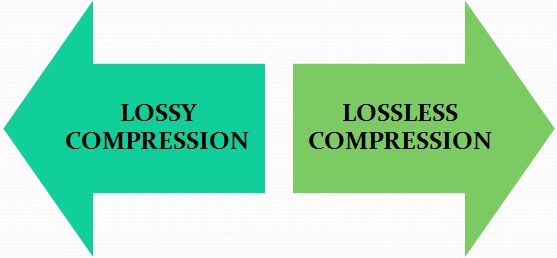
Lossy Compression vs Lossless Compression

In the transition from analog music (vinyl records, cassette tapes and other similar media) to digital music (audio CDs, mp3 audio files, etc.) a few decades ago, compression algorithms have played a fundamental role. to say the least. To avoid taking up too much space on the data storage media (when the transition was launched, every available byte of space was worth as much as gold) it was necessary to develop algorithms that would help compress the size of the files without affecting the quality of the file too much. Audio .

Lossless vs Lossy compression

It was during these years that names like mp3 audio files, WMA files, WaV files, and OGG files began to circulate quite frequently in musical (and non-musical) circles around the world.

Losseless vs Lossy

Over the years, the panorama of audio formats expanded dramatically and we witness the curious formation of two opposing blocks. On one side, in fact, so-called lossless files were ‘stacked’ (literally lossless), while on the other side of the musical ‘iron curtain’ were lossy files (literally lossy). As the names suggest, the distinction between one format and another is given by the possible loss of musical information.

Lossless files guarantee (and guarantee) the same depth of sound and quality of an audio CD, while lossy files (like mp3 audio files) allow you to reduce the size of a music track in the order of 10 times in partial detriment of audio quality. For example, if a lossless file takes up 40 megabytes of space, an mp3 audio file of the same song will take up just over 4 megabytes.

The bitrate

What makes the difference between the two audio file formats is the bit rate used in the analog-to-digital conversion process. When we speak of bit rate (sometimes also written bit rate) we refer to the number of bits that we can process in the unit of time. In music, the bit rate measures the amount of data contained in each second of the audio track: the higher the value of the bit rate, the better the quality of the music.

For an mp3 audio file, this value can range from 32 kbps (kilobits per second) to 320 kbps. In a lossless file, however, there is no compression, and with a bit rate of around 1,411 kbps, the audio quality is comparable to that of an audio CD. According to the numbers, therefore, lossless files are better than mp3 audio files, ensuring deeper sound that is true to the original. However, as experience teaches us, numbers are not always everything.

Diluted differences

The reality of the events seems to be quite different. The human ear, in fact, would not be so sensitive as to be able to notice differences between an mp3 audio file of excellent quality (with a 320 kbps bit rate) and a lossless file.

To understand this, simply run one or more ABX tests. One such test consists of cross-comparing two known files (named A and B) and two unknown files (X and Y, which are the same as A and B but with different bit rates). At the end of the test, two pairs of files should be formed, matching the originals with their modified files. If you use an mp3 audio file with a high bit rate (320 kbps or slightly lower), even the most musically trained ear will not be able to tell the difference.

Despite this, a music file made up of lossless files still guarantees a substantial advantage over a file made up of mp3 audio files. The first, in fact, can be converted to other audio formats without losing quality; Any conversion of a lossy file, on the other hand, will cause further loss of music information and deterioration in audio quality.

What is the difference between MP3 and Mp4?

MP3 and MP4, what are the differences?

Many wonder if MP4 is in all respects an “improved version” of MP3. The answer to this question is definitely “NO”, as these are two different types of file data.

mp3

In fact, MP3s refer only to the audio encoding aspect, while MP4s also store images, videos, text and subtitles, so in this case we are talking about a real digital container of different types of information.

Mp4

To better understand what the differences are between the two formats, let’s take a closer look at both.

MP3, history and functions

Designed by the Moving Picture group of experts and introduced to the world in the early 1990s, MP3, short for MPEG-1 Audio Layer 3, is an audio format that has revolutionized the concept of music and its portability.

Its operation is based on a specific lossy compression algorithm that allows to significantly reduce the volume of data useful for playing an audio track, called Lossy (translated: Loss).

Despite this compression, the end result remains faithful to the original recording for the vast majority of users.
In practice, any frequency considered imperceptible to the human ear is considered “removable”.

What does all this imply? Simple! The resulting MP3 file will be extremely smaller than the starting track, therefore, at a volume that previously could only hold 20 music files, hundreds of MP3 tracks can be stored.

MP4, history and features

The release of MP4, or MPEG4 Part 14, dates back to the early 2000s, precisely to 2002, and is used for digital video and audio broadcasts, images, and subtitles.

It is defined as a multimedia container in standard format or part of MPEG4 and does not have a standard information encoding method.

MP4 technology is based on the Apple QuickTime MOV format with, in addition, support for different MPEGs and higher quality audio expressed in AAC (Advanced Audio Coding) format.

From all this it can be understood that MP4 can be audio, video or audio + video files at the same time, also considering the possible presence of images or subtitles.

This is, for example, the most widely used format in the ever-evolving world of digital television and mobile video telephony.

Remember that the two extensions MP4 and M4A indicate the same type of file, what changes is only the extension and, in most cases, you can rename a specific file so that it is suitable for reading by the program.

Bottom line: when to use MP3 and MP4?

Finally, when should you choose an MP3 or MP4 format?

In the event that your file is exclusively an audio track, to be listened to while you are running and to be played through a small portable device, it is good to convert your songs to MP3 format.

This will take up less space on your device, preserve good audio quality, and can store many more songs in the player’s memory.

If, on the other hand, the files you are interested in are videos, perhaps accompanied by audio, images and subtitles, and they will be played on a device with a screen, the format I recommend is undoubtedly MP4.

Video formats that work on Instagram

There are two video formats that work on Instagram: rectangular and square. In this context, there are some tips to keep in mind. The official technical requirements speak of a maximum duration of 60 seconds, while there is no minimum limit to be respected. The minimum resolution is equal to 600 x 315 pixels, that is, 1.91: 1 horizontally, and 600 x 600 pixels, that is, 1: 1 in the square, while vertically it is equal to 600 x 750 pixels, that is , 4: 5.

Instagram video formats

There is a maximum threshold of 30 fps for the frame rate, while the aspect ratio of the preview image cannot be different from that of the video. There is no speed limit for files that stay under 1 gig in total. For the subtitle, the length of the text cannot exceed 2200 characters, while the available formats are .mov and .mp4. These are the recommended formats, although it is of course possible to use others.

Como colocar el Formato de video e imágenes en Instagram? - [2020]

So the full list includes 3g2, 3gp and 3gpp for mobile video, asf for Windows Media Video, f4v and flv for Flash Video, dv for DV video, divx for DIVX video, dat for MPEG video. and avi for AVI video, but not only. In fact, there are also mod formats for MOD videos, mkv for Matroska format, m4v for MPEG-4 video, m2ts for M2TS video, gif for graphics interchange format, mts for AVCHD video, mpg for via or MPEG, mpeg4 for MPEG video. -4, mov for QuickTime movie, wmv for Windows Media Video, vob for DVD video, ts for MPEG Transport Stream, tod for TOD video, ogv for Ogg video format, qt for QuickTime movie, ogm for Ogg Media format and nsv for Nullsoft video.

On Instagram, in addition, it is also possible to use an animated infographic: beyond the basic tools that are traditionally available, in fact, ad hoc applications can be used that offer the opportunity to create videos in which, along with the music, animated texts and graphics. Thus, the stories and in general the profiles on the social network can be made more captivating and more creative, in such a way that they capture the interest and attention of the followers.

Do not forget, then, the option Carousel for images: it is a mode that allows you to upload up to a maximum of 4 photos that can be navigated within the same publication. Even through this solution, therefore, it is possible to create animated infographics: in fact, a kind of sui generis storytelling is created.

Of course, to achieve the optimal result in terms of volume and equalization, if you are going to make a video to upload to Instagram, it is Mp4Gain.

Everything you need to know about samples and bits

I started delving into depth and sample rate in my last mixing / mastering tutorial, and while we’re not necessarily digital audio engineers, some background on what bit depth and sample rate is good information for anyone. participate in digital music. It’s something you always work with, whether you know it or not, and it’s great background information for understanding whether understanding the building blocks of digital audio is critical for personal gain or just to be able to sound smart just in case. where the conversation never comes up.

Samplerate

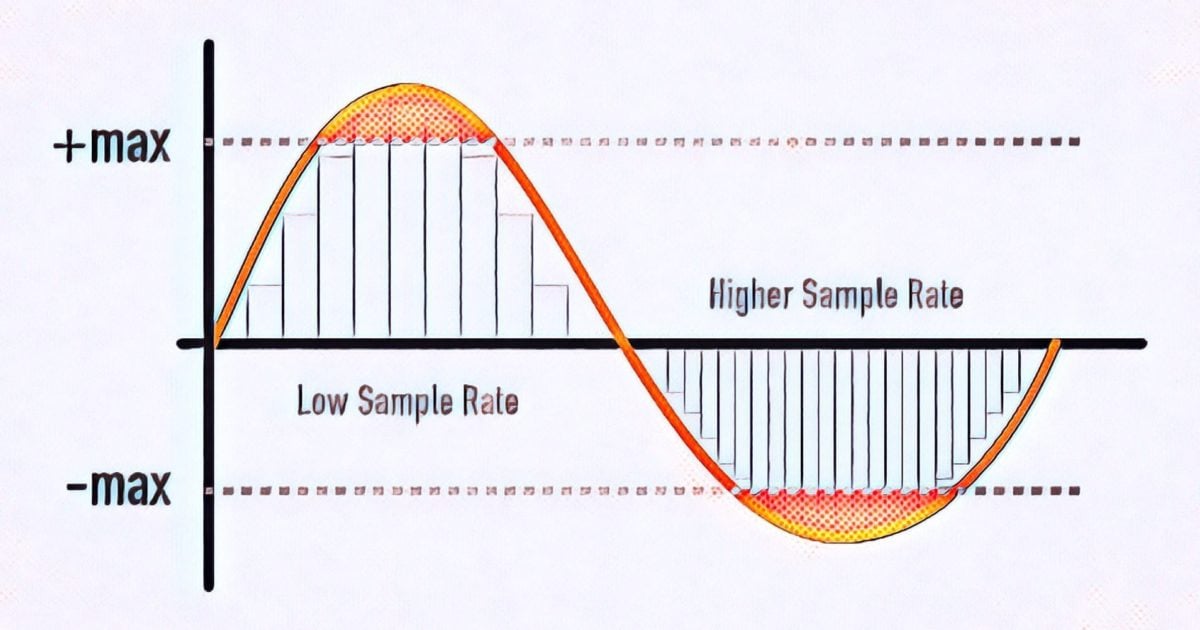
So the first thing to understand is that bit depth and sample rate only exist in digital audio. In digital audio, bit depth describes amplitude (vertical axis) and sample rate describes frequency (horizontal axis). So when we increase the number of bits we are using we are increasing the amplitude resolution of our sound and by increasing the number of samples per second we are using we are increasing the frequency resolution of our sound.

In an analog system (and in nature), the audio is continuous and fluid. In a digital system, the smooth analog waveform is only approximated by the samples and must be set to a limited number of amplitude values. When you sample a sound, the audio is divided into small sections (samples) and these samples are fixed at one of the available amplitude levels. The process of fixing the signal to an amplitude level is called quantization, and the process of creating the sample slices is, of course, called sampling.

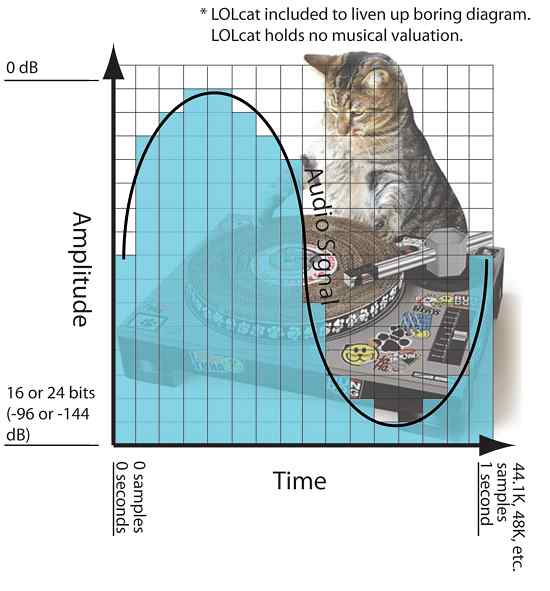
In the diagram below you can see a visualization of this where there is an organic sine wave playing for one second. It starts in 0 seconds and ends in 1 second. The blue bars represent the digital approximation of the sine wave where each bar is a sample and has been set to one of the available amplitude levels. (This diagram is obviously much grosser than in real life).

samplerate

This second of audio would have 44.1K, 48K, etc. samples. From left to right depending on the selected sample rate when recording and it will cover -144dB at 0dB at 24bit (or -96dB at 0dB at 16bit bit). The dynamic range resolution (the number of possible amplitude levels for the sample to rest) would be 65,536 at 16 bits, and get this, 16,777,216 when logged at 24 bits.

Therefore, increasing the bit depth greatly increases our amplitude resolution and dynamic range. What is not so obvious is where the increase in dynamic range occurs. The added dB is added to the softest part of the sound since the amplitude can never exceed 0 dB. What this does is allow you to hear more delicate sounds (like a reverb tail running at -130 dB) to be heard, which might otherwise be cut off to a 16-bit, -96 dB sample.

Is analog recording better than digital?

During my training as a sound engineer, I read several times that in analog systems the sound wave, in the form of alternating current, is continuously recorded on the tape, something that does not happen in the digital environment where the sound wave is found. photographed thousands of times per second and reconstructed to some degree of approximation.

analog

“Tape recording is better from this point of view than digital recording”

Obviously I was not the only one to have taken this statement as true, since among technicians and musicians I hear it repeated often, but are we really sure that it is so? Could such outdated technology be better than the current one? Obviously not.

digital audio

From a technical point of view, analog recording suffers from a number of problems that introduce distortions and artifacts, so comparing the recorded sound with the source, the result is anything but faithful. Don’t you think so? Here are some issues that you may not have been told about analog recording.

–The flutter and the wow are oscillations that are generated during the route of the tape that, stretching between the heads, begins to vibrate like a guitar string, introducing micro-phasing and effects similar to tremolo;
–hysteresis. The metallic particles that cover the surface of the tape are quite slow and do not move from their rest state unless the magnetic field of the recording head is strong enough to polarize them. Therefore, sounds of weaker intensity are not correctly recorded, as well as high frequencies;
–maximum distortion. Transients are very fast, dynamic, and rich in high frequencies, qualities that tape cannot fully satisfy;
Background noise is an intrinsic feature of tape, to which we have tried to bypass filters with pre-emphasis and noise reduction circuitry, which in turn add more distortion;
deterioration of the material that occurs in each step and risk of self-cancellation of the material.

These aspects of analog recording, and they are just a few, are enough to make us understand that, even if we record continuously, our signal suffers many alterations.

Digital technology represents a clear improvement on many fronts, thanks to the low prices and the reliability of the instruments, capable of always guaranteeing the same performance without the need for constant maintenance.

With ever higher sample rates, 144 dB of dynamics (for 24-bit formats), and no background noise, digital audio recording allows you to truly capture sound in all its dynamic and tonal components.

–Yes, but digital is cold, analog is hot!

Seriously, the adjectives hot and cold are not appropriate terms to describe the characteristics of sound and are used incorrectly to express personal preferences and tastes.

What is generally understood by “warm sound” is the sensation of tonal enrichment that analog machines give to the audio signal in which there is less presence of high frequencies, while the adjective “cold” refers to a bare sound , raw, essential and seemingly unbalanced in favor of high frequencies.

If you want to improve the tone, it is better to use more appropriate terms, referring to digital as true copy and analog as artificial.

Why can WebM be the future of images on the Internet?

In 2010, Google announced a new video technology with a bold proposition: to be the future of streaming video over the Internet. Thinking of the full potential of Web Giant, the idea is not that megalomaniac, especially since YouTube, the main video portal of the current global network, belongs to the company.

WebM,

This technology is WebM, a video “format” that works in conjunction with HTML5 and offers more satisfying results compared to traditional methods such as Flash videos or even animated GIFs.

Technically speaking, this format works with more colors, takes less time to load, and displays videos at 60 frames per second. It combines different features in a package designed with the web in mind, putting you at an advantage over other competitors.

WebM

Google itself has been using WebM for some time experimentally on YouTube – if you have activated the video player in HTML5 format, know that the screens are made in this new format – but despite all the advantages, does it have potential? to go further and really be the future of images on the Internet?

Open and expanding technology

WebM is an open source technology that works with open multimedia standards: structure based on the Matroska container, VP8 video codec (also developed by Google) and Vorbis audio stream. So the technology can be modified, applied, and redistributed for free by anyone who wants to embrace the idea, and some websites and browsers have already done so.

Currently, Mozilla Firefox, Google Chrome and Opera already support WebM natively, being able to take advantage of the pages that offer content in this format. Internet Explorer and Safari do not run natively WebM, but there are add-ons that can be installed to give them this functionality.

Thinking of laptops, increasingly important for web browsing, only Chrome has full support for the new format: Firefox, Opera Mobile and the native Android browser have partial support. The portable versions of Safari and Internet Explorer do not work with WebM.

Currently, several web services already use the format:

YouTube: in the HTML5 video player;
Wikimedia: also in an HTML5 media player with WebM;
Skype: implemented the VP8 codec for video streaming in version 5.0;
4chan: now allows the publication of videos in WebM, limiting the playback time to 120 seconds and the file size to 3 MB, all without audio;
Logitech: You plan to use the method in a video calling service;
NVIDIA: Announced HTML5 Video Service Using 3D Vision Technology;
Nintendo: Nintendo Wii uses the WebM format to stream videos;
NeoGAF – One of the largest forums on the Internet can be formatted via a Firefox plug-in.

And what are the advantages?

WebM is a format designed for the web, so it is developed taking into account some peculiarities of the network, such as improved performance to avoid bandwidth losses, better ratio between quality and file size, etc.

At this point, WebM consumes few hardware resources, exhibiting satisfactory performance also on simpler computers. In a simple way, it can be said that the ability to offer high quality content, openly and without overloading the PC or even the Internet connection are the main differentials of this method.

Performance

It can be said that the chances of success of WebM come essentially from the combination of several good elements in its composition. Choosing Matroska as the basis for everything, for example, makes control over video execution much more precise, as this format has an excellent response time for video searches.

Other advanced features such as multiple audio, video and subtitle tracks during streaming and also recovering from a streaming failure from the same point where it stopped, show how Matroska is a competent container and can serve customers. WebM purposes.

Size and quality

The size / quality ratio is probably one of the challenges of streaming video services, after all, the ideal is to offer the best quality in files with the smallest possible size. WebM achieves good results in this regard by using the VP8 video codec, developed by ON2, a company acquired by Google.

This codec is considered one of the few existing standards capable of guaranteeing an optimal balance between image quality and file size during compression in MPEG4. It was not by chance that Google acquired it and later became an open license.

Some considerations about MPEG2

The world is in a slow but constant evolution: many times without realizing it, we are abandoning things that we did in the past to adapt to the new times. How to buy film roll boxes, in the corner bracket, to place in the camera. Whether on the camera phone or the digital camera itself, that no longer matters to us. But at that time, at the height of analog photography, it was common to know how to order one type of film or the other, saying for example “ASA 100 film” or “ASA 400 film”. There was another specification, very popular in Germany, DIN, with values ​​as similar as the Celsius and Fahrenheit temperature scales … Looking for an international standardization, the ISO (International Organization for Standardization),

mpeg 2

The specifications of film labels were standardized, but the world presented new challenges: computers, increasingly present in our daily lives, brought digitization to the living room or the television: the old VCR gave way to the video player. DVD. Still images and then videos invaded the cell phone. However, to get here, new standards have become necessary over time.

MPEG-2 Video

One of them, older, concerned digital photographic images. The same ISO for film boxes (which also created dozens of other standards) joined in 1986 with the CCITT (Consultatif International Téléphonique et Télégraphique Committee) to create the Joint Group of Photographic Experts, whose work would result in 1994 in the JPEG compression standard. . for digital still images.

Compression is necessary in the digital world to reduce the high volume generated by numerical information resulting from audio and video digitization processes. In this process thousands of samples of each part of the image or sound are obtained, which are then converted into sequences of numbers that represent the brightness / color / sound values ​​of the samples. Then it is necessary to have a storage medium capable of storing all these numbers. Since these media typically do not contain as much information, the compression process comes into play.

And that’s not all: compression also has advantages in video transmission, allowing you to send a signal with better quality, compressed, occupying the same space as a lower quality signal, without compression.

In the JPEG standard, the image is divided into 8×8-pixel squares and by complex mathematical calculations an ‘average’ color is determined for these 64-pixel blocks. This results in loss of detail in compression. The processes in which this occurs are known as “lossy”. There are processes in which there is no loss (‘lossless’), used for example in the GIF standard (Graphic InterFace, developed by Compuserve) to compress photographic images. However, standards such as GIF are suitable for graphics and not for photographic images, because the set of colors treated by them (256 colors) is much smaller than that used in standards such as JPEG.

In January 1988, ISO formed a working group called the Motion Picture Experts Group together with the IEC (International Electrotechnical Commission), generating an acronym that would become well known: MPEG. The group, formed to create international video and audio compression standards, then created the MPEG-1, MPEG-2 and MPEG-4 algorithms that are used today.

The use of MPEG algorithms always involves two phases: the compression phase, where the image and / or audio are compressed, generating content with a smaller total size, ready to be recorded on an optical disc, for example, and the recovery phase of this content, also called expansion, where the original image and / or audio is reconstituted. Compression is done by software called a compressor and expansion by software called an expander. These names have better known synonyms, encoder and decoder respectively. And the set of 2 forms the word codec, short for encoder (encoder) + decoder.

The MPEG standards brought a new philosophy in coding systems, where the encoder process is much more laborious and complex than the reverse of the decoder. Since decoding is simple and fast, it facilitates the proliferation of electronic circuits that perform this process efficiently, making players cheaper, an ideal situation for content distribution. This fact also allows new encoders to emerge over time, using different approaches in compression processes. There are thus encoders that produce better images than others, in addition to being generally parameterized, that is, the compression quality can be adjusted.

VIDEO FORMATS: A BRIEF REVIEW OF THE MOST KNOWN

When facing the world of video, you have to take into account a series of concepts. Thus, we must be clear about the differences between the container format, the video codec, the video specification and the audio codec:

Video formats

 video formats

Container format

This type of file contains several elements and, at least, video and audio.

The video codec

codec

It is often confused with the video format, but it really is not the same. It is not a mandatory element, since if no codec is specified, the video will be uncompressed, that is, in RAW format. Therefore, a codec is generally chosen to compress the video. And depending on which codec we choose, a better or worse quality will be achieved and, in turn, a larger or smaller size.

The video specification

Each video codec is usually based on a specific video specification (H262, H263, H264, H265), which is nothing more than a set of standards that define how they should behave.

The audio codec

As with the video, we can have several audio channels included in the file. In addition, they are usually also compressed with a certain codec, in order to save space: MP3, WMA, etc.

Video formats

Types of container formats

AVI format

It is probably one of the best known container formats. Corresponds to the English acronym of Audio video interleave. It was developed by Microsoft in 1992 and is one of the most popular formats, perhaps due to its wide use on Windows platforms. Being one of the most basic, it only allows audio and video channels.

Among the codecs that we can find are the DivX codec and the XViD.

MKV format (Matroska)

It is an open source container format, created in 2002.

Among the most common codecs that we can find are H264.

WebM format

It is a project that is based in Matroska. Initially, it was developed by the company On2 Technologies, but in 2010 it became part of Google, which released the source code, guiding it to use with HTML5 as a free standard.

As for the codec used by WebM we find the VP8, which has evolved to the current VP9, ​​giving great performance.

MPG format

Rather than being a format, it is a specification, standardized by the Moving Picture Experts Group (MPEG). MPG files are used to create movies that are distributed on the Internet and, depending on their compression, we find the versions MPG-1 or MPG-2.

MP4 format

The MPEG-3 specification was discontinued and never developed, the MPEG-4 standard later being defined.

The commonly used codecs are x264.

HEVC format

The MPEG-H / HEVC (High Efficiency Video Coding) specification is considered H.265, and doubles the performance of its predecessor, supporting resolutions that could reach 8K (UHDTV).