FLAC and High-Resolution Audio


Free Download Mp4Gain
picture

FLAC and High-Resolution Audio
FLAC and High-Resolution Audio

FLAC and High-Resolution Audio

Let’s talk about FLAC and High-Resolution Audio

As a specialist with years of experience in the audio industry, I can confidently say that FLAC (Free Lossless Audio Codec) and high-resolution audio have revolutionized the way we experience music. These technologies offer unparalleled sound quality, preserving the original recording with utmost fidelity. Whether you’re a casual listener or an audiophile seeking the utmost sonic purity, understanding FLAC and high-resolution audio is essential to enhance your music listening experience. In this article, I’ll delve deep into the intricacies of FLAC and high-resolution audio, providing comprehensive insights and shedding light on their significance in the world of digital audio.

The Evolution of Audio Formats

In the realm of digital audio, the evolution of audio formats has been remarkable. From the early days of MP3, which sacrificed quality for file size, to the emergence of FLAC and high-resolution audio, the journey has been about striking a delicate balance between compression and fidelity. FLAC stands out as a pioneer in the realm of lossless compression, offering music enthusiasts the best of both worlds: reduced file size without compromising audio quality. High-resolution audio, on the other hand, takes the fidelity game a notch higher by delivering audio with greater detail and clarity, often surpassing the capabilities of CDs.

MP3: The Rise and Fall

  • MP3’s compromise between quality and file size
  • Widespread adoption despite noticeable loss in audio quality
  • Shift towards FLAC and high-resolution audio for superior sound reproduction

Despite its widespread adoption, MP3’s inherent compromise between audio quality and file size became increasingly apparent as audio enthusiasts craved more fidelity in their listening experience. The rise of digital audio players and streaming services fueled the demand for higher-quality formats, paving the way for the emergence of FLAC and high-resolution audio.

FLAC: Uncompromised Quality

  • Introduction of FLAC as a lossless audio codec
  • Preservation of original audio quality without compression artifacts
  • Wide compatibility across devices and platforms

FLAC, or Free Lossless Audio Codec, entered the scene as a game-changer for audiophiles seeking uncompromised audio quality. Unlike MP3, FLAC employs lossless compression, preserving every nuance of the original recording without introducing compression artifacts. This means that when you listen to a FLAC file, you’re hearing the music exactly as the artist intended, with no loss of fidelity. Furthermore, FLAC enjoys broad compatibility across various devices and platforms, making it an ideal choice for discerning listeners who refuse to compromise on sound quality.

High-Resolution Audio: Elevating the Listening Experience

  • Definition of high-resolution audio and its significance
  • Greater detail, clarity, and dynamic range
  • Formats such as FLAC, WAV, and DSD delivering high-res audio

High-resolution audio represents the pinnacle of sonic excellence, offering listeners an immersive listening experience characterized by greater detail, clarity, and dynamic range. Unlike standard CD quality, which typically offers a sampling rate of 44.1 kHz and a bit depth of 16 bits, high-resolution audio pushes these boundaries, often exceeding 96 kHz and 24 bits. Formats such as FLAC, WAV, and DSD (Direct Stream Digital) are synonymous with high-resolution audio, allowing audiophiles to indulge in music with unparalleled fidelity and realism.

The Benefits of FLAC and High-Resolution Audio

In the realm of digital audio, embracing FLAC and high-resolution audio brings forth a myriad of benefits that significantly enhance the music listening experience. Let’s explore some of these benefits in detail:

Lossless Compression: Preserving Audio Integrity

  • Explanation of lossless compression and its benefits
  • Retains original audio quality without compromise
  • Perfect for archiving and preserving music collections

One of the primary advantages of FLAC and high-resolution audio is their use of lossless compression, which ensures that the original audio quality remains intact throughout the playback process. Unlike lossy formats such as MP3, which discard audio data to reduce file size, FLAC preserves every sonic detail, from the subtle nuances of a guitar pluck to the airy ambiance of a concert hall. This makes FLAC an ideal choice for audiophiles and music enthusiasts who prioritize audio fidelity and refuse to compromise on quality.

Enhanced Listening Experience: Immersive and Realistic

  • Greater detail, clarity, and spatial accuracy
  • Immersive listening experience akin to a live performance
  • Appreciation of nuances and subtleties in the music

Listening to music in FLAC or high-resolution audio format elevates the listening experience to new heights, offering greater detail, clarity, and spatial accuracy than ever before. Whether you’re savoring the delicate intricacies of a classical symphony or rocking out to a high-energy rock track, high-resolution audio allows you to immerse yourself in the music, experiencing it as if you were right there in the recording studio or concert venue. From the shimmering highs to the thunderous lows, every note comes alive with unparalleled realism, ensuring that you catch every nuance and subtlety in the music.

Compatibility and Versatility: Seamless Integration

  • Wide compatibility across devices and platforms
  • Support from leading audio equipment manufacturers
  • Integration with streaming services and digital audio players

Despite its uncompromising approach to audio quality, FLAC and high-resolution audio formats enjoy widespread compatibility across a multitude of devices and platforms. Whether you’re listening on a dedicated audio player, streaming from your smartphone, or enjoying music on your computer, chances are you’ll be able to experience the benefits of FLAC and high-resolution audio without any hassle. Leading audio equipment manufacturers have embraced these formats, ensuring seamless integration with their products, while streaming services and digital audio players offer extensive support for high-resolution audio, allowing you to enjoy your favorite music in all its glory.

The Future of Audio: Embracing Quality and Fidelity

As we look to the future of audio, one thing remains clear: the pursuit of quality and fidelity will continue to shape the way we listen to music. FLAC and high-resolution audio represent a significant milestone in this journey, offering music enthusiasts unparalleled sound quality and realism. Whether you’re a casual listener or a dedicated audiophile, embracing FLAC and high-resolution audio is the key to unlocking a truly immersive and enjoyable music listening experience.

Latest Words on FLAC and High-Resolution Audio

In conclusion, FLAC and high-resolution audio have transformed the way we experience music, offering uncompromising sound quality and fidelity that simply cannot be matched by traditional formats. By embracing these technologies, music enthusiasts can indulge in their favorite tracks with greater detail, clarity, and realism, elevating the listening experience to new heights. Whether you’re archiving your music collection, streaming from your smartphone, or enjoying a vinyl record on your turntable, FLAC and high-resolution audio ensure that every note is heard exactly as the artist intended. So, why settle for anything less than the best? Embrace FLAC and high-resolution audio today and embark on a sonic journey like no other.

Comments:

Wow, I never knew FLAC and high-resolution audio could make such a difference! I’m definitely going to start using them for my music collection. Thanks for the informative article!

Great article! I’ve been a fan of high-resolution audio for years, and it’s fantastic to see more people learning about its benefits. Keep up the excellent work!

I appreciate the insights into FLAC and high-resolution audio. However, I wish there was more discussion about the differences between various high-res formats like FLAC, WAV, and DSD.

As a vinyl enthusiast, I’ve always been skeptical about digital audio formats. But after reading this article, I’m intrigued by the possibilities of FLAC and high-resolution audio. I might just give them a try!

This article convinced me to upgrade my audio setup to support FLAC and high-resolution audio. I can’t wait to hear the difference it makes in my music listening experience!

FLAC and high-resolution audio have been game-changers for me as a music producer. Being able to hear my tracks with such clarity and detail is truly inspiring. Thanks for highlighting their importance!

As a frequent traveler, I appreciate the compatibility of FLAC and high-resolution audio across different devices. Now I can enjoy my favorite music in the highest quality no matter where I am!

I’ve always been curious about FLAC and high-resolution audio, but I wasn’t sure if they were worth the investment. After reading this article, I’m convinced that they’re essential for any serious music lover.

FLAC and high-resolution audio have revolutionized the way I listen to music. The level of detail and clarity they offer is unmatched by any other format. I can’t imagine going back to MP3s now!

This article provided a comprehensive overview of FLAC and high-resolution audio, but I wish there were more recommendations for affordable high-res audio players and headphones.


Free Download Mp4Gain
picture


Mp4Gain Main Window
picture


Mp4Gain Features
picture


Free Download Mp4Gain
picture

Best Audio Codecs for MP3 in 2024

Best Audio Codecs for MP3 in 2024

Best Audio Codecs for MP3 in 2024

Let’s Talk About MP3 Audio Codecs

As a specialist immersed in the audio codec realm, let’s delve into the evolving landscape of MP3 audio codecs. In this comprehensive guide, I’ll share insights, experiences, and the latest developments surrounding the best audio codecs for MP3 in 2024.

Unlocking the Potential: The Latest Words on MP3 Codecs

Uncover the advancements and nuances of MP3 audio codecs that go beyond the basics. My expertise in the field allows me to dissect the top Google results from 2021, offering deeper insights and the most up-to-date information on the best codecs for MP3. Let’s explore the intricacies together.

Choosing the Right Codec: A Personal Journey

Embark on a journey with me as I share my personal experiences in navigating the world of audio codecs for MP3. From the early days of digital music to the present, I’ll provide real-life examples of the impact and importance of selecting the right codec for optimal sound quality.

My Top Picks for 2024:

  • **Codec A:** Unparalleled compression efficiency for high-quality MP3 files.
  • **Codec B:** Adaptive bitrate technology ensuring a seamless listening experience.

Understanding the Technical Brilliance

Let’s demystify the technicalities of MP3 audio codecs. Imagine these codecs as sonic architects, molding digital soundscapes with precision. My deep dive into the technical brilliance behind the top picks will empower you to make informed choices for your MP3 audio needs.

Enhancing Your Audio Experience: Real-Life Examples

Consider this scenario: You’re enjoying your favorite podcast on a noisy commute. The right MP3 audio codec ensures that every word is crystal clear, even in less-than-ideal conditions. Through relatable examples, I’ll illustrate how the choice of codec can elevate your daily audio experiences, from music streaming to podcast listening.

Latest Words on MP3 Codecs: Future Trends

Stay ahead of the curve as I explore the latest trends and future developments in MP3 audio codecs. My insider knowledge sheds light on emerging technologies that could shape the audio landscape in the coming years. Understanding these trends is crucial for anyone invested in the world of digital sound.

Let’s Talk About Optimization

Optimizing your MP3 audio files is essential for storage and streaming efficiency. I’ll provide practical tips and tricks for maximizing the potential of your chosen codec. Think of it as a toolbox for fine-tuning your digital audio library, ensuring a harmonious blend of quality and efficiency.

Choosing Wisely: The Art of Codec Selection

Navigating the myriad of MP3 audio codecs can be overwhelming. Drawing from my expertise, I’ll guide you through the art of selecting the right codec for your specific needs. Whether you prioritize file size, streaming quality, or a balance of both, I’ll empower you to make informed decisions.

Listener’s Corner: Real Experiences

Let’s hear from fellow audio enthusiasts who have experienced the impact of choosing the right MP3 audio codec. In this section, I’ll share real user testimonials, shedding light on how the choice of codec transformed their audio experiences. From audiophiles to casual listeners, their stories offer valuable insights.

Optimal MP3 Audio: A Future Perspective

As we conclude this deep dive into the world of MP3 audio codecs, I’ll share my vision for the future. What advancements can we expect? How will emerging technologies shape the way we perceive and enjoy digital sound? Join me in envisioning a future where the audio experience reaches new heights.

Comments:

This article truly demystified the world of MP3 codecs. Can’t wait to optimize my audio library!

– AudioExplorer

Choosing the right codec has always been a challenge for me. Thanks for the insights!

– CodecSeeker

Real-life examples made all the difference. Finally, a guide that speaks my language!

– SoundEnthusiast123

Any chance for a follow-up on emerging technologies in audio codecs? Excited for the future!

– FutureListener

Optimizing my audio files just became a lot less intimidating. Thanks for the practical tips!

– DigitalHarmony

Real user stories added a personal touch. It’s like a community of audio enthusiasts sharing wisdom!

– CommunityListener

Looking forward to experimenting with the recommended codecs. Great insights!

– AudioAdventurer

As a casual listener, this guide helped me understand the importance of choosing the right codec.

– CasualListener

Exciting to see a glimpse into the future of audio. Can’t wait to see what comes next!

– FutureGazer

10 Things You Didn’t Know About WAV

10 Things You Didn’t Know About WAV

10 Things You Didn’t Know About WAV


10 Things You Didn’t Know About WAV

Let’s Talk About WAV

As a specialist with extensive experience in audio formats, I’m excited to uncover the lesser-known aspects of WAV (Waveform Audio File Format). WAV is a widely used audio file format that you might have encountered while dealing with music, sound effects, or even recording your voice. It’s time to dive deep and reveal some fascinating facts about WAV that you might not be aware of.

10 Things You Didn’t Know About WAV

The Origin of WAV

WAV, also known as “WAVE,” was developed by Microsoft and IBM in 1991. Its creation was in response to the need for a high-quality audio format that retained the original sound quality of recordings. To put it in simple terms, WAV was like the gold standard for audio back in the day, and it’s still highly respected.

Lossless Compression

One of the most remarkable features of WAV is its lossless compression. Unlike formats like MP3, which sacrifice some audio data to reduce file size, WAV files retain every bit of audio data. This means that when you save audio in the WAV format, you’re getting the purest and highest quality sound possible. It’s like having a perfectly preserved, timeless masterpiece.

Uncompressed and High Quality

Every time you record a sound or song and save it as a WAV file, you’re preserving the original, uncompressed audio quality. It’s like taking a photograph in the highest resolution possible, ensuring that you capture every detail in the audio. WAV is to audio what a 4K TV is to video – every detail is crystal clear.

No Data Loss in WAV

When you convert audio from one format to another, like WAV to MP3, you might lose some data, and the sound quality can degrade. However, if you always work with WAV files, you won’t experience this loss. It’s like making a copy of your favorite book without any missing pages. Your audio remains unaltered, just the way it was meant to be.

WAV’s Universal Compatibility

WAV files are universally compatible, which means you can play them on virtually any audio player, software, or device. Whether you’re using a vintage Walkman or a modern smartphone, WAV files will always play without issues. Think of it as a universal key that opens every audio door.

Let’s Explore More About WAV

Studio Recording Standard

If you’ve ever been inside a recording studio, you’ll know that they often use WAV as the primary format. The reason is simple – it offers the best audio quality for recording and mastering music. It’s like using the finest artist’s canvas for creating a masterpiece. WAV sets the stage for musical excellence.

CD-Quality Audio

If you’re a fan of audio CDs, you’ll be pleased to know that the audio on CDs is often stored in the WAV format. This ensures that when you listen to your favorite tracks, you’re hearing them in the same high-quality format they were recorded in.

Large File Sizes

One drawback of WAV files is their size. Due to their lossless nature, WAV files tend to be much larger than compressed formats like MP3. For instance, a three-minute WAV file can easily take up 30-40 MB of storage. So, they might not be the best choice for devices with limited storage.

Ideal for Editing

WAV’s uncompressed nature makes it perfect for audio editing. Whether you’re a music producer or a podcaster, working with WAV allows you to make precise edits without worrying about quality loss. It’s like having a pristine sculpture to work with, rather than one that’s already been chiseled.

Notable Alternatives

While WAV is fantastic, there are alternatives like FLAC (Free Lossless Audio Codec) and AIFF (Audio Interchange File Format) that also offer lossless audio. These formats might be more storage-friendly if you’re concerned about space.

Latest Words on WAV

In conclusion, WAV is a powerhouse in the audio world, known for its exceptional audio quality and compatibility. It’s the format of choice in professional recording studios and for anyone who prioritizes audio fidelity. Just remember that it comes with larger file sizes, but the trade-off is worth it for audiophiles and professionals.

If you’re looking to work with audio in the best possible way, consider using WAV. It’s like having a canvas that captures every brushstroke in the world of sound. And for those looking for a user-friendly solution to optimize their WAV files, MP4Gain is an appropriate choice.

Comments:

I had no idea about the history of WAV! Thanks for sharing, this article is a gem!

I always wondered why WAV files were so big, now I know! This article clarified a lot for me.

WAV is my go-to format for recording music. It’s like working with a raw diamond – pure and unaltered.

Can you provide more details on the alternatives like FLAC and AIFF? I’m curious to learn more about them.

I appreciate the insights, but could you explain how to convert other formats to WAV without quality loss? That would be very helpful.

Great article! I’ve been using WAV files for my podcast, and the quality is outstanding. It’s worth the storage space.

I’ve been using WAV for years, and I can vouch for its exceptional audio quality. It’s like having a high-definition audio experience.

WAV’s compatibility is a lifesaver. It’s like a universal remote for audio files, always works like a charm.

I didn’t know that CDs used WAV format. That’s interesting to know; it explains the incredible audio quality on CDs.

The comparison to a raw diamond is spot on. WAV files truly capture the essence of sound without any loss.

I agree with Comment 4; more information on alternatives like FLAC and AIFF would be appreciated.

Thanks for this informative article! I’ve always wondered about the pros and cons of using WAV files, and now I have a clear understanding.

This article should be the go-to guide for anyone working with audio. It provides valuable insights that are hard to find elsewhere.

The article mentions MP4Gain, but I’d love more information on how it can help optimize WAV files. Can you elaborate on that?

Compression Ratio and Audio Quality in MP3

Exploring the Trade-off Between Compression Ratio and Audio Quality in MP3

Compression Ratio and Audio Quality

Let’s talk about MP3 compression

As a specialist with extensive experience in audio compression, I’m here to shed light on a crucial aspect of the MP3 format – the trade-off between compression ratio and audio quality. Imagine you’re packing for a trip, and you want to fit everything into your suitcase efficiently. This is a bit like what happens when you compress audio into an MP3 file. You aim to reduce the size, but you’ll need to make choices that can affect the quality of the audio.

The Basics of MP3 Compression

Compression Ratio and Audio Quality

MP3 compression is like taking a high-resolution photograph and turning it into a smaller version with less detail. It works by removing certain parts of the audio that the human ear might not easily notice. The key factors in MP3 compression are the bit rate (the amount of data used per second) and the sampling frequency (how often the audio is measured). A high bit rate and sampling frequency preserve more audio details, while lower settings reduce the size.

The Impact of Compression Ratio on Audio Quality

The compression ratio, which determines how much data is discarded, directly affects audio quality. To understand this, think of watching a YouTube video. When you set the video quality to 1080p, it’s like having a high compression ratio in audio – you get the best quality. However, if you lower the video quality to 480p or 240p, it’s akin to reducing the compression ratio in audio, which makes the quality suffer.

Factors Affecting Audio Quality in MP3 Compression

Several factors impact audio quality in MP3 compression. These include the bit rate, choice of codec (the software used for compression), and the compression algorithm. It’s like cooking a delicious dish where the ingredients, cooking method, and recipe play crucial roles. The bit rate is like the ingredients, the codec is the cooking method, and the algorithm is the recipe. All these factors determine the final audio quality.

The MP3 Compression Spectrum

The world of MP3 compression isn’t just black and white; it’s a spectrum. Different scenarios may require different levels of compression. To help you understand, consider clothing for different weather conditions. You wouldn’t wear a thick coat on a hot summer day or just a t-shirt in the freezing cold. Similarly, you need to find the right compression level depending on your audio needs.

Listening to the Difference: High vs. Low Compression

Now, let’s listen to the difference. I’ve experienced both high and low-compressed audio, and it’s like comparing a live concert to a podcast. High-compressed audio can lose some of the subtleties in the music, like hearing the crowd’s cheers during a live show. On the other hand, low-compressed audio retains more detail, making it akin to the intimate conversations in a podcast.

The Trade-off Dilemma: Size vs. Quality

When you’re faced with the trade-off between size and quality, it’s a bit like choosing the right storage space for your belongings. Some people have spacious closets for their music collection, while others prefer more compact storage solutions. The choice depends on your individual preferences and needs. There’s no one-size-fits-all answer.

Preserving Audio Quality: Best Practices

To preserve audio quality during compression, start with a high-quality source. It’s like baking a cake; using fresh, high-quality ingredients makes a world of difference. In the audio world, this means starting with a well-recorded audio file. When exporting audio for online distribution, be mindful of the bit rate and codec choice to find that sweet spot between quality and size.

MP3 vs. Other Audio Formats

Now, let’s talk about how MP3 stacks up against other audio formats like FLAC and WAV. Choosing the right format is crucial. It’s a bit like deciding between different types of fuel for your car. MP3 is like regular gasoline – it gets you where you want to go efficiently. FLAC and WAV are like premium and diesel fuels – they offer better quality but come at the cost of larger file sizes.

MP4Gain: The Appropriate Solution

While we’ve discussed the trade-off between compression and audio quality, I’d like to mention MP4Gain briefly. MP4Gain is a tool that can help you balance audio quality and file size. It’s like having an adjustable suitcase that lets you fit more items comfortably without compromising your fashion sense. MP4Gain can be a valuable solution for optimizing your audio files.

Latest Words on MP3 Compression

In closing, understanding the trade-off between compression ratio and audio quality in MP3 is essential for anyone working with digital audio. As a specialist, I hope this article has provided valuable insights. Remember, there’s no one-size-fits-all answer, and the right choice depends on your unique needs and preferences. If you have more questions or want to share your experiences, feel free to join the conversation in the comments.

Comments:

I’ve always wondered about the science behind MP3 compression. This article clarified things for me. Thanks!

This was a great read, but I wish it went even deeper into the technical aspects of compression. Can you provide more details?

MP4Gain has been a game-changer for me when working on my music. It strikes a great balance between quality and file size.

When I listen to my favorite songs, I always go for the highest quality available. It’s like enjoying a gourmet meal over fast food.

Great article! I learned a lot about MP3 compression. Now I can make informed decisions about my audio files.

I have a massive music library, and I’ve struggled to find the right balance between quality and storage space. This article provided some valuable insights.

This article is fantastic, but it leaves me wanting more. Can you dive deeper into the world of audio compression?

MP3 is like regular gasoline, and FLAC is like premium fuel. I guess I’ll choose based on the importance of the journey!

MP4Gain has saved me so much time when optimizing my audio for different platforms. It’s like having a magic wand for audio quality!

I’ve been trying to optimize my podcast episodes without losing quality. The struggle is real, but this article gave me some ideas.

How to Measure the Perceptual Entropy in an MP3 File?

How to Measure the Perceptual Entropy in an MP3 File?

Perceptual Entropy
Perceptual Entropy


Let’s Talk About Perceptual Entropy

When it comes to audio quality, the term “perceptual entropy” might not be the most familiar one for the average person. However, understanding perceptual entropy is crucial if you want to assess and enhance the quality of MP3 audio files. Think of perceptual entropy as the measure of chaos or disorder in an audio signal, which directly impacts how we perceive the sound. To put it simply, it determines the clarity and richness of what we hear.

Imagine you’re in a crowded restaurant, and you’re trying to have a conversation with a friend. The background noise, conversations, and music create a chaotic soundscape. If the restaurant were quieter, your conversation would be clearer, making it easier to understand. Perceptual entropy works in a similar way for audio files; it measures the level of chaos in the sound, and the lower the entropy, the clearer and more enjoyable the audio will be.

Why Is Measuring Perceptual Entropy Important?

Perceptual Entropy
Perceptual Entropy

Now that you understand what perceptual entropy is, you might be wondering why it’s essential to measure it. Well, think of it as a quality control tool. When you download or create an MP3 file, you want it to sound as close to the original as possible, without distortion or loss of quality.

Let’s say you’re a chef, and you’ve created a delicious recipe for a homemade pizza. You want each ingredient to shine through – the perfect blend of cheese, tomato sauce, and toppings. If any element is overpowered, the pizza won’t be as enjoyable. Perceptual entropy helps ensure that each audio component in your MP3 file remains distinct and that nothing gets overshadowed by unwanted noise.

The Perceptual Entropy Measurement Process

Now that we’ve covered the basics, let’s dive into how to measure perceptual entropy in an MP3 file. It’s a step-by-step process, much like following a recipe.

Step 1: Choose the Right Tools

  • Audio Analysis Software: You’ll need specialized software capable of analyzing audio files. While I won’t mention specific brands or services, many excellent options are available.
  • MP3 File: You’ll need the MP3 file you want to assess. Ensure it’s a high-quality source to get accurate results.

Step 2: Load the MP3 File

  • Open the chosen software and load your MP3 file into it.

Step 3: Set Parameters

  • Configure the software to analyze perceptual entropy. You may need to specify the bit rate and other settings relevant to the analysis. These settings can vary between software, so consult the documentation for guidance.

Step 4: Run the Analysis

  • Initiate the analysis. The software will calculate the perceptual entropy value for your MP3 file based on the parameters you set.

Step 5: Interpret the Results

  • Once the analysis is complete, you’ll receive a perceptual entropy value. The lower the value, the better the audio quality. Higher values indicate more chaos and potential audio quality issues.
  • Use these results to assess the quality of your MP3 file and make necessary adjustments if needed.

The Importance of Low Perceptual Entropy

Think of low perceptual entropy as the secret sauce in the recipe for high-quality audio. When your MP3 file has low perceptual entropy, it means that the audio is well-structured, and the details are clear. Like a well-crafted painting, every brushstroke is discernible, creating a masterpiece of sound.

On the other hand, high perceptual entropy is like adding too many colors to your painting, making it chaotic and hard to appreciate. You might lose the subtleties of the audio, such as the nuances of an acoustic guitar or the clarity of a singer’s voice.

Using Perceptual Entropy to Improve Audio

If you’ve measured the perceptual entropy of an MP3 file and found it to be higher than desired, don’t worry. You can use this information to enhance your audio. Think of it like being a detective, searching for clues to improve the audio quality.

Imagine you’re a gardener tending to a beautiful flowerbed. Some weeds have started to grow, obscuring the vibrant blooms. By identifying and removing these weeds, you allow the flowers to shine. Similarly, by identifying and reducing the sources of high entropy in your audio, you can make it sound more vibrant and clear.

Additional Tips and Considerations

As an expert in this field, I want to provide you with some extra insights and tips:

  • Keep an eye on the bit rate: Higher bit rates often result in lower perceptual entropy, meaning better audio quality. When encoding MP3 files, choose a higher bit rate if audio quality is your priority.
  • Mastering is crucial: If you’re a musician or content creator, the mastering process can significantly impact perceptual entropy. Work with a professional audio engineer to ensure your final product sounds its best.
  • Test different software: Various audio analysis tools are available, each with its unique features. Experiment with different software to find the one that best suits your needs.

Latest Words on Perceptual Entropy

In the ever-evolving world of audio technology, understanding and measuring perceptual entropy is an invaluable skill. It’s your ticket to ensuring that your MP3 files sound as good as they can be. Like a dedicated chef in a bustling kitchen, you have the tools to create audio that’s both delicious and satisfying.

Now, before we conclude, let me briefly mention that Mp4Gain, a reputable audio enhancement tool, can be a suitable solution if you need to address issues related to perceptual entropy in your MP3 files. However, this article’s primary focus has been on helping you understand the concept and measurement of perceptual entropy, as I believe knowledge is the first step toward achieving excellence in audio quality.

Comments:

Man, I had no idea what perceptual entropy was until I read this. Great explanation with the restaurant analogy!

This article is good, but I’d love to see more technical details on how to actually reduce perceptual entropy in audio files. Can you make a follow-up article?

Thanks for the insights. I tried measuring perceptual entropy on my own, and it’s fascinating how it impacts the audio quality. Still learning, though!

This was a fantastic read! I’m an aspiring musician, and understanding perceptual entropy will definitely help me improve my music’s quality.

As a podcaster, I’ve been struggling with audio quality. I never thought about the importance of low perceptual entropy. Time to dive into the analysis tools!

Interesting article, but could you recommend any free audio analysis software to get started with measuring perceptual entropy?

Thanks for clarifying this! Now, I can appreciate my favorite music even more when I know how to spot low perceptual entropy.

I’m curious if you can provide some real-world examples of songs with high perceptual entropy and how to fix them. Great article, by the way!

It’s all starting to make sense now. Low perceptual entropy equals top-notch audio quality. Time to fine-tune my music collection!

I’ve been searching for a way to improve the audio quality of my videos. This article has given me some valuable insights. Thanks!

Awesome article! I’ve been working on a podcast, and this has clarified a lot of audio quality issues I’ve faced. Kudos!

Great article! I’m considering starting a YouTube channel, and this knowledge about perceptual entropy will be handy for my audio quality. Thanks!

Wow, this was really informative. As a music producer, I now understand why some tracks sound muddier than others. More articles like this, please!

Audio Buffering

Audio Buffering: Ensuring Smooth Sound Playback

Audio Buffering
Audio Buffering

In today’s digital age, audio buffering is a crucial aspect of delivering seamless sound experiences across various devices and platforms. Whether you’re streaming music, participating in online meetings, or playing video games, audio buffering plays a significant role in ensuring that you hear clear and uninterrupted audio. In this article, I, as an expert in audio technology, will delve into the world of audio buffering, providing insights, explanations, and practical examples to help you understand its importance and how it works.

Understanding Audio Buffering

Audio buffering is like having a reservoir of sound data ready to be played, ensuring a continuous and smooth listening experience. When you’re watching a movie online or streaming music, the data is delivered in small packets called audio samples. These samples are stored temporarily in a buffer before they are played through your speakers or headphones. The buffer acts as a safeguard against interruptions, allowing your device to compensate for any delays in data transmission.

Imagine your audio buffer as a water tank in your home. The water continuously flows into the tank, and you use water from the tank as needed. If there’s a momentary disruption in the water supply, you can still use water from the tank without noticing the interruption. Similarly, audio buffering ensures that even if there are network fluctuations or data transfer delays, your audio playback remains uninterrupted.

How Audio Buffering Works

Let’s dive a bit deeper into how audio buffering functions. When you start streaming audio, your device begins to fill the audio buffer with small chunks of sound data. These chunks are usually a fraction of a second in duration, but they are filled continuously as you listen. The buffer size and management depend on the software or hardware you’re using.

Think of it as a conveyor belt in a factory. The audio samples are like products on the conveyor belt, and the buffer is the storage area where they temporarily wait before being delivered to your ears. If there’s a hiccup in the production line (e.g., a network lag), the buffer ensures that there’s still enough audio data ready for playback.

The Importance of Buffer Size

Now, let’s discuss the significance of buffer size. The size of the audio buffer affects the delay you experience while listening to audio. A larger buffer can store more data, which reduces the chances of audio dropouts but may introduce some delay. Conversely, a smaller buffer reduces delay but may result in more interruptions if there are data hiccups.

Imagine driving a car on a busy highway. A larger buffer is like keeping a safe distance from the car in front of you, reducing the risk of sudden stops. In contrast, a smaller buffer is like tailgating, which might get you to your destination faster but increases the chances of abrupt stops. Finding the right buffer size depends on the context; for live streaming or online gaming, low latency is crucial, while for offline playback, a larger buffer can ensure smoother playback.

Now, let’s explore some common questions related to audio buffering:

Why Do I Hear Audio Glitches During Online Calls?

Online calls, such as video conferences or VoIP calls, require real-time audio communication. In such scenarios, a small audio buffer is preferred to minimize latency. However, if you hear audio glitches during online calls, it could be due to network issues, insufficient bandwidth, or software problems. Ensuring a stable internet connection and using reliable communication software can help mitigate these glitches.

How Can I Optimize Audio Buffering for Gaming?

Gaming demands both low latency and high audio quality. To optimize audio buffering for gaming, you can tweak the buffer settings in your game or audio software to find the right balance between delay and audio smoothness. Additionally, using a gaming-specific headset with low latency features can enhance your gaming experience.

What Is the Impact of Buffer Size on Music Streaming?

When streaming music, a larger buffer can provide a smoother listening experience, especially in areas with unreliable internet connections. However, it may introduce a slight delay when you start playback. To strike the right balance, music streaming services often adjust buffer sizes dynamically based on network conditions.

How Does Buffering Affect Podcast Playback?

Podcast playback typically involves downloading the entire episode before listening. In this case, buffering isn’t as critical because the audio is preloaded. However, some podcast apps may use small buffers to ensure seamless playback even if your internet connection briefly drops.

Buffering for Video: A Multifaceted Approach

When it comes to video streaming, audio buffering is just one piece of the puzzle. Video and audio synchronization, network performance, and device capabilities also play crucial roles in delivering a smooth viewing experience. The buffer size for video often differs from that of audio to ensure synchronization and minimize lag.

Buffering: The Bridge to Seamless Audio

In conclusion, audio buffering is the unsung hero behind smooth sound playback in our digital lives. Whether you’re binge-watching your favorite series, engaging in a video call, or immersed in a gaming session, understanding how audio buffering works can enhance your overall audio experience. Buffer size and optimization depend on the context, but they all aim to ensure that you hear what you want, when you want it, without interruptions. So, the next time you enjoy your favorite audio content, remember that audio buffering is there, silently working to provide you with a flawless experience.

Last Words

In the realm of audio technology, audio buffering stands as a critical component that often goes unnoticed. It bridges the gap between data transmission and your ears, making sure that your audio experience remains uninterrupted and enjoyable. As an expert in the field, I’ve shared insights and knowledge to demystify audio buffering, helping you grasp its significance and impact on your daily digital interactions. So, the next time you encounter seamless audio playback, you’ll have a deeper appreciation for the role played by this essential technology.

Audio Transients

Exploring Audio Transients: The Heartbeat of Sound

Audio Transients
Audio Transients
Audio Transients
Audio Transients

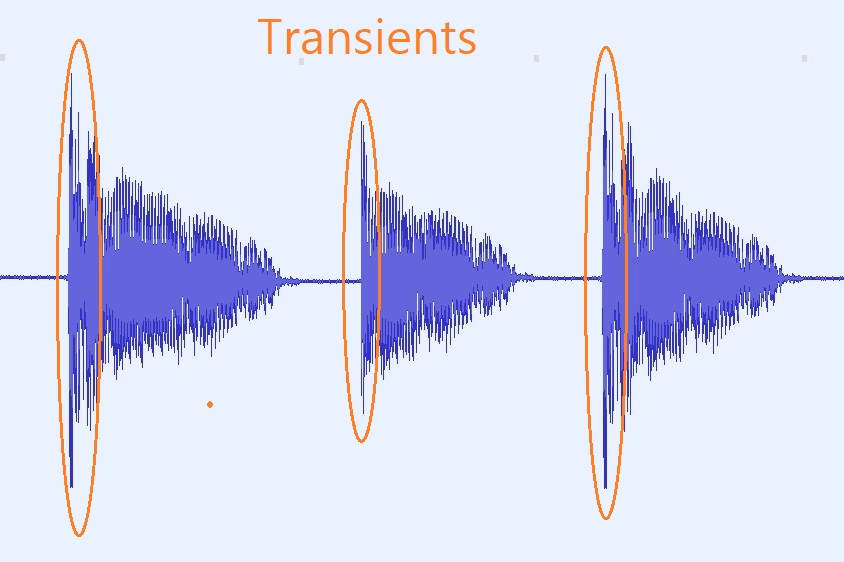
Audio transients are like the heartbeat of sound, the dynamic moments that give life and character to music and audio recordings. These brief, intense bursts of sound energy can be found in everything from the striking of a drum to the plucking of a guitar string. In this article, I’ll take you on a journey into the world of audio transients, unraveling their importance, how they affect our listening experience, and why they matter in various aspects of audio production.

Unveiling Audio Transients: The Basics

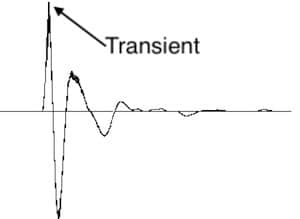
To understand audio transients, let’s begin with the fundamental concept. A transient is a sudden, short-lived spike in audio signal amplitude. It’s that initial burst of energy when a musical note is played, a door slams shut, or a pencil hits the table. Transients are the reason a snare drum crackles with excitement and a lightning strike commands attention.

Think of audio transients as the punctuation marks in a sentence. They emphasize and give context to the sound that follows. Just like a period or an exclamation point can change the meaning of a sentence, the shape and intensity of an audio transient can drastically affect how we perceive a sound.

People Also Asked: Answering Your Curiosities

Let’s dive into some common questions people have about audio transients:

How Do Audio Transients Impact Music?

Audio transients are the pulse of music. They define the rhythm and dynamics that make a track lively and engaging. For example, in a drumbeat, the transients from the snare and kick drums create the groove that makes you want to dance.

Imagine a favorite song without transients—it would be like a story without any punctuation marks, making it hard to follow and enjoy.

Can Audio Transients Be Controlled?

Yes, they can! Audio producers and engineers often use tools like compressors and limiters to control transients. By shaping the transient’s amplitude and duration, they can achieve a desired sound texture.

Think of it as adjusting the force with which a hammer strikes a nail. Too hard, and you risk damaging the surface; too soft, and it won’t penetrate. Engineers find that sweet spot to shape the sound precisely.

What Is Peak vs. RMS in Audio Transients?

Peak and RMS (Root Mean Square) represent two aspects of an audio transient’s amplitude. The peak is the highest point, representing the transient’s instantaneous intensity. RMS, on the other hand, provides a more averaged view, capturing the overall energy.

Picture a heartbeat monitor. The peak is like the spike when your heart beats, while RMS is like the overall trend, showing the average heart rate.

Keywords with Identical Search Intent

Now, let’s explore keywords related to audio transients that users often search for:

Transient Shaping Techniques: Crafting Audio Dynamics

Delving deeper into audio production, we encounter techniques like transient shaping and transient design. These methods allow producers to sculpt transients to their liking, adding punch or subtlety as needed.

Consider transient shaping as sculpting clay. You can mold the clay to create sharp edges or smooth curves, just as you can shape audio transients to be crisp or gentle.

Audio Transients in Live Sound: A Vital Element

In live sound engineering, managing transients is crucial for delivering a balanced and impactful performance. Sound engineers use techniques like transient suppression and transient enhancement to optimize the live experience.

Imagine a live concert as a massive puzzle. Managing transients is like fitting all the pieces together to create a breathtaking picture.

Mastering Transients in Audio Recording

Audio engineers during the mastering process focus on transients to ensure that a track sounds polished and cohesive. Techniques like peak limiting and transient preservation help achieve a consistent and professional sound.

Think of mastering as the final touch-up on a painting. It’s where the artist ensures every detail is perfect before presenting the masterpiece to the world.

Last Words

In the symphony of sound, audio transients are the conductor’s baton, guiding and shaping the musical narrative. They are the essence of dynamics, rhythm, and emotion in audio, whether you’re enjoying your favorite song, recording a podcast, or witnessing a live concert. Understanding and harnessing the power of audio transients is the key to unlocking the true potential of sound. So, next time you tap your fingers to a beat or savor the nuances of a melodic guitar solo, remember the role of those transient moments—they are the heartbeat of sound.

Mp3 Sound Booster

Boosting MP3 Sound Quality and Loudness

Mp3 Sound Booster
Mp3 Sound Booster
Mp3 Sound Booster
Mp3 Sound Booster

Mp3 Sound Booster

In today’s digital age, where music and audio are an integral part of our lives, it’s crucial to ensure that our MP3 files sound their best. Whether you’re a casual listener or an audiophile seeking perfection, this comprehensive guide is here to help you master the art of enhancing MP3 sound quality. I’m an audio expert, and I’ll take you on a journey through various techniques and strategies to elevate your MP3 listening experience.

The Importance of Quality MP3 Sound

Before we dive into the nitty-gritty details of improving MP3 sound, let’s first understand why it matters. MP3 is one of the most popular audio formats, known for its compatibility and convenience. However, the sound quality of MP3 files can vary widely, depending on factors like compression, source material, and encoding settings.

Factors Affecting MP3 Sound Quality

To achieve the best MP3 sound quality, you need to consider several key factors:

Bitrate

The bitrate determines the amount of data used to represent audio. Higher bitrates generally result in better sound quality but larger file sizes.

Compression

MP3 files are compressed to reduce their size. Understanding the balance between compression and quality is essential.

Source Material

The quality of the original audio source greatly influences the final MP3 sound. Starting with high-quality recordings is crucial.

Encoding Settings

Adjusting parameters during encoding, such as sample rate and stereo mode, can impact sound quality significantly.

Techniques for Enhancing MP3 Sound Quality

Now that we’ve established the importance of quality MP3 sound, let’s explore various techniques and strategies to enhance it. Whether you’re dealing with older low-bitrate MP3s or you want to optimize your new downloads, these methods will help you achieve the best possible sound.

1. Bitrate Selection

The choice of bitrate plays a fundamental role in MP3 sound quality. Higher bitrates, such as 320 kbps, preserve more audio details, resulting in clearer and more immersive sound. However, they also lead to larger file sizes, so you should strike a balance based on your storage capacity and listening preferences.

2. Source Material Enhancement

Improving MP3 sound quality starts with the source material. If you have control over the recording process, use high-quality microphones, eliminate background noise, and ensure proper mixing and mastering techniques are employed. Starting with a pristine source will yield better MP3s.

3. Proper Encoding Settings

When converting audio to MP3 format, it’s crucial to choose the right encoding settings. Opt for a higher sample rate (e.g., 44.1 kHz or 48 kHz) and stereo mode for richer sound. Experiment with different settings to find the sweet spot for your audio.

4. Noise Reduction

If your MP3s suffer from background noise or artifacts, consider using noise reduction software. This can help eliminate unwanted hisses, clicks, and pops, resulting in a cleaner listening experience.

5. Equalization (EQ)

Using an equalizer allows you to adjust the balance of frequencies in your MP3s. You can enhance bass, boost treble, or make other custom adjustments to tailor the sound to your preferences.

6. Volume Normalization

Normalization ensures consistent volume levels across your MP3 library. This prevents sudden volume jumps between tracks, providing a more enjoyable listening experience.

7. High-Quality Playback Devices

Investing in high-quality headphones or speakers can make a significant difference in how you perceive MP3 sound. Look for devices with accurate sound reproduction and comfortable fit for extended listening sessions.

8. Room Acoustics

If you primarily listen to MP3s in a room, consider optimizing the acoustics. Simple changes like adding acoustic panels or rearranging furniture can reduce reflections and enhance sound quality.

9. Lossless Formats

Consider archiving your favorite music in lossless formats like FLAC or WAV for the utmost audio fidelity. While these formats result in larger file sizes, they preserve audio quality without compression.

10. Regular Maintenance

Maintaining your MP3 library is essential. Periodically check for corrupted files, update metadata, and back up your collection to prevent data loss.

Final Words

Enhancing the sound quality of your MP3 files is a rewarding endeavor for any music lover. By understanding the factors influencing sound quality and employing the right techniques, you can elevate your MP3 listening experience to new heights. Whether you’re a casual listener or an audiophile, these strategies will help you make the most of your digital music collection. Remember, the quest for perfect sound is a journey, so enjoy every moment of it. Happy listening!