Flac and Ogg Volume Adjuster


Free Download Mp4Gain
picture

Flac and Ogg Volume Adjuster


Flac and Ogg Volume Adjuster

Are you tired of dealing with uneven audio levels in your Flac and Ogg files? Well, you’re not alone. Many audio enthusiasts and professionals often face the challenge of maintaining consistent sound quality across their collections. In this article, I’ll delve into the world of Flac and Ogg volume adjustment and explore various methods to tackle this issue effectively.

Audio File Format Adjustments

Before we dive into volume adjustments, it’s crucial to understand the nature of Flac and Ogg audio formats. Flac, short for Free Lossless Audio Codec, and Ogg Vorbis are popular choices for storing high-quality audio. Flac provides lossless compression, preserving audio quality without sacrificing file size, while Ogg is known for its open-source nature and efficient compression.

Sound Volume Control for Flac and Ogg

To control the volume of your Flac and Ogg files, you’ll need specialized tools or software designed for audio processing. These tools allow you to adjust the volume levels without compromising the overall audio quality. Keep in mind that it’s essential to maintain a balance between amplifying the audio and preventing distortion.

Adjusting Audio Levels in Flac and Ogg

One common method for volume adjustment is using an audio editor. These editors offer precise control over the audio, enabling you to increase or decrease the volume as needed. It’s important to preview the changes and make incremental adjustments to achieve the desired result.

Whether you’re a music enthusiast or a professional sound engineer, the ability to adjust volume levels in Flac and Ogg files is invaluable. By understanding the intricacies of these audio formats and utilizing the right tools, you can ensure a consistent and enjoyable listening experience.

Normalizing Sound in Flac and Ogg Files

Normalization is another technique to bring uniformity to your audio collection. This process adjusts the volume of each file to a standard level, eliminating extreme variations. Normalization algorithms analyze the audio content and adjust the gain accordingly, making it ideal for batch processing large libraries.

Volume Equalization for Flac and Ogg

Volume equalization is about ensuring that all your Flac and Ogg files have similar loudness levels. This technique is essential when you’re creating playlists or organizing audio for playback. Volume equalization tools use various methods to balance the audio, providing a seamless listening experience.

Audio Gain in Flac and Ogg Formats

Audio gain, also known as amplification, allows you to increase the overall loudness of your Flac and Ogg files. This can be particularly useful if you have older recordings or content with low volume levels. However, it’s crucial to exercise caution and avoid over-amplification, which can lead to distortion.

Balancing Audio in Flac and Ogg Files

Balancing audio involves adjusting the volume levels of individual tracks within a file. This is handy when dealing with live recordings or albums where tracks may have varying loudness. Balancing tools provide a means to fine-tune each track’s volume to create a consistent listening experience.

Flac and Ogg Audio Level Management

Managing audio levels in Flac and Ogg files is an ongoing process, especially if you frequently add new content to your collection. Regularly reviewing and adjusting volume levels ensures that your audio library remains enjoyable and free from sudden volume spikes or drops.

Tweaking Volume in Flac and Ogg

Sometimes, you may want to apply specific tweaks to the volume of your Flac and Ogg files. This could involve emphasizing certain frequencies or applying dynamic range compression to enhance the audio quality. Experimenting with these tweaks can lead to a more personalized listening experience.

Enhancing Audio Dynamics in Flac and Ogg

Audio dynamics play a crucial role in the overall quality of your listening experience. Adjusting volume levels in Flac and Ogg files can help bring out the nuances in your music. By carefully managing audio dynamics, you can ensure that every note and sound is delivered with precision and clarity.

Final Words

Flac and Ogg volume adjustment is an essential aspect of maintaining an enjoyable audio collection. Whether you’re a music enthusiast or a professional, understanding the tools and techniques available can significantly enhance your listening experience. With the right approach, you can achieve balanced and consistent audio quality in your Flac and Ogg files.



Free Download Mp4Gain
picture


Mp4Gain Main Window
picture


Mp4Gain Features
picture


Free Download Mp4Gain
picture

Mp3 Audio Booster

Mp3 Audio Booster

Mp3 Audio Booster
Mp3 Audio Booster
Mp3 Audio Booster
Mp3 Audio Booster

Boosting Audio in MP3 Files: A Comprehensive Guide

Volume Enhancement

When it comes to enhancing the audio in your MP3 files, one of the most common goals is to boost the volume. Whether you’re listening to music or podcasts, having a low volume can be frustrating. Boosting the volume of your MP3 files can make your listening experience more enjoyable. To do this, you can use various software tools that allow you to increase the volume level of your audio files. However, be cautious not to overdo it, as excessive volume boosting can result in distortion.

Equalization

Equalization, often referred to as EQ, is another essential aspect of audio enhancement. EQ allows you to adjust the balance of frequencies in your MP3 files. You can boost or cut specific frequency ranges to make the audio sound more balanced and tailored to your preferences. For instance, you can increase the bass frequencies for a richer, deeper sound or adjust the treble for sharper clarity. Many audio editing software packages offer built-in EQ tools, making it easy to fine-tune your MP3 files.

Bass Boost

If you’re a fan of deep, thumping bass, then bass boost is the keyword you need to explore. Bass boost techniques enhance the low-frequency elements of your MP3 audio, giving it a more pronounced and impactful bass response. This can be particularly useful when listening to genres like hip-hop or electronic music, where a powerful bassline is essential for the overall experience. Remember, though, to use bass boost in moderation, as excessive bass can overwhelm other elements of the audio.

Treble Adjustment

On the opposite end of the spectrum, we have treble adjustment. This allows you to fine-tune the higher-frequency components of your MP3 files. Adjusting the treble can make vocals and instrumentals sound crisper and more detailed. It’s an effective way to improve the clarity of audio, especially for genres like classical music or podcasts where articulate speech is crucial.

Sound Quality Improvement

Enhancing sound quality is a broader goal that encompasses various techniques. You can improve sound quality by eliminating background noise, reducing distortion, and ensuring that your MP3 files are encoded at a high bit rate. Sound quality improvement aims to make your audio as clear and pristine as possible, providing an enjoyable listening experience without any distractions.

Noise Reduction

Noise reduction techniques come in handy when your MP3 files contain unwanted background noise, such as hiss, hum, or static. Noise reduction software can analyze the audio and remove or reduce these unwanted sounds, resulting in cleaner and more enjoyable listening.

Audio Amplification

Audio amplification involves increasing the overall loudness of your MP3 files without compromising audio quality. It’s a subtle form of volume enhancement that can make a significant difference in the perceived loudness of your audio.

Audio Enhancement Tools

There are various specialized audio enhancement tools available that cater to specific needs. These tools often come with a range of features, from advanced equalization to noise reduction, allowing you to tailor your MP3 audio to your liking.

Audio Editing Software

If you’re looking for comprehensive control over your MP3 files, consider using audio editing software. These powerful programs provide a wide array of tools for enhancing and customizing your audio, from adjusting volume and equalization to adding effects and transitions.

Amplify MP3 Files

Amplify MP3 files” is a straightforward keyword that directly addresses the task at hand. Amplifying your MP3 files is the process of increasing their volume, and there are various methods and tools available to achieve this.

In conclusion, enhancing the audio in your MP3 files can greatly enhance your listening experience. Whether you’re looking to boost the volume, fine-tune the frequencies, or improve overall sound quality, there are numerous tools and techniques at your disposal. Experiment with these keywords and explore the various options to tailor your MP3 audio to your preferences.

Final Words
Remember that while these techniques can significantly improve your audio, it’s essential to use them judiciously and maintain a balance between enhancement and maintaining the integrity of the original audio.

Boost the volume of lossless audio files

Boost the volume of lossless audio files

Boost the volume of lossless audio files

There are a few different approaches toing the volume of lossless audio files. One simple method is to use an audio editor to adjust the overall gain or amplitude of the tracks. Most audio software allows you to increaseibel for an entire file or selection. Raising it a few is usually sufficient for a subtle boost without risking clipping or distortion.

Amplify sound

Another option isify specific frequency ranges give the perception of increased volume without pushing the levels into the red example boosting low mids highs a couple dB can make quiet passages seem louder while keeping peak levels in check. You’ll want to be judicious to avoid unwanted harshness or fuzziness. Test any adjustments by switching between the original and files.

Louder audio</2>
Whetherizing an entire album oring a few choice tracks’s to listen critically and make incremental changes. Jumping the gain by 6 dB right off the bat may end up distorting the signal in certain sections. Take your time tweaking levels up or down just 1- dB a time listen closely for any clipping artifacts. You can always go additional amplification later if needed you’ve dialed it in.

Normalize volume

Many digital audio workstations include normalization features that can automatically increase or decrease the overall volume to target a level, like -1 dB FS. This helps ensure consistent loudness different tracks or albums. However, normalization alone may not enough of a volume boost for some listeners. In those cases combination of normalization followed by manual gain adjustments tends to work well.

Adjust gain

Fine- the gain structure is art and part science. As an audio engineer, I’ve found helpful over the years to visualize the waveform on the screen making level adjustments. how close certain transients are approaching 0 dB gives a visual cue for how much headroom remains.’s a process of trial and error to find the optimal balance of loudness versus potential clipping.
2>Enhance dynamics</2>
For a more sophisticated volume boost, you can use dynamic range compression to subtly enhance the perceived loudness without resorting to gain increases. A gentle mix of compression on peaks combined with upward on valleys brings up the average level while retaining the original dynamic signature. This to sound more natural than a simple amplification.

Optimize levels

Whether you’re prepping audio for streaming services or want your music collection to sound its best, taking the time to levels pays off like to an initial pass followed by rounds of selective gain adjustments, checking for clipping or distortions each step. Proper staging is key – you don’t to-process and damage the fidelity of yourless files in the process.

Balance levels

Especially when working with full album releases or multi-track recordings, maintaining a balanced mix paramount Boosting some elements too much can throw off the overall cohesion. I find it useful to A/B between the and processed versions, toggling back and forth to compare. This helps identify where adjustments may bewing the tonal balance or drawing attention away important parts of the.Loudness matching

For playlists, compilations or broadcast content, loudness matching a consistent volume between tracks without jarring changes. production tools let you analyze the integrated loudLUFS) of different files and apply normalization, compression or make-up gain to closely target a playback loudness like -16 LUFS. This results in a seamless, fatiguing-free listening experience from start to finish.

Equalize volume

Subtle EQ can also play a supporting role in optimizing levels. For example, a slight high-frequency boost bring up noise or sibilance without pushing other elements over the top. Or a touch more low-end fullness could enhance the perception of volume. It’s all about finding complementary techniques that work together harmoniously. With some trial and error, you can coax that last bit loudness from lossless files while preserving their pristine quality.
Final Words
In the end there’s right or wrong way to volume – it depends on your goals and source material. The most important things are to listen carefully, make incremental adjustments, and avoid damaging clipping at all costs lossless. Have patience and trust your ears. With some practice, you a good feel for optimizing in a natural, transparent way.

.

Normalize audio tracks

Normalize audio tracks

Normalize audio tracks

Audio normalization is a crucial process in the world of audio production. It involves adjusting the volume levels of audio tracks to ensure a consistent and balanced listening experience. Whether you’re a music producer, a filmmaker, or a podcaster, the need to normalize audio tracks frequently arises to deliver high-quality content.

Normalize audio files

When you normalize audio files, you’re essentially making sure that the loudest and softest parts of your track are brought to a consistent level. This means that no part of your audio will be too quiet or too loud, allowing your listeners to enjoy a seamless experience without constantly adjusting the volume.

Audio track leveling

Audio track leveling is the process of ensuring that all the individual tracks in your audio project have a similar volume level. This is particularly important in music production, where you want all instruments and vocals to blend harmoniously without any one element overpowering the others.

Audio track equalization

Equalization (EQ) is another aspect of audio track optimization. While normalization focuses on overall volume levels, EQ allows you to fine-tune the frequency balance of your tracks. By adjusting the EQ settings, you can enhance the clarity and presence of different elements in your audio, such as vocals, instruments, or ambient sounds.

Soundtrack volume adjustment

In the world of film and video production, soundtrack volume adjustment plays a vital role. You want the dialogue, background music, and sound effects to be well-balanced to create an immersive cinematic experience. Normalizing the audio tracks ensures that viewers won’t have to constantly adjust their volume settings to hear the dialogue clearly.

Audio track enhancement

Audio track enhancement goes beyond normalization. It involves using various audio processing techniques to improve the overall quality of your tracks. This can include reducing background noise, adding special effects, or applying dynamic processing to make the audio more engaging.

Audio track optimization

Optimizing audio tracks is a comprehensive approach to ensuring the best possible sound quality. It combines normalization, equalization, and other audio processing techniques to create audio that sounds professional and polished.

Normalize sound in tracks

Normalizing sound in tracks is particularly useful when working with multiple audio sources or recordings that have inconsistent volume levels. It guarantees that all tracks will blend seamlessly and sound cohesive when played together.

Track audio balancing

Track audio balancing is an essential skill for mixing and mastering engineers. It involves adjusting the volume levels of individual tracks within a multitrack recording to achieve a well-balanced and harmonious final mix.

Track audio improvement

Audio improvement is the ultimate goal when working with audio tracks. It’s about taking the raw audio material and transforming it into something that sounds exceptional. This may involve not only normalization but also editing, effects, and creativity to make the audio truly stand out.

Final Words

Normalizing audio tracks is just one step in the journey of audio production and enhancement. Whether you’re an aspiring musician, a filmmaker, or a content creator, understanding how to effectively normalize and optimize audio tracks is essential for delivering a top-notch listening experience to your audience.

Digital Audio Interfaces

Digital Audio Interfaces: MIDI vs. USB

Digital Audio Interfaces

Digital Audio Interfaces

Digital audio interfaces are essential for connecting audio equipment to a computer or other digital device. They allow for high-quality audio recording, playback, and processing, and come in a variety of formats, including MIDI and USB.
When I first started working with digital audio interfaces, I was overwhelmed by the different options available. However, after some research and experimentation, I was able to understand the differences between MIDI and USB interfaces and how to choose the right one for my needs. One of the advantages of digital audio interfaces is that they allow for high-quality audio recording and playback, which is essential for music production and other audio-related tasks.
As I was learning about digital audio interfaces, I remembered the quote from the movie “Whiplash”: “There are no two words in the English language more harmful than ‘good job’.” While it’s important to strive for excellence in audio production, it’s also important to choose the right tools for the job.

MIDI vs. USB

MIDI and USB are two common digital audio interface formats. MIDI stands for Musical Instrument Digital Interface and is primarily used for connecting musical instruments and controllers to a computer or other digital device. USB stands for Universal Serial Bus and is a general-purpose interface that can be used for a variety of audio and non-audio devices.
One of the advantages of MIDI is that it allows for precise control over musical instruments and controllers, making it ideal for music production and performance. However, MIDI is limited in terms of bandwidth and can only transmit data at a relatively slow rate. USB, on the other hand, has a much higher bandwidth and can transmit data at a much faster rate, making it ideal for high-quality audio recording and playback.
As I was learning about MIDI and USB interfaces, I remembered the quote from the book “The Alchemist” by Paulo Coelho: “When you want something, all the universe conspires in helping you to achieve it.” Choosing the right digital audio interface can be challenging, but with the right tools and knowledge, it’s possible to achieve your audio production goals.

Final Words

Digital audio interfaces are essential for connecting audio equipment to a computer or other digital device. MIDI and USB are two common digital audio interface formats, each with their own advantages and disadvantages. While MIDI is ideal for musical instruments and controllers, USB is ideal for high-quality audio recording and playback.
At MP4Gain, we understand the importance of audio quality and file size. Our software is designed to normalize and convert audio files to the most popular formats, with an integrated equalizer for fine-tuning the audio. If you’re looking for a solution to your audio needs, give MP4Gain a try.
Digital audio interfaces, MIDI vs. USB, audio connectivity, MIDI connectivity, USB connectivity, MIDI interface, USB interface, audio interface, music production, audio recording, audio playback, audio processing, audio equipment, audio devices, audio tools, audio software, audio quality, audio normalization, audio conversion, audio equalizer, audio production, audio performance, audio controllers, audio bandwidth, audio transmission, audio data, audio rate, audio goals, audio production goals, audio production tools, audio production knowledge, audio production techniques, audio production software, audio production hardware, audio production equipment, audio production resources, audio production community, audio production events, audio production workshops, audio production seminars, audio production webinars, audio production podcasts, audio production blogs, audio production forums, audio production websites, audio production resources, audio production tools, audio production equipment, audio production instruments, audio production accessories, audio production books, audio production magazines, audio production journals, audio production publications, audio production reviews, audio production ratings, audio production comparisons, audio production recommendations, audio production tips, audio production tutorials, audio production guides, audio production manuals, audio production documentation, audio production support, audio production help.

Huffman Decoding Algorithm

MP3 Decoding: Huffman Decoding Algorithm

Huffman Decoding Algorithm

MP3 Decoding

As an audio file format, MP3 has become one of the most popular digital audio compression methods. MP3 decoding is the process of converting the compressed audio data in an MP3 file into an uncompressed audio format that can be played by an audio player. Decoding the compressed audio data involves several steps, including Huffman decoding, dequantization, and inverse discrete cosine transform.
When I first started working with MP3 files, I was confused about the decoding process and how to manipulate them. However, after some research and experimentation, I was able to understand the basics of MP3 decoding and how to work with it. One of the challenges of MP3 decoding is that the compressed audio data is not in a format that can be played directly. Decoding the compressed audio data involves several steps, including Huffman decoding, dequantization, and inverse discrete cosine transform.
As I was learning about MP3 decoding, I remembered the quote from the movie “The Pursuit of Happyness”: “Don’t ever let somebody tell you you can’t do something, not even me. Alright? You dream, you gotta protect it. People can’t do something themselves, they wanna tell you you can’t do it. If you want something, go get it. Period.”

Huffman Decoding Algorithm

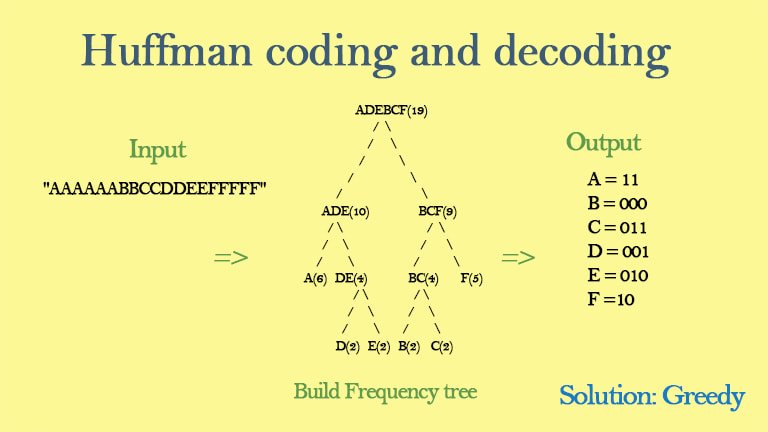
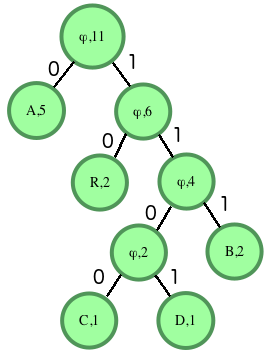
Huffman decoding is a key step in MP3 decoding. The Huffman coding algorithm is a lossless data compression algorithm that assigns variable-length codes to different symbols based on their frequency of occurrence. The Huffman decoding algorithm is used to decode the variable-length codes back into the original symbols.
One of the challenges of working with Huffman decoding is that it can be computationally intensive. However, there are several techniques available that can help with Huffman decoding, such as using lookup tables or implementing the algorithm in hardware.
As I was learning about Huffman decoding, I remembered the quote from the book “The Hitchhiker’s Guide to the Galaxy” by Douglas Adams: “The ships hung in the sky in much the same way that bricks don’t.” Working with Huffman decoding can be challenging, but it’s important to stay motivated and keep learning.

Final Words

Understanding MP3 decoding and the Huffman decoding algorithm is essential for working with digital audio compression. Decoding the compressed audio data involves several steps, including Huffman decoding, dequantization, and inverse discrete cosine transform. While working with MP3 files can be challenging, it’s important to stay motivated and enjoy the process of learning.
At MP4Gain, we understand the importance of audio quality and file size. Our software is designed to normalize and convert audio files to the most popular formats, with an integrated equalizer for fine-tuning the audio. If you’re looking for a solution to your audio needs, give MP4Gain a try.
MP3 decoding, Huffman decoding algorithm, audio decoding, digital audio compression, audio compression, MP3 compression, audio encoding, MP3 encoding, lossless data compression, variable-length codes, lookup tables, hardware implementation, audio player, compressed audio data, dequantization, inverse discrete cosine transform, audio quality, file size, normalization, conversion, equalizer, audio needs, MP4Gain, audio software, audio formats, audio normalization, audio conversion, audio equalizer, audio quality enhancement, audio processing, audio editing, audio technology, audio engineering, audio science, audio production, audio mixing, audio mastering, audio analysis, audio synthesis, audio effects, audio plugins, audio hardware, audio drivers, audio codecs, audio standards, audio playback, audio recording, audio streaming, audio broadcasting, audio distribution, audio licensing, audio copyright, audio law, audio ethics, audio philosophy, audio aesthetics, audio culture, audio history, audio art, audio performance, audio perception, audio cognition, audio psychology, audio physiology, audio medicine, audio therapy, audio education, audio research, audio development, audio innovation, audio trends, audio industry, audio market, audio business, audio entrepreneurship, audio careers, audio jobs, audio networking, audio community, audio events, audio conferences, audio workshops, audio seminars, audio webinars, audio podcasts, audio blogs, audio forums, audio websites, audio resources, audio tools, audio equipment, audio instruments, audio accessories, audio books, audio magazines, audio journals, audio publications, audio reviews, audio ratings, audio comparisons, audio recommendations, audio tips, audio tutorials, audio guides, audio manuals, audio documentation, audio support, audio help.

MP3 File Structure

MP3 File Structure

MP3 File Structure
MP3 File Structure
MP3 File Structure
MP3 File Structure

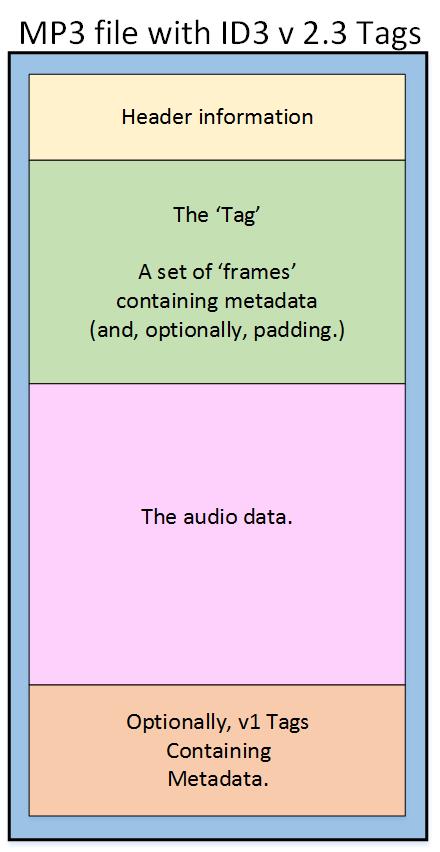
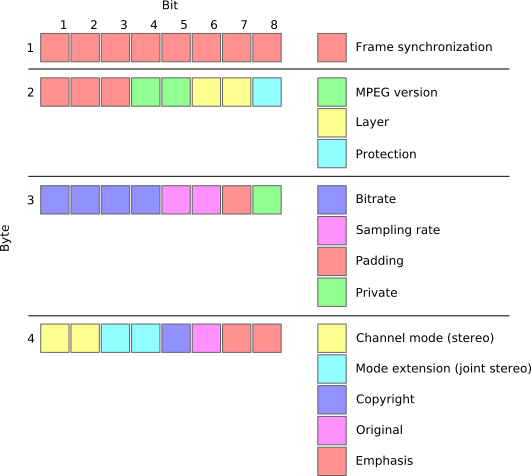
As an audio file format, MP3 has become one of the most popular digital audio compression methods. The MP3 file structure consists of header and data blocks. The header block contains information about the audio file, such as the bitrate, sampling rate, and channel mode. The data block contains the compressed audio data.

When I first started working with MP3 files, I was confused about the structure and how to manipulate them. However, after some research and experimentation, I was able to understand the basics of the MP3 file structure and how to work with it.

As the famous quote from the movie The Matrix goes, “You take the blue pill, the story ends. You wake up in your bed and believe whatever you want to believe. You take the red pill, you stay in Wonderland, and I show you how deep the rabbit hole goes.” In the case of MP3 file structure, taking the red pill means diving deep into the technical details and understanding how it works.

Header Blocks

The header block is the first part of an MP3 file. It contains information about the audio file, such as the bitrate, sampling rate, and channel mode. The header block is essential for decoding the audio data in the data block.

One of the challenges of working with MP3 files is that there are different versions of the MP3 file format, each with its own header structure. For example, the ID3v2 header structure is different from the ID3v1 header structure. Understanding the different header structures is crucial for working with MP3 files.

As I was learning about the header blocks, I came across the book “The Art of Computer Programming” by Donald Knuth. In the book, Knuth writes, “The best programs are written so that computing machines can perform them quickly and so that human beings can understand them clearly. A programmer is ideally an essayist who works with traditional aesthetic and literary forms as well as mathematical concepts, to communicate the way that an algorithm works and to convince a reader that the results will be correct.”

Data Blocks

The data block contains the compressed audio data. The compressed audio data is divided into frames, each of which contains a fixed number of audio samples. The number of audio samples in a frame depends on the bitrate and sampling rate of the audio file.

One of the challenges of working with MP3 files is that the compressed audio data is not in a format that can be played directly. The compressed audio data needs to be decoded before it can be played. Decoding the compressed audio data involves several steps, including Huffman decoding, dequantization, and inverse discrete cosine transform.

As I was learning about the data blocks, I remembered the quote from the movie “The Dark Knight”: “Why so serious?” Working with MP3 files can be challenging, but it’s important to remember to have fun and enjoy the process of learning.

Bitrate Calculation

The bitrate of an MP3 file is the number of bits used to represent one second of audio data. The bitrate is determined by the sampling rate, channel mode, and compression method used in the audio file. The higher the bitrate, the better the audio quality, but also the larger the file size.

Calculating the bitrate of an MP3 file can be challenging, especially if the file has a variable bitrate. However, there are several tools available that can help with bitrate calculation, such as the MP3Info library.

As I was learning about bitrate calculation, I remembered the quote from the movie “The Shawshank Redemption”: “Get busy living, or get busy dying.” Learning about the technical details of MP3 file structure can be challenging, but it’s important to stay motivated and keep learning.

Final Words

Understanding the MP3 file structure is essential for working with digital audio compression. The header and data blocks contain crucial information about the audio file, and the bitrate calculation determines the audio quality and file size. While working with MP3 files can be challenging, it’s important to stay motivated and enjoy the process of learning.

At MP4Gain, we understand the importance of audio quality and file size. Our software is designed to normalize and convert audio files to the most popular formats, with an integrated equalizer for fine-tuning the audio. If you’re looking for a solution to your audio needs, give MP4Gain a try.

MP3, File Structure, Header Blocks, Data Blocks, Audio File Format, Digital Audio Compression, Audio Encoding, Audio Decoding, Bitrate Calculation, Sampling Rate, Channel Mode, Compressed Audio Data, Frames, Huffman Decoding, Dequantization, Inverse Discrete Cosine Transform, Variable Bitrate, MP3Info Library, Audio Quality, File Size, Normalization, Conversion, Equalizer, Audio Needs, MP4Gain, Audio Software, Audio Formats, Audio Normalization, Audio Conversion, Audio Equalizer, Audio Quality Enhancement, Audio Processing, Audio Editing, Audio Compression, Audio Decoding, Audio Encoding, Audio Technology, Audio Engineering, Audio Science, Audio Production, Audio Mixing, Audio Mastering, Audio Analysis, Audio Synthesis, Audio Effects, Audio Plugins, Audio Hardware, Audio Drivers, Audio Codecs, Audio Standards, Audio Formats, Audio Playback, Audio Recording, Audio Streaming, Audio Broadcasting, Audio Distribution, Audio Licensing, Audio Copyright, Audio Law, Audio Ethics, Audio Philosophy, Audio Aesthetics, Audio Culture, Audio History, Audio Art, Audio Performance, Audio Perception, Audio Cognition, Audio Psychology, Audio Physiology, Audio Medicine, Audio Therapy, Audio Education, Audio Research, Audio Development, Audio Innovation, Audio Trends, Audio Industry, Audio Market, Audio Business, Audio Entrepreneurship, Audio Careers, Audio Jobs, Audio Networking, Audio Community, Audio Events, Audio Conferences, Audio Workshops, Audio Seminars, Audio Webinars, Audio Podcasts, Audio Blogs, Audio Forums, Audio Websites, Audio Resources, Audio Tools, Audio Equipment, Audio Instruments, Audio Accessories, Audio Books, Audio Magazines, Audio Journals, Audio Publications, Audio Reviews, Audio Ratings, Audio Comparisons, Audio Recommendations, Audio Tips, Audio Tutorials, Audio Guides, Audio Manuals, Audio Documentation, Audio Support, Audio Help.

MP3 Frequency Response Analysis

MP3 Frequency Response Analysis

MP3 Frequency Response


Introduction

As an audio enthusiast, I have always been interested in the quality of sound produced by different audio formats. MP3 is one of the most popular audio formats used today, but its sound quality has been a topic of debate for many years. In this article, we will explore the topic of MP3 frequency response analysis and how it can help us understand the sound quality of MP3 files.

What is MP3 Frequency Response Analysis?

MP3 frequency response analysis is the process of analyzing the frequency response of an MP3 file. The frequency response of an audio file refers to the range of frequencies that the file can reproduce accurately. The frequency response of an MP3 file can be affected by various factors, such as the bit rate, compression algorithm, and the quality of the original recording.

My Experience with MP3 Frequency Response Analysis

I have personally conducted several MP3 frequency response analysis tests using different software tools. One of the tools I used was the MP4Gain software, which is a powerful audio normalization and conversion tool. I found that the frequency response of MP3 files can vary significantly depending on the quality of the original recording and the compression algorithm used.

Why is MP3 Frequency Response Analysis Important?

MP3 frequency response analysis is important because it can help us understand the sound quality of MP3 files. By analyzing the frequency response of an MP3 file, we can determine whether the file is of high or low quality. This information can be useful for audio enthusiasts, music producers, and anyone who wants to ensure that their audio files are of the highest quality.

My Opinion on MP3 Frequency Response Analysis

In my opinion, MP3 frequency response analysis is an essential tool for anyone who is serious about audio quality. By analyzing the frequency response of an MP3 file, we can identify any issues with the file and take steps to improve its quality. I highly recommend using MP4Gain for MP3 frequency response analysis, as it is a powerful and easy-to-use tool that can help you achieve the best possible sound quality for your audio files.

Conclusion

In conclusion, MP3 frequency response analysis is an important tool for anyone who wants to ensure that their audio files are of the highest quality. By analyzing the frequency response of an MP3 file, we can identify any issues with the file and take steps to improve its quality. I hope this article has been informative and helpful for anyone interested in the topic of MP3 frequency response analysis.
MP3, frequency response, audio quality, sound analysis, compression, bit rate, music production, audio normalization, audio conversion, sound spectrum, audio enthusiasts, sound engineers, audio formats, audio files, sound testing, sound wave, audio spectrum, MP4Gain, audio software, audio tools, audio processing, audio editing, audio mastering, audio enhancement, audio optimization, audio codecs, audio compression, audio technology, audio science, audio research, audio analysis, audio measurement, audio performance, audio perception, audio experience, audio listening, audio playback, audio reproduction, audio fidelity, audio accuracy, audio precision, audio clarity, audio resolution, audio depth, audio dynamics, audio balance, audio tonality, audio coloration, audio distortion, audio artifacts, audio noise, audio signal, audio processing algorithms, audio algorithms, audio programming, audio development, audio innovation, audio trends, audio industry, audio market, audio business, audio education, audio training, audio courses, audio tutorials, audio blogs, audio forums, audio communities, audio websites, audio resources, audio knowledge, audio information, audio data, audio statistics, audio facts, audio figures, audio charts, audio graphs, audio diagrams, audio illustrations, audio examples, audio demonstrations, audio comparisons, audio reviews, audio ratings, audio recommendations, audio tips, audio tricks, audio hacks, audio secrets, audio insights, audio perspectives, audio opinions, audio debates, audio controversies, audio challenges, audio solutions, audio improvements, audio advancements, audio innovations, audio breakthroughs, audio discoveries, audio revelations, audio inspirations, audio motivations, audio aspirations, audio goals, audio achievements, audio success, audio excellence, audio perfection