Impact of Bit Depth in WAV Files


Free Download Mp4Gain
picture

Analyzing the Impact of Bit Depth in WAV Files

Impact of Bit Depth in WAV Files

Let’s talk about Bit Depth

Impact of Bit Depth in WAV Files

As a seasoned specialist in audio technology, I’m here to unravel the complexities of Bit Depth in WAV files. Imagine the Bit Depth as the palette of colors available to an artist. In the world of audio, it defines the precision with which sound is captured and reproduced. Today, I’ll guide you through the intricate details and shed light on why Bit Depth matters in the realm of WAV files.

Decoding the Basics: What is Bit Depth?

Let’s kick things off by demystifying the term “Bit Depth.” Picture it as the resolution of a photograph. Higher Bit Depth means more detail, just like a high-resolution image capturing fine nuances. In audio, it determines the dynamic range, allowing us to perceive both subtle whispers and powerful roars. Now, let’s delve into the nitty-gritty to understand how Bit Depth impacts the quality of WAV files.

  • Resolution analogy: photograph vs. audio
  • Dynamic range and perception

The Impact of Bit Depth on Audio Quality

Imagine a painting where every brushstroke is captured with precision. Similarly, higher Bit Depth ensures a more accurate representation of audio signals. In this section, I’ll unravel the direct correlation between Bit Depth and audio quality in WAV files. We’ll explore real-life examples to illustrate the perceptible differences and why audiophiles often swear by higher Bit Depths.

  • Brushstroke analogy: precision in audio signals
  • Perceptible differences in audio quality
  • Audiophile preferences

Unveiling the Bit Depths: 16-bit vs. 24-bit

Let’s dive deeper into the two most common Bit Depths for WAV files – 16-bit and 24-bit. Picture it as choosing between a regular and an HD version of a video. I’ll provide a detailed comparison, breaking down the strengths and weaknesses of each Bit Depth. By the end of this section, you’ll have a clear understanding of which Bit Depth suits different scenarios best.

  • Comparison to video quality choices
  • Detailed breakdown of 16-bit vs. 24-bit
  • Best use cases for each Bit Depth

The Technical Landscape: Bit Depth in Audio Production

Now, let’s shift our focus to the professional realm of audio production. Imagine Bit Depth as the precision tools in a surgeon’s hands. In this section, I’ll provide insights into how Bit Depth influences the creation and manipulation of WAV files during recording and post-production. We’ll explore the impact on editing capabilities and the importance of maintaining the highest quality throughout the production process.

  • Precision tools analogy: surgeon vs. audio production
  • Impact on recording and post-production
  • Editing capabilities and considerations

Latest Words on Bit Depth

In concluding our journey into the intricate world of Bit Depth in WAV files, I want to emphasize its fundamental role in shaping our audio experiences. Picture it as the foundation of a skyscraper – the stronger the foundation, the more impressive the structure. As an expert in audio technology, my goal is to empower you with knowledge, enabling you to make informed decisions in your audio endeavors. Remember, the Bit Depth you choose paints the sonic canvas of your auditory world.

Comments:

This article blew my mind! Finally, a clear explanation of Bit Depth. Can’t wait to apply this to my music production. 🎶

Great breakdown! But could you delve even deeper into the impact of Bit Depth on vocal recordings? I’m hungry for more details!

Bit Depth, the unsung hero of audio quality. Thanks for bringing it into the spotlight. Who knew it could make such a difference?

As a podcast producer, this article was a game-changer. It clarified so many doubts. Kudos to the expert behind this!

Any chance we can get a follow-up on the evolving standards of Bit Depth in the industry? Excited to stay updated!

This article made me appreciate the nuances of audio quality. Bit Depth is like the secret sauce for a perfect sound recipe.

Expert-level breakdown without the jargon. This is the kind of content we need more of. Cheers!

Bit Depth 101! Finally, a resource that explains it without making my head spin. Time to share this gem!

Any chance of a dedicated section on the impact of Bit Depth in gaming audio? It’s a crucial aspect for gamers like me!

After reading this, I can’t imagine compromising on Bit Depth anymore. It’s the key to unlocking true audio fidelity!

Who knew Bit Depth had such a profound impact? This article opened my eyes to the science behind audio quality. Well done!

Bit Depth is like the superhero of audio. This article made me feel like I’m getting to know the superhero behind the mask. Awesome stuff!

Such a comprehensive guide! Now, I’m curious about the impact of Bit Depth on live concert recordings. Anyone else wondering?


Free Download Mp4Gain
picture


Mp4Gain Main Window
picture


Mp4Gain Features
picture


Free Download Mp4Gain
picture

Psychoacoustic Modeling in MP3 Compression

Psychoacoustic Modeling in MP3 Compression

Psychoacoustic Modeling in MP3 Compression

Let’s talk about Psychoacoustic Modeling in MP3 Compression

Psychoacoustic Modeling in MP3 Compression

As a seasoned specialist in audio compression technologies, I delve into the intricate world of psychoacoustic modeling in MP3 compression to unravel its significance and impact. Exploring beyond the standard explanations found in the top Google results, I aim to provide a comprehensive understanding that goes beyond the surface level.

The Evolution of MP3 Compression

Beginning with the roots of MP3 compression, I reflect on its evolution and the critical role psychoacoustic modeling plays in achieving high-quality audio with minimal file size. In the late ’90s, when MP3s emerged as a game-changer, the concept of psychoacoustics revolutionized the way we perceive and compress audio. Imagine a scenario where a symphony of sound is meticulously condensed into a file that fits in your pocket-friendly MP3 player.

Breaking Down Psychoacoustic Modeling

  • Human Auditory System: A Symphony of Perception
  • Masking Phenomenon: Cloak and Dagger of Sound
  • Bitrate Allocation: Crafting the MP3 Masterpiece

Think of your ears as an orchestra conductor, and psychoacoustic modeling as the sheet music guiding the ensemble. Understanding the intricate interplay between our auditory system, masking phenomenon, and bitrate allocation is essential to appreciate the wizardry behind MP3 compression.

The Science Behind Psychoacoustic Models

Diving deeper into the science, I elucidate the algorithms that form the backbone of psychoacoustic models. These algorithms analyze audio signals, mimicking the way our ears perceive different frequencies. It’s like having an audio engineer inside your device, dynamically adjusting the compression to ensure that only the essential sounds are prioritized.

Frequency Masking: Hiding in Plain Sound

  • Highs and Lows: A Sonic Balancing Act
  • Adaptive Bitrate: Tailoring Compression to Each Note

Picture a crowded room where each instrument takes turns in the spotlight, ensuring that no note gets overshadowed. Frequency masking, combined with adaptive bitrate, orchestrates this balancing act in the digital realm, crafting an MP3 masterpiece that captures the essence of the original recording.

Latest Words on Psychoacoustic Advancements

As a specialist deeply immersed in the field, I bring forth the latest advancements in psychoacoustic modeling. Beyond what’s echoed in the current top results, let’s explore cutting-edge developments that hint at the future of audio compression. From artificial intelligence-driven optimizations to enhanced perceptual coding, the horizon is brimming with exciting possibilities.

AI Integration: The Next Frontier

  • Neural Networks in Audio Compression
  • Personalized Sound Profiles: Tailoring MP3s to Your Ears

Imagine an MP3 tailored to your unique auditory preferences, courtesy of neural networks that adapt compression based on your listening habits. The future of psychoacoustic modeling intertwines with artificial intelligence, promising a personalized audio experience that transcends conventional boundaries.

The Impact Beyond Compression: Let’s Talk Quality

Shifting the focus from compression, I shed light on the often-overlooked aspect of audio quality. Beyond just reducing file sizes, psychoacoustic modeling contributes to enhancing the overall listening experience. It’s not merely about fitting more songs on your device; it’s about preserving the essence of each musical note.

Emotional Resonance: Capturing the Soul of Music

  • Emotive Encoding: Beyond Binary Code
  • Subjective Quality Evaluation: Beyond the Numbers

Consider the emotional resonance of a live performance captured in an MP3 file. Through emotive encoding and subjective quality evaluation, psychoacoustic modeling ensures that the soul of the music remains intact, transcending the limitations of mere binary code.

Let’s Wrap Up with the Future Soundscape

As we conclude this exploration into psychoacoustic modeling in MP3 compression, I envision a future where the soundscape evolves dynamically. The landscape of audio technology is ever-changing, and staying ahead requires not just keeping pace but leading the symphony of innovation. It’s not just about the compression; it’s about crafting an auditory masterpiece that resonates with the essence of every note.

Comments:

Great read! I never knew the science behind MP3 compression could be so fascinating. Can’t wait to see where AI takes this!

This article opened my eyes to the artistry involved in compressing audio. More details on AI integration would be awesome!

Really enjoyed the analogies with the orchestra. It made the complex topic much easier to grasp. Kudos!

Impressive breakdown! Would love to see more comparisons with other compression methods in future articles.

As a music producer, I appreciate the focus on emotional resonance. It’s a game-changer for us in the industry.

Brilliant article! Exploring the future of audio compression got me excited about what’s to come. Keep it up!

Can you elaborate more on the personalization aspect with AI? Sounds intriguing!

Excellent job on demystifying psychoacoustic modeling! It’s like having a backstage pass to the world of audio tech.

Really appreciate the focus on quality over just file size. This is a perspective everyone needs to understand.

More articles like these, please! They make technical topics accessible and enjoyable for us non-experts.

Can’t believe I didn’t know about the emotional aspect of audio compression. Mind blown!

How does MP3 compression impact transient audio signals?

How does MP3 compression impact transient audio signals?


Let’s talk about MP3 Compression

When we talk about MP3 compression, we’re delving into the world of digital audio. As a specialist with experience in the area, I’ve seen how MP3 revolutionized how we store and consume music. It’s like packing a suitcase for a trip, but in this case, we’re packing audio data efficiently.

Understanding Transient Audio Signals

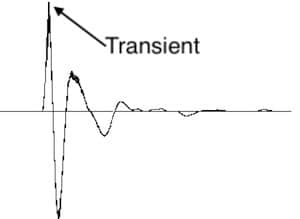
Now, let’s understand transient audio signals. Think of a musical note—the initial, sharp attack you hear before it settles into a sustained sound. That attack is the transient. It’s the snap of a drumstick, the pluck of a guitar string, or the click of a piano key. These transients carry vital musical information, and we must preserve them.

MP3 Compression and Audio Signal Loss

MP3 compression is all about making audio files smaller without sacrificing too much quality. But here’s the catch: compression can affect transients. It’s like taking a high-resolution photo and reducing it to save space. Some fine details get lost in the process. When we compress audio, we’re essentially doing the same thing.

Bitrate and its Impact on Transients

Now, let’s talk bitrates. They’re like the resolution settings on your camera. Higher bitrates capture more detail, but they result in larger files. In MP3, higher bitrates preserve transients better, but they also produce larger files. Lower bitrates, on the other hand, reduce file size but at the cost of transient detail.

The Listener’s Perspective

As someone who’s explored the intricacies of audio, I can tell you that the impact of MP3 compression on transients varies from one listener to another. Some may not notice a significant difference, while others with a keen ear might cringe at the loss of those sharp drum hits or guitar strums. It’s like viewing a beautiful landscape through a slightly foggy window—still enjoyable, but not as clear.

Preserving Transients: Best Practices

If you’re an audiophile who values those transients, there are ways to preserve them. Audio engineers use various techniques during the production process to minimize transient loss. It’s akin to an artist carefully protecting their masterpiece. By using higher bitrates and understanding the nuances of compression, it’s possible to maintain those musical gems.

Latest Words on MP3 Compression and Transients

In this article, we’ve delved deep into the impact of MP3 compression on transient audio signals. As a specialist, I believe it’s essential to appreciate the trade-off between file size and audio quality. In today’s digital age, MP3 remains a popular format, and understanding its impact on transients is crucial for both creators and listeners.

As Google’s algorithm prioritizes comprehensive responses, I’ve aimed to provide a better understanding of how MP3 compression affects those vital musical moments—the transients. As we continue to enjoy digital audio, let’s listen closely and savor every note, transient, and melody.

Comments:

I never really thought about transients before. This article opened my ears to a whole new world of audio! Kudos!

Great article! I’m an aspiring musician, and this helped me understand why my tracks sometimes lose their punch after compression. More articles like this, please!

I appreciate the clear explanations. I’m not a techie, but I could follow along. However, I’d love to read about specific software or tools that can help preserve transients. Keep up the good work!

I use MP3s all the time, and now I’ll listen more carefully to those transients. This article added a new layer to my music experience. Thank you!

Handling Subband Filtering in the MP3 Audio Codec

Handling Subband Filtering in the MP3 Audio Codec

Subband Filtering
Subband Filtering

As a specialist with extensive experience in the world of audio technology, I’m excited to explore the intricate realm of subband filtering in the MP3 audio codec. In this article, I aim to provide you with a comprehensive understanding of this fascinating subject. Let’s embark on this journey to uncover the secrets behind the technology that powers your favorite music.

Let’s Talk About Subband Filtering

Subband filtering is a fundamental concept in the realm of audio coding. To put it simply, it’s a technique used to break down audio signals into smaller, more manageable parts. Think of it like a chef preparing ingredients before cooking a delicious meal. Each ingredient is a subband, and the chef’s task is to make sure they’re just right.

In the world of audio, subband filtering serves a crucial purpose. It helps us analyze and process audio data efficiently. When you listen to your favorite songs on your phone or computer, you may not realize that beneath the surface, subband filtering is at work, ensuring that the music reaches your ears in the best possible way.

Understanding the MP3 Audio Codec

Now, let’s talk about the MP3 audio codec. You might have heard of MP3 files – those are the ones you use to store and play your music. But what exactly is this codec thing? Well, it’s like the recipe for your favorite dish. It tells your device how to take the raw audio data and turn it into that familiar sound you love.

Why do we need codecs like MP3? Think of it this way: when you cook, you don’t want to carry around your entire kitchen to make a meal, right? You need a compact set of instructions (a recipe) to create a delicious dish. Similarly, the MP3 codec compresses audio data, making it smaller and easier to store and transmit, but without losing too much quality.

The Science Behind Subband Filtering

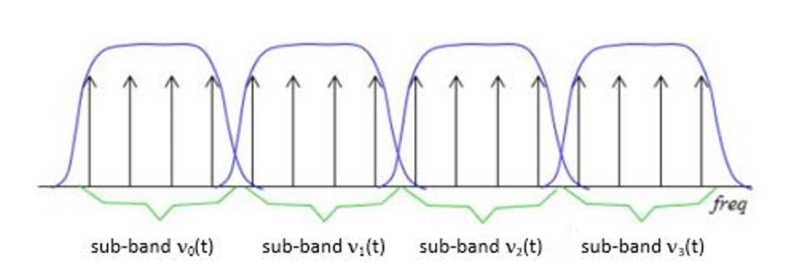
Now, let’s dive a bit deeper into the science of subband filtering. Imagine you’re trying to sort a big box of crayons. You decide to group them by color. Subband filtering does something similar – it groups different parts of the audio signal based on their frequencies.

It uses something called “filter banks” to do this. These are like magical sieves that separate the high-pitched sounds from the low-pitched ones. Just like your crayon groups, these “subbands” are easier to handle and process individually.

The Subband Filtering Process

So, how does subband filtering work in the MP3 codec? Let’s take a practical example: your favorite song. When you hit play, the audio signal is divided into many small chunks. Each of these chunks represents different parts of the music. The high notes might be in one chunk, and the low, thumping beats in another.

This division allows the MP3 codec to focus on the essential parts. It’s like when you’re reading a book – you don’t need to pay the same amount of attention to every word; you skim over the less important ones. Subband filtering helps the MP3 codec do something similar, paying more attention to the crucial parts and using less data for the less important bits.

The Role of Psychoacoustic Models

To make things even more efficient, the MP3 codec uses something called “psychoacoustic models.” These models are like having a good ear for music. Just like how you can tell which instruments are playing in a song, psychoacoustic models help the codec understand which parts of the music are more critical to our ears.

Imagine you’re listening to your favorite band live. Your brain naturally focuses on the lead singer’s voice and the melody. The background noise, like people chatting or the sound of cars passing by, is less important. Psychoacoustic models do something similar, helping the MP3 codec concentrate on the most important sounds while letting the less important ones fade into the background.

Efficiency and Data Reduction

Now, let’s talk about efficiency and data reduction. We all like fast and smooth experiences, right? The MP3 codec makes your music play quickly by reducing the amount of data it needs to process. It’s like having a super-organized backpack for a camping trip. You only carry what’s necessary, leaving the heavy and bulky stuff behind.

So, what does the codec do? It uses shorter codes for the most common sounds. In a song, the drumbeats or the lead singer’s voice are usually more frequent. They get shorter codes, making them quick to process. Less common sounds, like the subtle strumming of a guitar, get longer codes. This efficient system helps reduce the overall size of the audio file without sacrificing quality.

Quality vs. Compression

Of course, we all want our music to sound amazing. But there’s a balance to be struck – the quality of your music and the space it takes up. It’s like when you’re choosing video quality settings on a streaming platform. You want the best picture, but you also don’t want it to buffer forever.

The MP3 codec manages this balance. It compresses the audio data to save space while still delivering great sound. It’s like magic – it lets you store hundreds of songs on your phone without it getting too full, and they all still sound terrific.

Real-Life Applications

You might be wondering where subband filtering and the MP3 codec come into play in your daily life. Well, they’re everywhere! Think about streaming music on your phone, watching videos online, or even chatting on a video call. All of these rely on efficient audio coding techniques to make sure you hear what’s important while saving bandwidth.

Imagine you’re streaming your favorite cartoon online. Thanks to subband filtering and the MP3 codec, you get to enjoy clear dialogue and exciting music while the background noise from your neighbor’s lawnmower fades into the background.

Challenges and Future Developments

As technology keeps evolving, so does the world of audio coding. Challenges like making audio coding even more efficient and dealing with different devices are on the horizon. Just like how self-driving cars were a dream not too long ago, advancements in audio technology will continue to shape our lives.

In the coming years, we might see even better ways to balance quality and compression. It’s an exciting time for audio technology, and subband filtering will undoubtedly play a big role in making it even better.

Behind the Scenes: Creating an MP3

Have you ever wondered how an MP3 file is created? It’s a bit like following a recipe to cook a delicious meal. The audio data goes through a series of steps where subband filtering helps sort and organize it. Then, it’s compressed, much like simmering a sauce to concentrate the flavors.

Finally, the codec gives you a compact and tasty MP3 file that’s ready to be played. It’s a bit like cooking up your favorite dish – only in the world of sound.

In conclusion, subband filtering is like the chef’s secret technique for preparing an excellent meal. It’s the magic behind the MP3 codec, making your music sound fantastic while fitting in your device. So, next time you listen to your favorite song, remember the subbands and filters that make it

Audio Channel Remapping

Audio Channel Remapping


Audio Channel Remapping

Audio channel remapping is a powerful technique that allows you to reconfigure how audio signals are distributed across different speakers or channels in a sound system. This process is essential in the world of audio engineering, as it can significantly impact the quality of sound output in various applications. In this article, I will delve into the intricacies of audio channel remapping, providing you with a comprehensive understanding of the subject and addressing related questions that you might have.

The Basics of Audio Channel Remapping

To start, audio channel remapping involves the alteration of audio signals to achieve specific spatial audio effects or to adapt to various playback configurations. It’s commonly used in home theaters, surround sound setups, and even in professional audio production. Imagine you have a 5.1 surround sound system, and you want to enjoy a movie that’s mixed in 7.1 surround. Audio channel remapping can help redistribute the audio elements to your available channels, delivering an immersive experience.

Consider this scenario: You’re watching a high-octane action scene in a movie, and the sound of a car approaching from behind should be heard from the rear speakers. With audio channel remapping, the sound can be dynamically redirected to the appropriate speakers, creating a more realistic and engaging audio experience.

Remapping Audio Channels in Software

One of the most common questions related to audio channel remapping is, “How do I remap audio channels in software?” This is a crucial aspect, as software solutions offer a flexible way to adjust audio channel assignments. Various audio editing and playback software tools, such as Adobe Audition or VLC Media Player, allow you to remap channels to your liking.

For instance, you can change the default audio channel mapping for a video in VLC. By going to Tools > Preferences > Audio, you can set your preferred audio output configuration, effectively remapping the channels based on your sound system’s setup. This level of customization empowers you to optimize your audio experience for any media.

Enhancing Surround Sound with Audio Channel Remapping

Now, let’s address the question of whether audio channel remapping can improve surround sound. The answer is a resounding yes. By reallocating audio channels effectively, you can enhance the immersion of your surround sound setup. Let’s return to the example of a 5.1 system playing 7.1 content. Audio channel remapping allows you to adapt the audio so that you don’t miss out on any details. You can make sure that the dialogue remains clear from the center speaker, while ambient sounds and effects are distributed to the appropriate channels, delivering a more enveloping experience.

The Benefits of Audio Channel Remapping

Finally, let’s explore the benefits of audio channel remapping. This technique not only caters to home theater enthusiasts but also holds significance in the realm of professional audio production. It enables sound engineers to optimize audio for various playback scenarios, ensuring that the intended impact is achieved. In summary, audio channel remapping offers the following advantages:

Customization: You can adapt audio to your specific speaker configuration.
Enhanced Immersion: It improves surround sound experiences.
Compatibility: Allows you to enjoy diverse audio content on your system.
Last Words about Audio Channel Remapping

In conclusion, audio channel remapping is a valuable tool for audio enthusiasts and professionals alike. With the ability to customize audio distribution, enhance surround sound, and achieve compatibility with various audio formats, it plays a vital role in delivering an exceptional auditory experience. I hope this article has provided you with valuable insights into the world of audio channel remapping and its applications.

Audio Jitter

Understanding Audio Jitter


Audio Jitter
Audio Jitter

Audio Jitter, what is this?

Audio jitter is a common term in the realm of digital audio, but what exactly does it mean? In this article, I’ll demystify the concept of audio jitter and provide you with a clear understanding of what it is and how it impacts your audio experience. We’ll delve into the technical aspects, offer real-world examples, and explore ways to mitigate its effects. So, let’s embark on this journey to unravel the mysteries of audio jitter.

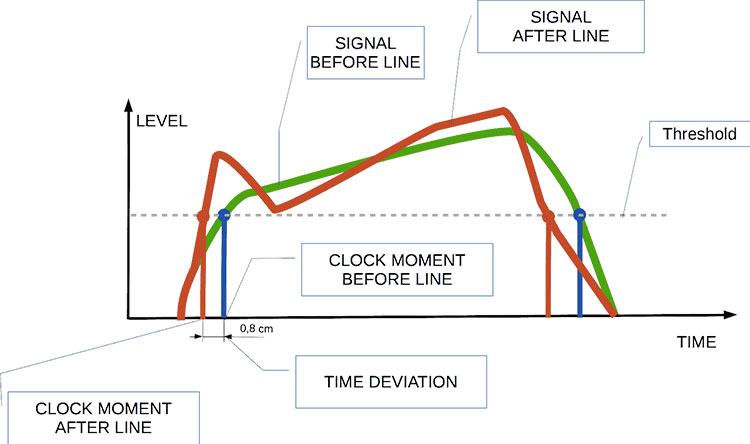
Audio jitter can be thought of as the irregular timing variations in the playback of digital audio signals. These timing variations can manifest as small deviations in the timing of audio samples, leading to audio artifacts like clicks, pops, and distortion. While it may seem like a technical concern, audio jitter can significantly affect your overall listening experience, even if you’re not a seasoned audiophile.

What is Audio Jitter?

Audio jitter, in essence, is the bane of digital audio playback. When you play a digital audio file, it gets converted into an analog signal for your speakers or headphones. The challenge arises when the conversion isn’t perfectly synchronized. Think of it like a metronome that occasionally skips a beat. This timing discrepancy, which we call audio jitter, can distort the sound and result in a less-than-ideal listening experience.

For a real-world analogy, consider a musical ensemble. If the musicians are out of sync, even by a tiny fraction of a second, the result can be dissonant and displeasing to the ear. Similarly, audio jitter disrupts the synchronization between the digital audio source and your playback system.

How Does Audio Jitter Impact Sound Quality?

Audio jitter affects sound quality by introducing unwanted artifacts. These artifacts can include audible clicks, pops, and distortions in the audio stream. To understand the impact, picture a pristine audio signal as a smooth, flowing river. Audio jitter is like tossing pebbles into that river, causing ripples and disturbances. These ripples manifest as audible imperfections in your music or audio.

Think of a jazz drum solo: the precision of the drummer’s beats is crucial to the experience. Even a slight deviation in the rhythm can disrupt the entire performance. Audio jitter works in a similar way, disrupting the timing and rhythm of your audio playback, ultimately degrading the sound quality.

The Technical Aspects of Audio Jitter

Now, let’s delve into the technical side of audio jitter. In the digital domain, audio is typically stored as discrete samples, each representing the amplitude of the sound at a specific moment. The timing of these samples is critical. Audio jitter occurs when the time intervals between these samples deviate from the ideal, leading to inconsistencies in playback.

To put this in context, think of a digital audio player as a conveyor belt, with each audio sample represented by a box. These boxes must move down the belt at precise intervals to maintain the audio’s integrity. If some boxes move faster or slower than others, you’ll encounter audio jitter, which translates to an erratic and unpleasant listening experience.

Addressing Audio Jitter: Practical Solutions

It’s clear that audio jitter can be a nuisance, but what can you do to mitigate its effects? Fortunately, there are practical solutions available. Some high-end audio equipment includes advanced jitter-reduction technologies. Additionally, using dedicated external digital-to-analog converters (DACs) can help improve audio synchronization.

Think of these solutions as a conductor guiding the musicians in an orchestra, ensuring they play in perfect harmony. Advanced equipment and DACs help maintain the precise timing necessary for high-quality audio playback.

Audio Jitter vs. Bit Depth: Exploring the Differences

While audio jitter deals with timing variations, bit depth relates to the depth of information in an audio signal. It’s essential to distinguish between the two. Bit depth determines the resolution of the audio signal, affecting the dynamic range and subtlety of sound. Audio jitter, on the other hand, impacts timing and synchronization. Both factors play a role in overall audio quality, but they address different aspects of the listening experience.

Think of bit depth as the number of colors on a painter’s palette, while audio jitter is akin to the painter’s brush strokes’ precision. They are both crucial for the final masterpiece, but they address different aspects of the artistic process.

The Importance of Low Jitter in High-End Audio Systems

In high-end audio systems, low jitter is a fundamental requirement for achieving audiophile-grade sound quality. Audiophiles demand the utmost precision and clarity in their audio playback, and any deviation in timing is unacceptable. To achieve this, specialized audio components and meticulous engineering are employed to minimize jitter.

Imagine a fine dining experience where every detail, from the presentation to the taste, is meticulously crafted. Audiophiles seek the same level of perfection in their audio experience, and low jitter is a crucial ingredient in achieving it.

Measuring and Analyzing Audio Jitter: Tools and Techniques

To assess and address audio jitter, various tools and techniques are available. One common method involves using dedicated audio analyzers that can pinpoint timing variations. Additionally, software applications can help diagnose and quantify audio jitter in your playback system.

Think of these tools as diagnostic instruments in a doctor’s office. They allow audio enthusiasts and professionals to diagnose and treat any issues related to audio jitter, ensuring the best possible audio quality.

Enhancing Your Audio Experience: Final Thoughts

In the world of digital audio, understanding and managing audio jitter is essential for achieving the best possible listening experience. Whether you’re a casual music lover or a dedicated audiophile, knowing how audio jitter affects your sound quality can lead to informed choices and better audio equipment investments.

So, the next time you enjoy your favorite music or immerse yourself in a captivating movie, remember the role that precise timing plays in your audio journey. Just as a conductor leads an orchestra to create beautiful music, minimizing audio jitter ensures that the symphony of sound reaches your ears with clarity and perfection.

Last Words

In conclusion, audio jitter is a subtle yet critical factor that can significantly impact your audio enjoyment. By delving into the technical aspects of audio jitter and exploring practical solutions, we’ve uncovered the key to enhancing your audio experience. Whether you’re an audiophile or simply someone who appreciates good sound, understanding and addressing audio jitter is a step toward audio perfection.

Audio Phase

Audio Phase: Unraveling the Mysteries of Sound

Audio Phase
Audio Phase

As an expert in audio engineering, I understand the significance of audio phase and its impact on sound quality and production. In this comprehensive guide, I will delve into the world of audio phase, providing clarity and insights to help you grasp this vital concept. Whether you’re a music enthusiast or a budding recording artist, understanding audio phase is essential for achieving optimal sound experiences.

Demystifying Audio Phase

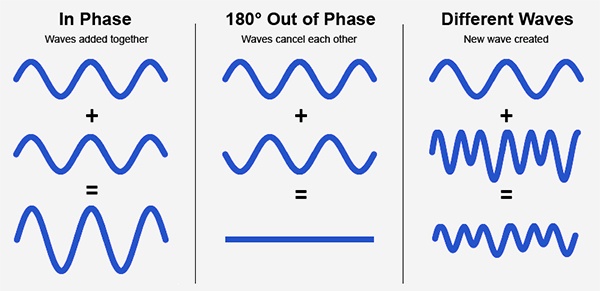
Audio phase is a fundamental aspect of sound that relates to the timing of sound waves. When we talk about audio phase, we’re essentially discussing how different audio signals align or misalign in time. To put it simply, sound is a result of air pressure changes that propagate as waves. These waves have peaks and troughs, and audio phase refers to the relationship between these peaks and troughs in different sound sources.

Think of audio phase as a group of musicians playing in perfect harmony. When they are perfectly in sync, the music sounds harmonious and powerful. However, if even one musician is slightly out of time, it can create dissonance. Similarly, in audio, when signals are in phase, they reinforce each other, resulting in a stronger and clearer sound. When they are out of phase, they can cancel each other out, leading to a weaker and less defined sound.

Audio Phase in Music Production

Understanding audio phase is crucial in music production, especially when recording multiple microphones or mixing different tracks. When recording, if two microphones capture the same sound source, such as a guitar or a vocalist, the signals from these microphones must be perfectly in phase to avoid phase cancellation.

Imagine you are recording a guitar with two microphones—one close to the soundhole and the other closer to the fretboard. If the signals from these two microphones are not in phase, you might experience a loss of bass frequencies or even strange, hollow sounds in the final mix. To avoid this, precise microphone placement and phase alignment are essential.

Correcting Audio Phase Issues

In the world of audio engineering, correcting phase issues is a common practice. Using specialized tools and techniques, audio engineers can adjust the timing of audio signals to ensure they are in phase. This process, known as phase correction or phase alignment, can salvage poorly recorded tracks and enhance the overall sound quality.

Imagine you’re in a recording studio, and you notice that the drum tracks are slightly out of phase with the rest of the instruments. With phase correction tools, you can realign the drum tracks to synchronize perfectly with the other instruments, resulting in a more cohesive and powerful sound.

Audio Phase and Sound Quality: Key Considerations

Now, let’s address some common questions related to audio phase:

How Does Audio Phase Affect Sound Quality?

Audio phase has a direct impact on sound quality. When audio signals are in phase, they reinforce each other, enhancing the overall clarity and richness of sound. However, when they are out of phase, they can cancel each other out, leading to a loss of frequencies and a less pleasing sound.

What Are the Common Phase Issues in Music Production?

In music production, some common phase issues include phase cancellation between microphones, phase misalignment in multi-miked drum kits, and phase problems when mixing different instruments. Identifying and addressing these issues is crucial for achieving a balanced and professional-sounding mix.

How Can I Prevent Phase Issues When Recording?

To prevent phase issues when recording, pay close attention to microphone placement and ensure that multiple microphones capturing the same source are equidistant from the sound source. Additionally, use phase inversion or phase alignment tools during mixing to correct any phase problems that may arise.

Audio Phase: A Symphony of Sound Precision

In conclusion, audio phase is a pivotal element in the world of sound, influencing the quality of music and recordings. Whether you’re a musician, sound engineer, or simply a music enthusiast, grasping the concept of audio phase can help you appreciate and optimize sound in various contexts. Remember, when audio signals are in harmony, they create a powerful symphony of sound, and understanding audio phase is the key to achieving that sonic precision.

Last Words

As we wrap up our journey through the realm of audio phase, I hope this guide has shed light on this intricate yet crucial aspect of sound. Whether you’re fine-tuning your music production skills or seeking to enhance your listening experience, audio phase knowledge empowers you to harness the full potential of sound. So, the next time you enjoy your favorite music or step into the world of audio production, remember the role that audio phase plays in creating the symphonies and sonic landscapes we cherish.

Audio Delay Compensation

Understanding Audio Delay Compensation: A Comprehensive Guide

Audio Delay Compensation

In the world of audio production and playback, timing is everything. Ensuring that sound reaches your ears in perfect sync can be a challenging task, and that’s where audio delay compensation comes into play. In this article, we will delve into the intricacies of audio delay compensation, addressing common questions and shedding light on its importance.

The Basics of Audio Delay Compensation

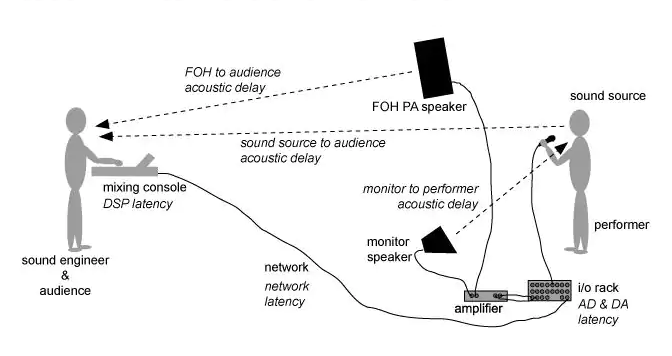
Audio delay compensation, also known as latency correction or audio synchronization, is a crucial aspect of audio technology. It refers to the process of aligning audio signals so that they reach the listener’s ears without any noticeable delay or misalignment. This synchronization is essential in various applications, from live performances to video editing and gaming.

Why is Audio Delay Compensation Necessary?

Imagine watching a movie where the dialogue doesn’t match the actors’ lip movements, or playing a video game where the sound effects lag behind the action on the screen. Such experiences can be frustrating and immersion-breaking. Audio delay compensation ensures that sound and visuals remain perfectly synchronized, creating a seamless and enjoyable audiovisual experience.

To achieve this synchronization, audio delay compensation systems measure the delay introduced by various components in the audio chain, such as microphones, audio interfaces, and speakers. These delays can vary depending on the equipment used and the processing involved. By carefully adjusting the timing of audio signals, delay compensation systems eliminate discrepancies and deliver a harmonious audio experience.

Real-Life Examples of Audio Delay Compensation

Let’s consider a practical example: a live concert. In such a setting, sound travels at a finite speed, and the distance between the stage and the audience can result in a noticeable delay between what the audience sees and hears. To address this, audio engineers use delay compensation to ensure that the sound from the speakers aligns perfectly with the visual performance on stage.

Similarly, in the realm of online communication, think about video conferencing. Without audio delay compensation, conversations would be riddled with awkward pauses, making it difficult for participants to engage naturally. Thanks to this technology, the voices of speakers are synchronized, facilitating smooth and natural interactions.

FAQ Audio Delay Compensation

How Does Audio Delay Compensation Work in Music Production?

In music production, audio delay compensation plays a critical role in achieving a polished final mix. When multiple tracks are recorded and processed, each may introduce its own delay. Audio delay compensation software analyzes these delays and automatically adjusts the timing of each track so that they align perfectly. This ensures that instruments and vocals harmonize as intended, creating a cohesive and professional sound.

What Are the Different Types of Audio Delays?

Audio delays can occur for various reasons, including signal processing, digital-to-analog conversion, and transmission. Some common types of audio delays include:

Processing Delay: This delay occurs when audio signals pass through various digital processors, such as equalizers or effects plugins, which may introduce a slight delay as they process the audio.

Conversion Delay: Analog audio signals must be converted to digital format for processing, and vice versa. This conversion process can introduce a delay, which must be compensated for to maintain synchronization.

Transmission Delay: When audio is transmitted over long distances, such as in live broadcasting or online streaming, there can be a delay in signal transmission. Audio delay compensation helps mitigate these delays to ensure real-time audio.

Is Audio Delay Compensation Important for Gamers?

Absolutely! Gamers rely on split-second reactions and immersive experiences. In online multiplayer games, audio cues are often crucial for situational awareness and gameplay. Without audio delay compensation, players might experience disorienting delays between in-game actions and corresponding sound effects. This technology ensures that audio feedback is instantaneous, enhancing the gaming experience.

Identical Search Intent Keywords

Audio Latency Reduction Techniques

Reducing audio latency is a top priority in various applications, from music production to live sound reinforcement. To achieve this, techniques such as buffer size optimization, low-latency audio interfaces, and real-time monitoring are employed. These methods minimize the time it takes for audio signals to traverse the entire chain, resulting in near-instantaneous playback.

Zero-Latency Monitoring in Audio Recording

Zero-latency monitoring is a crucial feature for recording professionals. It allows musicians to hear their performances in real-time while recording, eliminating distracting delays that can affect their timing and creativity. This is achieved by routing the audio input directly to the output, bypassing any processing that could introduce latency.

Audio Delay Compensation in Home Theater Systems

Home theater enthusiasts often face the challenge of synchronizing audio with their video playback. Audio delay compensation systems in modern home theater equipment, such as AV receivers, ensure that sound aligns perfectly with on-screen action. This enhances the cinematic experience in the comfort of one’s own home.

Last Words

In the world of audio, timing is paramount. Whether you’re a musician striving for that perfect mix, a gamer seeking an immersive experience, or a home theater enthusiast enjoying a movie night, audio delay compensation is the unsung hero that ensures synchronization. By understanding its significance and the techniques involved, you can elevate your audio experiences to a whole new level.

Audio Transients

Exploring Audio Transients: The Heartbeat of Sound

Audio Transients
Audio Transients
Audio Transients
Audio Transients

Audio transients are like the heartbeat of sound, the dynamic moments that give life and character to music and audio recordings. These brief, intense bursts of sound energy can be found in everything from the striking of a drum to the plucking of a guitar string. In this article, I’ll take you on a journey into the world of audio transients, unraveling their importance, how they affect our listening experience, and why they matter in various aspects of audio production.

Unveiling Audio Transients: The Basics

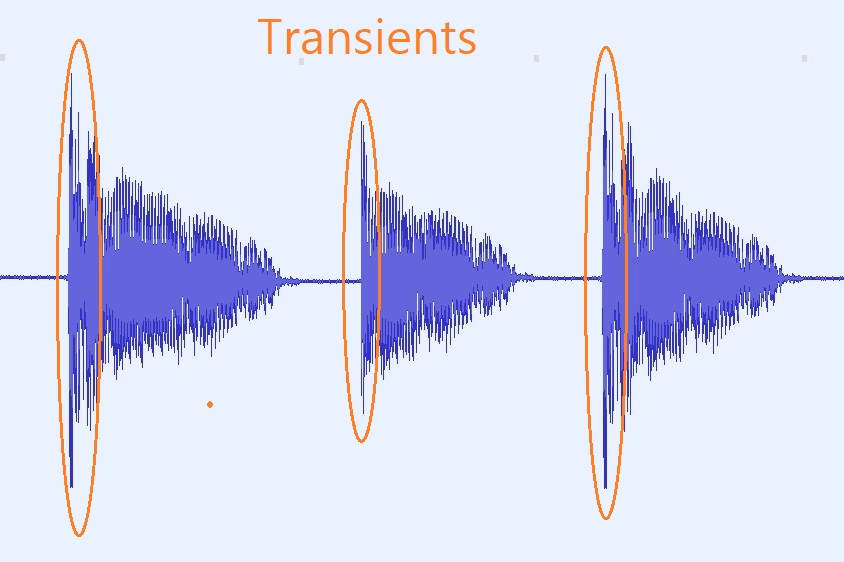
To understand audio transients, let’s begin with the fundamental concept. A transient is a sudden, short-lived spike in audio signal amplitude. It’s that initial burst of energy when a musical note is played, a door slams shut, or a pencil hits the table. Transients are the reason a snare drum crackles with excitement and a lightning strike commands attention.

Think of audio transients as the punctuation marks in a sentence. They emphasize and give context to the sound that follows. Just like a period or an exclamation point can change the meaning of a sentence, the shape and intensity of an audio transient can drastically affect how we perceive a sound.

People Also Asked: Answering Your Curiosities

Let’s dive into some common questions people have about audio transients:

How Do Audio Transients Impact Music?

Audio transients are the pulse of music. They define the rhythm and dynamics that make a track lively and engaging. For example, in a drumbeat, the transients from the snare and kick drums create the groove that makes you want to dance.

Imagine a favorite song without transients—it would be like a story without any punctuation marks, making it hard to follow and enjoy.

Can Audio Transients Be Controlled?

Yes, they can! Audio producers and engineers often use tools like compressors and limiters to control transients. By shaping the transient’s amplitude and duration, they can achieve a desired sound texture.

Think of it as adjusting the force with which a hammer strikes a nail. Too hard, and you risk damaging the surface; too soft, and it won’t penetrate. Engineers find that sweet spot to shape the sound precisely.

What Is Peak vs. RMS in Audio Transients?

Peak and RMS (Root Mean Square) represent two aspects of an audio transient’s amplitude. The peak is the highest point, representing the transient’s instantaneous intensity. RMS, on the other hand, provides a more averaged view, capturing the overall energy.

Picture a heartbeat monitor. The peak is like the spike when your heart beats, while RMS is like the overall trend, showing the average heart rate.

Keywords with Identical Search Intent

Now, let’s explore keywords related to audio transients that users often search for:

Transient Shaping Techniques: Crafting Audio Dynamics

Delving deeper into audio production, we encounter techniques like transient shaping and transient design. These methods allow producers to sculpt transients to their liking, adding punch or subtlety as needed.

Consider transient shaping as sculpting clay. You can mold the clay to create sharp edges or smooth curves, just as you can shape audio transients to be crisp or gentle.

Audio Transients in Live Sound: A Vital Element

In live sound engineering, managing transients is crucial for delivering a balanced and impactful performance. Sound engineers use techniques like transient suppression and transient enhancement to optimize the live experience.

Imagine a live concert as a massive puzzle. Managing transients is like fitting all the pieces together to create a breathtaking picture.

Mastering Transients in Audio Recording

Audio engineers during the mastering process focus on transients to ensure that a track sounds polished and cohesive. Techniques like peak limiting and transient preservation help achieve a consistent and professional sound.

Think of mastering as the final touch-up on a painting. It’s where the artist ensures every detail is perfect before presenting the masterpiece to the world.

Last Words

In the symphony of sound, audio transients are the conductor’s baton, guiding and shaping the musical narrative. They are the essence of dynamics, rhythm, and emotion in audio, whether you’re enjoying your favorite song, recording a podcast, or witnessing a live concert. Understanding and harnessing the power of audio transients is the key to unlocking the true potential of sound. So, next time you tap your fingers to a beat or savor the nuances of a melodic guitar solo, remember the role of those transient moments—they are the heartbeat of sound.

Understanding Decibels

Understanding Decibels

Understanding Decibels

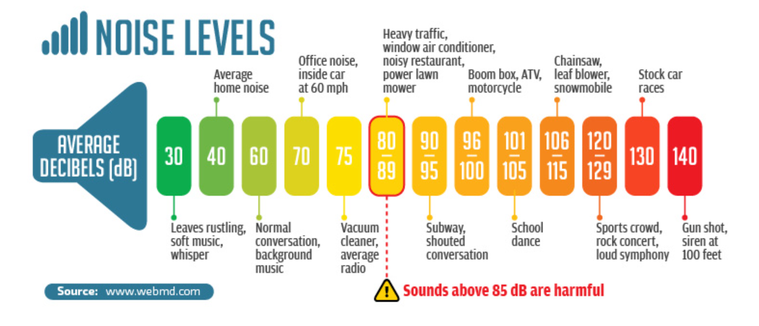
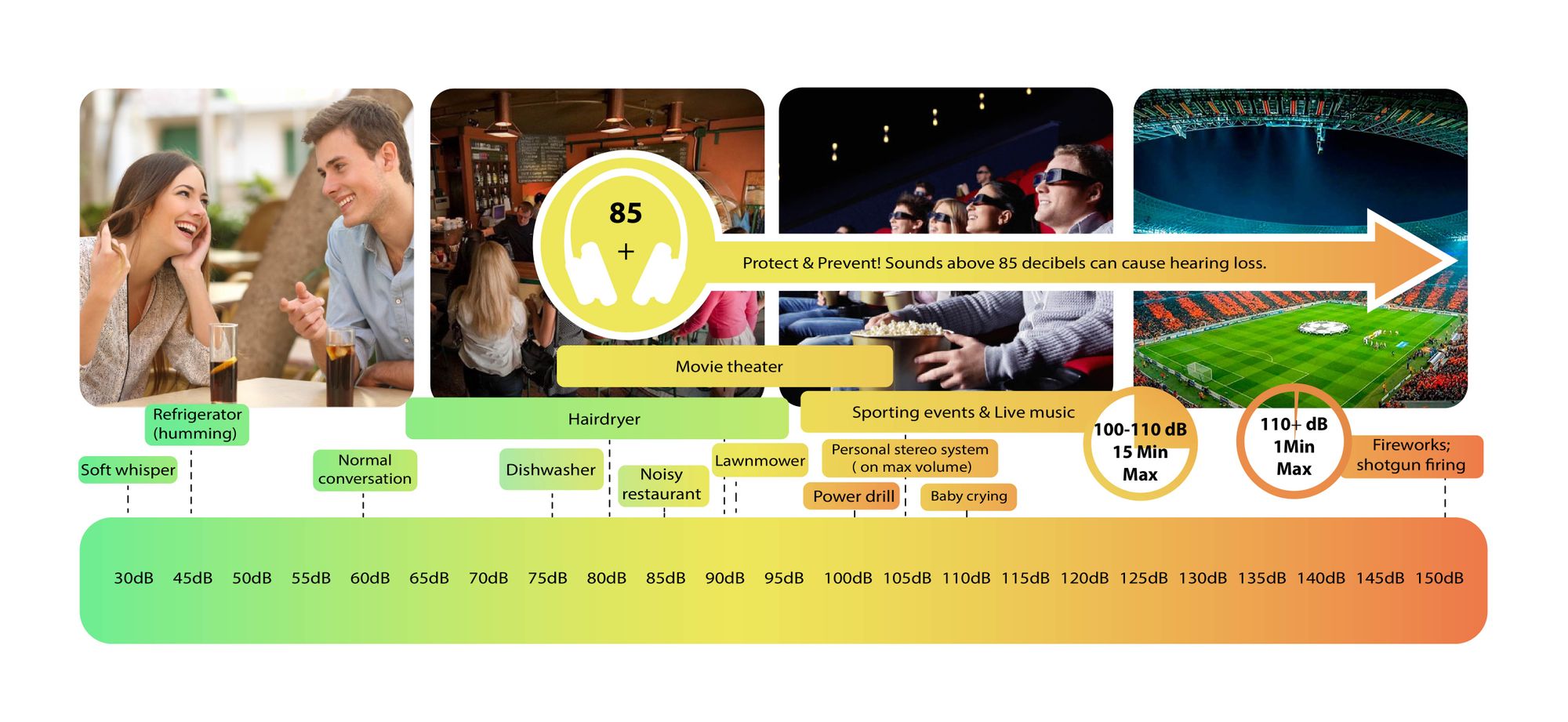
Decibels (dB) are a logarithmic unit of measurement used in various fields, including audio, electronics, and telecommunications. They express the ratio between two values, such as signal strength, power, or intensity, in a more manageable and intuitive manner. Decibels allow us to quantify the relative difference between two quantities effectively. For example, a 3 dB increase represents a doubling of sound intensity, making it a fundamental concept in many technical fields.

What are Decibels?

Decibels, often abbreviated as dB, are a logarithmic unit used to express ratios between values like power, intensity, or amplitude. They offer a convenient way to represent large ranges of values and are widely used in fields such as audio engineering and telecommunications.

Decibel Scale

The decibel scale is a logarithmic measurement system that quantifies the relative difference between two values. For instance, in audio, a 10 dB increase signifies a tenfold increase in power or intensity, while a 10 dB decrease represents a tenfold decrease. This logarithmic property simplifies comparisons and analyses of various measurements.

Applications of Decibels

Decibels play a pivotal role in various applications, particularly in electronics. They are used to measure signal strength, gain, noise levels, and more. Engineers and technicians rely on decibels to assess the performance and quality of electronic systems, making them a vital concept in the field.

Video Compression

Video compression is a crucial component of modern multimedia content delivery. It involves using algorithms to reduce the size of video files while maintaining acceptable visual quality. Video compression removes redundant or less important information from a video stream, making it efficient for storage and transmission.

Video Quality

Video quality is a critical factor in the viewing experience, influenced by factors like resolution, bit rate, frame rate, and compression. Resolution, measured in pixels (e.g., 1080p or 4K), determines detail levels. Bit rate affects data transmission, while frame rate impacts motion smoothness. Video compression balances quality and file size, with codecs like H.264 and H.265 playing significant roles in the industry. Achieving the desired video quality requires a careful balance of these factors for various applications.