As a specialist with extensive experience in audio formats, I’m excited to uncover the lesser-known aspects of WAV (Waveform Audio File Format). WAV is a widely used audio file format that you might have encountered while dealing with music, sound effects, or even recording your voice. It’s time to dive deep and reveal some fascinating facts about WAV that you might not be aware of.
10 Things You Didn’t Know About WAV
The Origin of WAV
WAV, also known as “WAVE,” was developed by Microsoft and IBM in 1991. Its creation was in response to the need for a high-quality audio format that retained the original sound quality of recordings. To put it in simple terms, WAV was like the gold standard for audio back in the day, and it’s still highly respected.
Lossless Compression
One of the most remarkable features of WAV is its lossless compression. Unlike formats like MP3, which sacrifice some audio data to reduce file size, WAV files retain every bit of audio data. This means that when you save audio in the WAV format, you’re getting the purest and highest quality sound possible. It’s like having a perfectly preserved, timeless masterpiece.
Uncompressed and High Quality
Every time you record a sound or song and save it as a WAV file, you’re preserving the original, uncompressed audio quality. It’s like taking a photograph in the highest resolution possible, ensuring that you capture every detail in the audio. WAV is to audio what a 4K TV is to video – every detail is crystal clear.
No Data Loss in WAV
When you convert audio from one format to another, like WAV to MP3, you might lose some data, and the sound quality can degrade. However, if you always work with WAV files, you won’t experience this loss. It’s like making a copy of your favorite book without any missing pages. Your audio remains unaltered, just the way it was meant to be.
WAV’s Universal Compatibility
WAV files are universally compatible, which means you can play them on virtually any audio player, software, or device. Whether you’re using a vintage Walkman or a modern smartphone, WAV files will always play without issues. Think of it as a universal key that opens every audio door.
Let’s Explore More About WAV
Studio Recording Standard
If you’ve ever been inside a recording studio, you’ll know that they often use WAV as the primary format. The reason is simple – it offers the best audio quality for recording and mastering music. It’s like using the finest artist’s canvas for creating a masterpiece. WAV sets the stage for musical excellence.
CD-Quality Audio
If you’re a fan of audio CDs, you’ll be pleased to know that the audio on CDs is often stored in the WAV format. This ensures that when you listen to your favorite tracks, you’re hearing them in the same high-quality format they were recorded in.
Large File Sizes
One drawback of WAV files is their size. Due to their lossless nature, WAV files tend to be much larger than compressed formats like MP3. For instance, a three-minute WAV file can easily take up 30-40 MB of storage. So, they might not be the best choice for devices with limited storage.
Ideal for Editing
WAV’s uncompressed nature makes it perfect for audio editing. Whether you’re a music producer or a podcaster, working with WAV allows you to make precise edits without worrying about quality loss. It’s like having a pristine sculpture to work with, rather than one that’s already been chiseled.
Notable Alternatives
While WAV is fantastic, there are alternatives like FLAC (Free Lossless Audio Codec) and AIFF (Audio Interchange File Format) that also offer lossless audio. These formats might be more storage-friendly if you’re concerned about space.
Latest Words on WAV
In conclusion, WAV is a powerhouse in the audio world, known for its exceptional audio quality and compatibility. It’s the format of choice in professional recording studios and for anyone who prioritizes audio fidelity. Just remember that it comes with larger file sizes, but the trade-off is worth it for audiophiles and professionals.
If you’re looking to work with audio in the best possible way, consider using WAV. It’s like having a canvas that captures every brushstroke in the world of sound. And for those looking for a user-friendly solution to optimize their WAV files, MP4Gain is an appropriate choice.
Comments:
I had no idea about the history of WAV! Thanks for sharing, this article is a gem!
I always wondered why WAV files were so big, now I know! This article clarified a lot for me.
WAV is my go-to format for recording music. It’s like working with a raw diamond – pure and unaltered.
Can you provide more details on the alternatives like FLAC and AIFF? I’m curious to learn more about them.
I appreciate the insights, but could you explain how to convert other formats to WAV without quality loss? That would be very helpful.
Great article! I’ve been using WAV files for my podcast, and the quality is outstanding. It’s worth the storage space.
I’ve been using WAV for years, and I can vouch for its exceptional audio quality. It’s like having a high-definition audio experience.
WAV’s compatibility is a lifesaver. It’s like a universal remote for audio files, always works like a charm.
I didn’t know that CDs used WAV format. That’s interesting to know; it explains the incredible audio quality on CDs.
The comparison to a raw diamond is spot on. WAV files truly capture the essence of sound without any loss.
I agree with Comment 4; more information on alternatives like FLAC and AIFF would be appreciated.
Thanks for this informative article! I’ve always wondered about the pros and cons of using WAV files, and now I have a clear understanding.
This article should be the go-to guide for anyone working with audio. It provides valuable insights that are hard to find elsewhere.
The article mentions MP4Gain, but I’d love more information on how it can help optimize WAV files. Can you elaborate on that?
10 Things You Didn’t Know About MP310 Things You Didn’t Know About MP3
Let’s talk about MP3
As a specialist with years of experience in the field of audio technology, I’m excited to delve into the fascinating world of MP3. Most of us are familiar with MP3 files – those digital audio formats that have become a staple in our daily lives. But there’s so much more to MP3 than meets the ear. In this article, I’ll reveal 10 things about MP3 that you probably didn’t know, providing a deeper understanding of this technology and its impact on our world.
10 Things You Didn’t Know About MP3
The Origins of MP3
To truly appreciate the MP3 format, let’s take a step back in time. MP3, short for “MPEG-1 Audio Layer 3,” was developed in the late 1980s. Its birth can be traced to the work of the Fraunhofer Society, a German research organization. The team behind MP3 compression was led by Karlheinz Brandenburg, who is often regarded as the father of the MP3 format. Their groundbreaking work revolutionized the way we store and share audio files. Imagine a time when cassette tapes and CDs ruled the music world – MP3 was a game-changer.
The Magic of Compression
One of the key innovations behind MP3 is its compression algorithm. MP3 files are significantly smaller than their uncompressed counterparts, making them perfect for storage and transmission. But here’s the magic: MP3 compression manages to reduce file sizes without losing much audio quality. It’s like having a suitcase that magically fits more clothes without wrinkles – MP3 achieves this by discarding inaudible parts of the audio. This allows us to store thousands of songs on our devices without running out of space.
Bit Rates and Quality
When you download an MP3 file, you may notice different bit rates like 128 kbps or 320 kbps. These numbers represent the amount of data encoded per second. A higher bit rate generally means better audio quality. For instance, a 320 kbps MP3 will sound closer to the original audio source, while a 128 kbps version may have some loss in quality. So, the next time you choose an MP3, you’ll know how to pick the best balance between file size and quality.
Compatibility with Most Devices
One of the remarkable features of MP3 is its universal compatibility. MP3 files can be played on virtually every device with audio capabilities – from smartphones to laptops, portable music players to car stereos. This widespread support has made MP3 a go-to format for music lovers worldwide. You can listen to your favorite tunes on the go, no matter the device.
The MP3 Licensing Controversy
While MP3 has brought us countless hours of music enjoyment, it has not been without its controversies. At one point, MP3 technology was subject to patent licenses. This caused debates in the audio community and led to the emergence of open-source audio formats like Ogg Vorbis. Thankfully, the licensing situation has improved over the years, but it’s a reminder of the complexities behind this audio format.
MP3 vs. WAV: What’s the Difference?
MP3 and WAV are both audio formats, but they serve different purposes. MP3 is perfect for compressed storage and streaming, while WAV files are typically used for high-quality audio production and editing. Think of it this way: MP3 is like a quick snack, and WAV is a gourmet meal. Each has its place in the audio world, and understanding the difference can help you choose the right format for your needs.
The Birth of the Podcast Revolution
MP3 played a significant role in the rise of podcasts. Podcasters rely on MP3 files to distribute their shows to listeners worldwide. The format’s ability to compress large audio files while maintaining decent quality made it the perfect choice for the on-demand audio industry. From tech enthusiasts to true crime aficionados, MP3 has empowered the podcasting revolution.
MP3’s Impact on Music Piracy
We can’t discuss MP3 without acknowledging its role in the music piracy era of the late ’90s and early 2000s. With the advent of MP3, it became easier for people to share copyrighted music without authorization. This led to legal battles between record labels and file-sharing platforms like Napster. The music industry has since adapted to the digital landscape, embracing legal streaming services.
MP3’s Legacy and Its Future
As we fast forward to today, MP3 remains an integral part of our digital lives. While newer audio formats like AAC and FLAC have gained popularity, MP3 isn’t going anywhere. Its widespread use and compatibility ensure it will be with us for years to come. Looking ahead, MP3 continues to evolve, with innovations like MP3HD, which promises even better audio quality at similar file sizes.
The Role of MP4Gain
Before I conclude, I must mention MP4Gain – an appropriate solution for those looking to normalize the volume of their MP3 and MP4 files. MP4Gain allows you to maintain a consistent audio level across your entire music library, ensuring a seamless listening experience. While it’s important to understand the intricacies of the MP3 format, tools like MP4Gain simplify the management of your audio collection.
Latest Words on MP3
In closing, MP3 has come a long way since its inception, shaping the way we consume and enjoy music. Its impact on the digital audio landscape is undeniable, from the podcast revolution to the debates over music piracy. As technology continues to advance, MP3 remains a constant, offering us a world of music in the palm of our hands.
Comments:
Comment: MP3 is a part of my daily life, from my morning jog playlist to my road trips. It’s amazing how much it has evolved over the years!
Author: MusicLover92
Comment: I remember the days of dial-up internet and downloading MP3s took ages. The convenience we have now is incredible!
Author: NostalgicSoul
Comment: I wish the article had gone more in-depth on the MP3HD format. I’m curious to know how it compares to regular MP3s.
Author: CuriousListener
Comment: Thanks for the insights! I’ve always wondered about the differences between MP3 and WAV.
Author: AudioEnthusiast
Comment: MP3 brought a whole new era of music sharing, for better or worse. It’s fascinating to see how the industry adapted.
Author: TrendWatcher
Comment: I can’t imagine a world without MP3s – they’re like the lifeblood of my daily routine.
Author: EverydayListener
Comment: This article provides a great overview of the MP3 format. I’d love to see more about the technical aspects in the future!
Author: TechGeek89
Comment: MP3 made my long commutes enjoyable with a vast music library in my pocket. It’s a game-changer, indeed!
Author: CommuterLife
Comment: The rise of podcasts has been a game-changer, thanks to MP3. I’ve discovered some incredible shows because of it.
Author: PodcastJunkie
Comment: Music piracy was a dark chapter, but the industry has adapted, and legal streaming services are a blessing for music lovers.
Author: LawAbider
Comment: MP3’s legacy lives on, and I can’t wait to see what the future holds for audio formats. Great article!
As a seasoned specialist in the field, I’m here to uncover the hidden mysteries of the OGG format. When you search for “OGG Unknown Secrets,” you’re likely seeking to unearth the lesser-known aspects of this versatile audio format. In this article, I will dive deep into the world of OGG, revealing its secrets and providing you with a comprehensive understanding of this digital audio format. Get ready to demystify
OGG Unknown Secrets
The Origins of OGG
To truly appreciate the secrets of OGG, we must first understand its origins. OGG, often referred to as Ogg Vorbis, is an open-source and patent-free audio codec. It was developed as an alternative to proprietary audio formats like MP3. OGG offers high-quality audio compression without the licensing restrictions associated with other formats. Its origin story is one of openness and accessibility, making it a unique choice for audio enthusiasts.
Unveiling OGG’s Superior Compression
One of the lesser-known secrets about OGG is its superior compression capabilities. OGG uses the Vorbis codec, which provides excellent audio quality while keeping file sizes relatively small. This means you can enjoy high-fidelity audio without consuming excessive storage space. OGG’s compression prowess sets it apart in the world of digital audio.
OGG and its Wide Compatibility
Contrary to popular belief, OGG is not limited to a niche audience. It boasts a surprisingly wide range of compatibility. While it may not be as universally supported as some other formats, OGG can be played on various operating systems and media players, including popular ones like VLC and Foobar2000. Additionally, many online platforms and streaming services have adopted OGG for its impressive audio quality.
The OGG Container Format
A lesser-known aspect of OGG is that it’s not just for audio. OGG serves as a versatile container format that can encapsulate both audio and video content. This container format is open and extensible, allowing for a variety of multimedia applications. So, when you encounter an OGG file, it may not only contain audio but also video, making it a flexible choice for different media needs.
Metadata Richness in OGG
OGG supports extensive metadata, and this is a hidden treasure for music enthusiasts and audiophiles. Metadata is the information embedded within audio files, including details about the artist, album, track, and more. OGG’s support for rich metadata ensures that your music library remains well-organized, with all the necessary information available at your fingertips.
OGG vs. Other Audio Formats
Comparing OGG to its counterparts, such as MP3 and AAC, unveils some interesting insights. While MP3 and AAC are more widely adopted, OGG excels in terms of audio quality and openness. If you prioritize high-fidelity audio and want to support open-source formats, OGG is an excellent choice. It offers a unique blend of quality and accessibility.
The Future of OGG
As technology advances, audio formats continue to evolve. OGG’s open nature positions it well for the future. With ongoing developments in audio technology, OGG is likely to adapt and offer even better audio experiences in the years ahead. It’s a format worth keeping an eye on as the audio landscape continues to change.
Latest Words on OGG
In conclusion, the OGG format holds many hidden secrets that make it a compelling choice for audiophiles and digital audio enthusiasts. From its open-source origins and superior compression to wide compatibility and metadata richness, OGG offers much more than meets the eye. As an expert in the field, my mission has been to shed light on these lesser-known aspects of OGG, ensuring you have a comprehensive understanding of this versatile audio format.
Remember that in the ever-evolving world of technology, OGG is likely to continue adapting and improving to meet the demands of audio enthusiasts worldwide. The next time you encounter an OGG file, you’ll have a deeper appreciation for the secrets it holds.
Comments:
Comments:
OGG has been my go-to format for audio. It’s the best of both worlds: high quality and openness.
This article provides a good overview, but I’d love to see more details on using OGG with different media players.
Kudos to the author for revealing the lesser-known facts about OGG. It’s a format with immense potential.
I’ve always been curious about the differences between OGG and other formats. This article was a great help!
While OGG is great, I wish the article had a section on converting other formats to OGG efficiently.
As a seasoned specialist in the field, I’m here to unveil the mysteries of the M4a format. When you search for “M4a Unknown Secrets,” you’re probably eager to learn about the lesser-known aspects of this popular audio format. In this article, I will delve into the depths of M4a, revealing hidden secrets and offering a comprehensive understanding of this digital audio container. It’s time to demystify M4a and provide you with valuable insights that go beyond what other sources offer.
The Origins of M4a
To truly appreciate the secrets of M4a, we must first understand its origins. M4a, or MPEG-4 Audio, is a digital audio format that was developed as an improvement over the older MP3 format. The “a” in M4a stands for “audio,” and it was introduced to the world in the early 2000s. Unlike its predecessor, M4a offers superior audio quality, smaller file sizes, and enhanced features, making it a versatile choice for a wide range of applications.
M4a Unknown Secrets
What Sets M4a Apart
M4a’s remarkable popularity can be attributed to several unique features. One of its standout characteristics is its ability to deliver high-quality audio while keeping file sizes relatively small. This is due to the use of advanced audio compression technologies, such as AAC (Advanced Audio Coding). AAC is a more efficient codec compared to MP3, and it ensures that M4a files sound great while taking up less storage space on your device.
M4a and iTunes
One of the lesser-known secrets about M4a is its strong association with Apple’s iTunes. M4a is the default audio format for iTunes, and it’s the preferred choice for Apple’s ecosystem of devices, including iPhones and iPads. This is because M4a is designed to provide a seamless and high-quality audio experience within the Apple ecosystem. It’s worth noting that M4a is not exclusive to Apple; it’s widely supported on various platforms and devices.
Compatibility and Versatility
Contrary to what some may believe, M4a is not a format limited to Apple devices. In fact, it’s a highly versatile format that works on a wide range of operating systems and media players, including Windows, Android, and more. Its compatibility extends to various software applications and online platforms, making it an excellent choice for both professionals and everyday users.
Enhanced Metadata
Another lesser-known aspect of M4a is its support for extensive metadata. Metadata is information about the audio file, including details like artist, album, genre, and more. M4a allows for rich metadata, providing a better way to organize and identify your audio files. This is especially beneficial for music enthusiasts who want to keep their digital music libraries well-organized.
Lossless M4a
While M4a is often associated with lossy compression, there is also a less-known lossless version of this format. Lossless M4a retains the full audio quality without any compression, making it an ideal choice for audiophiles who want the best sound quality. This is a hidden gem for those who appreciate uncompromised audio fidelity.
M4a vs. MP3
Comparing M4a with its older sibling, MP3, reveals some intriguing insights. M4a is undoubtedly superior in terms of audio quality and file size. However, the choice between these two formats ultimately depends on your specific needs. MP3 is still widely used and supported, but if you’re looking for better quality without significantly larger file sizes, M4a is the way to go.
The Future of M4a
As technology evolves, so does the world of audio formats. M4a continues to be a relevant and preferred format for many users, but it’s essential to stay informed about future developments. With emerging audio technologies and evolving standards, M4a is likely to adapt and provide even better audio experiences in the years to come.
Latest Words on M4a
In conclusion, the M4a format holds several hidden secrets that make it a powerful choice for audio enthusiasts and everyday users alike. From its origins and compatibility to enhanced metadata and lossless options, M4a offers much more than meets the eye. As a specialist in the field, my goal has been to shed light on these lesser-known aspects of M4a, ensuring that you have a complete understanding of this versatile audio format.
Remember that the world of technology is ever-changing, and as we look to the future, M4a is likely to continue evolving to meet the demands of audio enthusiasts worldwide. So, the next time you encounter an M4a file, you’ll have a deeper appreciation for the secrets it holds.
Comments:
Comments:
M4a has been my preferred audio format for years. The quality is outstanding!
I wish the article delved deeper into lossless M4a options. Can you provide more details?
Kudos to the author for shedding light on M4a’s versatility. I’ve been using it across different devices without issues.
Great article, but I’d love to see a follow-up on how to convert audio to M4a efficiently.
I didn’t know M4a had such rich metadata support. Thanks for the info!
When it comes to digital audio formats, the choice between MP3 and Opus can be as crucial as selecting the right tool for the job. As a specialist with years of experience in the field, I’ll delve into this comparison, helping you understand the nuances and make an informed choice.
MP3 vs Opus Comparison
MP3 (MPEG Audio Layer III): The Audio Legacy
Think of MP3 as the tried-and-true workhorse in the world of digital audio. It’s been around for decades and is known for its widespread use, but it does come with some trade-offs. Let’s explore its strengths and weaknesses.
MP3’s Ubiquity
MP3 is like the classic turntable of digital audio. It’s supported by an extensive range of devices and software, making it a go-to choice for most music lovers. Its ubiquity is its strength, but there’s more to this story.
Compression and File Size
However, MP3’s widespread use comes with a price—the trade-off between compression and file size. Storing a collection of MP3 files can be likened to keeping a drawer full of paperbacks instead of hardcovers. It’s a matter of compromise.
Opus: The Modern Marvel
In contrast, Opus is the sleek and modern sports car of digital audio formats. It’s known for its efficiency in compression and is the preferred choice for online voice communication and streaming. Let’s take a closer look at what makes Opus stand out.
Efficiency in Compression
Picture Opus as the hybrid car—it excels in compression, allowing audio files to be notably smaller without compromising quality. Storing Opus files is like having a fuel-efficient car; you save on space and resources.
Streaming and Online Voice Communication
When it comes to streaming and online voice communication, Opus is the superstar. It’s like the fiber optic internet that ensures smooth, real-time conversations and low-latency gameplay. Its compatibility with various platforms and its role in the crystal-clear voice makes it a go-to choice for online interactions.
Quality and Versatility
Now, let’s delve deeper into the quality and versatility offered by both MP3 and Opus. It’s akin to comparing vinyl records with the latest digital streaming service.
Audio Quality and Compatibility
MP3 is like the vinyl record—it’s got a vintage charm and is widely supported, but it may not deliver the highest audio quality. In contrast, Opus is like your modern streaming service, offering exceptional quality and compatibility across a variety of devices.
Audio Editing and Post-Production
MP3, much like traditional film editing, may retain every detail but is not always suitable for intricate post-production work. Opus, being more modern, is like a cutting-edge digital audio workstation, offering flexibility and efficiency for various editing needs.
Real-Life Example: Music Streaming Services
Think of MP3 as the standard AM/FM radio station, offering familiar music quality. Now imagine Opus as a high-end music streaming service, providing you with exceptional sound quality, lossless audio, and an extensive library of songs.
Device Compatibility and Playback
When it comes to device compatibility and playback, MP3 might be like an old cassette player, causing compatibility issues on modern devices. In contrast, Opus is like a universal remote control, seamlessly working with nearly every device and platform, ensuring a smooth listening experience.
Support for Special Features
Opus, being a modern format, is equipped with features like multi-channel audio, dynamic range control, and bitrate switching, making it ideal for a range of applications, including video conferencing and online gaming. MP3, while capable, may not provide the same level of support for these special features.
Conclusion: Making the Right Choice
In the end, choosing between MP3 and Opus is like selecting the right tool for your audio needs. Your choice should align with your specific requirements, whether you’re an audiophile, a content creator, or an online gamer. Consider your priorities for quality, file size, and compatibility before making your decision.
Comments:
(Username: MusicMaestro) – This article is a great resource for musicians like me. Opus seems promising for streaming high-quality music.
(Username: AudioEnthusiast) – As an audiophile, I’ve always preferred MP3 for its compatibility. But Opus is making me reconsider my choices.
(Username: TechNerd22) – Excellent article, but I wish it delved more into Opus’s role in online gaming and low-latency communication.
(Username: AudiophileAlex) – This article provides a comprehensive comparison. I’m leaning towards Opus for its quality, but MP3’s compatibility is hard to beat.
(Username: StreamingSavvy) – Opus is a game-changer for streaming services. The difference in audio quality is remarkable.
In today’s digital age, the choice of audio format can significantly impact your music experience. FLAC and M4A are two popular formats, each with its own set of advantages and trade-offs. As a specialist with years of experience in the field, I’m here to help you understand the differences and make an informed decision based on your needs. Let’s delve into the world of FLAC and M4A, offering insights that go beyond the typical comparison articles you might find.
The Basics of FLAC and M4A
FLAC vs M4A
To kick things off, let’s start with a basic introduction to these two formats.
FLAC (Free Lossless Audio Codec): FLAC is the audiophile’s dream. It’s like a Tupperware container for your music. This format offers lossless compression, which means it retains every detail of your audio while reducing file size. It’s like storing your favorite sandwich without losing any flavor.
M4A (MPEG-4 Audio): On the other hand, M4A is like a Ziplock bag. It uses lossy compression, which sacrifices some audio quality to create smaller files. Think of it as a quick snack – convenient and smaller in size.
Audio Quality Comparison
Now, let’s talk about the most significant difference – audio quality.
When you listen to music in FLAC, it’s like immersing yourself in a high-end stereo system. Every note, every nuance, and every instrument is crystal clear. It’s like enjoying a gourmet meal prepared by a top chef.
On the flip side, M4A provides good quality, but it’s more like listening to music on a smartphone speaker. You get the general idea, but you might miss the subtleties and richness.
File Size and Compression
One critical consideration is file size. FLAC files tend to be larger because they store all the audio data. Think of it as a high-resolution photo of a scenic landscape. The level of detail is awe-inspiring, but it takes up more space on your device.
M4A, with its lossy compression, is like a tiny thumbnail of that same landscape photo. It’s smaller, making it ideal for devices with limited storage.
Compatibility and Usage
FLAC isn’t as widely supported as M4A. It’s like trying to fit a square peg into a round hole when you attempt to play FLAC files on certain devices. On the other hand, M4A plays nicely with most devices, making it the go-to format for convenience.
Metadata and Tagging
FLAC shines in the realm of metadata. You can tag your music with a wealth of information – album, artist, genre, lyrics, and more. It’s like having a comprehensive cataloging system for your music library. M4A also supports metadata, but it’s more limited in its capabilities.
Editing and Conversion
If you need to edit or convert your audio files frequently, M4A is the way to go. It’s like having an editable e-book. You can easily make changes and share it with others. FLAC, however, is more like a printed book. Once it’s set, it’s challenging to modify.
Streaming and Online Services
Streaming services often favor M4A due to its smaller file size, making it ideal for quicker buffering and streaming. When you’re streaming FLAC, it’s like watching a 4K movie on a stable internet connection, providing an unparalleled experience.
Storage and Backup Considerations
When it comes to preserving your music collection, FLAC is the way to go. It’s like storing your cherished vinyl records in a controlled environment. Your audio is safe, and the quality is unmatched. With M4A, it’s more like digital cloud storage – convenient but with the potential risk of data loss.
Final Verdict
So, which is better – FLAC or M4A? It depends on your priorities and needs. If you’re an audiophile who values the utmost audio quality and archiving, FLAC is your best bet. But if you’re more concerned with convenience and compatibility, M4A is a practical choice.
Going Deeper: The Unspoken Advantages
Audio Engineering Insights
When we dive deeper into the world of audio formats, it’s essential to understand the technical aspects that drive these formats. Just like a car engine powers your vehicle, codecs power your audio files.
Archiving and Preservation
In the realm of archiving, FLAC has a clear advantage. It’s like preserving rare and valuable antique books. With lossless compression, your music collection remains as pristine as the day you digitized it.
Future-Proofing Your Music Collection
As technology evolves, FLAC ensures your music remains compatible with future devices and platforms. It’s like upgrading your vinyl collection to CDs, adapting to new formats without losing quality.
Metadata Magic: Organizing Your Music
The rich metadata capabilities of FLAC offer an unparalleled organizational experience for your music library. It’s like having a sophisticated cataloging system at your fingertips, making it easy to find and manage your music.
Perceived Quality vs. Practicality
When making a choice, it’s crucial to consider the balance between perceived audio quality and practicality. The choice between FLAC and M4A is context-dependent. Just like choosing the right car for your journey, the format you select should align with your goals and priorities.
Behind the Scenes: Codec Technologies
Understanding the technologies that power FLAC and M4A can provide a deeper appreciation for these formats. Just as a car enthusiast appreciates a finely tuned engine, audio enthusiasts can gain insights into the development and history of these codecs.
Community Opinions
The final word should come from the community. Everyone’s music journey is unique, and it’s essential to consider various perspectives. Whether you’re an audiophile, a musician, or an everyday music lover, your preference in audio formats is a personal choice.
Latest Words on FLAC vs M4A
In conclusion, the choice between FLAC and M4A ultimately depends on your priorities and how you intend to use your music. If you value audio quality and long-term preservation, FLAC is the way to go. If convenience and compatibility are paramount, M4A has you covered. Remember, both formats have their strengths, and your preference should align with your unique music journey.
As a specialist with extensive experience in audio encoding, I’m here to provide you with a comprehensive guide to OGG encoding. If you’re curious about OGG, what it entails, and why it’s a game-changer in the digital audio world, you’ve come to the right place. Let’s dive into the world of OGG encoding and demystify its key aspects.
Demystifying OGG
What is OGG?
OGG is an open and free multimedia container format that encapsulates audio, video, and other data. In the context of audio, OGG usually refers to audio files that use the Ogg Vorbis audio codec. This format is renowned for its high audio quality and efficient compression, making it a go-to choice for many audio enthusiasts.
A Brief History
The OGG format emerged as an open alternative to proprietary audio formats. Ogg Vorbis, the codec often associated with OGG files, was developed to deliver superior audio quality while maintaining a compact file size.
The Significance of OGG Encoding
Diverse Use Cases
OGG encoding finds applications in a wide range of scenarios. Whether you’re a music lover, a gamer, a content creator, or a developer, OGG files can enhance your audio experience. They’re commonly used for music, sound effects in video games, and online streaming.
Benefits Over Other Audio Formats
OGG’s claim to fame lies in its ability to deliver excellent audio quality at smaller file sizes. It competes favorably with other formats, such as MP3, FLAC, and WAV, offering a sweet spot between quality and compression.
In the following sections, we’ll explore how OGG compares to other audio formats, the OGG encoding process, advanced techniques, and compatibility with various platforms.
OGG vs. Other Audio Formats
OGG isn’t the only audio format available, and it’s essential to understand how it stacks up against the competition.
OGG vs. MP3
Compression Techniques and Audio Quality
OGG Vorbis and MP3 both use lossy compression techniques. However, OGG Vorbis is known for producing better audio quality at lower bitrates compared to MP3. This means that with OGG, you can achieve higher audio fidelity with smaller file sizes.
Storage Space Comparison
While OGG files may be slightly larger than MP3 files at the same bitrate, the difference in file size is generally negligible. This makes OGG a great choice for those who prioritize audio quality over small file sizes.
OGG vs. FLAC
Lossy vs. Lossless Compression
OGG Vorbis, like MP3, uses lossy compression, which sacrifices some audio data for smaller file sizes. In contrast, FLAC (Free Lossless Audio Codec) employs lossless compression, preserving every detail of the original audio.
Practical Scenarios for Each Format
FLAC is ideal when you need to preserve every nuance of audio quality, making it suitable for professional audio production. OGG, on the other hand, is a versatile choice for everyday listening and various multimedia applications where file size is a concern.
OGG vs. WAV
Balancing Audio Fidelity and File Size
WAV (Waveform Audio File Format) is an uncompressed, lossless format that retains all audio data. OGG, with its lossy compression, achieves a compromise between audio quality and file size.
Use Cases and Real-Life Examples
WAV is perfect for studio recordings and archiving audio in its purest form. OGG, with its small file sizes and excellent quality, suits online streaming, portable devices, and scenarios where storage is limited.
In the next section, we’ll delve into the OGG encoding process, guiding you through selecting the right codec, essential tools and software, customizing settings, and batch encoding for efficiency.
OGG Encoding Process
When it comes to OGG encoding, the process involves several critical decisions that affect audio quality and file size. As an expert in audio encoding, I’ll walk you through the steps of encoding your audio files into OGG format.
Selecting the Right Codec
Vorbis vs. Opus
OGG encoding typically revolves around the Vorbis codec, known for its balance between quality and compression. Opus, another codec, is favored for its low-latency performance and excellent voice quality. Your choice depends on your specific needs, such as music or real-time voice communication.
Making Informed Choices
Choosing the right codec is crucial because it impacts the overall audio quality and compatibility of your OGG files. To make an informed decision, you need to consider factors like the content type and your target audience.
Essential Encoding Tools and Software
Encoders, Decoders, and Their Functions
Numerous encoding tools and software are available to facilitate OGG encoding. Popular choices include Xiph.Org’s official encoder, OggEnc, and graphical front-ends like Foobar2000. Additionally, decoders are essential for playback, and they’re often built into media players or available as plugins.
Step-by-Step Encoding Procedure
Using encoding software like OggEnc, the process is relatively straightforward. You select the source audio, set the encoding parameters (e.g., bitrate), and let the software convert your audio files to the OGG format. Most users can opt for default settings, but customization is also possible for those with specific preferences.
Customizing OGG Settings
Bitrate and Quality Adjustments
The bitrate you choose has a significant impact on audio quality and file size. A higher bitrate (e.g., 192 kbps) delivers better audio quality, while a lower bitrate (e.g., 96 kbps) results in smaller file sizes. The right balance depends on your storage capacity and audio quality demands.
Metadata Tagging and Its Importance
Metadata, including artist names, track titles, and album information, is essential for organizing your audio library. Properly tagging your OGG files ensures that your collection is well-organized and easily searchable.
Batch Encoding for Efficiency
Time-Saving Techniques and Strategies
If you have a large collection of audio files to convert to OGG, batch encoding can save you significant time and effort. Most encoding software allows you to select multiple files for simultaneous conversion, maintaining consistency in your music library.
In the following section, we’ll delve into advanced OGG encoding techniques, such as handling surround sound, variable bitrate vs. constant bitrate, and pursuing lossless audio quality.
Advanced OGG Encoding Techniques
As an audio encoding specialist, I’m committed to helping you achieve the best audio experience. Advanced OGG encoding techniques can elevate your audio quality and cater to specific requirements.
Surround Sound and Multichannel Audio
Creating Immersive Listening Experiences
OGG supports multichannel audio, making it suitable for creating immersive soundscapes. This feature is commonly used in the gaming industry for providing players with realistic and engaging audio environments.
Challenges and Solutions
It’s important to note that not all devices and media players support OGG files with multichannel audio. However, you can transcode or downmix your multichannel OGG files to stereo for broader compatibility.
Variable Bitrate (VBR) vs. Constant Bitrate (CBR)
Striking a Balance Between Quality and File Size
Variable Bitrate (VBR) adjusts the bitrate dynamically based on audio complexity, resulting in higher quality during intricate parts of a track. Constant Bitrate (CBR) maintains a consistent bitrate throughout the file.
Application Scenarios for Each
VBR is often preferred for music with varying complexity, as it optimizes audio quality. CBR is more suitable for audio with consistent complexity, such as spoken-word content or podcasts.
Lossless OGG Encoding
Pursuing Audiophile Sound Quality
For audiophiles who demand the utmost audio quality, OGG supports lossless encoding. This means that your OGG files retain all the audio data of the original source, providing an audiophile-grade listening experience.
Storage and Compatibility Considerations
Keep in mind that lossless OGG files are significantly larger than standard OGG files. Ensure you have ample storage space to accommodate your lossless audio collection.
In the next section, we’ll explore how OGG functions on different platforms, from Windows and Linux to Android. Each platform has its own considerations when it comes to OGG compatibility and playback.
OGG on Different Platforms
OGG isn’t limited to one platform; it can be used across various operating systems, but there are platform-specific nuances to consider.
OGG on Windows
Compatibility and Playback Options
Windows users can enjoy OGG files with native support on the Windows operating system. You can play OGG files using media players like Windows Media Player or import them into software like Audacity for editing.
Converting OGG on Windows
If you need to convert OGG files to other formats or transcode them for specific software or devices, several third-party tools are available, such as the versatile Foobar2000.
OGG on Linux
Native Support and Tools
Linux-based operating systems natively support OGG files. You can play OGG audio using various media players and editors available for Linux, such as VLC and Audacity.
Linux-Based Audio Software
Linux enthusiasts and professionals often use open-source audio software for encoding, decoding, and editing OGG files, ensuring complete control over their audio experience.
OGG on Android
Playback Solutions and Apps
Android devices may not natively support OGG, but there are numerous apps available on the Google Play Store for OGG playback. Apps like Poweramp and VLC Media Player provide Android users with the ability to enjoy their OGG music libraries.
Transcoding OGG for Android
To ensure seamless playback on Android devices, you might need to transcode your OGG files to a more Android-friendly format, such as MP3 or AAC. Several apps can assist in this conversion process.
In the final section, we’ll discuss the future of OGG encoding, exploring emerging audio technologies, the role of Opus and Speex codecs, OGG in streaming services, listener preferences, and trends in audio quality.
The Future of OGG Encoding
As an expert in audio encoding, I stay on the cutting edge of audio technology to provide you with the latest insights into the future of OGG encoding and its role in the ever-evolving digital audio landscape.
Emerging Audio Technologies
The Role of Opus and Speex Codecs
Opus and Speex are emerging audio codecs that cater to specific use cases. Opus excels in low-latency applications, making it ideal for real-time voice communication. Speex, on the other hand, is designed for efficient voice compression.
Future-Proofing Your Audio
As these technologies evolve, it’s crucial to consider future-proofing your audio library by keeping up with the latest codec advancements. This ensures that your audio remains compatible and of high quality for years to come.
OGG in Streaming Services
Streaming Quality and Bandwidth Optimization
In the world of music streaming, bitrate selection plays a vital role in balancing audio quality and bandwidth usage. Streaming platforms like Spotify use OGG Vorbis files with variable bitrates to provide the best possible quality while adapting to network conditions.
Metadata’s Influence on Music Discovery
Metadata tagging in OGG files is increasingly important in music streaming. It aids in music discovery, helping listeners explore new tracks and artists. With well-tagged OGG files, your music library becomes a valuable resource for finding and enjoying music.
Audio Quality in the Digital Age
Listener Preferences and Trends
Audio quality remains a central focus for listeners. High-resolution audio and lossless formats continue to gain popularity among audiophiles. It’s crucial to stay informed about listener preferences and adapt your encoding choices accordingly.
In conclusion, OGG encoding is a versatile and high-quality audio format that caters to a wide range of preferences and devices. Whether you’re an audiophile seeking pristine audio quality, a content creator, or an everyday music enthusiast, OGG has a place in your audio journey. With the insights provided in this article, you can make informed decisions about your audio encoding and enjoy the best possible listening experience. The world of audio is ever-evolving, and OGG remains a key player in this dynamic landscape.
Latest Words on OGG Encoding
Now that we’ve covered the fundamentals of OGG encoding, it’s essential to stay up to date with the latest developments and expert insights in the field.
Ongoing Developments
Updates and Evolving Codecs
The world of audio encoding is in a constant state of development. Keep an eye out for updates to OGG codecs and encoding tools, as they may bring improvements in audio quality and compression.
User Questions and Expert Insights
Addressing Common Queries
I’ve gathered some common questions and inquiries about OGG encoding from users and provided expert insights to help you navigate this intricate field.
Industry Expert Opinions
I’ve also sought the opinions of industry experts to provide you with a well-rounded perspective on OGG encoding and its place in the audio world.
Recommended Tools and Resources
Staying Informed and Making the Right Choices
To stay informed and make the right choices when it comes to OGG encoding, I’ve compiled a list of recommended tools, forums, and resources for further exploration.
Download and use Mp4Gain.
With this wealth of information and insights, you’re well-equipped to embark on your OGG encoding journey and make the most of this exceptional audio format. Enjoy the world of high-quality audio and explore the possibilities that OGG encoding offers.
As a specialist with extensive experience in audio encoding, I aim to provide you with a comprehensive guide to M4a encoding. If you’re wondering what M4a is and why it matters, you’ve come to the right place. Let’s start by unraveling the M4a format, its significance, and the basics of M4a encoding.
Understanding M4a Format
What is M4a?
M4a, short for MPEG-4 Audio, is an audio file format developed by Apple. It is based on the Advanced Audio Coding (AAC) codec, which provides efficient compression without compromising audio quality. The “a” in M4a stands for “audio,” differentiating it from other MPEG-4 file types used for video.
History and Evolution
M4a was introduced alongside the iPod in the early 2000s, and it quickly gained popularity within the Apple ecosystem. Over the years, it has evolved to become one of the preferred audio formats, known for its compatibility and high-quality audio.
Significance of M4a Encoding
Common Use Cases
M4a encoding is widely used for music files, podcasts, audiobooks, and more. It’s the default format for iTunes and Apple’s music services, making it essential for iOS users.
Advantages over Other Formats
Compared to other audio formats like MP3, WAV, and FLAC, M4a offers a balance between compression and quality. It delivers superior audio fidelity at smaller file sizes, making it ideal for both casual listeners and audiophiles.
The Basics of M4a Encoding
Codec Overview
M4a primarily uses the AAC codec, known for its efficiency in compressing audio data. This codec maintains the original sound quality while reducing file sizes significantly.
Audio Quality and Compression
M4a files can achieve excellent audio quality, even at lower bitrates, due to the AAC codec’s advanced compression algorithms. This quality retention is one of the key reasons for M4a’s popularity.
Compatibility and Supported Devices
iOS Ecosystem
M4a is seamlessly integrated into the Apple ecosystem. It’s the primary format for music, ringtones, and even notification sounds on iOS devices. Whether you’re using an iPhone, iPad, or iPod, M4a is the go-to choice for audio.
Cross-Platform Considerations
While M4a is native to Apple devices, it’s also supported on Windows and Android platforms. However, for optimal compatibility, some users might need to convert M4a to other formats when using non-Apple devices.
In the following sections, we’ll delve deeper into M4a encoding, explore how it compares to other audio formats, and discuss advanced techniques to make the most of this format. Let’s dive in!
M4a vs. Other Audio Formats
M4a, despite its widespread use, isn’t the only audio format out there. In this section, we’ll compare M4a to other popular formats like MP3, WAV, and FLAC.
M4a vs. MP3
Compression Methods and Quality
M4a and MP3 both use lossy compression, but M4a, with its AAC codec, generally provides better audio quality at the same bitrate. This means that M4a files can sound clearer and more detailed compared to MP3 files of the same size.
Storage Space Comparison
While M4a files might be slightly larger than MP3 files at the same bitrate, the difference in file size is typically minimal. Given the enhanced audio quality, the trade-off is often worth it for music enthusiasts.
M4a vs. WAV
Lossless vs. Lossy Compression
WAV is an uncompressed, lossless format, preserving every detail of the original audio. In contrast, M4a uses lossy compression, which sacrifices some audio data for smaller file sizes.
Use Cases and Practical Scenarios
WAV is ideal for preserving audio fidelity in professional environments, like studio recordings. M4a, on the other hand, strikes a balance between quality and file size, making it suitable for everyday listening and mobile devices.
M4a vs. FLAC
Lossless Compression Showdown
FLAC (Free Lossless Audio Codec) is another lossless format, comparable to WAV in terms of audio quality. However, M4a still maintains a significant advantage in terms of compatibility and file size.
High-Quality Audio Preferences
Audiophiles who demand the utmost audio quality may prefer FLAC, but for the majority of listeners, M4a provides an excellent compromise between audio quality and storage efficiency.
In the next section, we’ll explore the M4a encoding process, guiding you through the selection of the right codec and the use of encoding tools and software. We’ll also discuss advanced techniques to optimize your M4a files.
M4a Encoding Process
When it comes to M4a encoding, the process involves several crucial decisions that impact audio quality and file size. As a specialist in audio encoding, I’ll take you through the steps of encoding your audio files in the M4a format.
Choosing the Right Codec
AAC vs. ALAC
M4a encoding primarily relies on the Advanced Audio Coding (AAC) codec, which offers a great balance between audio quality and compression. However, if you’re looking for a lossless option, Apple Lossless Audio Codec (ALAC) is available. AAC is suitable for most users, while ALAC is preferred by those who demand pristine audio quality.
Quality vs. File Size Trade-offs
When selecting the codec, you’ll need to consider the trade-off between audio quality and file size. Higher bitrates (e.g., 256 kbps) provide better audio quality but result in larger files. Lower bitrates (e.g., 128 kbps) reduce file size but may slightly compromise quality. Your choice should align with your preferences and available storage.
Encoding Tools and Software
Apple iTunes and Other Options
For Apple users, iTunes is the go-to software for encoding M4a files. It offers a straightforward interface and various preset options. However, there are alternatives like dBpoweramp for Windows and XLD for macOS that provide more advanced features and customization.
Step-by-Step Encoding Procedure
Encoding with iTunes is as simple as importing your audio files, selecting the format (M4a), and choosing the desired settings. Most users opt for the default settings, but those with specific requirements can customize their settings, as we’ll discuss in the next section.
Customizing M4a Settings
Bitrate Selection
The bitrate you choose significantly affects audio quality and file size. A higher bitrate (e.g., 256 kbps) preserves more audio details, making it ideal for high-quality music. However, for casual listening and limited storage, a bitrate of 128 kbps is often sufficient.
Metadata Tagging
Metadata, such as artist names, album titles, and track information, is crucial for organizing your music library. M4a files support robust metadata tagging, allowing you to keep your collection well-organized and easily searchable.
Batch Encoding for Efficiency
Time-Saving Tips and Techniques
If you have a large collection of audio files to convert to M4a, batch encoding can save you a lot of time. Most encoding software, including iTunes, allows you to select multiple files for simultaneous conversion. This is especially handy when you want to maintain consistency in your music library.
In the following section, we’ll delve into advanced M4a encoding techniques, such as handling surround sound, variable bitrate, and lossless encoding, to cater to a variety of audio preferences.
Advanced M4a Encoding Techniques
As a specialist in audio encoding, I believe in delivering the best audio experience. Advanced M4a encoding techniques can help you achieve just that.
Surround Sound and Multichannel Audio
Creating Immersive Experiences
M4a can support multichannel audio, making it suitable for creating immersive sound experiences in formats like 5.1 surround sound. This is commonly used for movies and special audio projects.
Compatibility Challenges
It’s important to note that not all devices and software support multichannel M4a files. Make sure your playback equipment can handle them before encoding.
Variable Bitrate (VBR) vs. Constant Bitrate (CBR)
Balancing Quality and File Size
Variable Bitrate (VBR) adjusts the bitrate dynamically based on the complexity of the audio, resulting in better quality in more complex sections. Constant Bitrate (CBR) maintains a consistent bitrate throughout the file.
Application Scenarios
For music with varying complexity, VBR is often preferred, as it optimizes audio quality. CBR is more suitable for audio with consistent complexity, like spoken-word podcasts.
Lossless M4a Encoding
Achieving Audiophile Sound
If you’re an audiophile seeking the utmost audio quality, consider lossless M4a encoding with the ALAC codec. This format preserves audio fidelity without any loss of data.
Storage Considerations
Keep in mind that lossless M4a files are significantly larger than standard M4a files, so ample storage space is necessary.
In the next section, we’ll explore how M4a functions on different platforms, from Apple devices to Windows and Android. Each platform has its own considerations when it comes to M4a compatibility and playback.
M4a on Different Platforms
M4a isn’t limited to Apple devices; it can be used on various platforms, but there are some platform-specific nuances to consider.
M4a on Apple Devices
iTunes Integration
On Apple devices, M4a files are seamlessly integrated with iTunes, making it easy to manage your music library and sync with your iOS devices. iCloud and iTunes Match further enhance the experience by providing cloud-based access to your M4a files.
M4a on Windows
Compatibility and Playback
Windows users can enjoy M4a files with native support on the Windows operating system. You can play M4a files using media players like Windows Media Player or even import them into software like Audacity for editing.
Converting M4a on Windows
If you need to convert M4a files to other formats for compatibility, several third-party tools are available, such as dBpoweramp, which provides easy batch conversion.
M4a on Android
Playback Options and Apps
While Android devices don’t natively support M4a files, there are numerous apps available on the Google Play Store that can handle them. Apps like Poweramp and VLC Media Player allow Android users to enjoy their M4a music libraries.
Transcoding M4a for Android
To ensure seamless playback on Android devices, you might need to transcode your M4a files to a more Android-friendly format, such as MP3 or Ogg Vorbis.
In the final section, we’ll discuss the future of M4a encoding, exploring emerging technologies, the role of M4a in streaming services, listener preferences, and trends in audio quality. These insights will help you stay ahead in the ever-evolving world of audio encoding.
The Future of M4a Encoding
As a specialist in audio encoding, I constantly keep an eye on emerging trends and technologies in the field. Here, we’ll delve into the future of M4a encoding and its role in the evolving landscape of digital audio.
Emerging Technologies
AAC-ELD and HE-AAC
Advanced Audio Coding-Enhanced Low Delay (AAC-ELD) and High-Efficiency Advanced Audio Coding (HE-AAC) are cutting-edge codec variations of AAC, designed for various applications. They offer improved performance in low-latency scenarios and even more efficient compression, respectively.
Future-Proofing Your Audio
As these technologies evolve, it’s essential to consider future-proofing your audio library by keeping up with the latest codec advancements. This ensures your music remains compatible and of high quality for years to come.
M4a in Streaming Services
Bitrate Selection and Streaming Quality
In the world of music streaming, bitrate selection plays a crucial role in balancing audio quality and bandwidth usage. Streaming platforms like Spotify and Apple Music use M4a files with variable bitrates to provide the best possible quality while adapting to network conditions.
Metadata’s Role in Music Discovery
Metadata is increasingly important in music streaming. It aids in music discovery, helping listeners explore new tracks and artists. With well-tagged M4a files, your music library becomes a valuable resource for finding and enjoying music.
Audio Quality in a Digital Age
Listener Preferences and Trends
Audio quality remains a central focus for listeners. High-resolution audio and lossless formats continue to gain popularity among audiophiles. It’s crucial to stay informed about listener preferences and adapt your encoding choices accordingly.
In conclusion, M4a encoding is a versatile and high-quality audio format that caters to a wide range of preferences and devices. Whether you’re an Apple enthusiast or an audiophile seeking pristine audio quality, M4a has a place in your audio journey. With the insights provided in this article, you can make informed decisions about your audio encoding and enjoy the best possible listening experience. The world of audio is ever-evolving, and M4a remains a key player in this dynamic landscape.
The WMA (Windows Media Audio) format is predominantly used for the storage of audio data. Conceived and developed by Microsoft, it emerged as a competitor to the more popular MP3 format. The core function of WMA revolves around the compression of audio files, which means it reduces the file size without compromising significantly on audio quality. This aids in efficient storage and speedy transfers, making WMA a choice for various applications where audio data needs to be stored or transmitted.
Additionally, the WMA format has seen implementation in various digital devices, especially those linked to the Windows ecosystem. It’s suitable for both streaming audio content and local playback. Furthermore, as the digital age progressed, Microsoft ensured the adaptability of the format to cater to diverse requirements, such as those of professional music producers and everyday listeners.
“Sound is the vocabulary of nature.” – Pierre Schaeffer
How does WMA differ from MP3?
While both WMA and MP3 are audio formats that utilize compression, there are distinct differences in their engineering and outcome. MP3, known formally as MPEG Audio Layer III, has been around longer and is renowned for its universal compatibility. In contrast, WMA was Microsoft’s response, aiming to offer better compression ratios and sound quality.
Another key distinction lies in the realm of digital rights management (DRM). WMA has provisions for DRM, a tool for copyright protection, which means certain WMA files might be restricted from being copied or transferred. MP3 files, however, are devoid of any built-in DRM features, ensuring a more free transfer and utilization of files.
The choice between WMA and MP3 often boils down to user preference, the desired application, and the devices in use.
“Music is the universal language of mankind.” – Henry Wadsworth Longfellow
What are the benefits of WMA files?
There are multiple benefits of using WMA files. Firstly, they offer a good balance between file size and sound quality. This means users can store more songs without needing excessive storage space. Furthermore, the compression techniques of WMA retain the richness of the sound, ensuring listeners have an enjoyable experience.
WMA also offers versatility. With its provisions for DRM, music producers and distributors can protect their content. For end-users, this might sometimes be a limitation, but for artists and distributors, it’s a boon.
Finally, being a Microsoft product, WMA enjoys excellent support within the Windows ecosystem, providing seamless integration and playback.
“Without music, life would be a mistake.” – Friedrich Nietzsche
Is WMA better than MP3 for audio quality?
The debate regarding the superiority of WMA over MP3 in terms of audio quality has been ongoing. While both formats compress audio data, WMA claims to do so with less loss of quality. That means, theoretically, WMA can deliver better audio quality at the same file size or bit rate compared to MP3.
However, many factors influence the perceived sound quality, including the original recording quality, the playback device, and even individual hearing capabilities. Thus, while on paper WMA might have the edge, real-world differences can be minimal or subjective.
“Music can change the world because it can change people.” – Bono
How does WMA compression work?
WMA employs a method of lossy compression. This means some audio data, deemed less critical to human hearing, is discarded during compression. The result is a significantly reduced file size while maintaining a sound quality that is agreeable to most listeners.
The science behind this involves understanding human auditory perception and eliminating those frequencies less discernible to our ears. Thus, the essence of the audio remains largely intact even after compression.
“The music is not in the notes, but in the silence between.” – Wolfgang Amadeus Mozart
Can WMA files be played on all devices?
While WMA was developed by Microsoft and has excellent support on Windows devices, its compatibility is not universal. Many modern devices and platforms do support WMA playback. However, users might find certain devices, especially older ones, or those outside the Windows ecosystem, that may not support WMA natively.
Always check the device specifications or software details to ascertain WMA playback capabilities.
“Music touches us emotionally, where words alone can’t.” – Johnny Depp
Are there different versions of WMA format?
Yes, over the years, Microsoft introduced various versions of WMA. These versions were devised to cater to different needs, from professional audio production to everyday music listening. Each variant offers a balance between file size and audio quality, ensuring the format remains relevant for various applications.
“Music expresses that which cannot be put into words and that which cannot remain silent.” – Victor Hugo
How does WMA handle digital rights management?
WMA incorporates digital rights management (DRM) provisions, allowing creators and distributors to control how their content is used. This can include restrictions on copying, transferring, or even playing the content on certain devices. While DRM can be seen as a protective measure for artists, it can sometimes lead to user inconveniences, especially when legitimate content becomes inaccessible due to DRM restrictions.
“Music is the shorthand of emotion.” – Leo Tolstoy
What is the history behind WMA?
Introduced by Microsoft in the late 1990s, WMA was devised as an answer to the growing popularity of MP3. Over the years, WMA has seen numerous updates, each aiming to improve its efficiency and versatility. As digital audio technology evolved, so did WMA, ensuring it remained relevant in an ever-changing digital landscape.
“Music is the wine that fills the cup of silence.” – Robert Fripp
How can I convert a file to WMA?
Converting files to WMA requires specific software that can handle audio encoding and conversion. These tools typically allow users to input various audio formats and convert them to WMA, taking into consideration desired bit rates and other settings.
“Music brings a warm glow to my vision, thawing mind and muscle from their endless wintering.” – Haruki Murakami
Final Words
The WMA format, with its roots in Microsoft’s vision for digital audio, has indeed carved a niche for itself in the world of audio formats. Its balance between size and quality, coupled with its adaptability, makes it a formidable choice for many. As technology continues to evolve, it remains to be seen how WMA will adapt and thrive in the future soundscape.
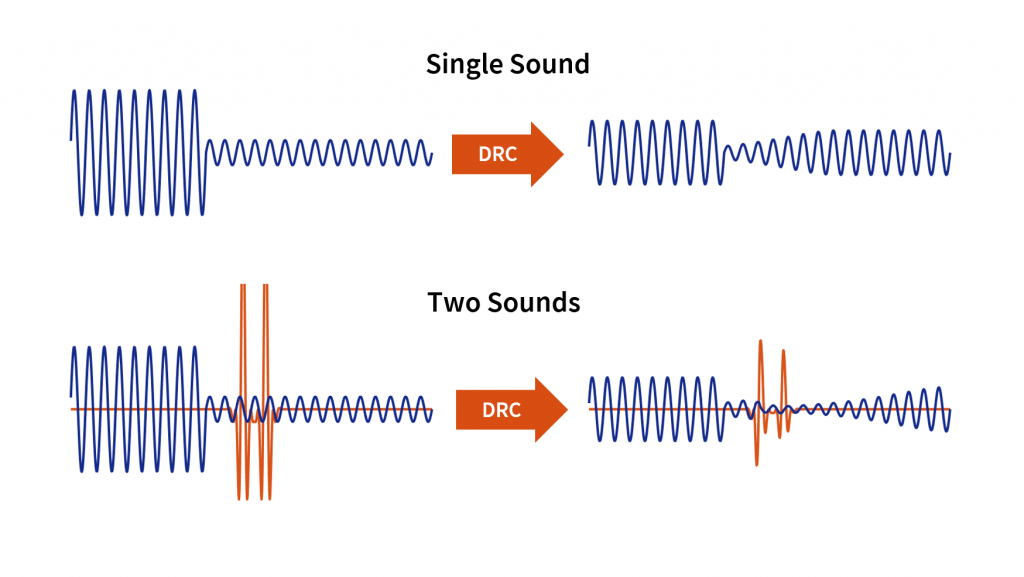
Audio Dynamic Range Compression: Limiting and Expansion
Audio Dynamic Range CompressionAudio Dynamic Range Compression
Audio Compression: What It Is and How It Works
As an audio engineer, I’ve spent countless hours working with dynamic range compression. At its core, compression is a tool used to control the dynamic range of an audio signal. This means that it can be used to make quiet sounds louder and loud sounds quieter, resulting in a more consistent overall volume. Compression is an essential tool in the world of audio production, and it’s used in everything from music to film and television.
One of my favorite quotes about compression comes from the legendary producer Quincy Jones. He once said, “Compression is like a good pair of eyeglasses. You don’t notice them, but they make things look better.” And it’s true. When used correctly, compression can make an audio signal sound more polished and professional.
Dynamic Range Compression vs. Limiting
While compression and limiting are often used interchangeably, they are actually two different processes. Compression is used to control the dynamic range of an audio signal, while limiting is used to prevent the signal from exceeding a certain level. In other words, limiting is a more extreme form of compression.
One of the most common uses of limiting is in mastering, which is the final step in the audio production process. During mastering, the goal is to make sure that the audio sounds consistent across different playback systems. Limiting is used to prevent the audio from distorting or clipping when played back on a variety of systems.
Audio Expansion: The Other Side of the Coin
While compression and limiting are used to control the dynamic range of an audio signal, expansion is used to increase it. Expansion is the opposite of compression, and it’s used to make quiet sounds even quieter. This can be useful in situations where you want to bring out the details in a recording.
One of my favorite examples of the use of expansion comes from the film “No Country for Old Men.” In the film, there’s a scene where the main character is walking through a hotel room. As he walks, you can hear the sound of his footsteps echoing off the walls. The sound of the footsteps is very quiet, but it’s still audible. This is a great example of the use of expansion to bring out the details in a recording.
Final Words:
In conclusion, dynamic range compression, limiting, and expansion are all essential tools in the world of audio production. Whether you’re working on music, film, or television, understanding how to use these tools can make a huge difference in the final product. And while there are many different techniques and approaches to using compression, limiting, and expansion, the most important thing is to use your ears and trust your instincts.
audio compression, dynamic range, audio engineering, audio processing, audio mixing, audio production, audio mastering, audio software, audio plugins, audio effects, audio equipment, audio gear, audio technology, audio science, audio theory, audio education, audio tutorials, audio tips, audio tricks, audio hacks, audio workflow, audio techniques, audio aesthetics, audio quality, audio fidelity, audio perception, audio psychology, audio philosophy, audio history, audio culture, audio art, audio creativity, audio innovation, audio trends, audio industry, audio business, audio marketing, audio branding, audio advertising, audio monetization, audio revenue, audio distribution, audio streaming, audio downloads, audio formats, audio codecs, audio standards, audio compatibility, audio hardware, audio drivers, audio firmware, audio troubleshooting, audio repair, audio maintenance, audio optimization, audio performance, audio testing, audio measurement, audio analysis, audio visualization, audio synthesis, audio sampling, audio recording, audio editing, audio mixing, audio mastering, audio post-production, audio restoration, audio enhancement, audio noise reduction, audio equalization, audio filters, audio modulation, audio synthesis, audio synthesis









Comments:
I had no idea about the history of WAV! Thanks for sharing, this article is a gem!
I always wondered why WAV files were so big, now I know! This article clarified a lot for me.
WAV is my go-to format for recording music. It’s like working with a raw diamond – pure and unaltered.
Can you provide more details on the alternatives like FLAC and AIFF? I’m curious to learn more about them.
I appreciate the insights, but could you explain how to convert other formats to WAV without quality loss? That would be very helpful.
Great article! I’ve been using WAV files for my podcast, and the quality is outstanding. It’s worth the storage space.
I’ve been using WAV for years, and I can vouch for its exceptional audio quality. It’s like having a high-definition audio experience.
WAV’s compatibility is a lifesaver. It’s like a universal remote for audio files, always works like a charm.
I didn’t know that CDs used WAV format. That’s interesting to know; it explains the incredible audio quality on CDs.
The comparison to a raw diamond is spot on. WAV files truly capture the essence of sound without any loss.
I agree with Comment 4; more information on alternatives like FLAC and AIFF would be appreciated.
Thanks for this informative article! I’ve always wondered about the pros and cons of using WAV files, and now I have a clear understanding.
This article should be the go-to guide for anyone working with audio. It provides valuable insights that are hard to find elsewhere.
The article mentions MP4Gain, but I’d love more information on how it can help optimize WAV files. Can you elaborate on that?