MP3 Bitrate Calculation Methods


Free Download Mp4Gain
picture

MP3 Bitrate Calculation Methods

MP3 Bitrate
MP3 Bitrate
MP3 Bitrate
MP3 Bitrate

What is MP3 Bitrate?

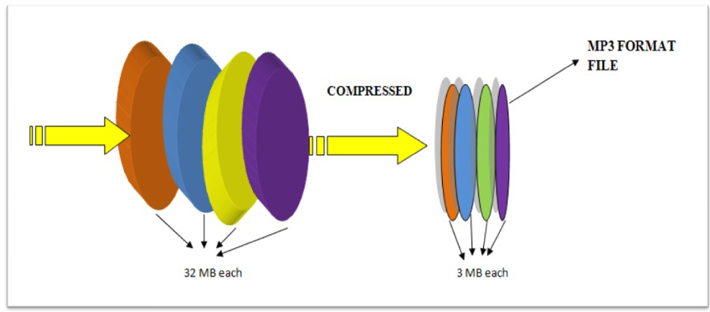
MP3 bitrate is the amount of data that is used to encode an MP3 audio file. The higher the bitrate, the higher the quality of the audio file. However, higher bitrates also result in larger file sizes.

How is MP3 Bitrate Calculated?

MP3 bitrate is calculated using a variety of factors, including the complexity of the audio signal, the desired quality of the audio file, and the target file size.

What are the Different Types of MP3 Bitrate Calculation Methods?

There are two main types of MP3 bitrate calculation methods:

  • Constant bitrate (CBR): This method uses a constant bitrate for the entire audio file. This results in a consistent audio quality throughout the file, but it can also result in larger file sizes for complex audio signals.
  • Variable bitrate (VBR): This method uses a variable bitrate, which means that the bitrate changes depending on the complexity of the audio signal. This results in smaller file sizes for complex audio signals, but it can also result in a slight variation in audio quality.

Which MP3 Bitrate Calculation Method is Best?

The best MP3 bitrate calculation method depends on your needs. If you need a consistent audio quality throughout the file, then CBR is the best option. If you are more concerned about file size, then VBR is the best option.

How to Choose the Right MP3 Bitrate for Your Needs

When choosing the right MP3 bitrate for your needs, you should consider the following factors:

  • The type of audio signal: Complex audio signals, such as those that contain a lot of high-frequency content, require a higher bitrate than simple audio signals.
  • The desired quality of the audio file: If you want the highest possible quality, then you should use a higher bitrate. If you are more concerned about file size, then you can use a lower bitrate.
  • The target file size: If you have a specific file size in mind, then you can use a bitrate calculator to determine the bitrate that you need.

Conclusion

MP3 bitrate is an important factor to consider when encoding audio files. By understanding the different types of MP3 bitrate calculation methods and how to choose the right bitrate for your needs, you can ensure that your audio files sound great and have a reasonable file size.

Here are some additional details about the different types of MP3 bitrate calculation methods:

  • Constant bitrate (CBR): This method is the simplest to understand and implement. It is also the most reliable, as it ensures that the audio quality is consistent throughout the file. However, it can result in larger file sizes for complex audio signals.
  • Variable bitrate (VBR): This method is more complex than CBR, but it can result in smaller file sizes for complex audio signals. This is because VBR allows the encoder to use a lower bitrate for less complex parts of the audio signal, and a higher bitrate for more complex parts of the audio signal. However, VBR can result in a slight variation in audio quality, depending on the complexity of the audio signal.

Ultimately, the best MP3 bitrate calculation method for you depends on your specific needs. If you need a consistent audio quality throughout the file, then CBR is the best option. If you are more concerned about file size, then VBR is the best option.


Free Download Mp4Gain
picture


Mp4Gain Main Window
picture


Mp4Gain Features
picture


Free Download Mp4Gain
picture

Demystifying the OGG Audio Format

Demystifying the OGG Audio Format

Demystifying the OGG Audio Format

OGG is a free, open-source audio format that was created by the Xiph.Org Foundation. It is a popular choice for streaming and downloading music because it offers good audio quality and smaller file sizes than other formats, such as MP3.

Here are some of the key features of OGG:

  • Open-source: OGG is an open-source format, which means that it is free to use and distribute. This makes it a popular choice for developers who want to create their own music players or other software that can play OGG files.
  • Small file sizes: OGG files are typically smaller than MP3 files of the same quality. This makes them a good choice for streaming or downloading music over the internet, or for storing music on devices with limited storage space.
  • Good audio quality: OGG files offer good audio quality, comparable to MP3 files. This is because OGG uses a lossy compression algorithm that is designed to remove data from the audio file without significantly affecting the quality.

Here are some of the most common questions that people ask about OGG:

1. What is the difference between OGG and MP3?

OGG and MP3 are both lossy audio formats, which means that they use compression to reduce the size of the audio file. However, OGG uses a different compression algorithm than MP3. This means that OGG files are typically smaller than MP3 files of the same quality.

2. What software can I use to play OGG files?

There are many different software programs that can play OGG files. Some popular options include VLC Media Player, Winamp, and Audacity.

3. Where can I find OGG files?

There are many different websites where you can find OGG files. Some popular options include Jamendo, Free Music Archive, and Magnatune.

4. Is OGG a good choice for music streaming?

Yes, OGG is a good choice for music streaming. It offers good audio quality and smaller file sizes than other formats, such as MP3. This makes it a good choice for listening to music online or on mobile devices.

5. Is OGG a good choice for music downloads?

Yes, OGG is a good choice for music downloads. It offers good audio quality and smaller file sizes than other formats, such as MP3. This makes it a good choice for storing music on devices with limited storage space.

Overall, OGG is a good choice for anyone who wants to listen to music with good audio quality and smaller file sizes. It is an open-source format that is free to use and distribute, and it is supported by a wide range of software.

OGG vs. MP4

OGG vs. MP4: Technical Differences in Multimedia

OGG vs. MP4
OGG vs. MP4
OGG vs. MP4
OGG vs. MP4


OGG and MP4 are two popular multimedia file formats. They are both used to store audio and video files, but they have some key differences.

OGG is an open-source format that is free to use and distribute. It is supported by a wide range of software, including players, encoders, and decoders. OGG files are typically smaller than MP4 files, which makes them a good choice for streaming or downloading music and videos.

MP4 is a proprietary format that is owned by the MPEG Group. It is supported by a wider range of devices than OGG, including smartphones, tablets, and gaming consoles. MP4 files are typically larger than OGG files, but they offer better quality audio and video.

Here is a table that summarizes the key differences between OGG and MP4:

Feature OGG MP4
File format Open-source Proprietary
Licensing Free to use and distribute Requires a license
Supported software Wide range of players, encoders, and decoders Limited range of devices
File size Typically smaller Typically larger
Audio and video quality Good Excellent

Here are some additional questions that people often ask about OGG and MP4:

1. Which format is better for streaming music?

OGG is a good choice for streaming music because it offers good audio quality and smaller file sizes. This makes it ideal for listening to music online or on mobile devices.

2. Which format is better for downloading movies and TV shows?

MP4 is a good choice for downloading movies and TV shows because it offers excellent audio and video quality. This makes it ideal for watching movies and TV shows on high-definition TVs or home theater systems.

3. Which format is better for recording audio?

Both OGG and MP4 are good choices for recording audio. However, OGG may be a better choice if you are looking for smaller file sizes.

4. Which format is better for creating video files?

MP4 is a better choice for creating video files because it offers better quality video. This is important if you are creating videos that will be watched on high-definition TVs or home theater systems.

Ultimately, the best format for you will depend on your needs and preferences. If you are looking for a format that offers good audio and video quality and is supported by a wide range of devices, then MP4 is a good choice. If you are looking for a format that offers good audio quality and smaller file sizes, then OGG is a good choice.

MP3 Frequency Response

MP3 Frequency Response: Technical Considerations

MP3 Frequency Response


MP3 is a popular digital audio format that uses a lossy compression algorithm to reduce the size of audio files. One of the factors that can affect the quality of an MP3 file is its frequency response.

Frequency response is a measure of how well a system reproduces different frequencies of sound. A flat frequency response means that all frequencies are reproduced equally well. However, MP3 compression can introduce distortions that can affect the frequency response of an audio file.

There are a number of factors that can affect the frequency response of an MP3 file, including:

  • The bitrate of the MP3 file. The bitrate is a measure of the amount of data that is used to represent the audio file. Higher bitrates result in better quality audio files, but they also result in larger file sizes.
  • The encoder used to create the MP3 file. Different encoders use different compression algorithms, and these algorithms can have different effects on the frequency response of an audio file.
  • The playback device. The playback device can also affect the frequency response of an MP3 file. Some playback devices, such as headphones, have a limited frequency response. This can result in loss of detail in the audio signal.

If you are concerned about the frequency response of your MP3 files, there are a few things you can do to improve the quality of the audio.

  • Use a higher bitrate. This will result in better quality audio files, but it will also result in larger file sizes.
  • Use a different encoder. Some encoders, such as the Fraunhofer mp3 encoder, are known for their good frequency response.
  • Use a high-quality playback device. This will help to ensure that the full range of frequencies in the audio signal are reproduced.

By following these tips, you can improve the frequency response of your MP3 files and enjoy better quality audio.

Here are some additional questions that people often ask about MP3 frequency response:

1. What is a good frequency response for an MP3 file?

A good frequency response for an MP3 file will vary depending on the type of music that you are listening to. However, a general rule of thumb is that the frequency response should be flat within the range of human hearing, which is typically between 20 Hz and 20 kHz.

2. How does the bitrate of an MP3 file affect its frequency response?

The bitrate of an MP3 file is a measure of the amount of data that is used to represent the audio file. Higher bitrates result in better quality audio files, but they also result in larger file sizes. In general, a higher bitrate will result in a flatter frequency response.

3. What are some of the best encoders for MP3 files?

Some of the best encoders for MP3 files include the Fraunhofer mp3 encoder, the Xiph.org LAME encoder, and the Monkey’s Audio encoder. These encoders are known for their good quality and their ability to produce flat frequency responses.

4. What are some of the best playback devices for MP3 files?

Some of the best playback devices for MP3 files include high-quality headphones, home stereo systems, and car stereos. These devices are capable of reproducing the full range of frequencies in an audio signal, which can help to improve the quality of the audio.

AAC vs. MP3

Understanding Audio Codecs: AAC vs. MP3

AAC vs. MP3
AAC vs. MP3
AAC vs. MP3
AAC vs. MP3


Audio codecs are a type of data compression algorithm that is used to reduce the size of digital audio files. This makes it possible to store and transfer audio files more efficiently, and to play them back on devices with limited storage space.

There are two main types of audio codecs: lossy and lossless. Lossy codecs reduce the size of audio files by removing some of the data from the original audio signal. This can result in a loss of quality, but it can also result in a significant reduction in file size. Lossless codecs, on the other hand, do not remove any data from the original audio signal. This means that the quality of the audio is preserved, but the file size is not reduced as much.

In this article, we will compare two of the most popular audio codecs: AAC and MP3. We will discuss the advantages and disadvantages of each codec, and we will help you decide which codec is right for you.

AAC

AAC stands for Advanced Audio Coding. It is a lossy audio codec that was developed by the Moving Picture Experts Group (MPEG). AAC is designed to provide better sound quality than MP3 at the same file size. AAC is also more efficient than MP3, which means that it can achieve even better sound quality at lower file sizes.

AAC is supported by a wide range of devices, including smartphones, tablets, computers, and home audio systems. It is also the default audio format for many streaming services, such as Spotify and Apple Music.

MP3

MP3 stands for MPEG-1 Audio Layer 3. It is a lossy audio codec that was developed by the Moving Picture Experts Group (MPEG). MP3 is the most popular audio codec in the world. It is supported by a wide range of devices, and it is the default audio format for many music file sharing services.

MP3 is not as efficient as AAC, which means that it cannot achieve the same sound quality at lower file sizes. However, MP3 is still a good choice for most people. It is a reliable and widely supported codec that offers good sound quality at a reasonable file size.

Which Audio Codec is Right for You?

The best audio codec for you depends on your needs. If you want the best possible sound quality, then AAC is the better choice. However, if you are looking for a codec that is widely supported and that offers good sound quality at a reasonable file size, then MP3 is a good option.

Conclusion

AAC and MP3 are two of the most popular audio codecs in the world. Both codecs offer good sound quality, but AAC is generally considered to be the better choice for people who want the best possible sound quality. MP3 is a good option for people who are looking for a codec that is widely supported and that offers good sound quality at a reasonable file size.

FLAC vs. OGG

FLAC vs. OGG: Comparing Open Source Audio Formats

FLAC vs. OGG
FLAC vs. OGG
FLAC vs. OGG
FLAC vs. OGG

Introduction

FLAC and OGG are two popular open source audio formats. They are both lossless, which means that they can perfectly reproduce the original audio signal. However, there are some key differences between the two formats.

FLAC

FLAC stands for Free Lossless Audio Codec. It is a lossless audio format that was developed by the Xiph.Org Foundation. FLAC files are typically smaller than WAV files, but they retain the same audio quality. FLAC is a popular format for audiophiles and music lovers who want to store their music in the highest possible quality.

OGG

OGG is a container format that can store a variety of audio and video codecs, including Vorbis, Theora, and Speex. Vorbis is a lossy audio codec that was developed by the Xiph.Org Foundation. Ogg Vorbis files are typically smaller than FLAC files, but they do not offer the same level of audio quality. Ogg Vorbis is a popular format for streaming audio and for distributing music online.

Comparison

The following table compares the key features of FLAC and OGG:

Feature FLAC OGG
Audio quality Lossless Lossy
File size Larger Smaller
Compatibility Widely compatible Not as widely compatible
Licensing Free and open source Free and open source

Which Format is Right for You?

The best format for you depends on your needs and preferences. If you want the highest possible audio quality, then FLAC is the best option. If you are looking for a smaller file size and compatibility with a wider range of devices, then OGG is a better choice.

Conclusion

FLAC and OGG are both great options for storing and playing audio files. FLAC offers the highest possible audio quality, while OGG offers a smaller file size and compatibility with a wider range of devices. The best format for you depends on your needs and preferences.

Frequently Asked Questions

What is the difference between FLAC and OGG?

FLAC and OGG are both audio formats, but they are different in a few ways. FLAC is lossless, which means that it can perfectly reproduce the original audio signal. OGG is lossy, which means that some of the original audio data is discarded in order to reduce the file size.

Which format is better, FLAC or OGG?

FLAC and OGG are both great formats, but they have different strengths and weaknesses. FLAC offers the highest possible audio quality, while OGG offers a smaller file size and compatibility with a wider range of devices. The best format for you depends on your needs and preferences.

What are some of the benefits of using FLAC or OGG?

There are a number of benefits to using FLAC or OGG, including:

  • Smaller file sizes: FLAC and OGG files are typically much smaller than WAV files, which makes them easier to store and transfer.
  • Higher quality: FLAC and OGG files offer higher quality audio than MP3 files.
  • Compatibility: FLAC and OGG files are compatible with a wide range of devices, including computers, smartphones, and portable music players.

What are some of the drawbacks of using FLAC or OGG?

There are a few drawbacks to using FLAC or OGG, including:

  • Larger file sizes: FLAC and OGG files are typically larger than MP3 files, which can take up more storage space on your device.
  • Not as widely supported: FLAC and OGG files are not as widely supported as MP3 files, which means that you may not be able to play them on all devices.

Conclusion

FLAC and OGG are both great options for storing and playing audio files. They offer a number of benefits, including smaller file sizes, higher quality audio, and compatibility with a wide range of devices. However, they also have a few drawbacks, including larger file sizes and not being as widely supported as MP3 files. The best format for you depends on your needs and preferences.

MP3 Compression: Bitrate and Audio Quality Tradeoffs

MP3 Compression: Bitrate and Audio Quality Tradeoffs

MP3 Compression
MP3 Compression
MP3 Compression
MP3 Compression

MP3 Compression

MP3 is a popular format for digital audio. It is a lossy format, which means that some of the original audio data is discarded in order to reduce the file size. The amount of data that is discarded is determined by the bitrate, which is a measure of the amount of data per second. A higher bitrate results in a higher quality audio file, but also a larger file size.

How MP3 Compression Works

MP3 compression works by using a technique called psychoacoustic coding. Psychoacoustic coding takes advantage of the fact that the human ear is not equally sensitive to all frequencies. For example, we can hear lower frequencies better than higher frequencies. Psychoacoustic coding uses this information to discard frequencies that are not as important to human hearing.

Bitrate and Audio Quality

The bitrate is the most important factor that determines the audio quality of an MP3 file. A higher bitrate results in a higher quality audio file, but also a larger file size. For example, a 128 kbps MP3 file will sound better than a 64 kbps MP3 file, but the 128 kbps file will be twice as large.

Choosing the Right Bitrate

The best bitrate to choose depends on how you plan to use the MP3 file. If you are going to listen to the file on a high-quality audio system, then you will want to use a high bitrate. If you are going to listen to the file on a portable device, then you may want to use a lower bitrate to save space.

Other Factors That Affect Audio Quality

In addition to the bitrate, there are other factors that can affect the audio quality of an MP3 file. These factors include the sampling rate, the bit depth, and the encoder used.

  • The sampling rate is the number of times per second that the audio signal is sampled. A higher sampling rate results in a higher quality audio file.
  • The bit depth is the number of bits used to represent each sample. A higher bit depth results in a higher quality audio file.
  • The encoder is the software that is used to compress the audio file. Different encoders use different algorithms, and some encoders produce better quality audio files than others.

Conclusion

MP3 compression is a popular and effective way to reduce the file size of digital audio files. By using a high bitrate, you can ensure that the audio quality of your MP3 files is good enough for your needs.

Frequently Asked Questions

What is the difference between MP3 and lossless audio formats?

MP3 is a lossy format, which means that some of the original audio data is discarded in order to reduce the file size. Lossless audio formats, such as FLAC and WAV, do not discard any data, so they retain the original audio quality. However, lossless audio files are much larger than MP3 files.

What is the best bitrate for MP3 files?

The best bitrate for MP3 files depends on how you plan to use them. If you are going to listen to the files on a high-quality audio system, then you will want to use a high bitrate. If you are going to listen to the files on a portable device, then you may want to use a lower bitrate to save space.

What are some tips for improving the audio quality of MP3 files?

There are a few things you can do to improve the audio quality of MP3 files. First, use a high bitrate. Second, use a high-quality encoder. Third, avoid using compression plugins or software that may degrade the audio quality.

What are some common problems with MP3 files?

Some common problems with MP3 files include:

  • Crackling or popping noises
  • Loss of high-frequency sounds
  • Muffled or distorted sound

These problems can be caused by a number of factors, including:

  • Low bitrate
  • Poor quality encoder
  • Damage to the file

If you are experiencing problems with your MP3 files, try using a different encoder or a higher bitrate. You can also try repairing the file using a file repair utility.

What is Audio Smoothing?

What is Audio Smoothing?

Audio Smoothing
Audio Smoothing
Audio Smoothing
Audio Smoothing


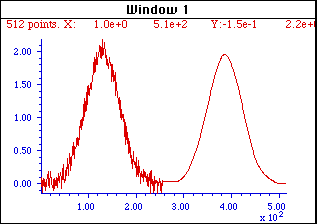
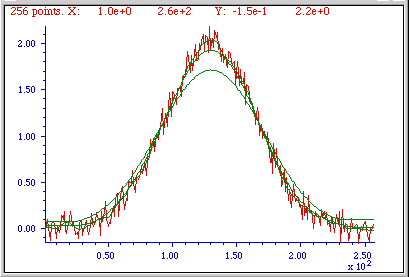
Audio smoothing is a process of reducing the noise and distortion in an audio signal. This is done by averaging the values of neighboring samples, which helps to smooth out any sharp changes in the signal.

Audio smoothing can be used to improve the quality of audio recordings, as it can help to reduce background noise and make the sound more natural. It can also be used to improve the sound of digital audio files, as it can help to reduce quantization noise and make the sound more smooth and even.

There are a number of different ways to perform audio smoothing. One common method is to use a moving average filter. A moving average filter averages the values of a window of neighboring samples, and then outputs the average value. The size of the window determines how much smoothing is applied.

Another common method for audio smoothing is to use a low-pass filter. A low-pass filter removes high-frequency components from the signal, which helps to reduce noise and distortion. The cutoff frequency of the filter determines which frequencies are removed.

Audio smoothing can be a useful tool for improving the quality of audio recordings and digital audio files. It can help to reduce noise and distortion, and make the sound more natural and smooth.

What are the benefits of audio smoothing?

There are a number of benefits to using audio smoothing. Some of the most common benefits include:

  • Reduced noise: Audio smoothing can help to reduce noise in an audio signal. This is because the averaging process helps to smooth out any sharp changes in the signal, which can make the noise less noticeable.
  • Improved sound quality: Audio smoothing can help to improve the sound quality of an audio signal. This is because the smoothing process can help to reduce distortion and make the sound more natural.
  • Increased clarity: Audio smoothing can help to increase the clarity of an audio signal. This is because the smoothing process can help to remove any unwanted noise or distortion, which can make the signal easier to understand.

How does audio smoothing work?

Audio smoothing works by averaging the values of neighboring samples in an audio signal. This helps to smooth out any sharp changes in the signal, which can make the noise less noticeable and improve the overall sound quality.

There are a number of different ways to perform audio smoothing. One common method is to use a moving average filter. A moving average filter averages the values of a window of neighboring samples, and then outputs the average value. The size of the window determines how much smoothing is applied.

Another common method for audio smoothing is to use a low-pass filter. A low-pass filter removes high-frequency components from the signal, which helps to reduce noise and distortion. The cutoff frequency of the filter determines which frequencies are removed.

How to use audio smoothing

Audio smoothing can be used in a variety of different ways. Some of the most common applications include:

  • Recording: Audio smoothing can be used to improve the sound quality of audio recordings. This is especially useful for recordings that are made in noisy environments.
  • Editing: Audio smoothing can be used to edit audio files. This can be used to remove noise or distortion, or to smooth out the sound of a recording.
  • Mastering: Audio smoothing can be used to master audio files. This can be used to improve the overall sound quality of a recording, or to make the sound more consistent.

Tips for using audio smoothing

When using audio smoothing, there are a few things to keep in mind:

  • Start with a low setting: When you first start using audio smoothing, it is best to start with a low setting. This will help you to get a feel for how the smoothing process affects the sound of the audio signal.
  • Experiment with different settings: Once you have a basic understanding of how audio smoothing works, you can experiment with different settings to see how they affect the sound of the audio signal.
  • Be careful not to over-smooth: It is important to be careful not to over-smooth the audio signal. This can result in a loss of detail and make the sound sound unnatural.

Conclusion

Audio smoothing is a useful tool that can be used to improve the quality of audio recordings and digital audio files. It can help to reduce noise and distortion, and make the sound more natural and smooth. When used correctly, audio smoothing can be a valuable part of your audio production workflow.