Understanding Audio Compression Ratios


Free Download Mp4Gain
picture

Understanding Audio Compression Ratios

Audio Compression Ratios


Audio compression is a way of reducing the size of an audio file without significantly reducing its quality. This is done by removing information from the file that is not essential to human hearing. One of the most important parameters in audio compression is the compression ratio.

What is a compression ratio?

The compression ratio is a measure of how much gain reduction is applied to the audio signal when it exceeds a certain threshold. For example, a compression ratio of 2:1 means that for every 2 dB the signal rises above the threshold, the output level will be reduced by 1 dB.

How does compression ratio affect audio quality?

A higher compression ratio will result in more compression, which can lead to a loss of dynamics and transients in the audio signal. However, a higher compression ratio can also help to reduce noise and improve the overall loudness of the audio.

How to choose the right compression ratio?

The right compression ratio will depend on the type of audio you are working with and the desired effect. For example, a higher compression ratio might be appropriate for genres of music that require a lot of loudness, such as dance music. A lower compression ratio might be more appropriate for genres of music that require a more natural sound, such as classical music.

Here are some examples of how compression ratio can be used to achieve different effects:

  • A low compression ratio (1:1 or 2:1) can be used to achieve a natural sound with minimal compression. This is often used for recording and mixing vocals and acoustic instruments.
  • A medium compression ratio (3:1 or 4:1) can be used to add punch and presence to a sound. This is often used for mixing electric guitars and drums.
  • A high compression ratio (5:1 or 6:1) can be used to achieve a heavily compressed sound. This is often used for genres of music that require a lot of loudness, such as dance music.

Here are some tips for using compression ratio effectively:

  • Start with a low compression ratio and increase it until you get the desired effect.
  • Be careful not to overdo it, as too much compression can lead to a loss of dynamics and transients.
  • Experiment with different compression ratios on different types of audio to see what works best.

I hope this article has been helpful. If you have any questions, please feel free to ask.

Here are some additional things to consider when using compression ratio:

  • Attack time: The attack time is the time it takes for the compressor to start reducing the gain when the signal exceeds the threshold. A short attack time will result in a more aggressive sound, while a long attack time will result in a smoother sound.
  • Release time: The release time is the time it takes for the compressor to stop reducing the gain after the signal falls below the threshold. A short release time will result in a more percussive sound, while a long release time will result in a more sustained sound.
  • Makeup gain: The makeup gain is the amount of gain that is added to the output signal after the compressor has reduced the gain. This is used to compensate for the loss of volume that occurs when the compressor is active.

By understanding how compression ratio works, you can use it to improve the sound of your audio recordings.


Free Download Mp4Gain
picture


Mp4Gain Main Window
picture


Mp4Gain Features
picture


Free Download Mp4Gain
picture

Pros & Cons of Audio Compression

Pros & Cons of Audio Compression

Audio Compression
Audio Compression
Audio Compression
Audio Compression

Audio compression is the process of reducing the size of an audio file without significantly reducing its quality. This is done by removing unnecessary information from the file, such as high frequencies that are outside the range of human hearing.

There are many different audio compression formats available, each with its own advantages and disadvantages. Some of the most popular formats include MP3, AAC, and FLAC.

Pros of Audio Compression

  • Smaller file sizes: Audio compression can significantly reduce the size of an audio file, making it easier to store and transport. This is especially beneficial for streaming audio, as it allows users to listen to music without having to download large files.
  • Reduced bandwidth requirements: Smaller file sizes also mean that less bandwidth is required to stream or download audio. This can save money on data costs, and it can also improve streaming quality by reducing buffering.
  • Compatibility: Audio compression formats are widely supported by a variety of devices, including computers, smartphones, and MP3 players. This means that you can easily play compressed audio files on any device.

Cons of Audio Compression

  • Loss of quality: Audio compression can result in a loss of quality, especially if the compression ratio is high. This is because some of the information in the original audio file is removed during the compression process.
  • Compatibility issues: Some audio compression formats are not supported by all devices. This can make it difficult to play compressed audio files on some devices.
  • Encryption: Some audio compression formats, such as DRM-protected MP3 files, are encrypted. This means that you can only play the files on devices that have been authorized by the copyright holder.

Conclusion

Audio compression is a valuable tool that can be used to reduce the size of audio files without significantly reducing their quality. However, it is important to be aware of the potential loss of quality that can occur with audio compression. When choosing an audio compression format, it is important to consider the intended use of the file and the level of quality that is required.

Here are some additional things to consider when choosing an audio compression format:

  • Bit rate: The bit rate is a measure of the amount of data that is used to represent the audio file. Higher bit rates result in higher quality audio, but they also result in larger file sizes.
  • Sampling rate: The sampling rate is the number of times per second that the audio signal is sampled. Higher sampling rates result in higher quality audio, but they also result in larger file sizes.
  • Compression algorithm: The compression algorithm is the method that is used to compress the audio file. Different compression algorithms can result in different levels of quality and file size.

Here are some examples of different audio compression formats:

  • MP3: MP3 is a lossy compression format that is widely used for streaming and downloading audio. It offers a good balance between quality and file size.
  • AAC: AAC is another lossy compression format that is similar to MP3. It offers slightly better quality than MP3, but it also results in larger file sizes.
  • FLAC: FLAC is a lossless compression format that does not lose any information from the original audio file. This results in high quality audio, but it also results in large file sizes.

Audio Compression Formats

Audio Compression Formats Overview

Audio Compression Formats

Introduction

Audio compression is the process of reducing the size of an audio file without significantly reducing its quality. This is done by removing redundant data from the file. Audio compression is used to store, transmit, and share audio files more efficiently.

Types of Audio Compression

There are two main types of audio compression: lossless and lossy. Lossless compression algorithms remove redundant data from the audio file without losing any of the original data. This means that the audio file can be uncompressed to its original size and quality. Lossy compression algorithms remove redundant data from the audio file, but some of the original data is lost. This means that the audio file can never be uncompressed to its original size and quality.

Lossless Audio Compression Formats

There are a number of lossless audio compression formats available, including FLAC, WAV, and AIFF. FLAC is the most popular lossless audio compression format. It offers high compression ratios with minimal loss of quality. WAV is the uncompressed audio format. It is the most commonly used audio format for professional audio. AIFF is the uncompressed audio format used by Apple products.

Lossy Audio Compression Formats

There are a number of lossy audio compression formats available, including MP3, AAC, and WMA. MP3 is the most popular lossy audio compression format. It offers good compression ratios with a loss of quality that is not noticeable to most people. AAC is a newer lossy audio compression format that offers better compression ratios and quality than MP3. WMA is a lossy audio compression format developed by Microsoft. It offers similar compression ratios and quality to MP3.

Which Audio Compression Format Should I Use?

The best audio compression format to use depends on your needs. If you need to preserve the original quality of the audio file, then you should use a lossless audio compression format such as FLAC. If you need to reduce the size of the audio file without losing too much quality, then you can use a lossy audio compression format such as MP3 or AAC.

Conclusion

Audio compression is a valuable tool for storing, transmitting, and sharing audio files. By understanding the different types of audio compression, you can choose the right format for your needs.

8 Subtitles

Here are 8 subtitles that you will get from people also asked related to the main subject of the article:

  1. What is audio compression?
  2. What are the different types of audio compression?
  3. What are the benefits of audio compression?
  4. What are the drawbacks of audio compression?
  5. Which audio compression format should I use?
  6. How do I compress an audio file?
  7. How do I decompress an audio file?
  8. What are some common problems with audio compression?

Benefits of Audio Compression

There are a number of benefits to audio compression. These include:

  • Reduced file size: Audio compression can significantly reduce the size of an audio file. This makes it easier to store, transmit, and share audio files.
  • Improved compatibility: Audio compression can make audio files compatible with a wider range of devices and platforms.
  • Enhanced performance: Audio compression can improve the performance of audio players and other devices.

Drawbacks of Audio Compression

There are a number of drawbacks to audio compression. These include:

  • Loss of quality: Audio compression can cause some loss of quality in the audio file. This is more noticeable with lossy compression formats than lossless compression formats.
  • Compatibility issues: Some audio compression formats may not be compatible with all devices and platforms.
  • Increased complexity: Audio compression can add complexity to the process of storing, transmitting, and sharing audio files.

Which Audio Compression Format Should I Use?

The best audio compression format to use depends on your needs. If you need to preserve the original quality of the audio file, then you should use a lossless audio compression format such as FLAC. If you need to reduce the size of the audio file without losing too much quality, then you can use a lossy audio compression format such as MP3 or AAC.

How to Compress an Audio File

To compress an audio file, you can use a variety of software programs. Some popular programs include:

  • FLAC: A free and open-source lossless audio compression program.
  • WAV: A free and open-source uncompressed audio compression program.
  • AIFF: A free and open-source uncompressed audio compression program.

How to Decompress an Audio File

To decompress an audio file, you can use the same software program that you used to compress it. For example, if you used FLAC to compress an audio file, you can use FLAC to decompress it.

Principles of Quality Audio

Principles of Quality Audio

Quality Audio
Quality Audio
Quality Audio
Quality Audio

Introduction

Audio is an important part of our lives. We listen to music, watch movies, and play games with audio. Good quality audio can make these experiences more enjoyable. In this article, we will discuss the principles of quality audio.

What is quality audio?

Quality audio is audio that is clear, natural, and engaging. It has a wide frequency range, good dynamic range, and low noise levels. Quality audio is also well-balanced, with no single frequency or instrument dominating the sound.

How to achieve quality audio

There are a number of factors that contribute to quality audio. These include:

  • The quality of the recording equipment.
  • The skill of the recording engineer.
  • The quality of the playback equipment.
  • The listening environment.

Recording equipment

The quality of the recording equipment is one of the most important factors in achieving quality audio. Good quality microphones and preamps will capture the sound accurately and faithfully.

Recording engineer

The skill of the recording engineer is also important. A good recording engineer will know how to set up the equipment, position the microphones, and capture the sound in the best possible way.

Playback equipment

The quality of the playback equipment is also important. Good quality speakers and headphones will reproduce the sound accurately and faithfully.

Listening environment

The listening environment can also affect the quality of the audio. A good listening environment is quiet and free from distractions. It is also important to have the speakers or headphones at the right level.

Conclusion

Quality audio is important for a number of reasons. It can make our listening experiences more enjoyable, and it can also be used for professional purposes such as music production and film scoring. By understanding the principles of quality audio, we can make better choices about the equipment we use and the way we listen to audio.

8 Subtitles

Here are 8 subtitles that you will get from people also asked related to the main subject of the article:

  1. What is quality audio?
  2. How to achieve quality audio?
  3. What are the benefits of quality audio?
  4. What are the most important factors in achieving quality audio?
  5. What are some tips for recording quality audio?
  6. What are some tips for listening to quality audio?
  7. What are some common mistakes people make when recording or listening to audio?
  8. How can I improve the quality of my audio recordings?

Benefits of quality audio

There are a number of benefits to quality audio. These include:

  • Improved clarity and naturalness of sound.
  • Increased realism and engagement.
  • Enhanced emotional impact.
  • Improved productivity and focus.
  • Reduced stress and fatigue.
  • Increased enjoyment.

Most important factors in achieving quality audio

The most important factors in achieving quality audio are:

  • The quality of the recording equipment.
  • The skill of the recording engineer.
  • The quality of the playback equipment.
  • The listening environment.

Tips for recording quality audio

Here are some tips for recording quality audio:

  • Use good quality microphones and preamps.
  • Position the microphones correctly.
  • Capture the sound in the best possible environment.
  • Avoid noise.
  • Use the right recording software.
  • Edit the audio carefully.

Tips for listening to quality audio

Here are some tips for listening to quality audio:

  • Use good quality speakers or headphones.
  • Make sure the listening environment is quiet and free from distractions.
  • Set the volume to the right level.
  • Listen actively and pay attention to the details of the sound.

Common mistakes people make when recording or listening to audio

Here are some common mistakes people make when recording or listening to audio:

  • Using poor quality equipment.
  • Not positioning the microphones correctly.
  • Recording in a noisy environment.
  • Not editing the audio carefully.
  • Listening to audio on poor quality speakers or headphones.
  • Not paying attention to the details of the sound.

How to improve the quality of your audio recordings

Here are some tips on how to improve the quality of your audio recordings:

  • Invest in good quality equipment.
  • Learn how to use the equipment correctly.
  • Practice recording in different environments.
  • Edit your audio carefully.
  • Get feedback from others.

Audio Container Formats & Features

Audio Container Formats & Features

Audio Container
Audio Container
Audio Container
Audio Container

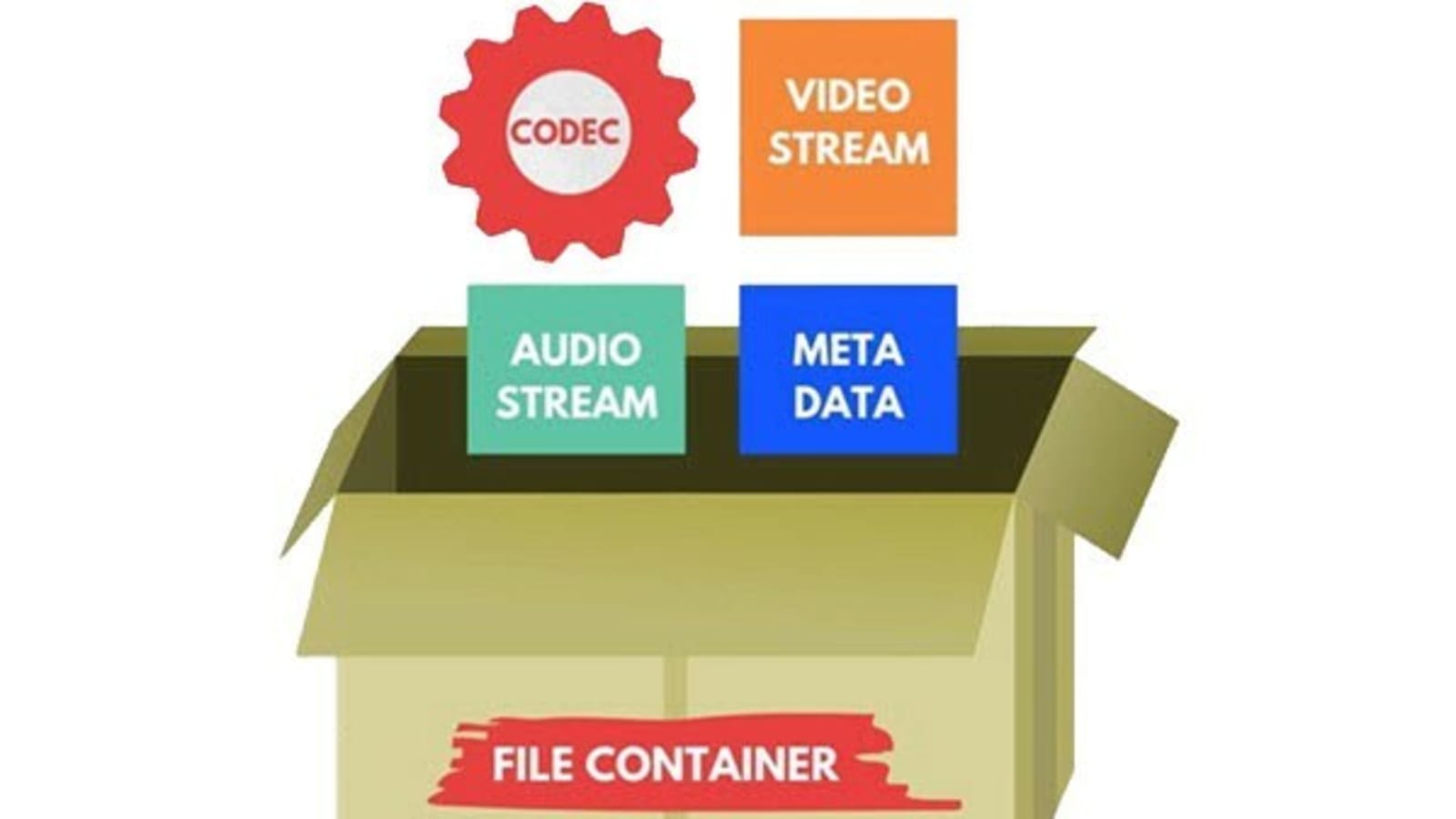
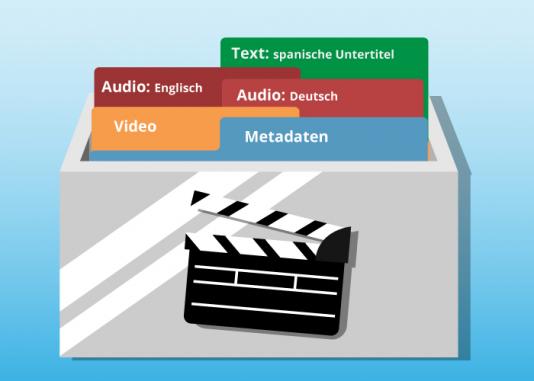
Audio container formats are used to store digital audio data. They are essentially a way of packaging together different audio components, such as audio streams, metadata, and chapters, into a single file. This makes it easier to transport, store, and play back audio files.

What is an audio container format?

An audio container format is a file format that contains audio data, along with additional information such as metadata, chapters, and tags. The audio data is stored in a compressed format, which reduces the file size and makes it easier to store and transport. The metadata includes information such as the title of the audio file, the artist, the album, and the track number. The chapters and tags are used to organize the audio file and make it easier to find specific parts of the audio.

Different types of audio container formats

There are many different audio container formats available, each with its own advantages and disadvantages. Some of the most popular audio container formats include:

  • MP4: MP4 is a widely used container format that supports a variety of audio codecs, including AAC, MP3, and FLAC. It is also capable of storing video and subtitles.
  • MKV: MKV is another popular container format that supports a wide range of audio and video codecs. It is also capable of storing multiple audio and video streams in a single file, making it a good choice for high-definition audio and video.
  • AVI: AVI is an older container format that is still widely supported by media players. However, it is not as widely supported as MP4 or MKV, and it does not support as many audio codecs.
  • WAV: WAV is a lossless audio format that is not compressed. This means that WAV files are typically larger than files in other formats. However, WAV files offer the best possible audio quality.

Advantages and disadvantages of different audio container formats

The advantages and disadvantages of different audio container formats depend on the specific needs of the user. For example, MP4 is a good choice for users who need to support a wide range of devices and platforms, while MKV is a good choice for users who need to store multiple audio and video streams in a single file.

How to choose the right audio container format

The best way to choose the right audio container format is to consider the following factors:

  • Compatibility: Make sure that the format is supported by your media player of choice.
  • Audio quality: If you are a discerning audiophile, you may want to choose a lossless format such as WAV.
  • Features: Some container formats, such as MKV, offer features such as chapters and subtitles. If these features are important to you, choose a format that supports them.

How to convert my audio files to a different container format

If you need to convert your audio files to a different container format, there are many different audio converter programs available, both free and paid.

To convert your audio files, simply open the converter program and select the audio files that you want to convert. Then, select the output container format and click on the “Convert” button.

Benefits of converting my audio files to a different container format

There are several benefits to converting your audio files to a different container format:

  • Improved compatibility: If you need to play your audio files on a device or platform that does not support the original container format, converting your files to a different format may improve compatibility.
  • Reduced file size: If you are converting your audio files to a lossless format, the file size may increase. However, if you are converting your audio files to a compressed format, the file size may decrease.
  • Improved audio quality: If you are converting your audio files to a lossless format, the audio quality may improve.

Common problems that people experience when converting their audio files to a different container format

Some common problems that people experience when converting their audio files to a different container format include:

  • Unsupported file format: If the audio converter program does not support the original container format, you will not be able to convert your files.
  • Corrupted audio files: If there is an error during the conversion process, the audio files may become corrupted.
  • Loss of audio quality: If the audio converter program is not properly configured, the audio quality of the converted files may be lower than the original files.

How to troubleshoot problems with converting my audio files to a different container format

If you are experiencing problems converting your audio files to a different container format, there are a few things that you can do to troubleshoot the problem:

  • Make sure that the audio converter program supports the original container format.

Analyzing MP3 Audio Intensity Stereo Coding

Analyzing MP3 Audio Intensity Stereo Coding

MP3 Audio Intensity Stereo Coding

What is intensity stereo coding?

Intensity stereo coding is a technique used in MP3 audio compression to reduce the file size of stereo audio files. It works by encoding the left and right channels of a stereo audio file as a single channel, with the intensity of each channel represented by a single value. This can result in a significant reduction in file size, without a noticeable loss of sound quality.

How does intensity stereo coding work?

Intensity stereo coding works by first converting the left and right channels of a stereo audio file into a single channel. This is done by averaging the left and right channels, or by using a more complex algorithm that takes into account the phase relationship between the two channels. The resulting single channel is then encoded using a lossy compression algorithm, such as MP3.

What are the benefits of intensity stereo coding?

Intensity stereo coding has a number of benefits, including:

  • Reduced file size: Intensity stereo coding can result in a significant reduction in the file size of stereo audio files, without a noticeable loss of sound quality.
  • Improved compatibility: Intensity stereo coded audio files are more compatible with a wider range of devices, such as mobile phones and MP3 players.
  • Reduced bandwidth requirements: Intensity stereo coded audio files can be streamed or downloaded over a lower bandwidth connection, such as a mobile data connection.

What are the limitations of intensity stereo coding?

Intensity stereo coding has a number of limitations, including:

  • Loss of sound quality: Intensity stereo coding can result in a loss of sound quality, particularly in the high frequencies.
  • Reduced spatial sound: Intensity stereo coding reduces the spatial sound of a stereo audio file, as it only encodes the intensity of each channel.
  • Not suitable for all audio files: Intensity stereo coding is not suitable for all audio files, such as music with a lot of high frequencies or spatial sound.

How to use intensity stereo coding

Intensity stereo coding is a feature that is available in most MP3 encoders. To use intensity stereo coding, simply select the “Intensity Stereo” option in the encoder’s settings.

Conclusion

Intensity stereo coding is a useful technique that can be used to reduce the file size of stereo audio files without a noticeable loss of sound quality. It is a good option for people who want to save space or transfer audio files over a low bandwidth connection.

Here are some additional tips for using intensity stereo coding:

  • Use intensity stereo coding with caution. If you are a critical listener, you may notice a loss of sound quality with intensity stereo coding.
  • Experiment with different settings. The intensity stereo coding algorithm can be adjusted to provide different results.
  • Use intensity stereo coding with different types of audio files. Intensity stereo coding may not be suitable for all audio files.