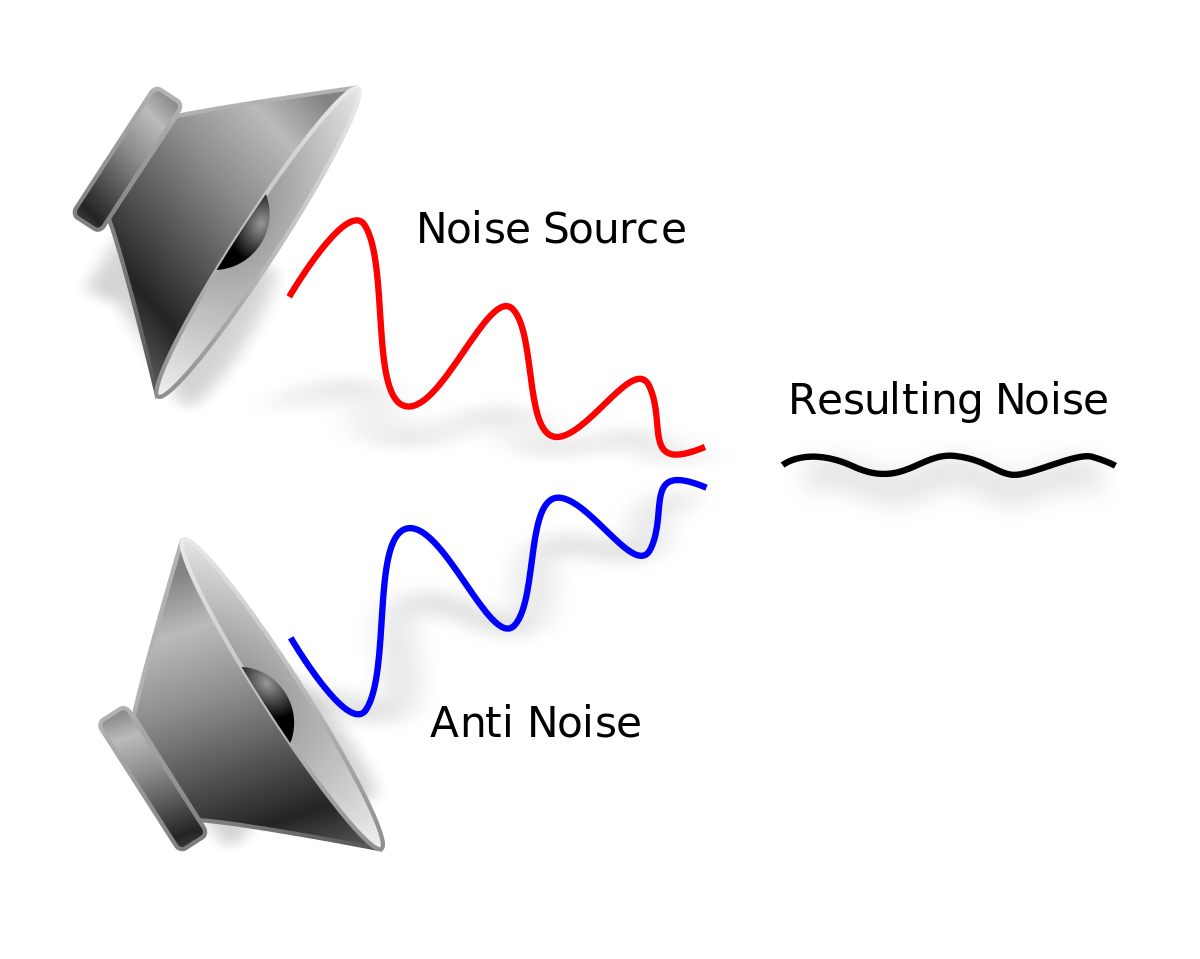
As an audio engineer, I have dealt with various types of noise in digital audio recordings. Noise can be introduced during the recording process or can be present in the source material. In either case, noise reduction techniques can be used to remove unwanted noise from the audio signal. One of the most common noise reduction techniques is spectral subtraction. This technique involves analyzing the frequency spectrum of the audio signal and removing the noise components. Another technique is noise gating, which involves setting a threshold level below which the noise is suppressed. However, noise gating can result in unwanted artifacts in the audio signal. In my experience, a combination of these techniques can be used to achieve the best results.
Audio Restoration
Audio restoration is the process of removing unwanted noise and restoring the audio signal to its original quality. This process can be time-consuming and requires specialized software and expertise. One of the leading companies in audio restoration is CEDAR Audio. They have developed advanced algorithms that can recognize noise in the presence of a wanted signal and create a dynamic noise profile. This allows for more accurate noise reduction without affecting the desired audio. In my experience, audio restoration is a valuable tool for preserving historical recordings and improving the quality of damaged audio.
Noise Reduction Algorithms
Noise reduction algorithms are the backbone of noise reduction software. These algorithms analyze the audio signal and selectively remove noise frequencies that are not part of the desired sound. There are many different noise reduction algorithms available, each with its own strengths and weaknesses. Some algorithms are better suited for removing specific types of noise, such as hum or hiss. In my experience, the best noise reduction algorithms are those that allow for manual adjustments. This allows for more precise control over the noise reduction process and can result in better-sounding audio.
Final Words:
Digital audio noise reduction methods are essential for achieving high-quality audio recordings. Whether you are dealing with noise in the recording process or in the source material, there are many techniques and tools available to help you remove unwanted noise. By using a combination of noise reduction techniques and algorithms, you can achieve the best results and create professional-sounding recordings.
Keywords: Audio Noise Reduction, Digital Audio Restoration, Noise Reduction Software, Dynamic Noise Reduction, Noise Reduction Algorithms, Noise Reduction Techniques, Audio Signal Processing, Audio Noise Reduction Hacks, Audio Noise Reduction Tips, Audio Noise Reduction Tools, Audio Noise Reduction Plugins, Audio Noise Reduction Filters,
a music lover, I have always been fascinated by the technology behind digital audio files. MP3 files, in particular, have been a staple in my music library for years. However, it wasn’t until recently that I decided to dive deeper into the technical aspects of these files, specifically the file header structure.
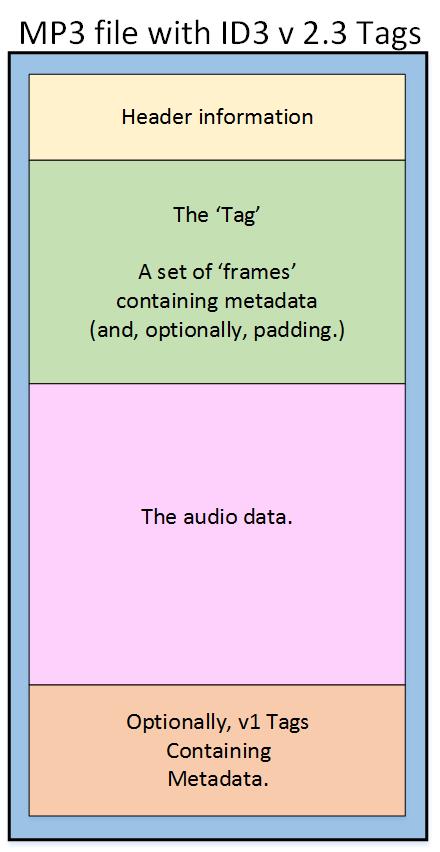
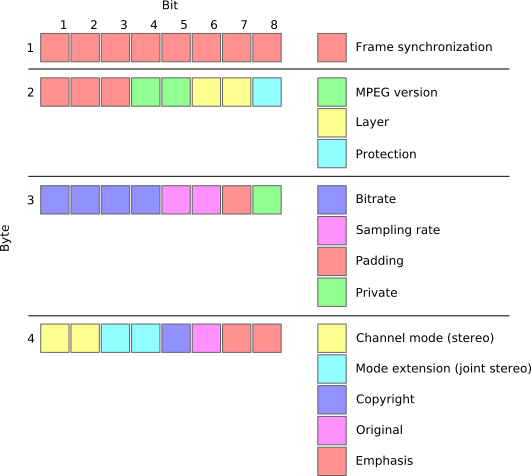
The MP3 file header structure is a crucial component of the file, as it contains important information about the file’s format, bitrate, and other key details. Understanding this structure is essential for anyone looking to work with MP3 files, whether it be for editing, conversion, or other purposes.
Breaking Down the MP3 File Header Structure
The MP3 file header structure is made up of several components, each of which plays a critical role in defining the file’s format and characteristics. These components include the sync word, version ID, layer description, bitrate index, sampling rate frequency index, padding bit, private bit, channel mode, and mode extension.
One of the most important components of the MP3 file header structure is the bitrate index, which determines the bitrate of the file. The bitrate is a measure of the amount of data that is processed per unit of time, and it has a significant impact on the quality of the audio. Another critical component is the sampling rate frequency index, which determines the sampling rate of the file. The sampling rate is the number of samples of audio carried per second, and it also has a significant impact on the quality of the audio.
Final Words
In conclusion, understanding the MP3 file header structure is essential for anyone looking to work with these files. By breaking down the various components of the structure, we can gain a deeper understanding of how these files work and how to manipulate them for various purposes. Whether you’re an audio engineer, a music producer, or simply a music lover, taking the time to learn about the MP3 file header structure is well worth the effort.
MP3, file header, sync word, version ID, layer description, bitrate index, sampling rate frequency index, padding bit, private bit, channel mode, mode extension, audio format, digital audio, audio quality, audio engineering, music production, music editing, audio conversion, audio technology, audio files, digital music, music library, audio characteristics, audio processing, audio data, audio sampling, audio bitrate, audio frequency, audio compression, audio decoding
As someone who has been working with audio files for years, I can tell you that MP3 compression is one of the most important topics in the industry. It’s a technique that has revolutionized the way we listen to music, and it’s something that every audio enthusiast should understand.
How MP3 Compression Works
At its core, MP3 compression is all about removing data that the human ear can’t hear. This is done by analyzing the audio file and identifying sounds that are outside of the range of human hearing. These sounds are then removed, resulting in a smaller file size without any noticeable loss in quality.
As the book “The Art of Digital Audio” explains, “MP3 compression is based on the psychoacoustic principle that the human ear cannot discern certain sounds that are masked by other sounds.” This means that by removing these masked sounds, we can significantly reduce the file size of an audio file without sacrificing quality.
The Benefits of MP3 Compression
One of the biggest benefits of MP3 compression is the ability to store more music on your device. Before MP3 compression, most audio files were too large to be stored on a computer or portable music player. With MP3 compression, you can store hundreds or even thousands of songs on a single device.
Another benefit of MP3 compression is the ability to stream music over the internet. Without MP3 compression, streaming music would be nearly impossible due to the large file sizes of most audio files. MP3 compression allows for fast and efficient streaming, making it possible to listen to music on the go.
The Future of MP3 Compression
While MP3 compression has been around for decades, it’s still an evolving technology. As new audio formats and compression techniques are developed, we can expect MP3 compression to continue to improve.
One area where MP3 compression is likely to see significant growth is in the field of virtual and augmented reality. As these technologies become more advanced, the need for high-quality, low-latency audio will become increasingly important. MP3 compression is likely to play a key role in meeting this need.
MP3 Compression vs. Other Audio Formats
When it comes to audio formats, there are a lot of options out there. From WAV to FLAC to AAC, each format has its own strengths and weaknesses. So how does MP3 compression stack up against the competition?
MP3 Compression vs. WAV
WAV is a lossless audio format that is often used in professional audio production. While WAV files offer the highest possible audio quality, they also come with a large file size. This makes them impractical for most consumer applications.
MP3 compression, on the other hand, offers a good balance between file size and audio quality. While MP3 files are not as high-quality as WAV files, they are much smaller and more practical for everyday use.
MP3 Compression vs. FLAC
FLAC is another lossless audio format that is often used by audiophiles. Like WAV, FLAC files offer high-quality audio, but they also come with a large file size.
While FLAC files are great for archiving and preserving high-quality audio, they are not practical for everyday use. MP3 compression, on the other hand, offers a good compromise between file size and audio quality, making it the ideal format for most consumer applications.
MP3 Compression vs. AAC
AAC is a newer audio format that was developed by Apple. Like MP3 compression, AAC is a lossy format that offers a good balance between file size and audio quality.
While AAC files are generally smaller than MP3 files, they also tend to offer slightly better audio quality. However, because AAC is a proprietary format, it is not as widely supported as MP3 compression.
The Science Behind MP3 Compression
At its core, MP3 compression is all about the science of sound. By understanding how sound works and how the human ear perceives it, we can create audio files that are smaller and more efficient without sacrificing quality.
The Psychoacoustic Model
The key to MP3 compression is the psychoacoustic model. This model is based on the fact that the human ear is not equally sensitive to all frequencies of sound. In fact, our ears are much more sensitive to sounds in the midrange frequencies than they are to sounds in the high or low frequencies.
By taking advantage of this fact, MP3 compression is able to remove sounds that are outside of the range of human hearing. This results in a smaller file size without any noticeable loss in quality.
The Bitrate
Another important factor in MP3 compression is the bitrate. The bitrate is the amount of data that is used to represent each second of audio. A higher bitrate means that more data is being used, which results in a higher-quality audio file.
However, higher bitrates also mean larger file sizes. This is why most MP3 files are encoded at a bitrate of 128 kbps or 192 kbps. These bitrates offer a good balance between file size and audio quality.
The Future of MP3 Compression
As technology continues to evolve, we can expect MP3 compression to continue to improve. New compression techniques and audio formats are likely to emerge, offering even better audio quality and smaller file sizes.
However, even as new technologies emerge, MP3 compression is likely to remain a key part of the audio industry. Its ability to offer high-quality audio in a small file size makes it the ideal format for most consumer applications.
MP3 Compression Techniques
There are a number of different techniques that can be used to compress MP3 files. Each technique has its own strengths and weaknesses, and the best technique to use will depend on the specific needs of the user.
Constant Bitrate Encoding
Constant bitrate encoding is the simplest and most common technique used to compress MP3 files. With constant bitrate encoding, the bitrate is kept constant throughout the entire audio file.
While constant bitrate encoding is easy to implement, it can result in larger file sizes than other techniques. This is because the bitrate is not adjusted to match the complexity of the audio.
Variable Bitrate Encoding
Variable bitrate encoding is a more advanced technique that adjusts the bitrate based on the complexity of the audio. This means that more data is used to represent complex sounds, while less data is used to represent simpler sounds.
Variable bitrate encoding can result in smaller file sizes than constant bitrate encoding, while still maintaining high audio quality. However, it can be more difficult to implement than constant bitrate encoding.
Joint Stereo Encoding
Joint stereo encoding is a technique that takes advantage of the fact that most audio files are recorded in stereo. With joint stereo encoding, the left and right channels of the audio are analyzed separately, and the data is compressed based on the similarities between the two channels.
This technique can result in smaller file sizes than other techniques, while still maintaining high audio quality. However, it can also result in some loss of stereo separation.
The Benefits of MP3 Compression
As someone who has been working with audio files for years, I can tell you that MP3 compression is one of the most important topics in the industry. It’s a technique that has revolutionized the way we listen to music, and it’s something that every audio enthusiast should understand.
Storing More Music
One of the biggest benefits of MP3 compression is the ability to store more music on your device. Before MP3 compression, most audio files were too large to be stored on a computer or portable music player. With MP3 compression, you can store hundreds or even thousands of songs on a single device.
This is something that I’ve personally experienced. As someone who loves music, I used to have to carry around a large collection of CDs or cassette tapes. With MP3 compression, I can now carry my entire music collection in my pocket.
Streaming Music
Another benefit of MP3 compression is the ability to stream music over the internet. Without MP3 compression, streaming music would be nearly impossible due to the large file sizes of most audio files. MP3 compression allows for fast and efficient streaming, making it possible to listen to music on the go.
This is something that I’ve personally experienced as well. As someone who travels frequently, I rely on streaming music services to keep me entertained on long flights or train rides. Without MP3 compression, this would not be possible.
The Future of MP3 Compression
While MP3 compression has been around for decades, it’s still an evolving technology. As new audio formats and compression techniques are developed, we can expect MP3 compression to continue to improve.
One area where MP3 compression is likely to see significant growth is in the field of virtual and augmented reality. As these technologies become more advanced, the need for high-quality, low-latency audio will become increasingly important. MP3 compression is likely to play a key role in meeting this need.
MP3 Compression for Beginners
If you’re new to the world of audio files, MP3 compression can seem like a daunting topic. However, with a little bit of knowledge, you can quickly become an expert.
Choosing the Right Bitrate
One of the most important things to consider when compressing MP3 files is the bitrate. The bitrate is the amount of data that is used to represent each second of audio. A higher bitrate means that more data is being used, which results in a higher-quality audio file.
However, higher bitrates also mean larger file sizes. This is why most MP3 files are encoded at a bitrate of 128 kbps or 192 kbps. These bitrates offer a good balance between file size and audio quality.
Using the Right Software
Another important factor to consider when compressing MP3 files is the software that you use. While there are many different programs available for compressing audio files, not all of them are created equal.
If you’re looking for a reliable and easy-to-use program for compressing MP3 files, I would recommend checking out MP4Gain. This program offers a wide range of compression options, making it easy to find the right settings for your needs.
Conclusion
In conclusion, MP3 compression is an important topic for anyone who works with audio files. Whether you’re a professional audio engineer or just someone who loves music, understanding MP3 compression is essential.
By taking advantage of the techniques and technologies available for MP3 compression, you can store more music on your device, stream music over the internet, and enjoy high-quality audio without sacrificing file size. So if you haven’t already, I would encourage you to start exploring the world of MP3 compression today.
As someone who has been using mobile devices for years, I have encountered a wide range of media file formats. From 3GP to M4V, each format has its own strengths and weaknesses, and choosing the right format can be a challenge. In this article, I will explore some of the most common media file formats for mobile devices, and provide some tips for choosing the right format for your needs.
Understanding Media File Formats
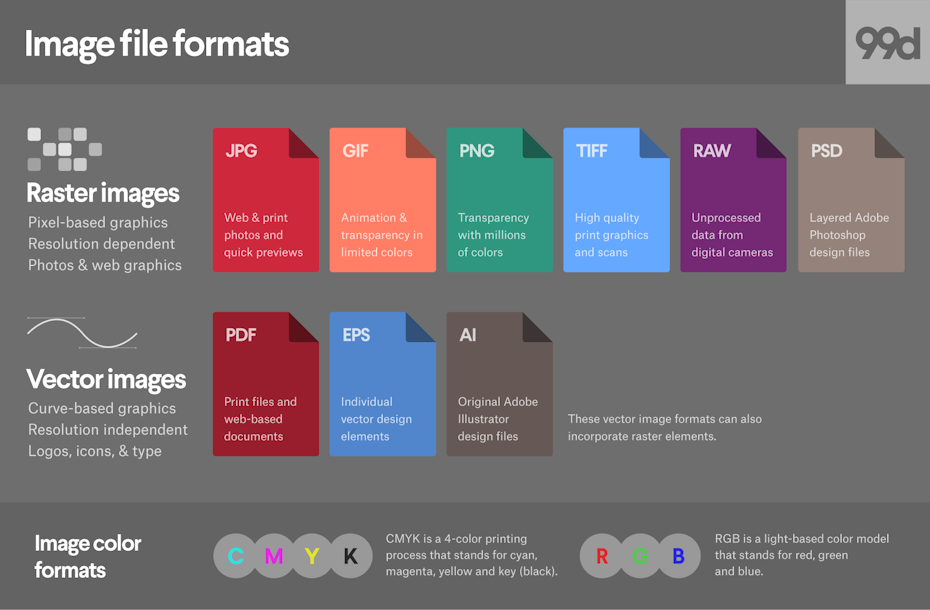
Media file formats are essentially containers that hold audio and video data. Each format has its own unique characteristics, including compression algorithms, video resolutions, and audio quality. Some of the most common media file formats for mobile devices include:
3GP: This format is commonly used for video content on mobile devices, and is known for its small file size and low bandwidth requirements.
M4V: This format is similar to MP4, but is specifically designed for use with Apple devices. It supports high-quality video and audio, and is often used for streaming and downloading content from the iTunes Store.
MP4: This format is widely used for video content on mobile devices, and is known for its high-quality video and audio, as well as its compatibility with a wide range of devices and platforms.
“Choosing the right media file format for your needs can be a challenge, but it is important to consider factors such as file size, video quality, and compatibility with your device and platform.”
Other Media File Formats
In addition to 3GP, M4V, and MP4, there are a number of other media file formats that are commonly used for mobile devices. These include:
AVI: This format is widely used for video content on desktop computers, but is less common on mobile devices due to its large file size and limited compatibility.
WMV: This format is commonly used for video content on Windows devices, and is known for its high-quality video and audio.
MOV: This format is commonly used for video content on Apple devices, and is known for its high-quality video and audio, as well as its compatibility with a wide range of devices and platforms.
“While there are a number of media file formats available for mobile devices, it is important to choose the right format for your specific needs. Factors such as file size, video quality, and compatibility with your device and platform can all play a role in determining the best format for your needs.”
Final Words
As someone who has been using mobile devices for years, I have learned the importance of choosing the right media file format for my needs. Whether I am streaming video content or downloading music, the right format can make all the difference in terms of quality and compatibility. By understanding the various media file formats available for mobile devices, and considering factors such as file size, video quality, and compatibility, you can ensure that your media content looks and sounds its best.
Media File Formats, Mobile Devices, 3GP, M4V, MP4, AVI, WMV, MOV, Audio Quality, Video Quality, Compression Algorithms, Compatibility, File Size, Streaming, Downloading, iTunes Store, Apple Devices, Windows Devices, Desktop Computers, Video Content, Audio Data, Containers, Bandwidth Requirements, High-Quality Video, High-Quality Audio, Video Resolutions, Choosing the Right Format, Quality and Compatibility.
Media File Formats, Mobile Devices, 3GP, M4V, MP4, AVI, WMV, MOV Audio Quality, Video Quality, Compression Algorithms, Compatibility, File Size, Streaming, Downloading, iTunes Store, Apple Devices, Windows Devices, Desktop Computers, Video Content, Audio Data, Containers, Bandwidth Requirements, High-Quality Video, High-Quality Audio, Video Resolutions, Choosing the Right Format, Quality and Compatibility, Media Content, Video Streaming, Audio Streaming, Video Downloading, Audio Downloading, Mobile Video Formats, Mobile Audio Formats, Mobile Media Formats, Mobile Video Quality, Mobile Audio Quality, Mobile Video Compression, Mobile Audio Compression, Mobile Video Resolution, Mobile Audio Resolution, Mobile Video Compatibility, Mobile Audio Compatibility, Mobile Video File Size, Mobile Audio File Size, Mobile Video Streaming Quality, Mobile Audio Streaming Quality, Mobile Video Downloading Quality, Mobile Audio Downloading Quality, Mobile Video Playback, Mobile Audio Playback, Mobile Video Conversion, Mobile Audio Conversion, Mobile Video Editing, Mobile Audio Editing, Mobile Video Production, Mobile Audio Production, Mobile Video Distribution, Mobile Audio Distribution.
As a video enthusiast, I have always been fascinated by the intricacies of video processing and enhancement. One of the most common issues that I have encountered is interlaced video, which can result in poor video quality and a lack of clarity. In this article, I will explore the various deinterlacing techniques that can be used to convert interlaced video to progressive playback, resulting in a smoother and more visually appealing viewing experience.
Understanding Interlaced Video
Interlaced video is a legacy format that was developed in the early days of television broadcasting. It was designed to reduce the bandwidth required for transmitting video signals, by splitting each frame into two fields that are displayed alternately. While this approach was effective at the time, it can result in a number of issues when viewed on modern displays, including flickering, jagged edges, and a lack of detail.
“Interlaced video is like a flipbook, where each page is split into two halves that are displayed in rapid succession. While this approach was effective in the past, it can result in a number of issues when viewed on modern displays.”
To address these issues, deinterlacing techniques can be used to convert interlaced video to progressive playback. This involves combining the two fields of each frame into a single frame, resulting in a smoother and more visually appealing viewing experience.
Deinterlacing Techniques
There are a number of deinterlacing techniques that can be used to convert interlaced video to progressive playback. These include:
Bob deinterlacing: This technique involves simply duplicating each field to create a full frame. While this approach is simple, it can result in a loss of detail and a lack of sharpness.
Weave deinterlacing: This technique involves combining the two fields of each frame into a single frame, by interleaving the lines from each field. While this approach can result in a smoother image, it can also introduce artifacts and a loss of detail.
Motion-adaptive deinterlacing: This technique involves analyzing the motion in each frame, and using this information to create a new frame that is a blend of the two fields. This approach can result in a much smoother and more detailed image, but it can also be more computationally intensive.
“While there are a number of deinterlacing techniques available, it is important to choose the right approach for your specific needs. Factors such as the source material, the intended viewing environment, and the available processing power can all play a role in determining the best approach.”
Conclusion
Deinterlacing is an important technique for improving the quality of interlaced video, and ensuring a smooth and visually appealing viewing experience. By understanding the various deinterlacing techniques available, and choosing the right approach for your specific needs, you can ensure that your video content looks its best.
Final Words
As a video enthusiast, I have always been passionate about exploring the various techniques and technologies that can be used to enhance the quality of video content. Deinterlacing is just one of the many tools available for improving the visual appeal of video, and I hope that this article has provided you with a better understanding of this important technique.
Video Deinterlacing, Deinterlacing Techniques, Progressive Playback, Interlaced Video, Video Quality, Video Conversion, Video Processing, Video Enhancement, Bob Deinterlacing, Weave Deinterlacing, Motion-Adaptive Deinterlacing, Flickering, Jagged Edges, Loss of Detail, Smooth Image, Artifacts, Processing Power, Source Material, Viewing Environment, Video Content, Visual Appeal, Video Enthusiast, Video Technologies, Video Enhancement Techniques, Video Quality Improvement.
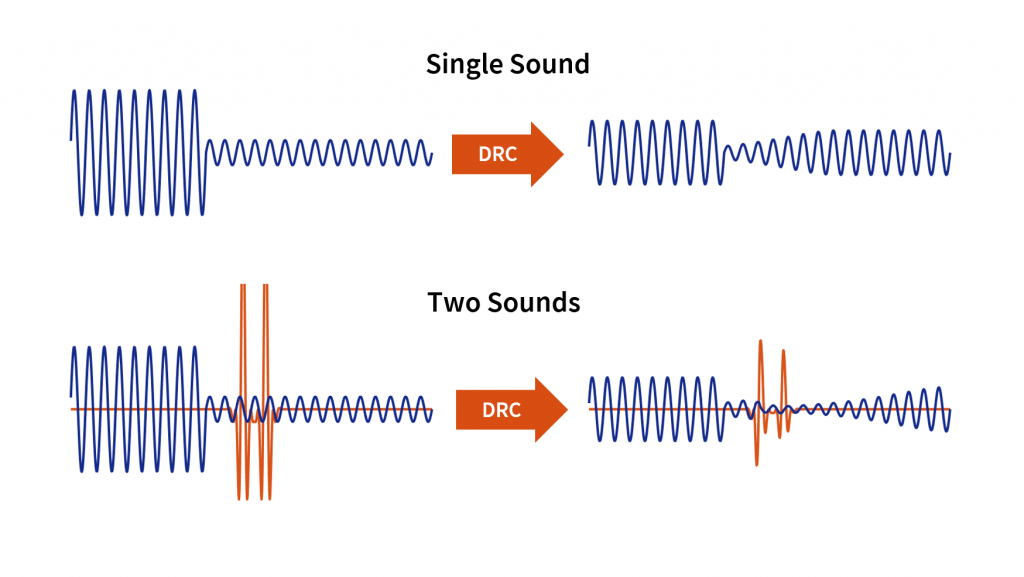
As an audio engineer, I’ve spent countless hours working with dynamic range compression. At its core, compression is a tool used to control the dynamic range of an audio signal. This means that it can be used to make quiet sounds louder and loud sounds quieter, resulting in a more consistent overall volume. Compression is an essential tool in the world of audio production, and it’s used in everything from music to film and television.
One of my favorite quotes about compression comes from the legendary producer Quincy Jones. He once said, “Compression is like a good pair of eyeglasses. You don’t notice them, but they make things look better.” And it’s true. When used correctly, compression can make an audio signal sound more polished and professional.
Dynamic Range Compression vs. Limiting
While compression and limiting are often used interchangeably, they are actually two different processes. Compression is used to control the dynamic range of an audio signal, while limiting is used to prevent the signal from exceeding a certain level. In other words, limiting is a more extreme form of compression.
One of the most common uses of limiting is in mastering, which is the final step in the audio production process. During mastering, the goal is to make sure that the audio sounds consistent across different playback systems. Limiting is used to prevent the audio from distorting or clipping when played back on a variety of systems.
Audio Expansion: The Other Side of the Coin
While compression and limiting are used to control the dynamic range of an audio signal, expansion is used to increase it. Expansion is the opposite of compression, and it’s used to make quiet sounds even quieter. This can be useful in situations where you want to bring out the details in a recording.
One of my favorite examples of the use of expansion comes from the film “No Country for Old Men.” In the film, there’s a scene where the main character is walking through a hotel room. As he walks, you can hear the sound of his footsteps echoing off the walls. The sound of the footsteps is very quiet, but it’s still audible. This is a great example of the use of expansion to bring out the details in a recording.
Final Words:
In conclusion, dynamic range compression, limiting, and expansion are all essential tools in the world of audio production. Whether you’re working on music, film, or television, understanding how to use these tools can make a huge difference in the final product. And while there are many different techniques and approaches to using compression, limiting, and expansion, the most important thing is to use your ears and trust your instincts.
audio compression, dynamic range, audio engineering, audio processing, audio mixing, audio production, audio mastering, audio software, audio plugins, audio effects, audio equipment, audio gear, audio technology, audio science, audio theory, audio education, audio tutorials, audio tips, audio tricks, audio hacks, audio workflow, audio techniques, audio aesthetics, audio quality, audio fidelity, audio perception, audio psychology, audio philosophy, audio history, audio culture, audio art, audio creativity, audio innovation, audio trends, audio industry, audio business, audio marketing, audio branding, audio advertising, audio monetization, audio revenue, audio distribution, audio streaming, audio downloads, audio formats, audio codecs, audio standards, audio compatibility, audio hardware, audio drivers, audio firmware, audio troubleshooting, audio repair, audio maintenance, audio optimization, audio performance, audio testing, audio measurement, audio analysis, audio visualization, audio synthesis, audio sampling, audio recording, audio editing, audio mixing, audio mastering, audio post-production, audio restoration, audio enhancement, audio noise reduction, audio equalization, audio filters, audio modulation, audio synthesis, audio synthesis
Understanding the Differences Between MP4 Audio and Video Formats
As a digital media enthusiast, I have always been interested in the different file formats available for audio and video. One of the most popular formats is the MP4, which has become the standard for digital media. However, there are different file extensions associated with MP4 files, including .mp4, .m4a, and .m4v. In this article, I will explain the differences between these file extensions and how they affect the usage of MP4 files.
The .mp4 File Extension
The .mp4 file extension is the most common file extension associated with MP4 files. It is a digital multimedia container format that is used to store audio, video, and other data. The .mp4 file extension is widely supported by media players and devices, making it a popular choice for digital media.
The .m4a File Extension
The .m4a file extension is another file extension associated with MP4 files. It is used specifically for audio files that are encoded using the Advanced Audio Coding (AAC) codec. The .m4a file extension is commonly used for music files and is supported by most media players and devices.
The .m4v File Extension
The .m4v file extension is not specifically associated with MP4 files, but it is used for video files that are encoded using the H.264 codec. The .m4v file extension is commonly used for video files that are downloaded from the iTunes Store and is supported by most media players and devices.
In conclusion, understanding the differences between .mp4, .m4a, and .m4v file extensions is important for anyone who works with digital media. As a digital media enthusiast, I have found that knowing the different file formats and file extensions has helped me to appreciate the technology behind digital media. If you are looking for a reliable and efficient way to normalize and convert your audio and video files, I highly recommend MP4Gain. It is a powerful tool that can help you get the most out of your digital media collection.
Optimizing MP4 Compression and Encoding
When it comes to digital media, compression and encoding are two important factors that affect the quality and size of the media files. MP4 files are no exception, and optimizing the compression and encoding settings can help you get the most out of your digital media.
Compression
Compression is the process of reducing the size of a digital media file without significantly affecting the quality of the media. MP4 files use a variety of compression algorithms, including H.264 and MPEG-4, to reduce the size of the media files. However, too much compression can result in a loss of quality, so it is important to find the right balance between file size and quality.
Encoding
Encoding is the process of converting a digital media file from one format to another. MP4 files can be encoded using a variety of codecs, including H.264 and AAC. The choice of codec can affect the quality and compatibility of the media file, so it is important to choose the right codec for your needs.
In conclusion, optimizing the compression and encoding settings for your MP4 files can help you get the most out of your digital media. If you are looking for a reliable and efficient way to optimize your MP4 files, I highly recommend MP4Gain. It is a powerful tool that can help you optimize your digital media collection.
MP4 Quality and Usage Differences
When it comes to digital media, quality and usage are two important factors that affect the overall experience of the media. MP4 files are no exception, and understanding the quality and usage differences can help you get the most out of your digital media.
Quality
Quality is the measure of how good a digital media file looks and sounds. MP4 files can vary in quality depending on the compression and encoding settings used. Higher quality MP4 files will have a larger file size, but will also look and sound better than lower quality files.
Usage
Usage is the way in which a digital media file is used. MP4 files can be used for a variety of purposes, including streaming, downloading, and playback on different devices. Understanding the usage differences can help you choose the right settings for your MP4 files.
In conclusion, understanding the quality and usage differences of MP4 files can help you get the most out of your digital media. If you are looking for a reliable and efficient way to optimize your MP4 files, I highly recommend MP4Gain. It is a powerful tool that can help you optimize your digital media collection.
Final Words:
In this article, we have explored the differences between .mp4, .m4a, and .m4v file extensions for MP4 files. We have learned how each file extension affects the usage of MP4 files and how to optimize the compression and encoding settings for MP4 files. If you have any questions or comments, please feel free to leave them below. Thank you for reading!
Understanding the Differences Between MP3 Audio Formats
As a music lover and audio enthusiast, I have always been interested in the different audio formats available today. One of the most popular formats is the MP3, which has revolutionized the way we listen to music. However, there are different file extensions associated with MP3 audio files, including .mp3, .mpga, and .mpeg. In this article, I will explain the differences between these file extensions and how they affect the quality of the audio.
The .mp3 File Extension
The .mp3 file extension is the most common file extension associated with MP3 audio files. It is a compressed audio format that uses lossy compression to reduce the size of the audio file. This means that some of the audio data is discarded during the compression process, resulting in a smaller file size. However, this also means that some of the audio quality is lost.
The .mpga File Extension
The .mpga file extension is another file extension associated with MP3 audio files. It is also a compressed audio format that uses lossy compression to reduce the size of the audio file. However, the .mpga file extension is used for MPEG-1 Layer III audio files, which are older and less common than .mp3 files. The .mpga file extension is still supported by some media players and devices, but it is not as widely used as .mp3.
The .mpeg File Extension
The .mpeg file extension is not specifically associated with MP3 audio files, but it is used for MPEG-1 and MPEG-2 video files, which can also contain audio data. The audio data in .mpeg files is usually compressed using MPEG-1 Layer III, which is the same compression algorithm used for .mp3 files. However, .mpeg files are not as common for audio as they are for video.
In conclusion, understanding the differences between .mp3, .mpga, and .mpeg file extensions is important for anyone who works with digital audio. As an audio enthusiast, I have found that knowing the different audio formats and file extensions has helped me to appreciate the technology behind digital audio. If you are looking for a reliable and efficient way to normalize and convert your audio files, I highly recommend MP4Gain. It is a powerful tool that can help you get the most out of your digital audio collection.
Final Words:
In this article, we have explored the differences between .mp3, .mpga, and .mpeg file extensions for MP3 audio files. We have learned how each file extension affects the quality of the audio and how they are used in different contexts. If you have any questions or comments, please feel free to leave them below. Thank you for reading!
As an audio enthusiast, I have always been fascinated by the technology behind digital audio. One of the most popular audio formats today is the MP3, which has revolutionized the way we listen to music. In this article, I will explain the basics of MP3 file structure, frames, and sync words, and how they work together to compress audio data.
What is MP3 Audio Compression?
MP3 is a digital audio format that uses lossy compression to reduce the size of audio files. This means that some of the audio data is discarded during the compression process, resulting in a smaller file size. The MP3 format was developed by the Fraunhofer Institute in Germany in the late 1980s and has since become the de facto standard for digital audio.
Understanding MP3 File Structure
MP3 files are made up of a series of frames, each of which contains a small portion of the audio data. The frames are synchronized using sync words, which are unique patterns of bits that indicate the start of a new frame. The sync words are used by the MP3 decoder to identify the beginning of each frame and to synchronize the audio data.
How Frames and Sync Words Work Together
Frames and sync words are the building blocks of the MP3 file format. The frames contain the compressed audio data, while the sync words are used to identify the beginning of each frame. The sync words are also used to ensure that the frames are decoded in the correct order. Without sync words, the MP3 decoder would not be able to properly decode the audio data.
In conclusion, understanding the basics of MP3 file structure, frames, and sync words is essential for anyone who wants to work with digital audio. As an audio enthusiast, I have found that knowing how MP3 compression works has helped me to appreciate the technology behind digital audio. If you are looking for a reliable and efficient way to normalize and convert your audio files, I highly recommend MP4Gain. It is a powerful tool that can help you get the most out of your digital audio collection.
Final Words:
In this article, we have explored the basics of MP3 file structure, frames, and sync words. We have learned how MP3 compression works and how frames and sync words are used to compress and decompress audio data. If you have any questions or comments, please feel free to leave them below. Thank you for reading!
Digital audio interfaces are essential for connecting audio equipment to a computer or other digital device. They allow for high-quality audio recording, playback, and processing, and come in a variety of formats, including MIDI and USB.
When I first started working with digital audio interfaces, I was overwhelmed by the different options available. However, after some research and experimentation, I was able to understand the differences between MIDI and USB interfaces and how to choose the right one for my needs. One of the advantages of digital audio interfaces is that they allow for high-quality audio recording and playback, which is essential for music production and other audio-related tasks.
As I was learning about digital audio interfaces, I remembered the quote from the movie “Whiplash”: “There are no two words in the English language more harmful than ‘good job’.” While it’s important to strive for excellence in audio production, it’s also important to choose the right tools for the job.
MIDI vs. USB
MIDI and USB are two common digital audio interface formats. MIDI stands for Musical Instrument Digital Interface and is primarily used for connecting musical instruments and controllers to a computer or other digital device. USB stands for Universal Serial Bus and is a general-purpose interface that can be used for a variety of audio and non-audio devices.
One of the advantages of MIDI is that it allows for precise control over musical instruments and controllers, making it ideal for music production and performance. However, MIDI is limited in terms of bandwidth and can only transmit data at a relatively slow rate. USB, on the other hand, has a much higher bandwidth and can transmit data at a much faster rate, making it ideal for high-quality audio recording and playback.
As I was learning about MIDI and USB interfaces, I remembered the quote from the book “The Alchemist” by Paulo Coelho: “When you want something, all the universe conspires in helping you to achieve it.” Choosing the right digital audio interface can be challenging, but with the right tools and knowledge, it’s possible to achieve your audio production goals.
Final Words
Digital audio interfaces are essential for connecting audio equipment to a computer or other digital device. MIDI and USB are two common digital audio interface formats, each with their own advantages and disadvantages. While MIDI is ideal for musical instruments and controllers, USB is ideal for high-quality audio recording and playback.
At MP4Gain, we understand the importance of audio quality and file size. Our software is designed to normalize and convert audio files to the most popular formats, with an integrated equalizer for fine-tuning the audio. If you’re looking for a solution to your audio needs, give MP4Gain a try.
Digital audio interfaces, MIDI vs. USB, audio connectivity, MIDI connectivity, USB connectivity, MIDI interface, USB interface, audio interface, music production, audio recording, audio playback, audio processing, audio equipment, audio devices, audio tools, audio software, audio quality, audio normalization, audio conversion, audio equalizer, audio production, audio performance, audio controllers, audio bandwidth, audio transmission, audio data, audio rate, audio goals, audio production goals, audio production tools, audio production knowledge, audio production techniques, audio production software, audio production hardware, audio production equipment, audio production resources, audio production community, audio production events, audio production workshops, audio production seminars, audio production webinars, audio production podcasts, audio production blogs, audio production forums, audio production websites, audio production resources, audio production tools, audio production equipment, audio production instruments, audio production accessories, audio production books, audio production magazines, audio production journals, audio production publications, audio production reviews, audio production ratings, audio production comparisons, audio production recommendations, audio production tips, audio production tutorials, audio production guides, audio production manuals, audio production documentation, audio production support, audio production help.