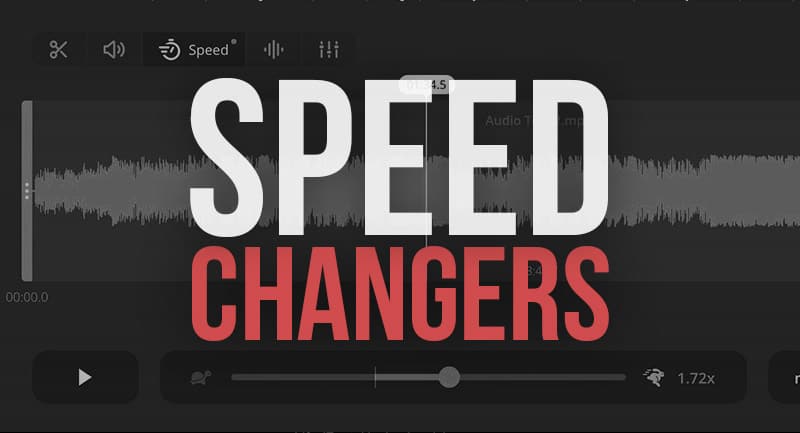
Mp3 Tempo Change


Free Download Mp4Gain
picture

Mp3 Tempo Change

Mp3 Tempo Change
Mp3 Tempo Change

Mp3 Tempo Change: Introduction

Mp3 Tempo Change
Mp3 Tempo Change

When it comes to audio files, changing the tempo can make a significant impact on the listening experience. Whether you want to speed up a song to match the rhythm of a workout or slow down a piece to learn a new instrument, a tempo change is a powerful tool. In this guide, we’ll cover everything you need to know about tempo change, from the technical aspects to the practical considerations.

What is Tempo Change?

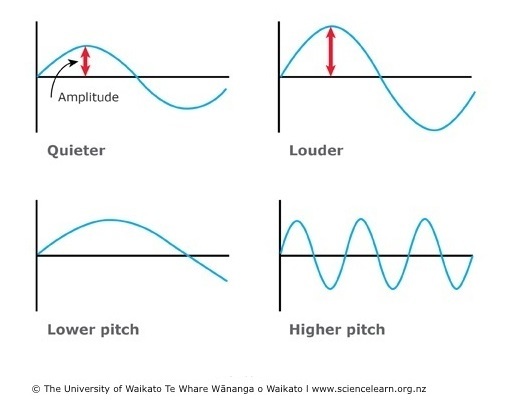
Tempo refers to the speed at which a piece of music is played. When you increase or decrease the tempo, you change the speed of the music. Tempo change is the process of altering the tempo of an audio file.

The Technical Side of Tempo Change

Tempo change is a complex process that involves manipulating the audio data in the file. Audio files are made up of a series of samples, which represent the sound wave at a particular point in time. To change the tempo, the software must adjust the timing of these samples without changing the pitch of the audio.

There are several methods for adjusting the timing of audio samples. One common technique is time stretching, which involves changing the playback speed of the audio without changing its pitch. This method works by adjusting the spacing between the audio samples, effectively stretching or compressing the waveform.

Another technique is pitch shifting, which changes the pitch of the audio without changing the tempo. This method works by modifying the frequency of the audio waveform.

Practical Considerations for Tempo Change

When it comes to tempo change, there are a few things to keep in mind. First, changing the tempo of an audio file can affect its quality. When you increase the tempo, the software must add in additional samples to fill the gaps, which can lead to a loss of audio quality. Similarly, when you decrease the tempo, the software must remove samples, which can also result in a loss of quality.

Second, changing the tempo of an audio file can also affect its length. When you increase the tempo, the file will become shorter, and when you decrease the tempo, the file will become longer. This can be an important consideration if you’re syncing audio to video or working with a limited amount of storage space.

Choosing the Right Software for Tempo Change

When it comes to tempo change, having the right software can make all the difference. While there are many programs that can adjust the tempo of an audio file, not all software is created equal.

One of the best software options for tempo change is Mp4Gain. This program offers a variety of features for adjusting the tempo of audio files, including the ability to change the BPM and adjust the pitch without affecting the tempo. Mp4Gain also offers a user-friendly interface that makes it easy to adjust the tempo of your audio files.

Conclusion

In conclusion, tempo change is a powerful tool for anyone working with audio files. Whether you’re looking to speed up a song for a workout or slow down a piece to learn an instrument, a tempo change can make all the difference. When choosing software for tempo change, be sure to select a program that offers the features and functionality you need to achieve your goals. Mp4Gain is a great option for anyone looking to adjust the tempo of their audio files with ease.


Free Download Mp4Gain
picture


Mp4Gain Main Window
picture


Mp4Gain Features
picture


Free Download Mp4Gain
picture

Audio Bit Depth Explained

Audio Bit Depth Explained


Audio Bit Depth Explained

Bit Depth

Audio Bit Depth Explained

When it comes to producing or enjoying high-quality audio, understanding bit depth is essential. This technical aspect of digital audio determines the level of precision and accuracy with which sound is captured and reproduced. For sound engineers and audiophiles alike, a deep understanding of bit depth is a must-have skill for creating and experiencing truly exceptional sound.

What is Bit Depth?

Bit depth refers to the number of bits used to represent each sample in a digital audio file. Each sample represents the amplitude of the audio signal at a specific point in time. The bit depth determines the range of values that can be used to represent the amplitude of each sample. A higher bit depth provides a larger range of possible values, resulting in a more accurate representation of the audio signal. This, in turn, leads to a higher-quality audio recording.

Common bit depths used in audio recording and production include 16-bit, 24-bit, and 32-bit. The most common bit depth used in consumer audio devices is 16-bit, while 24-bit and 32-bit are more commonly used in professional audio production.

How Does Bit Depth Affect Audio Quality?

The bit depth of an audio recording has a significant impact on its overall quality. A higher bit depth provides a more accurate representation of the audio signal, resulting in a more natural and lifelike sound. With a higher bit depth, the audio signal can be recorded and processed with greater precision and accuracy, allowing for a wider dynamic range and more nuanced expression.

On the other hand, a lower bit depth can result in quantization errors, which can introduce distortion and noise into the audio signal. This can result in a loss of detail and clarity, particularly in quiet or complex passages of music.

Bit Depth and Dynamic Range

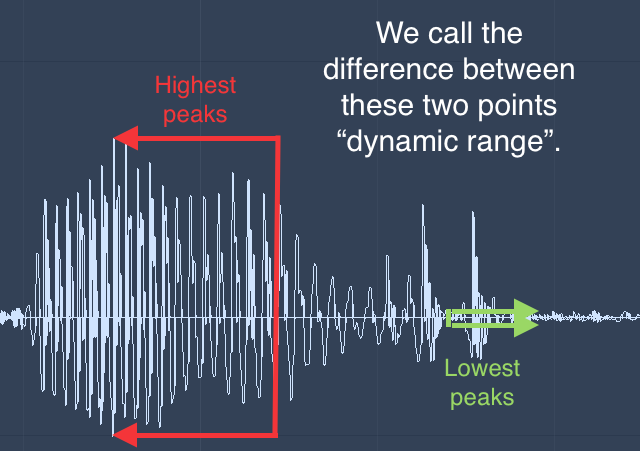
The dynamic range of an audio recording refers to the difference between the loudest and softest parts of the recording. A higher bit depth allows for a wider dynamic range, as the signal can be recorded with greater accuracy and precision. This means that even the softest parts of the recording can be captured with a higher level of detail and clarity, resulting in a more natural and lifelike sound.

For example, a recording of a classical music performance with a wide dynamic range may require a higher bit depth to capture the full range of dynamics and expression. Without a sufficient bit depth, the softer parts of the performance may be lost, resulting in a less engaging and less satisfying listening experience.

Conclusion

Understanding bit depth is crucial for anyone involved in the production or enjoyment of high-quality audio. By providing a more accurate representation of the audio signal, a higher bit depth can result in a more natural and lifelike sound, with a wider dynamic range and more nuanced expression. While a lower bit depth can result in quantization errors and a loss of detail and clarity, particularly in quiet or complex passages of music.

Overall, it is important to choose the appropriate bit depth for each recording or production, based on the dynamic range and complexity of the audio signal. By doing so, sound engineers and audiophiles can ensure that the audio they create or enjoy is of the highest quality possible.

As a final recommendation, we suggest using MP4Gain to adjust the volume and equalization of your digital audio files, ensuring that they are optimized for playback on a variety of devices and systems.

Audio Codec Comparison: A Comprehensive Guide for Audio Geeks

Audio Codec Comparison: A Comprehensive Guide for Audio Geeks

Audio Codec Comparison

Introduction

Audio codecs play a significant role in digital audio technology, as they are responsible for compressing and decompressing digital audio files. The use of audio codecs is essential to reduce the file size of audio files, making them easier to store, share, and transfer over the internet.

However, with the numerous audio codecs available in the market, it can be challenging to choose the right one for your needs. In this article, we will provide a comprehensive guide on the most popular audio codecs available today, their features, and their pros and cons.

What is an Audio Codec?

An audio codec is a software program or algorithm that compresses and decompresses digital audio data. The term codec stands for coder-decoder, and it is responsible for reducing the file size of digital audio files by removing redundant and irrelevant information from the file while retaining the original sound quality as much as possible.

Without an audio codec, digital audio files would be too large to store or transfer over the internet, which would be impractical. Therefore, audio codecs are essential for digital audio technology to function effectively.

Types of Audio Codecs

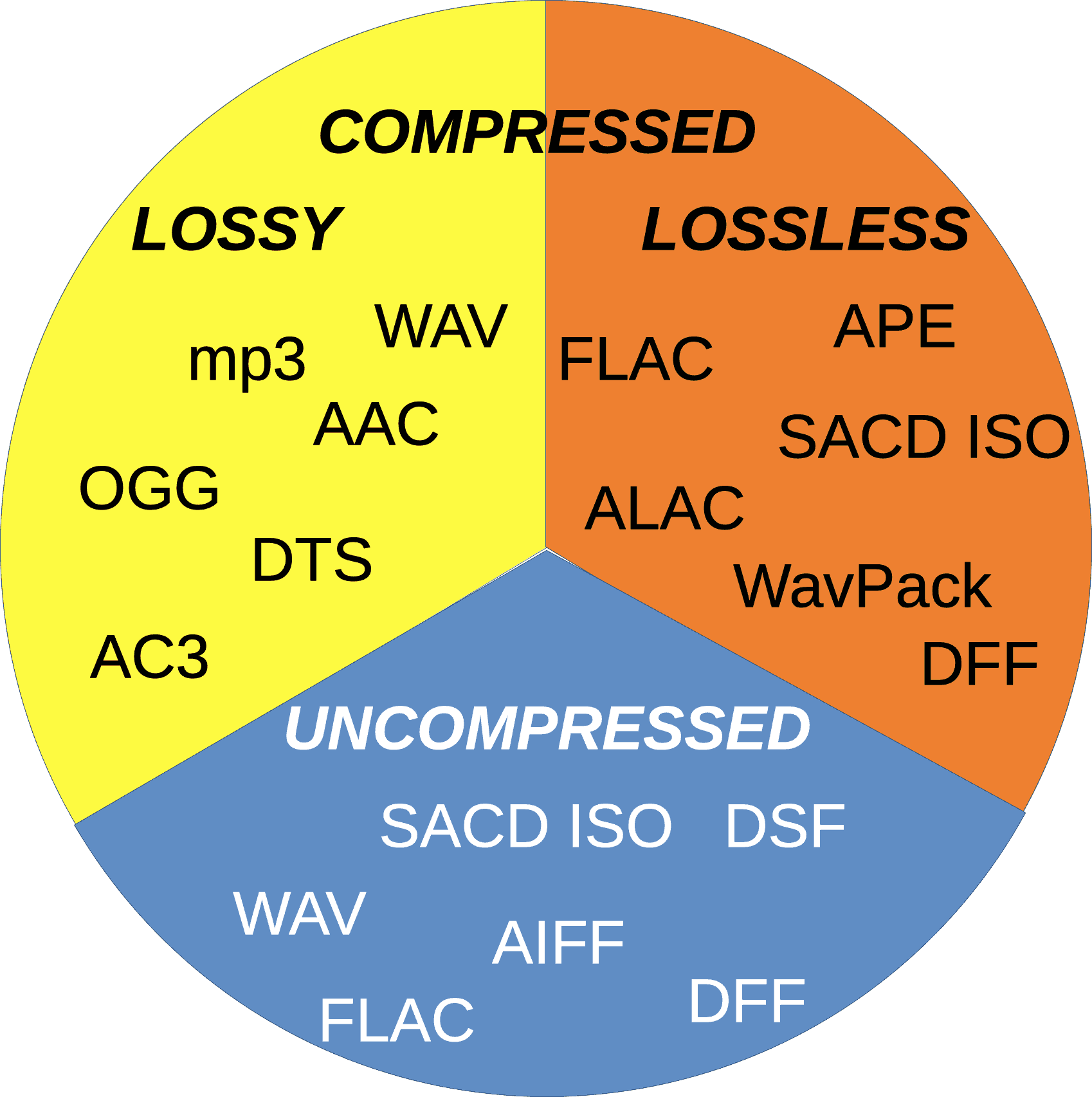
  • Lossy Audio Codecs

    Lossy audio codecs are designed to reduce the file size of digital audio files by discarding information that is considered irrelevant or redundant for human hearing. Lossy codecs achieve compression by applying psychoacoustic models that analyze the human auditory system’s limitations and remove sounds that are inaudible or less audible to the human ear. The most popular lossy audio codecs are:

    • MP3
    • AAC
    • OGG
    • WMA
  • Lossless Audio Codecs

    Lossless audio codecs compress digital audio files without discarding any information. Lossless codecs achieve compression by using sophisticated algorithms that analyze and encode the original audio data without affecting its quality. Lossless codecs are preferred for archiving or storing audio files that require the highest possible sound quality. The most popular lossless audio codecs are:

    • FLAC
    • ALAC
    • WAV
    • AIFF

Popular Audio Codecs

MP3

MP3 is the most popular audio codec in the world, and it has been around since the 1990s. MP3 stands for MPEG Audio Layer III, and it is a lossy audio codec that compresses digital audio files by removing sounds that are less audible to the human ear. MP3 is compatible with almost all audio players and devices and is widely used for music streaming, downloading, and sharing over the internet.

The main advantage of MP3 is its small file size, which makes it easy to store and transfer over the internet. However, MP3’s main drawback is its reduced sound quality, especially for audio files that contain a wide range of frequencies or dynamic range. MP3 files are prone to audio artifacts, such as compression artifacts, and they can sound flat or distorted compared to the original audio file.

AAC

AAC stands for Advanced Audio Coding, and it is a lossy audio codec that is widely used for music streaming and downloading. AAC is the default audio codec for Apple devices and is used by popular streaming services such as Spotify, Tidal, and YouTube. AAC is also used for high-definition digital television and radio broadcasting, as well as in various video formats such as MP4 and M4V.

FLAC

FLAC stands for Free Lossless Audio Codec, and as the name suggests, it is a lossless audio codec. FLAC is designed to compress audio files without losing any data or quality. It is an open-source codec that can be used on any platform and supports metadata, tagging, and album cover art. FLAC is a popular codec for archiving audio files and for audiophiles who want to preserve the original quality of their music. However, because FLAC files are larger than compressed audio files, they are less suitable for streaming and downloading over the internet.

ALAC

ALAC stands for Apple Lossless Audio Codec, and it is a lossless audio codec that is similar to FLAC. ALAC is the default audio codec for Apple devices and is supported by iTunes and other Apple software. Like FLAC, ALAC is designed to compress audio files without losing any data or quality. However, because ALAC is only supported by Apple devices and software, it is less widely used than FLAC.

Opus

Opus is a relatively new audio codec that was standardized by the Internet Engineering Task Force (IETF) in 2012. Opus is a versatile codec that can be used for a wide range of audio applications, including music streaming, voice chat, and video conferencing. It is designed to provide high-quality audio at low bitrates and can adapt to changing network conditions. Opus is an open-source codec that is supported by most modern web browsers and operating systems.

DSD

DSD stands for Direct Stream Digital, and it is a high-resolution audio codec that is used for digital recordings of analog audio sources. DSD uses a 1-bit sampling method that is different from traditional PCM-based codecs. DSD recordings have a high sampling rate and a wide frequency response, which allows them to capture more of the original sound than other codecs. DSD is used primarily by audiophiles and is supported by high-end audio equipment and software.

Conclusion

Choosing the right audio codec depends on your specific needs and preferences. If you want to compress your audio files for streaming or downloading, then lossy codecs such as MP3 or AAC are a good choice. If you want to preserve the original quality of your music, then lossless codecs such as FLAC or ALAC are a better option. Opus is a versatile codec that can be used for a wide range of audio applications, and DSD is a high-resolution codec that is ideal for audiophiles. Ultimately, the choice of codec depends on your personal preferences and the specific requirements of your project or application.

One tool that can be useful for managing and adjusting audio files is MP4Gain. MP4Gain is a software that allows you to normalize and adjust the volume of MP3, MP4, FLAC, and other audio files. It can be used to ensure that all of your audio files have the same volume level, which can be particularly useful for creating playlists or for streaming audio files. MP4Gain is available for Windows and it is a simple and effective tool for managing your audio files.

Dynamic range compression

Dynamic range compression

Dynamic range compression


Dynamic range compression, also known as simply “compression,” is a common technique used in audio processing to reduce the dynamic range of an audio signal. In this article, we will explore the concept of dynamic range compression, how it works, and its applications in music production and sound engineering.

Dynamic range compression

What is Dynamic Range Compression?

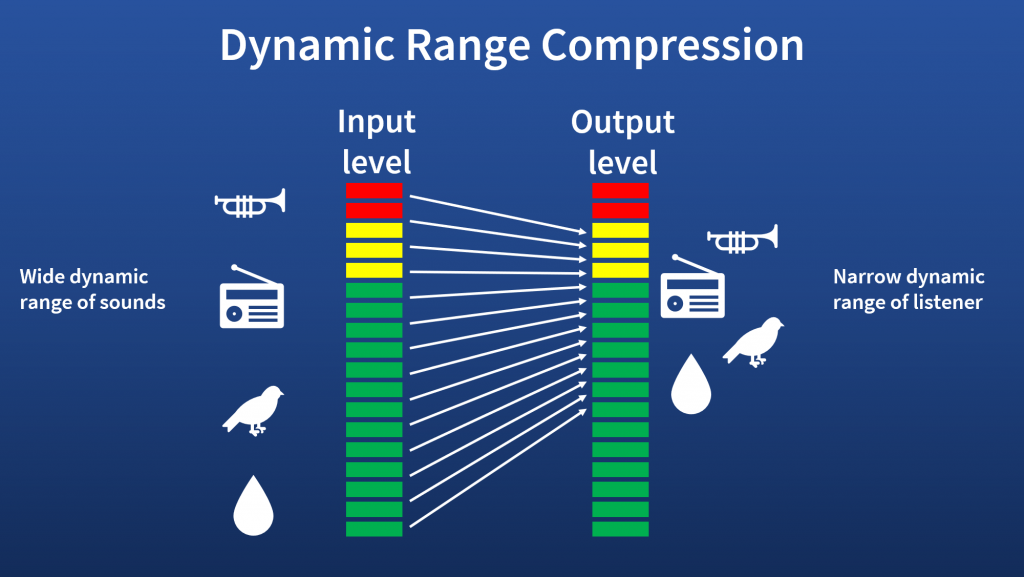
Dynamic range refers to the difference between the loudest and softest parts of an audio signal. In music production and sound engineering, it is desirable to have a wide dynamic range to create a more natural and dynamic sound. However, some musical genres, such as rock or electronic music, rely on a more consistent volume level throughout the song, which can be achieved through compression.

Dynamic range compression is a process that reduces the difference between the loudest and softest parts of an audio signal, resulting in a more consistent volume level. Compression works by lowering the volume of the loudest parts of the signal and boosting the volume of the softest parts, effectively “compressing” the dynamic range.

How Does Dynamic Range Compression Work?

Dynamic range compression works by applying a gain reduction to the audio signal when the volume exceeds a certain threshold. The threshold is set by the user and determines at what volume level the gain reduction will start to occur. Once the threshold is reached, the compressor reduces the gain of the signal by a set amount, called the ratio.

For example, if the threshold is set to -10 dB and the ratio is set to 2:1, then any part of the signal that exceeds -10 dB will be reduced in volume by half. So if a part of the signal that was originally at -8 dB is now reduced by half, it will be brought down to -11 dB.

Applications of Dynamic Range Compression

Dynamic range compression is used in a variety of applications in music production and sound engineering. Here are some of the most common applications:

Leveling the Volume of a Mix

When mixing a song, it is common for certain parts of the track to be louder than others, such as the chorus being louder than the verses. Compression can be used to level out the volume of the mix and make it more consistent.

Adding Punch to Drums and Percussion

Compression can be used to add punch and impact to drums and percussion by bringing out the attack of the sound. By setting a fast attack time and a high ratio, the compressor can reduce the volume of the sustain portion of the sound, while leaving the attack relatively untouched.

Controlling the Dynamics of Vocals

Vocals are one of the most important elements in a song, and dynamic range compression can be used to control their dynamics. By compressing the vocals, you can make them more consistent in volume, while still retaining the natural dynamics of the performance.

Managing Peaks in Audio Recordings

When recording audio, it is common for certain parts of the signal to exceed 0 dB, which can cause clipping and distortion. Compression can be used to manage these peaks and prevent clipping, allowing for a cleaner and more dynamic recording.

Conclusion

Dynamic range compression is a powerful tool for music production and sound engineering, allowing for a more consistent and controlled sound. By understanding how compression works and its various applications, you can use it to enhance your recordings and mixes. While there are many software options available for dynamic range compression, one that we recommend is MP4Gain, which provides a user-friendly interface and a variety of compression options to suit your needs.

The Science Behind Digital Audio Levelers

The Science Behind Digital Audio Levelers

audio leveling
audio leveling

When it comes to creating high-quality audio recordings, one of the most important considerations is maintaining consistent volume levels. Digital audio levelers are software tools designed to automatically adjust the volume of an audio track, ensuring that it remains at a consistent level throughout. But how do these tools actually work, and what is the science behind their operation? In this article, we’ll take a deep dive into the world of digital audio levelers, exploring the principles that underpin their operation and the key factors that affect their effectiveness.

audio leveling
audio leveling

Understanding Audio Levels

Before we dive into the world of digital audio levelers, it’s important to first understand the basics of audio levels. At its most basic, audio level refers to the amplitude of a sound wave, which is usually measured in decibels (dB). When recording audio, it’s important to ensure that the levels remain consistent throughout the recording, as fluctuations in volume can be jarring to the listener and can even cause distortion or clipping.

Traditionally, maintaining consistent audio levels required manual adjustments by the sound engineer or producer, who would listen to the recording and adjust the levels in real-time to ensure that they remained consistent. However, with the advent of digital audio technology, this process has become increasingly automated, with digital audio levelers offering a more streamlined and efficient solution.

How Digital Audio Levelers Work

So how do digital audio levelers actually work? At their most basic, digital audio levelers operate by analyzing the incoming audio signal and adjusting the volume level to ensure that it remains consistent. There are several different methods that levelers can use to accomplish this, but most operate using one of two primary techniques: peak normalization or RMS normalization.

Peak Normalization

Peak normalization is a technique that involves analyzing the audio signal and identifying the highest peak amplitude. The leveler then adjusts the volume level so that the highest peak is at a predetermined level, typically 0 dB. This ensures that the loudest part of the audio track is as loud as possible without causing distortion or clipping.

RMS Normalization

RMS normalization is a more complex technique that involves analyzing the average level of the audio signal over time. Rather than focusing on the highest peak, the leveler looks at the entire signal and adjusts the volume level to ensure that the average level remains consistent. This can help to ensure that the audio track maintains a more consistent volume level overall, even if there are individual peaks that exceed the average level.

Factors Affecting Leveler Effectiveness

While digital audio levelers can be incredibly effective at maintaining consistent audio levels, there are several factors that can affect their overall effectiveness. One of the most important of these factors is the dynamic range of the audio signal. Dynamic range refers to the difference between the loudest and quietest parts of an audio signal. If the dynamic range is too wide, it can be difficult for a leveler to maintain consistent levels without causing distortion or clipping.

Another factor that can affect leveler effectiveness is the type of audio being recorded. For example, speech recordings may require a different approach than music recordings, as the natural dynamic range of speech is typically narrower than that of music. Similarly, different genres of music may require different approaches, as the dynamic range of a rock song may be different from that of a classical piece.

Conclusion

During the last decades, digital audio levelers have become essential tools for the music industry, broadcasting, film, and TV production. They help ensure that the audio output meets specific standards, and the sound quality is consistent across different playback systems. As we have seen, digital audio levelers are sophisticated devices that incorporate various algorithms to analyze and adjust the audio levels, making them essential for modern media production.

The most widely used digital audio leveler, MP4Gain, has proven to be effective and reliable. With its advanced algorithms and intuitive user interface, MP4Gain simplifies the process of optimizing audio levels, making it accessible even to non-technical users. However, there are many other options available in the market, each with its own unique features and benefits.

When selecting a digital audio leveler, it is important to consider the specific needs and requirements of your project. Factors such as budget, level of technical expertise, and desired features should be taken into account. Additionally, it is crucial to stay informed about new developments and advancements in the field of digital audio levelers, as technology is constantly evolving.

In conclusion, digital audio levelers play a critical role in ensuring the quality and consistency of audio output across different playback systems. They are powerful tools that incorporate advanced algorithms to analyze and adjust audio levels, making them essential for modern media production.

How to Calculate Audio Bitrate: A Comprehensive Guide

How to Calculate Audio Bitrate: A Comprehensive Guide

Audio Bitrate
Audio Bitrate

Calculating audio bitrate is an essential skill for anyone working with digital audio files. Bitrate is the amount of data used to encode one second of audio, and it plays a significant role in the quality of audio files. In this comprehensive guide, we will discuss everything you need to know about audio bitrate and how to calculate it.


Audio Bitrate
Audio Bitrate

What is Audio Bitrate?

Bitrate is the number of bits used to encode one second of audio. It is typically measured in kilobits per second (kbps) and determines the audio file’s size and quality. The higher the bitrate, the larger the audio file’s size and the better the audio quality.

Audio bitrate is determined by several factors, including:

  • The audio format
  • The audio codec
  • The audio signal characteristics

Audio Format and Codec

The audio format and codec are two critical factors that determine audio bitrate. Audio format refers to the type of audio file, such as MP3, WAV, or FLAC. Each audio format has its own advantages and disadvantages, including file size, compatibility, and audio quality.

The audio codec, on the other hand, is the software used to compress and decompress audio data. Codecs determine how efficiently audio data is compressed and how much data is used to encode one second of audio.

It is essential to choose the right audio format and codec for your needs, as they can significantly impact the audio bitrate and quality. For example, MP3 files are smaller in size but lower in quality than WAV or FLAC files.

Audio Signal Characteristics

The characteristics of the audio signal, such as its frequency range and amplitude, can also affect the effectiveness of audio compression and the resulting audio bitrate. Higher frequencies and amplitudes require more data to encode accurately, resulting in a higher bitrate.

Other factors that can affect audio bitrate include the number of audio channels and the audio’s dynamic range. Stereo audio files require more data than mono audio files, while audio files with a wide dynamic range require more data than those with a narrow dynamic range.

Calculating Audio Bitrate

Calculating audio bitrate requires you to know the audio file’s duration, size, and format. Once you have this information, you can use the following formula to calculate audio bitrate:

Bitrate = (File size in bits / Duration in seconds) / 1000

For example, if you have a 3-minute MP3 audio file with a size of 4,320,000 bytes:

  1. Convert the file size to bits: 4,320,000 x 8 = 34,560,000 bits
  2. Convert the duration to seconds: 3 x 60 = 180 seconds
  3. Calculate the bitrate: (34,560,000 / 180) / 1000 = 192 kbps

In this example, the audio file has a bitrate of 192 kbps.

Conclusion

Calculating audio bitrate is an essential skill for anyone working with digital audio files. Understanding audio format, codec, and signal characteristics can help you choose the right audio settings for your needs and ensure the best audio quality possible. By following the formula above, you can easily calculate the required bitrate for your audio files and adjust the settings accordingly. Keep in mind that bitrate is not the only factor that affects audio quality, so be sure to consider other factors such as the audio format, codec, and signal characteristics when selecting your settings.

When working with audio, it’s important to strike a balance between file size and audio quality. Higher bitrates generally result in better audio quality, but also larger file sizes. It’s up to you to determine the optimal balance for your specific needs and use case.

Final Thoughts

Calculating audio bitrate may seem like a daunting task, but with the right tools and knowledge, it can be a straightforward process. By understanding the different factors that affect audio quality and file size, you can make informed decisions when selecting your audio settings.

Remember, bitrate is just one of many factors that affect audio quality. Other factors, such as the audio format and codec, can also have a significant impact. By taking these factors into consideration and making informed decisions, you can achieve the best possible audio quality for your needs.

Whether you’re an audio professional or simply someone who enjoys working with digital audio files, understanding how to calculate audio bitrate is an important skill to have. By following the guidelines outlined in this article, you can ensure that your audio files are optimized for the best possible quality and file size.

References

Note: The information provided in this article is for educational purposes only and should not be construed as professional advice. Always consult a professional audio engineer or other qualified expert for advice on specific audio projects or issues.

Audio Noise Reduction Algorithms: Understanding the Science Behind Clear Sound

Audio Noise Reduction Algorithms: Understanding the Science Behind Clear Sound

Audio Noise Reduction

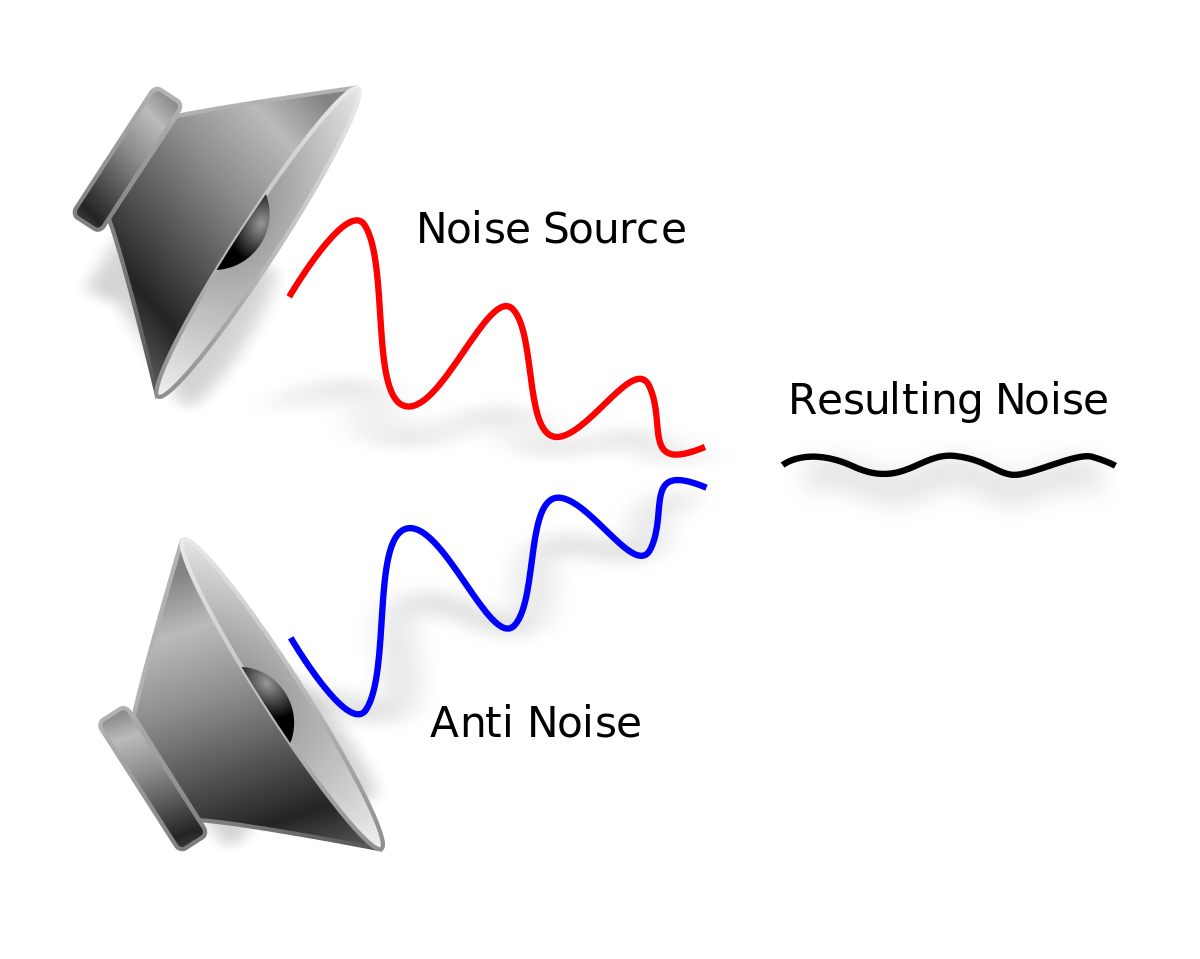
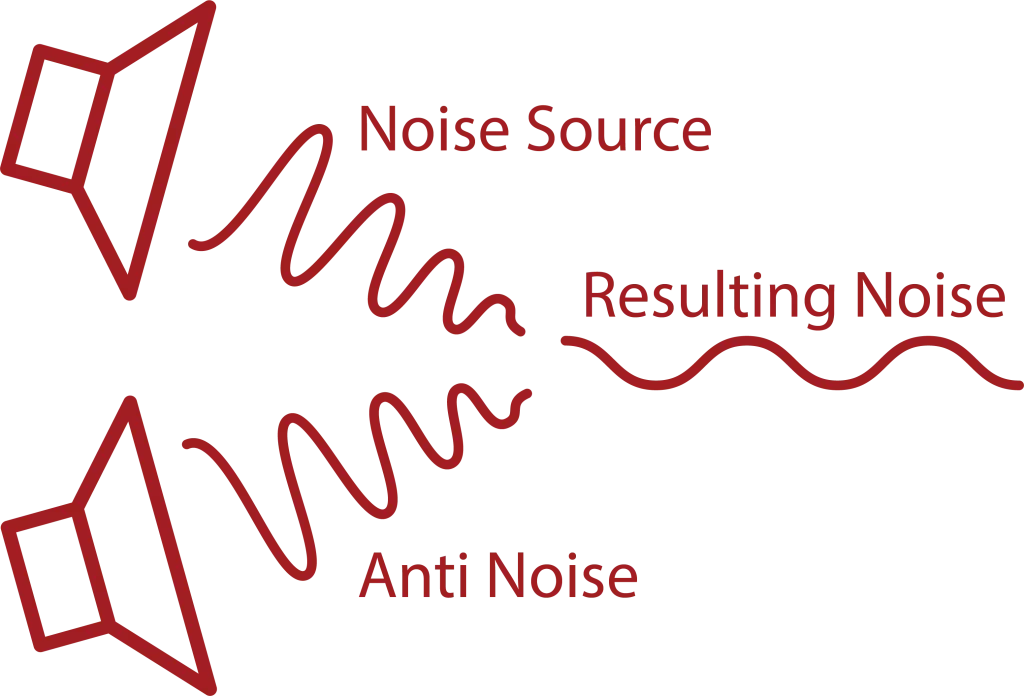
Audio noise is a common issue that plagues most audio recordings. Noise refers to any unwanted sound that is picked up during recording, such as hissing, humming, or static. This unwanted sound can be distracting and reduce the quality of the audio. Fortunately, audio noise reduction algorithms can help eliminate these noises, resulting in clear and high-quality audio recordings.

Audio Noise Reduction

The Basics of Audio Noise Reduction Algorithms

Audio noise reduction algorithms are used to filter out noise from audio recordings. These algorithms analyze the audio signal and separate the noise from the desired audio. Once the noise is separated, the algorithm can reduce or eliminate it from the recording. There are two main types of audio noise reduction algorithms:

  • Spectral Subtraction: This algorithm works by analyzing the frequency spectrum of the audio signal. It then estimates the noise spectrum and subtracts it from the audio signal, resulting in a cleaner sound.
  • Adaptive Filtering: This algorithm works by modeling the noise signal and filtering it out of the audio signal.

Both of these algorithms can be effective in reducing noise from audio recordings, but each has its strengths and weaknesses depending on the type of noise present and the characteristics of the audio signal.

How Audio Noise Reduction Algorithms Work

Audio noise reduction algorithms work by analyzing the audio signal and separating the noise from the desired audio. This process involves several steps:

Step 1: Noise Estimation

The first step in the audio noise reduction process is to estimate the noise. This is done by analyzing a portion of the audio signal that is known to be noise-only. This can be a portion of the audio that was recorded with no desired audio present or a silent section of the audio. Once the noise is estimated, the algorithm can use this information to separate the noise from the desired audio.

Step 2: Filtering

Once the noise has been estimated, the algorithm can begin to filter it out of the audio signal. This is done by applying a filter to the audio signal that will reduce or eliminate the noise. The type of filter used will depend on the algorithm being used and the characteristics of the audio signal.

Step 3: Signal Reconstruction

After the noise has been filtered out of the audio signal, the algorithm will reconstruct the audio signal to ensure that it is of high quality and free of artifacts. This is done by applying a process called signal reconstruction, which involves smoothing out any irregularities in the audio signal and ensuring that the signal is continuous.

Factors That Affect Audio Noise Reduction

There are several factors that can affect the effectiveness of audio noise reduction algorithms:

    • Noise Type: The type of noise present in the audio signal can affect the effectiveness of the algorithm. Some types of noise are easier to filter out than others.
    • Signal-to-Noise Ratio: The signal-to-noise ratio (SNR) is the ratio of the desired audio to the noise in the audio signal. A low SNR can make it more difficult for the algorithm to separate the noise from the desired audio.
    • Audio Signal Characteristics: The characteristics of the audio signal, such as its frequency range and amplitude, can also affect the effectiveness of noise reduction algorithms.

Types of Noise Reduction Algorithms

There are several types of noise reduction algorithms available, each with its own strengths and weaknesses. Some of the most commonly used algorithms include:

      • Single-Channel Noise Reduction: This type of algorithm is designed to reduce noise in a single audio channel, such as a single microphone recording. It can be effective in reducing constant background noise but may not be as effective in reducing more complex noise patterns.
      • Multi-Channel Noise Reduction: Multi-channel noise reduction algorithms can be used to reduce noise in multiple audio channels, such as in a stereo recording. These algorithms can be more effective than single-channel algorithms in reducing complex noise patterns.
      • Adaptive Filter: Adaptive filter algorithms can be effective in reducing noise that is relatively consistent over time, such as electrical hum. These algorithms analyze the audio signal and create a filter that is customized to reduce the specific noise pattern.
      • Spectral Subtraction: Spectral subtraction algorithms work by analyzing the frequency spectrum of the audio signal and subtracting the noise frequency components. This algorithm can be effective in reducing steady-state noise but may introduce artifacts in the audio signal.
      • Wiener Filter: The Wiener filter is a statistical algorithm that can be used to reduce noise in audio signals. This algorithm analyzes the statistical properties of the audio signal and the noise and creates a filter that can effectively reduce the noise.

Challenges in Noise Reduction

While noise reduction algorithms can be effective in reducing unwanted noise in audio signals, there are several challenges that must be considered:

      • Noise Types: Different types of noise require different noise reduction algorithms. For example, reducing background hiss requires a different algorithm than reducing electrical hum.
      • Signal-to-Noise Ratio: The signal-to-noise ratio (SNR) is the ratio of the desired audio signal to the unwanted noise. A low SNR can make it difficult for noise reduction algorithms to effectively reduce the noise without affecting the desired audio signal.
      • Artifacts: Noise reduction algorithms can introduce artifacts into the audio signal, such as distortion or a “muffling” effect. These artifacts can negatively affect the quality of the audio signal.
      • Computational Complexity: Some noise reduction algorithms require significant computational resources, which can make real-time noise reduction difficult.

Conclusion

Audio noise reduction algorithms are an essential tool for improving the quality of audio recordings. By analyzing the characteristics of the audio signal and the noise, these algorithms can effectively reduce unwanted noise and improve the clarity of the desired audio signal. However, the effectiveness of these algorithms depends on several factors, including the type of noise, the signal-to-noise ratio, and the computational complexity of the algorithm. By understanding the strengths and limitations of different noise reduction algorithms, audio professionals can select the most appropriate algorithm for their specific needs and achieve the best possible results.

Understanding Audio Bit Depth: 8-bit vs. 16-bit vs. 24-bit

Understanding Audio Bit Depth: 8-bit vs. 16-bit vs. 24-bit

Bit Depth
Bit Depth

When it comes to digital audio, one of the most critical factors in determining the quality of a recording is the audio bit depth. In this article, we’ll delve into the technical details of audio bit depth and explore the differences between 8-bit, 16-bit, and 24-bit audio recordings.

Bit Depth
Bit Depth

What is Audio Bit Depth?

In digital audio, sound waves are converted into a series of numerical values that can be stored and manipulated by computers. Audio bit depth refers to the number of bits of information used to represent each sample in a digital audio recording. Each sample represents the amplitude of the sound wave at a specific point in time.

The bit depth determines the range of possible values for each sample. For example, an 8-bit audio recording has 256 possible values, while a 16-bit recording has 65,536 possible values, and a 24-bit recording has over 16 million possible values. This increase in possible values provides greater resolution and accuracy, resulting in improved sound quality.

Dynamic Range

Another critical aspect of audio bit depth is dynamic range, which refers to the difference between the quietest and loudest sounds that can be recorded. With an increase in bit depth, the dynamic range of a recording also increases. For example, a 16-bit audio recording has a dynamic range of 96 dB, whereas a 24-bit recording has a dynamic range of 144 dB. This difference in dynamic range is quite significant and is one of the reasons why 24-bit audio is preferred for professional applications.

Quantization Noise

Quantization noise is an inherent part of digital audio and is introduced during the process of converting an analog audio signal to a digital representation. Quantization noise is essentially the difference between the actual analog signal and the closest quantized digital value. The more bits used for quantization, the lower the level of quantization noise.

However, as the bit depth increases, the noise introduced becomes less of an issue. At 16 bits, quantization noise is typically not audible, but it can become noticeable when processing audio. At 24 bits, quantization noise is virtually non-existent, even when processing audio.

Conclusion

In conclusion, audio bit depth plays a crucial role in the quality of digital audio recordings. Increasing the bit depth of an audio recording provides greater resolution and accuracy, resulting in improved sound quality. Professionals in the music industry typically prefer 24-bit audio due to its higher dynamic range and lower quantization noise. However, for most consumer applications, 16-bit audio is perfectly adequate and results in high-quality sound.

It is also important to note that bit depth is just one aspect of digital audio quality. Other factors such as sample rate and compression algorithms also play a significant role in determining the overall quality of a digital audio recording. Nonetheless, understanding audio bit depth is a crucial step in the journey to becoming a proficient audio engineer or producer.