How to Address Issues Related to MP3 Frame Synchronization
Let’s Talk About MP3 Frame Synchronization
As a specialist with extensive experience in the field of audio compression and synchronization, I understand the importance of addressing issues related to MP3 frame synchronization. MP3 is a widely used audio format, and its proper synchronization is crucial to ensuring the seamless playback of audio files. In this comprehensive guide, we will explore the intricacies of MP3 frame synchronization, common problems that arise, and effective solutions to tackle these issues.
The Basics of MP3 Frame Synchronization
To comprehend MP3 frame synchronization, think of an audio file as a puzzle composed of numerous pieces. Each piece represents an MP3 frame, and these frames must fit together perfectly to create a seamless audio experience. Just like putting together a jigsaw puzzle, when even one piece is misplaced, the entire picture can become distorted.
In the world of MP3, a frame is a fundamental unit of audio data, typically consisting of 1152 samples. These frames are aligned in a specific sequence to form an audio stream. If the frames aren’t synchronized correctly, you may experience audio artifacts, dropouts, or even complete audio distortion during playback. This can be particularly frustrating, akin to listening to a scratched vinyl record that skips and distorts the music you love.
Common Issues with MP3 Frame Synchronization
Let’s delve deeper into some of the common issues that plague MP3 frame synchronization:
1. Jitter and Timing Mismatches
One of the main culprits behind synchronization issues is jitter. Imagine trying to put together a puzzle where the pieces keep changing size and shape. Jitter in MP3 files can lead to timing mismatches between frames, causing audio playback to be out of sync. This often results in the unpleasant experience of hearing voices or instruments that seem slightly off, akin to watching a movie with poorly dubbed audio.
2. Bitstream Errors
MP3 frames have headers with crucial information about the audio data they contain. Bitstream errors, such as corrupted headers, can disrupt frame synchronization. It’s like trying to read a book with pages missing or scrambled. Without the correct headers, your audio player may struggle to interpret the audio data, leading to distortion or silence.
3. Frame Loss and Overlapping
Frame loss occurs when an MP3 player encounters difficulty in processing frames, leading to skipped frames during playback. Overlapping, on the other hand, results from frames being duplicated or played out of order. Both issues disrupt the seamless flow of audio, creating a disjointed listening experience similar to a scratched CD that repeats or skips segments.
Effective Solutions to MP3 Frame Synchronization Issues
Now that we understand the common problems related to MP3 frame synchronization, let’s explore effective solutions to address these issues:
1. Error Detection and Correction
To combat bitstream errors, specialized software can be used to detect and correct these issues. Just as spell checkers help fix typos in text, error detection and correction tools can repair damaged MP3 frames, ensuring smoother playback. Think of it as having a grammar tool that corrects your writing errors automatically.
2. Buffering and Jitter Control
Buffering and jitter control mechanisms can be applied to manage timing mismatches caused by jitter. This is similar to using shock absorbers in a car to ensure a smooth ride even on bumpy roads. These mechanisms help maintain a consistent flow of audio data, reducing synchronization issues.
3. Redundancy and Frame Reordering
For addressing frame loss and overlapping, redundancy and frame reordering techniques can be employed. Redundancy adds extra information to frames, reducing the impact of lost frames, while frame reordering ensures frames are played in the correct sequence. Picture this as a backup plan that ensures you don’t lose the plot when a few pages of your book are missing.
Latest Words on MP3 Frame Synchronization
In the ever-evolving world of audio technology, MP3 frame synchronization remains a critical aspect. As a specialist, my experience has taught me that understanding the intricacies of MP3 frame synchronization is vital to enjoy a seamless audio experience. By addressing issues related to synchronization, you can ensure that your favorite songs, podcasts, or audiobooks are played without interruptions, just like a well-preserved vinyl record or a pristine novel.
Comments:
Comment 1: Hey, great article! I’ve had my fair share of MP3 synchronization issues, and your explanations with real-life comparisons were super helpful. Thanks!
Comment 2: This article is alright, but I was hoping for more in-depth technical details about MP3 synchronization. Can you provide more advanced information?
Comment 3: I had no idea about these synchronization problems in MP3 files. Your article opened my eyes. Now I know why my music sometimes sounds weird.
Comment 4: I wish you’d talked more about the software solutions for MP3 synchronization. What tools can I use to fix these issues?
Comment 5: Your comparison to puzzles and books really made the concepts clear. I appreciate how approachable you’ve made this topic.
Comment 6: Great job on breaking down the complex topic of MP3 synchronization! Your real-life examples made it easy to grasp.
Comment 7: I agree with Comment 2; I wanted more technical details too. Can you elaborate on the error correction methods?
Comment 8: This article needs a bit more depth. I’m still a bit confused about how buffering works in MP3 synchronization.
Comment 9: Kudos to the author for simplifying a complex topic. It’s nice to have a resource that makes audio tech accessible to everyone.
Comment 10: I had no idea MP3s could be so finicky. Your article was an eye-opener. I’ll be more patient with my music now.
As a specialist with extensive experience in the world of digital audio and video, I’m excited to delve into the fascinating realm of MP3 YouTube. You’ve probably found yourself in a situation where you stumbled upon an incredible piece of music or a memorable podcast while watching a YouTube video. But what if you want to enjoy that audio on the go, without the need for a video? That’s where MP3 YouTube conversions come into play.
The Magic of MP3 YouTube
Imagine this: you’re watching a fantastic cooking tutorial on YouTube, and the background music is a catchy tune that you can’t get out of your head. Or perhaps you’re engrossed in a podcast interview with your favorite author, and the audio quality is superb. You’d love to listen to these without the distraction of visuals or while offline, right? MP3 YouTube allows you to extract the audio from YouTube videos and convert it into the widely supported MP3 format. This way, you can enjoy your favorite audio content anywhere, anytime.
Now, let’s explore the ins and outs of MP3 YouTube and how it works. We’ll provide you with invaluable insights and tips to get the most out of this conversion process.
The Science Behind MP3 YouTube
MP3 YouTube conversions are like magic spells that transform a video into a stand-alone audio file. To understand this process better, let’s break it down step by step:
Step 1: Choose Your Video
Imagine you have a DVD of your favorite movie at home. The movie itself is the YouTube video, and the DVD player represents YouTube. You pick the movie you want to watch (your chosen YouTube video) and load it into the player (access it on YouTube).
Step 2: Extract the Audio
Now, think of this movie as having two elements: audio and visuals. In MP3 YouTube conversions, we’re only interested in the audio. It’s like taking the sound from the DVD and leaving the visuals behind. This process is similar to hitting the “Extract Audio” button when converting a YouTube video to MP3.
Step 3: Convert to MP3
Once you’ve extracted the audio, you have a format that’s like the soundtrack of the movie. Think of this as your MP3 file. Just like you can listen to the soundtrack separately, you can play your MP3 file on any device or share it with friends.
The Convenience of MP3 YouTube Conversions
Now, let’s discuss why MP3 YouTube conversions are so popular and how they can make your digital life easier:
Saving Data and Space
Imagine you’re going on a road trip, and you have a limited data plan. If you had to stream videos from YouTube, it would consume a lot of data. But with MP3 YouTube, you can convert your favorite videos into audio files and save them on your phone or music player. This not only saves data but also precious storage space.
Offline Listening
Picture a long flight with no in-flight entertainment. With MP3 YouTube conversions, you can download audio versions of your favorite videos before your trip. Once in the air, you can enjoy the content without the need for an internet connection.
Custom Playlists
Let’s say you want to create a playlist of your favorite motivational speeches from various YouTube videos. MP3 YouTube makes it simple. Extract the audio, organize the speeches in your preferred order, and create your custom playlist. You’ll have an instant source of inspiration on your device.
The Importance of Quality
In the world of MP3 YouTube conversions, one crucial aspect to consider is audio quality. While most conversions provide decent quality, there can be differences. To ensure you’re getting the best audio experience, let’s take a look at what to watch out for:
Bitrate Matters
Think of the audio quality as the number of colors in a painting. The more colors you have, the more vivid and detailed the image is. Bitrate represents the number of pieces of information (or bits) transmitted per second in an audio file. Higher bitrates generally result in better sound quality. For your music collection, aim for a bitrate of at least 128 Kbps. This provides a balance between file size and audio quality. However, if you’re an audiophile, you might prefer bitrates of 256 Kbps or higher for an even richer listening experience.
Source Matters
Imagine you’re baking a cake. The quality of your ingredients plays a significant role in the final taste. Similarly, the source video on YouTube affects the quality of the extracted audio. If the source video has poor audio quality, there’s a limit to how good the converted MP3 can be. Therefore, when searching for content to convert, choose videos with high audio quality to ensure a great listening experience.
Customization Is Key
Not all MP3 YouTube conversion tools offer the same level of customization. Some allow you to select the desired bitrate, while others may not. When converting, look for options that let you control the output quality. This way, you can tailor the conversion to your specific preferences.
Finding the Best MP3 YouTube Converter
Now that you understand the world of MP3 YouTube conversions, you’re probably wondering where to find the best tools to perform this magic. Here are some tips to help you on your quest:
User-Friendly Interface
Think of the user interface as a recipe book. The simpler and more intuitive it is, the easier it is to follow the steps. Look for a converter with a clean, user-friendly interface that doesn’t overwhelm you with unnecessary options.
Compatibility
Just as you need the right ingredients for a specific dish, you need a converter that works with your devices and platforms. Ensure that the converter you choose is compatible with your operating system (Windows, macOS, Linux, etc.) and supports the video-sharing platforms you use.
Speed and Efficiency
Consider this scenario: you’re cooking a meal, and the recipe you’re following has multiple steps. A good recipe book provides clear instructions and ensures you can prepare the meal efficiently. Similarly, the best MP3 YouTube converter is one that can complete the conversion process swiftly without compromising the audio quality.
Customization Options
Remember, a great chef loves to experiment and adjust recipes to their liking. The same goes for MP3 YouTube conversions. Look for a converter that allows you to customize the output, including bitrate, file format, and even adding metadata like album art or song information.
Reliability
Just as you trust a renowned chef for a delectable meal, you want to trust the converter you use. Read user reviews and seek recommendations to find a reliable and trustworthy tool. Avoid converters that are known for delivering poor audio quality or malware.
The Legality of MP3 YouTube Conversions
Now, let’s address an important aspect that often confuses many users – the legality of MP3 YouTube conversions. It’s like understanding the rules and regulations of a specific cuisine.
Grey Area
The legality of MP3 YouTube conversions falls into a grey area. While converting YouTube videos to MP3 format for personal use is generally considered acceptable, distributing copyrighted content without permission is not. Therefore, it’s crucial to be mindful of the content you convert and how you use it.
Copyrighted Material
Think of copyrighted material as a secret family recipe. Just as you can’t sell someone else’s famous dish without permission, you can’t distribute copyrighted audio without the appropriate rights. If you’re
As a specialist with extensive experience in audio encoding, I’m here to provide you with a comprehensive guide to OGG encoding. If you’re curious about OGG, what it entails, and why it’s a game-changer in the digital audio world, you’ve come to the right place. Let’s dive into the world of OGG encoding and demystify its key aspects.
Demystifying OGG
What is OGG?
OGG is an open and free multimedia container format that encapsulates audio, video, and other data. In the context of audio, OGG usually refers to audio files that use the Ogg Vorbis audio codec. This format is renowned for its high audio quality and efficient compression, making it a go-to choice for many audio enthusiasts.
A Brief History
The OGG format emerged as an open alternative to proprietary audio formats. Ogg Vorbis, the codec often associated with OGG files, was developed to deliver superior audio quality while maintaining a compact file size.
The Significance of OGG Encoding
Diverse Use Cases
OGG encoding finds applications in a wide range of scenarios. Whether you’re a music lover, a gamer, a content creator, or a developer, OGG files can enhance your audio experience. They’re commonly used for music, sound effects in video games, and online streaming.
Benefits Over Other Audio Formats
OGG’s claim to fame lies in its ability to deliver excellent audio quality at smaller file sizes. It competes favorably with other formats, such as MP3, FLAC, and WAV, offering a sweet spot between quality and compression.
In the following sections, we’ll explore how OGG compares to other audio formats, the OGG encoding process, advanced techniques, and compatibility with various platforms.
OGG vs. Other Audio Formats
OGG isn’t the only audio format available, and it’s essential to understand how it stacks up against the competition.
OGG vs. MP3
Compression Techniques and Audio Quality
OGG Vorbis and MP3 both use lossy compression techniques. However, OGG Vorbis is known for producing better audio quality at lower bitrates compared to MP3. This means that with OGG, you can achieve higher audio fidelity with smaller file sizes.
Storage Space Comparison
While OGG files may be slightly larger than MP3 files at the same bitrate, the difference in file size is generally negligible. This makes OGG a great choice for those who prioritize audio quality over small file sizes.
OGG vs. FLAC
Lossy vs. Lossless Compression
OGG Vorbis, like MP3, uses lossy compression, which sacrifices some audio data for smaller file sizes. In contrast, FLAC (Free Lossless Audio Codec) employs lossless compression, preserving every detail of the original audio.
Practical Scenarios for Each Format
FLAC is ideal when you need to preserve every nuance of audio quality, making it suitable for professional audio production. OGG, on the other hand, is a versatile choice for everyday listening and various multimedia applications where file size is a concern.
OGG vs. WAV
Balancing Audio Fidelity and File Size
WAV (Waveform Audio File Format) is an uncompressed, lossless format that retains all audio data. OGG, with its lossy compression, achieves a compromise between audio quality and file size.
Use Cases and Real-Life Examples
WAV is perfect for studio recordings and archiving audio in its purest form. OGG, with its small file sizes and excellent quality, suits online streaming, portable devices, and scenarios where storage is limited.
In the next section, we’ll delve into the OGG encoding process, guiding you through selecting the right codec, essential tools and software, customizing settings, and batch encoding for efficiency.
OGG Encoding Process
When it comes to OGG encoding, the process involves several critical decisions that affect audio quality and file size. As an expert in audio encoding, I’ll walk you through the steps of encoding your audio files into OGG format.
Selecting the Right Codec
Vorbis vs. Opus
OGG encoding typically revolves around the Vorbis codec, known for its balance between quality and compression. Opus, another codec, is favored for its low-latency performance and excellent voice quality. Your choice depends on your specific needs, such as music or real-time voice communication.
Making Informed Choices
Choosing the right codec is crucial because it impacts the overall audio quality and compatibility of your OGG files. To make an informed decision, you need to consider factors like the content type and your target audience.
Essential Encoding Tools and Software
Encoders, Decoders, and Their Functions
Numerous encoding tools and software are available to facilitate OGG encoding. Popular choices include Xiph.Org’s official encoder, OggEnc, and graphical front-ends like Foobar2000. Additionally, decoders are essential for playback, and they’re often built into media players or available as plugins.
Step-by-Step Encoding Procedure
Using encoding software like OggEnc, the process is relatively straightforward. You select the source audio, set the encoding parameters (e.g., bitrate), and let the software convert your audio files to the OGG format. Most users can opt for default settings, but customization is also possible for those with specific preferences.
Customizing OGG Settings
Bitrate and Quality Adjustments
The bitrate you choose has a significant impact on audio quality and file size. A higher bitrate (e.g., 192 kbps) delivers better audio quality, while a lower bitrate (e.g., 96 kbps) results in smaller file sizes. The right balance depends on your storage capacity and audio quality demands.
Metadata Tagging and Its Importance
Metadata, including artist names, track titles, and album information, is essential for organizing your audio library. Properly tagging your OGG files ensures that your collection is well-organized and easily searchable.
Batch Encoding for Efficiency
Time-Saving Techniques and Strategies
If you have a large collection of audio files to convert to OGG, batch encoding can save you significant time and effort. Most encoding software allows you to select multiple files for simultaneous conversion, maintaining consistency in your music library.
In the following section, we’ll delve into advanced OGG encoding techniques, such as handling surround sound, variable bitrate vs. constant bitrate, and pursuing lossless audio quality.
Advanced OGG Encoding Techniques
As an audio encoding specialist, I’m committed to helping you achieve the best audio experience. Advanced OGG encoding techniques can elevate your audio quality and cater to specific requirements.
Surround Sound and Multichannel Audio
Creating Immersive Listening Experiences
OGG supports multichannel audio, making it suitable for creating immersive soundscapes. This feature is commonly used in the gaming industry for providing players with realistic and engaging audio environments.
Challenges and Solutions
It’s important to note that not all devices and media players support OGG files with multichannel audio. However, you can transcode or downmix your multichannel OGG files to stereo for broader compatibility.
Variable Bitrate (VBR) vs. Constant Bitrate (CBR)
Striking a Balance Between Quality and File Size
Variable Bitrate (VBR) adjusts the bitrate dynamically based on audio complexity, resulting in higher quality during intricate parts of a track. Constant Bitrate (CBR) maintains a consistent bitrate throughout the file.
Application Scenarios for Each
VBR is often preferred for music with varying complexity, as it optimizes audio quality. CBR is more suitable for audio with consistent complexity, such as spoken-word content or podcasts.
Lossless OGG Encoding
Pursuing Audiophile Sound Quality
For audiophiles who demand the utmost audio quality, OGG supports lossless encoding. This means that your OGG files retain all the audio data of the original source, providing an audiophile-grade listening experience.
Storage and Compatibility Considerations
Keep in mind that lossless OGG files are significantly larger than standard OGG files. Ensure you have ample storage space to accommodate your lossless audio collection.
In the next section, we’ll explore how OGG functions on different platforms, from Windows and Linux to Android. Each platform has its own considerations when it comes to OGG compatibility and playback.
OGG on Different Platforms
OGG isn’t limited to one platform; it can be used across various operating systems, but there are platform-specific nuances to consider.
OGG on Windows
Compatibility and Playback Options
Windows users can enjoy OGG files with native support on the Windows operating system. You can play OGG files using media players like Windows Media Player or import them into software like Audacity for editing.
Converting OGG on Windows
If you need to convert OGG files to other formats or transcode them for specific software or devices, several third-party tools are available, such as the versatile Foobar2000.
OGG on Linux
Native Support and Tools
Linux-based operating systems natively support OGG files. You can play OGG audio using various media players and editors available for Linux, such as VLC and Audacity.
Linux-Based Audio Software
Linux enthusiasts and professionals often use open-source audio software for encoding, decoding, and editing OGG files, ensuring complete control over their audio experience.
OGG on Android
Playback Solutions and Apps
Android devices may not natively support OGG, but there are numerous apps available on the Google Play Store for OGG playback. Apps like Poweramp and VLC Media Player provide Android users with the ability to enjoy their OGG music libraries.
Transcoding OGG for Android
To ensure seamless playback on Android devices, you might need to transcode your OGG files to a more Android-friendly format, such as MP3 or AAC. Several apps can assist in this conversion process.
In the final section, we’ll discuss the future of OGG encoding, exploring emerging audio technologies, the role of Opus and Speex codecs, OGG in streaming services, listener preferences, and trends in audio quality.
The Future of OGG Encoding
As an expert in audio encoding, I stay on the cutting edge of audio technology to provide you with the latest insights into the future of OGG encoding and its role in the ever-evolving digital audio landscape.
Emerging Audio Technologies
The Role of Opus and Speex Codecs
Opus and Speex are emerging audio codecs that cater to specific use cases. Opus excels in low-latency applications, making it ideal for real-time voice communication. Speex, on the other hand, is designed for efficient voice compression.
Future-Proofing Your Audio
As these technologies evolve, it’s crucial to consider future-proofing your audio library by keeping up with the latest codec advancements. This ensures that your audio remains compatible and of high quality for years to come.
OGG in Streaming Services
Streaming Quality and Bandwidth Optimization
In the world of music streaming, bitrate selection plays a vital role in balancing audio quality and bandwidth usage. Streaming platforms like Spotify use OGG Vorbis files with variable bitrates to provide the best possible quality while adapting to network conditions.
Metadata’s Influence on Music Discovery
Metadata tagging in OGG files is increasingly important in music streaming. It aids in music discovery, helping listeners explore new tracks and artists. With well-tagged OGG files, your music library becomes a valuable resource for finding and enjoying music.
Audio Quality in the Digital Age
Listener Preferences and Trends
Audio quality remains a central focus for listeners. High-resolution audio and lossless formats continue to gain popularity among audiophiles. It’s crucial to stay informed about listener preferences and adapt your encoding choices accordingly.
In conclusion, OGG encoding is a versatile and high-quality audio format that caters to a wide range of preferences and devices. Whether you’re an audiophile seeking pristine audio quality, a content creator, or an everyday music enthusiast, OGG has a place in your audio journey. With the insights provided in this article, you can make informed decisions about your audio encoding and enjoy the best possible listening experience. The world of audio is ever-evolving, and OGG remains a key player in this dynamic landscape.
Latest Words on OGG Encoding
Now that we’ve covered the fundamentals of OGG encoding, it’s essential to stay up to date with the latest developments and expert insights in the field.
Ongoing Developments
Updates and Evolving Codecs
The world of audio encoding is in a constant state of development. Keep an eye out for updates to OGG codecs and encoding tools, as they may bring improvements in audio quality and compression.
User Questions and Expert Insights
Addressing Common Queries
I’ve gathered some common questions and inquiries about OGG encoding from users and provided expert insights to help you navigate this intricate field.
Industry Expert Opinions
I’ve also sought the opinions of industry experts to provide you with a well-rounded perspective on OGG encoding and its place in the audio world.
Recommended Tools and Resources
Staying Informed and Making the Right Choices
To stay informed and make the right choices when it comes to OGG encoding, I’ve compiled a list of recommended tools, forums, and resources for further exploration.
Download and use Mp4Gain.
With this wealth of information and insights, you’re well-equipped to embark on your OGG encoding journey and make the most of this exceptional audio format. Enjoy the world of high-quality audio and explore the possibilities that OGG encoding offers.
Calculating Critical Bandwidths in MP3 Compression
Critical Bandwidths in MP3
As an expert in the realm of MP3 compression and audio technology, I’m here to unravel the intricate world of critical bandwidths in MP3 compression. Understanding this concept is pivotal in achieving optimal audio quality while minimizing file size. Let’s dive into the details and explore this fascinating topic.
What Are Critical Bandwidths in MP3 Compression?
Critical bandwidths, often referred to as critical bands, are a fundamental concept in the field of psychoacoustics. They relate to the way our ears perceive different frequencies and play a vital role in audio compression, particularly in the MP3 format. To put it simply, critical bandwidths represent the range of frequencies that our ears can distinguish and process.
Real-Life Example: Think of critical bandwidths as a set of buckets, each representing a range of frequencies. Our ears can only fill a limited number of buckets at once, and these buckets are wider for low frequencies and narrower for high frequencies.
MP3 compression exploits the knowledge of critical bandwidths to remove audio information that falls outside the range of human hearing. This selective approach allows for significant data reduction while retaining audio quality. It’s akin to trimming the fat while preserving the meat, resulting in a leaner audio file.
How Are Critical Bandwidths Determined?
Critical bandwidths are not fixed; they vary depending on the specific frequency and the environment in which the sound is heard. Psychoacoustic studies have led to the development of critical bandwidth curves, which provide a graphical representation of how our ears perceive different frequencies.
Real-Life Example: Imagine you’re in a noisy café, trying to listen to a conversation. Your ears focus on the frequency range of the voices while ignoring the surrounding noise. This selective attention is similar to how critical bandwidths work in audio compression.
In the context of MP3 compression, these critical bandwidth curves are used to determine which parts of the audio spectrum can be discarded without a noticeable impact on the listening experience. This fine-tuned approach ensures that the compression process is both efficient and transparent to our ears.
Balancing Compression and Quality
The art of MP3 compression lies in finding the delicate balance between reducing file size and maintaining audio quality. Critical bandwidths are a crucial tool in achieving this equilibrium. By identifying and preserving the most relevant audio information while discarding what falls outside the critical bandwidths, MP3 compression delivers impressive results.
Real-Life Example: Consider the act of watching a high-definition movie on your smartphone while saving data. The device adjusts the video quality based on the screen size and your internet speed, providing a smooth viewing experience without unnecessary data consumption. MP3 compression operates in a similar fashion, optimizing audio for digital consumption.
In essence, critical bandwidths in MP3 compression serve as a guide to ensure that the compression process is as imperceptible as possible to the human ear. By focusing on the audio information that matters most, we can enjoy high-quality audio experiences with smaller file sizes.
Last Words about Critical Bandwidths in MP3 Compression
In my journey through the realm of audio compression, I’ve come to appreciate the profound impact of critical bandwidths. These frequency ranges shape the way we perceive sound and play a pivotal role in the world of MP3 compression. By understanding this concept, we can navigate the intricacies of audio technology, striking a harmonious balance between quality and efficiency.
Adaptive audio streaming, a critical aspect of modern digital media delivery, has revolutionized how we experience audio content. In this comprehensive guide, I will delve into the intricacies of adaptive audio streaming and its significance in providing top-notch streaming audio quality.
Understanding Adaptive Audio Streaming
Adaptive audio streaming is a dynamic approach that optimizes audio quality based on the viewer’s network conditions. It ensures a seamless audio experience by adjusting the audio codec’s parameters and the bitrate of the audio stream in real-time. This adaptation is vital to prevent audio interruptions, buffering, and loss of quality, especially in the ever-changing world of online content delivery.
Imagine a journey on a highway where the traffic flow constantly changes. Adaptive streaming is like having a smart vehicle that adjusts its speed to maintain a smooth ride. Similarly, when your internet connection fluctuates, adaptive audio streaming adapts the audio quality to ensure you experience a continuous, high-quality audio stream.
The Science Behind Streaming Audio Quality
To grasp the science behind adaptive audio streaming, let’s explore some of the key technical aspects. Adaptive streaming relies on efficient audio codecs that compress and decompress audio data. These codecs use various algorithms to reduce the size of audio files while preserving audio quality. The choice of codec and its efficiency play a significant role in determining the quality of the audio stream.
In a real-world analogy, think of audio codecs as skilled chefs preparing a sumptuous dish. A masterful chef knows how to retain the flavors while reducing the dish’s size, making it easier to serve. Likewise, efficient audio codecs preserve the audio’s fidelity while making it compatible with varying network conditions.
The Impact of Latency in Audio Streaming
Latency, the delay between audio production and playback, is a crucial factor in adaptive audio streaming. While some latency is inevitable due to data transmission and codec processing, excessive latency can disrupt the streaming experience. Adaptive streaming technologies aim to strike a balance between audio quality and latency.
Think of latency as the time it takes for a letter to reach its destination through traditional mail compared to email. Adaptive audio streaming ensures the audio reaches your ears with minimal delay, akin to the swift delivery of an email. This balance is essential for real-time applications like online gaming or live broadcasts, where low latency is a top priority.
Now, let’s address the questions that often arise regarding adaptive audio streaming:
How Does Adaptive Bitrate Streaming Work?
Adaptive bitrate streaming, a close sibling to adaptive audio streaming, involves adjusting not only the audio quality but also the video quality based on network conditions. It works by dividing the audio and video content into small chunks of data and delivering them in varying quality levels. Players then choose the best quality for a seamless viewing experience.
What Technologies Drive Adaptive Audio Streaming?
Adaptive audio streaming leverages several technologies, including HTTP Live Streaming (HLS), Dynamic Adaptive Streaming over HTTP (DASH), and Real-Time Messaging Protocol (RTMP). These technologies enable adaptive streaming by optimizing content delivery over the internet, ensuring that audio quality remains consistent across different devices and network conditions.
Why Is Mobile Audio Streaming Challenging?
Mobile audio streaming presents unique challenges due to the variability of cellular networks and the limited processing power of mobile devices. Adaptive audio streaming is particularly crucial in this context, as it ensures a smooth listening experience, even when on the move. It’s like having an audio companion that adjusts to your surroundings, providing uninterrupted music or podcasts as you travel.
Last Words about Adaptive Audio Streaming
In the era of digital media, adaptive audio streaming is the unsung hero that ensures you enjoy a high-quality audio experience regardless of your network conditions. I’ve shared my knowledge and expertise on this topic, revealing the science behind streaming audio quality and the role of efficient codecs. Understanding the impact of latency and the technologies driving adaptive streaming is key to appreciating its significance. As an expert in the field, I encourage you to embrace the world of adaptive audio streaming, where your audio content is tailored to your network conditions, just like a perfectly orchestrated symphony.
Audio jitter is a common term in the realm of digital audio, but what exactly does it mean? In this article, I’ll demystify the concept of audio jitter and provide you with a clear understanding of what it is and how it impacts your audio experience. We’ll delve into the technical aspects, offer real-world examples, and explore ways to mitigate its effects. So, let’s embark on this journey to unravel the mysteries of audio jitter.
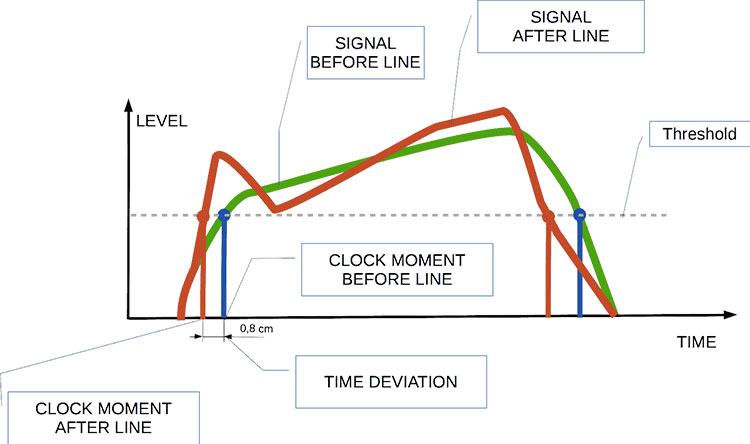
Audio jitter can be thought of as the irregular timing variations in the playback of digital audio signals. These timing variations can manifest as small deviations in the timing of audio samples, leading to audio artifacts like clicks, pops, and distortion. While it may seem like a technical concern, audio jitter can significantly affect your overall listening experience, even if you’re not a seasoned audiophile.
What is Audio Jitter?
Audio jitter, in essence, is the bane of digital audio playback. When you play a digital audio file, it gets converted into an analog signal for your speakers or headphones. The challenge arises when the conversion isn’t perfectly synchronized. Think of it like a metronome that occasionally skips a beat. This timing discrepancy, which we call audio jitter, can distort the sound and result in a less-than-ideal listening experience.
For a real-world analogy, consider a musical ensemble. If the musicians are out of sync, even by a tiny fraction of a second, the result can be dissonant and displeasing to the ear. Similarly, audio jitter disrupts the synchronization between the digital audio source and your playback system.
How Does Audio Jitter Impact Sound Quality?
Audio jitter affects sound quality by introducing unwanted artifacts. These artifacts can include audible clicks, pops, and distortions in the audio stream. To understand the impact, picture a pristine audio signal as a smooth, flowing river. Audio jitter is like tossing pebbles into that river, causing ripples and disturbances. These ripples manifest as audible imperfections in your music or audio.
Think of a jazz drum solo: the precision of the drummer’s beats is crucial to the experience. Even a slight deviation in the rhythm can disrupt the entire performance. Audio jitter works in a similar way, disrupting the timing and rhythm of your audio playback, ultimately degrading the sound quality.
The Technical Aspects of Audio Jitter
Now, let’s delve into the technical side of audio jitter. In the digital domain, audio is typically stored as discrete samples, each representing the amplitude of the sound at a specific moment. The timing of these samples is critical. Audio jitter occurs when the time intervals between these samples deviate from the ideal, leading to inconsistencies in playback.
To put this in context, think of a digital audio player as a conveyor belt, with each audio sample represented by a box. These boxes must move down the belt at precise intervals to maintain the audio’s integrity. If some boxes move faster or slower than others, you’ll encounter audio jitter, which translates to an erratic and unpleasant listening experience.
Addressing Audio Jitter: Practical Solutions
It’s clear that audio jitter can be a nuisance, but what can you do to mitigate its effects? Fortunately, there are practical solutions available. Some high-end audio equipment includes advanced jitter-reduction technologies. Additionally, using dedicated external digital-to-analog converters (DACs) can help improve audio synchronization.
Think of these solutions as a conductor guiding the musicians in an orchestra, ensuring they play in perfect harmony. Advanced equipment and DACs help maintain the precise timing necessary for high-quality audio playback.
Audio Jitter vs. Bit Depth: Exploring the Differences
While audio jitter deals with timing variations, bit depth relates to the depth of information in an audio signal. It’s essential to distinguish between the two. Bit depth determines the resolution of the audio signal, affecting the dynamic range and subtlety of sound. Audio jitter, on the other hand, impacts timing and synchronization. Both factors play a role in overall audio quality, but they address different aspects of the listening experience.
Think of bit depth as the number of colors on a painter’s palette, while audio jitter is akin to the painter’s brush strokes’ precision. They are both crucial for the final masterpiece, but they address different aspects of the artistic process.
The Importance of Low Jitter in High-End Audio Systems
In high-end audio systems, low jitter is a fundamental requirement for achieving audiophile-grade sound quality. Audiophiles demand the utmost precision and clarity in their audio playback, and any deviation in timing is unacceptable. To achieve this, specialized audio components and meticulous engineering are employed to minimize jitter.
Imagine a fine dining experience where every detail, from the presentation to the taste, is meticulously crafted. Audiophiles seek the same level of perfection in their audio experience, and low jitter is a crucial ingredient in achieving it.
Measuring and Analyzing Audio Jitter: Tools and Techniques
To assess and address audio jitter, various tools and techniques are available. One common method involves using dedicated audio analyzers that can pinpoint timing variations. Additionally, software applications can help diagnose and quantify audio jitter in your playback system.
Think of these tools as diagnostic instruments in a doctor’s office. They allow audio enthusiasts and professionals to diagnose and treat any issues related to audio jitter, ensuring the best possible audio quality.
Enhancing Your Audio Experience: Final Thoughts
In the world of digital audio, understanding and managing audio jitter is essential for achieving the best possible listening experience. Whether you’re a casual music lover or a dedicated audiophile, knowing how audio jitter affects your sound quality can lead to informed choices and better audio equipment investments.
So, the next time you enjoy your favorite music or immerse yourself in a captivating movie, remember the role that precise timing plays in your audio journey. Just as a conductor leads an orchestra to create beautiful music, minimizing audio jitter ensures that the symphony of sound reaches your ears with clarity and perfection.
Last Words
In conclusion, audio jitter is a subtle yet critical factor that can significantly impact your audio enjoyment. By delving into the technical aspects of audio jitter and exploring practical solutions, we’ve uncovered the key to enhancing your audio experience. Whether you’re an audiophile or simply someone who appreciates good sound, understanding and addressing audio jitter is a step toward audio perfection.
Understanding Bitstream Compression: Enhancing Data Efficiency
Bitstream Compression
In today’s data-driven world, efficiency is paramount. Whether you’re a tech enthusiast, a professional in the field, or simply curious about data compression, the term “Bitstream Compression” might have piqued your interest. In this article, I’ll delve into the intricacies of Bitstream Compression, providing insights, examples, and technical knowledge to help you grasp its significance and applications.
Bitstream Compression: Unraveling the Concept
Bitstream Compression: A Closer Look
Bitstream Compression is a data compression technique designed to reduce the size of digital data streams. To put it simply, it’s like packing a suitcase efficiently to maximize space. This technology finds applications in various domains, from multimedia transmission to storage devices. Imagine you’re sending a high-definition video over the internet. Bitstream Compression optimizes the data, allowing for smoother transmission without compromising quality.
The Mechanics of Bitstream Compression
How Bitstream Compression Works
Let’s take a closer look at how Bitstream Compression works. Imagine you have a long string of binary data, consisting of 0s and 1s. Think of it as a sequence of beads on a string. Bitstream Compression identifies patterns within this sequence and replaces them with shorter codes, just like using symbols to represent words. This compression process reduces the overall size of the data while retaining essential information. As a result, you save bandwidth and storage space. This technique is analogous to shorthand writing, where complex sentences are expressed with fewer strokes.
Applications of Bitstream Compression
Bitstream Compression in the Real World
Bitstream Compression plays a pivotal role in modern technology. It’s the reason you can stream high-quality videos on your mobile device without constant buffering. Moreover, it’s widely employed in audio codecs like MP3, making it possible to carry your entire music library in your pocket. Beyond entertainment, it’s essential in sectors like medical imaging, where high-resolution images are compressed for efficient storage and transmission.
Optimizing Bitstream Compression
Now, let’s address some common questions that arise regarding Bitstream Compression:
1. How does Bitstream Compression affect data quality?
The Trade-Off Between Compression and Quality
Bitstream Compression aims to reduce data size, but what about quality? Find out how this technique strikes a balance between efficient storage and maintaining data integrity.
2. Where else is Bitstream Compression used besides multimedia?
Bitstream Compression Beyond Entertainment
Explore the diverse applications of Bitstream Compression, from medical imaging to data transmission, and discover how it impacts various industries.
3. Are there different methods of Bitstream Compression?
Exploring Bitstream Compression Techniques
Delve into the world of Bitstream Compression techniques and learn about the various methods used to optimize data streams for different purposes.
4. How can I implement Bitstream Compression in my projects?
If you’re considering incorporating Bitstream Compression into your projects, this section provides valuable insights and guidance on getting started.
Last Words
In conclusion, Bitstream Compression is a powerful tool in the digital age, enabling efficient data storage and transmission across a wide range of applications. Understanding its mechanics and applications can empower you to make informed decisions in your tech endeavors. Whether you’re a developer, a content creator, or simply someone curious about the digital world, Bitstream Compression is a concept worth exploring.
In today’s digital age, audio buffering is a crucial aspect of delivering seamless sound experiences across various devices and platforms. Whether you’re streaming music, participating in online meetings, or playing video games, audio buffering plays a significant role in ensuring that you hear clear and uninterrupted audio. In this article, I, as an expert in audio technology, will delve into the world of audio buffering, providing insights, explanations, and practical examples to help you understand its importance and how it works.
Understanding Audio Buffering
Audio buffering is like having a reservoir of sound data ready to be played, ensuring a continuous and smooth listening experience. When you’re watching a movie online or streaming music, the data is delivered in small packets called audio samples. These samples are stored temporarily in a buffer before they are played through your speakers or headphones. The buffer acts as a safeguard against interruptions, allowing your device to compensate for any delays in data transmission.
Imagine your audio buffer as a water tank in your home. The water continuously flows into the tank, and you use water from the tank as needed. If there’s a momentary disruption in the water supply, you can still use water from the tank without noticing the interruption. Similarly, audio buffering ensures that even if there are network fluctuations or data transfer delays, your audio playback remains uninterrupted.
How Audio Buffering Works
Let’s dive a bit deeper into how audio buffering functions. When you start streaming audio, your device begins to fill the audio buffer with small chunks of sound data. These chunks are usually a fraction of a second in duration, but they are filled continuously as you listen. The buffer size and management depend on the software or hardware you’re using.
Think of it as a conveyor belt in a factory. The audio samples are like products on the conveyor belt, and the buffer is the storage area where they temporarily wait before being delivered to your ears. If there’s a hiccup in the production line (e.g., a network lag), the buffer ensures that there’s still enough audio data ready for playback.
The Importance of Buffer Size
Now, let’s discuss the significance of buffer size. The size of the audio buffer affects the delay you experience while listening to audio. A larger buffer can store more data, which reduces the chances of audio dropouts but may introduce some delay. Conversely, a smaller buffer reduces delay but may result in more interruptions if there are data hiccups.
Imagine driving a car on a busy highway. A larger buffer is like keeping a safe distance from the car in front of you, reducing the risk of sudden stops. In contrast, a smaller buffer is like tailgating, which might get you to your destination faster but increases the chances of abrupt stops. Finding the right buffer size depends on the context; for live streaming or online gaming, low latency is crucial, while for offline playback, a larger buffer can ensure smoother playback.
Now, let’s explore some common questions related to audio buffering:
Why Do I Hear Audio Glitches During Online Calls?
Online calls, such as video conferences or VoIP calls, require real-time audio communication. In such scenarios, a small audio buffer is preferred to minimize latency. However, if you hear audio glitches during online calls, it could be due to network issues, insufficient bandwidth, or software problems. Ensuring a stable internet connection and using reliable communication software can help mitigate these glitches.
How Can I Optimize Audio Buffering for Gaming?
Gaming demands both low latency and high audio quality. To optimize audio buffering for gaming, you can tweak the buffer settings in your game or audio software to find the right balance between delay and audio smoothness. Additionally, using a gaming-specific headset with low latency features can enhance your gaming experience.
What Is the Impact of Buffer Size on Music Streaming?
When streaming music, a larger buffer can provide a smoother listening experience, especially in areas with unreliable internet connections. However, it may introduce a slight delay when you start playback. To strike the right balance, music streaming services often adjust buffer sizes dynamically based on network conditions.
How Does Buffering Affect Podcast Playback?
Podcast playback typically involves downloading the entire episode before listening. In this case, buffering isn’t as critical because the audio is preloaded. However, some podcast apps may use small buffers to ensure seamless playback even if your internet connection briefly drops.
Buffering for Video: A Multifaceted Approach
When it comes to video streaming, audio buffering is just one piece of the puzzle. Video and audio synchronization, network performance, and device capabilities also play crucial roles in delivering a smooth viewing experience. The buffer size for video often differs from that of audio to ensure synchronization and minimize lag.
Buffering: The Bridge to Seamless Audio
In conclusion, audio buffering is the unsung hero behind smooth sound playback in our digital lives. Whether you’re binge-watching your favorite series, engaging in a video call, or immersed in a gaming session, understanding how audio buffering works can enhance your overall audio experience. Buffer size and optimization depend on the context, but they all aim to ensure that you hear what you want, when you want it, without interruptions. So, the next time you enjoy your favorite audio content, remember that audio buffering is there, silently working to provide you with a flawless experience.
Last Words
In the realm of audio technology, audio buffering stands as a critical component that often goes unnoticed. It bridges the gap between data transmission and your ears, making sure that your audio experience remains uninterrupted and enjoyable. As an expert in the field, I’ve shared insights and knowledge to demystify audio buffering, helping you grasp its significance and impact on your daily digital interactions. So, the next time you encounter seamless audio playback, you’ll have a deeper appreciation for the role played by this essential technology.
Newest Audio Codecs: Unlocking the Future of Sound
Newest Audio CodecsNewest Audio Codecs
As an audio expert, I’m excited to delve into the world of the newest audio codecs, which are transforming how we experience sound. These cutting-edge technologies have the power to shape the audio landscape, and I’m here to share my insights and experiences.
Audio Compression Techniques
Let’s start by discussing the backbone of these newest audio codecs – audio compression techniques. Imagine audio compression as the art of creating a perfectly crafted miniature sculpture of a grand masterpiece. In the world of audio codecs, this process involves reducing the size of audio files while preserving exceptional sound quality.
One of the most prominent techniques used in these codecs is Perceptual Audio Coding, which is similar to how our brain focuses on essential details in a complex image. Perceptual audio coding identifies and retains the most crucial elements of an audio signal while discarding less perceptible information. This allows for significant file size reduction without compromising the listening experience.
Another fascinating approach is Audio Spatial Coding, which can be likened to creating a 3D model of a real-world object. Audio spatial coding focuses on reproducing sound in a three-dimensional space, offering a more immersive listening experience. It’s often used in applications like virtual reality and gaming to provide users with an unparalleled sense of presence.
These techniques are pivotal in the development of the newest audio codecs. By employing innovative compression methods, these codecs can deliver audio that is not only compact but also stunningly clear, making them ideal for a wide range of applications, from streaming high-fidelity music to enhancing the realism of virtual environments.
Bitrate in Audio Streaming
Another crucial aspect of the newest audio codecs is the management of bitrate, which plays a pivotal role in delivering high-quality audio during streaming. Picture bitrate as the flow rate of a pristine river. In the context of audio streaming, it represents the rate at which audio data is transmitted from the source to your device. The higher the bitrate, the more data can be transmitted per second, resulting in superior audio quality.
Consider a scenario where you’re streaming your favorite song online. If the codec employs a low bitrate, it’s akin to a narrow river with a sluggish flow. You receive the audio data slowly, leading to a compromised listening experience. In contrast, a high bitrate is like a wide river with a swift current, delivering an abundance of data per second and ensuring that every note and nuance reaches your ears in exceptional detail.
The newest audio codecs excel in optimizing bitrate dynamically. It’s as if they have a smart water flow controller, adjusting the flow rate based on your internet connection’s capabilities. This dynamic management ensures that you enjoy a seamless audio streaming experience, even on limited bandwidth, without sacrificing audio quality.
Understanding Audio Masking in Psychoacoustics
Now, let’s shift our focus to the intriguing world of audio masking in psychoacoustics. This area of study is like deciphering the mysteries of the mind’s inner workings when it comes to sound perception. Understanding audio masking is fundamental for the newest audio codecs as it helps them allocate resources effectively.
Psychoacoustic Principles
Psychoacoustic principles are the cornerstone of audio masking. Think of it as understanding how our brain prioritizes and filters sounds, much like how we pay attention to a conversation in a noisy room. Auditory masking is a central concept in this field, similar to how a louder conversation can drown out a quieter one in a crowded space. This phenomenon occurs when a louder sound, known as the “masker,” makes it challenging to perceive a quieter sound, known as the “masked” sound.
Frequency masking is another key concept. It’s akin to trying to distinguish one instrument in a symphony when they are all playing together. Certain frequencies can mask or conceal others, making it crucial to allocate resources wisely when encoding audio. The newest audio codecs leverage psychoacoustic principles to ensure that the most critical audio information remains perceptible while optimizing file size by discarding less crucial data.
Audio Compression Algorithms
To truly grasp the capabilities of the newest audio codecs, we must delve into the intricate world of audio compression algorithms. These algorithms are like the secret recipes behind our favorite dishes, combining mathematical prowess and encoding techniques to achieve the perfect balance of quality and file size reduction.
One such algorithm is the Modified Discrete Cosine Transform (MDCT), which breaks down audio signals into smaller, manageable components, much like solving a complex puzzle piece by piece. The MDCT is the foundation of codecs like AAC and Opus, known for their exceptional audio quality and efficiency.
Additionally, variable bitrate (VBR) encoding is a crucial technique, like adjusting your car’s speed to navigate varying road conditions. VBR encoding allocates more bits to complex audio segments and fewer bits to simpler ones, ensuring consistent audio quality across the entire file. This approach is instrumental in preserving high-quality audio, even in the presence of psychoacoustic masking effects.
In conclusion, the newest audio codecs are a testament to the remarkable progress in the field of audio technology. With advanced compression techniques, dynamic bitrate management, and a deep understanding of psychoacoustic principles, these codecs are shaping the future of how we experience sound. Whether you’re a music enthusiast, a gamer, or a professional in the audio industry, these codecs are set to provide you with audio experiences that are nothing short of extraordinary. So, as we journey into this exciting soundscape, remember that the newest audio codecs are your gateway to a world of unparalleled sonic delight.
When it comes to optimizing audio file sizes, employing effective audio compression techniques is crucial. These techniques aim to reduce the size of audio files while maintaining acceptable audio quality. Here are some key audio compression methods:
Lossless Compression: Lossless compression algorithms, such as FLAC (Free Lossless Audio Codec), reduce file sizes without compromising audio quality. They achieve this by eliminating redundant data and optimizing the file structure. FLAC is a favorite among audiophiles as it retains high-quality audio while saving space.
Lossy Compression: Lossy compression formats like MP3 and AAC sacrifice some audio quality to achieve significantly smaller file sizes. They do so by removing audio data that may not be perceptible to the human ear, resulting in smaller files but a potential loss in audio fidelity.
Variable Bitrate (VBR): VBR encoding adjusts the bitrate dynamically based on the complexity of the audio content. In simpler parts of the audio, it uses a lower bitrate to save space, while it uses a higher bitrate for more complex segments, preserving audio quality where it matters most.
Reducing audio file size
Reducing the size of audio files can be essential for various reasons, such as conserving storage space or improving the efficiency of data transmission. Here are some strategies to effectively reduce audio file sizes:
Bitrate Adjustment: Lowering the bitrate of an audio file decreases its size but can lead to a noticeable loss in audio quality. Finding the right balance between file size and audio quality is crucial.
Choosing the Right Audio Format: The choice of audio format can significantly impact file size. Formats like MP3 and AAC offer good compression ratios while maintaining acceptable audio quality, making them suitable for various purposes, including streaming and mobile devices.
Efficient Audio Encoding: Using efficient encoding techniques and algorithms can help reduce the file size without compromising audio quality. Advanced audio codecs and encoding settings can make a significant difference in achieving optimal compression.
Minimizing audio file size
Minimizing audio file size is essential for optimizing storage and ensuring smooth audio streaming. Here are some additional tips to achieve this:
Removing Unnecessary Data: Eliminating metadata and unused audio tracks can trim down the file size without affecting the core audio content. This is particularly useful for audio files with extensive metadata.
Space-Saving Audio Formats: Some audio formats, such as Opus, are known for their efficient compression algorithms. Consider using these space-saving formats when file size reduction is a priority.
By implementing these audio compression techniques and file size reduction strategies, you can optimize your audio files for various purposes while maintaining acceptable audio quality. Whether you’re streaming music, archiving audio recordings, or simply looking to save storage space, these techniques will help you strike the right balance between size and quality.
Final Words
Optimizing audio file sizes is a valuable skill in today’s digital age. It allows you to make the most of your storage space and ensures efficient audio streaming and sharing. Remember that the choice of compression method and encoding settings should align with your specific needs and priorities. Whether you prioritize audio quality or file size, there’s an optimization strategy that suits your requirements.






Comment 1: Hey, great article! I’ve had my fair share of MP3 synchronization issues, and your explanations with real-life comparisons were super helpful. Thanks!
Comment 2: This article is alright, but I was hoping for more in-depth technical details about MP3 synchronization. Can you provide more advanced information?
Comment 3: I had no idea about these synchronization problems in MP3 files. Your article opened my eyes. Now I know why my music sometimes sounds weird.
Comment 4: I wish you’d talked more about the software solutions for MP3 synchronization. What tools can I use to fix these issues?
Comment 5: Your comparison to puzzles and books really made the concepts clear. I appreciate how approachable you’ve made this topic.
Comment 6: Great job on breaking down the complex topic of MP3 synchronization! Your real-life examples made it easy to grasp.
Comment 7: I agree with Comment 2; I wanted more technical details too. Can you elaborate on the error correction methods?
Comment 8: This article needs a bit more depth. I’m still a bit confused about how buffering works in MP3 synchronization.
Comment 9: Kudos to the author for simplifying a complex topic. It’s nice to have a resource that makes audio tech accessible to everyone.
Comment 10: I had no idea MP3s could be so finicky. Your article was an eye-opener. I’ll be more patient with my music now.