Audio Latency Definition


Free Download Mp4Gain
picture

Audio Latency Definition

Audio Latency
Audio Latency
Audio Latency
Audio Latency


Audio latency is the delay between the time a sound is produced and the time it is heard. It is a common problem in audio production and gaming, and can be caused by a variety of factors, including hardware and software issues.

As a musician and audio engineer, I have experienced the frustration of dealing with audio latency firsthand. It can make recording and mixing a nightmare, and can ruin the experience of playing games that rely on precise timing.

As the name suggests, audio latency is a type of delay, but it is important to note that not all delays are latency. Latency specifically refers to the delay caused by the time it takes for a signal to travel through a system, such as a computer or audio interface.

How to Reduce Audio Latency

Reducing audio latency can be a complex process, but there are several steps you can take to minimize it. One of the most effective ways to reduce latency is to optimize your computer’s performance.

This can be done by closing unnecessary programs and processes, disabling visual effects, and updating your drivers. You can also reduce latency by using a dedicated audio interface, which can bypass your computer’s built-in sound card and provide faster processing.

Another way to reduce latency is to adjust your buffer size. A smaller buffer size can reduce latency, but may also cause audio glitches and dropouts. Finding the right balance between buffer size and latency is key.

As the famous musician and producer Quincy Jones once said, “The most important thing in music is the silence between the notes.” In the case of audio latency, reducing the silence between the notes can make all the difference.

Audio Latency Causes

There are many factors that can contribute to audio latency, including hardware and software issues. One common cause of latency is a slow or overloaded CPU, which can struggle to process audio in real-time.

Another cause of latency is an outdated or malfunctioning audio driver. This can cause delays in the signal processing chain, leading to noticeable latency.

Latency can also be caused by the use of wireless devices, such as Bluetooth headphones or speakers. The time it takes for the signal to travel wirelessly can add significant latency to the audio signal.

As with many technical issues, the key to solving audio latency problems is to identify the root cause and address it directly.

Audio Latency Solutions

There are several solutions to audio latency, depending on the specific cause of the problem. One solution is to use a dedicated audio interface, which can provide faster processing and bypass the built-in sound card on your computer.

Another solution is to adjust your buffer size, as mentioned earlier. Finding the right balance between buffer size and latency can be a trial-and-error process, but can greatly improve the performance of your audio system.

Other solutions include upgrading your computer’s hardware, such as adding more RAM or a faster CPU, or using a wired connection instead of wireless.

Ultimately, the best solution to audio latency is prevention. By optimizing your computer’s performance and using high-quality hardware and software, you can minimize the risk of latency and ensure a smooth audio experience.

Audio Latency in Gaming

Audio latency can be a major problem in gaming, especially in games that rely on precise timing and sound cues. Even a small delay can make a big difference in gameplay, and can lead to frustration and poor performance.

As a gamer myself, I have experienced the frustration of dealing with audio latency in games. It can make it difficult to react quickly to in-game events, and can make it hard to enjoy the immersive audio experience that many modern games offer.

One solution to audio latency in gaming is to use a dedicated gaming headset or sound card, which can provide faster processing and reduce latency. Another solution is to adjust your game’s audio settings, such as the buffer size or sample rate.

Ultimately, the key to reducing audio latency in gaming is to find the right balance between performance and quality. By optimizing your system and using high-quality hardware and software, you can enjoy a smooth and immersive gaming experience.

Audio Latency in Music Production

Audio latency is a common problem in music production, and can make recording and mixing a difficult and frustrating process. Even a small delay can throw off the timing of a performance or make it hard to hear subtle changes in the mix.

As a musician and producer, I have dealt with audio latency in many different contexts. It can be caused by a variety of factors, including slow or overloaded CPUs, outdated drivers, and high buffer sizes.

One solution to audio latency in music production is to use a dedicated audio interface, which can provide faster processing and reduce latency. Another solution is to adjust your buffer size and sample rate, as well as optimizing your computer’s performance.

Ultimately, the key to reducing audio latency in music production is to find the right balance between performance and quality. By using high-quality hardware and software and optimizing your system, you can ensure a smooth and productive recording and mixing process.



Free Download Mp4Gain
picture


Mp4Gain Main Window
picture


Mp4Gain Features
picture


Free Download Mp4Gain
picture

What is a WAV File?

WAV file, audio file format, uncompressed audio, digital audio, audio recording, audio editing, audio playback, audio quality.

What is a WAV File?

WAV File
WAV File
WAV File
WAV File

Uncompressed Audio

As a musician and audio engineer, I’ve worked with WAV files extensively. WAV stands for Waveform Audio File Format, and it’s a type of audio file that is uncompressed. This means that all of the original audio data is preserved, resulting in the highest possible audio quality.
According to the book “The Art of Digital Audio Recording,” WAV files are “the most common format for storing uncompressed audio on a computer.” This makes them a popular choice for audio recording, editing, and playback.

Digital Audio

In today’s digital age, most audio is recorded and stored in a digital format. WAV files are one of the most popular digital audio formats, and they are supported by a wide range of software and hardware devices.
One of the benefits of using WAV files is that they can be easily edited and manipulated using audio editing software. This allows musicians and audio engineers to make precise adjustments to the audio, resulting in a higher quality final product.

Audio Quality

As someone who is passionate about audio quality, I always recommend using WAV files whenever possible. Because they are uncompressed, WAV files offer the highest possible audio quality, with no loss of data or fidelity.
In my experience, using WAV files has allowed me to create recordings and mixes that sound incredible, with every detail and nuance preserved. Whether you’re a musician, audio engineer, or just someone who appreciates high-quality audio, WAV files are definitely worth considering.
Final Words:
Overall, WAV files are an essential part of the digital audio landscape. Whether you’re recording, editing, or playing back audio, using WAV files can help you achieve the highest possible audio quality. And if you’re looking for a way to normalize and convert your audio files, I highly recommend checking out mp4gain.
Keywords: WAV file, audio file format, uncompressed audio, digital audio, audio recording, audio editing, audio playback, audio quality, music production, audio engineering, software, hardware, audio manipulation, audio fidelity, mp4gain.

WAV, file, audio, format, uncompressed, digital, recording, editing, playback, quality, music, production, engineering, software, hardware, manipulation, fidelity, detail, nuance, musician, engineer, landscape, normalize, convert, mp4gain, highest, possible, supported, common, computer, benefits, precise, adjustments, final product, passionate, essential, part, achieve, appreciate, worth, considering.

How Does FLAC Compression Work?

FLAC compression, lossless audio compression, audio file compression, digital audio compression, audio codec, audio compression algorithm, audio compression software, audio compression format.

How Does FLAC Compression Work?

FLAC Compression
FLAC Compression
FLAC Compression
FLAC Compression

Lossless Audio Compression

As an audiophile, I’ve always been interested in finding ways to compress audio files without sacrificing quality. That’s where FLAC compression comes in. FLAC stands for Free Lossless Audio Codec, which means that it compresses audio files without losing any of the original data. This is different from other compression methods, like MP3, which use lossy compression and discard some of the audio data to achieve a smaller file size.

According to the book “The Art of Digital Audio Recording,” FLAC compression works by “using a prediction algorithm to estimate the value of each audio sample based on the values of previous samples.” This prediction algorithm is then used to encode the audio data in a more efficient way, resulting in a smaller file size without any loss of quality.

Audio Compression Software

As a music producer, I’ve used FLAC compression software to reduce the size of my audio files without sacrificing quality. There are many different software options available for FLAC compression, including both free and paid options. One of the most popular options is the FLAC command-line tool, which is available for Windows, Mac, and Linux.

Another popular option is dBpoweramp, which is a paid audio conversion software that includes FLAC compression as one of its features. According to the dBpoweramp website, their FLAC compression “is the fastest and most reliable compression method available.”

Audio Compression Format

FLAC compression is also a popular audio compression format, used by many music streaming services and online music stores. According to the website of the music streaming service Tidal, “FLAC is a lossless compression format that provides bit-perfect copies of CD-quality music.”

In my experience, using FLAC compression has allowed me to store more music on my hard drive without sacrificing any of the quality. It’s a great option for anyone who wants to reduce the size of their audio files without sacrificing any of the original data.

Final Words:
Overall, FLAC compression is a great option for anyone who wants to compress their audio files without sacrificing quality. Whether you’re a music producer, audiophile, or just someone who wants to store more music on their hard drive, FLAC compression is definitely worth considering.

Keywords: FLAC compression, lossless audio compression, audio file compression, digital audio compression, audio codec, audio compression algorithm, audio compression software, audio compression format, music streaming, music production, Tidal.
FLAC, compression, lossless, audio, file, digital, codec, algorithm, software, format, music, streaming, production, Tidal, quality, data, prediction, estimate, command-line, tool, Windows, Mac, Linux, dBpoweramp, fastest, reliable, bit-perfect, CD-quality, hard drive, audiophile, music producer, online music store, file size, reduce, store, option, sacrifice, original, great, considering, worth.

The Difference Between a Compressor and a Limiter

The Difference Between a Compressor and a Limiter

The Difference Between a Compressor and a Limiter)
The Difference Between a Compressor and a Limiter

Compressor and Limiter: What Are They?

As a music producer and audio engineer, I have had my fair share of using compressors and limiters. Both of these audio processing tools are used to control the dynamic range of audio, but they do so in different ways.

A compressor reduces the dynamic range of audio by decreasing the volume of loud parts and increasing the volume of quiet parts, creating a more even level of audio. On the other hand, a limiter sets a hard limit to the maximum volume of audio, preventing it from exceeding a certain threshold.

Experience:

I remember working on a song where the vocals were all over the place, and the dynamic range was too wide. The loud parts were too loud, and the quiet parts were too quiet. Adding a compressor to the vocal track helped me smooth out the levels and create a more consistent sound.

How Do They Work?

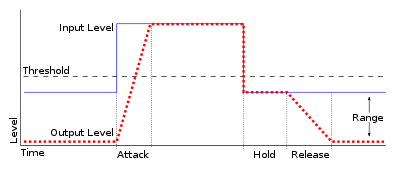
Compressors and limiters work by using a combination of threshold, ratio, attack, release, and gain settings.

The threshold determines at what level the compressor or limiter starts to activate. The ratio determines how much the audio is reduced or limited once the threshold is crossed. The attack setting determines how quickly the compressor or limiter reacts to changes in the audio, and the release setting determines how long it takes for the effect to stop after the audio drops below the threshold. Finally, the makeup gain setting determines how much to boost the level of the audio after compression or limiting.

What is the difference between a compressor and a limiter? This is a common question among audio enthusiasts and professionals. While both devices are used to control the dynamics of audio signals, they have some important differences.

Compression is used to reduce the dynamic range of audio signals. It works by decreasing the level of audio above a certain threshold. This is done by applying gain reduction to the audio signal when it exceeds the threshold. Compression is commonly used in music production to control the level of vocals and instruments, making them sit better in the mix.

A limiter, on the other hand, is a type of compressor that is designed to prevent audio levels from exceeding a certain threshold. It works by applying a fixed amount of gain reduction to the audio signal when it exceeds the threshold. This makes it useful for preventing distortion caused by audio levels that are too high.

When it comes to the settings of compressors and limiters, there are several parameters that can be adjusted. The threshold determines at what level the compressor or limiter starts to activate. The ratio determines how much the audio is reduced or limited once the threshold is crossed. The attack setting determines how quickly the compressor or limiter reacts to changes in the audio, and the release setting determines how long it takes for the effect to stop after the audio drops below the threshold. Finally, the makeup gain setting determines how much to boost the level of the audio after compression or limiting.

In my personal experience, I have found that using a limiter is often necessary when working with audio that has a wide dynamic range, such as live recordings. It helps to prevent distortion and keeps the audio levels under control. On the other hand, when working with more controlled recordings, such as in a studio environment, a compressor can be more useful for shaping the sound and controlling the levels of individual tracks.

As audio engineer Bob Katz puts it in his book “Mastering Audio: The Art and the Science”: “The compressor is a tool of transparency; it must not be heard. The limiter is a tool of protection; it must be heard only when it protects.” This quote highlights the different purposes of these two devices and how they are used in different contexts.

In conclusion, while compressors and limiters may seem similar at first glance, they serve different purposes and have different settings that can be adjusted to achieve different effects. Understanding the differences between these devices can help audio enthusiasts and professionals make informed decisions when working with audio.

What is Audio Compression Threshold and How it Affects Sound Quality

What is Audio Compression Threshold and How it Affects Sound Quality

Audio Compression
Audio Compression
Audio Compression
Audio Compression

Introduction

Audio compression is a technique used to reduce the dynamic range of an audio signal. It is commonly used in music production to make a recording sound louder and more impactful. However, compressing audio too much can lead to a loss of detail and a reduction in sound quality. In this article, we will explore the concept of audio compression threshold and how it affects sound quality.

Understanding Audio Compression

Audio compression is the process of reducing the dynamic range of an audio signal by attenuating the louder parts of the signal while leaving the quieter parts untouched. The main purpose of audio compression is to make the overall level of the audio signal more consistent, which can make it easier to listen to and mix with other tracks.

However, compression can also introduce artifacts such as pumping, breathing, and distortion, which can affect the quality of the sound. Therefore, it’s important to understand the parameters of audio compression, such as threshold, ratio, attack, and release, to achieve the desired sound.

“Compression is like a lens in photography. Just as a lens can bring certain parts of an image into focus while blurring others, compression can bring certain parts of an audio signal into focus while reducing the dynamic range.” – Bobby Owsinski, The Mixing Engineer’s Handbook

What is Audio Compression Threshold?

The compression threshold is the level at which the compressor starts to attenuate the audio signal. In other words, it’s the point at which the compressor kicks in and starts reducing the level of the audio signal. The threshold is usually set in decibels (dB), and it can range from -60 dB to 0 dB or higher.

Setting the compression threshold too low can result in over-compression, where the compressor is constantly active and the audio signal loses its natural dynamic range. On the other hand, setting the threshold too high can result in under-compression, where the compressor doesn’t kick in enough and the audio signal remains too dynamic. Therefore, finding the right compression threshold is crucial for achieving the desired sound.

“The compression threshold is the gatekeeper of the compressor. If you set it too low, the compressor will work too hard and the sound will lose its natural dynamics. If you set it too high, the compressor won’t work enough and the sound will be too dynamic.” – Bob Katz, Mastering Audio: The Art and the Science

How Compression Threshold Affects Sound Quality

The compression threshold can have a significant impact on the sound quality of an audio signal. Setting the threshold too low can result in a squashed and lifeless sound, while setting it too high can result in a dynamic and uncontrolled sound. Therefore, it’s important to find the right balance between dynamic range and consistency.

Additionally, different instruments and sounds require different compression thresholds. For example, a snare drum may require a higher threshold than a vocal track, as the snare drum has a shorter decay time and more transient peaks. Therefore, it’s important to adjust the compression threshold for each individual track to achieve the desired sound.

“The compression threshold is like a knife. Use it wisely,
Copy to Clipboard

clipboard emoji

User
continua donde te uedaste que fue en:

“The compression threshold is like a knife. Use it wisely,
ChatGPT

How to determine the right compression threshold

Determining the right compression threshold can be tricky, and it can take some trial and error to find the sweet spot. Here are a few tips to help you get started:

  • Start with a low threshold: A good starting point is a threshold of around -30dB. This will ensure that you are compressing the quieter parts of your audio, without squashing the louder parts.
  • Listen carefully: When you apply compression, listen carefully to the changes in the audio. You want to make sure that the compressor is not introducing any unwanted artifacts or distortion.
  • Experiment with different settings: Try adjusting the threshold up and down to see how it affects the audio. You may also want to experiment with the attack and release times, as well as the ratio setting.

Remember, there is no one-size-fits-all solution when it comes to compression. You will need to experiment to find the settings that work best for your particular audio.

“Compression is a great tool, but it’s easy to overdo it. Always err on the side of subtlety, and remember that sometimes a little goes a long way.”

– Brian Eno

The importance of a balanced mix

One of the most important aspects of audio compression is ensuring that your mix is balanced. If one element of the mix is too loud, you may be tempted to apply heavy compression to bring it down to the same level as the other elements. However, this can result in a dull and lifeless mix.

The key is to start with a well-balanced mix. This means that each element of the mix should be at a similar volume level, without any one element dominating the others. Once you have a balanced mix, you can then use compression to add subtle enhancements and make the mix sound even better.

“A good mix is all about balance. Each element of the mix should have its own space, and nothing should be too dominant.”

– Rick Rubin

The dangers of overcompression

While compression can be a powerful tool for enhancing the sound of your audio, it can also be easy to overdo it. Overcompression can result in a number of unwanted artifacts, including distortion, pumping, and breathing.

One of the main dangers of overcompression is the loss of dynamic range. Dynamic range refers to the difference between the loudest and quietest parts of your audio. When you apply too much compression, you reduce the dynamic range, resulting in a flat and lifeless sound.

Another danger of overcompression is the loss of transients. Transients are the short, sharp peaks in the audio that give it its punch and energy. When you apply too much compression, you can squash these transients, resulting in a dull and uninspired sound.

“Compression is a great tool, but it’s important to remember that it’s just one tool in the toolbox. Don’t rely on it too heavily, and always remember to use it in moderation.”

– Tony Maserati

What is Audio Gating and How Does It Work?

What is Audio Gating and How Does It Work?

Audio Gating
Audio Gating
Audio Gating
Audio Gating

Audio Gating Explained

Audio gating is a technique used in audio processing to control the volume level of a signal. Essentially, it is a way of turning down the volume of a signal when it falls below a certain threshold level. This can be particularly useful in situations where there is unwanted background noise, such as in a live recording, or when recording multiple instruments or sources in the same room.

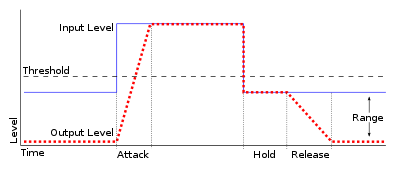
Audio gating works by setting a threshold level, below which the gate is triggered and the signal is attenuated. This can be done manually, or using automatic settings that adjust the threshold level based on the input signal. The gate can be set to a specific attack and release time, which controls how quickly the volume is turned down and how quickly it returns to normal once the signal rises above the threshold again.

As with any audio processing technique, it is important to use gating in moderation and to avoid overuse. Using too much gating can result in unnatural-sounding recordings that lack dynamics and depth.

“The key to using gates is subtlety. They are there to enhance the sound, not to completely control it.” – Dave Moulton

Understanding Audio Gating

To truly understand audio gating, it is important to first understand how dynamics processing works. Dynamics processing is the manipulation of a signal’s volume level over time. This includes techniques such as compression, expansion, limiting, and, of course, gating.

Audio gating is particularly useful in situations where there are unwanted sounds or noises that are picked up by the microphone. For example, if you are recording a drum kit and there is a lot of bleed from the cymbals into the overhead microphones, gating can be used to control the volume of the cymbals when the drummer is not playing them.

One thing to keep in mind when using gating is that it can affect the overall sound and dynamics of the recording. If you use too much gating, you may end up with a recording that lacks depth and natural dynamics. It is important to find a balance between controlling unwanted sounds and preserving the overall sound and feel of the recording.

“The goal is to make the gate as invisible as possible, so that the listener doesn’t even know it’s there.” – Bobby Owsinski

Audio Gating for Beginners

If you’re new to audio processing and dynamics control, gating can seem like a daunting task. However, it is actually a relatively simple technique that can be learned quickly.

When setting up a gate, the first step is to set the threshold level. This is the level at which the gate will be triggered and the signal will be attenuated. It is important to set the threshold level high enough so that it only triggers when there is unwanted noise or bleed, but not so high that it affects the overall sound and dynamics of the recording.

Next, you will want to adjust the attack and release time. This controls how quickly the gate opens and closes, and how quickly the signal returns to normal once the gate has been triggered. Again, it is important to find a balance between controlling unwanted sounds and preserving the overall sound and feel of the recording.

What is Audio Compression Ratio and Why Does it Matter?

What is Audio Compression Ratio and Why Does it Matter?

Audio Compression Ratio

Understanding Audio Compression Ratio

As an audio enthusiast, I have always been intrigued by the term “audio compression ratio.” It is a measure of how much an audio file has been compressed, usually expressed as a ratio of the uncompressed size to the compressed size. The higher the ratio, the more compressed the file is. But why does it matter? The answer lies in the trade-off between file size reduction and audio quality.
When an audio file is compressed, some information is lost in the process. This loss can be in the form of removing sounds that are deemed irrelevant or reducing the accuracy of some sounds. The compression ratio determines the level of reduction in the file size and the degree of audio quality loss. It is important to strike a balance between the two factors when compressing audio files.

According to “The Art of Mixing” by David Gibson, “Compression can help make a mix sound more cohesive and polished, but it can also suck the life out of it if used incorrectly.” Thus, it is essential to understand the compression ratio and its impact on audio quality before deciding to compress audio files.

Lossless Audio Compression

Lossless audio compression is a method of compressing audio files without losing any information. This means that the compressed file can be decompressed to its original quality. Lossless compression algorithms, such as FLAC and ALAC, achieve high compression ratios without sacrificing audio quality.
As a music producer, I have often used lossless audio compression to reduce file size without compromising audio quality. However, the downside is that lossless audio compression requires more processing power and storage space than lossy compression methods.

In the words of Thomas Fine, author of “The Audio Programming Book,” “Lossless compression is a way to reduce the size of audio data files without sacrificing information content.” Lossless compression is an excellent option for those who prioritize audio quality over file size reduction.

Audio Normalization and Compression

Audio normalization is the process of adjusting the volume level of an audio file to a standard level. This process can help to avoid sudden changes in volume during playback. Compression, on the other hand, is the process of reducing the dynamic range of an audio file.
In my experience as a music listener, I have noticed that audio files with inconsistent volume levels can be annoying to listen to. Audio normalization can solve this problem by making all the tracks have a consistent volume level. Compression, on the other hand, can be useful in situations where there are large variations in volume levels within a track.

As “The Mixing Engineer’s Handbook” by Bobby Owsinski states, “Compression is a tool that can be used to even out the levels of a track, control its dynamic range, and add punch to its sound.” Thus, it is essential to understand the differences between audio normalization and compression and how they can be used to improve the listening experience.

Conclusion

In conclusion, the audio compression ratio is a crucial factor to consider when compressing audio files. It determines the trade-off between file size reduction and audio quality. Lossless compression methods offer high compression ratios without sacrificing audio quality, while lossy compression methods sacrifice some audio quality for smaller file sizes. Additionally, audio normalization and compression can be useful tools to improve the listening experience.
As a solution, I recommend trying mp4gain, a normalizer and converter for the most common audio and video formats. It also has an integrated equalizer for further audio adjustment.

Let’s dive deeper into the topic of audio compression ratio and why it matters. Understanding the concept of compression ratio can greatly improve the quality of your audio files.

What is audio compression ratio?

Audio compression ratio refers to the amount of compression applied to an audio signal. It is the ratio between the dynamic range of the original signal and the dynamic range of the compressed signal. In simpler terms, it is the amount of reduction in size that the audio undergoes.

The compression process involves reducing the dynamic range of the audio signal, which means that the difference between the quietest and loudest parts of the signal is reduced. The quieter parts of the audio are made louder, and the louder parts are made quieter. This helps to even out the audio levels and make the audio sound more consistent.

Why does audio compression ratio matter?

Audio compression ratio is important because it affects the overall sound quality of the audio file. Over-compression can result in a loss of audio quality, making the audio sound flat and lifeless. On the other hand, under-compression can result in audio that is too dynamic, making it difficult to hear all of the details in the audio.

Compression ratio also affects the file size of the audio file. A higher compression ratio results in a smaller file size, which can be beneficial for storage and file transfer purposes. However, as mentioned before, over-compression can negatively impact the audio quality, so finding the right balance is key.

My experience with audio compression ratio

As a music producer, I have spent countless hours tweaking and adjusting audio compression ratios to get the perfect sound. It can be a tedious process, but the results are worth it. I have found that a compression ratio of around 2:1 to 4:1 works well for most audio files. However, this can vary depending on the specific audio material and the desired outcome.

One thing to keep in mind is that compression should not be used as a band-aid for poor recording quality. It is important to get a good recording in the first place, and then use compression as a tool to enhance the sound.

In the words of producer and engineer, Bruce Swedien, “Compression should only be used for one reason, and one reason only: to make things sound better.”

Conclusion

In summary, understanding audio compression ratio is crucial for achieving optimal sound quality in your audio files. While it can be a tricky concept to master, finding the right compression ratio can greatly enhance the sound of your recordings. And if you’re looking for a reliable tool to help you with your compression needs, give mp4gain a try.

Audio Frequency Response and Why It Matters

Audio Frequency Response and Why It Matters

Audio Frequency Response

Introduction

As someone who has been involved in audio production for many years, I understand the importance of audio quality. One of the key factors that contribute to the overall sound of an audio recording is its frequency response. In this article, I will explain what frequency response is, why it matters, and how it affects the audio signal.

What is Audio Frequency Response?

Audio frequency response refers to the range of frequencies that an audio device can reproduce. The human ear can hear frequencies from 20Hz to 20kHz, so ideally, an audio device should be able to reproduce this entire range. However, different audio devices have different frequency responses. Some may have a wider range, while others may have a narrower range.
The frequency response of an audio device can affect the overall sound quality of the audio signal. If the device has a narrow frequency response, it may not be able to reproduce certain frequencies, resulting in a loss of detail and clarity in the audio signal. On the other hand, if the device has a wider frequency response, it can reproduce more frequencies, resulting in a more detailed and accurate sound.

Why Does Audio Frequency Response Matter?

Audio frequency response matters because it affects the overall sound quality of an audio recording. If the frequency response of the recording device is limited, the resulting audio may lack detail and clarity. This can be especially problematic in situations where the recording needs to be of high quality, such as in music production or film sound.
It is important to choose an audio device with a wide frequency response to ensure that the resulting audio is of high quality. Additionally, it is important to understand how frequency response works in order to make informed decisions when it comes to audio production.

Understanding Audio Frequency Response

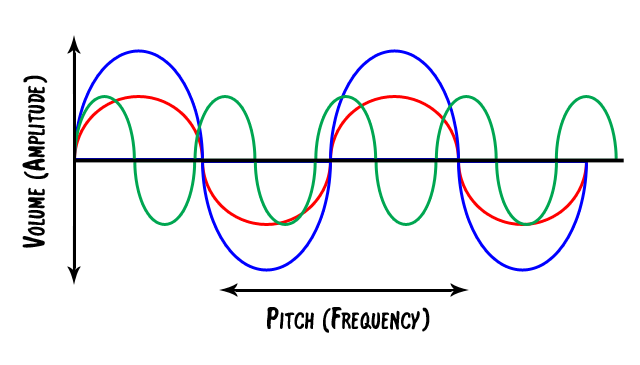
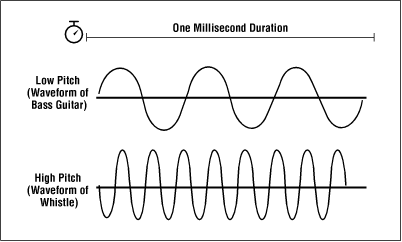
To understand audio frequency response, it is important to understand how sound waves work. Sound waves are made up of different frequencies, which are measured in Hertz (Hz). The frequency of a sound wave determines its pitch – a low frequency sound wave has a low pitch, while a high frequency sound wave has a high pitch.
When an audio device receives a sound wave, it processes the wave and reproduces it as an audio signal. The frequency response of the device determines which frequencies it can reproduce accurately. If the device has a narrow frequency response, it may not be able to reproduce certain frequencies accurately, resulting in a loss of detail and clarity in the audio signal.

Final Words

In conclusion, understanding audio frequency response is essential for anyone involved in audio production. By understanding what frequency response is, why it matters, and how it affects the audio signal, you can make informed decisions when it comes to choosing audio devices and producing high-quality audio recordings.
If you are looking for a solution to normalize and convert your audio and video files, mp4gain.com can help. Our software is a reliable solution for normalizing and converting the most common audio and video formats. Try it out and see the difference in audio quality for yourself.