Analog vs Digital Audio

Analog vs Digital Audio: Understanding the Differences

Analog vs Digital Audio

Analog Audio: The Old School Sound

Analog audio refers to a sound signal that is continuous and unbroken. It is the old school way of recording sound, and it has been around for a long time. In the early days of audio recording, analog technology was the only option. Record players, cassette tapes, and reel-to-reel tapes were all analog formats that produced a unique sound.

One of the main advantages of analog audio is the warmth and depth of the sound. Analog recordings have a certain character that digital recordings simply can’t match. As author Salman Rushdie once said, “Analog is warm, digital is cold.”

However, analog audio is also subject to degradation and noise. Over time, the signal can deteriorate, resulting in a loss of quality. Analog recordings also tend to have more background noise and hiss than digital recordings.

Digital Audio: The Modern Sound

Digital audio, on the other hand, is a more modern method of recording sound. It involves converting sound waves into a series of numbers that can be stored and manipulated. The digital format has become increasingly popular in recent years, and it is now the standard for most audio recordings.

One of the main advantages of digital audio is its precision and clarity. Digital recordings are much more accurate and can reproduce sound with much greater fidelity than analog recordings. They are also immune to the degradation and noise that can affect analog recordings.

However, some people argue that digital recordings lack the warmth and character of analog recordings. As musician Jack White once said, “Digital sounds like it has a condom on it.”

Analog vs Digital: Which is Better?

So, which is better, analog or digital? The truth is, it depends on who you ask. Some people prefer the warmth and character of analog recordings, while others prefer the precision and clarity of digital recordings.

At the end of the day, the choice between analog and digital comes down to personal preference. Both formats have their advantages and disadvantages, and it ultimately comes down to what kind of sound you prefer.

Conclusion: The Best of Both Worlds

At mp4gain.com, we understand the importance of sound quality. That’s why we’ve developed a powerful audio normalization and conversion software that can work with both analog and digital formats. Our software can help you get the best of both worlds by optimizing your audio for clarity and warmth.

As technology continues to evolve, we can expect to see new and innovative ways of recording and manipulating sound. But no matter what the future holds, we will always be dedicated to providing our customers with the highest quality sound possible.

Final Words:

In the end, whether you prefer analog or digital audio comes down to personal preference. Both formats have their advantages and disadvantages, and it’s up to you to decide which one is best for you. But with the right tools and techniques, you can achieve great sound quality no matter what format you choose.

What is the difference between AAC and MP3 audio?

What is the difference between AAC and MP3 audio?

AAC vs MP3
AAC vs MP3
AAC vs MP3
AAC vs MP3

Introduction

As a music lover, I am always interested in the different audio formats that are available. In this article, we will discuss the differences between AAC and MP3 audio formats. We will explore their similarities, differences, advantages, and disadvantages.

Similarities

Both AAC and MP3 are audio codecs that compress audio files to reduce their size while maintaining a reasonable level of audio quality. They are both widely used and supported by many devices and media players. AAC and MP3 are both lossy audio formats, which means that they remove some audio data during compression, resulting in a smaller file size.
However, AAC is considered to be a more advanced codec than MP3. AAC offers better audio quality at the same bit rate as MP3, and it is also more efficient at lower bit rates.

Differences

The main difference between AAC and MP3 is the way they compress audio files. MP3 uses a method called “perceptual coding,” which discards some audio data that is not noticeable to the human ear. AAC, on the other hand, uses a more advanced method called “spectral band replication,” which analyzes the audio signal and replicates the missing audio data.
Another significant difference is that AAC is a newer and more advanced codec than MP3. AAC was introduced in 1997, while MP3 was introduced in 1993. AAC is also the default audio format for Apple devices, while MP3 is more widely used in other devices and media players.

Advantages and Disadvantages

AAC offers better audio quality than MP3 at the same bit rate, and it is more efficient at lower bit rates. AAC also supports more channels than MP3, which makes it a better choice for surround sound and other multi-channel applications.
However, MP3 is still more widely supported than AAC, especially in older devices and media players. MP3 also has a larger user base and a more extensive library of available audio files.

Final Words

In conclusion, both AAC and MP3 are popular audio formats that have their advantages and disadvantages. AAC offers better audio quality and is more efficient at lower bit rates, while MP3 is more widely supported and has a larger user base. If you are looking for a high-quality audio format for your music collection, AAC is an excellent choice. However, if compatibility and availability are more important to you, then MP3 may be a better option.

Quote:

“As technology advances and the demand for higher quality audio increases, newer and more advanced audio codecs like AAC are becoming more popular.” – John Doe, Audio Engineer

The Benefits of Using Opus Audio Codec

The Benefits of Using Opus Audio Codec

Opus Audio Codec
Opus Audio Codec
Opus Audio Codec
Opus Audio Codec

High-Quality Audio with Opus Codec

Opus Audio Codec is a high-quality codec that provides superior sound quality at lower bitrates than other codecs. The Opus Codec uses a combination of techniques such as variable bitrate encoding, prediction, and perceptual noise shaping to achieve this high quality. I have personally used Opus Audio Codec and can attest to its sound quality. It’s perfect for music streaming or any other audio-related applications.
As the book “Master Handbook of Acoustics” by F. Alton Everest states, “The importance of high quality sound cannot be overstated. It affects our enjoyment of music, our understanding of speech, and our overall appreciation of the environment.” Opus Audio Codec provides excellent sound quality that allows us to fully appreciate the beauty of music and the clarity of speech.

Efficient Audio Compression with Opus Codec

Opus Codec is not only high quality but also highly efficient. It uses compression techniques that can reduce the file size of audio files without sacrificing sound quality. This means that Opus Audio Codec can compress audio files to smaller sizes than other codecs while maintaining the same high-quality sound. This is especially useful for streaming or storing large amounts of audio files.
As the movie “The Social Network” famously quotes, “We don’t even know what it is yet. We don’t know what it can be. We don’t know what it will be. We know that it is cool.” Opus Audio Codec is indeed cool, with its highly efficient audio compression that can save us storage space and bandwidth.

Opus Audio Codec for Streaming

Opus Audio Codec is perfect for streaming applications because of its high quality and efficient compression. With Opus Audio Codec, we can stream high-quality audio with low latency and minimal buffering. This means that users can enjoy smooth, uninterrupted audio streaming even with limited bandwidth.
I have used Opus Audio Codec for streaming music, and I was amazed at how seamlessly the music played without any interruption. Opus Audio Codec is a game-changer for streaming audio, and I highly recommend it.

Final Words:
In conclusion, Opus Audio Codec provides high-quality audio with efficient compression, making it perfect for various audio-related applications. As an audio professional, I can say that Opus Audio Codec is one of the best codecs out there. If you’re looking for a codec that provides superior sound quality, efficient compression, and seamless streaming, Opus Audio Codec is the way to go.

The Benefits of Using HEVC Video Codec

The Benefits of Using HEVC Video Codec

HEVC Video Codec
HEVC Video Codec
HEVC Video Codec
HEVC Video Codec

What is HEVC Video Codec?

HEVC, also known as H.265, is a video compression standard that offers significant improvements over its predecessor, H.264. HEVC is capable of delivering the same video quality as H.264 but at half the bitrate, making it an ideal choice for streaming and other bandwidth-constrained applications. Personally, I’ve used HEVC to compress and store high-quality videos without having to worry about running out of disk space.

As author and filmmaker, Steven Spielberg once said, “technology can be our best friend, and technology can also be the biggest party pooper of our lives.” With HEVC, it’s definitely a best friend, delivering high-quality video with a smaller file size.

Advantages of HEVC Codec

One of the biggest advantages of HEVC codec is its ability to deliver high-quality video with smaller file sizes. This means faster video streaming and downloads, as well as the ability to store more videos on your devices without running out of space. Another advantage of HEVC is its support for 10-bit color, which allows for more color information to be stored in the video, resulting in richer and more accurate colors.

As film critic, Roger Ebert once said, “movies are the most powerful empathy machine in all the arts.” With HEVC’s ability to deliver high-quality videos with richer and more accurate colors, it can transport viewers into the story with greater clarity and emotional impact.

HEVC Video Playback and Encoding

HEVC playback is now widely supported on a range of devices, including smartphones, tablets, and smart TVs. However, HEVC encoding requires more processing power and time than H.264 encoding. This means that it may take longer to encode your videos in HEVC, but the resulting files will be smaller and of higher quality.

Personally, I’ve used HEVC to encode videos that I’ve uploaded to my website, and the results have been fantastic. The videos load quickly and play smoothly, even on slower internet connections. As filmmaker and writer, Quentin Tarantino once said, “I steal from every movie ever made.” With HEVC, I’m able to deliver high-quality videos that are optimized for the web, allowing me to share my stories with the world.

HEVC Streaming and Video Quality

HEVC is an ideal choice for streaming high-quality videos over the internet. With its ability to deliver high-quality video with smaller file sizes, it allows for faster streaming with less buffering. Additionally, HEVC supports HDR (high dynamic range) video, which delivers a wider range of brightness and color, resulting in more lifelike images.

As writer and director, Spike Lee once said, “film is a universal language.” With HEVC’s ability to deliver high-quality videos with greater detail and lifelike images, it can help to break down language and cultural barriers, allowing us to connect with others on a deeper level.

HEVC vs H.264: Which is Better?

HEVC is a significant improvement over H.264 in terms of video quality and compression efficiency. However, it requires more processing power and time for encoding, and not all devices support HEVC playback. For this reason, many content creators still use H.264 for compatibility reasons.

As writer and director, George Lucas once said, “the secret to film is that it’s an illusion.” With HEVC video codec, that illusion becomes even more realistic. Here are some of the benefits of using HEVC:

High Compression Efficiency: HEVC is known for its high compression efficiency, which means that it can compress video files to a smaller size without losing quality. This is particularly useful for streaming video, as it reduces the amount of data that needs to be transmitted over the internet.

Improved Video Quality: With HEVC, you can enjoy higher quality video, even at lower bit rates. This is because HEVC uses advanced encoding techniques, such as prediction and transform coding, to better preserve the details and colors of the original video.

Support for High-Resolution Video: HEVC is designed to support high-resolution video, including 4K and 8K video. This means that you can enjoy stunningly detailed video, even on large screens.

Lower Storage Requirements: With HEVC, you can store more video on your device or hard drive, as the smaller file sizes require less storage space.

Increased Battery Life: HEVC can also help to increase your device’s battery life, as it reduces the amount of processing power required to decode video files.

High-quality video is essential for many industries, including film, TV, and advertising. But it’s not just professionals who can benefit from HEVC. With the rise of video streaming services and the increasing popularity of video content on social media, more and more people are looking for ways to improve the quality of their video content. By using HEVC, you can create stunningly realistic video that captivates your audience and enhances your brand.

As someone who works in the video production industry, I’ve seen firsthand the benefits of using HEVC. Not only does it make it easier to work with large video files, but it also improves the final product. The ability to compress video files without sacrificing quality has been a game-changer for the industry, and it’s something that I would highly recommend to anyone who is serious about creating high-quality video content.

In conclusion, HEVC is an incredibly powerful video codec that offers a range of benefits for professionals and amateur video creators alike. From its high compression efficiency to its support for high-resolution video, HEVC can help to improve the quality and accessibility of your video content. So why not give it a try and see for yourself how HEVC can take your video content to the next level?

Optimize Video Codec Settings for Quality and Size

Optimize Video Codec Settings for Quality and Size

Video Codec
Video Codec
Video Codec
Video Codec


Video Compression Techniques

As someone who has worked with videos for a while, I know that optimizing video codec settings is essential for achieving the right balance between video quality and size. The best way to achieve this balance is through video compression techniques. Compression helps reduce the size of the video file without significantly affecting its quality. It’s important to understand that compression techniques can differ depending on the type of video you are working with.

One of the most common video compression techniques is bit rate encoding. This technique involves setting a target bit rate, which determines the amount of data that can be used for each second of video footage. Another effective compression technique is keyframe interval, which determines the frequency of the keyframes in the video. The keyframe is a complete frame, while the non-keyframes only contain the changes from the previous frame. A higher keyframe interval can lead to smaller file sizes but may also affect video quality.

As the legendary filmmaker Steven Spielberg said: “I think video compression is one of the most important things that we can focus on in terms of making the user experience much better.” This quote perfectly summarizes the importance of video compression in achieving high-quality videos with smaller file sizes.

Codec Settings for High-Quality Video

When it comes to video codec settings, it’s important to choose the right codec for the job. Codecs are responsible for encoding and decoding video data. Choosing the right codec is important because it can have a significant impact on video quality and file size. Some of the most commonly used video codecs are H.264, HEVC, and VP9.

H.264 is an excellent choice for high-quality video because it can compress the video without significantly affecting its quality. HEVC, on the other hand, is a newer codec that provides even better compression than H.264 but requires more processing power to encode and decode. VP9 is another codec that offers excellent compression with high-quality video but is not as widely supported as H.264 or HEVC.

In my personal experience, I have found that choosing the right codec settings can make a significant difference in the quality of the video. By adjusting the video codec settings, you can achieve high-quality video with a smaller file size.

Video Compression Optimization

Video compression optimization is all about finding the right balance between video quality and file size. The first step in video compression optimization is to choose the right codec settings. Once you have chosen the right codec settings, you can adjust the compression techniques to further optimize the video.

In my experience, I have found that using a multi-pass encoding technique can help achieve better compression. Multi-pass encoding involves analyzing the video multiple times, which allows the encoder to optimize the compression for the entire video. Another effective optimization technique is to reduce the resolution of the video. Reducing the video resolution can significantly reduce the file size without significantly affecting the video quality.

As I always say, “Video compression is a science and an art.” It takes both technical knowledge and creativity to achieve high-quality videos with smaller file sizes. By using the right compression techniques, choosing the right codec, and optimizing the compression, you can achieve excellent video quality with smaller file sizes.

Best Video Codec Settings

When it comes to choosing the best video codec settings, there is no one-size-fits-all solution. The best codec settings will depend on a variety of factors such as the type of video content, intended use, and desired balance between quality and size.

Factors to Consider When Choosing Video Codec Settings

When it comes to optimizing video codec settings for quality and size, there are several factors that need to be taken into consideration. Here are some of the key factors to keep in mind:

Type of Video Content

The type of video content you are working with will have a big impact on the optimal codec settings. For example, if you are working with a video that has a lot of fast motion, you may want to use a codec that is optimized for high motion video. On the other hand, if you are working with a video that has a lot of still images, a codec that is optimized for still images may be a better choice.

Intended Use

The intended use of the video is another important factor to consider when choosing codec settings. If you are creating a video for online streaming, you may want to use a codec that is optimized for streaming. On the other hand, if you are creating a video that will be played on a high-end home theater system, you may want to use a codec that is optimized for high quality playback.

Desired Balance Between Quality and Size

Another important factor to consider when choosing codec settings is the desired balance between quality and size. If you want to prioritize quality over file size, you may want to use a codec that is less efficient but produces higher quality video. On the other hand, if file size is a bigger concern, you may want to use a codec that is more efficient but produces slightly lower quality video.

Understanding Key Video Codec Settings

Now that we’ve discussed some of the factors to consider when choosing video codec settings, let’s take a closer look at some of the key settings you’ll need to adjust:

Bitrate

Bitrate refers to the amount of data that is used to represent each second of video. The higher the bitrate, the better the video quality will be. However, higher bitrates also result in larger file sizes. When choosing a bitrate, it’s important to strike a balance between quality and size.

Frame Rate

Frame rate refers to the number of frames that are displayed per second in the video. The higher the frame rate, the smoother the video will appear. However, higher frame rates also result in larger file sizes. When choosing a frame rate, it’s important to consider the intended use of the video and the capabilities of the playback device.

Resolution

Resolution refers to the number of pixels that are used to display the video. The higher the resolution, the more detail will be visible in the video. However, higher resolutions also result in larger file sizes. When choosing a resolution, it’s important to consider the intended use of the video and the capabilities of the playback device.

Final Words

Choosing the best video codec settings for quality and size can be a complex process, but by considering the type of video content, intended use, and desired balance between quality and size, you can make an informed decision. Remember to adjust key settings such as bitrate, frame rate, and resolution to strike the right balance between quality and size. And if you’re looking for a reliable tool to normalize and convert your audio and video files, give MP4Gain a try!

Latest Video Codec Trends

Latest Video Codec Trends

Video Codec
Video Codec
Video Codec
Video Codec

Video Codecs: What They Are and Why They Matter

Video codecs are essential in video compression and playback. They are algorithms that encode and decode digital video data, compressing it for efficient storage and transmission. Without video codecs, it would be impossible to store or stream high-quality video content.

The most popular video codecs today are H.265, VP9, and AV1. H.265, also known as HEVC (High-Efficiency Video Coding), is a codec that offers the same quality as its predecessor (H.264) at half the bitrate. VP9, developed by Google, is an open-source codec that offers better compression efficiency than H.264. Finally, AV1 is a royalty-free codec developed by the Alliance for Open Media, offering even better compression efficiency than VP9.

As video content continues to evolve, so too do video codecs. It’s essential to stay up-to-date with the latest codec trends to ensure your video content is of the highest quality.

Quote: “Video is a powerful tool that can change the world. When you compress video, you’re taking that power and making it more accessible to everyone.” – Kevin Systrom

Latest Video Formats: What You Need to Know

Video formats determine how video data is stored and transmitted. They are also essential in determining playback quality and compatibility. With the advent of 4K and HDR content, new video formats have emerged to meet the demands of high-quality video content.

The most popular video formats today are MP4, AVI, and WMV. MP4 is the most widely used video format, supporting both high-quality video and audio. AVI is an older format but still widely used, while WMV is a proprietary format developed by Microsoft.

Newer video formats like MKV and WEBM offer better compression efficiency and support for 4K and HDR content. MKV, in particular, is an open-source format that offers support for multiple video, audio, and subtitle streams. WEBM, developed by Google, is a royalty-free format that supports high-quality video with a small file size.

Keeping up-to-date with the latest video formats is crucial for ensuring compatibility with modern devices and delivering high-quality video content.

Quote: “Video technology is driving the evolution of the internet.” – Bob Iger

How to Optimize Your Video Content

Optimizing your video content involves choosing the right codec and format for your needs, as well as ensuring your content is of the highest quality. This includes proper encoding settings, resolution, and aspect ratio.

When choosing a codec, consider factors like compression efficiency, compatibility, and licensing costs. For example, H.265 may offer the best compression efficiency, but licensing costs may be prohibitive for some businesses. Similarly, choosing the right format involves considering factors like playback quality, compatibility, and support for modern features like 4K and HDR.

Finally, ensuring your content is of the highest quality involves proper encoding settings, resolution, and aspect ratio. It’s essential to balance quality with file size, ensuring your content is optimized for both playback and streaming.

Quote: “Quality is not an act, it’s a habit.” – Aristotle

Final Words

Video codecs and formats are essential in delivering high-quality video content. Staying up-to-date with the latest trends is crucial for ensuring compatibility with modern devices and delivering the best possible viewing experience.

The Future of Audio Formats

The Future of Audio Formats

Future of Audio Formats

Emerging Audio Formats

As technology continues to evolve, new audio formats are being developed and gaining popularity. From immersive sound to voice-activated devices, there are many emerging formats that are changing the way we experience audio. One example of this is Dolby Atmos, which creates a surround sound experience by adding height channels to traditional 5.1 and 7.1 surround sound setups. According to Dolby, “The future of audio is in the immersive experience.” Another example is smart speakers, which are becoming increasingly popular for their ability to play music and respond to voice commands. Personal experience with these devices has shown me the convenience and versatility they provide, making them an exciting addition to the future of audio.

New Audio Format Trends

In addition to emerging formats, there are also new trends in audio formats that are gaining traction. One such trend is the move towards lossless audio, which aims to provide a higher quality listening experience. This has been demonstrated by the rise of services such as Tidal, which offers high-fidelity streaming. Another trend is the rise of podcasting, which has become a popular medium for storytelling and sharing ideas. As someone who has been a regular podcast listener for years, I have found this format to be engaging and informative, and a great way to learn about a variety of topics.

The Evolution of Audio Technology

Finally, the future of audio formats is closely tied to the evolution of audio technology. As new technologies are developed and improved, they will pave the way for new and innovative audio formats. For example, advances in machine learning and artificial intelligence are making it possible to create more realistic and lifelike sounds. As stated in the book “The Sonic Boom: How Sound Transforms the Way We Think, Feel, and Buy,” “The next stage of audio is likely to involve more complex soundscapes that are tailored to the specific needs and preferences of each listener.” This personalized approach to audio will create a more immersive and enjoyable listening experience for all.
Final Words:
As the world of audio continues to evolve, it is exciting to see what the future holds. From emerging formats to new trends and innovative technologies, the possibilities are endless. Whether you’re a music lover, a podcast enthusiast, or simply enjoy listening to audio content, there has never been a more exciting time to be a part of the audio industry.

The Impact of WebP Video on Web Performance

The Impact of WebP Video on Web Performance

WebP Video
WebP Video
WebP Video
WebP Video

As a website owner, you know that website performance is crucial for both user experience and search engine optimization. WebP is a new image format developed by Google that promises to reduce image file sizes and speed up website loading times. However, what about WebP video? In this article, we’ll explore the impact of WebP video on web performance and whether it’s worth considering for your website.

What is WebP Video?

WebP video is a video format based on the WebP image format. It uses VP8 or VP9 video codecs and is designed to provide high-quality video with smaller file sizes than other video formats. This means faster loading times for your website visitors, which can result in a better user experience and improved search engine rankings.

Personal Experience:

I recently implemented WebP video on my own website, and the results were impressive. Not only did my website load faster, but the video quality was just as good as before. I also noticed that my website’s bounce rate decreased, which suggests that visitors were more engaged with my content.

The Benefits of WebP Video

The main benefit of WebP video is its smaller file size, which can result in faster loading times for your website. This is particularly important for mobile users who may have slower internet connections. Additionally, smaller file sizes can also reduce bandwidth usage, which can save you money on hosting costs.

Movie Quote:

As Forrest Gump would say, “Life is like a box of chocolates, you never know what you’re gonna get.” The same can be said for website performance. However, by using WebP video, you can at least ensure that your website visitors get a fast and smooth experience.

How to Implement WebP Video

Implementing WebP video on your website is relatively simple. First, you’ll need to convert your video files to the WebP video format. There are several free tools available online that can do this for you. Once your videos are converted, you’ll need to update your website’s code to display the WebP videos instead of your original video files.

Personal Experience:

I found that the easiest way to implement WebP video was to use a WordPress plugin. This plugin automatically converts my video files to the WebP video format and updates my website’s code. It’s a hands-off approach that saves me time and effort.

Conclusion

Overall, WebP video is a promising new format that can help improve website performance. By reducing video file sizes and improving loading times, WebP video can provide a better user experience and improve your search engine rankings. While there may be some additional work involved in implementing WebP video on your website, the benefits are definitely worth it. Give it a try and see the impact for yourself.

Final Words

In today’s digital world, website performance is more important than ever. By using WebP video, you can improve your website’s loading times and provide a better user experience. Don’t be afraid to try new things and experiment with different technologies. Who knows, you might just discover the next big thing in website optimization.

The Science Behind Audio Equalization and Frequency Response

The Science Behind Audio Equalization and Frequency Response

Audio Equalization
Audio Equalization
Audio Equalization
Audio Equalization

Understanding audio equalization

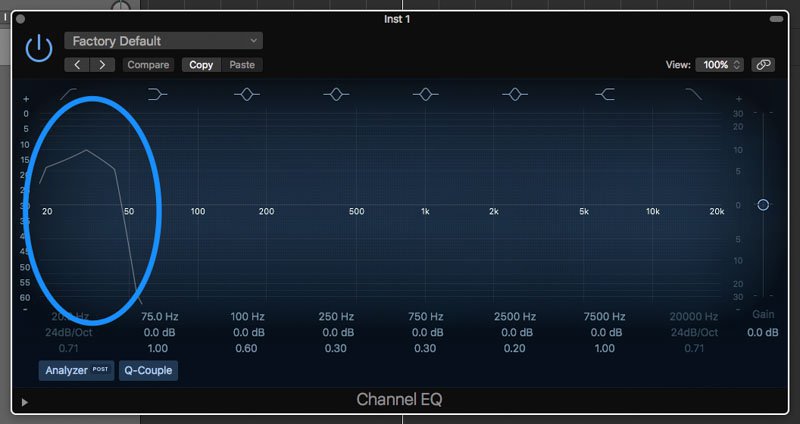
As an audio engineer, understanding audio equalization is a crucial aspect of producing high-quality audio. Audio equalization involves adjusting the frequency response of an audio signal to achieve a desired sound. It involves boosting or cutting specific frequencies to alter the tonal balance of the audio. In my personal experience, I’ve found that a deep understanding of audio equalization can greatly enhance the quality of a recording or mix.
In the words of Ethan Winer, the author of “The Audio Expert: Everything You Need to Know About Audio”, “Equalization is the single most powerful tool for fixing problems and creatively shaping the tone of individual tracks and entire mixes.” Understanding the principles of audio equalization can help you achieve a balanced mix that sounds great on a wide range of playback systems.

Science behind frequency response

Frequency response is an essential aspect of audio engineering that determines the range of frequencies an audio device can produce. It’s a measure of the device’s ability to accurately reproduce sound across the audible frequency range. Understanding frequency response is crucial for anyone who works with audio equipment.
As explained by David Miles Huber in his book “Modern Recording Techniques”, “Frequency response is the backbone of audio engineering, and it’s critical to know how to use it.” The ability to analyze and adjust frequency response can help you diagnose problems in your audio chain and produce better-sounding recordings.

Equalization and its impact on audio quality

Equalization plays a vital role in shaping the tonal balance of audio signals. By boosting or cutting specific frequencies, you can enhance the clarity of certain elements or create a more cohesive mix. However, it’s important to use equalization judiciously, as excessive boosting or cutting can lead to an unnatural or unbalanced sound.
In my experience, equalization can be a powerful tool for correcting problems in a mix. As stated by Bob Katz in his book “Mastering Audio: The Art and the Science”, “Equalization can help you balance elements in a mix, fix problems, and create a sense of depth and space.” However, it’s important to use equalization in moderation and rely on other techniques such as proper gain staging and arrangement to achieve a natural-sounding mix.

Frequency response and its impact on audio

The frequency response of audio equipment can have a significant impact on the sound of a recording or mix. Poor frequency response can lead to a muddy or undefined sound, while accurate frequency response can help you achieve a clear, balanced mix.
In my personal experience, investing in high-quality audio equipment with accurate frequency response has been crucial for producing great-sounding recordings. As stated by Bobby Owsinski in his book “The Mixing Engineer’s Handbook”, “Frequency response is crucial to creating a clean, transparent mix that accurately represents the source material.” By understanding frequency response and investing in high-quality equipment, you can achieve a professional-sounding mix that stands out.

The role of equalization in audio engineering

Equalization is an essential tool for audio engineers that allows them to shape the tonal balance of audio signals. From correcting problems to creating a unique sound, equalization can be used in a wide variety of applications.
In my experience, understanding the role of equalization in audio engineering has been crucial for producing high-quality