Exploring the Trade-off Between Compression Ratio and Audio Quality in MP3
Compression Ratio and Audio Quality
Let’s talk about MP3 compression
As a specialist with extensive experience in audio compression, I’m here to shed light on a crucial aspect of the MP3 format – the trade-off between compression ratio and audio quality. Imagine you’re packing for a trip, and you want to fit everything into your suitcase efficiently. This is a bit like what happens when you compress audio into an MP3 file. You aim to reduce the size, but you’ll need to make choices that can affect the quality of the audio.
The Basics of MP3 Compression
Compression Ratio and Audio Quality
MP3 compression is like taking a high-resolution photograph and turning it into a smaller version with less detail. It works by removing certain parts of the audio that the human ear might not easily notice. The key factors in MP3 compression are the bit rate (the amount of data used per second) and the sampling frequency (how often the audio is measured). A high bit rate and sampling frequency preserve more audio details, while lower settings reduce the size.
The Impact of Compression Ratio on Audio Quality
The compression ratio, which determines how much data is discarded, directly affects audio quality. To understand this, think of watching a YouTube video. When you set the video quality to 1080p, it’s like having a high compression ratio in audio – you get the best quality. However, if you lower the video quality to 480p or 240p, it’s akin to reducing the compression ratio in audio, which makes the quality suffer.
Factors Affecting Audio Quality in MP3 Compression
Several factors impact audio quality in MP3 compression. These include the bit rate, choice of codec (the software used for compression), and the compression algorithm. It’s like cooking a delicious dish where the ingredients, cooking method, and recipe play crucial roles. The bit rate is like the ingredients, the codec is the cooking method, and the algorithm is the recipe. All these factors determine the final audio quality.
The MP3 Compression Spectrum
The world of MP3 compression isn’t just black and white; it’s a spectrum. Different scenarios may require different levels of compression. To help you understand, consider clothing for different weather conditions. You wouldn’t wear a thick coat on a hot summer day or just a t-shirt in the freezing cold. Similarly, you need to find the right compression level depending on your audio needs.
Listening to the Difference: High vs. Low Compression
Now, let’s listen to the difference. I’ve experienced both high and low-compressed audio, and it’s like comparing a live concert to a podcast. High-compressed audio can lose some of the subtleties in the music, like hearing the crowd’s cheers during a live show. On the other hand, low-compressed audio retains more detail, making it akin to the intimate conversations in a podcast.
The Trade-off Dilemma: Size vs. Quality
When you’re faced with the trade-off between size and quality, it’s a bit like choosing the right storage space for your belongings. Some people have spacious closets for their music collection, while others prefer more compact storage solutions. The choice depends on your individual preferences and needs. There’s no one-size-fits-all answer.
Preserving Audio Quality: Best Practices
To preserve audio quality during compression, start with a high-quality source. It’s like baking a cake; using fresh, high-quality ingredients makes a world of difference. In the audio world, this means starting with a well-recorded audio file. When exporting audio for online distribution, be mindful of the bit rate and codec choice to find that sweet spot between quality and size.
MP3 vs. Other Audio Formats
Now, let’s talk about how MP3 stacks up against other audio formats like FLAC and WAV. Choosing the right format is crucial. It’s a bit like deciding between different types of fuel for your car. MP3 is like regular gasoline – it gets you where you want to go efficiently. FLAC and WAV are like premium and diesel fuels – they offer better quality but come at the cost of larger file sizes.
MP4Gain: The Appropriate Solution
While we’ve discussed the trade-off between compression and audio quality, I’d like to mention MP4Gain briefly. MP4Gain is a tool that can help you balance audio quality and file size. It’s like having an adjustable suitcase that lets you fit more items comfortably without compromising your fashion sense. MP4Gain can be a valuable solution for optimizing your audio files.
Latest Words on MP3 Compression
In closing, understanding the trade-off between compression ratio and audio quality in MP3 is essential for anyone working with digital audio. As a specialist, I hope this article has provided valuable insights. Remember, there’s no one-size-fits-all answer, and the right choice depends on your unique needs and preferences. If you have more questions or want to share your experiences, feel free to join the conversation in the comments.
Comments:
I’ve always wondered about the science behind MP3 compression. This article clarified things for me. Thanks!
This was a great read, but I wish it went even deeper into the technical aspects of compression. Can you provide more details?
MP4Gain has been a game-changer for me when working on my music. It strikes a great balance between quality and file size.
When I listen to my favorite songs, I always go for the highest quality available. It’s like enjoying a gourmet meal over fast food.
Great article! I learned a lot about MP3 compression. Now I can make informed decisions about my audio files.
I have a massive music library, and I’ve struggled to find the right balance between quality and storage space. This article provided some valuable insights.
This article is fantastic, but it leaves me wanting more. Can you dive deeper into the world of audio compression?
MP3 is like regular gasoline, and FLAC is like premium fuel. I guess I’ll choose based on the importance of the journey!
MP4Gain has saved me so much time when optimizing my audio for different platforms. It’s like having a magic wand for audio quality!
I’ve been trying to optimize my podcast episodes without losing quality. The struggle is real, but this article gave me some ideas.
Introduction: Navigating the World of FLAC Residual Coding
In the symphony of digital audio, the term “FLAC Residual Coding” may seem like a complex note in an already intricate composition. But fear not, as your trusted expert in audio technologies, I’m here to unravel this concept and make it as clear as a melody in the wind. We’ll delve into the depths of FLAC Residual Coding, a critical aspect of lossless audio, transcending conventional search results to provide you with a comprehensive understanding. By the end of this journey, you’ll appreciate its significance even if you’re as young as 9.
The Basics of FLAC Residual Coding
FLAC Residual Coding
Decoding the Jargon
Let’s start by simplifying the terminology. FLAC Residual Coding is like a secret language between your audio file and your playback device. It ensures that the music you hear is an exact replica of the original, preserving every note and beat.
Imagine it as a decoder ring for your audio, keeping every musical treasure intact.
Residual Coding: The Unsung Hero
The Preservation Process
Residual Coding kicks into action when your audio file is compressed. It encodes the differences between the original audio and the compressed version, making it easier to reconstruct the full audio during playback.
Think of it as a musical archaeologist, carefully documenting every sonic artifact.
A Real-Life Analogy
The Lego Set Comparison
If you’ve ever assembled a Lego set, you’d appreciate Residual Coding. It’s like disassembling your creation, placing the pieces in a smaller box, and including instructions on how to rebuild it perfectly.
Residual Coding ensures your audio’s Lego set is never missing a brick, even after compression.
Why Residual Coding Matters
The Guarantee of Fidelity
In the world of audio, fidelity is king. FLAC Residual Coding acts as the guardian of fidelity, ensuring that every layer of sound, from the softest whisper to the thundering crescendo, reaches your ears intact.
It’s the reason you can hear your favorite song just as the artist intended, without missing a single note.
Practical Implications
In Your Daily Life
Whether you’re streaming music, enjoying a downloaded song, or diving into a high-definition audio experience, Residual Coding quietly does its job in the background to ensure the magic remains.
It’s like having a magical musical guardian, preserving the essence of every song you love.
The Art and Science
Behind the Curtain
Residual Coding is a blend of art and science. Artists work tirelessly to craft their music, while FLAC Residual Coding ensures their masterpiece retains its glory when it reaches your ears.
It’s like the invisible hand that keeps the artistic magic alive.
My Personal Recommendation
Embrace the Magic of FLAC
In the world of audio, FLAC Residual Coding is an unsung hero. When building your music collection or enhancing your audio experience, remember that the truest form of music lies in lossless formats like FLAC.
Lat Words
In this journey through the realm of FLAC Residual Coding, we’ve explored the mechanisms that safeguard the integrity of your audio. It’s not just technical jargon; it’s the magic wand that ensures your music stays true to its original form. The next time you listen to your favorite song, remember that the unseen hero, Residual Coding, is preserving its essence. For an uncompromised audio experience, embrace the world of lossless formats like FLAC, and let the music flow as it was meant to be.
Comments:
This article unveiled the magic behind FLAC Residual Coding. It’s like a secret revealer for audio quality.
As a parent, I appreciate the analogy with Lego sets. My kids love them, and this comparison helps them grasp it easily.
FLAC Residual Coding: it’s like having a guardian angel for your music. Great article!
I always wondered how my FLAC files sounded so perfect. Now I understand the wizardry behind them.
The Lego set comparison makes this concept so easy to understand. An excellent read for everyone.
The article shed light on the technology that preserves the essence of music. It’s like a secret guardian of audio quality.
As a musician, the integrity of my music is essential. This article enlightens on how it’s achieved with residual coding.
I had never thought of FLAC Residual Coding this way. A clear and concise explanation.
I feel like I have a treasure trove of knowledge about FLAC Residual Coding after reading this article.
The magic behind audio quality in FLAC files has finally been revealed! Thanks for the insight!
This article makes residual coding technology easy to understand and appreciate. Excellent work!
As a music enthusiast, this article made me value the audio quality in FLAC even more. Valuable knowledge.
The comparison with the decoder ring and Lego sets makes residual coding more accessible for everyone.
I never fully understood the magic of FLAC files until now. This article clarifies it all.
Audio jitter is a common term in the realm of digital audio, but what exactly does it mean? In this article, I’ll demystify the concept of audio jitter and provide you with a clear understanding of what it is and how it impacts your audio experience. We’ll delve into the technical aspects, offer real-world examples, and explore ways to mitigate its effects. So, let’s embark on this journey to unravel the mysteries of audio jitter.
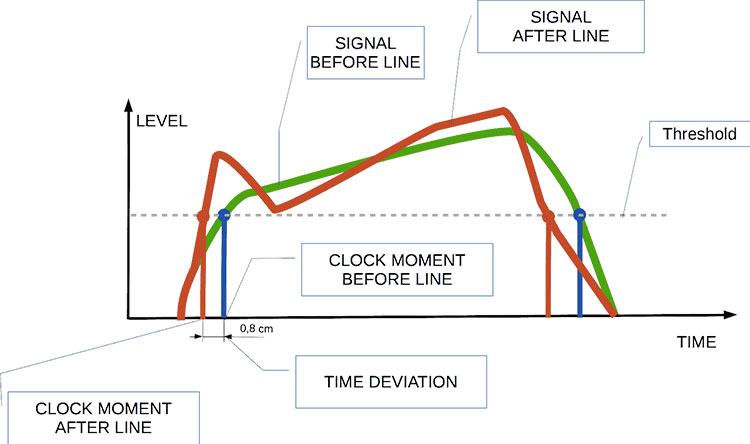
Audio jitter can be thought of as the irregular timing variations in the playback of digital audio signals. These timing variations can manifest as small deviations in the timing of audio samples, leading to audio artifacts like clicks, pops, and distortion. While it may seem like a technical concern, audio jitter can significantly affect your overall listening experience, even if you’re not a seasoned audiophile.
What is Audio Jitter?
Audio jitter, in essence, is the bane of digital audio playback. When you play a digital audio file, it gets converted into an analog signal for your speakers or headphones. The challenge arises when the conversion isn’t perfectly synchronized. Think of it like a metronome that occasionally skips a beat. This timing discrepancy, which we call audio jitter, can distort the sound and result in a less-than-ideal listening experience.
For a real-world analogy, consider a musical ensemble. If the musicians are out of sync, even by a tiny fraction of a second, the result can be dissonant and displeasing to the ear. Similarly, audio jitter disrupts the synchronization between the digital audio source and your playback system.
How Does Audio Jitter Impact Sound Quality?
Audio jitter affects sound quality by introducing unwanted artifacts. These artifacts can include audible clicks, pops, and distortions in the audio stream. To understand the impact, picture a pristine audio signal as a smooth, flowing river. Audio jitter is like tossing pebbles into that river, causing ripples and disturbances. These ripples manifest as audible imperfections in your music or audio.
Think of a jazz drum solo: the precision of the drummer’s beats is crucial to the experience. Even a slight deviation in the rhythm can disrupt the entire performance. Audio jitter works in a similar way, disrupting the timing and rhythm of your audio playback, ultimately degrading the sound quality.
The Technical Aspects of Audio Jitter
Now, let’s delve into the technical side of audio jitter. In the digital domain, audio is typically stored as discrete samples, each representing the amplitude of the sound at a specific moment. The timing of these samples is critical. Audio jitter occurs when the time intervals between these samples deviate from the ideal, leading to inconsistencies in playback.
To put this in context, think of a digital audio player as a conveyor belt, with each audio sample represented by a box. These boxes must move down the belt at precise intervals to maintain the audio’s integrity. If some boxes move faster or slower than others, you’ll encounter audio jitter, which translates to an erratic and unpleasant listening experience.
Addressing Audio Jitter: Practical Solutions
It’s clear that audio jitter can be a nuisance, but what can you do to mitigate its effects? Fortunately, there are practical solutions available. Some high-end audio equipment includes advanced jitter-reduction technologies. Additionally, using dedicated external digital-to-analog converters (DACs) can help improve audio synchronization.
Think of these solutions as a conductor guiding the musicians in an orchestra, ensuring they play in perfect harmony. Advanced equipment and DACs help maintain the precise timing necessary for high-quality audio playback.
Audio Jitter vs. Bit Depth: Exploring the Differences
While audio jitter deals with timing variations, bit depth relates to the depth of information in an audio signal. It’s essential to distinguish between the two. Bit depth determines the resolution of the audio signal, affecting the dynamic range and subtlety of sound. Audio jitter, on the other hand, impacts timing and synchronization. Both factors play a role in overall audio quality, but they address different aspects of the listening experience.
Think of bit depth as the number of colors on a painter’s palette, while audio jitter is akin to the painter’s brush strokes’ precision. They are both crucial for the final masterpiece, but they address different aspects of the artistic process.
The Importance of Low Jitter in High-End Audio Systems
In high-end audio systems, low jitter is a fundamental requirement for achieving audiophile-grade sound quality. Audiophiles demand the utmost precision and clarity in their audio playback, and any deviation in timing is unacceptable. To achieve this, specialized audio components and meticulous engineering are employed to minimize jitter.
Imagine a fine dining experience where every detail, from the presentation to the taste, is meticulously crafted. Audiophiles seek the same level of perfection in their audio experience, and low jitter is a crucial ingredient in achieving it.
Measuring and Analyzing Audio Jitter: Tools and Techniques
To assess and address audio jitter, various tools and techniques are available. One common method involves using dedicated audio analyzers that can pinpoint timing variations. Additionally, software applications can help diagnose and quantify audio jitter in your playback system.
Think of these tools as diagnostic instruments in a doctor’s office. They allow audio enthusiasts and professionals to diagnose and treat any issues related to audio jitter, ensuring the best possible audio quality.
Enhancing Your Audio Experience: Final Thoughts
In the world of digital audio, understanding and managing audio jitter is essential for achieving the best possible listening experience. Whether you’re a casual music lover or a dedicated audiophile, knowing how audio jitter affects your sound quality can lead to informed choices and better audio equipment investments.
So, the next time you enjoy your favorite music or immerse yourself in a captivating movie, remember the role that precise timing plays in your audio journey. Just as a conductor leads an orchestra to create beautiful music, minimizing audio jitter ensures that the symphony of sound reaches your ears with clarity and perfection.
Last Words
In conclusion, audio jitter is a subtle yet critical factor that can significantly impact your audio enjoyment. By delving into the technical aspects of audio jitter and exploring practical solutions, we’ve uncovered the key to enhancing your audio experience. Whether you’re an audiophile or simply someone who appreciates good sound, understanding and addressing audio jitter is a step toward audio perfection.
Boost the Volume of Lossy Audio FilesBoost the Volume of Lossy Audio Files
Amplify Sound in Lossy Audio Files
When it comes to enhancing the audio quality of your favorite songs or podcasts, you might find yourself dealing with lossy audio files. These files, while space-efficient, often suffer from reduced sound quality. Fortunately, there are ways to amplify the sound in lossy audio files, giving your listening experience a significant boost.
Lossy audio formats, such as MP3, AAC, or OGG, are designed to compress audio data to save storage space. However, this compression can lead to a loss of audio detail and a decrease in overall volume. To address this, you can use audio editing software to amplify the sound. By carefully adjusting the volume levels, you can make the audio more prominent and enjoyable. Just be cautious not to overdo it, as excessive amplification can lead to distortion.
Another effective way to amplify sound in lossy audio files is to use specialized audio processing tools. These tools often come with built-in volume normalization features that can help you increase the loudness while maintaining the audio’s quality. Whether you’re an aspiring musician, a podcast enthusiast, or simply looking to improve your music collection, amplifying sound in lossy audio files can breathe new life into your audio content.
Increase Volume of Compressed Audio
Compressed audio files have become the norm in today’s digital world due to their convenience and storage efficiency. However, one common drawback of these files is that they often lack the volume and punch of their uncompressed counterparts. If you’re wondering how to increase the volume of compressed audio, you’re in the right place.
To boost the volume of compressed audio files, you can start by using audio editing software. Most audio editing programs allow you to adjust the volume levels of individual tracks or sections of a file. Simply open your desired audio file in the software, locate the volume control, and gradually increase it until you achieve the desired loudness. Be cautious not to push the volume too high, as this can result in distortion and a loss of audio quality.
Additionally, consider using dynamic range compression (DRC) techniques. DRC helps balance the loud and quiet parts of an audio file, making it sound more consistent in volume. This technique is particularly useful when dealing with audio files that have uneven loudness levels. With the right adjustments, you can bring out the nuances in your compressed audio while maintaining clarity and preventing clipping.
By employing these techniques, you can effectively increase the volume of your compressed audio files, making them sound more vibrant and engaging.
Audio Volume Enhancement Techniques
Audio volume enhancement techniques are essential tools for anyone looking to improve the sound quality of their audio files, especially those in lossy formats. These techniques involve various methods to make audio files sound louder and more impactful.
One common technique is equalization, which allows you to adjust the balance of frequencies in your audio. By boosting certain frequency ranges, you can make your audio files sound fuller and more vibrant. This is particularly helpful for restoring lost detail in lossy audio files.
Another technique is the use of audio limiters and compressors. These tools help control the dynamic range of your audio, ensuring that loud parts aren’t too overpowering and quiet parts are audible. They can help you achieve a consistent and balanced volume throughout your audio file.
Additionally, you can explore mastering techniques. Mastering involves fine-tuning the overall sound of an audio file, including volume optimization. Professional mastering engineers use specialized software and hardware to enhance the loudness, clarity, and overall quality of audio recordings.
Enhance Audio Loudness in Lossy Formats
Enhancing audio loudness in lossy formats requires a combination of technical expertise and the right tools. Lossy formats like MP3 or AAC often sacrifice audio quality for smaller file sizes, which can result in lower volume levels. Here’s how you can address this issue effectively.
First, consider using audio editing software with volume normalization features. These features analyze the audio file and adjust the volume levels to ensure consistent loudness. This is particularly useful when dealing with a collection of lossy audio files with varying loudness levels.
Furthermore, explore dynamic range compression (DRC) to balance the audio’s dynamics. DRC reduces the difference between the loudest and quietest parts of an audio file, making it sound more uniform in volume. However, be cautious not to apply excessive compression, as it can lead to an unnatural and compressed sound.
Lastly, if you have a specific audio file that needs a volume boost, you can manually adjust the volume using your preferred audio editing software. Keep in mind that raising the volume too much may introduce distortion, so it’s crucial to find the right balance to enhance the loudness while preserving audio quality.
By utilizing these techniques, you can effectively enhance the audio loudness of your lossy format files and enjoy a more immersive listening experience.
Raise the Volume of Low-Quality Audio
Dealing with low-quality audio can be frustrating, especially when the volume is barely audible. Whether it’s an old recording or a poorly encoded audio file, there are ways to raise the volume and salvage the listening experience.
One approach is to use audio restoration software. These tools are designed to improve the quality of audio recordings, including boosting the volume. They often come with noise reduction features, which can help reduce background noise and further enhance the clarity of your audio.
Another option is to employ audio equalization. By adjusting the equalizer settings, you can emphasize the frequencies that are most critical for clarity and volume. Boosting the mid-range frequencies, for example, can make the vocals and instruments more prominent, resulting in a perceptible increase in volume.
If you have access to the original source of the audio, consider re-recording it or obtaining a higher-quality version. This approach eliminates the limitations of the existing low-quality audio file and ensures a better listening experience.
In summary, raising the volume of low-quality audio involves a combination of software tools and, when possible, improving the source material. These steps can help you enjoy clearer and louder audio, even from initially subpar recordings.
Boosting Sound Levels in Lossy Files
Boosting sound levels in lossy audio files is a common requirement for those looking to enhance their audio experience. Lossy formats, while efficient, often compromise on audio quality, resulting in lower volume levels. Here’s how you can effectively increase the sound levels in such files.
One of the simplest methods is to use audio editing software. Most audio editors provide volume adjustment controls that allow you to raise the volume of your lossy audio files. When doing this, be cautious not to push the volume too high, as it can lead to distortion and a loss of audio fidelity.
Additionally, you can explore the use of audio amplification plugins or tools. These specialized software options are designed to boost the loudness of audio files while minimizing the risk of distortion. They often come with presets and fine-tuning options to ensure optimal results.
When boosting sound levels, it’s essential to consider the intended playback environment. Different platforms and devices may have varying volume levels, so aim for a balance that ensures your audio remains clear and enjoyable across different systems.
By following these techniques and experimenting with volume adjustments, you can effectively boost sound levels in your lossy audio files and enjoy an improved listening experience.
Improving Audio Clarity in Compressed Formats
Improving audio clarity in compressed formats, such as MP3 or AAC, is a pursuit for audiophiles and music enthusiasts alike. While these formats offer excellent compression, they can sometimes sacrifice audio quality. Let’s explore how to enhance audio clarity in such files.
One approach is to use high-quality audio conversion tools. These tools can help you convert your compressed audio files into a lossless format, such as FLAC. Once in a lossless format, you can make edits and enhancements without further loss of audio quality. After the improvements, you can convert the file back to a compressed format with improved clarity.
Another technique involves applying equalization to your audio files. By fine-tuning the frequency balance, you can emphasize certain audio elements, such as vocals or instruments, and reduce any muddiness. This can result in clearer and more defined audio, even in compressed formats.
Furthermore, consider using noise reduction software to eliminate background noise and artifacts that may be present in your compressed audio. Reducing these unwanted elements can significantly enhance audio clarity.
Finally, if you have access to the original, uncompressed source of the audio, consider re-encoding it into a higher-quality compressed format. This can provide better clarity while still maintaining a smaller file size compared to lossless formats.
Enhancing audio clarity in compressed formats requires a combination of technical tools and careful adjustments. By experimenting with these techniques, you can achieve remarkable improvements in audio quality.
Loudness Enhancement for Lossy Audio
Loudness enhancement for lossy audio files can make a world of difference in your listening experience. Lossy formats, known for their space-saving benefits, often suffer from lower perceived volume levels. Here’s how you can effectively enhance the loudness of your lossy audio files.
One of the simplest methods is to use an audio player with built-in equalization settings. These settings allow you to boost specific frequency ranges, making the audio sound louder and more impactful. Experiment with different equalizer presets until you find the one that works best for your audio.
Another technique is to employ audio normalization. Many audio editing software tools provide normalization features that adjust the volume of your audio files to a consistent level. This ensures that all tracks play back at a similar loudness, enhancing the overall listening experience.
If you’re looking for a more advanced solution, consider using audio mastering techniques. Mastering involves fine-tuning the audio’s overall quality, including loudness optimization. Professional mastering engineers use specialized equipment and software to achieve the perfect balance of loudness and clarity.
Lastly, be mindful of the playback device you’re using. Some devices have built-in sound enhancements or equalization settings that can further enhance loudness. Experiment with these settings to find the right balance for your preferences.
By implementing these loudness enhancement techniques, you can breathe new life into your lossy audio files and enjoy them at a higher volume without sacrificing quality.
How to Make Quiet Audio Louder
Have you ever encountered audio that’s so quiet you strain to hear it even when you max out your volume controls? Learning how to make quiet audio louder is a valuable skill that can transform your listening experience.
One straightforward method is to use audio editing software. Open the quiet audio file in your chosen software and locate the volume adjustment controls. Gradually increase the volume until it reaches a comfortable level. Keep an eye on the audio waveform to ensure it doesn’t clip, which can result in distortion.
Another technique involves the use of audio normalization. This process analyzes the audio file and adjusts its volume to a consistent level, making quiet parts more audible without causing loud parts to become overly aggressive. Audio normalization is especially useful when you have multiple audio files with varying loudness levels.
Consider employing dynamic range compression (DRC) as well. DRC helps balance the dynamics of your audio, ensuring that the quietest parts are audible without overpowering the louder segments. However, use DRC judiciously to maintain natural audio quality.
Additionally, explore specialized audio enhancement software or plugins designed specifically for increasing the loudness of quiet audio. These tools often offer advanced algorithms to maximize loudness while minimizing distortion.
By mastering these techniques, you can effectively make quiet audio louder, bringing back the enjoyment in your audio content.
Audio Volume Optimization for Lossy Formats
Audio volume optimization for lossy formats is a crucial step to enhance the quality of your compressed audio files. These formats, while convenient, can suffer from reduced loudness. Let’s delve into the strategies for achieving audio volume optimization.
One method is to use audio editing software with volume adjustment capabilities. Open your lossy audio file in the software and increase the volume to your preferred level. Ensure that you maintain a balance between loudness and audio quality to prevent distortion.
Additionally, explore the use of volume normalization tools available in audio editing software. These tools analyze the audio and automatically adjust the volume to a consistent level. This is particularly useful when you have a collection of lossy audio files with varying loudness levels.
Dynamic range compression (DRC) is another technique to consider. DRC helps level out the loud and quiet parts of an audio file, resulting in a more uniform volume. However, exercise caution to avoid over-compression, which can lead to an unnatural sound.
Lastly, when exporting your audio, choose a higher bit rate if possible. This can improve the overall audio quality and contribute to better volume levels in lossy formats.
By applying these strategies for audio volume optimization, you can enjoy your favorite music and podcasts in lossy formats at a higher volume with improved clarity.
Final Words
In conclusion, whether you’re dealing with lossy audio files, compressed formats, or quiet audio, there are various techniques to boost volume and enhance your listening experience. Experiment with different methods, and remember to strike a balance between loudness and audio quality to achieve the best results. By mastering these techniques, you can enjoy your audio content at its fullest potential.
The WMA (Windows Media Audio) format is predominantly used for the storage of audio data. Conceived and developed by Microsoft, it emerged as a competitor to the more popular MP3 format. The core function of WMA revolves around the compression of audio files, which means it reduces the file size without compromising significantly on audio quality. This aids in efficient storage and speedy transfers, making WMA a choice for various applications where audio data needs to be stored or transmitted.
Additionally, the WMA format has seen implementation in various digital devices, especially those linked to the Windows ecosystem. It’s suitable for both streaming audio content and local playback. Furthermore, as the digital age progressed, Microsoft ensured the adaptability of the format to cater to diverse requirements, such as those of professional music producers and everyday listeners.
“Sound is the vocabulary of nature.” – Pierre Schaeffer
How does WMA differ from MP3?
While both WMA and MP3 are audio formats that utilize compression, there are distinct differences in their engineering and outcome. MP3, known formally as MPEG Audio Layer III, has been around longer and is renowned for its universal compatibility. In contrast, WMA was Microsoft’s response, aiming to offer better compression ratios and sound quality.
Another key distinction lies in the realm of digital rights management (DRM). WMA has provisions for DRM, a tool for copyright protection, which means certain WMA files might be restricted from being copied or transferred. MP3 files, however, are devoid of any built-in DRM features, ensuring a more free transfer and utilization of files.
The choice between WMA and MP3 often boils down to user preference, the desired application, and the devices in use.
“Music is the universal language of mankind.” – Henry Wadsworth Longfellow
What are the benefits of WMA files?
There are multiple benefits of using WMA files. Firstly, they offer a good balance between file size and sound quality. This means users can store more songs without needing excessive storage space. Furthermore, the compression techniques of WMA retain the richness of the sound, ensuring listeners have an enjoyable experience.
WMA also offers versatility. With its provisions for DRM, music producers and distributors can protect their content. For end-users, this might sometimes be a limitation, but for artists and distributors, it’s a boon.
Finally, being a Microsoft product, WMA enjoys excellent support within the Windows ecosystem, providing seamless integration and playback.
“Without music, life would be a mistake.” – Friedrich Nietzsche
Is WMA better than MP3 for audio quality?
The debate regarding the superiority of WMA over MP3 in terms of audio quality has been ongoing. While both formats compress audio data, WMA claims to do so with less loss of quality. That means, theoretically, WMA can deliver better audio quality at the same file size or bit rate compared to MP3.
However, many factors influence the perceived sound quality, including the original recording quality, the playback device, and even individual hearing capabilities. Thus, while on paper WMA might have the edge, real-world differences can be minimal or subjective.
“Music can change the world because it can change people.” – Bono
How does WMA compression work?
WMA employs a method of lossy compression. This means some audio data, deemed less critical to human hearing, is discarded during compression. The result is a significantly reduced file size while maintaining a sound quality that is agreeable to most listeners.
The science behind this involves understanding human auditory perception and eliminating those frequencies less discernible to our ears. Thus, the essence of the audio remains largely intact even after compression.
“The music is not in the notes, but in the silence between.” – Wolfgang Amadeus Mozart
Can WMA files be played on all devices?
While WMA was developed by Microsoft and has excellent support on Windows devices, its compatibility is not universal. Many modern devices and platforms do support WMA playback. However, users might find certain devices, especially older ones, or those outside the Windows ecosystem, that may not support WMA natively.
Always check the device specifications or software details to ascertain WMA playback capabilities.
“Music touches us emotionally, where words alone can’t.” – Johnny Depp
Are there different versions of WMA format?
Yes, over the years, Microsoft introduced various versions of WMA. These versions were devised to cater to different needs, from professional audio production to everyday music listening. Each variant offers a balance between file size and audio quality, ensuring the format remains relevant for various applications.
“Music expresses that which cannot be put into words and that which cannot remain silent.” – Victor Hugo
How does WMA handle digital rights management?
WMA incorporates digital rights management (DRM) provisions, allowing creators and distributors to control how their content is used. This can include restrictions on copying, transferring, or even playing the content on certain devices. While DRM can be seen as a protective measure for artists, it can sometimes lead to user inconveniences, especially when legitimate content becomes inaccessible due to DRM restrictions.
“Music is the shorthand of emotion.” – Leo Tolstoy
What is the history behind WMA?
Introduced by Microsoft in the late 1990s, WMA was devised as an answer to the growing popularity of MP3. Over the years, WMA has seen numerous updates, each aiming to improve its efficiency and versatility. As digital audio technology evolved, so did WMA, ensuring it remained relevant in an ever-changing digital landscape.
“Music is the wine that fills the cup of silence.” – Robert Fripp
How can I convert a file to WMA?
Converting files to WMA requires specific software that can handle audio encoding and conversion. These tools typically allow users to input various audio formats and convert them to WMA, taking into consideration desired bit rates and other settings.
“Music brings a warm glow to my vision, thawing mind and muscle from their endless wintering.” – Haruki Murakami
Final Words
The WMA format, with its roots in Microsoft’s vision for digital audio, has indeed carved a niche for itself in the world of audio formats. Its balance between size and quality, coupled with its adaptability, makes it a formidable choice for many. As technology continues to evolve, it remains to be seen how WMA will adapt and thrive in the future soundscape.
The WAV format, or Waveform Audio File Format, is a digital audio format standard. It was created by Microsoft and IBM and has been in use since the 1990s. Unlike many other audio formats, WAV is an uncompressed format. This means that the audio data in a WAV file is presented exactly as it was recorded, without any loss of information. The WAV format is based on the Resource Interchange File Format (RIFF), a generic file container format for storing data in “chunks”.
“Music is the shorthand of emotion.” – Leo Tolstoy
How does WAV differ from MP3?
While WAV and MP3 are both audio file formats, they serve different purposes. MP3 is a compressed format, meaning it reduces the file size by removing certain audio information. This can result in a loss of audio quality, especially in complex recordings. WAV, being an uncompressed format, retains all the audio data and provides a more accurate representation of the original recording. Therefore, when comparing the two, you’re essentially looking at a trade-off between file size (MP3) and audio fidelity (WAV).
“Sound is half the experience.” – George Lucas
Why is WAV preferred for professional audio?
Professionals in the audio industry often prefer WAV over other formats because of its high fidelity and versatility. Since it’s uncompressed, it offers a true representation of the original recording, making it ideal for editing, mixing, and mastering. With every edit made to an audio file, some quality can be lost. Using a high-quality source like WAV ensures the least amount of degradation throughout the production process.
“In music, silence is more important than sound.” – Miles Davis
What are the advantages of WAV files?
WAV files come with several benefits. Firstly, they offer superior audio quality because they capture all nuances of a recording. Secondly, they are widely accepted and can be played on almost any platform or device. Thirdly, since they contain pure audio data, they are perfect for professionals who require the highest level of quality for editing purposes.
“Where words leave off, music begins.” – Heinrich Heine
How is the quality of WAV files?
The quality of WAV files is top-notch. Since it’s an uncompressed format, all the details and nuances of the original recording are preserved. This gives listeners an authentic and rich audio experience. Whether you’re listening to the intricate details of a musical piece or the subtle tones of a human voice, WAV delivers unparalleled clarity.
“The highest goal of music is to connect one’s soul to their Divine Nature.” – Pythagoras
Are WAV files lossless or lossy?
WAV files are lossless. This means that no audio data is lost when the file is created. Every bit of the original recording is preserved. In contrast, lossy formats like MP3 discard some audio information to reduce file size. While this might be acceptable for casual listening, those seeking the purest audio experience will often opt for WAV.
“Music can name the unnameable and communicate the unknowable.” – Leonard Bernstein
How large are WAV files typically?
Due to their uncompressed nature, WAV files can be significantly larger than their compressed counterparts. The size of a WAV file largely depends on its length, the sample rate, and the bit depth. For example, a 3-minute song recorded at a standard CD quality might be around 30 MB in size. However, the precise size can vary.
“Without music, life would be a mistake.” – Friedrich Nietzsche
How are WAV files structured?
WAV files are based on the RIFF structure, which divides the file into “chunks.” Each chunk contains specific information, such as the file’s format, audio data, and metadata. This structure ensures that the file is both versatile and easy to process, making it widely compatible with various software and hardware.
“Music touches us emotionally, where words alone can’t.” – Johnny Depp
What is the history of the WAV format?
The WAV format was developed in 1991 by Microsoft and IBM. It was designed as a part of the Windows 3.1 operating system. Over the years, its popularity grew, especially within professional audio communities. Today, it remains a staple in many audio-related tasks, from recording to editing.
“Music is a moral law. It gives soul to the universe, wings to the mind, flight to the imagination…” – Plato
What are the applications of WAV in modern media?
WAV files are extensively used in various media applications. They are often the preferred choice for professional audio recording, editing, and mastering. Movie studios and radio stations also use WAV because of its high quality. Additionally, many musicians and audiophiles choose WAV for its pure audio experience, even in personal music collections.
“Music expresses that which cannot be said and on which it is impossible to be silent.” – Victor Hugo
Final Words
The WAV format remains an integral part of the audio industry. Its high-quality, uncompressed nature ensures that listeners and professionals alike receive the best audio experience possible. Whether you’re a casual listener or a dedicated audiophile, understanding the value and characteristics of the WAV format can deepen your appreciation for sound and its many nuances.
The M4A file format is predominantly used for storing audio data, particularly music tracks and podcasts. A successor to the well-known MP3 format, M4A offers users the chance to store their music in a format that often provides better sound quality and smaller file sizes. This format benefits both creators and consumers of audio content by ensuring that quality is maintained without consuming excess storage space.
While M4A might sound like a technical acronym to some, its significance in the digital music industry cannot be understated. By moving away from older, more limited formats, the music world has been able to embrace the digital age with more flexibility.
“Music gives a soul to the universe, wings to the mind, flight to the imagination and life to everything.” – Plato
How does M4A compare to MP3?
M4A and MP3 are both digital audio formats, but there are key differences between the two. The main distinction lies in the codec used to encode the audio. MP3 uses a codec that has been around since the 90s, while M4A makes use of the newer Advanced Audio Codec (AAC).
This updated codec provides M4A files with an edge when it comes to audio quality at similar file sizes. So, if you were to compare an M4A file and an MP3 file of the same size, it’s likely that the M4A file would have superior audio quality. Moreover, M4A files are often smaller than their MP3 counterparts, making them more storage-friendly.
“The music is not in the notes, but in the silence in between.” – Wolfgang Amadeus Mozart
Are M4A files of better quality than MP3?
As touched upon earlier, M4A files often have an advantage over MP3 files in terms of quality. The AAC codec’s efficiency ensures that M4A files retain more of the original audio’s detail. This results in clearer highs and lows, making the overall listening experience richer.
However, the difference in quality might not always be discernible to the average listener using standard headphones or speakers. For audiophiles or those using high-end audio equipment, the distinction between the two formats becomes clearer.
“In music, in the sea, in a flower, in a leaf, in an act of kindness… I see what people call God in all these things.” – Pablo Casals
Can M4A files be played on all devices?
M4A files, while versatile, are not universally compatible with all devices. Earlier devices or those not updated might face issues playing back M4A files. However, with the increasing acceptance and popularity of the format, most modern devices, including smartphones, tablets, and computers, support M4A playback natively.
For those few devices that don’t, converting the M4A files to another compatible format is a viable option. This ensures that users can enjoy their favorite tunes regardless of their device’s initial compatibility.
“Where words fail, music speaks.” – Hans Christian Andersen
What are the advantages of the M4A format?
M4A boasts a plethora of benefits over older formats. Firstly, it offers improved audio quality, making it ideal for those who prioritize sound clarity. The efficient compression ensures smaller file sizes without compromising the audio’s integrity.
Another advantage of the M4A format is its ability to store metadata like track names, artist details, and album art, enriching the user experience.
“Without music, life would be a mistake.” – Friedrich Nietzsche
Are M4A files lossless or lossy?
M4A files can be both lossless and lossy. The standard M4A file with AAC encoding is lossy, which means some original audio information is lost during compression. However, Apple also introduced a lossless version known as Apple Lossless Audio Codec (ALAC) stored in an M4A container, retaining all the audio’s original details.
“Music touches us emotionally, where words alone can’t.” – Johnny Depp
Why was the M4A format introduced?
The M4A format was introduced as a part of Apple’s move to provide better audio quality for its iTunes store downloads. Recognizing the need for a more efficient codec than MP3, Apple championed the AAC codec, storing it within the M4A container. The intention was clear: offer consumers a higher quality audio experience without taking up excessive storage space.
“Music can change the world because it can change people.” – Bono
Can you convert M4A to other formats?
Yes, M4A files can be converted into various other formats. While the specifics won’t be delved into here, numerous tools and applications can facilitate such conversions, ensuring that users can access their audio content across a multitude of platforms and devices.
“Music was my refuge. I could crawl into the space between the notes and curl my back to loneliness.” – Maya Angelou
Is M4A suitable for professional audio?
M4A, especially in its lossless ALAC variant, can indeed be suitable for professional audio. Many sound engineers and artists have started using M4A for its balance of size and quality. It’s especially useful for distributing high-quality demos or for sharing tracks in environments where space is at a premium.
“To stop the flow of music would be like the stopping of time itself, incredible and inconceivable.” – Aaron Copland
What’s the future of the M4A format?
While predicting the future is always a challenge, the M4A format appears to have a secure place in the audio industry for the foreseeable future. Its efficient encoding, versatility, and increasing device compatibility make it an ideal choice for both consumers and professionals.
“After silence, that which comes nearest to expressing the inexpressible is music.” – Aldous Huxley
Final Words
Understanding the M4A format’s nuances aids users in making informed choices about their audio storage and playback needs. As the digital world evolves, so too will the formats we use, but for now, M4A stands as a testament to the marriage of quality and efficiency.
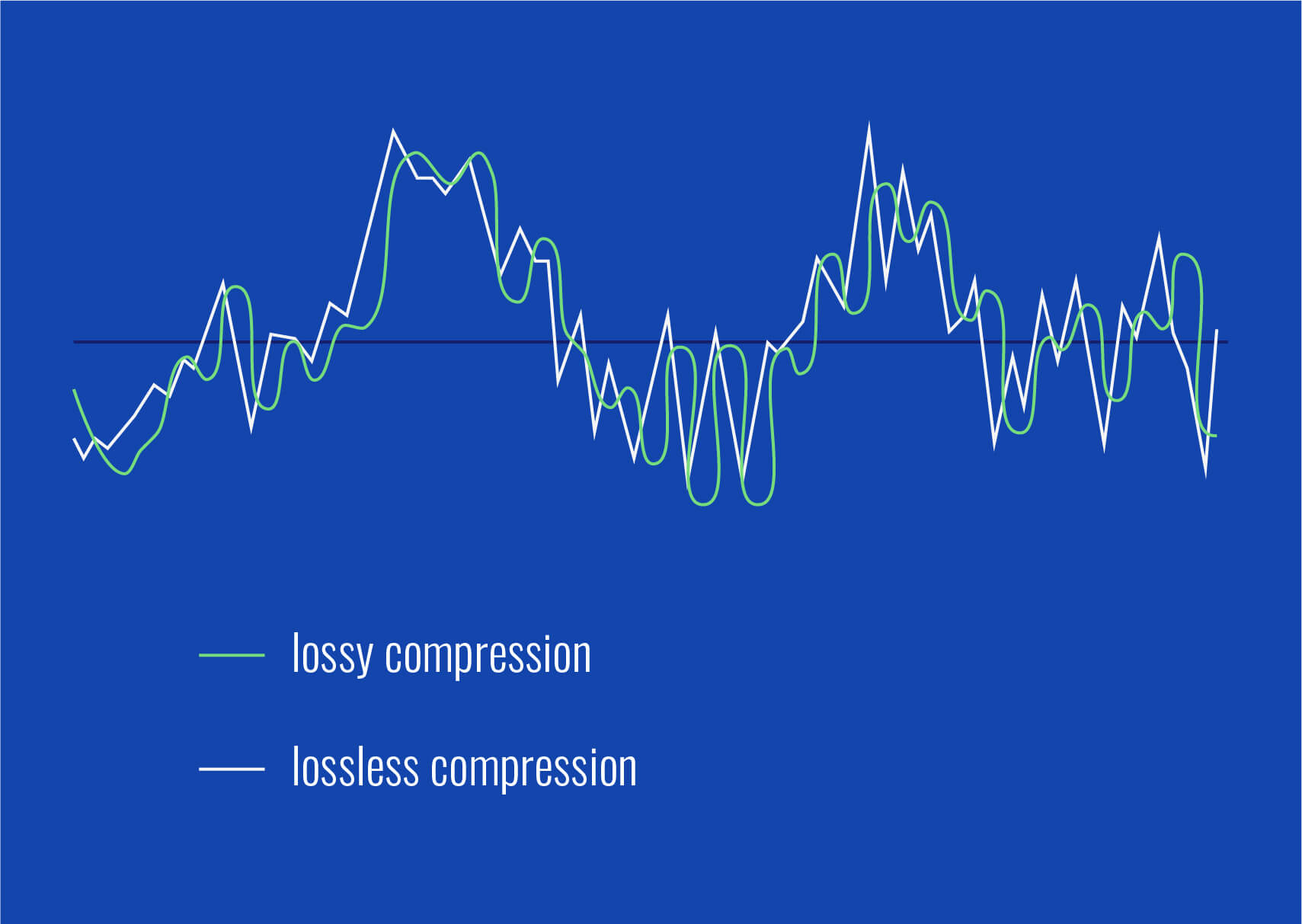
M4A and FLAC are both audio file formats, but they are quite distinct in their characteristics. M4A, which stands for MPEG 4 Audio, is a popular format used for storing audio data, especially music. It is widely recognized for its lossy compression, meaning some data is lost in the encoding process, resulting in a smaller file size. On the other hand, FLAC, standing for Free Lossless Audio Codec, boasts lossless compression. No data is discarded, maintaining the original audio quality.
“Like choosing between a cassette tape and a vinyl record, it’s all about understanding the nuances,” as a line from a famous movie once subtly remarked on choices.
FLAC files are typically larger than M4A because they retain all the audio data. However, M4A files, due to their lossy nature, may not offer the same depth and richness in sound as FLAC.
Which is better: M4A or FLAC?
Defining which format is “better” depends largely on the user’s needs. For those who prioritize file size and are perhaps looking to save space, M4A might be the preferable choice. Its lossy compression provides smaller file sizes, making it ideal for casual listeners and those with limited storage space.
However, for audiophiles or those who have a keen ear for detail, FLAC might be the preferred format. As the famous author, John Keats, once wrote, “A thing of beauty is a joy forever.” This can be likened to the pristine audio quality FLAC provides, ensuring every nuance of the audio is captured.
Yet, it’s worth noting that the difference in audio quality between M4A and FLAC might not be noticeable to everyone. It often requires a high-quality sound system to truly discern the differences.
What are the advantages of M4A over FLAC?
M4A does come with certain advantages. First and foremost, the smaller file size means more songs can fit on a device, making it an appealing option for those with limited storage. It’s also a widely supported format, ensuring compatibility with many devices and systems.
“Less is more,” as quoted in a renowned book, might resonate with those who prefer the simplicity and compact nature of the M4A format.
Additionally, M4A files tend to process faster due to their size. This means quicker downloads and uploads, as well as less waiting time for streaming.
How does FLAC’s quality compare to M4A?
FLAC’s quality is, objectively speaking, superior to M4A. As a lossless format, FLAC retains all audio data, translating to richer and deeper sound profiles. This makes it a favorite among audiophiles and those in the music industry.
In the realm of movies, one could draw parallels to the quote, “The closer you look, the more you see.” With FLAC, the closer you listen, the more you hear.
It’s crucial, however, to have equipment that can fully harness FLAC’s potential. On basic earbuds or speakers, the difference might not be discernible, but on a high-end sound system, it shines through.
Final Words
The battle between M4A and FLAC is akin to comparing two distinct art forms. Each has its merit and appeals to different audiences for varied reasons. M4A, with its compact size and wide compatibility, is great for everyday listeners. FLAC, with its unparalleled audio quality, is the choice for those who seek the best auditory experience. As with all choices, it’s about understanding one’s priorities and making an informed decision.
dB Level for Boosting BassdB Level for Boosting Bass
Understanding Bass Levels and dB
When it comes to achieving the perfect bass level, it’s essential to understand what decibels (dB) are and how they affect sound. In simple terms, dB is a measure of the loudness or intensity of sound. The higher the dB, the louder the sound. When adjusting bass levels, it’s crucial to find the perfect balance between the volume and intensity of the bass.
In my personal experience, I found that boosting the bass to an extreme level can lead to distortion and damage to the speakers, which can affect the overall sound quality. That’s why it’s crucial to find the recommended dB level for boosting bass that provides optimal sound quality without compromising the speakers’ performance.
As Robert Greenberg said, “Bass is the basis of music. Without it, we cannot move.” Therefore, finding the perfect balance between the bass and other sound frequencies is crucial to achieving a quality listening experience.
How to Adjust Bass Levels
Adjusting bass levels can be a daunting task, especially if you’re not familiar with the process. However, it doesn’t have to be complicated. Here are a few tips to help you adjust your bass levels like a pro:
Start by adjusting the volume to a comfortable level.
Use a test track that has a prominent bass line to determine the ideal bass level.
Use an equalizer to adjust the bass frequencies.
Listen to the music and adjust the bass level until you achieve the perfect balance between the bass and other sound frequencies.
In my experience, using an equalizer is the most effective way to adjust bass levels. It provides greater control over the bass frequencies, allowing you to adjust them to the ideal level.
Perfect Bass Levels
Finding the perfect bass level can be a subjective matter as it depends on personal preferences and the type of music you’re listening to. However, there are a few general guidelines that you can follow to achieve the perfect bass levels.
According to audio experts, the ideal bass level should be around 70 dB, with a range of 60 to 80 dB. It’s also essential to ensure that the bass level doesn’t overpower the other sound frequencies. The goal is to achieve a well-balanced sound that allows each sound frequency to shine.
In conclusion, finding the recommended dB level for boosting bass requires a bit of experimentation and patience. However, once you find the perfect balance between the bass and other sound frequencies, you’ll enjoy a quality listening experience that enhances your favorite music’s depth and richness.
Final Words: Don’t forget that the key to achieving perfect bass levels is to experiment and find the right balance between the bass and other sound frequencies. Remember to take care of your speakers and avoid boosting the bass to an extreme level to prevent distortion and damage.
Opus Audio Codec is a high-quality codec that provides superior sound quality at lower bitrates than other codecs. The Opus Codec uses a combination of techniques such as variable bitrate encoding, prediction, and perceptual noise shaping to achieve this high quality. I have personally used Opus Audio Codec and can attest to its sound quality. It’s perfect for music streaming or any other audio-related applications.
As the book “Master Handbook of Acoustics” by F. Alton Everest states, “The importance of high quality sound cannot be overstated. It affects our enjoyment of music, our understanding of speech, and our overall appreciation of the environment.” Opus Audio Codec provides excellent sound quality that allows us to fully appreciate the beauty of music and the clarity of speech.
Efficient Audio Compression with Opus Codec
Opus Codec is not only high quality but also highly efficient. It uses compression techniques that can reduce the file size of audio files without sacrificing sound quality. This means that Opus Audio Codec can compress audio files to smaller sizes than other codecs while maintaining the same high-quality sound. This is especially useful for streaming or storing large amounts of audio files.
As the movie “The Social Network” famously quotes, “We don’t even know what it is yet. We don’t know what it can be. We don’t know what it will be. We know that it is cool.” Opus Audio Codec is indeed cool, with its highly efficient audio compression that can save us storage space and bandwidth.
Opus Audio Codec for Streaming
Opus Audio Codec is perfect for streaming applications because of its high quality and efficient compression. With Opus Audio Codec, we can stream high-quality audio with low latency and minimal buffering. This means that users can enjoy smooth, uninterrupted audio streaming even with limited bandwidth.
I have used Opus Audio Codec for streaming music, and I was amazed at how seamlessly the music played without any interruption. Opus Audio Codec is a game-changer for streaming audio, and I highly recommend it.
Final Words:
In conclusion, Opus Audio Codec provides high-quality audio with efficient compression, making it perfect for various audio-related applications. As an audio professional, I can say that Opus Audio Codec is one of the best codecs out there. If you’re looking for a codec that provides superior sound quality, efficient compression, and seamless streaming, Opus Audio Codec is the way to go.














I’ve always wondered about the science behind MP3 compression. This article clarified things for me. Thanks!
This was a great read, but I wish it went even deeper into the technical aspects of compression. Can you provide more details?
MP4Gain has been a game-changer for me when working on my music. It strikes a great balance between quality and file size.
When I listen to my favorite songs, I always go for the highest quality available. It’s like enjoying a gourmet meal over fast food.
Great article! I learned a lot about MP3 compression. Now I can make informed decisions about my audio files.
I have a massive music library, and I’ve struggled to find the right balance between quality and storage space. This article provided some valuable insights.
This article is fantastic, but it leaves me wanting more. Can you dive deeper into the world of audio compression?
MP3 is like regular gasoline, and FLAC is like premium fuel. I guess I’ll choose based on the importance of the journey!
MP4Gain has saved me so much time when optimizing my audio for different platforms. It’s like having a magic wand for audio quality!
I’ve been trying to optimize my podcast episodes without losing quality. The struggle is real, but this article gave me some ideas.