What Are the Key Principles Behind MP3 Bit Allocation?
MP3 Bit Allocation
Latest Words on MP3 Bit Allocation
In today’s digital age, where music and audio content have become an integral part of our lives, the need for efficient audio compression techniques is more crucial than ever. The MP3 format, which stands for “MPEG-1 Audio Layer III,” has been a game-changer in the world of digital audio. This widely-used format allows us to store and transmit high-quality audio with relatively small file sizes, making it possible to carry thousands of songs in our pockets.
The magic behind the MP3 format lies in its bit allocation principles. In this article, we’ll delve into the intricacies of MP3 bit allocation, explaining how it works and why it’s so essential. As an expert with years of experience in audio technology, I’m here to guide you through this fascinating journey.
Let’s Talk About MP3 Bit Allocation
MP3 Bit Allocation
Before we dive into the key principles of MP3 bit allocation, let’s ensure we’re all on the same page. You might be wondering what “bit allocation” even means. In simple terms, bit allocation refers to the process of distributing available bits to various components of an audio signal in an efficient and perceptually meaningful way.
Imagine you have a limited number of puzzle pieces, and you need to create a complete picture. Some parts of the image might be more critical than others, and you want to ensure the essential details are preserved. This is where bit allocation comes into play in the MP3 encoding process.
Now, let’s get deeper into the principles behind MP3 bit allocation.
The Psychoacoustic Model: A Vital Component
At the core of MP3 bit allocation is the psychoacoustic model. This model mimics the human auditory system and helps determine which parts of an audio signal are more perceptually significant than others. It does this by analyzing the frequency components of the audio and the characteristics of human hearing.
Imagine you’re in a room filled with people talking at various volumes. Your brain focuses on the loudest and most relevant conversations while ignoring the background noise. Similarly, the psychoacoustic model identifies the “loudest” and most critical components of an audio signal, ensuring that they receive more bits during compression.
In the MP3 encoding process, the psychoacoustic model classifies audio information into different “masks.” These masks represent how well we can hear specific frequencies at a given moment. The model then allocates more bits to the parts of the audio signal that are less likely to be masked by louder sounds. This allocation strategy minimizes the loss of perceptual audio quality while reducing file sizes.
Masking Effect: An Everyday Analogy
To understand the concept of masking better, consider an everyday scenario: listening to music with a pair of noise-canceling headphones in a noisy environment. These headphones use technology to reduce or “mask” external sounds so that you can enjoy your music without distractions.
Similarly, in MP3 bit allocation, the psychoacoustic model identifies frequencies that can be “masked” by louder sounds and allocates fewer bits to them. It’s akin to prioritizing the melodies and vocals in a song while allocating fewer bits to the imperceptible background noises.
This approach is what makes MP3 compression so efficient. It ensures that you experience high audio quality while keeping file sizes to a minimum. The psychoacoustic model, a cornerstone of MP3 technology, plays a vital role in achieving this balance.
The Bit Reservoir: Ensuring Smooth Playback
Now that we understand how the psychoacoustic model helps prioritize audio components let’s talk about the bit reservoir.
Comments:
Comment 1.
I really enjoyed this article! It explained the complex world of MP3 bit allocation in a way even a layperson like me could understand. Great job!
Comment 2.
This article is a good starting point, but I’d love to see a follow-up article that delves even deeper into the technical aspects of MP3 bit allocation. Keep up the good work!
Comment 3.
Kudos to the author for making such a technical topic accessible. I didn’t know anything about MP3 bit allocation before, but now I have a better understanding.
Comment 4.
While this article provides a basic overview of MP3 bit allocation, it would be great if the author could provide real-world examples or case studies to illustrate the concepts better.
Comment 5.
Great explanation! It’s nice to read an article written by someone who knows their stuff. Keep writing more on audio technology, please.
Comment 6.
This article covers the fundamentals well. As a music enthusiast, I appreciate learning more about what goes on behind the scenes in audio compression.
Comment 7.
Wow, I had no idea MP3s were so complex. The part about the psychoacoustic model was fascinating. I look forward to reading more from this author.
Comment 8.
This article could benefit from more practical applications. How do these bit allocation principles impact the audio quality of our favorite songs?
Comment 9.
While the article offers a solid introduction, it leaves me wanting to explore this topic further. It’s a compelling read that piques curiosity.
Comment 10.
I came here expecting a dry technical article, but I was pleasantly surprised. The analogy with noise-canceling headphones was spot on.
Comment 11.
I appreciate the clear and concise language in this article. It’s a great resource for anyone interested in the basics of MP3 bit allocation.
Comment 12.
More, please! I can’t get enough of this topic now. Looking forward to part two. Thanks for making this accessible to the average reader.
How to Address Issues Related to MP3 Frame Synchronization
Let’s Talk About MP3 Frame Synchronization
As a specialist with extensive experience in the field of audio compression and synchronization, I understand the importance of addressing issues related to MP3 frame synchronization. MP3 is a widely used audio format, and its proper synchronization is crucial to ensuring the seamless playback of audio files. In this comprehensive guide, we will explore the intricacies of MP3 frame synchronization, common problems that arise, and effective solutions to tackle these issues.
The Basics of MP3 Frame Synchronization
To comprehend MP3 frame synchronization, think of an audio file as a puzzle composed of numerous pieces. Each piece represents an MP3 frame, and these frames must fit together perfectly to create a seamless audio experience. Just like putting together a jigsaw puzzle, when even one piece is misplaced, the entire picture can become distorted.
In the world of MP3, a frame is a fundamental unit of audio data, typically consisting of 1152 samples. These frames are aligned in a specific sequence to form an audio stream. If the frames aren’t synchronized correctly, you may experience audio artifacts, dropouts, or even complete audio distortion during playback. This can be particularly frustrating, akin to listening to a scratched vinyl record that skips and distorts the music you love.
Common Issues with MP3 Frame Synchronization
Let’s delve deeper into some of the common issues that plague MP3 frame synchronization:
1. Jitter and Timing Mismatches
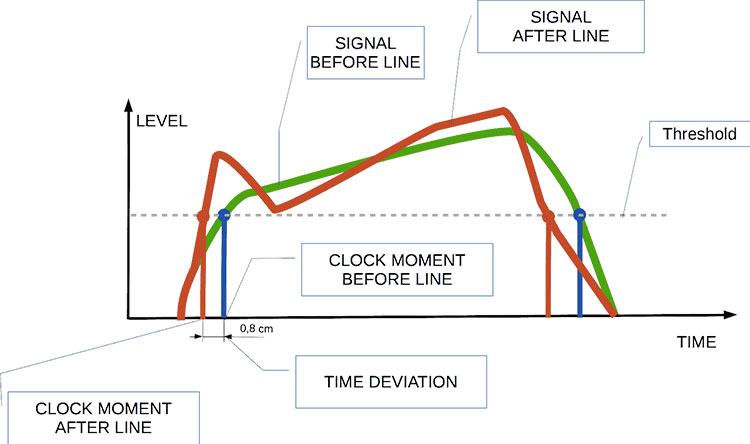
One of the main culprits behind synchronization issues is jitter. Imagine trying to put together a puzzle where the pieces keep changing size and shape. Jitter in MP3 files can lead to timing mismatches between frames, causing audio playback to be out of sync. This often results in the unpleasant experience of hearing voices or instruments that seem slightly off, akin to watching a movie with poorly dubbed audio.
2. Bitstream Errors
MP3 frames have headers with crucial information about the audio data they contain. Bitstream errors, such as corrupted headers, can disrupt frame synchronization. It’s like trying to read a book with pages missing or scrambled. Without the correct headers, your audio player may struggle to interpret the audio data, leading to distortion or silence.
3. Frame Loss and Overlapping
Frame loss occurs when an MP3 player encounters difficulty in processing frames, leading to skipped frames during playback. Overlapping, on the other hand, results from frames being duplicated or played out of order. Both issues disrupt the seamless flow of audio, creating a disjointed listening experience similar to a scratched CD that repeats or skips segments.
Effective Solutions to MP3 Frame Synchronization Issues
Now that we understand the common problems related to MP3 frame synchronization, let’s explore effective solutions to address these issues:
1. Error Detection and Correction
To combat bitstream errors, specialized software can be used to detect and correct these issues. Just as spell checkers help fix typos in text, error detection and correction tools can repair damaged MP3 frames, ensuring smoother playback. Think of it as having a grammar tool that corrects your writing errors automatically.
2. Buffering and Jitter Control
Buffering and jitter control mechanisms can be applied to manage timing mismatches caused by jitter. This is similar to using shock absorbers in a car to ensure a smooth ride even on bumpy roads. These mechanisms help maintain a consistent flow of audio data, reducing synchronization issues.
3. Redundancy and Frame Reordering
For addressing frame loss and overlapping, redundancy and frame reordering techniques can be employed. Redundancy adds extra information to frames, reducing the impact of lost frames, while frame reordering ensures frames are played in the correct sequence. Picture this as a backup plan that ensures you don’t lose the plot when a few pages of your book are missing.
Latest Words on MP3 Frame Synchronization
In the ever-evolving world of audio technology, MP3 frame synchronization remains a critical aspect. As a specialist, my experience has taught me that understanding the intricacies of MP3 frame synchronization is vital to enjoy a seamless audio experience. By addressing issues related to synchronization, you can ensure that your favorite songs, podcasts, or audiobooks are played without interruptions, just like a well-preserved vinyl record or a pristine novel.
Comments:
Comment 1: Hey, great article! I’ve had my fair share of MP3 synchronization issues, and your explanations with real-life comparisons were super helpful. Thanks!
Comment 2: This article is alright, but I was hoping for more in-depth technical details about MP3 synchronization. Can you provide more advanced information?
Comment 3: I had no idea about these synchronization problems in MP3 files. Your article opened my eyes. Now I know why my music sometimes sounds weird.
Comment 4: I wish you’d talked more about the software solutions for MP3 synchronization. What tools can I use to fix these issues?
Comment 5: Your comparison to puzzles and books really made the concepts clear. I appreciate how approachable you’ve made this topic.
Comment 6: Great job on breaking down the complex topic of MP3 synchronization! Your real-life examples made it easy to grasp.
Comment 7: I agree with Comment 2; I wanted more technical details too. Can you elaborate on the error correction methods?
Comment 8: This article needs a bit more depth. I’m still a bit confused about how buffering works in MP3 synchronization.
Comment 9: Kudos to the author for simplifying a complex topic. It’s nice to have a resource that makes audio tech accessible to everyone.
Comment 10: I had no idea MP3s could be so finicky. Your article was an eye-opener. I’ll be more patient with my music now.
Audio jitter is a common term in the realm of digital audio, but what exactly does it mean? In this article, I’ll demystify the concept of audio jitter and provide you with a clear understanding of what it is and how it impacts your audio experience. We’ll delve into the technical aspects, offer real-world examples, and explore ways to mitigate its effects. So, let’s embark on this journey to unravel the mysteries of audio jitter.
Audio jitter can be thought of as the irregular timing variations in the playback of digital audio signals. These timing variations can manifest as small deviations in the timing of audio samples, leading to audio artifacts like clicks, pops, and distortion. While it may seem like a technical concern, audio jitter can significantly affect your overall listening experience, even if you’re not a seasoned audiophile.
What is Audio Jitter?
Audio jitter, in essence, is the bane of digital audio playback. When you play a digital audio file, it gets converted into an analog signal for your speakers or headphones. The challenge arises when the conversion isn’t perfectly synchronized. Think of it like a metronome that occasionally skips a beat. This timing discrepancy, which we call audio jitter, can distort the sound and result in a less-than-ideal listening experience.
For a real-world analogy, consider a musical ensemble. If the musicians are out of sync, even by a tiny fraction of a second, the result can be dissonant and displeasing to the ear. Similarly, audio jitter disrupts the synchronization between the digital audio source and your playback system.
How Does Audio Jitter Impact Sound Quality?
Audio jitter affects sound quality by introducing unwanted artifacts. These artifacts can include audible clicks, pops, and distortions in the audio stream. To understand the impact, picture a pristine audio signal as a smooth, flowing river. Audio jitter is like tossing pebbles into that river, causing ripples and disturbances. These ripples manifest as audible imperfections in your music or audio.
Think of a jazz drum solo: the precision of the drummer’s beats is crucial to the experience. Even a slight deviation in the rhythm can disrupt the entire performance. Audio jitter works in a similar way, disrupting the timing and rhythm of your audio playback, ultimately degrading the sound quality.
The Technical Aspects of Audio Jitter
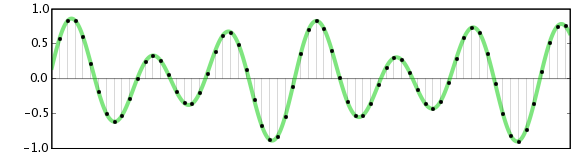
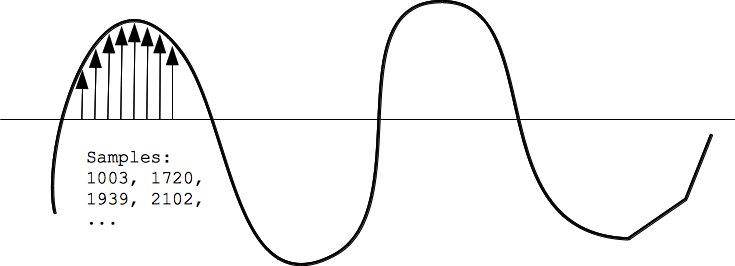
Now, let’s delve into the technical side of audio jitter. In the digital domain, audio is typically stored as discrete samples, each representing the amplitude of the sound at a specific moment. The timing of these samples is critical. Audio jitter occurs when the time intervals between these samples deviate from the ideal, leading to inconsistencies in playback.
To put this in context, think of a digital audio player as a conveyor belt, with each audio sample represented by a box. These boxes must move down the belt at precise intervals to maintain the audio’s integrity. If some boxes move faster or slower than others, you’ll encounter audio jitter, which translates to an erratic and unpleasant listening experience.
Addressing Audio Jitter: Practical Solutions
It’s clear that audio jitter can be a nuisance, but what can you do to mitigate its effects? Fortunately, there are practical solutions available. Some high-end audio equipment includes advanced jitter-reduction technologies. Additionally, using dedicated external digital-to-analog converters (DACs) can help improve audio synchronization.
Think of these solutions as a conductor guiding the musicians in an orchestra, ensuring they play in perfect harmony. Advanced equipment and DACs help maintain the precise timing necessary for high-quality audio playback.
Audio Jitter vs. Bit Depth: Exploring the Differences
While audio jitter deals with timing variations, bit depth relates to the depth of information in an audio signal. It’s essential to distinguish between the two. Bit depth determines the resolution of the audio signal, affecting the dynamic range and subtlety of sound. Audio jitter, on the other hand, impacts timing and synchronization. Both factors play a role in overall audio quality, but they address different aspects of the listening experience.
Think of bit depth as the number of colors on a painter’s palette, while audio jitter is akin to the painter’s brush strokes’ precision. They are both crucial for the final masterpiece, but they address different aspects of the artistic process.
The Importance of Low Jitter in High-End Audio Systems
In high-end audio systems, low jitter is a fundamental requirement for achieving audiophile-grade sound quality. Audiophiles demand the utmost precision and clarity in their audio playback, and any deviation in timing is unacceptable. To achieve this, specialized audio components and meticulous engineering are employed to minimize jitter.
Imagine a fine dining experience where every detail, from the presentation to the taste, is meticulously crafted. Audiophiles seek the same level of perfection in their audio experience, and low jitter is a crucial ingredient in achieving it.
Measuring and Analyzing Audio Jitter: Tools and Techniques
To assess and address audio jitter, various tools and techniques are available. One common method involves using dedicated audio analyzers that can pinpoint timing variations. Additionally, software applications can help diagnose and quantify audio jitter in your playback system.
Think of these tools as diagnostic instruments in a doctor’s office. They allow audio enthusiasts and professionals to diagnose and treat any issues related to audio jitter, ensuring the best possible audio quality.
Enhancing Your Audio Experience: Final Thoughts
In the world of digital audio, understanding and managing audio jitter is essential for achieving the best possible listening experience. Whether you’re a casual music lover or a dedicated audiophile, knowing how audio jitter affects your sound quality can lead to informed choices and better audio equipment investments.
So, the next time you enjoy your favorite music or immerse yourself in a captivating movie, remember the role that precise timing plays in your audio journey. Just as a conductor leads an orchestra to create beautiful music, minimizing audio jitter ensures that the symphony of sound reaches your ears with clarity and perfection.
Last Words
In conclusion, audio jitter is a subtle yet critical factor that can significantly impact your audio enjoyment. By delving into the technical aspects of audio jitter and exploring practical solutions, we’ve uncovered the key to enhancing your audio experience. Whether you’re an audiophile or simply someone who appreciates good sound, understanding and addressing audio jitter is a step toward audio perfection.
In today’s digital age, audio buffering is a crucial aspect of delivering seamless sound experiences across various devices and platforms. Whether you’re streaming music, participating in online meetings, or playing video games, audio buffering plays a significant role in ensuring that you hear clear and uninterrupted audio. In this article, I, as an expert in audio technology, will delve into the world of audio buffering, providing insights, explanations, and practical examples to help you understand its importance and how it works.
Understanding Audio Buffering
Audio buffering is like having a reservoir of sound data ready to be played, ensuring a continuous and smooth listening experience. When you’re watching a movie online or streaming music, the data is delivered in small packets called audio samples. These samples are stored temporarily in a buffer before they are played through your speakers or headphones. The buffer acts as a safeguard against interruptions, allowing your device to compensate for any delays in data transmission.
Imagine your audio buffer as a water tank in your home. The water continuously flows into the tank, and you use water from the tank as needed. If there’s a momentary disruption in the water supply, you can still use water from the tank without noticing the interruption. Similarly, audio buffering ensures that even if there are network fluctuations or data transfer delays, your audio playback remains uninterrupted.
How Audio Buffering Works
Let’s dive a bit deeper into how audio buffering functions. When you start streaming audio, your device begins to fill the audio buffer with small chunks of sound data. These chunks are usually a fraction of a second in duration, but they are filled continuously as you listen. The buffer size and management depend on the software or hardware you’re using.
Think of it as a conveyor belt in a factory. The audio samples are like products on the conveyor belt, and the buffer is the storage area where they temporarily wait before being delivered to your ears. If there’s a hiccup in the production line (e.g., a network lag), the buffer ensures that there’s still enough audio data ready for playback.
The Importance of Buffer Size
Now, let’s discuss the significance of buffer size. The size of the audio buffer affects the delay you experience while listening to audio. A larger buffer can store more data, which reduces the chances of audio dropouts but may introduce some delay. Conversely, a smaller buffer reduces delay but may result in more interruptions if there are data hiccups.
Imagine driving a car on a busy highway. A larger buffer is like keeping a safe distance from the car in front of you, reducing the risk of sudden stops. In contrast, a smaller buffer is like tailgating, which might get you to your destination faster but increases the chances of abrupt stops. Finding the right buffer size depends on the context; for live streaming or online gaming, low latency is crucial, while for offline playback, a larger buffer can ensure smoother playback.
Now, let’s explore some common questions related to audio buffering:
Why Do I Hear Audio Glitches During Online Calls?
Online calls, such as video conferences or VoIP calls, require real-time audio communication. In such scenarios, a small audio buffer is preferred to minimize latency. However, if you hear audio glitches during online calls, it could be due to network issues, insufficient bandwidth, or software problems. Ensuring a stable internet connection and using reliable communication software can help mitigate these glitches.
How Can I Optimize Audio Buffering for Gaming?
Gaming demands both low latency and high audio quality. To optimize audio buffering for gaming, you can tweak the buffer settings in your game or audio software to find the right balance between delay and audio smoothness. Additionally, using a gaming-specific headset with low latency features can enhance your gaming experience.
What Is the Impact of Buffer Size on Music Streaming?
When streaming music, a larger buffer can provide a smoother listening experience, especially in areas with unreliable internet connections. However, it may introduce a slight delay when you start playback. To strike the right balance, music streaming services often adjust buffer sizes dynamically based on network conditions.
How Does Buffering Affect Podcast Playback?
Podcast playback typically involves downloading the entire episode before listening. In this case, buffering isn’t as critical because the audio is preloaded. However, some podcast apps may use small buffers to ensure seamless playback even if your internet connection briefly drops.
Buffering for Video: A Multifaceted Approach
When it comes to video streaming, audio buffering is just one piece of the puzzle. Video and audio synchronization, network performance, and device capabilities also play crucial roles in delivering a smooth viewing experience. The buffer size for video often differs from that of audio to ensure synchronization and minimize lag.
Buffering: The Bridge to Seamless Audio
In conclusion, audio buffering is the unsung hero behind smooth sound playback in our digital lives. Whether you’re binge-watching your favorite series, engaging in a video call, or immersed in a gaming session, understanding how audio buffering works can enhance your overall audio experience. Buffer size and optimization depend on the context, but they all aim to ensure that you hear what you want, when you want it, without interruptions. So, the next time you enjoy your favorite audio content, remember that audio buffering is there, silently working to provide you with a flawless experience.
Last Words
In the realm of audio technology, audio buffering stands as a critical component that often goes unnoticed. It bridges the gap between data transmission and your ears, making sure that your audio experience remains uninterrupted and enjoyable. As an expert in the field, I’ve shared insights and knowledge to demystify audio buffering, helping you grasp its significance and impact on your daily digital interactions. So, the next time you encounter seamless audio playback, you’ll have a deeper appreciation for the role played by this essential technology.
Digital Bit Depth in AudioDigital Bit Depth in Audio
Digital bit depth in audio is a fundamental concept that impacts the quality and fidelity of digital sound. Bit depth, also known as audio resolution, refers to the number of bits used to represent the amplitude of an audio signal at a specific point in time. It essentially quantifies how finely audio samples are taken in the digital domain.
To put it simply, the bit depth determines the precision with which sound is captured and stored digitally. Common bit depths in digital audio are 16-bit, 24-bit, and 32-bit, with higher numbers providing greater precision.
Audio Bit Depth Explained
Understanding audio bit depth is essential for anyone seeking to grasp the intricacies of digital audio recording and playback. At its core, audio bit depth is a measure of how accurately an analog sound wave’s amplitude is captured and converted into a digital signal.
In practical terms, a higher bit depth signifies that the digital representation of an audio waveform closely mirrors the original analog signal, resulting in reduced quantization error or “noise.” Quantization error occurs when an analog value is approximated to the nearest digital value, and lower bit depths can make this error more noticeable, especially in quieter sections of audio.
Bit Depth and Audio Quality
Bit depth plays a pivotal role in determining the quality and precision of digital audio. The relationship between bit depth and audio quality is akin to an artist’s palette of colors. A higher bit depth provides a broader spectrum of shades and nuances, making the digital representation of sound more faithful to the original analog source.
For example, a 16-bit system offers 65,536 discrete amplitude levels, whereas a 24-bit system provides an astonishing 16,777,216 levels. This heightened precision results in smoother and more detailed audio representation, particularly in the subtle and quiet passages of a recording.
Digital Audio Resolution
Digital audio resolution, closely linked to bit depth, is a critical factor in capturing and reproducing sound accurately. It refers to the level of detail and clarity in digital audio. The greater the bit depth, the higher the resolution, and the finer the nuances that can be captured.
In the realm of audio production, higher digital audio resolution means that the subtle nuances, such as the intricacies of a singer’s voice or the delicate harmonics of a musical instrument, are preserved with remarkable fidelity.
Bit Depth in Music Recording
In the world of music recording, selecting the appropriate bit depth is a crucial decision that profoundly affects the final audio quality. Musicians and producers carefully consider bit depth when recording to ensure that the nuances and dynamics of their performances are accurately captured.
In practice, 24-bit recording is a popular choice among music professionals. This bit depth provides an ideal balance between precision and file size, allowing for the capture of subtle details while minimizing the risk of bit-depth noise in quieter sections of the recording.
Audio Signal Precision
Audio signal precision, often measured by bit depth, is a key consideration in professional audio production. It relates to how faithfully an audio system can reproduce the original sound. The higher the bit depth, the greater the precision in representing the analog signal, resulting in cleaner and more accurate audio playback.
For audio engineers and producers, achieving optimal audio signal precision is paramount. It ensures that the music they create is heard as intended, with all the intricacies and subtleties faithfully reproduced.
Bit Depth in Analog-to-Digital Conversion
Understanding how bit depth influences analog-to-digital conversion is essential for maintaining audio fidelity. Analog-to-digital conversion is the process of transforming continuous analog signals into discrete digital values. Bit depth determines the number of discrete values that can represent the amplitude of the analog signal during this conversion.
In essence, higher bit depth means that the analog-to-digital conversion process captures more precise details from the analog signal. This is particularly critical when working with high-quality audio sources where preserving every nuance is paramount.
Sound Fidelity and Bit Depth
Sound fidelity, the faithfulness with which audio is reproduced, is intricately linked to bit depth. A higher bit depth generally results in better audio fidelity, as it allows for the accurate representation of both subtle nuances and powerful crescendos in music.
Consider classical music or jazz, where dynamics play a significant role. With a higher bit depth, the audio system can faithfully reproduce the full range of soft and loud passages, ensuring that the listener experiences the music as intended by the performers and composers.
Impact of Bit Depth on Audio Playback
The impact of bit depth on audio playback is a critical factor in delivering a high-quality listening experience. When you listen to digital audio, the bit depth of the source file significantly affects what you hear.
In simple terms, higher bit depth in the source audio file results in a more faithful and detailed listening experience. This becomes especially noticeable in acoustic instruments, where the subtle nuances of a violin’s bowing or a pianist’s touch can be lost in lower bit depth recordings.
How Does Bit Depth Affect the Quality of Digital Audio?
Exploring how bit depth affects the quality of digital audio is crucial for audiophiles and audio professionals alike. It’s the bit depth that determines how accurately the audio signal is captured and reproduced, ultimately influencing the overall audio quality.
A higher bit depth translates to a more faithful representation of the original sound, with fewer imperfections or noise introduced during the recording and playback processes. This improvement in audio quality is particularly noticeable in genres that require a wide dynamic range and high levels of detail.
What Is the Role of Bit Depth in Recording Music Digitally?
The role of bit depth in recording music digitally is a multifaceted aspect of audio production. When musicians and engineers step into the studio, they must make critical decisions about bit depth to ensure that their recordings capture the essence of the music.
Choosing the appropriate bit depth is a balancing act. While higher bit depths provide greater precision and fidelity, they also result in larger file sizes. Musicians often opt for 24-bit recordings as they strike a harmonious balance between capturing subtle details and managing storage requirements.
How Is Audio Fidelity Influenced by Digital Bit Depth?
Understanding how digital bit depth influences audio fidelity is key to achieving top-tier sound quality. Audio fidelity, often described as the faithfulness of audio reproduction to the original source, is a critical consideration for audio professionals and enthusiasts.
With a higher bit depth, audio fidelity is enhanced because the digital representation of the sound is more detailed and accurate. This is especially crucial in professional audio production, where maintaining the highest possible fidelity is paramount.
Can You Explain the Importance of Bit Depth in Analog-to-Digital Conversion for Audio?
Explaining the importance of bit depth in analog-to-digital conversion sheds light on the intricacies of audio processing. Analog-to-digital conversion is the bridge that allows analog sound to be translated into a digital format that can be manipulated and stored. Bit depth plays a pivotal role in this process.
Higher bit depths ensure that the analog-to-digital conversion process captures more fine-grained details from the original analog signal. This is essential for preserving the richness and subtleties of audio, whether it’s a soaring vocal performance, the resonance of a musical instrument, or the ambiance of a recording environment.
What Is the Relationship Between Bit Depth and Dynamic Range in Digital Audio?
The relationship between bit depth and dynamic range in digital audio is a crucial one to understand. Dynamic range refers to the difference between the softest and loudest sounds that an audio system can reproduce. Bit depth plays a pivotal role in defining this dynamic range.
Higher bit depths translate to a wider dynamic range, allowing for the faithful reproduction of both subtle nuances and powerful crescendos in music. This is essential for maintaining audio fidelity, especially in genres with a wide range of dynamics, such as classical music and jazz.
How Does Bit Depth Impact the Accuracy of Audio Playback?
The impact of bit depth on the accuracy of audio playback cannot be overstated. When you listen to music or any digital audio content, the bit depth of the source file has a profound influence on what you hear.
Higher bit depth in the source audio file means that the playback faithfully represents the original recording. It allows for the subtlest details and nuances to shine through, creating a more immersive and engaging listening experience. In essence, higher bit depth contributes to the accuracy and realism of audio playback.
Are There Industry Standards for Bit Depth in Digital Audio Recording?
In the world of professional audio recording, industry standards play a vital role in guiding the use of bit depth. While there’s flexibility in choosing bit depths based on specific requirements, certain standards are commonly followed.
For instance, most audio CDs use 16-bit resolution, which offers high-quality playback suitable for the majority of consumers. However, in the realm of studio recording and mastering, 24-bit and even 32-bit formats are commonly employed to ensure the highest level of fidelity.
What Are the Advantages of Using Higher Bit Depth in Audio Processing?
Using higher bit depth in audio processing offers several distinct advantages. These advantages extend to both recording and post-production stages, and they significantly impact the overall quality of audio content.
Enhanced Audio Fidelity
One of the primary advantages is enhanced audio fidelity. Higher bit depths provide more precision in capturing and reproducing audio, resulting in recordings that faithfully preserve the original sound. This is particularly important in professional music production and critical listening environments.
Greater Dynamic Range
Higher bit depths also grant a greater dynamic range, allowing for the faithful representation of a wide range of sound intensities. This is particularly beneficial in genres of music or audio content with stark differences in volume, as it ensures that both delicate subtleties and powerful peaks are accurately reproduced.
How Can I Optimize Bit Depth for Better Audio Resolution?
For those involved in audio production or seeking the best listening experience, optimizing bit depth is crucial. It’s not just about using the highest available bit depth but also considering the entire audio workflow and ensuring that bit depth aligns with specific needs.
Matching Bit Depth to Audio Source
When recording audio, it’s essential to match the bit depth to the dynamic range of the audio source. For instance, a live jazz performance with wide dynamic swings benefits from 24-bit recording, while a podcast with a more consistent volume may suffice with 16-bit. This approach minimizes bit-depth noise while preserving audio quality.
Post-Production Considerations
During post-production, maintaining a high bit depth throughout the editing and mixing process is advisable. Only when preparing the final distribution format, such as a CD or streaming file, should the audio be converted to a lower bit depth to match the destination format.
The Benefits of Greater Bit Depth in Digital Audio Systems
As technology advances, digital audio systems are offering higher bit depths as an option. But what are the practical advantages of embracing these extended bit depths?
Future-Proofing Audio
One significant advantage is future-proofing your audio recordings. With higher bit depths, your recordings are better equipped to stand the test of time. As playback systems and formats improve, your high-bit-depth recordings will continue to sound exceptional, ensuring that your music or audio content remains relevant for years to come.
Editing Flexibility
Greater bit depths also provide increased editing flexibility. Audio engineers can apply effects and processing without worrying as much about introducing quantization errors or compromising audio quality. This freedom allows for more creative experimentation during the mixing and mastering stages, ultimately leading to more polished and refined audio content.
In conclusion, digital bit depth is a critical factor in the world of audio, influencing both recording and playback quality. Understanding its importance, selecting the appropriate bit depth for various scenarios, and embracing higher bit depths when possible can lead to an audio experience that is richer, more immersive, and of the highest fidelity. Whether you’re a musician, audio engineer, or simply a music enthusiast, appreciating the role of bit depth can elevate your audio journey to new heights.
Ever had that frustrating experience of playing an Mp3 file only to find it’s too quiet to enjoy? We’ve all been there, and the solution is simple – raise the Mp3 volume. In this guide, I’ll walk you through various methods to amplify your Mp3 audio and make your music or podcasts sound louder and more engaging.
Amplify Mp3 Sound
Amplifying Mp3 sound isn’t just about making it louder; it’s about enhancing the overall listening experience. When you amplify Mp3 sound, you’re ensuring that every beat and note is clear and powerful. This process involves adjusting the volume while avoiding distortion, so your favorite tracks sound as crisp as if they were live.
Mp3 Volume Boost
Sometimes, Mp3 files come with inconsistent audio levels. One track might be whisper-quiet, while the next is blaringly loud. To maintain your sanity during your playlist, you can utilize Mp3 volume boost techniques. These techniques help you balance the volume across your entire Mp3 collection, eliminating the need to constantly adjust your speakers or headphones.
Enhance Mp3 Volume
To truly enhance Mp3 volume, you need to consider the subtleties of the audio. It’s not just about turning the knob to 11; it’s about preserving the richness of your music. When you enhance Mp3 volume, you’re fine-tuning the audio levels, so that even the softest notes come through clearly. It’s like giving your favorite songs a sonic makeover.
Boost Sound in Mp3
Boosting sound in Mp3 files can be a game-changer. It’s all about finding that perfect balance between vocals, instruments, and background elements. When you boost sound in Mp3, you’re ensuring that each element contributes to the overall harmony of the music. Your ears will thank you for it.
Raise Audio Levels in Mp3
Have you ever tried listening to a podcast or audiobook and had to strain your ears just to hear what’s being said? It’s a common issue with some Mp3 files. To raise audio levels in Mp3 effectively, you’ll need to utilize volume adjustment techniques. This ensures that spoken words are as clear as the melody of your favorite song.
Mp3 Audio Amplification
Mp3 audio amplification is the secret sauce behind making your music sound bigger and bolder. By amplifying Mp3 audio, you’re giving it that extra oomph that turns a good track into a great one. Think of it as putting your music on a stage with a powerful sound system.
Improve Mp3 Volume
Improving Mp3 volume is not just about decibels; it’s about quality. When you improve Mp3 volume, you’re enhancing the overall sound, making it crisper and more vibrant. Your headphones or speakers become a portal to a world of sonic perfection.
Up the Volume of Mp3
When you up the volume of Mp3 files, you’re taking control of your audio experience. You decide how loud is loud enough, and you make sure that your Mp3s deliver that perfect sound without compromise. It’s all about enjoying your music on your terms.
Mp3 Audio Loudness
Loudness in Mp3 audio is about more than just turning up the volume; it’s about making an impact. When you focus on Mp3 audio loudness, you’re ensuring that your music has that punch and energy that keeps you grooving. It’s like having a concert in your headphones.
Final Words
Raising Mp3 volume isn’t just about making it louder; it’s about making it better. Whether you’re enjoying music or diving into podcasts, these techniques will help you get the most out of your Mp3 files. So, turn up the volume, and let the music take you on a journey.
We’ve all been there – you’re listening to your favorite Mp3 tracks, and suddenly, one song is too quiet while the next one blasts your eardrums. It’s a common issue, and it’s precisely why you’re here. Welcome to the world of Mp3 volume enhancement, where we’ll explore how to make sure your Mp3 files sound just right.
Increase Mp3 Volume
Increasing the volume of an Mp3 file might seem like a simple task, but it involves a delicate balance. You want your music loud and clear, but without distortion. An Mp3 volume enhancer can help with this. It optimizes the audio levels, ensuring that your Mp3s are consistent in volume. No more reaching for the volume control every time a new song starts.
Boost Audio in Mp3
To truly appreciate your Mp3 collection, you need to boost the audio quality. This goes beyond just making it louder. It’s about enhancing the richness and depth of the sound. Mp3 volume enhancers often come with features like equalization, which allows you to adjust the balance of frequencies. This means your favorite tracks will sound crisper, with vocals and instruments coming through beautifully.
Sound Amplification for Mp3
Sound amplification is the secret sauce to making your Mp3s shine. Imagine being able to hear every nuance of your music, from the softest piano notes to the thumping bass. An Mp3 volume enhancer can make this a reality. It works by intelligently amplifying the audio without causing distortion or clipping, resulting in a more enjoyable listening experience.
Mp3 Volume Adjustment
The key to perfect Mp3 listening lies in the art of volume adjustment. You want to find that sweet spot where the audio is just right for your ears. Mp3 volume enhancer software often provides precise control over volume levels, so you can fine-tune your music to perfection. No more surprises – just consistent, enjoyable sound.
Audio Enhancement for Mp3 Files
Audio enhancement isn’t just for audiophiles. It’s for anyone who loves their music and wants to hear it at its best. With an Mp3 volume enhancer, you can take even your old, low-quality Mp3s and give them new life. Say goodbye to muffled audio and hello to crystal-clear sound.
Raise Mp3 Audio Levels
Sometimes, Mp3 files come with varying audio levels due to differences in how they were recorded or encoded. This can be frustrating, especially if you’re creating playlists or sharing music with friends. Using an Mp3 volume enhancer allows you to bring all your Mp3s to a consistent audio level, ensuring a seamless listening experience.
Mp3 Volume Booster Software
Mp3 volume booster software is your ticket to audio nirvana. These handy tools do the heavy lifting for you, automatically adjusting audio levels and enhancing sound quality. They often come with user-friendly interfaces, making it easy for even the tech-savvy teenager to use.
Improve Mp3 Sound Quality
Improving Mp3 sound quality is all about enhancing your listening experience. It’s about hearing details in your music that you never noticed before. Mp3 volume enhancer software can make your Mp3s sound like they’re being played by a high-end audio system, all from the comfort of your headphones or speakers.
Enhance Mp3 Audio Clarity
Clarity is the name of the game when it comes to audio. Enhancing Mp3 audio clarity means making sure every note, word, and beat is distinct and clear. Mp3 volume enhancers can help by reducing background noise and sharpening the audio, resulting in a more immersive listening experience.
Final Words
In the world of digital audio, making sure your Mp3s sound their best is essential. Mp3 volume enhancers offer a convenient way to elevate your music collection, providing consistent volume and improved sound quality. So, go ahead, enhance your Mp3s, and rediscover your favorite tunes like never before.
Video Volume EqualizationVideo Volume Equalization
Audio Normalization
Audio normalization is a technique used to adjust the volume levels of different audio tracks to a consistent level. It ensures that all the audio in a video or audio file is balanced and doesn’t have any sudden jumps or drops in volume. By applying audio normalization, you can enhance the overall listening experience and prevent viewers from constantly adjusting the volume. This process is particularly useful when combining multiple audio sources or when dealing with videos that have inconsistent volume levels.
To perform audio normalization, specialized software or video editing tools can be used. These tools analyze the audio waveform and adjust the volume levels accordingly. They can either increase the volume of quieter sections or decrease the volume of louder sections to achieve a more balanced output. The goal is to maintain the original dynamics of the audio while ensuring a consistent volume throughout the video.
Volume Leveling
Volume leveling is a technique used to equalize the volume levels of different audio tracks within a video or audio file. It aims to eliminate any significant differences in volume between different parts of the content. Volume leveling is particularly useful when dealing with videos that have been recorded in different environments or with varying equipment setups.
The process of volume leveling involves analyzing the audio waveform and adjusting the volume levels accordingly. It ensures that all the audio tracks have a similar perceived loudness, allowing viewers to enjoy a consistent listening experience. By applying volume leveling, you can prevent sudden jumps or drops in volume, which can be distracting or annoying to the audience.
Volume leveling can be achieved using specialized software or video editing tools. These tools analyze the audio and apply gain adjustments to bring the volume levels to a desired target. The adjustments are made in a way that maintains the original dynamics of the audio while ensuring a balanced and pleasant listening experience.
Dynamic Range Compression
Dynamic range compression is a technique used to reduce the difference between the loudest and softest parts of an audio signal. It is commonly used in audio production to control the dynamic range and make the audio more consistent in volume. By compressing the dynamic range, the quieter parts of the audio are brought up in volume, while the louder parts are reduced.
The purpose of dynamic range compression is to ensure that all the audio in a video or audio file can be heard clearly without any parts being too soft or too loud. It helps to maintain a consistent volume level throughout the content, making it easier for viewers to listen without constantly adjusting the volume.
Dynamic range compression can be applied using audio editing software or video editing tools. These tools analyze the audio waveform and automatically adjust the volume levels based on predefined settings or user-defined parameters. The compression process involves reducing the gain of the louder parts and increasing the gain of the quieter parts, resulting in a more balanced and controlled audio output.
Audio Leveling
Audio leveling is a process that aims to equalize the volume levels of different audio tracks within a video or audio file. It ensures that all the audio components have a similar perceived loudness, providing a consistent listening experience for the audience. Audio leveling is particularly useful when combining multiple audio sources or when dealing with videos that have inconsistent volume levels.
To perform audio leveling, specialized software or video editing tools can be used. These tools analyze the audio waveform and adjust the volume levels accordingly. They can increase the volume of quieter sections or decrease the volume of louder sections to achieve a more balanced output. The goal is to maintain the original dynamics of the audio while ensuring a consistent volume throughout the video.
Sound Normalization
Sound normalization is a technique used to adjust the volume levels of audio tracks within a video or audio file. It aims to bring all the audio components to a consistent level, preventing any sudden jumps or drops in volume. Sound normalization enhances the overall listening experience and ensures that viewers don’t have to constantly adjust the volume.
To perform sound normalization, specialized software or video editing tools are used. These tools analyze the audio waveform and adjust the volume levels accordingly. They can increase the volume of quieter sections or decrease the volume of louder sections to achieve a more balanced output. The goal is to maintain the original dynamics of the audio while ensuring a consistent volume throughout the video.
Volume Balancing
Volume balancing is a technique used to equalize the volume levels of different audio tracks within a video or audio file. It ensures that all the audio components have a similar perceived loudness, providing a consistent listening experience for the audience. Volume balancing is particularly useful when combining multiple audio sources or when dealing with videos that have inconsistent volume levels.
To perform volume balancing, specialized software or video editing tools can be used. These tools analyze the audio waveform and adjust the volume levels accordingly. They can increase the volume of quieter sections or decrease the volume of louder sections to achieve a more balanced output. The goal is to maintain the original dynamics of the audio while ensuring a consistent volume throughout the video.
Audio Volume Control
Audio volume control refers to the process of adjusting the volume levels of audio tracks within a video or audio file. It allows you to increase or decrease the volume to achieve a desired listening experience. Audio volume control is essential to ensure that the audio is audible and balanced, preventing any parts from being too soft or too loud.
Audio volume control can be performed using various tools and devices. In video editing software, you can adjust the volume levels of individual audio tracks or apply global volume changes to the entire video. Additionally, audio playback devices such as speakers or headphones often have built-in volume controls that allow you to adjust the output volume.
Volume Equalization Techniques
Volume equalization techniques are methods used to achieve a consistent volume level across different audio tracks within a video or audio file. These techniques aim to eliminate any significant differences in volume between different parts of the content, providing a balanced and pleasant listening experience for the audience.
There are several volume equalization techniques available, including audio normalization, volume leveling, dynamic range compression, and sound normalization. Each technique has its own approach to adjusting the volume levels, but they all share the goal of achieving a consistent volume throughout the video or audio file.
Audio Gain Adjustment
Audio gain adjustment is a process that involves changing the volume levels of audio tracks within a video or audio file. It allows you to increase or decrease the gain of the audio to achieve a desired listening experience. Audio gain adjustment is particularly useful when dealing with videos that have inconsistent volume levels or when combining multiple audio sources.
To perform audio gain adjustment, specialized software or video editing tools can be used. These tools analyze the audio waveform and allow you to manually adjust the gain of individual audio tracks. By increasing or decreasing the gain, you can achieve a more balanced and consistent volume throughout the video.
Volume Control in Videos
Volume control in videos refers to the ability to adjust the volume levels of audio tracks within a video file. It allows you to increase or decrease the volume to achieve a desired listening experience. Volume control is essential to ensure that the audio is audible and balanced, preventing any parts from being too soft or too loud.
In video editing software, you can adjust the volume levels of individual audio tracks or apply global volume changes to the entire video. This gives you control over the audio output and allows you to create a more immersive and enjoyable viewing experience. Volume control is particularly important when combining multiple audio sources or when dealing with videos that have inconsistent volume levels.
Final Words
In conclusion, video volume equalization is a crucial aspect of video production and editing. It ensures that the audio in a video is balanced and consistent, providing a pleasant listening experience for the audience. Techniques such as audio normalization, volume leveling, dynamic range compression, and sound normalization can be used to achieve volume equalization.
By applying these techniques, you can eliminate any sudden jumps or drops in volume, maintain the original dynamics of the audio, and create a more professional and polished video. Whether you’re a content creator, filmmaker, or video editor, mastering video volume equalization will greatly enhance the quality of your videos and improve the overall viewer experience. So, make sure to pay attention to the volume levels and use the appropriate tools and techniques to achieve the desired results.
Are you tired of watching MP4 videos with poor audio quality? Well, you’re not alone. Many of us have come across videos that have great visuals but lackluster sound. In this article, we’ll delve into the world of MP4 audio enhancement and explore various methods to improve the sound in your MP4 files.
Audio quality improvement
When it comes to MP4 audio enhancement, the first step is to focus on improving the overall audio quality. This can be achieved by using specialized software that can analyze and enhance the audio in your videos. These tools often come with features like noise reduction, equalization, and audio normalization, all of which can significantly enhance the clarity and richness of the sound.
MP4 audio enhancement software
There are several dedicated MP4 audio enhancement software options available in the market. These programs are designed to cater to both beginners and professionals. They offer a user-friendly interface and a wide range of audio enhancement tools, making it easy to adjust audio levels, remove background noise, and fine-tune the audio to perfection.
Enhance audio in MP4 files
Enhancing audio in MP4 files requires a keen ear and the right tools. You can manually adjust the audio settings, such as volume, equalization, and balance, using video editing software. Additionally, you can use audio enhancement plugins or filters to target specific issues like unwanted background noise or distorted audio.
Audio enhancement tools
There’s a treasure trove of audio enhancement tools available online, both free and paid. These tools often come with pre-configured settings for different types of audio issues, making it easier for users to enhance their MP4 audio without extensive knowledge of audio engineering.
MP4 audio editing
If you’re a perfectionist and want complete control over your MP4 audio, consider diving into audio editing. Software like Adobe Audition or Audacity allows you to get down to the nitty-gritty details of your audio, enabling you to remove imperfections, enhance clarity, and fine-tune every aspect of your sound.
Improve sound in MP4 videos
Enhancing the sound in your MP4 videos not only improves the viewing experience but also adds a professional touch to your content. With the right techniques and tools at your disposal, you can make your videos stand out with exceptional audio quality.
Audio enhancement techniques
Audio enhancement isn’t just about turning up the volume; it’s about using various techniques to polish and refine the audio. Techniques like equalization, compression, and reverb can be employed strategically to make your audio shine.
MP4 audio cleanup
Sometimes, MP4 files come with unwanted noise or artifacts that can be distracting. Audio cleanup tools can help you identify and remove these issues, leaving you with clean and crisp sound that complements your video perfectly.
Audio enhancement plugins
Plugins are like magic wands for audio enhancement. They can be integrated into your video editing software to provide specialized audio processing capabilities. Whether you need to reduce background noise or add special effects, there’s likely a plugin that can do the job.
Enhance audio clarity in MP4
Clarity is key when it comes to audio enhancement. Enhancing the clarity of your MP4 audio ensures that every word is heard crystal clear, making your videos more engaging and professional.
Final Words
In a world where multimedia content is king, MP4 audio enhancement is a valuable skill to have. With the right tools and techniques, you can elevate your videos to a whole new level of audio quality, captivating your audience and leaving a lasting impression.
If you’re looking to enhance the audio experience of your FLAC files, you’ve come to the right place. FLAC (Free Lossless Audio Codec) is known for its high-quality sound, but sometimes you may find that certain tracks are quieter than others or just not hitting the right volume level. Here, we’ll explore various methods and tools to boost the volume of your FLAC files effectively.
FLAC Audio Normalization
Audio normalization is the process of adjusting the volume of an audio file to a standardized level, making it consistent across all tracks. Many software applications and audio players offer this feature, allowing you to normalize your FLAC files with ease. By doing so, you can eliminate the hassle of manually adjusting the volume for each track and ensure a consistent listening experience.
FLAC Gain Adjustment
FLAC files often come with metadata tags that store information about the audio, including its volume level. Some audio players and software can read these tags and adjust the playback volume accordingly. By tweaking the gain or volume adjustment settings in your FLAC player or editor, you can fine-tune the volume to your liking without altering the original audio quality.
FLAC Volume Boosting Software
If you’re dealing with a large collection of FLAC files and want a quick and efficient way to boost their volume, consider using specialized FLAC volume boosting software. These tools are designed to analyze and amplify the audio within your FLAC files, ensuring that they sound louder and clearer without distortion.
FLAC Equalization
Equalization (EQ) is another technique that can help you achieve the desired volume for your FLAC files. It involves adjusting specific frequency bands in the audio to enhance or reduce certain aspects of the sound. By carefully applying EQ settings, you can make your FLAC tracks sound louder and more balanced.
FLAC Audio Converters
Converting your FLAC files to a different audio format can also impact their volume. Some formats, such as MP3, have built-in volume normalization during the encoding process. By converting your FLAC files to a format like MP3 with volume normalization enabled, you can ensure consistent volume levels across your music library.
FLAC Playback Enhancements
Exploring your audio player’s settings and features can often reveal hidden options for volume enhancement. Some players offer dynamic range compression (DRC) or volume leveling features that can automatically adjust the volume of your FLAC files as they play.
FLAC Replay Gain Tags
Replay Gain is a standardized method of calculating and storing volume adjustment information within audio files. Many FLAC files come with Replay Gain tags that can be utilized by compatible audio players to adjust playback volume automatically. Enabling this feature can simplify the process of achieving consistent audio levels.
FLAC Batch Processing
If you have numerous FLAC files that require volume adjustment, consider using batch processing tools. These applications allow you to apply volume boosting or normalization settings to multiple files simultaneously, saving you time and effort.
FLAC Volume Control Hardware
For audiophiles seeking precise control over their FLAC playback volume, dedicated hardware solutions are available. These devices offer analog or digital volume control to ensure that your FLAC files sound just the way you want them to.
FLAC Volume Boosting Apps
Mobile users can also enjoy enhanced FLAC audio with volume boosting apps. These apps are designed for smartphones and tablets, providing a convenient way to increase the volume and overall audio quality of your FLAC files on the go.
Final Words
Boosting the volume of your FLAC files can significantly improve your listening experience. Whether you prefer software-based solutions, hardware enhancements, or specialized apps, there are plenty of options to choose from. Experiment with these methods to find the one that suits your needs and enjoy your FLAC music at the perfect volume.











Comments:
Comment 1.
I really enjoyed this article! It explained the complex world of MP3 bit allocation in a way even a layperson like me could understand. Great job!
Comment 2.
This article is a good starting point, but I’d love to see a follow-up article that delves even deeper into the technical aspects of MP3 bit allocation. Keep up the good work!
Comment 3.
Kudos to the author for making such a technical topic accessible. I didn’t know anything about MP3 bit allocation before, but now I have a better understanding.
Comment 4.
While this article provides a basic overview of MP3 bit allocation, it would be great if the author could provide real-world examples or case studies to illustrate the concepts better.
Comment 5.
Great explanation! It’s nice to read an article written by someone who knows their stuff. Keep writing more on audio technology, please.
Comment 6.
This article covers the fundamentals well. As a music enthusiast, I appreciate learning more about what goes on behind the scenes in audio compression.
Comment 7.
Wow, I had no idea MP3s were so complex. The part about the psychoacoustic model was fascinating. I look forward to reading more from this author.
Comment 8.
This article could benefit from more practical applications. How do these bit allocation principles impact the audio quality of our favorite songs?
Comment 9.
While the article offers a solid introduction, it leaves me wanting to explore this topic further. It’s a compelling read that piques curiosity.
Comment 10.
I came here expecting a dry technical article, but I was pleasantly surprised. The analogy with noise-canceling headphones was spot on.
Comment 11.
I appreciate the clear and concise language in this article. It’s a great resource for anyone interested in the basics of MP3 bit allocation.
Comment 12.
More, please! I can’t get enough of this topic now. Looking forward to part two. Thanks for making this accessible to the average reader.