Description of the main audio formats


Free Download Mp4Gain
picture

Description of the main audio formats

audio formats

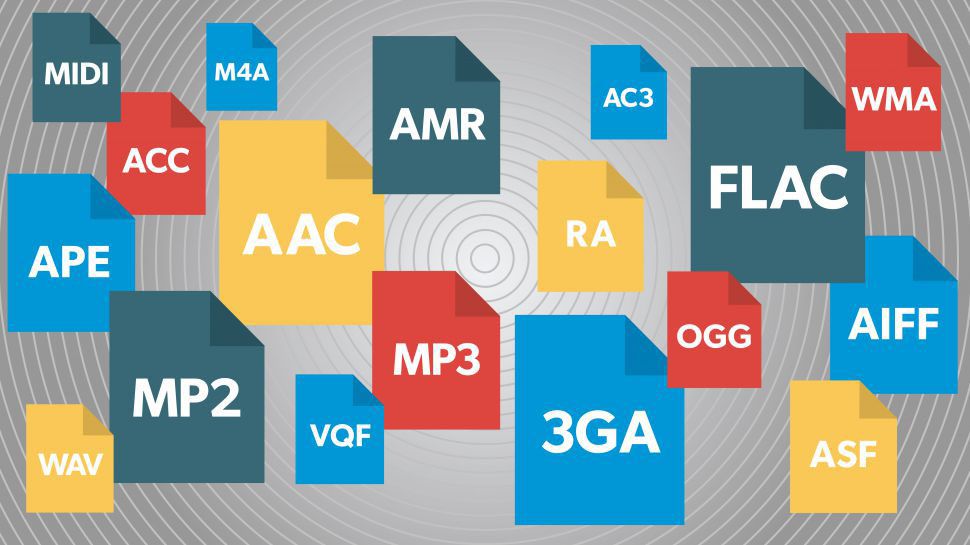
In the world of music there are a large number of music formats, their modifications and versions, created by the giants of the music industry and small companies that have received public recognition in the electronic world.

audio formats

Various physical methods have been developed to store audio data for these purposes, such as vinyl records, magnetic tape, CD, DAT, MD (minidisc), DVD, or converting music scores to music (MIDI), in the same way that they have many different computing methods emerged. audio data storage – digital: OGG, Mp3, Flac, Wav formats.

It is impossible to consider and discuss all audio formats, codecs, their advantages and disadvantages, so in my article I will try to tell you about the most popular audio file extensions that you find.

Why can’t we use any universal audio file encoding format? Because implementing multiple functions requires a different format. For example: to play CDs in a CD-ROM drive, to record music or sound effects in video games, to record a movie track or video clip, to play on mobile phones or to transfer files over the Internet, in addition, there are various operating systems that are the most widely used in the world … These include: Amiga, Macintosh, NEXT, and Windows PC.

Also, the work of a dj, sound engineer, cj, video engineer, or a simple music lover is quite different in nature. This may require that your audio data be saved in your own way. For example, the audio of a CD must be saved using 16 bits and a sampling frequency of 44.1 kHz. However, to download sound over the Internet, we’d better use a different bit depth and sample rate, as each minute of 16-bit, 44-kilohertz audio takes up about 10MB, i.e. an average track of 5 minutes will be 50 meters, too much data for the average user. This article provides an overview of the most popular music formats.

AA (Audible Audio Book File) is a proprietary format developed by Audible. It is used to record audiobooks sold through the Audible and iTunes services. It is possible to reduce or accelerate the speed of listening to files: digital tone, the ability to leave bookmarks when listening to audio books, file protection, when delivering sound recordings over the Internet.

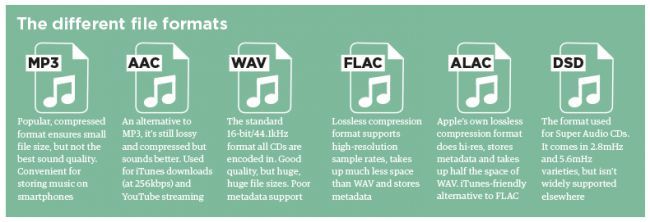
AAC (Advanced Audio Coding) is an audio file format with less quality loss when encoding than MP3 in the same sizes. Lossless music encoding of original quality using the ALAC profile. AAC is a family of MPEG4 audio coding algorithms. Unlike the hybrid mp3 filter bank, AAC uses MDST (Modified Cosine Transform) technology, which means that the listener gets better sound quality than MP3 encoding with the same or lower bit rate. Possible AAC file extensions: [.m4a], [.m4b], [.m4p].

Additionally, AAC is a wideband audio coding algorithm that uses two basic coding principles to dramatically reduce the amount of data required to transmit high-quality digital audio. This format is one of the highest quality, uses lossy compression, compatible with most modern equipment, including notebooks.

For 2009, it is much less common than MP3 and other workarounds. AAC (Advanced Audio Coding) was originally created as a successor to MP3 with improved encoding quality. The AAC format, officially known as ISO / IEC 13818-7, was released in 1997 as the new seventh part of the MPEG-2 family. There is also the AAC format known as MPEG-4 Part 3.

Benefits of AAC over MP3:

– up to 48 audio channels;

– high coding efficiency with constant and variable bit rate;

– sampling frequencies from 8 Hz to 96 kHz (MP3: 8 Hz – 48 kHz);

– More flexible set stereo mode.

ADX is a proprietary ADICM-based lossy compression and storage format developed by CRI Middleware specifically for use in video games. The most characteristic feature is the ability to repeat the sound recording, which makes using the format convenient to use as background music in various games that support this media container. It is compatible with many SEGA Dreamcast games, some PlayStation 2 games and GameCube.

Unlike MP3, it does not use the psychoacoustic model of reducing the volume of sound data (reducing its complexity). Instead, the ADPCM model uses a prediction function relative error data record to store samples.


Free Download Mp4Gain
picture


Mp4Gain Main Window
picture


Mp4Gain Features
picture


Free Download Mp4Gain
picture

Lossless Compression – How It Works

Lossless Compression – How It Works
When the copy is not different from the original.

Lossless compression

Lossless Compression – How It Works
We have already discovered how sound is digitized. One of the problems: if we digitize it with high quality, then we need a large amount of data, which means large files, a large consumption of disk space, expensive flash drives, a lot of Internet traffic. I would like the files to be smaller.

Lossy Compression and Lossless Compression

For this, compression is used – various algorithms that do their magic with the data and the output is data from a smaller volume.

Lossy and lossless compression
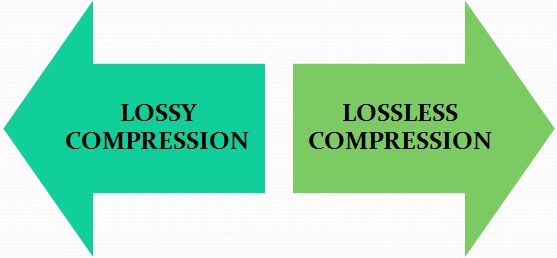
There are two main types of compression: lossy and lossless.

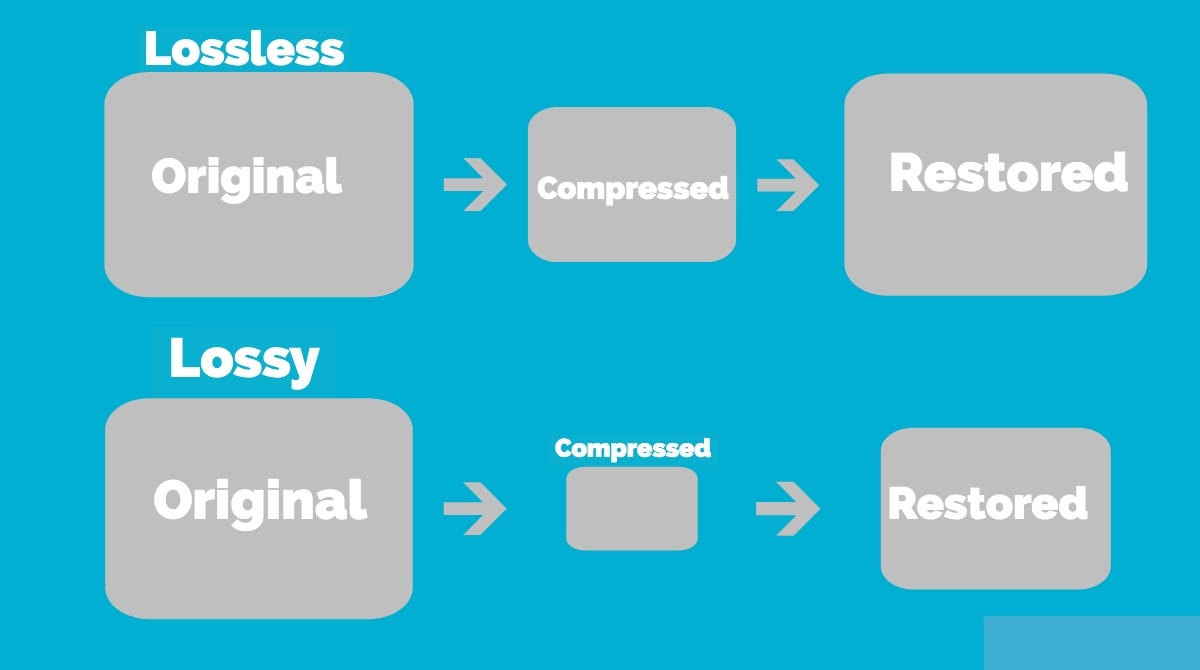
Lossy compression means that we lost some information in the process. Lossy compression algorithms try to make sure that we only lose data that is not too important to us.

Imagine that lossy compression is a short retelling of a school curriculum work: the student is not so important about the description of the author’s nature and style, the main thing is the plot. The short count kept only what was important, but conveyed it much faster.

Lossless compression is when we reduce the size of the file, without losing quality. Interesting mathematical and coding techniques are used for this. The main idea is that during decoding all the data remains in place.

Lossless compression algorithms
There are two main options: the Huffman algorithm or the LZW. LZW is used everywhere, but it is quite difficult to explain, not intuitive, and requires a full lecture. It is much better to explain the Huffman algorithm.

Huffman’s algorithm takes the file, breaks it into pieces, making it convenient to operate, and then looks at how common each fragment is. The algorithm designates the most frequent words with a short code and the rarest with a longer code. Since the most frequent words now take up much less space, the finished file becomes smaller.

But there is also a downside: sometimes you need to store this word and code mapping table directly in the same file, but it can turn out large on its own. Most often, the Huffman algorithm is used for lossless compression of text and video files.

Here’s an example: Take the song Beyonce – All The Single Ladies. There are two such passages there:

All the single women

All the single women

All the single women

Now put your hands up

If you like it then you should put a ring on it

If you like it then you should put a ring on it

Don’t be mad once you see that he wants it

If you like it then you should put a ring on it

Here are 281 signs. We see that some lines are repeated. Let’s code them:

COMPRESSION TABLE

\ a \ All single women

\ b \ Now put your hands up

\ c \ If you like it then you should have put a ring on it

\ d \ Don’t be mad once you see that he wants it

SONG TEXT

\ a \ \ a \ \ a \ \ b \

\ c \ \ c \ \ d \ \ c \

Along with the compression table, this text now occupies 187 characters; we have compressed the text by almost a third due to the fact that it is quite monotonous.

Lossless compression using audio as an example
On average, one minute of uncompressed audio takes up 10 megabytes. This is quite a lot: if, for example, you have a one-hour recording of a concert, it will be half a gigabyte. On the other hand, this recording captures all the nuances of the sound, there are many high frequencies and beauty in general.

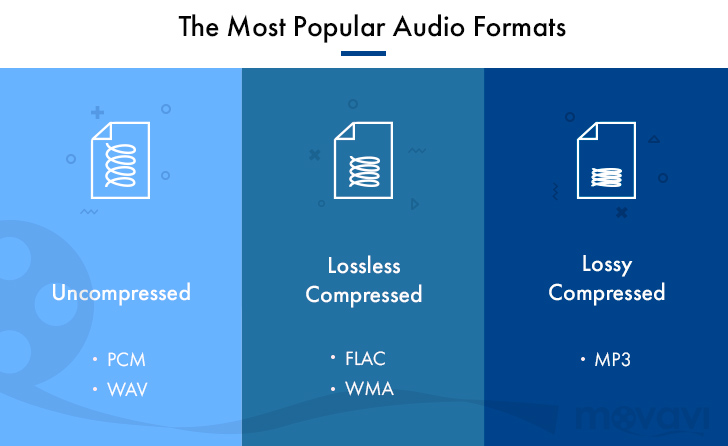
For such situations, lossless compression is used: it shrinks the file by 2 to 3 times without distorting the sound. The algorithms that compress the audio are called codecs. FLAC and Apple Lossless are two popular lossless audio compression codecs.

Compare the size and quality of the two-minute audio yourself:

Original: uncompressed WAV format, 23 megabytes

Lossless compression: FLAC format with the same parameters as WAV, 10 megabytes

Where else is lossless compression used?
In filing cabinets. The job of archiving programs is to package selected files so that the file takes up as little space as possible, without damaging what’s inside. For example, the text version of “War and Peace” might be 4 megabytes and the archived version 100 kilobytes 40 times less.

In programming. There are special wrappers that take a ready-to-use program and optimize the code so that it takes up less space, but retains its functionality. For example:

Delete comments
Minimize function and variable names
Remove characters required for human readability

Lossless audio formats

Lossless audio formats

Lossless


Although downloadable music files and music streaming have made music CDs less popular than before, they still exist and provide an excellent means of backing up your music collection. If you don’t back up your music, you could lose it if your hard drive fails. Even if all your music is on CDs, you should make copies of them because CDs can get scratched.

Lossless vs Lossy

You want perfect copies of all your originals in the event of a disaster, so stay away from lossy formats like MP3, which can affect the quality of your recordings. Use lossless audio formats when burning your digital music library to CD.

Lossless audio formats encode and compress audio losslessly, ensuring your music is perfectly preserved digitally.

FLAC (Free Lossless Audio Codec)
Free Lossless Audio Codec (FLAC) is the most popular lossless encoding format. It is increasingly compatible with hardware devices such as MP3 players, smartphones, tablets, and home entertainment systems. FLAC is a brainchild of the non-profit Xiph.Org foundation and is also open source. Music stored in this format is generally reduced by 30-50% of its original size with no loss of quality.

Common ways to rip audio CDs to FLAC include software media players like Winamp for Windows or special utilities like Max for Mac computers.

All major operating systems are supported by FLAC, including Windows 10, macOS High Sierra and above, Android 3.1 and above, iOS 11 and above, and most Linux distributions.

ALAC (Apple Lossless Audio Codec)
Apple originally developed its ALAC format as a proprietary project, but made it open source in 2011. Audio is encoded using a lossless algorithm that is stored in the MP4 container. By the way, ALAC files have the same .m4a extension as AAC, the naming convention can be confusing.

ALAC is not as popular as FLAC, but it may be the best option if iTunes is your preferred software media player and you are using Apple hardware such as an iPhone, iPod, or iPad.

There is no loss of quality when ripping ALAC music CDs, so this is a good option if you want to keep the original audio CDs. If at any time you need to switch from ALAC to another format, there will also be no loss of quality.

WMA Lossless (Windows Media Audio Lossless)
The WMA Lossless format, developed by Microsoft, is a proprietary format that can be used to rip original music CDs without losing sound quality. A typical audio CD is compressed between 206MB and 411MB, depending on several factors. The resulting file, which is created with confusion, has a WMA extension, which is identical to files in the standard (lossy) WMA format.

WMA Lossless is probably the least supported of the formats on this list, but it may still be the one you choose, especially if you use Windows Media Player and have a hardware device that supports it.

Mono audio
The Monkey audio format is not as compatible as competing lossless systems like FLAC and ALAC, but it does provide better compression on average, resulting in smaller file sizes. This is not an open source project, but it is free to use. Files encoded in Monkey audio format have the funny APE extension.

Methods used to copy CDs to APE files include downloading a Windows program from Monkey’s Audio’s official website or using standalone CD ripping software that generates data in this format.

While most software media players don’t have built-in support for playing files in the Monkey audio format, there is a good selection of plugins available for Windows Media Player, Foobar2000, Winamp, Media Player Classic, and more.

WAV (WAVeform audio format)
WAV format is not considered the ideal choice when choosing a digital audio system to store your audio CDs, but it is a lossless option. The downside to this approach is that files created in WAV format are larger than other lossless formats, since no compression is used.

If storage space is not an issue, then the WAV format has a number of distinct advantages: it is widely compatible with both hardware and software. Converting to other formats requires significantly less CPU processing time because WAV files are already unzipped and don’t need to be unzipped before converting. You can also directly manipulate WAV files with your audio editing software without having to wait for decompression and recompression cycles to update your changes.

What does a lossless audio format do?

What does a lossless audio format do?

lossless audio

You may think that the word “lossless” is used for audio formats that don’t use compression at all. However, even lossless audio formats use compression to keep file sizes at an acceptable level.

LOSSLESS AUDIO

Lossless formats use compression algorithms that preserve the audio data, so the sound is exactly the same as the original source. This is in contrast to lossy audio formats like AAC, MP3, and WMA, which compress audio using algorithms that discard data. Audio files are made up of sound and silence. Lossless formats are capable of compressing pause to almost zero while retaining all audio data, making it smaller than uncompressed files.

What lossless formats are commonly used for digital music?
Examples of popular lossless formats used to store music:

FLAC
Wav
A THE C
Lossless WMA
Impact of Lossless Formats on Music Quality
If you download a lossless music track from an HD music service, you expect the sound to be really high quality. On the other hand, if you convert low-quality music tapes by digitizing them using lossless audio formats, the sound quality will not improve.

Is it possible to convert a lossy song to a lossless song?
It is never a good idea to go from one loss to another. This is because a song that has already been compressed in a lossy format will always be like this. If you convert it to a lossless format, all you get is wasted space on your hard drive or mobile device. You cannot improve the quality of a lossy song using this method.

Benefits of Using a Lossless Audio Format for Your Music Library
Using a lossy format like MP3 is still the most common method of storing your music collection. However, there are clear benefits to creating a lossless music library.

Perfect Music CD Backup: Lossless copy of audio files gives you a slightly exact copy of the original music CD. This means that no matter what audio formats come in the future, you will know that you have a perfect copy of the original.
Recover from loss or damage. Having music in lossless format allows you to restore a damaged original CD or any lost CD to a blank CD.
Convert to any format. Since your music is in a lossless format, you can convert it to any format and get the best quality it can support.

Disadvantages of storing your music in lossless format
Not as compatible: Compared to formats like MP3, lossless formats are not as compatible with hardware devices like smartphones and tablets.
It requires more storage space. Lossless audio files generally require more storage space than lossy encoded files.

Lossless audio formats

Lossless audio formats

Lossless audio

Audio files can be converted in a more or less space saving way using lossless or lossy codecs. While the data reduction is absolutely true to the original with lossless codecs, a difference can be heard from the original material, especially with heavy compression with lossy codecs.

Lossless compressed audio files lose approximately 25% to 50% of their original file size. Typical representatives are Monkey’s Audio, FLAC, or WavPack. Modern lossy codecs like AAC, Ogg Vorbis, or MP3, on the other hand, reduce source material by 90% without sounding noticeably worse.

Lossless audio compression

Unlike documents or images, for example, audio files are very difficult to compress, since identical repetitions are very rare in music. But it is precisely on such occurrences that the Huffmann or Lempel-Ziv algorithms depend, which are used in ZIP or RAR, for example. Therefore, most non-clustered compressors employ predictive coding. The signal is divided into a music component and a noise component. Depending on how well this prediction has been made, the noise component should ideally be Gaussian white noise that can be easily compressed using conventional methods.
In the ideal case, the result is 50% compression, which is highly dependent on the piece of music.

Monkey’s Audio, FLAC and WavPack are popular formats for lossless compression of WAV (PCM) files, for example digitized original recordings from the recording studio (for archiving or later processing) or archiving copies of music CDs. The sound quality is always the same as the original and the checksums reveal corrupted files. Increasing hard drive capacity at affordable prices makes “Lossless Codecs” interesting for everyday use.

Uncompressed: WAV (PCM)

WAV is the largest common denominator of Windows audio formats. The Macintosh equivalent is called AIFF. WAV is actually the collective term for various subformats, of which PCM is the most common and is generally equated with WAV.

WAV (PCM) is an uncompressed recording of sound samples: the time signal of a noise is sampled, quantized, digitized, and saved at discrete points in time. The more often and finer you record these values, the better the sound. With CD quality music, this instantaneous value is recorded 44,100 times per second and recorded with 16-bit “precision”, that is, 2 ^ 16 = 65536 possible values.

With the help of special programs (eg CDex, EAC, Audiograbber), Audio CDs can be transferred to the hard disk as WAV (PCM) files. Viewed in this way, WAV (PCM) files are copies of the original, provided the CD-ROM drive is not read incorrectly or the CD is damaged. One minute at CD quality requires roughly 10MB of storage space, which is not as happy to give away even in the age of ever-larger hard drives.

On the PC, WAV (PCM) and CD-quality (44.1 kHz, 16-bit, stereo) audio files are often the starting material for creating space-saving audio files in formats such as MP3. However, for sound processing on the home PC, WAV (PCM) is the first choice.

Monkey’s Audio

Monkey’s Audio is a lossless audio codec for PCM wave files. Monkey’s Audio comes with a convenient program interface (in English), over which files can be compressed, decompressed, verified or tagged. PCM wave files (any sample rate, 8/16/24 bit, mono or stereo) or corresponding Shorten or WavPack files are accepted as source files. Monkey’s Audio does not support multiple channels.

The APE tags that are used to store the title information can be supplemented with their own fields and are therefore very flexible. They are now used in conjunction with other audio formats as well.

The included command line encoder allows integration into other programs. Various audio players support the format through plugins. A plug-in for Winamp can be installed at the same time as installation. Monkey’s Audio is a Windows program by default. However, there is a platform independent version of Java.

FLAC

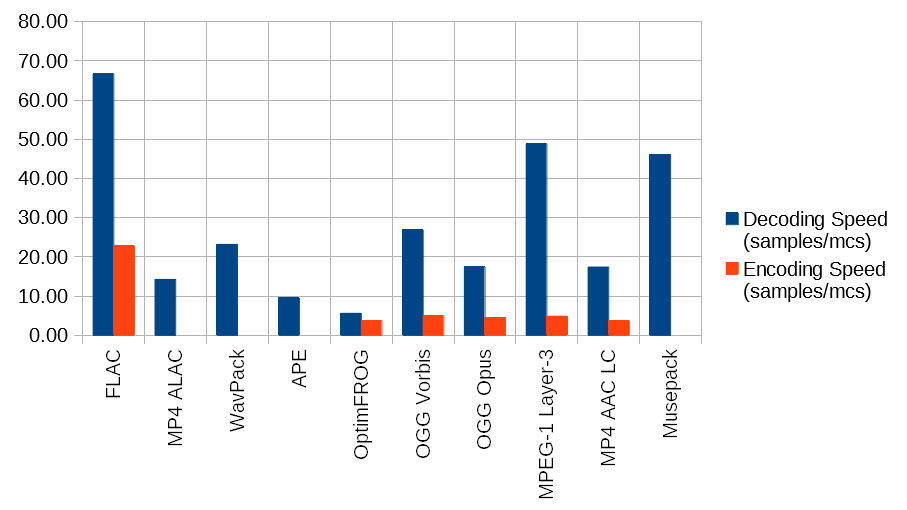
FLAC stands for “Free Lossless Audio Codec”. There are several lossless audio codecs available. FLAC is suitable here for several reasons: FLAC follows the open source philosophy (free open source code, available for many operating systems), works very fast, has a good and secure framework structure.

Comparison of audio formats

What is the best audio format for what purpose?

Comparison of audio formats

All radio and podcast producers are faced with the question: What audio format is best for my shows and contributions? There is usually no simple answer. Each file format and each codec has advantages and disadvantages.

Audio Formats Comparison

Before converting / converting, you need to be clear about what you plan to do with your audio file: Should it be published to the NRWision media library? Is the program designed to broadcast on the Internet or for the home audio system? Should the file be edited again if necessary? Only then can you weigh which audio format and which properties make the most sense.

Audio File Formats comparision

Compress without loss?

You must decide whether you want the best possible sound quality or the smallest possible file size. With some audio codecs, sound is retained at its full bandwidth and without loss. Other codecs compress the file so that it takes up less space or is faster to transfer online. At best, it can still be played on many different devices and players. Depending on the strength of the compression, the sound of music or voice recording may also be audibly affected.

In the case of audio files, information such as sample rate and bit rate always play a role.

The sample rate indicates how often the level is saved per second. CDs, for example, have a sample rate of 44,100 Hz. 44,100 values ​​are stored for one second of music.

Bit transfer rate

Bit rate defines the amount of data that is processed per second. It can be constant or variable and therefore also influences the sound quality.
Important: When converting audio files to other formats, the quality cannot be improved, it only deteriorates or is preserved. With each compression, some of the audio data is lost, although it is not necessarily audible.

Next we present the audio formats and their properties.

MP3

File extension: .mp3

MP3 is probably the most popular and widely used audio format in the world. It became the standard for music files on the Internet more than 20 years ago and has been freely available since 2017. By the way, MP3 was developed by the Fraunhofer Institute in Germany, among others. Raw audio is highly compressed when converted to MP3 files to save storage space. Only what humans can hear should be preserved. You can set the degree of compression, the so-called bit rate. 192 kBit / s (kilobits per second) roughly corresponds to CD quality. At higher bit rates, MP3 files sound lossless to most people. Lower bit rates are used, for example, in Internet radios.

Advantage:
widely used, compatible with many playback devices, high compression

Disadvantage:
possibly loss of audible quality, especially at low bit rates

Wav

File extension: .wav

WAV files are not compressed and therefore take up a lot of storage space. But they can be used well for audio editing and can be easily edited in almost any software.

WAV files were developed for Windows computers in 1991. However, they can also be reproduced and used on other operating systems.

Advantage:
no need to encode / decode when editing

Disadvantage:
very large files

WMA

File extension: .wma

Originally, the WMA (Windows Media Audio) format was supposed to compete with MP3, but it could not be established equally. Audio data is also compressed here, if possible without audible loss.

Some versions of WMA files may contain a certificate key to prevent piracy.

Advantage:
good compression with high sound quality

Disadvantages:
not very widespread, only supported by a few players

AAC (advanced audio coding)

File extension: .aac

This audio format is considered the successor to the MP3 format. With the AAC format, developers have managed to further reduce memory size while maintaining the best possible sound quality.

The AAC process is being used with increasing frequency on music websites, Internet radio stations, and as a soundtrack format for video files.

Advantage:
very good compression, small files with high audio quality

Disadvantage:
not yet compatible with all programs and devices

Ogg

File extension: .ogg

In Ogg files, there is actually a container format. In addition to compressed audio, it can also contain video and text data. Also, Ogg files can be used well as an online stream. Even so, the format never prevailed against MP3 among home users.

Advantage:
small file size with good sound quality, no license

Disadvantage:
not compatible with many programs, must be converted for audio processing

FLAC (Free Lossless Audio Codec)

File extension: .flac

The name already gives it away: the FLAC codec is freely available and compresses audio files without loss of quality. The format is mainly used for music that can be faithfully reproduced thanks to FLAC. More and more players support FLAC files, sometimes just with the help of a plugin.

The FLAC codec makes audio files 30 to 60 percent smaller. This makes them much larger than MP3 files. To do this, you can decode it and thus restore the original data without loss.

Advantage:
no loss, no license

Disadvantage:
relatively large files, not natively supported by all players

Opus

File extension: .opus

The latest file format from our overview should become the Internet audio standard. Opus is developed openly and has several advantages. The audio codec significantly reduces the bit rate again. The quality of music and language is preserved as best as possible. Additionally, Opus files can be streamed and contain metadata.

Opus plays practically no role (yet) in audio processing. We are curious to see if and how the format will prevail for years to come.

5 reasons to choose lossless audio: Flac, WAV, AIFF

MP3 versus FLAC

There are several formats you can choose from when you want to rip your CDs. MP3 is the most popular format, while FLAC (Free Lossless Audio Codec) is a lesser known alternative. The main difference between the two is the way they compress the audio information. Mp3 is a lossy format in which parts of the audio information are people probably won’t hear it, it gets thrown away. On the other hand, as the name suggests, FLAC is lossless, which means that it would keep all the information about the audio and nothing would be thrown away.

LossLess Audio

The biggest consequence of the lossy / lossless difference is the magnitude of the corresponding size. While both are significantly smaller than uncompressed audio, MP3 files will likely be about 20% larger than their equivalent FLAC files. is very important on portable devices where space is often a big issue. FLAC advantage nothing is lost no matter how many times you compress and unzip the file. With MP3, the sound quality would deteriorate due to the way the algorithm works.

LossLess Audio

The small MP3 file size is also one of the main factors why it has become so popular. It was the codec of choice when the first SSD music players appeared; dubbed as MP3 players. Even today, MP3 is still very popular and almost all devices that can play digital music can recognize and play MP3 files. With FLAC, the number of devices capable of playing FLAC files is very small. The ability to play FLAC files can often only be seen on high-end devices, where the sound quality can really be appreciated.

Another aspect in which the two formats differ is royalties. Although MP3 is widely used, few know that it is a proprietary format and that royalties are required to use this format. However, people don’t have to worry because it is the device manufacturer who pays the royalties for using the MP3 format. FLAC is royalty-free software that anyone can use without paying for it. The author intended it to be free from the start.

Resume:

1. MP3 is a lossy encoding algorithm while FLAC is a lossless encoding algorithm

2 is. MP3 files are probably 20% the size of the same FLAC-encoded file

3. MP3 has a broader hardware support compared to FLAC

4. MP3 is a proprietary format, while FLAC is not copyrighted.

Audio formats

Before you know the audio formats, know that they are divided into two main groups: the compressed and the uncompressed.

audio formats

Uncompressed formats are those in which the audio quality is assessed and without loss of information, which guarantees that the audios are practically identical to the real ones. Tablets reduce the original file size, taking up less space on your computer or cell phone memory. However, the quality and information may be compromised.

audio format

It is worth mentioning that it is not just a good format that guarantees that the end result will be of excellent sound quality. You need to do your part, too, using good audio software to make the necessary changes and “cleanup,” as well as using quality equipment to record your voice.

1. Advanced Audio Coding (AAC)

It is considered the main competitor to the most famous format on the Internet, MP3, and is commonly used on Apple devices, based on the MPEG-4 standard.

Compared to MP3, AAC has more flexibility, which means you will experience less data loss and quality when compressed. Also, it has a better level at lower bit rates, such as 128 kbps.

2. OGG Vorbis

This is a non-proprietary format, that is, they have no restrictions for audio players to play it. Also, it has a better compression rate than MP3, however it is not as well known or advertised.

It is widely used in game audio, because among other qualities, it brings open source, which provides greater customization, but is difficult to standardize. Its audio quality is quite satisfactory.

3. MP3

Considered the most popular audio format in the world, MP3 offers high compatibility, allowing music and audio to be played in virtually any program or media player.

It was created in Germany and uses the so-called perceptual encoding, which encodes only the sounds that humans can hear. Of all, it manages to be the most balanced in terms of quality versus size.

It may get to lower bit rates, but there may be a final quality loss.

4. WMA

This is Microsoft’s standard format and also quite popular. Unlike MP3, WMA allows the creation of content-protected copies, thus preventing your music or other audio productions from being pirated.

Microsoft’s proposal is that the format achieve a sound property equivalent to that of MP3, but in a much smaller size. In practice, this does not happen, but at low bit rates the result is very similar.

It offers four codecs:

Standard WMA: acts as an MP3 repeater;
WMA Pro: guarantees higher definition audio;
WMA Lossless: allows file compression without loss of quality;
WMA Voice – Aimed at low bit rate voice recordings.

5. MP2

Although it already has a successor, MP2 is still widely used, being the standard format for transmitting radio and television audio. It is a file extension for MPEG -1 layer II playback (MP3 plays in MPEG -1/2 layer III).

One of the attributes of the MP2 is that it still has great compatibility, as well as fewer errors than its successor. In addition to having better performance in audios with higher bit rates.

6. Real Audio

RealNetworks proprietary format. They have multiple audio codecs and great performance for those with low bit rates. It was constantly used in dial-up modems, hi-fi formats for music and streaming, as is the case with web radio.

RealNetworks is an internet provider that works with streaming services. It was founded by a former Microsoft executive and also offers entertainment services through subscriptions.

7. Audio Coding 3 (AC3)

Created in 1983 by Dolby Laboratories, AC3 is primarily used in DVDs, Blu-ray players, home theaters, and HDTV playback. It can reproduce frequencies between 20 and 20,000 Hz, which is equivalent to the human audible sound.

Therefore, the AC3 can reproduce unique and detailed sounds, with very good quality. Its bit rate goes up to 640kpbs and its display speed goes up to 48kHz.

8. WAV

One of the best characteristics of this format is that it has a high sound fidelity rate, that is, it faithfully reproduces what was recorded without compression or loss of data.

It is widely used by those who work with audio editing, since it will be able to manipulate the real sound and without any interference. It is also considered for those who need more definition and sound fidelity as possible for their productions.

Mp3, the winner

In the era of broadband connections, fiber optics and HD videos on YouTube, MP3 remains the reference format for audio files. We are now so used to listening to music in compressed formats, and often through poor quality playback systems, that it is difficult for us to remember what listening to music really means. The recent evolution from download to hit-and-run streaming has only made the situation worse by further devaluing the value of music. When was the last time you listened to a record from start to finish without interruption, spending those 30-40 minutes on “simple” listening activity?

Audio formats

Premise: This post is not a crusade against Spotify because I use it myself for new releases or to have some background music at work, it is not even an analog vs. digital (or vinyl vs. CD vs. MP3) post because on this topic en Much has already been said. My goal is to make you understand what you are missing, in qualitative terms, if you listen to music in compressed formats.

Audio formats

Sampling and theoretical aspects.

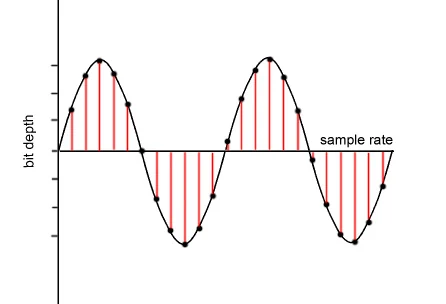
Audio recording on a computer or digital medium assumes that the signal passes through an analog> digital (AD) converter, so that the continuous electrical signal generated by microphones or musical instruments is transformed into a digital signal (series of 0 and 1) This process is called sampling. The final quality of the recording depends on several factors: converter quality, sample rate, and bit depth.

To make an easily understandable comparison: When shooting a movie, the “analog” reality perceived by our eye is stored in a movie that takes 24 frames per second. If we consider the standard of the audio CD (44.1 kHz, 16 bits), for every second of music 44100 pictures are taken from the computer to the continuous electrical signal. If with the sampling frequency we have simply established how many times in a second the waveform will be analyzed, with the bit depth we assign to each sample a numerical value: 2 ^ 16 = 65,536 possible values.

If you wonder how it got to 44,100, I refer you to the Nyquist-Shannon sampling theorem.

When we press the record button on our computer, through the PCM (pulse code modulation) sampling process described above, the files are saved in uncompressed WAV or AIFF format.

Lossless files and lossy files

PCM files take up a lot of space on our hard drives because, as we have seen, there is the data necessary to describe the analog waveform in as much detail as possible. Indicatively, a WAV or AIFF file as audio CD will occupy 10 MB for every minute of music.

To overcome this problem, remember that in the early 2000s storage space cost around $ 10 / GB, while today the price is around $ 0.03 / GB (source): Audio formats have been introduced that , through an algorithm encodes and decodes information, reduces the size of the file. These codecs fall into two categories: formats with lossless compression and formats with lossy compression.

As the name implies, lossless compression indicates a reduction in file weight (usually around 50%) without loss of information. Leaving the world of audio aside for a second, ZIP and RAR files are clear examples of this type of compression: at any time we can “unzip” such a file and have access to the original information again without this no way has changed.

The most common file formats are: FLAC (Free Lossless Audio Codec) and ALAC (Apple Lossless Audio Codec).

Lossy compression, on the other hand, implies that some of the original audio information is somehow removed to obtain a file that weighs even 90% less than the PCM.

By what criteria is information removed without “compromising” the original audio too much? Since our hearing is an imperfect instrument, codecs exploit two principles of psychoacoustics: the minimum threshold of audibility (the human ear does not perceive all frequencies in the range between 20Hz and 20kHZ equally) and masking (a weaker sound). is masked, making it inaudible, by a louder sound.)

Compression algorithms, however advanced, introduce a number of artifacts into audio files that, if played back in discrete quality audio systems, can be easily recognized or at least noticed even by an inexperienced ear. Several studies have shown that an untrained ear does not distinguish the difference between an uncompressed file and an MP3 with a bit rate equal to 256kb / s or more.

The most common lossy formats are: MP3, OGG Vorbis, AAC.

The victory of MP3

Since its introduction in the mid-1990s, MP3 has established itself as the industry-standard consumer format fueled by file-sharing through peer-to-peer channels, where, with slow connections, the heaviest file was the one it was downloaded, the longer it took to obtain it, and since the market introduction of MP3 players in which we tried to store as much music as possible and, therefore, we resorted to very compressed files.

In the transition from the era of downloading to that of small transmission files, they ensure smoother and smoother data transmission.

Despite, therefore, the evolution that has taken place in recent years in the speed of Internet connections and the reduction in the price of storage systems, only in recent years have services been created to buy files from High-quality online audio (HD tracks) or HD streaming services (Tidal).

Examples and audio files.

The main services we use to buy or listen to music use these compression levels (all information is taken from the official websites of each service at the time this publication was written).

Spotify: OGG Vorbis files at 96 kb / s (normal mobile quality), 160 kb / s (normal desktop and web player quality, high mobile quality), 320 kb / s (premium users: high desktop quality, very high quality mobile).
iTunes: By default, CDs are imported into 128 kb / s AAC files. Files in the iTunes Store are of this quality, except for “iTunes Plus” songs converted to AAC at 256 kb / s.
Pandora: 64kb / s AAC (free users), 192kb / s AAC (premium users).
YouTube: HD videos (720 or 1080p) have an audio quality equal to 384kb / s, SD videos (360, 480p) have an audio quality equal to 128kb / s.

FLAC, WAV, MP3, DSD, ALAC … What audio format should I use?

You probably know the famous MP3 audio format. There’s even a good chance that you only use it on a daily basis. But did you know that it is possible to take your music to the next level thanks to other audio formats? If the terms FLAC, DSD, sample rate, or even lossless don’t mean anything to you, then you’ve come to the right place. Designed specifically for newbies, this guide tells you everything you need to know about the basics of digital audio.

soundwave

FLAC, DSD, ALAC … Listening to a debate between audiophiles can seem difficult when you do not know this universe and the many acronyms that refer to it. But if you try the adventure, you will not regret it. Say goodbye to your boring and lifeless MP3s and hello to quality music. Trust us, your ears will thank you!

Sample Rate and Bit Depth: The Basics of Digital Music

Before knocking you out (we promise we won’t hit too hard) with barbaric acronyms in every way, let’s first focus on two essential notions of modern audio, namely sampling rate and bit depth. These two elements give an idea of ​​the recording precision of a song.

but depth

As you know, computers run on bits, which are sets of 0 and 1. During a passage in the studio, music produced by an artist must be digitized, therefore transformed into 0 and 1 in order to be recorded on CD or transmitted to through transmission services. This is where the sampling rate and bit depth come into play.

Take the example of a CD. Our beloved empanadas are recorded in 16-bit / 44.1 kHz. The 44.1 kHz sampling rate means that the music produced by our musician is analyzed 44,100 times per second by studio recording devices. As for the bit depth, it gives an indication of the number of information recorded during this same period. The greater the depth, the more information will be encoded at the end.

However, CD quality is not the best in the world, even if it far exceeds MP3. Thus, we find 24-bit / 192 kHz recordings. The DSD goes even further with a frequency that rises to several MHz. But for simplicity, just remember that the higher the values ​​described above, the more accurate the recording will be in your sound reproduction.

Lossy formats: MP3, AAC, OGG

In general, there are two types of formats in the audio world: lossy, lossy in English, and lossy, or lossless. If you want the best audio quality, stay away from compressed formats.

The best known of all is MP3. True dinosaur in the audio world, this type of file was developed at a time when the capacities of our hard drives were determined in MB and not in TB. Therefore, we had to compress the recordings as much as possible, even if that meant putting quality aside.

It is true that MP3 encoded music weighs only a few megabytes. But the applied algorithm is very aggressive, it simply cuts the frequencies considered inaudible by the human ear. In fact, MP3 loses many audible parts. To get an idea, click the link below, you will hear these famous truncated parts. The pieces seem flat, devoid of life. Listening can even become unpleasant after several tens of minutes. Suffice it to say that, apart from its small size, MP3 is no longer really interesting in our time if we are looking for quality music.

To make things better, Apple, meanwhile, released another audio format, AAC, for advanced audio encoding. This is also a lossy format which therefore loses details during data compression. However, the algorithm used is more efficient, cutting fewer important frequencies, at least on paper. In absolute terms, the difference from MP3 is not necessarily stark and the debate has been raging for years in the audiophile environment to find out if the AAC format is really better than MP3.

Finally, there is also the OGG Vorbis, another lossy compressed format. Like AAC, it is supposed to work better than MP3. This is the type of file Spotify uses. Her interest is to enable efficient transmission while reducing quality. However, the songs encoded in this format are not fabulous. The ideal is really to become lossless.