Highest quality music format. – part 5


Free Download Mp4Gain
picture

Highest quality music format. – part 5
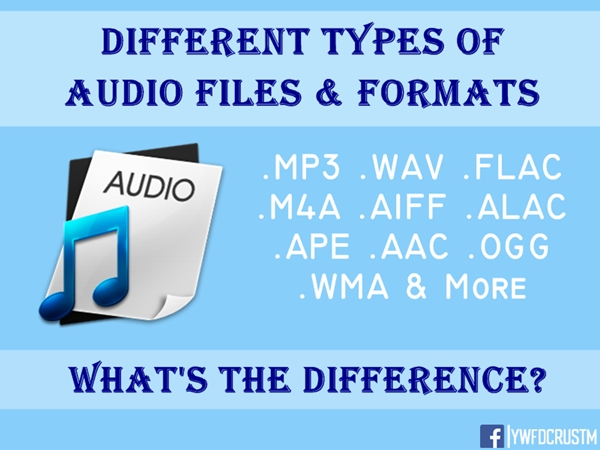
Audio File Format

There are many music formats now. Not so long ago, the popular mp3 standard is outdated due to frequency cuts, and even a high bit rate doesn’t save it.

audio format

It is not a bad option to replace the Ogg format, BUT it also has losses, although they are smaller.

OGG Vorbis
The youngest format developed from scratch relatively recently is OGG Vorbis. Some predict a good future for it, others an imminent sunset, but most of those who have tried it in action agree that this is a very promising and very high-quality project. Let me remind you that both mp3PRO and WMA are commercial formats and consequently closed, unlike what OGG is an open project, with source codes available to anyone, making OGG Vorbis the fastest growing compression format , something like a project. LAME for MP3. Despite its young age, OGG has recently undergone a complete optimization of its algorithm to work with low bit rates. And now a new version format received the RC2 prefix to the name. At the moment, according to the available information, the OGG Vorbis encoder compresses the stream only with variable bit rate (VBR), performing compression with a bit rate of 32 to 350 kbps.

Due to the increasing volumes of the hard disk, the requirements for the quality of digitized music began to increase and lossless digitization began to gain more and more popularity.

A surprising example is the Flac format.
FLAC only supports fixed point samples, not floating point. It can handle any PCM bit resolution from 4 to 32 bits per sample, any sample rate from 1 Hz to 1,048,570 Hz in 1 Hz increments, and any number of channels from 1 to 8. Channels can be grouped in cases such as stereo and 5.1 channel surround to take advantage of inter-channel correlations to increase compression. FLAC uses CRC checksums to identify corrupted frames when used in a streaming protocol, and it also has a full MD5 hash of the raw PCM audio stored in its STREAMINFO metadata header.
FLAC (English Free Lossless Audio Codec) is a popular free codec for audio compression. Unlike the lossy Ogg Vorbis, MP3 and AAC codecs, it does not remove any information from the audio stream and is suitable for both daily listening and archiving an audio collection. Today, the FLAC format is compatible with many audio applications.
FLAC Features:
Lossless compression: PCM data encoding does not lead to information loss, therefore the decoded audio file is absolutely identical to the one entered into the encoder. To determine possible errors during file transfer, a 16-bit checksum is calculated for each frame. The integrity at a later stage is confirmed by the MD5 signature of the decompressed data, which is in the header and can be verified during replay, decoding or testing.
Speed: The encoding and decoding speed is asymmetric. For decoding, only whole number arithmetic is used, which requires much less computation than in perceptual codecs. Real-time decoding can be easily accomplished even on older computers.
Hardware Support: With a free base implementation and easy decoding, FLAC is the only lossless audio codec that has hardware support.
Streaming: each FLAC frame contains enough information to decode itself. The current FLAC framework is independent of the ones before and after. FLAC uses timing codes and checksums, allowing the decoder to quickly select a position in the current sequence.
Search: FLAC supports fast and accurate search, which is useful not only for playback, but also allows FLAC to be used in sound editors.
Metadata: FLAC has an extensible metadata system. New metadata blocks can be defined and implemented in future versions without losing backward compatibility. Metadata types are now defined for Audio CD lookup tables, labels, and markup lists. An application can use the APPLICATION metadata block after registering an ID for it.


Free Download Mp4Gain
picture


Mp4Gain Main Window
picture


Mp4Gain Features
picture


Free Download Mp4Gain
picture

Highest quality music format. – Part 4

Highest quality music format. – Part 4

audio format


AAC

An advanced form of audio encoding. The younger but advanced brother of MP3. It has slightly improved sound characteristics and a higher compression ratio.

audio file formats


Applies to Android, iOS, iTunes, YouTube, Nintendo, and the latest PlayStation.

It is also a folk format, but for a little more advanced people. Which is reflected in the title.

OGG

In general, this is not a format, but a container, and in fact the name OGG says nothing about the sound it contains.

However, most of the time it contains the Vorbis codec.

Significantly improved sound quality relative to other lossy compression formats.
Smaller files can be recorded with the same sound quality.
An even cheaper format than MP3.

The problem is that the OGG format is free, so nobody invests money in its promotion. Therefore, it may not be supported everywhere and incompatibilities may arise.

Then you have to convert to MP3.

WMA
Microsoft’s proprietary format, therefore, although it is an improved version of MP3 and OGG, has not received widespread use and is not compatible with most devices and platforms.

Advice. If it is possible to use WMA instead of MP3, use the former. Cheaper and more pleasant to the ear.

For owners of advanced and expensive devices, branded desktops and mobiles, with high-quality headphones and speakers.

The downside to these formats is that file sizes of the same recording length will be roughly two to three times larger.

However, although lossless compression is stated, it should not be confused with high-fidelity audio recordings. There are minimal losses, although notable only for musicians.

FLAC
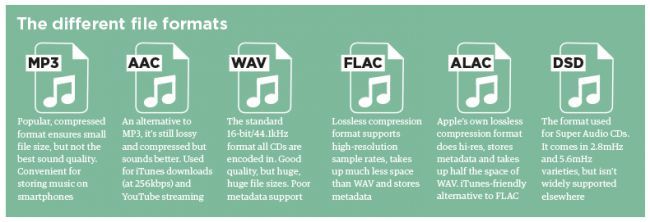
Free lossless audio codec. Its advantage is its great popularity, almost like MP3.

The compression ratio is up to 60% of the original file.
Compatible with most software platforms and devices.
It can be a profitable alternative when it comes to burning CDs. Almost indistinguishable in sound, but the advantage of saving almost half the disk space.

A THE C
Format for owners of Apple-branded devices, as others may not be supported.

Slightly less good than FLAC in terms of compression ratio.

But Apple owners simply have no choice: the free FLAC format does not work in principle on iOS and iTunes.

Lossless WMA
An improved version of the aforementioned WMA. Slightly lower than FLAC and ALAC. It has a significant advantage over ALAC, as WMA is compatible with Windows and Mac.

However, it is not very widespread, so if you have many different devices in use, there is likely an incompatibility.

Highest quality music format. – Part 3

Highest quality music format. – Part 3

audio file format

Three types of audio formats

audio file formats

No compression.
Lossless compression.
Lossy compression.
Uncompressed audio recording formats show their best performance only on high-quality professional audio equipment.

If you have an inexpensive tablet or smartphone in your hands, then wonderful music will play on your device, but you will not listen to it simply because the hardware and software resource and the speakers or headphones are not capable of reproducing such high sound quality. .

On the other hand, if you start MP3 sound recording through professional stereos and amplifiers, you will hear such noise and rattle from the speakers that, again, this type of use is completely pointless.

Audio Classification by Type of Sound Reproduction Equipment
For professional equipment, uncompressed audio formats.
For semi-professional teams, compressed audio formats. But without loss.
For inexpensive equipment, compressed and lossy audio formats.
In the first case, the hardware is so expensive that it is ridiculous to worry about saving money on media.

In the second case, the owner of an Apple device for a thousand dollars will obviously also be able to call himself to spend a couple of hundred dollars on a bulky memory.

In the third case, since we have barely managed to raise money for a cheap smartphone, saving on the size of the stored music is very important. Well, no one is going to listen to a symphony orchestra in Hi-Fi on the phone anyway. Unless you can download a ringtone from the classics to make a joke look like a fresh bell pepper in the eyes of tomatoes.

With this concludes the overture, we begin to present the subject.

This includes uncompressed formats.

PCM – Pulse Code Modulation. The original analog audio is sampled as is, without any modification.

PCM is the most common audio recording format used on CDs and DVDs. Dolby multi-channel, surround, subject to high-quality speakers, sounding almost one-on-one with a live performance.

If you like to sit in front of a home theater and immerse yourself in empathy for the main and supporting characters in the movie, this is it.

Wav
A fairly old format, developed as early as 1991. Well, that’s how the old masters always thought of high quality.

Many people think of WAV as an uncompressed format. But in fact it is a container and it can also contain compressed files.

In most cases, WAV contains uncompressed PCM audio. Therefore, the quality is high. But even for one minute of recording, approximately 32MB of memory is wasted.

Fairly good compatibility with Windows and Mac.

AIFF
An analog of WAV from Apple developers. This is also a container and also usually contains sound in PCM format. Good compatibility with Windows.

Lossy compressed audio formats

Truly popular formats for everyone.

MP3
In accordance with the MPEG-1 Audio Layer 3 standard. It appeared in 1993 and instantly won universal love precisely because of its economy in memory consumption.

A CD can store the complete discography of your favorite band.
Throw some records in the glove compartment and you can enjoy music from Kaliningrad to Vladivostok.
During this time, you can listen to all the books of all the writers worth listening to.
The MP3 format is such a solid eunuch, from which all the most reluctant cut, but began to show the ability to accumulate and save. Also, MP3 is a very inexpensive format.

The main advantage is that he leans on everything that he just plays and sings.

Highest quality music format. – Part 2

Highest quality music format. – Part 2

Audio File Format

AMR standard

As for this format, it may be one of the lowest quality. Its origin is related to the appearance of the first clumsy mobile phones, which still could not set ringtones in .mp3 format to ring.

Audio Format

So AMR was still able to replace natural sound with a certain amount of quality loss. But this quality cannot be compared with that offered by the more “advanced” formats.

MIDI

Interestingly, MIDI can also be attributed to what are commonly called “audio formats”. Although it is generally accepted (and many, in fact, still believe it) that the MIDI system is just a set of commands, you can argue with that. Decoding the MIDI abbreviation is actually a system for recording and editing certain keystrokes, pitch, tempo, key, effects, etc.

However, there are files with the .mid or midi extension that can be played quite easily in modern sequencers or studio recording software using Roland’s standard set of GM (General MIDI), GS (which is the same) sounds. or XG. (Extended MIDI) from Yamaha Corporation. The first two sets have 128 standard sounds, not counting the effects, and the third has almost three times as many.

FLAC
Now we come to one of the most modern and unique formats of our time. Music in FLAC audio format is gaining popularity today. This is due to the quality that true music lovers pay attention to in the first place.

If you look at it, this format was created on the basis of the well-known MP3. But if split-track layout was used before, there is no such thing in this format (at the moment, at the moment). The structure consists of one or two files, one of which is informational. Only specialized software audio players can play this format. The most famous can be called AIMP. Only when the main file is opened does the list of recorded tracks appear in the main bin. In such a player, switching between tracks is done in the same way as in any other. But there is no possibility of accidental deletion of a particular composition (as already mentioned, the information about them is contained in a single file).

Format compatibility
Naturally, all audio formats are compatible with each other today. In other words, any standard DVD player or home software can handle this effortlessly. The same goes for sound processing programs. The semi-professional and professional programs recognize all the formats known today (even in spite of the specifications of the operating systems). Audio editors, sequencers, plug-ins such as VST, RTAS (for Windows systems) or AU (for Mac OS X) can work with these formats in the so-called cross-platform mode.

Format conversion

There are several ways to change the audio. For example, you can open the “native” format and save the file in a different one. You can make it even easier. There are special converters for this. In them, you can simply load the desired initial format file from the list, and then just select the end. As they say, nothing at all.

Sound quality processing
Another thing is when it comes to changing part of the frequency of the original file. Here you cannot do without specialized software packages. It is with its help that you can change the quality of audio files. In this case, you can change not only the standard sample rate of 44100 Hz, increasing it, say, up to 96000 Hz, but also adjust the depth of the same 16 to 24 or 32 bits. And we are not talking about the fact that you can also adjust the bit rate, that is, the reproducible bandwidth, expressed in kilobits per second. The standard value is considered to be 128 kbps. The bit rate can be changed at your discretion, but the best sound quality is achieved at around 320 kbps. Of course, not everyone can tell the difference between standard sound and peak performance. However, it is worth trying to play an audio track with different data on good equipment. Here the difference will not keep you waiting.

Also, in addition to all these parameters, you can edit and much more. What is the software use of equalizers, limiters, compressors, crossovers, normalizers, de-essers, etc., etc. Each of these modules allows you to customize the sound, as they say, “on its own”. And absolutely all the formats known today can be processed by programs of this type.

Final comparison
Let’s try to make some kind of comparison between the formats used (although this is far from being all there is in the world of sound).

Highest quality music format.

Highest quality music format.

Music File Formats

Audio Formats

audio formats

As a rule, today the term “audio” refers to everything that is connected with sound, whether it be playback, processing, mixing, mastering or listening to recordings. But few people know that since their inception, audio formats have constantly undergone many significant changes, sometimes for the better and then for the worse. The problem is that, compared to the original formats, the creators of the new formats tried to improve the sound quality, and this invariably affected the size of the played file. Downsizing, on the contrary, led to a loss of quality. But it was not always like this.

The first audio format in computer games
The first mention of computer sound came from the creation of primitive games at the time, in which sound was played through the system’s speaker. But no matter how hard the developers of such software (software) have been, the required quality could not be achieved, compatible with tape recorders or reel or cassette recordings.

That is why many manufacturers have started looking for solutions on how to change the audio format so that the sound is natural. Frankly, this has led to more competition than we have now. This applies not only to the material being played, but also to studio sound, live performances, quality or basic parameter settings in terms of knowledge of physics, acoustics, etc.

The appearance of the WAV format
It is believed that the first full quality of audio formats was associated with the appearance of the standard and the .wav file extension (this abbreviation was formed from the English word “wave” or wave). Anyway, he became the first-born that could be processed into computer programs on a professional level.

These files already had their own characteristics: sample rate, sound depth, bit rate, and much more. This sound was even compatible with what could be obtained after processing a conventional audio CD using certain instruments such as a conventional equalizer. But the size was clearly unjustified. For example, a three-minute track could be 20 to 50 MB.

CD discs
The audio CD format, or rather the .cda extension, appeared around the same time.

Unlike “wave” files saved on the hard disk, they cannot be edited. Today it can be opened in an audio processing program, reformatted by audio transcoding, and saved anywhere other than on a CD.

MP3 codec
With the advent of the LAME MP3 Encoder codec, the music industry experienced a real shock, because those files “weighed” dozens of times less than the same WAV file. Even a five minute compose at full compression rarely exceeds the size of 5-7MB. Agree, a significant advance, not to mention the fact, allowed not only to adjust the above characteristics, but also some additional parameters in the form of ID3 tags, which contained information, for example, about the artist, album name and tracks. , the release date.

This type has become the most popular. Look, almost the entire Internet is full of this universal format. In general, we can say that the MP3 audio format has become a true revolution in sound. It remains one of the most popular and in-demand so far, even though it is being replaced by other types of audio. But more on that later.

AIFF files
Audio formats have a different style. The so-called .aiff format was originally created for use on Macintosh computer systems.

Only much later did a transformation take place, which predetermined the compatibility of sound formats with their use on platforms of different operating systems.

OGG format
Music in audio.ogg format is also quite common. This standard was developed by Vorbis. However, it should be noted that it has a number of significant disadvantages. First of all, it is an unreasonable load on the computer’s system resources, despite the minimal size. Second, the use of your own codecs and decoders, which the system may not install automatically. For example, when working in the FL Studio Producer Edition (or XXL) program in versions prior to 9.xx, there was a folder with an installation file in .inf format, which had to be activated for installation after installing the main application manually. (Otherwise, presets in this format just won’t play.)

However, these types of audio formats are now found, and the sound itself looks great.

Lossless digital audio formats

Lossless digital audio formats

lossless audio

Uncompressed formats
The first digital audio formats encoded information, as they say, “as is”.

Lossless Audio

This format is, first of all, convenient for the computer itself: there is a simple correspondence between a sequence of digital signals and a sound waveform. Not surprisingly, despite the further development of compressed audio formats, uncompressed formats continue to be actively used in the field of professional (and amateur) sound work. What are these formats?

First, it is the audio CD format itself. For him everything is simple: this is the format in which most audio discs are recorded (unless, of course, several albums have been recorded on them at the same time – in this case, we are talking about a format obviously compressed). The Audio CD format uses Pulse Code Modulation (PCM) to convert “digital” to “analog.” This is the type of conversion that forms the basis of most other audio formats.

Everything is clear with CDs, but what about sound presentation formats on computers? Here, as you can imagine, the biggest computer and software manufacturers were the first to rush in, developing formats like AIFF (Apple) and WAV (Microsoft and IBM), known to computer and operating system users of these developers to this day. from today. Furthermore, Apple, being the undisputed leader in the field of computer multimedia at the time, introduced its format in 1988, ahead of the developers of the WAV format by three years. If you let the computer read the data on the audio CD and translate it into any of these formats, you will get an exact copy, which will take up the same amount of space on your computer’s hard drive as the original on the CD. The only difference will be in the format in which this data will be packed.

It is important to note that the capabilities of these formats exceed those of an audio disc. They allow much greater audio depth (up to 32 bits) and sample rates (AIFF up to 196 kHz, and in WAV, any). But even these parameters were not satisfied with the developers of ultra-high fidelity audio formats. These formats were first used on Super Audio CD (SACD) developed in 1999 by Sony and Philips, and were eventually installed on personal computers for lovers of high-quality sound.

The digital audio format used in SACD is called DSD (Direct Stream Digital). It uses a fundamentally different way of analog-to-digital and digital-to-analog conversion – the waveform is encoded with just one bit at a time. In other words, the “depth” of the sound is only one bit, but this information is updated much more frequently than in most other formats, that is, the sample rate is increased several times. This allows the algorithm to recreate the shape of the sound wave by estimating the density of these pulses in a given time interval.

This way of representing the signal made it possible to avoid non-linear quantization noise. It is true that the higher the frequency of the sound, the lower the number of pulses that encodes it, the precision of the encoding decreases, which means that the constant noise level in relation to the signal, that is, the hiss, increases . But at a high sampling frequency, the level of this hiss becomes critical already in the ultrasound region, which is imperceptible to the ear. At the same time, a much more important task has been accomplished: there is no quantization noise, a kind of “curse” of digital sound. They all “left” with the same inaudible noise. It is not surprising that this format fell in love with critics of “digital”, it seemed to bring it closer to “analog”, eliminating traces of discretion in its sound.

However, it turned out that DSD files are completely unsuitable for editing: they are edited only by converting to PCM (and vice versa when saved), and each such conversion multiplies the amount of noise that soon becomes critical for hearing. . It’s one thing when you record ready-to-use analog material in DSD, which has passed analog mastering. But what should you do when recording and editing new audio material? So, there were formats that went back to pulse code modulation with additional adjustments against quantization noise. Notable among these is DXD (Digital eXtreme Definition), which has found application not only for mastering source data for SACD, but also for listening to high-quality audio on a computer.

MAXIMUM SOUND QUALITY. LOSSLESS FORMAT

MAXIMUM SOUND QUALITY. LOSSLESS FORMAT: WHAT IS IT? HIGH QUALITY MUSIC IN LOSSLESS FORMAT

Lossless Audio

Today there are about three dozen common digital audio formats. Why you need to create so many types of sound files to store one type of content and how to manage all this, you will learn from this material.

Lossless Audio

Surely many users prefer to use their home computer not only as a workhorse, but also as a multimedia center, where they can watch movies or family photos, as well as listen to their favorite music. Although compact digital players or mobile phones are certainly more suitable for listening to musical compositions, but unlike them, a computer can not only play music.

No matter how big the built-in memory of your music player is, it will most likely be difficult to store your entire music library on it. Additionally, using a PC, you can create, edit, organize, and search for music. Also, don’t forget that there are around three dozen common digital audio formats today, and most players are far from omnivorous and can only play a few of them.

So why do you need to create so many music formats to store one type of content? The point is that in the vast majority of cases the sound is stored in a “compressed” form, since one minute of uncompressed composition occupies about 10 MB on the hard disk. On the one hand, this seems not to be much, but on the other, if you are a music lover and your collection consists of several hundred or even thousands of songs, then it is clear that the sound must be compressed to reduce the space it takes up electronic media.

Various special algorithms are used to compress music files, which subsequently determine the structure and presentation of the audio data, or so-called digital audio file formats. All audio formats can be divided into three groups: uncompressed audio formats, lossless compression, and lossy compression.

NO COMPRESSION

One of the most widespread formats related to this type is the well-known WAV. The sound of files with this extension is stored without compression or changes. It is true that much more space is required to store uncompressed files and therefore WAV is more widely used only in professional audio and video applications, where the sound should not have a loss of quality before processing. Storing ordinary musical compositions in this form is an unwarranted waste.

To play WAV files, you do not need any special software, as all media players understand this format, including the standard Windows Media audio player built into the Windows system.

Another format used to store uncompressed audio that is worth mentioning is Apple’s development called AIFF (Audio Interchange File Format). As you may have guessed, it is most commonly used on Macintosh computers running Mac OS X.

LOSSLESS COMPRESSION (NO LOSS)

Lossless compression algorithms for audio files work on the principle of conventional file cabinets. They do not provide the highest level of compression (40 to 60%), while they have virtually no effect on sound quality. It is also worth noting that in this case, the encrypted data can be fully restored to its original form. Therefore, the use of lossless compression is most often used in cases where it is important to preserve the identity of the compressed data with respect to the original.

The most popular audio formats in this group are FLAC (Free Lossless Audio Codec), APE (Monkey’s Audio), WMA (Windows Media Lossless), and ALAC (Apple Lossless Audio Codec). Each has its own pros and cons. For example, the APE codec offers slightly better compression gains, while FLAC is more common. In general, all true music lovers store their music collections in lossless formats, since they do not remove any data from the audio stream, and files created with these codecs can be listened to even on high-quality stereos.

Lossless formats: flac, ape, wv, dts, and other digital audio formats

Lossless formats: flac, ape, wv, dts, and other digital audio formats

Free Lossless Audio Codec

Recently, in the open spaces of the Russian Internet, music in Lossless formats has been found more and more often, which can not fail to delight connoisseurs of free real quality. But sadly, files with the flac, ape, wv, dts permission cause a “RAM” stupor for a common user and he walks in search of his usual mp3. Well what can I say, Epic Fail, comrades?

lossless  audio

This guide provides a detailed description of lossless formats and describes in detail how to read and write such files …

Theory: lossless formats

Lossless data compression is an information compression method, whereby encoded information can be retrieved with bit precision. This fully recovers the original data from the compressed state. This type of compression is diametrically different from lossy data compression. As a general rule, each type of digital information has its own lossless compression algorithms.

FLAC and APE codecs are the main Lossless formats today

FLAC (English Free Lossless Audio Codec) is a popular free codec for audio compression. Unlike the lossy Ogg Vorbis, MP3 and AAC codecs, it does not remove any information from the audio stream and is suitable for both daily listening and archiving an audio collection. Today, the FLAC format is compatible with many audio applications.

Monkey’s Audio (APE) is a popular lossless digital audio encoding format. It is distributed free of charge along with open source code and a suite of encoding and playback software, as well as plugins for popular players. Monkey’s audio files use the following extensions: .ape to store audio and .apl to store metadata. Despite being open source, Monkey’s Audio is not free, as its license imposes significant restrictions on its use.

After downloading music on Lossless, you can burn it to CD in the future and listen to it with Hi-Fi (or other) class acoustics, while normal CD quality will be.

For comparison, bitrate:

-mp3 ~ 320 kb / s

-FLAC and APE ~ 1000 kb / s

Theory:

SACD, DVD-Audio, DTS-CD and others multi-channel music formats.

SACD stands for Super Audio Compact Disc, an optical disc format for storing music. It looks like a normal CD, some discs can be seen with the naked eye: their working side is yellow. The sound in SACD is recorded in a completely different format: DSD (Direct Stream Digital) and they are reproduced only in special players.

features:

– Multichannel: 6 channels of audio can be recorded

– A completely different type of recording (DSD), which provides better sound quality compared to a CD.

– Conditional compatibility with older players: there can be two layers to a disc: normal CD (stereo) and one or two SACD variants (stereo / multichannel).

That is, if the disk:

Single Layer (“Single Layer”) – Read-only on SACD players.

Double Layer or “Hybrid” (“Double Layer” or “Hybrid”): Read on both conventional CD players and SACD players.

All SACDs have CD text – text information about album, artist, and track.

Audio formats: rating and benefits

Audio formats: rating and benefits

Audio Formats

As actual field studies have shown, a good idea to rank the top ten audio formats turned out to be an impossible task at first.

Audio formats

Competition conditions too different for unequal participants. In addition, some corruption schemes or lobbyists of transnational companies in the field of audio recording interfere in our good cause to help people choose the best sound product.

The world’s most popular MP3 format reached the leaders of popular love solely due to multi-million dollar promotional investments. And if you take the sound quality, then regular. And even in terms of compression and disk space savings, it’s not the highest compression either.

Therefore, a compromise decision was made: divide the test subjects into three groups and compare and identify the leaders by groups.

Three types of audio formats
No compression.
Lossless compression.
Lossy compression.
Uncompressed audio recording formats show their best performance only on high-quality professional audio equipment.

If you have an inexpensive tablet or smartphone in your hands, then wonderful music will sound on your device, but you will not hear it simply because the hardware and software resource and the speakers or headphones cannot reproduce such high sound quality.

On the other hand, if you start MP3 sound recording through professional stereos and amplifiers, you will hear such noise and rattle from the speakers that, again, this type of use is completely meaningless.

Audio classification by type of sound reproduction equipment
For professional equipment, uncompressed audio formats.
For semi-professional teams, compressed audio formats. But without loss.
For inexpensive equipment: lossy and compressed audio formats.
In the first case, the hardware is so expensive that it is ridiculous to worry about saving money on media.

In the second case, the owner of an Apple device for a thousand dollars will obviously be able to call himself and spend a couple of hundred dollars on a bulky memory.

In the third case, since it has hardly been possible to raise money for a cheap smartphone, saving on the size of the stored music is very important. Well, no one is going to listen to a symphony orchestra in Hi-Fi on the phone anyway. Unless you can download a ringtone from the classics for fun to make it look like a fresh bell pepper to the eyes of tomatoes.

With this concludes the overture, we begin to present the subject.

Audio formats for high quality sound
This includes uncompressed formats.

PCM – Pulse Code Modulation. The original analog audio is sampled as is, without any modification.
PCM is the most common audio recording format used on CDs and DVDs. Dolby multi-channel, surround, subject to high-quality speakers, sounding almost one-on-one with a live performance.

If you like to sit in front of a home theater and immerse yourself in empathy for the main and supporting characters in the movie, this is it.

Wav
A fairly old format, developed as early as 1991. Well, the old masters always thought of high quality.

Many people consider WAV to be an uncompressed format. But it is actually a container and it can also contain compressed files.

In most cases, WAV contains uncompressed PCM audio. Therefore, the quality is high. But even for one minute of recording, approximately 32MB of memory is wasted.

Good enough compatibility with Windows and Mac.

AIFF
WAV analog from Apple developers. This is also a container and also usually contains sound in PCM format. Good compatibility with Windows.

Lossy compressed audio formats
Truly popular formats for everyone.

MP3
In accordance with the MPEG-1 Audio Layer 3 standard, it appeared in 1993 and instantly won universal love precisely because of its economy in memory consumption.

A CD can store the complete discography of your favorite band.
Throw some records in the glove compartment and you can enjoy music from Kaliningrad to Vladivostok.
During this time, you can listen to all the books by all the writers worth listening to.
The MP3 format is such a solid eunuch, from which they cut the most reluctant, but began to show the ability to store and save. So MP3 is a very inexpensive format.

The main advantage is that he leans on everything that he just plays and sings.

AAC
An advanced form of audio encoding. The younger but advanced brother of MP3. It has slightly improved sound characteristics and a higher compression ratio.

Applies to Android, iOS, iTunes, YouTube, Nintendo, and the latest versions of PlayStation.

Lossless sound quality

Lossless sound quality

Lossless Audio

This group of formats records, encodes the sound in such a way that by decoding it it can be restored exactly.

Lossless Audio Compressor

The most popular lossless encoding formats are:

FLAC (Free Lossless Audio Codec)

APE (mono audio)

ALAC (Apple Lossless Audio Codec)

Loss of sound quality (lossy)
Lossy compression modifies the sound. For example, frequencies inaudible to the human ear are eliminated. The decoded file will differ from the original in terms of the information recorded on it, but it will sound almost the same.

Popular lossy formats: MP3, WMA, OGG, AAC. [2]

Bit rate is the amount of information transmitted over a certain period of time. The essence of its principle is how much information we can dedicate to each second of the reproduction of our audio file. It is generally accepted to use Kbps (kilobits per second) or Mbps as units.

1. Constant Bit Rate Coding (CBR, Constant Bit Rate): An encoding mode in which the bit rate remains unchanged regardless of the nature of the music. The main task of the encoder in this case will be the need to obtain the highest possible file quality with a constant stream.
2. Average Bit Rate Coding (ABR, Average Bit Rate): intermediate coding mode between CBR and VBR. When encoding, the desired average bit rate is indicated. If necessary, the encoder can slightly increase or decrease the bit rate to achieve a higher quality / size ratio. The downside of ABR mode is the lower quality than VBR mode. The advantage is a more or less uniform flow and, as a result, an easily predictable file size.
3. Variable Bit Rate (VBR) Encoding – A mode of encoding in which the desired quality level is set at the encoder. When encoding, the codec chooses the bit rate required to compress each fragment of the recording, while the range of bit rates used can be very large. This mode allows you to achieve the highest quality / size ratio, but the size of the resulting file is often difficult to predict (for example, when compressing with musepack -normal, the average file bitrate can be 140 or 210). The disadvantage of VBR is the impossibility of using it for Internet broadcasts with a small channel width. [3]
SBR (Spectral Band Replication) is a technology that allows you to restore high frequencies using information contained in other regions of the spectrum and a small stream of additional data.

DRM (digital rights management) is a set of tools designed to protect a recording from illegal copies.

The digital audio format is a format for representing audio data used in digital audio recording, as well as for additional storage of recorded material on a computer and other electronic media, so-called audio media. [4]

An audio file (a file that contains a sound recording) is a computer file consisting of information about the amplitude and frequency of sound, saved for later playback on a computer or player.

The file format determines the structure and presentation characteristics of the audio data when stored on a PC storage device. To eliminate the redundancy of the audio data, audio codecs are used, with the help of which the audio data is compressed. There are three groups of audio file formats:

1.Uncompressed audio formats like WAV, AIFF
2.Lossless compressed audio formats (APE, FLAC)
3.audio formats using lossy compression (mp3, ogg)
Sound quality is a very subjective parameter and can vary greatly from person to person. If we are talking about the so-called music file encoding, when the audible differences between the original file and the file obtained by decoding a compressed audio file are not desirable, then it is assumed that the music will be played on Hi-Fi equipment (or even Hi-End) of high quality, and not at all. on computer speakers that cost $ 15-20. Modern codecs allow you to achieve the sound of an encoded file, which is indistinguishable to the ear from a CD, even with good equipment, with a compression ratio of about 1: 5. To listen to music every day on a computer, generally choose a higher audio compression ratio (up to 1:10 or even 1:20), as a result it is possible to create smaller files at the expense of lower quality. Subjectively, it may not change: in particular, ordinary computer speakers often introduce noticeably more distortion.