What does MP3 bitrate mean?


Free Download Mp4Gain
picture

What does MP3 bitrate mean?

MP3 bitrate

Bit rate

mp3 bit rate

The rate at which a digital channel transmits digital signals is called the data transfer rate or bit rate.
The word bitrate has many translations, such as bitrate, etc., which indicates how many bits per second the encoded (compressed) audio data should be represented, and a bit is the smallest binary unit, either 0 or 0. 1. The relationship between bitrate and audio and video compression is simply that the higher the bitrate, the better the quality of the audio and video, but the larger the encoded file; if the bitrate is lower, the situation is reversed.

For example: encode audio and video at 500 Kbps.
where bps are bits 1K = 1010 = 1024
b is little
s is the second
p is for (for)
Therefore, encoding at 500 kbps means that the encoded audio and video data must be represented at 500 K bits per second.
In the baseband transmission system, the bit rate is used to represent the code rate of transmitted information.
The bit rate Rb refers to the unit of time
The number of binary bits transmitted within the unit, the unit is b/s. For example, the transmission speed of a computer serial port is up to 115200b/s.
The symbol rate or baud rate Rs refers to the number of modulation symbols transmitted per unit of time, that is, ternary and ternary
The information transmission rate of the multivariate digital code stream in the

In M-ary modulation, the relationship between the bit rate Rb and the baud rate Rs is:
Rb=Rslog2M
The sampling rate refers to the ratio of the sampling samples to the total number of samples, and the sampling rate refers to the number of samples per unit of time. If it is an instrument, the sampling rate is 40MSa/s, which indicates that the number of samples per second is 40M, but it cannot be represented by 40MHz.

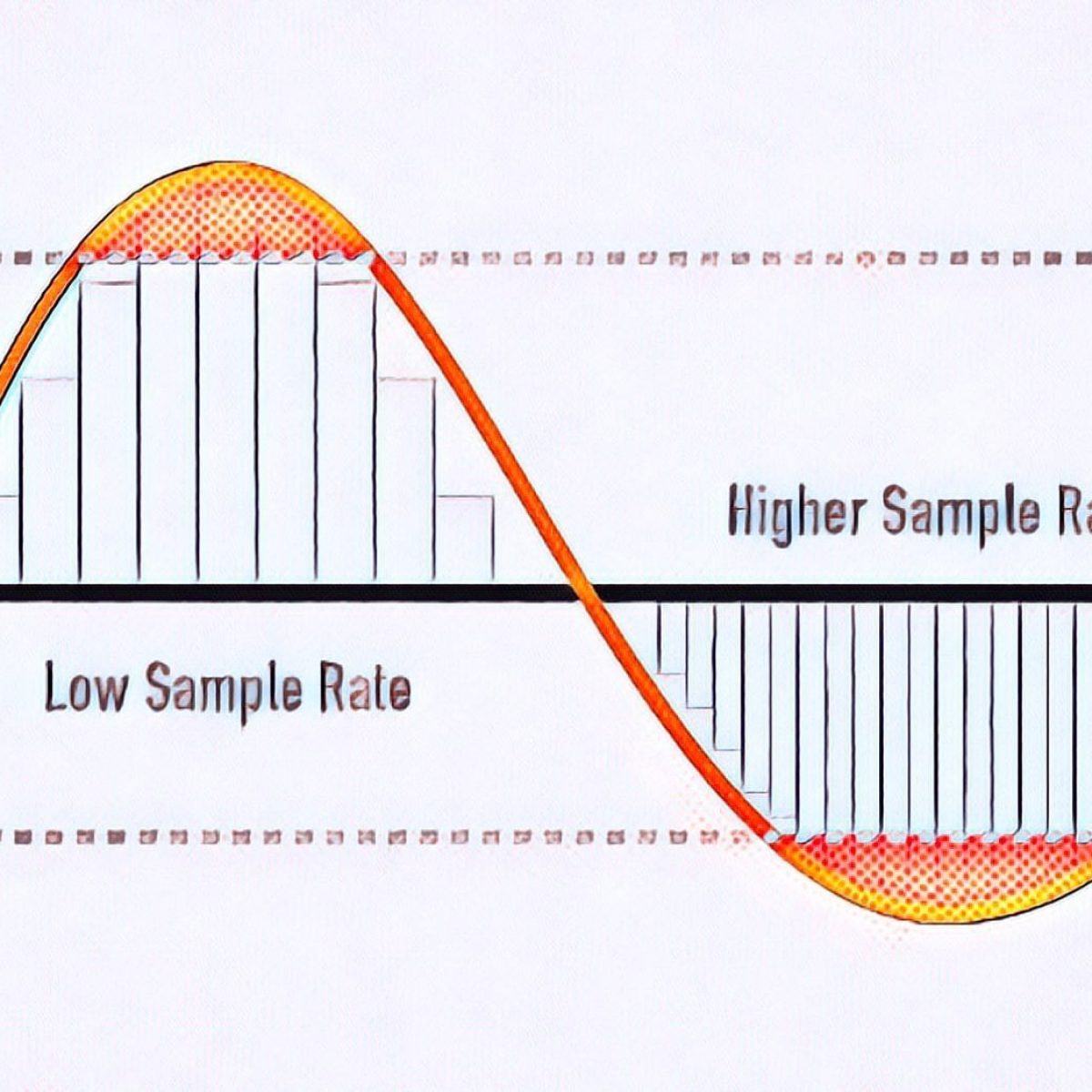
The process of converting analog audio to digital audio is called sampling. In a nutshell, how much data is needed to record a 1 second duration of sound via waveform sampling. A sound with a sample rate of 44 KHz requires 44,000 data points to describe a 1-second sound waveform. In principle, the higher the sample rate, the better the sound quality.


Free Download Mp4Gain
picture


Mp4Gain Main Window
picture


Mp4Gain Features
picture


Free Download Mp4Gain
picture

Sample rate and bit rate of MP3 Part 2

Sample rate and bit rate of MP3 Part 2

BIT RATE

The number of digits in the sound is equivalent to the number of colors on the screen, indicating the amount of data per sample.

bit rate

Of course, the larger the amount of data, the more accurate the playback sound, so as not to confuse the sound. of the teapot with the train whistle. In the same way, it is more clear and precise for the image, so as not to confuse blood and ketchup. [However, limited by the function of human organs, 16-bit sound and 24-bit image are basically the limits of ordinary humans, and the higher digits can only be distinguished by instruments. For example, the phone has 7-bit sound sampled at 3 kHz and the CD has 16-bit sound sampled at 44.1 kHz, so the CD is clearer than the phone. ]

When you understand the above two concepts, bitrate is easy to understand. Take the phone as an example, 3000 samples per second, each sample is 7 bits, then the phone’s bit rate is 21000. And the CD is 44100 samples per second, two channels, each sample is 13 bit PCM encoded, so the CD bit rate is 44100*2*13=1146600, which means the CD data volume per second is about 144KB. the capacity of a CD is 74 minutes equal to 4440 seconds, which is 639360KB=640MB.

Sound is actually a type of energy wave, so it also has the characteristics of frequency and amplitude, with frequency corresponding to the time axis and amplitude corresponding to the level axis. The wave is infinitely smooth, and the string can be considered to be made up of innumerable points. Since the storage space is relatively limited, in the process of digital encoding, the points of the string must be sampled. The sampling process consists of extracting the frequency value of a certain point. Obviously, the more points that are extracted in one second, the richer the frequency information that can be obtained. To restore the waveform, there must be two sampling points in one vibration. The highest frequency that can be felt is 20kHz, so to meet the auditory requirements of the human ear, at least 40k samples per second, expressed at 40kHz, and this 40kHz is the sample rate. Our common CD has a sample rate of 44.1 kHz. It is not enough to have only frequency information, we must also obtain and quantify the energy value of this frequency to represent the strength of the signal. The number of quantization levels is an integer power of 2, and the sample size of our common CD bit is 16 bits, that is, 2 to the power of 16. Sample size is harder to understand than bit rate. sampling, because it makes it seem abstract. For a simple example: suppose a wave is sampled 8 times, and the energy values ​​corresponding to the sampling points are A1-A8, but we only use 2-bit sampling size, as a result we can only keep the 4 point values ​​in A1-A8 and discard the other 4. If we use the 3bit sample size, all 8 point information is recorded. The higher the sample rate and sample size values, the closer the recorded waveform is to the original signal.

MP3 sample rate and bit rate

MP3 sample rate and bit rate

Bit Rate

When we listen to mp3 and watch movies, we will notice two parameters.

BIT RATE

The most common ones are 44.1 KHz sample rate and 192 Kbps bit rate. So what is the sample rate and what is the bit rate? What is the relationship between them? Explain:

The process of converting an analog audio signal to a digital audio signal is called sampling. In a nutshell, how many data points does it take to record a 1 second long sound via waveform sampling. For example: the sound sample rate of 44.1 KHz is equivalent to spending 44,000 data points to describe the sound waveform for 1 second. In principle, the higher the sample rate, the better the sound quality; sampling frequency is generally divided into three levels: 22.05KHz, 44.1KHz and 48KHz; 22.05KHz can only achieve FM radio sound quality, and 44.1KHz is the theoretical limit of CD sound quality, 48KHz has reached DVD quality.

Sampling rate refers to the sampling frequency when converting sound (analog signal) to mp3 (digital signal), i.e. how many data points are sampled per unit of time. (The data for a sample point is 8 (or even more) bits long.)

Bit rate refers to the number of bits (bits) transmitted per second. The unit is bps (bit per second). The higher the bitrate, the more data transmitted and the better the sound quality.

It can be said that the sample rate and bit rate are like the horizontal and vertical coordinates on the coordinate axis. The sampling frequency on the abscissa represents the data points sampled per second. The bit rate on the ordinate represents the precision when quantizing analog quantities with digital quantities.

The sample rate is similar to the number of frames of moving images. For example, the sampling rate of movies is 24 Hz, the sampling rate of PAL format is 25 Hz, and the sampling rate of NTSC format is 30 Hz. When we play back the still images sampled at the same rate as the sampling frequency, we see a continuous image. In the same way, when a CD recorded at a sampling rate of 44.1 kHz is played back at the same rate, a continuous sound can be heard. Obviously, the higher the sample rate, the more coherent the sound will be heard and the picture will be seen. [Of course, the sampling rate that human auditory and visual organs can distinguish is limited, which is basically higher than sound sampled at 44.1kHZ, and most people haven’t noticed the difference. ]

Quality (bit rate)

Quality (bit rate)

Bit Rate

In multimedia technology, quality is often used to judge the effect of audio, and quality here is actually bitrate.

Bit Rate

1. Introduction
2 sound control
3 encoding mode
Introductionedit transmission
The term quality is widely used.
In multimedia technology, quality is often used to judge the effect of audio, and quality here is actually bitrate.
On WINDOWS it is called “bit rate” and on some players it is described as ” bit rate “.
Quality refers to the bit rate at which digital sound is converted from analog to digital format. The higher the bitrate, the better the quality of the restored sound.
sound control edit stream
16 Kbps = phone quality
24 Kbps = increase phone quality, shortwave transmission, longwave transmission, European standard medium wave transmission
40 Kbps = American standard medium wave transmission
56Kbps=Voice
64 Kbps = boost voice (best bitrate setting for cell phone ringtones, best setting for cell phone mono MP3 players)
112 Kbps = FM stereo broadcast FM 128 Kbps = tape (best setting for mobile phone stereo MP3 player, best setting for low-end MP3 player)
160 Kbps = HIFI high fidelity (best setting for mid to high end MP3 players)
192Kbps=CD (best setting for high-end MP3 players)
256Kbps=Studio Music Studio (for music enthusiasts)
In fact, with the advancement of technology, the quality of music is also getting higher and higher, the highest quality of MP3 is 320Kbps, but some formats can achieve higher sound quality.
For example, the emerging APE audio format can provide real audiophile level lossless sound quality and smaller volume than WAV format, and its quality is usually 550kbps-950kbps.
encoding modeedit stream
VBR (Variable Bitrate) Dynamic Bitrate means there is no fixed bitrate. The compression software immediately determines which bitrate to use based on the audio data being compressed. This is a method that takes quality as a premise and takes file size into account The recommended encoding mode;
ABR Average Bit Rate (Average Bit Rate) is an interpolation parameter of VBR. LAME created this encoding mode in response to the low file volume ratio of CBR and the variable size of files generated by VBR. Within the specified file size, ABR takes every 50 frames (about 1 second for 30 frames) as a segment. High-frequency and insensitive frequencies use relatively low traffic, and low-frequency and large dynamic performance use high traffic, which can be used as VBR and CBR, a compromise option.
CBR (constant bitrate), constant bitrate means the file has one bitrate from start to finish. Compared to VBR and ABR, the compressed file size is very large and the sound quality will not improve significantly compared to VBR and ABR.

What is bit rate? Knowledge of the MP3 audio format. Part 2

What is bit rate? Knowledge of the MP3 audio format. Part 2

mp3 bit rate

Bitrate is a benchmark indicator of the efficiency of digital music compression.

mp3 bitrate

The bit rate represents the number of bits bps (bit per second, bits per second) transmitted per unit of time (1 second). We usually use kbps (in simple terms, it is per second) clock 1000 bits) as the unit. The bit rate of digital music on CD is 1411.2 kbps (ie recording 1 second of CD music requires 1411.2 × 1024 bits of data). The higher the bit rate of the music file, the more data (Bit) must be processed in a unit of time (1 second), and the better the sound quality of the music file. However, when the bit rate is high, the file size increases, which will occupy a large amount of storage capacity. 8 to 320 kbps.

1. WMA (Windows Media Audio, Windows Media Audio)

As a Microsoft media compression method, it is a part of the technology that compresses only audio data in Windows Media Technologies. The sound quality is similar to MP3 and can be compressed with half the technology of MP3. It has the copyrighted Windows Media Rights Manager, which can be played by installing in WMP (Windows Media Player, Windows Media Player). Due to the strong influence of Microsoft and Windows, as well as major copyright reasons, the major American record companies EMI and BMG have officially confirmed that they use the WMA method developed and produced by Microsoft. It is believed that this advanced method will become even more popular in the future.

2. MP3 (CBR, VBR, ABR)

MP3 is currently the most widely used and widely used lossy compressed digital audio format, which has been explained above and will not be repeated here.

CBR (constant bit rate)

CBR is the oldest and simplest MP3 encoding (compression) method. When this method is used for encoding, the bit rate of the entire file is the same, in other words, the bit rate used by the MP3 file per second is the same. Although the music file has sections of varying complexity, the encoder always keeps the bit rate constant, unless you use the highest sound quality, otherwise the sound quality of the different sections of the MP3 file will vary. The more complex the passage, the worse the sound quality. Its biggest advantage is that the file size is fixed, which is convenient for calculating storage space.

What is bit rate? Knowledge of the MP3 audio format.

What is bit rate? Knowledge of the MP3 audio format.

mp3 bit rate

Digital audio formats are audio signals that are recorded, processed, and reproduced in digital form.

Mp3 bit rate

The emergence of digital audio formats is to meet the needs of high-fidelity playback, storage and transmission. Simply put, early analog audio formats had issues with playback distortion and glitches due to media wear. Since the advent of CD discs, audio files in digital format have become popular, but another problem has arisen: the limitation of storage volume and the phenomenon of CD disc wear is still present. Saving to a hard drive (in connection with longer storage time) is also not a good solution when storage media (mainly hard drives) are still expensive at the time. The rise of the Internet has created a requirement for long-distance file transmission. Under the restriction of bandwidth, the demand to reduce file size has become more intense. All this has led to the generation of lossy compressed digital audio formats from external factors!

In terms of internal factors, with the improvement of computing and coding capabilities, the progress of various acoustic psychological models has promoted the emergence of various lossy compressed digital audio formats. Some of the most commonly used audio formats in MP3 players are briefly introduced below: MP3 (CBR, VBR, ABR), WMA, WAV, ADPCM, and the emerging audio formats AAC, ASF, and OGG.

Before introducing various digital audio formats, let’s clarify one concept: bitrate.

In the field of computing, all information is digitized. Bit is the smallest unit of data in a computer, it refers to a number of 0 or 1, which is a mathematical binary number, a “0” or “1” , is a bit. For example, when we say a 2-digit number, it means that it is a two-digit binary number, and there are 4 combinations of “00”, “01”, “10” and “11”, which represent 0, “11” in decimal respectively. 1, 2 and 3 are four numbers.

What is the capacity of the high resolution sound source?

What is the capacity of the high resolution sound source?

Hi-Res audio

High resolution sound source with more information than conventional CDs.

HiRes Audio

Since the data size is large, you can enjoy high-quality sound with a three-dimensional effect, but the problem is that when managing multiple high-resolution audio sources, the required storage capacity becomes huge.

Then I will introduce what is the capacity of the high resolution sound source, including the management method.

What is the capacity of Hi-Res Audio sources compared to CDs?
In determining the capacity (file size) of a high-resolution sound source, the sampling frequency and bit depth of the sound source are important factors.

The sample rate (sample rate) is a numerical value that is used as an index when converting analog data, such as speech, to a digital signal.

It indicates how many times per second an information sample was measured, and is expressed in “Hz (hertz)”.

If sampling is done every 44,100 seconds, it will be “44.1 kHz”.

On the other hand, the bit depth is a numerical value that indicates how many pieces are recorded in each divided data.

It is represented by “bit”.

Both the sample rate and the bit depth mean that the higher the number, the more information there will be, that is, the higher the resolution.

The amount of music data per second is called the bit rate.

Bit rate is the sample rate multiplied by the bit depth and is expressed in “bps”.

The calculation formula is as follows.

Bit rate (bps) = sample rate (Hz) x bit depth (bit) x 2

For example, the bit rate and sample rate of a CD sound source are generally “44.1 kHz / 16 bits”.

Most so-called “CD sound quality” sound sources are based on this number.

The size of the 5 minute 44.1 kHz / 16 bit / sound source file is about 50 MB.

But what about hi-res audio sources?

High resolution sound source capacity per song (5 minutes) varies depending on the music data format, as shown below.

WAV: 192 kHz / 24-bit: capacity for 5 minutes is 330 MB
FLAC: 192 kHz / 24 bit: capacity for 5 minutes is 200 MB
ALAC: 192 kHz / 24 bits: capacity for 5 minutes is 200 MB
What you can see from this is that the capacity of the high resolution sound source is 4 to 6 times that of the CD sound source in 5 minutes.

Large capacity high resolution music management equipment
If you download 5 high-resolution songs for 4 minutes, it will take up about 700MB (for 96kHz / 24-bit WAV files).

In the case of 10 songs, it exceeds 1400MB, that is, 1GB.

If so, I would like to have enough storage to handle that amount of data.

An effective way to do this is to build a NAS-centric network audio system that incorporates a large-capacity hard drive.

For example, if you can prepare a 4TB (terabyte) hard drive, it can store around 20,000 high-resolution songs.

Next, we will explain what NAS and network audio are like.

NAS
NAS stands for “Network Attached Storage” and it reads like aubergine.

It stands for network attached storage, and it is also called a network hard drive or network compatible HDD.

In other words, it is an external hard drive that is used when connecting to a network (LAN).

A normal external hard drive used when connecting to a PC = PC via USB etc. can basically be used with only one PC.

However, if it is a NAS, it can be used with multiple devices participating in the LAN.

Files saved on the hard drive can also be used and shared from, for example, the personal computers of each family member participating in the home LAN, smartphones connected via Wi-Fi, and TVs in the living room to be.

It is also possible to access the data on the NAS from the outside via the Internet.

The NAS is often used in the home to store and share data for music, video (video / TV recording data), photos (images), etc.

Meaning and relationship of sample rate, bit depth, and bit rate

Meaning and relationship of sample rate, bit depth, and bit rate

bit depth

Sampling rate
Bit depth
Bit rate

bit depth audio

I will present the three meanings and relationships of.

Table of Contents
What is the sampling rate?
What is bit depth?
What is a bit rate?
resume
Sponsorship

What is the sampling rate?
For example, let’s say you say “Ah” for 1 second.

When recording this “Ah” sound on a personal computer, the “Ah” sound is divided into tens of thousands per second, each divided into tens of thousands.

“The height of this section was about this.”
“The length of this section was about this.”
Record it as data like this.

The personal computer continually reads each of this divided data and outputs it as a “voice” called “Ah”.

At this time, “how many tens of thousands of sounds are collected per second” is called the “sample rate.” (Also called “sample rate”)

Sampling rate
▲ Sample rate image

The more divisions you make, the smoother the sound will be, and as a result, you will feel that the sound quality has improved!

What is bit depth?
The sample rate is “how many tens of thousands of sounds are collected per second”.

“How much capacity is given to each divided data (sample)” is called “bit depth”.

Figure_bit depth
▲ Bit depth image

Also called “number of quantization bits”, “number of sample bits”, “bit offset”, and so on.

For example, if the bit depth is “16 bits”, the amount of information is 2 to the 16th power (65536) for one sample.

The higher the bit depth, the greater the expressiveness of the sound’s fineness and volume, and as a result, I feel like the sound quality has improved!

By the way, the bit depth of most of the world’s sound sources is 16 bit.

that’s why

“Import music from CD!”
“Import music downloaded from the Internet!”
In such cases, 16 bits is sufficient.

On the other hand, if you say “What you recorded in your DAW comes out wav!”, It is better to have 16 bits or more.

This is because, for example, when processing audio effects with audio editing software, sound deterioration can be reduced to zero by assigning an additional bit depth (for example, 32-bit). (Although 16 bit is fine for final output)

What’s more,
note that “bit depth” on this page has a different meaning than “bit depth” in video.

Reference: What is Bit Depth (Color Depth)? Differences like 10bit / 24bit / 30bit

What is a bit rate?
Bit rate is the “amount of data per second”.

Reference: What is a bit rate? Relationship between image quality, sound quality and codec [Video / Audio]

The “sample rate” and “bit depth” presented above are

Sample rate: how many tens of thousands of sounds are collected per second
Bit depth: how much to give to each divided data
Therefore, the product of these two values ​​is the “bit rate”.

Audio encoding

Audio encoding

Audio Encoding

I wrote over audio files last time, but if you reduce the file size (code at a lower bit rate), the sound quality tends to deteriorate. How much should it really be? .. ..

audio encoding

When compressing using audio encoding (AAC, MP3, etc.), the compression rate is determined by the bit rate at the time of encoding. Specifically, if you set a low bit rate, the compression rate will be higher and the file size when saved will be smaller, but first of all, what is the bit rate for uncompressed original sound source (PCM) ?
If you save it as PCM, the sound quality will be that of the original sound, but it can be a bit awkward to save without worrying about the file size. Also, depending on the application, I think the memory capacity is sufficient even for the original sound size and the communication speed is fine. Therefore, I would like to write about the sample rate and bit rate that are often heard in digital audio.

The bit rate of digital audio is determined by the sampling frequency, the number of bits assigned to a sample (number of quantization bits), and the number of channels (stereo, monaural, etc.).

PCM bit rate (uncompressed) = sample rate x number of quantization bits x number of channels
As I wrote a bit last time, in file containers like wav and mp4 format, this information is attached as a header, so that the application can see the header and play it back. The compression rate of the encoding is determined by the bit rate specified at the time of encoding for this PCM (uncompressed) bit rate.
For example, as many of you know about music CDs, with 44.1 kHz stereo, this is the next bit rate.

Music CD bit rate: 44100Hz x 16bit x 2ch (stereo) = 1411.2kbps
When encoding this with MP3, AAC, etc., it is natural to specify a bit rate lower than 1,411.2 kbps. For example, when encoding at 256 kbps, the compression rate is around 18% when the original sound is 100% and the file size is 1/5 or less.

Encode a music CD at 256 kbps: 256 kbps / 1,411.2 kbps = about 18%
In general, the sample rates of audio devices connected to PCs are 48 kHz and 44.1 kHz for music, 16 kHz and 8 kHz for audio such as microphones and headphones, and 32 kHz, 24 kHz, 22.05 kHz. , etc.

The bit rate of PCM (uncompressed sound source) with 16-bit quantization bits is as follows.

Stereo (for music) PCM 16-bit bit rate (example)
Sampling frequency Number of quantization bits Number of channels Bit rate Comments
48kHz 16 16 2 1536 kbps
44.1 kHz 16 16 2 1,411.2 kbps Music CD
32kHz 16 16 2 1,024 kbps
24kHz 16 16 2 768 kbps
22.05 kHz 16 16 2 705.6 kbps
Monaural (for audio) PCM 16-bit bit rate (example)
Sampling frequency Number of quantization bits Number of channels Bit rate Comments
32kHz 16 16 1 512 kbps Super Wide Band
24kHz 16 16 1 384 kbps
16kHz 16 16 1 256 kbps broadband
8kHz 16 16 1 128 kbps Narrow band

Sampling rate
If you check the web, there are explanations such as the sampling required to convert analog waveforms to digital conversion. For example, it shows how many samples of an audio signal input from a microphone are taken per second and digitized. The larger the sample, the greater the range that can be recorded. When an analog waveform is digitized, the frequency that can be expressed is half the sampling frequency (sampling theorem). For example, with a sample rate of 48kHz, it is possible to express up to 24kHz. At 8kHz (narrowband) and 16kHz (wideband), which are often used for audio, you can only hear up to 4kHz and 8kHz, respectively. The higher the sample rate, the higher the bit rate.

sampling theorem
It is a very simple explanation, but it can express up to half the sample rate. When sampling a signal, if the interval is small, it can be restored close to the original signal, but if it is too thick, it cannot be restored (I would like to write a little more detail when talking about signal processing or other time ).

What is the bit rate? Simple explanation

What is the bit rate? Simple explanation

bitrate

Bit rate is a unit of data transfer.

BITRATE

When used in video or audio, as in video editing, it indicates how much data is represented per unit of time, and “bits per second (bps)” is generally used.
A bit is the smallest unit of data that a computer handles.
Two states of “0” and “1” can be expressed by 1 bit. (1 binary digit)
Similarly, a byte representing the size of a file is a unit of data handled by a computer. (1 byte = 8 bits)
Here are some things to keep in mind about bit rates.
In home appliance hard disk recorders, it is sometimes expressed as a recording mode such as XP, SP, LP.
The higher the bit rate value (numerical value), the better the picture and sound quality, but the greater the amount of data (file size).
The unit of bit rate is usually Mbps, which means 10 6 (10 to the sixth power) for video, and kbps, which means 10 3 (10 to the third power) for audio.
When burning a video to DVD, there is a limit to the amount of data that can be burned to DVD, and if you try to burn a long video, you will have to lower the bit rate, resulting in poor image quality. . To record high-quality video, the bit rate must be increased, which increases the amount of data required and shortens the recording time.
Even if the bit rate used is the same, the image quality and sound quality will differ depending on the encoder and compression method used for digitizing.