
Energy Compaction Techniques in MP3

Let’s Talk About Energy Compaction Techniques in MP3
Energy compaction techniques are the secret behind MP3’s ability to shrink audio files while preserving quality. When you listen to MP3s, what you might not realize is how much data gets compressed in ways that keep the sound clear and rich. As a specialist in audio encoding, I’ve worked with these techniques and seen how they save file space and bandwidth, making them essential in the world of digital audio. Through my years of experience, I’ve learned that these techniques rely on psychology and sound science to deliver that high quality in smaller file sizes. Let’s dig into how these strategies work and why they’re so effective.
Understanding Energy Compaction in Audio Compression
Energy compaction in audio means capturing the most “energy” or impactful parts of sound, then efficiently storing them. Think of a box you want to pack tightly. The idea is to keep the essential items while ditching things you won’t need. In audio, it’s similar, focusing on the frequencies that impact what we hear. Techniques like psychoacoustics and frequency masking help, concentrating on sounds our brains pick up easily while discarding what we won’t miss. This process is why MP3s retain such quality despite reduced data size.
The Science Behind Psychoacoustic Models
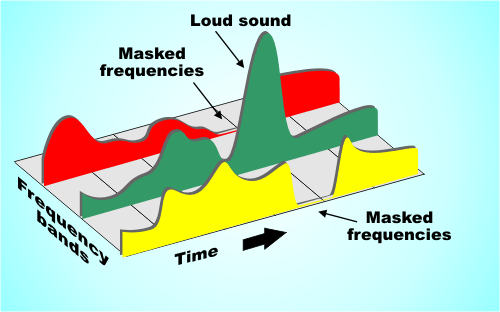
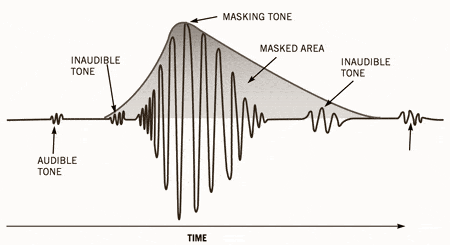
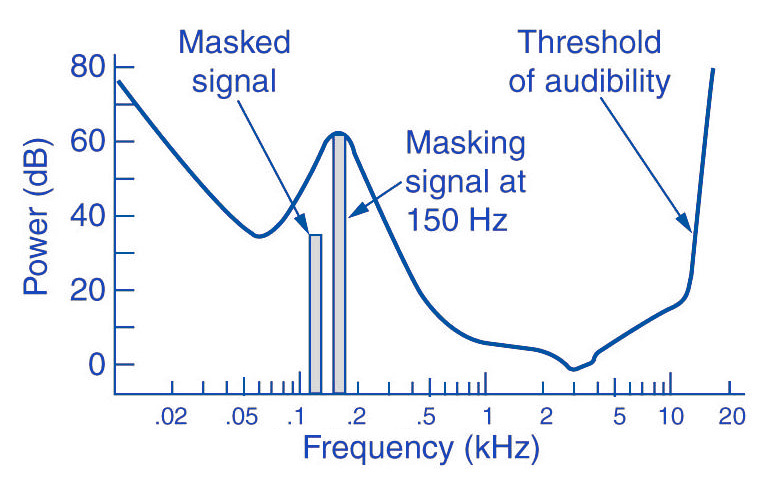
The psychoacoustic model is the backbone of MP3 compression, utilizing how humans perceive sound. I’ve noticed that this model’s core is auditory masking, where certain sounds cover others, allowing us to filter out less noticeable audio details. For example, in a crowded room, a loud voice drowns out quieter conversations. MP3s apply this by omitting audio frequencies masked by louder ones. This trimming down is barely perceptible but makes the file lighter without compromising the listening experience.
Frequency Masking: A Key to Efficient Compression
Frequency masking is a fascinating aspect that mimics how the human ear naturally filters sound. In audio compression, this technique reduces the data of sounds that are “hidden” by others. Imagine two musical notes, one high-pitched and soft, and the other low-pitched and loud. You’re more likely to notice the loud, low-pitched sound, while the softer one fades. MP3 compression leverages this concept to retain sounds that our ears will register while cutting those masked sounds, effectively reducing file size.
Bit Allocation and Its Role in MP3 Compression
Bit allocation is all about efficiency, deciding where to place the “energy” in an audio file. I see this as budgeting – you allocate more bits to essential areas and fewer bits to less noticeable parts. High-energy, dynamic sounds get more bits to ensure clarity, while low-energy areas get fewer. This smart allocation is a big reason MP3 files maintain quality even when compressed. It’s like highlighting the main points in a presentation, so you communicate the essentials without overloading the file.
Transform Coding: Breaking Down Sound Frequencies
Transform coding breaks audio into frequency components, simplifying the compression process. If you’ve ever used packing cubes in a suitcase, you know how they allow you to fit more while keeping things organized. Similarly, transform coding organizes sound into manageable “blocks” or frequencies. This process, usually through the Modified Discrete Cosine Transform (MDCT), rearranges and compacts data, fitting it more neatly and reducing the file size while keeping audio integrity.
The Role of Critical Band Analysis in Energy Compaction
Critical band analysis divides audio into “bands” or sections that our brains process separately. In MP3, it enhances compression by adjusting each band’s clarity. Think of critical bands as different instruments in a band, each with its role in the song. MP3 encoding uses this band separation to focus on parts of sound that we process most. The result? It delivers higher quality where our ears will notice it most, effectively maximizing audio impact while saving data.
Transform-Based Coding and MDCT in Depth
Transform-based coding through MDCT is a powerful compaction tool. It breaks down complex audio into smaller, easily encoded parts, making compression possible without losing clarity. I often think of this as slicing a pie – it’s easier to manage in sections. MP3 uses MDCT because it’s efficient for complex sounds, keeping the file size small without losing the richness. This efficiency is why MP3s perform so well, even for intricate audio like music.
Perceptual Coding: Focusing on Auditory Importance
Perceptual coding aligns with how our minds interpret sound by storing what’s essential and leaving out the rest. When I encode audio, I consider how perceptual coding can reduce unnecessary data. It’s like summarizing an article with only the main points. MP3s use this to keep files light and easy to store. By storing sounds our ears register best, perceptual coding delivers that “full” listening experience we crave.
Analyzing the Harmonic Structure in MP3 Compression
Harmonic structure in audio compression focuses on how sounds layer and interact. When encoding, MP3s maintain harmonics to keep that natural tone. Imagine hearing a piano piece: the melody and harmony intertwine to create that “piano” sound. Harmonic preservation means MP3s keep this intact, ensuring our ears enjoy the full, layered quality, even if data is reduced.
Spectral Compression for Efficient Data Reduction
Spectral compression reduces the bits used on lower-priority frequencies, focusing energy on what’s essential. This method is especially handy for music or sound with consistent tones. It’s similar to focusing a flashlight beam on a specific spot, illuminating it while dimming the rest. By emphasizing critical frequencies, MP3 compression keeps the audio’s richness intact, ensuring you don’t miss out on the sound’s fullness.
Handling Compression Artifacts in MP3
Compression artifacts can impact MP3 quality if not managed. When compressing audio, you might get “blurring” or “ringing” sounds. These occur if we go too far with reduction. Through trial and error, I’ve learned how to avoid these issues, balancing data reduction with sound quality. Techniques like noise shaping help smooth over these artifacts, keeping the listening experience pleasant.
Using Auditory Masking in MP3 Encoding
Auditory masking is an ingenious trick that capitalizes on how our brains ignore certain sounds. In MP3, we use masking to drop frequencies that softer sounds would cover. For instance, in a busy city, we focus on a friend’s voice, tuning out car engines and chatter. MP3s do this by saving on data for sounds that we wouldn’t consciously perceive, giving us high quality without the extra bits.
Bit Rate Reduction Without Quality Loss
Bit rate reduction aims to minimize data without compromising sound. It’s like trimming the fat off a steak: you keep the flavor but lose what’s unnecessary. MP3s apply this by reducing bits used on lower-priority sounds. Over the years, I’ve learned that careful tuning during compression ensures we retain sound depth and fidelity, even with a lower bit rate.
The Importance of Spectral Band Replication
Spectral band replication (SBR) helps MP3s reproduce high frequencies efficiently. Picture adjusting an equalizer to enhance treble – SBR does this, adding detail to compressed files. It’s particularly useful in improving quality for lower-bitrate files, giving us that crispness in sound that’s often missed. This technique is essential in maximizing audio output, especially in files with limited data capacity.
Practical Applications of Energy Compaction in MP3s
Energy compaction is all around us in music, podcasts, and online streaming. Each of these applications uses MP3’s compaction techniques to deliver high-quality audio with less data. It’s how we enjoy hours of music without maxing out storage space. Whether you’re listening on your phone or streaming online, energy compaction keeps things light and efficient, a real advantage for today’s digital lifestyle.
Maximizing MP3 Efficiency for Storage and Streaming
MP3 efficiency ensures we store more audio with less space. When I work on audio files, I focus on optimizing bit rate and frequency masking to ensure sound quality remains high. This balance lets us store extensive music libraries or stream smoothly on minimal bandwidth. It’s why MP3s remain a go-to choice for audio – they provide storage-friendly options without sacrificing quality.
Latest Words on Energy Compaction Techniques in MP3
Energy compaction techniques make MP3 a reliable format, giving us quality sound in a compact form. I’ve seen how these methods blend technology and psychology, creating a unique space in digital audio. By understanding the science behind compression and focusing on the parts we truly hear, MP3s continue to thrive. If you’re looking for efficient audio solutions, tools like Mp4Gain provide the tweaks and control needed to make the most of these compression techniques, enhancing your audio experience further.












Comments:
Man, this article opened my eyes about MP3! Never thought about how much goes into making files sound good even after they’re compressed. Awesome stuff!
I wish they’d gone even deeper on critical band analysis. It’s such a cool topic and super important for anyone making music or audio files.
Totally agree, learned so much. MP3s feel different now knowing how they work. Big thanks to whoever wrote this!
Could you go more in-depth about spectral band replication? Still kinda unclear on how it adds to quality on low bitrate files.
Impressive breakdown! Now I see why MP3 still rules. It’s like the ultimate file format for music. Thanks for the clarity!
This article made me realize how MP3s have stayed relevant. All those compaction techniques really make sense now. Nice!
I’m a DJ and always wondered why my MP3s sound great despite being compressed. Loved learning about frequency masking and bit allocation.
Good stuff, I only knew the basics but now understand the real tech behind MP3s. So useful, appreciate the article!
Wow, didn’t expect this much detail. Honestly makes me look at MP3s with a whole new level of respect. Solid info!
This breakdown makes MP3 compression so clear! Was just looking to understand the basics, but learned a ton.