Mp3: Joint Stereo and Stereo modesMp3: Joint Stereo and Stereo modes
What is Mp3?
Mp3 is a popular audio format that is widely used for music and other audio files. It is a compressed audio format that allows for smaller file sizes without sacrificing audio quality. Mp3 uses a lossy compression algorithm that removes some of the audio data that is deemed less important to the human ear. This results in a smaller file size, but also a slight reduction in audio quality.
Personally, I have been using Mp3 for many years to store and listen to my music collection. I have always been impressed with the quality of the audio, even at lower bitrates. However, I have also noticed that some Mp3 files sound better than others, even when they have the same bitrate. This is where Joint Stereo and Stereo modes come into play.
Joint Stereo vs Stereo modes
Joint Stereo and Stereo modes are two different ways of encoding stereo audio in Mp3 files. Stereo mode is the traditional way of encoding stereo audio, where each channel (left and right) is encoded separately. Joint Stereo, on the other hand, uses a more advanced encoding technique that takes advantage of similarities between the left and right channels to reduce the amount of data that needs to be encoded.
In my experience, Joint Stereo mode can produce better sounding Mp3 files than Stereo mode, especially at lower bitrates. This is because Joint Stereo mode is able to preserve more of the original audio data, resulting in a more accurate representation of the original audio. However, not all Mp3 encoders support Joint Stereo mode, so it is important to check the settings of your encoder to ensure that it is being used.
Conclusion
In conclusion, Mp3 is a popular audio format that is widely used for music and other audio files. Joint Stereo and Stereo modes are two different ways of encoding stereo audio in Mp3 files, with Joint Stereo mode being the more advanced and potentially better sounding option. If you are looking to create high-quality Mp3 files, it is important to understand the differences between these two modes and to choose the one that best suits your needs.
Final words: Mp3 is a versatile and widely used audio format that can provide high-quality audio at lower file sizes. By understanding the differences between Joint Stereo and Stereo modes, you can create Mp3 files that sound great and take up less space on your device.
As video technology advances, it’s important to know the limitations of the formats we use. In this article, we’ll explore the maximum resolution supported by MP4, one of the most popular video formats. As someone who has worked with video for years, I’ve experienced the frustrations of dealing with unsupported resolutions. Let’s dive in.
Understanding MP4 Video Resolution
MP4 is a versatile video format that supports various resolutions, but what is the maximum resolution supported by MP4? The answer is dependent on the codec used to encode the video. The most common codec used in MP4 videos is H.264, which supports resolutions up to 4096 x 2304 pixels, commonly known as 4K. However, newer codecs such as H.265 can support even higher resolutions, such as 8K.
“Video technology has advanced rapidly in the past decade, and MP4 has been a reliable format for me throughout my career. However, it’s important to keep up with the latest developments to ensure compatibility with newer devices and codecs.”
MP4 Resolution Limitations
While MP4 can support high resolutions, there are limitations to consider. One factor is the device or software used to play the video. Older devices may not support high resolutions, and some software may struggle to play videos at high resolutions smoothly. Another factor is file size – higher resolutions mean larger file sizes, which can impact storage and streaming capabilities.
“In my experience, I’ve found that while high resolutions can be impressive, it’s important to balance quality with practicality. If you’re creating a video for a specific purpose, consider the device or platform it will be played on and adjust the resolution accordingly.”
Maximizing MP4 Video Quality
To get the most out of MP4 video, it’s important to optimize the quality for the intended audience. This can include adjusting the resolution, bit rate, and other settings to balance quality with file size. It’s also important to ensure the video is properly encoded, as poor encoding can result in loss of quality.
“As someone who has worked with video for years, I’ve found that small adjustments can make a big difference in video quality. It’s important to take the time to properly encode and optimize your videos, especially if they will be viewed by a large audience.”
Final Words
In conclusion, MP4 is a versatile video format that can support high resolutions, but it’s important to consider the limitations and optimize the quality for the intended audience. As someone who has experienced the frustration of dealing with unsupported resolutions, I recommend keeping up with the latest developments in video technology and adjusting the resolution to balance quality with practicality. And if you’re looking for a tool to optimize your MP4 videos, consider mp4gain, a reliable and powerful tool for normalizing and converting audio and video files.
I still remember the first time I heard an MP3 file. It was the late 90s, and the internet was still in its early days. I was amazed at how a song could be so compressed and still sound decent. Little did I know that this was just the beginning of a revolutionary audio technology that would change the way we listen to music forever.
The Birth of the MP3 File Format
The MP3 file format was first developed in 1987 by a German engineer named Karlheinz Brandenburg. He was working for the Fraunhofer Institute for Integrated Circuits in Erlangen, Germany, where he and his team were tasked with developing a digital audio format that could compress audio files without losing too much quality.
The breakthrough came in the early 90s when the first MP3 encoder was released. It was able to compress audio files by a factor of 10 to 12 times their original size without losing too much quality. This meant that a 50 MB audio file could be compressed down to 5 MB or less. This was a huge development at the time, as it made it possible to share audio files over the internet, which was still in its infancy.
The Evolution of MP3 Technology
Over the next few years, the MP3 format continued to evolve and improve. In 1995, the first MP3 player was released by Saehan Information Systems in South Korea. It was called the MPMan and was the size of a small portable cassette player. It had a 32 MB memory and could store up to 8 songs.
By the late 90s, MP3 players had become more common, and the MP3 format had become the standard for digital audio. The first iPod was released in 2001, and it revolutionized the way we listen to music. It had a 5 GB hard drive and could store up to 1000 songs. It was sleek, portable, and easy to use, and it quickly became the must-have gadget for music lovers around the world.
The Future of MP3 Technology
Despite its popularity, the MP3 format is not without its flaws. It is a lossy compression format, which means that some of the original audio data is lost during the compression process. This can result in a loss of audio quality, especially at lower bit rates.
However, there are new audio technologies being developed that may one day replace the MP3 format. One of these is the High-Resolution Audio (HRA) format, which is capable of reproducing audio at a much higher quality than the MP3 format. Another is the Master Quality Authenticated (MQA) format, which is designed to deliver studio-quality audio in a compact file size.
In conclusion, the MP3 format has come a long way since its inception in 1987. It has revolutionized the way we listen to music and has made it possible to share audio files over the internet. While it may one day be replaced by newer audio technologies, its legacy will live on.
mp3 compression, digital audio format, mp3 file size, audio quality, mp3 history, music industry, lossy compression, audio technology, high-quality audio, mp3 player, audio codec, file sharing, online music, digital music
MP3 vs MP4 Audio Quality: Understanding Digital Audio Formats
MP3 vs MP4MP3 vs MP4
What is MP3?
MP3 is a digital audio format that compresses audio files to make them smaller in size without significantly affecting the sound quality. MP3 stands for MPEG-1 Audio Layer 3 and is a type of lossy compression. This means that some audio data is lost during the compression process to reduce the file size. As a result, the audio quality of an MP3 file may not be as good as the original file.
For example, suppose you have a song that is 4 minutes long with a bitrate of 320 kbps. The uncompressed audio file may have a size of around 40 MB, but if you compress it into an MP3 file with a bitrate of 128 kbps, the file size may be reduced to around 3-4 MB. This makes it easier to store and share the audio file, but the audio quality may be affected by the compression process.
What is MP4?
MP4 is a digital multimedia container format that can store audio, video, and other types of data. MP4 uses various codecs, including AAC, to compress audio files while maintaining high quality. Unlike MP3, MP4 is a type of lossless compression, meaning that no audio data is lost during the compression process. As a result, the audio quality of an MP4 file is usually better than that of an MP3 file.
For example, if you compress the same 4-minute song with a bitrate of 128 kbps into an MP4 file, the file size may be larger, around 5-6 MB. However, the audio quality will be better than the MP3 file because no audio data was lost during the compression process.
How Does Audio Quality Compare between MP3 and MP4?
When it comes to audio quality, MP4 generally provides better quality than MP3. This is because MP4 uses a more advanced compression method that preserves more of the original audio data. MP4 can also support higher bitrates, which means that it can provide higher quality audio compared to MP3 at the same file size.
For example, imagine you have a song that is 4 minutes long and has a bitrate of 320 kbps. If you compress this song into an MP3 file with a bitrate of 128 kbps, the file size may be around 3-4 MB. However, if you compress the same song into an MP4 file with a bitrate of 128 kbps, the file size may be around 5-6 MB. Despite the larger file size, the MP4 file will likely sound better because it preserves more of the original audio data.
Another way to compare audio quality between MP3 and MP4 is by using a tool that can analyze the audio spectrum and display the differences between the two formats. For example, you can use a free online tool called “Sonic Visualizer” to compare the waveform and spectrogram of an MP3 file and an MP4 file. The spectrogram displays the frequency content of the audio over time, and you can see that the MP4 file has more high-frequency content and less distortion compared to the MP3 file.
Can Audio Quality be Improved?
Yes, audio quality can be improved for both MP3 and MP4 files using a variety of methods. One method is to increase the bitrate of the audio file during the compression process. This will result in a larger file size but will also improve the audio quality for the same reason – it is a type of lossless compression, meaning that no audio data is lost during the compression process. This is important for professionals in the music and audio industry who require high-quality audio files for their work.
Conclusion
In summary, MP3 and MP4 are both popular digital audio formats used for storing and sharing audio files. MP3 uses a type of lossy compression, while MP4 uses a type of lossless compression. This means that MP4 generally provides better audio quality compared to MP3, but at the cost of a larger file size. However, both formats can be improved through various methods such as increasing the bitrate or using a different codec. Ultimately, the choice of format depends on the specific needs and preferences of the user.
Digital audio is a method of storing audio data on a computer or digital device. Audio data is essentially a collection of sound waves, and to store it digitally, we need to convert these sound waves into a series of numbers that a computer can understand.
What is Digital Audio?
To do this, we use a process called “analog-to-digital conversion”. Analog audio signals are transformed into digital data by measuring the sound wave at regular intervals and assigning each measurement a numerical value. The process of measuring sound waves is called “sampling”, and the numerical values assigned to each sample are known as “bit depth”.
In essence, the audio signal is converted into a series of binary digits (1s and 0s) that can be stored on a computer. This allows us to manipulate, edit, and reproduce audio data in various ways.
How is Audio Converted to Digital Audio?
As mentioned earlier, audio is converted to digital audio using a process called “sampling”. Sampling involves taking snapshots of the audio signal at regular intervals, known as the “sampling rate”. The more samples that are taken per second, the more accurately the original sound can be reconstructed.
Imagine taking a picture of a person running. If you take one picture per second, you’ll see the person moving, but the motion won’t be smooth. If you take 10 pictures per second, the motion will be smoother, and if you take 60 pictures per second, the motion will be very smooth.
The same principle applies to digital audio. By taking many samples per second, the original sound can be accurately reconstructed. The number of samples taken per second is called the “sampling rate”, and it’s usually measured in Hertz (Hz). For example, a typical sampling rate for CD-quality audio is 44.1kHz, which means that 44,100 samples are taken per second.
Once the audio has been sampled, each sample is converted into a digital number. The number represents the amplitude of the sound wave at that particular moment. The amplitude of a sound wave is the height of the wave, and it determines how loud or quiet the sound is.
The digital numbers obtained from each sample are stored as binary data, which can be easily stored, edited, and reproduced on a computer.
What is an MP3?
An MP3 is a type of digital audio file that uses a technique called “lossy compression”. This means that some of the data in the original audio file is removed in order to reduce the file size. The removed data is typically inaudible to the human ear, so the overall quality of the audio is not significantly affected.
MP3s achieve this compression by using a technique called “perceptual coding”. This involves analyzing the audio signal and identifying the parts that are less important to the overall sound quality. These parts are then removed, leaving only the most important parts of the audio signal intact.
For example, let’s say you have a song that is 4 minutes long and takes up 40MB of storage space on your computer. If you were to convert that song into an MP3 file, the resulting file might only be 4MB in size, while still maintaining a high level of audio quality.
MP3 files are a popular choice for digital audio because they take up less space than other audio formats, making them easier to store and share. They’re also supported by most digital audio players and software, making them a versatile and widely used format.
How are Sound Waves Converted into Digital Numbers?
As we mentioned earlier, sound waves are converted into digital numbers using a process called “analog-to-digital conversion”. This process involves several steps:
Sampling: The analog audio signal is measured at regular intervals, known as the sampling rate. Each sample is a snapshot of the audio signal at that particular moment.
Quantization: Each sample is assigned a numerical value that represents the amplitude of the sound wave at that moment. This is done using a process called quantization, which assigns a specific digital value to each sample.
Encoding: The digital values obtained from quantization are then converted into binary data. This is done using a process called encoding, which converts each digital value into a series of 1s and 0s.
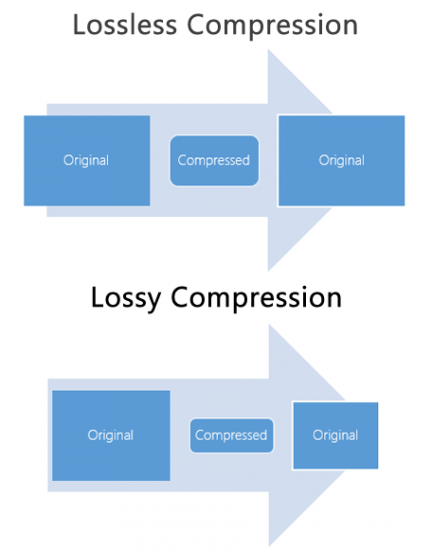
Compression: Depending on the file format being used, the digital audio data may be compressed in order to reduce its file size. Lossy compression, as we discussed earlier, involves removing some of the data from the original audio file to reduce its size, while maintaining a high level of audio quality. Lossless compression, on the other hand, compresses the file size without sacrificing any data or quality.
Once the audio has been converted into digital data, it can be easily manipulated, edited, and reproduced on a computer or digital device. This allows us to do things like change the volume, apply special effects, and even create entirely new compositions using existing audio samples.
In summary, digital audio is a way of storing and manipulating audio data using a series of numbers that a computer can understand. Analog-to-digital conversion is the process of converting sound waves into digital data, which involves sampling, quantization, encoding, and compression. MP3s are a popular type of digital audio file that use lossy compression to reduce file size, while maintaining a high level of audio quality.
How to Convert MP3 to AAC: Exploring the Technicalities of the Advanced
MP3 to AAC
Audio Codec
MP3 to AAC
The History of AAC
Advanced Audio Coding (AAC) is a widely used audio codec, designed to be the successor of the MP3 format. It was first introduced by the Moving Picture Experts Group (MPEG) as part of MPEG-2 and later extended as MPEG-4 Part 3. Since its release in 1997, AAC has been recognized for its superior audio quality and compression efficiency.
The development of AAC began in 1988 as part of an international collaboration called the Audio Coding Joint Technical Committee (JTC), consisting of experts from several organizations, including AT&T, Fraunhofer Society, and Sony. The goal was to create an audio codec that could deliver high-quality audio while using less bandwidth and storage space than MP3, which was the dominant audio format at the time.
The result of this collaboration was the creation of the MPEG-2 AAC standard in 1994, which was later extended as MPEG-4 Part 3 to include additional features. Today, AAC is supported by a wide range of devices and platforms, including Apple’s iTunes, iPod, and iPhone, as well as Android devices and various media players.
How AAC Works
AAC is a lossy compression codec, meaning that it achieves high compression rates by discarding some of the audio data. However, unlike MP3, which relies on a perceptual coding algorithm to remove irrelevant audio data, AAC uses a more advanced coding algorithm that takes into account the psychoacoustic properties of human hearing.
AAC achieves this by dividing the audio signal into different frequency bands and applying different quantization noise to each band, based on the sensitivity of human hearing at different frequencies. The result is a more efficient use of the available data rate, allowing AAC to deliver higher audio quality at the same bit rate as MP3.
AAC is also a format container, meaning that it can contain audio data encoded in various formats, including stereo, 5.1 surround sound, and even lossless formats like Apple Lossless and FLAC. This flexibility makes AAC a versatile audio format that can be used for a wide range of applications, from music streaming to professional audio production.
Converting MP3 to AAC Using Mp4Gain
Mp4Gain is a versatile audio and video conversion tool that supports a wide range of formats, including MP3 and AAC. With Mp4Gain, you can convert your MP3 files to AAC quickly and easily, without losing any audio quality.
What is a container format?
A container format is a type of file format that can store different types of data in a single file. In the case of audio and video files, a container format is used to package the different types of data that make up the file, including the video and audio streams, metadata, and any subtitles or closed captions.
The benefits of using AAC
AAC has several benefits over other audio formats. Firstly, it offers improved sound quality at lower bitrates than MP3, which means that files can be compressed to a smaller size without sacrificing quality. This is particularly important for mobile devices with limited storage capacity.
Secondly, AAC offers better performance at high bitrates, making it a popular choice for professionals who need high-quality audio, such as musicians, producers, and sound engineers.
Another benefit of using AAC is that it supports up to 48 channels of audio, compared to MP3’s limit of 2 channels. This makes AAC a popular choice for high-end surround sound systems and immersive audio experiences.
Finally, AAC is widely supported by a range of devices and software, including Apple devices, Android devices, and popular media players like VLC and QuickTime.
How to convert MP3 to AAC with Mp4Gain
Now that you understand the benefits of using AAC, you may want to convert your MP3 files to AAC to take advantage of these benefits. Fortunately, Mp4Gain makes it easy to do this.
To convert MP3 to AAC with Mp4Gain, follow these simple steps:
Open Mp4Gain and select the “Audio Converter” option from the main menu.
Click the “Add Files” button and select the MP3 files you want to convert to AAC.
Select “AAC” as the output format from the list of available formats.
Choose the desired bitrate, sampling rate, and channel configuration for the output file. You can also choose to normalize the volume if you want.
Click the “Convert” button to start the conversion process.
Once the conversion process is complete, you will have high-quality AAC files that can be played on a wide range of devices and media players.
Conclusion
AAC is a high-quality audio format that offers several benefits over other formats, including improved sound quality at lower bitrates, better performance at high bitrates, support for multiple channels of audio, and wide compatibility with devices and software.
If you want to take advantage of these benefits, Mp4Gain makes it easy to convert your MP3 files to AAC. With its simple interface and powerful conversion capabilities, Mp4Gain is the perfect tool for anyone who wants to create high-quality, versatile audio files.
Audio compression is a critical component of modern audio production. It allows for the reduction of file sizes while maintaining an acceptable level of sound quality. Lossy audio compression is a popular method that achieves this by removing non-essential information from an audio file. In this article, we will dive deep into the technical details of lossy audio compression and explore its advantages and disadvantages, as well as the impact it has on audio quality.
Lossy Audio Compression
The Technical Basics of Lossy Audio Compression
Lossy audio compression works by removing information that is deemed non-essential to the human ear. This information is often in the form of high-frequency sounds or sounds that are below the threshold of human hearing. Lossy compression achieves this by analyzing the audio file and creating a model of the sounds that the human ear can and cannot hear. This model is then used to remove the non-essential information from the audio file.
There are several popular lossy audio compression formats and codecs, including MP3, AAC, and Ogg Vorbis. Each of these formats has its own strengths and weaknesses, and choosing the right one depends on the specific needs of the user.
The Trade-offs of Lossy Audio Compression
While lossy compression is an effective way to reduce file sizes, it does come with some trade-offs. The most significant trade-off is the loss of audio quality. As non-essential information is removed from the audio file, it can result in a loss of dynamic range and a decrease in overall sound quality. However, the degree of quality loss is often subjective and depends on the specific requirements of the user.
When comparing lossy and lossless compression formats, file size is often a significant factor. Lossy compression generally results in much smaller file sizes than lossless compression, but at the cost of some audio quality loss. However, the size difference between the two formats can be significant, making lossy compression a practical solution for many users.
Advanced Techniques for Lossy Audio Compression
Advanced techniques are available for lossy audio compression that can help to improve audio quality while still achieving significant file size reduction. Perceptual coding is one such technique that uses psychoacoustic models to analyze the audio and remove non-essential information in a way that minimizes the impact on sound quality. Another technique involves the use of metadata, which can help to provide additional information about the audio file that can be used to improve compression.
Best Practices for Lossy Audio Compression
There are several best practices that can be followed to achieve the best results when compressing audio files using a lossy format. Some of these practices include choosing the right codec for the specific needs of the user, ensuring that the encoding settings are appropriate for the file being compressed, and avoiding the use of excessive compression, which can result in a loss of sound quality. Additionally, it is important to avoid common mistakes when compressing audio files, such as encoding at too low of a bit rate or not checking the final output for artifacts or distortion.
Psychoacoustic Models
Psychoacoustic models are mathematical models that simulate the way that the human ear processes sound. They are used in perceptual coding to identify which audio signals can be safely removed without causing a noticeable loss in audio quality.
Psychoacoustic models take into account factors such as frequency masking, temporal masking, and the sensitivity of the human ear to different types of audio signals. They can also take into account more complex factors such as the interaction between different audio signals.
Metadata
Metadata is data that is embedded in an audio file and provides additional information about the audio content. In the context of lossy audio compression, metadata can be used to improve the compression process by providing additional information about the audio content.
One common use of metadata in lossy audio compression is to provide information about the target device or playback environment. For example, metadata can provide information about the type of headphones or speakers that the audio file is intended to be played through. This information can be used by perceptual coders to optimize the compression process for the target device or playback environment.
Another common use of metadata in lossy audio compression is to provide information about the audio content itself. For example, metadata can provide information about the genre, tempo, and key of a song. This information can be used to optimize the compression process for the specific characteristics of the audio content.
Best Practices for Lossy Audio Compression
To achieve the best results in lossy audio compression, there are several best practices that should be followed. These include:
Use the highest quality compression settings available
Use a well-supported and widely-used compression format
Use a lossless format for archiving and backup purposes
Avoid excessive compression, as this can lead to noticeable audio artifacts
Take into account the intended playback environment when compressing audio files
Include appropriate metadata to provide additional information about the audio content
Common Mistakes to Avoid
When compressing audio files, there are several common mistakes that should be avoided. These include:
Using excessively low compression settings, as this can lead to a noticeable loss in audio quality
Using an unsupported or proprietary compression format, as this can lead to compatibility issues
Not taking into account the intended playback environment, which can lead to suboptimal compression settings
Not including appropriate metadata, which can make it difficult to organize and manage large collections of audio files
Using excessive compression, as this can lead to noticeable audio artifacts
Explanation of Audio Compression and Lossy Audio Compression
Audio compression is the process of reducing the size of an audio file without significantly degrading the quality of the sound. Compression is necessary in the world of digital audio because it allows for more efficient storage and transmission of audio files. Without compression, audio files would be prohibitively large, making it difficult to store and share them over the internet.
Lossy audio compression is a specific type of audio compression that achieves a high degree of compression by discarding some of the audio data. This means that when you compress an audio file using a lossy compression algorithm, some of the data is permanently lost, and the resulting file is of lower quality than the original. Lossy compression is used widely because it allows for much higher compression ratios than lossless compression, making it more practical for everyday use.
Importance of Audio Compression in Modern Audio Production
Audio compression is an essential tool in modern audio production. The ability to compress audio files allows for more efficient use of storage space and bandwidth, which are essential resources in the world of digital media. Audio compression also makes it possible to stream high-quality audio over the internet, which has revolutionized the way we consume music and other audio content.
However, it’s important to remember that audio compression is not without its downsides. Lossy compression, in particular, can have a significant impact on the quality of the audio, and it’s essential to understand the trade-offs involved when choosing a compression format and level of compression.
The Technical Basics of Lossy Audio Compression
At its most basic level, lossy audio compression works by analyzing the audio file and discarding information that is deemed unnecessary for human perception. This information can include sounds that are too quiet to hear, or frequencies that are outside the range of human hearing. By discarding this information, the compression algorithm can significantly reduce the size of the audio file while still retaining much of the original sound quality.
The specific techniques used in lossy audio compression can vary, but most algorithms use some combination of frequency masking, quantization, and other mathematical techniques to achieve compression. The result is a smaller file size that can be easily stored or transmitted, but with some loss of audio quality.
The Most Commonly Used Lossy Audio Compression Formats and Codecs
There are many different lossy audio compression formats and codecs available, each with its own strengths and weaknesses. Some of the most commonly used formats and codecs include:
MP3 – one of the most widely used audio compression formats, with a high degree of compatibility and a good balance between file size and sound quality
AAC – a newer format that is widely used for streaming audio and has a better sound quality than MP3 at the same bitrate
OGG – an open-source format that is popular for internet radio and streaming
WMA – a format developed by Microsoft that is commonly used for streaming and downloading audio files from the internet
FLAC – a lossless audio compression format that is capable of compressing audio files without any loss of quality, but with larger file sizes than lossy formats
The Fascinating History of Lossy Compression
Lossy compression is a method of data compression that reduces the size of a file by discarding information that is deemed to be unnecessary. This technique has been used for decades in various fields, including image, audio, and video processing, to make files smaller and easier to share or store.
The first significant work on lossy image compression was done in the early 1970s by a group of researchers at the University of Southern California. They developed the first image compression algorithm, called the discrete cosine transform (DCT), which is still used today in the popular JPEG image format.
In the 1980s, the Moving Pictures Experts Group (MPEG) was established to develop standards for digital video compression. They introduced the MPEG-1 and MPEG-2 video formats, which became widely adopted in the industry. The success of these formats led to the creation of newer standards, such as MPEG-4 and H.264, which are still used in modern video streaming services.
Lossy compression has also been essential for audio processing. In the late 1980s, the MP3 format was developed by the Fraunhofer Society in Germany, which used a perceptual coding algorithm to remove information that the human ear cannot detect. MP3 quickly became the standard for digital music distribution, leading to the creation of newer formats such as AAC and OGG Vorbis.
However, lossy compression is not without its drawbacks. Because it removes data, it can lead to a loss of quality, especially if the compression is too aggressive. This can result in artifacts or distortions in the processed image, audio, or video.
Despite these limitations, lossy compression remains an important tool in the modern digital world. It allows for more efficient storage and sharing of multimedia content and has revolutionized industries such as music, film, and photography. As technology continues to evolve, it’s likely that new and more efficient lossy compression techniques will be developed, further enhancing the way we share and consume digital content.
What audio formats are compatible with iPhone, iPad, iPod?
Now there are far fewer such questions on the net, but before in many forums people asked before buying an iPhone: “What audio formats are compatible with iPhone, iPad, iPod?”
iPhone and iPad support the following audio file formats:
AAC (8 to 320 kbps), AAC (from iTunes Store), HE-AAC, MP3 (8 to 320 kbps), MP3 VBR, Audible (formats 2, 3, 4, Audible Enhanced Audio, AAX and AAX +) , AIFF and WAV, Apple Lossless (ALAC).
Most of the time iPhone and iPad users prefer MP3 and ALAC (Apple Lossless) formats, which they download from trackers, so there is practically no problem to copy music to iPhone, iPad.
What is Apple Lossless (ALAC) and how is it different from FLAC?
A few separate words should be said about the rather unusual Apple Lossless (ALAC) – this is an analog of the FLAC audio codec. Apple Lossless was specially designed by Apple to ensure that the user can enjoy the highest quality music while keeping battery consumption within reasonable limits.
Apple Lossless (ALAC) does not require high performance, so you can listen to music without quality loss, even on old iPod Nano. Apple takes great care to ensure that its devices can work for a long time without recharging, which is why we have a FLAC analog in the person of Apple Lossless.
In what format is it better to listen to music? PART 4
What has changed today
A rare sound engineer makes a digital master recording (which is then played back on physical media), using modern technologies to the full. So the chance that a 24-bit track is actually only 16-bit is extremely high.
High-quality analog recording on high-end gear is even harder to find today, if only for fans of this sound. Such is, for example, Jack White, the former leader of the White Stripes. At the same time, some of his recordings reference lo-fi variations, and looking for the scandalous sonic characteristics of the song becomes something of a foodie treat.
If you imagine an ideal source, only the trained ear or listening on high-quality audio equipment will allow you to find a compressed file. And already based on this (and without forgetting perception), it is worth drawing the following conclusion:
AAC is necessary and sufficient for medium-priced equipment, in the absence of which (and in the absence of sources that can be encoded in AAC) – MP3 with a constant 320 kbps bit rate, created with the Lame 3.93 codec (recommended keys for decoding: -cbr -b320 -q0 -k -ms).
The exceptions are recordings originally recorded in high quality, say, recorded on DVD-Audio, SACD, or recordings originally collected in DSD (or similar format) with a high bit rate.
Although without losses it has some characteristics. And we will tell about them next time.
The author does not like Apple. The author greatly appreciates the achievements of the Fraunhofers and was greatly surprised to learn that AAC is his work. 🙂
In what format is it better to listen to music? Part 3
Due to its advanced age, MP3 has significant limitations: the bit depth can be 16-24 bits, the sample rate is expressed only in discrete values (8, 11,025, 12, 16, 22.05, 24, 32, 44.1, 48), the bit rate is limited to 320 kbps. Also, in the normal version of MP3, the number of channels is limited to two.
AAC
The same rake, only in profile. Also developed by the Fraunhofer Society. Later and uses a different, more modern psychoacoustic model. The publicly available information allows us to conclude: yes, they managed to improve their own creation.
Even with the simplest numbers, AAC is a more flexible format. The bit depth of the files obtained with the help of this development varies from 16 to 24, the sampling frequency, if desired, will also allow not to lose the sound image and is in the range of 8-192 kHz. The data stream is generally close to lossless formats (up to 512 kbps), while the maximum number of AAC file channels reaches 48.
Which format is definitely the best?
Considering that AAC is MP3 reinvented after a dozen years, then the choice is in its favor. If you want, it makes sense to only compare MP3 and OGG.
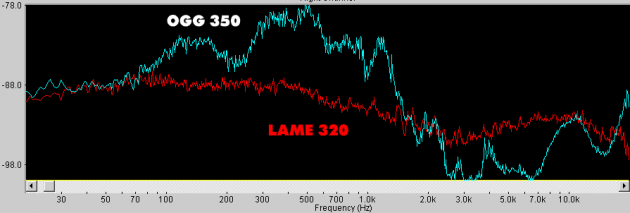
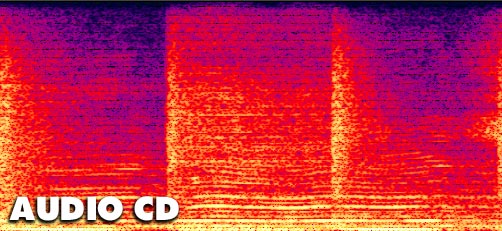
On the graphics – good AudioCD, compressed OGG with 350 kbps variable bit rate and MP3 using Lame. The lower the graph, the closer the sound is to the original. It turns out to be a very interesting image. Although MP3 has clearly cut the high frequencies, unlike OGG, in which you can see a blockage below 2 kHz.
The frequency-time distribution of sound does not speak of less interesting things. At a constant 320kbps bit rate, MP3 is almost identical to the original recording. Everything seems to fit now. But … In fact, everything is even more confusing.
Why use at a loss at all when there is no loss available?
Common sense.
The fact is that most analog recordings do not contain the amount of information that would need to be stored in high-quality formats. Don’t forget that the native sample rate for CD is 44.1 kHz, the quantization is only 16 bits.
The above graphics well demonstrate the high fidelity of MP3 streaming. But for an audio cassette, magnetic tape (unless of course it is a master tape), the characteristics of an audio CD are unattainable. And for mass studio equipment, the ability to record analog sound corresponding to AudioCD has appeared relatively recently. It makes no sense to digitize in FLAC (and even more so in WAV) a concert recording or a disc from the pre-digital era, especially those made with magnetic media. They do not contain those spectra and the amount of information that containers can store without compression.