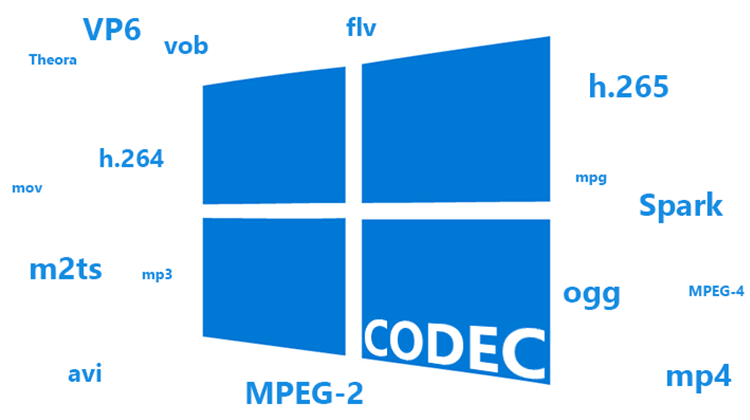
What is a codec? – clearly explained


Free Download Mp4Gain
picture

Codecs are crucial to the quality and efficiency of data encoding. In this practical tip we explain exactly what a codec is.

What is a video codec

What is a codec? – 10 facts

The following information will help you understand what a codec is. The following example shows the differences between format, encoder, and decoder and shows how quality and efficiency depend on the codec.

What Is A Codec

-A codec is a combination of encoder and decoder.
-The objective of a codec is usually to reduce the amount of data for transmission or storage.
-Codecs are used in particular for audio, video and image data, as well as for text compression and encryption.
-In the audio sector there are special codecs for voice or music. -Video and graphics codecs are specially designed for comics / cartoons and real pictures / movies.
Lossy data reduction primarily uses psychophysical tricks to inaccurately encode those parts of image and sound that humans can barely or barely perceive.
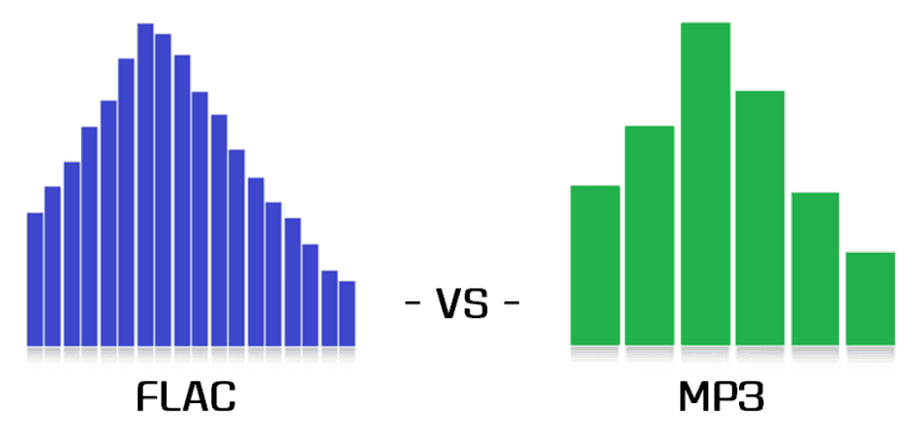
-The most popular audio codecs are FLAC and MP3, where FLAC specifies both the format and the codec. MP3 is a codec for audio in MPEG I or MPEG II format.
-The MP3 decoder side is standardized by Fraunhofer and can be obtained without a license. However, the encoder is paid. Therefore, many use the free LAME encoder.
-G.722.2 and Full Rate (FR) voice codecs are used especially in telephony.
-The most popular video codecs are H.265 for UHD TV, DivX and XviD in MPEG-4 Part 2 and H.264 for QuickTime.
-Often various encoded formats like MP3 and JPG are combined into one container file, for example in AVI, MKV, MP4 and FLV.

A simple codec example

The principle of a codec is clarified with an example. An abbreviation codec reduces typed text to abbreviated text and uses it to generate typed text:

-Format: Your digital font format might dictate how all the letters and characters you use are encoded in binary.
-You define the type of encoding in a specification, for example, the rule that each character consists of 8 bits. To do this, write a table showing which bit sequence is assigned to which letter or character.
-Codec: You can now create an abbreviation codec to convert typed text into font formatted abbreviated text.
-To do this, your codec must specify which words will be abbreviated and how, for example, through a set of rules, a large list of abbreviations or a combination.
Encoder – An encoder can now convert typed text to abbreviation format using the rules and directory.
Decoder: a decoder can convert it to written text.
-The efficiency of data reduction is highly dependent on your codec.
-If you only created a directory with three abbreviations, most of the texts will not be noticeably shorter. Compression is low.
-If your list of abbreviations is huge, the device that is going to encode and / or decode the text must have a large memory and a high reading speed.
-However, if you set up a smart set of rules for encoding, your codec is ideally small and the end device doesn’t have to do a lot of computing or reading work.
-If a word can be abbreviated in more than one way, that’s fine. A good encoder would use the most efficient abbreviation.
-However, if an abbreviation can have multiple meanings, you have lost information. This will probably render your codec unusable.
-However, if only the words that you know you are omitting were abbreviated ambiguously, you would have invented a lossy psychophysical encoding. This takes advantage of the fact that you do not visually perceive every existing word optically.
-This idea is not entirely false. Because, as this example shows, we don’t necessarily read exactly what is written.


Free Download Mp4Gain
picture


Mp4Gain Main Window
picture


Mp4Gain Features
picture


Free Download Mp4Gain
picture

MP3, FLAC, WAV, ALAC: the differences between audio formats

Digital audio formats

Digital Audio

Today, most people listen to music completely digitally. The differences between digital audio formats like WAV, FLAC, MP3, and ALAC are not clear to everyone. We put the facts together.

Digital audio formats

While vinyl is booming and CD sales are slowly but surely falling, today’s music is often heard without any physical medium. Whether you use your smartphone or digital audio player, you can move forward with digital audio formats on the go. After all, no one today wants to carry a Discman and multiple CDs with them when they typically have a powerful pocket computer in the form of a smartphone that can play digital music files. But what are the differences between the individual file formats and what are their advantages and disadvantages?

WAV and AIFF: the uncompressed ones

The Wave container format (.wav) was developed by Microsoft. Saves uncompressed audio content, so files require a lot of storage space (2 minutes can take 20MB of space. WAV is especially important when recording and editing audio content. The downside of .wav files is that they don’t metadata is required (about, Title Artist) can be stored,
the equivalent developed by Apple AIFF (.aif) Due to the fact that Apple computers are very common in music production, this audio format is very common there.

MP3, AAC, WMA, Ogg-Vorbis – compressed to save space, but not lossless

The MP3 file format (.mp3, named for the MPEG-1 Audio Layer 3 compression codec) developed by the Fraunhofer Institute in the 1980s is probably the best-known digital audio format. It gave the MP3 player its name, and for a long time music was digitized almost exclusively as MP3, for example, on the extremely popular and now illegal file-sharing networks around the turn of the millennium. The advantage of MP3 is the small amount of storage space required: on average, it takes up one-tenth the size of the original file. However, one disadvantage that should not be neglected is that it is lossy – frequencies that are inaudible to humans are removed to drastically reduce the memory required. To what extent this affects the sound, you can compare Flac with MP3 Read.

AAC (Advanced Audio Coding) is a successor to the MP3 format, offering slightly better sound quality. Apple continues to mainly offer songs in this audio format on the iTunes store.

WMA stands for Windows Media Audio (.wma), as the name suggests, a development by Microsoft. .Wma is also a lossy compression file format.

A somewhat rarer audio format is Ogg-Vorbis (.ogg), where Vorbis is the music compression technology and .ogg is the container format. Like MP3, .ogg is also lossy, but requires less storage space and better quality.

FLAC / ALAC / WMA lossless – the lossless

Lossless formats were developed to preserve all sound information while keeping the amount of memory required small. With all file formats, the required memory is reduced to about half the original file. With audio conversion software, the file can be converted to other lossless formats, something unthinkable with lossy formats. This is why lossless file formats are popular for archiving music collections in a space-saving way.

FLAC – Free Lossless Audio Code (.flac) is a free audio format, so it is not owned by any major corporation. ALAC: Apple Lossless Audio Codec (.alac) is Apple’s lossless file format, while Microsoft also has its own development on the market with WMA Lossless.

Comparison of all video formats (2020)

MP4, MOV or AVI?

MP4

Every video fan at some point comes across the question: which video format is best for me?

Usually there is no general answer.

Avi

But don’t worry in this updated 2020 definitive guide, we’ve listed all the common formats as well as all the pros and cons of them.

After this post, you will know exactly which video format is right for you, what you can use each format for, and what advantages and disadvantages each is associated with.

To ensure you a pleasant reading flow, we have listed all the points in this article as a link below. If you are particularly interested in a topic, just click on the link and you will find the correct paragraph.

1. WMV

2. MJPEG

3. MPEG I and MPEG II

4. MPEG IV

5. MPEG VII

6. MKV

7. AVI

8. MOV

9. MP4

10. FLV

11. RM

12. OGG

13. MTS

But before going through each video format, a brief introduction to understand the individual formats.

Anyway, why are there so many formats?

The choice of video formats is great because many companies want to implement their own file format. Video formats are actually file containers with different content, initially only image and sound, which can be saved separately. Containers can contain more information such as captions, menu structures, time codes, or comments for further processing.

Sound and picture can be compressed inside the container with a wide variety of codecs. A codec uses algorithms to convert data packets, digital audio or video files in such a way that they save space. Depending on the codec that can be viewed, the quality of a video may differ in image and sound quality.

You have to know that:
1. The video format answers the following question: how digital video data is technically recorded.

2. There are formats that keep the data compressed (= reduced, lossy) or uncompressed.

3. The type of compression is determined by the so-called codecs.

4. By far the most popular types are: MP4, WebM, and OGG.

5. Video formats like MP4 can contain additional information like images, texts.

6. It is possible to copy (= transcode) from one video format to another.

1. WMV

Although WMV files take up very little disk space, they are not really widely used. Despite the fact that Microsoft planned and pushed it with great expectations.
Of course, the fact that they take up very little space makes them sacrifice in quality. The WMV player by essence is Windows Media Player, which although it is available for many platforms, is still a brake that you basically need to have the Microsoft media player to be able to reproduce it.

Advantages: very high compression possible

Disadvantage: very little used

2. MJPEG

Motion JPEG (MJPEG) is a video codec in which each individual image is compressed separately as a JPEG image. Unlike MPEG-compressed videos, MJPEG-compressed videos have a quality that is independent of image movement. This standard is often used in older digital cameras. Due to the individual compression of all individual images, with this format it is possible to cut a frame from a video clip accurately without the need to recode it, which is generally only possible with MPEG keyframes.

Advantages: high compression, high quality, web standard, very flexible

Disadvantage: computationally intensive

3. MPEG 1 and 2 (Moving Image Expert Group) * .mpg

Video format developed by a group of experts with standardized compression methods. The advantages of MPEG movies are comparatively small files with good image quality, but low resolution. In practice, MPEG-II movies are far superior to MPEG-I movies in terms of resolution and image quality.

Advantage: widespread use, can be played on almost any device

Disadvantage: outdated, no HD, correspondingly poorer video quality

4. MPEG 4 (Moving Image Experts Group) * .mp4

Video format developed by a group of experts with standardized compression methods.

Originally, the aim of MPEG-4 was to support systems with low resources or narrow bandwidths (mobile phones, videophones, …) with a relatively small loss of quality. Since H.263, an ITU standard for video compression and decoding, had already met these requirements successfully, it was integrated into MPEG-4 as part 2 without major changes.

MPEG-4 movies are even more compressed and do not have a noticeable loss of quality: very small files with very good resolution. In practice, MPEG-4 places somewhat higher demands on the performance of the computer, since highly compressed data must first be “decompressed” again when played back.

Advantages: high compression, high quality, web standard, very flexible

Disadvantage: computationally intensive

5. MPEG 7

MPEG-7 is an ISO standard (ISO / IEC 15938) that was adopted in 2002 and was defined by the Moving Picture Experts Group, or MPEG for short. MPEG-7 is not a real compression standard, but it is used to describe multimedia data with the help of meta information and is stored in the form of one or more XML documents. It can be added to the time code, for example, to mark certain events or, for example, to synchronize the lyrics with a song.

Advantages: good content organization

Disadvantages: many complex XML schemas

6. MKV

One could suppose that it is based on a concept that we could qualify as similar to other containers such as MP4 and AVI, the Matroska Video (MKV) format is open source, which makes it different to a good extent .. MKV has the ability to be a container of a number, we would say that there are unlimited video and audio channels in addition to multilingual subtitles in a file, which is why it could be said that today it occupies a predominant place on the Internet when it comes to competing with other formats.

Advantages: good video quality, very good compression compression.

Disadvantage: certain playback limitations, depending on the device.

7. AVI

AVI takes its name from “Audio Video Interleave”. AVI is one of the most widely used formats and can be played almost everywhere.
It has been widely known for many years since Microsoft gave it a lot of strength and it has been one of its base formats..

Advantage: wide distribution

Disadvantage: inflexible

8. MOV

This format was developed by Apple and achieved a lot of acceptance. I used QuickTime Player from the beginning. An advantage of MOV is that it is possible to use many different CODECS for either compressing audio files or video files. It is compatible with practically all platforms (Mac and Windows, iOS, iPhone and iPad.)

Advantage: It has earned a place that puts it as a standard format for professionally produced work

Disadvantage: Not all devices are capable of playing it

9. MP4

It can be said that it comes from or is based, in some way, on QuickTime, MP4 has earned the most important place when it comes to being the ideal format to be shared on networks. MP4 has almost no loss and has a great quality surpassing many of its competitors. MP4 is compatible with most computers and phones.

Advantages: video compression without noticeable loss of quality

Web standard

Versatile in use

Cons: not suitable for streaming

10. FLV

FLV or Flash Video format is mainly used for streaming video files online through Adobe Flash Player. FLV video files retain good quality even after being compressed, so users can upload videos online faster. Now its almost dead since Flash does not work in most web browsers.

Advantages: high compression.

Disadvantage: almost dead.

11. RM (Real Average) * .rm

A collective term for the file formats of the software maker RealNetworks, in particular the Real-Audio audio format and the Real-Video video format. It is used primarily in streaming applications. Real files are lossy, but the quality of real video files is still comparatively good, especially with high compression.

Files compressed with RealVideo are lossy. The quality of RealVideo files is generally comparatively good with high compression, older versions are poor with low compression compared to MPEG for example. However, the quality of the newer versions is comparable to MPEG-4 video codecs like Xvid or DivX as well as Windows Media Video 9. RealVideo usually occurs in the RealMedia container and then has its file extension .rv, .ram, .rm, or .rmvb.

Pros: RTP support

Disadvantages: compressed real video movies are lossy

12.Ogg .ogg

Ogg is a container file format for multimedia files, so it can hold audio, video, and text data at the same time. Ogg was designed with the goal of offering a free and unrestricted software patent alternative to proprietary formats for efficient storage and streaming of multimedia content. The ability to transmit is the decisive design feature: everything that is packaged in an Ogg container can be transmitted without additional adjustments. This distinguishes Ogg from formats that are only capable of streaming in certain ways (like Matroska) or not capable of live streaming (like MP4). Ogg streams can be grouped and chained without having to adjust the individual stream.

Ogg Theora is not very common in the video field. However, it is enjoying increasing popularity in the open source scene. For HD videos, the Matroska format, which is also free, is gaining more and more ground outside of the open source scene, so it remains to be seen what role Ogg Theora will play in the future.

Advantage:

– Diversity of platforms

– open source code

– Easy to handle

5.1 surround information: playback without pauses

Disadvantage:

– High bit rate ranges

13. MTS

MTS is a video format for HD video from camcorders from manufacturers such as Panasonic and Sony. This format produces a high-quality video that is larger than the same video in any other format. The format is only compatible with some devices. If you want to play an MTS file on an Android or iOS device, for example, it is almost impossible. Only Blu-ray players, the Sony PlayStation 3, and a handful of other devices support the MTS format. To use MTS videos on other devices, you need to convert MTS to MP4. Of course, MTS files can also be converted to other popular formats like AVI, MKV, and WMV.

Advantages: high quality

Cons: inflexible

Well now that we have reviewed all the formats, the following question arises:

What is the best video format?

The different video formats have very different capabilities, some allow you to have many different tracks, some with subtitles and several audio tracks simultaneously. Obviously each format is only capable of being processed by some specific codecs. So, if we see that some can contain many tracks and that each one uses a different codec, we will understand that the resulting size will be very different, as well as the quality and resolution. That is, each format will offer very different results.

However, there is no clear answer to the question of what is the best video format. However, you could say that a particular format is the best and a good all-rounder.

MP4: a good all-rounder

The MP4 format is always right. All common browsers and operating systems support it. It also combines HD image quality with a small file size. This allows the user to save the video to hard drive or cloud, share it with others, play it on common mobile devices, or upload it to a video platform.

Video formats for mobile and web devices
Videos intended for a mobile device should take up little space. The MP4 format, which is compatible with iOS and Android, is ideal here. MOV format is also possible for Apple devices.

When asked which video format is best for a video on a website, the user needs to consider what formats the browser supports. Again, MP4 is the best option due to its high compatibility. The Google WebM video format works flawlessly, at least on Microsoft and Android devices.

Comparison of audio formats

What is the best audio format for what purpose?

Comparison of audio formats

All radio and podcast producers are faced with the question: What audio format is best for my shows and contributions? There is usually no simple answer. Each file format and each codec has advantages and disadvantages.

Audio Formats Comparison

Before converting / converting, you need to be clear about what you plan to do with your audio file: Should it be published to the NRWision media library? Is the program designed to broadcast on the Internet or for the home audio system? Should the file be edited again if necessary? Only then can you weigh which audio format and which properties make the most sense.

Audio File Formats comparision

Compress without loss?

You must decide whether you want the best possible sound quality or the smallest possible file size. With some audio codecs, sound is retained at its full bandwidth and without loss. Other codecs compress the file so that it takes up less space or is faster to transfer online. At best, it can still be played on many different devices and players. Depending on the strength of the compression, the sound of music or voice recording may also be audibly affected.

In the case of audio files, information such as sample rate and bit rate always play a role.

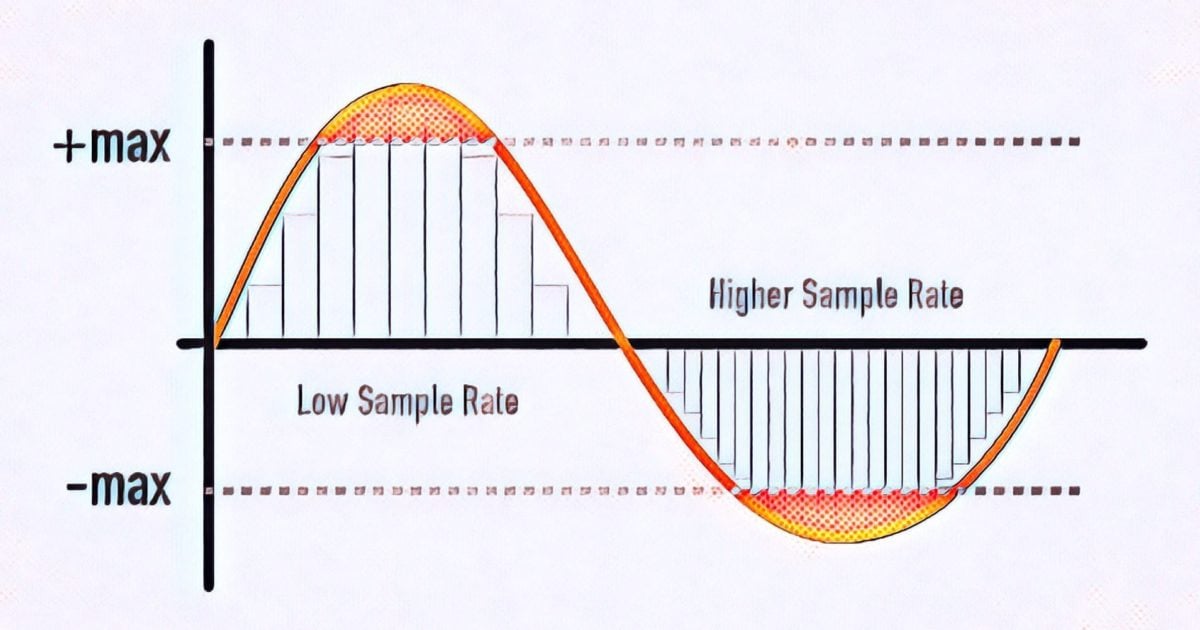
The sample rate indicates how often the level is saved per second. CDs, for example, have a sample rate of 44,100 Hz. 44,100 values ​​are stored for one second of music.

Bit transfer rate

Bit rate defines the amount of data that is processed per second. It can be constant or variable and therefore also influences the sound quality.
Important: When converting audio files to other formats, the quality cannot be improved, it only deteriorates or is preserved. With each compression, some of the audio data is lost, although it is not necessarily audible.

Next we present the audio formats and their properties.

MP3

File extension: .mp3

MP3 is probably the most popular and widely used audio format in the world. It became the standard for music files on the Internet more than 20 years ago and has been freely available since 2017. By the way, MP3 was developed by the Fraunhofer Institute in Germany, among others. Raw audio is highly compressed when converted to MP3 files to save storage space. Only what humans can hear should be preserved. You can set the degree of compression, the so-called bit rate. 192 kBit / s (kilobits per second) roughly corresponds to CD quality. At higher bit rates, MP3 files sound lossless to most people. Lower bit rates are used, for example, in Internet radios.

Advantage:
widely used, compatible with many playback devices, high compression

Disadvantage:
possibly loss of audible quality, especially at low bit rates

Wav

File extension: .wav

WAV files are not compressed and therefore take up a lot of storage space. But they can be used well for audio editing and can be easily edited in almost any software.

WAV files were developed for Windows computers in 1991. However, they can also be reproduced and used on other operating systems.

Advantage:
no need to encode / decode when editing

Disadvantage:
very large files

WMA

File extension: .wma

Originally, the WMA (Windows Media Audio) format was supposed to compete with MP3, but it could not be established equally. Audio data is also compressed here, if possible without audible loss.

Some versions of WMA files may contain a certificate key to prevent piracy.

Advantage:
good compression with high sound quality

Disadvantages:
not very widespread, only supported by a few players

AAC (advanced audio coding)

File extension: .aac

This audio format is considered the successor to the MP3 format. With the AAC format, developers have managed to further reduce memory size while maintaining the best possible sound quality.

The AAC process is being used with increasing frequency on music websites, Internet radio stations, and as a soundtrack format for video files.

Advantage:
very good compression, small files with high audio quality

Disadvantage:
not yet compatible with all programs and devices

Ogg

File extension: .ogg

In Ogg files, there is actually a container format. In addition to compressed audio, it can also contain video and text data. Also, Ogg files can be used well as an online stream. Even so, the format never prevailed against MP3 among home users.

Advantage:
small file size with good sound quality, no license

Disadvantage:
not compatible with many programs, must be converted for audio processing

FLAC (Free Lossless Audio Codec)

File extension: .flac

The name already gives it away: the FLAC codec is freely available and compresses audio files without loss of quality. The format is mainly used for music that can be faithfully reproduced thanks to FLAC. More and more players support FLAC files, sometimes just with the help of a plugin.

The FLAC codec makes audio files 30 to 60 percent smaller. This makes them much larger than MP3 files. To do this, you can decode it and thus restore the original data without loss.

Advantage:
no loss, no license

Disadvantage:
relatively large files, not natively supported by all players

Opus

File extension: .opus

The latest file format from our overview should become the Internet audio standard. Opus is developed openly and has several advantages. The audio codec significantly reduces the bit rate again. The quality of music and language is preserved as best as possible. Additionally, Opus files can be streamed and contain metadata.

Opus plays practically no role (yet) in audio processing. We are curious to see if and how the format will prevail for years to come.

What are the differences between MP3, FLAC and other audio formats?

Digital audio has been around for a long time, so there will surely be a host of audio formats. Here are some of the most common, what sets them apart and what they should be used for.

FLAC vs MP3

Before talking about everyday audio formats, it’s important that you understand the basics, and that means you understand PCM. Then we will move to compressed formats.

FLAC vs MP3

PCM audio: where it all begins

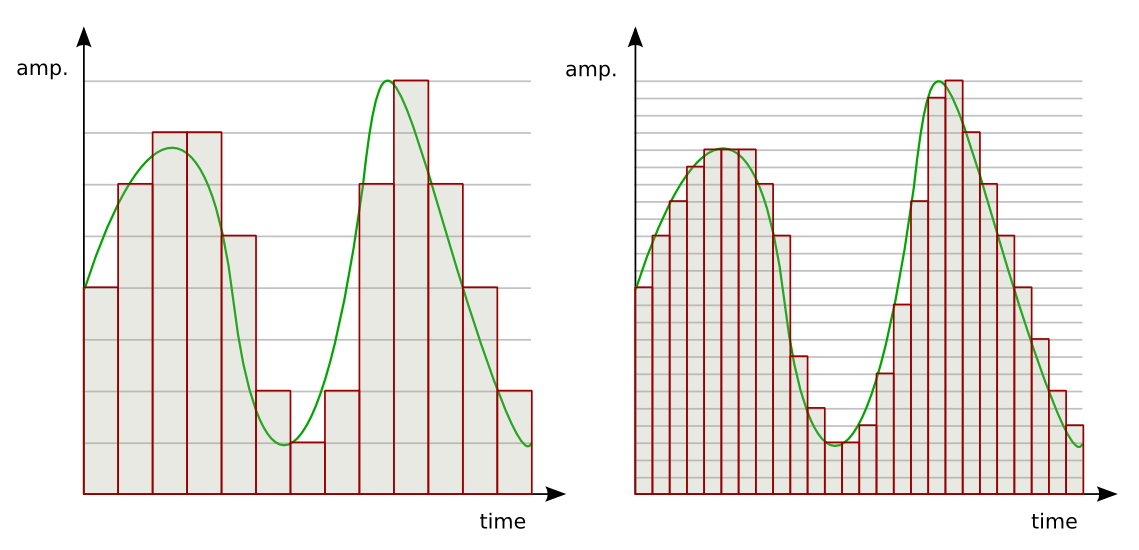
Pulse code modulation was created in 1937 and is the best approximation to analog audio. That is, an analog waveform is approximated at regular intervals. PCM is characterized by two properties: sample rate and bit depth. The sample rate measures the frequency (in times per second) that the amplitude of the waveform is measured and the bit depth measures the possible digital values. In terms of audio formats, this is basically the basics.

Where the sound is continuous in the real world. This is not the case in the digital world. In some ways this is more confusing for audio than video, so let’s take a look at the video as a comparison. What we interpret as ‘movement’ or think of ‘flowing’ and being in constant motion is actually a series of still images. Also, the amplitude of sound waves in digital format is not “smooth” or constantly changing. It changes based on certain criteria at predefined intervals.

I know there are many things here that may not be second nature unless you are an engineer, physicist, or audiophile, so let’s take a closer look with an analogy. Let’s say the water flowing from an open tap is your “analog” audio source. We can compare the temperature of the water with the amplitude of an audio wave; It is a property that must be measured so that you can enjoy it properly. Sampling is the number of times per second that you dip your finger into running water. The more times you insert your finger, the more “continuous” the temperature changes will be. If you dip your finger into running water 44,100 times per second, it’s almost like staying under it all the time, right? That is the basic idea behind sampling.

As mentioned above, PCM is the foundation of digital audio along with its variants. PCM tries to model a waveform, to the most of its uncompressed glory. It’s special, it’s ready to be caught in a digital signal processor, and it’s more or less universally playable. Most other formats manipulate audio through algorithms, so they must be decoded during playback. PCM audio is considered “lossless”, it is not compressed and therefore takes up a lot of hard disk space.

Uncompressed packet: WAV, AIFF

Both WAV and AIFF are PCM-based lossless audio container formats, with some minor changes to data storage. PCM audio comes in these formats for most people, depending on whether you’re using Windows or OS X, and they can be converted to each other with no loss of quality. Both are also considered “lossless”, are uncompressed, and are a stereo (2ch) PCM audio file sampled at 44.1 kHz (or 44100 times per second) at 16 bits (“CD quality”) approximately 10 MB per minute. If you are recording at home with a view to mixing, this is what you will want to use as it is of the highest quality.

Lossless Formats

Lossless formats: FLAC, ALAC, APE The free lossless audio codec, Apple’s lossless audio codec, and Monkey’s audio are all formats that compress audio, the same way everything compresses in the digital world: using algorithms. The difference between compressed files and FLAC files is that FLAC is specifically designed for audio, so it has better compression rates without data loss. Usually you will see about half the size of WAVs. In other words, a “CD quality” stereo sound FLAC file runs at about 5MB per minute.

The downside is that if you want to manipulate the audio, you can convert it to WAV.
no loss of quality

. If you are an audiophile and listen to a lot of music with dynamic range, these formats are for you. If you have a large set of speakers, cans, or earplugs, these sizes will cast the tones to show them off. Loss formats: MP3, AAC, WMA, Vorbis Image through

Lossy Formats

Most of the formats you see in everyday use are “lossy”; some degree of audio quality is sacrificed for a significant increase in file size. An average “CD quality” MP3 runs about 1MB per minute. Big difference from PCM, right? This is called compression, but unlike lossless formats, if you remove it in lossy formats, you won’t really be able to get that quality back. Different lossy formats use different algorithms to store data, so they generally vary in file size for comparable quality. Lossy formats also use bitrate to refer to audio quality, which is generally seen as “192 kbit / s” or “192 kbps.” Higher numbers mean more data is being pumped in, so there is more retention of details. Here are some details of the most popular formats: MP3: MPEG 1 Audio Layer 3, the most common lossy audio codec. Despite a ton of patent issues, it’s still incredibly popular. Who doesn’t lie about MP3s?

Vorbis – A free and open source lossy format most commonly used in PC games like Unreal Tournament 3. FOSS fans, like many Linux users, are sure to see a lot of this format.

AAC – Advanced Audio Coding, a standardized format now used with MPEG4 video. It is highly supported due to its compatibility with DRM (eg Apple’s FairPlay), its improvements over MP3, and because no license is required to stream or distribute content in this format. Apple fans probably have enough on AAC.
WMA: Windows Media Audio, Microsoft’s lossy audio format. It was developed and used to avoid licensing issues with the MP3 format, but due to major enhancements and DRM support, as well as lossless implementation, it still exists. It was very popular before iTunes became the champion of DRMed music.
Loss formats are what you use for all the things you listen to and save. They are designed to save hard drive space. The format you choose will depend on the digital audio player you use, the amount of space you have, the size of a high-quality nitpicker, and many excessive variables. Today computers will play anything, most audio players (except Apple, of course) will create multiple lossy formats, and more and more do FLAC and APE. Apple keeps MP3, ALAC and AAC.

Isn’t the audio quality subjective?

It absolutely is. Ultimately, it’s the ears that consume the most of these things, but that’s all the more reason to think about quality seriously. When I started building my digital music collection, I couldn’t really tell the difference between 128 kbit MP3s and audio CDs. In my ears there was no noticeable difference. However, over time, I realized that 256 kbit sounded much better, and after getting some really nice (and expensive!) Headphones, I went back to audio CDs full time! It also depends on the genre of music.

There are TONS of variables here folks, make no mistake about it. It was a while before I decided to use FLAC for some music and 320kbps MP3 for the rest. The point I’m trying to make is that you have to experiment to see what works best for you and your music, but keep in mind that as your tastes change, your perceptions, your gear, and the importance of quality will change as well. And all of this gets even more complicated when you’re not just talking about music, but also voice tracks, sound effects, white and brown noise, etc. There’s a whole world of sounds out there, so don’t be discouraged! If you learn what you can do and listen to yourself, you can use this information to leverage your future audio projects. I leave you with the best advice I’ve ever received: “Do what sounds good.”

5 reasons to choose lossless audio: Flac, WAV, AIFF

MP3 versus FLAC

There are several formats you can choose from when you want to rip your CDs. MP3 is the most popular format, while FLAC (Free Lossless Audio Codec) is a lesser known alternative. The main difference between the two is the way they compress the audio information. Mp3 is a lossy format in which parts of the audio information are people probably won’t hear it, it gets thrown away. On the other hand, as the name suggests, FLAC is lossless, which means that it would keep all the information about the audio and nothing would be thrown away.

LossLess Audio

The biggest consequence of the lossy / lossless difference is the magnitude of the corresponding size. While both are significantly smaller than uncompressed audio, MP3 files will likely be about 20% larger than their equivalent FLAC files. is very important on portable devices where space is often a big issue. FLAC advantage nothing is lost no matter how many times you compress and unzip the file. With MP3, the sound quality would deteriorate due to the way the algorithm works.

LossLess Audio

The small MP3 file size is also one of the main factors why it has become so popular. It was the codec of choice when the first SSD music players appeared; dubbed as MP3 players. Even today, MP3 is still very popular and almost all devices that can play digital music can recognize and play MP3 files. With FLAC, the number of devices capable of playing FLAC files is very small. The ability to play FLAC files can often only be seen on high-end devices, where the sound quality can really be appreciated.

Another aspect in which the two formats differ is royalties. Although MP3 is widely used, few know that it is a proprietary format and that royalties are required to use this format. However, people don’t have to worry because it is the device manufacturer who pays the royalties for using the MP3 format. FLAC is royalty-free software that anyone can use without paying for it. The author intended it to be free from the start.

Resume:

1. MP3 is a lossy encoding algorithm while FLAC is a lossless encoding algorithm

2 is. MP3 files are probably 20% the size of the same FLAC-encoded file

3. MP3 has a broader hardware support compared to FLAC

4. MP3 is a proprietary format, while FLAC is not copyrighted.

Sample Rate and Bit Depth: What Do They Mean for Your Sound Quality?

If you’re recording music with a  digital recorder, you’ve probably come across the terms sample rate and bit depth. These are the two main factors that determine the level of detail in the sound. The sample rate determines the frequency range of your recording and the bit depth determines the dynamic range. Read on to find out which settings are the best to use for your productions.

bit depth example in colors

Bit depth example in colors

Sample rate in bit-depth

Sample rate: audio pixels

Bit Depth

You can compare the sampling frequency of a digital signal with the number of pixels in a digital photo. As with digital photos, digital sound is divided into very small parts. With photos, those pieces are called pixels and with sound samples. The sampling frequency is expressed in kilohertz (KHz). The standard sampling frequency for CD is, for example, 44.1 kHz. That means that every second of your recording consists of 44,100 samples. Unlike photos, you will not hear any “blocks” at very low sample rates. The sound becomes mainly muffled.

Why 44.1 kHz?

In the late 1970s, Sony and Philips decided to choose 44.1 KHz as the default sample rate for their digital audio devices. That number may seem random, but there is definitely an idea behind it. The sample rate must be at least twice the highest rate you want to capture. If the sample rate is lower, the converters may misinterpret the super high frequencies. This phenomenon is called “aliasing.” Since, in theory, the human ear can detect frequencies from 20 Hz to 20 kHz, the sampling frequency should be at least 40 kHz. The additional 4.1 kHz is intended as a kind of buffer for the low-pass filter that is used to prevent aliasing above 20 kHz.

Why higher than 44.1 kHz?

Audio interfaces and DAWs often offer the ability to record at much higher sample rates, sometimes up to 192 kHz. This has several advantages. For example, the low pass filter mentioned above can be set much more gradually. Also, with the extension of time and the change of pitch, the noise will disturb you less. Keep in mind that the higher the sample rate, the larger your audio files will be. Plug-ins also require a lot more computing power from your computer at higher sample rates.

Hit my parts

So the sample rate tells us how many pieces the recording is made of. But how many different pieces can we choose from? In other words: in how many steps do we go from the softest sample to the hardest sample? We determine this with the bit depth. With most DAW and audio interfaces, you can choose between 16-bit or 24-bit. If you make very smooth recordings at a low bit depth, you have the possibility that the softer passages will disappear in the noise and you may even get distortion.

99 problems but a little is not one

The standard bit depth for CDs is 16 bits, which gives us a dynamic range of 96 dB. That’s a considerable improvement compared to say tape (+/- 80 dB), but in the studio world, 24-bit is generally chosen. With the 144 dB that we have then in dynamic range, we hardly really have to worry about the noise that the digital medium adds to the signal. In fact, it’s better to record and mix a little too low than too high.

What is High Resolution Audio (HRA)?

Most digital audio systems encode analog (the sound we hear) into digital for storage and transmission using a system called Pulse Code Modulation. Two factors determine the quality of a digital recording: the bit depth and the sample rate. Bit depth determines the number of “steps” available to describe the sound: the more bits used, the wider the dynamic range, ie the difference between the loudest and softest sound, that can be recorded.

The higher the sample rate, in other words the number of snapshots of sound per second, the more accurately the music can be analyzed and converted into digital data. The sample rate affects the range of audio frequency, from lowest to highest pitch, that can be stored.

Therefore, the higher the bit depth and sample rate, the more information can be stored.

The CD uses 16-bit / 44.1 kHz encoding, which was the best quality available when the CD was released in the early 1980s. But technology is advancing fast, and we can now record and distribute music at higher bit depths and higher sampling frequencies. These formats have been used in studios and mastering for many years. From now on they are also available for us to enjoy at home.

High Resolution Audio (HRA) is any format above the 16-bit / 44.1 kHz CD standard and HRA recordings are generally 24-bit encoded, allowing for a much wider dynamic range than CD. Also, the recordings have sample rates up to 192 kHz. Which is currently the “state of the art” for HRA commercial recordings. In this way you can experience music at home just like in the sound studio.

Hi-Res Audio

Hi-Res Audio Formats

There are a variety of HRA formats, so it is important that the HRA equipment supports the widest range possible. Technics products are compatible with all popular HRA formats. Various formats, even those that have not yet been widely accepted. This ensures that you can easily play HRA. Now and in the future.

High Resolution Audio

Music on CD is also available in various formats and qualities. Here is an overview of the most common formats for HRA, CD, download, and streaming.

Studio Master sound quality (24-bit) and CD quality (16-bit)
Most of the music files (both HRA and CD quality) available online are in FLAC – the free lossless audio codec (the format is free, not the music!)
24-bit FLAC files are usually available in 96 kHz and 192 kHz versions, although there are some albums in 24-bit / 44.1 kHz or 24-bit / 48 kHz. The 24-bit / 192 kHz versions are the highest quality files commonly available and are identical to the studio master.
Unlike MP3, which omits certain information to reduce file size, FLAC is lossless and works like a computer zip file. It decompresses “on the fly” when you play the music and delivers exactly the same data that was present before the file was compressed.
Apple has its own “lossless”: Apple Lossless (ALAC) works like FLAC, but is compatible with iTunes. Some companies that offer Studio Master downloads offer them in both FLAC and ALAC.
Another advantage of FLAC and ALAC is that they contain information about the music in the form of metadata, such as artist, album title, track title / number, music genre, composer, catalog number, etc.
This information is encoded in every Studio Master or other HRA files you buy online, or it can be added to CDs you rip – ripping software will use an internet database search engine to identify the music you are storing and relate it to all the information. fill in. You can also edit this information or enter it manually.

WAV / AIFF: uncompressed storage

You can also copy CDs as completely uncompressed files, that is, a direct copy of the data on the disc. Windows computers save them as WAV files (Waveform Audio File Format) and Macs as AIFF (Audio Interchange File Format). Technics systems play both file formats.
One downside of saving WAV files is that they don’t save track information by default. That is one of the reasons why using FLAC is so much more convenient. The other reason is that FLAC files are much smaller than WAV files.


We repeat here the information that we have given in other posts:
After various analyzes and tests carried out by universities and different companies, it has been determined that the human ear (more than 90% or 95% of people) cannot distinguish between an mp3 with 320b and a WAV file.

What is sample rate and bit depth

BIT DEPTH

-translated from eurpean language-

Bit Depth

As a digital music producer, you will soon come into contact with the terms Sample Rate and Bit Depth. These terms are often experienced as complicated and are also used interchangeably. Starting today, you will no longer have to make those mistakes, because you have LesinProducing and we will do our best to explain it to you as well as possible. So here we go!

Bit Depth

As a digital music producer, you work 99% of your time on your computer or laptop. In order to record and edit sounds with a computer, the sound must be translated into the digital language that a computer understands, that is, “binary codes” (with all those zeros and ones).

SAMPLE RATE

Sample Rate Image A movie is actually a complete series of images that are put together, which our brain then interprets as a moving image. This is how it works with digital audio. Digital audio is basically a series of snapshots, which our brain experiences as one continuous sound. The frequency with which snapshots of the audio are taken, we express it in “Sampling frequency”. The greater the number of snapshots taken, the more detailed the result. In the world of digital audio recording, 44.1 kHz and 48 kHz are / were the most common sample rates. “But what exactly does 44.1 kHz mean?” I heard you think!

44.1 kHz means 44,100 “snapshots” that are taken per second. At 48 kHz this is 48,000 “snapshots” per second. Today you come across sound cards that support recordings of up to 96 kHz or even 192 kHz. That’s respectively 96,000 and 192,000 “snapshots” per second.

Okay, so far, because I know you have a few questions on your mind right now. Let’s see if we can answer your questions right away:

Question 1: If my sound card supports 96kHz recording, for example, where can I configure this?
Answer: In Cubase you can set the sample rate in Project -> Project Settings. In Logic X, do this in File -> Project Settings -> Audio.

Question 2: Is the difference between 44.1 kHz and 96 kHz audible?
Answer: The difference between 44.1 kHz and 96 kHz is almost inaudible.

Question 3: If we don’t experience / hear 92 kHz as “better”, what good is it?
Answer: To answer this question, we are introducing a new term, the “Nyquist Frequency”. Simple explanation: generally people can hear frequencies from 20Hz to 20,000Hz (= 20kHz). If you want to record a 20 kHz sound source, it must have a sampling frequency of at least 40 kHz. The “Nyquist frequency” of the 40 kHz sample rate, in this case 20 kHz. In this setting, 20 kHz is the highest frequency that can be recorded with a 40 kHz sample rate. Some musical instruments are said to have a higher range than our hearing (20 kHz). According to some, it is important to record these instruments as well as possible, although these instruments contain frequencies that we do not hear directly at first, but that we can feel / experience. If you want to achieve this,

Question 4: Why not record everything at the highest possible sample rate?
Answer: One reason is that the higher the sample rate, the larger the storage space. For example, if you need 5 MB of storage space for a few seconds of audio at a sampling rate of 48 kHz, you will need no less than 4 times more storage space for the same seconds at 192 kHz, that is, 20 MB.

BIT DEPTH

When Sample Rate takes vertical “snapshots”, the bit depth is based on the resolution (sharpness of the translation). Easy said; the higher the bit depth of the “digital translation”, the sharper the “translated” result. The result is a nice smooth waveform at higher bit depth. So you can take 44,100 “snapshots” with the sample rate, but if the resolution (depth of supply) is not sharp enough, the result will not be a smooth waveform. Bit depth is also about dynamic range. With each +1 bit, a dynamic range of + 6dB is added. For example, a 16-bit bit depth has a 96 dB dynamic range, and a 24-bit has a 144 dB dynamic range. For CDs, use 16-bit and for DVDs, 24-bit.

Sample rate (Hz and kHz), resolution (bits), and bit rate (kBit / s) for music and audio

Because it always leads to misunderstandings, today there is a short explanation of the most important key figures for music and audio files. These basically apply to all uncompressed formats (WAV and AIFF). I’ll also go into the bitrate of compressed formats like MP3, WMV, and OGG below.

Sample Rates

Basic knowledge: An audio file stores a number at very short intervals that represents the level of the audio signal. During playback, the contour is calculated from this sequence of numbers.

Audio Sample Rate

An audio file can have multiple channels. Mono (one channel), stereo (2 channels), and 5.1 and 7.1 (Surround) are common. Each channel provides the information from one of the speakers and is a separate audio signal. That means we can split a stereo file and save it into two mono files.

The sample rate (Hertz) indicates how often the audio level is recorded and saved in one second. A specification of 44,100 Hz (44.1 kHz) means that 44,100 values ​​are stored for one second of music. Typical sample rates are 44.1 kHz (music CD), 48.0 kHz (film), and 96 kHz (recording studio).

The resolution (bit) indicates how much memory is used for that sample value. For example, 16 bits (2 to the power of 16) allow a scale of 65,536 values ​​for each individual sample value. If we have a lot of memory for a value, we can process the signal more precisely. Typical settings are 16-bit (music CD) or 24-bit or 32-bit in the studio.

Bit rate (kBit / s) is often confused with resolution. Represents the “bandwidth” of the audio file, that is, the amount of data that is processed in one second. For uncompressed formats like WAV and AIFF, you can easily calculate the bit rate by multiplying the above three values:

Bit rate = channels x sample rate x resolution

Example:

A WAV file in CD quality has the following bit rate:
2 channels x 16 bits x 44.1 kHz = 1411.2 kBit / s

The bit rate for compressed formats (MP3, OGG, WMV, AAC, etc.)
Unfortunately, this formula does not work with MP3 and other compressed formats because the signal is packaged to save space. The encoder reduces the bandwidth of the data to a desired bit rate and tries to obtain the best possible quality within this frame. The bit rate can be constant (CBR mode) or variable (VBR mode). A variable bit rate often makes sense if the audio signal is highly varied (for example, a movie or radio playback).