How sound is encoded


Free Download Mp4Gain
picture

How sound is encoded
How sound is encoded

Sound is a wave that travels more frequently in air, water, or other medium with a continuously changing intensity and frequency.
How sound is encoded

A person can perceive sound waves (air vibrations) with the help of hearing in the form of sound, while distinguishing between volume and pitch.

The higher the intensity of the sound wave, the louder the sound, the higher the frequency of the wave, the higher the pitch of the sound.

We previously wrote in more detail about the human perception of sound, you can read it here.

How audio is encoded (digital encoding and audio processing)
Dependence of the loudness, as well as the tone of the sound on the intensity and frequency of the sound wave.

Hertz (denoted by Hz or Hz) is a unit of measurement for the frequency of periodic processes (eg, oscillations).
1 Hz means an execution of said process in one second: 1 Hz = 1 / s.

If we have 10 Hz, this means that we have ten executions of said process in one second.

The human ear can perceive sound at frequencies ranging from 20 vibrations per second (20 Hertz, low sound) to 20,000 vibrations per second (20 KHz, high sound).

In addition, a person can perceive sound in a wide range of intensities, in which the maximum intensity is 1014 times greater than the minimum (one hundred thousand billion times).

To measure the volume of sound, a special unit of “decibels” (dB) was invented and used.

A decrease or increase in sound volume by 10 dB corresponds to a decrease or increase in sound intensity by 10 times.

Characteristic sound Loudness measured in decibels
Lower limit of human ear sensitivity 0
Leaf whisper ten
Conversation 60
Horn 90
Jet engine 120
Pain threshold 140

Sound volume in decibels

Sync Audio Sampling

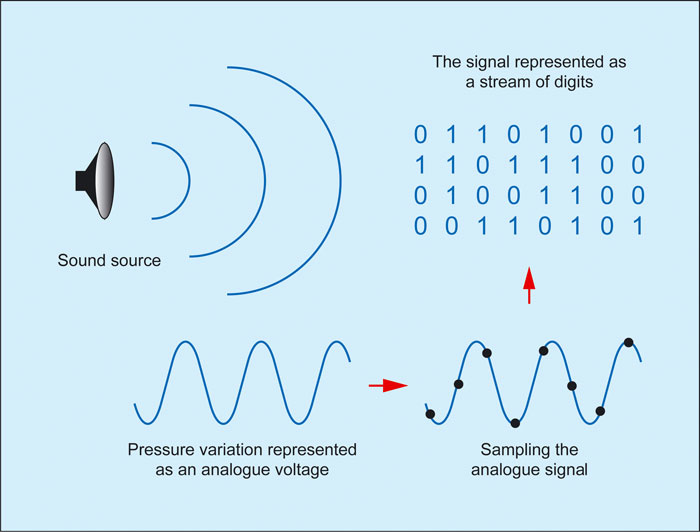
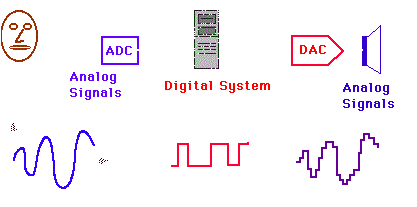
In order for computer systems to process sound, a continuous audio signal must be converted to a discrete digital form by time sampling.

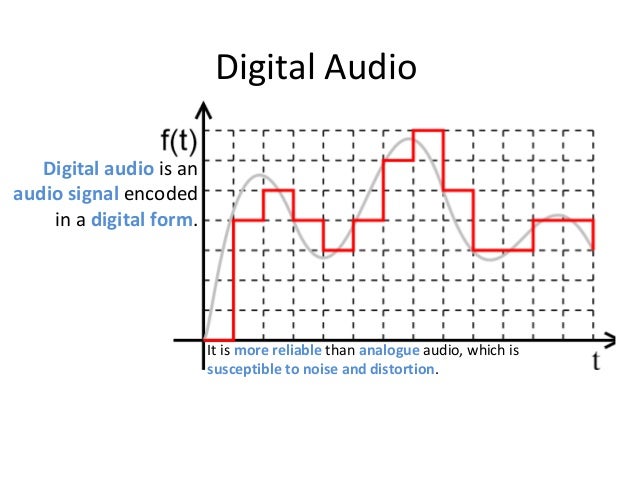
For this, a continuous sound wave is divided into separate small time sections, for each section a certain value of sound intensity is set.

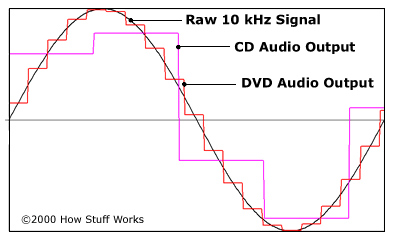
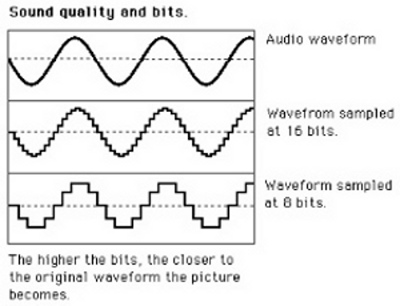
Therefore, the continuous dependence of the loudness of the sound at time A (t) is replaced by a discrete sequence of loudness levels. On the graph, this appears to replace a smooth curve with a sequence of “steps.”

How audio is encoded (digital encoding and audio processing)
Sync Audio Sampling

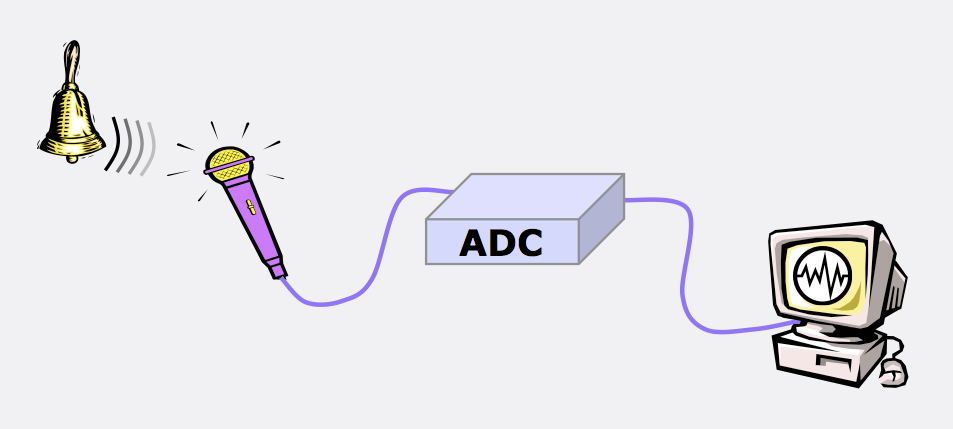
A microphone connected to the sound card is used to record analog audio and convert it to digital format.

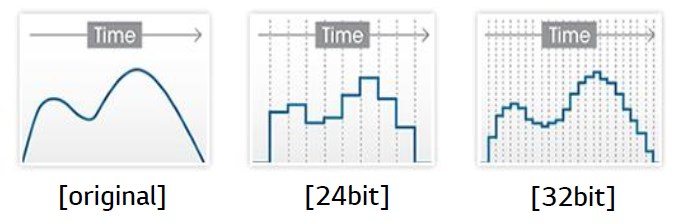
The denser the discrete strips are located on the graphic, the better it will be to ultimately recreate the original sound.

The resulting digital sound quality depends on the number of sound volume level measurements per unit time, that is, the sampling frequency.

Audio sample rate is the number of audio volume measurements in one second.

The more measurements that are made in one second (the higher the sampling frequency), the more accurately the “ladder” of the digital audio signal repeats the curve of the analog signal.

Each “step” of the graph is assigned a certain value for the sound volume level. Loudness levels can be thought of as a set of possible N states (gradations), which require a certain amount of I information to encode, which is called audio encoding depth.

Audio encoding depth is the amount of information required to encode the discrete volume levels of digital audio.

If the known encoding depth, the number of digital audio volume levels can be calculated by the general formula N = 2 I.

For example let the audio encoding depth be 16 bit, in this case the number of audio volume levels is:

N = 2I = 2 16 = 65 536.

During the encoding process, each sound volume level is assigned its own 16-bit binary code, the smallest sound level will correspond to the code 0000000000000000, and the highest – 1111111111111111.

Digitized audio quality

Therefore, the higher the sample rate and depth of audio encoding, the better the digitized sound will sound and the better you can bring the digitized sound closer to the original sound.

The lowest quality of digitized sound, corresponding to the quality of telephone communication, is obtained at a sampling rate of 8000 times per second, a sampling rate of 8 bits, and by recording an audio track (“mono” mode).
But it should be remembered that devices that resemble speech synthesizers and speech coders are used to improve this sound in telephony. About speech coders, this article also


Free Download Mp4Gain
picture


Mp4Gain Main Window
picture


Mp4Gain Features
picture


Free Download Mp4Gain
picture

Digital audio encoding

Digital audio encoding

Digital audio encoding

To represent the vibrations of sound in digital form, the amplitude of the sound signal is measured at each specific moment of the sound.

DIGITAL AUDIO ENCODING

Since the waveform of sound is inherently continuous, for its accurate digital display it is necessary to measure the amplitude an infinite number of times per second and divide the amplitude scale by an infinite number of gradations. In reality, the number of measurements per second (sample rate) typically ranges from 10,000 to 96,000. Currently, the most common sample rates are 44100 Hz (the standard for CD-audio) and 48000 Hz (the main standard for CD-audio). DAT). The number of amplitude gradations (resolution) is generally taken equal to 28, 216, or 224 (depending on the number of bits allocated for this information).

Of course, distortion is unavoidable when sampling a continuous signal. The lower the sample rate and / or resolution, the closer the output waveform will be to rectangular. In this case, high-frequency distortions arise, which are partially suppressed by filters installed at the DAC output.

Digitized audio requires a large amount of memory. In fact, at a standard 44100 Hz sample rate and 16-bit resolution, the audio material (stereo) for one minute would be 10,584,000 bytes (approximately 10.09 MB). Also, the sound files are very poorly compressed by standard archive programs (zip, arj, etc.). Therefore, there are special compression algorithms for them. For example, a WAV file compressed with ADPCM takes about four times less space. However, distortion may occur. Therefore, it is better not to use audio compression algorithms in professional work.

What is digital audio?

What is digital audio?

DIGITAL AUDIO

In fact, there can be several types of “digital sound”, more precisely, the types of its representation on a computer.

Digital Audio

The now familiar “digitized sound” is an analog of a photograph, an exact digital copy of sounds input from outside. It can be a microphone recording of your voice, a copy of audio tracks from a CD, or other sources. Like photography, this sound takes up a lot of space … however, the appetite for photography compared to sound is simply negligible! One minute of digital audio recorded at the highest quality requires approximately 10 megabytes. It is true that there are special compression methods that reduce the volume of computer sound ten times. But more on that later.

Besides “digital”, there is also “synthesized” sound – more precisely, music in MIDI format. Well, you are probably familiar with synthesizers. Briefly, the essence of MIDI technology can be summed up as follows: the computer not only plays the melody you need, but synthesizes it using a sound card. MIDI melodies are just command systems that control a sound card, note codes that it should “display” (indicating instruments, duration and some other parameters of this note). This technology is ideal for computer composers, as it allows you to easily change any parameter of the melody created on the computer: replace instruments, add or remove them, change the tempo and even the style of the song. And files with MIDI music are small, only a few tens of kilobytes. But MIDI has drawbacks too: you can’t record a voice to a MIDI file, and music sounds good only on a very high-quality sound card. Transfer the file you created to a neighbor’s computer equipped with a $ 10 card, and you will long think where all the charm and beauty of the melody has evaporated. It is true that MIDI can be relatively easily converted to digital sound format; reverse conversion, unfortunately, is impossible at the current level of computer technology development.

Finally, there is a third type of sound you can work with at home: “tracker” or “sampler” technology, a kind of love that comes from digital and synthesized sound. When you work with programs of this type, you will “build” a musical composition from small “pieces” of digital or synthesized sound that are repeated periodically: loops or samples. It is on this principle that compositions are created in the current popular style of “house”, “trance”, “techno” …

In short, all simple dance (not to say grosser, primitive), rhythmic music. This type of music, a cross between digital and synthesized, is called “tracker” and has a limited but loyal audience of fans.

What is digital audio?

What is digital audio?

Digital audio

Today we hear everywhere: high-quality digital sound, digital photography, digital video.

Digital Audio

What does this buzzword mean: digital? The key lies in modern methods of recording, processing and storing a wide variety of information, which appeared simultaneously with the advent of personal computers. The first PCs were designed only for settlement operations, but later they discovered that they can operate with texts, images, sounds and videos. You just need to translate everything into the computer language.

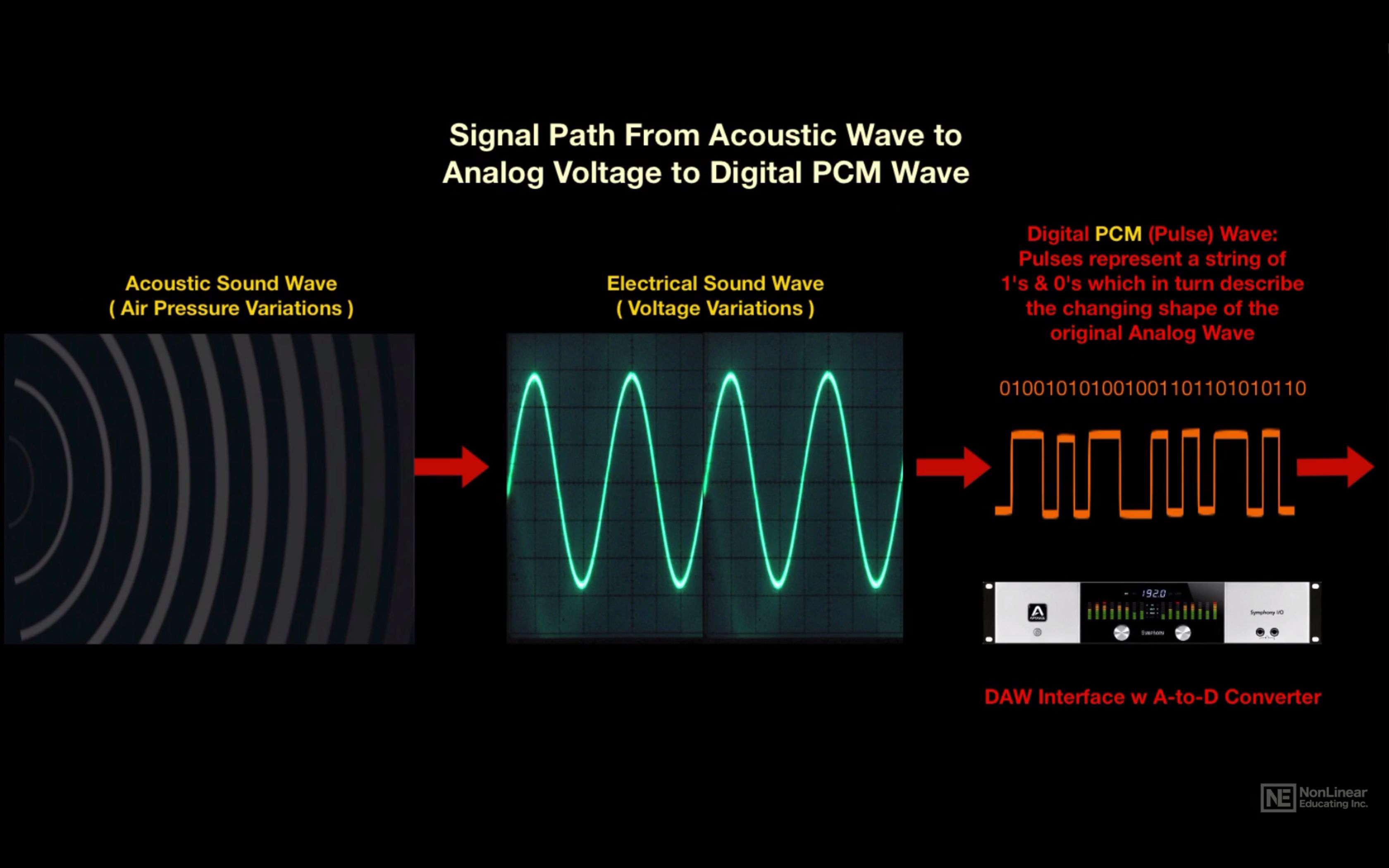
Let’s take a look at how you can record and play sound with a PC. First, the sound vibrations are converted to an alternating voltage using a microphone. This voltage is fed into the input of a special computing device – a sound card. The computer cannot register voltage. Like any electronic device, it can only record the voltage value of two levels: “there is voltage” (we should say a logical unit) or “there is no voltage” – logical zero.

It is in the form of combinations of logical zeros and ones that the PC records numbers, letters, words, or formulas. It is clear that recording a large amount of information requires many memory cells, because only one binary number can be written in a cell: 1 or 0. To write a digit or letter, 8 memory cells are needed. The number 3 is written as 00000011, the number 5 is 00000101, the letter k is 01101001, and the like.

How to record sound?
PC audio processing device control panel Very simple! The alternating voltage that reaches the sound card receives multiple measurements, the results of which are carefully recorded by the PC in memory. The computer measures the voltage approximately 44,000 times per second at any given time and records its value in memory. This is similar to how students keep a weather calendar: every day, at the same time, they record the readings of a thermometer, a barometer. The PC also records voltage values, but it does so much more frequently. How do you manage? Easy! Modern computers can do more than a billion simple operations per second, so the 44 or even 98,000 measurements required to record high-quality audio are not a problem for a computer. At the same time, the PC has to do a lot of work: drawing on the screen, writing the measurement results to disk, keeping an eye on which key you pressed, where the mouse moved, measured new voltage values, etc. Despite the fact that a voltage measurement consists of several dozen simple operations, the speed of modern processors is sufficient for it.

Large amounts of memory are required to store digital audio. One second of sound takes up the same space as 88,000 letters! This is how sound is recorded: voltage measurements are recorded on a large CD. Compare: You can record in text format a small library of 4-5 thousand books for several hundred pages or … 76 minutes of quality music.

Modern computers have learned to “cheat.” They record very quiet sounds with less precision, the ear will not yet hear them clearly. Sounds that are masked as loud sounds are also digitized less precisely. Why record in detail how smooth the violin sounds when the drum is struck hard? Therefore, the amount of memory occupied by sounds can be reduced ten times. This (and not only this) is done in the popular MP3 computer audio formats, which are common on the Internet, and in portable MP3 players, and Atrac, which is used in minidisc players.

How do I play the sound?
How is digital sound recreated? Even easier than typing it! In math lessons, you probably had to graph a function by points, and in physics lab work, you had to draw a graph based on measurements. During playback, the PC reads the voltage value from memory at all times and, using a sound card, resumes almost the same alternating voltage that was digitized.

These methods of recording and reproducing sound are used not only by computers, but also by various CD, MD and MP3 players, which, in fact, are also microcomputers, albeit without the usual keyboards, mice and monitors.

It is convenient not only to record and store digital sound, but also to transmit it remotely. The convenience lies in conserving airtime and battery life. During a conversation on a mobile phone, the voice is converted into digital form and memorized. When, say, 1/5 of a second of sound has accumulated, the phone’s transmitter turns on and the sound is transmitted for 1/100 of a second.

Fundamentals of digital audio

Fundamentals of digital audio

Digital Audio

Digital audio is based on the mathematical representation of the sound wave.

digital audio

The digital world is evolving very rapidly and it is no wonder that many people find digital technology complex. The purpose of this article is to explain what digital audio is without going into complicated mathematical details. To understand what digital sound is, you must first understand that there are no sounds inside a computer and there is only one math.

What is sound
Sound is the vibration of molecules. Mathematically, sound can be accurately described as a “wave.” It has a maximum peak value (wave hump) and a minimum value (deflection). If you have ever seen a graphical representation of a sound wave, you will notice that sound is always represented by a curve that constantly crosses the X-axis. This means that the nature of sound is “periodic”. Any sound has a crest and deflection, a positive and a negative period. This is called a loop. So the basic concept is that all sounds have at least one cycle.

The next important idea is that any periodic function can be represented mathematically as a series of sinusoids. In other words, even the most complex sound is just a collection of sine waves. A voice can constantly change its volume and pitch, but anytime it sounds, the voice is just a set of sine waves.

And finally, third: people do not hear sounds with a frequency higher than 22 kHz. Therefore, it is not necessary to record everything above 22 kHz.

So once again, the fundamentals of sound are as follows:

Sound waves are periodic and therefore can be described as a collection of sine waves.
We are not interested in waves with a frequency higher than 22 kHz, because we cannot physically hear them.
Analog to digital transition
Let’s say I’m speaking into a microphone. The microphone turns my voice into a continuous electrical current. This electrical current passes through a wire through an amplifier of some kind and eventually enters an analog-digital converter (ADC). Remember that the computer does not store sounds, but mathematical values, so we need something that converts the analog stream into a sequence of ones and zeros. This is what the ADC is doing. In simple terms, the converter takes quick snapshots of the sound wave, called samples, and assigns an amplitude value to each sample. And here we come to two basic concepts that will help explain the nature of digital sound. These concepts are time and breadth.

Sound bitness
Sound bitness
In the digital world, nothing is continuous, everything has a certain mathematical meaning. In the analog world, the sound wave will reach its peak and all values ​​from 0 dB to the peak will exist. And in a digital signal, there are a limited number of possible amplitude values. Think of analog audio as someone who gently walks up an escalator, while digital audio is someone who walks up a staircase and, over time, is on one rung or the other. Or let’s say there are values ​​50 and 51. So in analog sound there may be some intermediate value of 50.46, but in digital sound this value will be rounded to 50. This means that in fact the sound wave is distorted as it passes through the ADC … And since the analog signal is continuous, then this rounding of values ​​occurs constantly during the conversion process. This is called a quantization error and it sounds like a strange noise. But imagine a ladder with more steps that are less high. Now we have the values ​​50, followed by 50.2, followed by 50.4, and then 50.6, etc. An analog signal with an amplitude value of 50.46 will now be rounded to 50.4 instead of 50. This is a major improvement that does not completely eliminate quantization errors, but significantly reduces their impact. An increase in bitness is essentially an increase in the number of steps on a stair with a decrease in their height. As the quantization error decreases, the noise level decreases. Now we have the values ​​50, followed by 50.2, followed by 50.4, and then 50.6, etc. An analog signal with an amplitude value of 50.46 will now be rounded to 50.4 instead of 50. This is a major improvement that does not completely eliminate quantization errors, but significantly reduces their impact. An increase in bitness is essentially an increase in the number of steps on a stair with a decrease in their height. As the quantization error decreases, the noise level decreases.

What is digital audio

What is digital audio

digital audio

Digital audio is a numerical representation of sound.

Digital Audio

Recording sound as digital sound is similar to recording sound on a tape recorder. Let’s say you have a microphone connected to your computer. Whenever a sound is heard (speaking, singing, playing a musical instrument or just any noise), the microphone “hears” it and converts the sound into an electrical signal. The microphone then sends the signal to the computer’s sound card, which converts the signal into numbers. These numbers are called samples.

A sound card is a device that is inserted into a computer that allows it to understand the electrical signals from any sound device. You can think of a sound card as a “translator”. When an audio device (such as a microphone, electronic musical instrument, CD player, or other device capable of outputting an audio signal) sends signals to the computer, the sound card receives the signals and converts them into numbers that computer can understand.

The samples contain information that tells the computer what the recorded signal sounded like at specific times. The more samples that are used to represent the signal, the higher the quality of the recorded signal. For example, to create a digital sound recording that has the same quality as a CD recording, the computer must receive 44,100 samples per second. The number of samples taken per second is called the sample rate.

The size of each individual sample also affects the quality of the recorded sound. This size is called the bit depth. The higher the bit depth, the higher the sound quality. For example, to create CD-quality digital audio, each sample must be 16-bit.

Computers use the binary form to represent numbers. The place of a binary number is called a bit, each bit represents one of two numbers: 1 or 0. By combining bits, computers can display any number. For example, any number between 0 and 255 is represented as an eight-bit number. With 16 bits, it can represent numbers in the range 0 to 65,535.

Your computer can save all submitted samples. The temporal characteristics of the sample are also saved. Later, the computer can send samples to the sound card at the same intervals, so you hear the sound exactly the same as what was recorded. The basic concept is as follows: a sound card records an electrical signal from an audio device (such as a microphone or a CD player). The sound card converts the signals into sets of numbers, called samples, that are stored on your computer. During playback, the samples are sent back to the sound card, which converts them into an electrical signal. The signal is sent to the speakers (or other audio device) and you hear the sound exactly as you recorded it.

So what is the difference?
After reading the description of MIDI and digital audio, you may still be confused about the difference between the two. After all, both processes record the signals sent to the computer and then reproduce them, right? The point is, when you record MIDI data, you are not recording actual sound. Just record the instructions for playback. It is like a musician playing notes, where the notes are MIDI data and the musician is the computer. The musician (or computer) reads the notes (or MIDI data) and then stores them in memory. The musician then plays a melody on a musical instrument. What if the musician takes another instrument to play? The game will remain the same, but the sound will change. The same is true for MIDI data.

A keyboard synthesizer can produce any sound, but playing the same MIDI data using the keyboard will be exactly the same.

When you record digital audio, you are recording real audio. If you record a performance of a piece of music as digital sound, you cannot change the sound of that performance as described above. Due to these differences, MIDI and digital sound have their own advantages and disadvantages. Since MIDI is recorded as data for playback, rather than actual sound, you have much more freedom to manipulate the sound than with digital sound. For example, you can easily correct the error by changing the pitch. MIDI data can be converted to standard music notation, which is not possible with digital sound.

The benefits of digital audio

The benefits of digital audio

Digital Audio

The basics of “numbers”

DIGITAL AUDIO

Each of the multimedia devices on sale today, be it a CD player, a voice recorder or a flash memory player, uses many different types of presentation of data streams, which are then converted into sound. And even more sound formats used for professional purposes have been invented. An inexperienced buyer is forced to gather information on designations on boxes and devices from a variety of sources, often receiving incorrect information or even more confusion.

Almost all devices in the “Portable Audio” section of the ZOOM.CNews.ru catalog support multiple sound formats at the same time, and many devices that do not belong in this category are also tagged with support for playing sound files. To help our reader, we decided to create a short glossary of abbreviations and talk about the most common formats. We plan to leave it open for updates and modifications, adding new formats and describing in more detail the advantages and disadvantages of the already common or forgotten ones.

A little theory

To begin with, remember that digital sound is nothing more than a collection of numbers. The determining factor is the system by which sound as air pressure is converted into data streams and encoded for further processing and reproduction. Consequently, digital sound is usually included in computer files with various extensions, which more often (but not always) can determine their format. And the same concept of format can have, paradoxically, two meanings. First, the format may exist as a general characteristic, including both the type and the physical characteristics of the medium (disc or cassette), method of recording, principles of encoding, and protection against errors. Second, the format can only be understood as the method of encoding and compressing sound, as standard means are used for transfer, for example a computer.

Analog sound, unlike digital, is reproduced on analog devices and has several significant differences. While not a data stream, analog sound is represented as a continuous electrical signal that represents the change in sound wave. To translate it into digital format, the sound is “digitized”, that is, it is divided into certain segments, in which the numerical value of the amplitude is fixed at that moment. We will not delve into the principles of digital sound creation, but it is absolutely necessary to note that the more often a sound segment is divided and its characteristics described, the clearer and more complete the sound image itself is created.

This process generates an enormous flow of data that describes the sound, and it is clear that each digital audio format is nothing more than a compromise between the need to present the sound as loud as possible and the limitations of the memory of the computer or device. Of reproduction.

A little more theory. In most cases, the human ear perceives sound with a frequency no higher than 22,000 Hz and, to describe it fully in digital form, a sampling frequency of at least 44.1 kHz is required. Since it is absolutely impossible to determine the value of the signal at any given time, during digitization quantization occurs, that is, the replacement of the actual values ​​of the signal by approximate values. The more levels of audio quantization, the more accurately the signal level is described. As a result, each standard CD carries an audio signal with a sampling frequency of the same 44.1 kHz and a 16-bit quantization level,

Is the digital signal distorted during transmission and storage?

Is the digital signal distorted during transmission and storage?

DIGITAL AUDIO

Since any digital signal is represented as a real voltage or current electrical curve, its shape is distorted in one way or another during any transmission, and a signal “frozen” for storage (signalogram) is subject to degradation due to physical reasons. common.

Digital Audio

All of these influences on the shape of the carrier signal are interferences that, up to a certain value, do not change the information content of the signal, since individual distortions and letter loss in words generally do not interfere with the correct understanding of words. words, and information redundancy, such as an increase in the length of the words, increases the probability of successful recognition. … In other words, the carrier signal itself can be distorted, but the information it carries, the encoded audio signal, remains unchanged in the vast majority of cases.

So that the quality of the carrier signal does not deteriorate, any transmission of useful audio information (copying, writing to a carrier and reading it) must necessarily include the operation of restoring the form of the carrier signal, and ideally, and the digital form primary of the information signal, and only after that the newly generated carrier signal can be transmitted to the next consumer. In the case of direct copy without restoration (for example, simply rewriting a video cassette with a digital signal obtained with a PCM decoder in common VCRs), the quality of the digital signal deteriorates, although it still contains all the information it carries. However, after repeated sequential copies or long-term storage, the quality deteriorates so much that unrecoverable errors begin to appear that irreversibly distort the information carried by the signal. Therefore, the copying and transmission of digital signals should be done only on digital devices and, when stored on media, should be “updated” in a timely manner without waiting for irreversible degradation (for magnetic media, this period is estimated to be several years ). A correctly transmitted or updated digital signallogram does not lose quality and can be copied and exist forever in absolutely unaltered form. without waiting for irreversible degradation (for magnetic carriers this period is estimated to be several years). A correctly transmitted or updated digital signallogram does not lose quality and can be copied and exist forever in absolutely unaltered form. without waiting for irreversible degradation (for magnetic carriers this period is estimated to be several years). A correctly transmitted or updated digital signallogram does not lose quality and can be copied and exist forever in absolutely unaltered form.

However, it should not be forgotten that the correctness of any code is finite, and the actual carriers are far from ideal, therefore the occurrence of unrecoverable errors is such a rare thing, especially with careless handling of the carrier. When reading new and correctly stored DAT cassettes or CDs on high-quality and reliable devices, these errors practically do not occur, however, with aging, contamination and damage of media and reading systems, they become more. A single uncorrected error is almost always invisible to the ear due to interpolation, however, it leads to distortion of the original sound signal, and the accumulation of such errors over time begins to be felt in the ear.

A separate problem is the difficulty of recording uncorrected errors, as well as verifying the identity of the original and the copy. Very often, designers of digital audio devices operating in real time do not care about the issue of accurate verification of the reliability of the transmission, considering that the measures taken to correct the errors are sufficient. In the general case, the impossibility of retransmitting an erroneous sample or block leads to interpolation occurring secretly and after copying it is impossible to say with certainty whether the original signal was copied exactly. Error indicators, which are found on some devices, usually light up only at the moment of their appearance, and in the case of single errors, their operation can easily go unnoticed. Even in personal computer-based systems, it is often impossible to control the accuracy of reception through a digital interface or direct reading from a CD; the only way out is to repeat the operation and compare the results.

What are the pros and cons of digital audio?

What are the pros and cons of digital audio?

Digital Audio

The digital representation of sound is valuable, first of all, for the possibility of endless storage and reproduction without loss of quality; however, the conversion from analog to digital and vice versa inevitably leads to its partial loss.

digital audio

The most unpleasant distortions introduced in the digitizing stage are the granular noise that occurs when the signal is quantized by level due to rounding of the amplitude to the nearest discrete value. Unlike simple broadband noise introduced by quantization errors, granular noise is the harmonic distortion of the signal, most noticeable in the upper part of the spectrum.

The power of the granular noise is inversely proportional to the number of quantization steps; However, due to the logarithmic characteristic of hearing with linear quantization (constant step value), quiet sounds have fewer quantization steps than loud sounds, and as a result, the main density of non-linear distortions falls in the region of sounds. silent. This leads to a limitation of the dynamic range, which ideally (without taking into account harmonic distortion) would be equal to the signal-to-noise ratio, but the need to limit this distortion reduces the dynamic range for 16-bit encoding to 50-60 dB. The situation could have been saved by logarithmic quantification, but its implementation in real time is very difficult and expensive.

The distortion introduced by granular noise can be reduced by adding normal white noise (random or pseudo-random signal) to the signal, with an amplitude of half the least significant bit; such an operation is called dithering. This leads to a slight increase in the noise level, but weakens the correlation of quantization errors with the components of the high-frequency signal and improves subjective perception. Anti-aliasing is also applied before rounding the samples by decreasing their bit depth. Essentially, dithering and noise shaping are special cases of the same technology, with the difference that, in the first case, white noise with a flat spectrum is used and, in the second, noise with a spectrum with a “shape “special.

When restoring audio from digital to analog, there is the problem of smoothing the stepped waveform and suppressing the harmonics introduced by the sample rate. Due to the imperfection of the frequency response of the filters, insufficient suppression of this interference or excessive attenuation of useful high-frequency components may occur. Poorly suppressed sample rate harmonics distort the shape of the analog signal (especially in the high frequency region), resulting in a “rough” and “dirty” sound.

Digital audio formats: how to choose the best one (Part 2)

Digital audio formats: how to choose the best one (Part 2)

Digital Audio

The higher the bit rate, the better the sound quality. For example, at a bit rate of 128 kilobits per second, five minutes of music will require only about five megabytes on a hard drive or flash drive. The optimal bit rate for storing MP3 music files is believed to be 256 or 320 kilobits per second.

Digital Audio

Another popular lossy compression format is OGG Vorbis. Unlike MP3, it was originally free and open source, so it quickly gained popularity among independent developers. In terms of quality, it is in no way inferior to MP3, although it does use its own psychoacoustic model for file compression.

WMA is a lossy audio compression format developed by Microsoft Corporation. It can be found on any Windows operating system, but it is not very popular with users. Another relatively common lossy audio compression codec is AAC, which differs from MP3 in slightly less quality loss at the same bit rate.

Audio codecs for music lovers
Newer formats provide lossless audio compression. The most popular among users is the free FLAC format, introduced in 2001. FLAC is perfect for archiving your audio collection, as well as for listening to music on high-quality sound reproduction equipment.

In so-called lossless codecs, encoded data can always be retrieved with bit precision. The encoding is carried out using a mathematical scheme: a certain regularity is found in the initial data and, taking this regularity into account, a second sequence is generated, which fully describes the original.

The second most popular lossless compression format is Monkey’s Audio, which is distributed as free software for Microsoft Windows. The WavPack format has support for multi-channel streaming and a slightly better compression ratio. Apple introduced its own lossless ALAC codec in 2004, which resembles FLAC.

Digital audio has huge advantages over analog files. The user can store and replicate their material for an infinitely long time without losing the original quality. At the same time, storing the “digit” is more cost-effective, because it takes up much less physical space, unlike a collection of records or cassettes.
Thus, a powerful ZIP archiver can compress a WAV file by only 10-20%, while FLAC achieves compression rates of 30-50% for most audio files. At the same time, the audio codec allows the recovery of partially corrupted data and the decoding process itself is very undemanding on processor resources.

To archive your music collection, it is now optimal to use lossless compression formats, for example FLAC, which is supported by most players. However, to store audiobooks, where high fidelity of the original sound is not required, you can use cheaper MP3 or OGG.