The 4 most popular audio formats

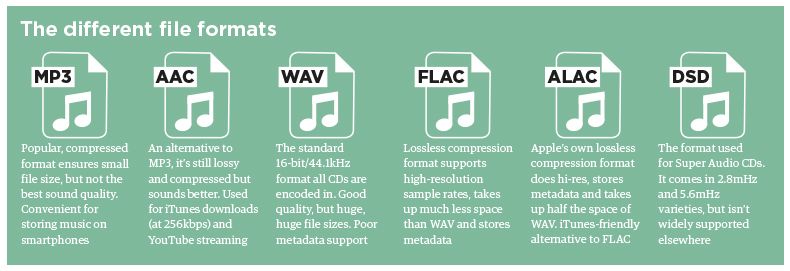
Each audio file format has its individual strengths and weaknesses. Find out which one is best for certain tasks or situations; This will save you time and avoid unnecessary mistakes. Next, we will look at the five most common types of audio files and some of their distinctive characteristics and differences.

Audio Formats

1. The M4A audio file format

M4A is a file extension for an audio file in the mpeg-4 format. This is a compressed audio file format used in modern environments. The reason for this is the higher quality standards that result from the use of cloud storage and more local hard drive space on modern computers. Especially for users who have to listen to pronounced sounds in audio files, the high quality of M4A ensures that the format remains relevant compared to other common file types.

Audio format

.M4A files are compressed audio formats used in Apple iTunes.
Music download software, such as Apple iTunes, uses the M4A format instead of MP3 because it is smaller and of higher quality. There are limitations in terms of compatibility, as many software programs cannot recognize the M4A format. This makes it ideal for a single selected user type.

2. The FLAC audio file format

The abbreviation FLAC stands for Free Lossless Audio Codec, which aptly describes files in the FLAC audio format. These are audio files that have been compressed and are smaller than the original file. The sophisticated file type is rarely used as an audio format. Because although it has its advantages, it often requires special downloads to make it work.

If you also consider that audio files are often streamed, this can be associated with considerable inconvenience for any new user receiving such a file.

A .FLAC file is a lossless audio format.

The most important aspect of FLAC is that lossless compression saves size and makes it easy to publish an audio file while maintaining the original quality. Compared to the original audio file, the .flac file requires only sixty percent of storage space. This saves a lot of hard drive space and time to upload and download.

3. The MP3 audio file format

The .mp3 file extension indicates audio files that use the MPEG-Audio Layer 3 format. The most important feature of MP3 files is their compression, which saves valuable storage space while maintaining the sound quality of the original almost flawless. Compression makes the MP3 audio format extremely popular with all portable audio players, especially the Apple iPod.

Due to its high quality and small file size, the .MP3 format also keeps up with newer types of audio files.
Today’s digital landscape is indispensable without MP3, as it is compatible with almost any device that can read types of audio files. Due to its compact size, the MP3 file format is especially suitable for exchanging a large number of audio files. It also works well for websites that host audio files. The popularity of the MP3 format relies heavily on its overall sound quality. Although this is not the highest quality level, MP3 offers enough other advantages to outweigh it.

4. The MP4 audio file format

The MP4 audio format is often mistakenly viewed as an evolution of the MP3 file. But that is a fallacy. Both types of audio files are fundamentally different; the supposed similarities result only from their names, not from their functionality. So, among other things, you should be aware that .mp4 files are sometimes called video files, not audio files. This is not an error because, in fact, the format refers to both audio and video files.

There are many differences between the .MP4 and .MP3 file formats.
The .mp4 audio file type is a full multimedia file extension that can contain audio, video, and other media. In MP4 format, the data is stored in the file, not in the code. This must be taken into account as MP4 files require different codecs to artificially implement the code so that it can be read.

Enhance Volume level of video and audio files

Undoubtedly we have all known the frustration produced by corroborating that our video or audio files (mp3, flac, aac, avi, mpeg, mp4, etc.) have a different loudness and this is noticeable when playing them!

Enhance volume level

Why do the videos or audio files have different loudness?

The reasons can be many. Since the time they were recorded, since in recent years the so-called “volume war” was generated by music producers.

enhance volume level

When sound louder is synonymous with having better sound

And this was because it was discovered that if an audio sounds a little louder, the human ear can perceive it as sounding better.

Indeed, exhibitions were carried out where people (including musician and music professionals) were made to listen to an aido and then they were made to listen to one that had 8% or 10% greater loudness … and the + 95% perceived that the second (which only sounded louder) sounded “better”.
So many products, almost all of them, especially dance music, por, rock, etc. They began to sacrifice the dynamics of the music and gave a little boost to the volume of their productions. But this was a little bit at the beginning, but when everyone went up a little bit, others went up higher and thus began a career that is known as the volume war.

What is the dynamics of music?

Much music with all intentionality has low volume passages and contrasts with others of high sonority. This gives expressiveness to the music, it is another resource to be able to transmit sensations, perceptions, feelings, atmospheres, etc.

The volume war ended that dynamic, making the whole song sound all the time at maximum volume, without reaching distortion. In other words, the only limit was that: the distortion.

Give it all the volume, staying on the edge of distortion.

Then, we will understand that the time in which it was recorded has a lot to do with the loudness of our music or our video.

There are also technical elements. The combination of bitrate, with bipt depth and sample rate, among others (equalization, etc) are other elements that help make each recording have its own loudness.

When having different loudness becomes a problem

Previously, if we listened to a song from a vinyl record or watched a video from a video cassette, to listen to another, it was necessary to change the vinyl record or the video cassette … and those seconds of pause did not make us perceive the difference in loudness that they possibly had both recordings between them.

Now, in the digital age, with playlists, a song begins just after the previous one ends, just as it happens with videos. And the end of one recording is so close to the beginning of the next one, that we perceive the difference in loidness clearly … and we don’t like it.

Mp4Gain is the software (the only one) that can normalize video and audio files of the most popular formats. You can even normalize and convert them at the same time. That is, if you have a music video and want to convert it to mp3, you can normalize and convert it in one step. Even if you have a flac and want to convert it to mp3 or if you have a vi and want to convert it to mp4 and in the process normalize it, quite with the click of a single button.

What is an OGG file?

OGG was developed as a container file format for multimedia applications and can contain audio, video and text data. It is particularly characterized by its transmission capabilities, since it is not necessary to adapt the contents of a container.

Ogg audio format

Files in OGG format are container files for multimedia applications. They can be transmitted without problems since it is not necessary to adjust the contents of the container.

Ogg format, what is OGG?

OGG history

The development of OGG started in 1993 and is under the direction of the Xiph.Org Foundation, which has also contributed some codecs. The goal was to create a license-free format that could efficiently store and stream multimedia content. The term OGG comes from a computer game and means something like “to drink something very energetic.”

When Fraunhofer-Gesellschaft began charging license fees for the widely used MP3 format, development of the Vorbis codec began in 1998. Vorbis is the best-known audio codec that is responsible for compressing the contents of the OGG container. The terms Vorbis and OGG are often treated synonymously, which is incorrect, because OGG is just the container for Vorbis-encoded audio content.

The most important codecs for OGG are:

Vorbis (audio)
Opus (audio, successor to Vorbis)
FLAC (audio)
Theora (video)
Speex (voice data)
Write (text data)

OGG fields of application

The OGG format is used in the audio segment by numerous software and hardware products and has also established itself in the IT sector. The HTML 5 standard allows OGG files to be played in Chrome, Firefox and Opera browsers without a plug-in, while Safari and Internet Explorer do not support the format. Due to its license-free nature, it is used in numerous web audio players, although here and also in professional studio environments, the successor Opus is becoming increasingly popular as an audio codec compared to Vorbis.

OGG’s Theora video codec is not very popular in the professional sector, but it is very popular in the open source community. For HD videos, the Matroska format is used, which is also license-free.

The main advantages of OGG

OGG is an open source project, so unlike proprietary formats, there are no usage license fees, which encourages distribution.

Whether it is an audio, video or text file, all content in the Conatiner format can be saved and transmitted without adjustments. This streaming capability is OGG’s core design feature and sets it apart from other formats that can only stream live in certain ways (like Matroska) or can’t stream at all (like MP4). The well-known VLC Media Player is suitable for playing OGG files. There are also programs available on the Internet to convert to MP3 and burn OGG files.

Sample rate and bit depth

The comparison with the digital or film camera is not completely random: the sampling frequency of the audio signals, that is, the frequency of the samples per unit of time (usually given per second), is comparable to the frame rate per second from a film camera. The number of pixels in each individual image could be equated with the bit depth: HD movies “look better” than Super 8 movies. The higher the number of pixels on the sensor and the more often a photo is taken, more precisely, the “light to be recorded”, the landscape, can be digitally reproduced.

Bit Depth

Bit depth

Fortunately for us, a certain Harry Nyquist inspired a certain Claude Shannon long ago to support him with a theorem (a theoretical statement or theorem) that stated that an audio signal at twice the frequency must be sampled uniformly to match. with the original signal. to be able to rebuild sufficiently. Limiting the bandwidth of audible frequencies practically frees us from our hearing, which is basically only capable of consciously perceiving frequencies between a maximum of 20 Hz and 20,000 Hz.

Sample rate

The expense of completely and exactly reconstructing the analog output signal is theoretically infinite, since digital signals are discontinuous by nature in any case, while analog signals are always continuous. Unfortunately, it is inevitable that digital information is only suitable for rough storage of analog signals. The starting signal is “rough”, good word, right? Nyquist’s theorem also applies to digital cameras: they also deal with frequencies, that is, those of light.

digital audio

For signals up to 20 kHz more or less relevant to humans, a sampling frequency of 40 kHz is sufficient according to the aforementioned theorem. The 44.1 kHz sample rate common for CD quality comes from the 1970s or Sony’s “pulse code modulation (PCM) process for storing digital signals on video tapes. Later, Sony developed the Red Book standard for audio CDs with Philips.

The frequency, which is slightly wider by an additional 4000 Hz than twice that audible to humans, has its origin in the simplest possible filters, which are intended to remove so-called aliasing effects from the audible range of the reconstructed analog signal. during digitization: the wider this “corridor”, the simpler the filter technology.

PCM pulse code modulation method

Exactly 44.1 kHz got out of this, because sample rate converters can be more easily designed (used for studio technology or data carrier transfer) if the sample rate is an integer multiple of the output frequency. The output frequency here was the 60 Hz network frequency used for video digitization with 525 lines to digitize the TV signal. Changing 60 Hz would have been very laborious, it stuck. It is not a coincidence that multiplying 525 by an integer factor results in a frequency greater than 44,000 Hz, which we want to achieve to keep filters for anti-aliasing simple: the next largest integer that is divisible by 525 is 44,100. The multiplication factor is 84, as a whole number is desired, which should not interest us otherwise.

But what role does the bit rate play?

This term is known primarily for describing the quality of lossy compressed audio (eg MP3). Unfortunately, this makes it even more difficult than with channel-separated compression, the bit rate is split between the two channels: stereo MP3 (not to be confused with dual channel) with a 320 kBit / sec bit rate. uses only 160 kBit / sec per channel.

Bit Rate

Or different bit rates per channel: set stereo (mono signal calculated with additional stereo information), on the other hand, it works with volume differences between the two channels and therefore can use the bit rate much more efficiently .

Bitrate

DAC, bit rate

What exactly is the obviously so essential bit rate? For a CD based on the Red Book standard, the bit rate is calculated as follows: 2 channels * 44,100 Hz sample rate * 16 bit depth per sample results in 1,411,200 bits / sec., That is, 1.4112 Mbit / sec. Bit rate. Obviously, this is considerably more than what compressed formats (should) provide. You can see how the compression processes work: last but not least, they more or less cleverly reduce the bit depth per sample at a given sample rate of 44.1 kHz, for example. The amount of data decreases, and that is exactly the goal of every data compression: halving the bit rate means exactly halving the amount of data.

As an example, I have compared some common file formats for digital audio:

Format

Codec (s)

Multichannel

Sampling rate

Bit depth or resulting bit depth from bit rate

Compression
/
subject to acoustic losses

Wav

PCM et al.

yes

any

any

Optionally, depending on the codec, also lossless

AIFF

PCM et al.

Not

any

any

Not

FLAC

FLAC (Free Lossless Audio Codec)

yes

0.001 kHz-655.350 kHz

4, 8, 16, 20, 24, 32

without losses

Apple loses
less
MP4

ALAC (Apple Lossless Audio Codec)

yes

0.001 kHz-384,000 kHz

16, 20, 24, 32

without losses

MP3

MPEG I Layer 3 in various incarnations
as B. LAME

Not

8-48 kHz

8-320 kBit / sec. CBR / VBR or 640 CBR for free MP3 format

with mandatory loss

Most readers will know that lossy compression is often based on psychoacoustic models or natural limitations of human hearing: what humans cannot (should) hear is not stored in the musical signal and is irretrievably lost, apparently not. you need it. The most popular example of this is the old MP3 format already mentioned. For some audiophiles, lossy compression is by definition useless for serious music listening, regardless of whether or not they would notice the loss of compression. For others, the sound is 320 kBit / sec. MP3 encoded for pop music are identical to CDs, they are satisfied.

DAC bit rate

Lossless compression, on the other hand, has become increasingly popular since Internet bandwidths and storage capacities have steadily increased. An example is the FLAC format, which fortunately is also “open source”, which means that it can be used freely and even changed in terms of the program. Meanwhile, most of the time it is directly compatible with proprietary audio hardware, so FLAC files can be played without the help of a computer, and in some cases even created (ripped CDs). As the table above shows, FLAC supports very high sample rates and bit depths, as well as multi-channel sound.

With FLAC, the audio signal is encoded based on computable fixed-point algorithms that conserve computational power, in which blocks are formed step by step and stereo separation is converted to mid-side separation and performed the remodeling of the signal with differential storage. No information is lost, it is stored more efficiently than, for example, on a CD; Depending on the complexity of the audio signal, compression rates of up to 30% can be achieved.

FLAC

It should be clear once again that FLAC or MP3 are file formats and therefore cannot be directly compared to the PCM of the Red Book encoding of a CD or DSD (see next section). Let’s leave it at that on the subject of data compression.

What format is suitable for my music? 

Today, most of the music is listened to digitally. Or listen to your favorite songs directly through various streaming services or the files are dragged to your own mobile phone or laptop. In the second case in particular, it often happens that different music formats are used, each with its own advantages and disadvantages.

Music format

Because all music and sounds can be saved on devices in many different formats. Strictly speaking, these are audio formats that offer different sound quality and take up different amounts of storage space. Therefore, you will find below which audio format should be used and when.

Music File Formats

MP3 is well known

Anyone who has anything to do with digital music will be familiar with the MP3 format. Even the MP-3 player bears the name of this format in its day. Not surprisingly, MP3 is the most popular music format in the world. It is a lossy format that removes sounds that are inaudible to humans, so to speak, to reduce the size of the rest of the file. This means that, as a mere mortal, you won’t hear any difference in quality, but the file has gotten up to 90 percent smaller.

WAV is a proprietary Windows format

WAV is a Windows container format that saves music uncompressed. On the contrary, this means that a lot of storage space is required to save all the songs, radio plays, etc. on your devices. Therefore, this format is not recommended for large music collections.

But you can use a special program to convert your WAV files to MP3 in a few minutes and thus save and play them on all your devices without any problem. The software is free and can be used without any prior knowledge; check here.

ALAC is Apple’s music format

This format can also be saved as “.m4a” or “.m4p” and is the predominant music format in the iTunes Store. With the ALAC format, compression is lossless, ensuring that the final file has very high audio quality, but it also requires a relatively large amount of storage space. Also, files that end in “.m4p” have some copy protection measures, which is why this format is often used for commercial purposes.

Free formats like FLAC or Ogg-Vorbis

Ogg-Vorbis is an alternative audio format, which is a combination of current “Vorbis” music compression technology and the “.ogg” container. The advantage of this format is, among other things, that less storage space is used than with MP3 files and, at the same time, the quality is usually even better. However, the big problem is that the format is very little known and therefore only a few devices can reproduce this format.

With FLAC, the advantage is elsewhere. No major corporation has the threads in the background here. Therefore, there is no copy protection for any files. Furthermore, the format offers similar quality and also takes up little storage space. But even with this format, compatibility issues with many devices can quickly arise.

MP3 offers the best overall picture

It should be clear that MP3 has been the best audio format to use for years and still is today. Especially in private use, the advantages are enormous and no other format can match it. To do this, an overview again of the most important aspects of the MP3 format:

High quality
Low consumption of storage space.
Compatible with virtually any device
High level of consciousness

The sample rate: looking for the best sound

When it comes to digital music and sound effects, the sample rate plays an important role. This applies to both CDs and file formats like MP3 and network players. The values ​​specified for the height or frequency of the removal rate differ significantly from each other. An important reference value is 44.1 kHz. We explain why this is so.

Sample rate

What is sampling frequency about

For a guitar voice or riff to be stored on a CD or hard drive, the sound must be digitized. To do this, samples of the analog signal are taken at constant time intervals (discrete time). These are used to convert the recorded information into a code.

Raumfeld connector
Raumfeld connector

If the signal is digital, such as MP3, it can also be converted back to an analog signal, such as fluctuating current intensity, to make the membrane of a speaker sound. The frequency of these samples or samples is indicated by the sampling frequency. In general, the more samples there are, the more detailed the sound can be digitally reproduced.

A CD accepts signals that have been digitized with a sampling frequency of 44,100 Hz or 44.1 kHz. That corresponds to 44,100 samples per second. Of course, this frequency was not determined by chance. Such a resolution takes into account the maximum audible audio frequency of about 20 kHz and an important rule of data processing: the Nyquist-Shannon theorem. From this it can be deduced that the sampling frequency must be at least twice as high as the highest frequency of the signal to be digitized. So if the highest tones we can hear vibrate at 20 kHz, according to this theorem, the sample rate must be at least 40 kHz in order to digitize and decode all the tones correctly. Otherwise, the digitized signal can only be incorrectly converted to analog.

44.1 kHz is not the end of the story

The sampling frequency development did not stop at 44.1 kHz. Modern data carriers and transmission methods now make it possible to process significantly larger amounts of data. Lossless formats like FLAC or high resolution multi-channel standards exceed this value many times over.

Dolby TrueHD, for example, supports very high sample rates. Thus, significantly finer digitized signals can be processed. Additionally, audio masters can use better reconstruction and anti-aliasing filters.

Sample rate isn’t the only measure – bit depth

While the sample rate describes the frequency of the samples, the bit depth indicates how many bits are used per sample. In other words, the bit depth tells you how accurate or how high the resolution is for each individual sample. The amplitude or dynamic range of the analog signal at the time of the sample is determined. So the area between the weakest and strongest sound pressure level. On a CD, each sample is 16-bit deep, although this value is also exceeded by modern digital standards. Dolby TrueHD reaches 24 bits.

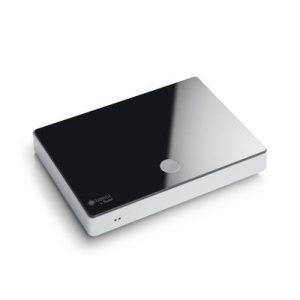
The Raumfeld connector brings out what is digitally possible
The raumfeld connector supports a sampling rate of 192 kHz.

▶ Hardly anyone makes bits sound as good as the Raumfeld plug. Because it plays high-resolution formats up to 96 kHz and 24-bit. An integrated high-end converter from Cirrus Logic converts digital data into analog. The Raumfeld connector has a powerful WLAN module for wireless data transmission. Thanks to Google Cast, multi-room speakers can also be conveniently controlled via the connector. If you connect the network player to a conventional system via Cinch or Toslink, it will be integrated into the local network.

Conclusion: sample rate as a bargaining chip for digital sound formats
The sampling rate indicates how often signals are sampled from an analog signal for digitization.
The Nyquist-Shannon theorem states that for the digitization to be true to the original, the sample rate must be at least twice the highest analog frequency.
CDs support sample rates up to 44.1 kHz. Modern formats, on the other hand, can reproduce 96 kHz and more.
Bit depth indicates how individual samples are resolved and influences the digitized dynamic range.
While CD samples have a 16-bit resolution, Dolby TrueHD, for example, reaches 24-bit.

MP3: the ideal sampling frequency according to each use.

Bitrate mp3

With MP3 and other audio formats, it is important to use the same sample rate from recording to playback whenever possible. While you can convert the sample rate at any time, sample rate converters almost always produce artifacts. The following sample rates are ideal for various applications:
To convert music CDs to MP3, for example, using our media player instructions, it is better to use the original 44100 Hz sample rate.

Mp3 Bitrate

DVD and BluRay sound is generally stored and played at 48,000 samples per second. So here you should stick to the 48 kHz sample rate. When converting 96 kHz audio to MP3, 48 kHz often sounds better than 44.1 kHz.

For pure voice recordings using a sound recorder or other software, a sampling rate of 8 to 9 kHz is sufficient, since small microphones above 4 to 5 kHz contain little sound energy.

If the sound quality of radio plays and audiobooks is not that important to you, because you want to carry as many stories as possible on an MP3 player, for example, use a sampling rate of 22050 Hz, although it is quite low. With half the sample rate, you can also cut the MP3 bit rate in half without losing quality.
If you digitize your old cassettes, 32 kHz was sufficient as the sample rate, because the tapes barely register frequencies above 16 kHz anyway. In other words, it would be unnecessary to use a higher sample rate.

What is the sample rate?

It is the speed with which “photographs” are taken (actually samples, in this case sound) and the more they are taken per second, the higher quality will be obtained. Think that the sound is represented by curves, and a curve will draw better the more detail or more dots it contains. It is impossible to represent well a curve with 3 segments, even with 10. The more segments it has, the more faithful it will be and the more similar it is to the original.

Because the quality is exactly that: how similar is the encoding to the original version. And there are two factors that count a lot: Sample rate and bitrate. Of course, the higher the sample rate and the higher the bitrate we will find a greater utilization of the disk space, which at this point is not usually a priority.

The size it occupies on the hard disk

Recall that the mp3 emerged precisely as a solution to save space on the hard disk. It was unmanageable to pretend to have a large music collection in WAV format (original format, without compression) on one of those small hard drives from a few years ago.

On the other hand, trying to download a complete WAV of a song from the internet or transfer it from one computer to another was also unmanageable, since they took up too much disk space.

Then the mp3 and later all the other compression formats, sought to achieve a good audio quality occupying perhaps 10 times the space that a WAV occupied.