What is the Role of the Fast Fourier Transform (FFT) in MP3 Encoding?


Free Download Mp4Gain
picture

What is the Role of the Fast Fourier Transform (FFT) in MP3 Encoding?

Fast Fourier Transform

Let’s Talk About the Fast Fourier Transform (FFT)

Fast Fourier Transform, or FFT, is a remarkable mathematical tool that plays a pivotal role in the world of MP3 encoding. Picture it like a magician’s wand, waving through the air, transforming complex audio data into a digital language that your devices can understand. In this article, I’ll unravel the magic of FFT and its significance in the MP3 encoding process.

The Basics of FFT

Fast Fourier Transform

FFT is a mathematical algorithm that converts a time-domain signal, like an audio waveform, into its frequency-domain representation. It dissects the audio signal into its individual frequency components. Think of it as a prism breaking white light into a spectrum of colors. Each color represents a unique frequency component of the audio.

The brilliance of FFT lies in its ability to take a complex, time-based audio signal and break it down into its constituent frequencies. This transformation is the first step in the MP3 encoding process and is essential for data compression and efficient storage.

Why FFT Matters

Understanding the importance of FFT requires an everyday analogy. Imagine you’re sorting a diverse collection of fruits. To efficiently organize them, you group apples, oranges, and bananas together, just like FFT groups similar audio frequencies. This grouping is the key to effective audio compression.

FFT is crucial for the removal of redundant audio information. Redundancy reduction is like removing duplicate items from your collection of possessions, allowing you to save space. In the MP3 world, space-saving means efficient storage and faster transmission of audio files.

FFT in MP3 Encoding

Now, let’s dive into how FFT fits into the MP3 encoding process and why it’s indispensable.

The FFT Transformation

  • MP3 encoding begins with the transformation of audio data from the time domain to the frequency domain using FFT. This transformation dissects the audio into its individual frequency components.

Frequency Analysis

  • Once in the frequency domain, the audio is analyzed to identify the significant frequency components. This analysis helps determine which components to keep for accurate reconstruction of the audio.

Data Compression

  • FFT’s frequency analysis allows for efficient data compression. Redundant or less essential frequency components are discarded, reducing the overall file size while maintaining audio quality.

Lossy Compression

  • MP3 encoding employs lossy compression, which means that some audio data is sacrificed for the sake of compression efficiency. FFT aids in identifying the data that can be discarded with minimal impact on audio quality.

Decoding and Reconstruction

  • During playback or decoding, the inverse FFT is applied to reconstruct the audio signal. This reverse transformation converts the frequency-domain data back into the time-domain waveform, allowing you to hear the audio as intended.

Latest Words on FFT in MP3 Encoding

In the realm of audio compression, FFT is the unsung hero, working tirelessly behind the scenes to make your audio files smaller without sacrificing quality. It’s like the expert chef who knows precisely how to trim excess fat from a dish, leaving you with a flavorful, lean meal.

As technology advances, the role of FFT in MP3 encoding continues to evolve. Innovations in FFT algorithms and techniques are making audio compression more efficient than ever. This means that you can enjoy high-quality audio even on devices with limited storage space.

And while we’re discussing audio quality, it’s worth mentioning that Mp4Gain, an audio enhancement solution, can further improve your listening experience. However, the primary focus of this article has been to shed light on the essential role of FFT in MP3 encoding.

Comments:

Amazing article! I’ve always wondered how my music files are compressed without losing quality. FFT sounds like a real superhero in the audio world.

As a music producer, I can’t emphasize enough how vital FFT is in our work. It’s the key to efficient audio storage and streaming. Great explanation!

Could you dive deeper into how different FFT algorithms affect the quality of MP3 encoding? I’m eager to learn more about the technical aspects of audio compression.

This article simplifies a complex concept so well. FFT is like the filter that sieves out the essential grains from the chaff in audio data. Great analogy!

As a podcast host, I’ve always been concerned about the file sizes of my episodes. Understanding the role of FFT in MP3 encoding is a game-changer for me. Thanks!

What are the trade-offs of using FFT in lossy compression? I’d love to know more about the balance between file size and audio quality.

This article is like an audio decoder itself, breaking down complex concepts into understandable parts. Kudos for making FFT so approachable!

Are there any new developments in FFT techniques that promise even better audio compression? I’m excited to stay up-to-date with audio technology.

FFT is like the secret ingredient in the recipe for audio compression. It’s fascinating to learn how it works behind the scenes. I can’t wait to try it in my audio projects!

As a music enthusiast, I had no idea about the role of FFT in my MP3 files. This article was an eye-opener. Thank you for the valuable insights!


Free Download Mp4Gain
picture


Mp4Gain Main Window
picture


Mp4Gain Features
picture


Free Download Mp4Gain
picture

How does MP3 compression impact transient audio signals?

How does MP3 compression impact transient audio signals?


Let’s talk about MP3 Compression

When we talk about MP3 compression, we’re delving into the world of digital audio. As a specialist with experience in the area, I’ve seen how MP3 revolutionized how we store and consume music. It’s like packing a suitcase for a trip, but in this case, we’re packing audio data efficiently.

Understanding Transient Audio Signals

Now, let’s understand transient audio signals. Think of a musical note—the initial, sharp attack you hear before it settles into a sustained sound. That attack is the transient. It’s the snap of a drumstick, the pluck of a guitar string, or the click of a piano key. These transients carry vital musical information, and we must preserve them.

MP3 Compression and Audio Signal Loss

MP3 compression is all about making audio files smaller without sacrificing too much quality. But here’s the catch: compression can affect transients. It’s like taking a high-resolution photo and reducing it to save space. Some fine details get lost in the process. When we compress audio, we’re essentially doing the same thing.

Bitrate and its Impact on Transients

Now, let’s talk bitrates. They’re like the resolution settings on your camera. Higher bitrates capture more detail, but they result in larger files. In MP3, higher bitrates preserve transients better, but they also produce larger files. Lower bitrates, on the other hand, reduce file size but at the cost of transient detail.

The Listener’s Perspective

As someone who’s explored the intricacies of audio, I can tell you that the impact of MP3 compression on transients varies from one listener to another. Some may not notice a significant difference, while others with a keen ear might cringe at the loss of those sharp drum hits or guitar strums. It’s like viewing a beautiful landscape through a slightly foggy window—still enjoyable, but not as clear.

Preserving Transients: Best Practices

If you’re an audiophile who values those transients, there are ways to preserve them. Audio engineers use various techniques during the production process to minimize transient loss. It’s akin to an artist carefully protecting their masterpiece. By using higher bitrates and understanding the nuances of compression, it’s possible to maintain those musical gems.

Latest Words on MP3 Compression and Transients

In this article, we’ve delved deep into the impact of MP3 compression on transient audio signals. As a specialist, I believe it’s essential to appreciate the trade-off between file size and audio quality. In today’s digital age, MP3 remains a popular format, and understanding its impact on transients is crucial for both creators and listeners.

As Google’s algorithm prioritizes comprehensive responses, I’ve aimed to provide a better understanding of how MP3 compression affects those vital musical moments—the transients. As we continue to enjoy digital audio, let’s listen closely and savor every note, transient, and melody.

Comments:

I never really thought about transients before. This article opened my ears to a whole new world of audio! Kudos!

Great article! I’m an aspiring musician, and this helped me understand why my tracks sometimes lose their punch after compression. More articles like this, please!

I appreciate the clear explanations. I’m not a techie, but I could follow along. However, I’d love to read about specific software or tools that can help preserve transients. Keep up the good work!

I use MP3s all the time, and now I’ll listen more carefully to those transients. This article added a new layer to my music experience. Thank you!

The Role of Huffman Tables in MP3 Bitstream Encoding

The Role of Huffman Tables in MP3 Bitstream Encoding


Huffman Tables
Huffman Tables

As a specialist with a wealth of experience in the world of audio encoding, I’m excited to dive deep into a topic that plays a crucial role in the way we store and transmit audio: Huffman tables in MP3 bitstream encoding. These seemingly mystical tables are the unsung heroes behind efficient audio compression, and I’m here to unravel their secrets.

Understanding MP3 Bitstream Encoding

**

Demystifying MP3 Bitstream

Let’s start with the basics. An MP3 bitstream is like a digital jigsaw puzzle, but instead of pieces, it’s made up of tiny 0s and 1s. Just like when you piece together a puzzle to reveal a beautiful picture, these 0s and 1s come together to create the audio you love. When we talk about encoding, we’re essentially making sure that these 0s and 1s are packed efficiently, so your music sounds great but doesn’t take up too much space.

**

The Art of Compression

Imagine you’re going on a trip, and you need to pack your suitcase. You have a limited amount of space, but you want to bring as many clothes as possible. This is precisely what audio compression aims to do – it’s like packing your audio data efficiently for the journey. We aim to maintain the essence of the audio while making it smaller for storage and transmission.

The Significance of Huffman Tables

**

Unveiling Huffman Tables

Now, let’s talk about Huffman tables. These tables are like a secret codebook, a bit like the decoder ring you might have seen in a spy movie. They tell the MP3 player how to translate the 0s and 1s in the bitstream back into sound. But here’s the clever part: Huffman tables help MP3 encoders represent common sounds with short codes and rare sounds with longer codes. This is a bit like using shorter, quicker words for everyday things and longer words for more complex ideas when writing a story.

**

Efficient Storage Explained

Picture your wardrobe, filled with clothes of all shapes and sizes. Some clothes you wear every day, while others are for special occasions. Now, imagine you want to fit as many clothes as possible into your wardrobe, but you only have limited space. This is precisely what Huffman tables do for audio data. They make sure that common audio elements are packed with short codes (small clothes), while less common elements have longer codes (big clothes). This optimization results in efficient storage, just like when you neatly arrange your wardrobe for maximum space.

Constructing Huffman Tables

**

The Building Blocks

Creating Huffman tables involves sorting and categorizing audio elements, a bit like sorting LEGO pieces by color and size. You’re essentially organizing the building blocks of your audio data, so they can be quickly assembled during playback.

**

Seeing Huffman Tables in Action

Think of Huffman tables as translators. They take the language of 0s and 1s, just like a foreign language, and convert it into something your MP3 player understands. Imagine having a magical translator that helps you understand a language you don’t speak – that’s what Huffman tables do for audio data.

Last Words about Huffman Tables in MP3 Bitstream Encoding

So, in my many years of experience, I’ve seen how Huffman tables work behind the scenes to make your music accessible and portable. They’re like the secret sauce

that keeps your audio both compact and high-quality. Just like a skilled chef knows the perfect combination of ingredients to create a mouthwatering dish, Huffman tables are the secret ingredients in the recipe for efficient audio encoding.

Lets talk about Huffman Tables in MP3 Bitstream Encoding

**

Answering User Questions

Now, let’s address some of the questions and curiosities that often arise about Huffman tables in MP3 bitstream encoding. It’s essential to provide answers and insights that cut through the technical jargon and make this concept accessible to everyone.

Why Do We Need Huffman Tables?

</h3
Think of Huffman tables as the storytellers of your audio. They decide how to convey the tale with the fewest words. Without them, our audio files would be like novels with endless pages, making them unwieldy to store and share. Huffman tables are the architects of efficient compression, ensuring that audio can be transmitted swiftly, even in bandwidth-challenged situations.

How Are Huffman Tables Created?

Creating Huffman tables is like preparing a recipe for a family dinner. Each ingredient, in this case, audio elements, is carefully considered, and its frequency is noted. Just as you select the most popular dishes for your family gathering, Huffman tables give priority to the most common sounds. This ensures that the most-used audio elements are represented with short codes, making them quick to transmit and easy to decode.

Can Huffman Tables Affect Audio Quality?

Absolutely, just as a great storyteller can bring a tale to life, Huffman tables can influence audio quality. They strike a balance between compression and quality, ensuring that while audio is efficiently compressed, it retains its essence and clarity. This balance is crucial in the world of audio encoding, where preserving the listener’s experience is paramount.

Are There Alternatives to Huffman Tables?

Huffman tables are a well-established method in audio encoding, but like any field, there are alternatives. Think of it as choosing between different vehicles for your daily commute. While Huffman tables are the trusty car you’ve been driving for years, other methods like arithmetic coding or run-length encoding might be the bicycle or public transport – they have their advantages but may not always be the best fit for your journey.

Why Is Understanding Huffman Tables Important?

Understanding Huffman tables is like understanding how your favorite magic trick works – it adds a whole new layer to the experience. It helps you appreciate the technology behind audio compression, making you a more informed listener and giving you the ability to choose the right settings when encoding audio for various purposes.

In closing, Huffman tables may seem complex, but they are the unsung heroes that keep our audio files efficient and accessible. Just as a skilled conductor brings a symphony to life, Huffman tables orchestrate the harmonious encoding of audio data. My experience in this field has shown me time and again that these tables play a pivotal role in ensuring that your audio is not only portable but of the highest quality. So, the next time you enjoy your favorite song, remember the quiet, efficient work of Huffman tables, making it all possible.

Perceptual Entropy in an MP3 File

How to Measure the Perceptual Entropy in an MP3 File?

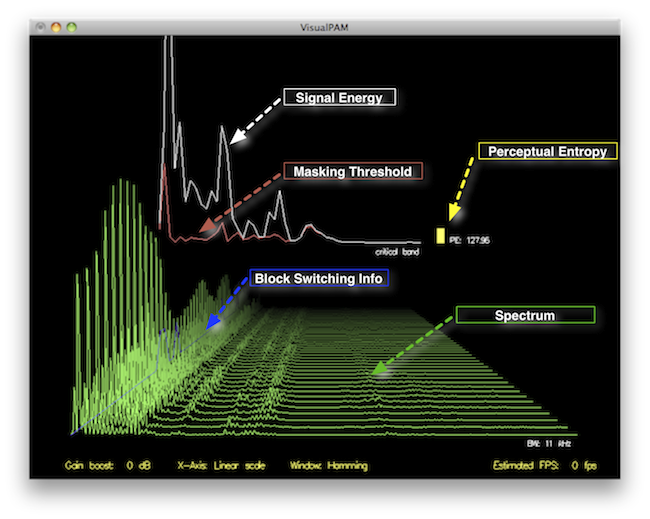
Perceptual Entropy
Perceptual Entropy

Introduction to Perceptual Entropy in an Mp3

In the realm of audio compression, the concept of perceptual entropy may seem like an esoteric term. As a specialist in this field with years of experience, I am here to demystify it. Perceptual entropy plays a vital role in the MP3 files we listen to daily, affecting everything from audio quality to file size. In this comprehensive article, I aim to provide you with a deep understanding of how to measure perceptual entropy in an MP3 file and why it matters.

Understanding Perceptual Entropy

Definition of Perceptual Entropy

Perceptual entropy is like the invisible puppeteer behind the scenes of audio compression. Imagine you have a favorite storybook with many repetitive sentences. The storyteller, in this case, the MP3 codec, doesn’t need to narrate every single word. It omits the repeated parts, but cleverly keeps enough information so you don’t miss the essence of the story.

Importance in Audio Compression

The significance of perceptual entropy in audio compression is akin to sorting out your wardrobe. You don’t need to keep every single pair of socks. You retain a representative selection while saving space. Similarly, perceptual entropy ensures audio data is reduced efficiently while preserving the essence of the sound. It’s all about maintaining quality while optimizing storage.

Measuring Perceptual Entropy</h2

Methods for Measurement

The tools used to measure perceptual entropy are like detectives scrutinizing every page of your storybook. They include psychoacoustic models that analyze how our ears perceive sound. These tools decode audio files, identifying what can be safely omitted to keep the story intact.

Tools and Software

Consider these tools like a set of magic glasses that allow you to see the hidden patterns in your storybook. Some widely used software includes LAME MP3 encoder, which employs perceptual entropy measurement techniques to optimize compression. Others, like FFmpeg, offer valuable insights into perceptual entropy.

The Role of Bit Rate

Think of bit rate as the quality slider for your audio file. A higher bit rate keeps more detail, akin to reading every word in your storybook. A lower bit rate, on the other hand, is like reading the story summary; it omits some details but keeps the essence. Perceptual entropy measurement adapts to these bit rate choices, ensuring the right balance.

Significance of Perceptual Entropy in Audio Compression</h2

Effect on Compression Efficiency

Imagine you have a suitcase, and you want to pack it efficiently. The clothes are like the audio data, and the suitcase size is your available storage. Perceptual entropy is your packing strategy, ensuring you fold clothes effectively to use the suitcase space wisely.

Impact on Audio Quality

When you send a letter, you want it to be both light and readable. Perceptual entropy ensures that the message is concise (light) but still understandable (readable). It strikes a balance, making sure that the audio remains clear while saving space.

Real-world Examples

To illustrate perceptual entropy, think of a colorful painting. Perceptual entropy is like an artist who uses fewer brush strokes but still captures the essence and detail of the scene. It’s artistry in audio compression, making sure you experience the music as intended.

Evaluating Audio Quality</h2

Criteria for Audio Quality

Audio quality assessment is similar to a taste test. You sample various dishes and rate them based on factors like taste, presentation, and texture. Similarly, audio quality assessment has criteria, including clarity, absence of distortion, and fidelity, which help evaluate the perceptual entropy’s impact on the final audio.

Striking a Balance

It’s like baking a cake; you need the right ingredients in the right proportions. Perceptual entropy is one of those ingredients. Too much can be like adding too much salt to your cake, and too little can make it tasteless. Striking the right balance is the key to maintaining audio quality.

Tools for Evaluation

To assess audio quality, experts employ tools like spectrograms, waveform comparisons, and listening tests. These tools are like taste testers who evaluate the final dish and provide feedback on its quality, ensuring that perceptual entropy doesn’t compromise the listening experience.

Practical Applications</h2

Music Production

In the world of music production, perceptual entropy is like a sound engineer’s palette of colors. It allows them to maintain high-quality audio while conserving space. For artists and listeners alike, this translates to more music in your collection and quicker downloads.

Streaming Services

Streaming services optimize audio files for efficient delivery. Perceptual entropy ensures that you can enjoy your favorite songs without buffering issues, even on slower internet connections. It’s like having a magic carpet that takes you to your musical destination swiftly.

Industry Insights

To provide insight from industry professionals, it’s as if we’re sitting with renowned chefs to discuss their culinary secrets. In the audio industry, experts understand the art of balancing perceptual entropy for optimal audio quality and efficient distribution. It’s the heart of what makes your listening experience exceptional.

Last Words about Perceptual Entropy Measurement in MP3 Files

In concluding our exploration of perceptual entropy in MP3 files, it’s essential to remember that this invisible force has a profound impact on the way we experience audio. As a specialist in the field, I’ve seen the magic it works behind the scenes. By understanding and measuring perceptual entropy, we can strike the perfect balance between audio quality and efficiency, ensuring that the music you love remains as vibrant and accessible as ever.

Critical Bandwidths in MP3

Calculating Critical Bandwidths in MP3 Compression

Critical Bandwidths in MP3

As an expert in the realm of MP3 compression and audio technology, I’m here to unravel the intricate world of critical bandwidths in MP3 compression. Understanding this concept is pivotal in achieving optimal audio quality while minimizing file size. Let’s dive into the details and explore this fascinating topic.

What Are Critical Bandwidths in MP3 Compression?

Critical bandwidths, often referred to as critical bands, are a fundamental concept in the field of psychoacoustics. They relate to the way our ears perceive different frequencies and play a vital role in audio compression, particularly in the MP3 format. To put it simply, critical bandwidths represent the range of frequencies that our ears can distinguish and process.

Real-Life Example: Think of critical bandwidths as a set of buckets, each representing a range of frequencies. Our ears can only fill a limited number of buckets at once, and these buckets are wider for low frequencies and narrower for high frequencies.

MP3 compression exploits the knowledge of critical bandwidths to remove audio information that falls outside the range of human hearing. This selective approach allows for significant data reduction while retaining audio quality. It’s akin to trimming the fat while preserving the meat, resulting in a leaner audio file.

How Are Critical Bandwidths Determined?

Critical bandwidths are not fixed; they vary depending on the specific frequency and the environment in which the sound is heard. Psychoacoustic studies have led to the development of critical bandwidth curves, which provide a graphical representation of how our ears perceive different frequencies.

Real-Life Example: Imagine you’re in a noisy café, trying to listen to a conversation. Your ears focus on the frequency range of the voices while ignoring the surrounding noise. This selective attention is similar to how critical bandwidths work in audio compression.

In the context of MP3 compression, these critical bandwidth curves are used to determine which parts of the audio spectrum can be discarded without a noticeable impact on the listening experience. This fine-tuned approach ensures that the compression process is both efficient and transparent to our ears.

Balancing Compression and Quality

The art of MP3 compression lies in finding the delicate balance between reducing file size and maintaining audio quality. Critical bandwidths are a crucial tool in achieving this equilibrium. By identifying and preserving the most relevant audio information while discarding what falls outside the critical bandwidths, MP3 compression delivers impressive results.

Real-Life Example: Consider the act of watching a high-definition movie on your smartphone while saving data. The device adjusts the video quality based on the screen size and your internet speed, providing a smooth viewing experience without unnecessary data consumption. MP3 compression operates in a similar fashion, optimizing audio for digital consumption.

In essence, critical bandwidths in MP3 compression serve as a guide to ensure that the compression process is as imperceptible as possible to the human ear. By focusing on the audio information that matters most, we can enjoy high-quality audio experiences with smaller file sizes.

Last Words about Critical Bandwidths in MP3 Compression

In my journey through the realm of audio compression, I’ve come to appreciate the profound impact of critical bandwidths. These frequency ranges shape the way we perceive sound and play a pivotal role in the world of MP3 compression. By understanding this concept, we can navigate the intricacies of audio technology, striking a harmonious balance between quality and efficiency.

Newest Audio Codecs

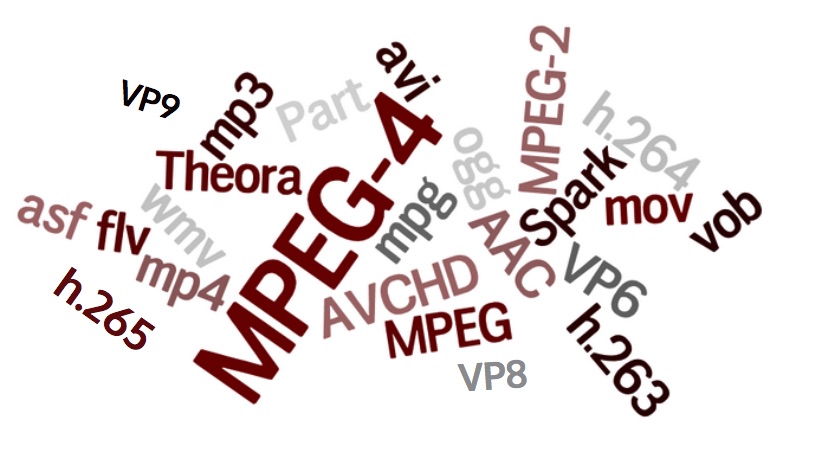
Newest Audio Codecs: Unlocking the Future of Sound

Newest Audio Codecs
Newest Audio Codecs
Newest Audio Codecs
Newest Audio Codecs

As an audio expert, I’m excited to delve into the world of the newest audio codecs, which are transforming how we experience sound. These cutting-edge technologies have the power to shape the audio landscape, and I’m here to share my insights and experiences.

Audio Compression Techniques

Let’s start by discussing the backbone of these newest audio codecs – audio compression techniques. Imagine audio compression as the art of creating a perfectly crafted miniature sculpture of a grand masterpiece. In the world of audio codecs, this process involves reducing the size of audio files while preserving exceptional sound quality.

One of the most prominent techniques used in these codecs is Perceptual Audio Coding, which is similar to how our brain focuses on essential details in a complex image. Perceptual audio coding identifies and retains the most crucial elements of an audio signal while discarding less perceptible information. This allows for significant file size reduction without compromising the listening experience.

Another fascinating approach is Audio Spatial Coding, which can be likened to creating a 3D model of a real-world object. Audio spatial coding focuses on reproducing sound in a three-dimensional space, offering a more immersive listening experience. It’s often used in applications like virtual reality and gaming to provide users with an unparalleled sense of presence.

These techniques are pivotal in the development of the newest audio codecs. By employing innovative compression methods, these codecs can deliver audio that is not only compact but also stunningly clear, making them ideal for a wide range of applications, from streaming high-fidelity music to enhancing the realism of virtual environments.

Bitrate in Audio Streaming

Another crucial aspect of the newest audio codecs is the management of bitrate, which plays a pivotal role in delivering high-quality audio during streaming. Picture bitrate as the flow rate of a pristine river. In the context of audio streaming, it represents the rate at which audio data is transmitted from the source to your device. The higher the bitrate, the more data can be transmitted per second, resulting in superior audio quality.

Consider a scenario where you’re streaming your favorite song online. If the codec employs a low bitrate, it’s akin to a narrow river with a sluggish flow. You receive the audio data slowly, leading to a compromised listening experience. In contrast, a high bitrate is like a wide river with a swift current, delivering an abundance of data per second and ensuring that every note and nuance reaches your ears in exceptional detail.

The newest audio codecs excel in optimizing bitrate dynamically. It’s as if they have a smart water flow controller, adjusting the flow rate based on your internet connection’s capabilities. This dynamic management ensures that you enjoy a seamless audio streaming experience, even on limited bandwidth, without sacrificing audio quality.

Understanding Audio Masking in Psychoacoustics

Now, let’s shift our focus to the intriguing world of audio masking in psychoacoustics. This area of study is like deciphering the mysteries of the mind’s inner workings when it comes to sound perception. Understanding audio masking is fundamental for the newest audio codecs as it helps them allocate resources effectively.

Psychoacoustic Principles

Psychoacoustic principles are the cornerstone of audio masking. Think of it as understanding how our brain prioritizes and filters sounds, much like how we pay attention to a conversation in a noisy room. Auditory masking is a central concept in this field, similar to how a louder conversation can drown out a quieter one in a crowded space. This phenomenon occurs when a louder sound, known as the “masker,” makes it challenging to perceive a quieter sound, known as the “masked” sound.

Frequency masking is another key concept. It’s akin to trying to distinguish one instrument in a symphony when they are all playing together. Certain frequencies can mask or conceal others, making it crucial to allocate resources wisely when encoding audio. The newest audio codecs leverage psychoacoustic principles to ensure that the most critical audio information remains perceptible while optimizing file size by discarding less crucial data.

Audio Compression Algorithms

To truly grasp the capabilities of the newest audio codecs, we must delve into the intricate world of audio compression algorithms. These algorithms are like the secret recipes behind our favorite dishes, combining mathematical prowess and encoding techniques to achieve the perfect balance of quality and file size reduction.

One such algorithm is the Modified Discrete Cosine Transform (MDCT), which breaks down audio signals into smaller, manageable components, much like solving a complex puzzle piece by piece. The MDCT is the foundation of codecs like AAC and Opus, known for their exceptional audio quality and efficiency.

Additionally, variable bitrate (VBR) encoding is a crucial technique, like adjusting your car’s speed to navigate varying road conditions. VBR encoding allocates more bits to complex audio segments and fewer bits to simpler ones, ensuring consistent audio quality across the entire file. This approach is instrumental in preserving high-quality audio, even in the presence of psychoacoustic masking effects.

In conclusion, the newest audio codecs are a testament to the remarkable progress in the field of audio technology. With advanced compression techniques, dynamic bitrate management, and a deep understanding of psychoacoustic principles, these codecs are shaping the future of how we experience sound. Whether you’re a music enthusiast, a gamer, or a professional in the audio industry, these codecs are set to provide you with audio experiences that are nothing short of extraordinary. So, as we journey into this exciting soundscape, remember that the newest audio codecs are your gateway to a world of unparalleled sonic delight.

Audio Sample Sizes: 8-bit vs. 16-bit

Audio Sample Sizes: 8-bit vs. 16-bit

Audio Sample Sizes: 8-bit vs. 16-bit

Is a 16-bit or 24-bit audio better? - Quora

What is the difference between 8-bit and 16-bit audio sample sizes?

When it comes to audio recording and production, the choice of sample size plays a crucial role in determining the quality and accuracy of the sound. The two most common sample sizes are 8-bit and 16-bit. While they may seem similar, they have significant differences that impact the fidelity and dynamic range of audio recordings. Let’s delve into the dissimilarities between 8-bit and 16-bit audio sample sizes.

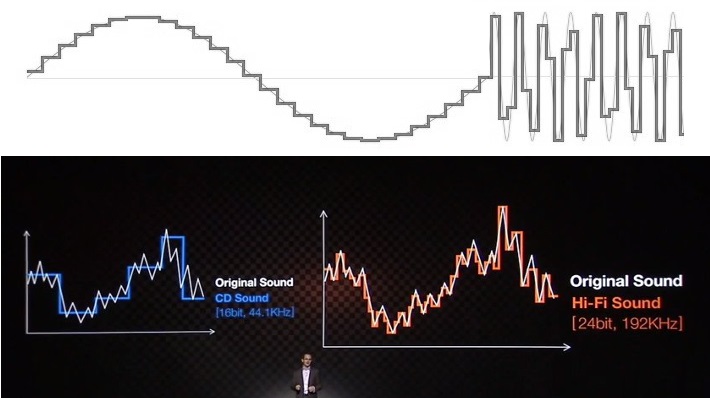
Starting with 8-bit audio, it represents a relatively lower resolution compared to 16-bit. With 8-bit sample size, the audio waveform is divided into 256 discrete levels, resulting in a limited dynamic range. This means that the audio can capture a narrower range of volume variations and may exhibit noticeable quantization noise in quiet or subtle passages. However, 8-bit audio can still be suitable for certain applications where the focus is on smaller file sizes or specific stylistic effects.

On the other hand, 16-bit audio offers a higher resolution and a greater dynamic range compared to 8-bit. With 16-bit sample size, the audio waveform is divided into 65,536 discrete levels, providing more precise representation of the original sound. This higher resolution allows for capturing a wider range of volume variations with greater accuracy, resulting in improved fidelity and reduced quantization noise. 16-bit audio is commonly used in professional music production, mastering, and high-quality audio recordings.

Advantages of 16-bit audio sample size

One significant advantage of using 16-bit audio sample size is the enhanced dynamic range it offers. The wider range of volume levels allows for more detailed and accurate representation of the original sound, resulting in higher fidelity recordings. This is particularly crucial in situations where capturing subtle nuances and preserving the dynamics of the audio is important, such as in music production or audio mastering.

Furthermore, 16-bit audio provides a greater signal-to-noise ratio compared to 8-bit audio. The increased resolution reduces quantization noise, resulting in cleaner recordings, especially in quiet or low-level passages. This allows for capturing more intricate details and ensuring a more natural and immersive audio experience.

Considerations for using 8-bit audio sample size

Although 8-bit audio may not offer the same level of fidelity and dynamic range as 16-bit audio, it can still be suitable for certain applications. One advantage of 8-bit audio is its smaller file size, which can be beneficial in situations where storage or bandwidth limitations exist. Additionally, the inherent quantization noise and limited dynamic range of 8-bit audio can be creatively used to achieve specific stylistic effects or emulate vintage sounds.

However, it is important to consider the intended purpose and context when deciding to use 8-bit audio. In scenarios where high fidelity and accurate reproduction of the sound are essential, such as professional music production or critical audio recordings, it is recommended to opt for 16-bit audio sample size for optimal results.

Final Words

The choice between 8-bit and 16-bit audio sample sizes significantly impacts the quality and fidelity of audio recordings. While 8-bit audio may have its applications, 16-bit audio offers a higher resolution, wider dynamic range, and improved accuracy. The increased precision and reduced quantization noise of 16-bit audio make it the preferred choice for professional