Understanding Lossy Audio Compression


Free Download Mp4Gain
picture

Understanding Lossy Audio Compression

Lossy Audio Compression

Audio compression is a critical component of modern audio production. It allows for the reduction of file sizes while maintaining an acceptable level of sound quality. Lossy audio compression is a popular method that achieves this by removing non-essential information from an audio file. In this article, we will dive deep into the technical details of lossy audio compression and explore its advantages and disadvantages, as well as the impact it has on audio quality.
Lossy Audio Compression

The Technical Basics of Lossy Audio Compression

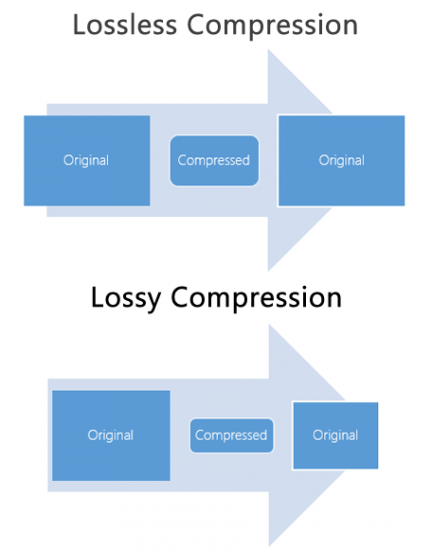
Lossy audio compression works by removing information that is deemed non-essential to the human ear. This information is often in the form of high-frequency sounds or sounds that are below the threshold of human hearing. Lossy compression achieves this by analyzing the audio file and creating a model of the sounds that the human ear can and cannot hear. This model is then used to remove the non-essential information from the audio file.

There are several popular lossy audio compression formats and codecs, including MP3, AAC, and Ogg Vorbis. Each of these formats has its own strengths and weaknesses, and choosing the right one depends on the specific needs of the user.

The Trade-offs of Lossy Audio Compression

While lossy compression is an effective way to reduce file sizes, it does come with some trade-offs. The most significant trade-off is the loss of audio quality. As non-essential information is removed from the audio file, it can result in a loss of dynamic range and a decrease in overall sound quality. However, the degree of quality loss is often subjective and depends on the specific requirements of the user.

When comparing lossy and lossless compression formats, file size is often a significant factor. Lossy compression generally results in much smaller file sizes than lossless compression, but at the cost of some audio quality loss. However, the size difference between the two formats can be significant, making lossy compression a practical solution for many users.

Advanced Techniques for Lossy Audio Compression

Advanced techniques are available for lossy audio compression that can help to improve audio quality while still achieving significant file size reduction. Perceptual coding is one such technique that uses psychoacoustic models to analyze the audio and remove non-essential information in a way that minimizes the impact on sound quality. Another technique involves the use of metadata, which can help to provide additional information about the audio file that can be used to improve compression.

Best Practices for Lossy Audio Compression

There are several best practices that can be followed to achieve the best results when compressing audio files using a lossy format. Some of these practices include choosing the right codec for the specific needs of the user, ensuring that the encoding settings are appropriate for the file being compressed, and avoiding the use of excessive compression, which can result in a loss of sound quality. Additionally, it is important to avoid common mistakes when compressing audio files, such as encoding at too low of a bit rate or not checking the final output for artifacts or distortion.

Psychoacoustic Models
Psychoacoustic models are mathematical models that simulate the way that the human ear processes sound. They are used in perceptual coding to identify which audio signals can be safely removed without causing a noticeable loss in audio quality.

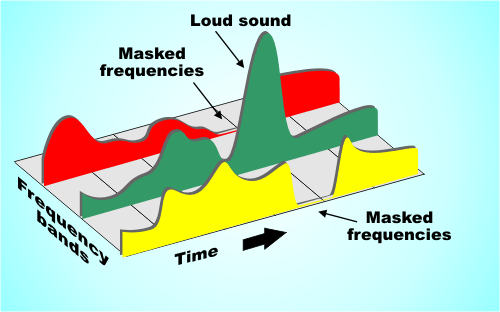
Psychoacoustic models take into account factors such as frequency masking, temporal masking, and the sensitivity of the human ear to different types of audio signals. They can also take into account more complex factors such as the interaction between different audio signals.

Metadata
Metadata is data that is embedded in an audio file and provides additional information about the audio content. In the context of lossy audio compression, metadata can be used to improve the compression process by providing additional information about the audio content.

One common use of metadata in lossy audio compression is to provide information about the target device or playback environment. For example, metadata can provide information about the type of headphones or speakers that the audio file is intended to be played through. This information can be used by perceptual coders to optimize the compression process for the target device or playback environment.

Another common use of metadata in lossy audio compression is to provide information about the audio content itself. For example, metadata can provide information about the genre, tempo, and key of a song. This information can be used to optimize the compression process for the specific characteristics of the audio content.

Best Practices for Lossy Audio Compression
To achieve the best results in lossy audio compression, there are several best practices that should be followed. These include:

  • Use the highest quality compression settings available
  • Use a well-supported and widely-used compression format
  • Use a lossless format for archiving and backup purposes
  • Avoid excessive compression, as this can lead to noticeable audio artifacts
  • Take into account the intended playback environment when compressing audio files
  • Include appropriate metadata to provide additional information about the audio content

Common Mistakes to Avoid
When compressing audio files, there are several common mistakes that should be avoided. These include:

  • Using excessively low compression settings, as this can lead to a noticeable loss in audio quality
  • Using an unsupported or proprietary compression format, as this can lead to compatibility issues
  • Not taking into account the intended playback environment, which can lead to suboptimal compression settings
  • Not including appropriate metadata, which can make it difficult to organize and manage large collections of audio files
  • Using excessive compression, as this can lead to noticeable audio artifacts
    1. Explanation of Audio Compression and Lossy Audio Compression

Audio compression is the process of reducing the size of an audio file without significantly degrading the quality of the sound. Compression is necessary in the world of digital audio because it allows for more efficient storage and transmission of audio files. Without compression, audio files would be prohibitively large, making it difficult to store and share them over the internet.

Lossy audio compression is a specific type of audio compression that achieves a high degree of compression by discarding some of the audio data. This means that when you compress an audio file using a lossy compression algorithm, some of the data is permanently lost, and the resulting file is of lower quality than the original. Lossy compression is used widely because it allows for much higher compression ratios than lossless compression, making it more practical for everyday use.

    1. Importance of Audio Compression in Modern Audio Production

Audio compression is an essential tool in modern audio production. The ability to compress audio files allows for more efficient use of storage space and bandwidth, which are essential resources in the world of digital media. Audio compression also makes it possible to stream high-quality audio over the internet, which has revolutionized the way we consume music and other audio content.

However, it’s important to remember that audio compression is not without its downsides. Lossy compression, in particular, can have a significant impact on the quality of the audio, and it’s essential to understand the trade-offs involved when choosing a compression format and level of compression.

    1. The Technical Basics of Lossy Audio Compression

At its most basic level, lossy audio compression works by analyzing the audio file and discarding information that is deemed unnecessary for human perception. This information can include sounds that are too quiet to hear, or frequencies that are outside the range of human hearing. By discarding this information, the compression algorithm can significantly reduce the size of the audio file while still retaining much of the original sound quality.

The specific techniques used in lossy audio compression can vary, but most algorithms use some combination of frequency masking, quantization, and other mathematical techniques to achieve compression. The result is a smaller file size that can be easily stored or transmitted, but with some loss of audio quality.

    1. The Most Commonly Used Lossy Audio Compression Formats and Codecs

There are many different lossy audio compression formats and codecs available, each with its own strengths and weaknesses. Some of the most commonly used formats and codecs include:

    • MP3 – one of the most widely used audio compression formats, with a high degree of compatibility and a good balance between file size and sound quality
    • AAC – a newer format that is widely used for streaming audio and has a better sound quality than MP3 at the same bitrate
    • OGG – an open-source format that is popular for internet radio and streaming
    • WMA – a format developed by Microsoft that is commonly used for streaming and downloading audio files from the internet
    • FLAC – a lossless audio compression format that is capable of compressing audio files without any loss of quality, but with larger file sizes than lossy formats

The Fascinating History of Lossy Compression

Lossy compression is a method of data compression that reduces the size of a file by discarding information that is deemed to be unnecessary. This technique has been used for decades in various fields, including image, audio, and video processing, to make files smaller and easier to share or store.

The first significant work on lossy image compression was done in the early 1970s by a group of researchers at the University of Southern California. They developed the first image compression algorithm, called the discrete cosine transform (DCT), which is still used today in the popular JPEG image format.

In the 1980s, the Moving Pictures Experts Group (MPEG) was established to develop standards for digital video compression. They introduced the MPEG-1 and MPEG-2 video formats, which became widely adopted in the industry. The success of these formats led to the creation of newer standards, such as MPEG-4 and H.264, which are still used in modern video streaming services.

Lossy compression has also been essential for audio processing. In the late 1980s, the MP3 format was developed by the Fraunhofer Society in Germany, which used a perceptual coding algorithm to remove information that the human ear cannot detect. MP3 quickly became the standard for digital music distribution, leading to the creation of newer formats such as AAC and OGG Vorbis.

However, lossy compression is not without its drawbacks. Because it removes data, it can lead to a loss of quality, especially if the compression is too aggressive. This can result in artifacts or distortions in the processed image, audio, or video.

Despite these limitations, lossy compression remains an important tool in the modern digital world. It allows for more efficient storage and sharing of multimedia content and has revolutionized industries such as music, film, and photography. As technology continues to evolve, it’s likely that new and more efficient lossy compression techniques will be developed, further enhancing the way we share and consume digital content.


Free Download Mp4Gain
picture


Mp4Gain Main Window
picture


Mp4Gain Features
picture


Free Download Mp4Gain
picture

Converting MP3 to WAV: A Technical Overview

Converting MP3 to WAV: A Technical Overview

MP3 to WAV
Mp3 to Wav

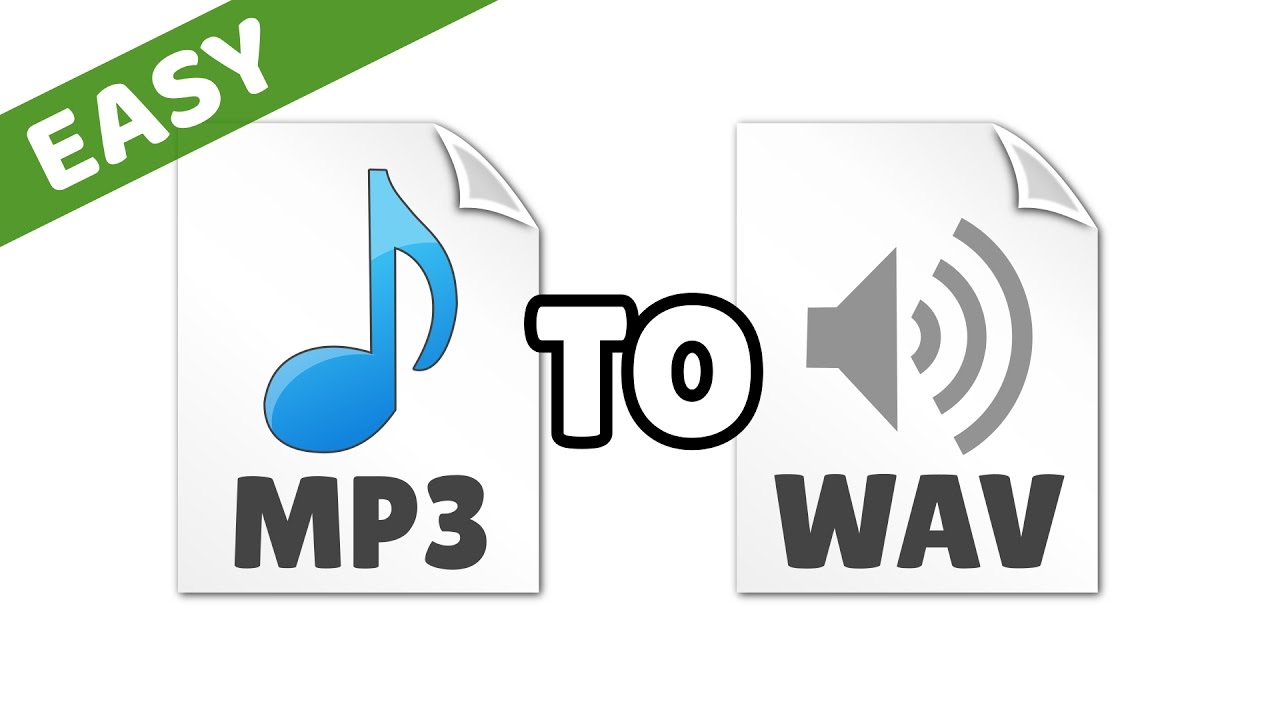
If you’re an audio geek, you might want to convert your MP3 files to WAV format to get a higher quality sound. Converting MP3 to WAV is a simple process, but it’s important to understand the technical differences between the two formats.

Mp3 to Wav
Mp3 to Wav

MP3 vs. WAV: What’s the Difference?

MP3 and WAV are both audio file formats, but they use different methods to compress and store audio data.

  • MP3: MP3 is a lossy audio compression format. This means that some audio data is lost during the compression process. MP3 files are smaller in size than WAV files, but they also have lower audio quality. MP3 files are popular for streaming and portable audio players because of their small file size.
  • WAV: WAV is a lossless audio format. This means that all audio data is preserved during the compression process. WAV files are larger in size than MP3 files, but they offer higher audio quality. WAV files are commonly used for professional audio editing and production.

Converting MP3 to WAV: The Technical Process

Converting MP3 to WAV involves decoding the MP3 data and re-encoding it in WAV format. Here’s a technical overview of the process:

  1. MP3 decoding: The MP3 data is read and decoded to raw audio data.
  2. Audio processing: The raw audio data is processed, including any required resampling, normalization, or filtering.
  3. WAV encoding: The processed audio data is encoded in WAV format.

Factors to Consider When Converting MP3 to WAV

When converting MP3 to WAV, there are several technical factors to consider:

  • Audio quality: The resulting WAV file will have higher audio quality than the original MP3, but the quality can still be affected by the initial MP3 compression and any subsequent processing.
  • File size: The resulting WAV file will be larger in size than the original MP3, which can affect storage and transfer.
  • Bit depth and sample rate: The bit depth and sample rate of the WAV file can affect its compatibility with different audio devices and software.

Conclusion

Converting MP3 to WAV can improve the audio quality of your files, but it’s important to understand the technical differences between the two formats. By considering factors like audio quality, file size, bit depth, and sample rate, you can ensure that your WAV files are optimized for your needs.

The History of WAV: From Cassette Tapes to Digital Audio

The WAV (Waveform Audio File Format) is a popular file format for storing and playing digital audio. But where did it come from, and how did it become so widely used?

The Early Days of Digital Audio

The history of the WAV file format goes back to the early days of digital audio. In the 1970s, digital recording technology was still in its infancy. Early digital audio systems used magnetic tape to store the digital audio data. This allowed the audio to be captured in a digital format, but the resulting files were quite large and difficult to work with.

In the 1980s, a new digital audio recording format was developed. Called the Digital Audio Tape (DAT), this new format used a rotating head to record and play back digital audio. DAT tapes were much smaller and more convenient than earlier magnetic tape formats, and they could store up to two hours of digital audio.

The Emergence of the WAV File Format

In the 1990s, personal computers became more powerful and began to include sound cards as standard equipment. This made it possible to record and play back digital audio on a computer. However, there were many different file formats for digital audio, and there was no standard format that could be used on all computers.

In response to this problem, Microsoft developed the WAV file format in 1991. The WAV format was designed to be a standard format for storing and playing digital audio on a computer. It was based on the Resource Interchange File Format (RIFF), a file format used for multimedia files.

The Advantages of the WAV File Format

One of the main advantages of the WAV file format is that it is an uncompressed format. This means that the audio data is stored in its original form, without any loss of quality. It is also a simple format, with a header that contains basic information about the audio file, such as its sample rate and bit depth.

The WAV format is also widely supported by audio software and hardware. This makes it a popular choice for professional audio production and editing. In addition, WAV files can be easily converted to other audio formats, such as MP3 or FLAC, without any loss of quality.

The Future of the WAV File Format

Today, the WAV file format is still widely used for digital audio recording and playback. However, new file formats, such as FLAC and ALAC, have emerged as alternatives to the WAV format. These formats offer better compression, which means that audio files can be stored in a smaller size without sacrificing quality.

Despite the competition from newer formats, the WAV format remains a popular choice for many professional audio producers and engineers. Its simplicity, uncompressed nature, and widespread support make it a reliable and flexible format for digital audio.

So there you have it, the history of the WAV file format. From its early days as a solution to the problems of early digital audio recording, to its current status as a popular choice for professional audio production, the WAV format has come a long way.

How does lossless compression work for audio?

How does lossless compression work for audio?

Lossless Audio
Lossless Audio

Lossless audio compression is a crucial technology for digital music distribution and storage. With the rise of streaming services, high-fidelity audio has become a priority for many listeners. However, uncompressed audio files can be quite large, making them impractical for mobile devices and slower internet connections. This is where lossless compression comes in.

Lossless Audio
Lossless Audio

Why is lossless audio compression important?

Lossless compression allows digital audio files to be compressed without losing any of the original data. This means that the sound quality is preserved, while the file size is reduced. With lossless compression, music files can be stored and transmitted more efficiently, without sacrificing quality. In addition, lossless compression makes it possible to enjoy high-fidelity audio on devices with limited storage capacity.

How does lossless compression work?

Lossless compression works by identifying and removing redundancies in the data. This is done through a process called entropy encoding, which analyzes the statistical properties of the audio data to find patterns that can be represented more efficiently. These patterns are then replaced with shorter codes, which are stored in a compressed file. When the file is decompressed, the original data is restored exactly as it was before compression.

Common lossless compression formats

  • FLAC: Free Lossless Audio Codec
  • ALAC: Apple Lossless Audio Codec
  • WAV: Waveform Audio File Format
  • AIFF: Audio Interchange File Format

How to use lossless compression

To use lossless compression for your audio files, you’ll need to choose a suitable codec and software. There are many options available, but some of the most popular choices include FLAC and ALAC. Once you’ve selected a codec, you can use a program like Foobar2000 or dBpoweramp to compress your files. You can also use lossless compression for streaming, by selecting a service that supports lossless audio, such as Tidal or Qobuz.

Lossless compression is an essential tool for anyone who wants to enjoy high-quality audio in a digital format. With lossless compression, you can store and transmit audio files more efficiently, without sacrificing fidelity. Whether you’re an audiophile or a casual listener, lossless compression is an important technology to be aware of.

The History of Lossless Audio Compression: From Analog to Digital

Lossless audio compression has come a long way since the early days of digital audio. In this article, we’ll take a deep dive into the history of lossless audio compression, from its roots in analog tape to the latest developments in digital audio.


Analog Roots

The history of lossless audio compression can be traced back to the days of analog tape. Tape-based audio recording was the dominant technology for several decades, and various techniques were developed to compress audio data without sacrificing quality. One of the most popular techniques was noise reduction, which involved boosting the level of low-level audio signals while reducing the level of high-level signals. This allowed audio to be recorded at a higher signal-to-noise ratio, resulting in a cleaner, clearer sound.

The Digital Revolution

The introduction of digital audio in the 1980s marked a major turning point in the history of lossless audio compression. With digital audio, it became possible to represent audio data as a series of numbers, which could be manipulated and compressed using a wide range of mathematical algorithms. One of the earliest lossless compression algorithms was the Audio Processing Technology (APT) algorithm, which was developed in the early 1990s. APT used a combination of linear prediction and residual coding to compress audio data without losing any information.

The Rise of Lossless Audio Formats

In the early days of digital audio, lossy compression formats like MP3 and AAC dominated the market. These formats achieved high levels of compression by discarding some of the original audio data, resulting in a loss of quality. However, as storage capacity and internet speeds increased, there was a growing demand for high-fidelity audio that could be stored and transmitted efficiently. This led to the development of lossless audio formats like FLAC and ALAC, which could compress audio data without sacrificing quality.

  • FLAC: Free Lossless Audio Codec
  • ALAC: Apple Lossless Audio Codec


The Future of Lossless Audio Compression

The latest developments in lossless audio compression are focused on improving the efficiency and speed of compression algorithms. One promising approach is the use of machine learning, which can be used to identify patterns in audio data that can be compressed more effectively. Another area of focus is the development of lossless compression formats that are optimized for streaming, allowing high-fidelity audio to be delivered over the internet in real time.


Maximize Sound Quality: The Ultimate Mp3 Normalization Guide

Maximize Sound Quality: The Ultimate Mp3 Normalization Guide

Mp3 Normalizer
Mp3 Normalizer


Let’s Learn About Mp3 Normalizer: An Overview

Mp3 Normalizer
Mp3 Normalizer

Explanation of What Mp3 Normalization Is

Before diving into the specifics of Mp3 normalization, let’s take a moment to understand how sound works. Sound is a physical phenomenon that is created by vibrations that travel through a medium, such as air, and are picked up by our ears. Our ears then convert these vibrations into electrical signals that our brains interpret as sound.

When it comes to recording sound, we use microphones to capture these vibrations and convert them into an electrical signal that can be stored and played back. In the past, recordings were made on physical media, such as vinyl records or cassette tapes. Nowadays, however, most recordings are made digitally.

When sound is recorded digitally, it is captured as a series of numbers that represent the amplitude of the sound wave at different points in time. These numbers are then stored as a digital file, such as an Mp3. The amplitude of a sound wave determines its volume, with larger amplitudes producing louder sounds.

So, what is Mp3 normalization? In simple terms, Mp3 normalization is the process of adjusting the volume of an Mp3 file so that it plays at a consistent level. This can be achieved by adjusting the amplitude of the sound wave so that it does not exceed a certain level, known as the normalization level.

Importance of Normalizing Mp3 Files for Optimal Listening Experience

Now that we understand what Mp3 normalization is, let’s explore why it is important. Have you ever experienced the frustration of having to constantly adjust the volume while listening to music? Perhaps you turn up the volume to hear a quiet part of a song, only to be blasted by a loud part a few moments later.

By normalizing Mp3 files, we can avoid these volume fluctuations and ensure a consistent listening experience. Normalizing also helps to prevent distortion, which can occur when the volume of a sound wave is too high and clips the top or bottom of the waveform.

Brief Overview of the Benefits of Mp3 Normalization

  • Consistent volume levels for a better listening experience
  • Prevention of distortion
  • Ability to match the volume of different songs or recordings

In summary, Mp3 normalization is the process of adjusting the volume of an Mp3 file to ensure a consistent listening experience. It can help prevent volume fluctuations and distortion, and allows us to match the volume levels of different songs or recordings. In the following sections, we will explore Mp3 normalization in more detail and provide tips for achieving optimal results.

Before we dive into the different types of Mp3 normalization, it’s important to understand the basics of audio normalization. In essence, audio normalization refers to the process of adjusting the volume of an audio file to a standardized level, usually measured in decibels (dB).

One common method of measuring the level of an audio file is using root mean square (RMS) amplitude. RMS is a mathematical formula that calculates the average power of an audio signal. Essentially, RMS measures the amount of energy in an audio signal over a period of time, which helps determine the overall loudness of the audio file.

Decibels (dB) are another common unit of measurement for sound volume. Decibels are a logarithmic scale that measures the ratio between the sound pressure level of an audio signal and a reference level. This means that every 10 dB increase represents a tenfold increase in the sound pressure level. For example, an audio file with a volume level of 70 dB is ten times louder than an audio file with a volume level of 60 dB.

Another important unit of measurement for audio normalization is Loudness Units Relative to Full Scale (LUFS). Unlike decibels, which are based on the sound pressure level of an audio signal, LUFS measures the perceived loudness of an audio signal, taking into account the human ear’s sensitivity to different frequencies.

When it comes to normalizing audio, it’s important to measure the level of sound accurately. This is because different audio files can have different volume levels, and normalizing them to the same level ensures consistency and eliminates the need to adjust the volume manually when playing back a playlist of audio files.

Normalization is typically achieved through a process called gain adjustment, which involves increasing or decreasing the amplitude of an audio signal. This can be done manually or with the help of software. There are various types of normalization, such as peak normalization, RMS normalization, and true peak normalization, each with its own advantages and disadvantages.

Definition of Mp3 Normalization

Simply put, Mp3 normalization is the process of adjusting the volume of an Mp3 audio file to a standardized level. This is done to ensure consistency of volume levels across multiple audio files, particularly in cases where an Mp3 audio file has a different volume level than other files in a playlist or album.

How Mp3 Normalization Works

The process of Mp3 normalization typically involves analyzing the audio file to determine its peak level or RMS amplitude. This information is then used to adjust the volume of the audio file to a target level, usually measured in dB or LUFS.

One important thing to note is that Mp3 normalization is a lossy process. This means that the audio quality may be slightly reduced after normalization, particularly if the audio file is heavily compressed or if the normalization is performed at a high level. However, in most cases, the reduction in audio quality is negligible and the benefits of normalization outweigh the potential drawbacks.

Explanation of the Different Types of Normalization

There are several types of normalization that can be used for Mp3 audio files, each with its own advantages and disadvantages:

  • Peak normalization: This method adjusts the volume of an audio file so that its loudest peak is at a target level, usually 0 dB. However, this method doesn’t take into account the overall loudness of the file, so it may not be the most effective method for achieving consistency across multiple files.
  • RMS normalization: This method adjusts the volume of an audio file based on its RMS amplitude, which gives a more accurate measure of the file’s overall loudness. This method is generally considered to be more effective than peak normalization for achieving consistency across multiple files.
  • True peak normalization: This method takes into account inter-sample peaks, which can occur when digital audio is converted to an analog signal. By accounting for these peaks, true peak normalization can prevent clipping and distortion in the final output.

Advantages of Using Mp3 Normalization for Your Audio Files

Using Mp3 normalization has several advantages, including:

  • Consistency: Normalizing your audio files to a standardized level ensures that they will all have the same volume level, which can be particularly helpful when playing back a playlist or album.
  • Improved listening experience: When audio files are at a consistent volume level, listeners won’t need to constantly adjust the volume when switching between files.
  • Protection from clipping: Clipping occurs when an audio signal exceeds the maximum level that can be represented by the digital system. Mp3 normalization can help prevent clipping by reducing the overall volume of the audio file.
  • Better compression: Normalizing an audio file can improve its compression efficiency, resulting in a smaller file size without sacrificing quality.

Overall, Mp3 normalization is an effective way to ensure consistent volume levels across multiple audio files, resulting in a better listening experience for the audience. By understanding the different types of normalization and the units of measurement involved, audio professionals and enthusiasts can effectively optimize their audio files for various applications.

Normalization with Audio Compression

Normalization with audio compression is a method that combines normalization and audio compression to ensure that there are no passages of low volume. This method is commonly used in radio stations, television channels, and live concerts, where the aim is to make sure that all sounds, from the lead singer’s whisper to the sound of the drums, are clearly heard by the audience.

For example, let’s say you have an audio file of a live concert. The volume levels of the different instruments and vocals may vary throughout the recording. If you normalize the file without compression, the volume of the quieter parts may increase, but the louder parts may become too loud and distorted. However, by using audio compression, you can ensure that the volume of the entire recording is consistent and that no parts are too loud or too quiet.

Replay Gain

Replay Gain is a method of audio normalization that adjusts the volume levels of an audio file to a consistent level without altering the dynamic range. Unlike audio compression, Replay Gain does not compress or expand the audio’s dynamic range, which preserves the original sound quality of the recording.

Replay Gain analyzes the audio file’s volume levels and applies a gain adjustment to bring the overall volume to a specified target level. The adjustment is applied uniformly across the entire file, which helps to maintain the audio’s balance and clarity.

For example, if you have an audio file with a very quiet intro and a very loud chorus, Replay Gain will adjust the volume of the entire file to a target level, ensuring that the intro and chorus are both at an optimal volume level without distorting the dynamic range of the recording.

Replay Gain can be especially useful for creating consistent playback levels across different audio tracks in a playlist, as well as for reducing the need to constantly adjust the volume during playback.

Converting Audio and Video Formats

Mp4Gain can also be used as a format converter, allowing you to convert audio and video files from one format to another. This can be useful if you have a file that is not compatible with your media player or if you want to reduce the file size.

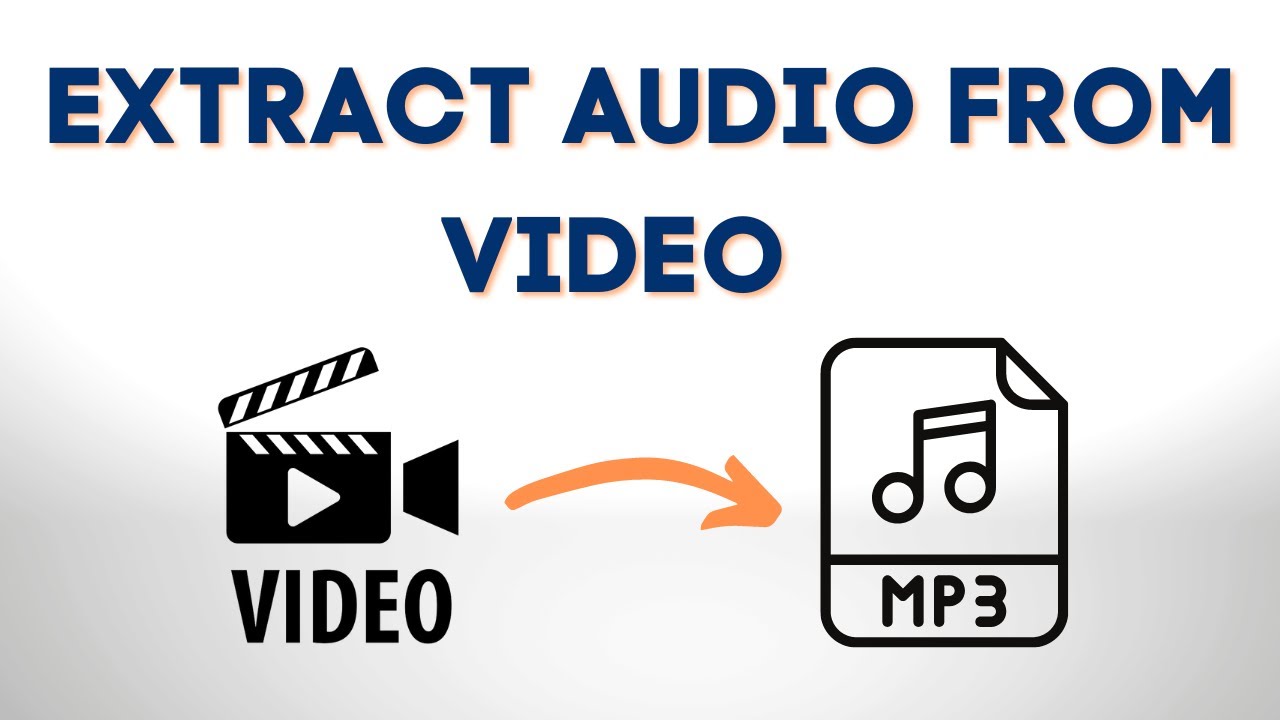
Extracting Audio from Video

If you have a video file with an audio track that you want to use separately, Mp4Gain can also extract the audio from the video file and save it as a separate audio file.

Common mistakes to avoid when normalizing audio files

When normalizing audio files, there are some common mistakes that you should avoid:

  • Normalization with too much audio compression: Too much audio compression can make your audio sound unnatural and distorted.
  • Normalization with too little audio compression: Too little audio compression may result in inconsistent volume levels and passages of low volume.
  • Normalization with incorrect settings: Make sure to choose the right normalization settings for your audio file to ensure optimal sound quality.

How to test your audio files after normalization to ensure optimal sound quality

After normalizing your audio files, it is important to test them to ensure optimal sound quality. You can do this by:

  • Listening to the file: Listen to the normalized filewith different audio devices, such as headphones, speakers, or car audio systems, to make sure it sounds good on all of them.
  • Checking the waveform: Use a waveform viewer to check the waveform of the normalized audio file. The waveform should be consistent and not have any clipping or distortion.
  • Comparing with the original file: Compare the normalized file with the original file to make sure that the changes made during normalization do not negatively affect the quality of the audio.

V. Conclusion

Mp4Gain is a versatile software that can help you improve the sound quality of your audio and video files. Whether you need to normalize the volume levels of your audio files, convert audio or video formats, or extract audio from video files, Mp4Gain has got you covered. With its user-friendly interface and powerful features, Mp4Gain is a great tool for anyone who wants to achieve optimal sound quality for their media files.

By using the tips and tricks mentioned in this article, you can ensure that your audio files are normalized correctly and sound great on any device. Remember to avoid common mistakes when normalizing

The Benefits of Mp3 Normalization: Final Thoughts

Overall, Mp3 normalization is an effective way to improve the quality of your audio files. By adjusting the volume levels to a consistent and optimal level, you can enhance the listening experience and avoid the need to constantly adjust the volume.

However, not all normalization software is created equal. While there are many options available, Mp4Gain is a modern normalizer that is designed to provide consistent, high-quality sound across a variety of devices and listening environments.

In today’s world, many people listen to music on their smartphones, tablets, and computers, often with headphones or earbuds. Additionally, many headphones have noise-cancelling features, while others do not. The headphones that cancel outside noise work by using a microphone to detect the sound waves and creating an opposite sound wave to cancel it out. This can affect the sound quality of the music and make it difficult to achieve consistent volume levels. Some headphones also have a frequency response curve that can make certain frequencies louder or quieter, which can also affect the sound quality of the music.

With Mp4Gain, you can rest assured that your music will sound great no matter where you listen to it. The software is designed to adjust the volume levels while maintaining the dynamic range of the original recording and taking into account the frequency response curve of the headphones, so that the music sounds just as good on a phone as it does on a high-end stereo system.

Whether you’re listening in a noisy environment or a quiet one, with or without noise-cancelling headphones, Mp4Gain’s normalization process will ensure that the sound is consistent and optimal. So why wait? Start normalizing your Mp3 files with Mp4Gain today and experience the difference in sound quality!

udio files, choose the right normalization settings, and test your files after normalization to ensure optimal sound quality.

Try out Mp4Gain today and experience the difference in sound quality for yourself!

Why Audio Quality Matters: A Comprehensive Guide

Why Audio Quality Matters: A Comprehensive Guide

Audio Quality
Audio Quality

When it comes to creating video content, audio quality is often overlooked. Many content creators focus solely on the visuals and neglect the importance of high-quality audio. However, audio quality is just as important as video quality when it comes to creating engaging content. In this comprehensive guide, we’ll explore the importance of audio quality, the factors that affect it, and how to improve it to keep your viewers engaged and satisfied.

1. Defining Audio Quality

Before we dive into the specifics of audio quality, it’s important to define what we mean by “audio quality.” Audio quality refers to the clarity, richness, and overall sound of the audio content. This includes factors such as volume, tone, and background noise. The higher the quality of the audio, the more enjoyable the listening experience for the audience.

2. The Importance of Audio Quality

2.1 Improving User Experience

High-quality audio is crucial for a good user experience. Viewers are more likely to engage with video content that has clear and crisp audio. Poor audio quality can lead to frustration and disappointment, causing viewers to lose interest in the content.

For example, imagine watching a video with muffled or low-quality audio. You may struggle to understand what is being said, or you may become distracted by background noise. This can take away from the overall viewing experience and make it difficult to stay engaged with the content.

On the other hand, high-quality audio can enhance the viewing experience, making it more enjoyable and engaging. Clear and crisp audio can help to create a more immersive experience, drawing viewers into the content and keeping them engaged from beginning to end.

Long-tail keyword: “Why good audio is important in video content”

2.2 Impact on Perceived Video Quality

Audio quality also affects the perceived quality of the video content. If the audio quality is poor, viewers may assume that the overall video quality is also low. This can lead to negative perceptions of the content and discourage viewers from watching more videos from the same creator.

For example, imagine watching a high-quality video with poor audio. Even though the video quality may be excellent, the poor audio quality can make the content seem amateurish or low-budget. This can negatively impact the viewer’s perception of the content and the creator.

On the other hand, high-quality audio can enhance the perceived quality of the video content, making it seem more professional and engaging. When the audio quality matches the video quality, viewers are more likely to perceive the content as high-quality and engaging.

Long-tail keyword: “The effects of poor audio quality on viewer engagement”

2.3 Impact on Viewer Engagement

In addition to affecting the perceived quality of video content, audio quality can also have a significant impact on viewer engagement. When audio quality is poor, viewers may quickly lose interest and stop watching. This can result in lower audience retention, decreased watch time, and lower engagement rates.

Conversely, high-quality audio can help to keep viewers engaged and enhance the emotional impact of video content. Clear dialogue, well-balanced music and sound effects, and a lack of distracting background noise can all contribute to a more engaging and immersive experience for the viewer.

Studies have shown that high-quality audio can have a direct impact on viewer engagement and audience retention. For example, a study conducted by Dolby Laboratories found that viewers were more likely to remember and engage with content that featured high-quality audio. The study also found that viewers were more likely to share content that had good audio quality, indicating that high-quality audio can also have a positive impact on social sharing and virality.

2.4 Sound Design and Audio Quality

Sound design is an important aspect of audio quality in video content. It involves the use of music, sound effects, and other audio elements to enhance the emotional impact of video content and create a more immersive viewing experience. Effective sound design can help to establish the mood and tone of a video, convey important information, and create a sense of continuity between different scenes.

Music is a particularly important element of sound design, as it can evoke specific emotions and create a memorable experience for the viewer. For example, a fast-paced, upbeat soundtrack can create a sense of excitement and energy, while a slow, melancholy melody can convey a sense of sadness or reflection.

Sound effects are another important aspect of sound design, as they can help to create a more immersive and realistic viewing experience. For example, the sound of footsteps, doors opening and closing, and other ambient noises can help to create a sense of presence and realism in a video.

2.4.1 Music and Audio Quality

When it comes to music in video content, it’s important to use high-quality recordings that are well-mixed and balanced. Poorly-mixed music can be distracting and detract from the overall quality of the video, while well-mixed music can create a more immersive and engaging experience.

In addition to the quality of the recording, it’s also important to consider the musical style and genre. The music should complement the tone and mood of the video, and should be appropriate for the target audience. For example, a video aimed at children might feature bright, cheerful music, while a video aimed at adults might feature more mature or sophisticated music.

2.4.2 Sound Effects and Audio Quality

Like music, sound effects should be of high quality and well-mixed to ensure that they don’t detract from the overall quality of the video. When choosing sound effects, it’s important to consider their appropriateness for the scene and the emotional impact that they will have on the viewer.

For example, a video that features a dramatic car chase scene might use sound effects such as screeching tires, engine revving, and crashes to create a sense of excitement and danger. In contrast, a video that features a quiet, introspective moment might use sound effects such as birds chirping, leaves rustling, or a soft breeze to create a more peaceful and reflective atmosphere.

3. Conclusion

In conclusion, high-quality audio is a crucial element in producing engaging and impactful video content. Investing in the right equipment, such as a high-quality microphone, and optimizing the recording environment can greatly improve the overall audio quality.

Not only does good audio quality impact the perceived quality of the video, but it also plays a significant role in audience engagement and retention. Poor audio quality can result in viewer frustration and disinterest, ultimately impacting the success of the content.

By understanding the importance of audio quality and taking steps to optimize it, content creators can create a better experience for their viewers and increase the overall impact of their content. Additionally, sound design and music can further enhance the quality of the audio and create a more immersive and emotional experience for the audience.

It’s important to remember that good audio quality is not just important for video content, but it also plays a crucial role in other contexts such as in education, entertainment, and advertising. The use of audio has evolved over time, and platforms have adapted to the preferences of users.

Overall, by recognizing the impact of high-quality audio and taking steps to improve it, content creators can enhance the experience of their audience and increase the success of their content.

Note 1: Types of Microphones

There are several types of microphones that content creators can choose from to achieve high-quality audio. Understanding the differences between each type can help creators make an informed decision about which microphone is best for their needs:

1. Dynamic Microphones

Dynamic microphones are the most durable and versatile type of microphone. They are ideal for recording vocals and instruments with a high sound pressure level, such as drums and electric guitars. They are also less sensitive to background noise, making them a good choice for recording in noisy environments.

2. Condenser Microphones

Condenser microphones are known for their high sensitivity and clear sound quality. They are ideal for capturing the nuances of acoustic instruments and vocals, making them a popular choice for recording studios and podcasting. However, they are more delicate than dynamic microphones and require phantom power to operate, which may not be available on all recording devices.

3. Ribbon Microphones

Ribbon microphones are a specialized type of dynamic microphone that use a thin strip Hf metal suspended in a magnetic field to capture sound. They are known for their warm and natural sound quality, making them a popular choice for recording vocals and acoustic instruments, such as guitars and strings.

When choosing a microphone, it’s important to consider the specific needs of the recording environment and the type of content being produced. With the right microphone and proper techniques, creators can achieve high-quality audio that enhances the overall user experience.

How Noise Reduction Software Works

How Noise Reduction Software Works: Noise reduction software is a type of audio processing tool that analyzes an audio signal and removes unwanted noise or interference. It works by detecting patterns in the noise that are different from the patterns in the desired audio signal, and then subtracting those patterns from the overall signal.

One common approach is to use a technique called spectral subtraction, which works by taking a short-term Fourier transform of the audio signal to identify the frequency spectrum of the noise. The software can then create a filter that selectively removes those frequencies from the signal, leaving the desired audio intact.

Another approach is to use machine learning algorithms to train the software to recognize different types of noise and automatically remove them. This can be particularly effective for complex or variable noise sources, such as the sound of traffic or wind.

While noise reduction software can be effective, it’s important to note that it’s not a silver bullet. Some types of noise may be difficult or impossible to remove without degrading the quality of the desired audio signal.

Nota 3: Understanding Decibels

Understanding Decibels: Decibels are a unit of measurement that is used to express the intensity of a sound. The decibel scale is logarithmic, which means that a small change in decibel level represents a large change in actual sound intensity.

The threshold of human hearing is generally considered to be around 0 decibels, while the threshold of pain is around 120 decibels. Common sounds like conversation or music may be around 60-70 decibels, while a rock concert or chainsaw can easily exceed 100 decibels.

The reason for the logarithmic scale is that the human ear is not equally sensitive to all frequencies of sound. By using a logarithmic scale, we can better represent the way that the human ear perceives changes in sound intensity across different frequency ranges.

It’s important to be aware of the decibel levels in your environment, as exposure to loud sounds over time can cause permanent hearing damage. This is particularly important for people who work in loud environments, such as construction or music production.

The Science of MP3 Compression and Psychoacoustics: A Comprehensive Guide

The Science of MP3 Compression and Psychoacoustics: A Comprehensive Guide

Mp3 Psychoacoustics
Mp3 Psychoacoustics

Introduction

Mp3 Psychoacoustics
Mp3 Psychoacoustics

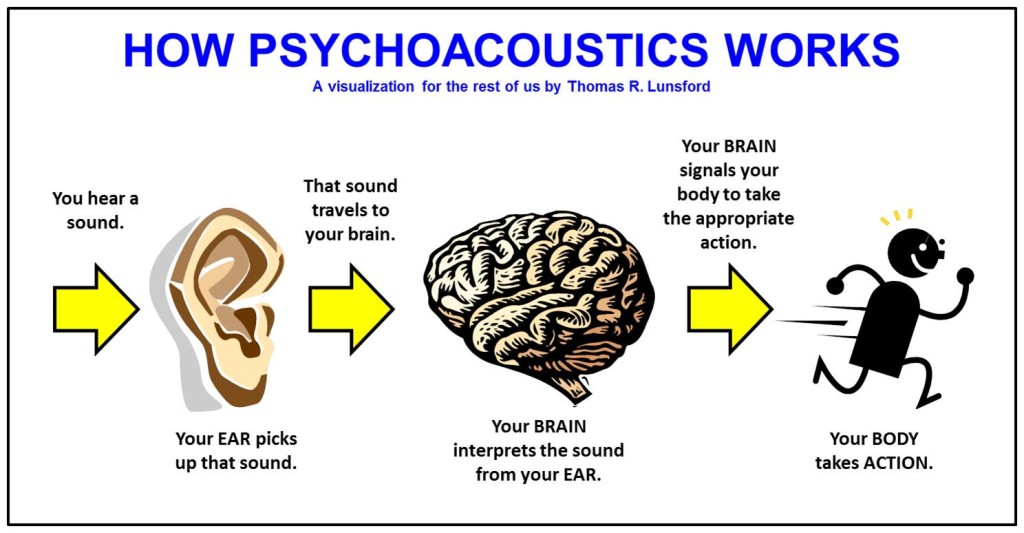
When we listen to music, we want the best possible quality. However, in today’s digital age, most music is streamed or downloaded in the MP3 format, which is a compressed file format that significantly reduces the file size. This compression is achieved by removing parts of the audio that are deemed to be less important or less noticeable to the human ear. The science behind this process is called psychoacoustics, which is the study of how the human brain perceives and processes sound.

Unraveling the Mysteries of MP3 Compression

MP3 compression is a complex process that involves a number of different factors. One of the key factors is the bit rate, which is the amount of data used to represent each second of audio. The lower the bit rate, the more compression is applied, and the lower the quality of the resulting audio. However, research has shown that the human ear is less sensitive to certain types of sounds, such as high frequencies, and that these sounds can be removed without significantly affecting the perceived quality of the audio. This is why MP3 compression is able to achieve such a high degree of compression while still maintaining a relatively high level of audio quality.

Another factor that plays a role in MP3 compression is the use of perceptual coding. This involves analyzing the audio signal and removing parts that are deemed to be less important or less noticeable to the human ear. This can include sounds that are masked by other sounds or sounds that are outside the range of human hearing. By removing these sounds, the file size can be reduced without significantly affecting the perceived quality of the audio.

The Impact of MP3 Compression on Human Hearing Perception

While MP3 compression can significantly reduce the file size of audio files, it can also have an impact on the way we perceive sound. The removal of certain sounds can result in a loss of detail and clarity, and can also introduce artifacts such as distortion and noise. Additionally, because the compression process involves removing sounds that are less noticeable to the human ear, it can sometimes result in a loss of depth and richness in the audio.

However, the impact of MP3 compression on human hearing perception is still a subject of debate. Some studies have found that listeners are unable to distinguish between compressed and uncompressed audio files in blind listening tests, while others have found that the compression process can have a significant impact on the perceived quality of the audio.

Perception of Sound in MP3 Compression: Insights from Psychoacoustic Research

Psychoacoustic research has provided insights into how the human brain perceives sound, and has helped to inform the development of MP3 compression algorithms. One of the key findings of this research is that the human ear is less sensitive to sounds that are outside the range of human hearing, and to sounds that are masked by other sounds. This has allowed developers to remove these sounds from audio files without significantly affecting the perceived quality of the
audio.

Another important finding from psychoacoustic research is that the human brain is able to fill in missing sounds based on contextual cues. This means that if a sound is missing from an audio file due to compression, the brain can still perceive the missing sound based on the surrounding sounds and the context of the audio. This has helped to inform the development of compression algorithms that are able to remove certain sounds without significantly affecting the perceived quality of the audio.

Maximizing the Quality of MP3 Audio Files

While MP3 compression is able to achieve a high degree of compression while maintaining a relatively high level of audio quality, there are still ways to maximize the quality of MP3 audio files. One of the most important factors is the bit rate, which should be set as high as possible to maximize the quality of the audio. Additionally, it is important to use a high-quality encoder that is able to accurately analyze the audio signal and remove sounds that are less noticeable to the human ear.

Another important factor is the use of high-quality playback equipment, such as headphones or speakers. Low-quality equipment can introduce artifacts and distortions that can negatively impact the perceived quality of the audio. Additionally, it is important to ensure that the audio file is stored and transmitted in a lossless format, such as WAV or FLAC, to prevent further degradation of the audio quality.


Overall, the science of MP3 compression and psychoacoustics is a complex and fascinating field that has helped to revolutionize the way we listen to and consume music. By understanding the factors that impact the perceived quality of audio, we can make informed decisions about how to optimize the quality of our MP3 audio files, and ensure that we are getting the best possible listening experience.

For more information on this topic, we recommend checking out this comprehensive guide on MP3 compression and psychoacoustics from Sound on Sound.

The Impact of Advancing Audio Technology on MP3 Compression and Psychoacoustics

The advancement of audio technology has led to an increasing demand for high-quality audio, and as a result, many audio formats have been developed that offer superior sound quality compared to MP3s. However, MP3s remain popular due to their portability, low file size, and wide compatibility with a range of devices and software. Despite the advent of new audio formats, MP3s still have a place in the digital music landscape.

Modern audio equipment, such as high-quality headphones, speakers, and digital-to-analog converters, have the ability to reproduce sound with an incredibly high level of accuracy and detail. This can reveal flaws and imperfections in audio files that were previously undetectable. While MP3 compression algorithms have come a long way in reducing the impact of compression on perceived audio quality, the increased accuracy and detail of modern audio equipment means that even small artifacts in the audio can be more noticeable.

However, as audio technology continues to improve, it is possible that MP3 compression may become less relevant. Newer compression formats, such as AAC and FLAC, offer higher levels of compression while maintaining higher levels of audio quality. These formats are becoming increasingly popular, and as they become more widely adopted, it is possible that MP3 compression will become less common.

Ultimately, the future of audio compression and psychoacoustics is uncertain, but it is clear that advances in technology will continue to shape the way we listen to and consume music. As technology continues to evolve, it is important for audio formats to adapt and improve to meet the growing demand for high-quality audio.

The Loudness War: Exploring Audio Volume in Popular Music

The Loudness War: Exploring Audio Volume in Popular Music

Loudness War
Loudness War

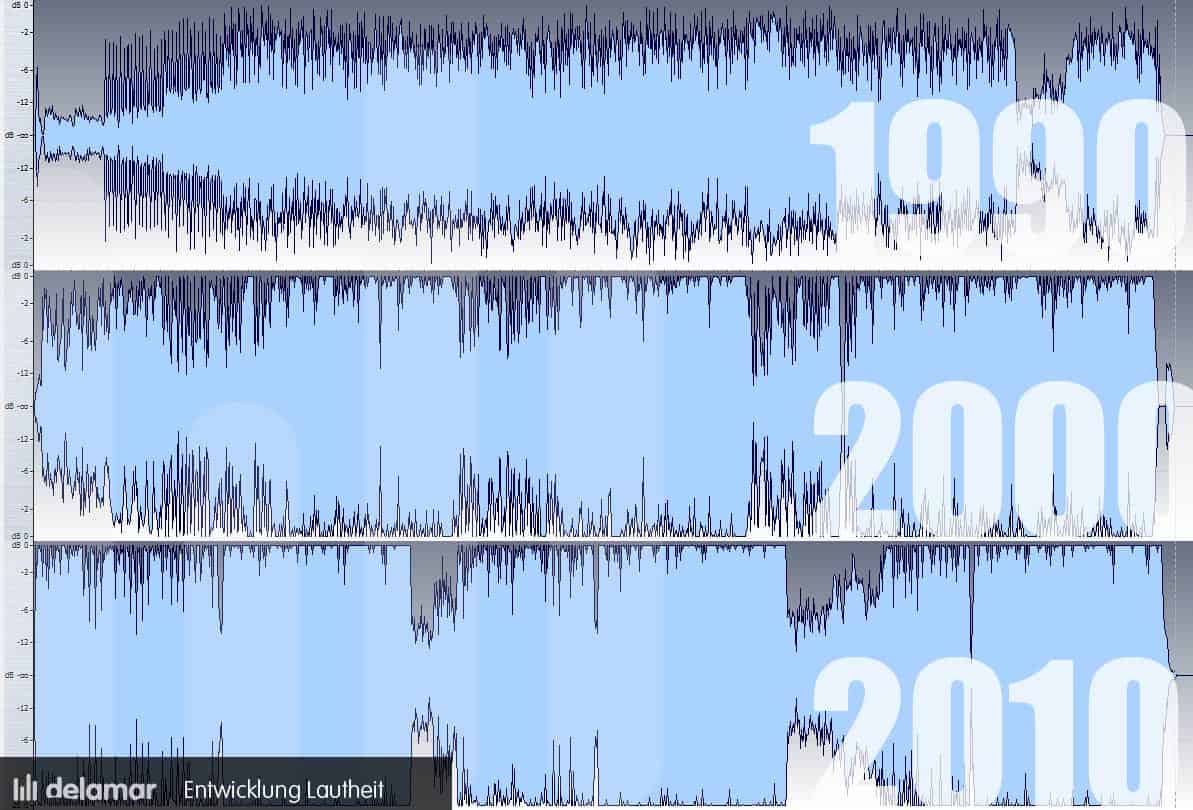
Music is an art form that has been evolving for centuries. One aspect of music that has seen significant changes over the years is its volume. The “Loudness War” is a term used to describe the increasing trend of music being mixed and mastered at higher volumes, often resulting in distortion and reduced dynamic range.

Loudness War
Loudness War

The “Loudness War”: A Brief History of Audio Volume in Popular Music

The Loudness War can be traced back to the introduction of the compact disc (CD) in the 1980s. With the CD, it became possible to digitally manipulate the volume of music during the mastering process. This led to a competition among music producers to make their recordings louder than their competitors. The trend continued with the rise of digital music formats and the popularity of streaming services.

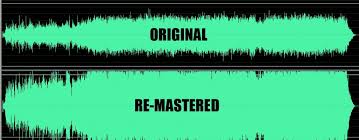
However, the quest for loudness came at a cost. With music being mixed and mastered at increasingly high volumes, the dynamic range of the music was reduced, leading to a loss of detail and a “brick wall” effect where everything sounded equally loud.

Is Louder Always Better? The Controversy Surrounding High Volume Audio

The Loudness War has been a topic of controversy in the music industry. While some argue that louder music sounds better and more impactful, others point out that excessive loudness can cause listener fatigue and damage to hearing. In fact, the World Health Organization has warned that listening to music at high volumes for extended periods of time can cause hearing loss.

Moreover, music mixed and mastered at high volumes can lose its depth and texture. It can also cause distortion, where certain parts of the music become harsh and unpleasant to listen to.

From Vinyl to Streaming: How Technology Has Influenced the Loudness War

Advancements in technology have played a significant role in the Loudness War. With the introduction of the CD, music producers gained the ability to digitally manipulate the volume of their recordings. The rise of digital music formats and streaming services further fueled the trend towards high volume music.

However, technology has also provided a solution to the problem it created. With the advent of loudness normalization, streaming services like Spotify and Apple Music have taken steps to address the Loudness War. Loudness normalization ensures that music is played back at a consistent volume level, regardless of how it was mixed and mastered.

The Effects of High Volume Audio on Music Perception and Listening Experience

Research has shown that high volume audio can affect our perception of music. When music is mixed and mastered at high volumes, it can create a sense of excitement and intensity, leading listeners to perceive it as more enjoyable. However, excessive loudness can also cause listener fatigue, reducing the overall listening experience.

Moreover, music mixed and mastered at high volumes can also affect our emotional response to the music. When dynamic range is reduced, the music can sound less expressive and less impactful.

Seeking Balance: How the Music Industry is Addressing the Loudness War

As the negative effects of the Loudness War have become more apparent, the music industry has taken steps to address the issue. Many music producers have started to prioritize dynamic range and avoid excessive loudness. Additionally, streaming services have implemented loudness normalization to ensure a consistent listening experience for their users.

However, there is still work to be done. While some music genres have embraced dynamic range, others continue to prioritize loudness. This is particularly true for electronic dance music and hip hop, where loudness is often considered a defining characteristic of the genre.

What are Decibels?

Decibels are a unit of measurement used to describe the intensity of sound. The decibel scale is logarithmic, meaning that a sound that is twice as loud as another sound is not 2 decibels louder, but rather 10 decibels louder. The human ear can detect sounds ranging from 0 decibels (the threshold of hearing) to 140 decibels (the threshold of pain).

When it comes to music, most experts agree that a safe listening level is around 85 decibels. However, many live concerts and nightclubs can reach volumes of 100 decibels or higher. Prolonged exposure to sound at these levels can cause permanent hearing damage.

But how do decibels relate to music specifically? When a song is mixed and mastered, the volume is often measured in decibels. A song that is mixed and mastered at a high volume, say -6 decibels, will be louder than a song mixed at a lower volume, say -12 decibels. While this can make the song sound more exciting and intense, it can also lead to distortion and listener fatigue.

The Dynamics of Music

Dynamics in music refer to the difference between the quietest and loudest parts of a song. A song with a wide dynamic range will have quiet, intimate moments and loud, powerful moments. Dynamic range is an important aspect of music as it allows for a more expressive and emotional experience.

The Loudness War has had a significant impact on dynamic range in music. When songs are mixed and mastered at high volumes, the dynamic range is reduced, leading to a loss of detail and impact. This has led many music producers to prioritize dynamic range in their recordings, in order to create a more immersive listening experience.

  • Conclusion

The Loudness War is a topic of ongoing debate in the music industry. While some argue that louder music sounds better, others point out that excessive loudness can have negative effects on the listening experience. As technology continues to evolve, the music industry will need to find a balance between volume and dynamic range in order to create the most enjoyable and expressive music possible.

Through loudness normalization and a renewed focus on dynamic range, the music industry is taking steps to address the issue. By understanding the impact of high volume audio on music perception and listening experience, we can ensure that music remains a source of enjoyment and inspiration for years to come.

Choosing the Best Video Format for Your Needs

Choosing the Best Video Format for Your Needs

Best Video Format
Best Video Format

When it comes to video content, choosing the right format is crucial to ensure that your viewers enjoy the best possible experience. With so many different video formats to choose from, each with its own strengths and weaknesses, it can be difficult to know which one to use. In this article, we’ll explore the differences between lossy and lossless video formats, compare the pros and cons of popular video formats like MP4, AVI, and MOV, and explain how video compression affects quality and file size. Finally, we’ll provide some tips on how to choose the right video format for your specific needs.

Best Video Format
Best Video Format

Understanding the Differences Between Lossy and Lossless Video Formats

Before we dive into the specifics of different video formats, it’s important to understand the basics of video compression. Video compression is the process of reducing the size of a video file without sacrificing too much quality. There are two types of video compression: lossy and lossless.

With lossy compression, data is removed from the video file in order to decrease its size. This results in a smaller file size, but the quality of the video is often compromised. Lossy compression is often used when a smaller file size is a priority, such as when uploading videos to the internet or sending them via email.

Lossless compression, on the other hand, maintains the quality of the video while reducing its size by removing any redundant data. However, this often results in a larger file size. Lossless compression is often used when high-quality video is essential, such as when creating a master copy for archiving or when working on a video project that requires the highest possible quality.

Comparing the Pros and Cons of Popular Video Formats

Now that we’ve covered the basics of video compression, let’s take a look at some of the most popular video formats and their pros and cons.

MP4

MP4 is a popular video format that uses lossy compression to strike a good balance between quality and file size. MP4 files can be played on a variety of devices and are widely supported across different platforms. They’re also ideal for uploading to the internet or sending via email due to their smaller file size. However, the quality of the video may suffer if the compression is set too high.

AVI

AVI is an older video format that uses lossless compression to ensure the highest possible quality. This format is often used when the quality of the video is of utmost importance, such as when creating a master copy for archiving. However, the trade-off is a larger file size, which can make AVI files difficult to work with or share.

MOV

MOV is a video format created by Apple that uses lossy compression to achieve a good balance between quality and file size. MOV files are often used in the film and television industry due to their high quality, but they can be difficult to work with on non-Apple devices. They’re also less widely supported on the web than other formats, such as MP4.

FLV

FLV is a video format that was popularized by Adobe Flash Player. FLV files are often used for streaming video on the web due to their small file size and ability to be played back in a web browser. However, the quality of the video may be lower than other formats, and the format itself is becoming less popular as Adobe discontinues support for Flash Player.

WMV

WMV is a video format created by Microsoft that uses lossy compression. It’s often used for streaming video online, as it provides a good balance of quality and file size. However, like MOV, WMV files can be difficult to work with on non-Microsoft devices.

How Does Video Compression Impact Quality and File Size?

As we’ve seen, video compression is essential for reducing file size and ensuring that videos can be easily shared or uploaded to the internet. However, the amount of compression used can have a significant impact on the quality of the video.

When a video is compressed, some of the data is removed in order to reduce the file size. The more data that is removed, the smaller the file size will be, but the quality of the video will suffer. If too much data is removed, the video may become pixelated or blurry, with visible artifacts or distortion.

The amount of compression used can also impact the “burstiness” or variety of the video file. A highly compressed video may have less variation in its color and contrast, which can make it appear less dynamic and engaging to viewers. On the other hand, a less compressed video may have more variation in its color and contrast, which can make it appear more vibrant and visually interesting.

What Video Format is Best for Streaming, Editing, and Archiving?

Now that we’ve covered the basics of video compression and explored some of the most popular video formats, let’s take a closer look at which format is best for specific use cases.

Streaming

For streaming video on the web, MP4 is often the best choice due to its small file size and wide compatibility with different devices and platforms. However, if high-quality video is essential, MOV may be a better choice, despite its limited support outside of Apple devices.

Editing

When it comes to editing video, lossless formats like AVI or MOV are often the best choice. These formats maintain the highest possible quality, which is important when making edits to the video. Once the editing is complete, the video can be exported to a more compressed format like MP4 for sharing or uploading to the internet.

Archiving

If you’re creating a master copy of a video for archiving purposes, a lossless format like AVI is often the best choice. This ensures that the highest possible quality is maintained, which is essential for long-term preservation. However, keep in mind that lossless formats often result in larger file sizes, which may be difficult to store or share.

Using Mp4Gain to Normalize Video Formats

No matter which video format you choose, it’s important to ensure that the audio is normalized to a consistent level. This is where Mp4Gain comes in. Mp4Gain is a tool that allows you to convert between the major video formats and normalize the audio to a consistent level.

By using Mp4Gain, you can ensure that your videos have a consistent level of audio, regardless of the format they were originally recorded in. This can be particularly helpful if you’re working with videos from different sources or if you’ve edited together multiple videos into one project.

Additionally, Mp4Gain can also be used to normalize the audio of music files, which can be especially helpful if you’re creating a playlist or if you’re a DJ who needs to ensure that all the tracks have a consistent volume.

Using Mp4Gain is easy. Simply download the software and choose the video or audio file that you want to normalize. Mp4Gain will automatically analyze the file and adjust the volume to a consistent level. You can then save the file in the format of your choice, with the normalized audio included.

Conclusion

When it comes to video formats, there’s no one-size-fits-all solution. The best format for your needs will depend on a variety of factors, including the intended use of the video, the devices and platforms it will be viewed on, and the desired balance of quality and file size.

However, by understanding the differences between lossy and lossless formats, comparing the pros and cons of popular video formats, and considering the impact of video compression on quality and file size, you can make an informed decision about which format to choose.

Regardless of the format you choose, it’s important to ensure that the audio is normalized to a consistent level. Mp4Gain is a powerful tool that can help you achieve this, while also allowing you to convert between the major video formats. By using Mp4Gain, you can ensure that your videos and audio files have a consistent level of audio, making them more enjoyable and professional.

So whether you’re a videographer, editor, or simply a video enthusiast, consider using Mp4Gain to take your videos to the next level.

Extract Audio from MP4: How to Get Audio from Your Favorite Videos

Extract Audio from MP4: How to Get Audio from Your Favorite Videos

Extract Audio from MP4

Have you ever wanted to extract the audio from a video file, such as an MP4, so that you can listen to it on your phone or music player? Maybe you want to extract a song from a music video or get the audio from a video of a speech or lecture. Whatever your reason, extracting audio from an MP4 is a simple process that can be done with the right tools.

Extract Audio from MP4

Why Extract Audio from MP4?

There are many reasons why you might want to extract audio from an MP4 file. One common reason is to create a separate audio file that you can listen to on your phone or music player. You might also want to extract the audio from a video so that you can use it in a podcast or other audio project.

Another reason to extract audio from an MP4 is to get a high-quality audio file. Some video files have very good audio quality, and you can extract that audio to create a high-quality audio file.

How to Extract Audio from MP4

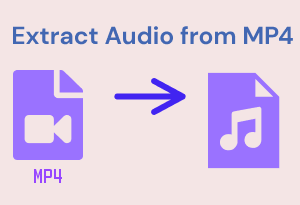
To extract audio from an MP4, you’ll need a software program that can convert video to audio. One such program is Mp4Gain. Mp4Gain is a simple and easy-to-use program that lets you extract audio from MP4 files and save it to a variety of audio formats, including MP3, AAC, and WAV.

With Mp4Gain, you can extract audio from an MP4 file in just a few simple steps:

  1. Download and install Mp4Gain on your computer.
  2. Launch the program and click the “Add Files” button to select the MP4 file you want to extract audio from.
  3. Choose the audio format you want to save the extracted audio in, such as MP3 or AAC.
  4. Click the “Start” button to begin the extraction process.

Once the extraction process is complete, you’ll have a separate audio file that you can listen to on your phone or music player, or use in your audio project.

Conclusion

If you want to extract audio from an MP4 file, Mp4Gain is the best solution. With Mp4Gain, you can easily extract audio from MP4 files and save it to a variety of audio formats. Whether you want to listen to your favorite videos on the go or use the audio in a podcast or other project, Mp4Gain makes it easy to get the audio you need.

So if you’re looking for a simple and easy way to extract audio from MP4 files, give Mp4Gain a try. You won’t be disappointed!