Audio Clipping


Free Download Mp4Gain
picture

Audio Clipping: Understanding, Causes, and Solutions

Audio Clipping
Audio Clipping

Introduction to Audio Clipping

Audio clipping is a common issue that can significantly impact the quality of your sound recordings. As an audio expert, I’ll provide you with insights, explanations, and practical solutions to help you understand and tackle this problem. Whether you’re a podcaster, musician, or simply someone who wants to improve their audio quality, this article will guide you through the nuances of audio clipping.

Audio clipping occurs when the amplitude of an audio signal exceeds the maximum level that can be accurately represented. When this happens, the signal is cut off or “clipped,” resulting in distorted and unpleasant sound. It’s essential to address this issue because clipped audio can be distracting and diminish the overall quality of your recordings.

What Causes Audio Clipping?

Audio clipping can be caused by various factors, but the most common ones include:

Overloading Input Levels: One of the primary reasons for audio clipping is setting input levels too high. When your microphone or audio input device records sound that is too loud, it can exceed the equipment’s capacity, leading to clipping. To avoid this, ensure your input levels are appropriately adjusted to prevent distortion.

Digital Clipping: In the digital realm, audio clipping occurs when the audio signal exceeds the maximum value that can be represented in the digital format. This can happen during recording, mixing, or mastering stages. It’s crucial to maintain headroom in your digital audio workflow to prevent digital clipping.

Amplification in Post-Processing: Amplifying an already clipped audio signal during post-processing can worsen the problem. It’s essential to identify and rectify clipped audio before applying any amplification or effects to your recordings.

How to Prevent and Fix Audio Clipping

Preventing and fixing audio clipping requires a combination of techniques and equipment adjustments. Here are some practical tips:

Proper Gain Staging: Maintain proper gain staging by setting input levels so that your audio signal is strong enough to capture the desired sound without overloading the equipment. This involves adjusting the gain on your microphone or audio interface.

Use a Pop Filter: A pop filter can help reduce sudden bursts of loud sound, such as plosives in vocal recordings. This can go a long way in preventing clipping at the source.

Monitor Levels: Continuously monitor your audio levels while recording to ensure they stay within the acceptable range. Use headphones or audio meters to keep an eye on the levels in real-time.

Why Is Audio Clipping Detrimental?

Audio clipping is detrimental because it compromises the quality and intelligibility of your recordings. When your audience hears distorted audio, it can be distracting and make it challenging to understand the content. In professional settings like music production, audio clipping can ruin an otherwise excellent recording.

Furthermore, addressing audio clipping is not just about improving sound quality; it’s also about preserving your equipment. Consistent clipping can damage microphones, speakers, and other audio gear over time, resulting in costly repairs or replacements.

Identical Search Intent Keywords

Now, let’s explore identical search intent keywords related to audio clipping:

Audio Clipping Prevention Techniques: Discover effective techniques to prevent audio clipping and maintain high-quality sound recordings.

Digital Audio Clipping Solutions: Learn how to deal with digital audio clipping issues and safeguard your recordings from distortion.

Microphone Gain Adjustment Tips: Gain insights into adjusting microphone gain levels to avoid audio clipping and capture pristine sound.

Real-Life Audio Clipping Examples: Explore real-life scenarios where audio clipping can occur, from live music performances to podcast recording sessions.

Last Words

In conclusion, understanding and addressing audio clipping is crucial for anyone working with audio recordings. By implementing proper gain staging, monitoring levels, and using tools like pop filters, you can significantly improve the quality of your audio. Remember that audio clipping not only affects the sound but also the longevity of your equipment. So, take the necessary steps to prevent and fix it, ensuring your audience enjoys distortion-free audio experiences.

As an audio expert with years of experience in the field, I’m confident that the information provided in this article will help you overcome audio clipping challenges and elevate the quality of your audio projects.


Free Download Mp4Gain
picture


Mp4Gain Main Window
picture


Mp4Gain Features
picture


Free Download Mp4Gain
picture

Audio Oscillators

Exploring the World of Audio Oscillators

Audio Oscillators
Audio Oscillators

When it comes to understanding the fascinating realm of audio electronics, audio oscillators play a pivotal role. These devices generate precise audio signals of varying frequencies, making them indispensable tools for testing, calibration, and sound production. In this article, I will delve into the world of audio oscillators, providing insights, examples, and expertise to help you grasp their significance and functionality.

Audio oscillators, at their core, are electronic instruments designed to produce audio waveforms with specific frequencies. These waveforms can vary from simple sine waves to more complex ones, like square or sawtooth waves. One common application of audio oscillators is in audio testing and measurement. For instance, when you need to check the frequency response of a speaker, you can use an audio oscillator to generate different frequencies and assess how the speaker responds. This is crucial for ensuring that audio equipment performs as expected.

Furthermore, audio oscillators are indispensable tools in music and sound production. Musicians and sound engineers use them to create specific tones and effects. For example, synthesizers often employ oscillators to produce the various sounds you hear in electronic music. These oscillators allow artists to manipulate waveforms to achieve the desired sonic textures. Now, let’s explore some of the questions you might have about audio oscillators.

How Do Audio Oscillators Work?

Audio oscillators function based on the principle of feedback loops. They contain components like amplifiers, capacitors, and resistors, all carefully configured to maintain a stable oscillation. At their core, oscillators generate a continuous output signal by feeding a portion of the signal back into the input, resulting in a continuous cycle of waveforms. The frequency of the output signal depends on the values of the components and can be adjusted using control knobs or digital settings.

Imagine a swing: when you give it a small push and keep pushing it at the right intervals, it swings back and forth steadily. Similarly, an audio oscillator maintains its output by continuously feeding back a portion of its signal, ensuring a consistent and predictable audio frequency.

Types of Audio Oscillators

Audio oscillators come in various types, each suited for specific applications. Here are a few common ones:

Analog Oscillators: These are traditional oscillators that use analog components like resistors, capacitors, and operational amplifiers. They are known for their warm and organic sound and are often favored in music production.

Digital Oscillators: These oscillators use digital signal processing to generate audio waveforms. They offer precise control and flexibility, making them ideal for synthesizers and digital audio workstations.

Function Generators: While not exclusively audio oscillators, function generators can produce a wide range of waveforms, including audio frequencies. They are versatile tools used in both audio testing and music production.

Low-Frequency Oscillators (LFOs): LFOs produce very low-frequency signals, typically below the audible range. They are crucial for modulating parameters in synthesis and creating dynamic audio effects.

Applications of Audio Oscillators

Audio oscillators find applications in various fields:

Audio Testing: Engineers use audio oscillators to measure the performance of audio equipment, ensuring accurate sound reproduction.

Music Production: Musicians and producers use oscillators to create unique sounds, from simple tones to complex textures.

Frequency Calibration: Oscillators are employed in scientific and industrial settings to calibrate equipment and maintain precise frequencies.

Waveform Analysis: Researchers and scientists use audio oscillators for waveform analysis and experimentation.

Last Words

In conclusion, audio oscillators are fascinating devices with a broad range of applications in audio engineering, music production, and scientific research. Whether you’re a musician looking to craft unique sounds or an engineer ensuring the quality of audio equipment, understanding the principles and types of audio oscillators is essential. I hope this article has provided valuable insights into this intriguing world of audio electronics.

Audio Convolution

Exploring Audio Convolution: Unraveling the Sound Transformation

Audio Convolution
Audio Convolution

Audio convolution is a fascinating concept that lies at the heart of many audio processing techniques and technologies. In this article, I will provide a comprehensive overview of audio convolution, its applications, and its role in shaping the world of sound.

Understanding Audio Convolution

Audio convolution is a mathematical operation that combines two audio signals to produce a third, resulting in a unique and transformative effect on sound. It operates by taking each sample of one audio signal and “mixing” it with corresponding samples of another, resulting in a new audio signal that carries the characteristics of both. This process is fundamental in various audio applications, ranging from music production to acoustic modeling and sound synthesis.

Applications of Audio Convolution

Audio convolution finds its use in a plethora of applications, each harnessing its power in distinct ways:

Reverberation: Convolution reverb is a widely used technique to recreate the natural acoustics of different spaces. By convolving an impulse response (representing a specific space’s acoustic characteristics) with an audio signal, you can make it sound as if it was recorded in that space.

Sound Design: Audio engineers use convolution to apply complex and unique effects to audio. This includes simulating vintage hardware, creating immersive audio environments for video games, or adding character to music tracks.

Room Acoustics Analysis: In architectural acoustics, convolution helps simulate how sound behaves in various spaces. This is crucial for designing concert halls, theaters, and recording studios to achieve desired acoustic properties.

FAQ Audio Convolution

What is Impulse Response in Audio Convolution?

Impulse response is a key element in audio convolution. It represents the way a system responds to an idealized impulse signal, which is a brief and infinitely loud sound. In audio convolution, an impulse response characterizes the unique acoustic properties of a space or the effect you want to apply. By convolving this impulse response with audio, you can emulate the sound of that space or effect.

How Does Audio Convolution Enhance Sound Quality?

Audio convolution enhances sound quality by allowing you to apply realistic acoustic properties, effects, and spatial characteristics to audio signals. This means you can make recorded music sound like it’s played in a concert hall or add rich textures to audio recordings. By accurately capturing and reproducing these aspects, convolution contributes to more immersive and high-fidelity sound experiences.

What Tools Are Used for Audio Convolution?

Several software tools and plugins are available for audio convolution. Digital audio workstations (DAWs) often include convolution reverb plugins, which make it easy to apply convolution to audio tracks. Additionally, standalone convolution processors and libraries offer flexibility in creating custom convolution effects and simulations

Sound Transformation with Audio Convolution

Audio convolution serves as a powerful tool for sound transformation. By convolving audio signals with various impulse responses and effects, you can shape and mold sound in countless creative ways. Whether you’re a music producer looking to craft unique textures or a sound designer pushing the boundaries of audio creativity, audio convolution opens up a world of sonic possibilities.

Real-Time Audio Convolution Processing

Real-time audio convolution processing has become increasingly accessible, thanks to advancements in computing power and software development. Musicians and live sound engineers can now apply convolution effects in real time, enhancing the quality and depth of live performances. This technology has revolutionized the way we experience sound in concerts and events.

Audio Convolution vs. Traditional Sound Processing

Audio convolution stands apart from traditional sound processing methods. While traditional techniques like equalization and compression modify audio in predefined ways, convolution offers a more flexible and adaptive approach. It allows you to replicate real-world sonic environments or create entirely novel soundscapes, making it a valuable addition to the audio engineer’s toolbox.

Last Words

In the ever-evolving realm of audio, the concept of audio convolution remains a potent force for creativity and realism. Whether you’re seeking to recreate the grandeur of a concert hall, craft cinematic soundscapes, or explore new sonic frontiers, audio convolution empowers you to transform sound in ways limited only by your imagination.

Audio Delay Compensation

Understanding Audio Delay Compensation: A Comprehensive Guide

Audio Delay Compensation

In the world of audio production and playback, timing is everything. Ensuring that sound reaches your ears in perfect sync can be a challenging task, and that’s where audio delay compensation comes into play. In this article, we will delve into the intricacies of audio delay compensation, addressing common questions and shedding light on its importance.

The Basics of Audio Delay Compensation

Audio delay compensation, also known as latency correction or audio synchronization, is a crucial aspect of audio technology. It refers to the process of aligning audio signals so that they reach the listener’s ears without any noticeable delay or misalignment. This synchronization is essential in various applications, from live performances to video editing and gaming.

Why is Audio Delay Compensation Necessary?

Imagine watching a movie where the dialogue doesn’t match the actors’ lip movements, or playing a video game where the sound effects lag behind the action on the screen. Such experiences can be frustrating and immersion-breaking. Audio delay compensation ensures that sound and visuals remain perfectly synchronized, creating a seamless and enjoyable audiovisual experience.

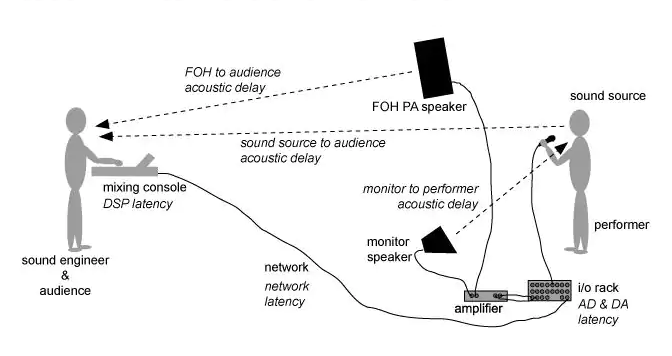
To achieve this synchronization, audio delay compensation systems measure the delay introduced by various components in the audio chain, such as microphones, audio interfaces, and speakers. These delays can vary depending on the equipment used and the processing involved. By carefully adjusting the timing of audio signals, delay compensation systems eliminate discrepancies and deliver a harmonious audio experience.

Real-Life Examples of Audio Delay Compensation

Let’s consider a practical example: a live concert. In such a setting, sound travels at a finite speed, and the distance between the stage and the audience can result in a noticeable delay between what the audience sees and hears. To address this, audio engineers use delay compensation to ensure that the sound from the speakers aligns perfectly with the visual performance on stage.

Similarly, in the realm of online communication, think about video conferencing. Without audio delay compensation, conversations would be riddled with awkward pauses, making it difficult for participants to engage naturally. Thanks to this technology, the voices of speakers are synchronized, facilitating smooth and natural interactions.

FAQ Audio Delay Compensation

How Does Audio Delay Compensation Work in Music Production?

In music production, audio delay compensation plays a critical role in achieving a polished final mix. When multiple tracks are recorded and processed, each may introduce its own delay. Audio delay compensation software analyzes these delays and automatically adjusts the timing of each track so that they align perfectly. This ensures that instruments and vocals harmonize as intended, creating a cohesive and professional sound.

What Are the Different Types of Audio Delays?

Audio delays can occur for various reasons, including signal processing, digital-to-analog conversion, and transmission. Some common types of audio delays include:

Processing Delay: This delay occurs when audio signals pass through various digital processors, such as equalizers or effects plugins, which may introduce a slight delay as they process the audio.

Conversion Delay: Analog audio signals must be converted to digital format for processing, and vice versa. This conversion process can introduce a delay, which must be compensated for to maintain synchronization.

Transmission Delay: When audio is transmitted over long distances, such as in live broadcasting or online streaming, there can be a delay in signal transmission. Audio delay compensation helps mitigate these delays to ensure real-time audio.

Is Audio Delay Compensation Important for Gamers?

Absolutely! Gamers rely on split-second reactions and immersive experiences. In online multiplayer games, audio cues are often crucial for situational awareness and gameplay. Without audio delay compensation, players might experience disorienting delays between in-game actions and corresponding sound effects. This technology ensures that audio feedback is instantaneous, enhancing the gaming experience.

Identical Search Intent Keywords

Audio Latency Reduction Techniques

Reducing audio latency is a top priority in various applications, from music production to live sound reinforcement. To achieve this, techniques such as buffer size optimization, low-latency audio interfaces, and real-time monitoring are employed. These methods minimize the time it takes for audio signals to traverse the entire chain, resulting in near-instantaneous playback.

Zero-Latency Monitoring in Audio Recording

Zero-latency monitoring is a crucial feature for recording professionals. It allows musicians to hear their performances in real-time while recording, eliminating distracting delays that can affect their timing and creativity. This is achieved by routing the audio input directly to the output, bypassing any processing that could introduce latency.

Audio Delay Compensation in Home Theater Systems

Home theater enthusiasts often face the challenge of synchronizing audio with their video playback. Audio delay compensation systems in modern home theater equipment, such as AV receivers, ensure that sound aligns perfectly with on-screen action. This enhances the cinematic experience in the comfort of one’s own home.

Last Words

In the world of audio, timing is paramount. Whether you’re a musician striving for that perfect mix, a gamer seeking an immersive experience, or a home theater enthusiast enjoying a movie night, audio delay compensation is the unsung hero that ensures synchronization. By understanding its significance and the techniques involved, you can elevate your audio experiences to a whole new level.

Audio Impulse Response

Audio Impulse Response

Understanding Audio Impulse Response: Exploring the World of Sound

Audio Impulse Response

Audio Impulse Response, often referred to as IR, is a critical concept in the world of audio engineering and sound reproduction. It plays a fundamental role in shaping the sound quality of various audio systems, from your home theater setup to professional recording studios. In this article, we will delve into the fascinating realm of Audio Impulse Response, exploring its significance, applications, and the technical intricacies that make it an indispensable tool for audio enthusiasts and professionals alike.

What Is Audio Impulse Response?

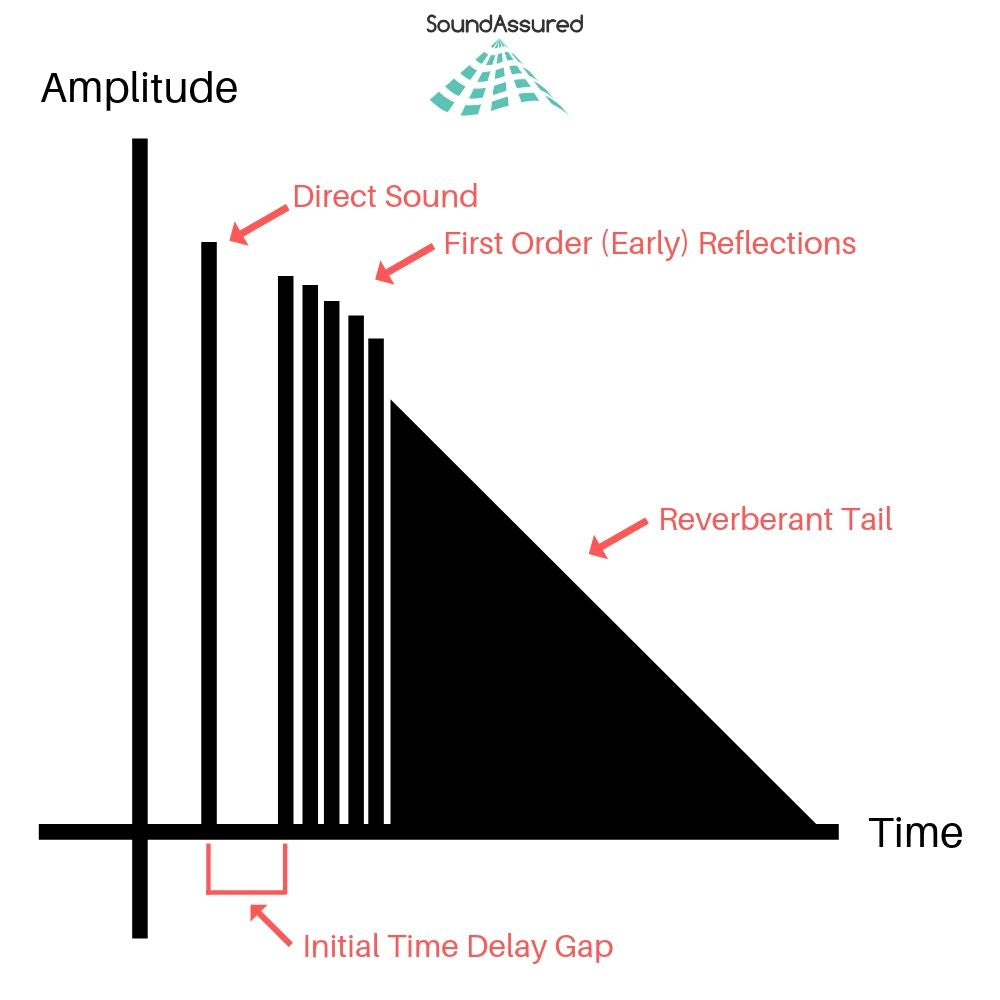
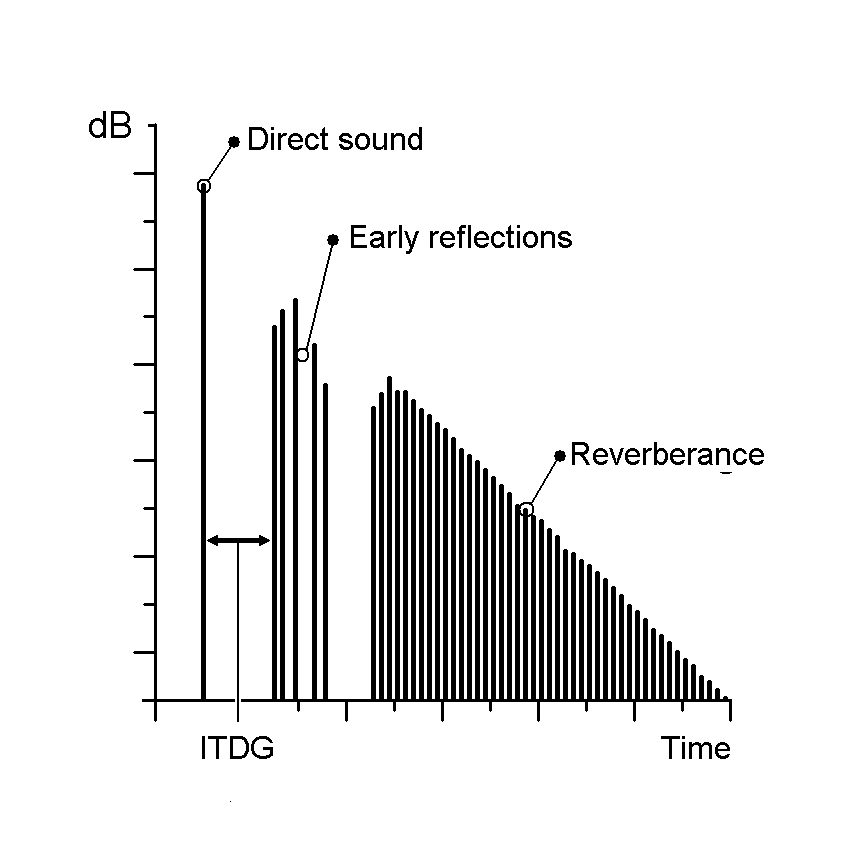
Audio Impulse Response, in its simplest form, is a mathematical description of how a system or device responds to an impulse or a short burst of sound. Think of it as the fingerprint of an audio system or space; it characterizes how that system interacts with sound. When you clap your hands in a room, the way the sound reverberates, bounces off walls, and eventually fades away is precisely what Audio Impulse Response quantifies.

Applications in Real-Life Scenarios

To illustrate its importance in real-life scenarios, consider a concert hall. Audio engineers use Impulse Response to understand how the hall reflects and diffuses sound. By analyzing the hall’s impulse response, they can optimize the placement of microphones and speakers, ensuring that the audience experiences the best possible sound quality.

Similarly, in the realm of home audio, IR plays a pivotal role. When you set up a home theater system, the IR of your room and equipment helps determine the ideal speaker placement and configuration for immersive surround sound.

The Technical Aspects

Now, let’s delve into the technical aspects. Audio Impulse Response is typically represented as a graph, where the x-axis represents time, and the y-axis represents amplitude. This graph shows how a system responds to an impulse over a certain period.

Understanding this graph allows audio engineers to manipulate and optimize audio systems effectively. For example, they can use IR data to simulate different acoustic environments. If you want your living room to sound like a concert hall, you can apply an IR profile that mimics the hall’s characteristics.

Exploring Further: Common Questions

How is Audio Impulse Response Measured?

Measuring Audio Impulse Response involves sending a precisely calibrated audio signal into a system and recording how the system responds. This is typically done using specialized equipment such as a sweep generator and a microphone. The recorded data is then processed to generate the IR graph, which reveals the system’s behavior.

Can Audio Impulse Response Be Altered?

Yes, Audio Impulse Response can be altered to achieve specific audio effects. Digital signal processing techniques allow audio engineers to modify the IR of a system. For example, you can apply reverb to make a recording sound like it was made in a cathedral or add echo for a spacious effect.

What’s the Connection Between IR and Speaker Design?

Speaker design relies heavily on understanding IR. Speaker manufacturers use IR data to design speakers that produce the desired sound characteristics. By fine-tuning the shape of the speaker cone and other components based on IR analysis, they can create speakers with optimal sound quality.

Keywords with Identical Search Intent

1. Acoustic Response Analysis

Acoustic Response Analysis is a related concept to Audio Impulse Response, focusing on the analysis of sound behavior in acoustic spaces. It is essential for designing concert halls, recording studios, and even home theaters.

2. Sound System Optimization

Sound System Optimization involves using Audio Impulse Response to fine-tune audio systems for the best possible sound quality. This applies to both professional setups and home audio systems.

3. Room Acoustics Enhancement

Improving Room Acoustics is a common goal in audio engineering. Understanding the IR of a room helps in enhancing acoustics through sound-absorbing materials, diffusers, and speaker placement.

4. Virtual Acoustic Modeling

Virtual Acoustic Modeling utilizes Audio Impulse Response data to simulate different acoustic environments in virtual or augmented reality applications. This is valuable for architectural acoustics and immersive audio experiences.

Last Words

In conclusion, Audio Impulse Response is a multifaceted concept that underpins much of the audio engineering world. From concert halls to your home audio setup, it influences how we experience sound in various environments. By grasping its technical intricacies and applications, you can gain a deeper appreciation for the magic that happens behind the scenes, making our audio experiences truly exceptional. So, the next time you enjoy a movie, concert, or even a phone call, remember that Audio Impulse Response is playing a crucial role in delivering that pristine sound to your ears.

Audio Notch Filter

Audio Notch Filter: Enhancing Sound Quality

Audio Notch Filter
Audio Notch Filter
Audio Notch Filter
Audio Notch Filter

Audio notch filters are indispensable tools in the world of audio engineering and signal processing. They play a crucial role in eliminating unwanted frequencies, enhancing sound quality, and ensuring crystal-clear audio reproduction. In this article, I will delve into the intricacies of audio notch filters, addressing common questions and shedding light on their applications and benefits.

The Power of Audio Notch Filters


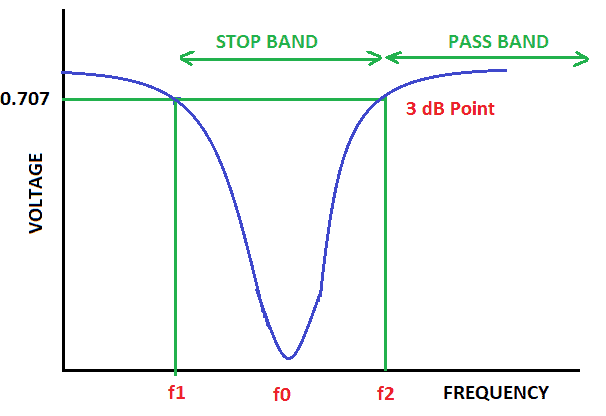
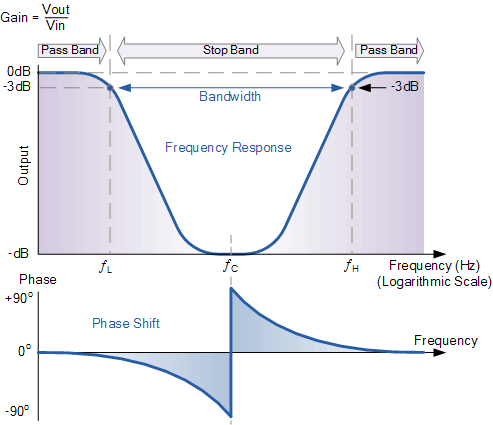
Audio notch filters, also known as band-stop or band-reject filters, are essential components in audio processing and equalization. They are designed to target and remove specific frequencies within an audio signal, effectively “notching out” unwanted noise or interference. Imagine a scenario where you’re recording a podcast, and there’s an annoying hum from nearby electronic equipment. An audio notch filter can surgically remove that hum, leaving your audio clean and crisp.

These filters work on the principle of destructive interference, which cancels out the unwanted frequencies, leaving the desired audio intact. This technology is akin to noise-canceling headphones, which use anti-phase signals to eliminate external sounds. Audio notch filters are the audio engineer’s equivalent, ensuring that only the intended sounds are heard.

Common Applications of Audio Notch Filters

Live Sound Reinforcement: In live concerts and events, audio notch filters are invaluable for tackling feedback issues. When a microphone picks up its own amplified sound, it can lead to screeching feedback. Notch filters can pinpoint and remove the feedback frequency, allowing for a smoother performance.

Recording Studios: When recording vocals or instruments, background noise or electronic interference can creep into the audio. Audio notch filters are used to isolate and remove these unwanted elements, resulting in pristine recordings.

Telecommunications: In telecommunication systems, audio notch filters are used to eliminate unwanted interference, ensuring clear and uninterrupted communication. For example, when you make a phone call and hear static or buzzing, notch filters can mitigate these disturbances.

Choosing the Right Audio Notch Filter

Selecting the appropriate audio notch filter for your specific needs is crucial. Filters come in various types, including analog and digital, and offer different notch widths and attenuation levels. Consider factors such as the frequency of the unwanted noise, the desired audio quality, and your budget when making a choice.

People Also Asked: Exploring Common Queries

How do audio notch filters work?
Audio notch filters operate by creating an inverse phase of the unwanted frequency, causing destructive interference. This cancels out the undesired sound, leaving the desired audio intact.

Can I use software-based audio notch filters?
Yes, there are software plugins and digital audio workstations (DAWs) that offer audio notch filter capabilities. These digital solutions are versatile and allow for precise control over filtering.

Are audio notch filters suitable for home audio setups?
Absolutely. Audio notch filters can improve the sound quality of home theater systems and audio setups by eliminating background noise, hums, or other unwanted frequencies.

Keywords with Identical Search Intent

Frequency Notch Filter
Noise Reduction in Audio
Band-Reject Filter
Audio Signal Processing

Enhancing Sound Quality with Audio Notch Filters

Audio notch filters, with their ability to surgically remove unwanted frequencies, are indispensable tools for audiophiles, recording engineers, and anyone seeking to elevate their audio experience. These filters act as sonic sculptors, allowing you to chisel away noise and interference, revealing the true beauty of your audio. Whether you’re in a live concert hall, a recording studio, or your living room, audio notch filters are the unsung heroes that ensure your ears receive only the purest, most harmonious sounds.

Last Words

In the world of audio, clarity is king, and audio notch filters are the knights in shining armor that protect that clarity. By understanding how these filters work and where they can be applied, you can take your audio experiences to new heights. So, whether you’re a musician striving for pristine recordings or an audiophile seeking audio nirvana, consider the power of audio notch filters in your quest for sonic perfection.

Audio Spectrum

Exploring the Fascinating World of Audio Spectrum

Audio Spectrum
Audio Spectrum

Audio Spectrum – a captivating phenomenon in the realm of audio and sound. The mere mention of this term conjures up images of colorful, rhythmic displays that dance to the beat of our favorite songs. In this article, I’ll take you on a journey deep into the heart of the audio spectrum, unraveling its intricacies and shedding light on its real-world applications.

Understanding the Audio Spectrum

Audio Spectrum
Audio Spectrum

At its core, the audio spectrum represents the range of frequencies that can be heard by the human ear. Imagine it as a vast landscape where each frequency is a unique color, and together they form a breathtaking canvas of sound. The spectrum spans from the low rumble of a bass drum to the piercing highs of a soprano’s voice, covering the entire audible frequency range, typically from 20 Hz to 20,000 Hz.

Now, let’s delve into the questions that people often ask about the audio spectrum:

How is the Audio Spectrum Represented?

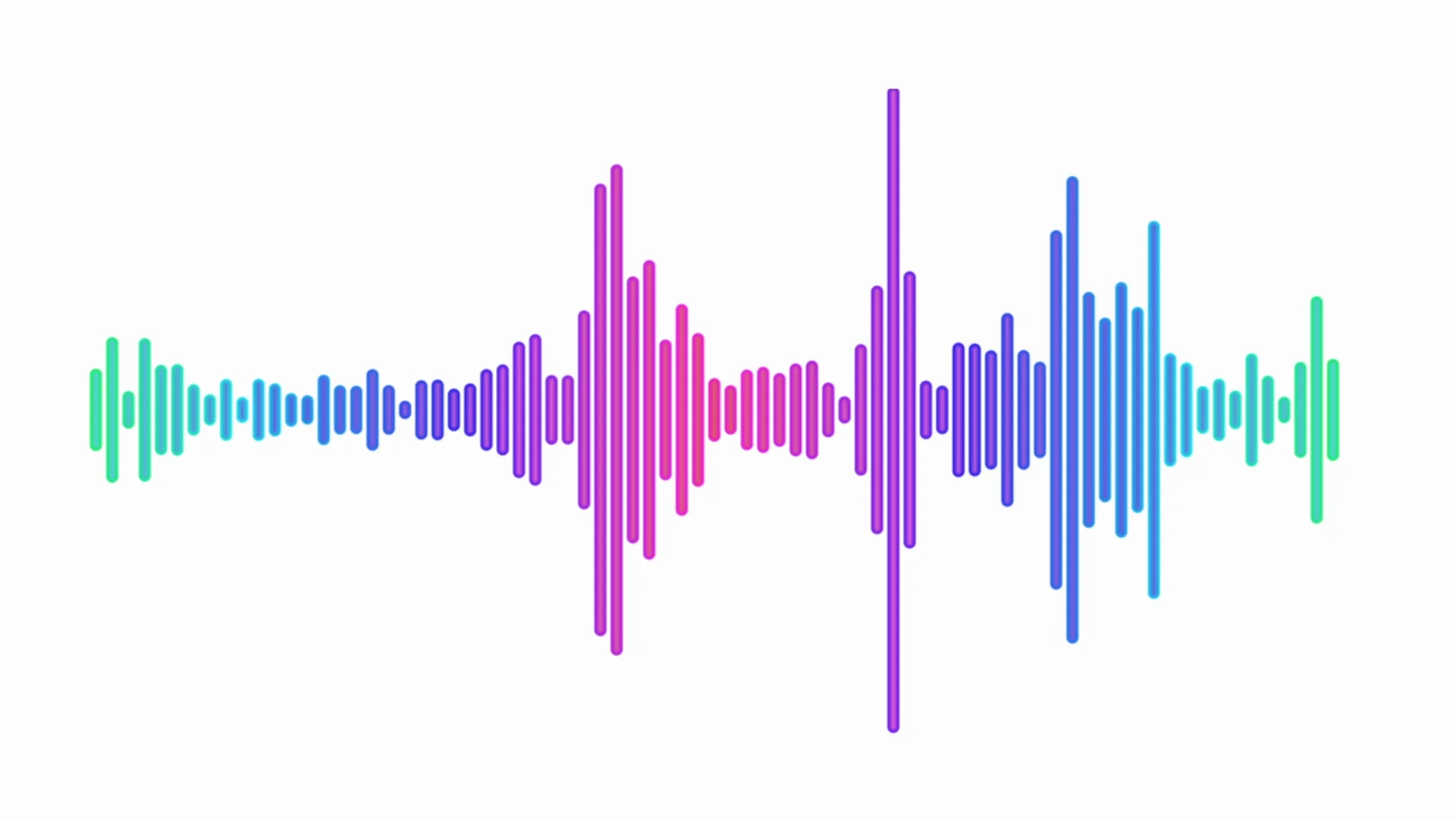
The audio spectrum is most commonly represented through spectrograms, waveforms, and frequency graphs. Spectrograms are like visual fingerprints of sound, displaying frequency on the vertical axis, time on the horizontal axis, and intensity through color variations. Waveforms provide a simple yet informative view, with time on the horizontal axis and amplitude on the vertical axis. Frequency graphs, on the other hand, show the amplitude of different frequencies over time. These representations are not only essential for audio analysis but also for creating mesmerizing audio visualizations in music players and software.

What’s the Connection Between Music and the Audio Spectrum?

Music and the audio spectrum share an inseparable bond. When you listen to your favorite songs, the different instruments and vocals occupy specific frequency ranges within the audio spectrum. For instance, the deep thump of a bass guitar resides in the lower frequencies, while the sparkle of a cymbal resides in the higher frequencies. Understanding this connection is crucial for audio engineers and musicians, as it allows them to fine-tune the balance and clarity of music during recording and mixing. It’s the magic that transforms a cacophony of sounds into a harmonious masterpiece.

How Does the Audio Spectrum Influence Real-World Applications?

The audio spectrum’s influence extends far beyond the realm of music. In telecommunications, the audio spectrum plays a vital role in encoding and transmitting human speech. In healthcare, it’s used in audiometry to assess hearing abilities and diagnose hearing impairments. Even in entertainment, audio spectrum analyzers are employed to create stunning visual effects that synchronize with music during concerts and festivals. These real-world applications underscore the importance of understanding and harnessing the power of the audio spectrum.

Frequency Analysis in Audio

Frequency analysis in audio is the process of breaking down sound into its constituent frequencies. This technique is invaluable for diagnosing and troubleshooting audio issues, such as identifying unwanted noise or optimizing the tonal balance of a recording.

Audio Visualization Techniques

Audio visualization techniques involve translating sound into captivating visual displays. These techniques are not only used in music players but also in immersive experiences like audio-driven art installations, where the audio spectrum becomes a canvas for creativity.

Harmonics and Overtones in Sound

Harmonics and overtones in sound are the additional frequencies that accompany the fundamental frequency of a musical note. Understanding these concepts is pivotal for musicians and audio engineers, as they influence the timbre and richness of musical instruments.

Sound Spectrum Analyzers

Sound spectrum analyzers are specialized tools used to visualize and analyze audio signals. They are indispensable in various fields, including acoustics, telecommunications, and the development of audio equipment.

Last Words

In the enchanting realm of audio, the spectrum reigns supreme, weaving its colorful tapestry of frequencies that shape the music we love and the technology that surrounds us. From the intricate details of frequency analysis to the captivating world of audio visualization, the audio spectrum continues to inspire creativity and innovation. As we navigate this sonic landscape, remember that the spectrum is not just a scientific concept; it’s the heartbeat of music and the foundation of our auditory experiences. Embrace its complexities, and you’ll uncover a world of endless possibilities.

Audio Latency Compensation

Understanding Audio Latency Compensation

Audio Latency Compensation

Audio latency compensation is a critical concept in the world of audio processing and production. It refers to the delay that can occur when processing audio signals, and it’s a topic that impacts everything from live performances to recording studio sessions and even everyday experiences like watching TV or playing video games. In this article, I’ll delve into the intricacies of audio latency compensation, exploring its significance, how it affects various applications, and how it can be managed for optimal audio experiences.

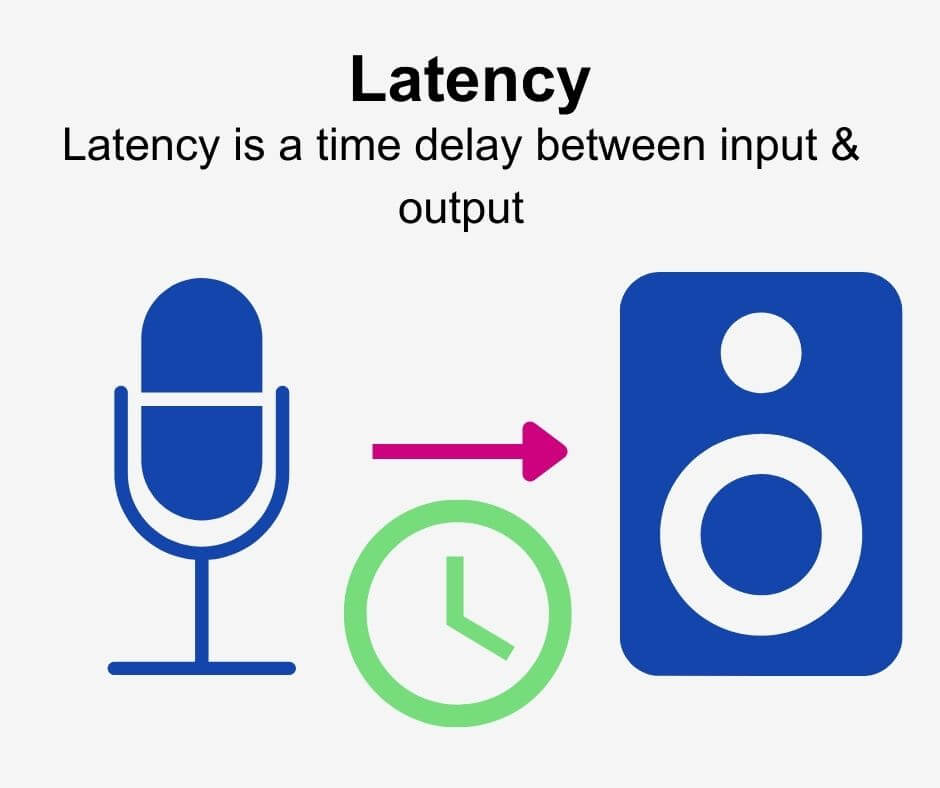
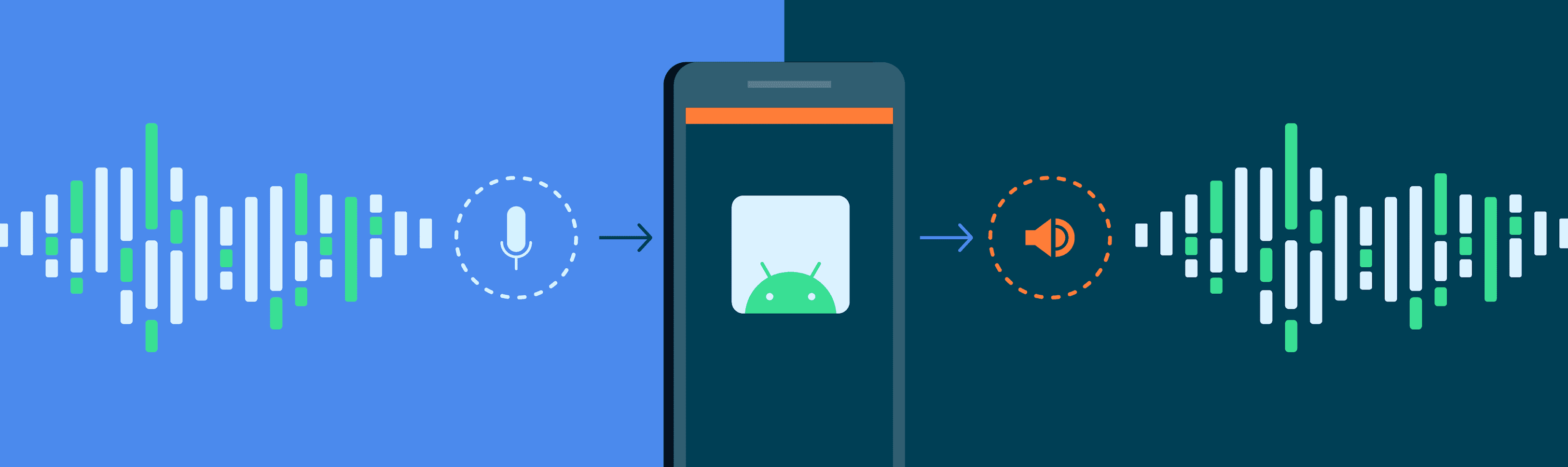
Audio latency compensation is essentially the delay that occurs when an audio signal is processed or transmitted from its source to its destination. This delay can be introduced at various stages of audio processing, such as when recording instruments, mixing tracks, or even during live performances. It’s measured in milliseconds and is a critical factor in ensuring that audio remains synchronized and cohesive.

Why Does Audio Latency Matter?

Audio Latency Compensation

The importance of audio latency compensation becomes evident when you consider scenarios where timing is crucial. For instance, in a live concert, the sound from microphones and instruments must reach the audience’s ears in sync with what they see on stage. Any delay can lead to a disjointed experience. Similarly, in music production, when multiple tracks are mixed, misaligned audio can result in muddiness or phase cancellation, affecting the overall quality of the recording.

Audio latency also plays a significant role in gaming. Gamers rely on audio cues for spatial awareness, and any latency can disrupt their ability to react quickly. Imagine playing a first-person shooter where the gunshot sound lags behind the visual animation; it could be the difference between victory and defeat.

Managing Audio Latency

To address audio latency, various techniques and technologies are employed. One common method is buffer size adjustment. This involves adjusting the size of data buffers in audio processing software or hardware to minimize delay. Smaller buffer sizes reduce latency but may strain the computer’s processing power, while larger buffers reduce strain but increase latency.

In professional audio setups, dedicated hardware interfaces with low-latency capabilities are used to minimize delay. These interfaces are designed to handle audio signals efficiently, ensuring minimal latency during recording and playback.

In the realm of gaming and live audio, technologies like ASIO (Audio Stream Input/Output) and low-latency audio drivers are employed to achieve near-instantaneous audio processing.

People Also Asked About Audio Latency Compensation

1. What Causes Audio Latency?

Audio latency can be caused by several factors, including:

Hardware Processing: Slow processors or insufficient RAM can lead to latency when processing audio.
Software Buffering: When audio data is buffered for processing, it can introduce delay, especially if the buffer size is too large.
Network Latency: In online applications, data transmission over the internet can introduce latency.

2. How Does Latency Affect Streaming and Online Calls?

In streaming and online calls, high latency can result in delays between audio and video, leading to unsynchronized experiences. This is often noticeable in live broadcasts or video conferencing.

3. Are There Differences Between Latency in Music Production and Gaming?

Yes, there are differences. In music production, low-latency is critical for real-time monitoring and recording. In gaming, low-latency ensures that audio cues match gameplay actions for a seamless experience.

4. Can Latency Be Completely Eliminated?

While we can minimize latency to imperceptible levels, complete elimination is challenging due to the limitations of hardware, software, and network transmission. Achieving extremely low latency is the goal, but there will always be some minimal delay.

Keywords with Identical Search Intent

1. Audio Delay Reduction Techniques

Reducing audio delay involves techniques like buffer size optimization, hardware upgrades, and low-latency drivers. These methods aim to minimize the time it takes for audio signals to travel from source to output.

2. Real-time Audio Processing

Real-time audio processing is crucial in applications like live sound engineering and gaming. It involves minimizing latency to ensure that audio signals are processed and delivered without noticeable delays.

3. Low-Latency Audio Interfaces

Low-latency audio interfaces are specialized hardware devices that enable musicians and producers to work with minimal audio delay. They are essential tools in professional music studios.

4. Latency Compensation in Audio Software

Audio software often includes features for latency compensation, allowing users to adjust settings and reduce delays during recording and playback. Understanding and utilizing these features is vital for audio professionals.

Last Words

In the world of audio, timing is everything. Whether you’re a musician, a gamer, or simply a fan of high-quality audio, understanding and managing audio latency compensation is essential for an immersive and seamless experience. By employing the right techniques and technologies, you can ensure that audio signals reach your ears with minimal delay, preserving the integrity of the sound and enhancing your overall enjoyment. So, whether you’re rocking out at a concert, producing your next hit song, or conquering virtual worlds in gaming, remember that audio latency compensation plays a pivotal role in shaping your auditory experience.

Audio Transients

Exploring Audio Transients: The Heartbeat of Sound

Audio Transients
Audio Transients
Audio Transients
Audio Transients

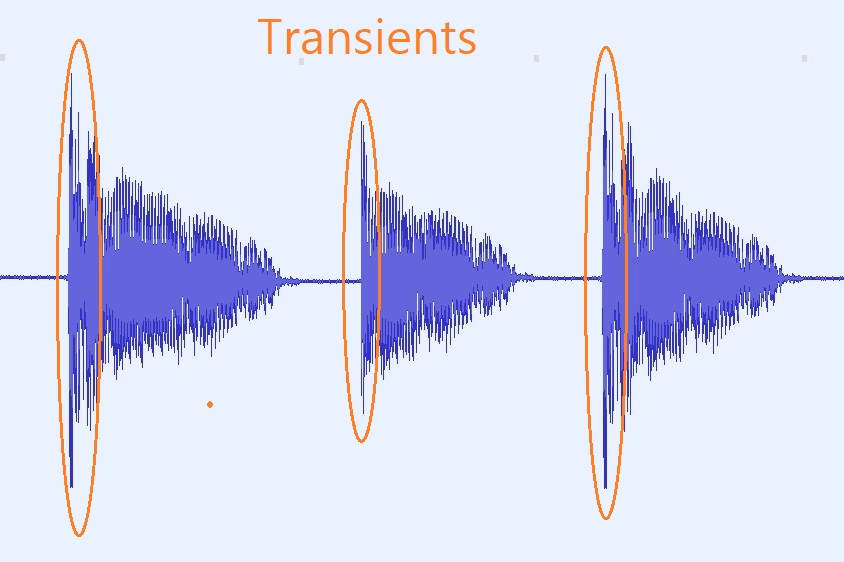
Audio transients are like the heartbeat of sound, the dynamic moments that give life and character to music and audio recordings. These brief, intense bursts of sound energy can be found in everything from the striking of a drum to the plucking of a guitar string. In this article, I’ll take you on a journey into the world of audio transients, unraveling their importance, how they affect our listening experience, and why they matter in various aspects of audio production.

Unveiling Audio Transients: The Basics

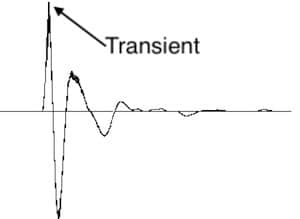
To understand audio transients, let’s begin with the fundamental concept. A transient is a sudden, short-lived spike in audio signal amplitude. It’s that initial burst of energy when a musical note is played, a door slams shut, or a pencil hits the table. Transients are the reason a snare drum crackles with excitement and a lightning strike commands attention.

Think of audio transients as the punctuation marks in a sentence. They emphasize and give context to the sound that follows. Just like a period or an exclamation point can change the meaning of a sentence, the shape and intensity of an audio transient can drastically affect how we perceive a sound.

People Also Asked: Answering Your Curiosities

Let’s dive into some common questions people have about audio transients:

How Do Audio Transients Impact Music?

Audio transients are the pulse of music. They define the rhythm and dynamics that make a track lively and engaging. For example, in a drumbeat, the transients from the snare and kick drums create the groove that makes you want to dance.

Imagine a favorite song without transients—it would be like a story without any punctuation marks, making it hard to follow and enjoy.

Can Audio Transients Be Controlled?

Yes, they can! Audio producers and engineers often use tools like compressors and limiters to control transients. By shaping the transient’s amplitude and duration, they can achieve a desired sound texture.

Think of it as adjusting the force with which a hammer strikes a nail. Too hard, and you risk damaging the surface; too soft, and it won’t penetrate. Engineers find that sweet spot to shape the sound precisely.

What Is Peak vs. RMS in Audio Transients?

Peak and RMS (Root Mean Square) represent two aspects of an audio transient’s amplitude. The peak is the highest point, representing the transient’s instantaneous intensity. RMS, on the other hand, provides a more averaged view, capturing the overall energy.

Picture a heartbeat monitor. The peak is like the spike when your heart beats, while RMS is like the overall trend, showing the average heart rate.

Keywords with Identical Search Intent

Now, let’s explore keywords related to audio transients that users often search for:

Transient Shaping Techniques: Crafting Audio Dynamics

Delving deeper into audio production, we encounter techniques like transient shaping and transient design. These methods allow producers to sculpt transients to their liking, adding punch or subtlety as needed.

Consider transient shaping as sculpting clay. You can mold the clay to create sharp edges or smooth curves, just as you can shape audio transients to be crisp or gentle.

Audio Transients in Live Sound: A Vital Element

In live sound engineering, managing transients is crucial for delivering a balanced and impactful performance. Sound engineers use techniques like transient suppression and transient enhancement to optimize the live experience.

Imagine a live concert as a massive puzzle. Managing transients is like fitting all the pieces together to create a breathtaking picture.

Mastering Transients in Audio Recording

Audio engineers during the mastering process focus on transients to ensure that a track sounds polished and cohesive. Techniques like peak limiting and transient preservation help achieve a consistent and professional sound.

Think of mastering as the final touch-up on a painting. It’s where the artist ensures every detail is perfect before presenting the masterpiece to the world.

Last Words

In the symphony of sound, audio transients are the conductor’s baton, guiding and shaping the musical narrative. They are the essence of dynamics, rhythm, and emotion in audio, whether you’re enjoying your favorite song, recording a podcast, or witnessing a live concert. Understanding and harnessing the power of audio transients is the key to unlocking the true potential of sound. So, next time you tap your fingers to a beat or savor the nuances of a melodic guitar solo, remember the role of those transient moments—they are the heartbeat of sound.

Audio Routing

Understanding Audio Routing: Navigating the Sonic Highway

Audio Routing
Audio Routing
Audio Routing
Audio Routing

Audio routing is the invisible highway that allows sound to flow seamlessly from one source to another. It’s the backbone of our modern audio experience, whether we’re listening to music on our headphones, watching a movie, or attending a live concert. In this article, we’ll explore the intricacies of audio routing, diving deep into the technical aspects while keeping things relatable with real-life examples.

Demystifying Audio Routing: The Basics

At its core, audio routing is about directing audio signals from their source to their destination. Think of it as the GPS for sound, guiding it through various paths and devices to reach our ears. This process involves numerous components, including mixers, cables, software, and hardware, all working together harmoniously.

One of the fundamental concepts in audio routing is the “signal chain.” Just like a relay race, audio signals pass through a sequence of devices, each contributing its unique flavor or function. For instance, in a home audio setup, your music might start with a streaming service on your smartphone. From there, it travels through Bluetooth or a wired connection to your speakers or headphones, possibly passing through an amplifier or equalizer along the way. Each step in this chain can shape the sound, adjusting volume, tone, or effects.

Answering Your Curiosities

Now, let’s address some of the common questions people have about audio routing:

How Does Audio Routing Impact Sound Quality?

The impact of audio routing on sound quality is substantial. Imagine you’re at a concert, and the sound system isn’t properly routed. The result? Muffled vocals, distorted instruments, and a less-than-enjoyable experience. On the other hand, precise routing ensures that sound retains its clarity and fidelity as it travels from source to destination.

To put it in everyday terms, think of audio routing as a relay race. If each runner (audio device) passes the baton (sound signal) smoothly, the final sprint (your ears) benefits from the efficiency.

What Are the Key Components of an Audio Routing System?

Audio routing systems can be complex, comprising various components. These include mixers, audio interfaces, digital audio workstations (DAWs), and even physical cables. Mixers act as traffic controllers, directing audio to the right destination, while DAWs provide digital pathways for editing and manipulation.

Picture it like a traffic network in a city. Mixers are the traffic lights, cables are the roads, and DAWs are the control center that can reroute traffic or apply special effects.

Is Audio Routing Only Important in Professional Settings?

While audio routing is crucial in professional studios and live performances, it’s equally significant in everyday scenarios. Consider your home entertainment setup. If your TV’s audio isn’t correctly routed to your soundbar or speakers, you miss out on the immersive experience of your favorite movie or video game.

Think of audio routing as the delivery route for a pizza. Even if you’re not a professional pizza chef, ensuring the right route ensures the pizza arrives hot and delicious.

Audio Signal Routing Techniques: A Deep Dive

Delving into advanced audio signal routing techniques, we uncover methods like parallel processing, sidechain compression, and audio bussing. These techniques offer precision and creativity in shaping soundscapes.

To illustrate, think of audio bussing as a split highway. You can send specific sounds down different lanes, processing them uniquely before merging them back into the main road.

Audio Routing in Home Theater Systems

Home theater enthusiasts often seek guidance on optimizing audio routing for the best cinematic experience. Topics may include setting up surround sound, calibrating audio systems, and integrating streaming devices.

Imagine your home theater as a cinema complex. Proper audio routing ensures each seat in your living room gets the full blockbuster experience.

Audio Routing in Virtual Reality (VR) Environments

VR audio takes immersion to the next level. Here, audio routing is crucial for creating realistic 3D soundscapes, tracking head movements, and ensuring sound matches the visual experience.

Picture wearing VR goggles in a virtual forest. Audio routing directs bird songs to your left when you turn your head, enhancing the illusion of a real forest.

Last Words

Audio routing is the unsung hero of our audio experiences, working tirelessly behind the scenes to deliver clear and captivating sound. Whether you’re a music producer, a home theater enthusiast, or simply someone who enjoys quality audio, understanding the nuances of audio routing can elevate your sonic journey. So, the next time you enjoy your favorite tunes or immerse yourself in a movie, remember the intricate web of audio routing that makes it all possible.