MP3 VS FLAC. Can you tell the difference?


Free Download Mp4Gain
picture

MP3 VS FLAC. Can you tell the difference?
mp3 vs flac

Along with vinyl records and CDs, our music library is increasingly replenished with MP3 and Flac music files. Many consider these two formats to be irreconcilable enemies, while others are sure that the difference between them is small. Is it so?

MP3 vs FLAC

Pizza. Baked in a real wood oven, with a slight smell of haze, the unique flavor of two cheeses fused into one whole. This aromatic bread pancake is crisp on the edges. This incredibly fragrant filling simultaneously plays with various flavors and smells. This is a feast of flavor and satiety. Sometimes he wants pizza so badly that he takes ordinary bread from the store, slices it finely, puts finely chopped ham on top, and covers it with cheese. And put it in the microwave for a couple of minutes. Of course, you can eat even with this, but there will not be the delight that is present when eating pizza prepared by the master.

No, no, we are not baking a signature pizza or opening an Italian restaurant. With this visual example, we show the difference between compressed and uncompressed audio formats.

About formats.
A little history. The MP3 format (MPEG-1/2 / 2.5 Layer 3) appeared in 1994. Do you remember those days? There was no talk of gigabytes, hundreds of megabytes cost a lot of money and many still remembered the legendary phrase of Bill Gates: “640 KB of memory is enough for any computer”. And if the reliability of this phrase is still questioned, then as early as 94 no one doubted that music would be distributed over the Internet and files would be stored on a computer. Okay, keeping your entire music library on one hard drive and being able to take it with you wherever you go is a great idea. However, at that time the main carrier of “digital music” was the CD.

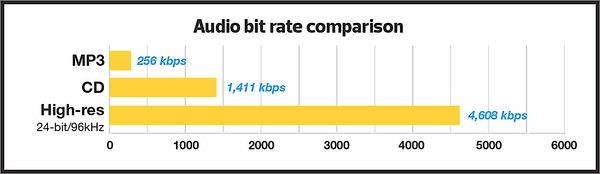
A standard CD contains 650 megabytes or 74 minutes of music at a bit rate of 1411.2 kbps. To preserve a dozen albums in their original quality in ’94, it took a very substantial quantity! Yes, and a personal computer cost a lot then, and the main task of the MP3 that appeared was the ability to transmit sound through channels with little bandwidth. At that time, transferring an entire CD over the Internet required tens of hours at best. Therefore, the developers were faced with the task of reducing the size of the audio file to the maximum, avoiding to a minimum the losses during the compression of the signal. However, the encoding technologies were not yet perfect, and the processors were not that fast, so it was decided to apply the psychoacoustic method, in which only part of the audio information is lost. For example, all “quiet” sounds above 17 kHz and all bass below 40 Hz. The developers have established various levels of compression for these files, taking the digital stream as the basis for measuring the quality: the more information is transmitted per second of time, the higher the sound quality, but also the larger the file size. The maximum bit rate in MP3 is considered to be 320 kbps, in which the sound is balanced and the quality is as close to the original as possible.

And this is the “closest” and tormented to good sound lovers so far. The fact is that listening to music on high-quality equipment allows you to fully feel the difference between the original recording and its MP3 version, even at 320 kbps.

In all honesty, we admit that you can listen to music even at 64 kbps. If you just want to hear your favorite tune, then no obstacle is terrible. You can even play the nearest musical instrument yourself, if you have the skill, or listen through the speaker phone. However, if you want to enjoy a work in which all the inherent nuances and emotions, its interpretation by the sound engineer and the way the performers play, will be preserved, then MP3 (as, indeed, any other format of lossy compression) will not be a pleasure, as well as the playback is excellent. CD recorded and edited on a mediocre device.

The developers of the Flac format thought about how to reproduce high-quality compressed audio in high-quality Hi-Fi. In fact, FLAC (Free Lossless Audio Codec – “free lossless audio codec”) appeared only 6 years after MP3. However, encoding technologies have come a long way during this time, making it possible to create codecs that compress the audio signal without loss. Of course, it wasn’t possible to make the file smaller than MP3, but users now have an order of magnitude more spacious storage, so a couple hundred megabytes per album is a mere trifle. It is not?

Both formats are quite widespread. Almost all operating systems can play them using standard or third-party players. МР3 is compatible with almost the entire line of sound reproduction devices, including those belonging to the High End class. With Flac (and its analogues), the situation is slightly different: some manufacturers still stubbornly ignore this compression method. Be that as it may, the simple music lover can always choose between these two formats. But, along with the choice, questions arise, but will you hear the difference between Flac and MP3? Let’s try to figure it out.

Mobile devices.
For music lovers who prefer to listen to music on mobile devices, there will be practically no difference. Modern smartphones, with rare exceptions, are not equipped with the highest quality audio path. Also, if you use normal in-ear headphones or a Bluetooth speaker. In both cases, the bandwidth of the audio path is not high, so all the recordings will be poor in micronance and dynamic recording. But! Manufacturers are gradually changing this situation. For example, the Korean company LG launched the launch of the V20 smartphone with a built-in Hi-Fi Quad DAC module, which has decoders to play all popular audio formats, including audiophiles and professionals. The smartphone comes with high-quality Bang & Olufsen headphones. On this device, the difference between MP3 and Flac sounds pretty good. In other cases, for a music lover, for those who want to listen to music from their phone, for now it is worth taking a closer look at a specialized external DAC and headphones. For example, FiiO’s line of portable headphone amps with built-in DACs are quite capable of capturing all the nuances of Flac recording when used in conjunction with good on-ear headphones. By the way, even “headphones” work, but not the cheap ones that are sold in all corners, but they are produced by major audio brands.

Alternative? If possible. This is not a multifunctional device, but a high-quality portable audio player. In such a device, as a rule, a high-quality digital-to-analog converter is installed and selected components are used in the audio section. And the entire structure is dedicated to one goal: high-quality sound reproduction. Therefore, other than strictly speaking a music player, there is nothing in the body to prevent you from distinguishing the Flac from the MP3.

Home Hi-Fi.
Everything here is much more prosaic. You can distinguish a high quality soundtrack from a poor quality one on any component of a modern audio system. Also, the more expensive the system, the more pronounced and unpleasant the sound artifacts inherent in lossy compressed compositions. And the brighter and more expressive the performance will be when playing files with lossless compression. If you can easily and immediately tell the difference between playing Flac and MP3, then your home system components are good. Another obstacle that prevents you from feeling it is the record player. The files can be played by directly connecting the hard drive with them to disc or multimedia players, as well as various receivers and amplifiers equipped with a built-in USB media player. As a general rule, in a low-quality device they save on everything therefore the base of the element is exposed to all kinds of interference from various operating units, and the digital-to-analog converter does not process the flow at the highest level, which allows many errors. All of this affects the final analog signal, which after all this can no longer be restored. Like covering your speakers with a towel or pillow. Who knows what the signal would be without it? So again we come to the conclusion that it will be impossible to distinguish between MP3 and Flac in such a system. Exit? Use only high-quality components in your home Hi-Fi systems, from the source and amplifier to acoustics and even cables. that after all this it is impossible to restore. Like covering your speakers with a towel or pillow. Who knows what the signal would be without it? So again we come to the conclusion that it will be impossible to distinguish between MP3 and Flac in such a system. Exit? Use only high-quality components in your home Hi-Fi systems, from the source and amplifier to acoustics and even cables. that after all this it is impossible to restore. Like covering your speakers with a towel or pillow. Who knows what the signal would be without it? So again we come to the conclusion that it will be impossible to distinguish between MP3 and Flac in such a system. Exit? Use only high-quality components in your home Hi-Fi systems, from the source and amplifier to acoustics and even cables.

The fact that almost all music is now stored at home as files that you can listen to on your home system or take it with you and listen to while traveling, on vacation, in class, or elsewhere is great. This is progress to take into account. However, we must not forget that we enjoy music in the first place. In addition to good pizza. And we do not recommend that you deny yourself these pleasures. They are an indicator of the quality of life and a source of our positive mood and positive emotions.


Free Download Mp4Gain
picture


Mp4Gain Main Window
picture


Mp4Gain Features
picture


Free Download Mp4Gain
picture

Choose the best format to compress audio data

Choose the best format to compress audio data: MP3, AAC or WavPack?

Best Audio Format

Choose the best format to compress audio data: MP3, AAC or WavPack?
If not lossless, then a cat? MP3, AAC, what else? Previously, we have already studied music compression algorithms several times, it is time to compare the most valuable ones.

Best Audio Format

Amicably, you’d need to give up lossy codecs entirely, but it’s always interesting to draw the line where quantity turns into quality. Also, even a lossy codec can surprise you with something, you’ll see. In this review, it was decided not to play around with different VBR modes, but to immediately stop at the maximum bitrate with a constant value of 320 kb / s. Today, with modern laptop capacity, asking for an extra 10MB for album capacity at the risk of losing quality? For what? In general, even with older codecs, the 320 kb / s stream ensures the absence of characteristic artifacts with nasty jingles. The first part of the review will be devoted to comparing the growth of artifacts using RMAA software, in the second part, the subjective experience of the listener in real phonograms is presented.

Comparative frequency response of three lossy formats relative to original WAV
If the last time the iPad Mini was used as a sound source, now, to improve accuracy, we take any iron influence out of the brackets, and then all the distortion analysis will be done exclusively in the digital domain, without conversion to analog as RMAA provides such an opportunity.To do this, we generate a test sample in WAV in RMAA, then handle it one by one in various lossy codecs. Then we will convert WAV from them again, so that the program can “recognize” the file and evaluate deviations from the original template. Now let’s look at how high frequencies are cut and distortion increases, giving the sound an unpleasant color. By the way, there won’t be that many. In general, at a bit rate of 320 kb / s, it will not be so easy to detect something harmful by ear. It’s not even about artifacts, but maybe a bit of “boring” of the sound compared to the original. The phonogram seems to fade a bit, it loses its mobility due to the alteration of transient processes after psychoacoustic processing. But it will not always be possible to clearly record this difference, it depends on the specific track.
MP3: Avalanche Distortion Let’s start with the most popular format. MP3 is a monster from the Fraunhofer Institute that has taken over the Earth. Because of this, nowadays no one thinks of using pure WAV for sound recording. Even if they rip out the defaced YouTube audio, they still rip it back down to MP3, and even at an obscene 128kb / s bit rate. We will not do that, and for the test we will use the most current version of the LAME 3.100 encoder with an insane preset and 320 kb / s bit rate. In the first figure, it was seen that the spectrum in MP3 is expected to experience oscillations in the HF region and eventually filter into the 20 kHz limit. Of course, this is the limit of the synthetic test; in a real music signal, it will probably be even lower. The size of the dynamic range in the MP3 file has not changed compared to the original. Those. The LAME 3,100 encoder at 320 kb / s does not add any noise to the recording.

1 kHz waveform distortion when encoded in MP3 compared to original WAV
Converting a single 1 kHz signal to MP3 showed the appearance of many small harmonic distortions. And although formally their participation is small (0.0009%), that is, one and a half to two times less than in the exhaust of a good DAC: in the dynamic spectrum of a real phonogram, their number will grow in an avalanche and in an unpredictable order. Furthermore, the “thickening” of the base of the strait at the original 1 kHz peak indicates certain problems, fouling with parasitic oscillations. This characteristic is clearly illustrated by the 100 Hz “square” wave after conversion to MP3. As you can see, its outline loses its definition along the horizontal axis. All of this ultimately has a negative effect on listening fatigue when listening to MP3s, unfortunately even the highest bit rates.

100 Hz “square” wave after conversion to MP3 (top) and AAC (bottom)
AAC: Increase the noise, but keep it clean A more precise way operates the AAS algorithm, which is actively used by Apple, and not only by it. Digital TV broadcasters work with this audio codec and furthermore AAC is included in the MPEG-4 container package.The square wave after conversion to AAC retains its shape, although base distortion and distortion also occurred. harmonics around the 1 kHz peak, although less noticeably than MP3. At the same time, AAC demonstrates a 1 dB higher measured noise level. What does it mean: intermediate recording on a cassette or what? No, the AAC algorithm probably uses something like noise shaping, a great invention that allows you to reduce quantization errors when mixing a pseudo-random noise signal. Again, it’s not just about drowning out the distortion below the noise floor, but using more sophisticated math. To illustrate, let’s look at the artifacts around the so-called 11.025 kHz jitter test. Why this particular frequency? Because the multiple harmonic of this peak falls exactly on the upper limit of the 44 kHz digital stream spectrum, and all the rest will be outside of it. Small spurious peaks, especially those that are symmetrical with respect to pitch (modulation products, “sidebands”) – these are the grains of jitter.

AAC (top) and MP3 (bottom) jitter test stability
As you can see, Fool-MP3 saved a low noise level, but generated more high frequency fluctuations (more noticeable to the ear), and AAC raised the noise a bit, but avoided clutter in the rest of the spectrum. But the WavPack encoder does even bigger tricks with noise shaping.
WavPack: Keep Frequency, Change Bit Width In general, if it comes immediately and very briefly, today’s WavPack encoder math belongs to the most flexible and cool protocols for audio enthusiasts, no kidding. Unlike FLAC, it can support 32-bit computation (I recommended it for creating lossless vinyl rips). Furthermore, in WavPack you can even package a DSD file without converting it to PCM. In this case, the file size will be much smaller than the original dsf. But we will talk about lossless WavPack some other time, but for now we will consider the unique principle of how the WavPack codec works at a loss. In one of my reviews, I showed that in several cases when compressing lossy it makes sense to reduce not the sample rate , but directly the bit depth of the signal (that is, below 24 or 16 bits), carefully mixing the dither (that is, a special noise profile to reduce quantization errors). WavPack went in exactly this glorious way, without touching on discretion and frequency in general, but changing the bit depth, which is now a dynamic value, describing the loudness level of the signal. A bit like the DSD principle, right? It is noteworthy that when converting to a lossy WavPack, you can also save a parallel “correction” file, with which it will be possible to fully restore the original, down to the last bit. It is true that in this case it will not work to save disk space, since the size of said pair will still correspond to the original without loss. However, the functionality of the protocol is still impressive, the bitrate of our test file was set at 320 kb / s to compare it to the maximum of our MP3 and AAC, but theoretically in WavPack it can be set even higher.

How does the bit rate affect the quality of the music?

How does the bit rate affect the quality of the music?

Audio Bitrate Quality

Does the bit rate affect the quality of the music?

There is a lot of talk these days that we have lost real music with the advent of compressed audio formats like MP3, AAC and the like. Is it really so? Will lossless music save music? Can an inexperienced listener tell the difference between MP3 and FLAC music? Let’s take a look at this problem.

Audio Bitrate

What is Bitrate?

You’ve probably heard the term “bitrate” before and you probably have a basic idea of ​​what it means, but it might be a good idea to familiarize yourself with its official definition so you know how it all works.

Bit rate is the number of bits or the amount of data that is processed over a period of time. In audio, this generally means kilobits per second. For example, the music you buy from iTunes is 256 kilobytes per second, which means that every second of the song contains 256 kilobytes of data.

The higher the bit rate of the track, the more space it will take up on your computer. Audio CDs typically take up quite a bit of space, so it has become common practice to compress these files so that you can burn more music to your hard drive (or iPod, Dropbox or whatever). This is where the “lossy” and “lossy” formats conflict.

Lossless and Lossy formats: what’s the difference?

When we say lossless, we mean that we haven’t really changed the original file. That is, we copy a track from the CD to our hard drive, but we do not compress it to the point of losing data. Essentially the same as the original CD track.

However, most of the time, you will probably extract your music in Lossy format. That is, you took a CD, copied it to your hard drive, and compressed the tracks so they don’t take up a lot of space. A typical MP3 or AAC album is probably about 100MB. The same album in a lossless format like FLAC or ALAC (aka Apple Lossless) will be around 300MB, so it has become common practice to use lossy formats for faster downloads and more hard drive savings. .

The problem is that when you compress a file to save space, you are removing chunks of data. Just like when you take a high quality image and compress it to JPEG, your computer grabs the raw data and “tricks” certain parts of the image into being basically the same, but with some loss of clarity and quality.

An example of how the JPEG graphics compression algorithm works
Remember that you are saving hard drive space by compressing music in lossy formats, which can make a big difference for an iPhone with 32GB of storage, but is only a trade-off in terms of size / quality.

There are different levels of compression: 128 Kbps, for example, takes up very little space, but it will also have a lower quality of playback than a larger 320 Kbps file, which in turn is of lower quality than the 1,411 reference file Kbps. From. 1,411 kbps is an audio CD level quality, which is more than sufficient in most cases.

The problem is not how much the music is compressed, but what equipment you listen to it on.

Does bit rate really matter?

As memory gets cheaper every year, listening to sound at a higher bit rate, or even lossless formats, is starting to become more and more popular. But is it worth the time, effort, and storage space on your phone or computer?

I don’t like answering questions this way, but sadly the answer is: it depends.

Part of the equation is the hardware you use. If you are using a good quality pair of headphones or speakers, you are used to wide frequency and dynamic range. As such, you are more likely to notice the downsides that come with compressing music into lower bitrate files. You may notice that low-quality MP3 files lack a certain level of detail; Subtle backing tracks may be harder to hear, the highs and lows won’t be as dynamic, or you may hear distortion in the lead vocal. In these cases, you may want a higher bit rate track.

However, if you’re listening to your music with a cheap pair of headphones on your iPod, you probably won’t notice the difference between a 128Kbps file and a 320Kbps file, let alone 1,411Kbps lossless music. Remember when you I showed the image a few paragraphs above and noticed that you probably had to look at it to see the flaws? Your headphones are like a truncated version of the image: they will make these imperfections difficult to perceive, as they are not physically capable of reproducing the music for you the way you want them to.

The other part of the equation is, of course, your own ears. It can be very difficult for some people to distinguish between two different bit rates for the simple reason: they listen to little music. Listening skills, like any other, develop with practice. If you listen to your favorite music often and a lot, your hearing becomes more accurate and begins to pick up small details and midtones. But until then, doesn’t it really matter what bitrate you use?

So what format and bit rate should you choose yourself? Is 320 Kbps enough for you or do you definitely need Lossless format?

The point is that it is difficult to hear the difference between a lossless file and a 320Kbps MP3 file. To hear the difference, you need serious high-quality equipment, good hearing, and some kind of music (for example, classical or jazz). .

For the vast majority of people, 320 Kbps is more than enough to listen to.

What else should you consider?

Music recorded in the Lossless format can be useful. Lossless files are more reliable in the future, in the sense that you can always compress them to Lossy format when you need to, but you can’t do the opposite and restore original CD quality from MP3 file. This, again, is one of the fundamental problems of online music stores: if you have created a huge music library on iTunes and one day you decide that you need more bitrate, you will have to buy it again, but this time only in CD format . …

Whenever I can, I always buy or copy music in Lossless format for backup.

I understand that audiophiles are like a needle under your nails. Like I said, it all depends on you, your audition and the equipment you have.

Compare two tracks recorded in Lossless and Lossy formats. Try a few different audio formats, listen to them for a while and see if it makes a difference for you or not.

Goodbye MP3?

Goodbye MP3?

MP3 is dead

Our Internet Topic of the Day: Nearly 20 years ago, MP3 conquered the Internet. Now the compression process that brought the music to the network has been disconnected.

MP3 Format Dead

What happens?

It has been almost 20 years since the first digital hackers logged into “Napster” with 65k beep modems and waited patiently until a single song made it onto their own hard drive after endless minutes. A few years later, the iPod was all the rage – a thousand songs on one device! MP3 was the future of music.

Now MP3 is dead: the German Fraunhofer Society has announced that no more licenses will be issued for MP3 encoding.

This is primarily a symbolic act. MP3 files and players will continue to work. The Fraunhofer Foundation basically only recognizes what has been a fact for a long time: the days of MP3 are over.

MP3 compression was invented at the Fraunhofer Institute for Integrated Circuits in the late 1980s and then further developed and commercialized.

Because it’s interesting?

MP3 hardly plays a role these days – when you download a music file these days, it is usually not in MP3 format. Apple, for example, switched to a different file format a long time ago.

With the iPod, the company had made a significant contribution to the success of the file format. And streaming services like Spotify also use different compression methods. Because today, other compression methods offer significantly better sound quality with an even smaller file size.

It is not clear if MP3 will disappear completely. The fact that the Fraunhofer Foundation ends its licensing program means that everyone can freely work with MP3 encoding. Perhaps the format will even see a small revival as a result.

MP3 Basics: Psychoacoustics

MP3 Basics: Psychoacoustics

Psychoacoustics

Ten hours of music on one CD. And that’s without any audible loss of quality. MP3 makes it possible. but how does it work?
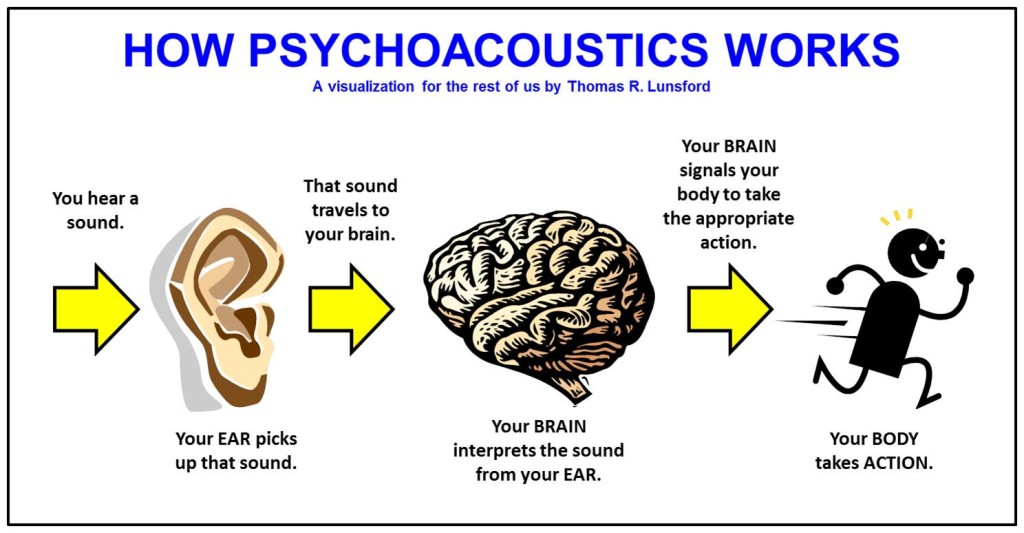
The core of MP3 is a compression process that filters out unnecessary information. With MPEG audio, filtering out superfluous information means reducing data that the human ear cannot or barely perceives. The basis for this is psychoacoustics. This science is about how the human ear perceives sound and is the key to MP3 technology.

Psychoacoustics

Imagine you are at the disco. Music resounds from huge boxes. This is hard work on the ear, as sound levels of 110 dB and more are achieved. Due to the extreme volume, it is almost impossible to speak unless you are yelling at yourself. In acoustics, this is called masking. To eliminate masking, the sound level of speech must be raised so high that the interfering signal (in this case loud music) no longer covers it.

Psychoacoustics is just one part of MP3 encoding. The audio signal goes through many more stations. In figure 2 you can see the basic structure of an MP3 encoder.

An audio signal passes through a filter bank that divides the signal into individual areas (subbands). At the same time, the audio signal goes through the psychoacoustic model. Here, the masking threshold is determined for each component with the help of the discrete Fourier transform (DFT). The psychoacoustic model specifies, among other things, the maximum allowable quantization error with which encoding can still be performed without the human ear being perceived. To do this, you specify the number of encoding bits that are required to reduce the quantization noise to such an extent that it becomes (almost) inaudible. In the last step, the data, the previously divided subbands, is processed (formatted) in such a way that a stream of bits is obtained that a decoder can decipher.

MP3 ENCODING

MP3 ENCODING

Mp3 encoding

The first step in encoding by the user is to specify a bit rate. This indicates the quality and at the same time the storage requirement of an MP3 file.

MP3 encoding

COMPRESSION RATES

With most recording programs, the quality of an MP3 file can be freely selected before recording begins. According to the Fraunhofer Institute, the CD quality of an MP3 file is a bit rate of 112 to 128 kbit per second, other measurements put CD quality at up to 160 kbit per second. However, the most used and sufficient for most listeners is 128 kbit.

In comparison, a corresponding CD quality for Layer 1 is 384 kbit / s and 256 kbit / s for Layer 2. A wave file works with a 1.4 Mbit / s bit rate and therefore works with roughly the same space requirements. as a CD audio track (CDA).

74 or 80 minutes of music can be put on a CD (depending on the size of the sound carrier), in MP3 format with a bit rate of 128 kbit / s, 11.5 or 12.4 hours would be possible.

PSYCHOACOUSTICS

MP3 audio compression relies on filtering out unnecessary information. Psychoacoustics is a science that deals with the perception of sound by the human ear.

Eg: You are in a disco. Loud music blasts through huge speakers and you try to talk to each other. This is almost impossible unless you yell. In acoustics, this is called masking. To eliminate masking, the sound level of speech should be raised to such an extent that the interfering signal (in this case music) no longer covers it.

Processes like this belong to the fundamental areas of psychoacoustics.

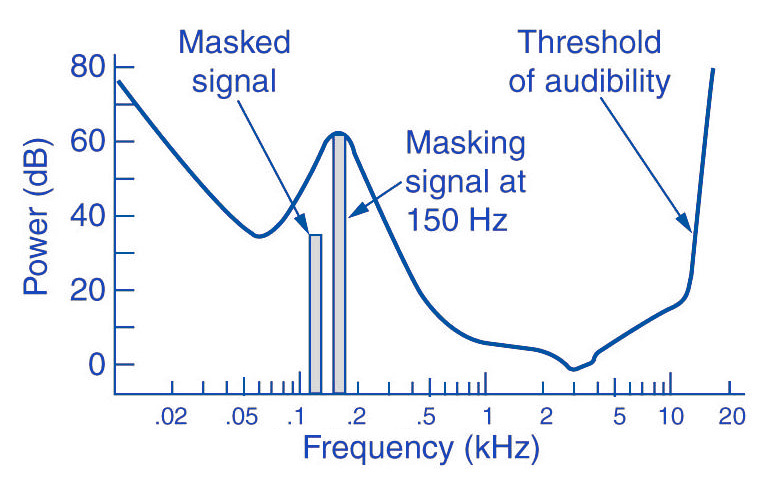
Tones below this threshold are not heard and therefore become noise during MP3 recording (skipped).

The overlays work as follows: you have, for example (picture 2) a tone with 1 kHz (1) and another tone with 1.1 kHz, which is approximately 18 dB lower (2). The second shade is completely superimposed on the first. This also works for other weaker tones (see Fig. 2). Another tone with a frequency of 2 kHz, which is also 18 dB quieter than the first, would not overlap because it is just outside the threshold of the first tone.

Noise can be another compression option for MP3 recording. The fact that when a sound is digitized it cannot be sampled at an infinite frequency, a noise imperceptible to the human ear (quantization noise) is generated. It is used as a model for the MPEG audio layer and thus increases the noise around a tone. Above all, loud and short tones mask a certain range in the frequency range before and after themselves where the weakest signals would not be audible. With MP3 encoding, the noise level increases in this area, as if digitized at a lower resolution.

There is also masking in the temporal area: hearing needs a so-called “recovery time” for loud and quiet noises until it is fully functional again. This is especially noticeable with strong, short, and rapidly rising tones. After a delay of about 5 ms, the hearing threshold drops again and after about 200 ms it reaches the normal level, the so-called resting hearing threshold. This effect is called post-masking. The effect of pre-masking is less important, but even more impressive: it is based on the fact that the brain processes loud sounds more quickly than soft ones. To some extent, the strong impulse outweighs the silent one on the way to the brain. This results in a pre-masking time of up to 20 ms.

The above psychoacoustic algorithm is used in the following steps:
– Audio information is divided into subbands
– Subbands are reduced
– 16-bit samples are generated
– Samples are compressed
– Compressed samples are combined into blocks
– Coding according to Huffmann Procedure
: summary in tables

DIVIDED INTO SUBBANDS

Depending on the frequency of the acoustic information, it is divided into 32 subbands. The bands are of different sizes due to adaptation to the human ear according to a psychoacoustic model.

The division is done with the help of a polyphase filter. This means that the samples are decimated and filtered simultaneously.

In layers 1 and 2, the bands were the same size with a bandwidth of 625 Hz each. The reason for this division is to provide the algorithm with a better target.

SUBBAND ​​REDUCTION

The MP3 encoder now examines each of the subbands according to the psychoacoustic model for expendable frequencies. Here, the masking threshold is determined, then the subbands whose level is below this masking function are removed. Another reason for dropping an entire sub-band could be that it is inaudible due to the pitch, similar to a dog’s whistle.

CONVERSION INTO 16-BIT SAMPLES

The frequency bands are sampled and converted to 16-bit samples. Tones are broken down into digital signals and further processed as numerical values. The sample rate determines the length of the sample intervals. However, neither the measurement of the amplitude nor the size of the sampling intervals can be infinitely precise. For this reason, with analog-digital conversion, a value is rounded between two sample points. This results in rounding errors that are noted in what is known as quantization noise. This can be kept inaudible using the highest possible resolution: with 8-bit, a maximum of 256 levels can be displayed, with 12-bit and 4096 and with 16-bit 65536 individual steps, so that noise is not heard.

However, some samples are also digitized with a lower sample rate. In the eighth subband, for example, there is a tone with 1 kHz and 60 dB. The MPEG audio encoder now calculates the masking threshold and recognizes that it is 36dB lower. The acceptable signal-to-noise ratio here is 24 dB, which corresponds to a 4-bit resolution, since the two values ​​are directly related. Leaving one bit out of resolution increases the noise level by 6dB. Since an audio CD is generally digitized with 16 bits, considerable data reduction can be applied here.

SAMPLE COMPRESSION

The next step is to compress the samples further. However, this process no longer has anything to do with the original shades. From here on, compression is only data-driven.

Each sample consists of 16 bits, but not all of them are absolutely necessary to represent a level. For example, leading zeros can be omitted. If, for example, the value 0000011101010101 is obtained for a sample, the algorithm truncates the result to 11101010101. To reconstruct the original 16 bits from this information, the decoder needs two pieces of information: the scale factor and the bit allocation. The scale factor indicates where the remaining bits of the sample were in their original state. The bit mapping contains the information about how many bits are left in the sample, since you can no longer calculate with a fixed 16-bit number. However, if you were to store these values ​​individually for each sample, you wouldn’t gain much,

GROUPING THE SAMPLES

The 16-bit samples that were just created are now combined into blocks. There are two different block lengths for this purpose: the short blocks with twelve samples and the long blocks with 36 samples.

Long blocks are used for low frequencies. However, long blocks would not allow sufficient resolution at higher frequencies; short blocks are used here. In the so-called mixed block mode, long blocks are used for the two frequency bands with the lowest frequencies. For the remaining 30 frequency bands, it is the turn of the short blocks. This mode allows better frequency resolution in the low frequencies without paying tribute to the sampling frequency in the high frequencies.

HUFFMANN CODING

The last step in MP3 compression is Huffmann encoding. This algorithm is also used, for example, in packaging programs such as WinZip. The frequency of certain values ​​is important here. However, the subbands are organized in advance. Subbands with lower frequencies tend to contain significantly more values ​​than those with high frequencies. The subbands are divided into three groups according to their frequency. Each area has its own Huffmann tree (Fig. 3) to achieve the optimal compression factor.

As a first step, the encoder excludes high frequencies; encoding is not necessary here, as its size can be derived from those of the other two regions. The mid-frequency range is treated as is, and the low frequencies are again divided into three regions, each of which is assigned its own Huffmann tree. The appearance of a Huffmann tree is stored in the MP3 file.

The structure of a Huffmann tree works as follows: frequently occurring values ​​are given a short sequence of bits, while rare values ​​are given a long one, so the algorithm first determines the distribution of values ​​within the data to be compressed.

To determine what is known as the Huffman tree, you start with the two rarest values. They are assigned a “0” or a “1”. The two values ​​are summarized, in the order that they are now represented by the sum of their frequency. The same is true for the next two rarer values. This process ends when only one value remains. The result of this procedure is a tree structure. The encoding is based on this structure. Each branch on the left receives a 0, each branch on the right is identified by a “1”. In our little example, the least common would be

Value 4 represented by the sequence of bits 010. The most common value 6, on the other hand, is assigned a simple 1.

FRAMEWORK SUMMARY

The result of the above compression is summarized in so-called frames. Each of these frames contains 1152 samples (32 subbands x 36 samples). A frame consists of a header, a checksum check, the actual audio data, and in certain circumstances a so-called bit repository. Such a deposit arises when the samples within the frame can be compressed in such a way that the full theoretical number of bits in a frame is not required. The encoder can fall back on these buckets if the available bits are insufficient for a subsequent frame. A distinction must be made between two terms: frame size and frame length.

The size of the frame is determined by the number of samples and is constant within a layer. In Layer 1 format, this is always 384 samples per frame, in Layers 2 and 3 1152 per frame. However, the length of the frame may differ at Layer 3 due to the change in bit rate or the pool of unfilled bits. The frame also contains the aforementioned information about the scale factor and bit allocation to be able to reconstruct all the samples again.

A file header, as it is known from other file formats, does not exist in an MP3 file. In the case of an image file, a header would contain information about the entire image (e.g. size, color depth, resolution

Encode MP3 correctly

Encode MP3 correctly

encode mp3

If the audio files are saved in MP3 format, signals inaudible to humans are cut off. We will tell you how to encode MP3 correctly to achieve the best possible quality.

ENCODE MP3

What is MP3

To optimally encode an MP3, it is important to have an idea of ​​how MP3 works:
MP3 is an audio codec developed by the Fraunhofer Institute, in particular Karlheinz Brandenburg, for the MPEG I standard.
MP3 is a compression method that Psychoakustig uses: The audio signal is divided into narrow frequency bands. Spectral components that humans hear partially or completely are stored with less precision.
The lower the specified bit rate, the more inaccurate the mapping, and the more likely frequencies above the masking threshold are also stored imprecisely.

Encodes MP3 optimally

Depending on whether you extract music from a CD, voice recordings, or analog media recordings, those records would be encoded, they are partly different settings. Others always make sense. You can do all the settings, for example, in XMedia Recode, which CHIP Online offers for free.
In general, it makes sense to keep the sample rate of the file to be encoded. With audio CD, this is 44100Hz. For recordings on discs or cassettes, 32000Hz is sufficient, speech is still clearly understandable even at 22050Hz.
For pure voice recordings, mono is sufficient; for music, joint stereo is usually more efficient than single stereo, as some bits can be saved losslessly through mid-side encoding.
As a bit rate mode, VBR-ABR (Variable Bit Rate – Average Bit Rate) is always the method of choice: in regions where frequency ranges are clearly masked or where there is absolute silence, an extremely large amount of data is saved that makes sense elsewhere. It can be used. Depending on the type of signal, an MP3 with an average VBA-ABR bit rate of 128 kbps can be significantly more accurate than a constant bit rate (kBR) file of 160 kbps. In any case, with the same file size, it is always at least as good as a KBR file with the same bitrate.
To take advantage of this potential, you should set the VBR quality to the maximum, the minimum bit rate to 32 kbps, and the maximum to 224.
Depending on the nuances of your music, an average bit rate of 128 to 192 kbps is usually ideal. Of course, mono files only need half the bit rate. For speech, 32 to 48 are sufficient for comprehension, up to 64 kbps for slightly clearer sound. Here you can also use a high pass of about 90 Hz.
Of course, you will get the best quality if you set the quality to “high”. Encoding takes a bit longer, but with current processor performance this is not significant.
It is completely useless to encode an MP3 with better quality later or to save a mono file in stereo.

Coding theory: data compression

Coding theory: data compression

Data compression - Encoding

Data compression or encoding refers to procedures to reduce data storage requirements. Basically, a distinction should be made between 2 types of data compression, lossless data compression and lossy / lossless data compression.

In lossy data compression, an attempt is made to filter out irrelevant sound, image, or audio information that falls below the threshold of human perception. This includes, for example, certain color values ​​and image spaces and tones and frequencies that are no longer perceptible in the audio data.

Encoding dTA COMPRESSION

In the audio sector, you can dispense with frequencies above 20 kHz with no qualms of conscience, which corresponds to a sample rate of 44,100 kHz, without noticing a noticeable audible loss (as an adult!). We speak here of irrelevance reduction or redundancy reduction. Even soft tones after loud sudden noises cannot be perceived by the human ear for a short period of time.

These themes can be summarized under the general term “psychoacoustic effects of perception”. Lossy / non-lossy data compression runs on the entire media area. Otherwise, the huge amounts of data would no longer be manageable.

If you go too far with data compression, a video will show typical compression artifacts or block artifacts. Video looks pixelated, often accompanied by blurry, blurry images, and streaks of color. Either the sound is muffled, squeaky, or has hearing compression artifacts as well. This video cannot be decompressed back into the original video in this way because essential video and audio information is simply missing.

The opposite of this procedure is lossless data compression. Data that has been losslessly compressed can be decompressed 1: 1 at any time without data loss. A known example of lossless compression is ZIP or RAR files. When you create a file from a text file, the file size is not reduced by omitting irrelevant data. With lossless compression, recurring information is routed and / or stored through counters. This can be explained with a simple example:

uncompressed text: Friday, Friday, always Friday

Method A
lossless compressed text: Friday, -1 over and over -4
Information “Friday” that is repeated 3 times is addressed in a space-saving way by specifying the position of the first definition.
Method b
Lossless compressed text: 3f, 3f over and over 3f
The information “Friday”, which is repeated 3 times, is addressed in a space saving way with the 2 characters “3f”.

The compromise: audio quality vs. Video quality

An audio and video analysis related to the content of the source video is essential before the encoding process. Get an accurate picture of the source video you have. A compromise must be found between good video quality / moderate audio quality and moderate video quality / good audio quality. H.264 is a very high compression video codec, but it should distribute whatever bit rates can be sensibly saved in advance.

What target bandwidth groups would I like to serve?
High / moderate video quality of source video?
Much / little movement in the source video?
High / moderate audio quality of source video?
For example, plan a higher bit rate for audio quality than video quality for a television interview. In contrast, for a complex documentary that requires a lot of movement, plan for a higher bit rate for video quality than for audio quality.

With this approach, you can distribute bitrates sensibly up front and save storage space if necessary. If you often have to do with web video encoding, we recommend that you use a checklist that you can work with on the corresponding video and audio prioritizations.

Overview in the jungle of audio formats

Overview in the jungle of audio formats

Audio Formats

Size does not necessarily matter, especially with compressed audio files. The deciding factor here is the algorithm that is used during encoding. Meanwhile, there are quite a few, but not all of them harmonize with iTunes, iPod & Co. We provide an overview of supported formats and introduce the general working method of audio compression.

Audio File Formats

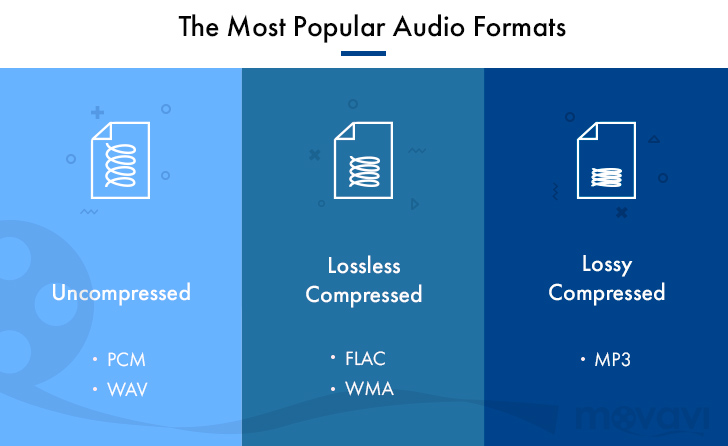
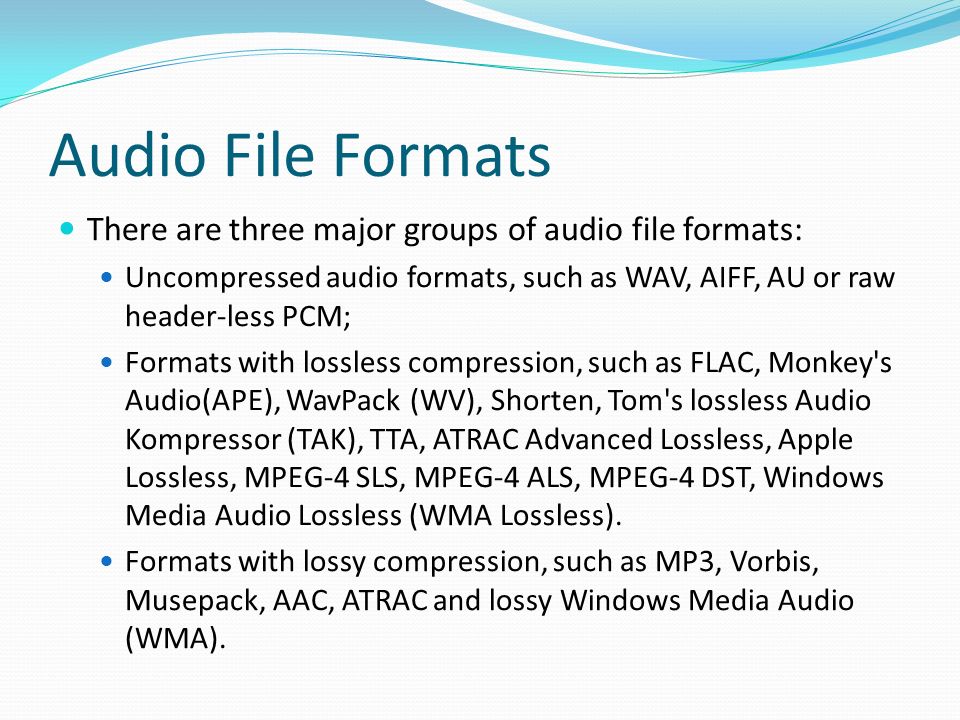
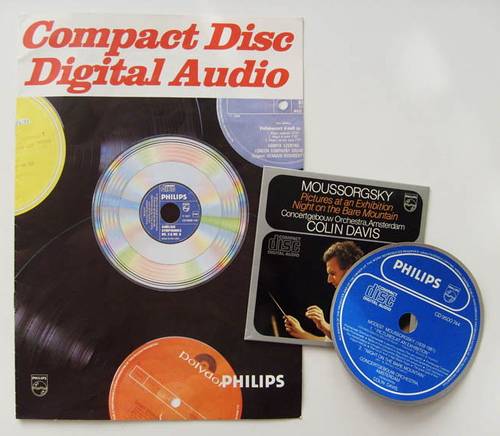
Since Philips introduced the audio CD in 1982, digitally stored music has been ubiquitous. However, since then, the number of digital data formats available has become so great that it is very easy to lose sight of things. There are basically compressed and uncompressed formats. The uncompressed WAV and AIFF formats are mainly used in audio media production due to their file size and high quality of the audio signal, and still on good old audio CDs.

Compression and reduction

Formats like Apple Lossless manage to reduce the amount of data without reducing the quality of the signal. This lossless encoder procedure is called data compression. However, you still have to live with relatively large files. This can quickly lead to difficulties, especially when gaming on mobile devices, as the battery drains very quickly. On a fourth-generation iPod, AAC-compressed music could only be played for three and a half hours in the test. However, when highly compressed audio books were used, it was more than ten hours. The other lossy processes accept a loss of quality in exchange for the advantage of a small file size. Here, the original quality of the music signal cannot be restored during playback. These compression processes make use of certain properties of human hearing to reduce data: the brain simply masks sound signals that are considerably quieter than other sounds that are perceived at the same time. Another effect that has been exploited is that there must be a minimal difference in the frequency of the tones to be able to distinguish them and to be able to perceive them consciously. Here there is also the possibility of saving. The encoder just skips everything within the specified bit rate that the brain would also leave out in its opinion. If the bit rate is set too low in relation to the complexity of the audio signal, you will inevitably notice signal interference, so-called artifacts, during decompression, that is, you will notice that the original has been compressed.

Bit rates for everyone and everything
Lossy encoders, unlike lossless encoders, can compress source material with different bit rates. The results are qualitatively very different. As a general rule, the average listener can no longer distinguish what is heard from the original signal of a bit rate of 160 kbps for MP3 and 128 kbps for AAC. However, this only applies to music; audiobooks, for example, can be compressed much more without incurring excessive losses. Bit rates of 96 kbps are sufficient for good results. Modern versions of encoders, including iTunes, can also compress the audio signal with a variable bit rate (VBR). The complexity of the source material is checked. If a passage is not very elaborately designed, the encoder automatically regulates the bit rate and saves space for more complicated parts. There it increases the bit rate again to improve the result. The option in iTunes to select the encoder settings and the encoder itself can be found in iTunes -> Settings -> Advanced -> Import. From encoder to bit rate to variable bit rate, you can choose the one that best suits your needs and needs from many options.

AIFF
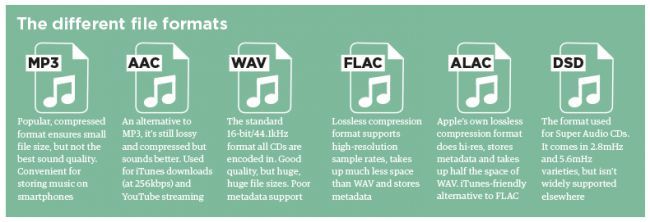
This data format is not compressed and corresponds to the original data on an audio CD. Therefore, a large file size is expected. A music CD usually contains 80 minutes of music with a size of 700 MB. Therefore, this format is a bit difficult to handle. AIFF isn’t doing itself a favor, especially on mobile music players, as the battery capacity drains very quickly.

Wav
In principle, what has been said above also applies to WAV files, the two formats are very similar. This format is also usually uncompressed, but there are also variants with compression.

MP3
The MP3 data format, strictly speaking the MPEG1 Audio Layer 3 standard, was one of the first to achieve high data compression and therefore a reduced file size. In times of Internet connections via modem, it quickly found widespread use. Today’s encoders come with a variety of possible VBR and bit rates, so there is something for every purpose.

Lossless apple
This can be used to create files that have no signal loss compared to the original when played back. However, the files are quite large and the bit rate is usually over 900 kbps. Therefore, this format is less suitable for mobile devices due to the shorter battery life.

AAC and protected AAC
This encoder is a further development of MP3 and generally works better than MP3 encoders. Protected AAC files have rights management (music files purchased from the iTunes Music Store are in this format).

Audible
Audiobooks purchased from Audible.com come in a file format that is a variation of AAC. The files have the extension .m4b. This file format supports bookmarks so you can continue listening to an audiobook where you last left it.

Windows Media Audio on Mac
Since Windows Media Player no longer exists for the Mac operating system, the Flip4Mac company has been offering a QuickTime component that allows you to open Windows Media files directly in QuickTime Player. However, digital rights management files cannot be played. WMA files offered by some internet music stores (eg Musicload.de) cannot be played with this solution. iTunes is also not supported. You can find an installer for the component on our brochure CD under Software -> Mac -> WMA Components 2.2.0.49R.dmg.

OGG Vorbis Audio
The OGG format, which is free of software patents, can be added to iTunes at a later date. The required QuickTime components can be found under Software -> Win -> OGG_xiph-qt-win32-0.1.5.exe or Software -> Mac -> OGG_xiph-qt-0.1.8.dmg on our brochure CD. After installation with the supplied installation program in the respective operating system, both QuickTime and iTunes can play OGG files. However, all iPod and iPhone models still cannot play OGG.