The digitization of sound


Free Download Mp4Gain
picture

With the diffusion of “liquid music”, knowing the processes and characteristics that characterize the transformation of sound into digital form is crucial to evaluate the formats and characteristics of audio files. In particular, when this transformation process is combined with compression and signal loss as occurs in almost all compressed formats.
digitization

… A determining factor in the fidelity of a signal is the limitation of the frequency band that it is capable of reproducing; for example, low frequencies are a problem for microphones and speakers, while high frequencies are a problem for analog circuits that set a limit on the highest frequency that can pass through them. A partial solution to these problems can be obtained by means of the numerical transformation, that is to say digital, of the waveforms that make up a sound signal.

Digitization
This does not increase the limits imposed by the reduced bandwidth determined by current transducer technology, but allows, within certain limits, the reconstruction of a clean digital signal from a deteriorated one, thus canceling aging, and above all it allows Use it countless times without increasing the noise level. But the greatest guarantee that a digital signal gives is to be able to make as many copies of it as you want and operate on it during the editing, filtering and modification phases with absolute precision without loss of quality.
So let’s look at … what happens inside a sampler. Also in this case the sound wave is received by a microphone that transduces it into an electrical signal that is sent to a low pass filter (LPF1); later it is sampled by an S&H circuit (Sample & Hold) and sent to the analog / digital converter (ADC) that transforms it into numerical values, that is, it digitizes it; a microprocessor (CPU) is responsible for storing it in memory (RAM).
During playback, the microprocessor reads the data resident in memory and sends it to a digital / analog converter (DAC) and later to a closing circuit (Sample & Hold); finally they reach a low pass filter (LPF2) and then a speaker. A digital signal is always discrete and not continuous, that is, it cannot assume the entire range of values ​​between a minimum and a maximum, values ​​that instead always identify two steps, that is, they jump without continuity between two points in space.
The activity carried out in this system is marked by a kind of internal clock (clock), which determines at what moments the system changes state, that is, at what time an event occurs that therefore cannot be in no time like common analog systems but only those dictated by the clock.
Therefore, the signal transformed into numeric cannot continuously assume all possible values, but only those that the system is capable of encoding. We will now examine again, but in more detail, the path made by the signal within a digital system. The analog signal from the microphone reaches the low pass filter (LPF1) which is used to remove all frequencies from the signal itself that are too high for the system at your disposal. Shannon’s theorem guarantees that in the sampling operation there is no loss of information if the sampling frequency Fc is at least twice the highest frequency present in the signal to be sampled.
It can also be said that the sampling frequency must be one octave higher than the highest frequency to be sampled, a frequency that does not refer to the fundamental (note that is played), but to the highest frequency present in the harmonic spectrum . At this point, the Sample & Hold circuit, in most cases included in the ADC, performs the sampling.
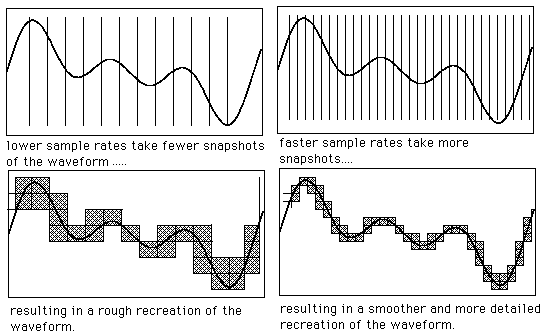
In practice, the system clock makes sure that every 1 / Fc second this circuit takes many pictures, taken at strictly regular intervals, called sampling periods (Tc = 1 / Fc). Of course, the more often the samples are recorded, or the better the higher the sampling frequency Fc, the more faithful the subsequent reproduction of the signal will be (Shannon’s theorem).

ALIASING
If the LPF1 low-pass filter is not placed in front of the S&H circuit, one could run into the phenomenon of aliasing or kinking, that is, the introduction of non-harmonic partials into the sample, generating noise and dissonant ring modulator effects. For example, suppose you have to sample a splash plate and you have chosen Fc = 50 kHz as the sample rate.
With these assumptions theoretically, we will be able to sample all harmonics within 25 kHz.


Free Download Mp4Gain
picture


Mp4Gain Main Window
picture


Mp4Gain Features
picture


Free Download Mp4Gain
picture

Music quality of files (lossless and lossy)

Music files can be the product of the perfect extraction of the music contained in CDs, called bit by bit. With this phrase we immediately clear the field of feeding unjustified prejudices towards the archives. The files are not of the same quality as CDs when using lossy formats: MP3, AAC, M4A. Besides these, there are formats that do not use any type of compression: WAV and AIF, which are the exact copy of the songs stored on CDs or even the original master recording format used to create CDs. Or there are formats that even using compression are “lossless”, called lossless: the most widespread of them is the FLAC format, not surprisingly adopted as a standard in the distribution of content in CD quality or higher. The FLAC format uses a type of compression that does not remove the original data. When unzipped, FLAC files have exactly the same bits that were present before compression.

Lossy - Lossless

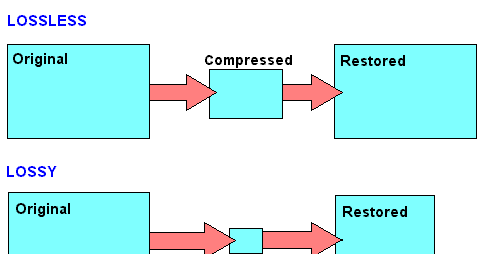
Before there are misunderstandings about the relationship between lossy and lossless files, we specified that if you have an MP3 file and convert it to FLAC, the data removed from MP3 transformation will not magically appear again. No conversion can regenerate the lost data into a lossy file. You can convert FLAC files to WAV or AIF because the compression used was lossless.

Lossy and lOOSLESS

The FLAC format also has advantages over WAV and AIF, the applied compression reduces its size and saves storage space and data bandwidth in reception / transmission when transmitting over the network. Besides this function, FLAC has another advantage over WAV, the information describing the tracks and the cover image can be inserted into the files. The information inserted in the files is called TAGs, the FLAC format provides for the insertion of this information that software applications and APPs read to recognize the content of the audio tracks. This simplifies the management of music collections, which without TAGs would present indistinguishable lists of audio files. Unfortunately, the standard WAV format does not allow the inclusion of TAGS in files.

Let’s continue the discussion on the playback chain of a portable Hi-Fi system. The technical quality of the content to be reproduced affects the final quality of the reproduction.

After adopting quality headphones, it would be wise to switch to lossless audio formats, to at least benefit from the original quality found on CDs.

Lossless music

Most of the sites that sell music online offer it in lossy formats, so the problem is how to get music without loss. Anyone with a CD can start by ripping them. Ripping is the term used to describe the transformation of the tracks contained in a CD into files. Anyone who wants to delve into the subject can read the writings dedicated to Ripping and the creation and management of music collections: What software for ripping and Creation and management of music files luquida.

In addition to CD ripping, there are websites that sell lossless music online in CD quality and Master Quality (Hi-Res), the latter is superior to CD and in many cases coincides with the original recording made in the Recording Studio.

High Resolution Music (HRA) has higher technical specifications than expected for CDs. Resolution ranges from 16 bit to 20/24 bit and sampling from 44.1 kHz to 48 / 88.2 / 96 / 176.4 / 192 kHz. For a description of the processes and characteristics of digitization, read the following text: The digitization of sound. With respect to these specifications we believe that the determining factor is the 24-bit resolution combined with sampling performed at least at 48 kHz.

Speaking of MP3 files, we usually refer to the bit rate, which with this format does not exceed 320 Kbps. The bit rate indicates the bits per second transmitted in a music stream. It is quite evident that a music stream consisting of more bits will contain more audio data. To orient yourself between these parameters, it is good to bear in mind that an uncompressed CD quality audio stream (16 bit 44.1 kHz) is 1,411 Kbps, converted to FLAC the stream will decrease between 30 and 50% of the format’s bit rate. uncompressed. Therefore, the CD quality stream generated by a FLAC will vary approximately between 705 and 988 Kbps. Obviously for high resolution formats the data stream will be proportionally higher depending on the specifications offered by the individual files.

The technical quality of the content to be reproduced as well as the reproduction devices are essential complements to obtain the best sound result.

Best format for Youtube videos

Youtube videos format

Let’s see what is the format that allows you to retain the highest quality when you upload your video to YouTube. In case you do not know, in fact, once YouTube has acquired the video on its servers, once the upload is finished, it proceeds to recode it and therefore it is important that we provide a file with the highest possible quality and with the specifications that you require.

YouTube video formats

CODEC

Let’s start with the CODEC. The choice is almost obvious and falls on the ubiquitous H264. Used both in the acquisition phase in many camcorders, and in the distribution phase, it is the best option even when we want to share movies on the Web. The reason is very simple: with the same file size, it provides the best quality. Then, in your editing or encoding program, select it. Of course it would be nice if it ended here. Actually, this algorithm can have variations within it, which I will not explain in detail because it is a very complicated and long speech.

What you need to know is that the H264 profile that YouTube asks us is HIGH, its entropy mode is CABAC and obviously it must be progressive and not interlaced, since we are going to upload a video that will be seen on PC, smartphone and tablets and not on old televisions. Regarding the bit rate, that is the amount of data per second, YouTube tells us that we can leave it automatically, even if as a reference it suggests selecting 8000Kbits / sec for movies in FullHD and 5000 for movies in HD.

We can increase these numbers, but keep in mind that as they grow, the size of the files increases, with more time to load and more space for storage.

CONTAINER

Regarding the extension, that is, the container, mp4 is the best option. Obviously, the frame rate, that is, the number of frames per second, must be the same as what you recorded and edited at.

PHOTOGRAMS TO THE SECOND

For example, if you choose 25 frames per second in these two stages, make sure it is the same when uploading.

AUDIO

Ok, this for the video part. And for the audio?

The choice here falls on the AAC-LC codec, which is obviously stereo and with a sample rate or sample rate of 48Khz.

I know it sounds complicated, but once you dictate these parameters into your encoding program and save them, you just have to select them when exporting and you can forget about them. You may be thinking: but my program already has the ‘export to Youtube’ function, can’t I use it? The quick answer is: you could do it, because in any case they generally have parameters that go more or less well with what YouTube asks us.

However, if you want maximum control and quality, create a preset with the parameters that I told you before, and that I will now quickly summarize:

H264 codec with HIGH profile, CABAC entropy mode and bit rate that can be automatic or 8000 Kbits / second for FullHD movies and 5000kbits / sec for HD movies
extension in mp4
number of frames per second that is the same as the one you recorded and edited as long as it is between 24 and 60 fps
Progressive and non-interlaced movies (for example, 1080p and not 1080i)
48 kHz audio, compressed in AAC-LC

Understanding the bit rate

When you start to make comparisons between video cameras you are faced with a series of aspects to take into account: numbers, characteristics, options … One of the lesser known but no less important issues is the bit rate. Let’s find out what it is, once and for all.

Bit rate

What is the bit rate?

Bit rate is the amount of digital information (bits) that is transferred or recorded in the unit of time.
In the case of video, the bitrate is generally expressed in bits per second, and the amounts being played to date are Mbps (Megabit, that is, millions of bits, per second) or kbps (kilobits, thousands of bits per second).

Bit rate

Because it is important

The bit rate is a parameter to take into account because it affects many aspects of digital production, both technical and more practical (ie economic).
First of all, it affects the quality of the video and the size of the single file: obviously, the more data is transmitted in the unit of time, the higher the quality of the recording. And at the same time, it will increase the size of the recorded file.
However, this should not lead us to think that a very high bit rate is always necessary: ​​in fact, we must bear in mind that as the bit rate increases, the difference becomes more and more marginal.
Basically, bit rate variations made from already high values ​​to reach higher values ​​are less visible than variations made from low values.

Then there is the question of file accessibility on the network: if the bit rate is very high, it will take a long time to download a video and watch it (for example, YouTube recommends not very high bit rates).

Finally, the bit rate also influences our portfolio: if we want to record at very high bit rates, we must first have a higher performance equipment, and then we will have to have more capable and higher performance media. Hence, larger SD, with high write speeds and consequently higher costs.

This is why you need to know what bitrate is, especially if you are serious about creating videos.

Bitrate, framerate and resolution

To get an idea of ​​the concept of framerate you can read this article that talks about 24 fps and the cinema effect. Instead, resolution is simply the number of pixels the camera uses to “describe” the scene – more pixels means more resolution and therefore more detail (up to a certain limit).

Why are we talking about these other two concepts? Because the bit rate is a bottleneck that can make you lose part of the information we want to record.

A little math

Let’s imagine that we have our machine and we set it to 4K and choose a frame rate of 60 frames per second.
Now let’s take the same machine and set it up in HD choosing a frame rate of 30 frames per second.

How will the bit rate change?

Since the bit rate is bit / second, let’s try to calculate the bits to transfer in each case.

-In the first case we will have 4096 × 2160 pixels, all multiplied by the 60 times in one second that the frame is recorded: a total of 530841600 pixels.
In the second case, however, 1920 × 1080 pixels multiplied by 30 frames: a total of 62,208,000 pixels.

That is why the bit rate can be a bottleneck: each pixel is represented by a certain number of bits, and if we record with resolution and framerate parameters that exceed the bit rate possible with a certain machine, this will have to apply compression to the file. And we know that the more compressed a file is, the lower its quality.

Audio formats

Before going through the different audio formats to identify the best ones for you, it seems right to try to make you understand what digital audio is. In short, it is nothing more than a representation of real sounds through a chain of zeros and ones. The more there is in a file, the closer the digital sound will be to what it represents.

Audio Formats

Better audio formats

It all started with Pulse-Code Modulation (PCM), created in 1937 and characterized by two properties: the sampling frequency to measure the amplitude of the waveform and the bit depth to measure possible digital values. It is basically the faithful conversion of analog audio into a digital file in which no compression is done. The result is a very large audio file, which takes up a lot of space.

Audio Formats

To remedy this, therefore, more or less compressed audio formats have been created that, depending on their characteristics, are divided into two different types: Lossless formats, that is, when the information contained in the final file is identical to that contained in the source file and therefore there is no loss of quality, and lossy formats, for which the information contained in the final file is less than that contained in the source file with the consequent loss of quality but in benefit of the space of necessary storage. For more details, continue reading, below you will find the different audio formats belonging to the categories in question indicated and explained.

Lossless (WAV, AIFF, FLAC and ALAC)

As I told you a few lines above, Lossless audio formats are those that are not compressed or that, despite being subjected to this type of treatment, the final quality remains practically unchanged with respect to the original audio. The main formats that belong to this category are the following: WAV, AIFF, FLACC, ALAC and APE. Let’s see its characteristics in detail.

WAV – An acronym for WAVEform audio file format, is a standard that was developed by Microsoft and IBM in 1991. It is the most popular category of apparent audio file format. It is not compressed and is essentially what you get when you rip audio from a music CD with your computer. It takes up a lot of space (1,411 kilobits of information per second of stereo music at 44,100 Hz / 16 bits), but it reproduces sounds faithfully. In terms of quality and quantity of information, it is similar to the AIFF format, which you will find explained below.
AIFF – Short for Audio Interchange File Format, it belongs mainly to the Mac world, it was developed by Apple based on the Electronic Arts Interchange File Format and is particularly suitable for audiophiles and music recorders. It basically has the same characteristics as the WAV format mentioned above, so it is not compressed, so it takes up a lot of space (1,411 Kilobits of information per second of stereo music at 44,100 Hz / 16 bits) and is capable of reproducing sounds with a lot of fidelity.

FLAC: is the abbreviation for Free Lossless Audio Codec. It is an open source codec that is often used to store music CDs on the computer without loss of quality and is compatible with most programs and devices. Compared to the formats that I have already told you about, it has a minimal degree of compression, but most people cannot perceive significant differences compared to a WAV or AIFF file.
ALAC – Short for Apple Lossless Audio Codec, is essentially Apple’s worldwide counterpart to the earlier FLAC format. The quality is good on average but the format is not as efficient as the FLAC in terms of weight. Then keep in mind the fact that not all gamers support it, so unless you have uniquely and exclusively Apple devices, it may not be the best solution to opt for.

Other important but less common audio formats that always belong to the Lossless calorie are Monkey’s Audio (APE) and OptimFROG (OFR). Its characteristics are more or less similar to those of the FLAC and ALAC formats.

Lossy (MP3, AAC, WMA, and Ogg Vorbis)

Now let’s move on to the audio formats belonging to the Lossy category, that is, those always subjected to compression that take up very little space but “sacrifice” a certain degree of audio quality. The main formats in this category are: MP3, AAC, WMA, and Ogg Vorbis. For more information, keep reading, you will find more details about it below.

MP3: in Full Moving Picture Expert Group-1/2 Audio Layer 3, also known as MPEG-1 Audio Layer III or MPEG-2 Audio Layer III.

What is a WAV file?

At this point, after considering Flac and MP3 files, it is good that you also understand what an audio file in WAV format consists of.

Aplicaciones para comprobar si un archivo de audio WAV es original o ha  perdido calidad - SoftZone

WAV is the most faithful format that can be obtained in the field of audio files.

Alejandro Calvillo Tena : AUDIO DIGITAL

Without delay, it is important that you know that if you are looking for the absolute reproduction of music without tricks or small changes, then you should trust a file in WAV format.

This particular type of file, in fact, directly stores the acquired samples. In this way, you need to understand that the WAV file behaves like a physical CD.

Therefore, the quality of a physical CD is identical to that of a WAV file and vice versa.

Even if you try to listen to one and then the other, you won’t be able to find any difference.

The WAV format does not use compression of any kind, for this reason it can reproduce sounds in an original way.

On the other hand, however, you will have already understood that this type is extremely cumbersome.

In fact, you will see that the size of this file is extremely large.

Even a single file can take up a large amount of memory.

In addition, some devices are not fully compatible with this particular format.

In particular, there are mobile devices that cannot read WAV files or can only do so with the help of certain media players.

As you will understand then, WAV files are the most complicated to manage in a sense, but at the same time they are by far the files that can give you the best possible quality in an audio file.

Audio & video explanation

Audio and Video


WE START WITH THE VOCABULARY
First, here is a list of the most used words:

A) FRAME RATE / FPS
The number of frames per second.

I recently wrote an article on this topic that you can find here.

Audio & Video

B) VIDEO SIZE
This data measures the width and height of the video.

The most common measurements are (in pixels):

426 x 240 (240p)
640 x 360 (360p)
854 x 480 (480p)
1280 x 720 (720p)
1920 x 1080 (1080p)
2560 x 1440 (1440p)
3840 x 2160 (2160p)
Here is a sample mirror illustrating the main dimensions of the videos:

Video size and aspect ratio

C) PROPORTIONS
The aspect ratio of an image describes the proportional relationship between the width and the height.

D) CODEC
Codecs are software that encodes and decodes data digitally, making it easy to preserve and reproduce.

Basically, when it comes to codecs, it means that our video file has been compressed.

This file, once compressed, will be placed inside a container that we will talk about later.

There are different types of codecs, such as recording.

This is the software your camcorder uses to compress your movie files.

Then there is the export codec which is instead the format we decided to assign to our output video.

Finally, we have the codec for the master, which is the format in which we will save our final project.

The most used codecs are:

MJPEG
MPEG-4
H264
H265
WMV
PRO RES
DNXHD

D1) MJPEG
Motion JPEG or MJPEG is a format in which video frames are compressed as individual JPEG images.

The format is widely used by leading low-cost consumer cameras and webcams and is supported by most web browsers, the PlayStation, and the QuickTime player.

Unfortunately, not all devices are equipped with the Motion JPEG codec.

For those who don’t have it, the installation of additional software is required.

The most famous is Movavi Video Converter, a simple application that takes advantage of available hardware acceleration technologies and SuperSpeed ​​mode, which instead supports ultra-fast compression without losing quality.

Movavi Video Converter enables you to process not only video, but also audio and photos by saving the resulting files in any popular formats like AVI, MP4, MOV, 3GP, MP3, and many other extensions.

D2) MPEG-4
The ‘MPEG-4 is one of the most popular codecs in the world.

It was introduced in late 1998 and is primarily used for applications such as video telephony or digital television, for streaming video over the Web, and for CD-ROM storage.

The advantage of MPEG-4, in fact, is the ability to compress a video of two hours on a CD, obtaining a high quality result.

Thanks to this, MPEG-4 has become very popular with users around the world.

Today, MPEG-4 is compatible with a large number of devices, from satellite television to mobile phones.

D3) H264
The H264 is part of the latest generation of codecs and is capable of high quality video with relatively low bit rates.

The standard offers up to twice the MPEG-4 compression.

In addition to the improvements in perception quality, the H.264 standard can deliver high-quality DVD video at less than 1 Mbps.

Personally, for the videos I upload to YouTube, I use the H264.

D4) H265
The H265, also known as High Efficiency Video Coding or HEVC, is the latest in a long list of video codecs.

Like its H264 predecessor, the H265 was developed for the broadcast industry by the ITU-T Video Coding Experts Group.

Compression is excellent as for H264 but is used for SD, HD and 4K movie resolutions.

D5) WMV
WMV is the Microsoft-generated codec used to compress Windows Media video files.

It is the format that is used to store videos in Windows, which is why some third-party programs use it for other things like very short animations for example.

For audio files, the WMA extension is used instead.

D6) PRO-RES
Pro-Res is a video codec created by Apple for the QuickTime format.

Born as an editing format, it was later used as a recording format in professional cameras for the broadcasting field.

There are a total of five Pro-Res formats:

ProRes 4444
ProRes 422 (HQ)
ProRes 422
ProRes 422 (LT)
ProRes 422 (proxy)
These formats range from extreme compression to minimal compression rates.

It is important to note that each Pro-Res format supports all current frame sizes such as SD, HD, 2K, 4K, and 5K.

D7) AVID DNXHD
Avid DNxHD (Digital Nonlinear Extensible High Definition) is a video codec designed to compose with little demand for storage and data bandwidth.

Advantages and disadvantages of the main formats

Formats

The MP4 file format

The MP4 file format has long been one of the most popular video formats on the web. Thanks to good compression coupled with good video file quality, excellent compromises can be achieved. The codecs used for MP4 are mainly H.264 or H.265.

Advantage

The format offers a good compromise between image quality and compression and is particularly compelling due to the simple ability to bundle multiple audio tracks and additional elements into a single format.

Disadvantages

MP4 files are often heavily compressed using standard codecs, making processing and creation difficult.

The AVI file format

The abbreviation AVI stands for Audio Video Interleave and means that in this format the video and audio tracks are directly linked to each other. The format is widespread, but technically obsolete.

Advantage

This format is mainly characterized by a very high level of acceptance. There is hardly any player and hardly any browser that does not support AVI files.

Disadvantages

The technical limitations of the file format and, above all, the lack of ability to use multiple audio tracks mean that fewer and fewer users are using the AVI file format.

The MKV file format

The MKV format is currently one of the most popular video formats on the net. It is a powerful container format that can integrate not only video files but also audio tracks, menus, and many other functions.

Advantage

The MKV format is particularly compelling due to the high quality of video files and the wide range of functions in which the format can be used. The format can only be used with the appropriate codec, but it is freely available on the net.

Disadvantages

The disadvantages of the format are mainly the low compression properties, so it is not possible to create very compact files.

The MOV file format

This video format was developed by Apple and is designed primarily for use with Quicktime. However, the format is no longer up to date and is therefore rarely used for network applications.

Advantage

The advantages of the format are mainly the ease of use in an Apple environment and the very high compression, which allows to obtain small files.

Disadvantages

Due to the very high compression of video files, there is a consequent loss of images and information. While relatively small and compact files can be created, in most cases the result is not as convincing.

The OGG file format

The OGG video file format was developed, among other things, to bring more flexibility to the market structure, which is often controlled by the rights holders. The OGG format was one of the first formats to be used in a widespread environment such as Linux, and thus it was able to establish itself in the market very quickly.

Advantage

The OGG file format has the advantage of being very widespread and not having authorization keys. Therefore, most browsers can extract it and use it natively. As a result, this video file format is often used to embed video files on your website.

Disadvantages

Despite the wide distribution, there are also downsides. Both the Safari browser and the older Internet Explorer only partially support the format, which can lead to display issues.

The VOB file format

The VOB video file format was established relatively early as the standard for DVD and was therefore developed primarily for these media. The format is not suitable for network use due to lack of licenses and low compression.

Advantage

The format can be easily read by any DVD player and also offers the advantage of low compression. It also allows you to merge different audio tracks.

Disadvantages

The VOB format is not suitable for network use as it cannot be uploaded on various platforms or on your own website. To play the format, you need your own codec, which is not freely available.

The WMV file format

The WMV format was developed by Microsoft and is still widely used today. Since this format supports digital rights management (DRM), it is generally used whenever the copyright of the video file is required.

Advantage

The format is recognized as reliable on all common devices with the Microsoft operating system and can be used without problems.

Disadvantages

As the format is older, very large video files are only partially supported. There are also limitations on file size and video quality.