Interview with the inventor of the mp3: “We weren’t the only ones, we were just better”


Free Download Mp4Gain
picture

A handful of German inventors from the Fraunhofer Institute in white coats invent a revolutionary process against all odds to compress music files to one-twelfth of their original size compared to CD with virtually no loss of quality. When was the moment they felt : Are we doing something bigger here?

mp3 developers

There are several moments. When I was still a student at the University of Erlangen in 1988 and doing basic research, someone visited our laboratory. My PhD supervisor, Dieter Seitzer, proudly demonstrated to this guest what we were currently working on: compressing digital music files. And when he asked what could become of our work, I replied: “Either our work will be forgotten and it will be accumulating dust in the library, or technology will become a standard that will be used by millions of people.” But I did not dare to dream about it. that really happened.

Developing mp3
Developing mp3

In 1977, his PhD supervisor, Seitzer, from Erlangen, had the idea of ​​transmitting music by telephone wire. And they all said, “I can’t.” And then you came. What application did you originally have in mind? Was it music in your pocket?

Back then, all textbooks said that you could compress images, videos, and voice, but definitely not music. It is too sensitive and complex. That was the starting point.

We asked ourselves: How can we compress music in that way, that is, reduce the amount of data per piece of music, so that people don’t hear the difference?

The question is to understand how the human ear works so that very similar things happen in our encoder, which compresses the music, as in the inner ear. Even in the inner ear, not all data is transmitted to the brain through nerve fibers. The brain always compares pitches with an internal reference, basically checking what it knows. In addition, there are so-called masking effects: if the sensory hairs tremble in the ear, the other sensory hairs are also automatically stimulated. This leads to the fact that the tones overlap and cannot be perceived at all. This is due to the mechanics of the inner ear. We use this as a guide when we come to the question: For what data can we reduce the level of detail, without being heard? Where would a coarser data structure be acceptable? We did not invent this trick in Erlangen. We weren’t the only ones working on it. We have only brought this knowledge to concrete results faster and optimized it better.

Is it true that you bought records for 1,000 marks in a music store in Erlangen to have compression material?

It is true. We had requested the project and absolutely needed better speakers, a small sound booth, and most of all, lots of audio samples. So I went to buy records: simple pieces, complex pieces, music of all genres, in all areas. We didn’t know what would work and, more importantly, what wouldn’t.

You mean the famous example of the Suzanne Vegas song “Tom’s Diner”, whose a cappella intro with “Da da da da …” was used to fine-tune the psychoacoustic MP3 model. What exactly was it about?

That was a special challenge: dense tones that the ear can still filter very well. My dissertation was almost done at the time and I really believed: I’m done, my process works for all kinds of music. But then I read in a hi-fi magazine that Suzanne Vegas’ voice had been used to test speakers. A colleague bought the CD because we wanted to know: What happens if we compress this music? The result was a disaster.

And how did you solve the problem?

There were two solutions. The first was to realize that what we had read in the specialized literature about how the masking of signals so rich in spectra works was not really true. Then we realized that psychoacoustics in these cases works differently than what the publications of the time suggested. We then test what happens when we transmit the lower frequencies very precisely and become less complex at the higher frequencies in favor of less storage space. That worked


Free Download Mp4Gain
picture


Mp4Gain Main Window
picture


Mp4Gain Features
picture


Free Download Mp4Gain
picture

Samplerate, what is sample rate

The sampling frequency is the time that results from the time between two samples. It is given in samples per second (S / s).

Sampling Rate

The level of the sampling frequency is a criterion for the reproducibility of the frequency of the sampled signal. The closer the sampling times are, the better the signal can be reproduced.

Sampling rate

Relationship between frequency and sampling frequency

For example, if an analog signal is sampled once per millisecond (ms), the sample rate is 1 kHz and the sample rate is 1000 samples per second. If the sampled signal has a frequency of 1 kHz, the signal is sampled once per period. It cannot be played. If, on the other hand, the frequency of the signal is 100 Hz, the signal is sampled ten times with the same sample rate. Therefore, the signal is easily reproducible. Therefore, the sampling frequency must be in a certain relation to the frequency of the signal. This relationship is through the given sampling theorem. Accordingly, the reproduction of the signal requires a sampling frequency that is at least twice the frequency of the signal. This applies to sine-type signals for their 1st harmonic, but not to square wave or pulse signals.

Audio sampling frequencies

In the case of voice transmission over ISDN with a maximum frequency range of 4 kHz, the sampling frequency is 8 kHz, which corresponds to a sampling interval of 125 µs. For audio with a maximum frequency range of 20 kHz, the sampling frequency is 44.1 kHz (22.67 µs) and 48 kHz (20.83 µs). For high-quality multi-channel audio, the sample rate can be up to 192 kHz. Much higher values ​​are found for video and HDTV. For digital video, this results in a 6.5 MHz bandwidth for the luminance signal, a sampling frequency of more than 13 MHz and a sampling interval of 74 ns. The sample rate for HDTV is even higher with 74 MHz and a sample rate of 13.5 ns.
In the case of pulse-shaped signals, the sampling frequency must be many times greater than its fundamental oscillation, since otherwise important pulse parameters cannot be determined. If the sample rate is many times higher than the theoretically required sample rate, we are talking about oversampling.

Mp4 volume enhancer & video volume enhancer

The option of matching or equalizing the volume levels of videos in their different formats has long been sought.

Boost Audio

Boost video volume levels

It seems to be very noticeable when there are videos that definitely need an improvement in their volume level.
It is very common for a person to have several videos and some of them sound with uneven volume or very low, that they sound a different volume from the rest of the videos.

Boost video voumen

Mp4 Volume Normalizer

Until now, there were no viable options to improve the volume level of some of the videos. At this time it is no longer enough to simply amplify the volume level, as it was in the past, but now a dynamic normalization is what these times need.

When we refer to dynamically boosting the volume, we are talking about ensuring that the peaks are less strident or the low parts in terms of audio level are less low in loudness.

This is exactly what an FM radio, a television transmission channel or the audio of a professional movie does.All these audios have a treatment that achieves this level of dynamic loudness that avoids very loud and untimely sounds or those of very low volume. , which are barely audible. Although a dynamic volume is maintained, this dynamic is maintained within ranges that allow it to be heard comfortably and at an audible, pleasant level and to be heard perfectly all the time.

Mp4Gain is exactly what it does: boost or normalize the dynamic loudness of a video or audio. And it does so very efficiently, as it is a very advanced algorithm.

The final goal is to have the loudness of each video and each audio, at the optimum loudness level.

What is the industry standard H.264 video encoding format for video compression?

The H.264 video compression standard is also known as MPEG-4 Part 10, Advanced Video Coding, MPEG-4 AVC, or AVC Video, and is an industry standard for video compression. It is one of the most popular video formats currently in use.

 H.265 vs H.264

In our digital life, we really come into contact with H.264 everywhere and the popularity of H.264 continues to grow. You can find this codec on, for example, HD DVD, HDTV, pay TV, or YouTube videos. And H.264 is not limited to consumer electronics. This format is also increasingly penetrating corporate communications IT.

H.264

Due to the growing popularity of H.264, it is estimated that by 2025, most conventional video distribution solutions that use HDBaseT or other proprietary transmission methods will be replaced by more flexible IP-based systems.

What is H.264?

H.264 or MPEG-4 AVC (Advanced Video Coding) is a video coding format used to record and distribute Full HD video and audio. This format was developed and maintained by the ITU-T Video Coding Expert Group (VCEG) together with the ISO / IEC JTC1 Moving Picture Expert Group (MPEG).

The H.264 format, which is commonly used for recording, compressing and distributing video content, is a network-compatible video transmission method that delivers high-quality images without consuming too much bandwidth.

Encoding and decoding with H.264

H.264 works by encoding (converting) HDMI (HD) audio and video signals into an IP stream that can be transmitted over an IP network. At the other extreme, the cable box converts the signals back to an uncompressed HDMI format. H.264 is so versatile because it allows you to transmit video signals from one encoder to multiple decoders at the same time. For example, you can transmit a set of video signals to a screen, a video wall, and a digital signage system at the same time.

H.264 applications: when and where can this format be used?

The H.264 video compression format is perfect for AV distribution to one or more video sources (multicast streams for multiple displays). A particularly suitable area of ​​application is the remote transmission of AV signals over existing cables and the Internet. It is currently in the process of moving to the standard video compression format, eg. B. for the video surveillance industry.

Applications include outdoor reporting (OB vans), energy sector, education, transportation sector, drone video recording to monitor the environment, as well as video wall processing, digital signage solutions and videoconferences.

The difference between H.265 and H.264

H.265 is the most recent variant of H.264 and is also known as High Efficiency Video Coding (HEVC) and MPEG-H Part 2. Compared to H.264, H.265 offers up to twice the compression of data with the same level of quality for video signals. It is designed to support future resolutions up to 8K UHD (8192×4320) (H.264 supports up to 4K (4092×2160)). Some newer devices, eg. Eg Some televisions, for example, have recently come with a built-in hardware decoder that plays H.265 content; however, the improved quality and reduced bandwidth usage come at a price. H.265 encoding and decoding require more processing power than H.264; therefore, the costs of H.265 solutions are significantly higher.

Benefits of using H.264 encoders and decoders

-Transmission with a low bandwidth requirement and a higher resolution.
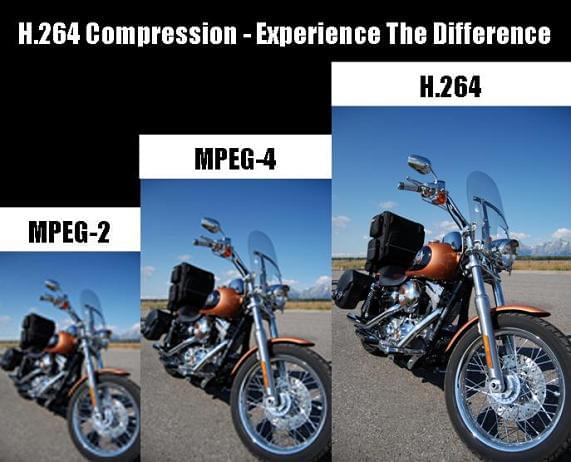
-H.264 was developed to provide high quality transmission of full motion video with lower bandwidth requirements and lower latency than traditional video standards such as MPEG-2. H.264 uses a very efficient codec that delivers high-quality images and uses minimal bandwidth.
-H.264 bit rate is lower than other formats.
-H.264 has a bitrate 80% lower than Motion JPEG video. Estimated bit rate savings can be up to 50% compared to MPEG-2. For example, H.264 can provide better image quality with the same compression bit rate. Or the same image quality at a lower bit rate.
-Reduced video storage requirements
-H.264 requires much less storage space to store video content compared to other standards.

Why the H.264 Video Format Continues to Gain Importance for Videos and Streaming

H.264 is a video compression method. Currently, it is considered the industry standard and is one of the most widely used video formats. Full HD video and audio recording is as unthinkable without this encoding and decoding process as modern video playback.

H.264

What does H.264 mean?

The H.264 video format is now in the standard video signal encoding and decoding. It enables the transmission of high-quality video signals without imposing excessive demands on the bandwidth. At the same time, H.264 has a significantly lower bit rate than other formats.

H.264 comparission

You have to know that about H.264

The term the term denotes a method for video compression.
H.264 is now considered the standard for storing and playing video formats.
The decisive factor for the success of the format is its usability up to a resolution of 4K (4092 x 2160 pixels)
The bandwidth of using H.264 ranges from YouTube to televisions and professional video productions.
The video format is an open standard, but it cannot be used without a license fee. This will be paid to the MPEG-LA consortium.

Usually we come in contact with the H.264 standard for video compression in relation to the MP4 file format. However, the two must be distinguished. One is the algorithm for compressing or decompressing. The other of the “containers” in which this process is used.

It should be noted that H.264 is not limited to the MP4 container format. When this standard was developed 15 (!) Years ago, it was deliberately designed for a wide range of applications. If you want to add audio to the image, a container format is required. As an algorithm, H.264 only compresses images.

Today, H.264 is the standard for Blu-Ray video discs. It is used uniformly by different manufacturers. The same applies to high definition television broadcasts. In general, the format is considered suitable for professional high-quality and post-processing. Rather, compression is naturally still data reduction. This is always accompanied by a certain loss compared to the original format!

Video cameras (digital cameras) also use this method to compress their recordings.

Manufacturers such as Apple use H.264 as a codec for QuickTime (version 7 or higher). The same goes for Microsoft Windows Media.

A video file that uses this method is called an H.264 file. These include, for example, MP4, HDTV, Blu-ray, and previously HD DVD.

The compression format supports a wide variety of applications. These are only limited by variables defined in the data flow. These are the maximum resolution or frame rate. The higher the video bitrate, the higher the levels.

What is AVC / Advanced Video Coding?

Advanced Video Coding (AVC) is nothing more than a video file that has been encoded with H.264.

Sometimes the term is also used as a synonym for MP4. This term can be found, for example, in the description of the recording process of digital cameras (so-called AVC camcorders), as well as in relation to Blu-ray and HDTV.

What are the limits of H.264?

The H.264 / AVC standard, contrary to what many believe, is not limited to 4K. It also allows DCI 4K (this corresponds to 4092 x 2160 pixels) at a frame rate of 60 fps (frames per second). SONY uses a system called XAVC, which is nothing more than 4K AVC.

The limits of H.264 today are not on the hardware or software side. But in the bandwidths necessary for transmission. This is where the levels come into play. They define, and limit, the maximum data rate and resolution that are available during playback.

Playback on computer

Basically, H.264 can be used independently of a specific container format. In addition to the more common MP4 video format, the standard can also be used for AVI files, Ogg formats, or Matryoshka containers (. Mkv).

For playing a video on YouTube, MP4 with H.264 is considered the most suitable format. Because these files are the best possible technical compromise between file size and data quality today.

As always, when playing videos encoded using software (a player), the computer’s processor (CPU for short) plays a decisive role. Hardware and graphics card are important.

Bit rate factor – how does it contribute to video quality?

Bit rate is a very important factor for good video quality. In the camera settings we now find more numbers next to the resolution. The one behind Mbps interests us more now. This is the information about the bit rate.

Video Bit Rate

This number indicates how much information is processed in the video per second. The higher this rate, the better the quality. Of course, the final file the camera produces will increase with the bit rate.

In this way, you can also calculate how much information is available for each frame, that is, each individual image. Suppose you are shooting with 25p and you have an available bit rate of 100 Mbps. That would mean that each image carries 4 Mbps of information. If you shot 50p at the same bit rate, it would only be 2 Mbps per image! The result would be a loss of image quality.

What Is Video Bitrate

Color depth factor – How does it contribute to video quality?

Bottom line: color depth is the maximum number of different color shades that a camera can display. Of course, the same applies to monitors, printers, televisions, etc.

The colors in general in our image consist of additive combinations of the three basic colors red, blue and green.

The gradations in each tone are again given in bits. Videos consist of pixels, that is, square image points. Each of these pixels carries with it certain color information. The higher the bit rate of the color depth, the more different shades of color each pixel can have.

The total number of color tones is calculated by adding 2 to the power of the number of bits; for an 8-bit camera, for example, that would be 256 colors per base color. Now you have to multiply the other two basic colors again to determine the total number of possible color tones. This means that an 8-bit sensor can display 28 * 28 * 28 colors. That’s over 16 million shades!

Thus, a 10-bit camera can display more than 1 billion colors, a 12-bit camera 68 billion colors, and a 14-bit camera even more than 4 billion color combinations.

Summary:

Many users are not fully aware of how bit rate influences video quality.
People usually see numbers next to the name of the format (Mp4, MOV, AVI) and do not know exactly what it is.

Here we have tried to explain that the higher the bit rate, the more colors.
Perhaps you think that speaking of so many millions of colors, and it is enough, but it is not like that. Actually reality has a practically infinite number of color gamut, so to capture it with realism, it is necessary to have as many colors as possible.

What is a codec and what are the different forms of codecs?

Codecs are encoders / decoders that digitally encode and decode data or signals to send it over a data network. In VoIP telephony, these play a particularly important role, as they determine how and with what quality the audio and video data is transported within a network.

CODECS

A general distinction is made between compressed and uncompressed codecs.

In the case of codec compression, a distinction is also made between lossy and lossy compression of multimedia data. With a codec, there is always a trade-off between available bandwidth, the computing power to compress the data, and the quality of voice in both video and audio streaming. Wideband codecs allow very high quality voice transmission. Narrowband codecs allow low-bandwidth voice transmission, but call quality suffers noticeably. In general, a bandwidth of at least 100 kBit / s in both directions is recommended.

Codecs

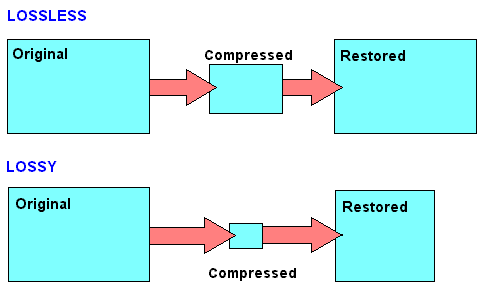
With lossless codecs, all audio or video information contained in the original data is preserved in its original quality. With lossy codecs, which often result in a loss of quality, higher compression can be achieved to require less bandwidth during transmission.

If, for example, the audio quality is too low or there are jerks and cuts during the call, it may make sense to change the codec. A common source of poor audio quality with Voice over IP is that the required bandwidth for the codec is not available from the Internet connection. The following codecs are currently used as standard formats:

Audio codecs
GSM: 13 kbit / s voice data rate (full rate method), 20 ms frames

iLBC – 15 kbps, 20 ms voice frames: 13.3 kbps, 30 ms frames

ITU G.711 – 64 kbit / s, based on samples. Also known as the A-law / µ-law method.

ITU G.722 – 48/56/64 Kbit / s

ITU G.723.1 – 5.3 / 6.3 kbit / s, 30 ms frames

ITU G.726 – 16/24/32/40 Kbit / s

ITU G.728 – 16 kbit / s

ITU G.729 – 8 kbit / s, 10 ms frames

Speex: 2.15 to 44.2 kbps

LPC10: 2.5 kbps

DoD CELP – 4.8 kbps

Average Opinion Score (MOS) is a measurement method that allows you to compare the voice quality of different codecs with each other. A group determines how close a codec is to the original human language. The scale ranges from 1 (poor) to 5 (excellent). Values ​​greater than 4 correspond to the voice quality in the ISDN network.

Video codecs
VP8: Free codec to compress HD video (also for streaming)

H.264 / MPEG-4 Part 10 or AVC (Advanced Video Coding) – Very popular paid codec for compressing HD video

All standards are optimized for low data transfer speeds and low video shake. Data transfer rates are not defined.

Codec

In electronics and telecommunications, the term codec is used for integrated circuits or chips that perform data conversion. In this context, the term is an acronym for encoder / decoder. This type of codec combines functions for analog-to-digital conversion with functions for digital-to-analog conversion on a single chip.

In practice, compression is used primarily to optimize the storage space requirements of a large file, such as a video. Compression is achieved by eliminating redundancies in the data.

Compression works for any type of file, including text, program, image, audio, video, or virtual reality (VR) files. The compression rate achieved depends on several factors. In some cases, compression can reduce the size of a file by a factor of 100 or more. For example, a video 30 terabytes in size can be reduced to three terabytes (or less).

Compression achieves the greatest benefit in transmitting data. Uncompressed files like the video file just mentioned are very large and therefore take a long time to upload and download. The compressed file, on the other hand, can generally be downloaded in a few seconds or minutes. In order for the video to be seen again after downloading, a decompression algorithm has to “undo” the compression.

There are numerous standard codec systems. Some are used primarily to minimize file transfer times and are implemented over the Internet. Others are designed to maximize the amount of data to be stored on a storage medium.

Data compression: lossless or lossy

To be able to store large amounts of data, a huge amount of storage space is required. When the space is at some point full, a new storage space is usually made available. Mainly in the form of new hard drives, server systems or the like. But there is another way to store more data: data compression.

Lossless vs Lossy

Data compression works like a pillow you squeeze
Figuratively speaking, data compression works the same way as when you squeeze a pillow. Not all air is required between the pillowcase and the feathers. By squeezing the pillow, you compress it by removing the air (as much as you can); the pillow becomes smaller, that is, more compressed than before.

It is similar with data compression. Here also items that are not absolutely necessary, in this case data, are removed and the storage space still required by the remaining data is reduced.

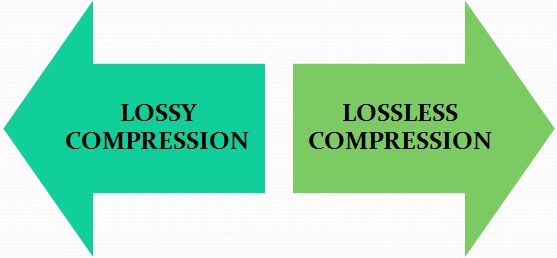
Lossy vs Lossless Compression

Different lossless compression encoding methods.

When it comes to data compression, a distinction is made between lossless compression and lossy compression, so it can be further subdivided into different types of compression.
Lossless compression is generally only done with text files. If the text is saved as a character string and not as an image or the like, the storage space can be saved using the dictionary method, for example. Recurring parts of the string are simply replaced by abbreviations.

Text: Hello world. Hello user
Encoding: world X5. X5 users.

With the help of Run Length Encoding (RLE), identical text components that are placed one after the other are only saved once. This can also save storage space.

Text: Today was beautiful, beautiful, beautiful and tomorrow will be more beautiful.
Coding: Today was / 3 / beautiful, / and tomorrow will be more beautiful.

In entropy encoding, as is the case with Huffman code or arithmetic encoding, for example, text elements are sorted in binary and encoded according to their frequency, and the most frequently occurring element is given the binary number smaller.

With these numbers, the text elements are stored in a separate dictionary.

Text: IF YOU FLY BACK, FLY, FLY, FLY, FLY AFTER.
Coding: 10100 1 1 1101 1 1 1 11

Difference between lossless and lossy compression

The benefit of lossless encoding is clear: it ensures that all “compressed” data in the compressed data packet can be accessed and restored.

In addition to lossless compression, there is also lossy compression. Irrelevant information is not encoded here, but is directly removed. Therefore, we speak of a reduction in irrelevance.

Lossy compression: the MP3 format

Of course, this procedure can lead to extremely high compression rates. However, this irrelevant information is irrevocably deleted. This means that the original state cannot be restored after compression.

Lossy compressions are often used for image, audio, and video files, as they often have to handle large volumes. The MP3 format is a classic example in this context. Here, frequency patterns are removed from an audio file that are almost inaudible to the human ear. This saves storage space.

If you compress data packets, you can use your own data storage capacity better than uncompressed data packets. However, you should always consider the type of compression you are using. Because lossy compression is not always desirable.

MP3 and knowledge of the effects of possible settings

The MP3 audio compression method (also called MPEG-1 Layer 3) uses the properties of the human ear to save storage space. Frequencies inaudible to humans are filtered out of musical pieces. Depending on the degree of compression (so-called bit rates), this leads to no or severe loss of quality.
Music CDs use a constant bit rate (consumption of storage space / unit of time) of 1.4 Mbit per second for a stereo audio signal.

mp3

In comparison, a data rate of 192 kBit / s is sufficient with MP3 for almost CD quality music. It follows that the memory requirement is also significantly lower. There is about 10MB per minute of music on a music CD, good quality MP3 files only occupy about one eighth of this memory; So you can put around 8 hours of music on an MP3 CD.

MT Podcast | Motor Transport

A distinction is made between:

VBR – variable bit rate (variable bit rate)

With VBR, the bitrate constantly adapts to the music. Fewer bits are used in more “quiet” places (for example, few instruments or quiet passages), so the bit rate is lowered, while in more complex places the bit rate is increased as much as is necessary for the specified quality level is maintained at all times. Therefore, the MP3 file created in this way requires less storage space than MP3 files of comparable quality. The size of the final file is of course unpredictable and can vary greatly depending on the song and its genre. (is better than ABR and CBR)

ABR: average bit rate

ABR makes it possible to use variable bit rates but still meet the given average bit rate very precisely. In this way, the encoder saves bits in quiet places, which are then available to more complex places. The quality of this mode is between CBR and VBR, since the disadvantages of the CBR mode are eliminated, but the advantages of VBR mode only partially come into play, since the higher bit rates are used less frequently so as not to exceed the specified average bit rate. (is better than CBR)

CBR – constant bit rate

In “old-fashioned” CBR mode, a certain bit rate is used, regardless of what bit rate is actually required. As a result, higher bit rates are not available for complex locations, which is at the expense of quality, while bits are wasted in quiet locations, which is at the expense of file size.

Conclusion: the best method is VBR.

The only exception is the CBR bit rate (320 kbit / s), but this no longer makes sense.
other technical terms:

Joint Stereo

Joint stereo, also known as MS stereo, is a lossless encoding of the two audio channels. The great similarity of the channels is exploited by creating two new channels. The sum of the left and right channels is stored in the middle channel (M); the difference between the original channels is encoded in the side channel (S). Therefore, the middle channel contains most of the information, while in the side channel there is only a small amount of information available. Both channels are quantized separately and relatively good compression is achieved.

However, this trick does not work for songs with strong channel separation, that is, if the left and right are almost not similar. Logically mid / side stereo is also not possible with mono.

Definition and explanation of the term bit rate

What is bitrate

Bit rate denotes a unit in which the relationship between the amount of data and time occurs. It is measured in the unit of bits per second. Common abbreviations for bit rate are bit / s or bps. The output quantity of information units in relation to digital multimedia formats limited by a constant output time is designated on a timeline.

Bit rate

Bit rate is used in video and audio compression. Encoding is possible with constant (short CBR) and variable (short VBR) bit rate. The variable bit rate aligns the encoding with the content of the multimedia content. In the case of a predominantly quiet scene in a movie, for example, fewer units of information are required relative to time. However, in scenes with a lot of movement, the bit rate increases. This is intended to allow optimal use of storage space with high image quality at the same time when compressing with a codec. Often times the required memory space is also less when encoding with a variable bit rate compared to a fixed rate.

Constant bit rate

Constant bit rate describes a compression method for video and audio content during storage and transmission. A constant data rate is used, regardless of the complexity of the respective signal. The same amount of data is always produced per unit of time.

Constant bit rate is often used in multimedia broadcasts. The reason for this is the limited streaming capabilities. By using constant bit rate, optimal quality is achieved with the same data throughput. In some cases, however, it may also happen that amounts of data are “given away”. This is the case when the content to be encoded requires a lower rate than specified. This is especially true for videos with quiet scenes or very quiet audio files. The constant bit rate is used, for example, for video CDs or Internet radio.

Variable bit rate

In addition to the constant bit rate, encoding with a variable bit rate is also possible. Here is audio and video content in constant quality at different bit rates depending on the content stored or transmitted.

This solution has established itself in the media storage field as it offers higher quality with less memory consumption at the same time. When encoding with a variable bit rate, individual sections of a medium receive different compressions depending on the complexity of the content. This enables the highest possible quality to be achieved with low memory consumption.

For a long time, encoding with the help of variable bit rates was considered insecure. In the meantime, however, the technology has matured, so good results can also be achieved by converting a medium with a variable bit rate. The downside of this method is that you cannot predict before conversion how big the file will be in the end. In most cases, only a minimum and maximum bit rate can be set. Individual encoders also offer the option of specifying how large the file should be before converting it.

Average bit rate

A third compression method is the definition of an average bit rate. A medium is converted at a variable bit rate. This enables a fixed file size to be achieved while maintaining high quality. For this variant of media compression, some codecs offer the option to compress in two passes. This allows the average bit rate to be reached very precisely.

In the first pass, the material is analyzed and then compressed in the second. Basically the method corresponds to that of variable bit rate, but an average bit rate allows you to calculate the size of a file. A deviation tolerance can be specified for individual programs.

Nominal bit rate

Nominal bit rate indicates the average bit rate that is achieved by encoding with a variable bit rate. Despite the possible fluctuations that arise in the various VBR modes, a quality assessment can be made.

The nominal bitrate concept was introduced by the developers of the OggVorbis codec. This should make it easier for MP3 users to start using variable bit rate. Many Mp3 codec users were only used to compressing an audio file with a fixed bit rate.