MP3 Bit Rate Guide – Quality and Differences Explained


Free Download Mp4Gain
picture

Bit rate Quality

When compressing audio and video files, the MP3 bit rate indicates how many bits are available to the decoder to encode exactly one second of a track. The higher the bit rate of the MP3 file, the better the quality achieved. The bit rate can be constant (constant bit rate, CBR) or variable (variable bit rate, VBR). Our guide explains the differences.
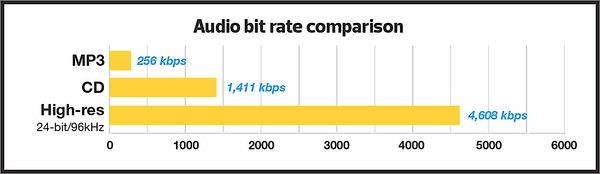
Bitrate  Quality

MP3 has established itself as a leading music format on the Internet in recent years and all popular MP3 players support this format. It was developed by the Fraunhofer Institute and is now considered the best known standard for Audiocodierun g. But where are the differences in the jungle of MP3 bit rates?

What MP3 bitrates are there anyway?

A distinction is made between the following common bit rates for MP3 files:

32, 40, 48, 56, 64, 80, 96, 112, 128, 160, 192, 224, 256 and 320 kBit / s.

This increases the quality of MP3s, but also the size of the files created. Compared to the original, an MP3 file only requires about 10 percent of the original storage space.

Starting at a bit rate of 192 kbit / s, you can hardly hear any difference from the quality of the original CD in many pieces of music.

Low bit rates: 32 to 128 kBit / s
Average bit rates: between 128 and 192 kBit / s
High bit rates: more than 192 kBit / s

What is the best bit rate for MP3 compression?

Again and again the question arises of what bit rate to select when converting songs to MP3 to achieve roughly CD quality. An MP3 compression with 192 kbit / s variable bit rate here is an ideal compromise between size and quality.

At just 128 kb / s, you can often hear a distinct difference from the original songs on CD. Music pieces with a lot of dynamics suffer more if the compression is too high (weak bass, lack of treble). So here it is better to use a higher bit rate.

How does the quality of bit rates differ depending on the compression method?

Constant Bit Rate (CBR)

With constant bit rate, each unit of time (for example, one second) is always allocated the same amount of storage space in the entire MP3 file. Therefore, the quality may vary depending on the piece of music. For this, the size of the resulting file can be calculated more precisely.

Variable Bit Rate (VBR)

Variable bit rate is usually the best compression method for normal use, as it can be used to produce consistent high quality. With Acapella parts, 320 kBit / s are not required, as only a few complex frequencies need to be encoded here. However, if you are playing a full orchestra, 128 kBit / s is usually not enough to cover the entire frequency spectrum of the various instruments. Depending on the piece of music, more bits are used when they are important, or those that are not can be omitted. In return, the file size varies more.

Average Bit Rate (ABR)

Some MP3 encoders also support average data rates. Technically, this variant is almost identical to Variable Bit Rate (VBR). Here, too, the encoder software always tries to achieve a uniform quality of the musical piece. However, the bit rate achieved often deviates slightly.

As an example: if you want a target bit rate of 128 kBit / s, then the bandwidth of the achieved bit rate is between 120 and 140 kBit / s. To achieve the desired average bit rate as accurately as possible, some codecs offer a two-pass compression process. The material is analyzed first and is only encoded in the second run. The ABR mode corresponds to a mix of CBR and VBR and is therefore qualitatively more in the middle.


Free Download Mp4Gain
picture


Mp4Gain Main Window
picture


Mp4Gain Features
picture


Free Download Mp4Gain
picture

MP3 quality – too compressed for hi-fi sound?

Audio quality

When it comes to the subject of “MP3 and sound quality”, one is entering a minefield. Hi-fi fundamentalists claim that many people no longer know what good sound really is because of MP3s. The accusation is not entirely unfounded, because MP3 is a lossy format. However, you shouldn’t make it too easy for him with judgment. After all, there is no uniform standard for MP3 quality. Another important question is: what about the sound quality of other formats?

audio quality

What “lossy” means for the sound quality of an MP3 file

MP3 and other lossy audio formats such as AAC may have been lost. to. designed with the aim of saving storage space. Because at the time of its development, the storage capacity of hard drives was much more limited than it is today, and the download and upload rates were also insufficient for large amounts of data. Today, the bandwidth for streaming and wireless transmission over Bluetooth are limiting factors. So compression still has to be. How is the amount of data reduced compared to the original recording?

On the one hand through compression and on the other hand through the omission of certain sound information. Because not everything that is captured in a recording also becomes the compressed file. To limit the effects of data loss on MP3 quality, only information that is acoustically insignificant is ignored. To be more precise: particularly low frequencies and particularly high tones are cut off. Because people can only perceive extreme highs and lows up to a certain point or not at all.

That’s how high MP3 quality really is

A general evaluation of the quality of MP3 sound is complicated by the fact that there are different levels of quality. They are the result of the respective bit rate (data rate, “bit rate”), specified in kilobits per second (“Kbit / s”). 64 Kbit / s as well as 128, 192, 256 or 320 Kbit / s can be implemented. The following applies: The higher the value, the less data loss will be compared to the source material.

A rule that is mentioned from time to time states that from a bit rate of 192 kbit / s data loss is no longer important for auditory impression. The file format alone says little about the quality of the audio signal.

But there is no clear limit. Factors like music genre, system, and last but not least individual hearing all play an important role when it comes to evaluating the quality of an MP3 file. There are also differences between the audio formats: a file encoded in AAC at 192 kbps tends to provide a better listening experience than an Ogg Vorbis file with the same data rate.

What is the sound quality on Spotify and other music streaming services?

Some 20 years after its invention, MP3 is still the most widely used audio format on the Internet. However, there are other formats that play an important role in music playback today. An example of this is the patent-free Ogg Vorbis format mentioned above. The streaming giant Spotify also relies on this.

Other audio formats used by streaming services are:

  • Apple Music: AAC
  • Spotify: Ogg Vorbis
  • Google Play Music: MP3
  • Deezer HiFi: FLAC

Streaming providers are quite reluctant to provide information on the respective data rates. When the service launched, Apple Music announced that the streams would be streamed at a bit rate of 256 kbps. With Spotify it is 320 Kbit / s with high sound quality, also with Google Play Music. At lower quality levels, the bit rate drops below 200 Kbit / s. However, providers of lossless transmission clearly exceed these values: Deezer, for example, announces its high fidelity subscription with 1,411 kbit / s. The stream here is in lossless FLAC format.

Normalize volume of a video, is it possible?

Video volume level normalize

People have long understood and learned that mp3s can be normalized, that it is feasible to boost loudness to get all mp3s to have a similar volume level.

Little by little it has been discovered that the same can be applied to other audio formats such as LAFF, OGG, AAC, etc. That not only can the volume of an mp3 be normalized but of the main audio formats.

Bost volume of a video

boost the volume of a video

But the idea of ​​achieving that the audio of a video can also be normalized is very recent, it is an advance that it is possible to boost the loudness of the audio of any video to achieve that all videos have a similar volume level and that it is also possible to achieve that the volume of the video has the adequate loudness so that there are no very quiet passages or very noisy passages.

The custom or idea of ​​downloading a video for its audio is quite new, it is only a few years old. The famous search to download from youtube to mp3 is recent. Others rather go down to mp4 poor which are music videos or other types of video … even see what they have recorded … and any of these videos may need to normalize the volume.

Many people feel this need, but they have not known about Mp4Gain nor do they know that this program is capable of normalizing the audio of videos and audio files.

Human Hearing: An Approach to Compressing Audio Data


Medical and physical examinations of human hearing and noise processing in the brain have shown that the hearing aid has its own perceptual characteristics. In certain circumstances, the brain does not register sounds or only partially registers them. Many signal components that are present in the acoustic signal are not even perceived by humans. The psychoacoustic call is concerned with investigating these facts. So far the following deficits in human ear perception have been discovered:

Curva auditiva del oído humano

Hearing perception range:

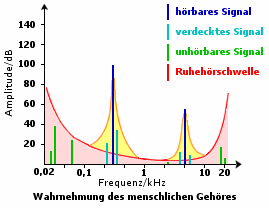
The waves can be emitted in a wide range of frequencies. However, the human ear can only really perceive a small section of this frequency range, the audio frequency range. In theory, humans can hear sounds with frequencies between 20 Hz and 20 kHz. In practice, however, it has been shown that ear sensitivity decreases considerably towards low and high frequencies. In the image above, amplitude, that is, sound pressure, is plotted against frequency.

Curva de audición específica de una pieza musical

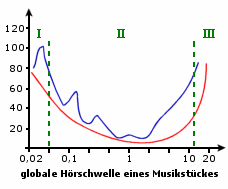
Measurements have shown that all signals that are completely below the threshold of hearing at rest (red line) are inaudible. The amplitude of these tones (green peaks in the image) is too low, so their volume is too low to be perceived. It is interesting to see that the silent hearing threshold is not constant at a certain amplitude value, but changes with frequency. Very low tones (less than 50 Hz) are only perceptible from very high amplitudes, as are tones above 15 kHz. It should also be noted that not everyone has the same silent hearing threshold. Children can hear high frequencies much better than older people.

Masking:

Another deficit of the human hearing aid is the inability to distinguish between tones of very similar frequency and very different volume that occur simultaneously. This effect is also called auditory masking. Or German called simultaneous masking. A high-amplitude signal (dark blue in the image above), also known as a masker, hides quieter signals that have a similar frequency. In the image, these are all signals that are within the area highlighted in yellow. Some turquoise peaks are shown as an example. The yellow area is outlined by the orange individual masking threshold of the masker. The individual masking threshold and the silent hearing threshold can be combined to form the so-called global masking threshold. Thus, all signals below the global masking threshold are inaudible. In practice, auditory masking means nothing more than loud music signals cover the quiet parts and make them inaudible.
Another masking effect occurs when two tones follow each other in a very short time. Of these two tones, only the one with greater amplitude is perceived, that is, greater volume. Interestingly, even if the soft sound reaches the ear first, only the strong signal that arrives later is registered in the brain. This second important masking effect is also called temporary masking in technical jargon.

Low-frequency localization deficits:

Although the human ear is able to pinpoint the origin of high and mid-frequency tones in the room well, problems arise in the lower-frequency region. The brain calculates the location of the sound source from the difference in signal transit time between the left and right ears. If there is a sound source on the right, the waves emitted by this source are perceived earlier by the right ear than by the left. The origin of the tones is calculated from the time interval between the perception of the left and right ears. However, very low-frequency sound signals have very long wavelengths, making clear localization impossible. Therefore, there is practically no tonal difference between a mono sound source for low-frequency signals and a stereo sound source for very low-frequency sounds. Joint stereo effect. It is used, for example, in the construction of subwoofer satellite systems and is also a starting point for audio compression in the area of ​​low tones.
Therefore, the human ear can only improperly or not at all perceive a complete series of frequency ranges. In electrical engineering, the field of digital signal processing (DSP) deals, among other things, with mathematical processes that, in combination with the psychoacoustic model of the hearing aid, lead to data reduction.

Digital audio encoding: data reduction

Mp3 encoding

Since the introduction of the compact disc audio (CD) and the advent of digital audio tape (DAT), digital technology has become increasingly popular in the audio industry. Both CD and DAT use pulse code modulation (PCM) as a basic digitizing process. This technology translates the original analog audio signal into the digital world through sampling, quantization, and encoding. Since PCM does not use data reduction, excellent sound quality is achieved, but is purchased at the cost of high memory requirements. In PCM, a CD can contain a maximum of 80 minutes of audio data.

Mp3 Encoding

Why reduce the audio data?

The high memory requirements of PCM, in particular, made direct use of this technology in multimedia or digital radio systems ineffective, time-consuming or impossible. These systems require a radical thinning of the audio signals. The reasons for this are insufficient broadcast transmission capabilities, the limited transfer rate of current bus systems (PCI, IDE, SCSI) and, above all, the still lack of storage space. Not only is there a shortage of hard drive space, but the main memory in today’s PC systems also offers insufficient reserves to allow sensible work with PCM audio data. If you consider that a 6-minute piece of music in PCM requires up to 60 Mbytes of memory (WAV file), it is easy to imagine that streaming this piece, for example over the Internet, is not profitable. not to mention classic works that last several hours. The result would be extremely long download times.

On the other hand, digital technology has unbeatable advantages over analog technology. Very good sound quality, immunity to interference and relatively easy technical manageability were reasons enough for several research institutions to develop more and more methods in recent years that allow to reduce the storage requirements of digital audio signals and, therefore, its use in new areas such as digital broadcasting. The main objective was to maintain sound quality, using the CD as a reference. The result is a whole series of codecs, some of which save a considerable amount of data. At the moment, the MP3 codec, developed by Motion Pictures Expert Group (MPEG), which is widely used on the Internet, is probably the best known, but also MPEG 2, AC-3,

The amount of memory required by a digital audio signal is primarily determined by the bit rate and the sample rate. Both parameters can be adjusted while encoding the signal. The next section examines the effects of changing the sample rate and bit rate when processing signals.

According to Shannon’s sampling theorem, sampling must take place with at least twice the maximum frequency of the function to be discretized. In the audio range, where 20 kHz is the upper limit, at least 40 kHz is required. The CD uses 44.1 kHz to avoid aliasing effects. Sampling can be used to reduce the data. Lowering the sampling rate results in fewer samples that need to be stored. Needless to say, this dramatically reduces the storage requirement. Unfortunately, this tactic has one major drawback. If you reduce the sampling rate, you can easily conflict with the sampling theorem. If you wanted to sample an audio signal with the full frequency range (20Hz – 20kHz) with, for example, only 20kHz, extreme alias distortion would occur. Playing music would be completely impossible. However, sampling is sometimes a way to reduce the data rate. If, for example, only speech intelligibility is desired without high-quality music reproduction, the 20 kHz frequency range is unnecessary. 3 kHz is sufficient as the upper limit frequency. Here the audio signal can be band limited to 3 kHz with the help of a low pass filter and the sample rate can be reduced to a minimum of 6 kHz. One possible use of such low sample rates would be telephone applications, for example. Here, the audio signal can be band limited to 3 kHz

Mp3 Encoder

MP3 is a storage format for compressing audio data. It occupies about 1/10 of the storage space of a corresponding CD or wave audio file.

Mp3 Encoder

This means that one minute has a storage requirement of approximately one megabyte.

– For this reason, the files are very popular for distribution on the Internet.

It takes an average of ten minutes to load a song from the Internet in near CD quality.

Mp3 Encoder

– So-called file sharing programs are freely available on the Internet and are used

to exchange music between individuals. The best known of these exchanges is “Napster,” which has been in the spotlight for months due to various legal disputes with record companies.

– MP3 is the abbreviated form of “MPEG (1) Audio Layer 3”, where MPEG is a

The abbreviation for “Moving Pictures Experts Group” is. So the full name is “Moving Pictures Experts Group 1 Audio Layer 3”.

– MPEG is a format for compressing videos, so the real purpose of MP3 was to deliver the sound to the videos before it passed “on its own” and gained popularity.

– According to the IT magazine CHIP (10/2000 edition), 73% of young people in Germany use MP3 files. The difference will hardly be noticeable.

– The predecessors of Layer 3 were Layers 1 and 2, whose data compression was not yet sufficient for distribution on the Internet.

– Layers 1-3 were developed by the Fraunhofer Institute in Darmstadt in Germany.

The department of the IIS (Institute of Integrated Circuits) has been working on audio compression methods since 1987 with the original goal of transmitting music over the telephone, which has been achieved in the broadest sense with the Internet.

– MP3 is a so-called “headerless file format”. The files do not have

Headings in the traditional sense, but they have multiple headings for the respective subareas.

MP3 AND INTERNET

Due to the low data capacity, the MP3 format has become more and more popular for downloading on the Internet in recent years. There are countless websites that offer MP3 files for free. However, file-sharing networks like Napster are much more popular. These are based on the following principle: each user loads the program from the Internet, logs in and can “exchange” music with other users. The program registers the user in one of the numerous servers each time the program is started and the files can be downloaded from any other user on this server by entering the title and artist. You get a large number of results for almost every song. After choosing the best connection, upload the file to your computer.

Unfortunately, this simplicity is too good to be true. Record companies have now noticed that money is flowing through their fingers and they intervene by suing Napster for copyright infringement. The process takes more than half a year. In March of this year, Napster had to agree to filter the download of copyrighted titles. But as Napster goes down, tons of similar shows emerge, making it difficult for record companies to stop the illegal music trade as new tools hit the market almost every day.

The development of music downloads from websites is similar: most providers disappear after a short time, but a new page is placed on the net somewhere. You can always find the song you are looking for using a search engine.

However, record companies have already developed that only use the Internet market. It is precisely with these companies that young talents have a great opportunity to become famous. The songs can be loaded onto the home computer for around 15 ATS each.

CODING

The first step in encoding by the user is to specify a bit rate. This indicates the quality and at the same time the storage requirement of an MP3 file.

COMPRESSION RATES

With most recording programs, the quality of an MP3 file can be freely selected before recording begins. According to the Fraunhofer Institute, the CD quality of an MP3 file is a bit rate of 112 to 128 kbit per second, other measurements put CD quality at up to 160 kbit per second. However, the most used and sufficient for most listeners is 128 kbit.

In comparison, a corresponding CD quality for Layer 1 is 384 kbit / s and 256 kbit / s for Layer 2. A wave file works with a 1.4 Mbit / s bit rate and therefore works with roughly the same space requirements. as a CD audio track (CDA).

MAIN VIDEO FORMATS

Video Formats

When watching a movie with pictures or an explanatory video, the idea of ​​the video format usually plays a secondary role or even does not play any role. However, the format does get interesting when it comes to marketing, placement or embedding of the video across the various channels.

So get familiar with the top nine video formats from our article and become a video format expert in no time.

Video formats

Container and Codec.

Before dealing intensively with individual video formats, two basic terms should first be clarified:

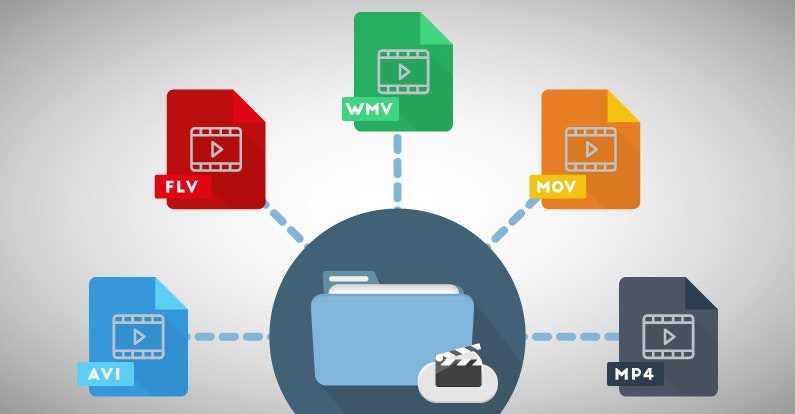
Video formats are so-called file containers that adapt to different content. In addition to audio and video files, menu structures or subtitles can also be integrated into a container. When the movie plays, the elements of the container are decoded.

Files are compressed within the container using codecs, which affects the quality and size of the file. If a video is played, the files contained in the container are decompressed again using the corresponding codec.

Understanding the functions of containers and codecs is critical to understanding the following nine video formats.

MPEG-1 (.mpg / .mpeg).

MPEG stands for Motion Picture Expert Group, a group of experts who dealt with the subject of video compression as early as the 1980s. MPEG is both a container and a codec. MPEG-1 is the Video CD standard and is therefore out of date. The high storage requirements and the fact that HD (high definition) is not supported mean that MPEG-1 cannot compete with the newer video formats.

Advantages: high distribution, wide acceptance of devices.
Cons: Very outdated, poor video quality (not suitable for HD).

MPEG-2 (.mpg / .mpeg / .vob / .m2p / .ts).
MPEG-2 is the further development of MPEG-1 and is the basis for DVDs. The codec for the MPEG-2 format is called H.262. The file extension on DVDs is .vob, while the MPEG format for camera recordings is usually a .ts file.

Advantages: wide distribution, DVD standard.
Disadvantages: low compression, large file size.

MPEG-4 (.mp4).

The successor to MPEG-2 is the MPEG-4 format. Mp4 files are designed for high HD image quality with low storage capacity. The most common codec is the H.264 standard. In rare cases, DivX and Xvid codecs are used. MPEG-4 is widely used on HD TV and Blu-Ray. At Apple, .mp4 files can generally be found under the abbreviation .m4v. Videos posted on the Internet are usually in .mp4 format.

Advantages: standard on the web, high compression, high quality, flexible use.
Disadvantage: intensive computing power for encoding and decoding.

QuickTime (.mov).
QuickTime is a standard developed by Apple. The QuickTime architecture is the basis for various video editing programs such as Adobe Premiere or Final Cut (Apple’s editing program). MOV files are mainly used for editing and less for actual use. Apart from QuickTime Player, the format is compatible with some multimedia player programs.

Advantage: Standard for professional video editing.
Disadvantage: low acceptance by end devices.

AVI (.avi).
Audio Video Interleave (AVI) files were Microsoft’s answer to Apple’s QuickTime architecture. In the early years of the format, good image quality cost high storage capacities, which could be improved a bit with new codecs like DivX. AVI is accepted and reproduced by a large number of end devices, but it turns out to be bulky with many technical details. Direct transmission is not possible, menus and chapters are not supported, and there is no automatic way to save the correct aspect ratio.

Advantages: widespread use, wide acceptance.
Disadvantages: inflexible, bulky.

WMV / ASF (.wmf / .asf).
ASF is the successor to the AVI format. However, it is known as the WMV (Windows Media Video) codec. The Microsoft codec is similar to MPEG-4, but it is less common. Unlike the previous AVI, the transmission is possible without problems.

Advantages: High compression, good video quality.
Disadvantage: less common.

MKV (.mkv).
Matroska is a container format with the file extension .mkv. Its namesake is the Russian matryoshka dolls, which can be stacked on each other to save space and look cool. This same principle is the goal of the container. The video format allows for different codecs and additional information. Depending on the device, this flexibility can also be a problem during playback.

Video Formats A to Z – Everything You Need to Know About It

Video File Formats

Codecs are not only available for video, but also for audio and images. For example, when the software needs to create a video file, it uses a codec for video and audio and creates a video file from it.

Video Formats

What are codecs?

Codecs, as their name suggests, encode (German = “encrypt” or “translate”) and decode (“decrypt”) information. The English word codec means a system of rules or agreements. Its origin is found in the English words En code (encoding) and De code (decoding). The codec “translates” a video from one format, which can be the original or an already encoded format, to other video formats and vice versa.

The task of the codec is to “know” how the data is compressed and how it can be restored (= replayed). Playback software and programs, for example Windows Media Player or the free-to-use, portable VCL player, benefit from codecs.

Often times, it can automatically recognize the codec in a file and find the correct codec to play it back. Or put another way: as long as a player recognizes the codec and has access to it, they can play the corresponding file. In this case, the user cannot make any difference in what video format a video file is available.

A professional video or movie is never tied to a specific compression method or video codec and formats. Depending on the application (distribution on TV, such as web content or on Blu-Ray Disc), a movie or video can appear in many different forms.

From a technical point of view, a codec is a pair of algorithms that encodes or decodes digital data.

Tech professionals will find that some of the formats in this article are called codecs, but not strictly codecs. In a more strict sense, a codec is only defined as a codec if there is an encoder on one side and a decoder as a “counterpart” on the other. If it is only encoded or only compressed, or vice versa, only decoded or only decompressed, this does not correspond to the scientific definition of a codec. However, this distinction is ignored in everyday video formats.

Codecs determine how data is compressed.

What does compression mean?

With today’s technology standards, the image information of an average high definition movie is at least 131GB, without sound. This amount of data makes it impossible for a movie to fit on a commercially available data medium (Video DVD, Blu-ray Disc).

The smaller the amount of data in a video file, the easier it will be to stream, edit, or save that file. However, at the same time, the quality of a movie or video should not be visibly reduced. Therefore, compression algorithms use sophisticated mechanisms and simplify and summarize the data. From an algorithmic point of view, the “least important” information is not saved. They are lost during the compression process and can no longer be rebuilt by decompression.

The newer codecs achieve sensational compression rates of up to 1: 500. Older video compression methods, still used today in the form of older codecs, can, conversely, “only” achieve values ​​of 1: 5 (= 100 times worse!).

Video compression originates from the compression of a single image (so-called still image compression). Codecs for single image compression optimize each image individually and one after the other. Modern video formats thus achieve a compression ratio of 1:10 on all video.

Newer codecs have optimized this process: they use similarities between individual partial images wherever they exist, resulting in huge savings potential at 25 individual images per second. This can also be seen in the compression rates, which with the new methods are well above 1: 100, and this with little loss of quality.

Video encoding and compression processes for video formats will only gain market acceptance if the largest possible group of users can use them. That is why there are not only codecs established by global corporations like Microsoft and Apple, but also codecs that have been standardized by international organizations. The best known body of this type is the Moving Expertes Group (MPEG). Good to know: because MPEG cooperates with the International Telecommunication Union (ITU), for example, cooperating partners assign different names to identical procedures. This is why H.264, MPEG-4 AVC, MPEG-4 / Part 10 or ISO / IEC 14496-10 are the same format.

Music producers: iPod and MP3 ruin sound quality

Hi-Fi is no longer a sales pitch: “Quality is determined by consumer demand.”

mp3

“Meanwhile, each band listens to the music on the iPod immediately after completing a piece.”

The proliferation of the MP3 standard and the success of the iPod have led to a deterioration in audio quality standards in the music industry. Music producers, sound engineers and artists are increasingly complaining that they have to assume in the recording studio that later music will be heard in poor quality through poor quality headphones. “Now all bands listen to the music on their iPod as soon as they finish a song,” Alan Douches, who has worked with Fleetwood Mac in the past, told the Wall Street Journal. “Today, young musicians believe that MP3 is a high-quality medium and iPods are the latest in technology.”

Mp3

“But quality is determined by consumer demand”

“The sound quality of MP3 is not good and from the audiophile point of view I agree,” says Peter Rantasa, Director of the Austrian Music Information Center (mica). “But the quality is determined by consumer demand. The different applications of modern use, for example, when moving with the iPod in a noisy environment, do not require the highest quality of sound. The same applies when I let the music plays in the background as background music. ”

Noisy

Another concern of producers is volume. Assuming loud music sells better, current productions would be released at a higher volume, which would also affect sound quality. “Quality is important to me, even if young people on the street like what they hear on MySpace, which is still below MP3 standards,” said Stuart Brawley, who recorded for Cher and Michael Jackson. “We try to offer the best quality possible, but we have to be realistic about how much time we can spend.”

Important for music distribution

However, opponents of the MP3 standard also admit that they own iPods and appreciate how they helped spread the music. It is unfortunate that the devices set technical standards for music production. Today, however, the higher audio quality is not a competitive advantage, Rantasa explains. “I think it is very difficult to find audiophile consumers. The media time budget is used differently today. Hardly anyone finds time to listen to a record for hours at home.”

How a Suzanne Vega song was used to develop the MP3

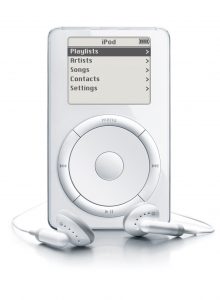
The triumphant advancement of MP3 music began with the first iPod, which was introduced by Apple on October 23, 2001.

The First iPod

German researchers invented the revolutionary MP3 format two decades ago. Now engineers are working on the audio technology of the future. Now they are being honored for their pioneering work.

Suzanne Vega - Tom's Diner

The MP3 music format is one of Germany’s most successful innovations. It is used around the world to store, transfer, and play music, audio books, and other digital audio products.

Three engineers who participated in the development of MP3 were awarded the Eduard Rhein Prize for Technology in Munich. Karlheinz Brandenburg, Bernhard Grill and Jürgen Herre share the prize, which is endowed with 30,000 euros.

Why the song “Tom’s Diner” was important to the development of MP3 and what innovations in audio technology can be expected, explains Professor Brandenburg, director of the Fraunhofer Institute for Digital Media Technology in Ilmenau.

Die Welt: Suzanne Vega’s song “Tom’s Diner” plays a special role in your career. Do you still have the song in your ears?

Karlheinz Brandenburg: Of course (hums the tune). As a doctoral student, he had developed a new method for storing music at a very low data rate. When I started writing all this, I read in a hi-fi magazine that “Tom’s Diner” is used to test high-quality music systems. I was curious what my algorithm, the forerunner of MP3, would do with this music. The result was amazing. Suzanne Vega’s voice sounded very husky and she seemed to be singing duet with herself. Very bad.

Die Welt: What consequences did that have for your doctoral thesis?

Brandenburg: I ​​wrote it down anyway and mentioned that the “Tom’s Diner” algorithm doesn’t work. It took years to understand what was happening. However, with a few tricks it was possible to encode this song to sound perfect.

Die Welt: Several researchers participated in the development of MP3. What was your most important contribution?

Brandenburg: I ​​am often credited with introducing a model of the psychoacoustic properties of the sense of hearing. But that already existed. My contribution was more technical – the way I converted various voice, image and video encoding algorithms and combined them in such a way that the integration of the psychoacoustic model was very easy and low bit rates were achieved for the circumstances. could.

Die Welt: How did the name MP3 come about?

Brandenburg: The official name of this data compression method is “MPEG Audio Layer 3”, a standard that has been defined by Moving Pictures Experts Group. Layer 3 is one of the three modes. Layer 2 was used in DAB digital radio, for example. Our team at the Fraunhofer Institute for Integrated Circuits (IIS) in Erlangen relied on the Internet from the beginning. The compressed music was saved on the hard drives of the PC. The Windows 3.1 operating system expected files to have three-digit extensions. So after a short consultation on July 14, 1995, we decided to add the final mp3 to the compressed audio files. There is a reference to MPEG and also to Layer 3.

Die Welt: A few years later, you could see people everywhere listening to music with MP3 players.

Brandenburg: Exactly. At first I shrugged off the name of the MP3 player, because mp3 was actually a final file. But I quickly realized that MP3 players are a good name for these devices.